Claude Code UI and CloudCLI: Setup, security and alternatives
Claude Code UI: CloudCLI features, setup, security and best alternatives
Searching for claude-code-ui can mean looking for a specific open-source project or any graphical interface for Claude Code. The distinction matters: installation instructions, permissions, and maintenance responsibilities depend on which product you choose. If tracking sessions, inspecting files, or handling approvals creates friction, a browser interface may help. This documentation-based guide covers capabilities, interface alternatives, safe setup, and the controls needed before opening an active repository.
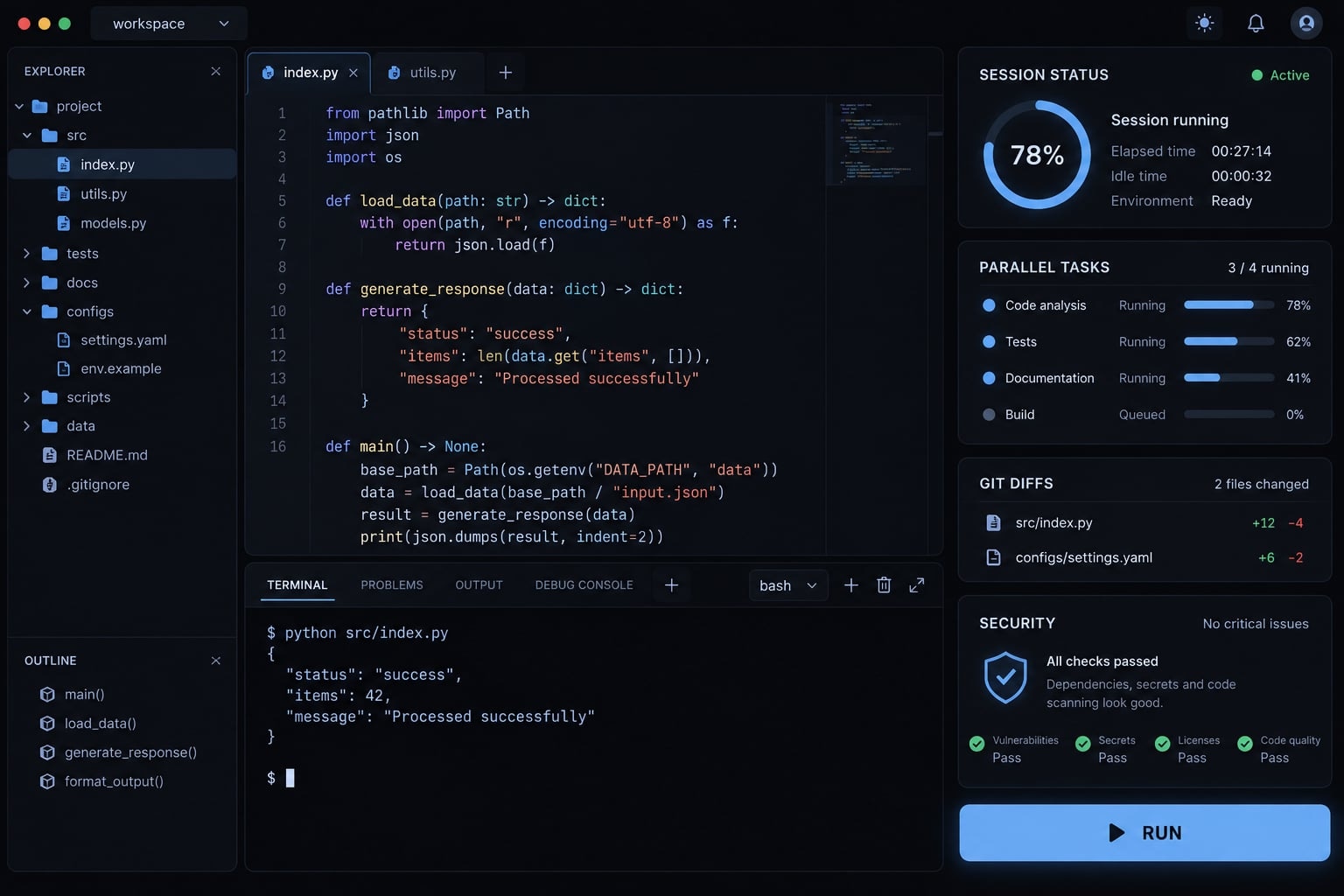
Claude Code UI is a third-party browser interface for working with coding agents. Project materials identify CloudCLI as its expanded identity, associated with the siteboon/claudecodeui repository. It adds visual access around agent workflows; it is not Claude itself, an Anthropic product, or a replacement for reviewing generated changes.What is Claude Code UI and is it now CloudCLI?
A Claude Code interface is the interaction layer around a coding agent: Where you submit tasks, inspect activity, and review changes. The specific claude-code-ui project provides that layer through a browser. CloudCLI is the broader product identity described in project materials, but repository names and package names may retain different histories.
The key distinction is model → agent → interface. Claude models generate responses, Claude Code operates within a development environment, and third-party interfaces visually expose those operations.
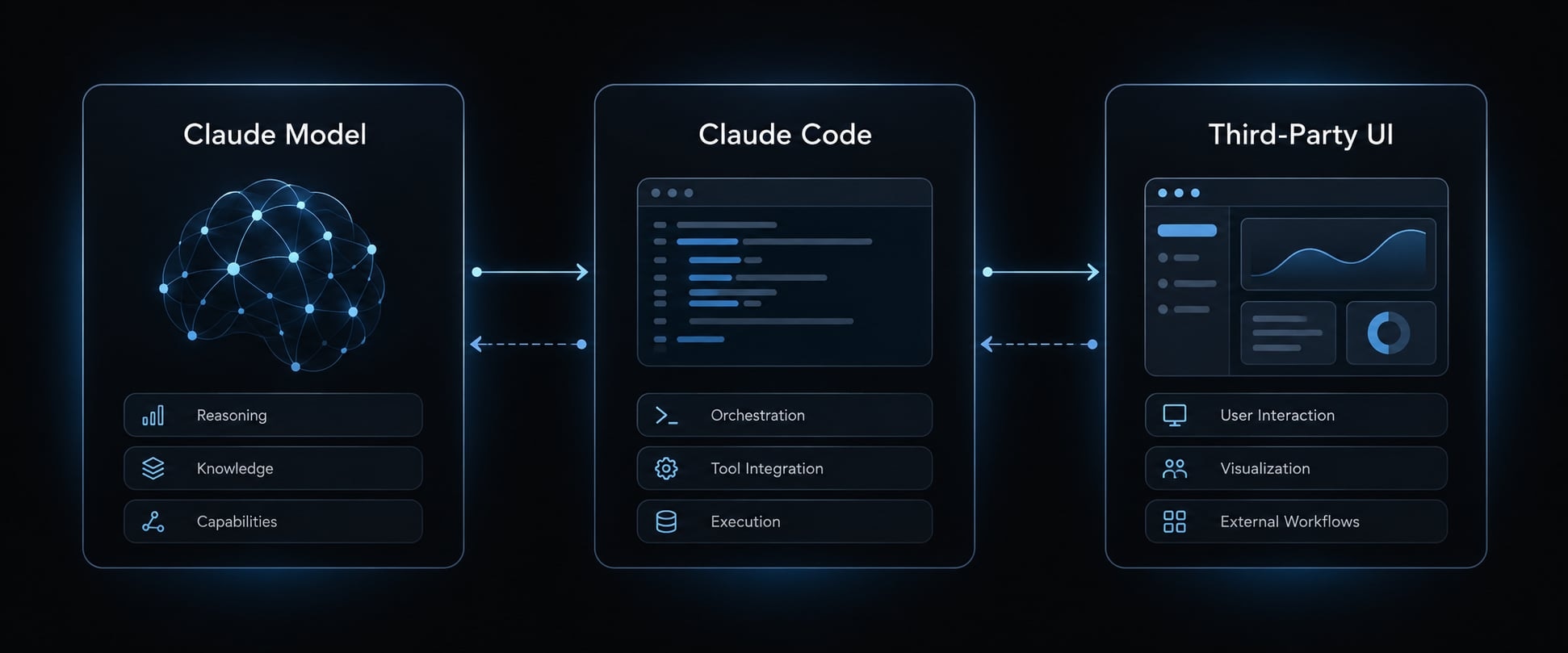
Claude Code UI terminology at a glance
Term | Role | Official/third-party status |
|---|---|---|
Claude Code | Coding agent available through supported interfaces, including a CLI (command-line interface) | Anthropic product |
Claude Code UI | Generic description or the specific browser-interface project | Project discussed here is third-party |
CloudCLI | Expanded identity associated with that project | Third-party |
Claude Code IDE integration | Brings agent interaction into an integrated development environment | Official or third-party; check publisher |
Agent control platform | Coordinates configurations, tasks, or reusable workflows | Depends on product |
Why the project expanded beyond Claude Code
Project materials describe an expanded scope supporting additional coding-agent CLIs. That explains the broader positioning, but compatibility must be checked against the release you install. A list of supported agents does not establish feature parity—or prove those agents can automatically coordinate tasks.
For claude-code-ui, verify the maintained repository, release notes, and package registry together. An older package name is not sufficient evidence of today’s recommended installation path.
What CloudCLI adds to the native Claude Code experience
CloudCLI’s practical attraction is visible working state, not different model intelligence. Project materials describe these capabilities; they are not independently tested here:
- Project navigation: Find the repository associated with a task.
- Multi-session management: Switch between ongoing or historical conversations.
- File inspection and editing: Examine changes beside agent activity.
- Git diff viewer: Review modifications before retaining them.
- Tool approvals: Respond to supported permission requests visually.
Browser-based project and session management
A project/session view can reduce terminal switching when several tasks need supervision. History inspection and resumption depend on the agent integration and stored session format.
Browser availability also enables different devices to reach an appropriately configured server. However, mobile access does not prove that substantial editing is comfortable—or that remote access is safely configured.
File editing, terminal sccess and Git diffs
Consider an illustrative B2B SaaS repository containing an account-invitation validation function and its tests. After an agent changes both, review the changed lines, surrounding behavior, and test coverage.
Project materials describe browser editing, terminal access, and Git inspection, but check your release for specific features like split versus unified diffs, staging, committing, and branch operations. Remember that a diff viewer is a supporting tool, not a full replacement for a complete Git client.
Parallel sessions and tool approvals
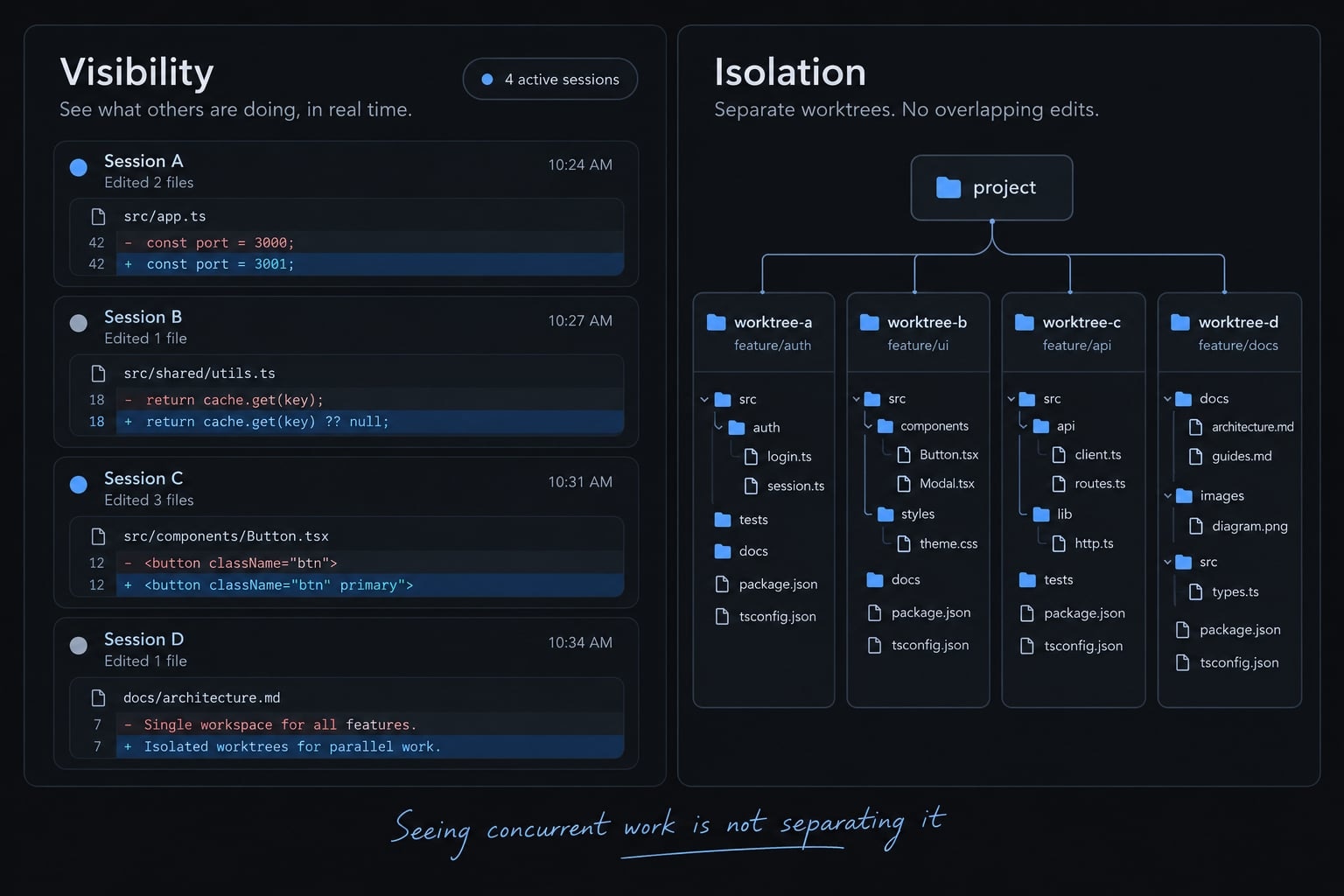
Session tracking helps you see concurrent work. It does not prevent two agents from changing the same directory. Likewise, approval visibility depends on the agent, release, execution path, and permission configuration. Do not assume that every command triggers a confirmation prompt.
How the local architecture works
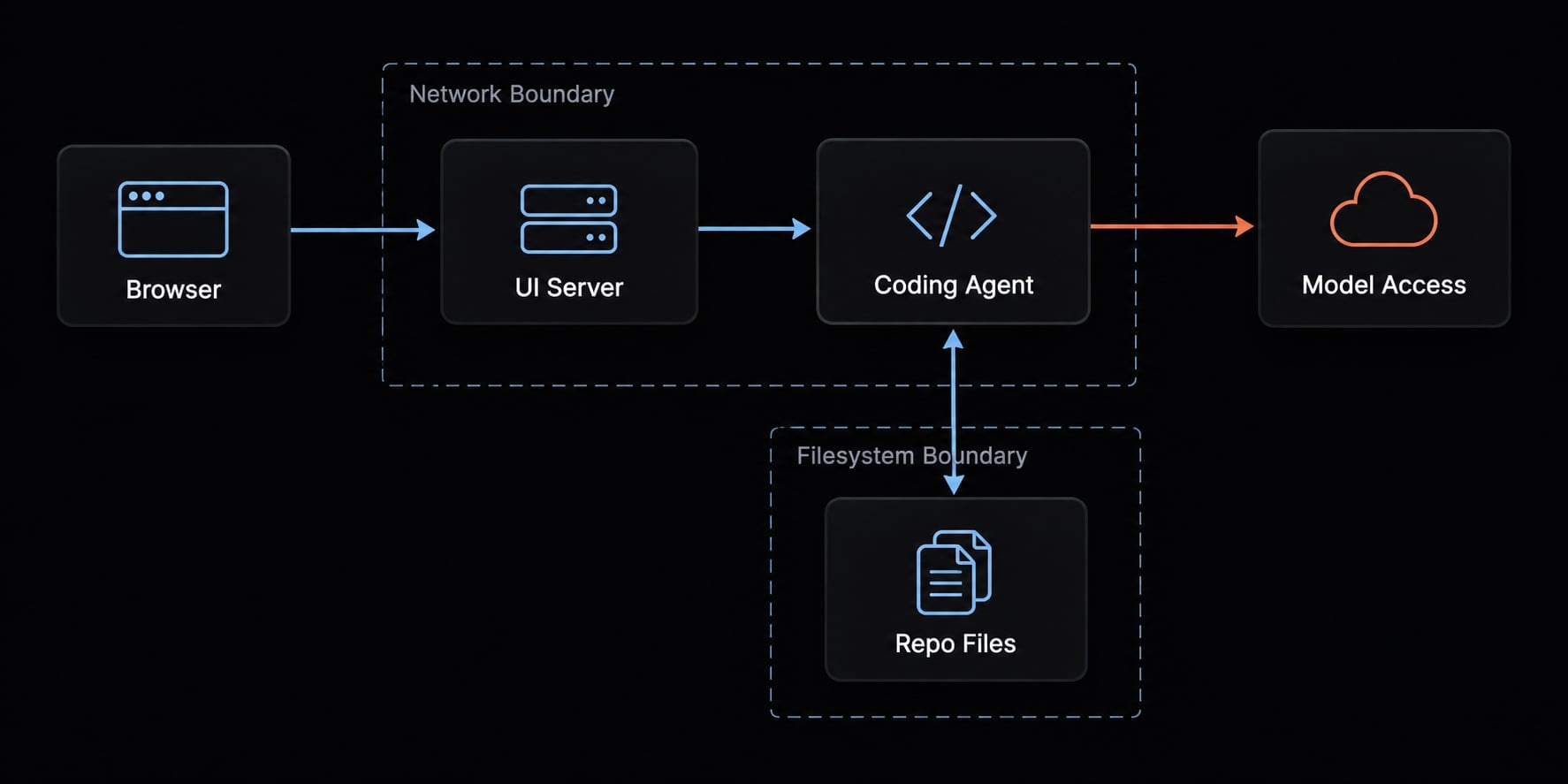
The conceptual flow is: Browser → UI server → coding-agent process → files/tools
The server’s operating-system permissions determine much of what the agent can reach. Model requests may still leave the machine; local hosting is not offline inference.
CloudCLI vs. Terminal, IDE and other Claude Code interfaces
The best Claude Code UI is the smallest interface that solves your actual friction. Compare review visibility against installation effort, update responsibility, and additional exposure. The table assumes you already have working Claude Code access. Effort descriptions are qualitative, not measured benchmarks.
Claude Code interface comparison
Interface | Best fit | Main strength | Main limitation | Setup effort |
|---|---|---|---|---|
Native terminal | Focused tasks and shell-heavy work | Direct agent interaction alongside existing scripts | Visual organization depends on terminal habits and tooling | Minimal additional setup |
Official IDE integration | Developers reviewing code while editing | Agent interaction near files and editor tools | Editor support and features vary by release | Usually low |
Official web or desktop coding interface | Supported account-based coding workflows | First-party visual experience | Check plan, platform, repository access, and execution environment | Low to moderate |
CloudCLI | Browser-based session supervision | Visual access around supported local agents | Additional service, dependencies, and security maintenance | Moderate; higher remotely |
Specialized wrapper category—not a reviewed product | A specific gap such as review visibility | Potentially focused interface | Maintenance, permissions, and compatibility require separate evaluation | Variable |
Agent workflow platform | Repeated handoffs and shared procedures | Reusable configurations and coordinated task execution | More operating conventions and configuration to maintain | Moderate to high |
When the terminal is still the better choice
Stay with the terminal when you:
- Run one bounded task at a time.
- Already rely on shell scripts and terminal navigation.
- Do not need another persistent application.
- Prefer troubleshooting the agent without an intermediary.
When CloudCLI provides meaningful value
A browser interface becomes useful when session oversight or state inspection—not code generation—is the bottleneck. Test whether it actually makes unfinished tasks and changed files easier to identify. For Claude Code in VS Code, compare the current official extension before adding another layer. Do not assume an IDE lacks session features.
How to Install and set up Claude Code UI safely
Validate Claude Code independently before installing its wrapper. Otherwise, authentication failures, runtime problems, and interface defects become difficult to distinguish.
Prerequisites
Prepare:
- Runtime versions required by the selected release.
- A working Claude Code installation and authentication.
- A verified UI repository/package relationship.
- A disposable repository without production credentials.
- A local-only first-run plan.
Record the operating system, agent version, UI version, installation method, and test date. Plan remote access separately.
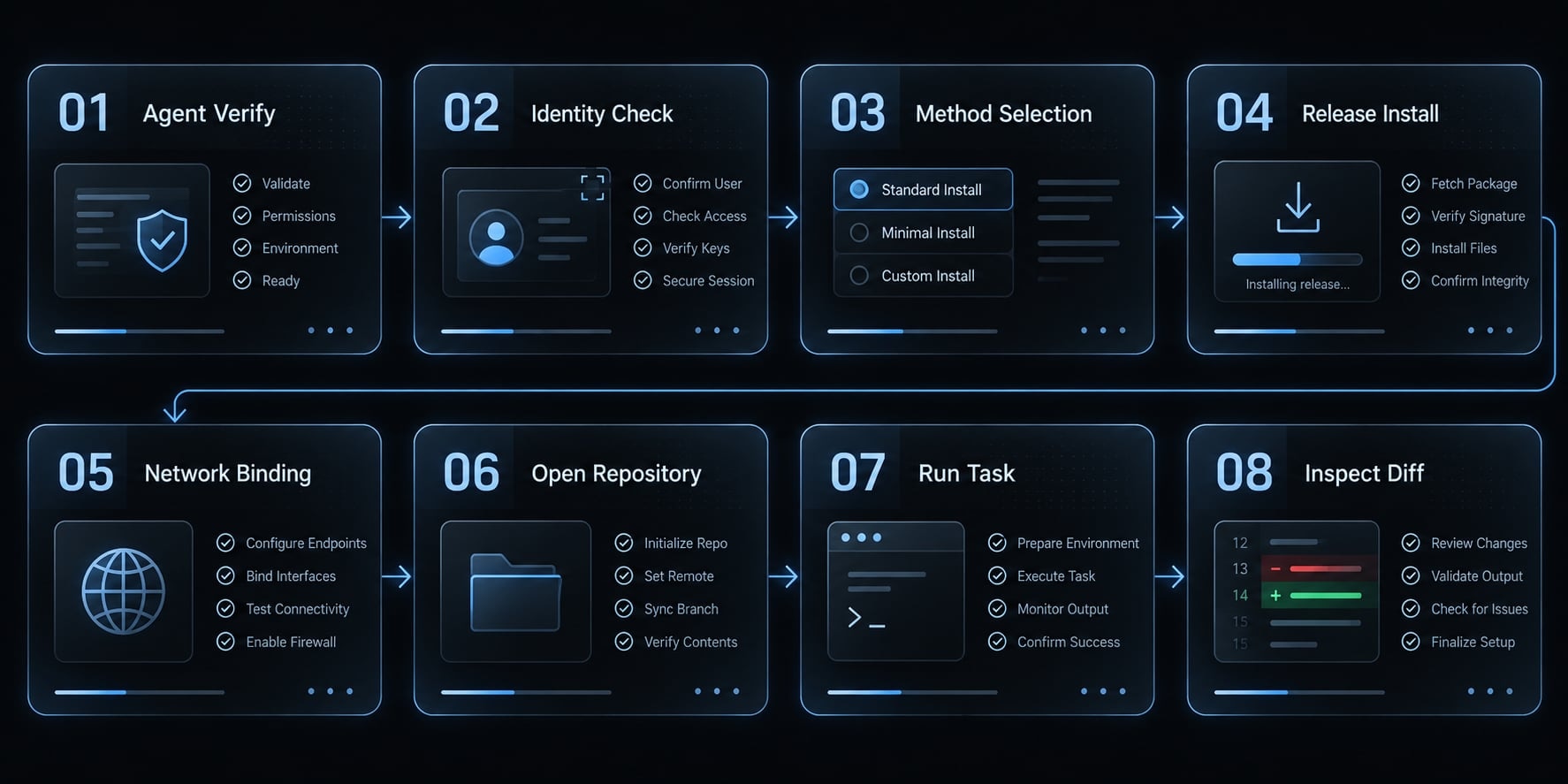
Basic local installation flow
- Confirm the underlying agent works: Check its version, then complete a harmless terminal task.
- Verify package identity: Match the maintained repository’s installation instructions to the package registry publisher.
- Choose the documented installation method: Review runtime requirements and installation scripts.
- Execute the release-specific command: Prefer an explicitly selected version over an unexplained moving target.
- Check the listening address: Confirm actual network binding before opening the local interface.
- Open the disposable SaaS repository: Verify its full path and current working-tree state.
- Run a limited task: Observe permission requests and stop controls.
- Inspect the diff and run checks: Confirm only intended files changed.
For an existing Claude Code installation, the version check is:
claude --version
No CloudCLI installation command is reproduced here because a current package/version combination has not been independently verified. Use the maintained release’s instructions rather than copying a historical package command.
With npm, the JavaScript package manager, remember that npx can download and execute code. It is not a sandbox.
Recommended first-test task
Ask the agent to document the invitation-validation behavior without changing application logic. Successful Claude Code UI setup means the correct repository opens, intended files change, configured approvals appear, and review is possible. You must also be able to stop the session and understand rollback.
Use this checklist before attempting a broader CloudCLI installation or remote deployment.
Security risks and permission controls to review
A browser-accessible coding interface can expose command execution, not merely dashboard data. Depending on its permissions, a compromised service could reach source code, credentials or other host resources.
Application vulnerabilities and deployment mistakes are separate risks. Updating software does not fix an unnecessarily exposed server; restricting access does not patch vulnerable code.
Verify the installed version and security advisories
Check the installed version against:
- Repository security advisories.
- Release notes and migration instructions.
- Package release history.
- Relevant authoritative vulnerability records.
Match any finding to its affected versions and configuration. Do not assume a historical advisory applies to every deployment or that an absent advisory proves safety.
Specific vulnerability identifiers and fixed-version claims are omitted here because their authoritative records have not been independently checked.
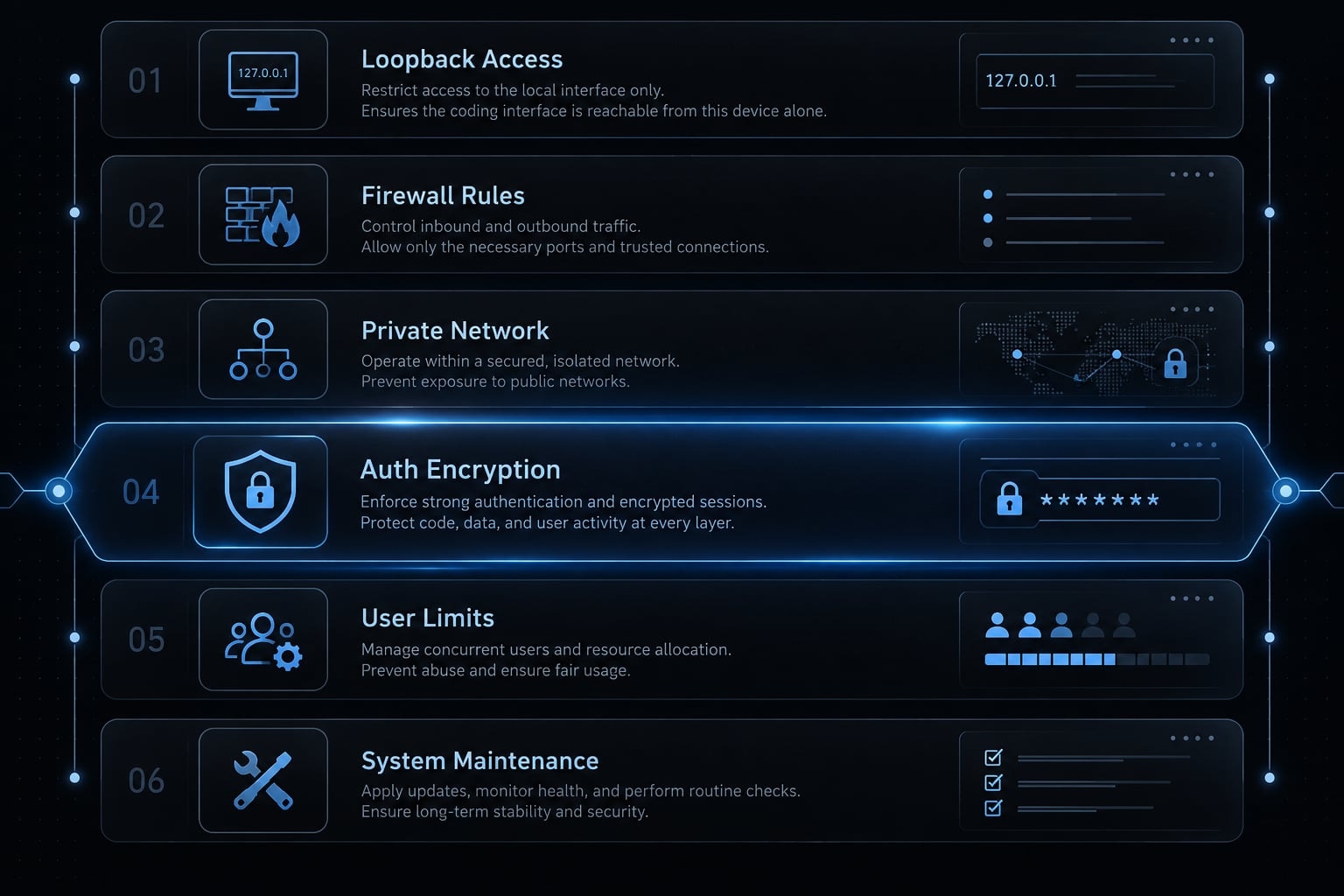
Do not expose the UI directly to the Internet
Apply these controls together:
- Prefer loopback-only access for local use.
- Verify actual binding and firewall behavior.
- Use controlled private-network access when remote work is necessary.
- Apply strong authentication and encrypted transport appropriately.
- Limit authorized users, devices, and service privileges.
- Maintain the application and its dependencies.
A VPN (virtual private network), proxy, or encrypted connection addresses only part of the access problem. It does not establish complete application security.
Protect credentials and production repositories
Use scoped credentials and a development environment separated from production. Avoid running the interface under an account with broad administrative access. Keep secrets out of prompts, screenshots, and logs. Review destructive commands, deployment actions, and credential handling rather than approving them automatically.
Repository content and tool output can contain malicious instructions. Treat approval requests as decisions, not routine clicks. Backups, tests, and human diff inspection remain necessary. Branch protection does not prevent local file damage, and localhost is not risk-free.
A practical Claude Code UI workflow for reliable development
A reliable workflow comes from bounded tasks, isolated working directories, and review—not the presence of a graphical interface.
Use one defined task per session
For the illustrative SaaS repository, specify:
- Objective: Reject malformed invitation addresses.
- Allowed scope: The validation function and its tests.
- Completion criteria: Relevant checks pass; unrelated behavior stays unchanged.
- Handoff: Summarize edits, checks, and unresolved concerns.
Visible session history is not necessarily the model’s active context. Good context window management means providing current requirements and concise handoffs, not assuming every earlier message remains available.
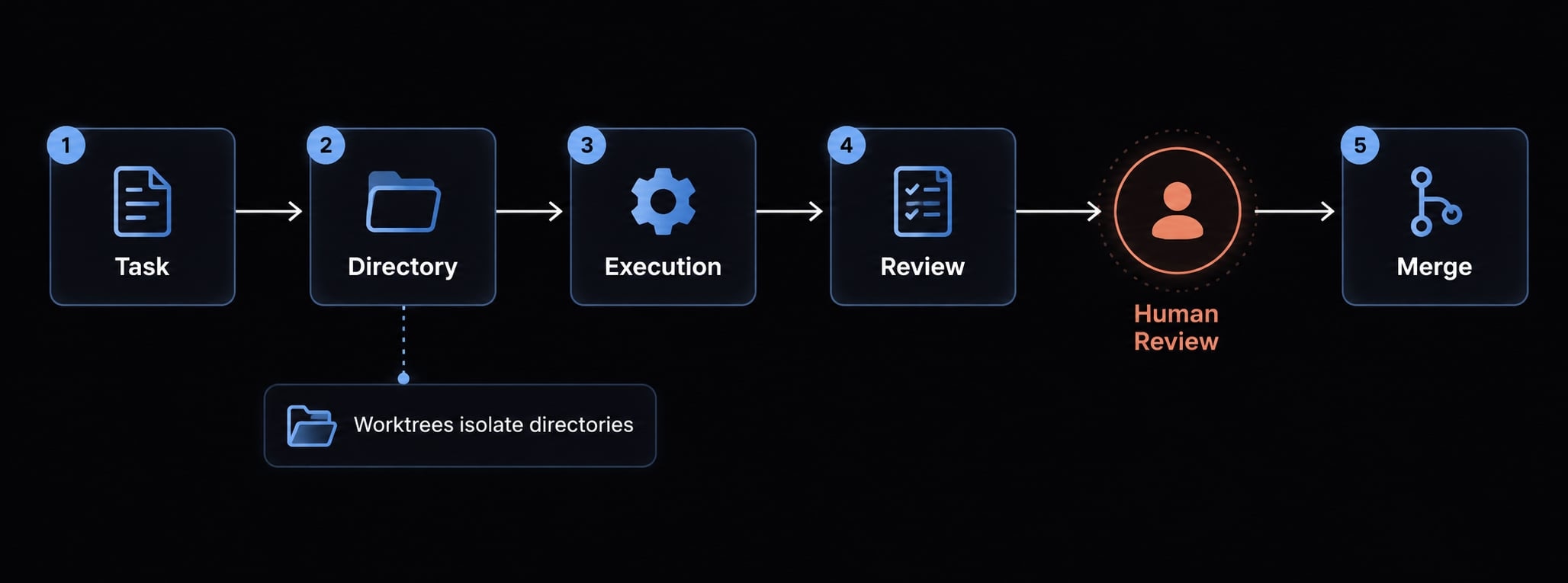
Isolate parallel work with branches or worktrees
Branches organize changes. Git worktrees or separate clones provide separate working directories. Switching branches inside one shared directory does not isolate simultaneous agents.
Use four steps:
- Assign a task to a separate working directory.
- Label its branch and session clearly.
- Review changes and checks independently.
- Merge only after evaluating interactions.
Worktrees do not isolate credentials, processes, databases, or external services.
Use project instructions and hooks
Control | Purpose and boundary |
|---|---|
Stable project guidance, not enforceable access control | |
Reusable command or skill | Repeatable instructions; inspect behavior before reuse |
Configured action at a documented event; blocking behavior varies | |
Git worktree | Working-directory separation, not a security sandbox |
Manual approval | Human gate for sensitive actions; effectiveness depends on coverage |
Validate custom hooks against current agent documentation. Tests and approvals reduce risk; neither proves complete correctness.
Which Claude Code UI setup is right for you?
Choose by the unresolved problem in your Claude Code workflow. Adding a tool without a clear constraint usually adds maintenance before it adds value.
Recommendations by user type
User situation | Starting point | Reason |
|---|---|---|
New Claude Code user | Terminal or official IDE integration | Learn agent behavior before introducing another troubleshooting layer |
Single-session developer | Existing terminal or editor | Another interface may offer little operational benefit |
Parallel-session power user | Evaluate browser supervision alongside separate worktrees | Improve visibility without confusing sessions with isolation |
Small engineering team | Shared task conventions and review gates first | Consistent operation matters more than everyone using the same interface |
Remote/mobile user | Supported official options or carefully restricted browser access | Assess authentication, exposure, and actual device usability |
Agency or automation team | Evaluate coordination only for repeated handoffs or shared configuration | Client count alone does not justify orchestration |
Quick decision rules
- Terminal: Direct, focused work with minimal overhead.
- IDE: Editing and review inside one workspace.
- Browser UI: Visual session oversight and carefully configured remote access.
- Orchestration: Repeatable procedures and coordinated task execution.
For multi-session projects, first ask whether you are losing track of work or failing to separate it. An agent control center may help with visibility; working-directory isolation addresses a different problem.
When you need more than a visual Claude Code wrapper
Another interface will not automatically fix inconsistent prompts, missing handoffs, or duplicated configuration. Those are workflow problems rather than presentation problems.
Claude Code workflow maturity model
This is an editorial selection framework, not a research-validated progression. Users do not need to move through every row.
Need | Suitable approach |
|---|---|
Direct execution | Native terminal |
Integrated review | IDE integration |
Visual supervision | Browser interface |
Parallel-task control | Separate workspaces and task ownership |
Repeatable agent operations | Shared skills and workflow orchestration |
Where AgentKit fits
AgentKit is the publisher’s product. Its product positioning addresses reusable development and marketing operations rather than simply adding a visual wrapper. Evaluate its documented capabilities against four concrete problems:
- Rebuilding prompts → Reusable skills and agent kits.
- Unclear handoffs → Specialized subagents and workflows.
- Repeated tool connections → Supported MCP integrations, using Model Context Protocol.
- Configuration sprawl → CLI and desktop management features.
These descriptions are product positioning, not independently demonstrated outcomes in this guide. They do not establish enterprise access controls, comprehensive audit logging, or enforced governance.
Before adoption, request or reproduce one bounded workflow: Plan the SaaS validation change, implement it, run checks, and produce a review handoff. Evaluate supported integrations, maintenance effort, and failure recovery. Similar reuse may support SEO or growth tasks, but that is a separate evaluation.
A readable configuration screen alone is not proof of reliable coordination.
Frequently asked questions
What is the difference between Claude Code and the CloudCLI (formerly Claude Code UI)?
Claude Code is the core Anthropic CLI agent that executes coding tasks. The CloudCLI (previously known as Claude Code UI) is a third-party graphical interface that wraps this agent, providing a web-based dashboard for session management, visual diff reviews, and browser access from other devices.
Is CloudCLI an official Anthropic product?
No, CloudCLI is a community-driven project and is not developed or endorsed by Anthropic. While it integrates with the official Claude Code CLI and agent SDKs, it operates as an independent management layer. Always verify the source repository before executing any installation commands.
Can I run CloudCLI on a remote server for mobile development?
Yes, you can run the UI server on a remote machine, such as an EC2 instance or home lab. However, it is critical to protect the interface with strong authentication or secure network tunnels like Tailscale or WireGuard, as it provides a command-execution surface that should never be exposed to the open internet.
How do I safely test CloudCLI for the first time?
Verify your Claude Code terminal installation first. Then match the maintained repository's instructions to the package registry publisher, install an explicitly selected release rather than a moving 'latest' target, confirm the server binds to loopback, open a disposable repository, and run one limited task while watching permission prompts and file changes.
Does CloudCLI offer more security than the native Claude Code terminal?
No. In fact, adding a web-based interface introduces a new command-execution surface. Security relies on your infrastructure—such as binding the UI to localhost, using authenticated proxies, and manually reviewing agent tool approvals. Always keep your CloudCLI version updated to protect it with controlled private-network access, strong authentication, and encrypted transport. A tunnel addresses only part of the problem — it does not establish application security.
Read more:
- Claude Code tutorial: Set up and master your AI coding agent
- Claude Code vs OpenCode Features: Choosing the right CLI agent
- Claude Code vs Replit: Which AI coding tool is best for you?
Conclusion
Claude Code UI and CloudCLI provide valuable browser-based supervision for complex agent workflows, though traditional terminals and IDEs remain more practical for focused, everyday tasks. Before adding new graphical interfaces to your daily process, ensure safety by testing bounded tasks in disposable environments, restricting network exposure, and maintaining strict review over directory changes and permissions.