
Claude Code Secrets: How to keep .env files, SSH keys, and cloud credentials out of reach
When people search for “Claude Code secrets,” they usually mean one thing: how to stop Claude Code from touching sensitive files like .env, ~/.ssh/, ~/.aws/, kube configs, or .npmrc during everyday local development. This is not just an enterprise problem; it affects side projects, startup repos, and routine debugging. Most users don’t need heavy lockdown - just a safer baseline, a clear view of where secrets can leak, and a few controls matched to their repo’s risk level. This guide outlines the real risk surfaces, the simplest protections to apply first, and when stronger isolation is worth the extra friction.
What “Claude Code secrets” actually means in practice
Claude Code secrets refers to sensitive values or files that an AI coding agent could access, read, or indirectly expose during normal development workflows. That includes .env files, API keys, cloud credentials, SSH keys, kube configs, and command output that reveals tokens or connection details.
In normal local development workflows, the problem is broader than a single file type. Claude Code secrets can become reachable through direct file access, environment variables, or shell commands that print sensitive values. From a Claude Code data privacy perspective, the bigger risk is not just whether a file exists, but whether a secret becomes visible during the workflow.
That is why protecting .env files from AI agents should be treated as one part of a wider credential exposure problem.
Secret files and sensitive locations developers often forget
.env,.env.local,.env.production~/.aws/~/.ssh/~/.kube/.npmrc.pypirc- service account JSON files
- database URLs stored in config files
- files or folders containing
secret,token,credential, orkey
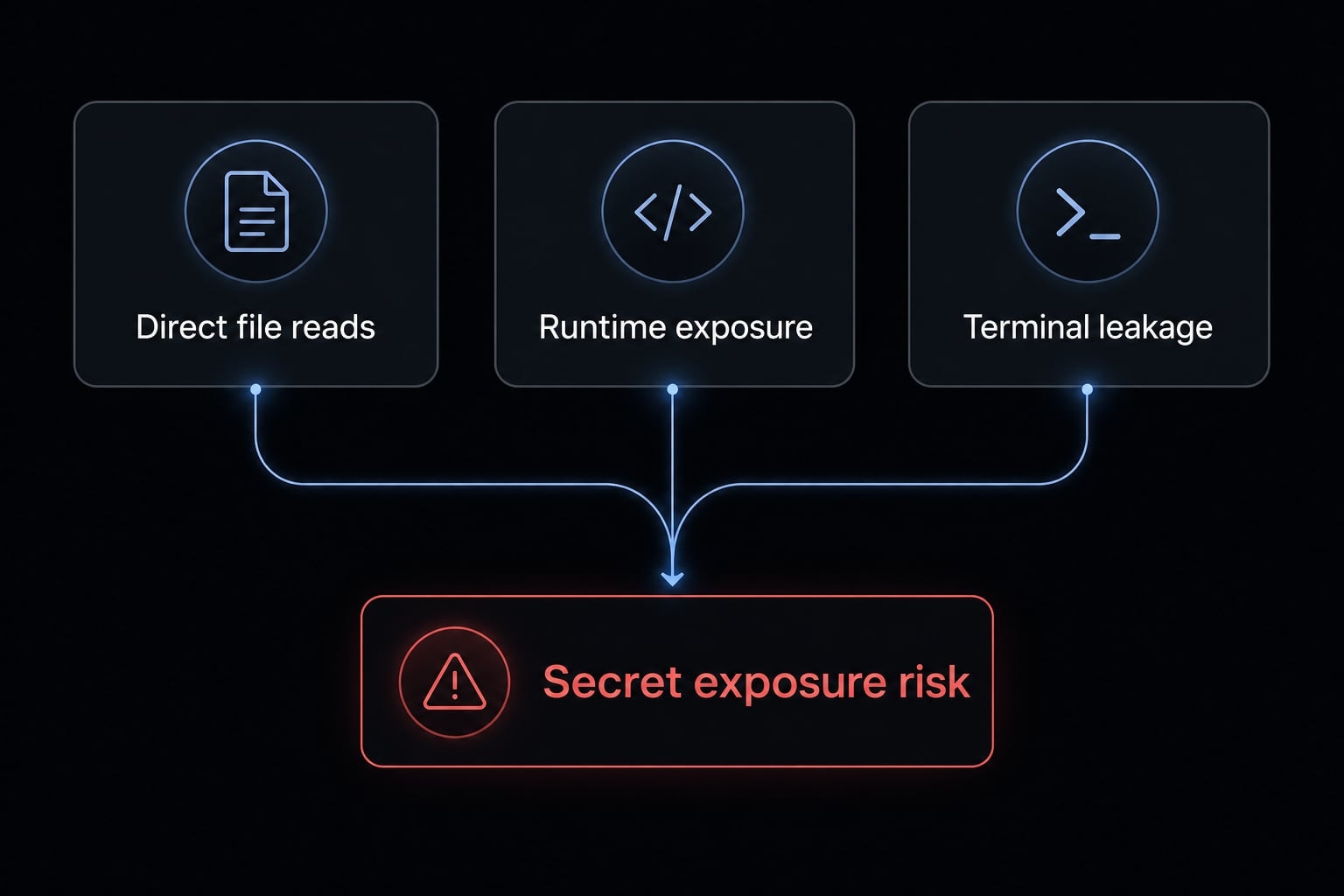
The 3 risk surfaces that matter most
- Direct file reads: The tool can read a sensitive file if permissions and path access allow it.
- Environment variables loaded into runtime/session: Runtime security means thinking about what is already available in memory, not just what is on disk.
- Sensitive values exposed in terminal output or logs: Terminal output leakage happens when a command prints tokens, config values, or connection strings.
The practical takeaway is simple: For Claude Code secrets, risk is mainly about reachability. If a value is reachable through files, environment variables, or command output, it deserves protection.
What’s confirmed, what’s possible, and what you should assume
This topic is best handled as operational risk management, not speculation about undocumented internals. A strong Claude Code security configuration starts with clear boundaries, realistic assumptions, and the least privilege principle (give the tool access only to what it actually needs).
Confirmed behaviors
- File access and local permission boundaries matter.
- Deny rules exist because path-level blocking is a valid and useful control.
- If secret files are present in the working environment and not restricted, they can become part of the reachable workflow context.
- A sensible Claude Code security configuration should treat local secret locations as sensitive by default.
- From a Claude Code data privacy perspective, reducing unnecessary access is the safest baseline.
Possible but not always provable outcomes
- Command output can unintentionally reveal credentials, tokens, or connection strings.
- Terminal commands related to auth, cloud tooling, or config inspection may print more than expected.
- Session context can include more information than the user intended.
- Not every risk is equally visible or easy to prove in every setup.
- AI observability in local coding workflows is still limited, which makes conservative controls more practical.
- Good runtime security assumes that reachable secrets may be exposed indirectly, even if the original file was not explicitly opened in front of the user.
Safe default assumption for day-to-day use
If a file, credential, or environment value is not explicitly blocked or isolated, assume it may be reachable enough to justify protective controls. That is the safest day-to-day model for Claude Code security configuration, and it aligns with the least privilege principle without requiring enterprise-heavy controls.
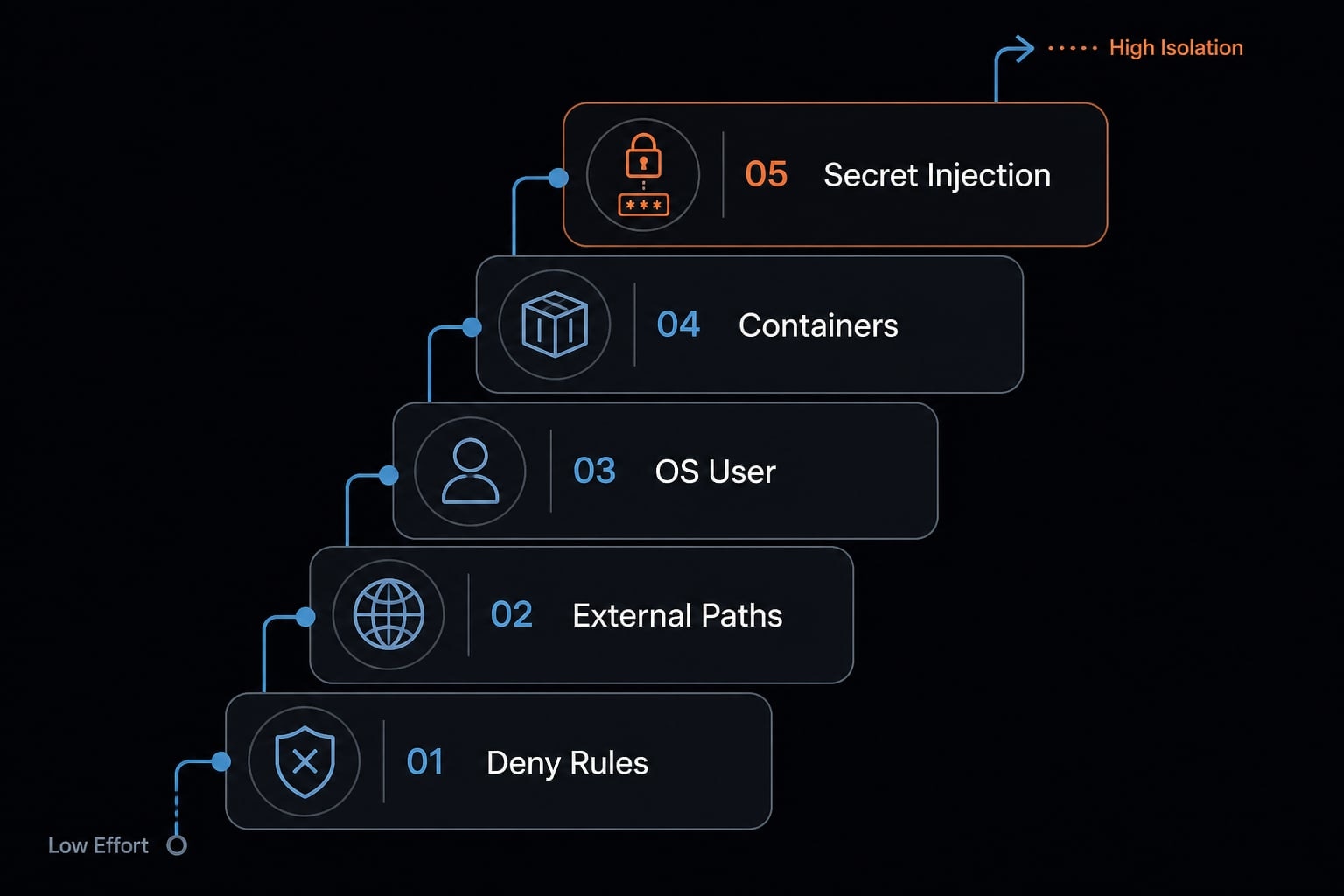
The security ladder: 5 ways to keep secrets out of Claude Code
The easiest way to think about this is as a ladder based on the least privilege principle. Start with the lowest-friction control that materially reduces risk, then move to stronger isolation only when your repo, team, or customer data justifies it. This section outlines practical options to prevent Claude Code from reading .env files, ordered by effort.
- Add deny rules for obvious secret paths.
- Move secrets outside active project directories.
- Use a separate OS user.
- Run Claude Code in a container or isolated environment.
- Use controlled secret injection instead of direct file exposure.
Protection Method | Setup Effort | What It Protects Well | Main Limitation | Best Fit |
|---|---|---|---|---|
Add deny rules | Low | Obvious file-path access | Does not fully stop runtime or output leakage | Most users |
Move secrets outside project directories | Low | Accidental project-scope exposure | Depends on workflow discipline | Solo builders, low-risk repos |
Separate OS user | Medium | OS-level file boundary | Adds daily friction | Sensitive repos |
Container or isolated environment | Medium-High | Stronger workspace isolation | More setup and maintenance | Teams, repeatable workflows |
Controlled secret injection | Medium | Reduces raw file exposure | Not a full safeguard by itself | Auth-heavy workflows |
Option 1 - Add deny rules for obvious secret paths
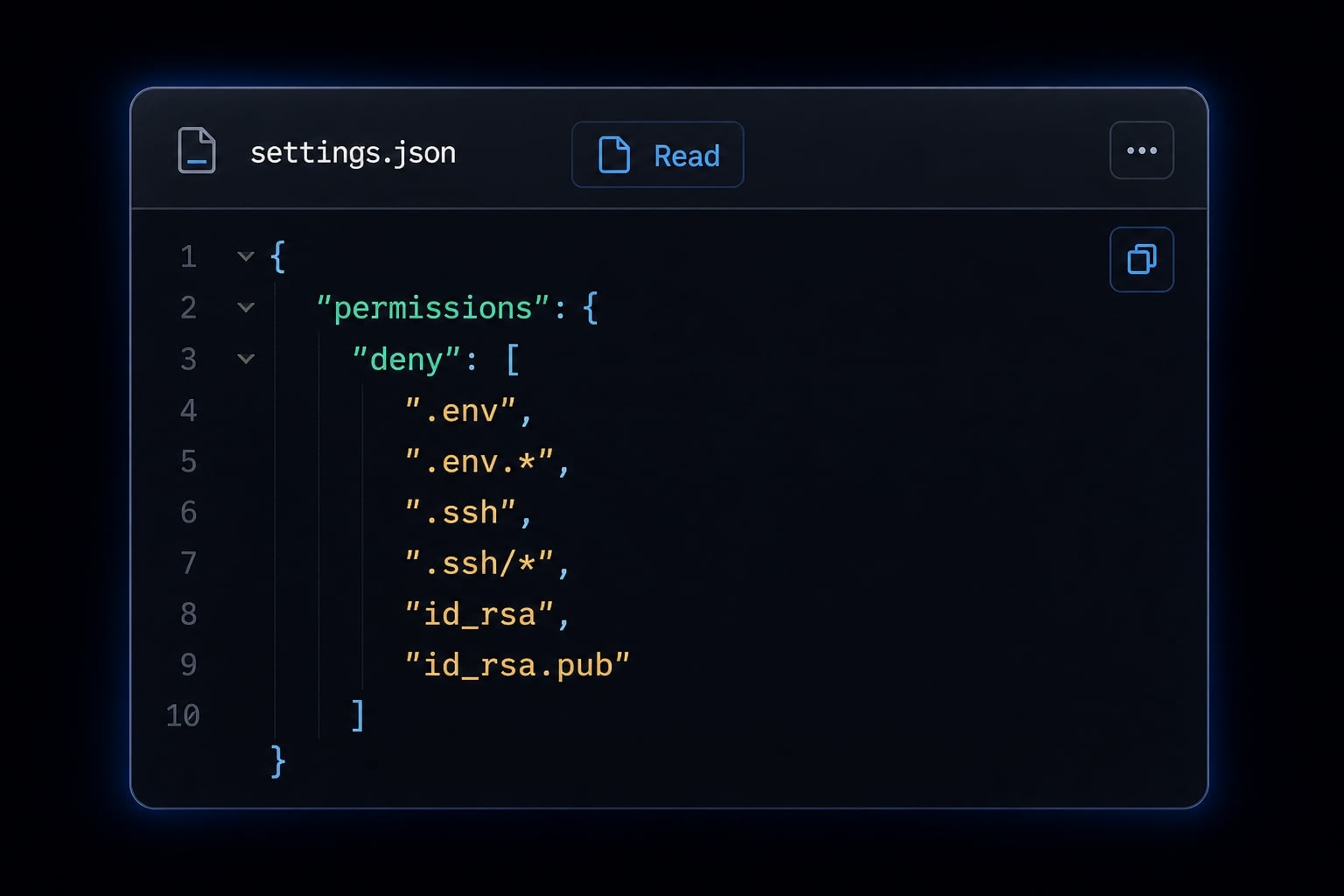
This is the fastest way to reduce risk. For most developers, deny rules in settings.json are the best first move because they help block obvious file reads with minimal setup.
What it does well:
- Reduces direct access to known sensitive paths.
- Creates a stronger default quickly.
- Helps when your main concern is how to block Claude Code from reading .env files.
What it does not protect against:
- Secrets already loaded into runtime.
- Shell commands that print sensitive values.
- Indirect exposure through logs or command output.
Who it is best for:
- Almost everyone using Claude Code locally.
- Developers who want immediate risk reduction without changing their workflow much.
Option 2 - Move secrets outside active project directories
A simple way to lower accidental exposure is to move secrets outside project directories. If sensitive files are not sitting inside the repo or current working tree, they are less likely to be pulled into normal project activity.
What it does well:
- Reduces accidental project-scope exposure.
- Keeps side projects cleaner.
- Works well for solo builders and lower-risk repos.
What it does not protect against:
- Secrets already exported into the shell.
- Commands that print values from external config.
- Users forgetting where secret files still live.
Who it is best for:
- Solo founders.
- Indie makers.
- Teams that want quick improvement before heavier controls.
Useful habits here include:
- keeping production
.envfiles outside the active repo. - separating local test credentials from real production credentials.
- avoiding credential files in commonly shared folders.
Option 3 - Use a separate OS user for Claude Code
Using a separate OS user gives Claude Code a stricter operating-system boundary. This is a stronger form of Claude Code sandbox configuration because access is limited by the OS, not just tool-level preferences.
What it does well:
- Creates a stronger file-access boundary.
- Reduces exposure to files owned by your main user.
- Supports better separation for sensitive repos.
What it does not protect against:
- Bad workflow decisions inside that isolated user context.
- Secrets intentionally mounted or copied into the isolated account.
- Command output leaks from credentials the isolated user can still access.
Who it is best for:
- Startup teams handling production repos.
- Technical founders with customer data exposure.
- Anyone wanting stronger isolation without full containerization.
Pros:
- Stronger OS-level boundary.
- Clearer separation of work contexts.
- Good fit for high-value repositories.
Cons:
- More friction in daily use.
- Requires setup and habit changes.
- Can complicate local tooling if not planned well.
Option 4 - Run Claude Code in a container or isolated environment
Running Claude Code in a container or isolated environment gives a stronger and more repeatable version of Claude Code configuration. This is often the cleanest step up from deny rules for teams.
What it does well:
- Limits the workspace to what you intentionally mount.
- Improves repeatability across developers.
- Makes stronger isolation easier to standardize.
What it does not protect against:
- Secrets mounted into the container by mistake.
- Command output leaks inside the isolated environment.
- Poorly scoped credentials still present at runtime.
Who it is best for:
- Small teams.
- More mature engineering workflows.
- Repos with higher operational sensitivity.
Pros:
- Stronger isolation.
- More consistent team setup.
- Better long-term control.
Cons:
- Higher setup overhead.
- More maintenance than simple file blocking.
- Can feel heavy for lightweight side projects.
Option 5 - Use controlled secret injection instead of direct file exposure
Environment variable injection or other controlled secret-loading methods can help when Claude Code needs auth context to run commands, but you do not want it reading raw secret files directly. This is useful for preventing credential leakage in AI tools when the workflow still needs access to authenticated services.
What it does well:
- Reduces raw file exposure.
- Supports workflows that still need authenticated commands.
- Can be a practical middle ground between usability and safety.
What it does not protect against:
- Secrets echoed by commands.
- Values exposed in logs.
- Broader runtime security issues if credentials are still reachable in memory.
Who it is best for:
- Developers using cloud CLIs often.
- Teams that need authenticated automation.
- Users who want more control without full OS isolation.
Blocking Claude Code from reading .env files is only one part of the solution. File blocking matters, but preventing credential leakage in AI tools usually requires both path restrictions and safer runtime habits.
Copy-ready minimum safe setup for most users
If you want one practical baseline, start here. This is a good default, not perfect protection. For most developers, the fastest way to begin securing Claude Code environment access is to combine path blocking with better approval habits. This is where Claude Code settings.json deny rules examples are most useful.
Example deny rules to start with
Use these Claude Code settings.json deny rules examples as a starting point, then customize them for your machine and repo structure:
{
  "permissions": {
    "deny": [
      "Read(**/.env*)",
      "Read(**/secrets/**)",
      "Read(**/*secret*)",
      "Read(**/*token*)",
      "Read(**/*credential*)",
      "Read(**/*key*)",
      "Read(~/.ssh/**)",
      "Read(~/.aws/**)",
      "Read(~/.kube/**)",
      "Read(**/*.pem)",
      "Read(**/*.p12)",
      "Read(**/service-account*.json)"
    ]
  }
}
These Claude Code settings.json deny rules examples help reduce obvious exposure paths through common secret files. They are most effective when paired with good CLI permissions discipline and the least privilege principle.
Daily habits that prevent accidental leakage
- Never paste raw API keys, tokens, or private keys into prompts.
- Avoid commands that dump full environment or config values.
- Review auth-related terminal commands before approval.
- Prefer temporary or scoped credentials where possible.
- Avoid storing production secrets in local project folders that AI tools can reach.
This baseline reduces obvious exposure risk, but it does not fully solve runtime security or terminal output leakage on its own.
Are deny rules enough? Where each protection method fails
Deny rules are valuable, but they can also create false confidence if you treat them as complete isolation. File-level blocking is not the same as runtime security. A stronger model for preventing credential leakage in AI tools looks at what is reachable through files, shell state, and command output.
Method | Helps most with | Main failure mode |
|---|---|---|
Deny rules | Blocking obvious file reads | Does not stop secrets already in runtime or command output |
Secret relocation / controlled injection | Reducing raw file exposure | Credentials may still be reachable during execution |
Separate user / container isolation | Stronger boundary and narrower workspace | More setup, and still depends on careful secret handling |
A useful way to think about this is layered control. Environment variable injection can reduce raw file exposure, but it is not the same as deterministic OS-level sandboxing. If you need stronger guarantees, OS user separation or containers are the more reliable step up.
Quick decision guide by risk level:
Risk level | Recommended setup |
|---|---|
low-risk side project | deny rules + safer habits |
startup production repo | deny rules + secret relocation or controlled injection |
high-sensitivity environment | separate user or container + stricter secret handling |
The point is not to dismiss deny rules. It is to use them as a starting layer, then add stronger boundaries when the repo justifies it.
A lightweight team policy for Claude Code and secrets
For small teams, consistency matters more than everyone inventing their own setup. Good developer tool governance does not need enterprise bureaucracy. It needs a baseline that supports secure AI coding workflows without slowing down normal delivery.
Minimum policy for a small engineering team:
- Standardize baseline deny rules across all developer machines.
- Do not keep raw production credentials in local AI-accessible project folders.
- Restrict AI-agent use during production debugging sessions where secrets may appear in logs or commands.
- Define a preferred isolated workflow for higher-value repos.
- Review repo types separately, because not every codebase needs the same AI agent security architecture.
- Treat preventing credential leakage in AI tools as an operational standard, not a personal preference.
A small startup usually needs one-page guidance, not a long policy document. The goal is a repeatable default that reduces avoidable mistakes.
Practical example: Choosing the right protection level without overcomplicating your workflow
The right Claude Code security configuration depends on what you are building and how sensitive the repo is. Protecting .env files from AI agents should match the actual risk, not a one-size-fits-all rule.
- Solo founder on an MVP: Deny rules, cleaner local folders, and safer shell habits are usually enough for secure AI coding workflows.
- Startup team on an active production repo: Add deny rules, move sensitive files out of project directories, and use controlled secret loading where needed.
- Highly sensitive client or regulated environment: Use stronger isolation with a separate OS user or container, plus stricter approval habits around auth-related commands.
Enough protection means reducing meaningful risk without creating so much friction that the team bypasses the controls.
Frequently asked questions
What are Claude Code secrets?
“Claude Code secrets” refers to sensitive files, API keys, or credentials that Claude Code may unintentionally access or expose while working. These can include .env files, SSH keys, AWS credentials, Kubernetes configurations, and other sensitive data.
How do you prevent Claude Code from accessing .env files?
You can configure deny rules in ~/.claude/settings.json. For example, add "Read(**/.env*)" to the deny list to prevent Claude Code from reading sensitive environment configuration files.
Are deny rules sufficient to secure Claude Code completely?
No. Deny rules provide an effective first layer of protection against direct file access, but they do not address risks involving runtime memory or secrets exposed through terminal command output. Treat them as a starting point rather than a complete security solution.
Which files should you protect from Claude Code?
In addition to .env files, consider blocking access to directories and files containing sensitive credentials, including ~/.ssh/, ~/.aws/, Kubernetes configurations in ~/.kube/, .npmrc, and .pypirc. You should also protect files whose names contain terms such as “secret,” “token,” “credential,” or “key.”
How can you strengthen Claude Code security further?
For stronger protection, use isolation measures such as running Claude Code inside a dedicated Docker container or under a separate operating system user account. These approaches help limit access to important system files.
Why should you not rely entirely on the AI to deny access?
Although Claude Code may request permission before accessing sensitive resources, relying entirely on the model’s behavior is risky. Apply the principle of least privilege by proactively blocking sensitive paths through system configuration instead of depending on the AI’s responses.
Read more:
- Claude Code hooks guide: Automate and control AI workflows
- Claude Code subagents documentation: Setup and usage guide
- Claude Code plugin marketplace: A guide to discover and setup
Conclusion
Managing Claude Code secrets is mostly about layered boundaries, not one perfect tool setting. For most users, the right starting point is simple: Block obvious sensitive paths, keep secrets out of active project folders, and use safer command habits when working with authenticated tools.
That baseline goes a long way toward securing Claude Code environment access in normal development workflows. If your repo handles production data, customer systems, or higher-sensitivity credentials, add stronger isolation through a separate OS user or containerized workflow. If your team needs a practical baseline, create a short internal checklist covering deny rules, secret locations, and approval habits before scaling AI-assisted development further.