
Vibe code authentication: Risks, guardrails, and a safer production workflow
While AI-driven "vibe coding" can spin up functional authentication flows in hours, a working happy path doesn't guarantee production security. Critical vulnerabilities often hide in edge cases-such as session management, backend route protection, account recovery, and permissions. AI-generated authentication isn't inherently flawed, but it poses high risks if deployed without explicit security specs, negative testing, automated checks, and expert human review. To ensure launch readiness, teams must evaluate these hidden risks and apply targeted controls before going live.
Is vibe-coded authentication safe?
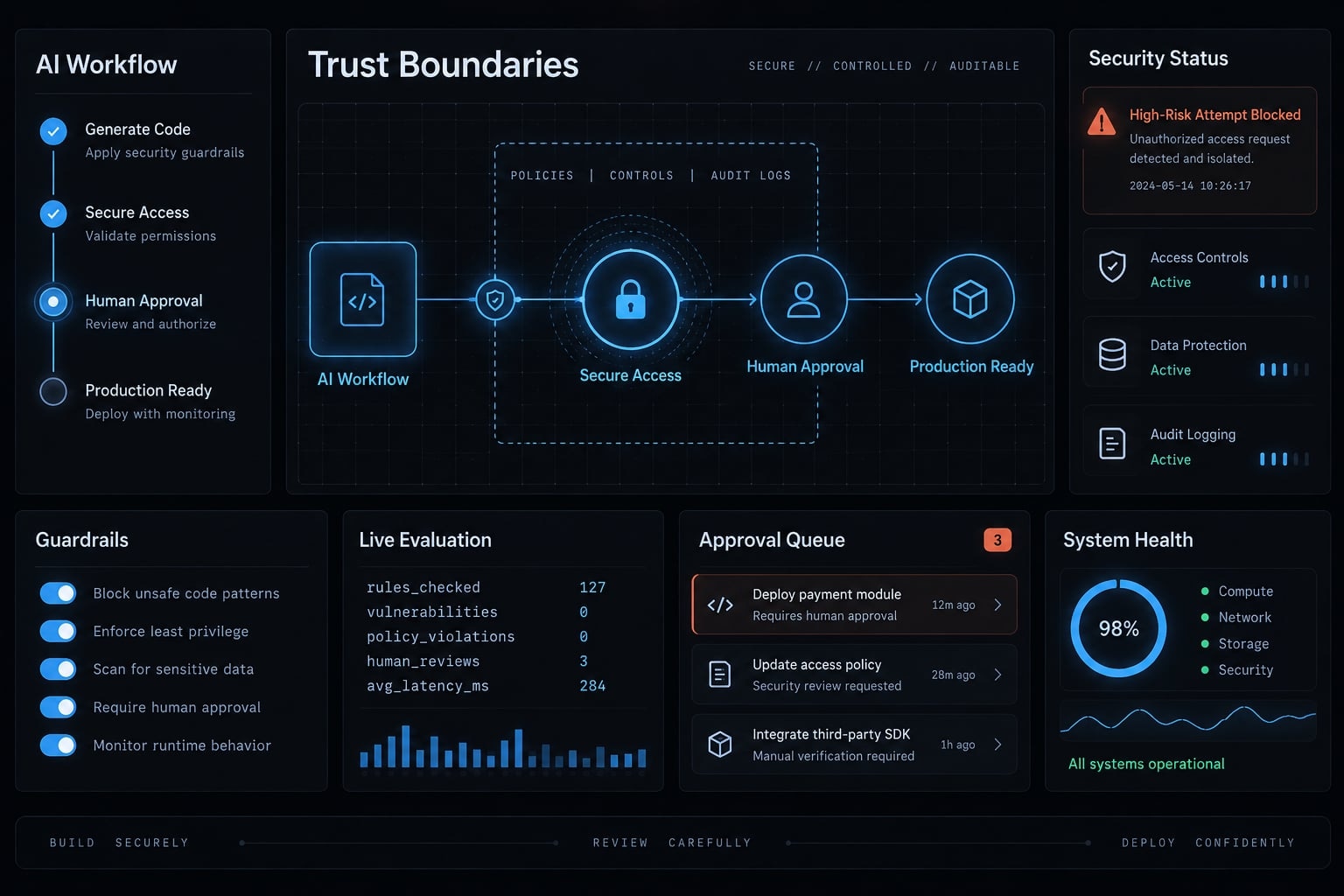
Vibe-coded authentication may be acceptable for a constrained prototype, but successful login behavior alone does not establish production readiness. Before public launch, AI-generated authentication requires architecture review, negative security tests, code and configuration scans, and human approval. The required controls depend on application exposure, data sensitivity, tenant structure, and the consequences of unauthorized access.
What counts as vibe-coded authentication?
Vibe-coded authentication is any identity-related implementation generated, integrated, or materially modified through natural-language instructions to an AI coding tool.
It can include:
- Custom registration and login logic generated from prompts.
- AI-generated integration with an established authentication SDK or provider.
- Generated middleware for protecting application routes.
- Generated roles, permissions, ownership checks, or access policies.
- Password-reset, email-verification, and account-recovery flows.
- AI-modified database permissions or Row-Level Security policies.
These approaches do not carry identical risk. Fully custom, LLM-generated auth logic places more design and maintenance responsibility on the development team. An official SDK reduces some implementation burden, but its configuration and surrounding application logic still require review.
“Working” versus “secure” authentication
Working behavior | Security question |
|---|---|
A valid user can log in | Can login be bypassed, abused, or used to enumerate accounts? |
A profile page loads | Can one user request another user’s record? |
A token is issued | Is it correctly validated, expired, rotated, and revoked? |
A reset email is sent | Is the reset token short-lived, single-use, and protected from leakage? |
Functional tests confirm that permitted behavior works. Security tests must also prove that prohibited behavior fails.
A generated login page may correctly identify a valid user while leaving an API endpoint publicly accessible. Similarly, a provider may issue valid sessions while the application accepts an unverified organization ID from each request.
AI may accelerate implementation, but it should not provide the final security approval for its own output.
Authentication is only one of four security boundaries
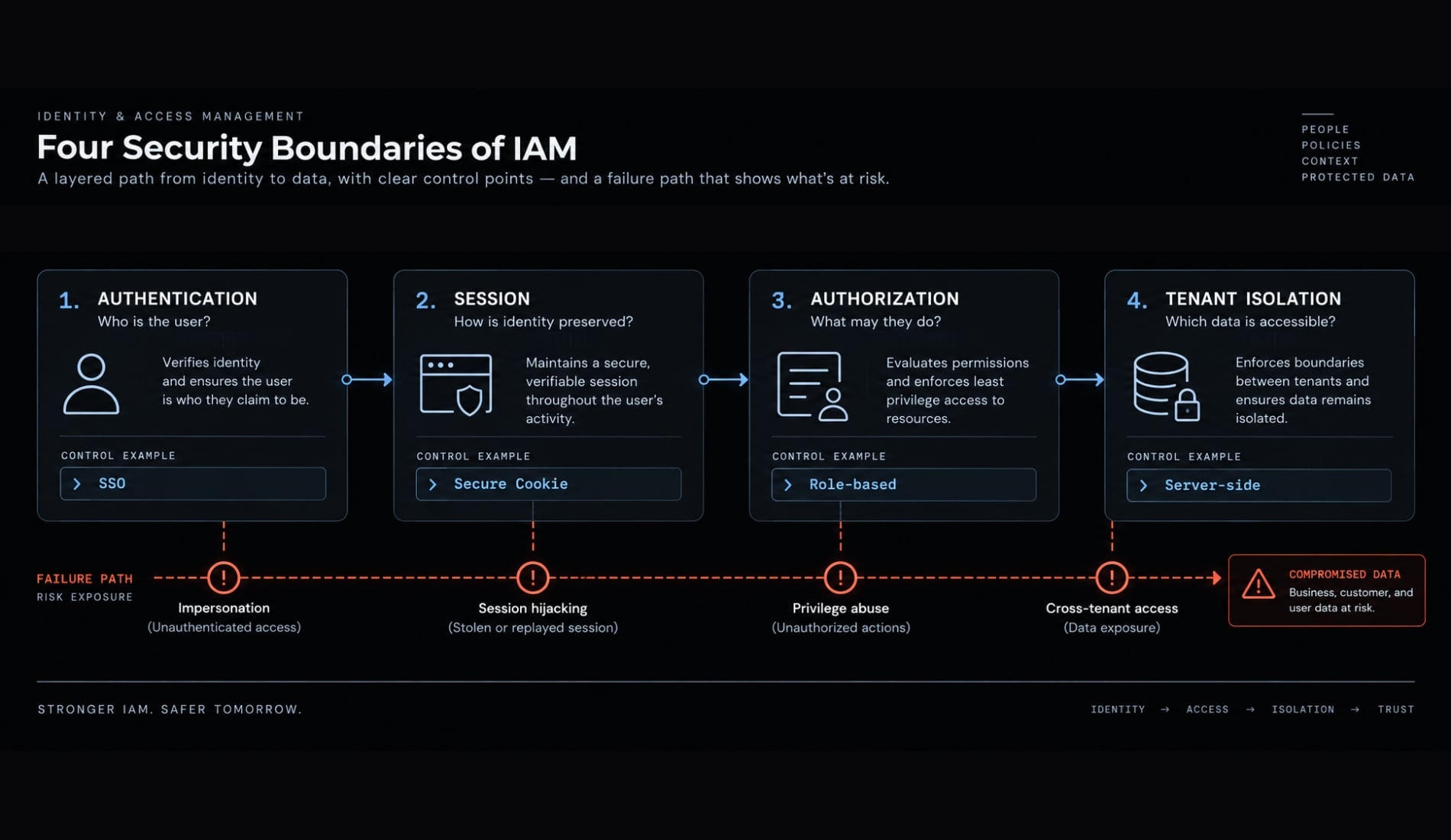
Identity and Access Management (IAM) is the combined system used to identify users, preserve their sessions, and control access to application resources. It applies to small applications as much as enterprise systems.
The distinction between authentication vs authorization is fundamental. Authentication establishes who the user is. Authorization determines what that user may do after their identity has been verified.
Security boundary | Core question | Example control |
|---|---|---|
Authentication | Who is the user? | Password, passkey, SSO, MFA |
Session protection | How is identity preserved safely? | Secure cookie, token validation, expiration |
Authorization | What may this user do? | Role, permission, ownership check |
Tenant isolation | Which organization’s data may the user access? | Server-side tenant validation, database policy |
Authentication: Verifying identity
Authentication can use passwords, passkeys, social login, enterprise Single Sign-On, or Multi-Factor Authentication. Each mechanism answers the same central question: can the application establish that the user controls the claimed identity?
A correct answer does not give the user unrestricted application access. Identity verification alone cannot determine whether the user owns a particular invoice, belongs to an organization, or may perform an administrative action.
Session management: Preserving identity safely
Session management preserves verified identity across subsequent requests. It covers session creation, expiration, renewal, revocation, logout, and responses to suspected compromise.
Applications may use server-managed sessions, cookies, JSON Web Tokens (JWTs), or a combination of mechanisms. JWT is a token format, not a complete authentication system. The correct mechanism depends on the architecture and must still be transported, stored, validated, expired, and revoked appropriately.
A logout button that clears browser state may not invalidate the corresponding server-side session. If the credential remains valid, it can potentially be reused from another device or intercepted environment.
Authorization and tenant isolation
Authorization enforces roles, permissions, ownership, and contextual policies. Tenant isolation ensures that users from one customer organization cannot access another customer’s resources.
Consider a B2B project-management application serving Company A and Company B. A Company A user changes a project ID or organization ID in an API request. The server must independently verify:
- The user may perform the requested action.
- The user belongs to the relevant organization.
- The requested project belongs to that organization.
- The role permits access to that specific resource.
Hiding Company B’s project in the interface is not protection. A user can bypass frontend controls and send requests directly to the API.
Managed authentication verifies identity; your application must still enforce permissions, ownership, and tenant boundaries.
The OWASP Authorization Cheat Sheet recommends server-side enforcement, least privilege, deny-by-default behavior, and permission validation on every request.
Seven common failures in vibe code authentication
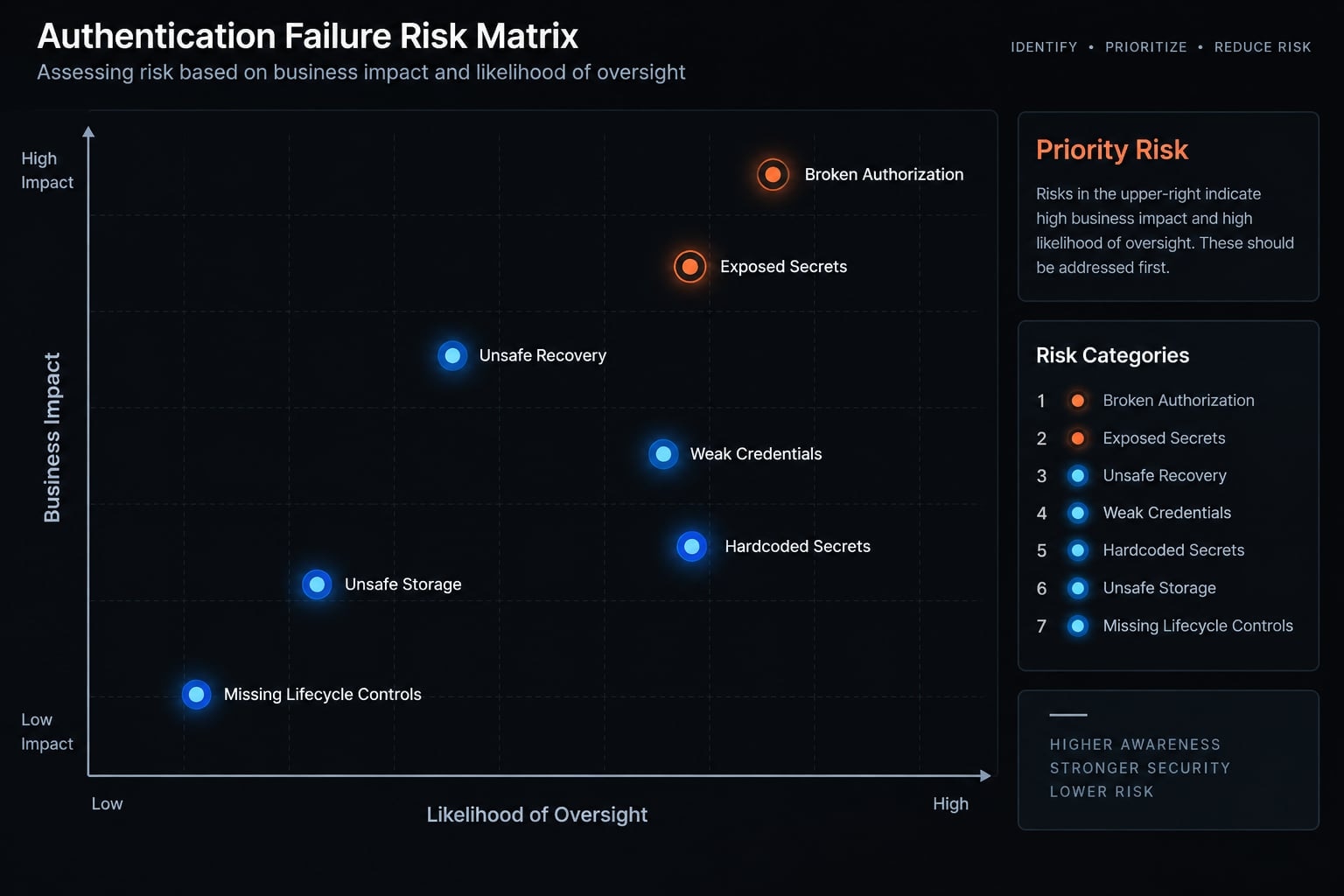
The main security risks of AI-generated authentication usually come from incomplete requirements, inconsistent enforcement, or missing lifecycle controls. Generated code may handle valid requests while overlooking abuse cases and interactions between components.
The seven common failure categories are:
- Weak credential handling.
- Hardcoded or exposed secrets.
- Unsafe cookie, token, or session storage.
- Missing expiration, refresh, rotation, or revocation.
- Unprotected backend routes.
- Broken authorization or tenant isolation.
- Unsafe password reset and account recovery.
Failure | Potential Impact | Minimum Control |
|---|---|---|
Weak credential handling | Account compromise | Established credential storage and password policy |
Hardcoded secrets | Token forgery or infrastructure access | Secret manager, scanning, rotation |
Unsafe session or token storage | Session theft | Architecture-appropriate storage and cookie controls |
Missing lifecycle controls | Replay or indefinite access | Expiration, refresh, rotation, revocation |
Unprotected backend routes | Unauthorized access | Central server-side authentication middleware |
Broken authorization or tenant checks | Cross-user or cross-company exposure | Resource-level and tenant-level validation |
Unsafe account recovery | Account takeover | Short-lived, random, single-use recovery flow |
1. Weak password and credential handling
Passwords must never be stored in plaintext or reversibly encrypted form. General-purpose fast hashes are also unsuitable because they are designed for speed rather than password protection.
Use a documented password-storage implementation from an actively maintained library or identity platform. The OWASP Password Storage Cheat Sheet recommends dedicated password-hashing algorithms and provides current configuration guidance.
Correct hashing is only one control. Registration and login may also require throttling, verification, breached-password screening, safe error messages, and protected recovery behavior.
Do not:
- Invent a password-hashing scheme.
- Ask an AI agent to design a custom credential format.
- Copy an old authentication tutorial without checking current framework guidance.
- Assume successful password comparison means credential handling is complete.
2. Hardcoded or exposed secrets
AI-generated authentication may introduce JWT signing secrets, OAuth client secrets, database credentials, or privileged service keys directly into source files.
Secrets can also leak through:
- Frontend bundles.
- Public repositories.
- Build logs and error traces.
- Shared development configuration.
- Generated documentation or test fixtures.
- Production environments reusing development credentials.
Use environment separation, protected deployment configuration, secret scanning, rotation procedures, and least-privilege service credentials. A secret placed in an environment variable is not automatically safe if client-side code or insecure logging exposes it.
3. Unsafe cookies, tokens and session storage
Storage decisions must reflect the application architecture and threat model. Browser-accessible storage can increase exposure to malicious scripts, while cookie-based sessions require appropriate configuration and Cross-Site Request Forgery controls.
Where cookies are used, review the Secure, HttpOnly, and SameSite attributes. Confirm that production traffic uses HTTPS and that session identifiers do not appear in URLs or unsafe logs.
For JWT security, verify signature, issuer, audience, and expiration where applicable. Do not merely decode a token and trust its claims. Follow the selected provider or library’s official token-validation documentation.
Neither JWTs nor cookies are universally secure or insecure. Security depends on how the complete session lifecycle is designed and enforced.
4. Missing expiration, refresh, rotation or revocation
A safe session lifecycle normally addresses the following sequence:
- A session or token is created.
- It expires within an appropriate period.
- Renewal occurs through a controlled mechanism.
- Refresh credentials are rotated where applicable.
- Logout or suspected compromise triggers revocation.
- Account disablement and role changes affect existing access.
A common failure pattern is clearing local interface state during logout without invalidating the underlying session. Another is issuing long-lived credentials without a practical revocation path.
Review session behavior during password changes, account suspension, permission changes, device loss, and suspected credential theft.
5. Unprotected backend routes
Frontend checks improve the interface but do not enforce the security boundary.
Frontend check | Server check |
|---|---|
Hides or redirects a page | Rejects unauthorized API requests |
Improves user experience | Enforces the security boundary |
Can be bypassed by direct requests | Must run for every protected operation |
An AI agent may apply middleware to most generated routes but omit it from one new endpoint. A later refactor may also remove a security check from one code path while leaving the interface unchanged.
Frontend route guards do not protect backend APIs. Every sensitive operation requires server-side enforcement.
Centralized middleware, reusable policies, and default-deny routing reduce the risk of inconsistent route protection.
6. Broken authorization and tenant isolation
Broken access control occurs when an authenticated user can perform an action or retrieve data beyond their permitted scope. It is distinct from an authentication failure.
For example:
- User A logs in successfully.
- User A changes a record ID to one belonging to User B.
- The endpoint confirms that User A is authenticated.
- The query returns User B’s record because ownership was never checked.
In a multi-tenant application, the same flaw can expose Company B’s data to Company A. Every tenant-sensitive request must validate membership and resource scope on the server.
Row-Level Security can provide an additional database control, but it does not replace all backend authorization. Policies must also be tested, versioned, and protected from broad debugging exceptions that remain enabled in production.
7. Unsafe password reset and account recovery
Account recovery can bypass the original login control. It therefore requires equivalent scrutiny.
Verify that the recovery flow includes:
- A cryptographically random reset token.
- Short expiration.
- Single-use enforcement.
- Appropriate generic responses to reduce account enumeration.
- Rate limits and abuse controls.
- Session revocation after suspected compromise or credential changes.
- Protected support-assisted recovery.
- Audit events for high-risk account changes.
Match the authentication approach to the application’s risk
The correct authentication risk level depends on public exposure, data sensitivity, privileges, tenant structure, and potential impact. Calling a product an “MVP” does not lower the duty to protect real users and real data.
Application type | Risk profile | Recommended approach |
|---|---|---|
Local prototype with synthetic data | Low and not publicly exposed | Mock authentication may be acceptable; remove it before deployment |
Internal tool | Limited audience but potentially sensitive access | Enterprise SSO or identity-aware access, least privilege, logging |
Public consumer application | Internet-facing accounts and personal data | Established library or managed provider plus application authorization |
Multi-tenant B2B SaaS | High cross-customer exposure | Established identity layer, explicit tenant controls, negative authorization tests |
Sensitive or regulated application | High legal, operational, or safety impact | Security-led architecture, formal testing, monitoring, incident response, documented approval |
Use these questions to classify the application:
- Does it store personal, financial, healthcare, employee, or confidential business data?
- Is it accessible from the public internet?
- Can one account access more than one organization?
- Does it include administrator, billing, support, or impersonation privileges?
- Will customers require SSO, MFA, user provisioning, or audit logs?
- Would compromise create material legal, financial, contractual, or reputational harm?
Each “yes” raises the required control and review threshold.
An internal tool is not automatically low risk. A small employee application may hold payroll data, production credentials, customer records, or administrative capabilities.
Likewise, public application security cannot be deferred merely because the first release has few users. If an early product processes real information, its authentication and access controls already perform a production role.
SOC 2 reviews or GDPR obligations may add evidence, governance, retention, and access-control requirements. Neither framework should be treated as automatic proof that the underlying implementation is secure.
A safer workflow for AI-assisted authentication
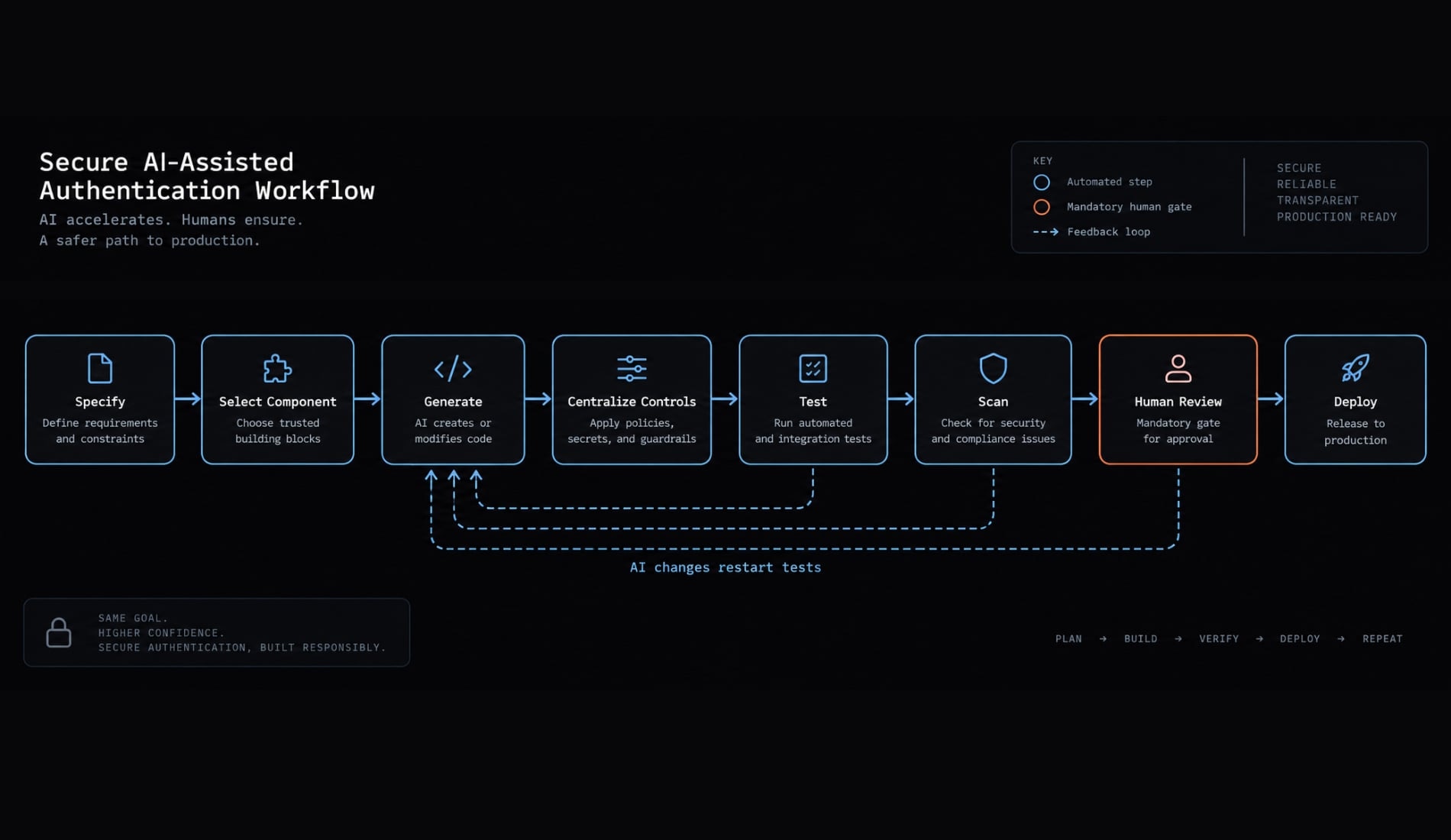
A safer AI-assisted authentication workflow separates generation from assurance. The agent can implement defined work, but architecture, testing, risk acceptance, and release approval remain controlled activities.
1. Define trust boundaries before generating code
Begin with a concise security specification:
User types:
Roles:
Organizations or tenants:
Protected resources:
Administrative actions:
Session-expiration behavior:
Logout and revocation behavior:
Recovery behavior:
Required audit events:
This spec-driven development approach reduces ambiguity before code generation begins. It also gives reviewers a reference for identifying missing controls.
2. Select an established authentication component
Choose among:
- A framework-native authentication library.
- A self-hosted identity platform.
- A managed authentication provider.
Prefer official SDKs and documented OAuth 2.0 or OpenID Connect (OIDC) flows. Review maintenance status, release history, framework compatibility, deployment requirements, and supported recovery mechanisms.
Do not ask the agent to invent token formats, password storage, or protocol behavior. Current OAuth guidance should align with the IETF OAuth 2.0 Security Best Current Practice, while OIDC implementations should follow the relevant OpenID Foundation specifications.
3. Give the agent explicit security constraints
Add a reusable instruction block to the repository:
Protect every sensitive backend route server-side.
Use no hardcoded secrets and validate required environment configuration.
Enforce role, ownership, and tenant checks for protected resources.
Use default-deny behavior where practical.
Add unauthenticated, unauthorized, cross-user, and cross-tenant tests.
Do not log passwords, tokens, session identifiers, or secrets.
Use official SDK and framework patterns.
Flag uncertain security decisions for human review.
Prompt quality does not guarantee security, but explicit constraints make omissions easier to detect.
4. Centralize authentication and authorization controls
Implement reusable middleware, guards, policies, or service-layer checks rather than duplicating conditions across endpoints. Centralized controls improve consistency by providing:
- Default-deny behavior.
- Explicit public-route exceptions.
- Shared role and permission enforcement.
- Standard tenant-membership validation.
- Alignment between backend checks and database policies.
- Fewer opportunities for a generated endpoint to omit protection.
Material exceptions should be visible and documented. Public access should never result from the absence of a policy.
5. Generate and run negative security tests
Security testing must verify denied behavior, not only successful behavior.
Repeat relevant tests after AI-generated refactors. A change outside the login screen may still affect middleware, database queries, or shared permission logic.
6. Scan code, dependencies and configuration
Use layered automated checks:
- Static Application Security Testing (SAST).
- Dependency vulnerability scanning.
- Secret detection.
- Infrastructure and deployment-configuration checks.
- API or dynamic testing where appropriate.
- Package provenance and maintenance review.
Scan findings require triage. False positives must be assessed, while passing results do not prove the application has no security vulnerabilities.
7. Require human approval before production
The production release gate should review:
- Trust boundaries.
- Protected backend routes.
- Authorization and ownership rules.
- Tenant isolation.
- Database policies.
- Secrets and environment configuration.
- Session lifecycle.
- Account recovery.
- Monitoring and audit events.
- Deployment configuration.
AgentKit may coordinate separate implementation, test, scan, and human-approval stages, but the workflow must not treat agent output or automated checks as final security assurance.
Build authentication or use an established solution?
The build vs buy authentication decision concerns long-term security ownership, not only initial development speed. Custom code creates continuing obligations for maintenance, incident response, protocol updates, monitoring, recovery, and customer requirements.
Option | Security ownership | Implementation effort | Ongoing maintenance | Best fit |
|---|---|---|---|---|
Fully custom authentication | Primarily internal | High | High | Exceptional requirements and strong identity-security expertise |
Established authentication library | Shared with maintainers | Medium | Medium | Teams needing control within proven framework patterns |
Self-hosted identity platform | Mostly internal operations | Medium–high | High | Teams requiring infrastructure or data control |
Managed identity provider | Shared responsibility | Low–medium | Lower, not zero | Public applications and small teams needing standard capabilities |
Evaluate each option against:
- Internal identity-security expertise.
- Time to production.
- Maintenance capacity.
- Incident-response ownership.
- Customization requirements.
- SSO and MFA requirements.
- Compliance evidence.
- Infrastructure control.
- Migration and lock-in risk.
- Total cost of ownership.
When custom authentication may be justified
Custom authentication may be reasonable when the organization has exceptional protocol or integration requirements, strict data-sovereignty constraints, or unusual infrastructure needs.
It also requires:
- Qualified identity-security expertise.
- Formal threat modeling.
- Continuous maintenance capacity.
- Security monitoring.
- Incident-response ownership.
- Documented testing and release approval.
Avoiding provider fees alone is usually an incomplete cost analysis. Engineering maintenance, security updates, customer support, audit evidence, and incident handling contribute to total ownership cost.
Self-hosted identity is not the same as fully custom authentication. A self-hosted platform can provide established identity behavior while leaving deployment, upgrades, availability, and operational security to the internal team.
What a managed authentication provider does not solve
A managed authentication provider reduces identity-infrastructure work, but it does not secure the complete application.
Your team still owns:
- Route-level authorization.
- Record ownership checks.
- Tenant isolation.
- Excessive application permissions.
- Leaked service credentials.
- Unsafe application logging.
- Incorrect SDK configuration.
- Business-logic abuse.
- Application incident response.
For example, a managed provider may correctly identify the current user. The application can still expose another tenant’s record if a database query lacks the required tenant constraint.
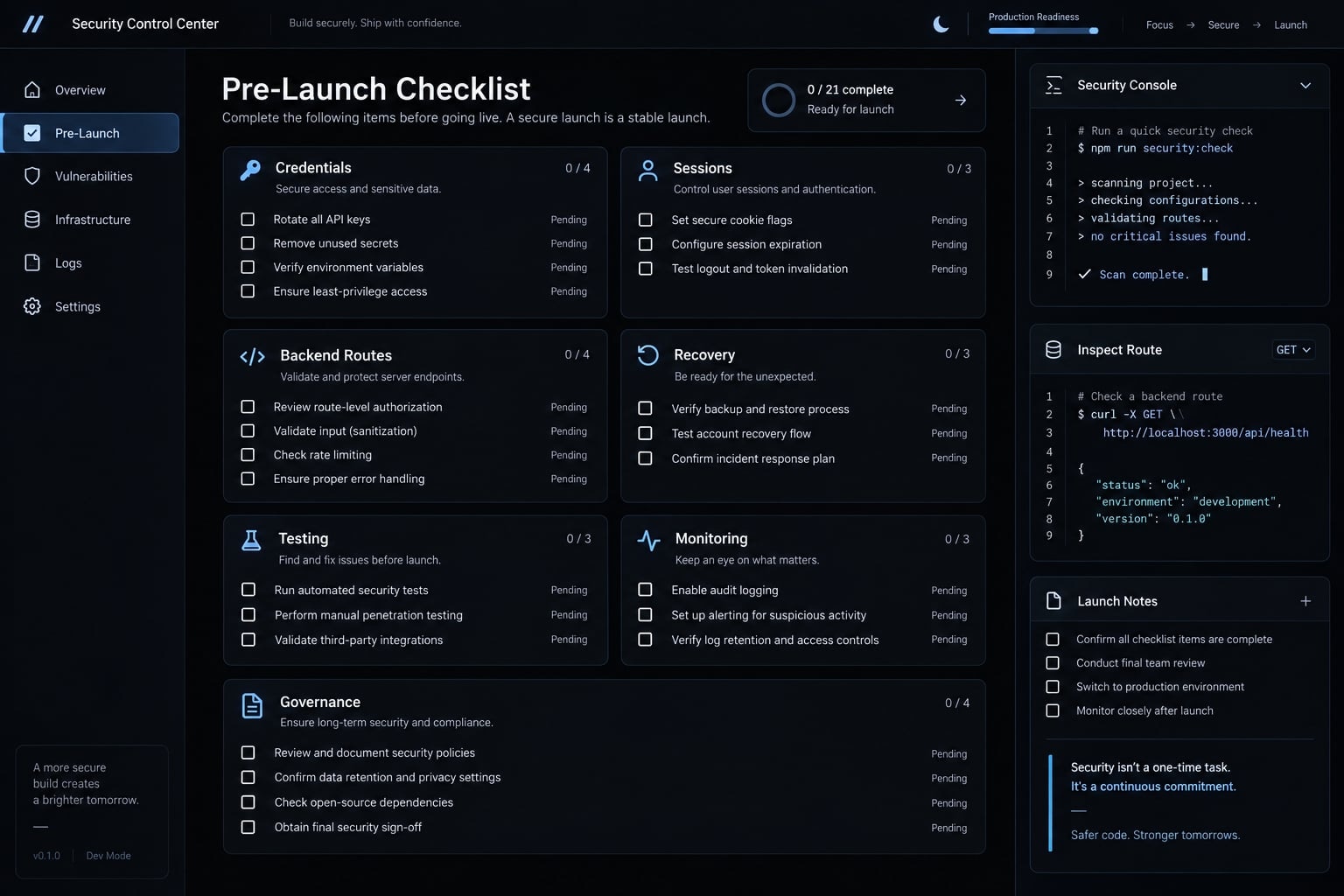
Vibe-coded authentication pre-launch checklist
This repository-ready authentication security checklist can be added to pull-request templates, deployment gates, agent instructions, or release reviews. It is a minimum baseline-not a certification, security guarantee, or substitute for qualified review.
Authentication provider and credential handling
- Authentication uses an actively maintained library, platform, or documented implementation.
- Passwords are never stored in plaintext or with a general-purpose fast hash.
- Registration, verification, login, and recovery behavior is documented.
- Login and recovery endpoints include rate limits and abuse controls.
- Error messages do not unnecessarily reveal whether an account exists.
- Sensitive or administrative accounts use stronger authentication, including MFA where appropriate.
Secrets, cookies, tokens and sessions
- No signing key, API key, client secret, or database credential is hardcoded.
- Secrets are separated by environment and can be rotated.
- Production traffic uses HTTPS.
- Cookies use appropriate
Secure,HttpOnly, andSameSitesettings. - Tokens are validated for signature, issuer, audience, and expiration where applicable.
- Session expiration, renewal, logout, revocation, and compromise behavior are tested.
Backend routes and authorization
- Every protected backend route enforces authentication server-side.
- Administrative operations require explicit authorization.
- Record ownership is checked server-side.
- Tenant membership is validated for every tenant-sensitive request.
- Frontend visibility is not treated as a security control.
- Database permissions follow least privilege and have negative tests.
Account lifecycle and recovery
- Verification and recovery tokens are random, short-lived, and single-use.
- Credential changes revoke affected sessions where appropriate.
- Role changes and account disablement take effect promptly.
- User deletion and data-retention behavior is documented.
- High-risk account changes create audit events.
Testing, monitoring and release governance
- Unauthenticated, unauthorized, cross-user, and cross-tenant tests pass.
- Secret, dependency, and static security scans run before release.
- Authentication failures and suspicious activity are logged without exposing sensitive data.
- Alerting and an incident-response owner are defined.
- A qualified human has reviewed trust boundaries and production configuration.
- Material authentication or authorization changes require explicit approval.
Version this pre-launch security review in the repository. Rerun it after provider changes, new roles, administrative routes, database-policy updates, AI-generated refactors, or tenant-model changes.
Ship faster without delegating the security decision
Vibe code authentication can accelerate implementation, but a working login remains only one part of production security. Authentication, session management, authorization, and tenant isolation require separate controls, negative tests, and human review after material AI-generated changes.
Match the solution to the application’s risk. Most small teams should prefer established components unless they can justify the maintenance and incident-response burden of custom ownership. Public applications should also treat route protection, lifecycle testing, automated checks, and release governance as mandatory.
Frequently asked questions
Is vibe-coded authentication safe for production use?
Vibe-coded authentication is generally not production-ready solely because it functions. While AI can generate working login flows, it often overlooks complex security requirements like session revocation, tenant isolation, and authorization. It is only safe when verified by rigorous testing, automated security scans, and qualified human approval.
What counts as "vibe-coded authentication"?
Vibe-coded authentication includes any login or access-control logic generated via AI prompts. This ranges from fully custom authentication systems built from scratch to the AI-assisted integration of established SDKs, middleware, or database policies. The risk lies in how the AI configures these components within your specific architecture.
Why is successful login not enough to secure an application?
A working login only verifies identity. Production security also requires session management (how identity is preserved), authorization (what the user can do), and tenant isolation (ensuring one user cannot access another company’s data). These boundaries are often missing in AI-generated code, even when the login flow appears perfect.
What are the most common security failures in AI-generated auth?
The most common failures include hardcoded secrets (like API keys), unprotected backend API routes, weak password storage, unsafe token/cookie handling, missing session lifecycle controls (like rotation), broken tenant isolation, and flawed account recovery flows. These vulnerabilities often occur because the AI generates code based on patterns rather than your specific security context.
How can I make my AI-assisted authentication workflow safer?
Use a spec-driven approach: define your security requirements first, use official authentication SDKs rather than custom code, centralize controls into middleware, and implement negative security testing (e.g., verifying that unauthorized access is rejected). Always require a qualified human to sign off on the security architecture before deployment.
Should I build my own authentication or use an established provider?
For most teams, using an established authentication provider or library is significantly safer than building a custom system. Managed providers reduce your security surface area by handling complex protocols, but they do not eliminate your responsibility for application-level authorization, tenant isolation, and secure configuration.
What should I check before launching an AI-built application?
Before launch, verify your authentication against a production checklist: ensure no secrets are hardcoded, confirm every backend route enforces server-side authorization, validate that tenant isolation is enforced at the database level, and run automated scans for vulnerabilities. Always document these checks and rerun them after any significant AI-generated changes.
Read more:
- Is vibe coding bad? Pros, cons and responsible AI practices
- How to vibe code: A practical beginner guide to AI development
- Vibe coding vs traditional coding: Which approach wins?
Conclusion
In conclusion, while AI-driven "vibe coding" can rapidly generate functional authentication flows, a working login is not proof of a secure application. Ensuring true production readiness requires moving beyond happy-path functionality to rigorously evaluate session lifecycles, enforce strict backend authorization, and isolate multi-tenant boundaries.
By leveraging established identity providers, enforcing negative security testing, and maintaining strict human-in-the-loop oversight before launch, development teams can harness the velocity of AI without compromising their application's core security.