Claude Code documentation workflow: A practical guide with prompts and templates
Software changes faster than its explanations. An authentication update ships, but the API example still shows the old request. This is documentation drift: the gap between documented behavior and what users actually encounter.
A Claude Code documentation workflow connects documentation to the software development lifecycle instead of treating it as cleanup. For teams already using Claude Code, the missing discipline is usually not better drafting. It is identifying affected pages, selecting evidence, limiting edits, checking claims, and securing approval. The workflow below turns a software change into review-ready documentation without treating generated text as product truth or authorizing automatic publication.
What is a Claude Code documentation workflow?
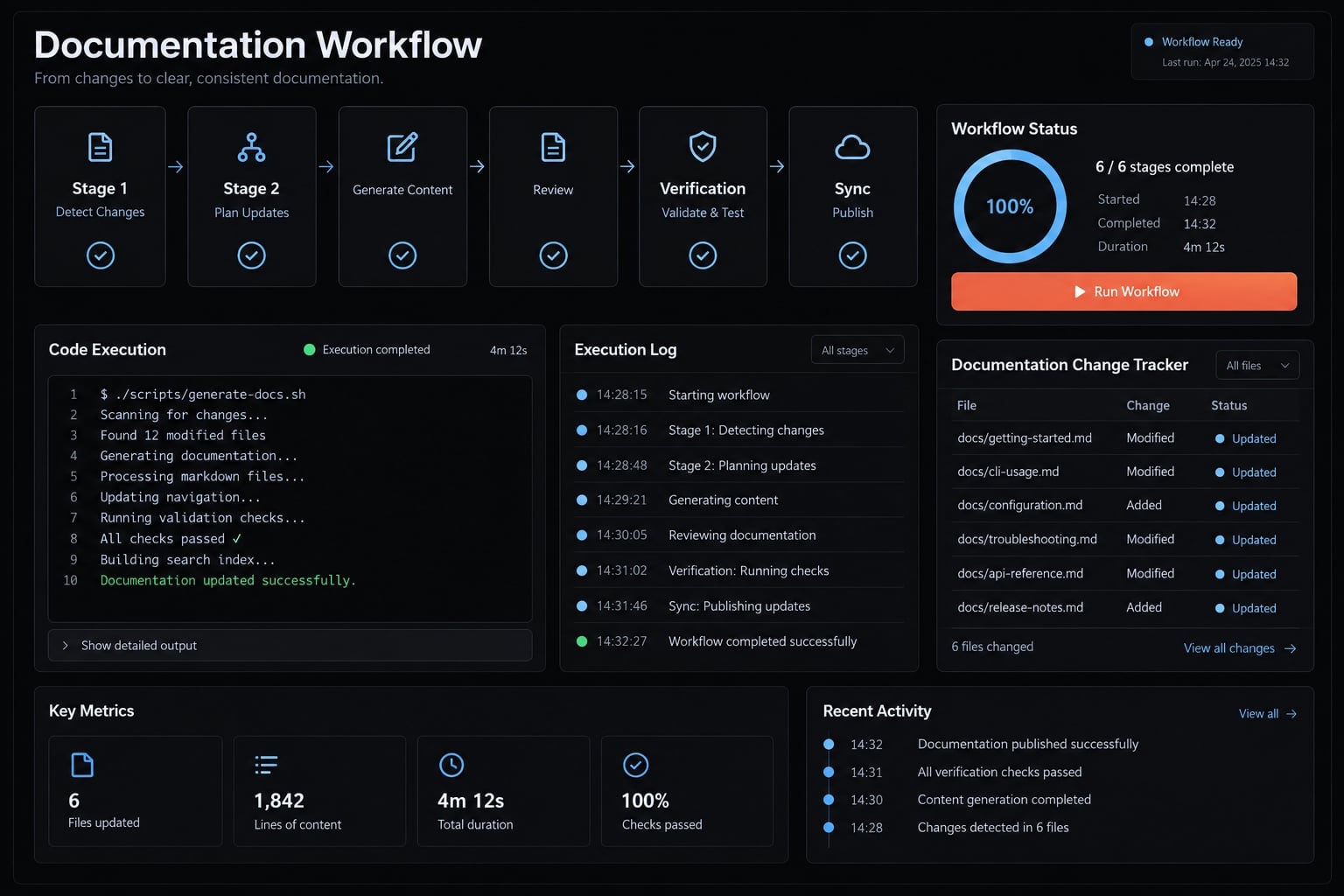
A Claude Code documentation workflow is a repeatable process for identifying documentation affected by software changes, gathering supporting evidence, planning updates, making bounded edits, verifying technical claims, and submitting changes for human review. Claude Code assists with analysis and drafting; repository controls and accountable reviewers determine what can be accepted.
Documentation serves two distinct purposes in an AI-assisted engineering workflow:
- Context: Project instructions, architectural decisions, and reference material that help Claude Code understand repository conventions and constraints.
- Output: README files, API references, architecture notes, runbooks, and release notes that explain the product to humans and external systems.
This distinction matters. An instruction telling an agent to verify commands is an input constraint; it is not evidence that a published command works.
The Claude Code CLI supports a docs-as-code approach, enabling documentation to follow the same version control and review processes as software code. Automation accelerates the process, but repository evidence determines correctness.
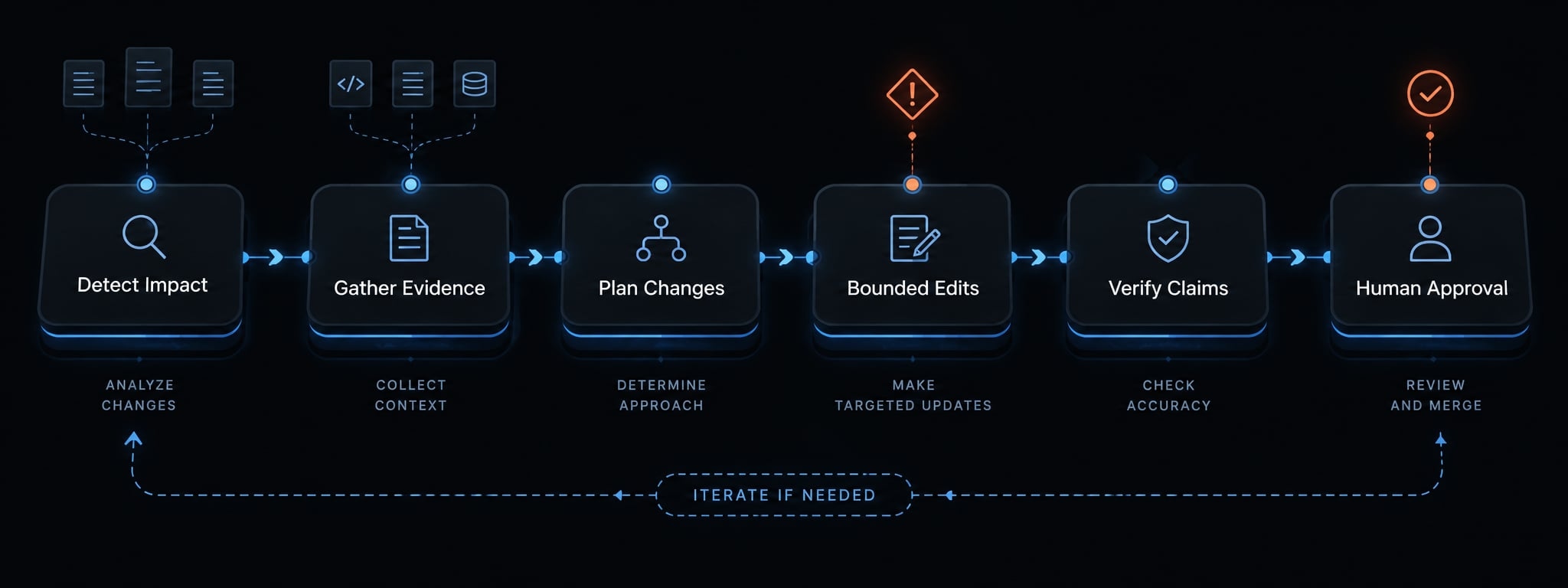
The six-stage workflow at a Glance:
Stage | Claude Code’s Role | Human/System Control | Output |
|---|---|---|---|
Detect impact | Identify affected documentation | Confirm comparison scope | Impact report |
Gather evidence | Map claims to sources | Resolve conflicting evidence | Evidence map |
Plan changes | Propose file-level updates | Approve scope | Change plan |
Make bounded edits | Update approved sections | Inspect actual diff | Minimal documentation diff |
Verify claims | Perform approved checks | Evaluate results and gaps | Validation report |
Review and merge | Prepare review materials | Maintainer approval | Accepted documentation change |
Configure Claude Code for reliable documentation work
Use CLAUDE.md to record concise project-specific rules, not an exhaustive repository manual. Anthropic’s Claude Code documentation describes project instruction files for memory management, while permission rules address execution controls separately.
Instructions guide behavior. They do not independently enforce filesystem restrictions, tool permissions, or reviewer approval.
A minimal CLAUDE.md documentation configuration
Copy this template into your repository root and replace its examples with actual project conventions:
## Documentation workflowAll paths below are repository-relative examples; adapt them.- Locations: README.md, docs/api/, docs/releases/.- Evidence: relevant implementation, schemas, tests, approved specifications, and configuration.- Scope: edit only files and sections in the approved plan.- Terminology: preserve established product names. Use the project glossary if one exists.- Conflicts: report disagreements between sources; do not silently select the convenient interpretation.- Unsupported claims: record NEEDS-REVIEW in the internal report, with a reason and required reviewer. Do not publish unresolved markers without approval.- Checks: discover commands from repository configuration. Propose exact commands and obtain execution approval. Do not invent missing scripts or checks.- Report: list changed files, evidence, commands actually executed, results, and unresolved items.- Status: use PASS, FAIL, or NOT VERIFIED.- Do not commit, push, publish, or merge without authorization.
NEEDS-REVIEW is a workflow convention, not a native Claude Code feature. Keep unresolved claims in review materials rather than silently inserting them into public documentation.
Establish a source-of-truth hierarchy
When documentation claims conflict with repository state, use this default evidence hierarchy. Architecture Decision Records (ADRs) document approved technical commitments.
Evidence | Useful For | Limitation |
|---|---|---|
Implementation and validated schemas | Current behavior and structure | Can disagree or contain defects |
Relevant tests | Expected cases and regressions | Existence does not establish execution |
Approved specifications and ADRs | Intended behavior and commitments | Implementation may lag |
Current configuration | Defaults and enabled behavior | Environment-specific |
Existing documentation | Terminology and historical rationale | May be outdated |
Issues and informal notes | Intent and unresolved questions | Not necessarily approved |
Configuration may be primary for environment setup claims. Approved specifications govern contractual API commitments. Code–schema or code–spec conflicts require maintainer review, not automatic agent precedence.
Keep context focused
Effective context engineering means supplying relevant information without burying documentation standards:
- Include changed files and affected documentation.
- Keep root instructions concise.
- Use scoped instructions or reusable skills where supported.
- Preserve approved decisions in a short plan.
The Six-step Claude Code documentation workflow
- Detect impact.
- Gather evidence.
- Plan changes.
- Make bounded edits.
- Verify claims.
- Review and merge.
Illustrative example (not an executed repository demonstration): The auth-docs-demo fixture provides consistent artifacts and prompts
Example ledger | Assumed fixture |
|---|---|
Previous behavior |
|
New behavior | It accepts |
Implementation |
|
Tests |
|
Documentation |
|
Uncertainties | Release availability and migration timing |
Required reviewer | Authentication maintainer; release owner for availability |
Step 1 - Detect documentation impact before editing
Start with a defined change set. Documentation impact analysis should identify affected readers before producing prose.
Inspect committed branch changes using git diff main...HEAD.
Inspect committed branch changes using git diff main...HEAD.
Confirm main is the intended comparison base.
Do not edit files.
Classify documentation as required update, possible review,
or unaffected. Return paths, changed behavior, audiences,
and uncertainties.
Plain git diff normally shows unstaged tracked changes, not the complete branch change set. git diff --cached shows staged changes. The three-dot comparison examines committed changes from the branches’ merge base.
- Control: Confirm the base and whether uncommitted changes also matter.
- Output: A file-level impact report.
Step 2 - Gather authoritative evidence
Create an evidence map linking every proposed documentation claim to its source code or schema reference.
For the login contract, map each proposed claim to file
paths and relevant symbols, schemas, or test cases.
Do not edit. Separate implemented from intended behavior.
Report missing evidence, conflicts, and execution status.
Illustrative impact/evidence artifact:
Claim | Affected file | Evidence to inspect | Uncertainty |
|---|---|---|---|
| API authentication page | Login schema and route validation | Runtime behavior not executed |
| Migration note | Rejection test and validator | Test result not verified |
Change is publicly available | Release notes | Release metadata and deployment record | Release evidence unavailable |
- Control: The maintainer resolves source-of-truth conflicts. Test existence is not a passing result.
- Output: A claim-specific evidence map.
Step 3 - Create a documentation change plan
Specify target files, sections, target readers, request/response examples, validation checks, and required reviewers before editing.
Produce a no-edit Markdown plan for authentication.md.
Cover request fields, request example, and migration guidance.
Separate public changes from internal unresolved questions.
List checks and reviewers. Wait for human approval.
Anthropic’s documentation describes Plan Mode for analysis before implementation. Check its behavior and tool permissions in your installed CLI version. A "do not edit" prompt instruction alone is an informational guideline, not an isolated OS sandbox.
- Control: Approve the documentation change plan before enabling edits.
- Output: A reviewable plan with release wording explicitly blocked pending evidence.
Step 4 - Generate bounded documentation edits
Bounded edits update only approved files and sections while preserving surrounding content, formatting, and unrelated documentation.
Apply the approved plan only to authentication.md:
request fields and request example.
Preserve terminology and rationale; avoid stylistic rewrites.
Record unsupported migration or version claims internally.
Return the diff and unresolved items.
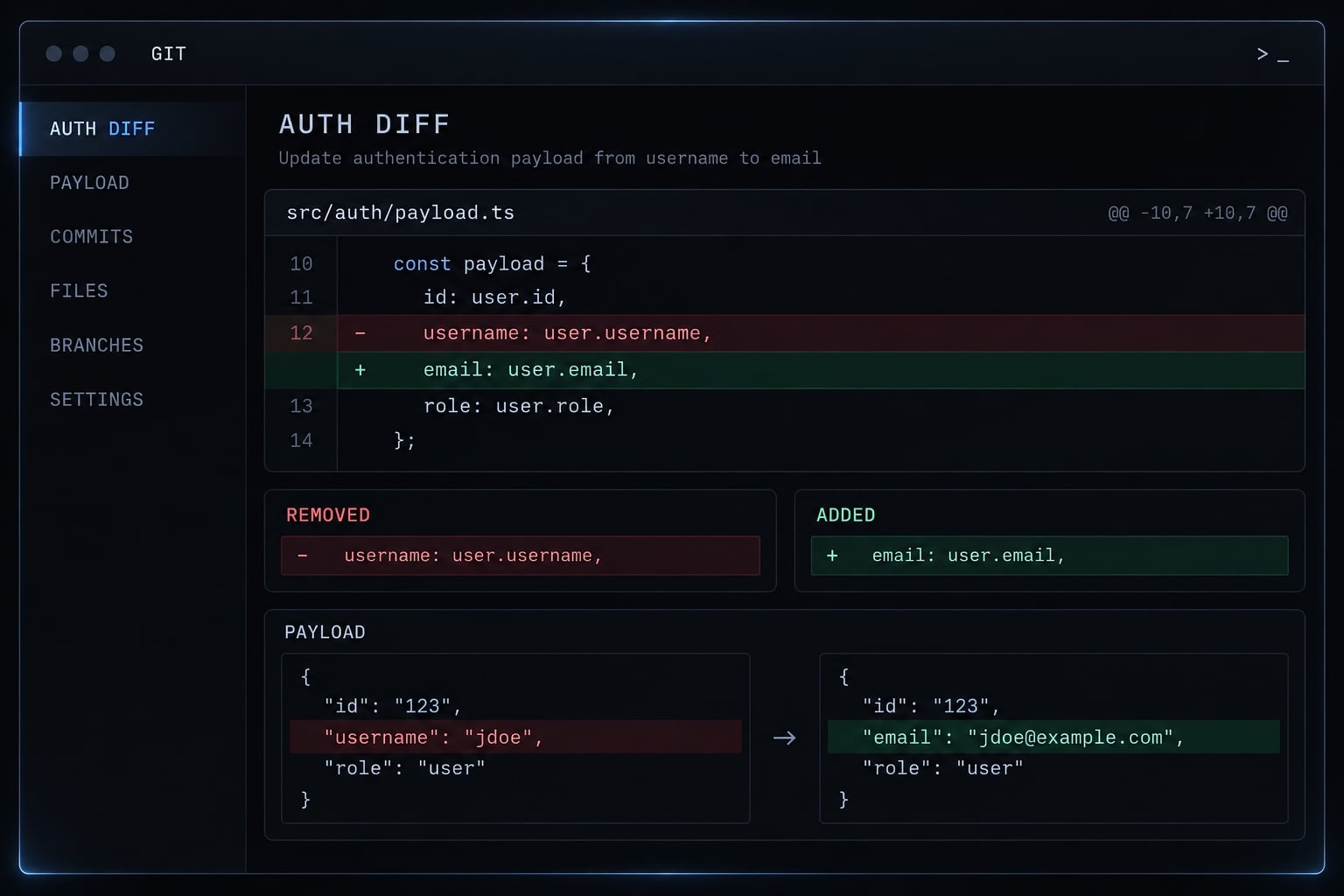
Illustrative minimal diff:
- Required fields: `username`, `password`.+ Required fields: `email`, `password`.- {"username":"demo-user","password":"EXAMPLE_ONLY"}+ {"email":"person@example.test","password":"EXAMPLE_ONLY"}
- Control: Compare the actual diff with approved scope.
- Output: A minimal documentation diff, not a rewritten API guide.
Step 5 - Verify every technical claim
Match documentation verification methods to the specific claim type:
Claim Type | Appropriate Check |
|---|---|
Shell commands | Confirm script exists; execute if approved |
Code samples | Compile and test relevant behavior |
API endpoints | Compare route, schema, and integration behavior |
Paths | Confirm tracked path exists |
Configuration keys | Inspect validation and defaults |
Links | Check targets with approved tools |
Version statements | Compare release metadata and availability |
Security claims | Inspect implementation; obtain specialist review |
Product behavior | Compare specification and reproducible behavior |
Verify changed claims using approved checks only.
For each, report PASS, FAIL, or NOT VERIFIED with evidence.
Record actual commands and results separately from proposals.
Explain every unresolved item; return failures for correction.- Control: A build does not prove semantic accuracy. Schemas can be stale; compilation does not prove runtime behavior. Security review is necessary, not infallible.
- Output: A validation report. For this unexecuted illustration:
Check | Status | Reason |
|---|---|---|
Login integration tests | NOT VERIFIED | No execution environment |
Public availability | NOT VERIFIED | No release record supplied |
Step 6 - Review and merge through Git
Prepare a GitHub pull request, or equivalent review request, after the verification loop.
Draft a PR description with rationale, changed files,
affected readers, evidence, executed checks, results,
limitations, and required reviewers.
Do not open, approve, merge, or publish anything.- Control: PR review remains accountable to maintainers. Drafting a description, creating a pull request, approving, merging, and publishing are separate actions requiring separate authorization.
- Output: Review-ready materials, not an automatically accepted change.
Build verification and Git controls into the workflow
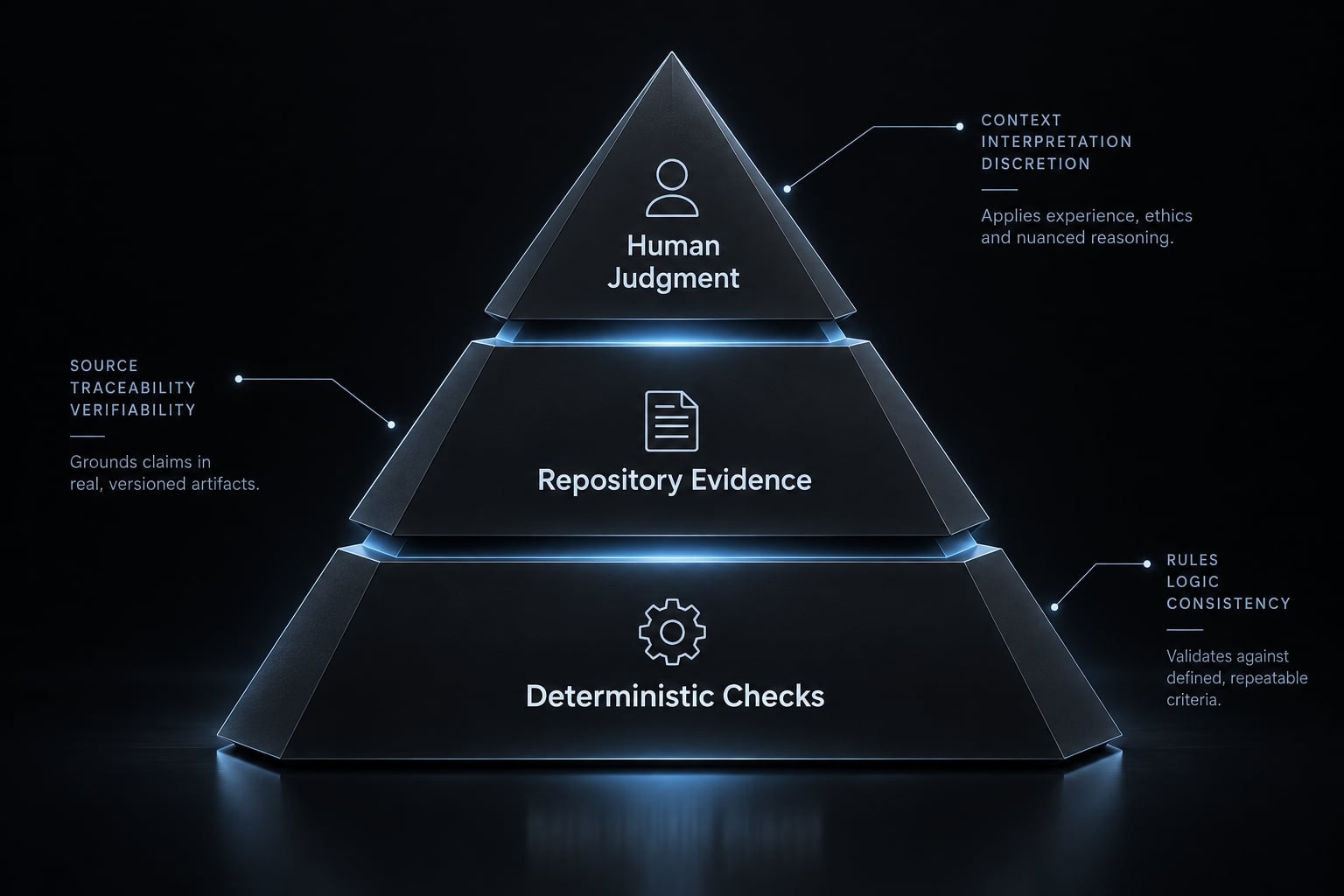
Agent self-review is insufficient. Documentation validation needs deterministic checks alongside human judgment.
Use three layers of validation
Layer | What It Establishes | Examples |
|---|---|---|
Deterministic | Defined acceptance criteria were met | Build, lint, link checks, example tests |
Repository evidence | Claims agree with inspected artifacts | Implementation, configuration, schemas, tests |
Human judgment | Accountable assessment of meaning and risk | Clarity, security, migration, public commitments |
Apply consistent statuses:
- PASS: The specified check ran and met its acceptance criteria.
- FAIL: The check ran and found a problem.
- NOT VERIFIED: Evidence, access, or execution conditions were insufficient.
Record a reason for every unresolved item. Failed or unresolved claims return to editing or maintainer review; they do not disappear inside a positive summary.
Documentation pull request checklist
Copy this checklist into your review template. Use “not applicable” only with an explanation.
Get the next post in your inbox
New guides and AgentKit updates, no spam. Unsubscribe at any time.
Where automation is safe and where approval is mandatory
Lower-risk automation in an approved environment | Mandatory approval |
|---|---|
Formatting approved documentation files | Security guidance and public guarantees |
Checking approved link targets | Migration warnings and customer commitments |
Running approved builds and tests | Production publication |
Drafting summaries and review findings | Merge decisions and expanded permissions |
“Lower-risk” does not mean harmless. Link checks make network requests; builds execute repository code; formatting modifies files. Repository text and external pages must not authorize new commands.
Apply the principle of least privilege: grant tools only necessary filesystem and network access. Protect environment variables and secrets before supplying context to local agents.
Practical Claude Code documentation examples
All three scenarios below are illustrative. “Failure caught” describes the intended detection mechanism, not an observed customer result.
Example 1 - Update a README after a setup change
- Trigger → The fixture replaces
npm run dev:legacywithnpm run devand requires a new environment variable. - Evidence → Inspect
package.json, configuration validation, and a sanitized example environment file. - Output → Update the README’s setup steps, required variables, and troubleshooting guidance.
- Validation → Confirm script names statically, then test setup in an approved clean environment when practical. Inspect scripts before execution.
- Failure caught → A generated instruction still references
dev:legacy. Comparing it withpackage.jsonidentifies the obsolete command before merge.
README automation helps maintain consistency; it does not make installation scripts inherently safe.
Example 2 - Synchronize API documentation with a route change
- Trigger → The authentication fixture replaces
usernamewithemail. - Evidence → Compare route implementation, schema, request validation, and integration tests.
- Output → Update API documentation and prepare migration guidance, withholding unsupported release timing.
- Validation → Test representative requests where authorized and compare response examples with the public response contract.
- Failure caught → A generated response includes
riskScore, an internal field. Reviewing the response serializer reveals that it is not exposed.
An implementation field is not automatically part of the public API contract.
Example 3 - Generate release notes from verified changes
- Trigger → Prepare release notes for a defined tag-to-tag boundary.
- Evidence → Review relevant commits, release metadata, deployment status, and approved product notes.
- Output → Draft user-facing changes, migration requirements, and applicable limitations.
- Validation → Have the release owner confirm availability, including feature-flag restrictions.
- Failure caught → The draft includes a merged feature that remains disabled. Release-status verification removes it from the availability claims.
A merged commit proves repository inclusion, not customer access.
Scale the workflow with AgentKit scaffolding
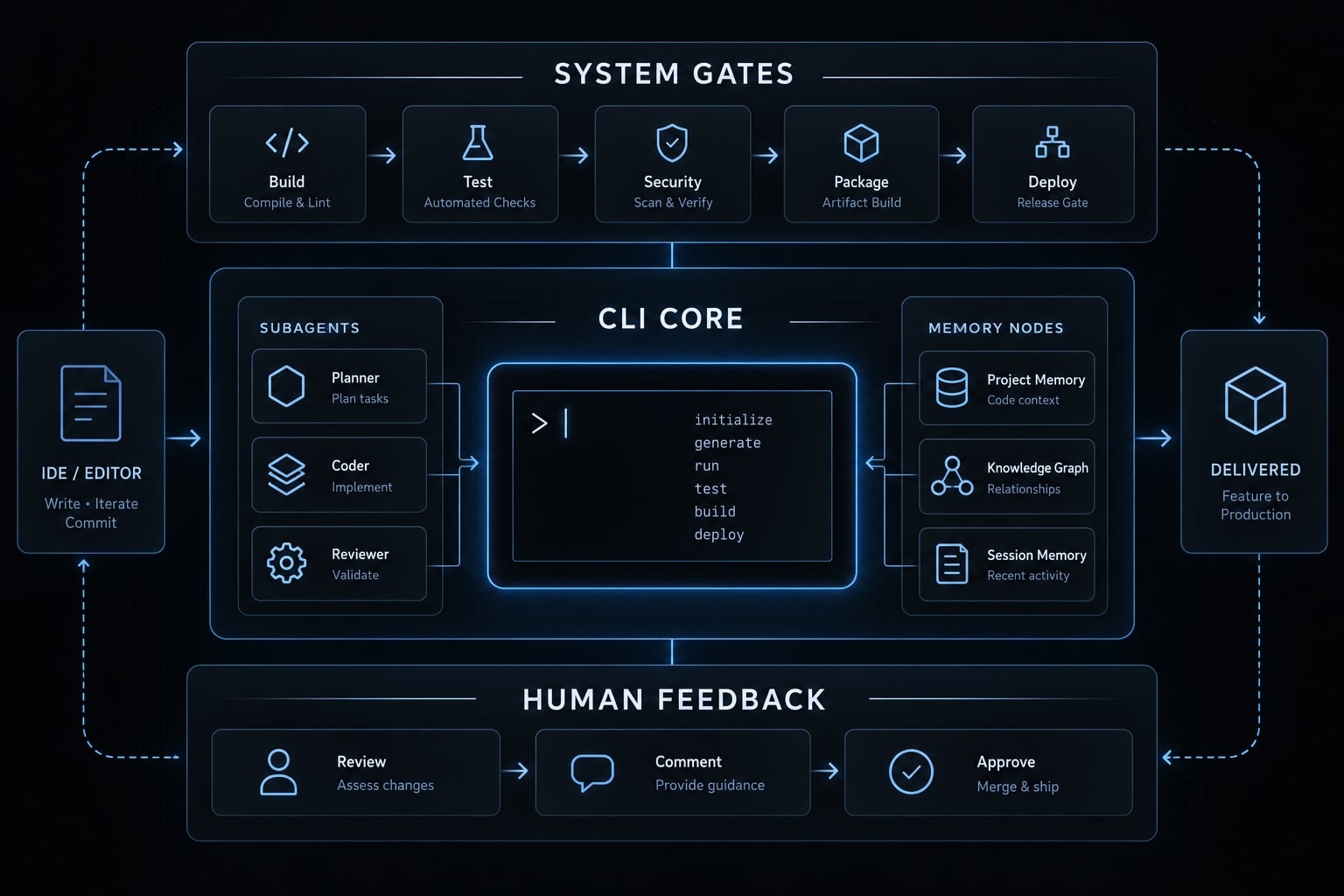
While native Claude Code instructions (CLAUDE.md) manage local prompts, scaling across multiple repositories benefits from structured AI Engineering Systems.
AgentKit provides the scaffolding layer necessary to standardize custom subagents, memory boundaries, and verification pipelines across heterogeneous execution environments (including Claude Code, Cursor, and DeepSeek Harness).
Recommended agent roles
When configuring multi-agent documentation pipelines in AgentKit:
Agent/Skill | Responsibility | Allowed Actions | Output |
|---|---|---|---|
Impact auditor | Identify affected pages | Read approved changes | Impact report |
Documentation writer | Apply approved plan | Edit named sections | Documentation diff |
Verifier | Check changed claims | Run approved checks | Validation report |
PR reviewer | Inspect scope and gaps | Read diff and evidence | Review findings |
Orchestrator | Coordinate stages | Route approved work | Status record |
A documentation subagent can handle one responsibility, but five separate agents are unnecessary. Reviewer agents produce findings, not human approval. An orchestrator’s audit trail depends on implemented logging.
Manual-to-automated adoption path
- Establish project instructions.
- Save impact, planning, and verification prompts.
- Add local or CI checks.
- Separate responsibilities.
- Package verified reusable components.
- Expand Claude Code automation only after manual results are dependable.
A small repository with occasional changes may need only instructions, a checklist, and ordinary Git review.
Frequently asked questions
What is a Claude Code documentation workflow?
A Claude Code documentation workflow is a structured process where AI CLI tools assist in mapping, updating, and verifying technical documentation alongside software changes. It combines automated impact detection, repository evidence mapping, bounded editing, and human-led verification gates.
Why does documentation drift occur when using AI coding tools?
Documentation drift occurs when codebase implementations change without synchronized updates to specs, READMEs, or API guides. Without an explicit docs-as-code verification loop, fast AI generation can amplify drift by shipping code faster than manual documentation updates occur.
How does the CLAUDE.md file support documentation tasks?
The CLAUDE.md file serves as a persistent behavioral contract that Claude Code reads at the start of every session. By defining specific documentation standards, approved evidence sources, and naming conventions within this file, teams provide the agent with the necessary context to maintain consistency and avoid hallucinated documentation structures.
Can Claude Code automatically verify documentation accuracy?
No. Claude Code can run deterministic checks (link checkers, linters, schema tests), but it cannot guarantee semantic intent, public commitment appropriateness, or business logic correctness. Human maintainer review remains mandatory for merge approval.
How should teams manage documentation conflicts or missing evidence?
If documentation conflicts with the codebase, or if sufficient evidence is unavailable, the agent should be instructed to surface these discrepancies rather than choosing an arbitrary path. Teams should label such items as "NEEDS-REVIEW" or "NOT VERIFIED" in the validation report, requiring a maintainer to resolve the inconsistency before the documentation is merged.
Is human approval required for documentation updates?
Yes. While Claude Code excels at synthesizing information and applying bounded edits, human approval is essential for documentation affecting security guidance, migration warnings, public guarantees, and customer-facing commitments. Human review ensures that the tone, intent, and accuracy of the generated content align with business requirements and verified product behavior.
Read more:
- Claude Code dependency audit: A safe, step-by-step workflow
- Claude Code MCP configuration: A practical setup guide
- Connect GitHub MCP to Claude Code: Step-by-step guide
Conclusion
A reliable Claude Code documentation workflow depends on process design, not just prompt engineering. Detect impact, gather evidence, approve a plan, constrain edits, verify claims, and retain accountable Git review.
Claude Code assists with analysis and drafting. Repository evidence, actual check results, and maintainers determine whether documentation is ready. Neither a confident summary nor a successful build resolves every product claim.
Start with one repository and one small change. Copy the CLAUDE.md configuration and review checklist, then record what remains unverified. Once documentation verification is dependable, explore verified AgentKit Engineer components for reuse across repositories-without removing the approval boundaries that made the manual workflow trustworthy
Ship features with Engineer Kit
Planning, implementation, review and testing workflows for AI coding agents, ready to install.
Explore Engineer Kit →Share this article
Keep reading
- Master Claude Code PostToolUse hook: Setup and examplesLearn how to configure Claude Code PostToolUse hooks for automated formatting and linting. Follow our guide to improve workflow efficiency today.15 min read
- How to use Kimi K2 with Claude Code: Setup & verification guideLearn how to configure Kimi K2 with Claude Code using Anthropic-compatible endpoints. Follow our step-by-step guide for setup, verification, and testing.13 min read
- Claude Code effort level: How to choose the right settingLearn how Claude Code effort level impacts reasoning and performance. Discover the best settings for your tasks to balance efficiency and accuracy.10 min read