
Claude Code PostToolUse hook: Configuration, examples and debugging
A Claude Code PostToolUse hook runs automatically after a tool executes successfully. It is an ideal tool for automating formatting, linting, and code diagnostics. While it cannot retroactively prevent or undo a completed operation, this tutorial guides you through sensible configuration settings, practical trade-offs, and effective debugging strategies to maintain clean code quality without slowing down your workflow.
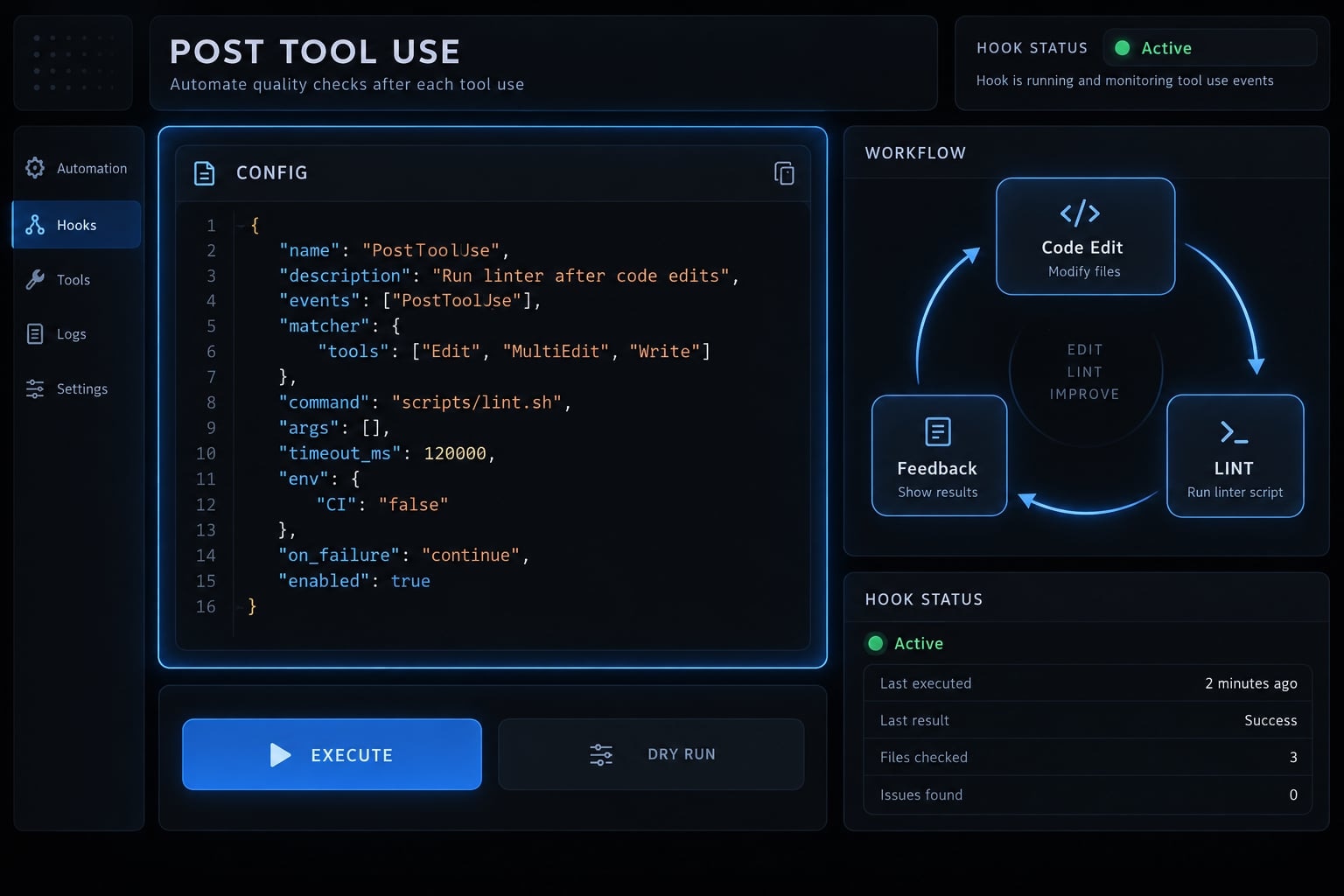
What is a Claude Code PostToolUse hook?
A Claude Code PostToolUse hook is a lifecycle handler invoked after a matching tool reports successful execution. In a command-based implementation, Claude Code starts a configured process, sends event data through standard input and processes supported feedback. The completed tool action is not automatically canceled or restored.
The official Claude Code hooks reference distinguishes successful execution from failure among Claude Code lifecycle events:
1. Claude selects a tool
             │
2. Pre-execution checks and permissions
             │
3. Tool executes
             │
       ┌─────┴─────┐
       │           │
4. Success       Failure
       │           │
   PostToolUse   PostToolUseFailure
       │           │
5. Supported feedback informs subsequent handling
Lifecycle schematic: PreToolUse belongs before execution; success and failure follow separate paths.
What PostToolUse can do
- Format edited files.
- Run targeted linting or lightweight validation.
- Perform focused checks or collect sanitized operational information.
- Return supported diagnostics and context.
What PostToolUse cannot do
PostToolUse cannot prevent a performed operation or automatically restore the previous state. A script can perform a separate corrective operation, but that introduces its own risks.
Use PreToolUse for pre-execution checks alongside permissions and other controls. Local hooks do not replace sandboxing or continuous integration (CI).
Minimal PostToolUse configuration in .claude/settings.json
Configure the event at project scope, then supply the executable script:
- Open or create
.claude/settings.json. - Merge the following entry into existing settings.
- Create
.claude/hooks/lint-and-format.shusing the implementation below. - Install the required dependencies and make the script executable.
- Inspect loaded hooks and verify an actual
EditorWrite.
{
  "hooks": {
    "PostToolUse": [
      {
        "matcher": "^(Edit|Write)$",
        "hooks": [
          {
            "type": "command",
            "command": "\"$CLAUDE_PROJECT_DIR\"/.claude/hooks/lint-and-format.sh",
            "timeout": 30
          }
        ]
      }
    ]
  }
}
Do not overwrite unrelated settings or existing hook entries. Registration is incomplete until the referenced script exists.
Field | Purpose |
|---|---|
| Selects matching tool names. |
|
|
| Quotes the expanded project directory, including spaces. |
| Maximum execution time in seconds; this example sets 30. |
Choose the correct settings scope
Location | Scope |
|---|---|
| Shared project configuration. |
| Personal project-specific settings, normally excluded from source control. |
| User-level configuration across projects. |
Managed organizational settings can restrict hooks; project settings do not automatically override those policies.
How to configure the Matcher in a Claude Code PostToolUse hook
Matchers target tool names, not filenames and regular-expression matching is case-sensitive.
Edit|Writematches those names; anchors make the example exact.Bashtargets shell-tool calls.mcp__filesystem__read_fileillustrates the naming convention for an MCP (Model Context Protocol) tool; confirm the name your server exposes..*broadly matches tool names and should be used cautiously.
Edits performed through Bash are not automatically covered by Edit|Write. File-extension filtering belongs inside this script.
Keep production logic outside the JSON file
A separate script improves review, quoting, reuse, and isolated testing.
$CLAUDE_PROJECT_DIR stabilizes the script location. It does not eliminate working-directory assumptions inside the script; the implementation explicitly changes to the project root.
What data does a PostToolUse hook receive?
Command hooks receive JSON stdin: event data delivered through standard input.
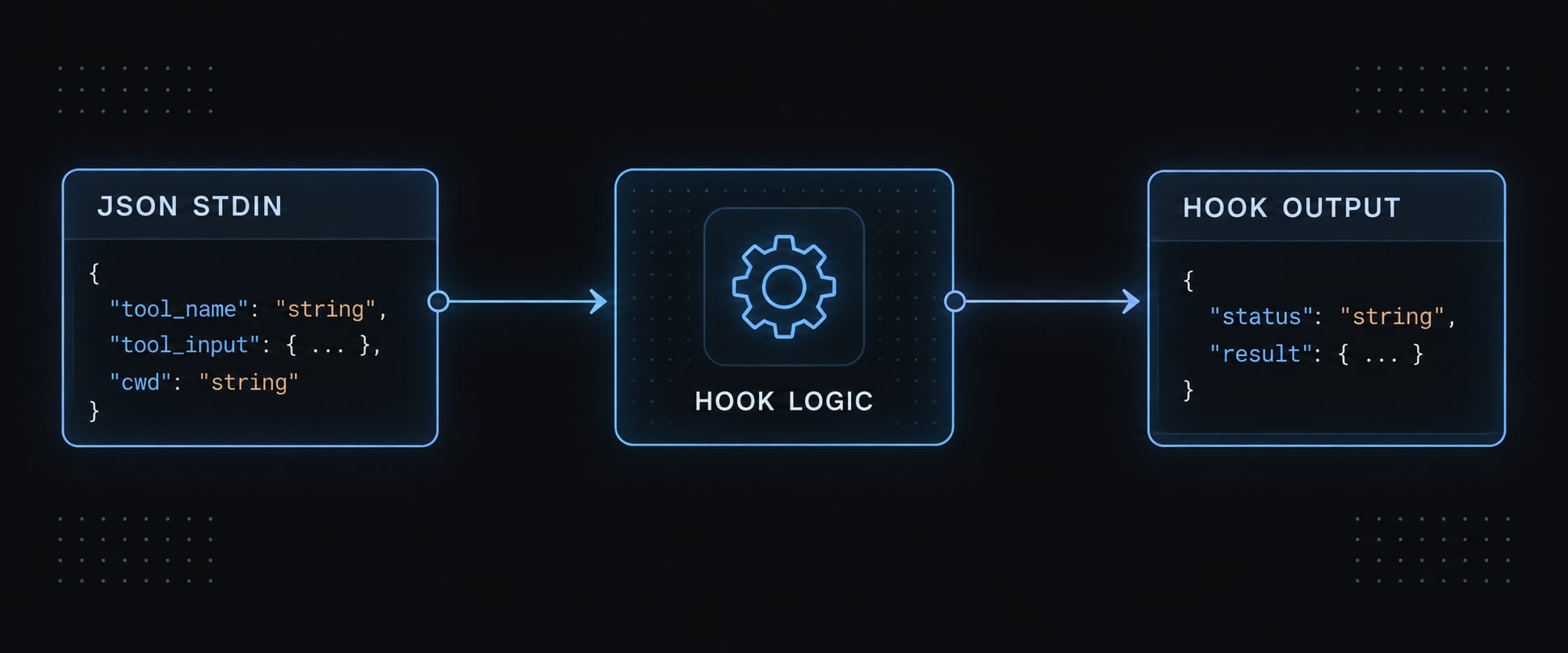
Save this abbreviated, representative hook-input fixture as .claude/hooks/posttooluse.fixture.json. It is not a complete Edit request or a universal tool-response schema.
{
  "hook_event_name": "PostToolUse",
  "tool_name": "Edit",
  "tool_input": {
    "file_path": "src/hook-fixture.js"
  },
  "tool_response": {},
  "cwd": "/example/saas app"
}
Field | Meaning |
|---|---|
| Identifies the lifecycle event. |
| Identifies the tool that completed. |
| Contains tool-specific arguments. |
| Contains tool-specific results; shape varies. |
| Execution context, not a universal repository-root guarantee. |
Read the Payload safely
Read stdin once, validate the JSON and check the type of tool_input.file_path before using it.
The example deliberately skips a missing or null path. It treats malformed JSON, a non-string path and an invalid file target as errors.
Quote variables and never use eval to interpret payload values. Tool arguments, responses, filenames and diagnostics remain untrusted input.
Return feedback to Claude
The official Claude Code hooks reference documents event-specific context through this structured output:
{
  "hookSpecificOutput": {
    "hookEventName": "PostToolUse",
    "additionalContext": "ESLint found an undefined identifier in the edited file."
  }
}
Exit status 0 means the hook process completed successfully. It can still report lint violations: successful execution is different from successful validation.
Keep formatter logs off stdout when returning JSON. Structured context is feedback, not retroactive cancellation, and does not guarantee Claude will resolve every finding.
Practical example - Format and lint files after an edit
For a small JavaScript/TypeScript SaaS repository, validate only the changed file rather than repeatedly checking the entire application.
Prerequisites:
- Bash on a supported Unix-like environment.
jqand Node.js available throughPATH.- Installed project-local Prettier and ESLint.
- Working configuration, including TypeScript support when applicable.
- A disposable repository or clean fixture.
If these tools are not already dependencies, install them intentionally during setup:
npm install --save-dev prettier eslint
mkdir -p .claude/hooks
Step 1 - Create the hook script
Save this complete script as .claude/hooks/lint-and-format.sh:
#!/usr/bin/env bashset -euo pipefailfail() { printf 'PostToolUse check failed: %s\n' "$1" >&2 exit 2}command -v jq >/dev/null 2>&1 || fail "jq is unavailable."command -v node >/dev/null 2>&1 || fail "Node.js is unavailable."# Read stdin once. Require exactly one JSON object.payload=$(cat)if ! printf '%s' "$payload" | jq -e -s 'length == 1 and (.[0] | type == "object")' \ >/dev/null 2>&1; then fail "Expected one valid JSON object on stdin."fiif ! printf '%s' "$payload" | jq -e ' .hook_event_name == "PostToolUse" and (.tool_name == "Edit" or .tool_name == "Write") and (.tool_input | type == "object")' >/dev/null; then fail "Unexpected event, tool, or tool_input shape."fi# A missing/null path is an intentional skip, not a parsing error.if printf '%s' "$payload" | jq -e '.tool_input.file_path == null' >/dev/null; then exit 0fiif ! printf '%s' "$payload" | jq -e ' .tool_input.file_path | if type == "string" then length > 0 and (test("[\\u0000-\\u001f\\u007f]") | not) else false end' >/dev/null; then fail "file_path must be a nonempty string without control characters."fifile_path=$(printf '%s' "$payload" | jq -r '.tool_input.file_path')[[ -n "${CLAUDE_PROJECT_DIR:-}" ]] || fail "CLAUDE_PROJECT_DIR is unset."cd -- "$CLAUDE_PROJECT_DIR" || fail "Cannot enter the project directory."root=$(pwd -P)# Resolve symlinks and require a regular file inside the project root.# Relative input paths are interpreted relative to this root.if ! target=$(node - "$root" "$file_path" <<'NODE'const fs = require("node:fs");const path = require("node:path");try { const root = fs.realpathSync(process.argv[2]); const target = fs.realpathSync(path.resolve(root, process.argv[3])); const relative = path.relative(root, target); if ( !relative || relative === ".." || relative.startsWith(".." + path.sep) || path.isAbsolute(relative) ) { throw new Error("outside root"); } if (!fs.statSync(target).isFile()) { throw new Error("not a regular file"); } if (/[\u0000-\u001f\u007f]/.test(target)) { throw new Error("unsupported path characters"); } process.stdout.write(target);} catch { process.stderr.write( "Target must be an existing regular file inside the project root.\n" ); process.exit(1);}NODE); then fail "File-target validation failed."ficase "$target" in *.js|*.jsx|*.ts|*.tsx|*.mjs|*.cjs) ;; *) exit 0 ;;esacprettier="$root/node_modules/.bin/prettier"eslint="$root/node_modules/.bin/eslint"[[ -x "$prettier" ]] || fail "Project-local Prettier is unavailable."[[ -x "$eslint" ]] || fail "Project-local ESLint is unavailable."log=$(mktemp)trap 'rm -f -- "$log"' EXIT# Bound diagnostics sent back to Claude.diagnostics() { head -c 4000 "$log" if [[ $(wc -c < "$log") -gt 4000 ]]; then printf '\n[diagnostics truncated]' fi}if "$prettier" --write "$target" >"$log" 2>&1; then :else status=$? fail "Prettier exited $status:$(diagnostics)"fiif "$eslint" --no-color "$target" >"$log" 2>&1; then exit 0else status=$?ficase "$status" in 1) jq -nc --arg message \ "ESLint reported lint violations after formatting:$(diagnostics)" \ '{ hookSpecificOutput: { hookEventName: "PostToolUse", additionalContext: $message } }' exit 0 ;; 2) fail "ESLint configuration or execution failure:$(diagnostics)" ;; *) fail "Unexpected ESLint exit status $status:$(diagnostics)" ;;esac
The root policy accepts existing regular files whose resolved paths remain inside the project. Relative paths are root-relative. Symlink resolution checks containment, but concurrent filesystem changes can still create a check/use race; this is not a sandbox.
Prettier failures remain visible. ESLint’s CLI documentation distinguishes status 1, meaning lint failures, from status 2, meaning configuration or internal failures. Returned diagnostics are capped at 4,000 bytes, although temporary tool output can be larger.
Step 2 - Make the script executable
chmod +x .claude/hooks/lint-and-format.sh
This enables direct execution on Unix-like systems. Windows users need compatible Bash paths and dependencies through WSL or Git Bash. A Node.js handler is a separate portability option.
Step 3 - Register the script
Use the earlier .claude/settings.json entry. Confirm the filename, executable permission, project directory, and local dependencies align.
The same handler pattern can support content or structured-data validation, with appropriate file checks and validators.
Step 4 - Verify the expected behavior
In a disposable JavaScript fixture, use this eslint.config.mjs:
export default [
  {
    files: ["src/**/*.js"],
    rules: {
      "no-undef": "error"
    }
  }
];
Create deliberately misformatted input:
mkdir -p src
printf 'export const seats={limit:10};missingName();\n' \
  > src/hook-fixture.js
With default Prettier settings, the expected result is:
export const seats = { limit: 10 };
missingName();
ESLint should then report missingName as undefined. These are expected outcomes, not recorded test results.
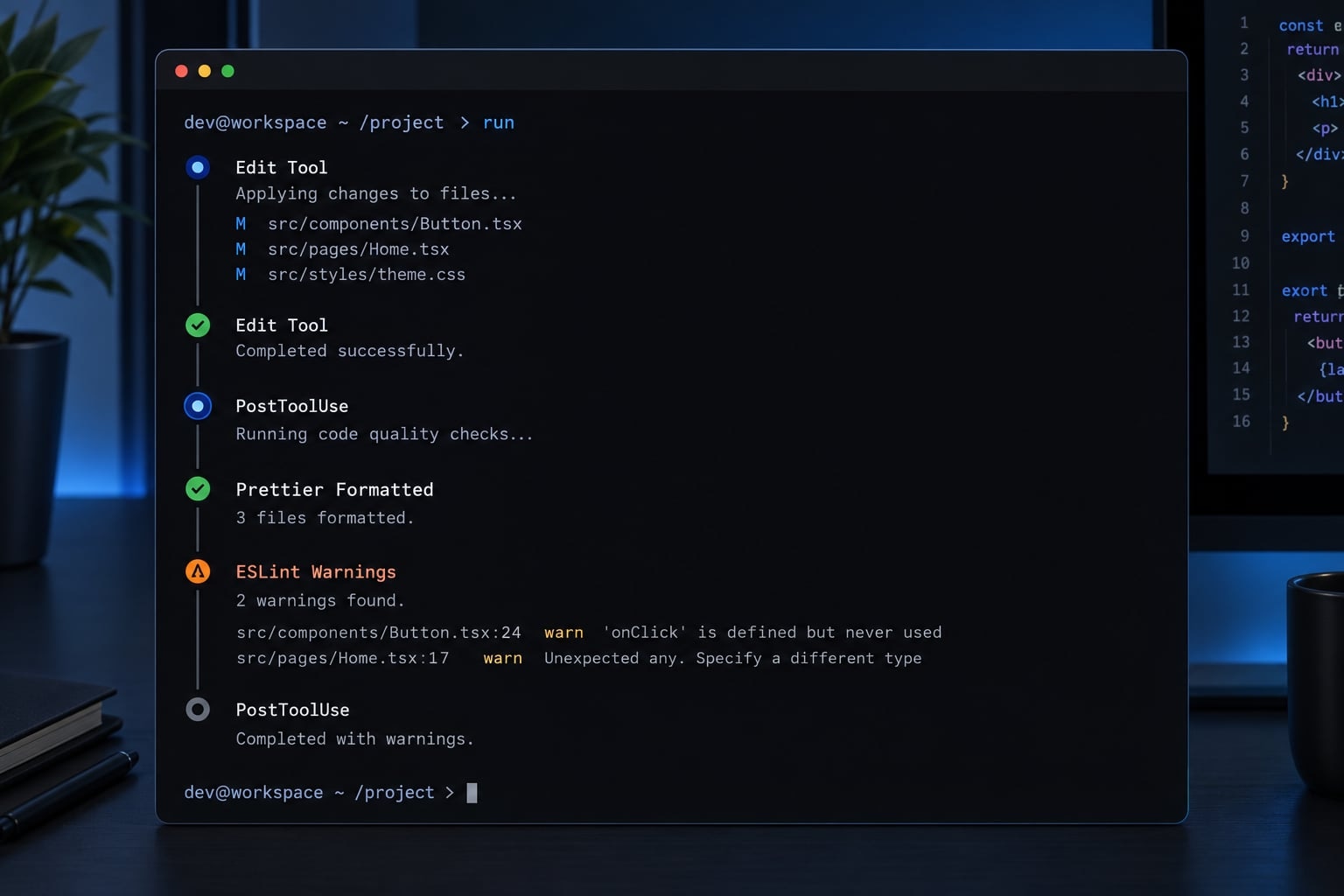
Also test an existing .txt file, malformed JSON, a temporarily unavailable local binary, and a project directory containing spaces. Confirm failures are visible rather than reported as clean validation.
Direct filesystem changes made by the script are not necessarily new Claude tool calls.
How to test and debug a PostToolUse hook
Test the script independently
Start at the repository root with dependencies installed. Use the saved representative fixture and explicitly supply CLAUDE_PROJECT_DIR:
# Run in Bash from the repository root.# Disable errexit so failure output and status can be inspected.set +eCLAUDE_PROJECT_DIR="$PWD" \ ./.claude/hooks/lint-and-format.sh \ < .claude/hooks/posttooluse.fixture.json \ > /tmp/posttooluse.stdout \ 2> /tmp/posttooluse.stderrhook_status=$?printf 'Hook exit status: %s\n' "$hook_status"printf '\nstdout:\n'cat /tmp/posttooluse.stdoutprintf '\nstderr:\n'cat /tmp/posttooluse.stderrprintf '\nFile contents:\n'cat src/hook-fixture.jsif [ -s /tmp/posttooluse.stdout ]; then jq . /tmp/posttooluse.stdoutfi
These temporary filenames are for a disposable local fixture; use private temporary files when testing sensitive repositories.
Capture the hook’s status immediately. A later successful jq invocation does not establish that the hook succeeded. Empty stdout is valid when no diagnostics need reporting.
For malformed input, pipe printf '{broken' into the same invocation. Expect status 2 and a JSON-validation diagnostic. An existing unsupported file should produce status 0 without formatting.
Implementation lesson: Inspect file changes, feedback and exit status separately. None alone proves the complete workflow succeeded.
Troubleshooting checklist
Symptom | Likely cause | Corrective action |
|---|---|---|
Hook never appears | Wrong scope or settings not loaded | Check settings location; reload or restart the session. |
Some edits are missed | Different tool name | Check whether Bash or another tool performed the edit. |
Command cannot start | Path or permission problem | Check quoting, filename, and executable permission. |
Command not found | Missing dependency or different PATH | Verify Node.js, jq, and local binaries in the hook environment. |
Payload rejected | Malformed JSON or unexpected fields | Validate the stdin payload and field types separately. |
No hook after tool error | Wrong lifecycle event | Use PostToolUseFailure for failed tool execution. |
Feedback missing | Contaminated or unsupported output | Keep stdout JSON-only and inspect event-specific schema. |
Session stalls | Slow checks or timeout | Reduce work before increasing the timeout. |
Wrong configuration used | Incorrect working directory | Confirm project-root selection and local dependency paths. |
Settings rejected | Schema mismatch or managed restrictions | Check installed-version documentation and organizational policy. |
Use /hooks and temporary logging
Use /hooks in the Claude Code CLI to inspect hook configuration; interface details depend on your installed version. Seeing registration does not prove execution succeeded.
During hook debugging, log only event name, tool name, field names, duration, or sanitized status. Avoid full payloads, source code, credentials, raw responses, and revealing paths. Remove temporary logs afterward.
Finish with an actual Claude Edit or Write: a manual script test cannot verify registration.
PostToolUse vs. PreToolUse vs. PostToolUseFailure
Choose by timing rather than treating every hook as an execution gate.
Requirement | Event | Timing | Typical use |
|---|---|---|---|
Inspect an intended action | PreToolUse | Before execution | Permission-related checks or prevention. |
Inspect a completed action | PostToolUse | After successful execution | Formatting, linting, diagnostics. |
Inspect an unsuccessful action | PostToolUseFailure | After failed execution | Error analysis and recovery guidance. |
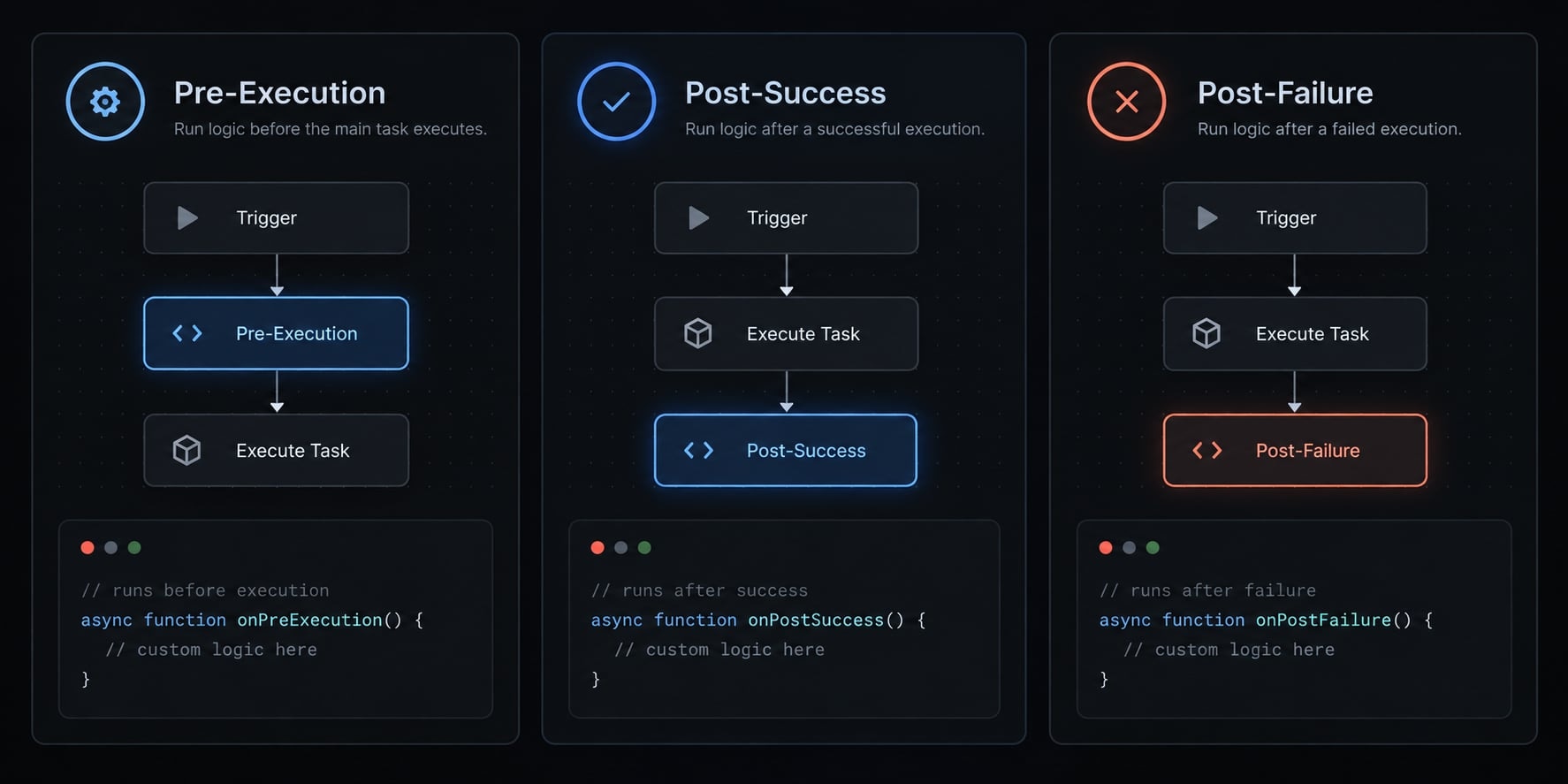
Simple selection rule:
- Before execution: use prevention or permission-related checks.
- After success: apply formatting and validation.
- After failure: inspect errors and provide recovery guidance.
Exit code 2 is event-specific. According to the official hooks reference, a PreToolUse command hook can block the pending tool call and return stderr to Claude.
For PostToolUse, exit code 2 returns stderr as feedback after execution. It does not reverse the completed action. The example uses it for hook/runtime failures, while ordinary lint findings use structured output with status 0.
Neither behavior turns a local hook into a complete security boundary.
Production best practices for reliable hooks
Reliable project-level hooks need narrow scope and predictable dependencies. Pin or document tool versions, retain the package lockfile, and review scripts as executable code.
Do not run full builds after every edit unless that cost is intentional.
Keep secrets out of settings, command arguments, output, and logs. Linter diagnostics can contain source fragments; truncation reduces volume but does not sanitize sensitive data.
Recommended performance model
Layer | Appropriate work |
|---|---|
Synchronous PostToolUse | Fast formatting, targeted linting, lightweight schema checks. |
Supported asynchronous/deferred execution | Longer checks whose delayed feedback is acceptable. |
CI/CD | Complete tests, builds, security scans, and release gates. |
Verify async hooks and their configuration against your installed Claude Code version before enabling them. Deferred feedback cannot enforce an immediate gate. Background checks may also observe files that have changed again.
CI/CD (continuous integration and delivery) remains the authoritative validation layer. Local hooks improve feedback speed; they do not prove release readiness.
Team standardization
- Commit shared settings and scripts to source control where policy permits.
- Keep personal overrides and generated logs separate.
- Document dependency installation and supported operating systems.
- Test malformed input, missing dependencies, lint failures, and paths containing spaces.
- Review hooks before enabling them in unfamiliar repositories.
- Preserve required CI checks when a local hook is temporarily disabled.
Document recovery: Identify the failing hook, restore dependencies or revert its configuration through the approved process, and rerun validation. Do not bypass managed restrictions.
Before rollout, record the Claude Code, Node.js, jq, Prettier, and ESLint versions alongside actual results. Consult the official release notes when behavior changes.
Frequently asked questions
Does Claude Code have onStart and onFinish hooks?
No. To implement equivalent functionality, map onStart to the SessionStart event and onFinish to the Stop event for turn-based completion, or use SessionEnd for full session termination. Use PostToolUse specifically for post-execution tasks like linting.
What exit code must a PostToolUse hook return to block an action?
In a PostToolUse hook, the tool has already executed, so you cannot block the operation retroactively. Using exit code 2 will flag a hook error to the agent, prompting it to adjust its strategy, but the original file change or command remains finalized.
Can a hook pause Claude Code until a human answers?
Yes. By attaching a hook to PreToolUse (before execution), you can wait for an external signal or human intervention before returning an allow/deny decision. PostToolUse is not designed for this, as it triggers only after the tool action has already finished.
Where should I configure my Claude Code hooks?
Configure hooks in your .claude/settings.json file for project-specific automation. For personal preferences, use your user-level configuration at ~/.claude/settings.json. Always ensure your script paths use environment variables like ${CLAUDE_PROJECT_DIR} to maintain portability across different development environments.
How do I troubleshoot a hook that is not running?
First, verify your configuration structure matches the required nested hooks array. Use the /hooks command within your Claude Code session to inspect mapped events. If the configuration is correct, test your script independently by piping a sample JSON fixture into your script via stdin to identify permission, dependency, or syntax errors.
Should I run full builds inside a PostToolUse hook?
No. Because PostToolUse hooks are often synchronous, running heavy tasks like full build suites will cause the CLI to stall after every edit. Use targeted checks, such as linting or formatting a single file, and leave comprehensive test suites or builds for your CI/CD pipeline.
Read more:
- Claude Code toolkit: Scale your AI development workflow easily
- Claude Code prompt engineering: A practical guide for developers
- Compact Claude Code: How to optimize context and stop drift
Conclusion
Ultimately, a Claude Code PostToolUse hook serves as a post-execution checkpoint rather than a prevention safeguard, relying on targeted checks, defensive parsing, and clear feedback to maintain code quality.
By keeping runtime errors separate, sanitizing diagnostics, and delegating exhaustive validation to your CI pipeline, you can safely automate formatting and linting without risking unintended side effects or stalled workflows.