Claude Code SvelteKit: Setup, instructions & safe workflows
Claude Code for SvelteKit: Setup guide, project instructions and safe workflows
To use Claude Code with SvelteKit reliably, open the relevant project directory, inspect installed versions and existing conventions, add concise project instructions, and validate every change. Start with the repository’s own scripts and architecture. No framework-specific plugin is required—MCP, skills, and hooks are optional extensions for specific needs.
A useful Claude Code SvelteKit workflow makes changes easy to inspect and reject - not merely easy to generate. A CLAUDE.md file helps preserve project decisions, while framework checks, behavioral tests, and human review establish acceptance. Begin with one bounded task before introducing additional automation.
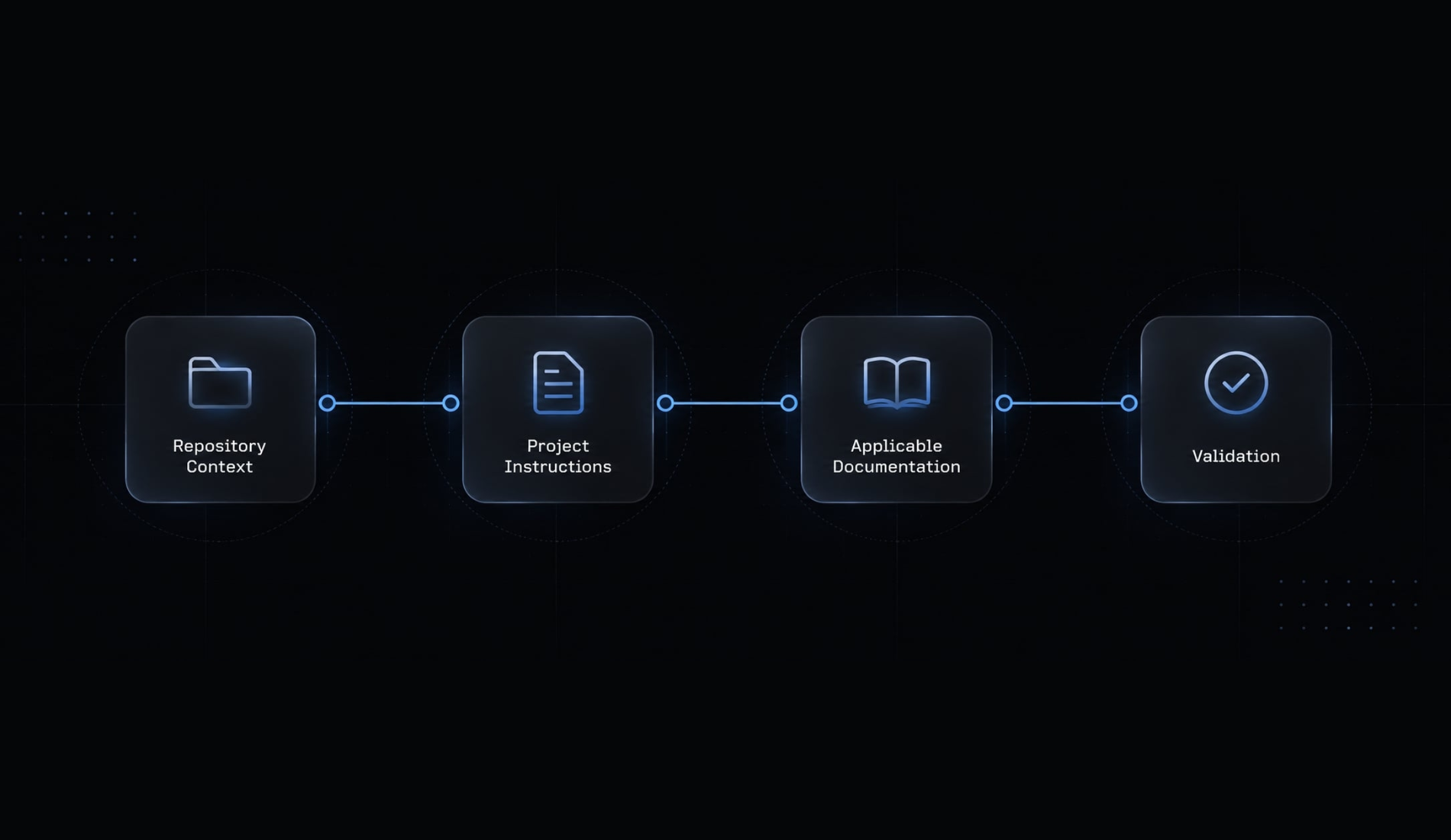
What Claude Code needs to work reliably with SvelteKit
Reliability depends on four layers: repository context, project instructions, applicable documentation, and validation. Extra tools help only when they address a gap in those layers.
Configuration | Priority | Purpose |
|---|---|---|
Relevant repository context | Essential | Establish versions, architecture, and constraints |
Launch from the project root | Recommended default | Keep initial context focused on the intended application |
Strongly recommended | Record repeatable project guidance | |
Documentation access through MCP | Optional | Retrieve relevant framework guidance |
Optional | Reuse task-specific instructions | |
Hooks and additional integrations | Optional | Automate approved checks or connect systems |
In a monorepo, choose the intended application directory while accounting for shared packages and workspace instructions.
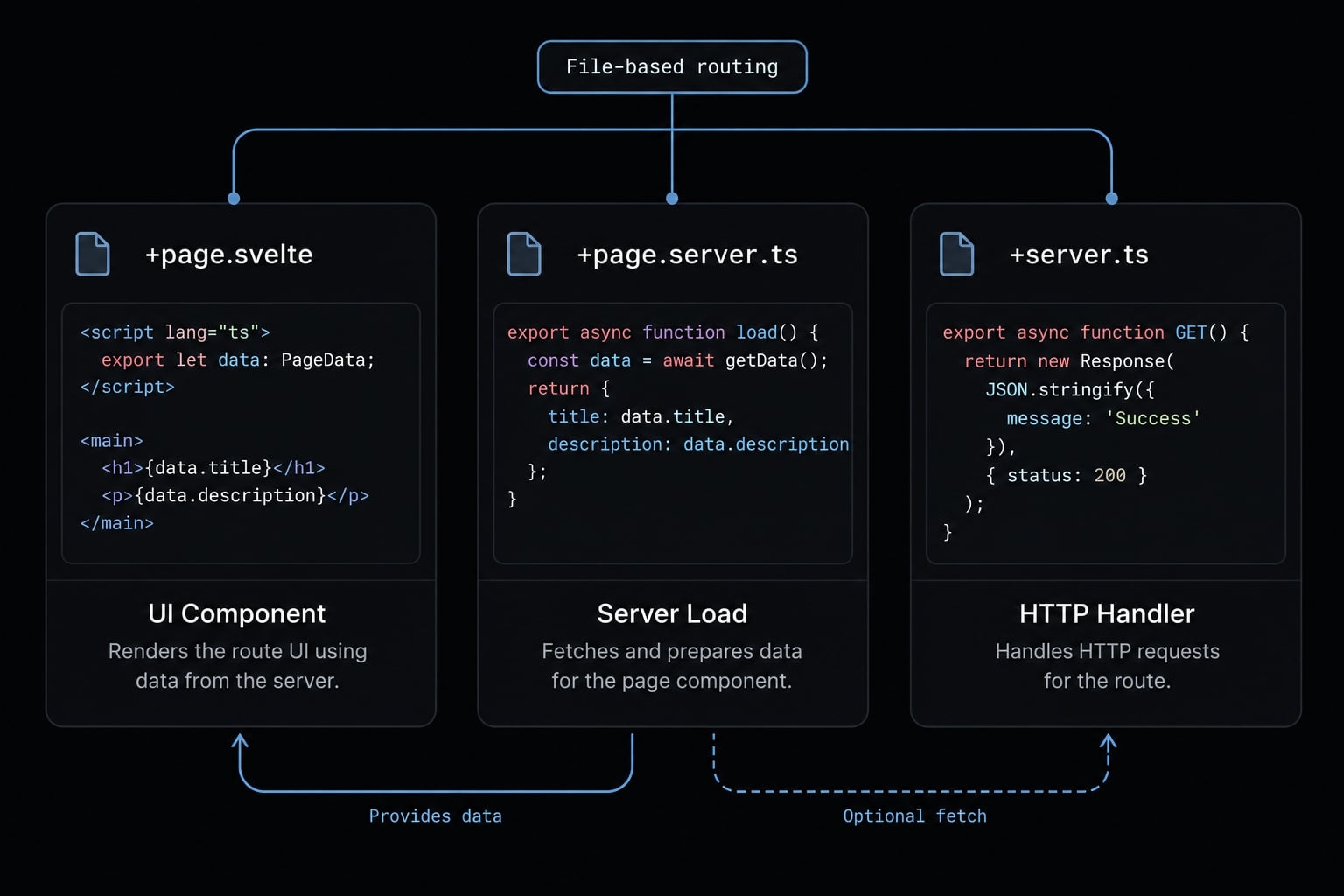
Understand the main sources of incorrect output
Common failure patterns in AI-generated SvelteKit code include:
- Component syntax inconsistent with the installed version or component mode (e.g., mixing legacy Svelte 4 reactivity with Svelte 5 runes).
- Confusing universal loading in
+page.ts, server-only loading in+page.server.ts, and HTTP handlers in+server.ts. - Exposing sensitive returned data despite keeping database imports server-side.
- Adding dependencies or unrelated refactors without approval.
- Passing compilation while failing business behavior.
For example, placing a database query in a universal load function is an architectural mistake, not just a syntax issue.
Choose the appropriate configuration level
- Inspect the repository and document its rules.
- Add documentation access for unresolved framework questions.
- Introduce skills for repeated tasks.
- Standardize only tools and checks that demonstrate value.
Prepare the SvelteKit repository before starting Claude Code
Establish a reversible starting point before allowing edits. Claude Code should already be installed and authenticated; installation is outside this guide’s scope.
- Inspect Git status and preserve existing work.
- Create a task branch.
- Confirm resolved versions and package-manager configuration.
- Install dependencies according to repository instructions.
- Run available baseline checks.
- Start Claude Code in the relevant project directory.
- Request inspection and a scoped plan before implementation.
Establish a clean baseline
Read package.json, the lockfile, workspace configuration, and contributor instructions. Record Claude Code, Node.js, package-manager, Svelte, and SvelteKit versions alongside the starting commit.
Dependency ranges alone do not establish resolved versions. Use the lockfile or the package manager’s installed-package report.
The standard Git commands below are for illustration only and do not constitute proof of execution. Choose an unused branch name and inspect existing changes first:
git status --shortgit switch -c task/sveltekit-scoped-change
Then run the actual scripts defined by the repository. For a pnpm project with a check script, that may be pnpm run check; neither pnpm nor that script is universal.
Record pre-existing failures separately. Inspect whether dependency installation changes the lockfile, and do not accept unexplained dependency churn.
Use an Inspection-First prompt
Inspect this SvelteKit repository without editing files. Identify resolvedSvelte and SvelteKit versions, the package manager, validation scripts,route/layout structure, and existing data-loading and form patterns.Check applicable project instructions and shared workspace conventions.For the requested task, list likely affected files, authorizationboundaries, uncertainties, and a short implementation plan. Separateobserved facts from assumptions and report existing working-tree changes.Do not install dependencies or make edits yet.
Keep the baseline log with the task record. It provides the comparison needed to distinguish existing problems from regressions.
Add a SvelteKit-Specific CLAUDE.md file
A SvelteKit CLAUDE.md file is a concise set of repository instructions that Claude Code can use when working in the project. Place it in the relevant project context and describe the stack, architecture, approval boundaries, and validation commands. It guides behavior; it does not enforce permissions or security.
Official Claude Code memory documentation describes project instruction files and their scope. In monorepos, inspect applicable parent and nested instructions before adding potentially conflicting rules.
Copy-Ready CLAUDE.md template
Replace the marked validation placeholder before adopting this proposed template:
# SvelteKit project instructions## Stack- Inspect package.json, the lockfile, and installed packages to determine Svelte/SvelteKit versions and the package manager.- Preserve the existing stack. Do not upgrade packages without approval.## Svelte conventions- Follow each component's existing mode and repository conventions.- Use runes only where supported and appropriate.- Prefer derived state over effects for ordinary computed values.- Preserve public props, events, accessibility, and observable behavior.- Consult applicable official Svelte/SvelteKit guidance when uncertain.- Do not migrate valid legacy components unless the task requires it.## Architecture- Respect +page.ts, +page.server.ts, +server.ts, and layout file roles.- Keep database access and private operations in server-only modules.- Return only necessary client-safe data from loads and actions.- Follow existing authentication, authorization, and tenant-scoping patterns.## Scope- Inspect relevant files before editing.- Propose a short plan for multi-file changes.- Avoid unrelated refactors and generated-file edits.## Approval- Obtain approval before dependency, authentication, database-schema, or deployment changes.- Never put secret values in instructions, examples, logs, or fixtures.## Validation- Approved commands: [REPLACE WITH EXACT REPOSITORY COMMANDS].- Format only intended changes using the repository-supported approach.- Run applicable checks and behavioral tests.- Report changed files and each check as passed, failed, or skipped.- Explain failures and skipped checks; never describe unrun checks as passed.
Customize the template
Adapt the instructions to observable repository facts:
- Replace every placeholder and remove unsupported assumptions.
- Add exact validation commands and their working directories.
- Document existing database utilities and authentication entry points.
- Identify approved form handling and data-loading patterns.
- Mark generated, protected, or deployment-sensitive directories.
- Remove conflicting rules, stale guidance, and sensitive information.
Avoid documenting an aspirational architecture as though it already exists. If the project uses established stores, do not introduce a blanket ban merely because Svelte 5 is installed.
Similarly, record remote-function conventions only when the repository actually uses them and its SvelteKit version supports the implementation.
Avoid overloading CLAUDE.md
Include | Avoid |
|---|---|
Project-specific architectural decisions | Entire framework documentation |
Exact checks and approval boundaries | Vague “follow best practices” rules |
Stable conventions and protected paths | One-off task requirements |
References to relevant local guidance | Secrets and stale instructions |
Keep temporary acceptance criteria in the task request. Review persistent instructions when dependencies or architecture change.
Permissions, isolated environments, continuous integration checks, and human review remain separate controls. An instruction saying “never expose secrets” cannot substitute for enforcing access restrictions.
Connect current Svelte documentation and optional skills
Official documentation access is the first useful addition when installed-version behavior is uncertain. It supplements repository inspection; it does not override local architecture or establish which version the project runs.
Add the official Svelte MCP
MCP (Model Context Protocol) lets Claude Code access tools and resources exposed by a configured server. Official Svelte AI documentation identifies @sveltejs/mcp as its MCP package. Its documented capabilities include:
list-sections: Ddiscover relevant documentation sections.get-documentation: Retrieve selected guidance.svelte-autofixer: Analyze Svelte code and suggest corrections.
Use the official Svelte MCP setup instructions together with Claude Code’s MCP documentation. A local stdio configuration runs a local process; a remote HTTP configuration connects to the hosted service. These are alternatives, not two registrations required for the same workflow.
No installation command is presented as tested here. Confirm the package identity, transport, configuration scope, and syntax against your installed Claude Code version before registration.
The local npx approach downloads and executes package code. Review that execution path and organizational policy before approving it.
After configuration, inspect connection status and available tools. Request a small documentation lookup before permitting implementation. Component analysis provides supplementary feedback, not definitive proof of accessibility, authorization, or runtime correctness.
Install community SvelteKit skills when repeated guidance Is needed
Skills provide reusable task guidance. Consider them when developers repeatedly restate the same form, data-loading, or component-review requirements.
Before adopting a community package, inspect ownership, recent activity, compatibility, marketplace identity, and installation instructions. Review bundled scripts, tools, hooks and requested permissions.
Test the package in a disposable environment before team-wide adoption. No community installation command is included here because its identity and installation behavior have not been independently verified.
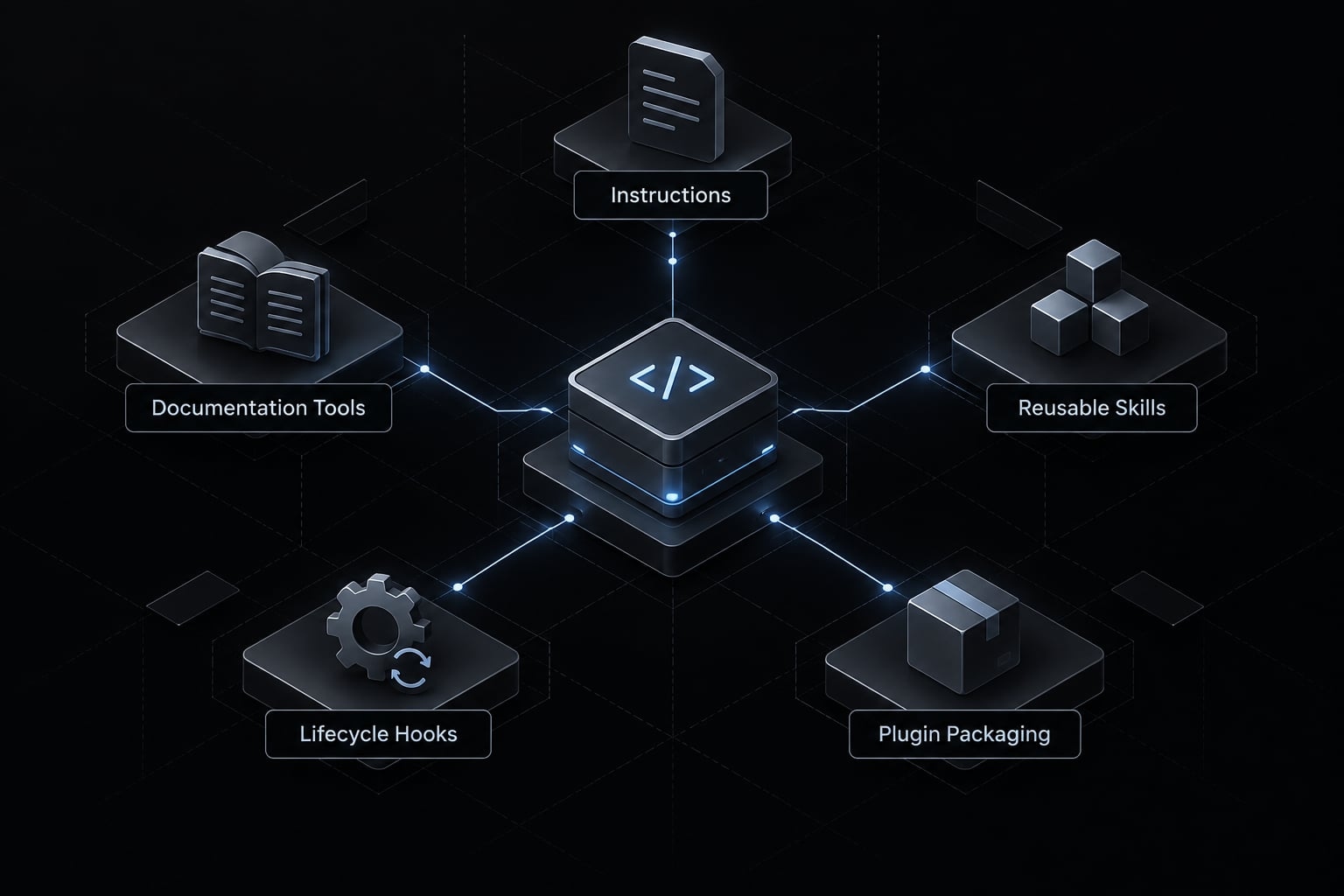
Choose between MCP, Skills and Hooks
Need | Tool | Limitation |
|---|---|---|
Persistent project rules |
| Guidance, not enforcement |
Relevant documentation | Official Svelte MCP | Must match the installed version |
Reusable task guidance | Skills | Automatic selection can vary |
Lifecycle automation | Hooks | Requires explicit configuration and review |
Packaging and distribution | Bundles introduce additional trust decisions | |
External systems | Relevant MCP integration | Access and data exposure require review |
Try explicit skill invocation before introducing activation hooks. A directory named .claude/hooks/ does not itself register a hook.
Use Claude Code for common SvelteKit tasks
Effective requests specify outcome, scope, constraints, and acceptance checks. Expected file locations make architectural mistakes easier to identify before reviewing implementation details.
The following examples are proposed tasks, not demonstrated implementation results.
Create a route with a form action
Task: Add /posts/new to an internal publishing application.
Prompt:
Inspect existing form and database patterns, then implement /posts/newusing a server-side form action. Validate input on the server, preservesafe submitted values after errors, and enforce existing publishingpermissions. Keep database operations private. Add no dependencieswithout approval. Preserve established navigation and enhancementbehavior. Run applicable checks and report untested paths.
Expected files:
src/routes/posts/new/+page.sveltesrc/routes/posts/new/+page.server.ts
Validation: Exercise empty input, invalid input, unauthorized submissions, successful creation, and expected navigation. Test progressive enhancement with and without JavaScript where required.
Official SvelteKit form-action documentation explains server handling and enhancement. Client validation improves usability but cannot replace server validation. Avoid broad exception handling that unintentionally swallows framework redirects.
Load Database-Backed data on the server
Task: Build a tenant-scoped product catalog for an internal operations application.
Prompt:
Use the existing database utility to load authorized products througha server load function. Derive tenant access from the existing trustedsession and permission model. Return only necessary client-safe fields.Implement empty and failure states. Do not return credentials, internalnotes, or unnecessary account data. Add cross-tenant access coverageand run relevant checks.
Expected files:
src/routes/products/+page.server.tssrc/routes/products/+page.svelte
Validation: Confirm allowed access, cross-tenant denial, empty results, and controlled database failures.
Official SvelteKit loading documentation distinguishes universal from server-only loads. +page.ts can execute on the server and in the browser; +page.server.ts executes only on the server.
However, returned server-load data can reach the browser. Follow the installed version’s supported serialization rules rather than assuming a universal JSON-only restriction.
Refactor a component to current Svelte 5 patterns
Task: Update one team-dashboard component without changing its public behavior.
Prompt:
Inspect this component's mode, public props/events, and consumers.Propose a scoped Svelte 5 refactor supported by the installed version.Preserve behavior and accessibility. Prefer derived state over effectsfor computed values, and avoid unnecessary global state. Consult officialguidance for ambiguous syntax. Validate reactivity, rendering, andexisting interactions without migrating unrelated components.
Expected files: The selected component and directly relevant tests. Caller changes require an explicit explanation.
Validation: Check prop updates, computed values, interactions, focus behavior, and server-rendered output where applicable.
Svelte 5 supports legacy components and stores. Their presence does not automatically justify migration.
Example | Negative case | Expected outcome |
|---|---|---|
Publishing form | User lacks permission | No post created |
Product catalog | Different tenant requested | No unauthorized records returned |
Dashboard component | Props change after initial render | Display updates correctly |
Ask Claude to review its own implementation
Review the diff for file placement, server/client separation, versioncompatibility, accessibility, new dependencies, unrelated edits, missingtests, and failure handling. Return findings with file references andseverity before making further edits.
Self-review supplements independent review. It does not establish that the original assumptions were correct.
Validate and secure AI-Generated SvelteKit changes
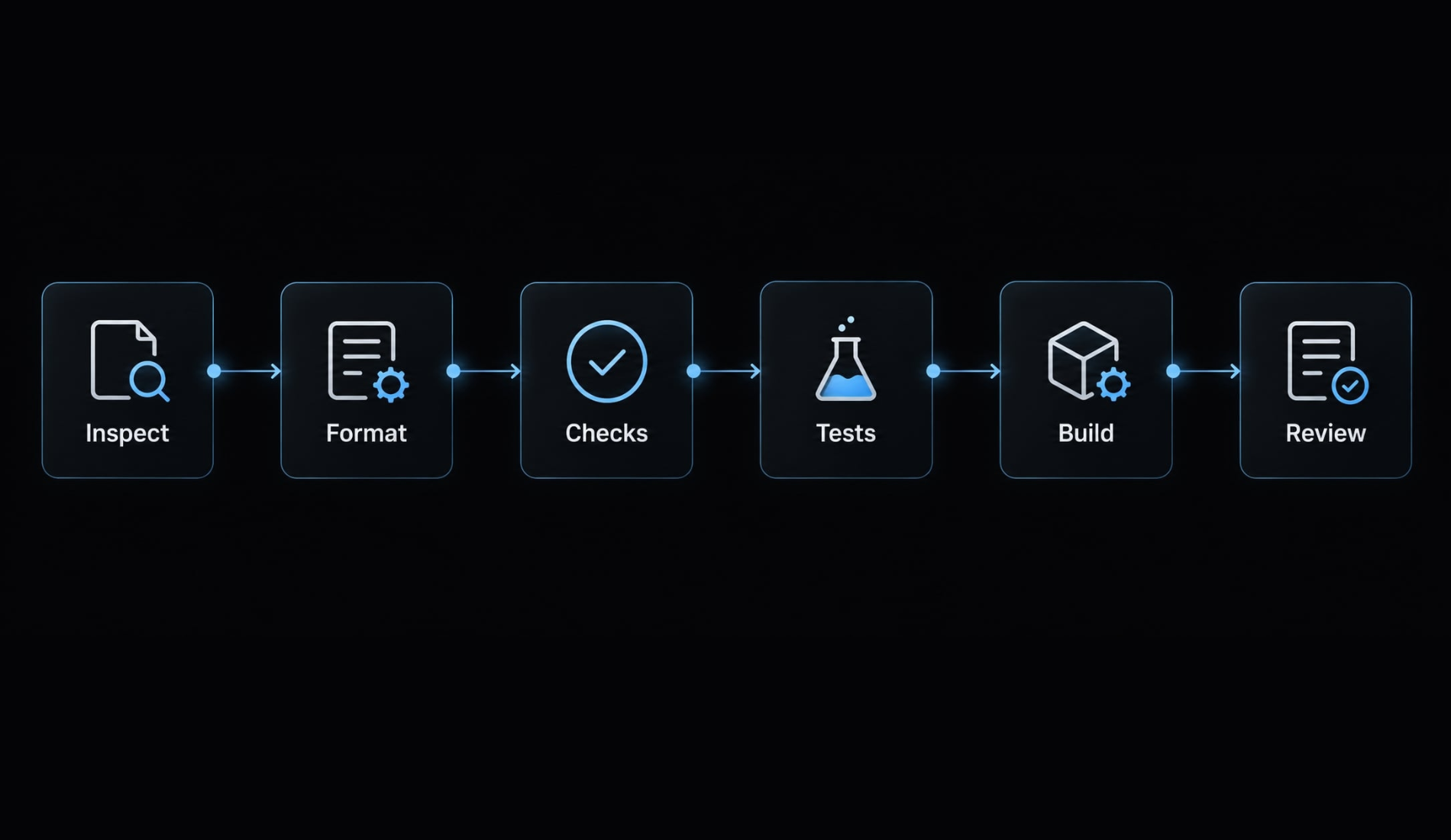
Generated code remains a draft until checked. Use this acceptance sequence:
- Inspect changed files.
- Format only intended changes.
- Run type and Svelte checks.
- Run relevant tests.
- Run the production build.
- Review the final diff and manually exercise the affected flow.
Run the Project’s existing checks
Read actual package.json scripts instead of assuming format, lint, or test exists. Some projects invoke svelte-check through a check script, potentially after SvelteKit synchronization; inspect the definition.
Framework validation identifies structural and type problems. It does not prove that a publishing permission or tenant filter works.
Use the repository-supported method for formatting selected files. A project-wide formatter can obscure the meaningful diff.
Record results explicitly:
Check status | Required reporting |
|---|---|
Passed | Exact command and successful result |
Failed | Command, relevant error, and baseline comparison |
Skipped | Command or check, reason, and remaining uncertainty |
This table defines reporting labels; it is not a completed test report. A blocked database test remains skipped, not implicitly passed.
Review SvelteKit security boundaries
Verify that:
- Private environment variables and server-only imports remain private.
- Returned load/action data excludes unnecessary sensitive fields.
- Authentication establishes identity; authorization separately permits the operation.
- Actions and endpoints validate untrusted input.
- Logs and errors do not reveal secrets.
- Database, authentication, and deployment changes receive explicit approval.
For multi-tenant features, attempt access using another tenant’s resource identifier. Hiding records in the interface is not access control.
Official SvelteKit server-only module protections help detect prohibited imports. They do not prevent developers from returning sensitive database fields.
Inspect the final diff before acceptance
Inspect task scope, package and lockfile changes, configuration changes, unfinished TODOs, and placeholder logic. Keep commits small and reversible.
Acceptance gate: A scoped diff, documented checks, an exercised critical flow, reviewed security boundaries, and approved sensitive changes.
Build success is not a security audit. Unresolved critical failures or untested access boundaries should block acceptance.
Troubleshoot common Claude Code and SvelteKit problems
Diagnose context, version, scope, and tooling separately. Start with the smallest correction rather than adding another integration.
Problem | Likely cause | First fix |
|---|---|---|
Syntax conflicts with component mode | Incorrect version or mode assumption | Inspect resolved versions and nearby components |
Incorrect route file | Universal/server roles misunderstood | State execution requirements and expected file |
Skill not selected | Scope, availability, or relevance mismatch | Verify availability; invoke explicitly |
Excessive documentation context | Retrieval too broad | Request only relevant sections |
Unrelated edits | Scope or acceptance criteria too loose | Specify allowed files and excluded work |
Build passes, behavior fails | Missing behavioral coverage | Reproduce the failing flow |
Private data becomes browser-visible | Unsafe imports or returned fields | Inspect the boundary and minimize returned data |
Fix unreliable skill activation
Use a short escalation path:
- Verify installation, availability, and configuration scope.
- Invoke the skill explicitly where supported.
- Improve the task description and skill relevance.
- Consider an evaluation step or hook only for a repeated, observed problem.
A “forced-eval hook” is a community pattern, not a mandatory Claude Code feature or guaranteed selection mechanism. Hooks can execute configured automation; they cannot guarantee the model’s choices.
Correct version hallucinations
Inspect resolved package versions, capture the exact error, and identify the relevant file. Consult applicable official guidance, make the smallest correction, and rerun the failing check plus the affected behavior test.
Avoid blanket rules copied from older tutorials. For example, Svelte documentation notes that derived values can be reassigned in supported newer versions; “all $derived values are always read-only” is inaccurate.
Likewise, stores are not prohibited simply because a component uses runes. Diagnose the specific incompatibility instead of imposing an unnecessary migration.
Reduce excessive tooling
Remove redundant integrations, narrow documentation retrieval, and review project scope. Retain tools that improve a demonstrated task.
A smaller approved toolset can be easier to understand, secure, and maintain than several overlapping plugins.
Frequently asked questions
What context and tooling does Claude Code need for SvelteKit projects?
Reliable integration requires repository context, concise CLAUDE.md instructions, and local validation scripts. The official Svelte MCP, skills, and hooks are optional additions. Optional tools like community skills and hooks can be added as project complexity grows.
How does CLAUDE.md improve Claude Code performance?
CLAUDE.md stores persistent project guidance that aligns AI outputs with your codebase rules. By recording resolved versions, component conventions, file roles, and validation commands, you reduce version and routing mistakes, though checks and review still decide acceptance.
Which tools should I choose: MCP, Skills, or Hooks?
Choose based on your workflow bottleneck: use official Svelte MCP for fetching updated framework documentation, community skills for repeatable task execution, and hooks for automated lifecycle events.
Why does Claude Code sometimes mix legacy Svelte 4 and Svelte 5 syntax?
This usually happens when the model assumes a version or component mode without checking. Record the resolved Svelte version in CLAUDE.md, ask Claude to follow each component’s existing mode, and run the project’s Svelte checks to catch mismatches.
What validation steps should I follow before accepting code changes?
Never accept AI-generated code without a human review. You should inspect the diff for scope creep, verify that the code complies with your project's pnpm or npm scripts (such as svelte-check or pnpm build), and manually exercise the affected business flow in your application.
How do I troubleshoot hallucinated versions or incorrect route file roles?
Start by verifying your resolved package versions and ensuring the agent is targeting the correct route files (+page.server.ts vs +page.ts). Consult official framework documentation, make small, surgical corrections, and rerun your project-specific validation scripts to confirm the fix addresses the issue without introducing new regressions.
Read more:
- Claude Code OWASP skills: Secure implementation and best practices
- Connect Notion to Claude Code: Official Notion MCP setup guide
- Connect GitHub MCP to Claude Code: Step-by-step guide
Conclusion
A reliable Claude Code workflow for SvelteKit starts with ground-truth repository context, not a bloated tool stack. Inspect resolved versions, preserve existing work, document concise instructions in CLAUDE.md, and keep implementation scope narrow. Validate framework compatibility separately from runtime behavior and authorization limits.
Treat CLAUDE.md as guidance, documentation tools as supporting context, and generated code as a draft requiring review. Accept changes only after reviewing the diff, exercising the affected flow, and verifying security boundaries.
If you want to reuse this workflow across projects, AgentKit packages skills, subagents, and review workflows for Claude Code, Codex, and other supported coding agents (Cursor and DeepSeek Harness in beta). It supports the process above; it does not replace your repository checks or human review.