Claude Code skill collections: How to evaluate them safely
Claude Code Skill collections: How to evaluate them before you install anything
Randomly installing Claude Code skill collections often leads to token bloat, routing confusion, and inconsistent outputs. To get real automation value without extra prompt overhead, you need a strict evaluation filter. This guide covers how to safely review skill collections, which categories are actually worth testing, and when to move beyond public options to custom systems.
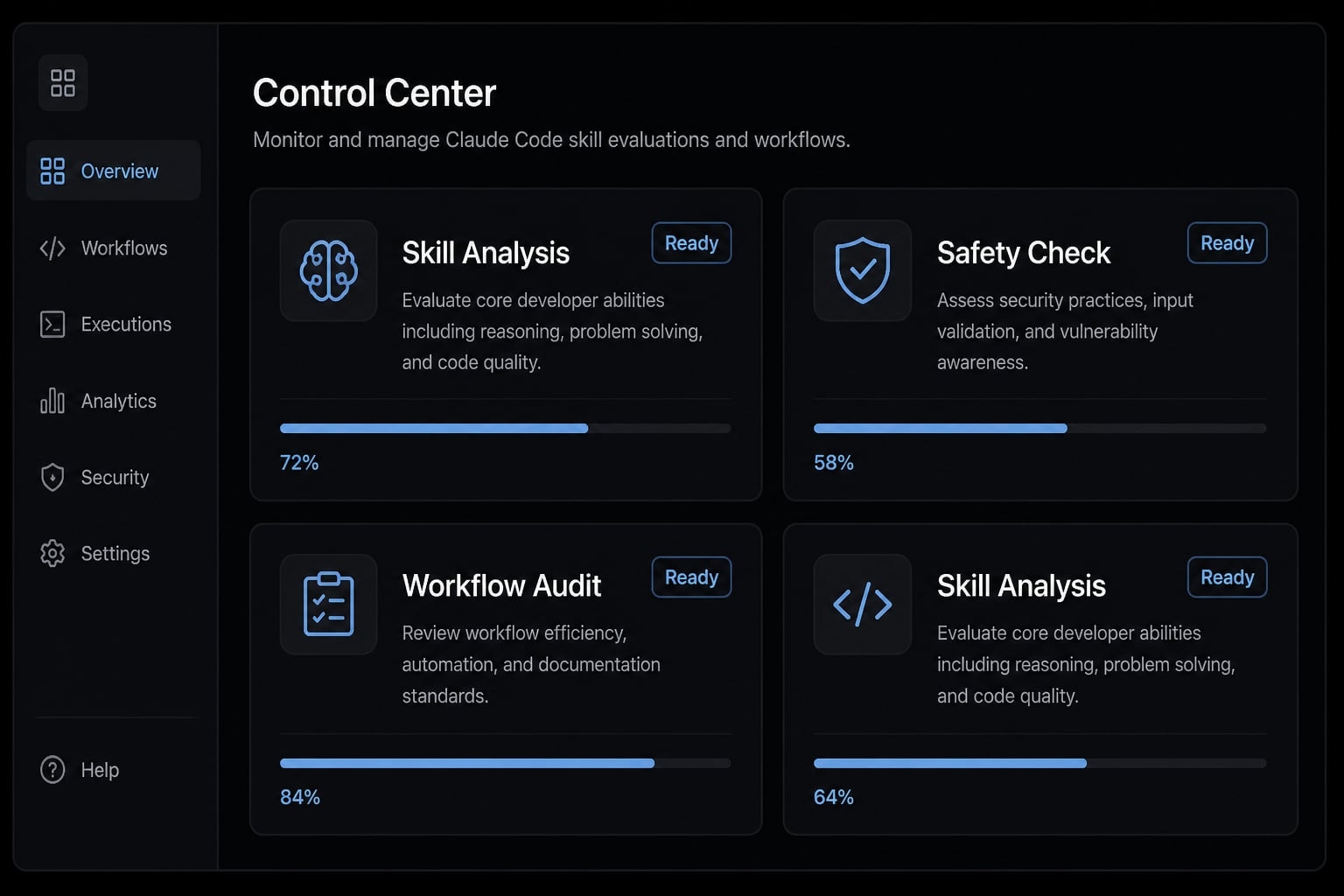
What Claude Code skill collections actually are
Claude Code skill collections are organized sets of reusable skills that group related workflow instructions, usually around a role, domain, or repeatable operating pattern. Instead of installing one isolated behavior at a time, users adopt a structured package of Agent Skills that can improve consistency, reduce repeated prompting, and support cleaner workflow execution.
A single skill can be useful. A collection becomes valuable when the goal is repeatability. In practice, teams usually run into the same issue: One good skill helps once, but scattered skills with overlapping scopes are hard to govern. That is why Claude Code skill libraries are often evaluated less like prompt packs and more like lightweight workflow assets.
Most skills are defined in a SKILL.md file that explains when they should be activated and what they should do. In high-quality Claude Code skill collections, these files are organized clearly, making each skill’s purpose, scope, and limitations easy to understand.
A standalone skill solves one recurring task; a collection organizes reusable workflow logic
- A standalone skill usually targets one repeated task, such as debugging, code review, or document formatting.
- A collection groups multiple skills around a workflow, role, or operating model.
- The difference matters because teams do not just need functionality. They need consistency.
- For solo users, a single skill may be enough. For shared environments, Claude Code skill collections reduce re-explaining expectations.
- Well-structured Claude Code skill libraries also make onboarding faster when new contributors need the same operating patterns.
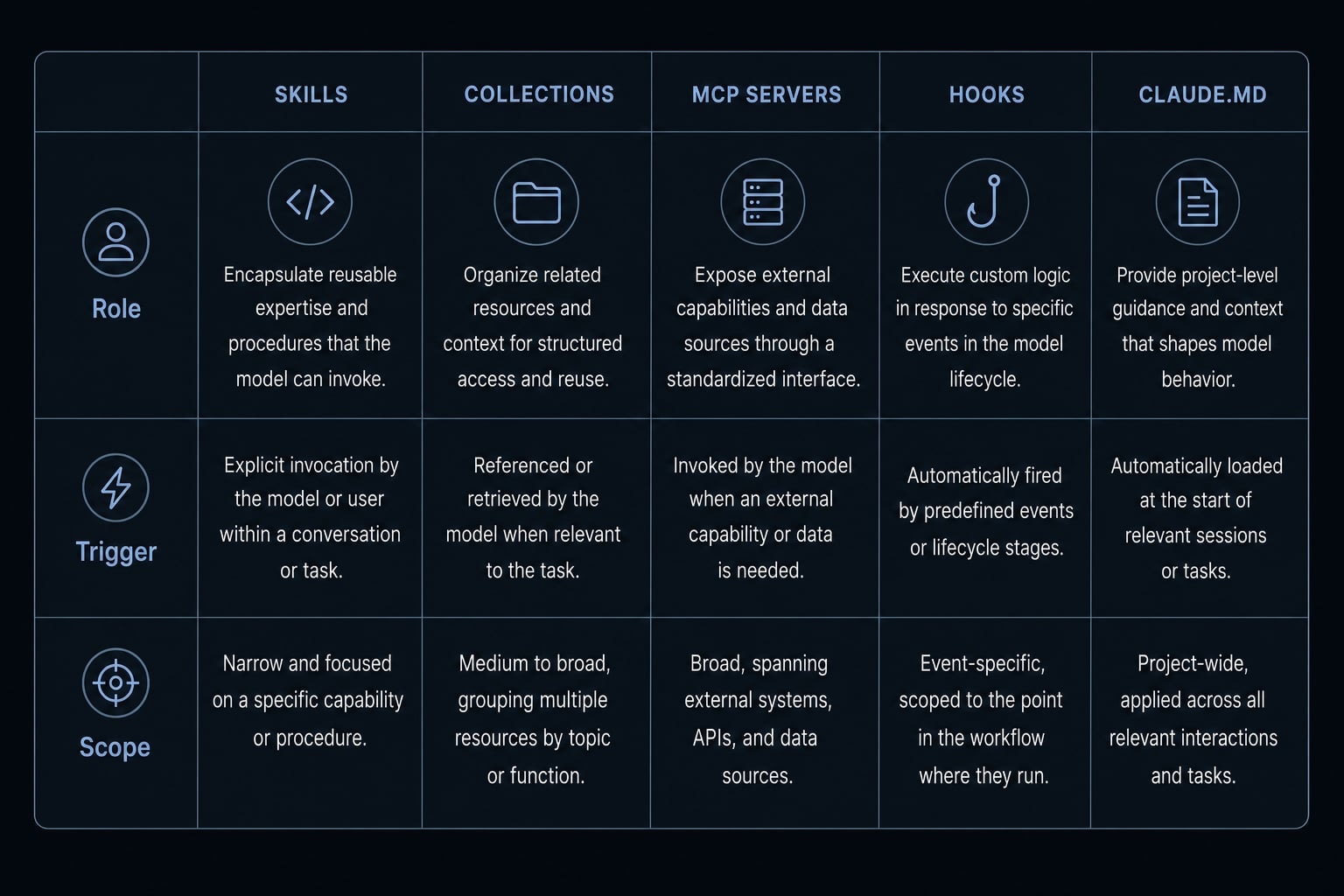
Skills vs MCP vs hooks vs CLAUDE.md
Component | What it does | When it matters | What it is not |
|---|---|---|---|
Skill | Reusable instructions for a specific task or procedure. | When you want on-demand behavior with scoped guidance. | Not a new tool capability. |
Collection | A grouped set of skills organized by workflow or role. | When repeatability matters across tasks or people. | Not just a random folder of prompts. |
Adds external capability through tools and integrations. | When Claude needs access to browsers, data sources, or systems. | Not the same as instruction logic. | |
Runs deterministic actions at defined lifecycle moments. | When behavior must happen reliably, not optionally. | Not soft guidance. | |
Stores always-on project context and conventions. | When baseline project knowledge should persist. | Not a routing-based skill system. |
A common failure pattern is mixing these primitives together. Users expect a skill to behave like an MCP tool, or they rely on a hook when they actually need optional guidance. The difference between Claude Code skills and MCP servers is especially important: Skills teach behavior, while MCP adds capability. Collections improve consistency, but they do not create magic capability on their own.
The 4 main types of Claude Code skill collections
Not all collections solve the same problem. The useful distinction is not “popular versus obscure.” It is whether the collection matches your workflow maturity and the kind of agentic workflow you are trying to standardize.
- Official or standards-aligned collections.
- Community-built general-purpose collections.
- Role-specific collections.
- Production-ready workflow kits for teams.
These four categories cover most of the market for curated collections of Claude Code skills. Choosing between them is usually more productive than browsing random repositories by star count.
1. Official or standards-aligned collections
This is often the safer starting point.
- Best for users who want predictable structure and lower ambiguity
- Typically clearer in naming, activation logic, and documentation
- Useful for cautious adopters testing a few workflows first
- Often better for context window management because scope tends to be tighter
The tradeoff is that official or standards-aligned options may feel narrower. They are usually less experimental and may offer less capability uplift than fast-moving community repos.
2. Community-built general-purpose collections
These are where experimentation happens fastest.
- Broad variety across coding, planning, research, and operational tasks.
- Good for exploring multiple workflows quickly.
- Often the first place users encounter highly visible curated collections of Claude Code skills.
- Can expose creative operating patterns before official ecosystems catch up.
The downside is quality variance. A common issue is vague triggers, overlapping instructions, or collections that try to do too much. Review burden is higher, especially when the collection claims broad productivity gains without clear boundaries.
3. Role-specific collections
These become valuable when the collection encodes real domain judgment.
Examples often include:
- Testing and verification.
- Design systems.
- Accessibility review.
- Security analysis.
- Content operations.
The best role-specific packs capture encoded preference and decision criteria that generic prompting misses. The weak ones are just generic prompt bundles pretending to be specialized.
4. Production-ready workflow kits for teams
This category matters when individual experimentation becomes team operations.
- They usually go beyond folders of skills.
- They may include conventions, reusable procedures, integrations, and governance.
- Better fit for multi-user agentic workflow environments.
- More useful when onboarding speed and repeatability matter.
The limitation is fit. These systems are more opinionated and can be excessive for casual solo use. Still, when a team needs shared standards, they are often more durable than loose public repos. Bigger is not better, the best category depends on what operating problem you need to solve.
How to evaluate a Claude Code Skill collection before installing it
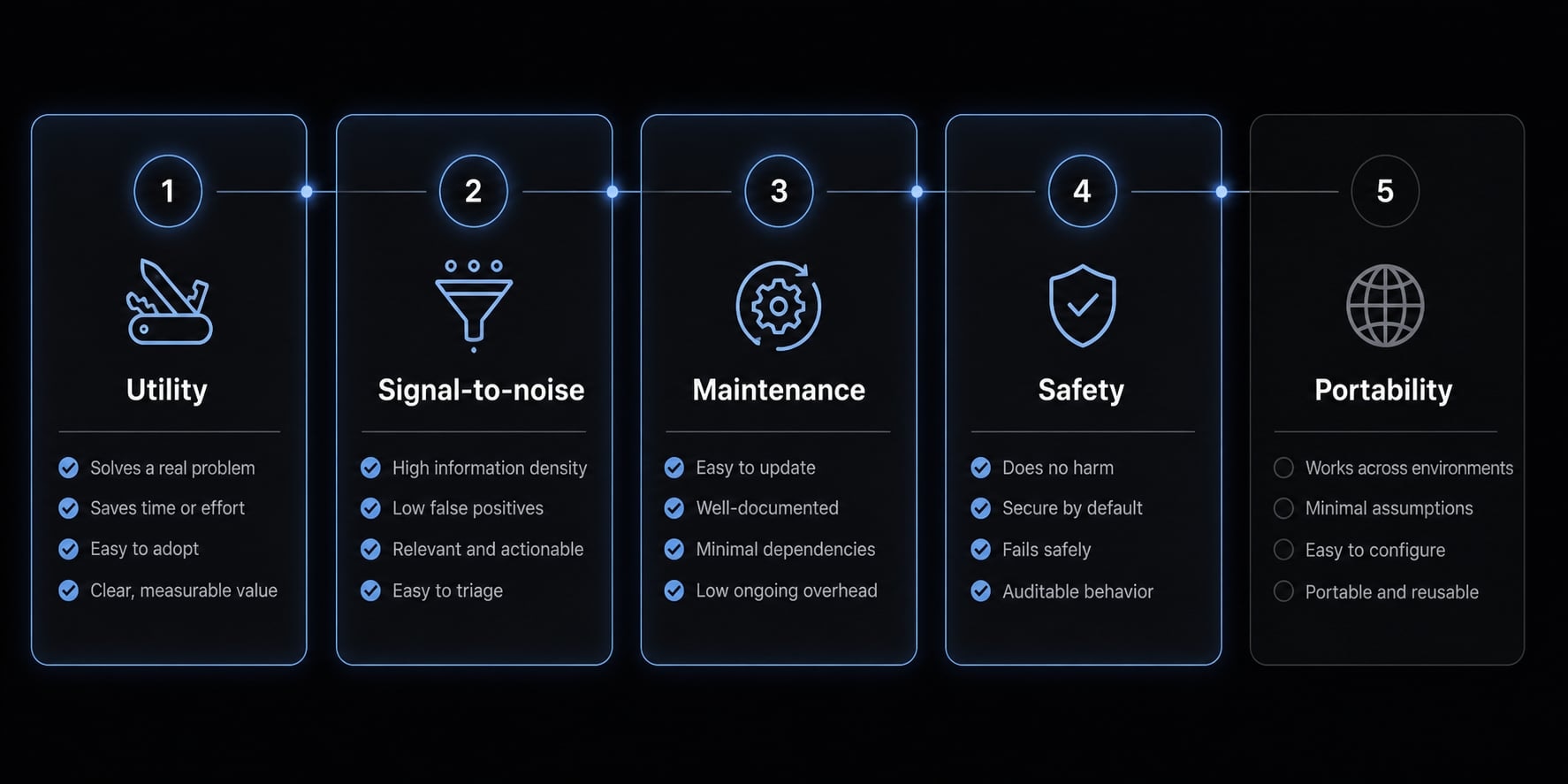
The best practices for installing Claude Code skills safely start with one question: Does the collection solve a real workflow gap, and are the instructions scoped cleanly enough to avoid confusion later? A collection should be reviewed like a lightweight workflow asset, not casually installed like harmless prompt text.
- Utility.
- Signal-to-noise.
- Maintenance.
- Safety.
- Portability.
If a collection fails two or three of these checks, it usually becomes overhead fast. The issue is rarely installation alone; it is scope, overlap, and maintainability.
Utility test
Start with usefulness, not novelty.
Check for:
- A specific workflow gap the collection fills.
- Clear task boundaries.
- Obvious trigger conditions.
- Real improvement in speed, consistency, or safety.
- Relevance to your daily work rather than occasional curiosity.
Good sign: A collection focused on testing, review, design handoff, or documentation continuity.
Red flag: Claims like “general productivity” or “does everything” with no routing logic.
If you cannot explain when a collection should activate, it is best to hold off on installing it.
Signal-to-noise test
More instructions do not create more value. In practice, bloated collections often increase execution latency, create routing ambiguity, and make daily use less predictable. Good collections respect progressive disclosure, meaning detailed instructions load only when relevant instead of polluting every session.
A common mistake is creating a massive collection with overlapping skills, overly broad triggers, and lengthy instructions that mostly repeat what Claude already does well. That raises token cost without improving outcomes.
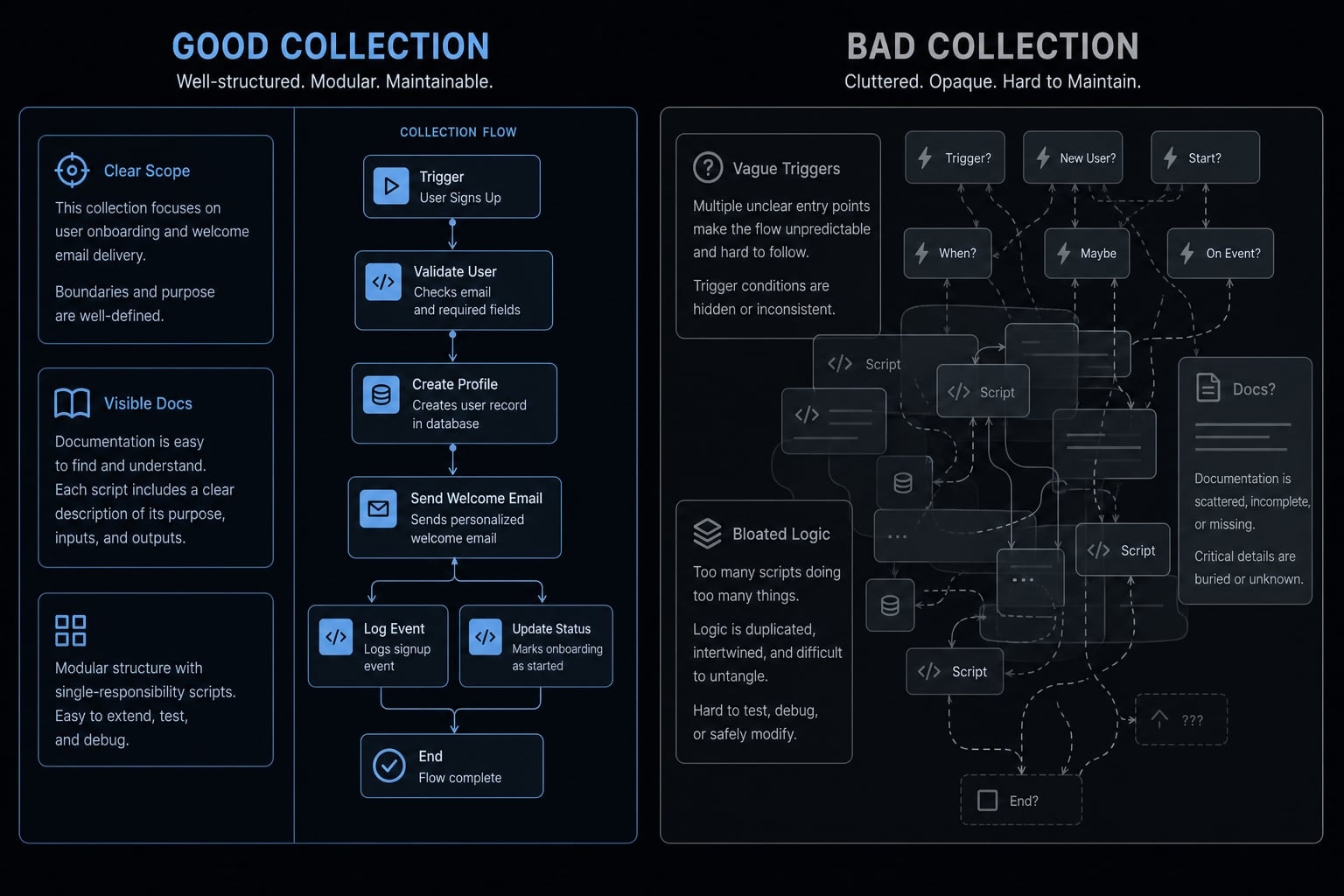
Example of a bad collection pattern:
- Vague triggers.
- Overlapping instructions.
- Hidden scripts.
- No examples.
- Broad claims of handling “all development tasks”.
Maintenance and documentation signals
Collections age quickly if they are not maintained.
Check for:
- Clear install instructions.
- Usage examples.
- Consistent naming.
- Scope boundaries for each skill.
- Recent updates.
- Signs of active maintenance.
- Readable SKILL.md files instead of cryptic descriptions.
Good sign: You can tell what each skill is for in under a minute.
Red flag: Broken docs, missing examples, or unclear activation conditions.
For team use, maintenance quality matters almost as much as functionality.
Safety review
Public skills should be reviewed like code, not like harmless snippets. This is the most practical interpretation of the best practices for installing Claude Code skills safely.
Inspect explicitly:
- Scripts included in the collection.
- File system actions.
- Permissions assumptions.
- External calls.
- Repository provenance.
- Hidden dependencies.
- Instruction patterns that try to override safeguards.
Good sign: Transparent behavior and deterministic logic where actions should be predictable
Red flag: Unclear shell behavior, external downloads, or instructions that hide what is being executed
If a collection contains scripts, review them line by line.
Portability and lock-in
A useful collection should travel reasonably well across projects or environments. That is where portability and evals matter. If a workflow only works in one narrow repo setup, adoption becomes fragile. Collections with simple evaluation cases are easier to validate across teams and scenarios.
Takeaway: Install slowly. The best collections earn trust through utility, low noise, visible maintenance, safe behavior, and reasonable reuse.
Recommended Claude Code skill collections by use case
This is not a “largest repo wins” list. The best Claude Code skills are usually the ones that fit a real workflow cleanly, not the collections with the most files. For real developer productivity tooling and operational use, shortlist by use case first.
- Developers.
- Testing and verification.
- Design and product.
- Documentation and file workflows.
- Growth, research, and operations.
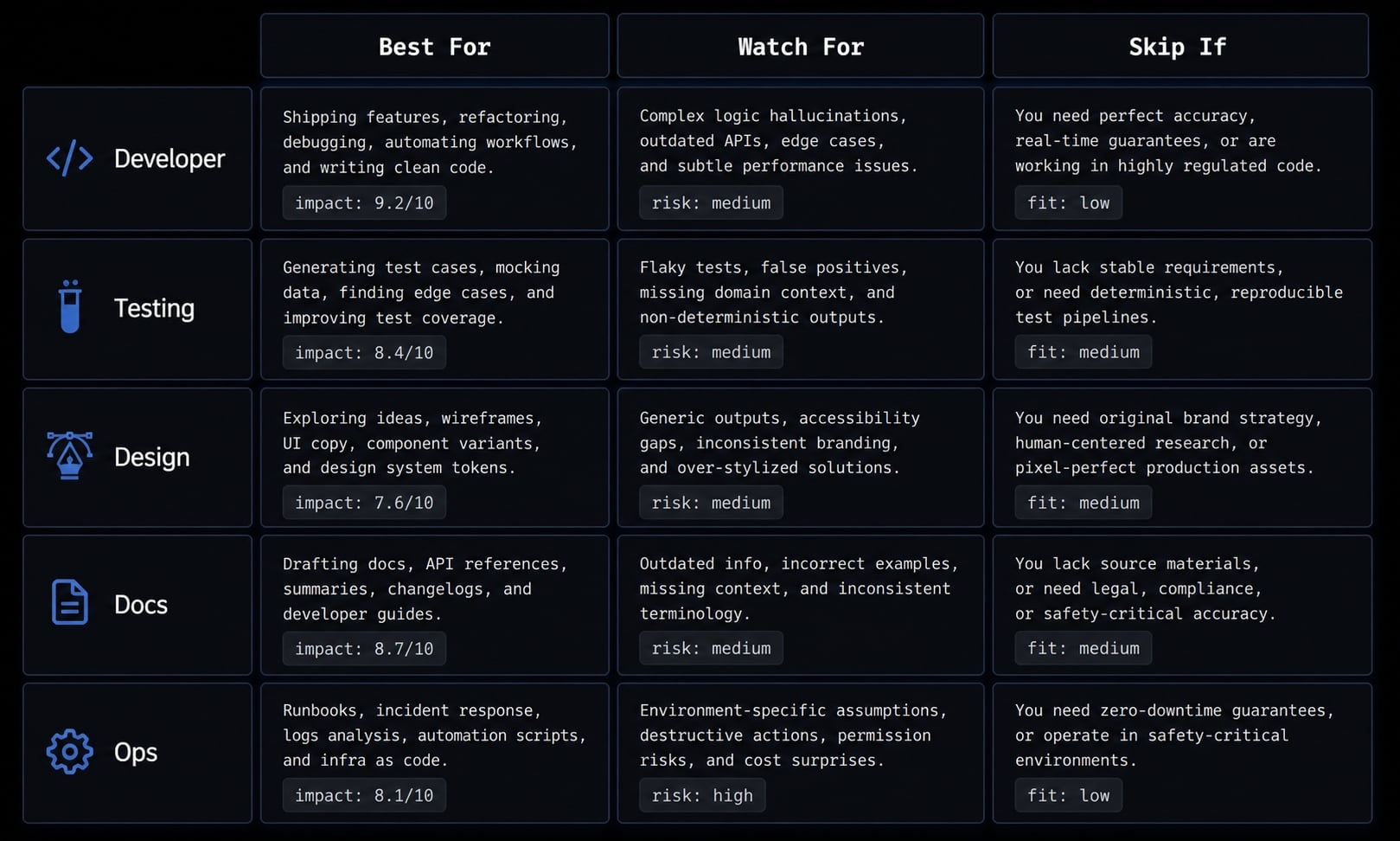
Best starting collections for developers
This category is the most practical entry point for many users exploring Claude Code skill collections.
Examples to evaluate:
- Planning and task decomposition packs.
- Debugging and four-step diagnosis workflows.
- TDD-oriented skills.
- Code simplification and refactor hygiene collections.
- Review checklist packs.
- Starting references from the Anthropic agent skills repository.
Best for:
- Solo developers.
- Indie makers.
- Small engineering teams.
- Users standardizing planning, debugging, and review behavior.
Watch for:
- Large packs that combine planning, coding, review, deployment, and brainstorming without clean routing.
- Style-heavy instructions that add overhead but little execution value.
Why it stands out:
- Clean development-focused collections often improve consistency quickly.
- They map well to repeatable coding tasks.
- Many of the best Claude Code skills start here because the use cases are frequent and easy to validate.
Skip if: You mainly need browser testing, document workflows, or marketing operations.
Best collections for testing and verification
Verification-heavy collections are often stronger than style-only packs because they reduce ambiguity. They are closer to measurable outcomes.
Examples to evaluate:
- Playwright-oriented testing packs.
- Regression and UI verification skills.
- Browser-based review flows.
- Issue reproduction procedures.
Best for:
- Teams shipping UI changes frequently.
- Workflows where confidence matters more than output style.
- Users who want repeatable test automation support.
Watch for:
- Collections that promise comprehensive QA but rely mostly on vague review language.
- Packs that lack examples or fail to define pass/fail criteria.
Why it stands out:
- Testing and verification workflows tend to outperform generic instruction packs.
- They often provide clearer operational value than broad “productivity” collections.
Skip if: Your main need is ideation, planning, or lightweight code assistance.
Best collections for design and product work
This category is growing fast, especially where teams need better research synthesis, accessibility checks, and clearer handoff routines.
Examples to evaluate:
- Design system review collections.
- Accessibility and UX audit skills.
- Research synthesis packs.
- Workflows for automating design handoffs with Claude Code skills.
- Product strategy or planning support collections.
Best for:
- Product teams.
- Designers working with engineering.
- Teams that repeat the same audit and handoff patterns.
Watch for:
- Generic “design genius” prompt bundles with no real frameworks.
- Packs that confuse visual taste with operational design process.
Why it stands out:
- Strong design collections encode structure, not hype.
- They can improve handoff clarity, research consistency, and review coverage.
Skip if: You only need coding and test support with no product or design collaboration layer.
Best collections for documentation and file workflows
These packs are useful when recurring deliverables matter more than code generation itself. Examples to evaluate:
- Document generation workflows.
- File transformation and parsing skills.
- Handoff continuity packs.
- Session compression and continuation helpers.
Best for:
- Teams creating recurring reports, specs, summaries, or handoff docs.
- Users who frequently need continuity across sessions.
Watch for:
- File workflow packs that depend on unclear scripts or undocumented external tooling.
- Document skills that are hard to reuse across projects.
Why it stands out:
- Documentation workflows are often easy to standardize.
- They reduce repeated prompting around structure and formatting.
- Well-scoped packs can make Claude Code skill collections useful beyond coding alone.
Skip if: Your work rarely involves reusable deliverables or cross-session continuity
Best collections for growth, research, and operational workflows
This category matters for technical operators, founders, and growth teams running repeatable non-engineering tasks.
Examples to evaluate:
- Research workflow packs.
- Content operation collections.
- Lead qualification support.
- CRM-adjacent process skills.
- Repeatable market analysis procedures.
Best for:
- Solo founders wearing multiple hats.
- Growth operators.
- Agencies and internal ops teams building repeatable research and execution patterns.
Watch for:
- Broad marketing packs that are really just generic writing prompts.
- Collections that skip review logic, quality criteria, or workflow boundaries.
Why it stands out:
- These collections bridge technical and operational work well
- They can reduce repetitive setup in research, content, and outreach workflows
Skip if: You do not yet have stable recurring processes to encode
Takeaway: Choose by workflow fit. The best Claude Code skills are usually the ones you can evaluate against a narrow, frequent use case.
Public collections vs custom collections vs production-ready kits
The right adoption model depends less on repository quality alone and more on workflow maturity, governance needs, and how many people must use the system consistently.
Criteria | Public collections | Custom collections | Production-ready kits |
|---|---|---|---|
Setup speed | Fast | Medium | Medium to fast once selected |
Relevance to your workflow | Variable | High | High |
Quality consistency | Uneven | Depends on your discipline | More standardized |
Security review burden | Higher | Controlled internally | Shared but still reviewable |
Documentation and onboarding | Often inconsistent | You must create it | Usually more structured |
Portability and reuse | Mixed | Good if designed well | Stronger when systemized |
Best fit | Solo discovery | Teams with clear internal patterns | Teams needing repeatable operations |
When public collections are enough
Public skill collections are often enough for solo experimentation.
Best when:
- You are testing a few workflows.
- You want quick exposure to useful patterns.
- Your review burden is manageable.
Tradeoff:
- Weaker consistency across a team.
- Uneven docs and governance.
Not enough when:
- Multiple people need the same operating pattern.
- Security and onboarding matter more.
Why custom collections create durable value
Custom collections are where custom agentic procedures become strategically useful. They encode your team’s real preferences, constraints, and repeat failure patterns.
Best when:
- Your workflows are already stable.
- You know what should be standardized.
- Internal nuance matters more than broad reuse.
Tradeoff:
- Writing, testing, documentation, and maintenance take time.
- Poor internal design creates fragile systems.
This is where LLM-based workflow automation starts producing durable value, but only if the team is willing to maintain it.
Why production-ready kits matter
A structured kit is useful when workflows span coding, testing, docs, marketing ops, CRM, or multi-step automation. These are not just prompt folders. They are closer to operational systems built from pre-configured Claude automation modules and reusable conventions.
Best when:
- Repeatability matters across functions.
- Onboarding speed is important.
- Governance is needed for production-ready AI agents
Tradeoff:
- More opinionated than public repos.
- May be unnecessary for early experimentation.
Takeaway: Public is great for discovery, custom is strong for internal depth, and kits matter when consistency must scale.
Where AgentKit fits if you need more than a loose skill collection
The gap between public repos and operational systems becomes obvious once teams outgrow one-off experiments. Piecing together scattered repositories can work early on, but it often creates maintenance drag, duplicated logic, and inconsistent behavior across contributors. That is where a structured option like AgentKit becomes relevant.
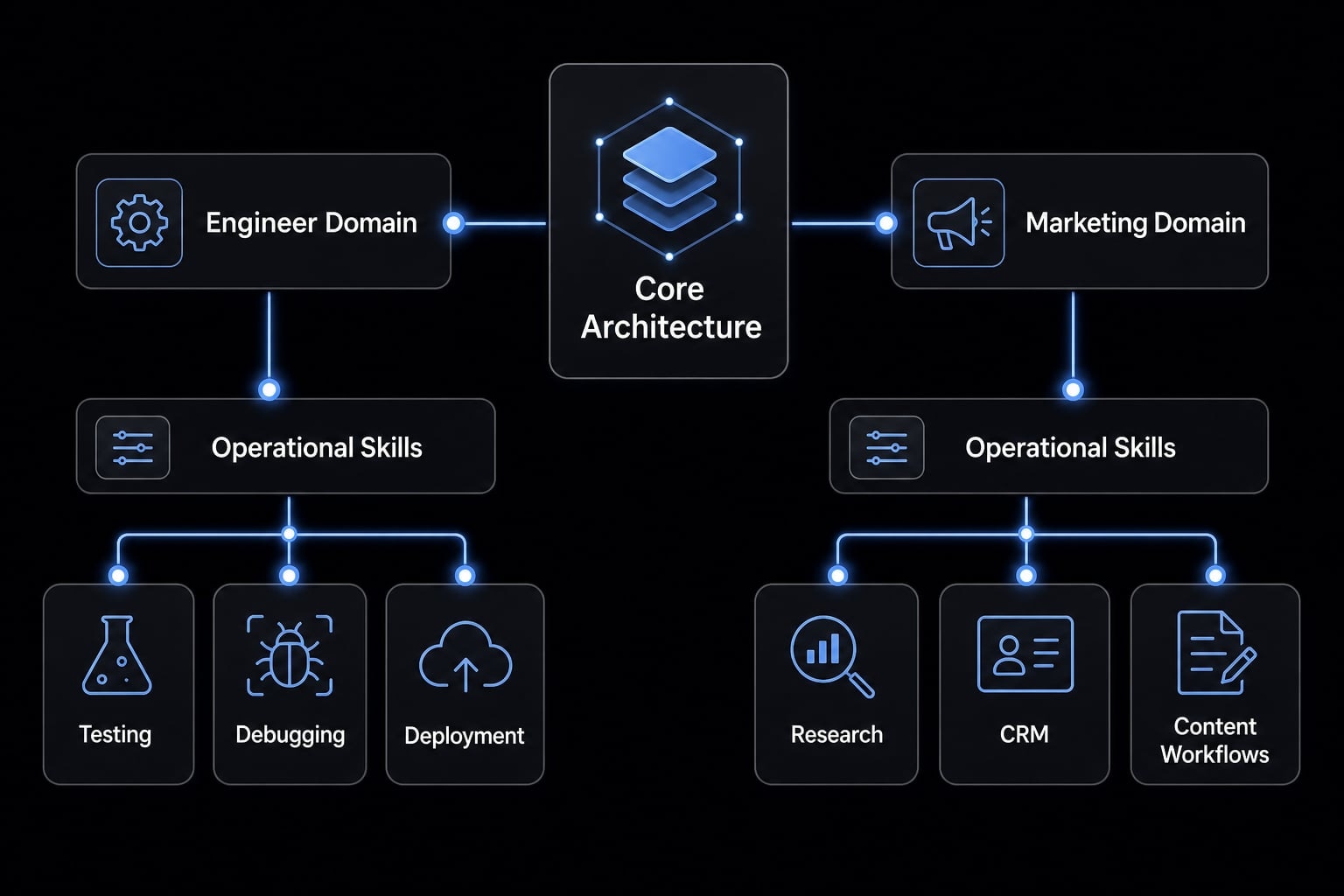
Rather than acting as another loose directory of Claude Code skill libraries, AgentKit is better understood as an operating layer for reusable patterns. It combines reusable skills, automated workflows, MCP integrations, a cross-platform CLI, and a desktop control model for managing configuration, tokens, plans, plugins, and security checks with more consistency.
Product scope by workflow domain
- AgentKit Engineer: Planning, frontend, backend, testing, debugging, code review, database work, and deployment.
- AgentKit Marketing: Research, content, SEO, lead generation, outreach, CRM workflows, and growth operations.
Why this differs from scattered public repos
- More structure around repeatable operating patterns.
- Less prompt rebuilding from session to session.
- Better onboarding for teams.
- Tighter control over workflows and dependencies.
- Easier coordination across tools and environments.
This makes AgentKit a better fit when users need more than ad hoc experimentation. It is especially relevant when skill usage starts expanding into multi-step workflows instead of isolated tasks.
If you are still in basic experimentation mode, public collections may be enough for now. But if you are standardizing work across people, tools, and recurring processes, a more structured system usually becomes easier to govern than a growing pile of disconnected public installs.
Frequently asked questions
What are Claude Code skill collections?
Claude Code skill collections are curated, reusable sets of instructions and scripts that extend Claude’s capabilities. Unlike individual skills, collections group specific logic around a workflow or role, helping teams maintain consistency, reduce redundant prompting, and automate repeatable tasks across projects using the Agent Skills standard.
How do Claude Code skills differ from MCP servers?
Skills provide Claude with instructions on how to act (e.g., following a specific TDD workflow), whereas MCP (Model Context Protocol) servers grant Claude new capabilities (e.g., connecting to a live database or browser). Collections use skills to manage the workflow, while MCP integrates external tools.
What should I check before installing a public collection?
Before installing, inspect the directory for a clear SKILL.md file, documentation, and usage examples. Evaluate the collection for clear task boundaries, verify that the scripts are transparent and secure, and check that it solves a specific workflow gap rather than adding generic "productivity" overhead.
Why do some skill collections reduce output quality?
Bloated collections can increase execution latency and trigger routing confusion. If a collection loads too many instructions at the start of a session, it consumes context window tokens and introduces conflicting constraints. Quality collections use "progressive disclosure," loading instructions only when the task context matches the skill.
When should I move from public collections to custom kits?
Public collections are ideal for solo experimentation, but custom collections become necessary when you need to encode team-specific preferences or domain constraints. If you require a production-ready, repeatable system that integrates multiple domains (like coding, testing, and ops), adopting a structured workflow kit is the better path.
Are public Claude Code skills safe to use?
Not all public skills are vetted. Because a skill inherits the agent’s permissions—including shell and filesystem access-you should treat every installation as a code review. Always inspect scripts for malicious payloads or unauthorized external calls before granting them access to your project environment.
Read more:
- Claude Code automation: Build repeatable and low-risk workflows
- Claude Code plugins: A guide to workflows, setup and safety
- Claude Code prompt injection: Risks and security best practices
Conclusion
The best Claude Code skill collections are rarely the biggest ones. The useful ones are the collections that match a real use case, keep signal high, stay maintainable, and hold up under basic safety review. That is the decision logic that matters more than popularity.
A practical path is simple: Choose by workflow fit, test for utility and signal-to-noise, review scripts and provenance carefully, then decide whether public options are enough or whether your environment now needs custom structure or production-ready AI agents. Public repos are a solid starting point. They are not always the right long-term operating model.
If your team is moving from experimentation to standardized AI workflows, AgentKit is worth evaluating as a more structured alternative to scattered public installs.