
Vibe coding internal tools: When it works, when it fails and how to use it safely
Internal requests often push teams to vibe-code custom tools over maintaining spreadsheets, but a working demo falls short of a production-ready application. This guide explores when AI-assisted rapid prototyping is appropriate, where hidden costs lie, and how to screen risks before connecting live systems through a practical scorecard and production gate.
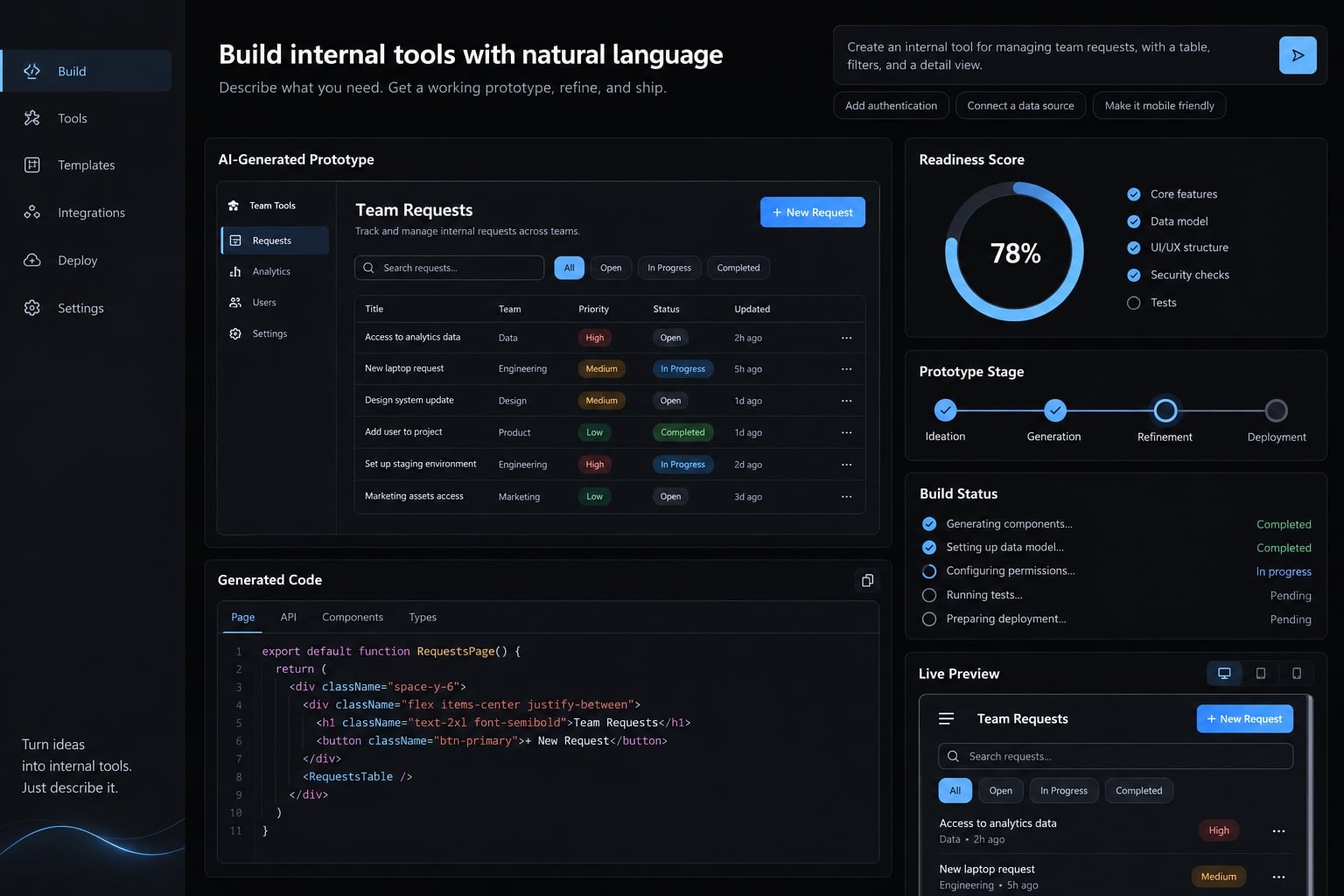
What is a vibe-coded internal tool?
A vibe-coded internal tool is a business application created or modified through natural-language instructions to an AI coding system. It supports employee workflows, such as campaign approvals or reporting. Prompt-driven creation can produce working software, but it does not establish the testing, security, reliability or ownership required for ongoing use.
The original usage emphasized accepting generated code with limited inspection. Broader usage often includes any prompt-led development. Adding systematic review, testing and ownership moves the work toward disciplined AI-assisted engineering, rather than unreviewed vibe coding.
For example, a campaign approval interface might let employees create, read, update, and delete requests. Generating those screens does not determine who may approve spending or delete another team’s records.
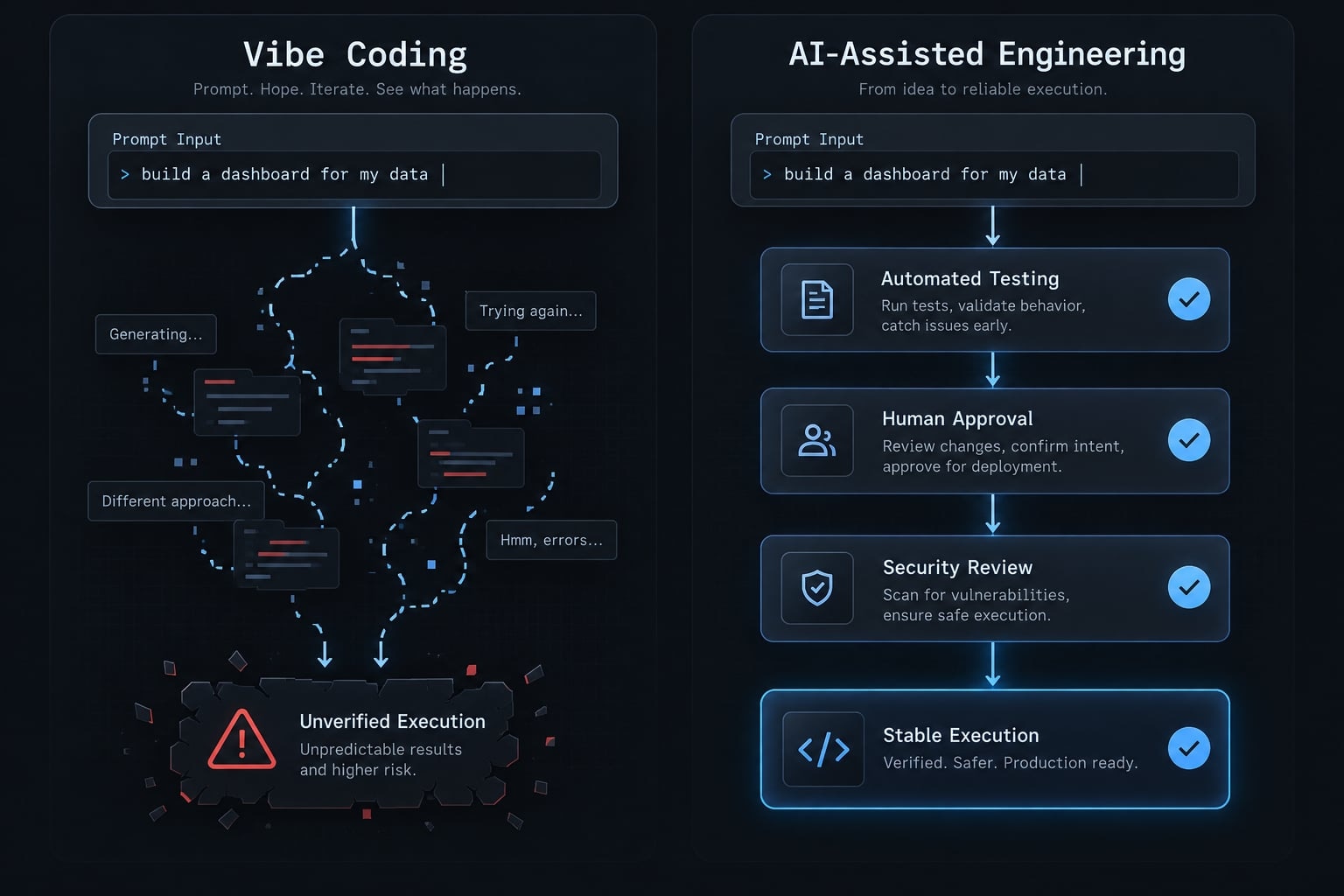
Vibe coding vs. Low-code, No-code and traditional development
Approach | How it is built | Customization | Technical oversight | Maintenance responsibility |
|---|---|---|---|---|
Vibe coding | Prompts generate code | Potentially broad | Risk-dependent; review necessary | Application owner |
Low-code | Visual configuration plus code | Platform-dependent | Configuration and code review | Vendor and application owner |
No-code | Visual rules and components | Within platform boundaries | Risk-dependent; not automatically low | Vendor and workflow owner |
Traditional development | Engineer-led implementation | Broad, resource-dependent | Formal engineering process | Engineering and business owners |
These approaches overlap. Low-code platforms can generate code, while conventional engineering can incorporate AI assistance. Customization and maintenance depend on implementation, not labels.
Platform vendors maintain their platforms not every business rule, permission, or integration customers configure. Internal business applications still need accountable owners.
Vercel v0, Claude Code and GitHub Copilot are ecosystem examples, not interchangeable product categories. Evaluate their current capabilities against the required workflow rather than treating every AI interface as an equivalent development environment.
Which internal tools are good candidates for vibe coding?
A good candidate for a vibe-coded internal tool meets these core criteria:
- Narrow scope: One clearly bounded workflow.
- Small, known user group: Identifiable users and responsibilities.
- Low-sensitivity or synthetic data: Limited exposure during experimentation.
- Read-only integrations where possible: No automatic record changes.
- Reversible actions: Mistakes can be corrected.
- Manual fallback: Work continues without the application.
- Named business owner: Someone controls scope and acceptance.
- Limited operational consequences: Failure causes inconvenience, not material harm.
Lower-risk use cases
The strongest internal tool use cases satisfy these conditions together. A simple interface can still conceal consequential access.
Use case | Why it can be lower-risk |
|---|---|
UTM builder | Generates campaign-tracking parameters from approved naming rules, without customer records or production writes. |
Meeting-action tracker | Tracks nonsensitive tasks for a small team, with a spreadsheet fallback. |
Read-only reporting dashboard | Displays approved aggregate data without modifying source systems. |
CRM cleanup prototype | Tests customer relationship management data-cleaning rules on synthetic or properly sanitized exports; no production write access. |
Limited approval workflow | Routes low-consequence requests with a manual override; does not authorize payments. |
Small asset tracker | Records ordinary equipment, with recoverable records and no access-control responsibilities. |
Our recurring example is an illustrative marketing operations UTM builder, not a customer case study. UTM parameters are labels added to links for campaign attribution. The tool checks naming conventions and generates links; it does not access customer information.
Read-only access still exposes whatever a user can retrieve. A reporting dashboard containing confidential margins needs meaningful access restrictions. Likewise, CRM exports may retain personal information after obvious identifiers are removed.
If expanding into internal knowledge search, preserve source-document permissions. A “temporary” utility also needs an owner and a deletion or retirement plan.
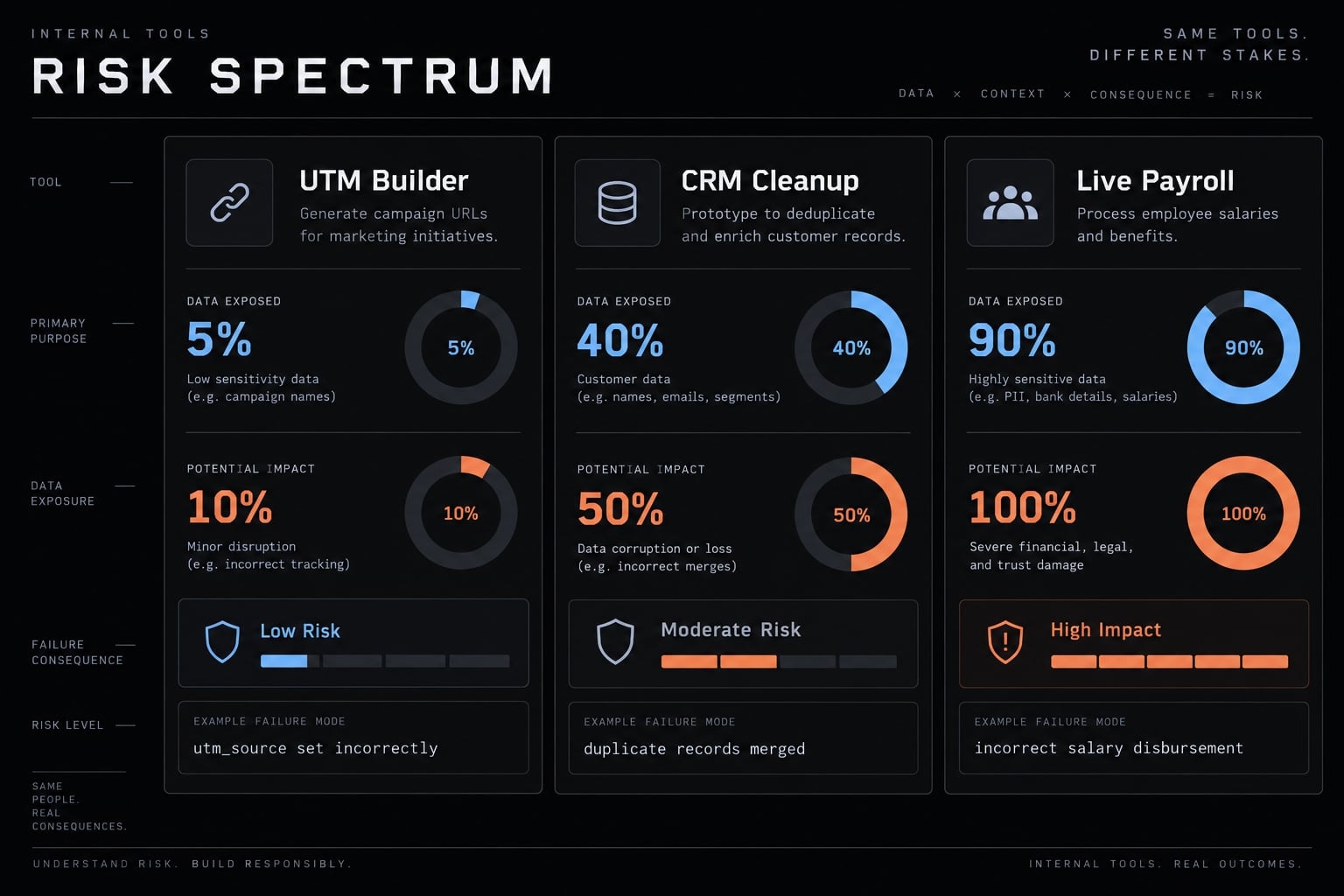
Use cases that should not be independently vibe coded
Do not independently deploy unreviewed generated software for:
- Payroll, compensation, payments, or financial transactions.
- Identity and access management.
- Regulated employee or health information.
- Production database administration.
- Compliance reporting with material reporting obligations.
- Autonomous changes or deletion of critical records.
Internal audience does not make an application low-risk.
Payroll illustrates the distinction. Its interface may be simpler than a dashboard, but incorrect calculations or permissions can expose employee information and create financial consequences.
AI assistance remains possible inside professionally governed development. The restriction concerns unsupervised delivery - not a ban on using AI for business process automation.
The real benefits and hidden costs of vibe coding internal tools
Faster validation is a potential benefit, not evidence of lower lifetime cost.
Potential benefit | Corresponding risk |
|---|---|
Faster validation | Unclear requirements drive rework |
Easier prototyping | Controls get overlooked |
Flexible customization | Custom maintenance accumulates |
Earlier user feedback | Demo enters production prematurely |
Lower initial engineering dependency | Support requires a difficult handoff |
For the UTM builder, early feedback can reveal inconsistent naming rules before deeper investment. That learning may justify a prototype even if the team later chooses an existing platform.
The prototype-to-production gap
A prototype demonstrates | Production also requires |
|---|---|
Completed interface | Permission design and enforcement |
Successful inputs | Validation and recovery from failures |
Happy-path functionality | Regression tests protecting existing behavior |
Application programming interface connection | Protected credentials and restricted access |
Manual launch | Repeatable, controlled deployment |
Builder understands behavior | Transferable documentation |
Visible errors | Centralized monitoring and response |
Technical debt means design or implementation compromises that make future changes harder. Generated code is not automatically technical debt, but undocumented assumptions can undermine maintainability.
Consider a hypothetical failure: the UTM builder’s creator leaves, and nobody knows which campaign rules are hardcoded. A naming update breaks reporting consistency.
The corrective action is to document rules, add representative tests, and assign a maintenance owner. The remaining limitation is that historical links may still require separate remediation. Technical debt affects more than the next code change.
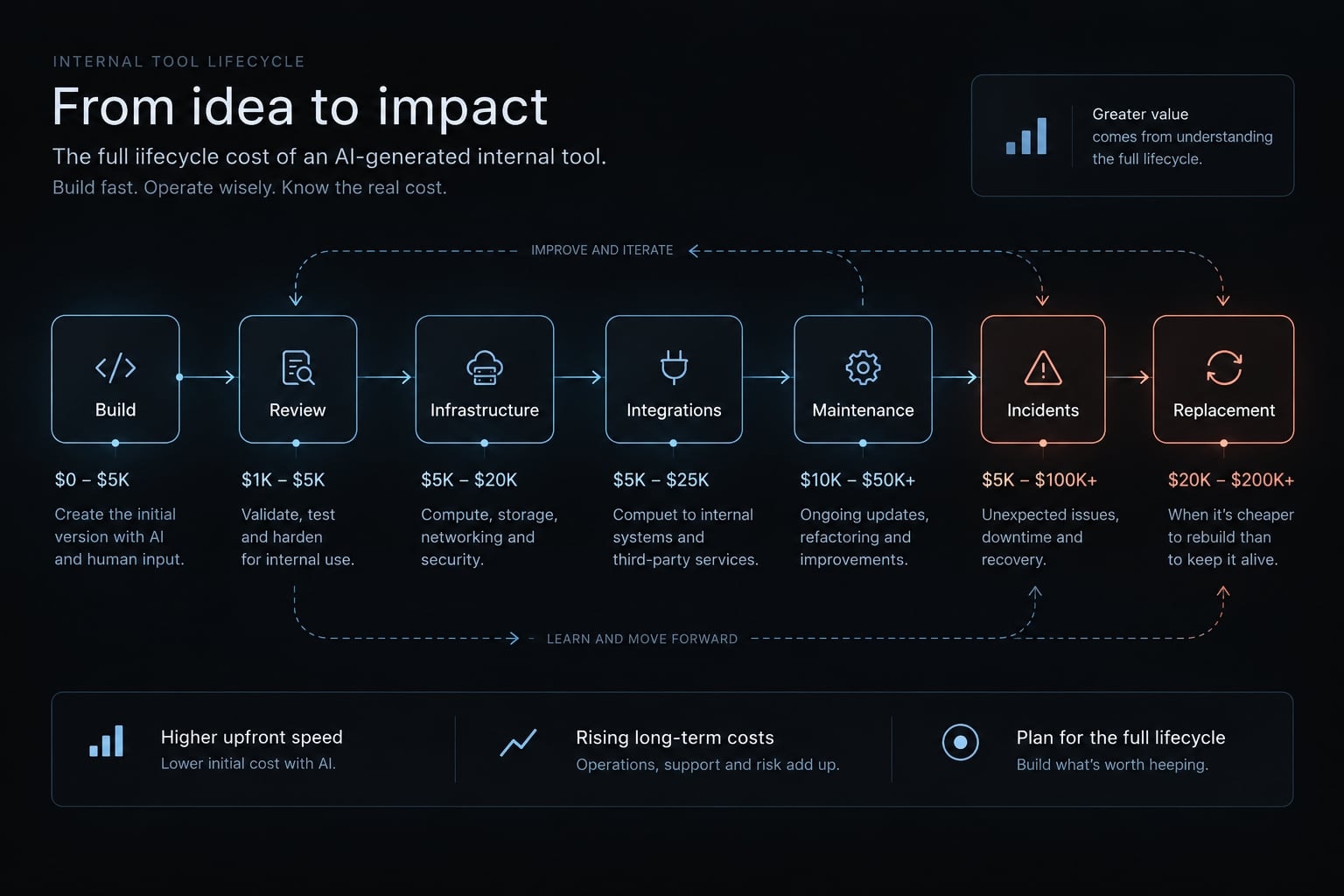
A more realistic cost model
Total cost of ownership = Build effort + Rreview and hardening + Infrastructure + Integrations + Maintenance + User support + Incident response + Replacement risk
Compare options over the same ownership period and scope. Twelve months can serve as an illustrative planning horizon, not a universal standard.
Convert labor into cost using a consistent rate. Include subscriptions, model usage, hosting, migration, and exit costs where relevant. Avoid counting integration or hardening effort twice when already included in build estimates.
Use this blank worksheet for each alternative:
Cost input | Evidence to enter |
|---|---|
Delivery and review | Estimated hours × consistent labor rate |
Recurring operation | Subscriptions, hosting, usage, support |
Change and exit | Rule updates, migration, retirement effort |
Incident and replacement exposure | Separate scenario assumptions and impact |
Incident and replacement exposure are not known cash expenses. Show assumptions separately rather than presenting speculative losses as a precise forecast.
The UTM builder still needs campaign-rule updates and support. Software as a service (SaaS) may be preferable when an existing product adequately covers those requirements. Buying also requires configuration, access management, vendor due diligence, and an exit plan.
Use a readiness scorecard before you build
Use this editorial readiness screen to structure discussion - not to certify security or authorize deployment.
Vibe-code internal tool readiness score
Choose one score per row. Higher scores indicate greater concern or weaker reasons to build.
Factor | 1 | 2 | 3 |
|---|---|---|---|
Business criticality | Convenience | Important; fallback exists | Essential operation |
Data sensitivity | Synthetic or nonsensitive | Confidential business data | Personal, regulated, highly sensitive |
User scope | Small, known team | Multiple teams | Broad or external access |
Integrations | None | Restricted read-only | Writes or privileged access |
Failure consequence | Easily corrected inconvenience | Recoverable disruption | Material harm |
Maintenance capacity | Named, capable owner | Limited support capacity | No capable owner |
Auditability | Versioned rules and traceable changes | Partial records | No adequate logs or records |
Existing alternatives | No adequate fit found | Partial fit available | Adequate established option |
“Existing alternatives” measures sourcing attractiveness, not security risk. Auditability concerns relevant actions and changes; a prototype lacking necessary logs can score 3.
How to interpret the score
Total | Suggested next step |
|---|---|
8-11 | Consider a limited prototype |
12-17 | Consider a controlled pilot with technical review |
18-24 | Prefer established software or formal engineering |
These are editorial thresholds, not empirically validated cutoffs. A low score does not authorize deployment or waive production requirements.
Automatically escalate regulated data, payment execution, identity systems, direct production writes or material legal, financial, or safety consequences. Even limited, controlled production writes require review. Sensitive data requires technical/security review before live use.
Record the owner, assumptions, data sources, review date, and stop criteria. No fallback or maintenance owner means no live pilot.
Worked example: The illustrative UTM builder scores 8 only with convenience-level criticality, nonsensitive inputs, a small team, no integrations, and easily corrected errors. It also needs a capable owner, versioned rules and traceable changes, and no adequate existing alternative. Payroll triggers escalation regardless of its total.
Build, buy, configure or commission?
Compare build vs. buy across six factors:
Factor | SaaS | Low-code configuration | Vibe-coded prototype | Custom engineering |
|---|---|---|---|---|
Best fit | Standard needs | Configurable workflows | Bounded uncertainty | Distinctive, consequential needs |
Delivery effort | Setup-dependent | Configuration-dependent | Scope-dependent | Requirements-dependent |
Customization | Vendor limits | Platform limits | Flexible; unproven | Designed deliberately |
Controls | Evaluate and configure | Configure and test | Must establish | Specify and verify |
Maintenance | Shared responsibility | Internal workflow owner | Internal code owner | Engineering owner |
Cost and exit | Fees; vendor lock-in | Fees; platform dependence | Variable support; handoff | Lifecycle budget; portability work |
No route is automatically fast, predictable, or well-controlled. Formal engineering can also use AI coding tools.
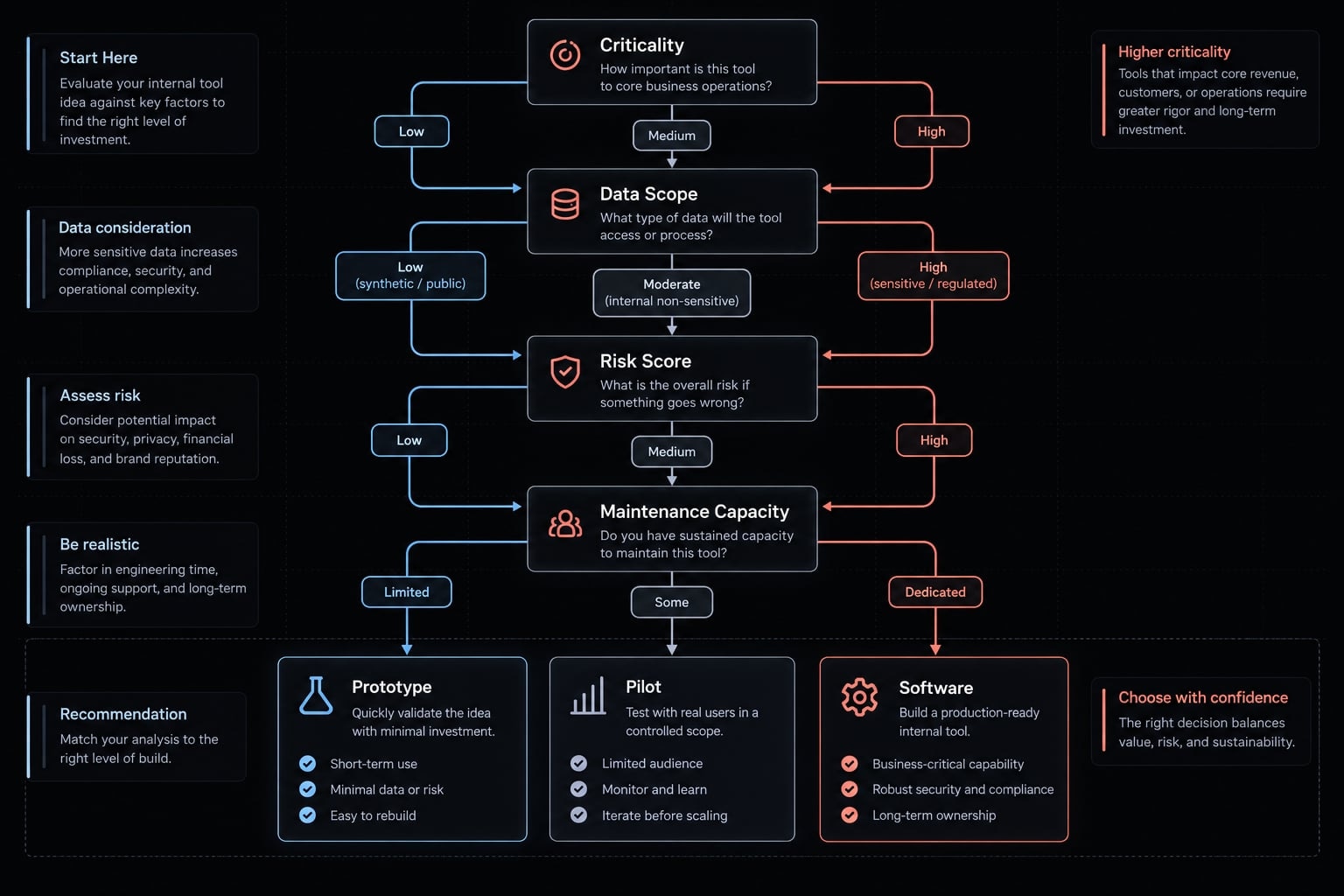
Move from prototype to production through controlled stages
Treat prototype, pilot, and production as separate commitments, with explicit approval between them.
Workflow definition → Risk classification → Synthetic-data prototype → Technical review → Controlled pilot → Production gate → Deployment → Monitoring and ownership
This sequence reflects lifecycle practices described in NIST’s Secure Software Development Framework (SSDF). OWASP’s Application Security Verification Standard provides application-control requirements. The checklist below is a starting point, not complete implementation of either framework.
Prototype, pilot and production are different commitments
Stage | Purpose and commitment |
|---|---|
Prototype | Validate workflow with synthetic data; remain easy to discard. |
Pilot | Limit users and approved data; require technical review, access controls, and operational visibility. |
Production | Support dependable operation with recovery, documentation, and approved ownership. |
A live-data pilot is not exempt from security controls. “Production-ready” means ready for an approved scope, not every future use.
Authentication establishes who a user is. Authorization determines what that user may do. Role-based access control assigns permissions according to job responsibilities. A login screen alone does not prevent unauthorized actions.
Minimum production-readiness gate
Copy this gate into the application record and attach evidence:
- Business owner named: Approves purpose, scope, and acceptance.
- Maintenance owner named: Accepts support and update responsibilities.
- Data sources approved: Permitted uses and sensitivity documented.
- Authentication enabled: Appropriate identity checks verified.
- Role-based permissions tested: Include denied actions, not just successful access.
- Secrets protected: Credentials stored outside source code and restricted appropriately.
- Inputs validated: Invalid and unexpected values handled safely.
- Critical workflows tested: Include failure cases and existing behavior after changes.
- Code and dependencies reviewed: Resolve critical issues or record explicit authorized risk acceptance.
- Errors monitored: Avoid logging credentials or unnecessary sensitive data.
- Recovery documented and tested: Cover backups, rollback, or manual recovery as appropriate.
- Repository and deployment access controlled: Limit who can change and release software.
- Documentation stored with the application: Include user guidance and technical handover.
- Retirement plan defined: Address replacement, access removal, and retained data.
Rollback means returning to a previous working application version. It does not restore deleted or corrupted records; backups and data-recovery procedures address that separate problem.
A responsible person must record approval. An agent cannot approve its own deployment. Human review does not guarantee security, and passing automated checks does not prove the absence of vulnerabilities. Regulated or business-critical tools need additional controls.
For the UTM builder, review precedes an authenticated team pilot. This human-in-the-loop approach keeps accountable approval separate from generated output.
Ownership after launch
Role | Accountability |
|---|---|
Business owner | Value, scope, continued business need |
Technical reviewer | Code quality and implementation risks |
Data/security approver | Data access and control suitability |
Maintenance owner | Updates, support, recovery, incidents, retirement |
One person may hold multiple roles; higher-risk approvals may require independence. Documented handovers reduce key-person dependency.
Set a risk-based review cadence covering access, dependencies, usage, errors, and value. Stop or restrict operation after ownership loss, repeated failures, or expansion beyond approved scope.
How coordinated AI agents make vibe coding more repeatable
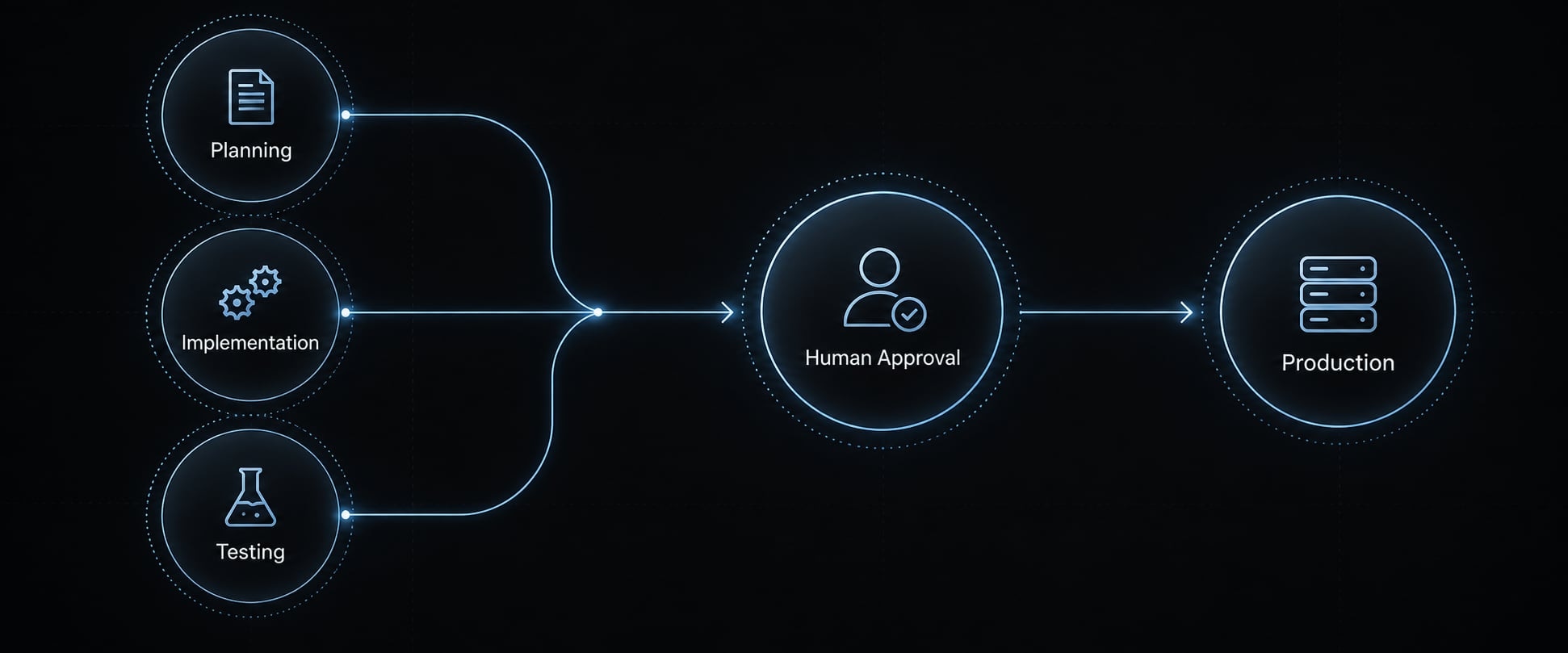
Saved requirements, explicit stages, and transferable records make a development process easier to repeat. Adding more AI coding agents does not automatically create that discipline.
Ad-hoc prompting vs. a controlled agent workflow
Ad-hoc approach | Designed controlled workflow |
|---|---|
Chat-only requirements | Stored scope and acceptance criteria |
Self-evaluation | Separate review roles |
Reactive testing | Planned test execution |
Remembered checks | Repeatable checks |
Conversation-bound knowledge | Transferable artifacts |
Direct deployment | Human approval gates |
These are design choices, not guaranteed outcomes of orchestration. Agents can repeat the same mistaken assumption, and generated tests can reproduce errors in generated code.
A separate review agent is not independent human assurance. More coordination can also add model-token charges, configuration, and troubleshooting work.
AgentKit solution specs
AgentKit provides an open scaffolding framework for teams constructing structured AI Engineering Systems. Evaluate it against your team’s process, rather than assuming a toolkit supplies operational accountability.
Specification | Evaluation guidance |
|---|---|
Solution | AgentKit open scaffolding framework for multi-agent AI Engineering Systems (supporting Claude Code, Cursor, Codex, DeepSeek Harness, etc.) |
Operating model | Self-managed toolkit; not an assumed implementation service |
Best fit | Experienced developers, technical founders, small product teams |
Capability scope | Agent kits, specialized subagents, reusable skills, automated workflows, MCP integrations, cross-platform CLI, desktop management |
Environment | Confirm current compatibility and feature coverage for your chosen coding environment before adoption |
Artifacts | Reusable templates are starting points; project plans, executed tests, and review records require actual project work |
Evaluation | Track delivery lead time, post-release defects, workflow completion, deployment failures, and maintenance effort |
Timing and cost | No fixed timeline; verify licensing and budget models, hosting, integrations, and human review |
Before standardizing, inspect a project-specific plan, executed test report, and review record tied to the application version. Confirm that someone other than the original builder can use them.
Frequently asked questions
Why is vibe coding internal apps considered risky?
Even though these apps are "internal," they often handle sensitive company data or interface with critical systems. Without formal engineering oversight, they may suffer from "vibe debt," hardcoded credentials, bypasses in authorization, or lack of documentation, making them difficult to maintain or secure long-term.
When is it suitable to use vibe coding for business tools?
It is suitable for low-impact, narrow-scope tasks like UTM builders, action trackers, or read-only reporting dashboards. These use cases should involve non-sensitive data, require manual fallback options, and have a clearly named business owner responsible for ongoing support and eventual retirement.
What is the "prototype-to-production" gap?
The gap represents the transition from a functional AI-generated demo to a dependable business tool. It includes adding essential controls like role-based access, automated testing, secrets management, error logging, and backups - elements that a prototype typically lacks but production systems require for reliability.
How can I make vibe-coded workflows more repeatable?
To move beyond ad-hoc prompting, implement a controlled agent workflow. This involves using specialized agent roles for planning, implementation, and review, while ensuring every artifact is documented and subject to a formal human approval gate before any code is deployed to a production environment.
Does using AI agents eliminate the need for IT engineering?
No. AI agents act as a force multiplier for development but do not replace responsible engineering. Governance, security architecture, data integrity, and long-term maintenance accountability remain the responsibility of the human team, regardless of whether the code was generated by an agent or written manually.
What should I look for in an AI development toolkit?
A professional toolkit should provide verified agent kits, reusable skills, and integrations like the Model Context Protocol (MCP) to manage configurations and security. It should enable a coordinated workflow that forces human-in-the-loop approvals, ensuring that code generation is always preceded by planning and followed by testing.
Read more:
- Andrej Karpathy vibe coding: What it is and how it works
- How to vibe code: A practical beginner guide to AI development
- 7 practical vibe coding examples: Build apps faster with AI
Conclusion
Vibe coding internal tools is most defensible when the workflow is narrow, the data is low-sensitivity, and mistakes are reversible. Moderate-risk applications need controlled pilots, technical review, and explicit access boundaries. Critical systems generally call for established software or formal engineering. Data sensitivity, allowed actions, failure consequences, and ownership - not interface polish - determine the appropriate path.
Start by completing the in-page readiness scorecard and naming a maintenance owner before connecting live systems. Compare build vs. buy over the same ownership period, then document the evidence required for production approval. If a prototype remains justified, keep its scope small enough to discard without disrupting operations. Teams evaluating coordinated development can review AgentKit’s scaffolding capabilities, but the immediate priority is simpler: agree on what the application may do, who supports it, and when it must stop.