
Vibe coding examples: What you can actually build, which tools to use, and where the limits start
Forget the viral demos. Practical "vibe coding" is about rapidly turning ideas into working drafts - like MVPs, internal dashboards, and workflow tools. Designed for founders and small teams, this guide cuts through the hype to cover what vibe coding actually is, 7 realistic examples, tool recommendations, a repeatable workflow, and potential risks. Read on to decide if AI prototyping is the right starting point for your next project.
What does vibe coding actually mean in practice?
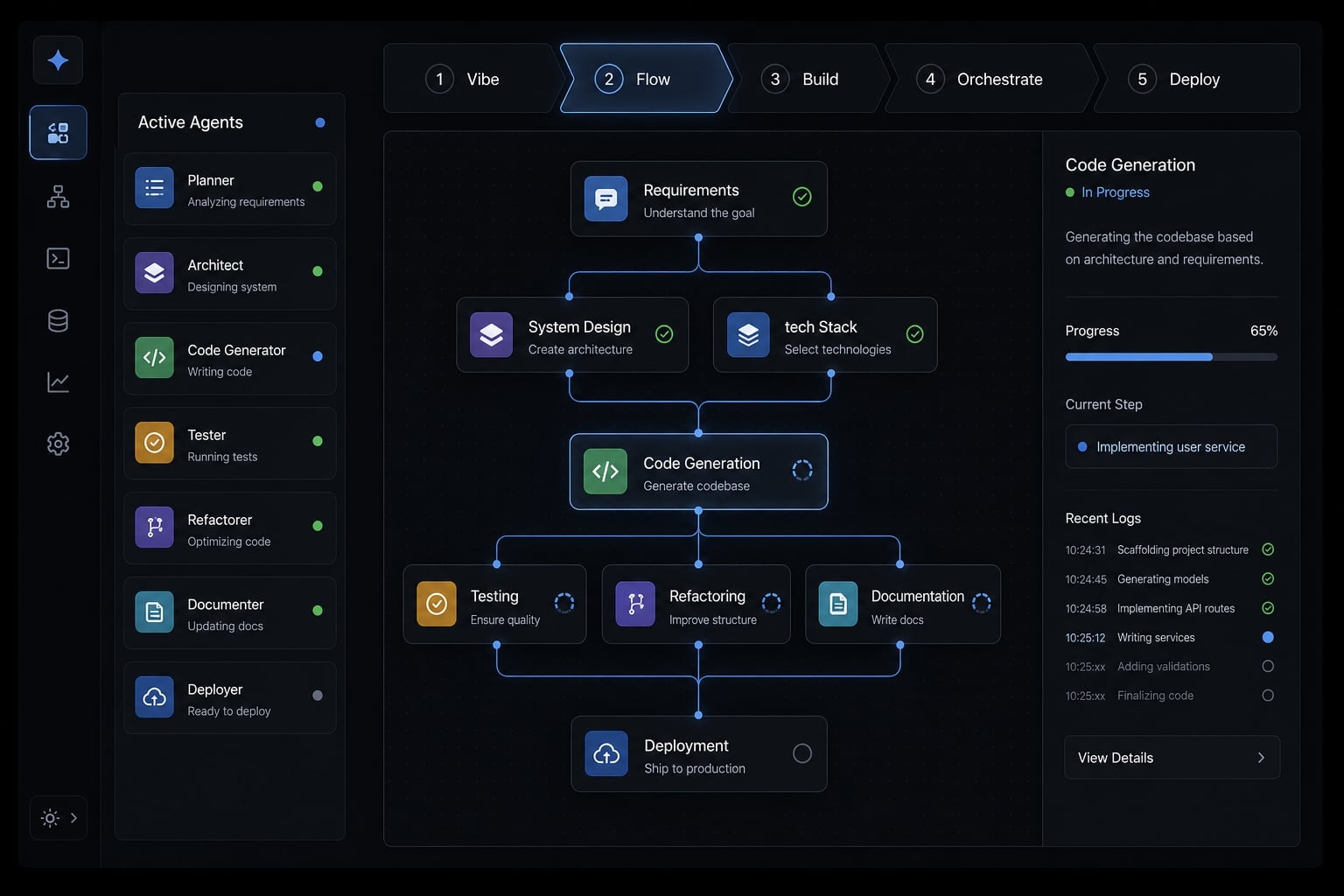
Vibe coding is a natural-language-first way to build software by describing what you want, reviewing what the AI generates, testing it, and refining it through multiple iterations. It is fast and accessible, but it is not one-shot software creation. The useful results usually come from clear prompts, inspection, and repeated improvement.
In practice, vibe coding sits between casual prompting and full engineering. You describe the outcome in plain language, an AI tool generates code or an interface, and then you work through a loop of review, testing, debugging, and revision. A better way to think about it is prompt-to-code engineering with human judgment still in the loop.
That matters because many teams confuse a successful prototype with a production-ready system. They are not the same thing. The first draft is rarely the usable draft. Vibe coding examples become valuable only when the output is easy to inspect and easy to validate.
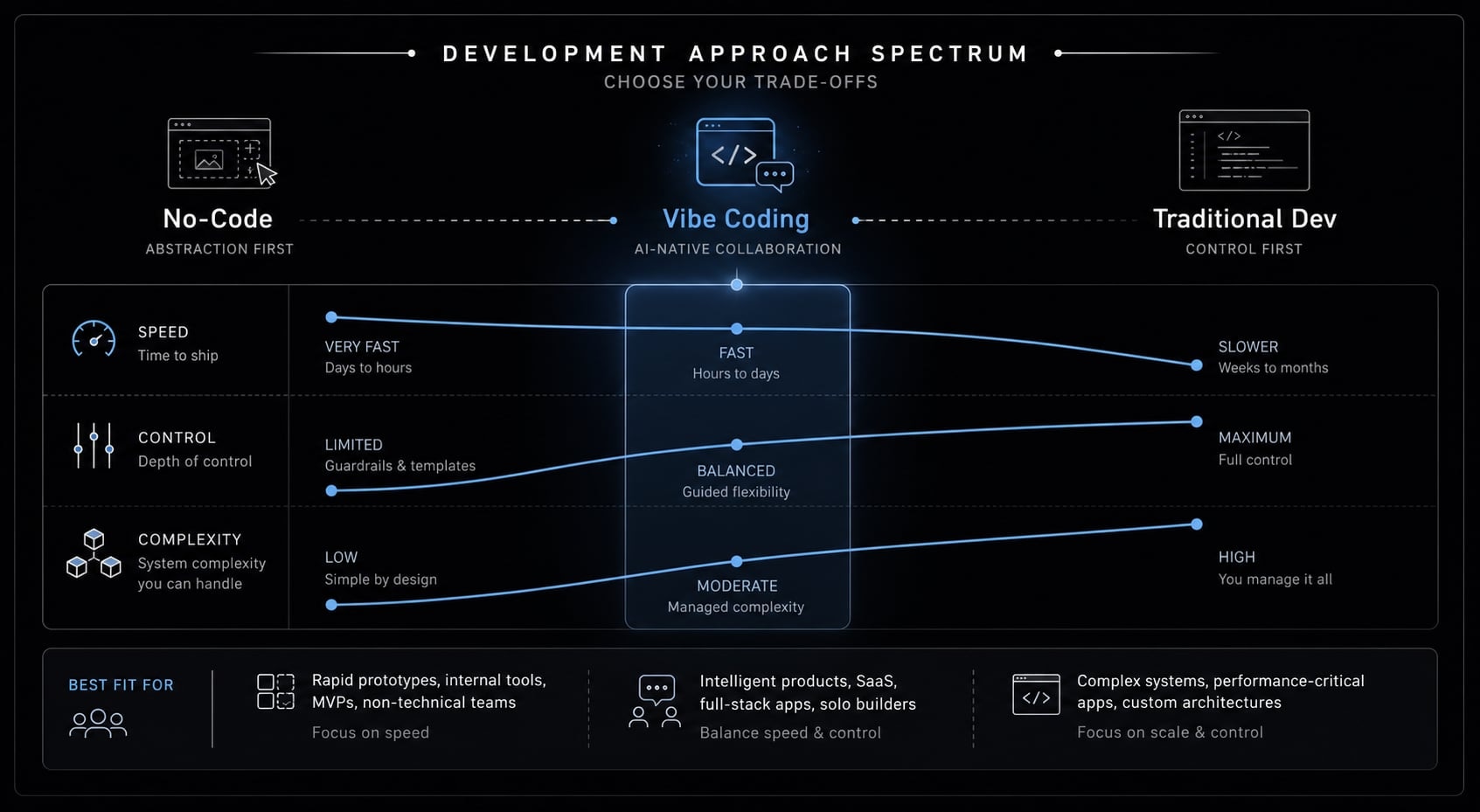
Unlike pure no-code tools, vibe coding gives you more flexibility. Unlike traditional development, it removes much of the syntax-first burden. Unlike just chatting with a model, it aims at a working artifact: a page, script, dashboard, workflow, or lightweight app.
What makes vibe coding different from traditional development?
Traditional development starts with code structure and technical implementation. Vibe coding starts with natural language programming - describing behavior before writing syntax.
- Syntax-first vs prompt-first: Traditional engineering requires explicit code decisions from the start. AI coding assistants let you begin with intent, then refine the generated output.
- Faster prototyping, lower precision: You can get to a functional draft quickly, but the trade-off is less predictability and more review work.
- Better for scoped outcomes: It works well for narrow tools and interfaces, not broad systems with many moving parts.
Where vibe coding fits on the build spectrum?
Vibe coding fits between no-code and full AI-driven development. It is strong for MVPs, internal tools, dashboards, calculators, and lightweight automations. It is weaker for regulated software, high-risk systems, or products that depend on deep infrastructure control. For most readers exploring vibe coding examples, the sweet spot is conversational application building where the core logic is clear and the output can be tested quickly.
7 practical vibe coding examples by use case
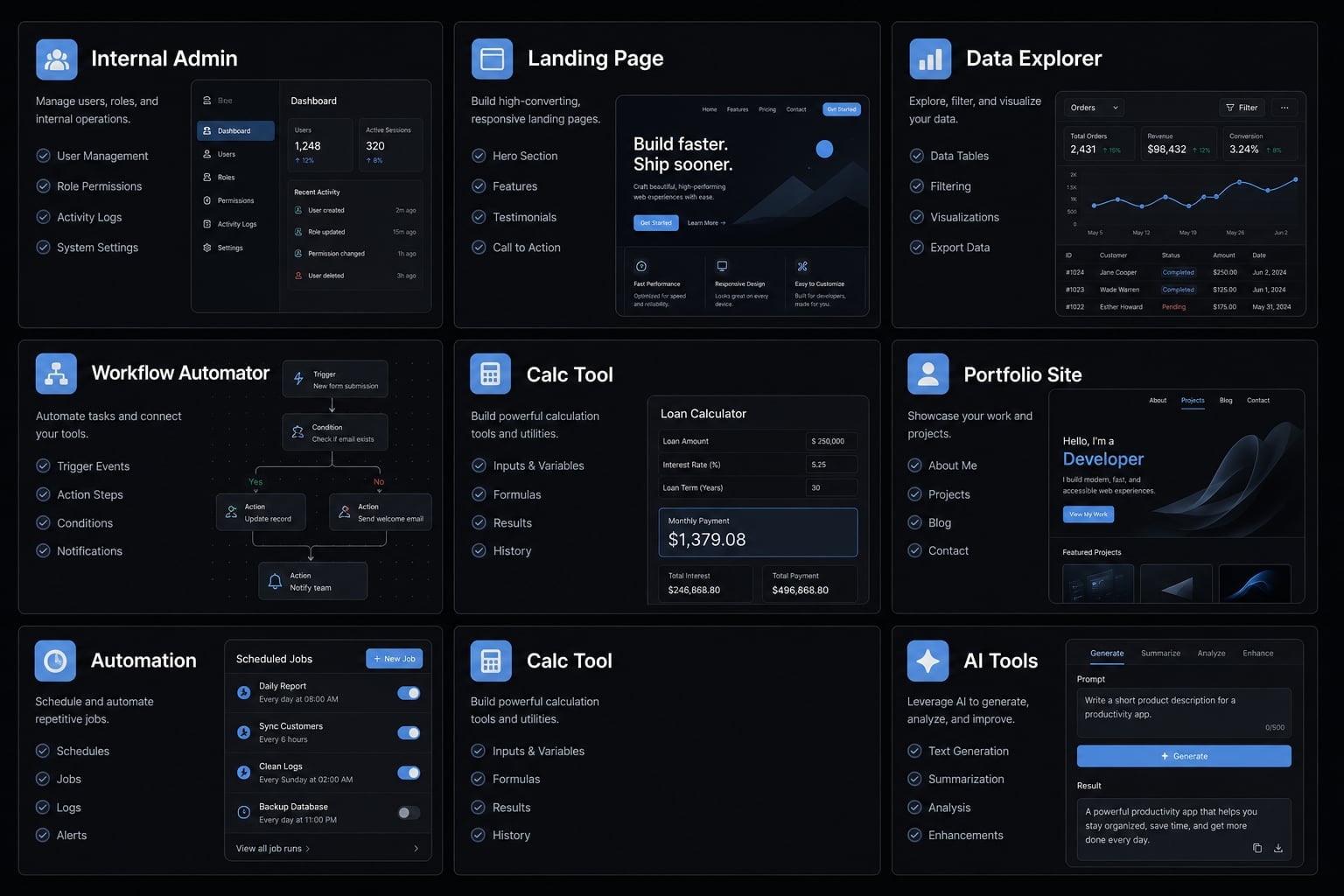
The best vibe coding examples tend to be narrow in scope, easy to validate, and useful before they are perfect. In practice, most teams start with a narrow workflow, not a full product. The fastest wins usually come from internal tools, landing pages, and simple calculators:
- MVP landing page or portfolio site.
- Internal admin panel or lightweight operations dashboard.
- Marketing calculator or lead magnet tool.
- Content or media workflow automation.
- Personal utility or niche workflow tool.
- Data explorer or reporting interface.
- AI-powered workflow agent connected to real tools.
1. MVP landing page or portfolio site
- What gets built: A launch page, waitlist page, portfolio site, or simple product microsite.
- Typical tools used: Lovable, v0, ChatGPT, Claude.
- Why it fits vibe coding: This is one of the cleanest AI-assisted prototyping use cases. The work is visual, feedback is immediate, and the technical surface area is relatively small. Founders can test messaging, positioning, and basic demand without waiting on a full build.
- Main constraint: A polished page does not prove product-market demand. It validates presentation, not the full product. This becomes risky when teams mistake design quality for business validation.
2. Internal admin panel or lightweight operations dashboard
- What gets built: A lead tracker, project monitor, internal task board, inventory view, or status dashboard that replaces spreadsheet friction.
- Typical tools used: Claude Code, Cursor IDE, Replit.
- Why it fits vibe coding: Functional internal tools often matter more than perfect design. They save manual work, centralize updates, and give teams better visibility. Vibe coding works well here because the user group is small and the workflow is usually well understood.
- Main constraint: Permissions, data cleanliness, and edge cases still matter. The moment real integrations, permissions, or governance enter the picture, complexity rises fast.
3. Marketing calculator or lead magnet tool
- What gets built: ROI calculators, pricing estimators, savings calculators, audit scorecards, or readiness assessment tools.
- Typical tools used: Lovable, v0, Cursor, ChatGPT.
- Why it fits vibe coding: Among all vibe coding examples, this one has a strong business case. Inputs and outputs are clear. It can create top-of-funnel demand, qualify leads, and answer common buying questions in a scalable format. It is also a practical form of conversational application building because the logic is usually narrow and inspectable.
- Main constraint: Wrong math damages trust quickly. If assumptions, formulas, or labels are unclear, the tool may create more friction than value.
4. Content or media workflow automation
- What gets built: Metadata helpers, publishing assistants, upload forms, title and description generators, asset routing workflows, or campaign prep tools.
- Typical tools used: Claude Code, Zapier MCP, Replit, Bolt.
- Why it fits vibe coding: Repetitive, rule-based work is a good match for intelligent workflow automation. Teams can reduce time spent on repetitive steps such as formatting, routing, tagging, or packaging content. This is where automating operations with vibe coding agents starts to create operational leverage.
- Main constraint: Integrations can be brittle. If APIs change, field mapping breaks, or permissions are misconfigured, the workflow can fail silently or produce inconsistent output.
5. Personal utility or niche workflow tool
- What gets built: Exporters, parsers, note utilities, comparison tools, rename scripts, file processors, or one-purpose workflow helpers.
- Typical tools used: Claude, ChatGPT, Cursor, local scripting environments.
- Why it fits vibe coding: This is one of the easiest entry points into iterative prototyping. The use case is narrow, the owner is usually the tester, and the feedback loop is fast. Many of the most successful early projects are not broad apps. They are small tools that remove one recurring annoyance.
- Main constraint: These tools are often hard to generalize. What works well for one person may be fragile or confusing when rolled out across a team.
6. Data explorer or reporting interface
- What gets built: Analytics viewers, internal reporting panels, searchable metric dashboards, lightweight BI-style interfaces, or data drill-down tools.
- Typical tools used: Cursor, Claude Code, Replit, frontend builders connected to simple data sources.
- Why it fits vibe coding: Teams often do not need perfect infrastructure first. They need answers. A reporting interface built through AI-driven development can improve visibility, reduce reporting delays, and give non-technical users faster access to operational data.
- Main constraint: Unstable metric definitions create rework. If the business has not agreed on what counts as an active lead, conversion, or completion event, the interface may only expose underlying confusion.
7. AI-powered workflow agent connected to real tools
- What gets built: Lead triage assistants, intake-to-action workflows, task routers, CRM follow-up helpers, support escalators, or research agents that trigger downstream actions.
- Typical tools used: LLM-based coding agents, Zapier MCP, Claude Code, AgentKit, other orchestration layers with MCP integrations.
- Why it fits vibe coding: This is where value increases because the system can do more than generate code. It can take action across tools. Used well, it reduces repetitive work, improves responsiveness, and connects fragmented steps into a more unified flow. This is the path toward production-ready workflows.
- Main constraint: Reliability matters much more once real actions are triggered. A mistaken message, wrong record update, or misrouted task is no longer a harmless prototype issue. It becomes an operational risk.
Need a structured way to evaluate which of these use cases is safe to prototype first? Explore AgentKit’s workflow patterns and reusable agent setups for practical AI build execution.
Which vibe coding tools fit which type of project?
The best tool depends less on popularity and more on what you are building, how much control you need, how technical you are, and whether this is a prototype or a repeatable workflow. There is no universal winner.
Tool / Category | Best for | Strength | Main trade-off |
|---|---|---|---|
ChatGPT / Claude | Brainstorming, simple logic, prompt drafting, lightweight scripts | Very low barrier to entry | Limited project structure and weaker long-run control |
Lovable / v0 | Landing pages, UI concepts, simple apps, calculators | Fast visual output | Less control over deeper logic and architecture |
Replit / Bolt | Lightweight app flows, scripts, quick deployment | Good balance of build speed and usability | Requires better prompt discipline |
Claude Code | Logic-heavy builds, local code iteration, workflow tools | Strong coding assistance with practical control | More context management required |
Cursor IDE / Windsurf | Deeper iteration, local files, more serious app work | High control and context reuse | Steeper learning curve |
Agent-based CLI workflows / AgentKit | Repeatable multi-step builds, team coordination, reusable workflows | Better orchestration and consistency | Best suited after experimentation matures |
Beginner-friendly tools
For beginners exploring vibe coding, the easiest starting tools are ChatGPT, Claude, Lovable, and v0. These tools are strong for simple apps, UI concepts, calculators, and pages. The real advantage is speed. You can move from idea to draft quickly without setting up much infrastructure.
The trade-off is control. They are ideal for early testing, but less reliable when your project needs strict logic, reusable context, or deeper system behavior.
Intermediate tools
Replit, Bolt, and Claude Code sit in the middle. They are better for workflow logic, app flows, scripts, and lightweight deployment. This is useful when you want more than a mockup but are not ready for a full IDE-driven process.
The main constraint is prompt quality. These tools reward clearer thinking and better iteration discipline. A vague request often produces vague output.
Advanced / higher-control tools
Cursor IDE, Windsurf, and agent-based CLI workflows are better for local control, context reuse, and multi-step development. They are especially useful for semi-technical founders, developers, or small teams that need deeper iteration over time.
The trade-off is learning curve. They can do more, but they expect more structure from the user.
Where orchestration tools matter?
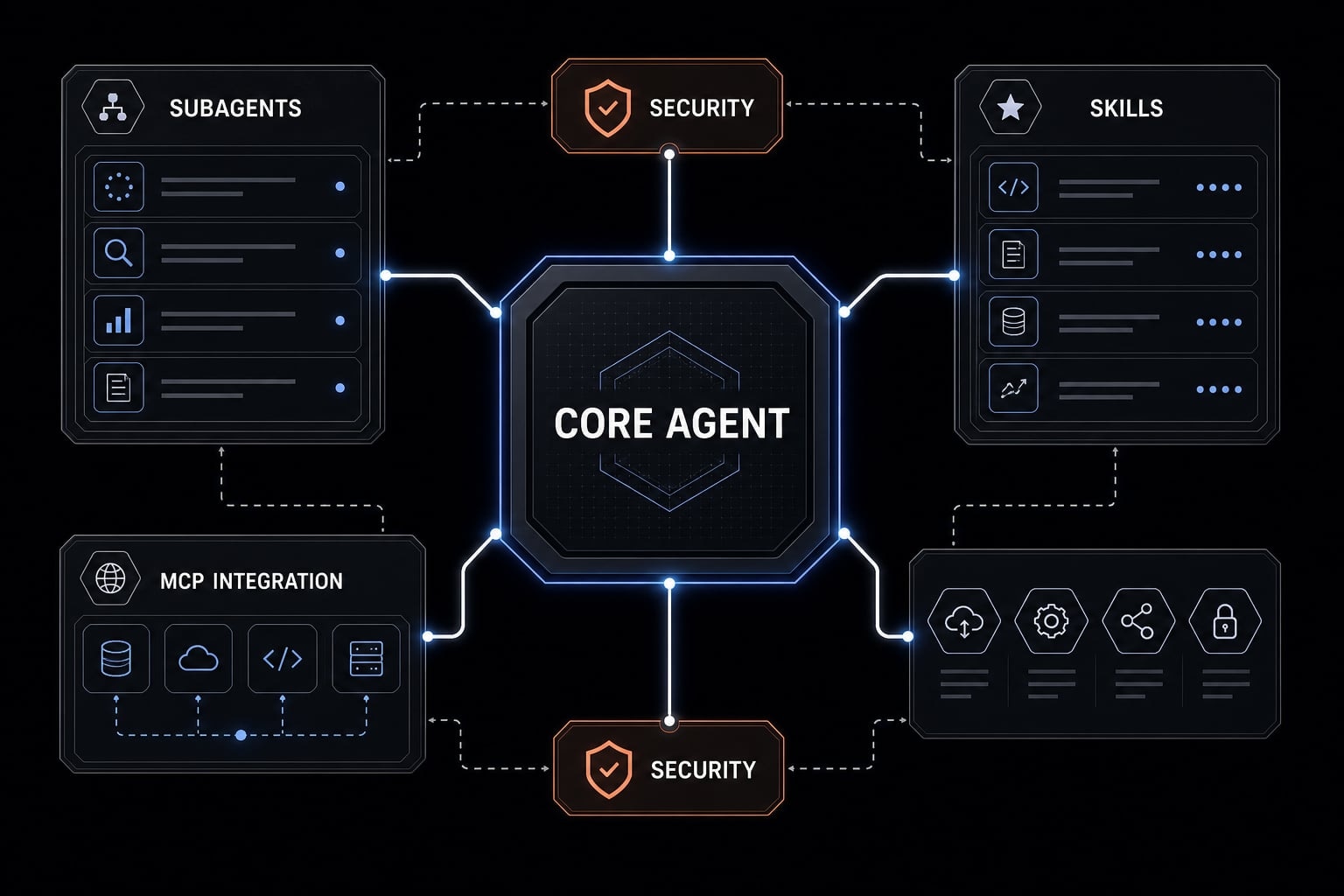
Once experiments become recurring workflows, teams usually need more than a chat window. They need reusable skills, templates, subagents, governance, and MCP integrations that connect actions across tools. That is where systems like AgentKit become useful: not as a shortcut around judgment, but as a way to reduce prompt sprawl and create more repeatable execution. If your workflow depends on external tools, connectors like Zapier MCP also become relevant because they help the AI take action without exposing uncontrolled credentials.
A simple vibe coding workflow you can reuse
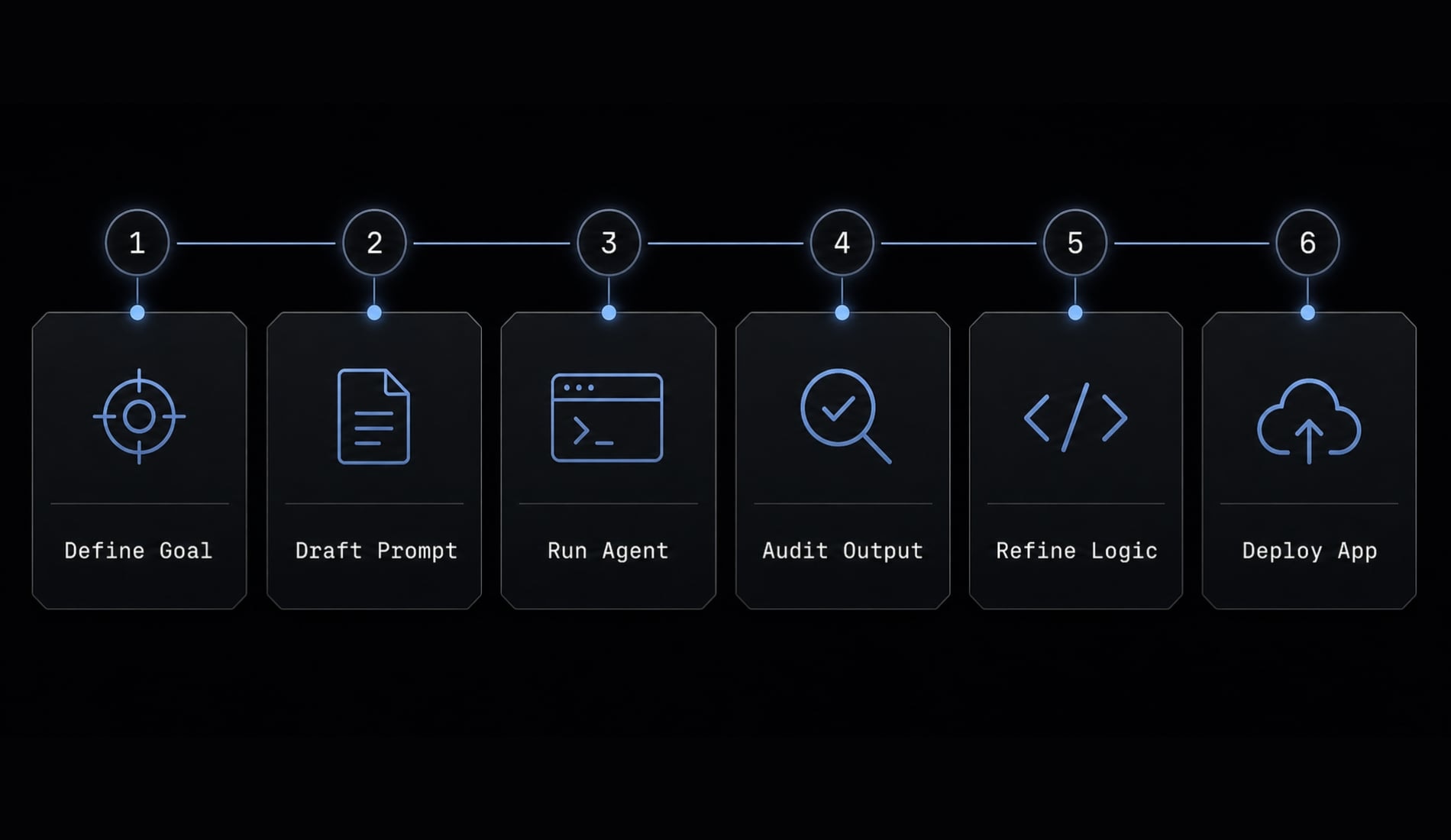
Vibe coding works best as a process, not a single prompt. For most non-technical founders, the biggest improvement comes from using the same build loop every time instead of improvising from scratch.
- Define one narrow outcome.
- Choose the tool based on output type.
- Prompt with requirements, examples, and constraints.
- Test a thin version first.
- Add review, debugging, and lightweight QA.
- Turn successful prompts into reusable workflows.
1. Define one narrow outcome
A strong vibe coding workflow for non-technical founders starts with one user, one task, and one output. Do not prompt “build my startup.” Prompt for a single result. Example scope statement:
Build a simple calculator that helps prospects estimate monthly savings from automating invoice reminders.
This keeps the project testable and avoids scope drift early.
2. Choose the tool based on output type
UI-heavy projects often fit Lovable or v0. Logic-heavy projects often fit Claude Code or Cursor IDE. Script-heavy tasks may work in Replit or a local coding assistant. Workflow-heavy use cases may require orchestration.
For anyone exploring the best AI tools for vibe coding beginners, tool selection should match output complexity, not trend popularity.
3. Prompt with requirements, examples, and constraints
Good natural language prompts are specific about behavior, inputs, outputs, and exclusions. In practice, clear constraints reduce wasted revisions.
Use a simple prompt pattern:
Build: A calculator that estimates time saved from automating lead follow-up.
Inputs/Rules: team size, weekly lead volume, average follow-up time, editable assumptions.
Constraints: simple UI, mobile-friendly, no login, explain assumptions clearly.
This is often enough to create a usable first draft.
4. Test a thin version before adding features
Validate the core flow before asking for polish. This is where iterative prototyping pays off. You find misunderstandings early, reduce wasted work, and learn whether the concept is worth expanding.
Vibe coding works best when the output is easy to validate.
5. Add review, debugging, and lightweight QA
AI-generated output still needs inspection. Human review remains necessary. Even a good draft can contain brittle logic, hidden bugs, or poor edge-case handling.
For teams, separate roles when needed:
- Builder: Creates the first draft.
- Reviewer: Checks logic and usability.
- Tester: Validates behavior and edge cases.
This lightweight form of automated QA plus human oversight is usually enough for early prototypes.
6. Turn winning prompts into reusable workflows
Once something works, save the prompt, assumptions, checklist, and task sequence. This is the bridge from one-off experimentation to context-aware development. A repeatable vibe coding workflow for non-technical founders is not just about writing better prompts. It is about preserving what worked so the next project starts faster and with less variability.
If your team keeps rebuilding the same prompt structures, review how AgentKit organizes reusable skills, subagents, and workflow templates for more consistent delivery.
When vibe coding works well - And when it becomes risky?
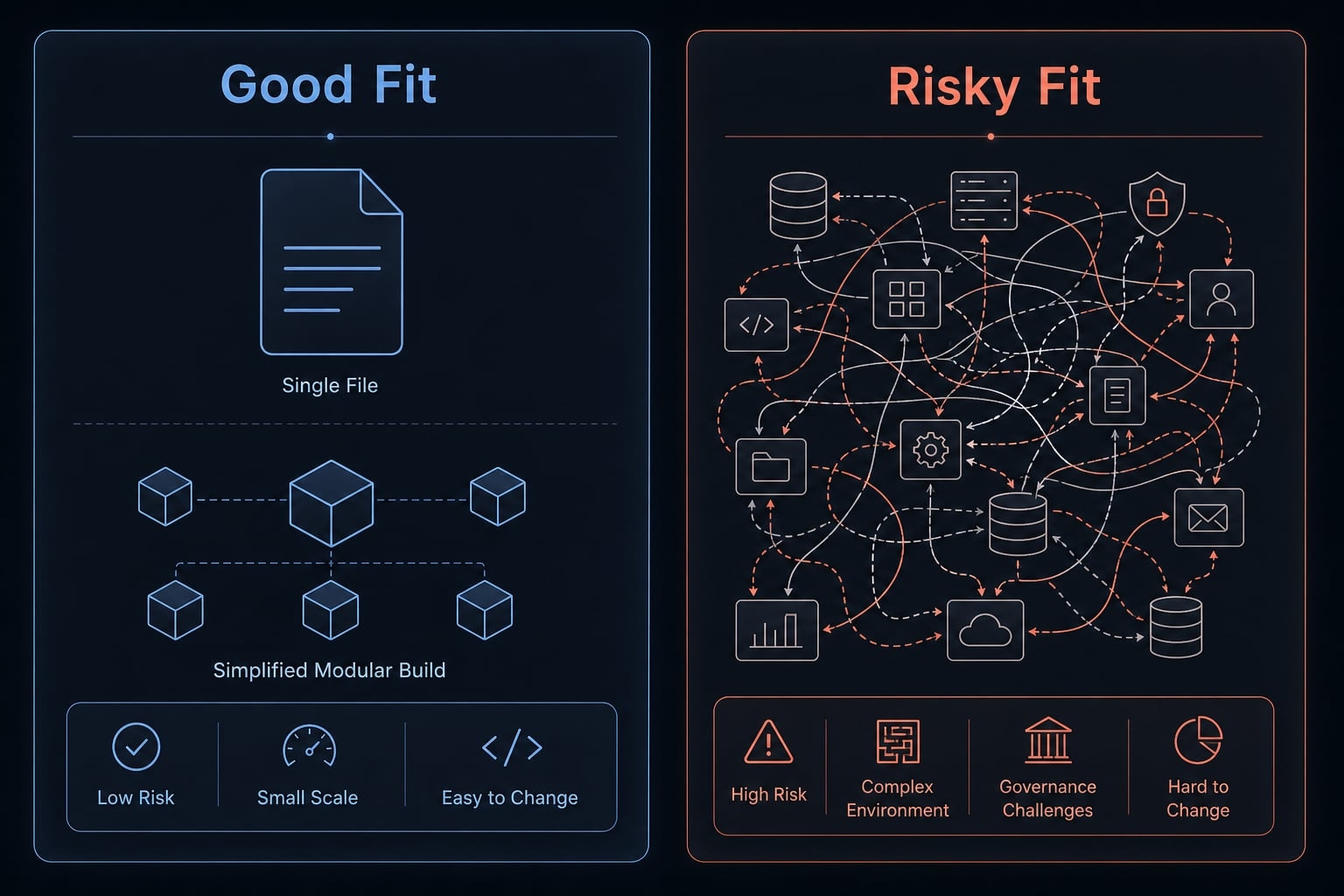
Vibe coding should not be the default path for every project. It works best when the project is narrow, testable, low-risk, and easy to inspect. It becomes risky when the cost of failure is high or when maintainability and governance matter more than build speed.
Good-fit scenarios
These are strong candidates for early experimentation and even gradual expansion into production-ready workflows:
- MVP landing pages.
- Internal tools.
- Lightweight dashboards.
- Calculators and estimators.
- Content workflows.
- Utility scripts.
- Early agent-assisted task routing with human review.
These use cases are easier to validate and cheaper to correct when something breaks.
Poor-fit scenarios
These projects require more caution because security and governance in AI coding become central:
- Payment-critical systems.
- Regulated software.
- Security-sensitive platforms.
- Deep enterprise integrations.
- Ambiguous requirements with many exceptions.
- Workflows that trigger important actions without oversight.
This is especially true for LLM-based coding agents that connect through API integrations and automation layers. The moment a system starts updating records, sending messages, or making operational changes across tools, small mistakes can create outsized business risk.
Many teams confuse a clever prototype with durable software. That is usually where maintenance problems begin.
From one-off prompting to repeatable AI build systems
One-off prompting works well at the idea stage. It starts to break when multiple people, tools, and workflows are involved. Prompt sprawl, repeated setup work, inconsistent outputs, and fragmented ownership are common signs that experimentation has outgrown its original setup.
What breaks as projects scale
As builds expand, teams often run into the same pattern:
- Prompts live in scattered chats.
- Setup steps get repeated every time.
- Output quality drifts across builders.
- Ownership becomes unclear.
- Workflows fragment across tools.
This is where agentic project management becomes relevant. Not because the work becomes fully automated, but because coordination becomes the real bottleneck.
What a structured agent workflow changes
A structured system helps standardize what was previously improvised. AgentKit is designed for that transition. It brings together reusable agent kits, specialized subagents, workflow templates, MCP integrations, and better control over configuration, token usage, and security checks.
For teams automating operations with vibe coding agents, the real benefit is consistency. AgentKit helps move experimental prompting toward production-ready workflows without pretending review is optional. It is most useful once multiple builders, repeatable sequences, and cross-tool actions are involved.
Frequently asked questions
What is “vibe coding,” and why is it gaining attention?
Vibe coding is a software development approach in which users describe their requirements in natural language instead of writing code traditionally. It uses AI coding assistants to generate, debug, and refine applications, accelerating the prototyping process for founders and managers.
What are some real-world examples of vibe coding that deliver business value?
The most effective vibe coding projects include building MVP landing pages, creating internal data dashboards, designing ROI calculators, automating marketing metadata workflows, developing web log analysis tools, building portfolio management systems, and creating utilities that support personal workflows.
How can I establish a repeatable vibe coding workflow?
A standard workflow consists of six steps: 1. Define a narrow objective; 2. Select the appropriate tool; 3. Write a detailed prompt with examples; 4. Test a simplified version; 5. Conduct a manual review and quality assurance; 6. Save the prompts and configurations as a reusable workflow.
Should vibe coding be used for every software project?
No. Vibe coding works best for small-scale, low-risk projects that are easy to validate. Avoid using it for systems with strict security requirements, demanding regulatory obligations, or workflows involving critical financial transactions.
What is the difference between vibe coding and no-code?
Vibe coding uses AI to generate source code, allowing for deeper customization and more flexible scaling than traditional no-code platforms, which are limited by predefined building blocks. It occupies the space between no-code development and professional software engineering.
When should I move from vibe coding to a professional system?
You should transition to professional orchestration solutions when your project experiences prompt sprawl, requires a high level of consistency, needs deep integration with enterprise systems, or involves collaboration among multiple people. These solutions provide better management of security, configuration, and standardized operational workflows.
Conclusion
The most useful vibe coding examples are not flashy demos. They are scoped, practical tools that solve one problem well: A landing page, calculator, dashboard, workflow helper, or lightweight agent. The real advantage is speed and accessibility. The trade-off is reduced control, which means review, testing, and iteration still matter.
For most founders and small teams, the right way to use vibe coding is as a practical build approach, not a shortcut around product thinking. Start with narrow outcomes, choose tools based on project type, and only move toward production-ready workflows when the use case proves itself.
If you are moving beyond one-off prompts and want a more repeatable system, explore AgentKit’s structured workflow approach, reusable agent templates, and orchestration patterns for scaling AI-assisted building with more consistency.