
Claude Code agent teams: Setup, examples and best practices
Coordinating implementation, testing, and review in a single conversation can blur ownership. Claude Code agent teams solve this by using separate, specialized sessions for a shared goal. This guide explains team mechanics, compares them with subagents, and provides setup steps, a task contract, and troubleshooting tips.
What are Claude Code agent teams?
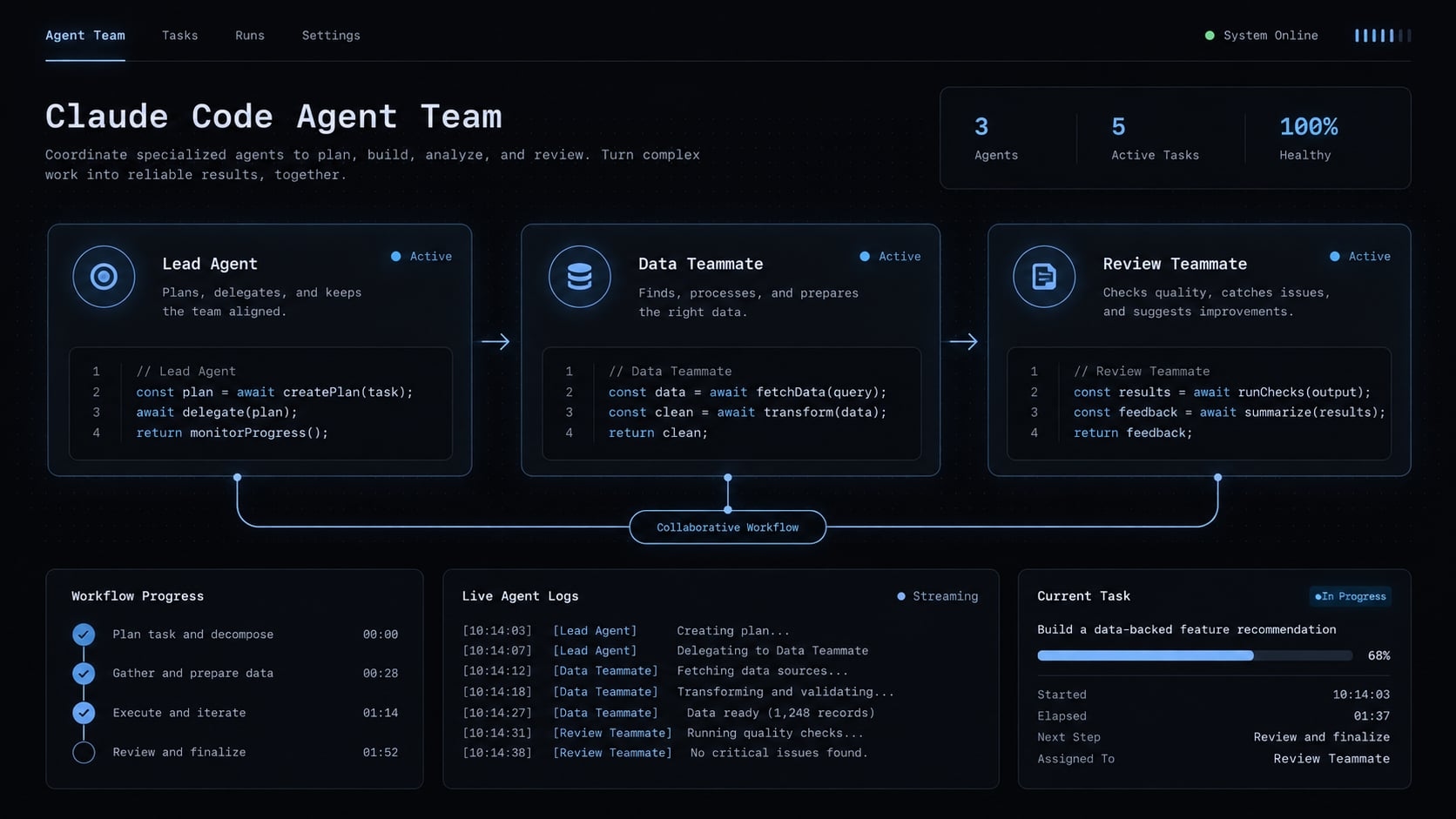
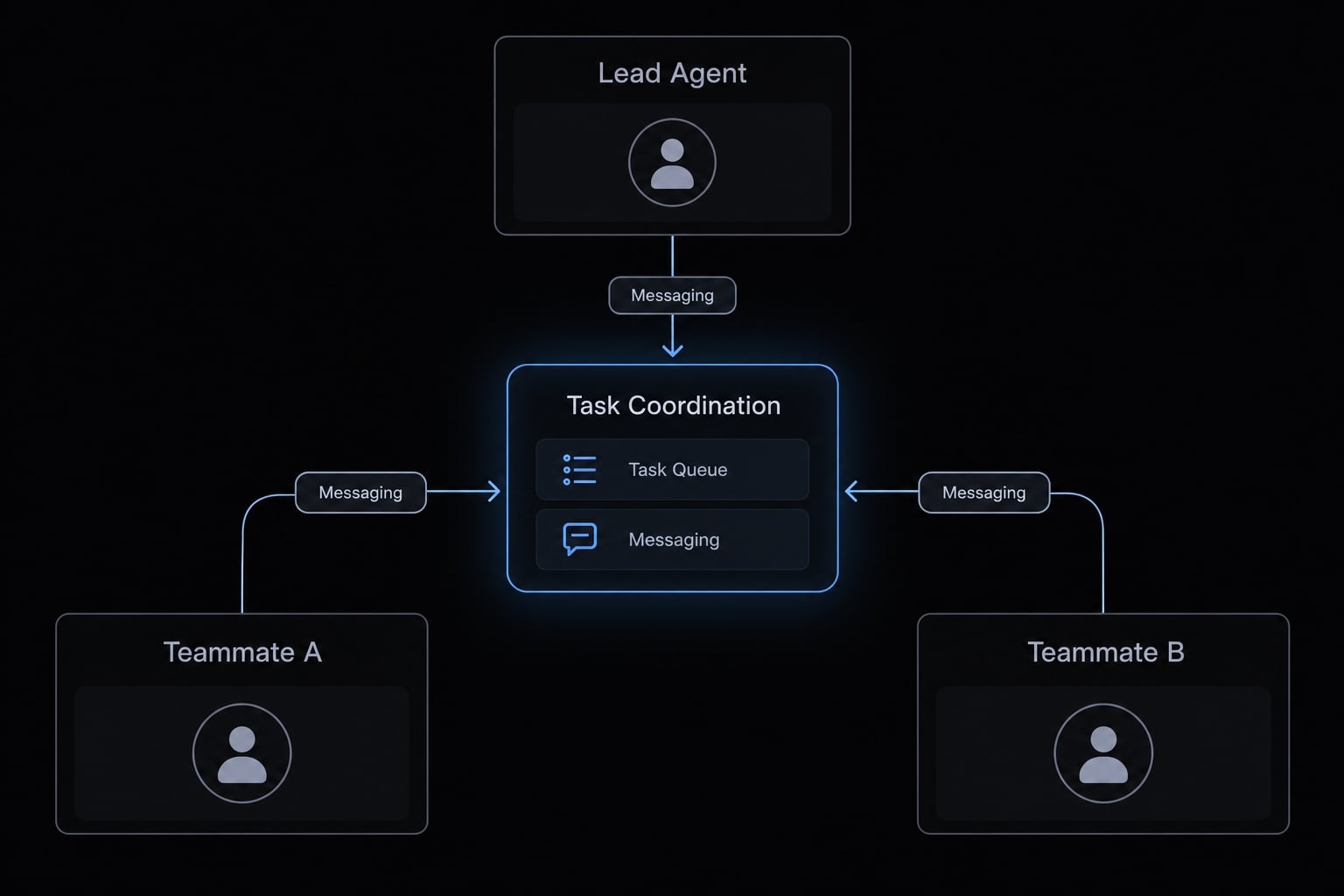
Claude Code agent teams coordinate a lead agent session and multiple teammate sessions to achieve a shared objective. Each teammate has separate context, while supported coordination provides task visibility and messaging. Teams suit separable investigations or bounded implementation work; they do not provide shared conversational memory, automatic correctness, or permission-free execution.
The lead agent
The lead agent coordinates the work. A useful operating plan asks it to:
- Delegate bounded tasks with explicit deliverables and owners.
- Identify dependencies before dependent implementation begins.
- Reconcile findings, review changes, and report remaining uncertainty.
These are responsibilities to request and supervise, not guarantees that the lead will catch every mistake.
Teammates and separate context
Each teammate works in its own conversational context. Do not assume it receives the lead’s complete conversation. Provide the requirements, relevant files, constraints, and expected output within each assignment. Repository instructions can supply common guidance, but they do not eliminate task-specific briefing.
Shared coordination and user control
The official documentation for Claude Code agent teams describes how shared task lists and inter-agent communication work, messages between participating sessions. Shared task state is not shared memory. A visible task description does not supply every implementation assumption.
You remain responsible for scope, permissions, and consequential approvals. In our running example, one teammate owns a backend validation change while another designs tests. The lead coordinates their agreed behavior and integration checkpoint.
Agent teams vs. subagents and single sessions
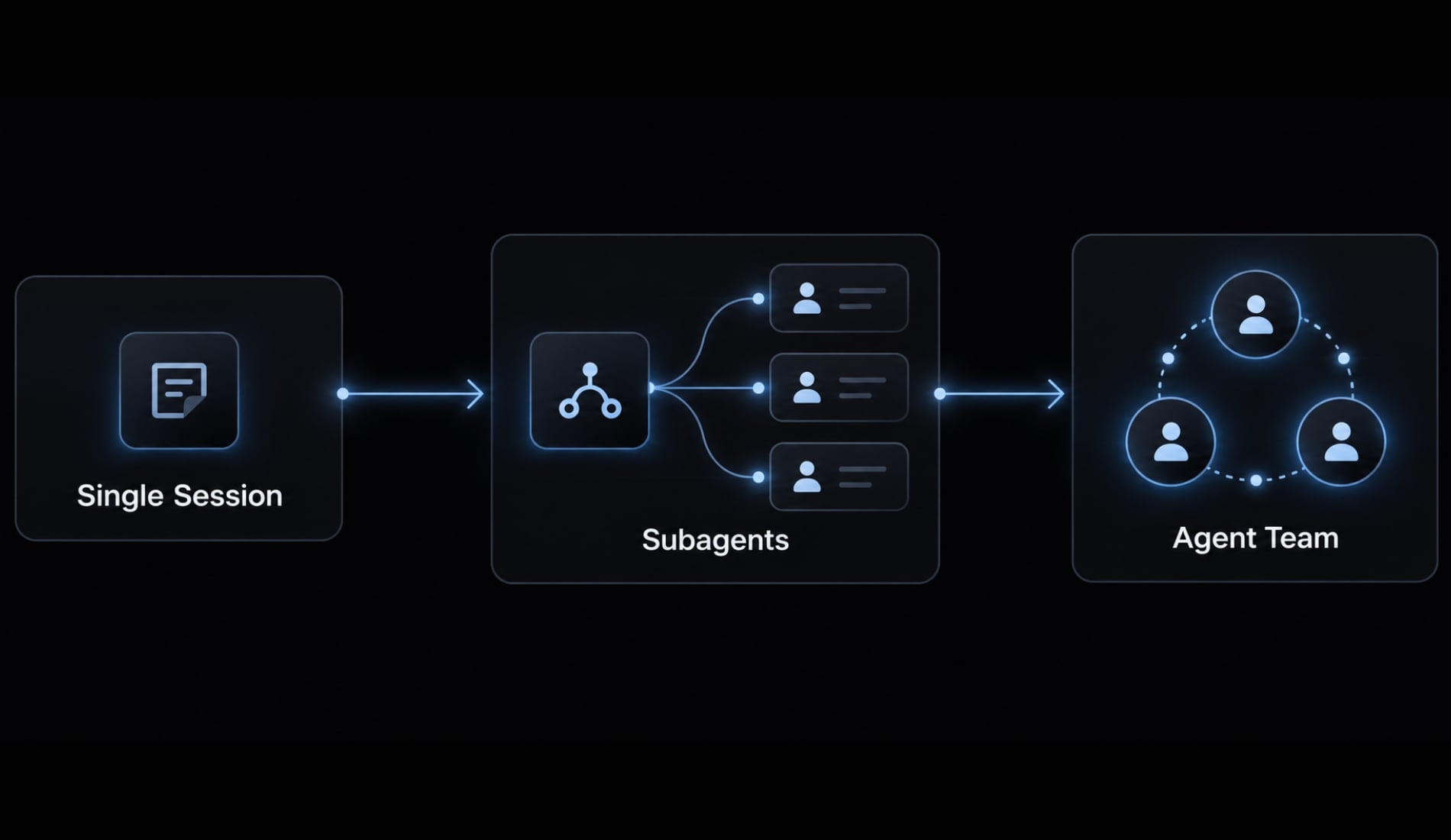
Choose by dependency structure, not agent count. Parallel work is useful when outputs are separable or investigations can proceed independently.
Workflow comparison
Choosing a Claude Code execution model
Criterion | Single session | Agent teams | |
|---|---|---|---|
Best fit | Focused, connected work | Bounded delegated tasks | Coordinated workstreams |
Coordination | One working conversation | Results returned to caller | Shared tasks and messaging |
Context | One session context | Separate task context | Separate teammate contexts |
Overhead | Least coordination structure | Briefing and result review | Briefing, messaging, integration |
Main concern | Overloaded conversation | Incomplete delegation brief | Overlap and coordination effort |
Anthropic’s subagent documentation distinguishes Claude Code subagents from native teams. Subagents can handle delegated work with context isolation - keeping their working conversation separate - but are not equivalent to teammates coordinating through the team mechanism.
Likewise, independently opened sessions are not automatically a native team. Independent sessions require user-managed coordination, including assignment tracking and conflict prevention.
When teams are worth using
Consider teams for:
- Parallel debugging hypotheses.
- Read-only reviews from different perspectives.
- Bounded implementation with separate ownership.
- Workstreams that benefit from exchanging findings.
When one session is better
Prefer a single-agent workflow for small fixes, sequential changes, repeated edits to the same files, or tasks without independently verifiable outputs.
Illustrative example, not executed: Correcting one validation condition in one backend module suits a single session. A broader change involving implementation and independently designed tests may justify a team.
The decision rule is simple: Use the least complex workflow that produces reviewable results.
How to set up Claude Code agent teams
Claude Code agent teams need both activation and a workable assignment structure. Enabling the feature alone does not establish ownership, dependencies, or acceptance criteria - the observable conditions required for completion.
Verification status: This is a documentation-oriented guide, not a tested setup transcript. No Claude Code version, operating system, or terminal environment was executed for this article. Current availability, activation, and lifecycle behavior must be confirmed against Anthropic’s documentation for your installed release. All repository examples below are illustrative.
Before you start:
- Confirm repository access.
- Preserve a recoverable working state, including existing uncommitted changes.
- Review permissions and sensitive operations.
- Check your installed version and feature availability.
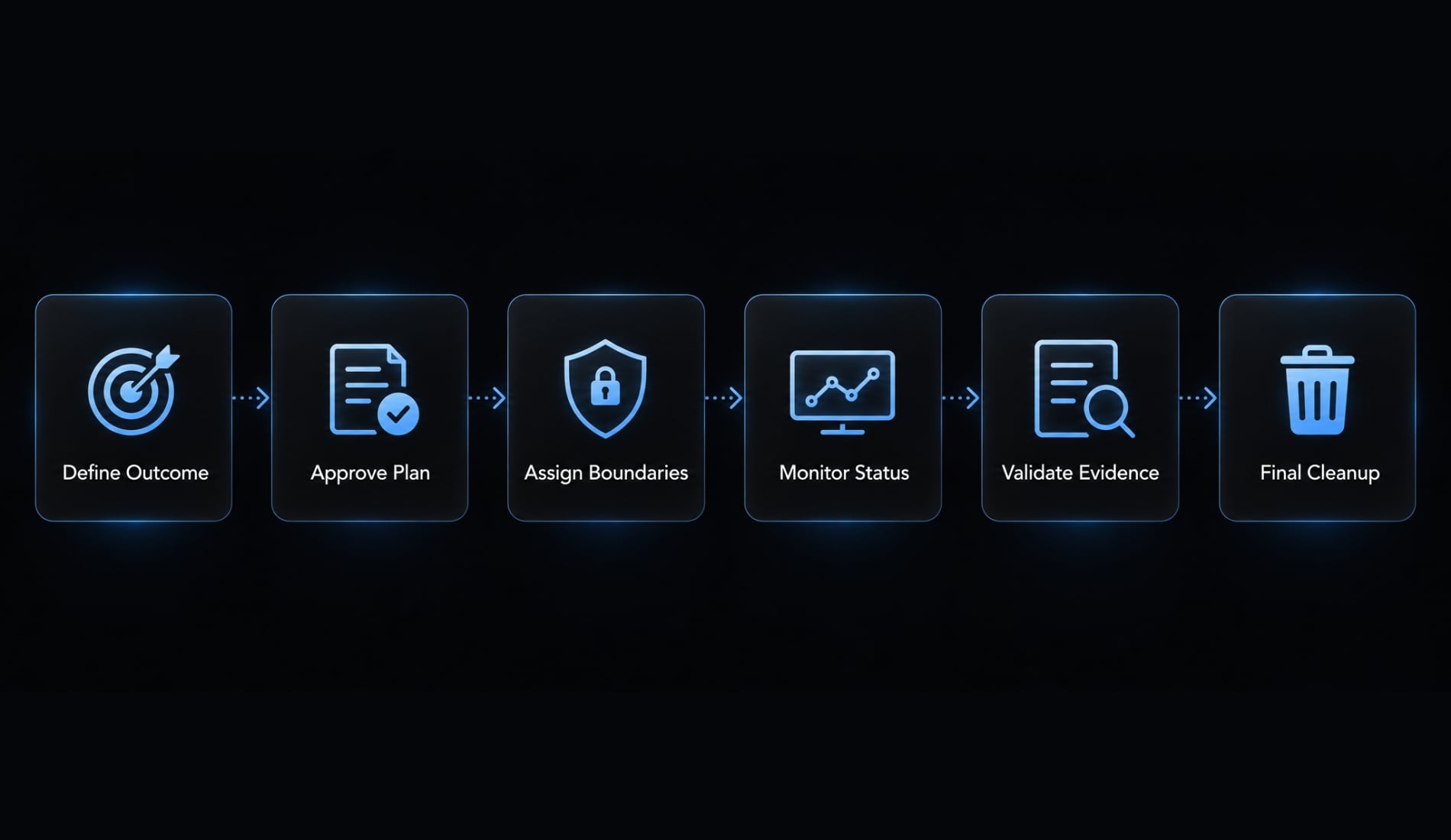
The minimum path is:
- Check availability and version.
- Enable the feature.
- Define one measurable outcome.
- Approve the plan before editing.
- Assign teammates clear boundaries.
- Monitor, validate, and close.
1. Check availability and version
Run:
claude --version
Compare the result with Anthropic’s Claude Code agent teams documentation and release notes. Confirm activation requirements, supported environments, and known limitations.
Note that experimental features and platform behaviors may evolve over time. Split-pane display is optional; do not treat tmux as a universal prerequisite.
2. Enable the feature
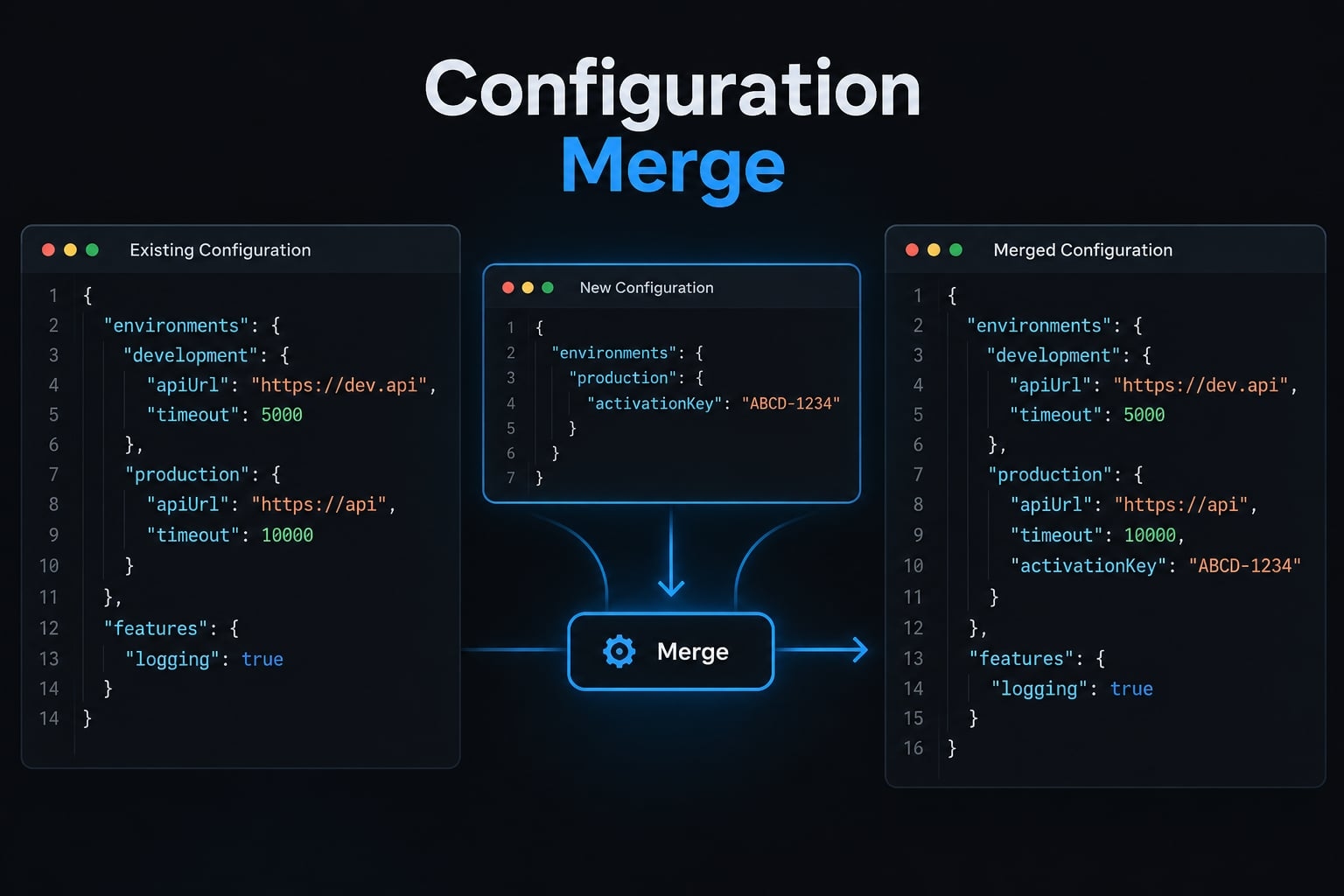
The documented experimental activation pattern uses the following setting in the user-level configuration file, ~/.claude/settings.json:
{
  "env": {
    "CLAUDE_CODE_EXPERIMENTAL_AGENT_TEAMS": "1"
  }
}
Confirm that this setting remains supported before applying it. Merge the key into your existing env object; do not replace the entire configuration file or create duplicate keys.
This is user-level configuration, not a repository-only setting. Launch a new Claude Code session afterward so it starts with the configured environment.
3. Define one measurable outcome
- Avoid “improve backend validation.”
- Use: “Reject a missing or blank organization name with the agreed validation response, preserve valid requests, and add regression tests.”
Exclude unrelated refactoring, dependencies, database changes, and deployment. Define the expected response from the repository’s existing conventions.
4. Approve the plan before editing
Ask Claude to inspect the repository and propose assignments before changing files. Require the plan to identify file ownership, dependencies, and relevant tests. Plan approval is an operating instruction. It is not an enforced permission boundary.
5. Assign teammates clear boundaries
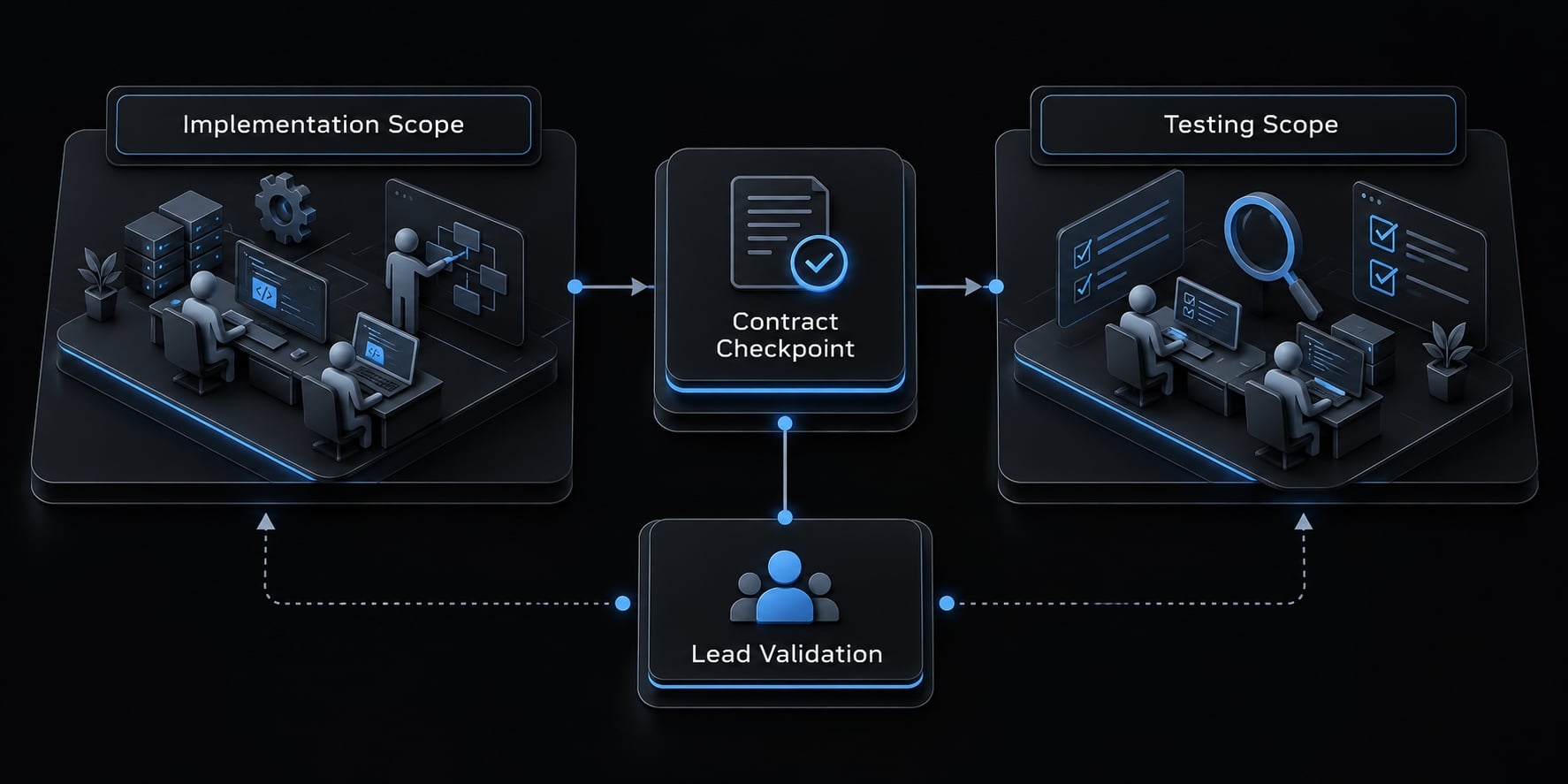
Start with two teammates as a practical recommendation, not a product minimum. Give implementation one production scope and testing one test scope. Test design can begin immediately; assertions dependent on the agreed response contract must wait for that checkpoint.
6. Monitor, validate and close
Inspect task status and messages through the controls supported by your installed release. Review diffs and test evidence before accepting completion.
Anthropic’s documented lifecycle separates teammate shutdown from team cleanup. Ask the lead to shut down teammates, then clean up team resources. Confirm the current procedure before relying on it. Cleanup does not mean deleting repository changes, removing test environments, or undoing external operations.
A starter team and copyable task contract
Roles need deliverables, not just titles. For the backend validation example, use one lead and two teammates. Add a reviewer only when the additional perspective justifies the effort.
Recommended starter roles
Illustrative starter-team responsibilities
Role | Owned output | Boundary |
|---|---|---|
Lead | Plan, coordination, integration, final validation | Reconcile before accepting completion |
Implementation teammate | Named production validation module | No unrelated production edits |
Testing teammate | Designated regression tests and results | No production-module edits |
Optional review teammate | Read-only findings with references | No edits without approval |
Test design can start early. Execution and final review depend on implementation checkpoints and the agreed response contract.
Context packet for every assignment
Each context packet should contain:
- Goal and relevant files: Intended behavior and repository references.
- Constraints and exclusions: Compatibility requirements and prohibited scope.
- Ownership and dependencies: Assigned files and blocking decisions.
- Deliverable and tests: Expected changes and validation evidence.
- Completion and escalation: Definition of done and when to stop.
Copyable team prompt
This task contract is AgentKit editorial guidance, not an executed example or an Anthropic feature. Replace every placeholder before use.
Create a team with two teammates for this bounded backend change.Goal:Reject missing or blank organization names using [expected response].Preserve valid requests and existing authorization behavior.Inspect first:Read [repository guidance], [production scope], and [test scope].Propose a plan, exact file ownership, dependencies, and test commands.Wait for my approval before editing. Do not add more teammateswithout approval.Implementation teammate:Own only [production files].Implement the agreed validation behavior.Do not edit [test files or excluded files].Testing teammate:Own only [test files].Design missing-name, blank-name, and valid-request regression tests.Do not edit production files.Wait for the agreed response contract before finalizing assertions;run implementation-dependent tests after the implementation checkpoint.Optional review:Only if approved, add a read-only reviewer.Report correctness concerns with file references; make no edits.For every assignment:Include relevant requirements, exclusions, dependencies, and expected output.No dependency, database, infrastructure, deployment, or security-policy changes.Escalation:Stop on overlapping edits, conflicting requirements, or out-of-scope needs.Notify the lead; preserve existing work. Do not overwrite another owner’s changes.Reporting:List changed files, tests actually run, results, assumptions,tests not run, and unresolved risks. Do not claim unexecuted tests passed.Lead:Reconcile outputs and inspect the combined diff.Run approved relevant validation; report any remaining gaps.Definition of done:Agreed behavior implemented, relevant tests passing, valid behaviorpreserved, no unexplained edits, and final human review requested.
Written boundaries guide task delegation. Actual filesystem and tool access still depend on configured permissions.
Use the on-page task contract directly; no email is required.
Best practices for reliable, cost-aware workflows
More sessions do not guarantee faster delivery or lower cost. Reliable results depend on useful parallelism, focused assignments, and evidence-based completion.
Before execution: Keep scope small and explicit
- Start with the smallest useful team: Add a teammate only for a distinct deliverable or investigation. Agent count is not a productivity metric.
- Identify dependencies before parallelizing: Implementation and testing may need an agreed response contract first. Parallel preparation does not make every step independent.
- Provide focused context and ownership boundaries: Include necessary requirements without copying unrelated history. Context window management means preserving useful information, not withholding essential constraints.
Assign one accountable owner per active deliverable. File ownership reduces ambiguity but does not mechanically prevent another session from editing those files.
During execution: Watch for wasted work
Get the next post in your inbox
New guides and AgentKit updates, no spam. Unsubscribe at any time.
Do not estimate a team’s billed cost by multiplying one session’s token usage by the number of teammates.
Illustrative failure mode: Both teammates investigate the same validation path. Pause the duplicate investigation, retain useful findings, and narrow testing to behavior-based cases.
Before completion: Require evidence and approval
- Validate diffs, tests, and unresolved risks: Ask what changed, which commands ran, what passed, and what remains untested. A confident summary is not validation evidence.
- Keep human approval for consequential changes: Deployment, infrastructure, database, and security changes require deliberate review. Passing tests do not establish complete correctness.
Anthropic’s permission documentation should govern actual access controls. A prompt saying “read-only” is not a substitute for restrictive permissions.
Common problems and fixes
The table below provides general troubleshooting recommendations, not observed failures from an executed demonstration. Causes are possibilities, not diagnoses. Preserve existing work before investigating file conflicts or changing assignments.
Safe troubleshooting for coordinated Claude Code work:
Symptom | Likely cause | Safe immediate action | Prevention |
|---|---|---|---|
Duplicated work | Assignments overlap or lack visible ownership. | Pause the redundant assignment, inspect outputs, and split scope. | Name one owner per deliverable. |
Missing requirements | The assignment omitted necessary context. | Correct the brief and confirm the updated expectation. | Provide a self-contained context packet. |
File conflicts | Sessions edit overlapping files. | Stop overlapping edits; preserve work and inspect the current diff. | Set explicit file boundaries. |
Excessive usage | Work is redundant, broad, or no longer useful. | Narrow or stop low-value assignments using supported controls. | Limit scope and set checkpoints. |
Integration failure | Interfaces or dependencies diverged. | Reconcile the contract before additional implementation. | Approve interfaces before dependent work. |
Premature completion | The definition of done is unclear. | Request tests, changed-file evidence, and unresolved risks. | Specify evidence requirements upfront. |
Permission stall | An operation needs approval or is denied. | Inspect the operation; approve only appropriate access. | Review necessary permissions beforehand. |
Unsupported findings | A conclusion lacks evidence or exceeds available context. | Request file references, reproduction, or explicit uncertainty. | Require evidence-linked findings. |
Do not solve a permission stall by broadly disabling safeguards. Determine whether the requested operation belongs within the approved task at all.
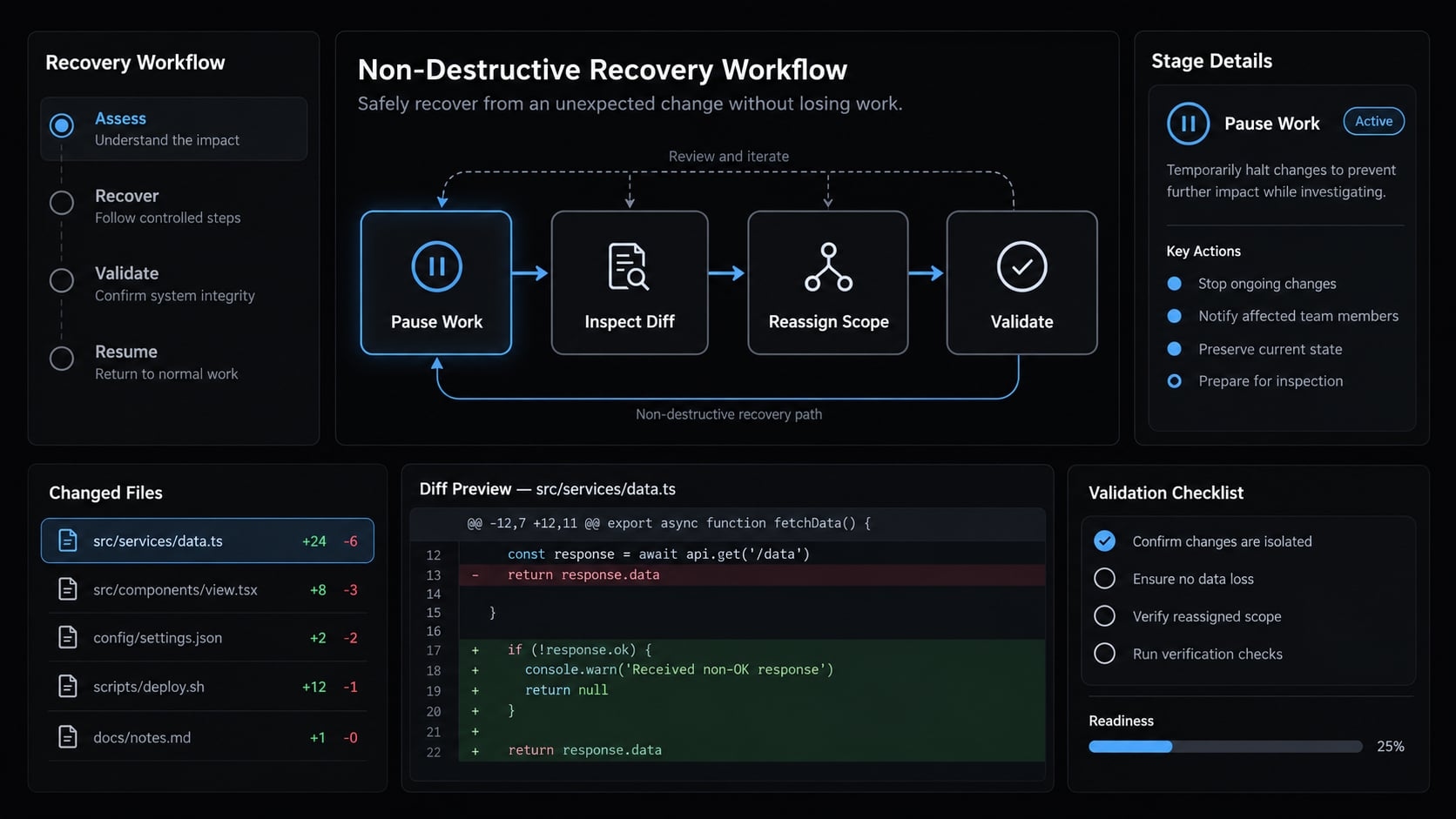
Likewise, resolve duplicated work through reassignment, not by discarding unexplored changes. After recovery, rerun relevant validation because combined edits may differ from either teammate’s original result.
Make the workflow repeatable with AgentKit
Native agent teams don’t require AgentKit; you can version your own role templates and task contracts. AgentKit becomes useful when maintaining those assets yourself starts to slow you down.
Its Engineer kit packages 45 specialized subagents (planning, coding, review, security audits, deployment), 108+ customizable skills, and a plan → cook → review → ship workflow, with session hooks that load project rules and approval prompts before risky operations. These install natively for Claude Code and Codex, with Cursor and DeepSeek Harness in beta; hook coverage varies by harness.
AgentKit standardizes roles and procedures, but it doesn’t replace native team coordination such as the shared task list and teammate messaging. Before adopting it, check supported versions, review the permissions its assets request, and test one bounded task first. If you prefer to stay self-managed, keep the task contract above under version control.
Frequently asked questions
What are Claude Code agent teams?
Claude Code agent teams are a multi-agent orchestration system that allows a "lead" agent to manage multiple "teammate" sessions simultaneously. Unlike traditional subagents that operate sequentially, agent teams enable parallel collaboration across independent contexts, allowing teammates to share task lists and coordinate on complex, multi-domain engineering projects.
How do agent teams differ from single-agent sessions?
A single-agent session manages one context window and executes tasks sequentially. Agent teams scale this by spawning separate Claude instances, each with its own context. This approach is superior for parallel tasks, such as simultaneous backend development and test writing, though it consumes more tokens due to multiple concurrent processes.
Should I use agent teams for every coding task?
No. Agent teams are designed for complex, parallelizable work where separate domain expertise is required. For routine fixes, single-agent sessions or simple subagents are more efficient. Using teams for sequential tasks or small edits increases coordination overhead and token consumption without providing a meaningful productivity benefit.
How do I enable agent teams in Claude Code?
You can enable agent teams by setting the CLAUDE_CODE_EXPERIMENTAL_AGENT_TEAMS environment variable to 1. This is typically done within your terminal configuration or by adding the setting to your ~/.claude/settings.json file. Ensure you are using the latest version of Claude Code, as feature availability may vary by release.
Can teammates edit the same files at the same time?
While agent teams can communicate to share findings, they do not inherently prevent file conflicts. To avoid race conditions, you must define clear ownership boundaries within your task instructions. Assigning teammates to separate directories or distinct modules is a best practice to prevent overlapping edits and repository state errors.
Do agent teams guarantee faster results?
Agent teams can significantly reduce wall-clock time for complex refactoring by allowing parallel execution. However, they do not guarantee lower costs or higher code quality. Token usage typically scales with the number of teammates, and human oversight remains essential to validate deliverables, resolve conflicts, and ensure the team adheres to your project requirements.
What happens if an agent team coordination fails?
If coordination breaks down, pause the team's progress immediately to inspect the task list and current file status. You can then reassign roles, narrow the scope of individual teammate tasks, or manually steer the lead agent. Avoid manually killing individual agents; always rely on the orchestrator to manage the team lifecycle.
Read more:
- Master Claude Code parallel agents: Boost efficiency properly
- Claude Code specialized agents: Boost your coding efficiency
Conclusion
Claude Code agent teams excel at separable tasks requiring clear ownership and validation. For smaller fixes, a single session or subagent is often more efficient. When using a team, start small with well-defined dependencies, clear boundaries, and rigorous test verification rather than relying on unsupported claims.
Go deeper in the docs
Reference pages for every command, skill, hook and setting mentioned here.
Read the docs →Share this article
Keep reading
- Master Claude Code PostToolUse hook: Setup and examplesLearn how to configure Claude Code PostToolUse hooks for automated formatting and linting. Follow our guide to improve workflow efficiency today.15 min read
- How to use Kimi K2 with Claude Code: Setup & verification guideLearn how to configure Kimi K2 with Claude Code using Anthropic-compatible endpoints. Follow our step-by-step guide for setup, verification, and testing.13 min read
- Claude Code effort level: How to choose the right settingLearn how Claude Code effort level impacts reasoning and performance. Discover the best settings for your tasks to balance efficiency and accuracy.10 min read