Claude Code specialized agents: Boost your coding efficiency
Claude Code specialized agents: What they are, how they work and when to use them
Long Claude Code sessions tend to break down in familiar ways: Planning, debugging, review, testing, and documentation all pile into one thread, the context gets noisy, and output quality starts to slip. Claude Code specialized agents matter because they give each subtask its own focused lane instead of forcing every instruction through the same conversation. The benefit is practical rather than extraordinary: cleaner task separation, less chat thread clutter, and more reliable handoffs. This guide explains what specialized agents are, how they work, when to use them, how to create them, and which mistakes make them less useful in real workflows.
What Claude Code specialized agents actually are
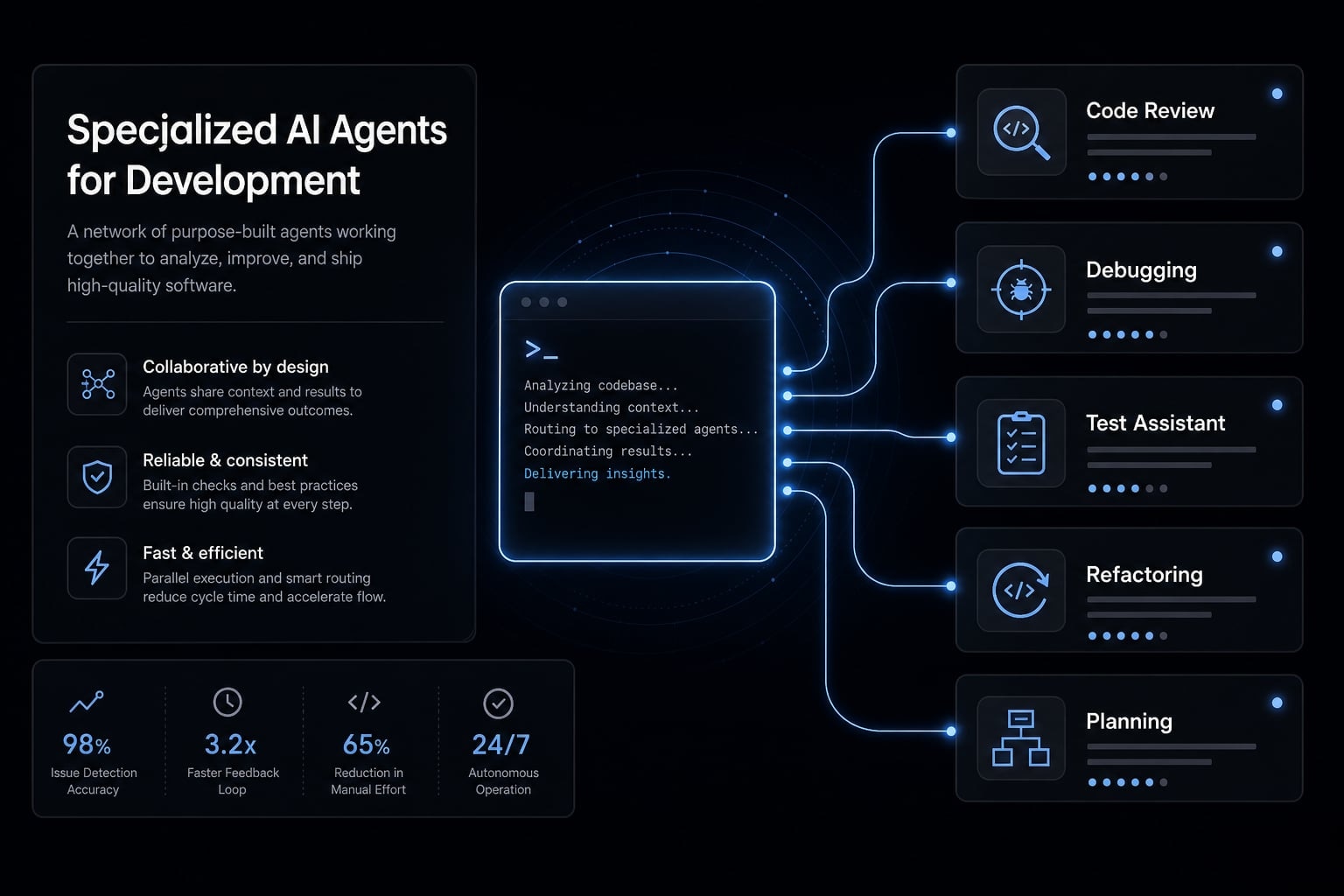
Claude Code specialized agents are focused sub-agents designed to handle one narrow task in a separate context window, then return a concise result to the main session. Their value comes from cleaner task delegation, sharper role boundaries, and better context control - not from adding some entirely new layer of intelligence.
In simple terms, Claude Code specialized agents act as role-specific helpers inside a broader Claude Code workflow. Instead of asking one main thread to plan features, inspect code changes, draft tests, and write release notes all at once, you delegate a bounded subtask to a focused assistant with a clear job.
The design principle is separation and clarity. A specialized agent should have one responsibility, a defined input, and a predictable output. The main benefit is cleaner workflow separation, not “more AI power.”
Specialized agents are focused sub-agents with one job
When one thread carries too many mixed instructions, quality usually drops for a simple reason: The model has to juggle competing goals. A debugging request needs different context than a changelog summary. A review pass needs different criteria than test planning.
That is why the strongest sub-agents follow a single-responsibility model:
- One agent reviews a change set.
- One agent drafts test cases.
- One agent summarizes implementation notes.
- One agent helps narrow likely root causes.
This narrow scope makes task delegation easier to trust and easier to repeat.
Mode | Best use | Context behavior | Typical output |
|---|---|---|---|
Main session | Overall direction, final decisions, orchestration. | Holds broader project context. | Strategy, synthesis, final next steps. |
Specialized agent | One bounded task. | Works in a separate context window. | Focused findings, summary, recommended action. |
Normal prompt | Quick ad hoc request. | Stays in the current thread. | One-off answer or draft. |
How specialized agents work inside Claude Code
The main session does not wait for you to hand off work. Claude Code reads each subagent's description field, matches it against the task at hand, and delegates when the two line up. The description is not documentation - it is the trigger. A subagent with a vague description won't perform effectively, no matter how good its instructions are.
The operating sequence
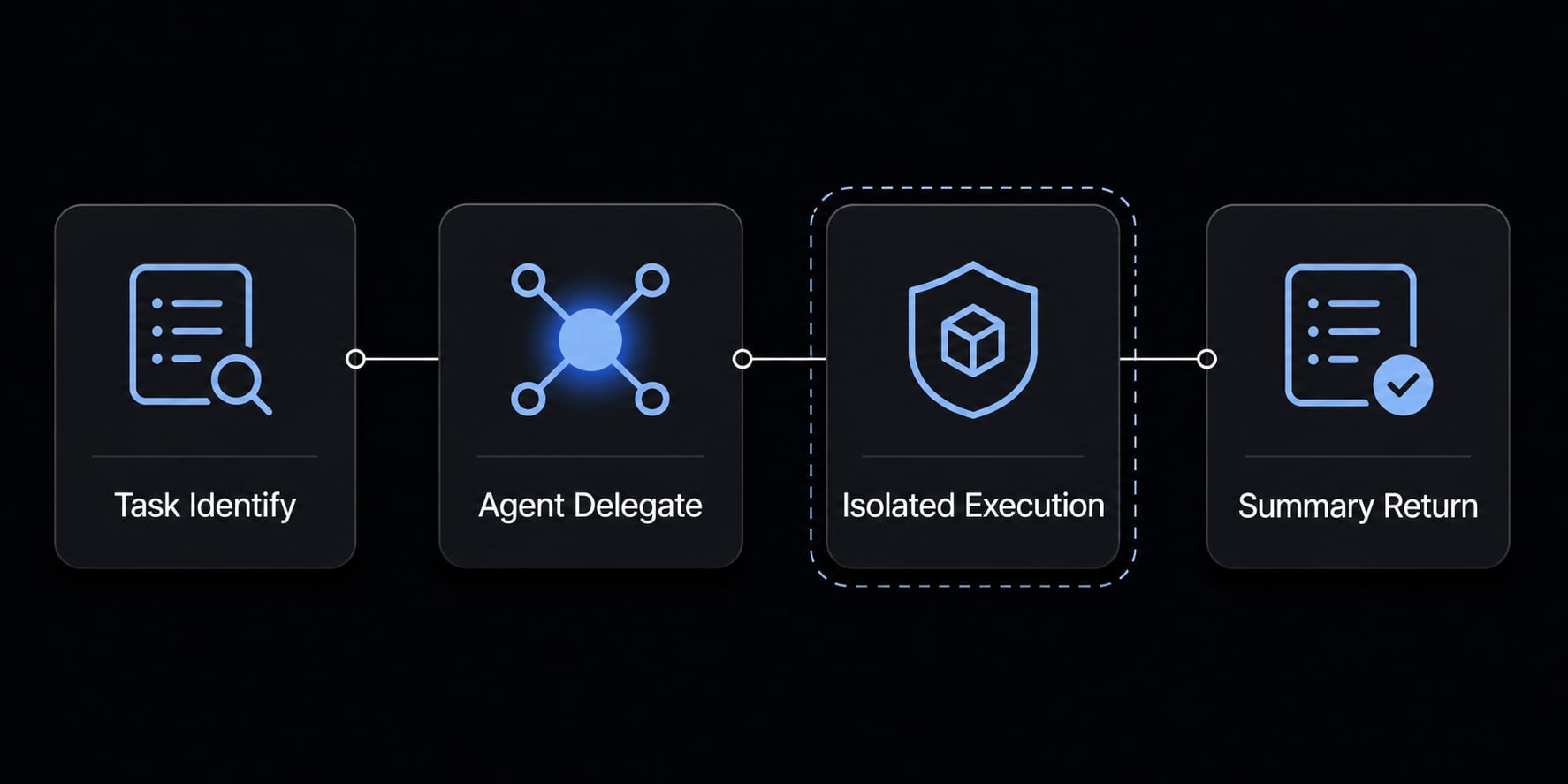
- The main session recognizes a matching task. It compares what you asked for against the description of every available subagent.
- It delegates automatically. In the transcript this shows as a tool call row with the subagent's name and a short task description, e.g: code-reviewer (Check auth changes).
- The subagent works in an isolated context. It gets a fresh session with its own system prompt, tool list, and model. It has no memory of previous invocations and no access to your main conversation history — every call is a clean slate.
- Only a summary returns. The intermediate work never enters the main transcript.
When you want a specific subagent to run and refuse to leave it to chance, name it in the prompt: "Use the code-reviewer subagent to check this PR".
That clean-slate behavior is why input design matters so much. The subagent cannot infer anything from what you discussed earlier - whatever it needs must be in the task description or reachable through its tools.
Why this improves context management
- Less thread bloat because side work does not crowd the main conversation.
- Fewer competing instructions because each delegated task has a narrow scope.
- Cleaner focus on the main objective such as shipping a feature or resolving a defect.
- Better support for mixed work types like review, debugging, testing, and docs.
A simpler way to think about it is this: The main session stays strategic, while sub-agents handle contained pieces of work. That reduces context sprawl and makes long sessions easier to control.
Useful outputs often include:
- A findings summary.
- A list of likely issues.
- Test recommendations.
- A short handoff note.
- Blockers or uncertainties.
Isolated work reduces clutter, but it does not remove the need for judgment. Summaries still need review, especially when the task affects production code, architecture decisions, or release risk.
When to use a specialized agent - and when not to
The best time to use sub-agents is when the work is repeatable, bounded, and easier to evaluate with a standard output. If the task is small, highly interactive, or only needs one or two prompts, delegation can add more friction than value. The core decision is not whether agents are available. It is whether workflow modularization actually improves the job.
Use a specialized agent if…
- The task repeats often across projects or sessions.
- The output can be standardized into a repeatable format.
- The task benefits from isolated context.
- The main thread needs to stay focused on planning or decision-making.
- You want a lightweight delegation framework for review, testing, or docs.
- The session is getting noisy and showing signs of context amnesia.
- The work is useful even if returned as a summary, not a full end-to-end solution.
Do not use a specialized agent if…
- The task is a one-off and easy to solve with a direct prompt.
- Setup cost exceeds the benefit.
- The task depends on fast back-and-forth inside the main thread.
- The subtask is too small to justify separate orchestration.
- Too many agents would create coordination friction.
- You are using delegation as a substitute for clearer prompting.
- The work depends on shared nuance that is easier to keep in one conversation.
Not every task should be delegated; sometimes a direct prompt in the main thread is faster and clearer.
A practical trade-off to keep in mind: Specialized agents reduce thread clutter, but they introduce setup overhead. If you create too many specialized LLM helpers for tiny tasks, you simply trade context overload for coordination overhead. That is one reason prompt chaining strategies still matter. For short workflows, a few disciplined prompts in the main thread may be the better option.
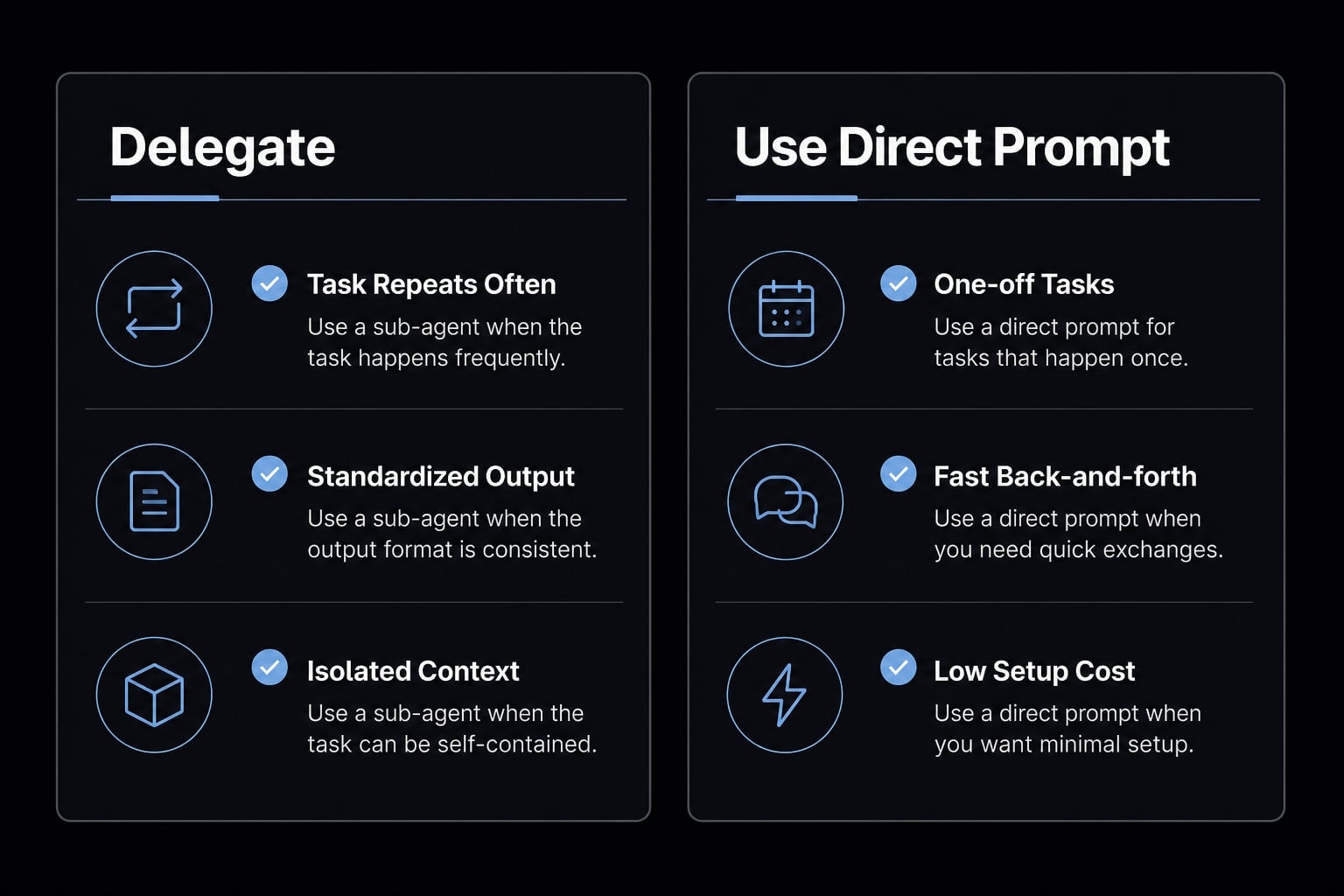
A helpful rule:
- Use delegation for bounded, reusable workflows.
- Use direct prompting for small, conversational work.
- Avoid over-delegation unless repeatability clearly justifies it.
How to create a specialized agent in Claude Code
The fastest way to create useful agents is to start narrow. Do not begin with a "do everything" assistant. Start with one role, define exactly what it receives, what it should return, and where it should stop.
A subagent is a Markdown file with YAML frontmatter. That is the entire format.
Where it goes:
- .claude/agents/ - Project scope, committed to the repo, shared with your team
- ~/.claude/agents/ - User scope, available in every project on your machine
Project definitions win name conflicts. Note that as of v2.1.198, /agents no longer opens a creation wizard — it prints a reminder to ask Claude to write the file or edit the directory directly. Asking Claude to write it is the fastest path; then check the frontmatter yourself.
---name: code-reviewerdescription: Reviews code changes for logic errors, risky edits, and likely regressions. Use PROACTIVELY immediately after implementation work is completed.tools: Read, Grep, Globmodel: sonnet---You are a code reviewer. Examine the change set and report findings only — do not edit files.For each issue, return:- Issue found- Evidence (file path and line)- Recommended next action- Confidence: high / medium / low
End with a "Blockers and uncertainties" section. If you could not verify something, say so.
Only name and description are required. tools is an allowlist - a reviewer given only Read, Grep, Glob cannot edit anything regardless of what its prompt says. That is a real boundary, not a request.
Basic setup steps
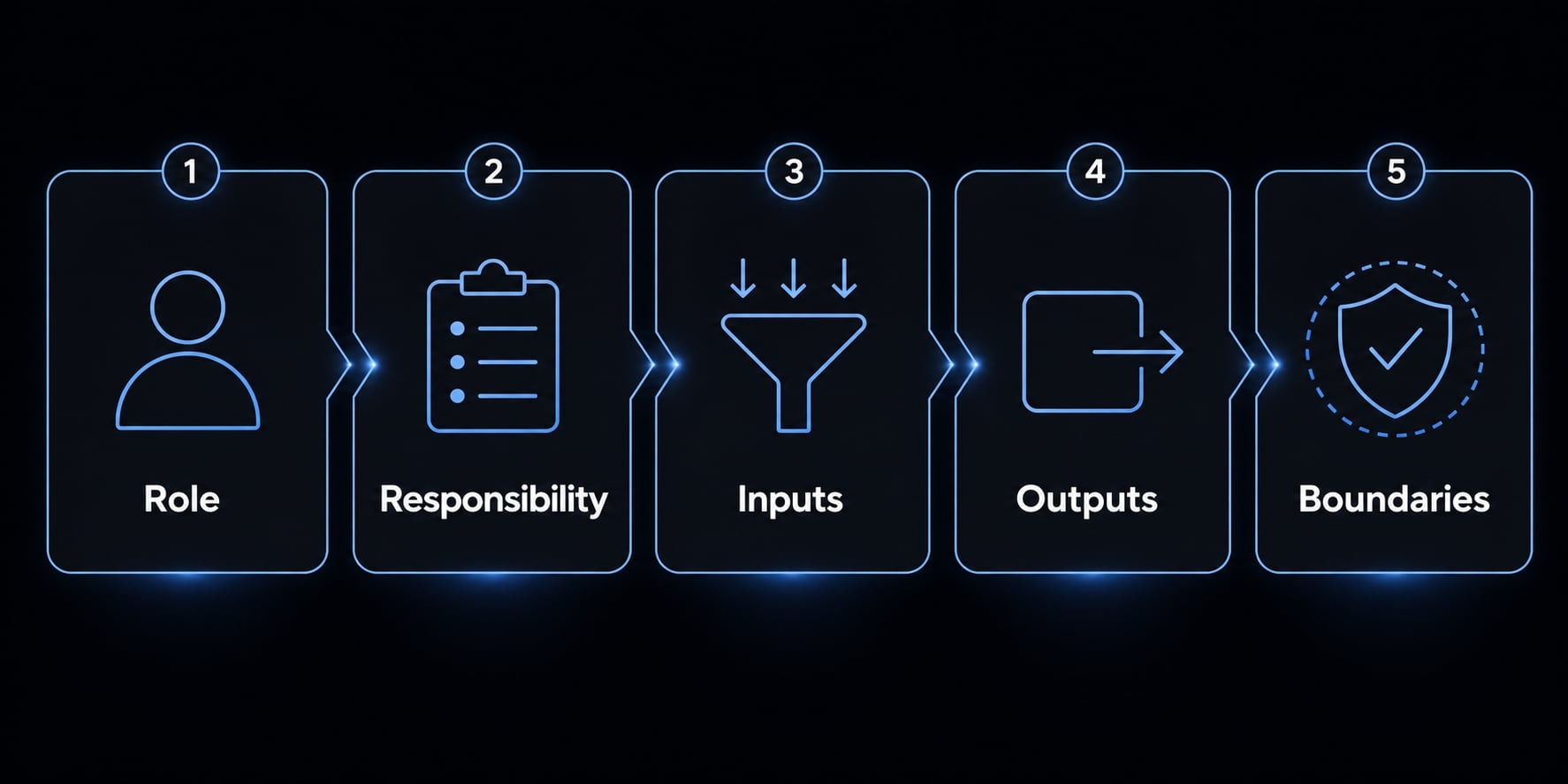
- Name the agent by role. Use the name field with lowercase and hyphens: code-reviewer, test-writer, docs-agent.
- Define its single responsibility in the description field. One sentence for what it owns, plus the condition that should trigger it. This is the field that decides whether the agent gets used at all. Compare Reviews code against the example above - the second tells Claude exactly when to route here. Add Use PROACTIVELY when you want the agent to fire without being asked.
- Specify the inputs it receives. Include the exact materials it should use, such as a diff, error output, file list, or feature summary.
- Specify the output format it must return. Use structured output so results are easy to scan and compare across runs.
- Set boundaries and failure reporting. Tell the agent when to stop, what not to assume, and how to report blockers or missing information.
This is the core of how to create custom sub-agents in Claude Code without overengineering the setup. The best agent design patterns are usually the simplest.
Example output contract
That output structure is what the example above encodes. Here is why it works:
- Issue found.
- Evidence.
- Recommended next action.
- Blockers or uncertainties.
That small output contract does more for reliability than long prompt instructions. It creates predictable handoffs and reduces guesswork when the result comes back to the main thread.
A few useful design rules:
- Keep the task-specific instruction set short.
- Ask for findings, not performance theater.
- Require uncertainty reporting.
- Standardize the return shape before adding more complexity.
- Start with one narrow agent before trying to build a multi-purpose assistant.
In practice, the teams that get value fastest are not the ones building the most agents. They are the ones defining the clearest roles.
6 common specialized agent roles developers actually use
The most effective roles are not abstract. They map directly to repeatable engineering tasks with clear outputs. If a role cannot be evaluated quickly, it is usually too broad. Good workflow delegation improves developer experience by reducing clutter and making side work easier to repeat.
Common roles include:
- Code review agent.
- Debugging agent.
- Test assistant.
- Documentation agent.
- Refactoring agent.
- Planning agent.
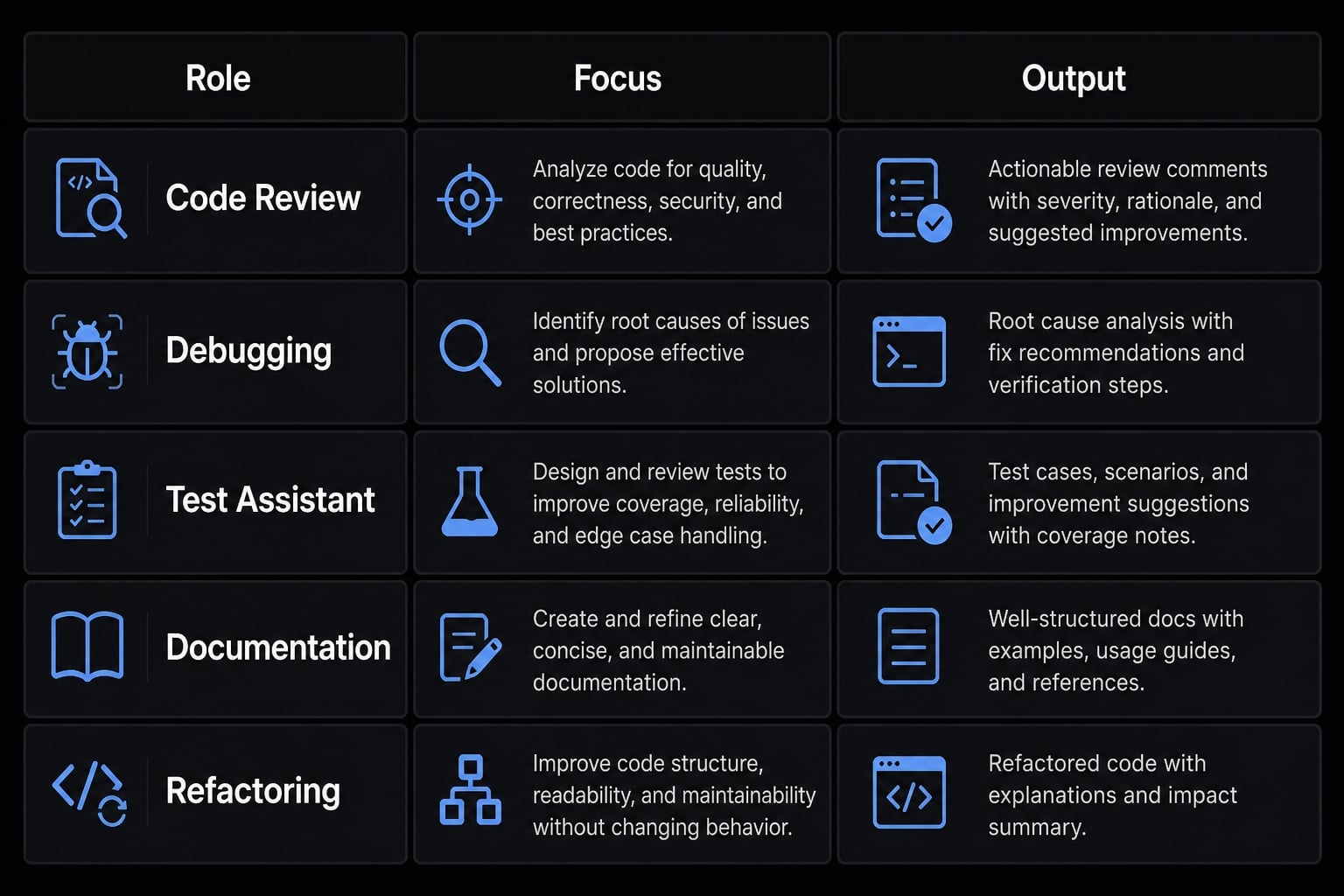
Code review agent
Best for post-change validation.
- Checks a diff or change set for logic issues.
- Flags risky edits, inconsistent patterns, and likely regressions.
- Returns findings plus recommended next checks.
This is one of the most practical forms of automated code review because the output can stay narrow and actionable.
Debugging agent
Best for narrowing likely causes before editing code.
- Reviews symptoms, logs, or failing behavior.
- Proposes root-cause hypotheses.
- Suggests targeted checks to validate each hypothesis.
This supports intelligent software debugging by turning a vague failure into a smaller investigation path.
Test assistant
Best for repeatable validation planning.
- Drafts test cases and edge cases.
- Identifies missing coverage.
- Suggests regression checks tied to recent changes.
A testing assistant is especially useful when implementation moves quickly and formal validation tends to lag behind.
Documentation agent
Best used after implementation.
- Creates concise docs, handoff notes, or changelog entries.
- Summarizes what changed and why it matters.
- Prevents documentation from being skipped at the end of a sprint.
This role is valuable because docs often fail for operational reasons, not because teams think they are unimportant.
Refactoring agent
Best as a recommendation layer first.
- Spots cleanup opportunities.
- Suggests simplification without changing behavior.
- Identifies duplicated logic, naming friction, or structural inconsistency.
The safest use is advisory first, especially when touching sensitive production paths..
Planning agent
Best for turning large goals into executable tasks.
- Breaks vague work into smaller steps.
- Creates implementation sequences.
- Helps maintain discipline in larger modular workflows.
This role is useful when the main thread is trying to move from “what are we doing?” to “what do we do next?”
These are assistants for focused tasks, not autonomous replacements for engineering judgment. Their strength is narrow execution with clear handoffs, not independent ownership of the whole software lifecycle.
Best practices for reliable specialized agents
Reliable agent behavior usually comes from better constraints, not more instructions. If a sub-agent becomes inconsistent, the problem is often weak scope control, vague outputs, or no clear definition of success. The strongest best practices for delegating tasks to Claude Code agents are operational, not theoretical.
Reliable agents usually have…
- One role.
- One output format.
- One clear success condition.
- Narrow scope control.
- Explicit obstacle reporting.
- Clear language about what to do when evidence is incomplete.
- A restricted
toolsallowlist where relevant. - Focused prompt engineering for sub-agents, not long generic prompts.
A useful pattern is to define the job in one sentence, define success in one sentence, then define the output shape in three or four fields. That is often enough.
Strong summaries should include…
- What was done.
- What was found.
- What should happen next.
- What remains uncertain.
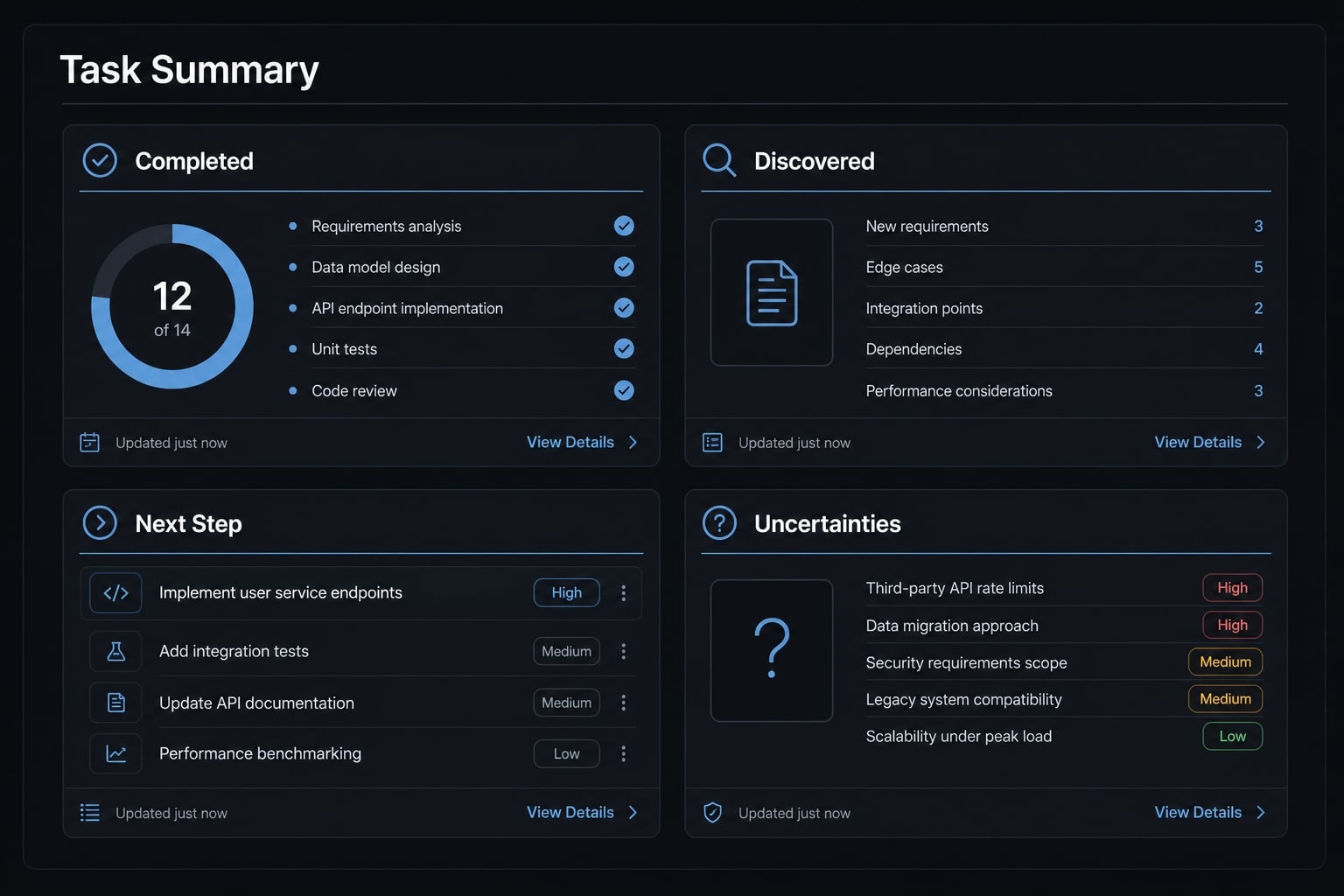
Example summary structure:
- Task completed.
- Key findings.
- Recommended next step.
- Risks, blockers, or uncertainty.
This matters because structured summaries are what make delegated work usable inside a real development loop. Without them, outputs become harder to compare and easier to ignore.
One more rule is worth keeping: Useful agents should report uncertainty and blockers instead of pretending they completed the task cleanly. Honest incompleteness is more valuable than polished but misleading confidence.
Common mistakes that make specialized agents less useful
Most common mistakes come from trying to delegate too much, too early, with too little structure. That is where specialized LLM sub-agents stop being helpful and start adding friction.
Mistake: Vague role, vague result
- Why it fails: The agent has no clear definition of success.
- Fix: Define one narrow responsibility and one expected output.
Mistake: Delegating tiny tasks
- Why it fails: Setup overhead exceeds the work itself.
- Fix: Keep one-off, two-prompt tasks in the main thread.
Mistake: Undefined output contracts
- Why it fails: Results come back inconsistent and hard to act on.
- Fix: Standardize the return format before expanding usage.
Mistake: Too many agents
- Why it fails: You create context fragmentation and coordination noise.
- Fix: Consolidate around a few high-value roles.
Mistake: Using delegation to compensate for poor prompting
- Why it fails: More agents do not fix unclear instructions.
- Fix: Improve task framing first, then delegate.
The pattern behind most common mistakes is simple: Broad scope creates weak results. Narrow scope is usually the correction. That is the most reliable way to avoid over-delegation and poor output contracts.
Practical example: A cleaner Claude Code workflow for review, testing and docs
A simple example of modular Claude Code agent workflows looks like this: The main thread owns the feature goal and final decisions, then delegates three side tasks after implementation. A review agent checks the change set for risky edits and inconsistent logic. A test agent proposes validation cases and missing edge coverage. A docs agent creates short release notes and handoff documentation.
The result is not a fully autonomous system. It is a cleaner operating model:
- Main thread keeps control of priorities.
- Review work stays separate from test planning.
- Documentation no longer competes with debugging context.
- Outputs become easier to reuse across similar work.
That is where Claude Code sub-agent orchestration becomes practical. The value is workflow standardization, not complexity. For teams that want a more repeatable system, reusable templates and reusable skill-based sub-agent architecture can help reduce setup time across projects without turning every task into custom prompt work.
Frequently asked questions
What are Claude Code specialized agents?
Claude Code specialized agents are focused sub-agents designed to handle specific, repeatable development tasks within an isolated context. By delegating individual responsibilities - such as code review or debugging - to these agents, developers keep their main conversation thread clear, strategic, and free from context clutter.
How do specialized agents differ from the main Claude Code session?
The main session acts as the strategic conductor for your project, while specialized agents function as dedicated assistants for narrow tasks. Using specialized agents allows you to maintain an isolated context window for specific jobs, which prevents your primary thread from becoming bloated with irrelevant technical details.
When should I use a specialized agent in my workflow?
You should use a specialized agent when a task is repeatable, requires a standardized output, and would benefit from being separated from your main strategic thread. Avoid creating agents for one-off tasks where the setup overhead outweighs the time saved through delegation.
How do I create an effective specialized agent?
Create a Markdown file with YAML frontmatter in .claude/agents/ for a single project, or ~/.claude/agents/ to use it everywhere. Only name and description are required. Write the description as the condition that should trigger the agent, restrict its tools with the tools field, and define a strict output format in the body so results stay comparable across runs.
What are common development tasks suitable for specialized agents?
Common roles include code review agents for identifying logic inconsistencies, debugging agents for narrowing root causes, test assistants for drafting edge cases, documentation agents for creating concise handoff notes, planning agents for breaking down complex goals, and refactoring agents for suggesting structural cleanup.
How can I ensure my specialized agents remain reliable?
Reliability in specialized agents is achieved by enforcing one narrow role, one consistent output format, and one clear success condition. Always require your agents to include an "uncertainty report" in their summary, which alerts you to potential blockers or missing information that requires human engineering judgment.
What is the biggest mistake to avoid when using sub-agents?
The most common mistake is over-delegation - creating too many agents or assigning them vague roles. If your agent does not have a clearly defined output contract or if the task is too tiny, you will create more coordination friction than productivity, ultimately degrading your development experience.
Read more:
- Everything Claude Code: A guide to streamlined AI coding
- Claude Code tutorial: Set up and master your AI coding agent
- Claude Code subagents documentation: Setup and usage guide
Conclusion
Claude Code specialized agents are most useful when they isolate context, standardize repeatable work, and keep the main thread focused on higher-level decisions. Their real value is not autonomy. It is cleaner workflow focus, better handoffs, and more reliable delegation for tasks like review, testing, debugging, and documentation.
The practical approach is to start small: choose one recurring task, define a narrow role, require structured output, and review the result critically. If you want to make this repeatable across projects, explore role templates, output contracts, and workflow standardization patterns that help your team reuse what already works.