Claude Code and Codex shared workflow: A practical setup guide
Claude Code and Codex Shared Workflow: A Practical Setup Guide
Multi-agent collaboration fails when critical context is trapped in chat logs—causing code conflicts, lost rationale, and wasted effort. To collaborate effectively across Claude Code and Codex, treat version-controlled project files as your single source of truth rather than relying on an agent's memory. By establishing clear task ownership, isolated working directories, structured handoffs, and strict human review, you can scale a reliable builder–reviewer workflow without multiplying coordination overhead.
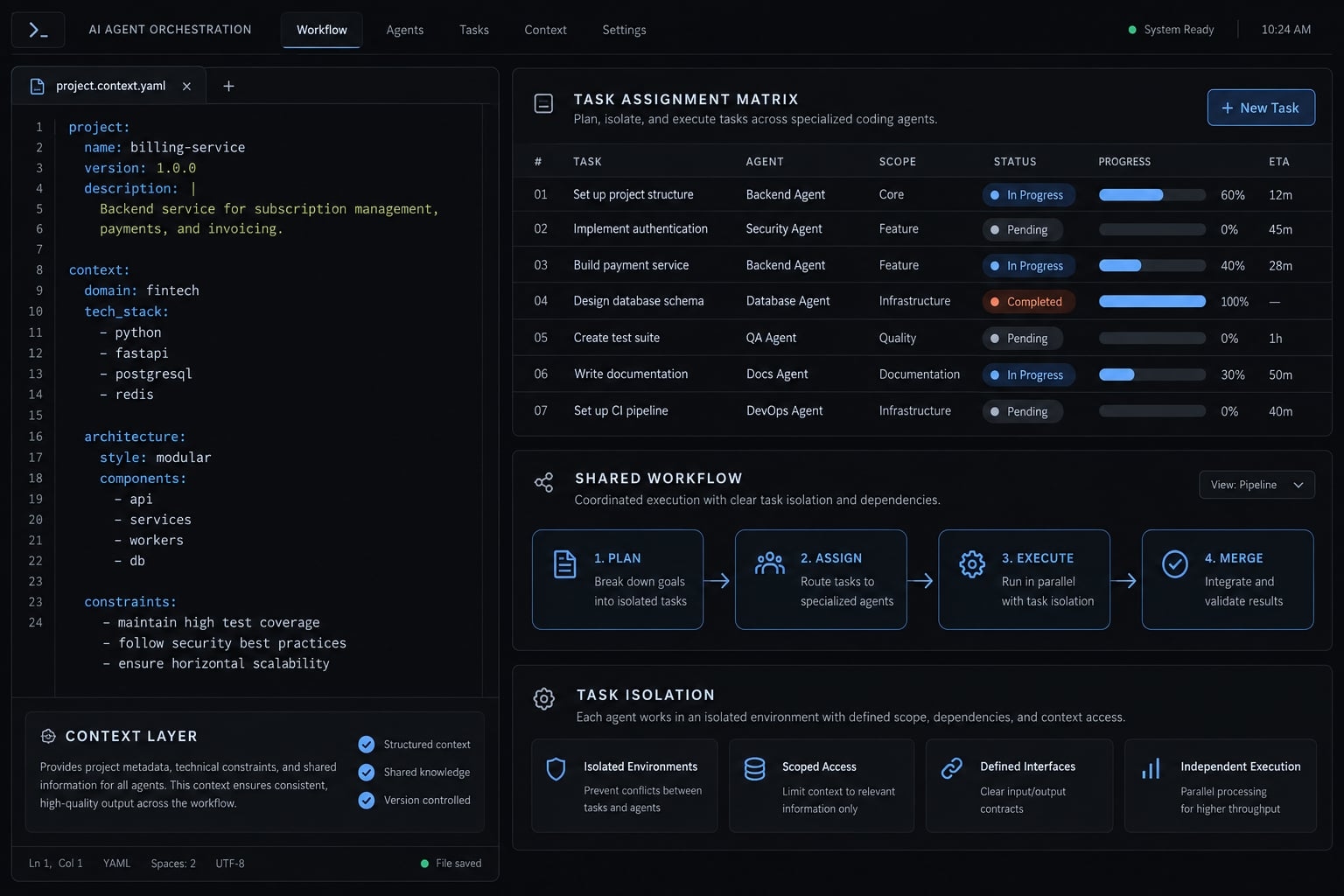
What is a Claude Code–Codex shared workflow?
A Claude Code–Codex shared workflow coordinates both tools through version-controlled project context, one accountable owner per task, explicit handoffs, and review gates. It preserves requirements, decisions, and verification evidence across tool changes without relying on previous conversations. It is an operating procedure, not automatic synchronization or native shared memory.
The three layers of a portable workflow
- Portable context: Requirements, architecture, decisions, tasks, and verification records.
- Reusable workflow logic: Checklists, task templates, review procedures, and reusable instructions.
- Tool-specific configuration: Instruction entry points, permissions, authentication, integrations, and environment settings.
While workflow logic is broadly adaptable, executable skills and configurations usually require fine-tuning.
When a shared workflow is worth the coordination cost
Shared project context does not require simultaneous editing. Start sequentially; introduce concurrency only when its coordination cost is justified.
Useful | Unnecessary or not ready |
|---|---|
Bounded implementation followed by second-agent review. | Trivial fixes with little additional review value. |
Separable tasks with explicit interfaces. | Poorly scoped tasks without acceptance criteria; define verification before delegating. |
Missing tests are a preparation gap, not a permanent disqualification. Define observable checks before assigning implementation.
Build the shared context layer
Chat history is not a reliable project record. Give each fact or decision one authoritative location, then direct both agents to it. Shared context only helps when it stays current and agents actually read it.
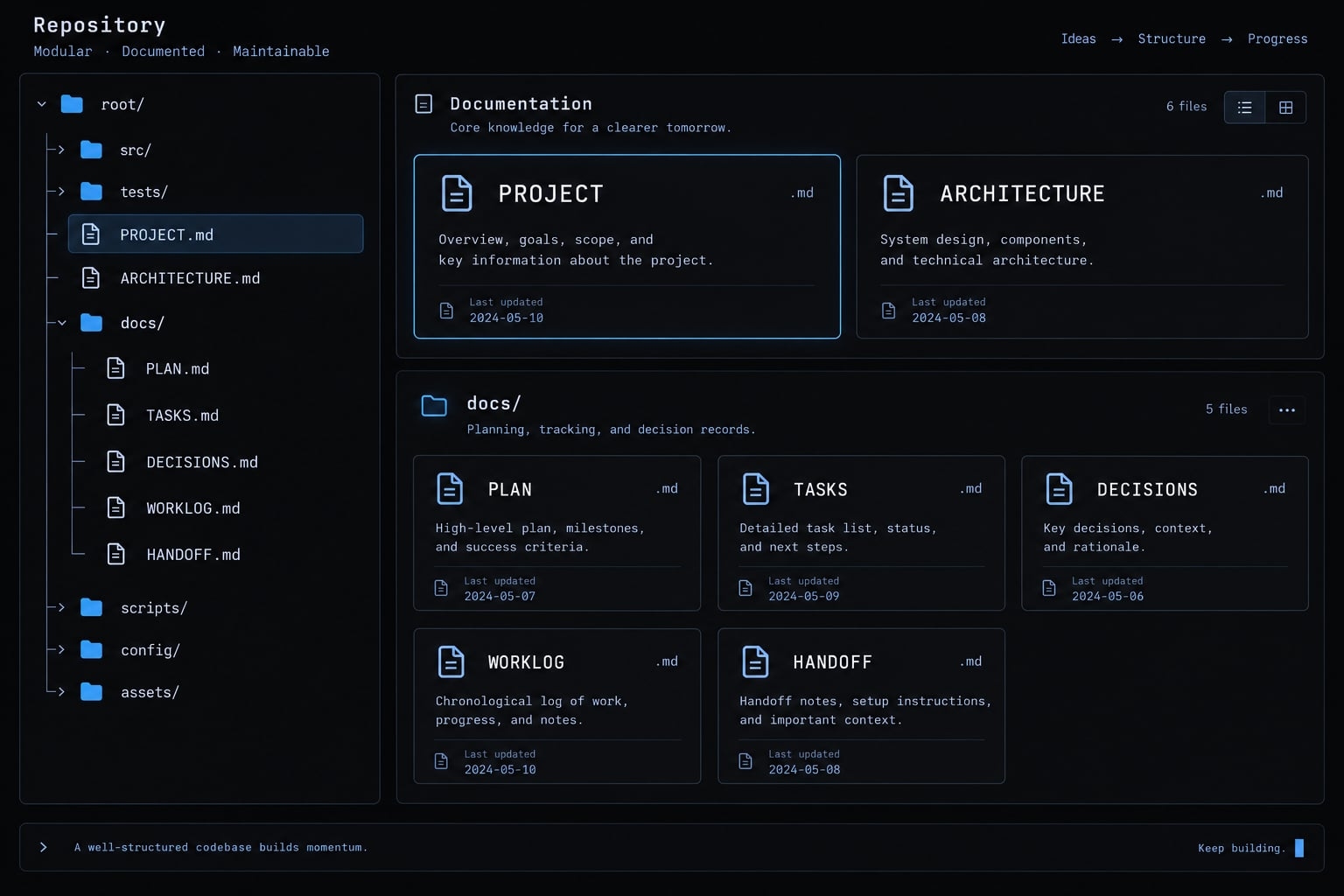
Recommended repository structure
These filenames and folders are proposed conventions, not a product standard:
repository/├── README.md├── PROJECT.md├── ARCHITECTURE.md├── CLAUDE.md├── AGENTS.md└── docs/ ├── PLAN.md ├── TASKS.md ├── DECISIONS.md ├── WORKLOG.md └── HANDOFF.md
README.md remains the human-facing entry point. Small projects can combine plan, task, and progress records. One docs/HANDOFF.md suits sequential work; concurrent tasks need task-specific handoffs.
Define one purpose for each context file
Recommended context files and authority boundaries
File | Purpose | Update rule | Source-of-truth status |
|---|---|---|---|
| Goals, requirements, constraints | Approved scope changes | Canonical product intent |
| Components and interfaces | Approved structural changes | Canonical architecture intent |
| Sequence and dependencies | Plan approval or revision | Canonical approved plan |
| Owners, criteria, status | Assignment or status changes | Canonical active-task state |
| Decisions and rationale | Decision approval or replacement | Canonical decision history |
| Commands, outcomes, blockers | Meaningful execution events | Operational evidence record |
| Revision and next action | Responsibility transfer | Revision-scoped transfer record |
| Claude Code instructions | Instruction changes | Tool-specific entry point |
| Codex-compatible instructions | Instruction changes | Tool-specific entry point |
Documents describe intent and recorded state. Source code and reproducible checks establish implementation behavior.
Prevent CLAUDE.md and AGENTS.md from drifting apart
An instruction adapter is this guide’s term for a tool-specific entry file directing agents to shared rules. Both files can contain broader instructions; using them as concise adapters is an architectural choice.
- Put shared rules in canonical documents.
- Keep adapters concise.
- Explicitly require reading the relevant documents before editing.
- Verify instruction discovery, scope, and precedence for your installed tools.
- Review both adapters when instructions change.
A minimal adapter instruction is:
Read PROJECT.md, ARCHITECTURE.md, and the active task,plan, and decision records before editing.State the task ID, acceptance criteria, and blockers.If required context is missing or contradictory, stop.
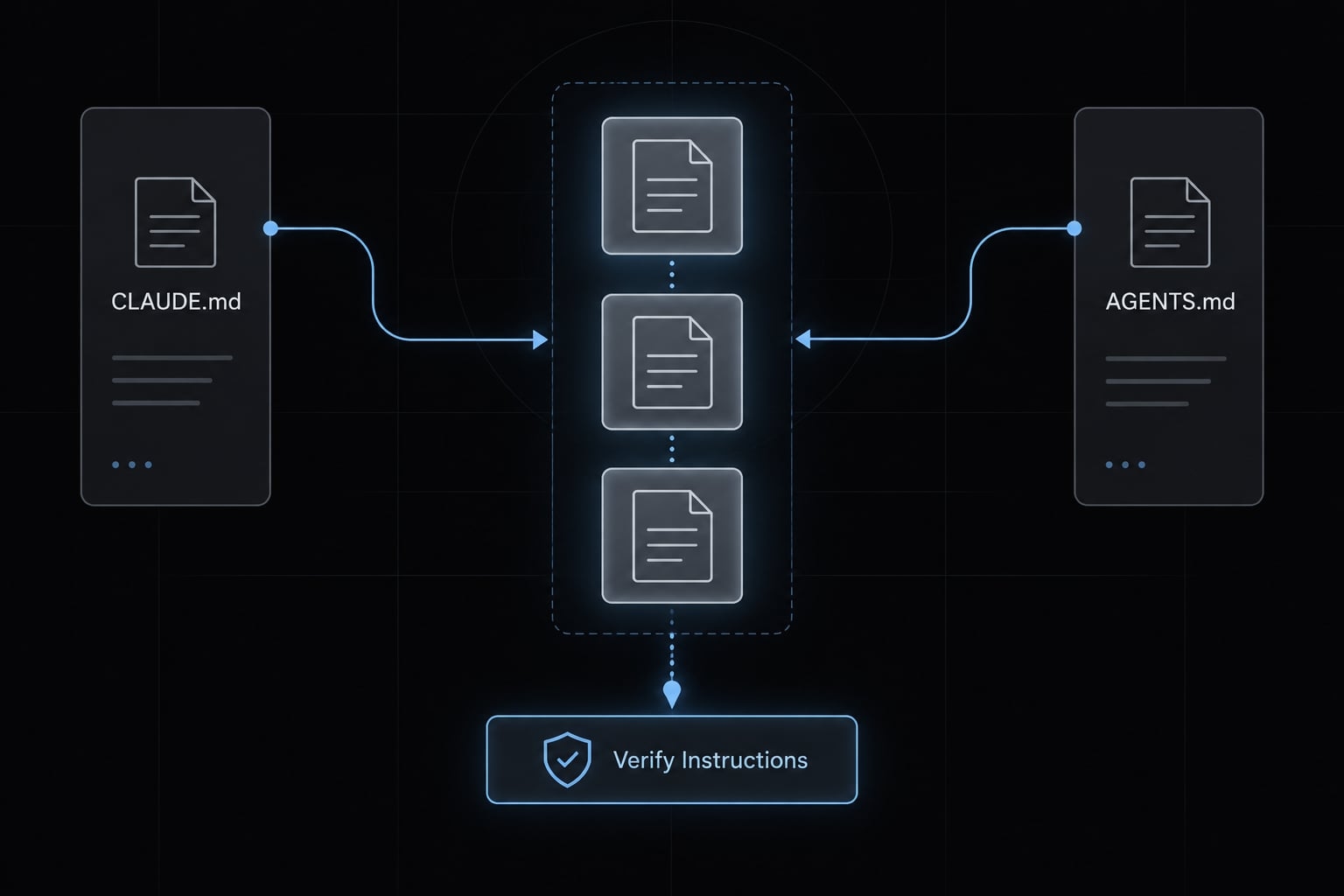
Claude Code’s memory documentation and OpenAI Codex’s AGENTS.md guidance describe their respective instruction-discovery behavior. AGENTS.md is not exclusive to Codex. A Markdown link alone does not guarantee its target is read; proposed files such as PROJECT.md are not necessarily auto-loaded.
Markdown context and checklists are portable content. Skills, MCP settings, plugins, and permissions require separate compatibility checks. MCP means Model Context Protocol, which connects agents with tools and resources. Keep credentials and local authentication material outside tracked files.
Divide responsibilities without relying on model hype
Base task allocation on ambiguity, affected components, change risk, testability, and required access. Claude Code and Codex can exchange roles based on observed project results. Neither vendor identity establishes permanent ownership of planning, implementation, or testing. One task owner controls implementation. A second agent offers bounded critique; a human resolves material uncertainty.
Task-Based Responsibility Matrix
Work type | Assignment pattern | Reason | Required control |
|---|---|---|---|
Requirements clarification | Human owner + agent | Resolve intent | Approved acceptance criteria |
Architecture planning | Planner + reviewer | Expose trade-offs | Human-approved decision |
Bounded implementation | Single builder | Clear accountability | Scope and branch boundaries |
Unit test generation | Builder or reviewer | Check observable behavior | Execute and inspect tests |
Security review | Reviewer + specialist when needed | Identify risky assumptions | Escalate high-risk changes |
Debugging | Assigned investigator | Preserve causal reasoning | Reproduction and regression check |
Documentation | Builder; reviewer checks | Align records with changes | Verify against final revision |
Final integration | Human owner | Retain accountability | Required checks and approval |
Generated tests need inspection, not just a passing result: they may encode the same mistaken assumption as the implementation. Agent security review does not replace specialist review for high-risk changes. A dedicated branch is not an access-control boundary.
Use the builder–reviewer pattern as the default
- The builder implements one bounded task.
- The reviewer inspects requirements and a pinned diff.
- The builder or human evaluates actionable findings.
- A human approves the final revision.
- Stop after one or two review passes unless new evidence warrants more.
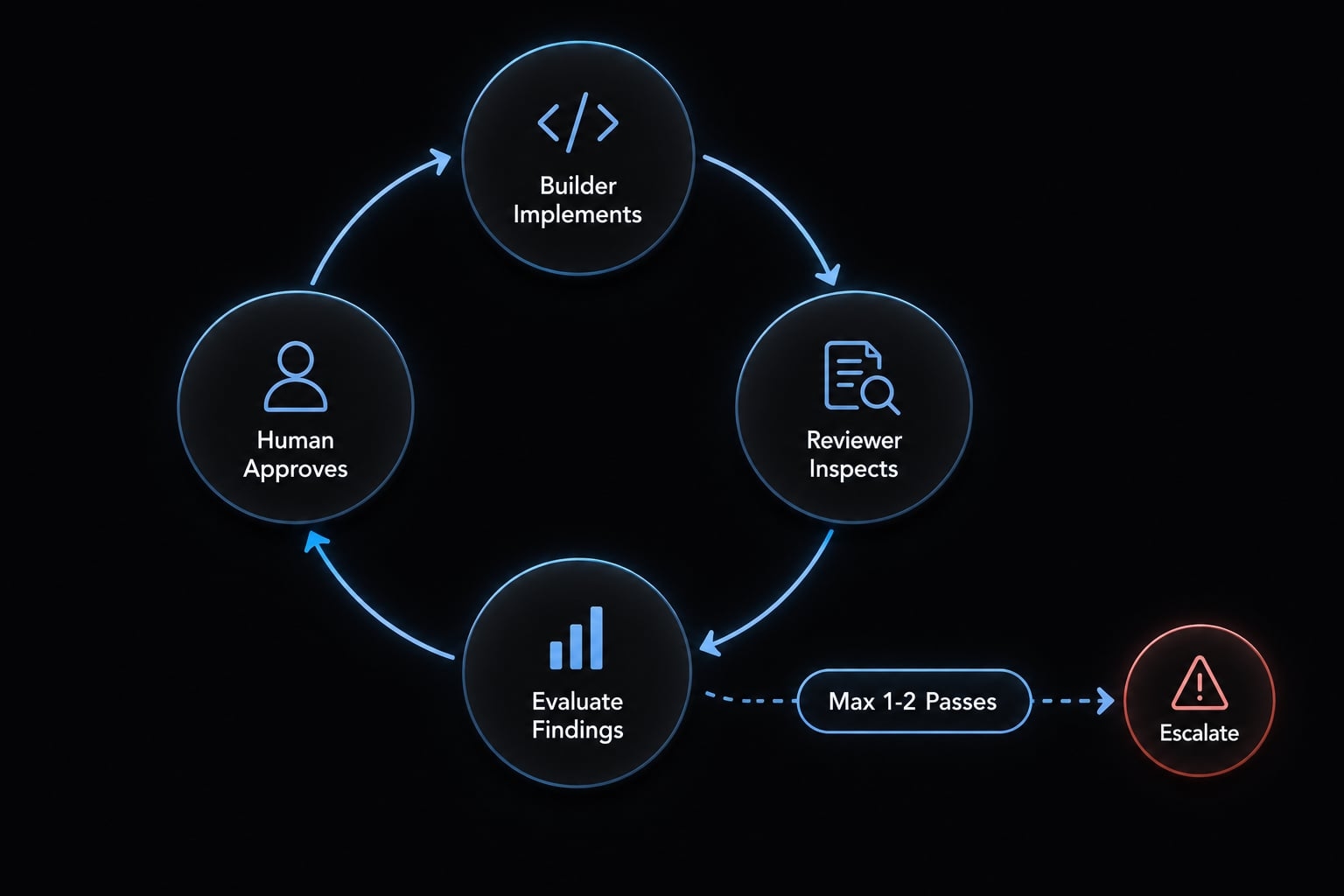
The pass limit is a practical default, not a universal standard.
Throughout this guide, the illustrative scenario is a B2B SaaS workspace-settings API change. Claude Code could implement an authorized settings update while Codex checks access boundaries and regression coverage. Reverse those assignments if project evidence favors doing so.
This resembles independent code review operationally, but it is not statistically independent assurance. Separate agents can share blind spots and miss the same defect.
Step-by-step Claude Code and Codex shared workflow
Use these seven steps to move one bounded change from intake to an approved merge:
- Define the task.
- Approve the plan.
- Assign and isolate.
- Implement and record.
- Hand off.
- Review and verify.
- Approve and integrate.
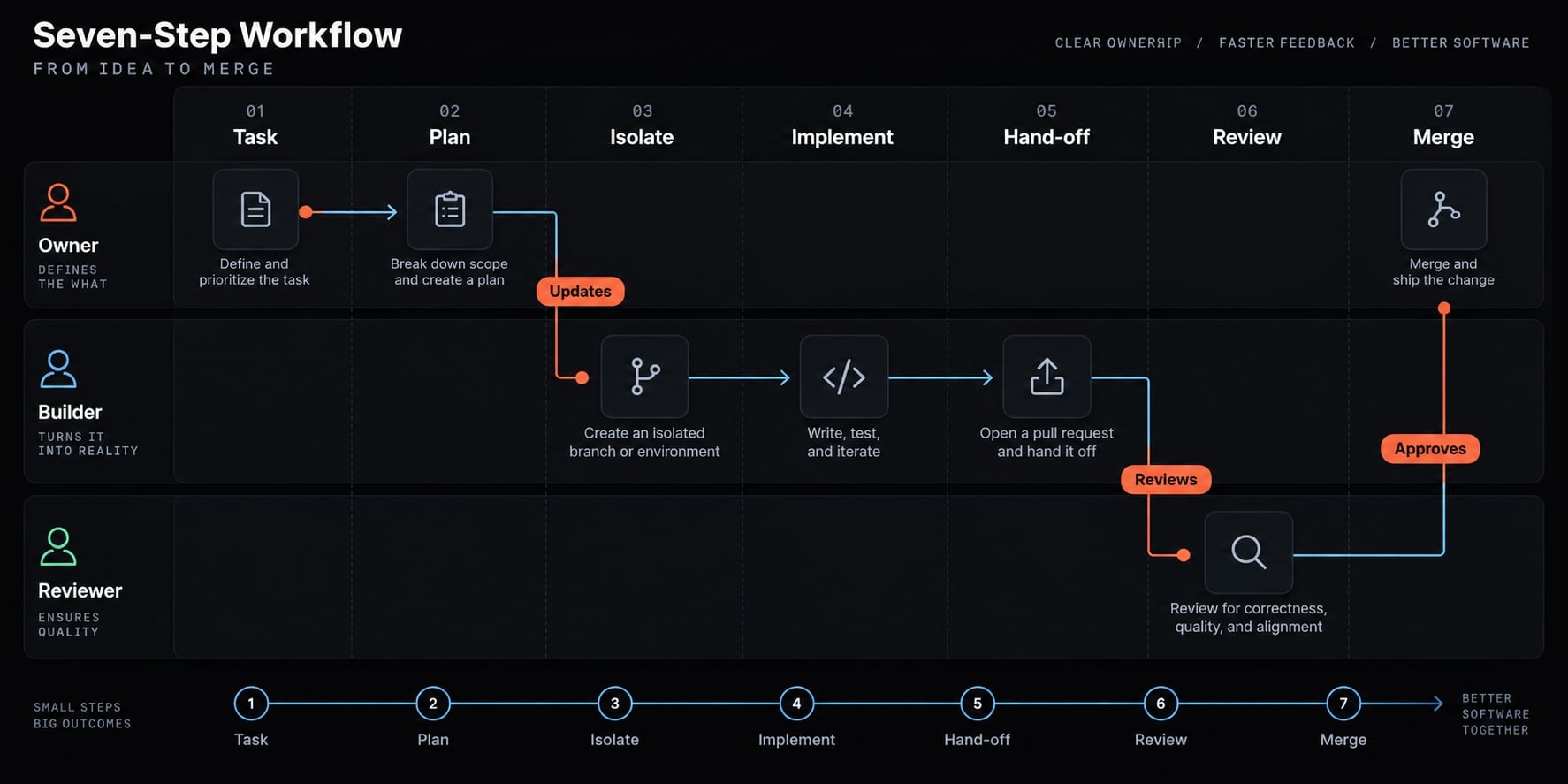
Step 1 - Define the task and acceptance criteria
Record the objective, scope, exclusions, and owner in docs/TASKS.md. For the illustrative workspace-settings API task:
- Authorized workspace administrators can update the display name.
- Unauthorized and cross-workspace requests fail without changing data.
- Relevant regression tests pass.
- Billing settings and unrelated endpoints remain unchanged.
These outcomes become the review criteria.
Step 2 - Create or update the shared plan
Record the implementation sequence, dependencies, and unresolved assumptions in docs/PLAN.md: inspect authorization, change validation and handling, then test.
Request second-agent critique for broad or risky changes. The human task owner approves the plan before implementation. Record accepted design decisions in docs/DECISIONS.md; an agent proposal is not automatically authoritative.
Step 3 - Assign one owner and isolate the work
Record task ownership and create a dedicated branch. Concurrent sessions need separate clones or a Git worktree, a separate working directory associated with the same repository.
Switching branches in one directory does not isolate concurrent sessions. Git’s git-worktree documentation explains linked working directories; they are not security sandboxes.
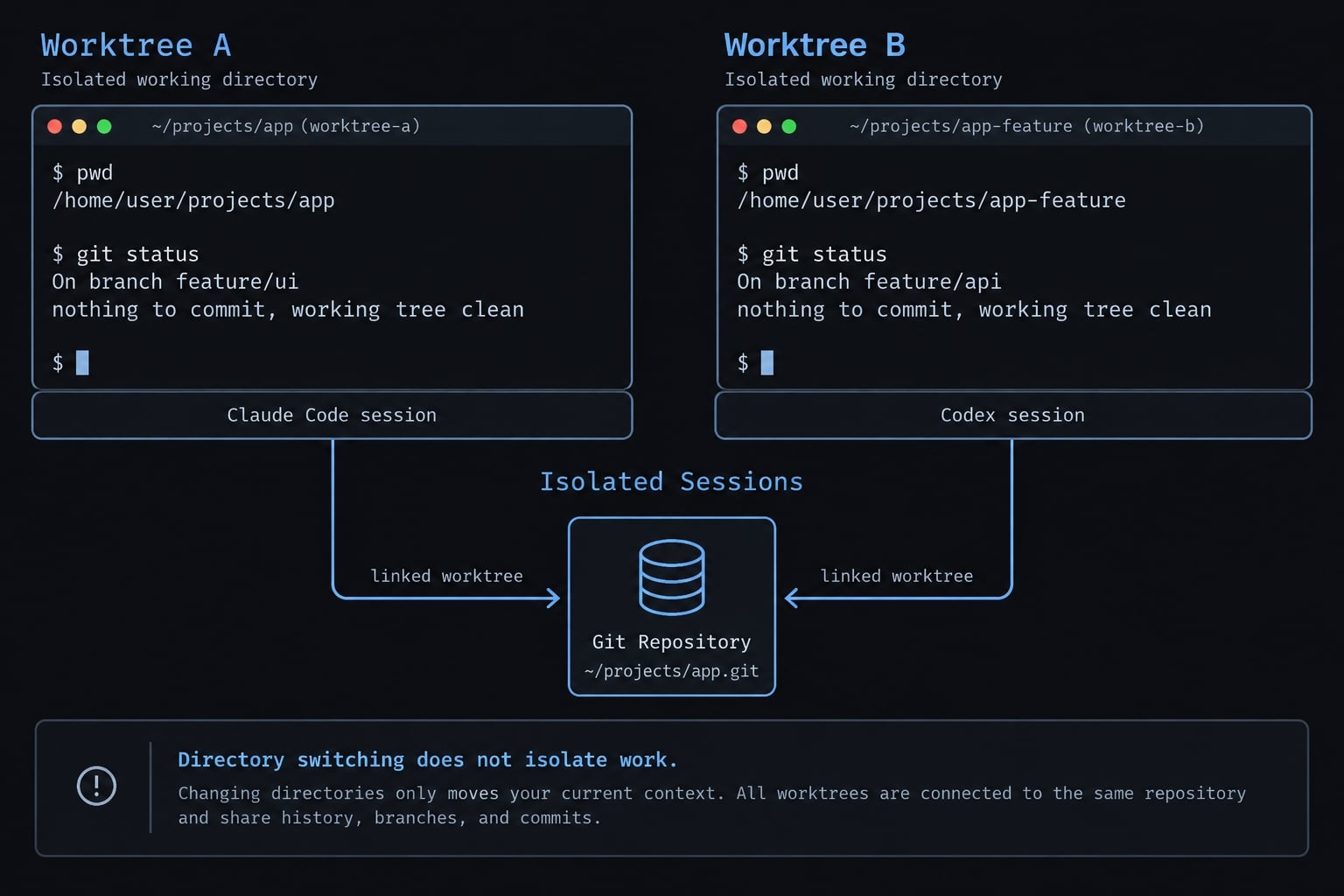
Define file and interface boundaries for parallel tasks. Keep commits small and task-linked.
Step 4 - Implement and record progress
The builder reads approved context before editing. Record changed files, commands, test outcomes, blockers, and assumptions in docs/WORKLOG.md.
Distinguish passed, failed, and not run. Capture execution results rather than accepting an agent’s unsupported “tests passed” statement. Stop for approval before high-impact actions. Record concise evidence and decisions, not raw conversations.
Step 5 - Write a structured handoff
The receiving agent should use repository artifacts, not pasted chat transcripts. Copy this template into the task’s handoff record:
## TaskID / objective / owner:Acceptance criteria: docs/TASKS.md, task IDRevision:- Branch:- Base commit:- Head commit for review:- Uncommitted changes: none / listed below## CompletedImplemented scope:## Changed FilesPaths and purpose:## VerificationCommand | outcome: passed/failed/not run | tested commitEvidence location:## DecisionsApproved decision references: docs/DECISIONS.md## Remaining WorkNext action / owner:## RisksKnown gaps and unresolved assumptions:## Do Not ChangeProtected behavior and scope exclusions:
For the workspace-settings change, protect unrelated billing behavior and existing authorization boundaries. “Do Not Change” records a constraint; it does not enforce permissions. Prefer a committed handoff revision. If uncommitted changes remain, preserve their patch and identify them explicitly before review.
Step 6 - Run independent review and verification
Review the approved requirements, identified revision and diff, tests, and architecture constraints.
Each finding must name:
- File or code location.
- Severity and impact.
- Reproduction or verification steps.
Prefer read-only inspection. If verification executes code or generates files, use an appropriately isolated environment rather than calling the entire session read-only. Treat findings as hypotheses until checked. Review corrections against their new revision.
Step 7 - Integrate through a human-controlled gate
Resolve material findings, run relevant automated checks against the final revision, inspect its diff, and update affected records. Merge through an approved pull request with configured branch controls. GitHub’s protected-branch documentation describes required reviews and status checks; configure equivalent controls on other hosts.
Earlier approval does not cover later changes. Production deployment, migrations, secret changes, and consequential external actions require separate authorization.
Prevent conflicts, unsafe changes and context loss
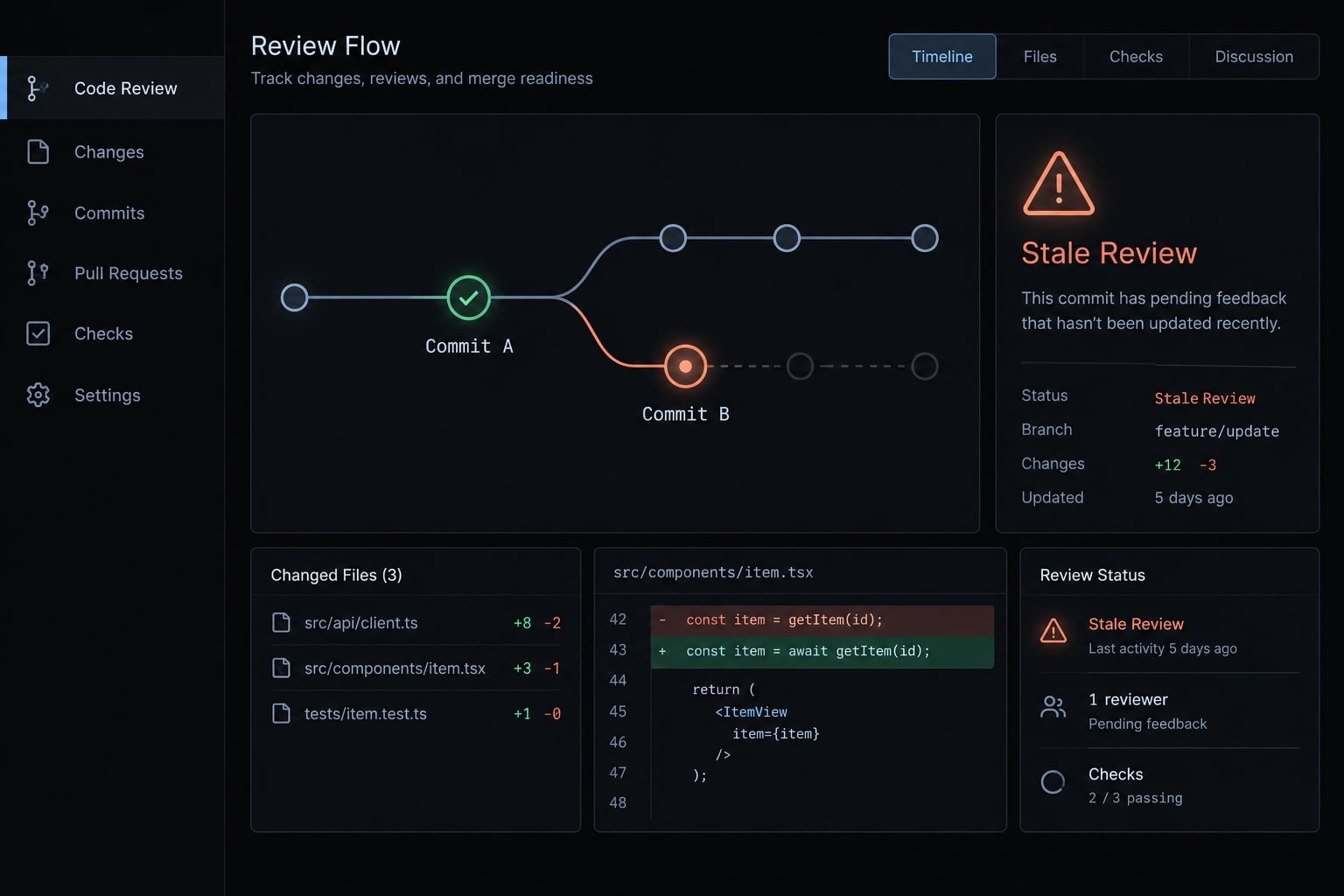
Coordination requires prevention and recovery procedures. Separate branches reduce collisions but cannot eliminate integration conflicts. Shared files can become stale or be ignored, especially after context truncation.
Conflict-prevention controls
Risk | Preventive control | Recovery action |
|---|---|---|
Simultaneous edits | One writer per task; separate directories | Preserve both changes; reconcile against approved scope |
Stale context | Record revision and update triggers | Compare with current code; repeat affected checks |
Conflicting instructions | Canonical rules; paired adapter review | Pause; human resolves conflict and updates records |
Large unreviewable diffs | Bounded tasks and small commits | Preserve work; split into reviewable changes |
Incomplete handoffs | Required revision and evidence fields | Return to owner for missing evidence |
Endless review loops | Pass limit and acceptance criteria | Escalate unresolved judgment to human owner |
An illustrative failure: the reviewer inspects an earlier workspace-settings commit after authorization logic has changed. Preserve the findings, identify the new head, and repeat the affected review and tests. Do not treat the old approval as current or restart unrelated work.
Security and permission guardrails
Least privilege means granting only the access needed for the assigned task:
- Restrict files, commands, integrations, and credentials.
- Separately authorize production and customer-data access.
- Exclude secrets from prompts, worklogs, screenshots, and committed configuration.
- Require explicit approval for destructive actions, migrations, publishing, messaging, and deployment.
- Sandbox untrusted scripts where supported.
- Log consequential actions and preserve review evidence.
Repository access does not authorize external-system access. Prompt instructions are not enforced access controls; approval gates need supporting permissions and hosting restrictions.
.gitignore reduces accidental tracking. It neither blocks agent access nor removes already committed secrets. Environment variables may be accessible to subprocesses and tools. Worktrees organize changes; they do not sandbox execution.
For MCP security, assess server trust, exposed tools, credential scope, and returned content. Repository text and tool outputs may contain untrusted instructions. Neither can authorize overriding approved rules or expanding access.
Before enabling this workflow, verify configuration against Claude Code’s permissions documentation, OpenAI Codex’s security guidance, Git’s git-worktree documentation, the official MCP Security Best Practices, and your hosting provider’s branch-protection documentation. Product surface, operating system, and installed version can affect available controls; this template does not configure them.
Common mistakes and a reusable operating checklist
Avoid these recurring coordination errors:
- Duplicating canonical rules across adapters.
- Using old conversations as the handoff.
- Reviewing an unspecified or outdated revision.
- Allowing overlapping writers.
- Treating unlimited review cycles as quality assurance.
Use the shared workflow checklist before the first task and after configuration changes. Context retention depends on maintained records, not merely creating files.
Shared workflow readiness checklist
- Goals and constraints are recorded in version-controlled files.
- Architecture boundaries and protected interfaces are documented.
- Both instruction entry points direct agents to the same canonical context; required reading is verified.
- Every active task has one recorded primary owner.
- Acceptance criteria specify testable outcomes.
- Concurrent sessions use separate working directories and task branches, or concurrency is disabled.
- Progress records include commands, outcomes, and tested revisions.
- Handoffs identify the revision, next action, and responsible owner.
- High-risk changes have appropriate reviewer or specialist assignments.
- Shared artifacts have been checked for secrets.
- High-impact actions require configured, enforceable approval.
- Review loops have recorded stopping conditions.
- A human approves the final revision; deployment requires separate authorization.
For a small repository, consolidate docs/PLAN.md, docs/TASKS.md, and docs/WORKLOG.md into one clearly sectioned task record. Update both adapters to reference that location.
Keep the same fields: objective, owner, scope, acceptance criteria, approved plan, commands, outcomes, and blockers. Consolidation should reduce maintenance, not remove evidence. A missing check remains “not run,” never an implied pass.
Frequently asked questions
What is a Claude Code–Codex shared workflow?
A Claude Code–Codex shared workflow is a development process where both agents work from a version-controlled project context rather than relying on independent conversation history. It uses explicit task ownership, structured file-based handoffs, and verification gates to coordinate work across tools without relying on previous conversations.
Can I run Claude Code and Codex simultaneously?
Yes, you can run them concurrently by giving each agent a separate working directory (a separate clone or Git worktree) and a dedicated task branch. However, to prevent file conflicts and context loss, you must ensure each agent follows the same project rules and records their progress in a shared, version-controlled repository structure.
Why is a shared workflow better than using one AI model?
A second agent can review a bounded change against the same requirements and catch issues the builder missed, though both agents can share blind spots. Assign builder and reviewer roles based on task risk and observed project results, not vendor identity.
How do I hand off tasks between Claude Code and Codex?
Use a structured handoff Markdown file that includes the current task state, changed files, completed verification steps, and remaining objectives. The receiving agent should be instructed to read this authoritative document rather than attempting to interpret the previous agent’s chat history or internal memory.
What are the essential files for managing agent context?
Essential files include a PROJECT.md for overarching goals, docs/PLAN.md for task sequence, and tool-specific entry points like CLAUDE.md and AGENTS.md. These files serve as the canonical source of truth for all agents, ensuring they maintain alignment despite using different underlying CLI tools.
Is human approval necessary in an AI-driven workflow?
Yes. While agents can perform critiques and identify potential issues, a human must remain accountable for final integration. Human approval is required for sensitive operations such as production deployments, secret management, large-scale migrations, and any external actions that could impact users or data.
How do I prevent agents from overwriting each other's work?
Prevent conflicts by isolating work into dedicated task branches and recording clear boundaries in your project plan. Use separate working directories to manage concurrent sessions and always verify the final revision against your acceptance criteria before integrating the work into your main branch.
Read more:
- Claude Code in the terminal: Installation and beginner guide
- Claude Code AWS MCP: Setup, Authentication and Troubleshooting
- How to use Claude Code with Shopify: Setup, examples and safety
Conclusion
A reliable Claude Code and Codex shared workflow depends on shared context, explicit ownership, isolated concurrent work, and revision-specific handoffs. Review must connect approved requirements to actual changes and reproducible evidence. A human remains accountable for the final revision, supported by configured permissions and merge controls, not instructions alone.
Start with a well-defined task—like updating workspace settings—using a simple builder–reviewer workflow. Then, evaluate if the review yields enough actionable feedback to justify the coordination overhead. Add parallel work only when ownership and interface boundaries are clear.