
Can Claude Code detect XSS? Capabilities, limits and a safe testing workflow
Claude Code helps identify potential XSS vulnerabilities through source inspection and data flow reasoning, though findings require careful runtime verification. While it assists with validation, remediation, and regression testing, a successful review depends on balancing application security with strict agent permissions and controls.
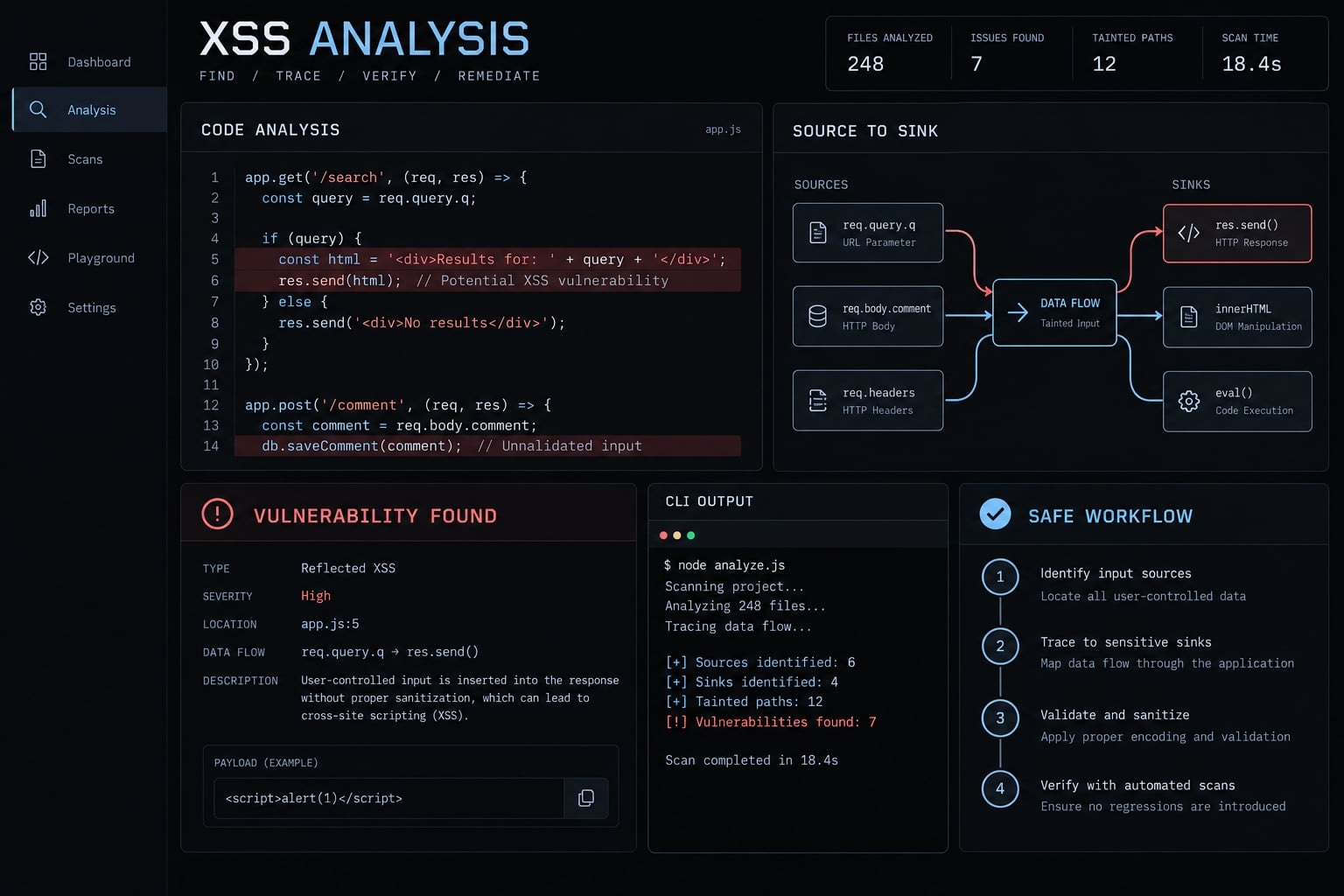
What can Claude Code actually do with XSS?
Claude Code can support AI-assisted code review by explaining code, connecting relevant files, and suggesting changes. This semantic code analysis - reasoning about code behavior - provides useful hypotheses, not exhaustive program analysis.
Capability matrix: Detect, validate and fix
Task | Useful assistance | Main limitation | Required verification |
|---|---|---|---|
Identify suspicious rendering | Locate raw HTML and risky interpolation | An API match is not a vulnerability | Inspect the actual data and context |
Trace input across files | Explain candidate data paths | May miss branches or transformations | Check references and reachability |
Assess contextual protection | Inspect escaping and sanitizers | May assume incorrect protection | Verify implementation and configuration |
Assist browser-level validation | Help gather authorized runtime evidence | Requires suitable tools and permissions | Review observed browser behavior |
Propose fixes and tests | Draft patches and regression cases | Generated changes may be incomplete | Review and execute tests |
Establish complete XSS coverage | Organize reviewed and unreviewed areas | Complete coverage cannot be guaranteed | Document scope and residual uncertainty |
Throughout this article, an illustrative internal support portal displays customer-submitted rich text. It is a teaching example, not a client case study or measured AgentKit result.
Three meanings behind “Claude Code XSS”
- Application review: Inspecting application code for potential cross-site scripting.
- Authorized validation: Assisting controlled testing of a suspected vulnerability.
- Agent security: Managing risks arising from the agent’s tools and access.
None of these establishes a vulnerability in Claude Code itself. That requires a verified advisory identifying affected components and versions.
Tool availability and permissions depend on the installed version and configuration. Consult Claude Code permissions and security documentation for the deployed environment.
How Claude Code identifies potential XSS
A useful finding needs a credible path from externally influenced data to a browser context that can interpret it unsafely. Source-to-sink analysis examines that path rather than treating suspicious syntax as proof.
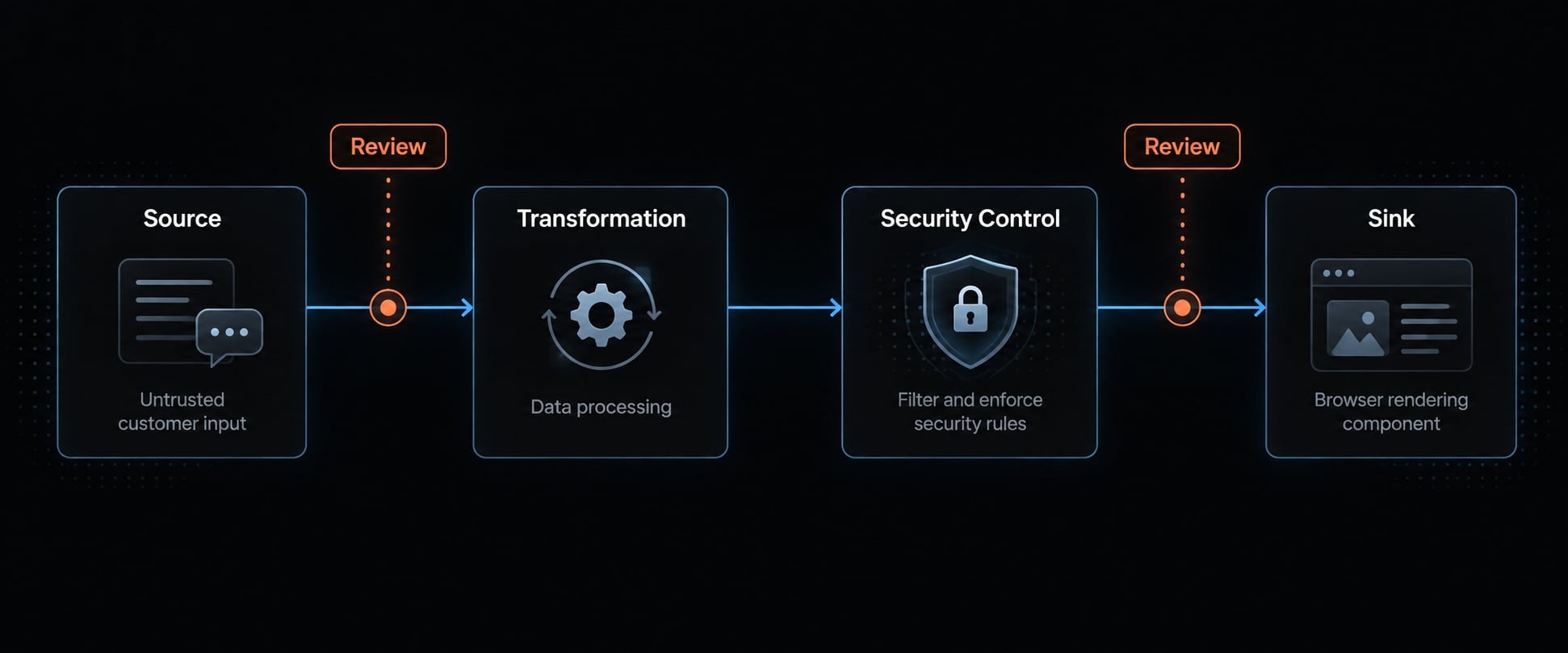
The four-part source-to-sink model
- Source: Where potentially untrusted input enters, such as customer-submitted support content.
- Transformation: How parsing, storage, formatting or other processing changes the value.
- Security control: Which output encoding, sanitization or framework protection applies.
- Sink: Where the browser interprets the resulting value.
This is a reasoning model, not necessarily a literal processing sequence. Protections may occur at several points; encoding generally belongs at the relevant output boundary.
Common sources and sinks Claude Code should review
Area | Examples | Review question |
|---|---|---|
Inputs | Forms, query parameters, database fields, API responses | Who can influence this value? |
HTML insertion | Template output, assembled markup | Is data interpreted as HTML? |
DOM APIs |
| What protection applies before insertion? |
Framework escape hatches |
| Is bypassing normal escaping justified? |
Script and URL contexts | Embedded script values, dynamic links | Are the context and permitted schemes safe? |
Database content is not automatically trusted. Conversely, an API response is not automatically attacker-controlled.
Why suspicious code is not automatically exploitable?
Source-to-sink analysis can overturn an initial suspicion because of:
- Missing attacker influence or an unreachable path.
- Relevant protection earlier in the flow.
- Framework or browser behavior.
- Required roles, permissions, or application state.
Privileged-user prerequisites affect risk; they do not automatically invalidate a finding.
In the portal example, raw HTML rendering initially looks unsafe. Further review finds an upstream sanitizer. Its configuration, coverage, and subsequent transformations must be checked before escalation - or dismissal. Without validation, the outcome remains unconfirmed.
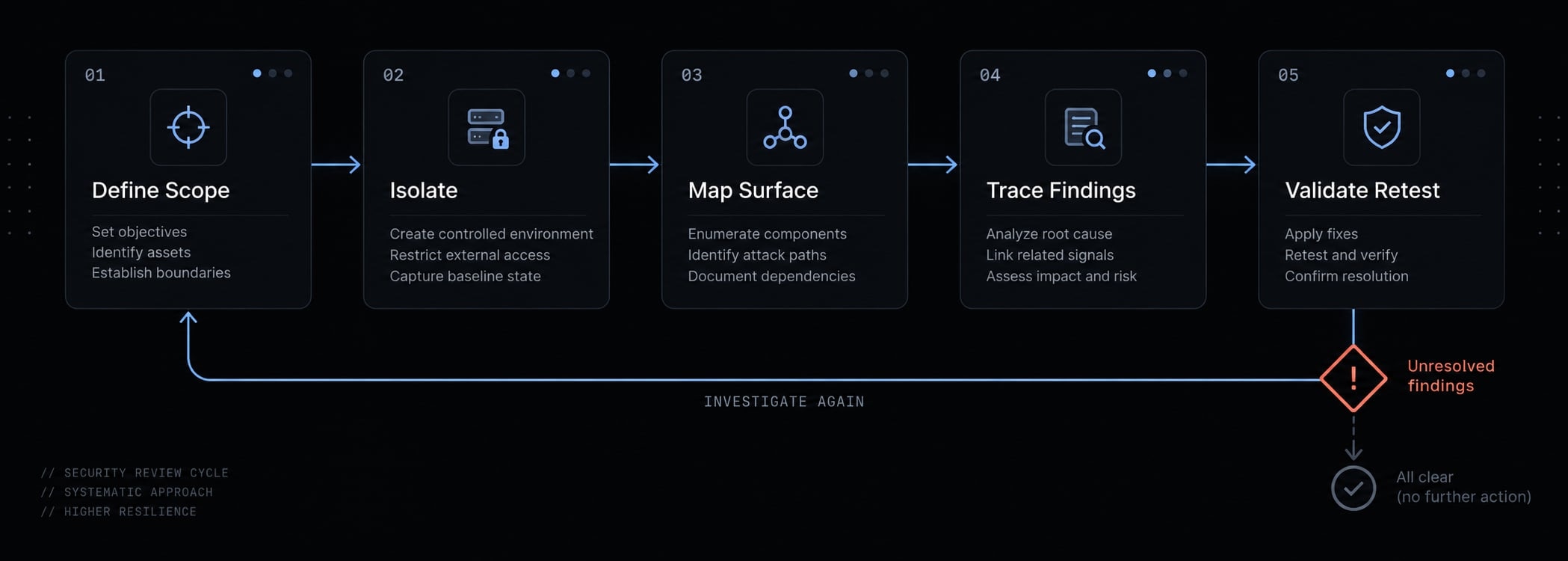
A safe five-step Claude Code XSS review workflow
Use a narrow, evidence-driven process:
- Define scope and authorization.
- Isolate execution and restrict permissions.
- Map the attack surface.
- Trace and challenge findings.
- Validate, remediate and retest.
Step 1 - Define scope and authorization
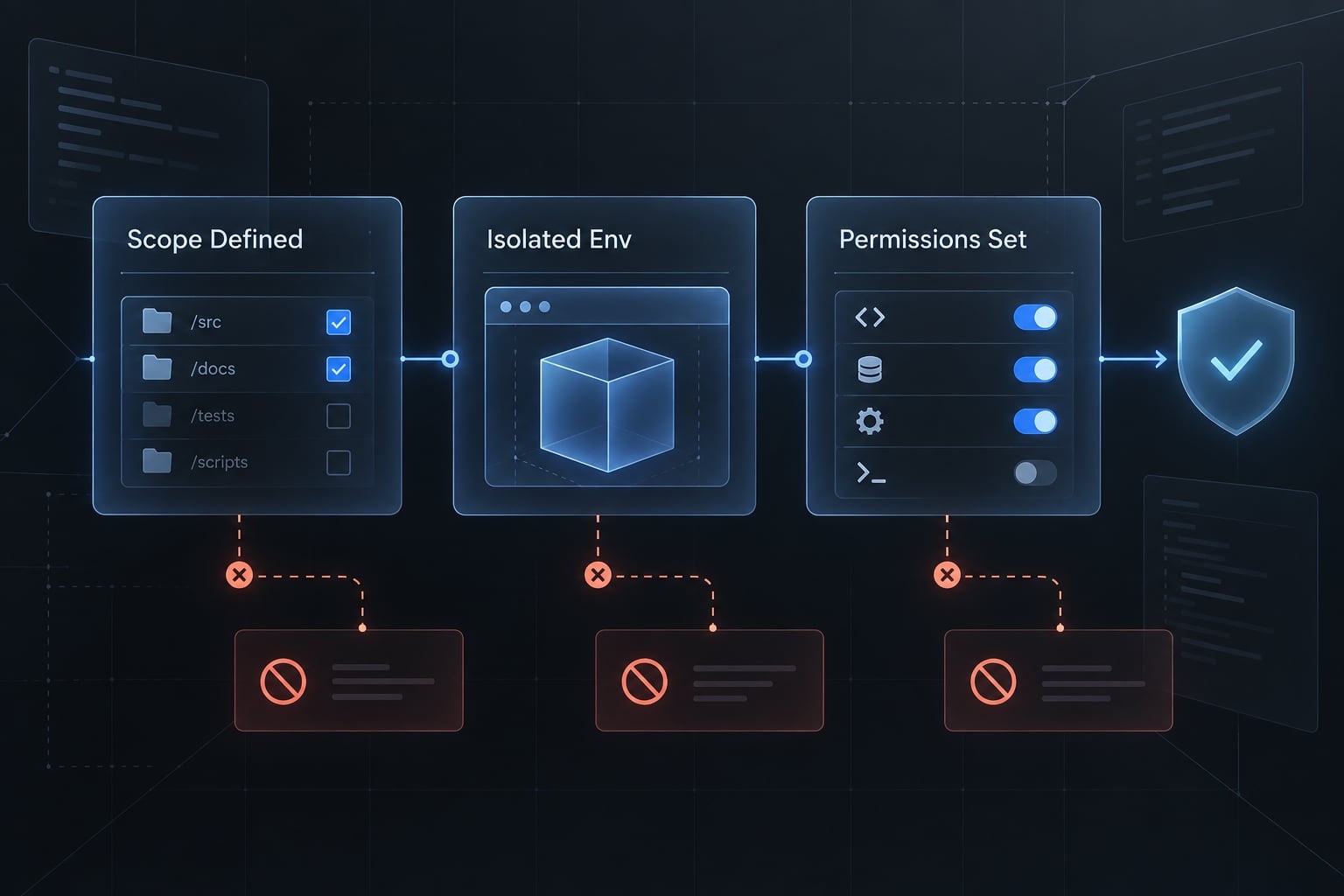
Confirm ownership or explicit authorization. Record repositories, routes, components, permitted environments, and excluded production or third-party assets.
Specify coverage:
- Reflected XSS: Input returns through an immediate response.
- Stored XSS: Persisted input later reaches a rendering context.
- DOM-based XSS: Client-side processing introduces the unsafe browser behavior.
These descriptions can overlap; stored data may trigger DOM-based XSS.
For the portal, scope submission, storage, formatting, and agent-facing rendering. Define success as traceable evidence, not a target number of findings. This code-assisted review may support a vulnerability assessment; it is not automatically a complete penetration test.
Output: A short scope and authorization record.
Step 2 - Isolate the repository and restrict permissions
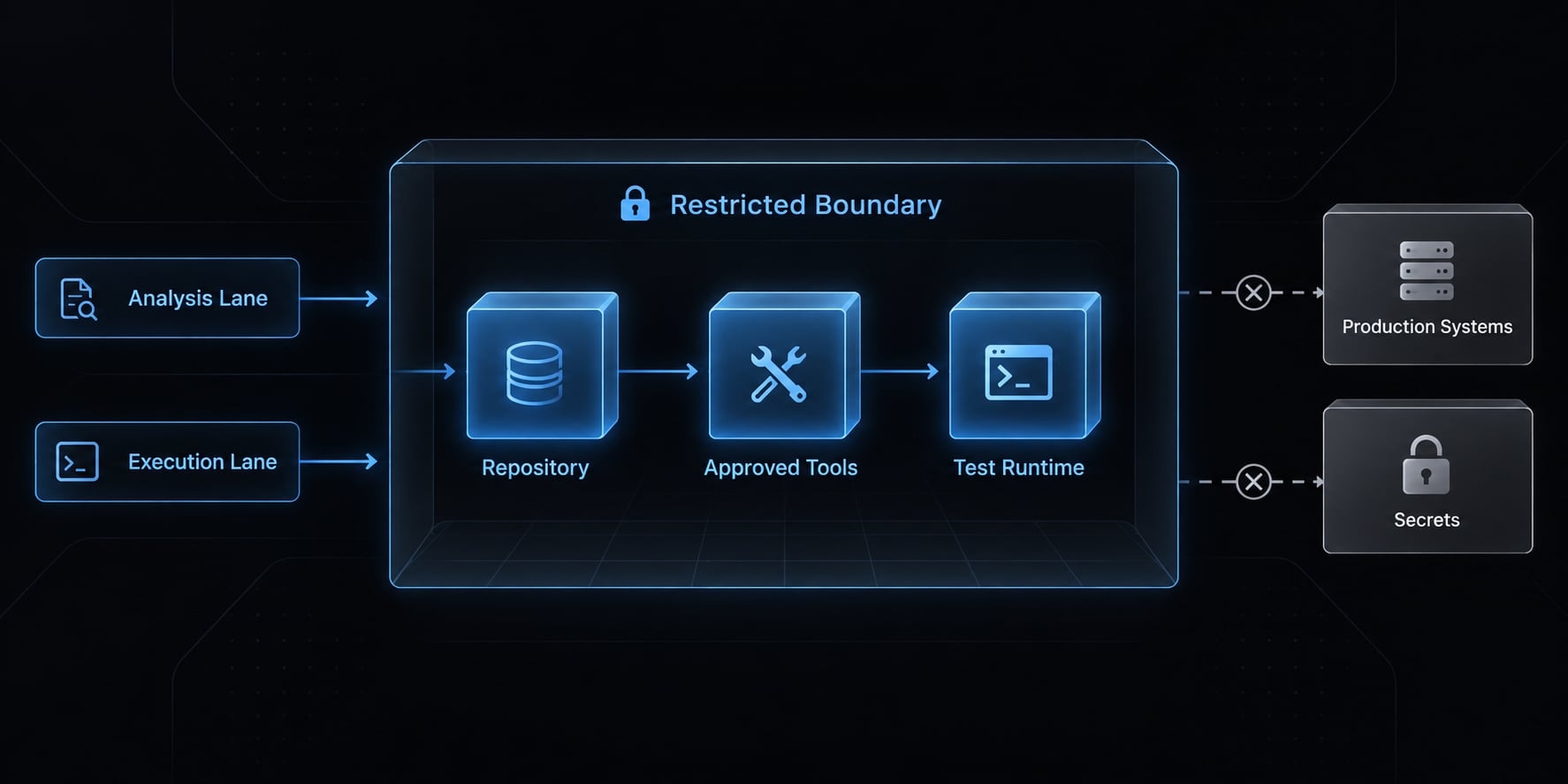
Use a disposable workspace or appropriately restricted environment. Exclude production credentials and customer data.
Create a separate branch for patch review, but remember: a Git branch is not an execution boundary. Containers also need restricted host mounts, credentials, filesystems, and networking.
Apply least privilege to file, shell, browser, network and MCP access. MCP (Model Context Protocol) connects agents to external tools and data sources.
Approve consequential commands and writes. Treat repository instructions that redirect the agent as untrusted. Some protections belong to the operating environment or connected tools, not Claude Code itself.
Output: A recorded environment, permission, and sandbox configuration baseline.
Step 3 - Map the XSS attack surface
Identify rich text, markdown, templates, raw HTML rendering, DOM manipulation, and cross-window messages.
Map sources and sinks before declaring vulnerabilities. Prioritize the portal’s customer-content renderer, then inspect connected transformations and alternative display paths. Keep the review scoped to reduce context loss without ignoring relevant dependencies.
Output: A prioritized map of files, entry points, and rendering paths.
Step 4 - Trace and challenge every finding
Record the source, transformations, protection, sink and necessary conditions. Include file and function references.
Ask what could invalidate the hypothesis. Does every route apply the sanitizer? Does later processing change its output? Can the relevant user control the value?
Use independent code review or suitable static analysis for corroboration. Asking the same model to reconsider can improve reasoning, but self-review is not independent verification.
Output: A suspected, plausible, or confirmed finding with supporting evidence.
Step 5 - Validate, remediate and retest
Validate only in an authorized, isolated runtime using test accounts and synthetic content. Gather evidence without accessing real customer data.
Review small, context-appropriate fixes. Run regression tests, repeat relevant static checks, and exercise affected user flows. Record untested paths and unresolved assumptions.
Output: A reviewed fix and closure record, or an explicitly unresolved finding.
What evidence should a Claude Code XSS finding include?
Model confidence is not evidence. A defensible report lets another reviewer follow the path, inspect protections, and understand what was actually tested.
The XSS evidence ladder
The following is this article’s reporting convention, not an official OWASP classification. Organizations may use different confirmation standards.
Level | Meaning | Required evidence | Reporting language |
|---|---|---|---|
Suspected | Unsafe-looking pattern | Relevant location and initial concern | “Potential issue; investigation required” |
Plausible | Supported input-to-sink path | Trace, protection analysis, and preconditions | “Credible path; runtime validation pending” |
Confirmed | Executable browser impact observed | Controlled runtime evidence tied to the path | “Confirmed in the tested environment” |
A scanner alert alone does not meet this runtime confirmation standard.
Keep severity, confidence, and validation status separate. Severity concerns potential impact; confidence concerns the strength of the assessment; validation records what has been demonstrated.
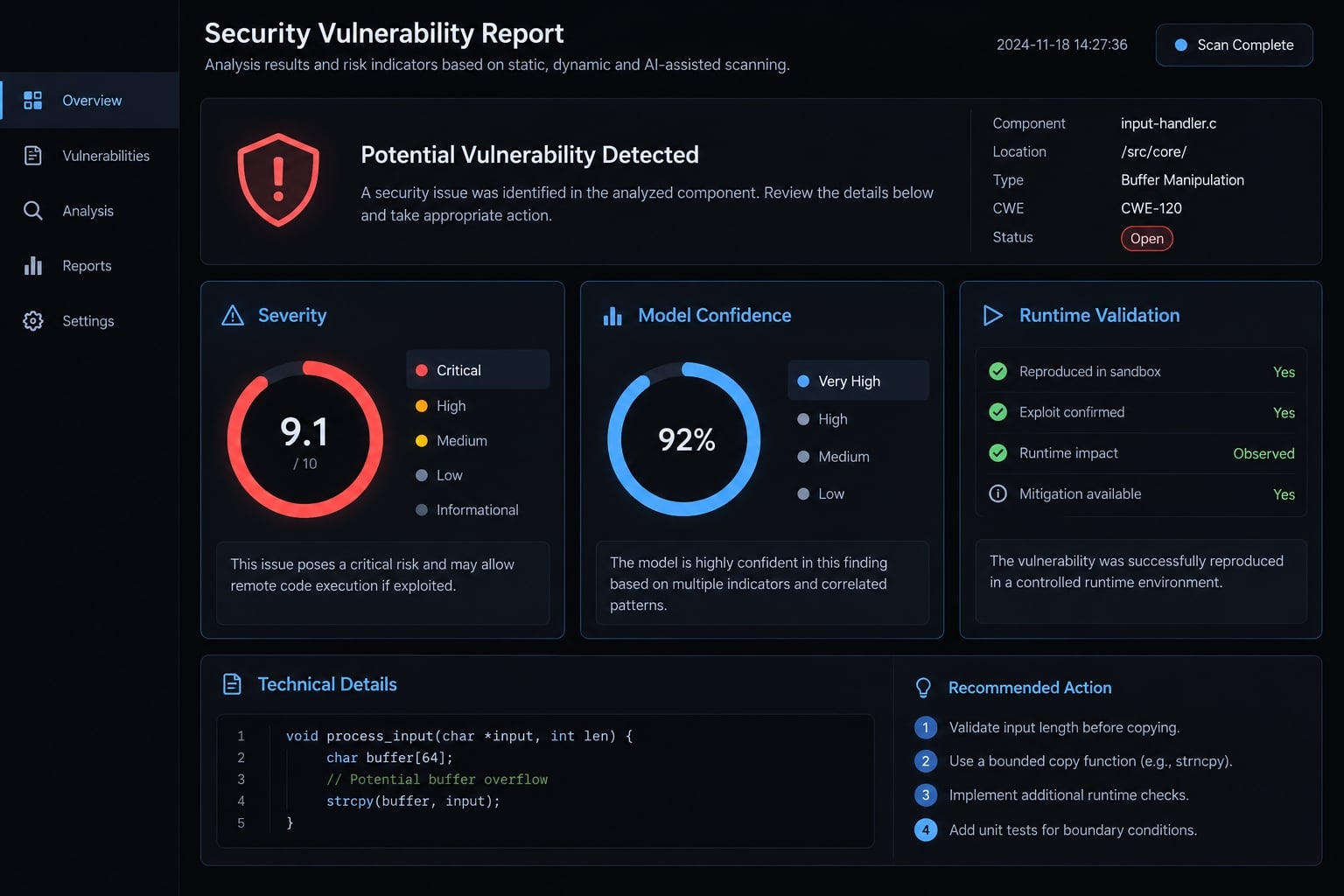
Required finding template
Finding ID / component:
Repository revision / framework and relevant versions:
XSS category:
Source / file and function references:
Transformations:
Sink / browser context:
Existing protections:
Preconditions / potential impact:
Severity / rationale:
Confidence / rationale:
Validation status / evidence reference:
Recommended fix:
Regression requirement:
Reviewer / disposition / residual limitations:
Keep sensitive reproduction artifacts in the authorized reporting system, not public tickets.
For the portal, “raw HTML API found” supports suspicion. A complete path with inadequate protection supports plausibility. Controlled browser evidence supports confirmation.
If protection is adequate across the investigated path, document the false-positive disposition rather than quietly deleting the alert. Human verification makes security triage and vulnerability reporting reviewable.
Claude Code vs. Semgrep, CodeQL, Burp Suite and OWASP ZAP
Choose tools by task, not a universal ranking. Static Application Security Testing (SAST) examines code without exercising the running application. Dynamic Application Security Testing (DAST) investigates a running application.
XSS tool decision matrix
Task | Claude Code | Semgrep | CodeQL | Burp Suite / OWASP ZAP |
|---|---|---|---|---|
Application context | Explains candidate flows | Rule-dependent interpretation | Query/model-dependent interpretation | Observes application interactions |
Repeatable patterns | Review output may vary | Configured rule checks | Configured query checks | Configured runtime checks |
Cross-file flows | Reasons across inspected files | Capability-dependent analysis | Modeled data-flow analysis | Observes exercised behavior |
Runtime observation | Requires connected tools | Primarily static | Primarily static | Investigates running application |
Exploitability | Forms and challenges hypotheses | Supplies static evidence | Supplies static evidence | Supplies runtime evidence |
Fix assistance | Drafts patches and tests | Rule-specific guidance | Query-specific guidance | Finding-specific guidance |
Reproducibility | Preserve context and artifacts | Fix versions and configuration | Fix database, queries, versions | Record state and test setup |
Coverage limits | Context and reasoning gaps | Rules, language, edition | Queries, models, build context | Authentication and exercised paths |
CodeQL also performs semantic analysis; the term is not exclusive to language models. Semgrep capabilities depend on rules, language, edition, and configuration.
Burp Suite editions differ in automated scanning capabilities. For both Burp Suite and ZAP, results depend on authentication, application state, crawl coverage, browser behavior and configuration.
Static evidence can be compelling, but does not itself observe browser execution. Runtime scanners can miss issues and produce false positives. Human reviewers assess the evidence and application context.
Recommended layered workflow
Get the next post in your inbox
New guides and AgentKit updates, no spam. Unsubscribe at any time.
Dependency and secret scanning are useful adjacent controls, not XSS confirmation tools.
Where Claude Code can fail and how to use it safely?
AI-assisted review has two distinct failure surfaces: incorrect application analysis and unsafe agent execution. More permissions do not necessarily produce better findings.
Common analysis failures
- Missed transformations: Later decoding or formatting changes supposedly safe content.
- Hallucinated protection: The model assumes a sanitizer or escaping layer exists.
- Wrong protection context: A control suitable for HTML is treated as sufficient for another context.
- Safe APIs incorrectly flagged: Pattern matching replaces data-flow reasoning.
- Invisible runtime behavior: Client-side state or integration behavior is absent from the inspected source.
- Context dilution: Too much unrelated material obscures relevant code or configuration.
Verify claimed protections against the actual framework version, sanitizer configuration, and call path. Require concrete references rather than accepting reassuring explanations.
“No findings” means no findings within the reviewed scope - not no vulnerabilities.
Agent execution risks
Risk area | Control |
|---|---|
Shell | Avoid unnecessary execution; approve consequential commands |
Secrets | Use sanitized environments and narrowly scoped test credentials |
Network | Restrict destinations and define permitted data transfers |
Browser/session | Use isolated sessions and dedicated test accounts |
Repository instructions | Treat embedded requests as untrusted; reject task redirection |
Writes | Constrain changed files and review diffs before acceptance |
Repository prompt injection - untrusted content attempting to redirect the agent - is not itself browser XSS. Both involve untrusted input, but cross different trust boundaries.
Permission approvals and sandboxing reduce AI agent security risk. Neither guarantees that malicious instructions cannot influence behavior. Verify which restrictions are enforced by Claude Code, connected tools, or the host environment.
How to fix and retest Claude Code XSS findings
Fix the unsafe interpretation of data, not merely the line that attracted attention. A generated patch is not a closed finding.
Remediation priorities
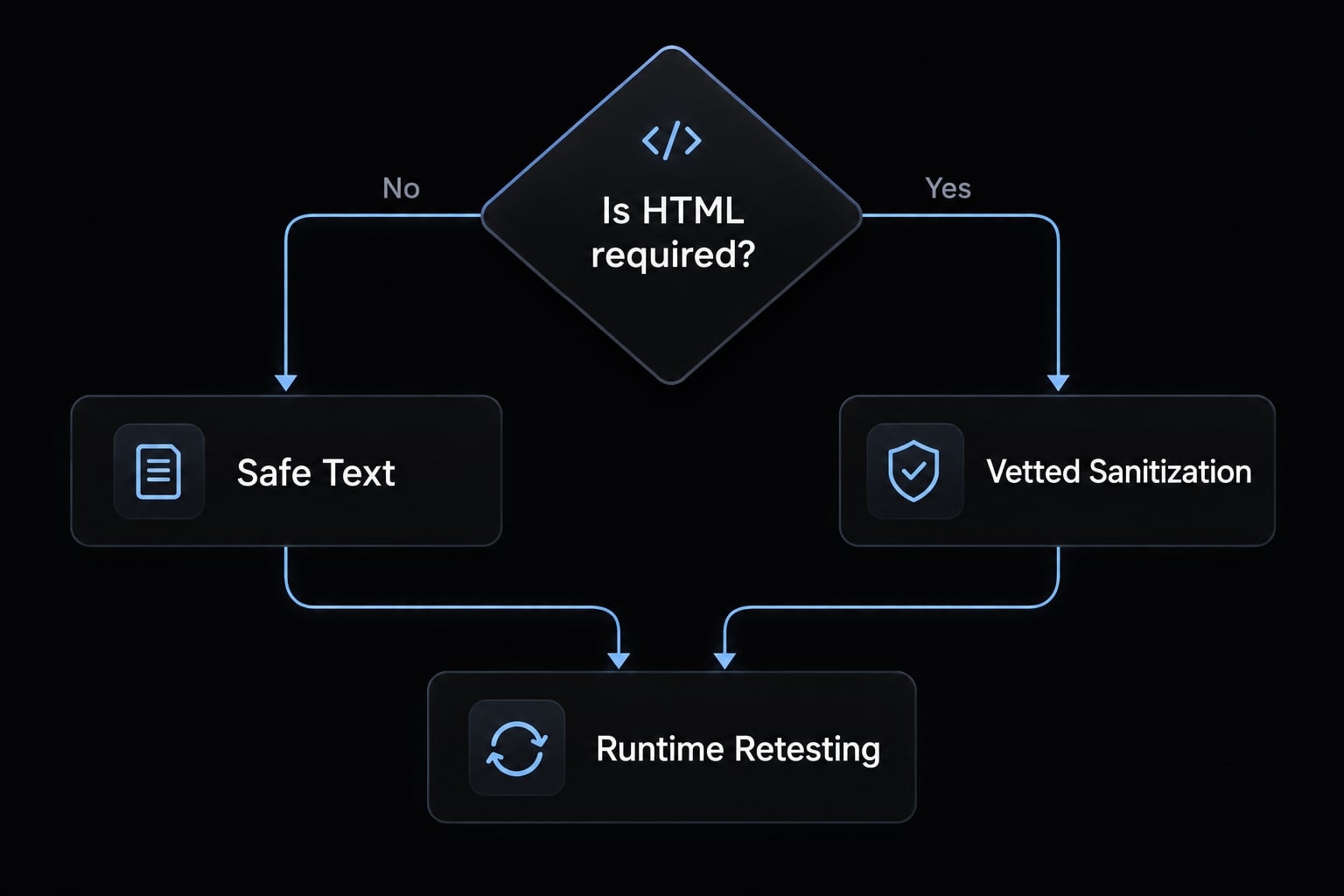
- Prefer safe text or component rendering when markup is unnecessary.
- Apply context-aware encoding at the correct output boundary; avoid double-encoding already protected framework output.
- Use vetted HTML sanitization when legitimate HTML must remain, with reviewed configuration.
- Remove unjustified escape hatches that bypass normal framework protections.
- Validate dynamic URLs and allowed schemes, rather than relying solely on escaping.
- Preserve appropriate server-side enforcement, while also securing client-side DOM handling.
- Use Content Security Policy (CSP) as defense in depth, not a replacement for fixing the flaw.
Input validation can constrain accepted data, but does not replace context-appropriate output protection. Generic HTML escaping is not sufficient for every JavaScript, URL, or other context. Avoid dangerous contexts where practical.
For the portal, choose plain-text rendering if formatting is unnecessary. Otherwise, retain rich text with a reviewed sanitizer and safe downstream handling.
Retesting checklist
- Recheck the original data path and authorized runtime behavior.
- Add regression testing and rerun relevant static checks.
- Inspect equivalent rendering paths.
- Confirm legitimate content still works.
- Record evidence, reviewer approval, and remaining limitations.
A legitimate fix may safely constrain data reaching the original sink; the sink need not disappear.
Copyable safety checklist
These Claude Code security best practices are an operational aid, not a compliance certificate. Record evidence for each completed item.
- Ownership or explicit review authorization is recorded.
- Repositories, components, environments, and exclusions are defined.
- Production secrets and customer data are excluded.
- Execution isolation is verified beyond a Git branch.
- File, shell, network, browser, and integration permissions follow least privilege.
- Repository revision and relevant software versions are recorded.
- Each finding includes source-to-sink evidence and protection analysis.
- Severity, confidence, and validation status are recorded separately.
- Independent review or suitable tooling corroborates consequential findings.
- Runtime testing uses authorized environments and isolated test accounts.
- Fixes have reviewed diffs, regression coverage, and affected-flow checks.
- A human approves reporting and closure, including unresolved limitations.
Frequently asked questions
Can Claude Code automatically detect all XSS vulnerabilities in my code?
No. While Claude Code can assist in identifying potential XSS by tracing data flows and flagging suspicious rendering patterns, it cannot guarantee complete coverage. Source review alone is insufficient to establish runtime exploitability, and human verification remains non-negotiable for confirming any security findings.
How does Claude Code’s security review differ from traditional static analysis tools?
Claude Code excels at contextual reasoning - understanding the intent and logic across multiple files - whereas static analysis tools like Semgrep or CodeQL excel at identifying known, repeatable vulnerability patterns deterministically. A layered approach using both AI-assisted reasoning and deterministic scanning provides the most reliable security posture.
Is it safe to let Claude Code automatically fix XSS findings?
You should never allow automatic fixes without review. While Claude Code can suggest patches, you must manually inspect the diff, verify the fix in an isolated runtime environment, and run regression tests. Always treat AI-generated code as a draft that requires human validation before merging.
What is the risk of using Claude Code for security triage?
The primary risk is the "echo chamber" effect, where the model that authored the code may fail to detect its own logical security flaws. To mitigate this, always pair Claude Code’s /security-review command with independent scanners and ensure that any security finding is reviewed by a human practitioner.
How can I minimize the risk of prompt injection during code review?
To protect your environment, perform reviews within a disposable workspace or a restricted branch. Avoid using production credentials or sensitive customer data, and ensure that your environment permissions - such as filesystem, shell, and browser access - are strictly configured to the minimum required for the task.
Does Claude Code introduce XSS risks into generated code?
Industry benchmarks indicate that AI-assisted code generation requires extra vigilance, as models can occasionally introduce vulnerabilities like unescaped template strings or raw innerHTML usage. Using built-in security hooks and enforcing a strict Content Security Policy (CSP) are essential controls to prevent these risks from impacting your application.
Read more:
- Claude Code tutorial: Set up and master your AI coding agent
- Claude Code VS Code: Installation and setup guide 2026
- Connect GitHub MCP to Claude Code: Step-by-step guide
Conclusion
Claude Code and AgentKit streamline XSS reviews through data-flow mapping and workflow automation, but their findings and patches remain hypotheses requiring rigorous runtime validation and human approval in isolated environments.
Ship features with Engineer Kit
Planning, implementation, review and testing workflows for AI coding agents, ready to install.
Explore Engineer Kit →Share this article
Keep reading
- Master Claude Code PostToolUse hook: Setup and examplesLearn how to configure Claude Code PostToolUse hooks for automated formatting and linting. Follow our guide to improve workflow efficiency today.15 min read
- How to use Kimi K2 with Claude Code: Setup & verification guideLearn how to configure Kimi K2 with Claude Code using Anthropic-compatible endpoints. Follow our step-by-step guide for setup, verification, and testing.13 min read
- Claude Code effort level: How to choose the right settingLearn how Claude Code effort level impacts reasoning and performance. Discover the best settings for your tasks to balance efficiency and accuracy.10 min read