Vibe coding a customer portal: Process, tools and checklist
While vibe coding can quickly prototype a functional customer portal, production-ready access requires human-verified controls for identities, files, and permissions. This guide provides a practical framework for scoping, building, and safely releasing an AI-assisted portal with clear engineering oversight.
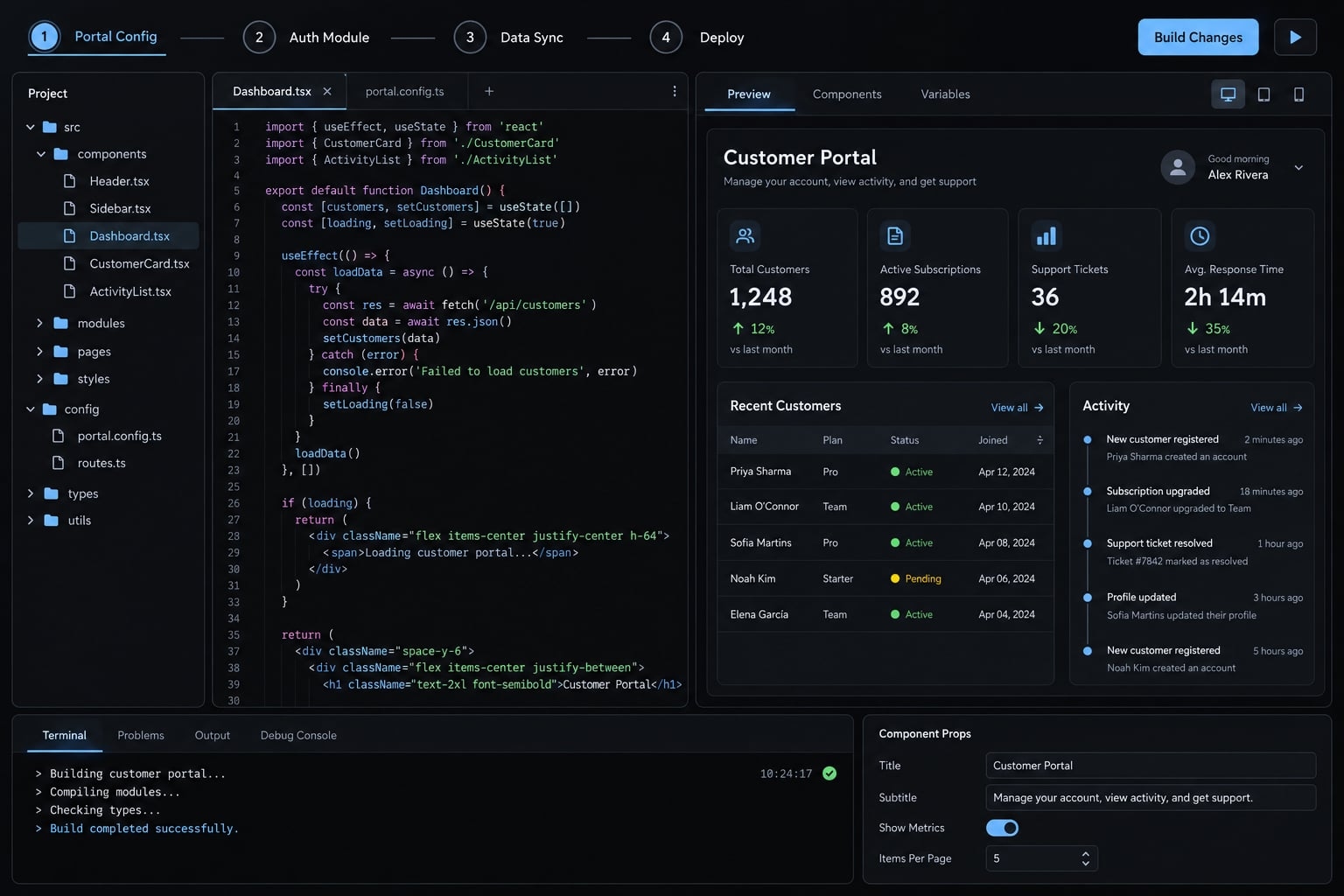
Can you build a customer portal with vibe coding?
Yes. Vibe coding can support customer portal prototypes and narrowly scoped applications, especially familiar workflows such as project tracking and document delivery. Suitability depends on the data, permitted actions, and consequences of failure. Any portal used by real customers needs verified access controls, testing, recovery procedures, and an accountable human owner.
“Vibe coding” often describes generating software through natural-language instructions without closely inspecting its code. This guide uses a controlled, AI-assisted approach, not uncritical acceptance of generated software.
A prototype validates a workflow, usually with synthetic data. An MVP (minimum viable product) limits features, not necessary protections. Production means real users or business reliance: A customer-facing MVP can already be production software.
Portal type | Typical features | Fit | Required controls |
|---|---|---|---|
Public-resource experience | Public guides, downloads | Lower-risk boundary case | Content review; authorization if authenticated |
Customer-specific status | Projects, approved reports | Good scoped candidate | Identity, account boundaries, private files |
Client collaboration | Requests, comments, uploads | Suitable with review | Write permissions, validation, upload controls |
Billing or payments | Invoices, payment links | Prefer hosted provider workflows | Financial authorization, verified provider events |
Sensitive or regulated records | Confidential case or health records | Specialist-led | Risk assessment and applicable legal controls |
Viewing invoices through a hosted provider differs from implementing payment processing. Regulatory requirements also vary by record type and jurisdiction.
What vibe coding is good at
- Generating familiar screens and forms.
- Refining navigation and customer-facing terminology.
- Connecting established services.
- Prototyping an agency portal for project status, approved reports, and requests.
That agency portal is the illustrative scenario used throughout this guide, not a reported customer implementation.
Where vibe coding becomes risky
Missing organization boundaries, exposed privileged credentials, failed integrations, and duplicated logic can undermine an apparently complete interface. Missing tests or operational ownership compound the risk.
Cross-customer access blocks launch, regardless of how well the portal looks or performs.
Define the portal before asking AI to build it
“Build a client portal” leaves critical decisions unspecified. An AI tool may generate plausible screens while inventing permission rules or overlooking record ownership.
Choose one core customer outcome
For the agency example, the primary outcome is straightforward: Customers can check project progress without emailing the account manager.
The minimum workflow is sign-in → project status → approved report → related request. Defer chat, custom analytics, and complex automation unless they are essential to that outcome.
Do not prompt yet until these six decisions are documented:
- Outcome: Customers can independently check project progress.
- Users and roles: Client viewer, client admin, agency support, system admin.
- View permissions: Customers see only permitted organization records.
- Action permissions: Define who can change, upload, approve, or delete.
- Ownership: Every project, request, and file has an organization boundary.
- Integrations and exclusions: Name essential connections and deferred features.
Map users, roles and permissions
- Authentication establishes who a user is.
- Authorization determines which records and actions that user may access.
The following is an illustrative permission policy, not a universal default.
Action | Client viewer | Client admin | Agency support | System admin |
|---|---|---|---|---|
View projects/reports | Own organization | Own organization | Assigned accounts only | Approved administrative access |
Submit requests | Own organization | Own organization | Assigned accounts only | Allowed by policy |
Upload/approve reports | No | No | Assigned accounts; publishing permission | Approved administrative access |
Invite members | No | Own organization only | Assigned accounts; invitation permission | Allowed by policy |
Delete records | No | Own organization; allowed by policy | Assigned accounts; allowed by policy | Approved access; retention rules apply |
Client admins cannot invite users into arbitrary organizations. Support access follows assignments; system administration does not automatically justify unrestricted customer-content access.
Hidden buttons do not enforce permissions. Backend checks must reject prohibited actions independently.
Define the minimum data model
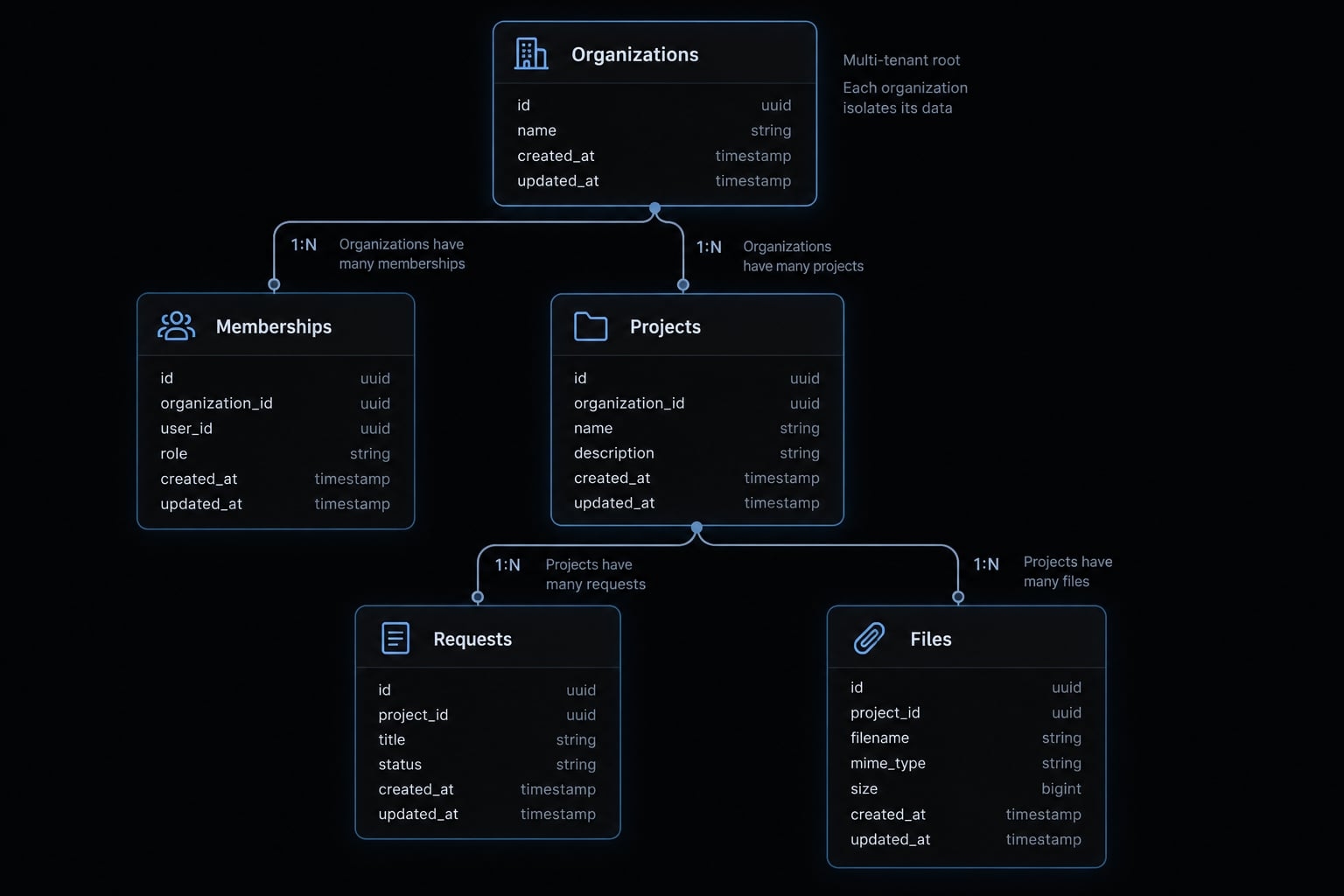
Use this relationship map:Organizations → Projects → Requests/Files
Users ↔ Organization memberships
Memberships connect users to organizations and roles. A user may belong to multiple organizations if the product allows it. Child records inherit a verifiable ownership boundary through their project.
Document sensitive fields, retention expectations, and the source of truth for synchronized project status.
Save the specification in PLAN.md. Files such as AGENTS.md or CLAUDE.md can contain agent-facing instructions where supported; tools do not universally read every filename.
Choose a simple, managed portal architecture
Choose the smallest stack your team can operate and another developer can understand. Select tools by required capabilities—not by how many services an AI agent can connect.
Layer | Purpose | Example options | Selection rule |
|---|---|---|---|
AI environment | Generate and revise code | Claude Code, app builder | Reviewable changes and export |
Frontend | Customer interface | React library; Next.js framework | Team-maintainable structure |
UI components | Reusable interface elements | Maintained component library | Accessibility and maintenance |
Authentication | Identity and sessions | Managed identity provider | Lifecycle and invitation controls |
Database | Structured records | Managed PostgreSQL | Policies and recovery options |
File storage | Private reports/uploads | Managed private object storage | Controlled access and retention |
Integrations | External system connections | Server-side connectors | Failure handling and reconciliation |
Version control | Change history | Git with hosted repository | Review and ownership |
Deployment | Run the application | Managed application hosting | Isolated environments and rollback |
Monitoring | Detect operational failures | Error tracking and alerts | Actionable, privacy-conscious reporting |
One platform may cover several layers; this is not a requirement for ten subscriptions.
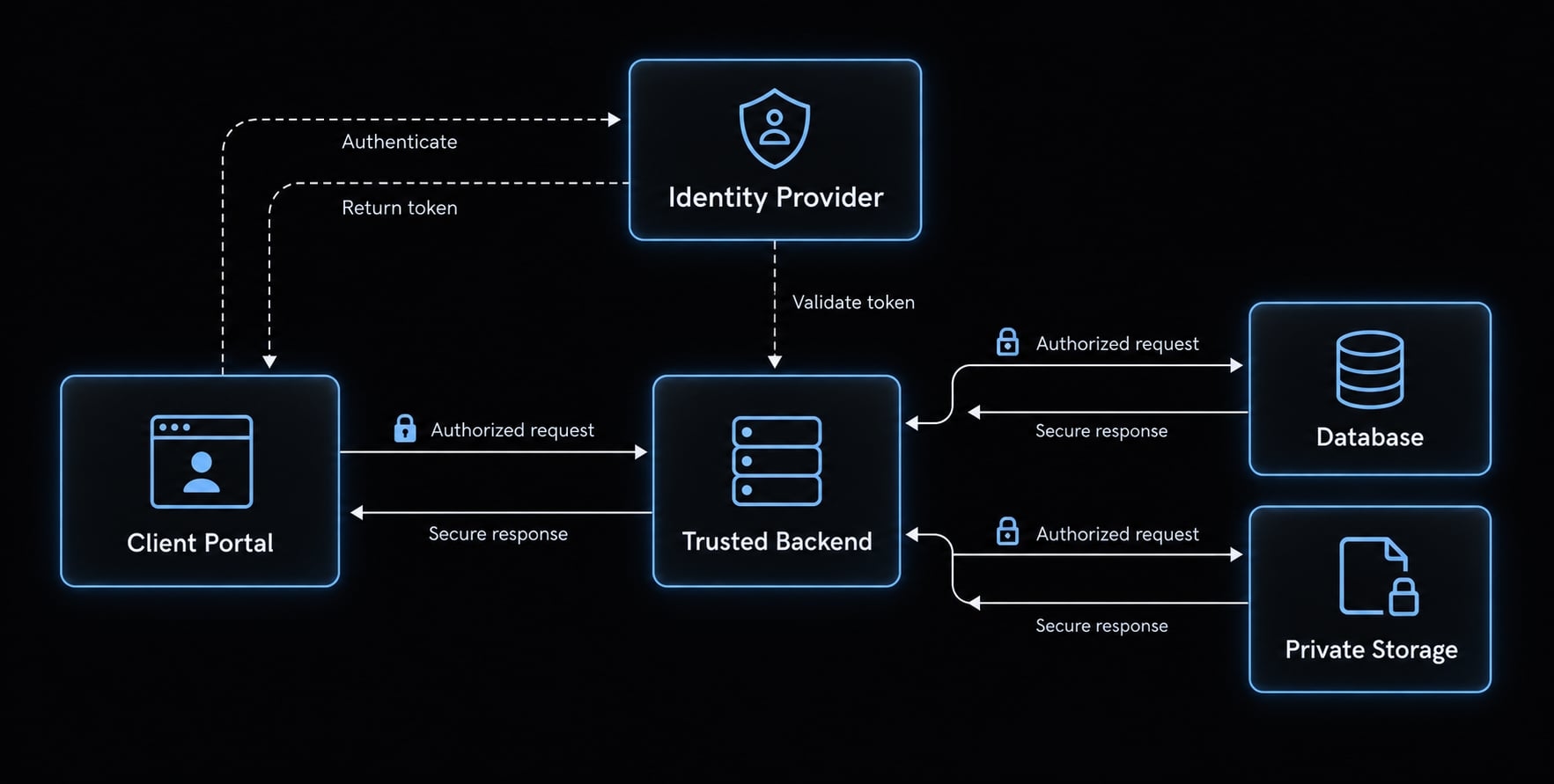
The browser requests access; the backend verifies identity, membership, and permitted actions before returning records or issuing file access.
AI app builder or repository-based coding agent?
- App builders can suit initial validation and familiar workflows.
- Repository-based agents can suit customization, code review, testing, and engineering handoff.
Capabilities overlap. Evaluate repository access, exportability, automated tests, environment separation, and maintainability rather than assuming either category guarantees them.
Why managed backends reduce risk
Managed authentication, databases, and storage reduce the infrastructure your team must implement. They do not remove responsibility for application configuration.
Row-level security (RLS) restricts database-row access through policies. It is one authorization mechanism, not a synonym for all access control.
Policies must therefore be explicitly configured and tested. Keep elevated service credentials outside browser code, and verify authorization before privileged operations.
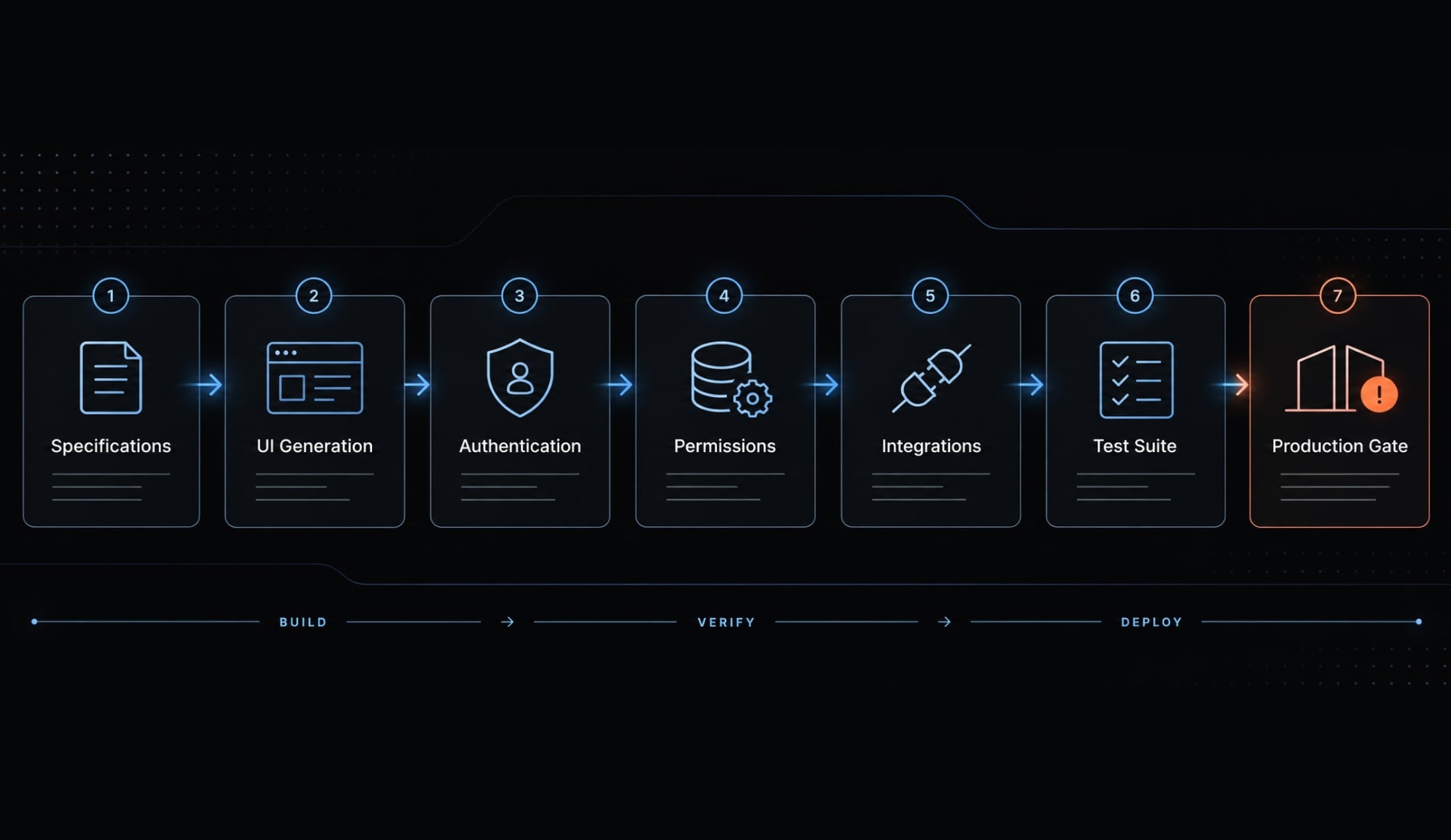
Build the customer portal in seven controlled steps
Build one reviewable increment at a time:
- Write the specification.
- Generate the interface with synthetic data.
- Add managed authentication.
- Connect data and enforce permissions.
- Add files and essential integrations.
- Create automated tests.
- Release through version control.
Step 1: Write a short portal specification
- Action: Define the objective, roles, workflow, entities, integrations, exclusions, and acceptance criteria. Ask the AI to identify unanswered questions before implementation. Initialize Git version control before generating application code.
- Output: A reviewed specification and incremental build plan.
- Acceptance check: Every workflow identifies an actor, permitted action, record scope, and expected result. For example: a client viewer downloads an approved report belonging to their organization.
Step 2: Generate the navigation and interface first
- Action: Build project lists, project details, report downloads, and request forms using synthetic records and maintained components. Review mobile layouts, keyboard navigation, loading states, empty states, and errors.
- Output: A clickable workflow without live customer connections.
- Acceptance check: A reviewer completes the primary task without assistance and understands failure messages. Keyboard checks help identify accessibility problems but do not establish full accessibility compliance.
Step 3: Add managed authentication
- Action: Configure sign-in, sign-out, recovery, invitations, session expiry, and disabled-account behavior. Decide explicitly between self-registration and invitation-only access.
- Output: A documented identity and account lifecycle.
- Acceptance check: Unauthenticated visitors cannot retrieve protected content. Invalid invitations fail, and disabled users lose access according to the documented session policy.
Successful authentication still does not establish organization membership or record access.
Step 4: Connect data and enforce permissions
- Action: Implement backend authorization and database policies where supported. Derive organization access from trusted membership records—not merely an organization ID supplied by the browser.
- Output: Connected projects, requests, and reports with enforced ownership boundaries.
- Acceptance check: Using two synthetic organizations, verify that Customer A cannot read or change Customer B’s records by altering identifiers or sending direct requests.
OWASP’s Authorization Cheat Sheet recommends denying access by default and validating permissions on every request.
Step 5: Add files and external integrations
- Action: Use private storage, authorize file access, restrict upload size and types, and keep privileged integration calls server-side. Define timeouts, retries, duplicate handling, and partial-failure behavior.
- Output: Controlled report delivery and documented integration behavior.
- Acceptance check: Unauthorized users cannot obtain file access. Retried submissions do not silently duplicate requests or other business actions.
Signed URLs are bearer links: someone holding a valid link may use it until expiry, depending on the design. They are not automatically identity-bound or instantly revocable.
Step 6: Create automated tests
- Action: Automate critical journeys and backend/API checks. An API is the interface software uses to exchange requests and data. Playwright supports browser testing, as described in its documentation; it is not a complete security-testing solution.
- Output: Repeatable tests against representative configurations.
Scenario | Expected result |
|---|---|
Login, recovery, disabled account | Documented lifecycle behavior |
Cross-customer read/write request | No disclosure or unauthorized change |
Invalid form or unauthorized file request | Rejected without unsafe side effects |
Integration timeout and retry | Visible failure; no duplicate business action |
- Acceptance check: Tests pass, and a deliberately introduced failure causes the automated release checks to fail. Passing tests only covers the behaviors tested.
Step 7: Deploy through version control
- Action: Require reviewed changes, tests, security checks, isolated development/staging/production environments, and staging approval. Configure release monitoring and rollback.
- CI/CD (continuous integration and delivery/deployment) automates change validation and release preparation or execution. A manual production approval gate is appropriate. GitHub Actions can automate these workflows; it does not itself supply application hosting.
- Output: A traceable release and recovery procedure.
- Acceptance check: Failed checks block promotion, and a rehearsal restores the previous application release. Reverting application code does not automatically reverse database changes; those require a compatible migration or recovery plan.
Move from a working demo to a production-ready portal
Production readiness means having evidence that a portal can handle intended customer access, foreseeable failures, and ongoing operation at an acceptable level of risk. It requires verified permissions, dependable release and recovery procedures, and maintainable ownership. It is not a guarantee of security or a permanent status earned by passing one checklist.
Area | Demo standard | Production standard |
|---|---|---|
Identity lifecycle | Login works | Invitations, recovery, expiry, revocation verified |
Record authorization | Correct records appear | Every protected operation checks permission |
Customer isolation | Separate dashboards | Cross-customer access attempts fail |
Forms and failures | Valid input succeeds | Server validation and safe failure handling |
File access | Download opens | Private storage and controlled access issuance |
Integration resilience | Successful connection | Retries, duplicates, partial failures handled |
Controlled deployment | Publish button works | Reviewed, tested, traceable releases |
Human maintainability | Generated code runs | A human can explain, change, and recover it |
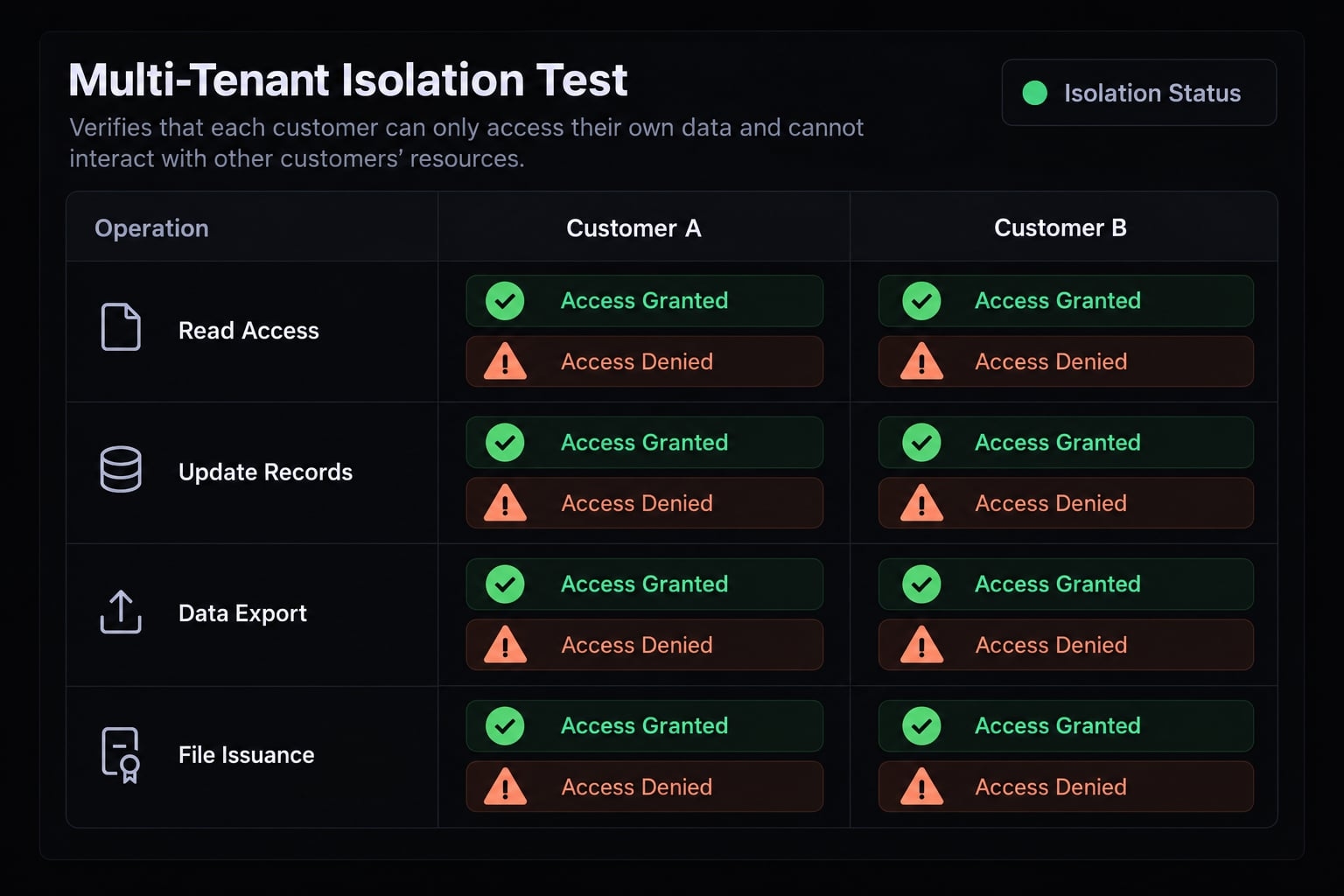
Run the two-customer isolation test
Tenant isolation means keeping each customer organization’s information separate within a shared application. Test only systems you own or are authorized to assess:
- Create Customer A and Customer B with synthetic records.
- Verify each organization’s permitted actions.
- Attempt cross-organization access through URLs, identifiers, parameters, and direct requests.
- Test reads, updates, deletions, exports, and file-access issuance where applicable.
- Record results, fix failures, and repeat.
The expected result is no unauthorized disclosure or successful action. Either a 403 denial or 404 response may be appropriate, depending on the design.
Any cross-customer exposure is a no-go condition. Passing this test is necessary evidence, not a substitute for broader security review.
Check secrets, dependencies and generated code
Review the repository, history, and browser build output for exposed credentials. Store privileged secrets in protected server-side configuration.
Some frontend configuration values are intentionally public. Administrative keys are not. Environment variables bundled into browser code are visible to users.
Revoke or rotate exposed credentials; deleting them from the latest commit is insufficient.
Review generated dependencies, their necessity, and known vulnerabilities. Require human review of authentication, authorization, billing, deletion, and administration. Scanners support this work but cannot identify every vulnerability.
Control technical debt
Technical debt is accumulated implementation work that makes future changes harder or riskier.
Control it by:
- Consolidating duplicated logic and components.
- Separating interface code from data-access responsibilities.
- Maintaining setup instructions, architectural decisions, and known limitations.
- Updating tests and documentation alongside behavior changes.
At least one human must explain how a request receives authorization and how a release reaches production.
Prepare for operations after launch
Assign a named alert and incident owner. Monitor application errors and integration failures without logging secrets or unnecessary customer content.
Test backup restoration—not just backup creation. Define acceptable recovery time and data loss according to business impact.
Document customer support, escalation, periodic access reviews, dependency maintenance, and applicable export or deletion procedures. A limited customer pilot still needs this accountability.
Know when to stop vibe coding and bring in an engineer
Engineering involvement is a normal transition in accountability, not a failure of AI assistance. Agents can continue generating changes while qualified humans review architecture, access boundaries, and operational consequences.
Trigger | Why it matters | Action |
|---|---|---|
Multiple customer organizations | Isolation failures expose other customers | Review membership and authorization paths |
Payments or financial actions | Errors can move money or alter obligations | Review provider integration and reconciliation |
Sensitive or regulated records | Additional confidentiality or legal requirements | Obtain security and relevant compliance review |
Business-critical integrations | Failures can corrupt synchronized records | Define source ownership and recovery |
Material downtime or change consequences | Failures disrupt customer operations | Review reliability and recovery design |
Repeated unrelated regressions | Changes reveal fragile dependencies | Pause expansion; stabilize architecture |
No human understands the codebase | Maintenance and incidents become uncontrolled | Require documented engineering handoff |
One critical bidirectional integration can justify review. The relevant questions concern failure consequences, reconciliation, and which system owns each record—not the number of connections.
Practical go/No-go verdict
- Proceed independently: A low-risk prototype using synthetic or non-sensitive data.
- Proceed with review: An authenticated customer MVP with verified controls and limited workflows.
- Do not launch without specialists: High-impact, sensitive, regulated, or complex systems.
Before handoff, package the specification, permission matrix, repository, setup instructions, test evidence, known limitations, and recovery procedures. Transfer access securely rather than placing credentials in documentation.
Production-readiness gate
Use this customer portal checklist as an evidence gate:
- Roles and action scopes are documented.
- Authorization is enforced outside the interface.
- Customer-isolation tests have passed.
- Privileged secrets are protected.
- Critical customer journeys are tested.
- Releases are traceable to reviewed changes.
- Monitoring and application rollback are available.
- Data recovery has been tested.
- A human operational owner is assigned.
- Another developer can take over using the handoff package.
Unresolved critical controls block launch. Completed interface features cannot compensate for missing authorization, exposed credentials, or untested recovery.
Frequently Asked Questions
Can you build a professional customer portal using vibe coding?
Yes, you can use vibe coding to build functional customer portals, provided you follow a structured, specification-driven approach. While AI agents excel at generating interfaces, a portal requires rigorous backend authorization and production-ready security controls to ensure data isolation between different client organizations.
How does vibe coding for portals differ from building a personal website?
A personal website is typically static and public, whereas a customer portal involves multi-tenancy, private data, and granular permissions. Unlike a personal site, a portal must implement authentication and authentication plus authorization enforced on every protected request. Database policies such as Row-Level Security can help, but they must be configured and tested — and elevated service credentials can bypass them.
What is the most common security risk in AI-generated portals?
The most common risk is "Broken Object-Level Authorization," where developers rely on hiding buttons in the user interface instead of enforcing authorization in the backend on every protected request. AI agents may generate functional interfaces that still accept unauthorized API requests.
Do I need to be a developer to build a secure customer portal?
You do not need to be a professional software engineer, but you must take responsibility for operational security. This includes verifying that your AI agent has implemented proper access policies, securing backend environment variables, and verifying that your application enforces organization boundaries on every protected request.
What should I include in my specification before prompting the AI?
Before generating code, define your user roles, record-ownership rules, and specific permission scopes in a technical plan. Specify exactly which actions—such as viewing, uploading, or approving—each role can perform, and confirm how the system should handle data separation between different client organizations.
How do I know if my portal is ready for production?
Isolation testing is a necessary gate, not a sufficient one. Work through the full production-readiness checklist: documented role scopes, authorization enforced outside the interface, passed isolation tests, protected secrets, tested customer journeys, traceable releases, monitoring and rollback, tested data recovery, a named operational owner, and a handoff package another developer can use.
When should I involve an engineer for my vibe-coded project?
You should bring in an engineer when your portal involves high-stakes integrations, complex multi-tenant billing, or regulated data handling. A specialist review is essential when the consequences of a security failure, data breach, or system downtime create significant business liability or operational risk.
Read more:
- Vibe coding tools: How to choose the right AI app builder
- 7 practical vibe coding examples: Build apps faster with AI
- Vibe coding threat model: Secure AI-assisted development guide
Conclusion
Building a customer portal with vibe coding requires balancing AI speed with human accountability. Success depends on defining clear permissions, enforcing backend controls, and treating operational readiness—such as isolation tests, recovery plans, and ownership—as core release requirements rather than post-launch cleanups