Vibe Coding tools: How to choose the right one without getting stuck after the prototype
Most vibe coding regret follows the same shape: The first build is impressive, then control, ownership, and maintainability become the real problem. This guide is written for that decision point - what the category actually includes, how app builders differ from editor-based and agent-based tools, and which ones are worth shortlisting depending on whether your output is disposable or something your team will maintain.
What are vibe coding tools?
Vibe coding tools are software products that let users create apps, features, or code through natural language prompts and iterative AI collaboration. Instead of writing every component manually, the user describes the desired outcome and the system generates code, UI, logic, or workflows that can then be refined.
At a practical level, vibe coding tools sit inside a broader market of natural language programming tools. The user starts with intent, not syntax. That is why the category appeals to both developers and non-technical builders: it lowers the friction between idea and working output.
Intent-first software creation
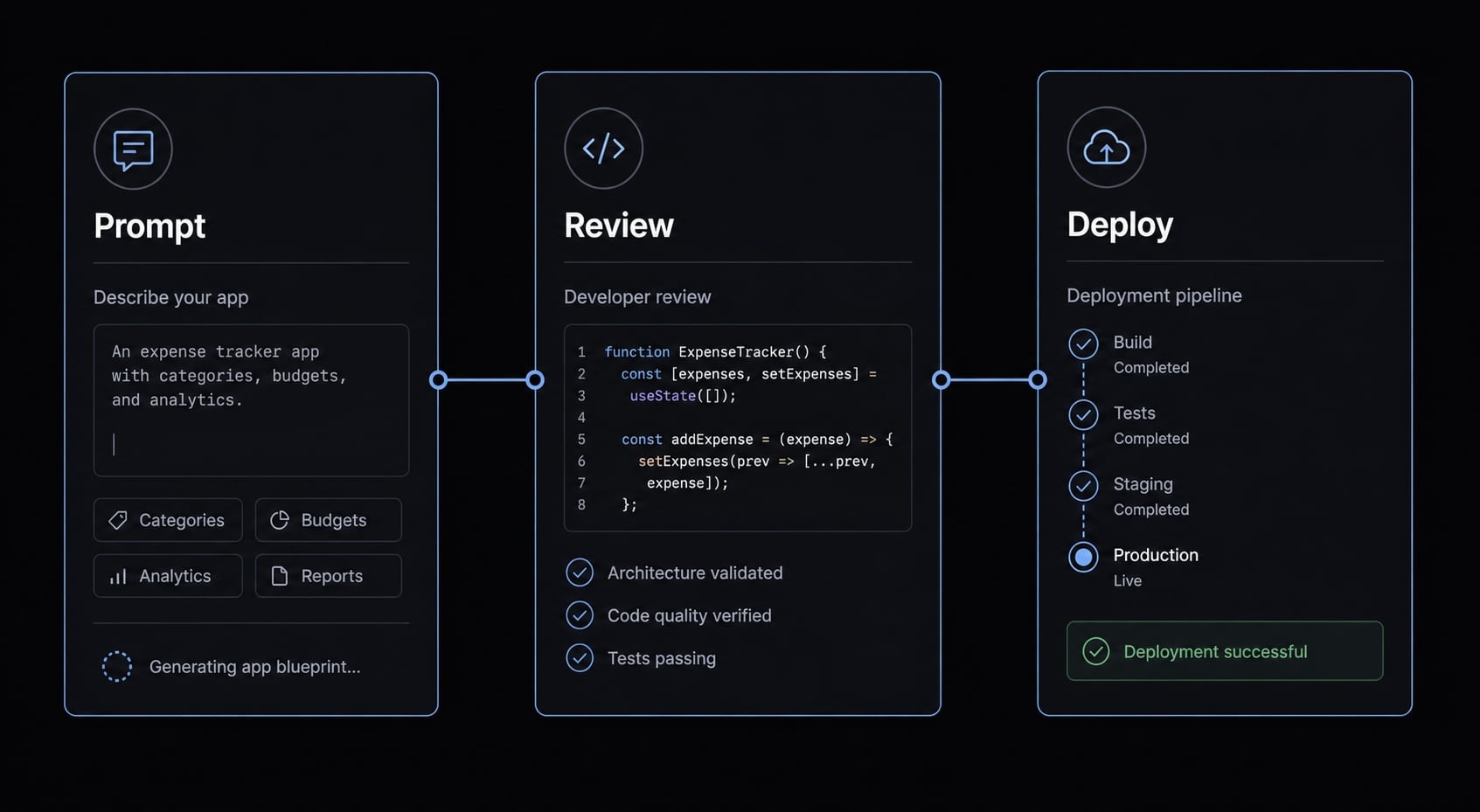
The core shift is simple. In prompt-based software development, you describe what you want the software to do, then refine the result through feedback loops. In many cases, these tools act like conversational coding interfaces, where the interaction feels closer to directing a collaborator than programming line by line.
This does not mean that all tools are the same.
Some generate quick full-stack prototypes. Others work inside an editor and understand your repository. Others can execute multi-step tasks with more autonomy. In all cases, user intent drives the first draft, but the level of control after generation varies widely.
Why the label can be misleading
In practice, buyers often compare very different products as if they were interchangeable. That is where confusion starts. Vibe coding tools are a useful market label, but not a precise technical class.
What sits under the label usually includes:
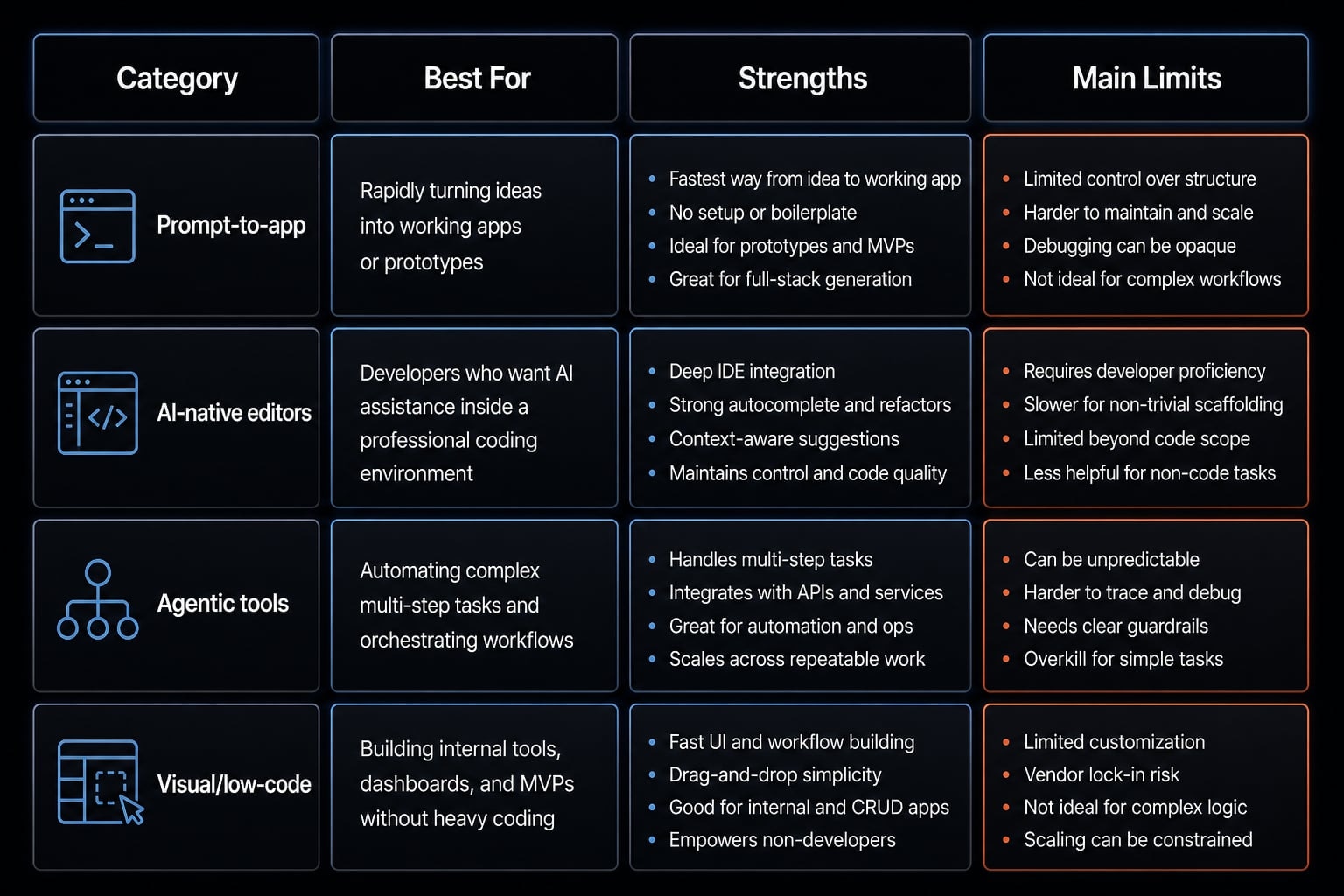
- Prompt-to-app builders with limited code exposure and very fast setup
- Editor-style AI tools with stronger repository awareness and better code control
- Agentic tools that can plan, edit, run commands, and work across multiple files
- Low-code development platforms that abstract logic visually rather than through raw code
That distinction matters because the issue usually appears after the first prototype. A tool that is perfect for a demo may be weak for debugging, handoff, or long-term maintenance.
The 4 main categories of vibe coding tools
Most category confusion disappears once you separate tools by workflow type. The market is not one thing. It is four related product groups inside modern AI software development, each solving a different problem.
- Prompt-to-app builders.
- AI-native coding editors.
- Agentic coding tools.
- Visual or low-code app builders.
Prompt-to-app builders
These are the fastest entry point for many users. They are built for rapid prototyping, simple SaaS MVPs, and internal tools where speed matters more than architectural depth. They usually offer:
- Very low setup friction.
- Plain-English app generation.
- Frontend, backend, and hosting shortcuts.
- Strong fit for non-technical founders validating ideas quickly.
The tradeoff is that these apps get harder to maintain quickly. When something breaks, the tools often point at the symptom rather than the cause, you may not be able to see how the system is actually put together, and moving the project off the platform gets harder the more you build.
Who should not use this: Teams building a strategic product that will soon require deeper engineering control.
AI-native coding editors
These are closer to LLM-integrated development environments than app builders. They work best for developers who want acceleration without giving up familiar workflows.
Their strengths usually include:
- Better codebase context.
- Direct editing inside familiar editor environments.
- Stronger code ownership.
- Better fit for review loops and iterative engineering.
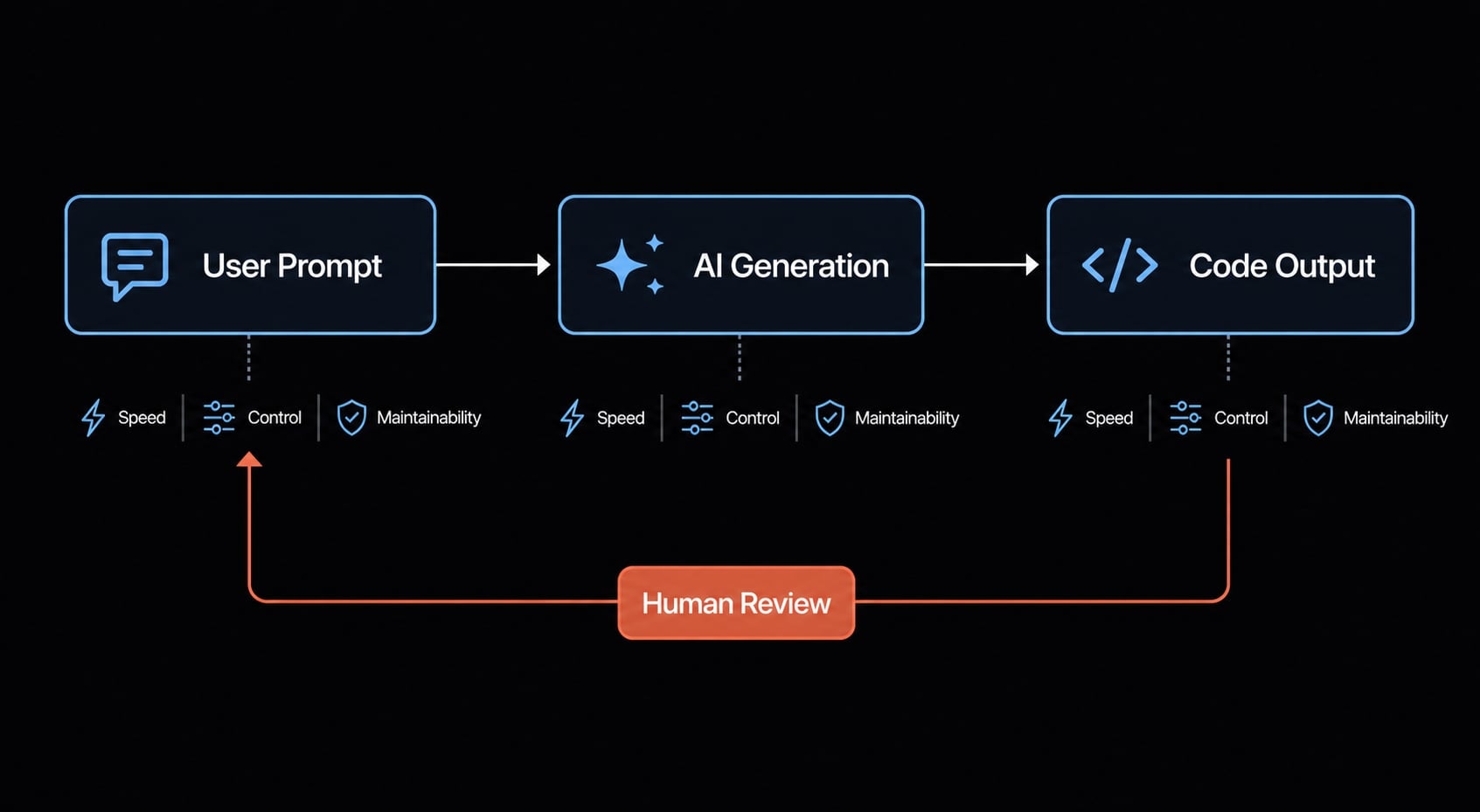
This is where vibe coding tools start to overlap with serious development workflows. You get speed, but you still need engineering judgment. The AI can help generate, refactor, and review, but it will not remove architecture decisions or code review responsibility.
Agentic coding tools
This category pushes deeper into autonomous agentic coding. These tools can inspect repositories, plan tasks, edit multiple files, run commands, and move through more complex workflows with limited step-by-step prompting.
They are strongest for:
- Terminal-heavy work.
- Multi-file implementation.
- Repetitive engineering tasks.
- Builders who already understand how to supervise an agentic workflow.
The tradeoffs are real:
- Higher oversight burden.
- Faster error propagation if prompts or plans are weak.
- Meaningful token burn.
- More risk if guardrails and approvals are missing.
These are powerful tools, but not passive ones.
Visual or low-code app builders
This category includes many low-code development platforms used for mobile apps, internal operations tools, and process-heavy software. Their strength is not pure code generation. It is abstraction through interfaces, components, and visual logic flowcharting. They are often a good fit for:
- Multi-platform mobile builds.
- Operational apps.
- Structured business processes.
- Teams that value visual control over raw code.
The main limitation is ceiling. Exportability, customization depth, and long-term flexibility can become constraints once the app outgrows the platform’s assumptions.
In the modern SDLC (Software Development Life Cycle), these categories are often complementary. The mistake is assuming they are substitutes.
Best vibe coding tools right now: Shortlist by use case
This is not a universal ranking. These are the best vibe coding tools by use case, and the right choice depends on the type of app you are building, your team’s skill level, and how much control you need after the first version.
Speed matters, but speed alone is not enough. The most useful shortlist usually balances rapid prototyping, code control, maintainability, and handoff risk. That is especially true if you are deciding between AI-powered app builders, editor-based tools, and agentic workflows.
Lovable
- Best for: Non-technical founders validating product ideas quickly
- What it does well: Lovable is one of the strongest best vibe coding tools for non-technical founders because it reduces the path from idea to visible product. It is especially good for early UI generation and quick concept testing. GitHub export helps if you later need developer handoff.
- Main limitations: It is less convincing when the product moves from idea validation to complex production logic. Teams can hit limits around maintainability, debugging depth, and structured backend control.
- Overall fit statement: A strong option for early MVP exploration, weaker as the long-term center of a serious engineering workflow.
Bolt.new
- Best for: Fast browser-based full-stack experimentation
- What it does well: Bolt.new is attractive for developers and technical builders who want full-stack MVP development with very low setup friction. It works well for rapid prototyping, quick experiments, and getting from prompt to working prototype in the browser without much ceremony.
- Main limitations: Its speed is the appeal, but serious long-term workflows may require stronger review discipline and more flexible engineering tooling. It is excellent for momentum, less certain for mature development control.
- Overall fit statement: A strong shortlist candidate when speed is the priority and the project is still exploratory.
Replit
- Best for: Solo builders and beginners who want an all-in-one environment
- What it does well: Replit remains useful because onboarding is easy and the hosted environment reduces setup overhead. For solo builders, learners, and small experiments, that convenience matters. It supports iterative building well and makes the first working version accessible.
- Main limitations: As complexity grows, teams can feel constrained by the platform model. The same simplicity that helps early adoption can create friction later when workflows, architecture, or customization needs become more demanding.
- Overall fit statement: A practical prototype-friendly choice for individuals and early-stage builds, but not always the best long-run home for growing products.
Cursor
- Best for: Developers who want speed inside a familiar editor workflow
- What it does well: Cursor is one of the strongest answers in any comparison of AI coding agents for developers, even though it is best understood as an AI-native editor rather than a pure agent platform. Its biggest advantage is codebase context. It works well for editing loops, refactoring, code review support, and accelerating existing workflows without forcing a new environment. It also helps clarify the debate around vibe coding tools vs traditional IDEs. For many teams, the better question is not whether to replace the IDE, but whether to upgrade it with stronger AI collaboration.
- Main limitations: Cursor still depends on the user’s ability to review architecture, verify outputs, and maintain coding standards. It accelerates judgment; it does not replace it.
- Overall fit statement: One of the best options for developers who want controlled acceleration and stronger ownership over the resulting code.
Claude Code
- Best for: Developers working across complex repositories and terminal-driven workflows
- What it does well: Claude Code is a strong fit for multi-file implementation, repository-wide editing, and autonomous agentic coding where planning and execution need to happen together. Its value increases when tasks involve terminal operations, deeper repo awareness, and sustained use of codebase context.
- Main limitations: It is not beginner-friendly. High leverage comes with high oversight needs. Without review discipline, it can create more work through error propagation, overreach, or wasted token spend.
- Overall fit statement: Excellent for experienced developers who want deeper AI leverage, but it rewards process discipline more than casual use.
FlutterFlow
- Best for: Mobile and multi-platform apps with visual control needs
- What it does well: FlutterFlow is one of the more practical low-code development platforms for teams building mobile products or responsive multi-platform apps. Its visual builder, component system, and Flutter export make it useful when interface control matters and the team wants a clearer path to code ownership than many locked-in builders provide.
- Main limitations: It is less ideal for buyers who want a purely prompt-first experience. The workflow is more structured and visual, which is a strength for some teams and friction for others.
- Overall fit statement: A strong fit when mobile delivery and visual precision matter more than conversational generation alone.
Base44 / Zite-style business app builders
- Best for: Internal tools, business workflows, and operational apps
- What they do well: This category is useful for dashboard-style tools, internal portals, CRM-like workflows, and business process apps. The appeal is convenience: logic, data, auth, and hosting can be assembled quickly, often with better visibility into workflows than consumer-style app generators provide.
- Main limitations: The scope is narrower. These platforms are usually strongest inside operational use cases, not broad product engineering. Platform dependence can also become a real risk if the app later needs more custom behavior than the system is designed to support.
- Overall fit statement: Good for business workflow speed and operational app delivery, less suited for product teams building highly customized software.
Shortlist comparison table
Tool | Best for | Speed to prototype | Code control | Production-readiness | Learning curve | Pricing entry |
|---|---|---|---|---|---|---|
Lovable | Non-technical founders | High | Low-Medium | Medium-Low | Low | Typically entry paid plan |
Bolt.new | Fast full-stack experiments | High | Medium | Medium-Low | Low-Medium | Typically entry paid plan |
Replit | Solo builders, beginners | High | Medium | Medium | Low | Typically entry paid plan |
Cursor | Developers in existing workflows | Medium-High | High | High | Medium | Typically entry paid plan |
Claude Code | Complex repo and terminal work | Medium | High | High | High | Usage varies by model/workflow |
FlutterFlow | Mobile and multi-platform apps | Medium | Medium-High | Medium-High | Medium | Typically entry paid plan |
Base44 / Zite-style | Internal tools and ops apps | High | Medium | Medium | Low-Medium | Typically entry paid plan |
Pricing changes frequently. Treat this as directional, not a fixed quote.
Quick verdict by persona
Founder with no dev team
- Start with Lovable or a business app builder.
- Prioritize speed and handoff options.
- Avoid assuming the first tool can carry the full product roadmap.
Solo builder
- Replit or Bolt.new works well for momentum.
- Cursor becomes stronger if you plan to keep owning the code.
Developer with existing codebase
- Cursor and Claude Code should be first on the shortlist.
- Prioritize repository awareness and review control.
Small product team
- Mix categories carefully.
- Use builders for exploration, but anchor production work in stronger engineering workflows.
Ops/marketing workflow team
- Base44 / Zite-style platforms often make more sense than general-purpose coding tools.
- Focus on workflow clarity, data handling, and maintainability of business logic.
How to choose the right vibe coding tool
A useful selection process is less about hype and more about fixed buying criteria. Before comparing brands, score every option against these five factors:
- Speed to prototype.
- Code ownership and exportability.
- Debugging depth.
- Deployment flexibility.
- Maintainability over time.
This matters because the gap between vibe coding tools vs traditional IDEs is not only about interface style. It is about what happens after the first app version exists.
Speed vs control
If your output is disposable, speed should dominate. That is where prompt-to-app builders usually win. They are ideal for testing user intent, validating demand, and turning rough ideas into visible software quickly.
If the output is strategic, control should matter earlier. Cursor- and Claude Code-style workflows usually make more sense when:
- The app will be inherited by developers later.
- You expect ongoing iteration.
- Architecture quality matters.
- The code will live inside a broader product roadmap.
This is also where so-called enterprise-ready vibe coding platforms get overestimated. Many tools can create something impressive quickly. Far fewer support governance, maintainability, and ownership at scale.
Maintainability matters earlier than most teams expect
In practice, teams often discover the real cost after the prototype. Hidden costs typically include:
- Handoff risk between founder and developer.
- Weak architecture that needs cleanup.
- Switching friction when leaving a platform.
- Rising token spend in complex agent workflows.
- Rework burden caused by shallow first-pass generation.
- Unclear code ownership when export or customization is limited.
A simple mapping helps:
- MVP: Lovable, Bolt.new, Replit.
- Internal tool: Base44 / Zite-style builders.
- SaaS product: Cursor, Claude Code, sometimes Bolt.new for early exploration.
- Mobile app: FlutterFlow.
- Existing codebase: Cursor or Claude Code first.
If your team may need to own, review, and extend the output later, code ownership should never be treated as a secondary criterion.
Where vibe coding tools break in real workflows
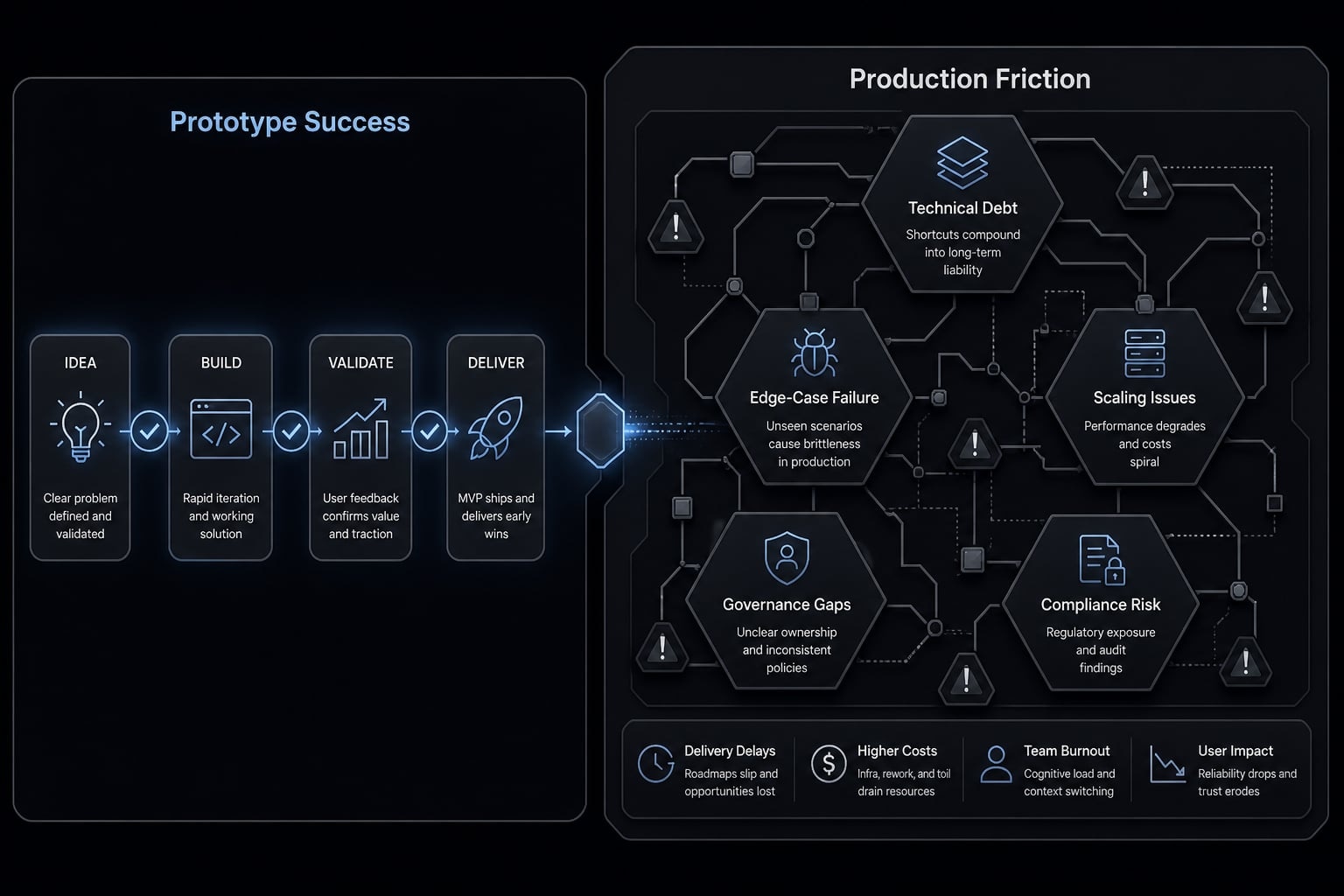
The trust test for this category is simple: Prototype quality is not the same as production quality. Many teams see a strong first build and underestimate what happens when real constraints appear.
Prototype quality is not production quality
Fast code generation is useful, but it can hide structural fragility. Good demos often skip the messy parts: edge-case handling, data integrity, permission logic, error states, deployment complexity, and long-term maintainability.
That is where technical debt starts accumulating quietly. The issue is not that AI-assisted tools always produce bad output. It is that the debt is often deferred rather than avoided. The early speed from iterative software prototyping can make the later cleanup cost easy to miss.
This becomes more visible when teams test the scalability of AI-generated code across a growing product, not a contained prototype.
Teams underestimate workflow discipline
The biggest operational gap is usually not generation quality. It is discipline around usage.
Teams typically need:
- Standard prompts for common workflows.
- Reusable agent behaviors and task patterns.
- Review workflows before merge or deployment.
- Access control for who can run what.
- Approval steps for higher-risk actions.
- Governance boundaries for sensitive systems.
- Clear policies around security and compliance in AI-assisted development.
That matters even more as usage expands beyond one builder. Without these controls, the tool may save time locally while creating inconsistency system-wide.
For teams, the real upgrade is repeatable AI workflow infrastructure
Once a team has chosen a tool, the next bottleneck is usually not generation capability. It is repeatability. One person can get good results from one-off prompting. A team usually cannot scale that cleanly without more structure.
In practice, the bottleneck shifts from “Can we generate this?” to “Can we generate this consistently, review it properly, and repeat it across projects?” That is where agentic workflow design starts to matter.
As adoption expands, teams run into:
- Quality variance between users.
- Rebuilt prompts for recurring tasks.
- Inconsistent planning and testing habits.
- Weak coordination across coding, review, and deployment.
- Poor reproducibility even when individual results look good.
This is where workflow orchestration becomes more valuable than adding another point tool. Teams need reusable patterns, clearer execution paths, and stronger control over how AI interacts with their codebase and systems.
Frequently asked questions
What are vibe coding tools?
Vibe coding tools are software platforms that enable users to build applications using natural language prompts and iterative AI collaboration. Rather than writing manual code, you describe the desired features, and the system generates the UI, logic, and database structure. These tools range from simple prompt-to-app builders to advanced AI-native coding editors.
How do I choose the best vibe coding tool for my team?
Choose based on your specific requirements: use prompt-to-app builders for rapid MVPs and non-technical founders, AI-native editors for developers needing codebase context, and visual low-code platforms for mobile or multi-platform native apps. Always prioritize code ownership, maintainability, and integration capabilities over simple speed-to-prototype metrics.
Are vibe coding tools suitable for production-ready applications?
Many are, but proceed with caution. While these tools excel at rapid prototyping, they can accumulate technical debt if you lack a disciplined review process. Successful teams treat AI-generated code as a starting point, requiring professional oversight to ensure security, architecture scalability, and edge-case handling before deployment.
What is the difference between vibe coding and traditional software development?
Traditional development relies on manual coding and architectural planning, offering maximum control and long-term maintainability. Vibe coding prioritizes speed, using AI to automate the generation of repetitive code. The trade-off is often a reduction in granular control and a higher dependency on the tool's proprietary workflow and platform logic.
Why do development teams need workflow infrastructure?
As teams move beyond simple prototypes, the bottleneck shifts from writing code to maintaining consistency. Repeatable workflow infrastructure-such as reusable skills, subagents, and automated orchestration-prevents "prompt fatigue," reduces quality variance, and ensures that your AI-assisted development remains predictable, secure, and scalable across complex projects.
What are the main risks of using AI coding tools?
The primary risks include vendor lock-in, "black-box" logic that becomes difficult to debug, and hidden technical debt. If you rely too heavily on automated generation without proper code review or documentation, you may struggle to maintain, scale, or modify the application once it grows beyond the initial prototype phase.
Read more:
- Vibe code mobile app: Build ideas faster with AI development
- Vibe coding product spec: Build faster with AI clarity
- Agentic coding vs vibe coding: A practical guide for developers
Conclusion
There is no single winner in this market. The right vibe coding tools depend on what you are building, how much control you need, and whether the output is a disposable prototype or a system your team will need to maintain.
For early experimentation, point tools are often enough. Prompt-to-app builders can move fast, and editor-based or agent-based tools can dramatically improve developer throughput. But once consistency, review discipline, and production quality start to matter, the real requirement shifts from isolated tool choice to workflow infrastructure.