Vibe coded games: How to build simple games using AI prompts
Vibe Coded games: What they are, how they work, and when they’re actually useful
Vibe coded games are simple games built by describing what you want in plain language and letting AI generate the first version. That makes vibe coding appealing to founders, indie game developers, and non-technical creators - who want to turn an idea into something playable fast. The key limitation is just as important: This approach is usually best for prototypes, not polished production games. In this guide, we’ll break down what vibe coded games are, which tools people use, how a beginner can try the workflow, what commonly goes wrong, and when this method is genuinely worth using.
What are vibe coded games?
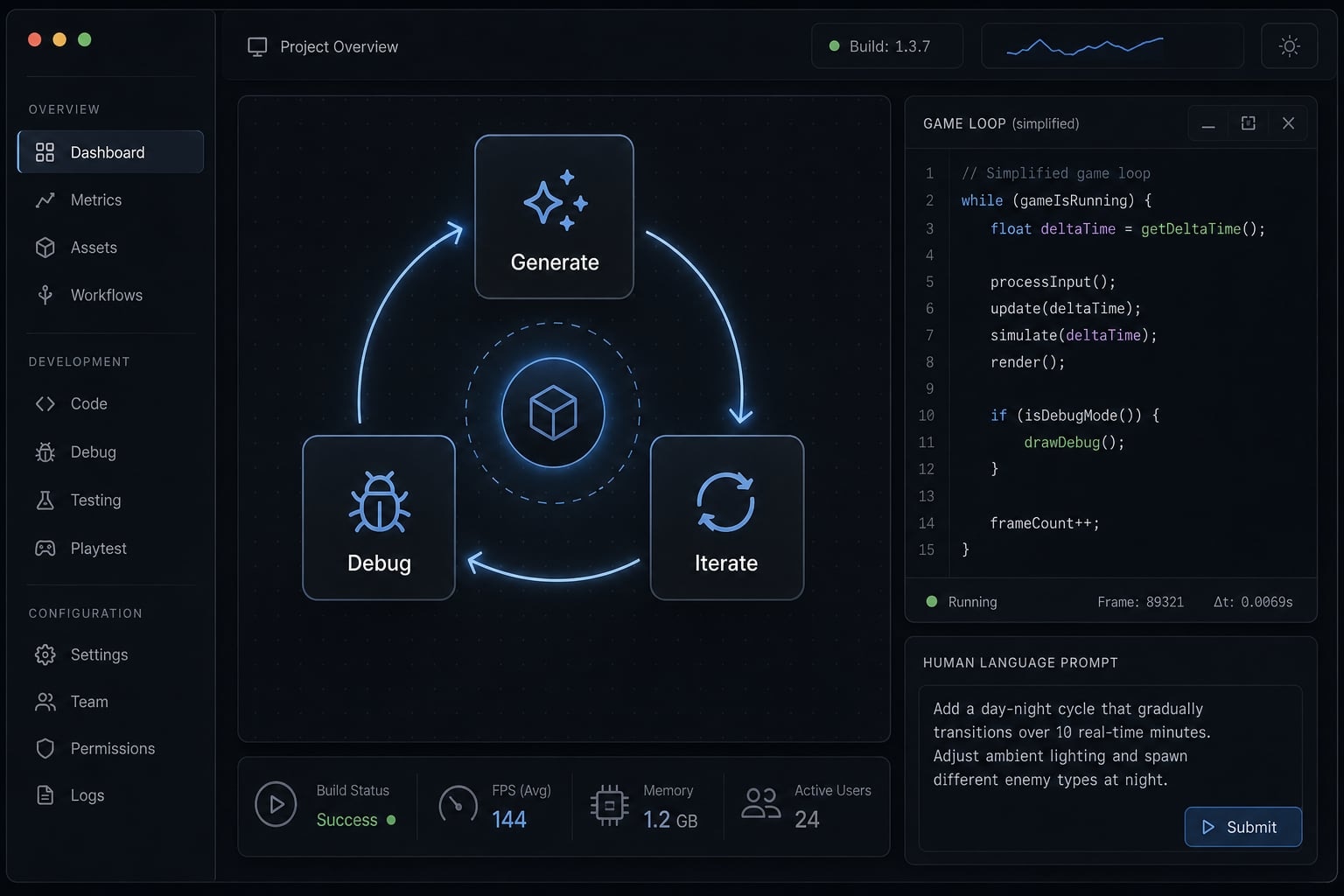
Vibe coded games are games or prototypes created by describing gameplay, visuals, and behavior in natural language, then using AI to generate code, logic, and a browser preview that you can test and refine. In practice, they are usually built through repeated prompting and iteration rather than one perfect instruction.
A plain-English definition
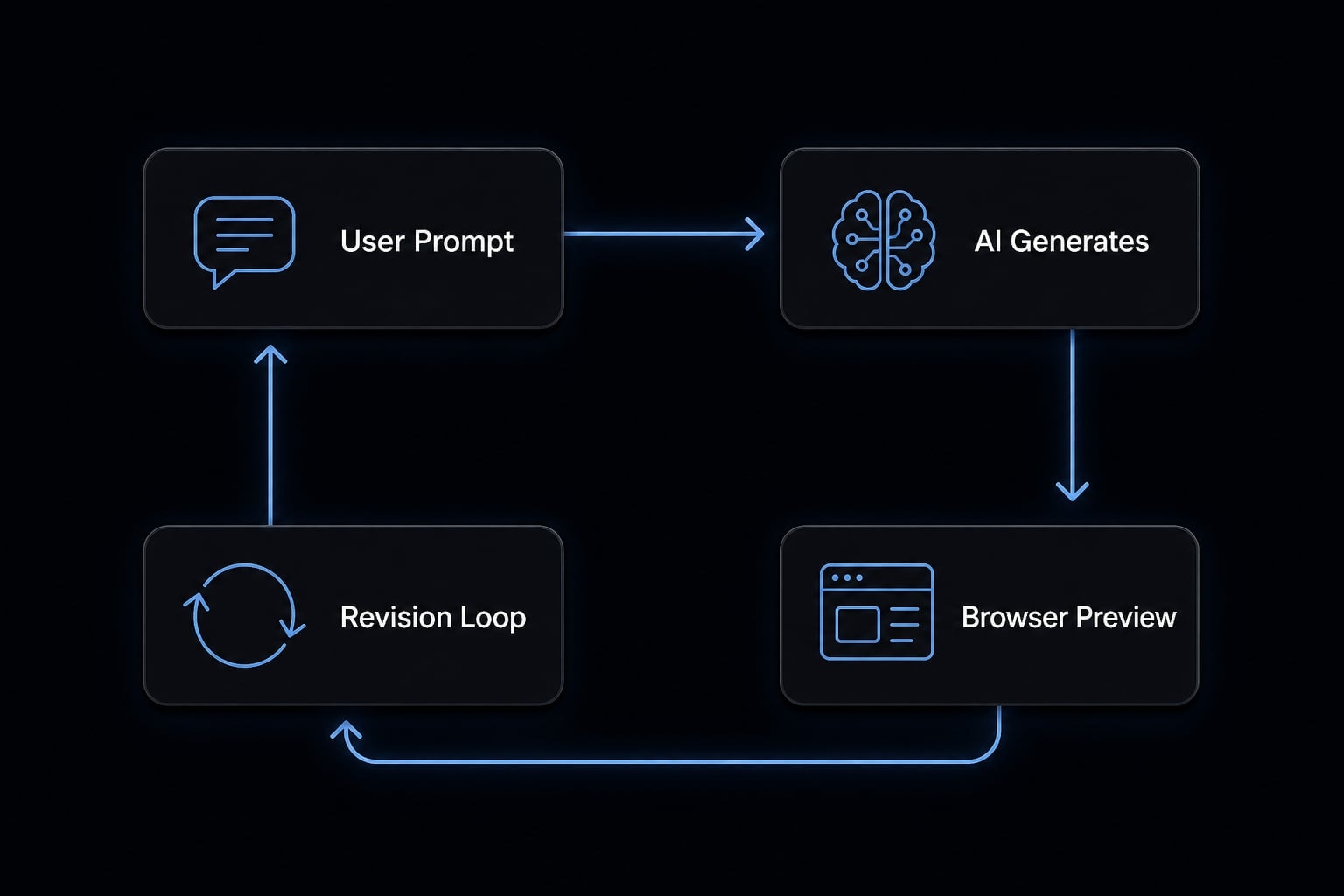
Vibe coded games are small games made through natural language game creation, where you tell an AI what to build instead of writing every line yourself. The AI may generate movement logic, scoring, UI elements, visuals, and browser-ready output.
The practical loop is simple:
- You describe the game.
- The AI generates a first version.
- You test what works and what breaks.
- You refine the result with more precise prompts.
That is why AI-assisted game development feels fast at the beginning. You move from idea to something visible quickly. But the first output is rarely final.
What vibe coding is not
Vibe coding is useful, but it is often misunderstood. It is not:
- Not fully automated game development where one prompt creates a finished product.
- Not guaranteed bug-free output, even for very small games.
- Not a replacement for all programming, especially when projects get larger.
- Not the same as no-code, because AI is still generating and editing actual code behind the scenes.
- Not the same as using an AI copilot inside a normal developer workflow, where a human usually stays in tighter control of architecture and implementation.
- Not pure prompt-based game engineering for every scenario, because once bugs appear, prompts alone are often not enough without checking the generated code.
The most accurate way to think about it is this: Vibe coding lowers the barrier to starting, but it does not remove the need for testing, revisions, and decisions.
Why vibe coded games feel so accessible
The biggest reason vibe coded games feel approachable is simple: Most people can describe a game idea before they can build one from scratch. That lowers the activation energy. Instead of setting up a full development environment first, you can often start with a prompt and see a rough output within minutes.
Why language feels easier than Syntax
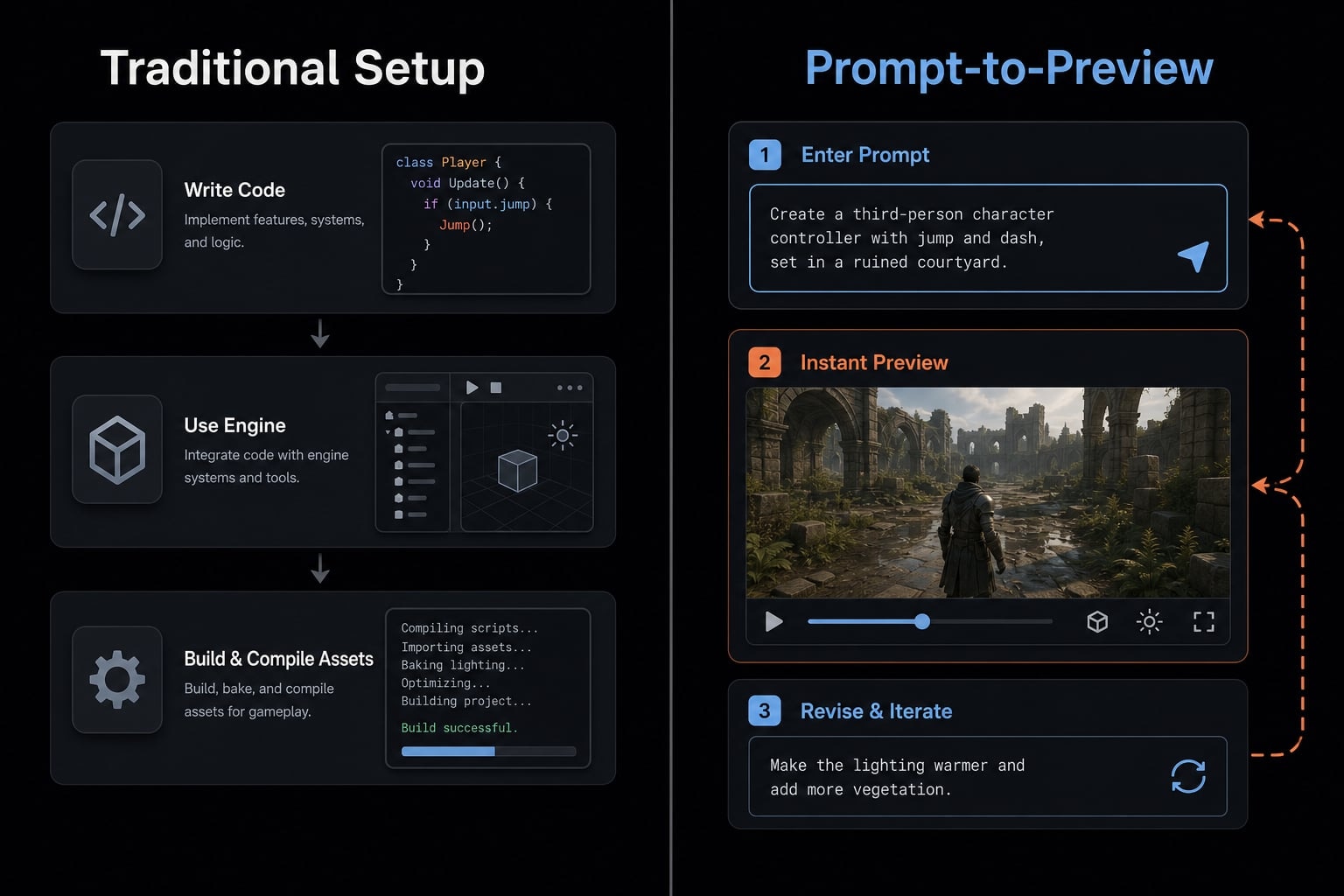
For beginners, natural language programming feels easier than formal coding syntax because the first step is descriptive, not technical. You can say, “Make a small platform game where a cat jumps between platforms and collects fish,” even if you do not know how to code jumping physics.
That matters psychologically. Immediate output creates momentum. When readers see a rough game appear in a browser, the process feels possible. That is the real appeal of rapid prototyping.
A simple accessibility loop often looks like this:
- Describe the idea.
- See output quickly.
- Test what happens.
- Refine the result.
This is why the first win is usually a playable prototype, not a polished game. Fast feedback reduces friction. It does not remove complexity later.
Best-fit users
This workflow is especially useful for people who need speed more than perfection:
- Non-technical creator exploring an idea without learning a full engine first.
- Solo founders testing a product concept through a lightweight game mechanic.
- Indie makers building small experiments.
- Educators creating classroom demos.
- Marketers building simple interactive demos or campaign microsites.
- Developers who want a fast first draft before deeper cleanup.
A second playable prototype often teaches more than a long planning document. That is why this approach gets traction quickly. It helps people start. Finishing well is still a separate challenge.
What tools people use to build vibe coded games
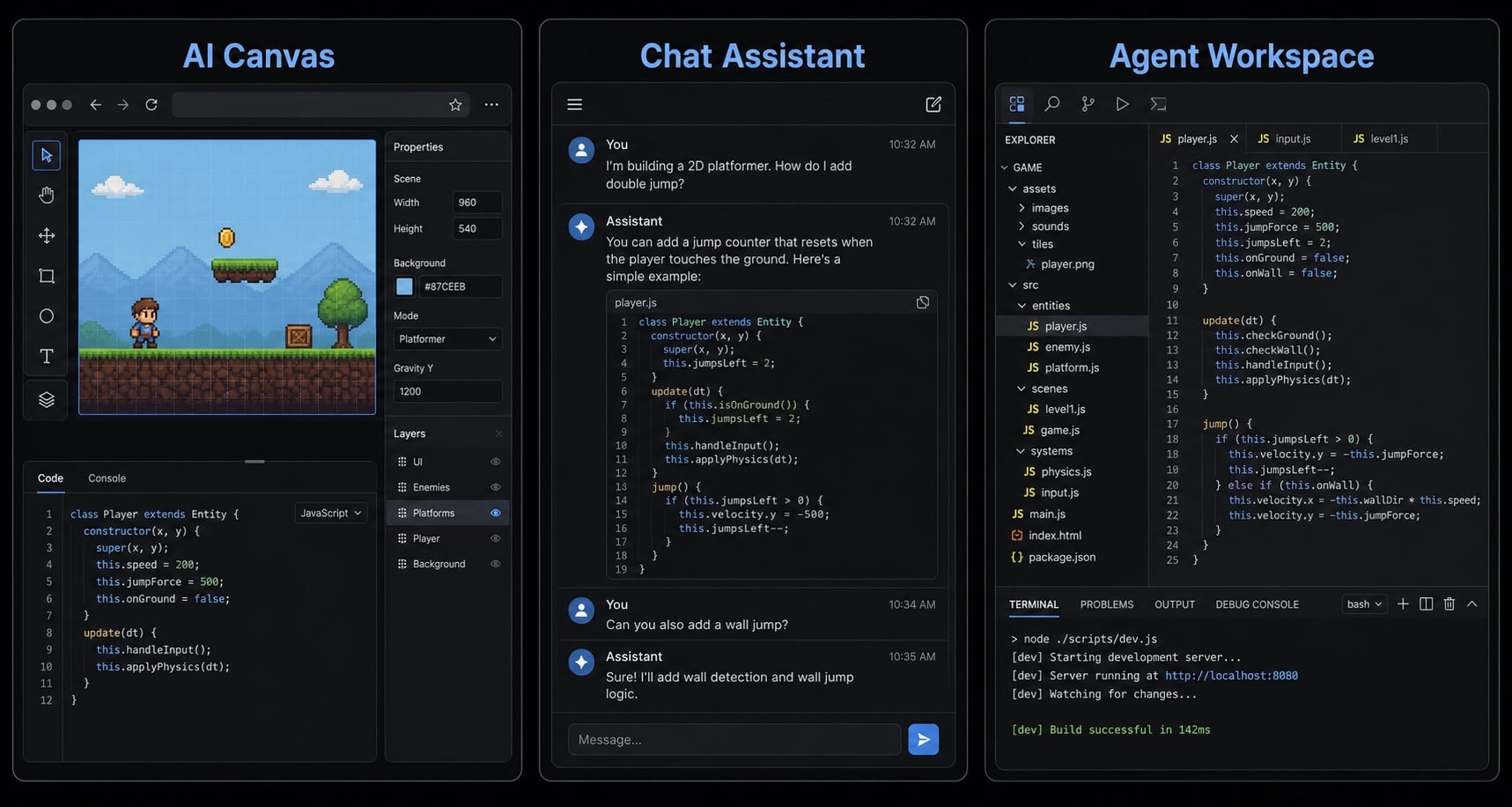
Most people do not need the “best” tool. They need the right tool category for their workflow. In practice, vibe coded games are usually built with one of four setups: Browser-based AI canvas tools, chat-based coding assistants, code-aware agents, or a traditional game workflow supported by AI. Recognizable examples include Google Gemini Canvas, Claude Code, and broader AI development agents, but workflow fit matters more than brand.
Tool selection criteria
For beginners, the most useful selection criteria are operational, not promotional:
- Fastest to start with minimal setup.
- Easiest to preview in a browser.
- Easiest to debug when something breaks.
- Best support for browser-based game rendering.
- Easiest to revise repeatedly without losing context.
- Ability to inspect and edit code.
- Enough continuity for multi-step work if you plan more than one prompt round.
If your goal is a small experiment, low friction usually beats maximum power. Some AI development agents are stronger at continuity and structured workflows, but they may feel heavier for a first test.
Why code visibility still matters
Prompt-only building feels smooth until the first real bug appears. That is where code visibility becomes important.
Many beginner game experiments run in a JavaScript HTML5 browser format. You do not need to understand every line of the AI-generated code, but you do need to see where movement logic, collision, score tracking, and restart behavior live. Otherwise, each fix becomes guesswork.
A practical rule: If the tool hides too much, debugging gets harder after the novelty wears off. The most beginner-friendly setup is usually the one that gives you fast previews and enough code visibility to isolate problems when needed.
Tool type | Best for | Strengths | Limits |
|---|---|---|---|
Browser-based AI canvas | First playable prototypes | Fast feedback, low setup friction | Limited control at larger scope |
Chat-based coding assistant | Small mechanics, logic fixes | Easy prompting, flexible ideation | Can lose context across iterations |
Code-aware AI agent | Structured multi-step builds | Better continuity, stronger debugging | Slightly higher learning curve |
Traditional engine + AI assistant | More control and extension | Better scalability and maintainability | More setup, less beginner-friendly |
A beginner-friendly workflow for making a simple vibe coded game
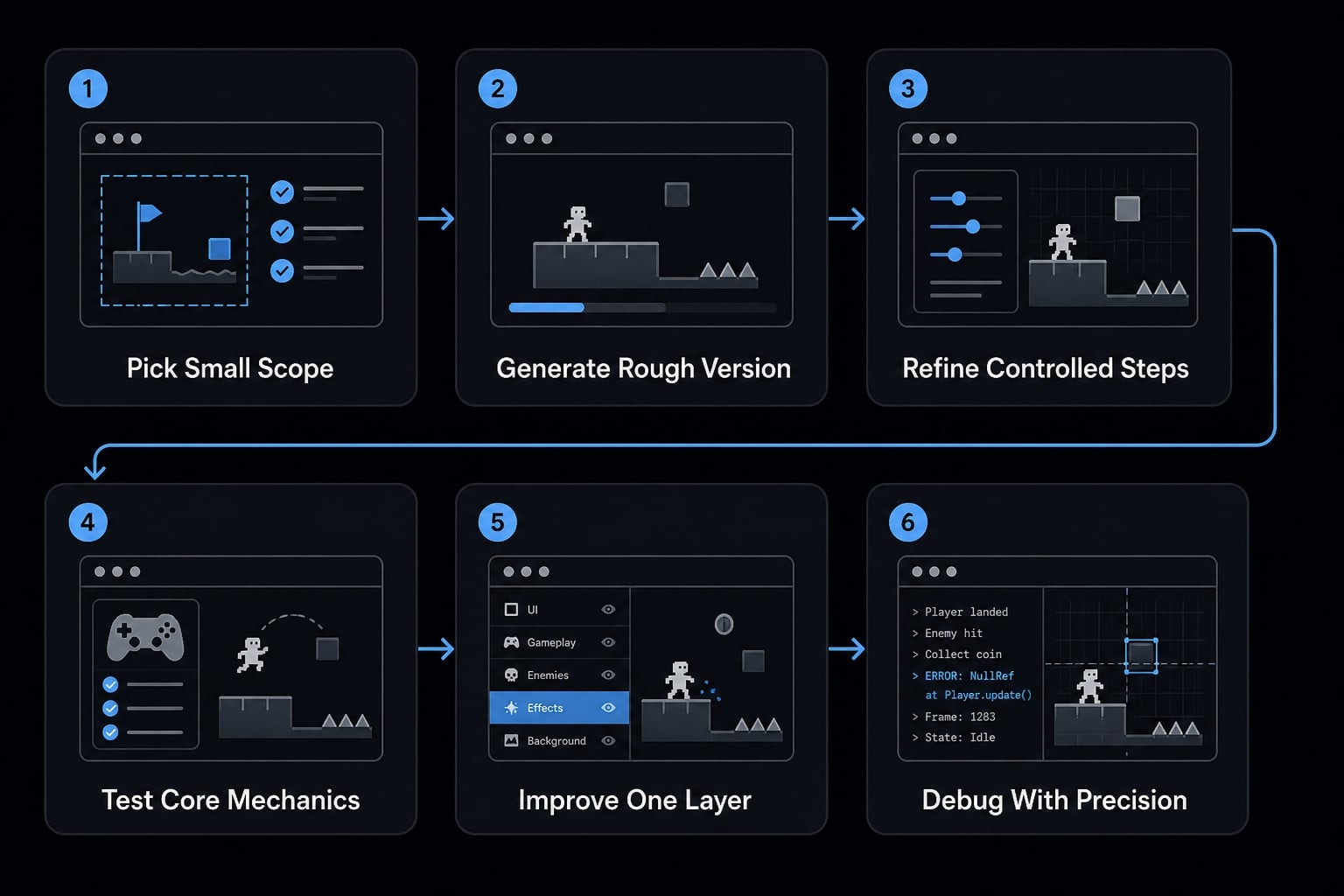
The fastest path is not “ask AI for a game.” The fastest path is choosing a tiny scope, generating a rough version, and refining it in controlled steps.
- Pick a small game with one clear mechanic.
- Prompt for controls, objective, and visual style.
- Generate the first playable browser version.
- Test movement, collision, score, and restart behavior.
- Improve one layer at a time.
- Save working versions and debug with precise prompts.
Step 1: Pick a realistic scope
Scope is the most important beginner decision. Small games work best because they are easy to test and easier to repair. Good first formats include:
- Simple platformer.
- Dodge game.
- Clicker.
- One-loop puzzle.
These work because they rely on a limited set of game mechanics. Usually there is one core action, one objective, and a short feedback loop. That makes it easier to get a playable prototype quickly. Poor first choices include:
- Open-world concepts.
- Multiplayer systems.
- Content-heavy RPG structures.
- Large branching narratives with many states.
Those formats create too many dependencies too early. The AI may still generate something, but maintaining consistency becomes difficult fast.
Step 2: Write the first prompt around the core loop
A good first prompt should define the game’s core loop clearly. Include:
- Genre
- Main player action
- Win or loss condition
- Scoring
- Visual style
- Browser output
- Editing constraints, if needed
If you are searching how to make a game with AI vibe coding, this is the step that matters most. Better prompts are usually narrower, not longer.
Use a prompt like this:
Create a simple browser-based platform game in JavaScript and HTML5. The player controls a cat that jumps across platforms, collects fish, and loses if it falls. Include score tracking, restart functionality, and simple cartoon visuals. Keep the code in one file and make it easy to modify.
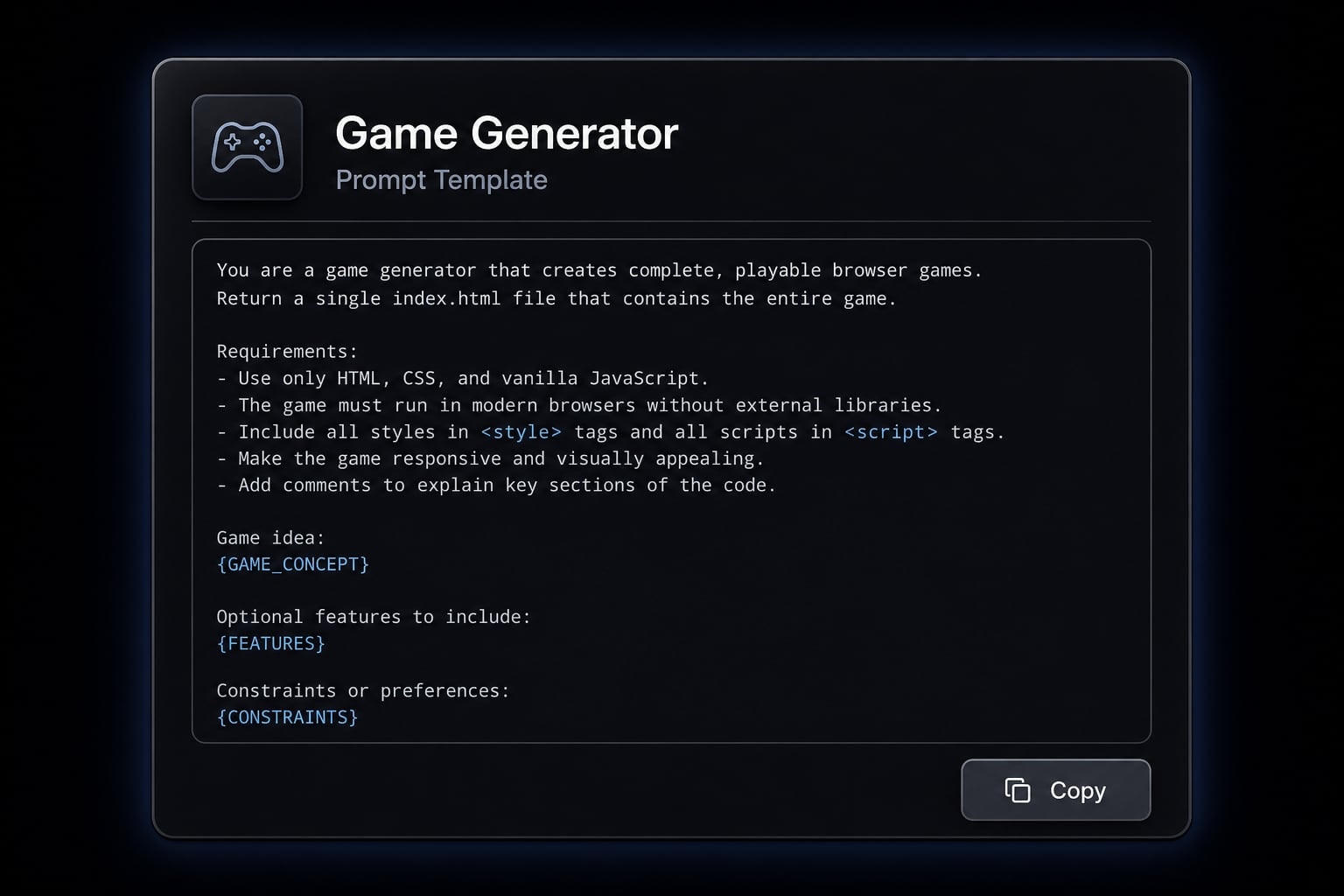
That prompt works because it defines the mechanic, objective, output format, and constraint level without overloading the model.
Step 3: Generate and test the first version
Once the first build appears, ignore polish. The goal is a first playable prototype, not a complete game.
Test these basics first:
- Movement works
- Collision works
- Score updates correctly
- Restart works after failure
- The objective is understandable within seconds
This stage matters because many first builds look functional until basic interaction starts failing. In practice, the first version is often rough but usable enough to guide the next round.
A common mistake is jumping straight to better art, sound, or menu design before verifying the game loop. That usually slows progress.
Step 4: Improve one layer at a time
After the basics work, improve the game in this order:
- Mechanics.
- Difficulty balance.
- Visuals.
- UI.
- Sound.
This order matters because stacked requests tend to reduce quality. If you ask for movement fixes, new enemies, animated backgrounds, menus, and sound effects in one prompt, the output often becomes less stable.
Controlled iterative refinement works better. Change one layer, test it, then move on.
For example:
- Fix jump height and landing feel.
- Adjust enemy speed or collectible spacing.
- Clean up visuals.
- Improve score placement and restart messaging.
- Add simple sound last.
This is also where AI-generated UI components can help, especially for score counters, restart buttons, and minimal overlays. Keep those changes isolated so they do not interfere with the game loop.
Step 5: Debug through precise prompts
At some point, something will break. That is normal. The recovery habit is to isolate one issue at a time.
Use prompts like:
- “The player falls through the floor after jumping. Fix collision handling only.”
- “Keep everything else the same, but reduce enemy speed by 20%.”
- “Do not redesign the interface. Only move the score counter to the top-right corner.”
- “The restart button appears, but it does not reset the score. Fix restart behavior only.”
This is debugging through prompts, and it works best when the request is narrow. Also save working versions before major edits. Stable builds matter because one bad prompt can introduce a regression.
The practical lesson is straightforward: Progress comes from controlled edits, not one perfect instruction. That is why iterative refinement is the real skill behind successful vibe coding.
What usually goes wrong with vibe coded games
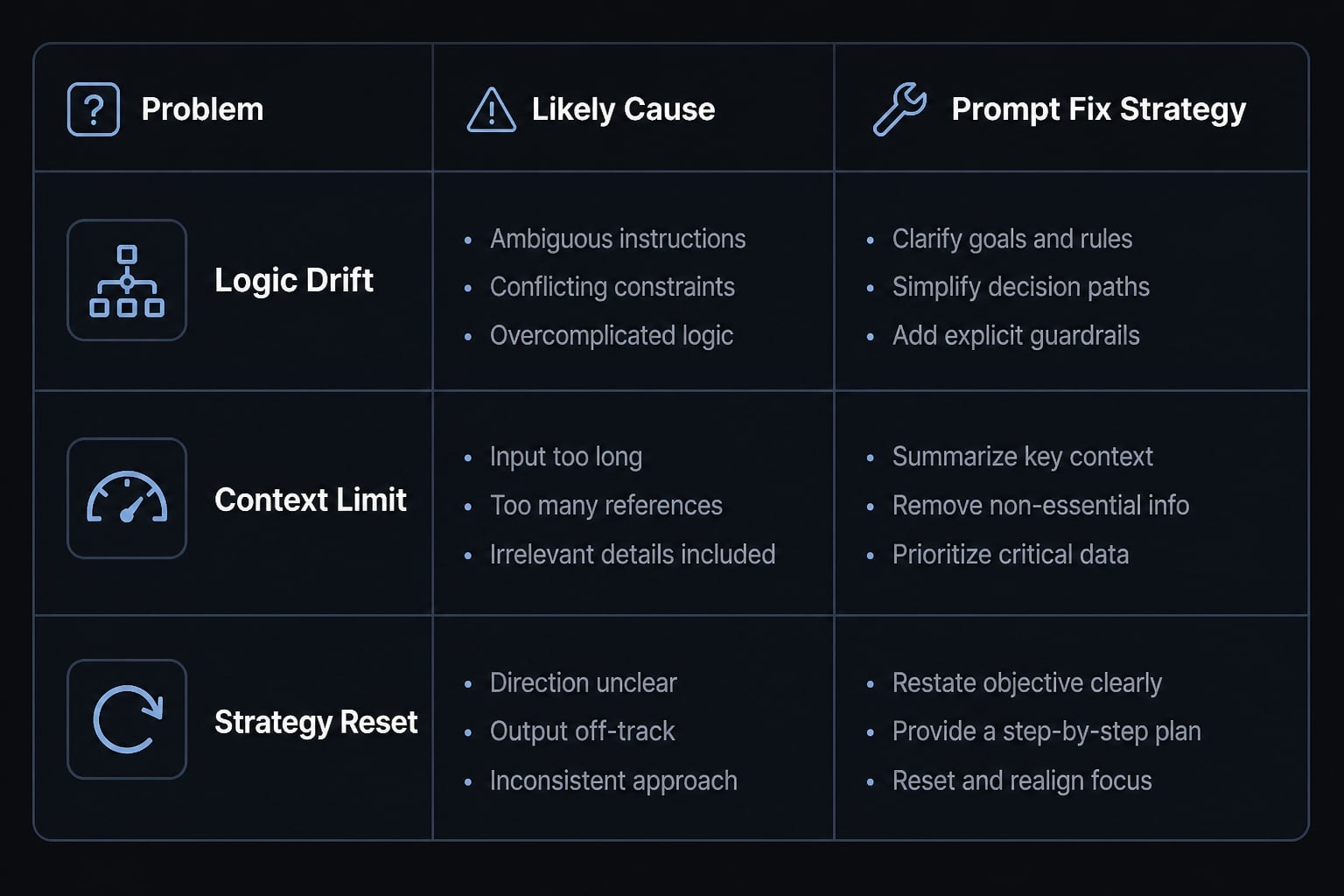
Vibe coded games break for predictable reasons. Prompts can be ambiguous, context can drift across iterations, and AI-generated code may solve one issue while creating another. That is not unusual. It is part of iterative software development, where each change has side effects and each version needs testing.
What breaks first
The most common failure points are usually easy to recognize:
- Physics and movement bugs.
- Collision errors.
- Score and reset issues.
- UI drift after unrelated changes.
- Visual inconsistency between game elements.
A typical example: You ask for better jumping, and suddenly the player clips through the floor. Or you move the score display, and the restart overlay breaks. This happens because broad prompts do not always translate consistently into exact code behavior.
Recovery habits that save time
The fastest recovery usually comes from disciplined habits:
- Isolate one issue at a time.
- Preserve working versions.
- Avoid mixing unrelated changes.
- Use highly constrained prompts.
- Treat debugging through prompts as normal, not as failure.
One reason problems pile up is inconsistent translation from broad language into exact code behavior. In plain English, the AI understood the intent loosely, but implemented it imperfectly. Another issue is that one fix can unexpectedly create another problem elsewhere.
A simple issue-response framework helps:
Problem | Likely cause | Prompt fix strategy |
|---|---|---|
Player falls through floor | Collision logic changed during movement edit | “Fix floor collision only. Keep movement speed unchanged.” |
Score does not reset | Restart handler missed one variable | “Reset score and player position on restart. Change nothing else.” |
UI moved to wrong place | Broad visual prompt changed layout structure | “Keep layout intact. Only move score to top-right.” |
Collectibles look inconsistent | Asset style changed across iterations | “Use one simple cartoon style for all collectibles.” |
Jump feels too floaty | Gravity and jump force are unbalanced | “Increase gravity slightly and reduce jump height by 15%.” |
If you want fewer dead ends, keep prompts specific and changes small. Recovery discipline matters more than clever wording.
A practical example: Building a simple cat platformer with AI prompts
A realistic beginner project might be a small platform game where a cat jumps across platforms and collects fish. Using Gemini Canvas as one example, the first output would likely be recognizable but rough: Movement works, but the jump feels floaty, the collectibles look inconsistent, and the score UI sits in an awkward place.
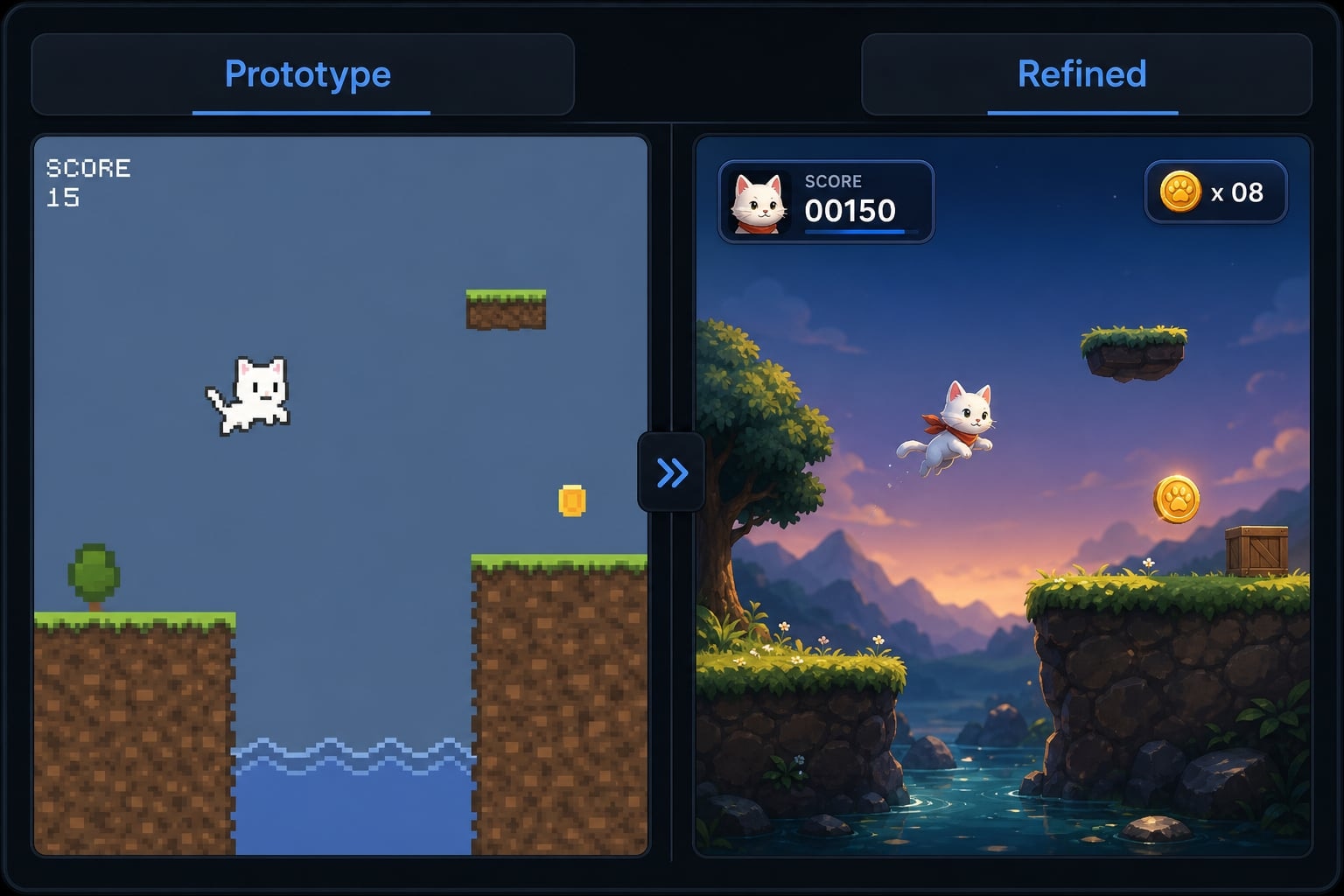
The next round of prompt iteration would focus on one layer at a time. First, tighten movement and landing. Then add cleaner collectibles. Next, move the score to the top-right and fix restart behavior so the game resets properly after a fall. After two or three controlled revisions, the result becomes a believable playable prototype.
That is what good AI-assisted game development usually looks like in practice. The first build proves the idea. The next few prompts improve usefulness. The goal is not perfection. The goal is a working demo that is fast to test, easy to show, and simple to learn from.
When vibe coding is worth using for game development
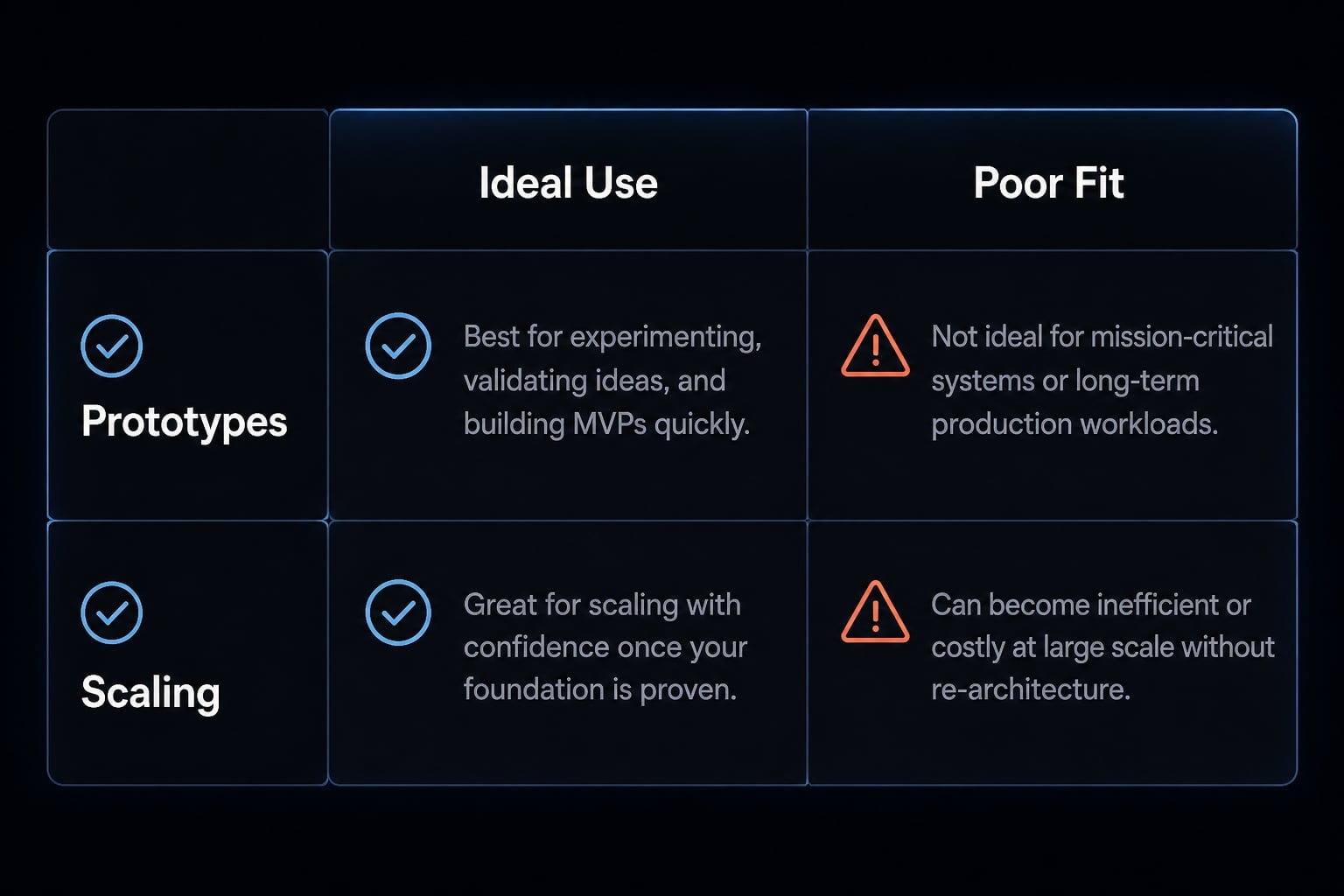
The clearest verdict is this: Vibe coding is most useful when speed matters more than long-term engineering structure. It works well for testing ideas, building fast experiments, and improving AI-augmented developer productivity in early exploration. The most realistic output is usually a playable build, not a finished commercial game.
Best for
The strongest best-fit use cases are:
- Validating a game idea quickly.
- Toy projects and creative experiments.
- Classroom demos.
- Interactive marketing or education experiments.
- Browser-native mechanic testing.
- Fast concept exploration before deeper development.
In these cases, a small playable build is often enough to answer the real question: is this idea interesting, understandable, or fun?
Not ideal for
This approach is weaker for projects that demand deep structure and long-term maintainability:
- Multiplayer systems.
- Content-heavy games.
- Performance-sensitive projects.
- Complex production pipelines.
- Long-term maintainability-heavy development.
That does not make software prototyping weak. It just means prompt-based game engineering has limits. Once many interdependent systems are involved, AI-generated iteration alone becomes harder to manage.
Good fit | Why it works | Poor fit | Why it struggles |
|---|---|---|---|
Small browser prototype | Fast iteration | Multiplayer game | Too many interdependent systems |
Idea validation | Low setup friction | Large content-heavy world | Hard to maintain consistency |
Classroom demo | Easy to explain and show | Performance-critical game | Generated code may be inefficient |
Simple interactive campaign | Good enough for lightweight experiences | Long-term production pipeline | Maintainability becomes the bottleneck |
The key decision is not whether AI is involved. It is whether your scope matches the method. If you want to go deeper, explore related resources on AI-assisted development workflows, beginner prompt engineering, or code-aware agent workflows for structured iteration.
Frequently asked questions
What are vibe coded games?
Vibe coded games are interactive browser-based prototypes built by non-technical creators using AI assistance. Instead of writing traditional code, creators use natural language prompts to describe gameplay mechanics, logic, and visual elements, iteratively refining the result through a continuous cycle of prompting, testing, and debugging.
How do I make a vibe coded game?
- Choose a simple game mechanic, such as a platformer or dodge game.
- Prompt an AI tool to generate the core gameplay logic and browser code.
- Preview and test the initial version.
- Iterate by providing specific prompts to fix bugs, balance difficulty, and refine visual assets.
Are vibe coded games production-ready?
No. While vibe coding is excellent for rapid prototyping and validating ideas, the resulting code is often unoptimized and difficult to maintain. These games are best suited for experiments, educational demos, or personal projects rather than commercial-grade software or complex, feature-heavy production releases.
What are the most common problems with vibe coding?
Common issues include physics glitches, collision detection errors, UI drift during iteration, and inconsistent visual styles. These problems usually occur because natural language prompts can be ambiguous, leading the AI to generate code that occasionally conflicts with previously established game mechanics or rendering logic.
Why does vibe coding feel easier than traditional development?
Vibe coding lowers the barrier to entry by replacing complex syntax with natural language. By focusing on immediate visual feedback and iterative refinement, creators can see their ideas come to life within minutes, allowing for rapid experimentation without the high friction of setting up a traditional development environment.
Which tools are best for vibe coding games?
The best tools provide a visible code environment and fast browser-based rendering. Browser-based AI canvas tools are ideal for beginners due to their immediate feedback, while code-aware AI agents or chat-based coding assistants are better for users who want more control over the generated JavaScript or HTML5 files.
Read more:
- Vibe coded websites: Build fast with AI prompt development
- Vibe code mobile app: Build ideas faster with AI development
- How to vibe code: A practical beginner guide to AI development
Conclusion
Vibe coded games are valuable because they shorten the path from idea to experiment. For beginners, the real advantage is not perfect automation. It is the ability to produce a rough but useful playable prototype quickly, test it, and learn what to improve next.
The success factors are consistent across almost every project: Keep the scope small, test the core loop early, and refine one layer at a time. If you try to build a huge game first, the process usually becomes frustrating. If you start with one mechanic and one clear objective, the workflow becomes far more practical. For a smart next step, use a simple browser-game prompt template and try a one-mechanic prototype before expanding further.