How to vibe code a subscription app: Complete guide to tools, costs and launch steps
While AI tools can rapidly build a subscription app prototype from natural-language prompts, launching a reliable, paid MVP requires weeks of work to integrate essential features like authentication, backend data, billing, entitlements, and deployment controls. This guide covers how to select a practical tech stack, build a complete paid workflow, implement recurring billing, estimate ownership costs, and validate your app for launch.
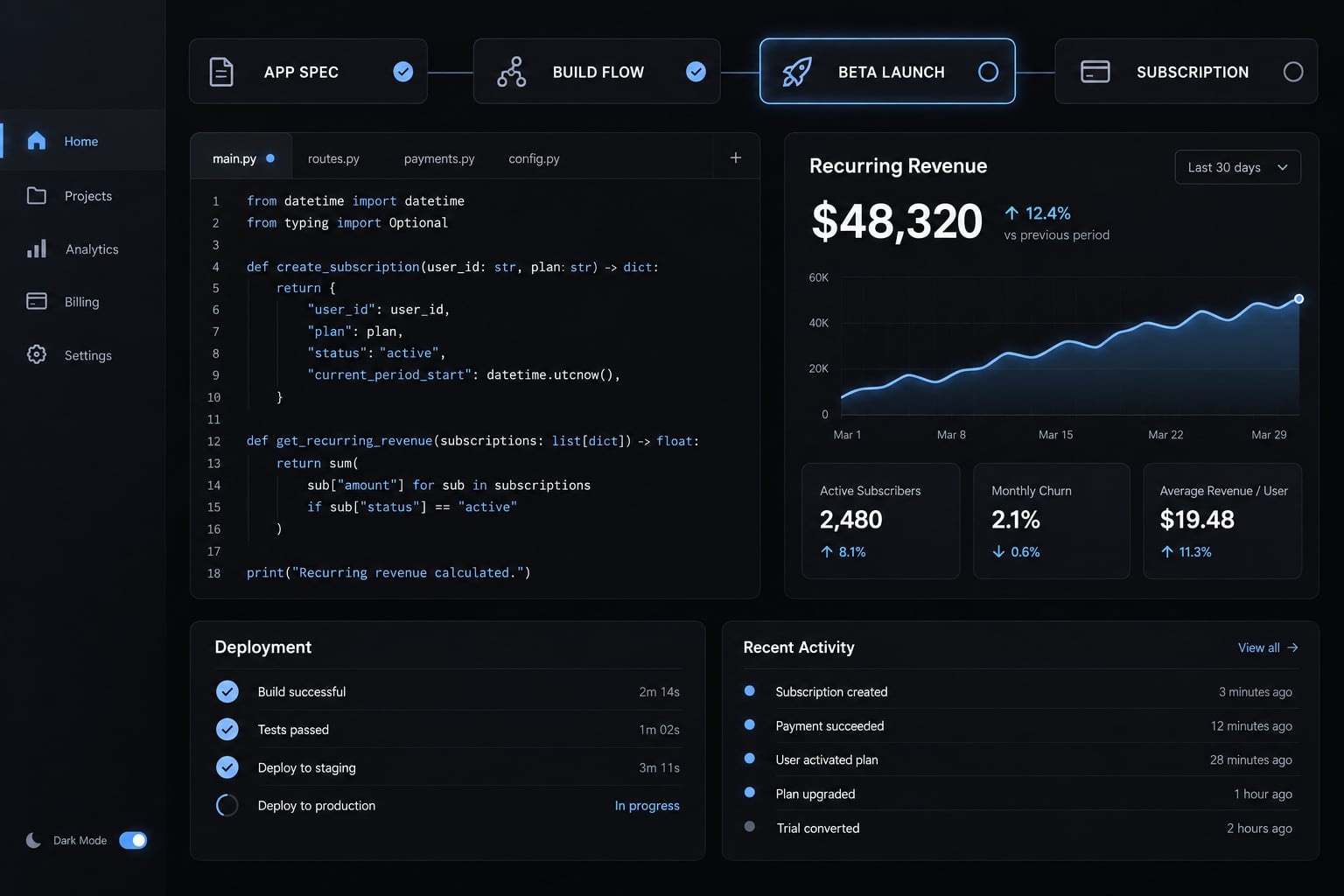
Direct answer: You can build a subscription app with AI, but no single coding subscription provides the complete system. A viable product combines an AI builder or coding agent with source control, a managed backend, authentication, billing, entitlement management, deployment, monitoring, and structured testing.
Can you really vibe code a subscription app?
Vibe coding means describing software requirements in natural language while an AI coding system generates and modifies source code. It can accelerate AI app development, especially when the product uses standard interfaces, forms, dashboards, databases, and managed integrations.
The practical question is not only, “Can you vibe code a subscription app?” It is also, “What level of product maturity can the current system support?”
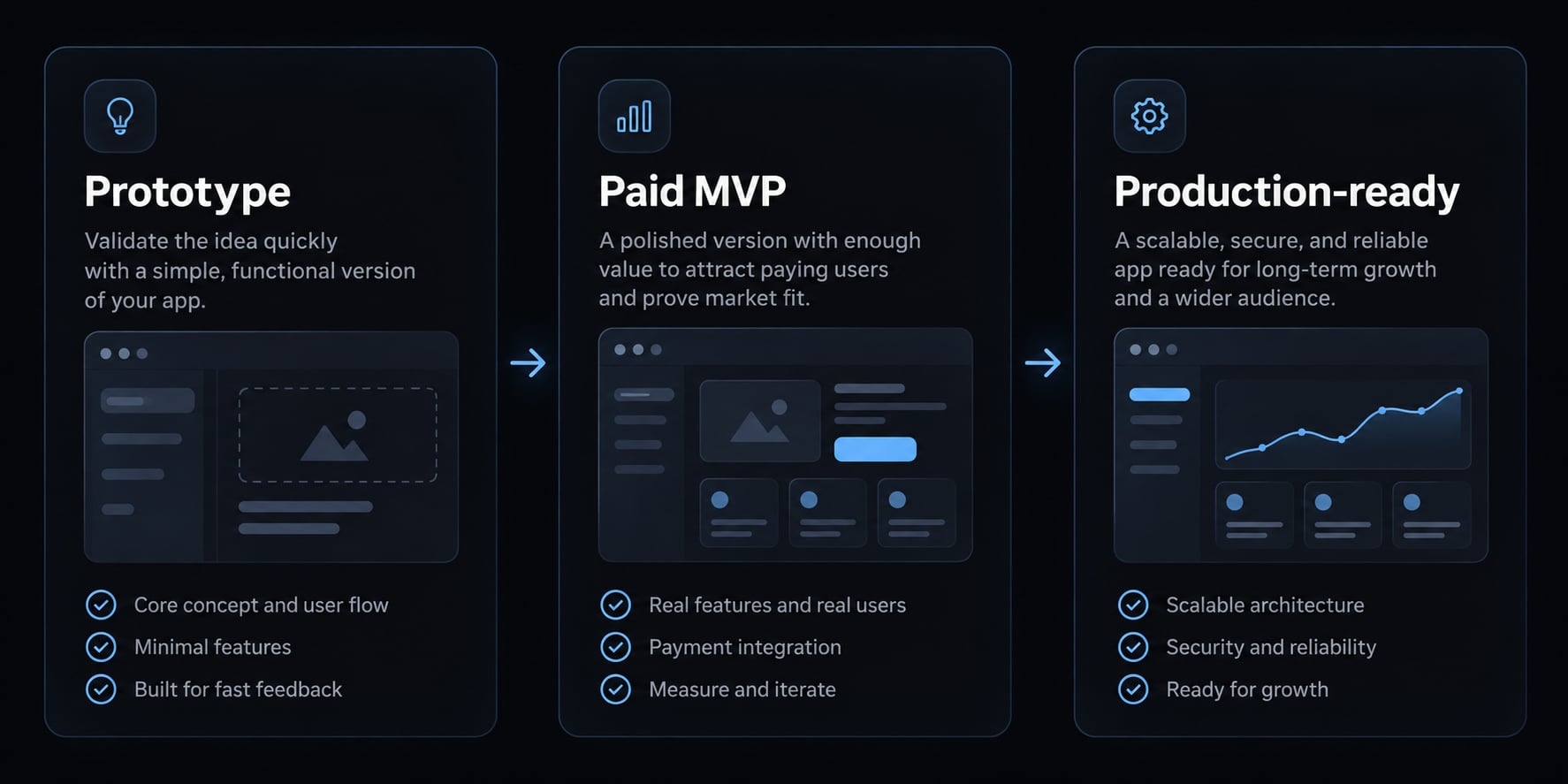
Stage | What it proves | What it does not prove |
|---|---|---|
Prototype | The concept and interface can be demonstrated | Data integrity, permissions, billing reliability, scalability, or recovery |
Paid MVP | Real users can register, pay, and complete the core workflow | Long-term maintainability, high-load performance, or complete operational resilience |
Production-ready app | Critical workflows have defined security, testing, monitoring, backup, and recovery controls | That future changes will remain safe without ongoing maintenance |
A common mistake is treating polished, seemingly complete screens as a finished product. The interface may still contain hard-coded data, inactive buttons, simulated payments, or missing server-side permission checks.
What vibe coding does well
- Generating interfaces: AI can quickly create dashboards, settings pages, onboarding flows, and responsive layouts.
- Building common workflows: Registration forms, profile management, search, filtering, and standard data operations are suitable starting points.
- Connecting managed services: Coding agents can help integrate established authentication, database, email, and hosting platforms.
- Producing repetitive code: AI reduces manual effort for common application patterns and supporting components.
- Supporting rapid iteration: Founders can test product assumptions without waiting for every interface change to be coded manually.
Where vibe coding still needs human judgment
Human judgment remains essential for product prioritization, system architecture, user permissions, billing edge cases, debugging, and technical debt management.
These decisions carry direct business consequences. Incorrect access rules can expose customer data. A billing-access mismatch can cause refunds and support requests. Repeated local fixes can create regressions—a previously working feature breaking after another change.
Vibe coding lowers development barriers, but it does not remove ownership of product, security, and launch decisions.
Choose the right vibe-coding stack
There is no universal subscription that reliably covers product planning, code generation, data, billing, deployment, monitoring, and recovery. The best AI tools for building apps should therefore be selected by function, not popularity.
Before choosing an AI subscription app builder, evaluate:
- Whether the target is web or native mobile.
- Whether you can access and export the source code.
- Whether the platform integrates with GitHub.
- Which backend, authentication, and deployment options are supported.
- Whether billing integration matches the distribution channel.
- Whether pricing is fixed, usage-based, or both.
- Whether logs, version history, and rollback are available.
- How difficult it would be to leave the platform.
Tool category | Common examples | Best use | Main limitation |
|---|---|---|---|
Prompt-to-app platform | Replit, Bolt, Lovable, Vibecode | Rapid prototyping and managed application setup | Platform limits, usage costs, and potential vendor lock-in |
Repository-based coding agent | Claude Code, Codex, GitHub Copilot | Working directly with an existing codebase | Requires stronger project context and review discipline |
Database and authentication | Supabase, Firebase | Managed user accounts, application data, and storage | Managed services still require correct permissions |
Web billing | Stripe Billing and comparable processors | Direct browser-based subscriptions | Payment confirmation must remain synchronized with access |
Mobile subscription management | RevenueCat or an equivalent layer | Store purchases, entitlements, and purchase restoration | Does not replace Apple or Google billing requirements |
Source control | GitHub | Version history, reviews, branches, and change recovery | Does not automatically provide deployment, backups, or application security |
Monitoring | Sentry and hosting-provider logs | Detecting errors and failed workflows | Only useful when alerts and response ownership are defined |
Vibecode is a specific prompt-to-app platform. It should not be confused with lowercase vibe coding, which refers to the broader AI-assisted app development practice.
Stack for a web SaaS product
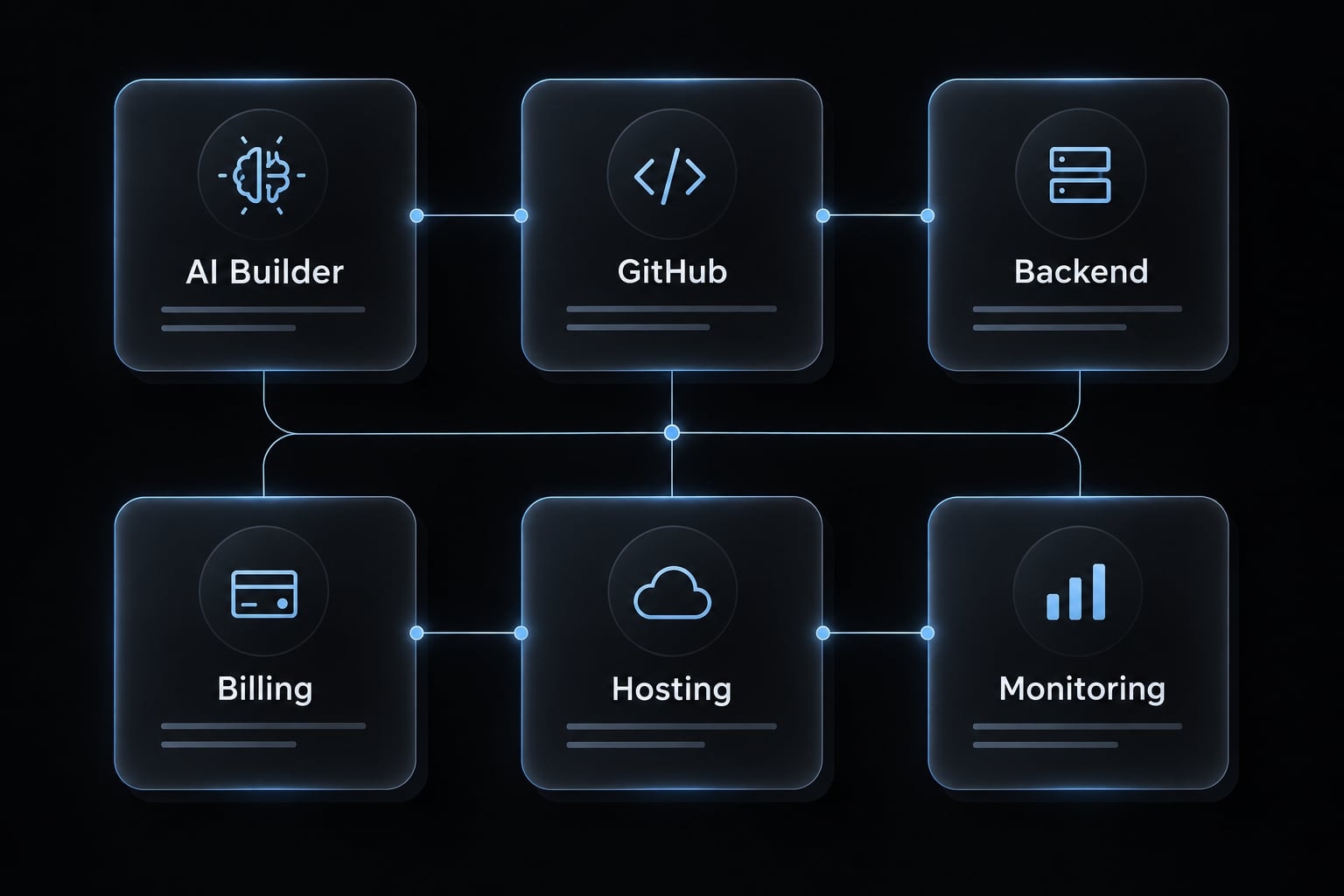
A practical web stack follows this chain:
AI builder or coding agent → GitHub → managed backend → web billing → hosting → monitoring
This route generally suits:
- B2B dashboards.
- Workflow applications.
- Content and research tools.
- Browser-based utilities.
- Simple SaaS products with account-based access.
A web app usually allows faster updates and more direct control over checkout. It also avoids native store review for the initial release.
Stack for a native mobile subscription app
A native mobile stack adds:
- A mobile framework or mobile app builder.
- Apple and Google developer accounts.
- Native in-app purchase configuration.
- An entitlement layer such as RevenueCat.
- Physical-device testing.
- App Store and Google Play review.
Native applications are operationally more complex because billing, disclosures, purchase restoration, device behavior, and store policies must remain aligned.
Minimum stack for a first prototype
Start with:
- One primary AI builder or coding agent.
- One GitHub repository.
- One managed backend.
- One deployment path.
- No duplicate AI subscriptions without defined responsibilities.
Add billing only after the core user journey writes and retrieves real data correctly. This avoids paying for tool sprawl while the product concept is still changing.
How to vibe code a subscription app step by step
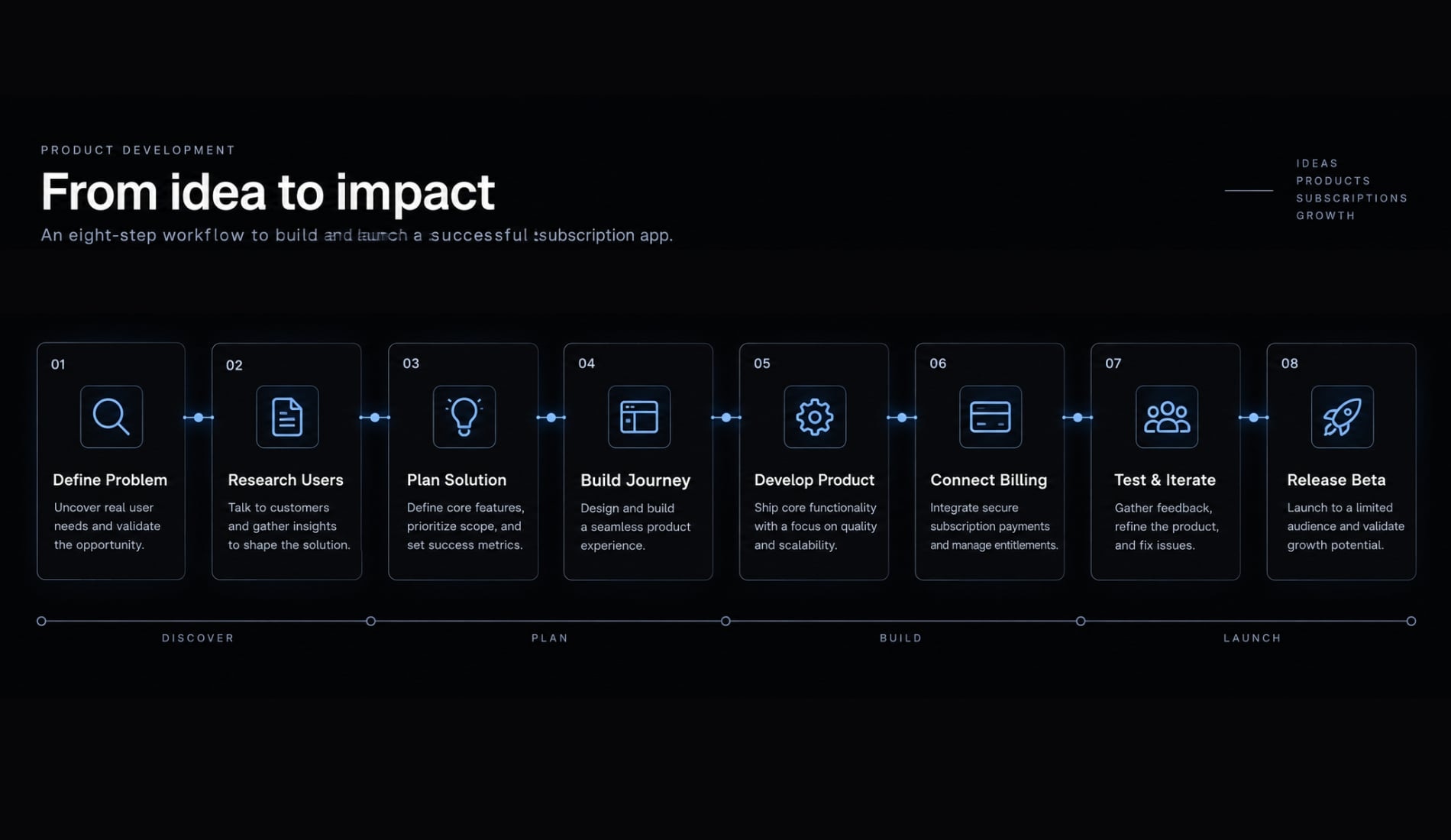
The safest sequence prioritizes one complete paid journey over feature volume.
- Define the paid problem and user.
- Choose web or native mobile.
- Create a product specification.
- Build one complete user journey.
- Add authentication and permissions.
- Connect billing and entitlements.
- Test and release a beta.
- Improve from real user evidence.
1. Define the paid problem and target user
A recurring subscription needs a recurring problem. An interesting feature alone does not justify continued payment.
Define:
- One primary target user.
- One recurring problem.
- One measurable product outcome.
- Why continued access creates ongoing value.
- An initial monthly or annual pricing hypothesis.
- Features explicitly excluded from the paid MVP.
Use this value proposition template:
For [target user] who needs to [recurring job], the product provides [measurable outcome] through [core workflow], making continued access worth [pricing hypothesis].
Subscription monetization is appropriate when the application creates repeated value. A one-time calculator or temporary utility may be better suited to a one-off payment.
2. Choose web or native mobile
For most first-time founders, a web application is the lower-complexity route unless mobile-specific capabilities are central to the product.
Choose a web app when | Choose native mobile when |
|---|---|
The product centers on forms, dashboards, content, or workflows | Camera, sensors, location, or device notifications are essential |
Rapid updates are important | Frequent mobile use is central to the experience |
Direct web subscription billing is suitable | App Store distribution is strategically important |
Store distribution is unnecessary | The team can support in-app purchase and device testing |
Users can receive the core value in a browser | Native performance or platform features are required |
Native mobile does not automatically make a product more valuable. It introduces app review, store product configuration, purchase restoration, and additional testing requirements.
3. Create a product specification before prompting
AI-generated code becomes more consistent when the coding agent receives structured, persistent product context. Your product specification should contain:
- Product objective.
- Target user.
- Core user journey.
- Roles and permissions.
- Main data objects.
- Subscription plans.
- Billing states.
- Acceptance criteria.
- Error states.
- Out-of-scope features.
Store this context in a repository file such as PROJECT.md, AGENTS.md, or CLAUDE.md. Treat prompt engineering as context management, not clever wording.
Before every material code change:
- Ask the coding agent to produce a plan.
- Divide the work into bounded tasks.
- Require a list of affected files.
- Identify tests that should be created or updated.
- Record major product and architecture decisions.
- Commit the current working version before implementation.
Avoid asking one oversized prompt to generate the entire application. Smaller tasks make failures easier to identify and reverse.
4. Build one complete user journey
A narrow, functioning workflow is more valuable than ten disconnected screens.
Build this journey first:
- A visitor reaches the product.
- The visitor creates an account.
- The user completes the core action.
- The user sees the subscription offer.
- The user completes payment.
- Paid access is activated.
- The user returns and retains the correct access.
Verify that:
- Forms write to real backend data.
- Buttons trigger their intended actions.
- Loading, empty, and error states exist.
- Demo data is removed or clearly isolated.
- Login sessions persist correctly.
- Paid status survives logout and login.
- Every screen presents a clear next action.
Do not trust an AI message claiming the feature is complete. Validate the behavior from a user account and inspect the resulting data.
5. Add authentication and data permissions
Authentication is the system used to identify users and manage login. Permissions determine which records and actions each authenticated user can access.
Test:
- Registration.
- Email verification, if required.
- Login and logout.
- Password reset.
- Account deletion.
- Admin and customer roles.
- User-to-user data isolation.
- Server-side secret handling.
A customer must never access another customer’s records by changing a URL, request, or account identifier. Managed authentication reduces setup work, but it does not make permissions automatically correct.
6. Add recurring billing and entitlements
Payment processing and paid-feature access are separate workflows.
Entitlement management is the app’s record of which features, content, or usage limits a customer may access. A completed transaction should update this record through a trusted server or platform event, rather than relying on the success message displayed in the browser.
Use this sequence:
- Define plans and prices.
- Configure checkout or in-app purchase.
- Confirm payment status.
- Update the entitlement record.
- Grant the correct access.
- Process renewals.
- Process cancellations and expirations.
- Handle failed payments and refunds.
- Restore mobile purchases where required.
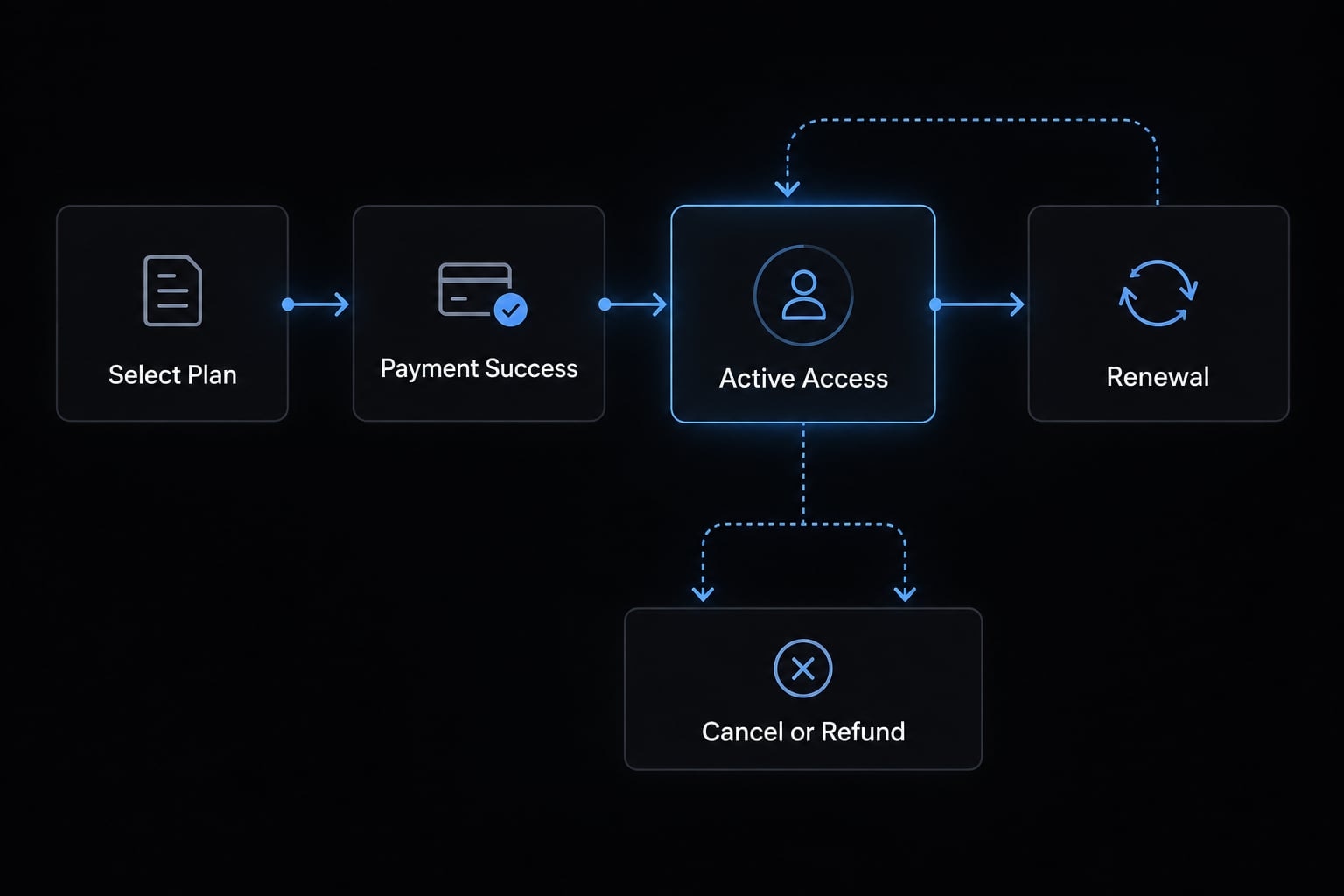
Plan selected → Checkout started → Payment confirmed → Entitlement updated → Access granted → Renewal, cancellation, expiration, or refund processed
7. Test, deploy and release to a small beta
The first release should validate the complete system with a controlled user group. It should not maximize traffic. A staging environment is a private deployment where changes are tested before reaching paying users in production.
Before beta release, check:
- Registration and login.
- The core product action.
- Purchase and entitlement activation.
- Cancellation and expiration.
- Failed payment behavior.
- Error logging.
- Multiple browsers or devices.
- Staging and production deployment.
- Automated tests for critical workflows.
- A documented rollback procedure.
Automated testing can reduce regression risk, but it does not replace manual validation. Ask several people other than the creator to complete the entire paid journey without guidance.
8. Improve the app from real user evidence
Iteration should respond to observed behavior, defects, and support requests. Avoid broad prompt-driven rewrites based only on preference. Prioritize work in this order:
- Registration blockers.
- Payment blockers.
- Incorrect access.
- Core workflow failures.
- Support-heavy usability problems.
- Secondary features.
- Cosmetic improvements.
Record defects, feedback, and implementation decisions. Commit before major changes, retest the paid journey, and review technical debt before increasing customer acquisition.
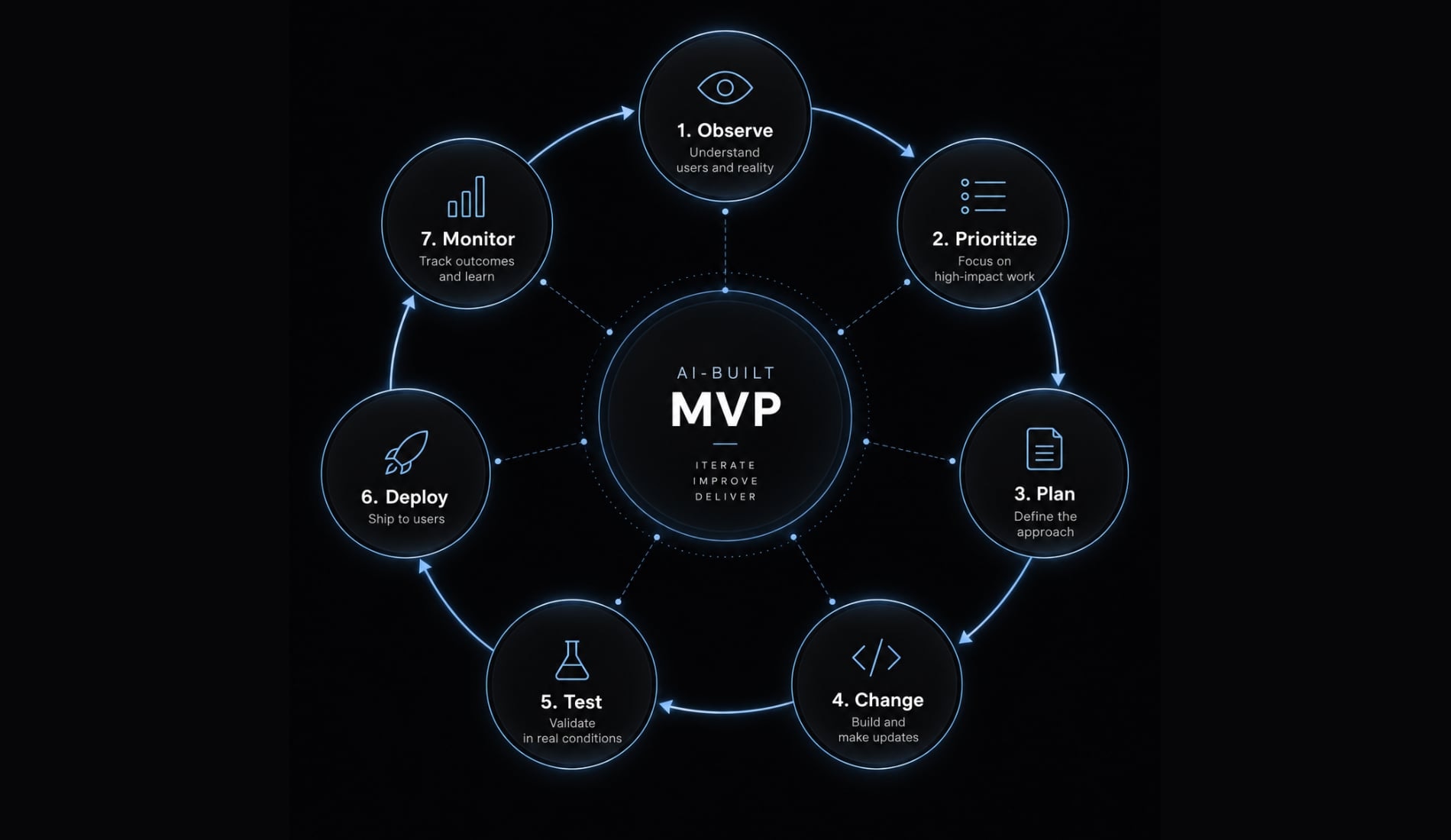
Use a controlled iterative development loop: Observe → Prioritize → Plan → Change → Test → Deploy → Monitor
How subscription billing actually works
Recurring billing is not limited to charging a card. The app must maintain a reliable relationship between the customer account, payment status, subscription period, and available features.
An entitlement is the product’s internal record of what a user may access. It may represent a plan, premium feature, usage allowance, or content library. The record must change when purchases, renewals, cancellations, expirations, payment failures, or refunds occur.
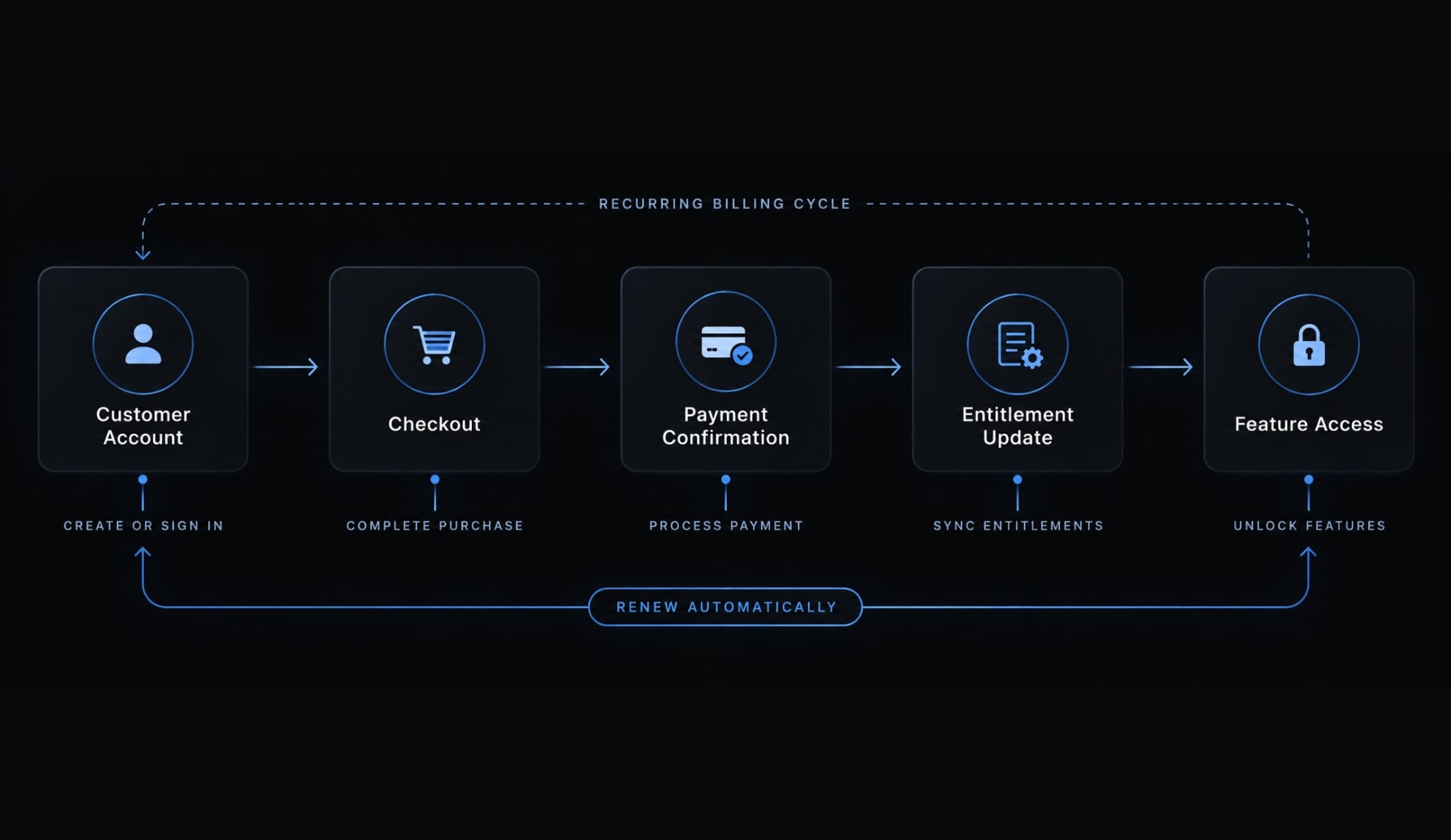
The complete billing lifecycle is: Customer account → Checkout or in-app purchase → Payment confirmation → Entitlement update → Feature access → Renewal, cancellation, expiration, failure, or refund
Web subscription billing
Web applications usually send customers to checkout through a payment processor such as Stripe Billing. The app then receives a trusted payment confirmation and updates the customer’s subscription status. A complete web billing setup normally includes:
- Defined products and prices.
- Checkout.
- Server-side payment confirmation.
- Plan and paid-through status.
- Invoices.
- A customer billing portal.
- Cancellation and plan changes.
- Failed-payment handling.
Access should not be unlocked only because the customer reaches a client-side success page.
Native mobile subscriptions
Native mobile applications generally use Apple and Google in-app purchase systems for digital subscriptions distributed through their stores. The workflow includes:
- Creating store subscription products.
- Displaying required subscription information.
- Verifying purchases.
- Updating entitlements.
- Restoring previous purchases.
- Synchronizing access across devices.
- Handling renewals, refunds, and expiration.
- Completing App Store review.
RevenueCat can support mobile subscription and entitlement workflows, but it does not replace store configuration or platform compliance. Consult the current Apple App Review Guidelines, Google Play Billing documentation and RevenueCat entitlement documentation.
Minimum billing tests before launch
Mark each scenario as pass or fail:
- New purchase activates the correct plan.
- Trial conversion activates paid access.
- Failed payment does not grant incorrect access.
- Renewal preserves access.
- Cancellation follows the correct paid-through period.
- Expiration removes or limits access as designed.
- Refund updates access correctly.
- Restore purchase works on mobile.
- Duplicate purchase attempts are handled.
- Login on another device restores the correct access.
Estimated vibe coding app cost and timeline
The visible AI coding subscription cost is only one part of the budget. Total Cost of Ownership means the combined cost of tools, infrastructure, payment fees, maintenance, support, debugging, security review, and founder time.
Treat the following as editorial planning ranges rather than guarantees. Actual app development timelines depend on platform choice, product scope, integrations, founder skill, and review requirements.
Stage | Typical direct cost categories | Indicative timeline | Primary goal |
|---|---|---|---|
Visual prototype | AI builder, domain, basic hosting | Several days to two weeks | Demonstrate the concept and interface |
Paid MVP | AI usage, backend, billing, hosting, developer accounts, monitoring | Several weeks | Let a small number of users register, pay, and receive value |
Early production app | All MVP costs plus testing, backups, support, review, and maintenance | Several months of refinement | Improve reliability before acquisition or scale |
The largest hidden costs often include:
- Founder time.
- AI credits or token usage.
- Hosting and database overages.
- Payment-processing fees.
- Apple or Google developer accounts.
- Monitoring and backups.
- Customer support.
- Security and engineering review.
- Debugging and rework.
- Ongoing maintenance.
A SaaS development cost comparison should include equivalent scope. A tool subscription does not include the project management, testing, review, maintenance, or operational accountability found in a complete development service. To control Total Cost of Ownership:
- Use one primary coding environment.
- Avoid overlapping AI subscriptions.
- Monitor usage-based credits.
- Set infrastructure spending alerts.
- Cancel unused services.
- Start with a small beta.
- Budget for maintenance from the beginning.
Pricing changes frequently. Verify current terms through the official pricing pages for every selected tool immediately before budgeting or publication.
Common risks and the production-readiness checklist
The greatest vibe coding security risks often remain invisible during a product demonstration. A polished interface can hide missing permissions, exposed secrets, incomplete billing states, and fragile application logic.
Risk | Warning sign | Preventive action |
|---|---|---|
Prototype mistaken for product | Screens work only with demo data | Test every workflow against persistent backend data |
Billing-access mismatch | Payment succeeds, but access remains wrong | Test payment and entitlement events separately |
Weak permissions | One user can retrieve another user’s records | Run data-isolation tests with multiple accounts |
Exposed secrets | Credentials appear in browser code or a repository | Move secrets server-side and rotate exposed credentials |
Regression loop | Each AI-generated fix breaks another feature | Commit small changes and rerun critical tests |
Missing monitoring | Users report failures before the team sees them | Configure logs, alerts, and response ownership |
Scaling failure | Performance drops sharply with concurrent activity | Run controlled load tests before high-traffic promotion |
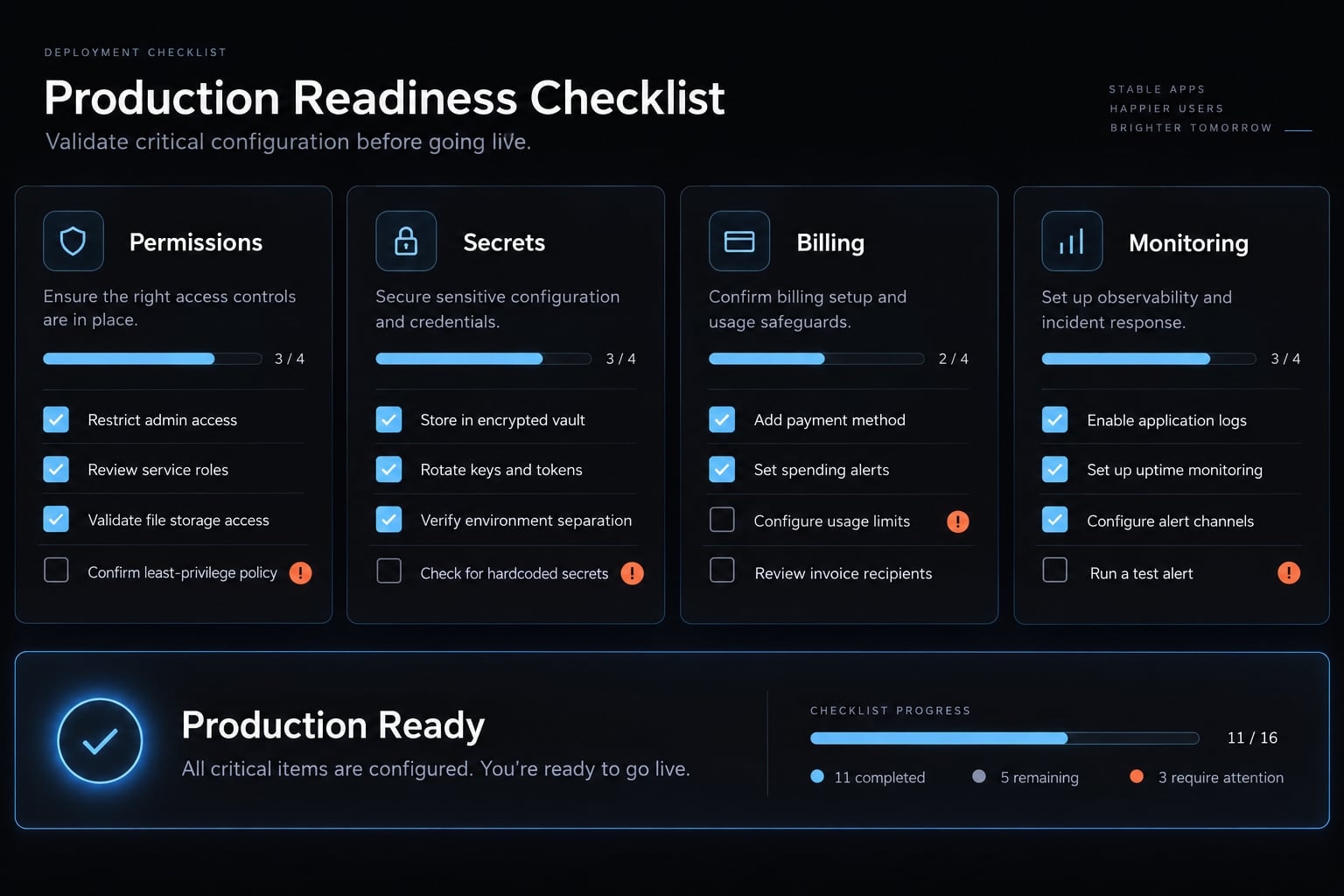
Production-readiness checklist
This checklist is a launch-control tool, not a security or compliance certification.
- No critical workflow depends on hard-coded demo data.
- Registration, login, password reset, and account deletion work.
- Users cannot access another user’s data.
- Admin and customer permissions are separated.
- Secrets are absent from frontend code and public repositories.
- Purchase, renewal, cancellation, expiration, and refund are tested.
- Mobile users can restore purchases.
- Critical errors are logged and monitored.
- Database backups are configured and recovery has been checked.
- A staging environment exists.
- A rollback method exists.
- Privacy policy and terms are published.
- Critical user and billing journeys have automated tests.
- People other than the creator have tested the app.
When to bring in a developer
Bring in qualified human expertise:
- Before storing financial, health, regulated, or highly sensitive data.
- Before a public paid launch if no one can assess the generated code.
- After repeated unexplained regressions.
- Before substantial paid acquisition.
- Before a high-traffic launch.
- For complex permissions, real-time collaboration, or financial calculations.
- When maintenance effort begins to outweigh the initial cost saving.
A paid MVP is not automatically a production-ready app. Technical review becomes increasingly important when downtime, data exposure, incorrect calculations, or billing failures could materially affect customers.
Vibe-coding route by project type
The appropriate route depends on how the application creates value, handles data, and charges customers.
Project type | Recommended starting route | Subscription method | Complexity | Engineering review |
|---|---|---|---|---|
Simple web SaaS | AI builder or repository-based agent with managed backend | Direct web billing | Moderate | Recommended before public paid launch |
Internal business tool | Managed backend and controlled user access | Usually no external subscription | Low to moderate | Depends on data sensitivity |
Native mobile utility | Mobile framework or builder with device testing | Apple and Google in-app purchase | Moderate to high | Strongly recommended |
Real-time collaborative product | Planned architecture with repository-based development | Web or native, depending on platform | High | Required |
Regulated or sensitive-data application | Developer-led process with AI assistance | Depends on platform and regulation | Very high | Required from planning |
A simple SaaS MVP is generally the strongest first use case for vibe coding. Products with complex synchronization, sensitive data, or high financial impact need earlier engineering involvement.
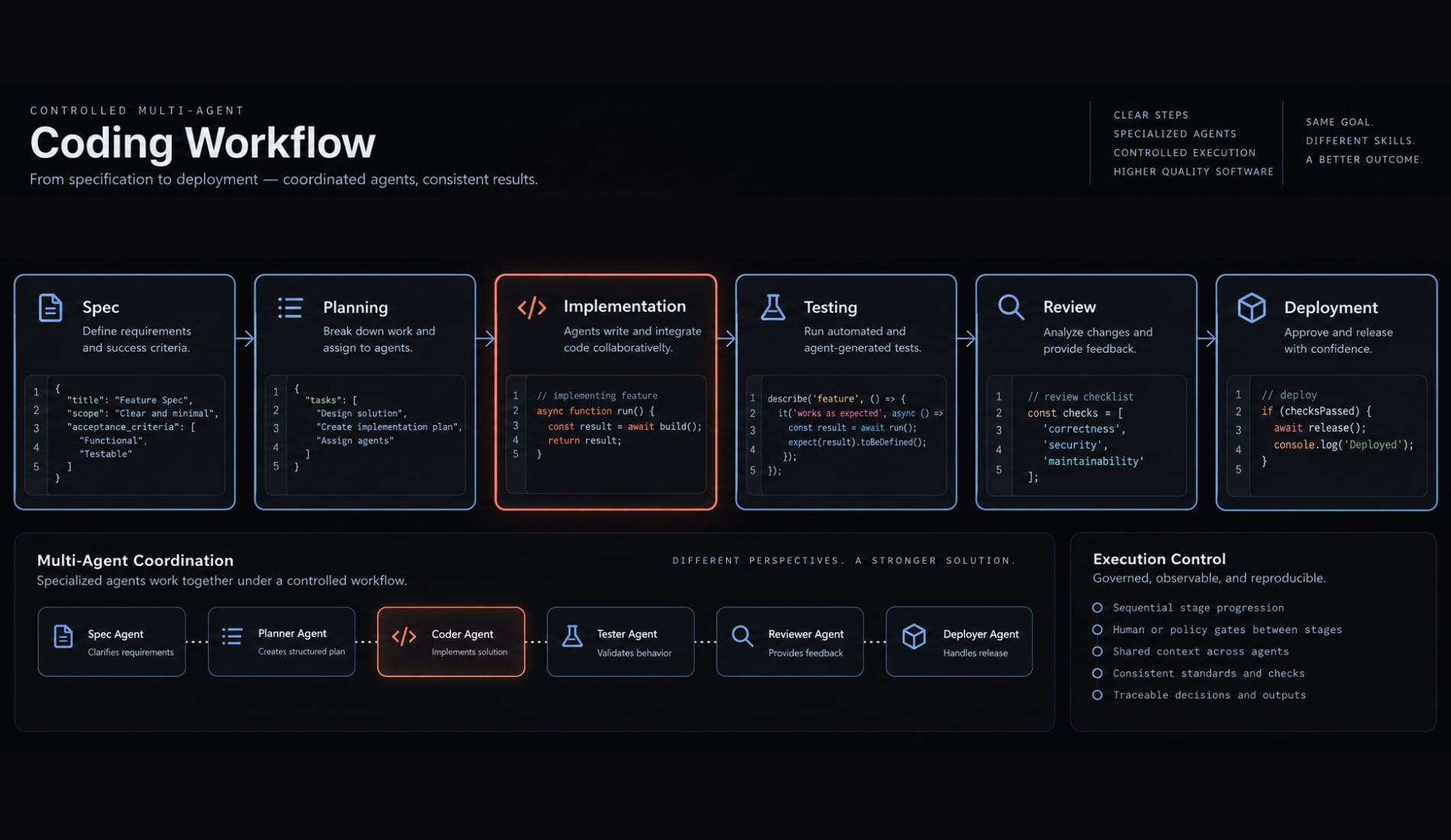
How coordinated AI agents improve the workflow
A single chat-based coding agent may move unpredictably between planning, implementation, testing, and debugging. AI agent orchestration separates these responsibilities into bounded roles. Depending on the project, those roles may include:
- Planner.
- Frontend implementer.
- Backend implementer.
- Test agent.
- Code reviewer.
- Security checker.
The controlled workflow becomes: Product specification → Implementation plan → Bounded code changes → Automated tests and review → Security check and controlled deployment
AgentKit is one implementation of this coordinated approach, using reusable skills, specialized subagents, automated code review, and security checks across development workflows. Orchestration becomes more useful after the initial prototype, but it does not replace accountable human review.
Build the paid journey before expanding the product
A viable vibe code subscription app starts with one recurring customer problem and one complete paid workflow. The system must connect authentication, permissions, application data, recurring billing, entitlement management, testing, monitoring, and deployment.
Start with a narrow paid MVP and validate it through a small beta. Bring in technical review before handling sensitive data, investing heavily in acquisition, or preparing for scale. That sequence reduces the risk of turning a fast prototype into an expensive maintenance problem.
Frequently asked questions
Can you really vibe code a subscription app?
Yes, you can build a functional subscription app using vibe coding, but it requires more than just generating screens. To move from an AI-generated prototype to a paid MVP, you must integrate secure authentication, a robust backend, recurring billing infrastructure, and thorough end-to-end testing.
What is the difference between a prototype and a paid MVP?
A prototype focuses on visualizing the user experience and interface, often using hard-coded data to demonstrate features. A paid MVP is a functional, production-ready version that allows real users to register, securely manage their subscription, access paid features, and receive consistent value through a verified end-to-end workflow.
Which tools are required to vibe code a subscription app?
You need an AI coding agent or platform, a source-code repository (like GitHub), a managed backend service, a payment processor (such as Stripe or RevenueCat for mobile), and a reliable hosting platform. Always prioritize tools that provide access to your source code and support exports to avoid vendor lock-in.
How do I manage subscription billing and entitlements?
Billing and entitlements are distinct systems. While the payment processor manages the transaction, your app must maintain an "entitlement record" that tracks what each user is allowed to access based on their specific billing state (active, trial, expired, or canceled). You must verify this state on the server side.
Is vibe-coded code production-ready?
Not automatically. AI-generated code often requires human review to ensure it follows best practices for security, error handling, and data privacy. Before launching a paid app, you must conduct rigorous testing, including failure scenarios, permission checks, and security audits, to ensure the application is stable and reliable for users.
How much does it cost to build a subscription app this way?
The cost varies by product scope but includes more than just AI-tool subscriptions. You must factor in hosting, database usage, payment processing fees, developer account fees, monitoring, and your own time spent on debugging, testing, and maintenance. Treat these costs as planning ranges rather than fixed, guaranteed expenses.
Read more:
- Vibe coded websites: Build fast with AI prompt development
- How to vibe code a CRUD app without losing control
- How to publish your vibe-coded app on the Apple App Store
Conclusion
In short, vibe coding can help you launch a subscription app faster, but a real product still depends on careful planning, secure systems, and thorough testing. Start small, validate the full paid workflow, and expand only after the foundation is reliable.