How to vibe code a CRUD app without losing control of the code
To vibe code a CRUD app reliably, define your data models and user flows first, then ask your AI assistant for a structured implementation plan. Build iteratively in vertical slices-Read, Create, Update, and Delete-pausing after each step to test failure states, verify database persistence, and commit stable code. While CRUD applications are ideal for AI-assisted development, a polished UI can easily mask broken logic or missing security. Always enforce server-side validation, implement strict access controls, and thoroughly review the generated code before trusting it with real user data.
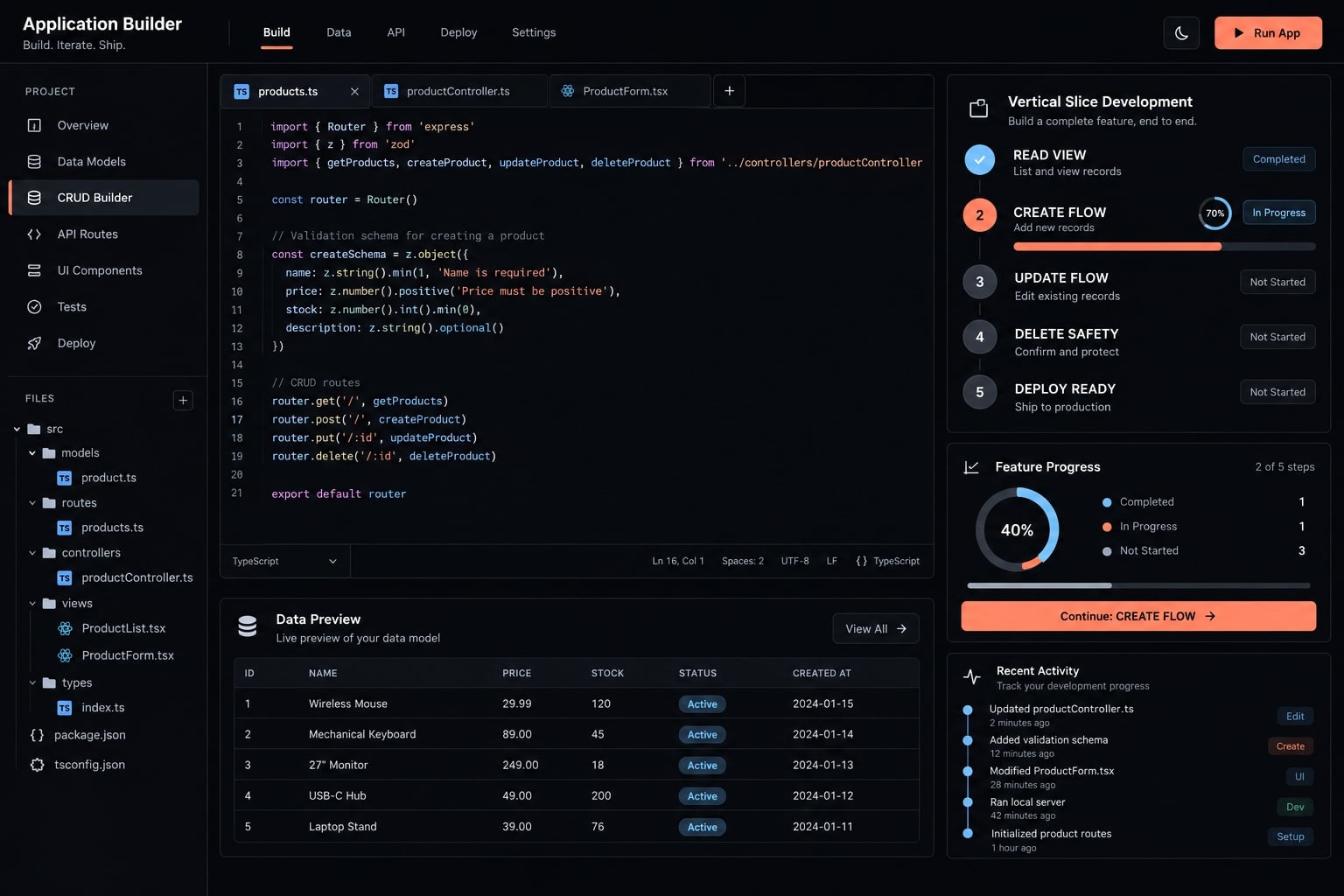
What does it mean to vibe code a CRUD app?
Vibe coding a CRUD app means directing an AI coding assistant through natural-language instructions to implement Create, Read, Update, and Delete functions. The assistant generates or modifies code, while the builder remains responsible for requirements, architecture, constraints, code review, testing, security, deployment, and maintenance.
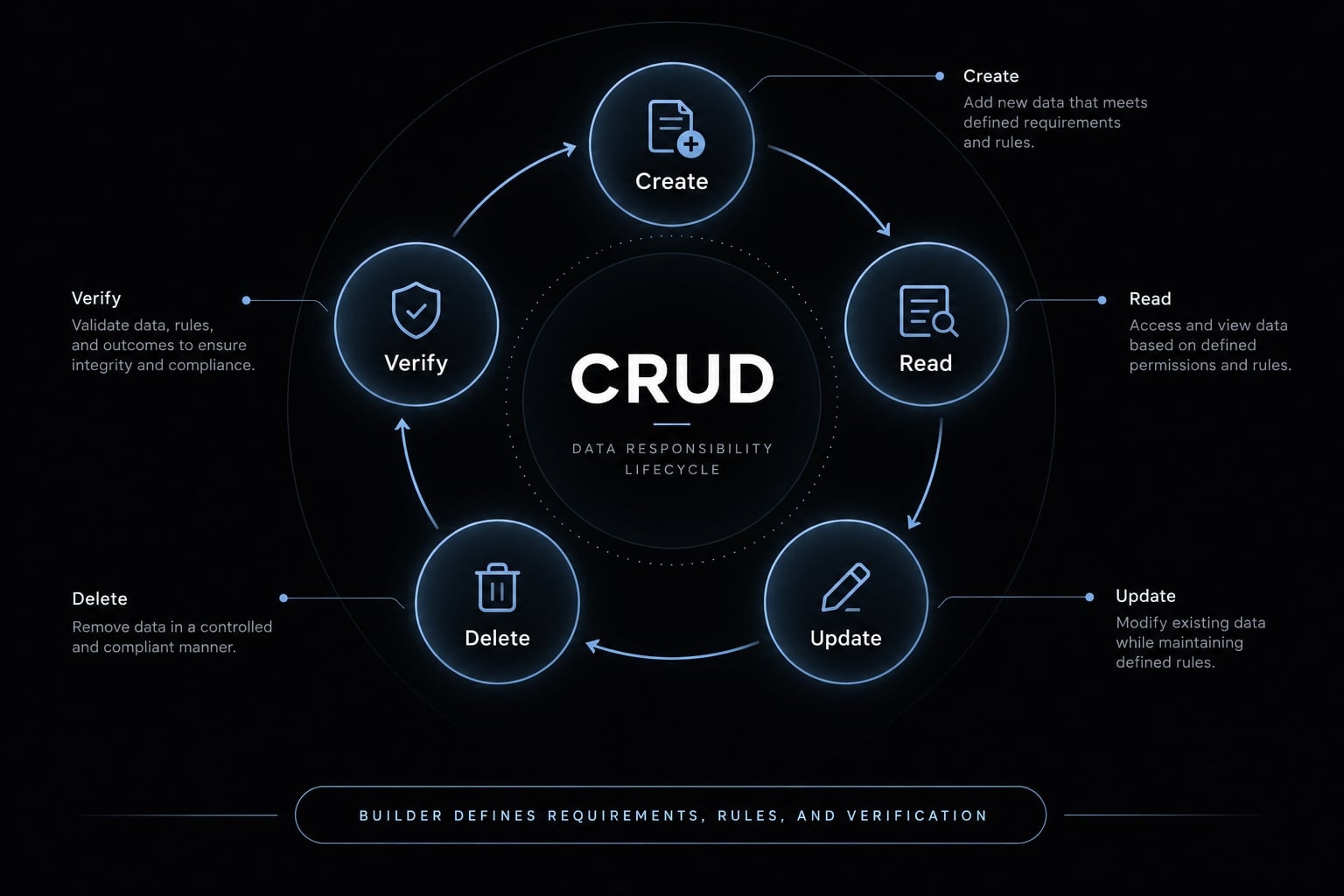
A CRUD application manages records through four basic operations:
- Create: Add a new record, such as a Lead.
- Read: Retrieve and display existing records.
- Update: Change permitted fields on an existing record.
- Delete: Remove or archive a record.
- Verify: Confirm that the interface and database reflect the intended result.
This approach is sometimes described as natural-language programming or prompt-based engineering. It should not be confused with Vibe.d, a web framework for the D programming language.
The distinction matters because AI-generated code can look complete without functioning correctly. A lead may appear in the interface but disappear after refresh because it was never stored. A hidden Delete button may suggest security even though the backend accepts unauthorized requests. The builder therefore defines what should happen, what must never happen, and how success will be proven.
CRUD apps are a practical fit for AI coding agents because:
- Their implementation patterns are common and structurally predictable.
- Each operation has explicit inputs and observable outcomes.
- Features can be divided through the Vertical Slice Method, which implements one usable feature across the database, backend, and interface.
- Explicit schemas and business rules reduce ambiguity in AI-assisted development.
- Small prototypes and internal tools can be reviewed incrementally.
This suitability does not make CRUD applications inherently simple or secure. Public applications require stronger authentication, authorization, monitoring, backup, and operational ownership.
Choose a simple stack before you start
The best stack is usually the simplest one your team can inspect, operate, and maintain. Adding unfamiliar frameworks because they appear “AI-native” increases the number of assumptions the assistant can get wrong.
Choose an AI coding tool that can inspect multiple files, explain proposed changes, and expose command output. The source code should remain exportable and reviewable.
Your full-stack framework should have conventional documentation and a predictable project structure. The managed database should support migrations and backups, while Git should provide a reliable rollback path.
Recommended starter stack
The following options support the workflow without making it dependent on one vendor.
Layer | Practical options | Selection principle |
|---|---|---|
AI coding assistant | Cursor, Claude Code, Codex, or Replit | Repository awareness, command output, and explainable changes |
Application framework | Next.js or another familiar full-stack framework | Conventional structure and strong documentation |
Database | Managed PostgreSQL | Schema control, migrations, backups, and portability |
UI components | Established component library | Consistent components and fewer avoidable accessibility errors |
Version control | Git and GitHub | Diffs, commits, branches, and rollback |
Deployment | Managed hosting | Environment variables, logs, and repeatable builds |
These tools do not offer identical capabilities. Evaluate their current documentation before selecting a stack. The workflow remains the same: Constrain the architecture, request small changes, and verify the result independently.
Minimum Prerequisites
Before starting AI-assisted development, you should be able to:
- Understand records, fields, forms, and basic database persistence.
- Access the coding tool, repository, database, and deployment platform.
- Inspect changed files and Git diffs.
- Run tests or evaluate their output.
- Restore an earlier Git commit.
- Read application and deployment logs.
You do not need to write every component manually. You do need enough technical understanding to recognize unexpected changes and unsupported claims.
How to vibe code a CRUD app
Step 1: Define the app, data model, and AI rules
A detailed prompt cannot compensate for an undefined product. If the requirements are vague, the assistant may invent fields, dependencies, permission rules, or an architecture that conflicts with the existing repository.
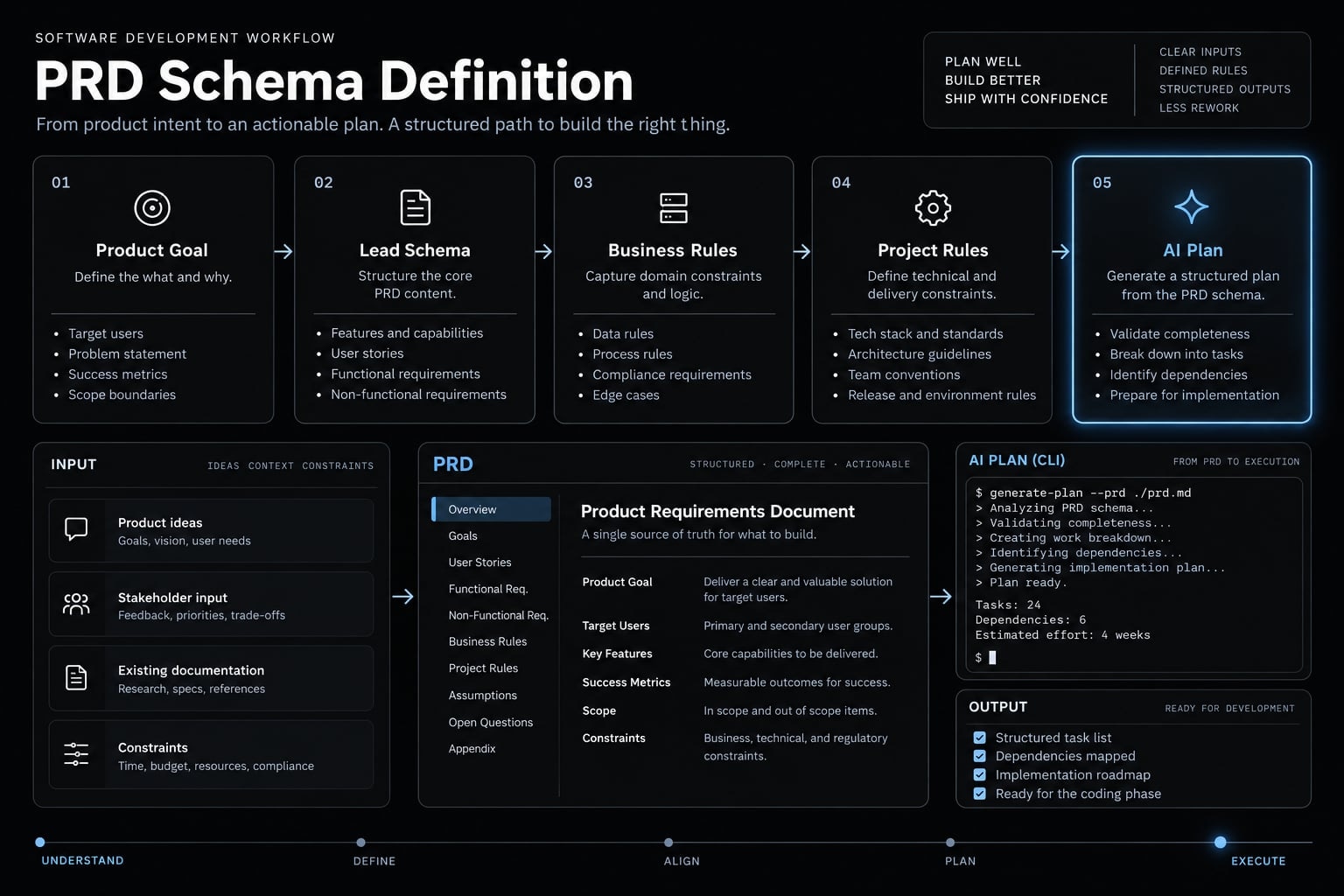
Create a lightweight Product Requirement Document (PRD) before generating code. It should define:
- Target user: Identify who operates the application.
- Primary entity: Specify the record being managed.
- Fields and data types: Define what the database stores.
- Required screens: List the views needed for each workflow.
- Business rules: State permitted values and behavior.
- Validation requirements: Define acceptable and rejected input.
- Permission rules: State who may perform each action.
- Definition of done: Describe observable completion criteria.
Initialize Git before significant generated changes. Then ask the assistant to inspect the repository and produce a vertical-slice plan without editing files.
Example lead tracker specification
Target user:A small sales or growth team.Entity:Lead.Fields:id, name, company, email, status, owner, notes, createdAt, updatedAt.Screens:Lead list, create form, detail/edit screen, and delete confirmation.Business rules:- name and email are required.- email must have a valid format.- status must use an approved value.- permission checks apply to reads and writes.- destructive actions require confirmation.Permission rules:- Signed-in users may view permitted leads and create leads.- Record owners may edit their permitted records.- Administrators may manage all records and roles.Definition of done:Data persists after refresh, invalid input is rejected, errors are useful,unauthorized actions are blocked, and local and deployed behavior is equivalent.
Keep this database schema intentionally small. Additional CRM features create more workflows, permissions, and failure states that must be verified.
Planning prompt
Use prompt engineering to constrain the planning role before requesting implementation.
Act as a planning reviewer. Do not write or modify code yet.Stack:[FRAMEWORK, DATABASE, UI LIBRARY, HOSTING]Repository context:[REPOSITORY DESCRIPTION OR PATHS]Application specification:[PASTE THE LEAD TRACKER SPECIFICATION]Existing authentication model:[DESCRIBE AUTHENTICATION OR STATE THAT NONE EXISTS]Test command:[COMMAND OR TESTING PROCESS]Tasks:1. Inspect the current repository.2. Summarize its architecture and relevant files.3. Review the application specification.4. List ambiguous, missing, or conflicting requirements.5. Propose a vertical-slice plan covering Read, Create, Update, and Delete.6. List expected file, schema, dependency, and environment changes.7. Describe the tests and database verification required for each slice.8. Identify migration, rollback, and regression risks.9. Do not write or modify code.
Review the proposed plan before implementation. An AI coding assistant may still invent assumptions, misunderstand existing authentication, or recommend unnecessary dependencies.
Resource: Copy this specification and planning prompt into your project documentation before starting the first slice.
Create persistent project rules
Project rules preserve constraints across later tasks. Store them in the format supported by your coding tool or in a clearly referenced repository document.
Include:
- Approved stack and dependency policy.
- Naming and folder conventions.
- Database migration rules.
- Authentication and authorization model.
- Server-side validation requirements.
- Existing test commands.
- Repository inspection before edits.
- Assumptions listed before implementation.
- Changes limited to task-relevant files.
- Reporting for schema and dependency changes.
- No unrelated refactoring.
- Regression testing before completion.
Repeated AI mistakes often indicate missing or unclear repository rules. Repeating the same prompt rarely fixes an undefined constraint.
Steps 2–5: Build CRUD as four vertical slices
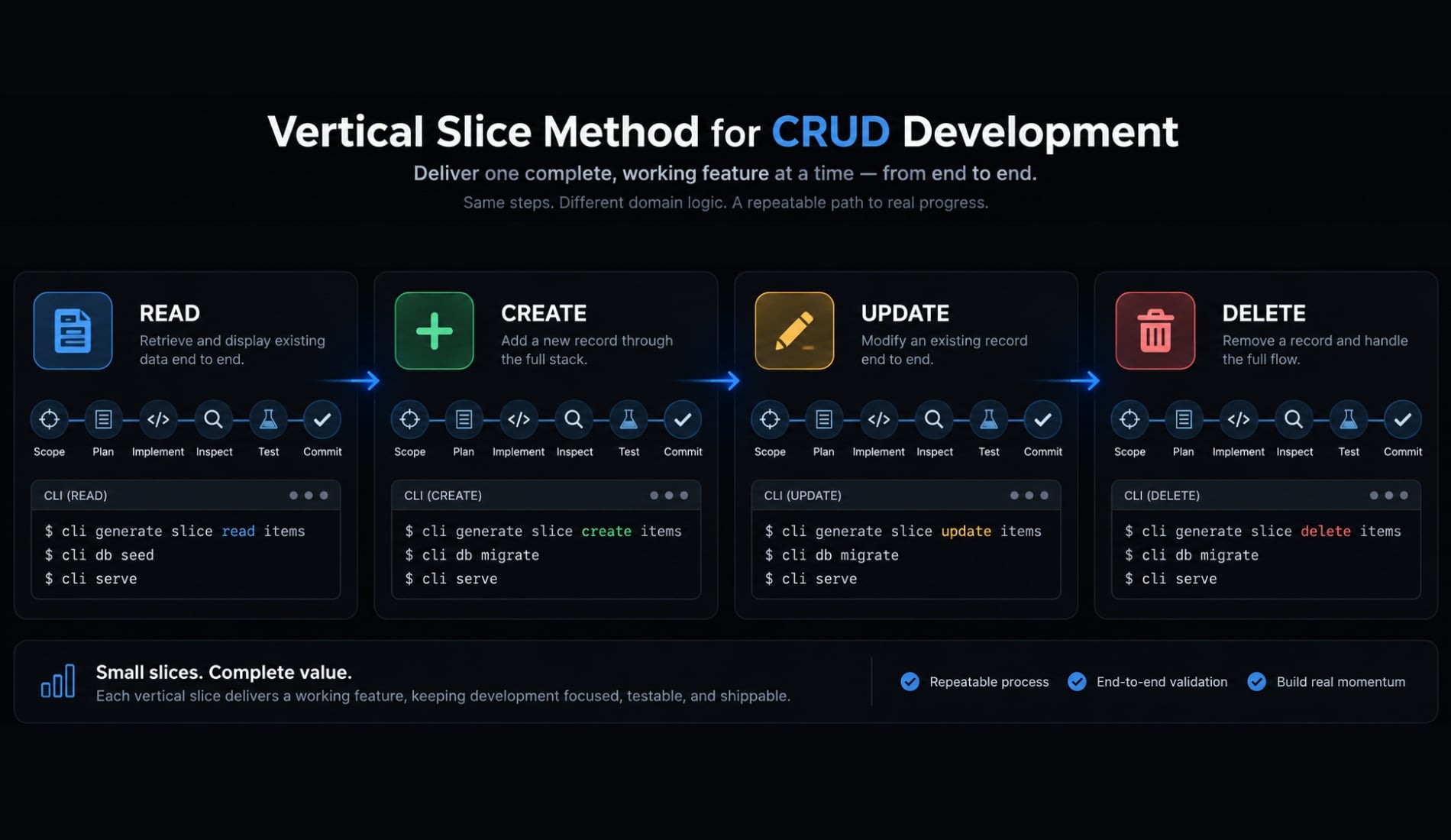
One-shot generation makes failures difficult to isolate. Use the Vertical Slice Method so each operation reaches from the database schema and backend logic to the interface and verification process.
Follow this sequence:
- Build Read first.
- Add Create with client and server validation.
- Add Update while preserving unchanged fields.
- Add Delete with confirmation and a recovery decision.
- Verify the interface and database after every operation.
- Commit each stable slice before continuing.
Use the same AI coding workflow each time: scope, plan, implement, inspect the diff, test the interface and database, then commit.
Step 2: Build the Read View First
Start with the Read operation because it verifies the database connection without changing stored data. Ask the assistant to retrieve Lead records and display only:
- Name.
- Company.
- Email.
- Status.
- Owner.
- Last updated date.
Require loading, empty, success, and safe error states. Defer search, filtering, sorting, and pagination unless the initial use case requires them.
The operation-specific request should allow only the Read flow. Require a changed-file list, an explanation of the database query, relevant tests, and confirmation that no unrelated dependency was introduced.
Verify that:
- Existing records appear correctly.
- An empty database produces a valid empty state.
- A failed query produces a safe error.
- Interface values match stored values.
- Restricted records remain hidden.
Common failure: The screen may display hard-coded or mock records while appearing complete. Inspect the query and compare the interface with the intended database.
Commit the stable Read slice before starting Create.
Step 3: Add the create flow
Build the Create operation only after Read retrieves persistent data. Add the required Lead fields, immediate browser feedback, and trusted server-side validation.
Client-side form validation improves usability but can be bypassed. Critical rules must also run on the server or through database constraints.
Test the following behavior:
- A valid Lead is saved.
- Missing
nameis rejected. - Invalid
emailis rejected. - Unsupported
statusis rejected. - Duplicate submission creates only one record.
- Database failure creates no partial record.
- The new record appears after refresh.
- The new row exists directly in the database.
The failure message should help the user recover without exposing queries, credentials, stack traces, or internal system details.
Review the diff for unexpected schema changes or new packages. Commit Create only after Read still works and persistence has been confirmed.
Step 4: Add the update flow
The Update operation should load the selected Lead, preserve existing values, and change only submitted and permitted fields.
Verify that updatedAt changes while createdAt remains intact. Handle a record that no longer exists, and reject invalid input without altering the original data.
Required tests include:
- One valid field changes.
- Unchanged fields remain intact.
- Invalid updates are rejected.
- Unauthorized updates are blocked.
- A missing record returns a safe state.
- The Read view still works after the update.
Common failure: AI-generated partial-update logic may replace valid fields with blanks, defaults, or stale form data. Compare the database row before and after the update, not merely the edited field shown in the interface.
Run regression testing against Read and Create before committing this slice.
Step 5: Add delete with a safety check
The Delete operation must identify the selected Lead and require explicit confirmation. Validate the record ID and enforce permission checks through backend logic or database policy.
Choose a deletion model deliberately:
- Hard delete: Permanently removes the record.
- Soft delete or archive: Preserves the record but excludes it from normal views.
Soft deletion is generally safer for customer, financial, operational, or audit-sensitive records. It still requires retention rules and tested recovery behavior.
Verify that:
- The correct record is removed or archived.
- A different Lead remains untouched.
- An invalid ID is handled safely.
- An already-deleted record does not cause an uncontrolled error.
- Unauthorized deletion is blocked.
- Cancellation leaves the record unchanged.
- The database reflects the expected result.
A hidden Delete button is not authorization. A user can still call an exposed endpoint unless the trusted data layer blocks the action.
Step 6: Add validation, authentication, and authorization
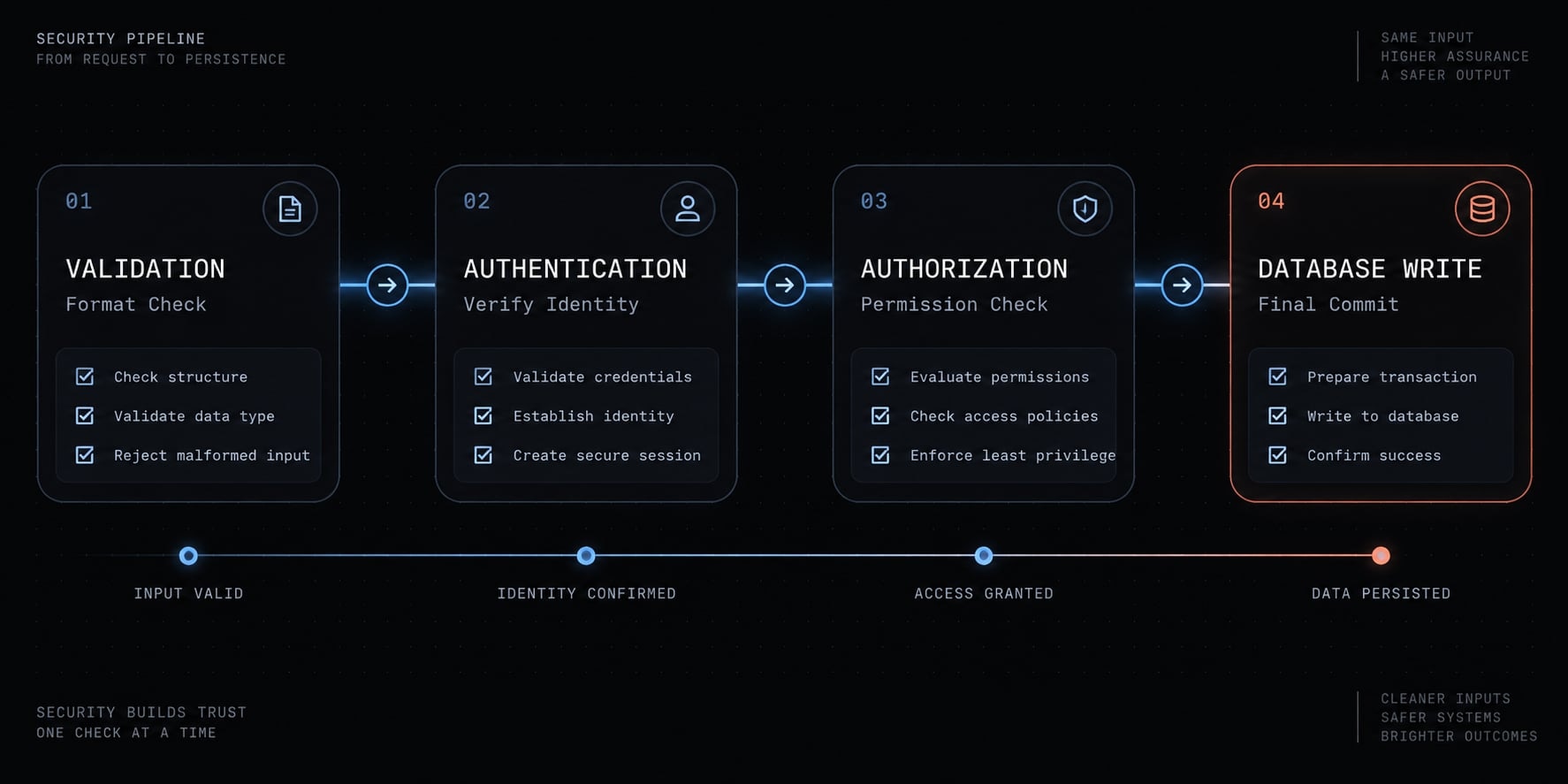
- Validation asks whether submitted data is acceptable.
- Authentication determines who the user is.
- Authorization determines whether that authenticated user may perform a requested action.
These controls solve different problems and should be enforced through trusted backend logic, database constraints, or database access policies before a write occurs. Client-side checks remain useful for fast feedback, but they cannot protect data integrity alone. Similarly, interface visibility is not a permission boundary.
Follow the relevant OWASP Input Validation, Authentication, and Authorization guidance when designing these controls.
Minimum access-control model
The following role-based access control model is an example, not a universal policy.
Action | Standard user | Record owner | Administrator |
|---|---|---|---|
View permitted leads | Yes | Yes | Yes |
Create a lead | Yes | Yes | Yes |
Edit another user’s lead | No | No | Yes |
Delete another user’s lead | No | No | Yes |
Change roles | No | No | Yes |
Store ownership through an immutable user identifier associated with the Lead. The backend or database must compare that identifier with the authenticated user before allowing an operation.
For public, regulated, financial, health, or otherwise sensitive applications, use a qualified security review. AI-assisted review can support discovery but should not be treated as security approval.
Security review prompt
Act as a security reviewer. Do not modify code during this review.Inspect all Read, Create, Update, and Delete operations.Review:1. Missing or incomplete authentication.2. Missing, inconsistent, or bypassable authorization.3. Controls implemented only in the interface.4. Server-side validation and database constraints.5. Record-ownership and database-access policies.6. Secrets and environment-variable handling.7. Error responses that may expose internal information.8. Dependency or configuration risks relevant to this feature.For every finding:- Assign a severity.- Cite the relevant file and behavior.- Explain the realistic impact.- Recommend the smallest safe fix.- State how the fix should be verified.Do not write or modify code until the findings are reviewed.
AI-assisted security review identifies likely issues; it does not replace professional assessment for high-risk applications.
Step 7: Test and debug without breaking working features
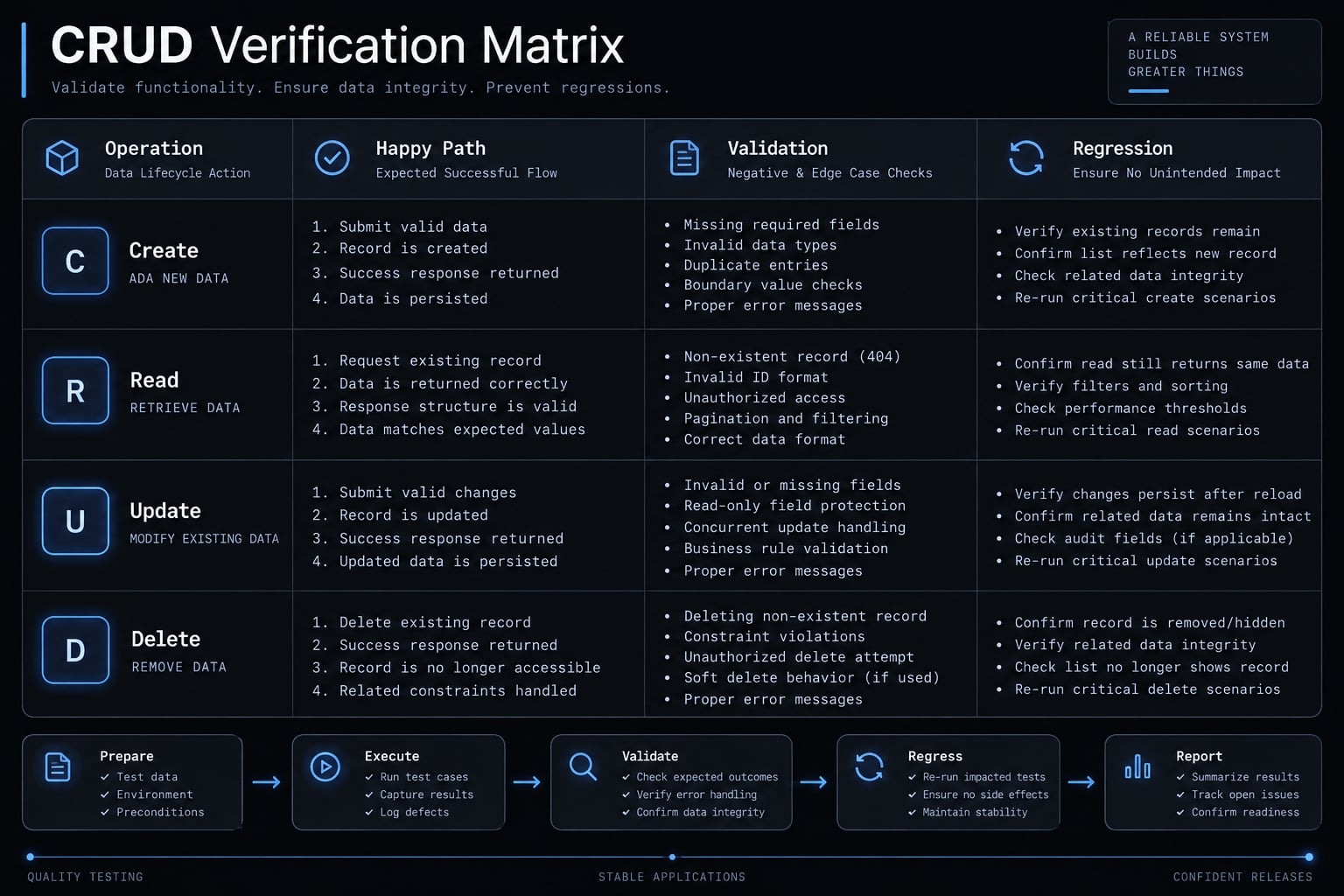
An AI completion message is not test evidence. “Done” has meaning only when supported by test output, observable application behavior, and the expected database state. CRUD testing must cover valid actions, invalid input, unauthorized actions, and infrastructure failures. Manual testing is acceptable initially if it follows a repeatable matrix.
CRUD verification matrix
Use this matrix after every stable slice and again after deployment.
Operation | Happy path | Validation test | Permission test | Failure state |
|---|---|---|---|---|
Create | Valid Lead is stored and displayed | Invalid required fields are rejected | Unauthorized creation is blocked | Database failure creates no partial record |
Read | Correct records appear | Empty state works | Restricted records stay hidden | Fetch error displays safely |
Update | Intended fields change | Invalid values are rejected | Unauthorized update is blocked | Existing valid data remains intact |
Delete | Correct record is removed or archived | Invalid ID is handled | Unauthorized deletion is blocked | Confirmation and failure feedback work |
A clicked button is not sufficient proof. Refresh the page, inspect the database, and check logs where appropriate. Add automated tests as the application becomes business-critical.
When a defect appears, reproduce it before requesting a fix. Capture the exact input, expected result, actual result, logs, and last stable Git commit.
Scoped debugging prompt
Act as a debugging engineer.Reproduction steps:[STEPS]Expected result:[EXPECTED BEHAVIOR]Actual result:[ACTUAL BEHAVIOR]Error output or logs:[PASTE REDACTED EVIDENCE]Last known stable commit:[COMMIT ID]Files likely involved:[FILES OR UNKNOWN]Current test results:[RESULTS]Before editing:1. Analyze the likely root cause.2. Identify the smallest relevant file set.3. Explain the proposed fix and its regression risk.4. Do not propose unrelated refactoring.After approval:1. Apply the smallest relevant change.2. Run the affected test.3. Rerun relevant CRUD regression tests.4. Report every changed file.5. Report any schema, dependency, or environment change.
If a speculative fix broadens unexpectedly, revert through version control and return to the last stable slice.
Use separate AI review roles
Separate responsibilities to reduce self-confirming errors:
- Planner: Reviews requirements and proposes task order.
- Engineer: Implements one vertical slice.
- Tester: Checks expected behavior and edge cases.
- Code reviewer: Reviews scope, clarity, and regression risk.
- Security reviewer: Examines permissions, secrets, and data access.
These may be separate agents or isolated prompts in one AI coding assistant. An orchestration layer such as AgentKit can make these roles reusable and coordinate their outputs without removing human review.
Step 8: Deploy the app and decide whether it is production-ready
Local success does not guarantee deployed success. Production may use different environment variables, database credentials, authentication URLs, migration state, or access policies.
Complete application deployment in this order:
- Create the production environment.
- Configure environment variables and secrets.
- Apply and verify the database migration.
- Deploy the application.
- Test authentication and permissions on the live URL.
- Run the complete CRUD verification matrix.
- Inspect application and database logs.
- Confirm backup and rollback procedures.
A common failure occurs when the local database contains the latest schema but the production migration was not applied. The interface deploys successfully, yet live queries fail.
Prototype vs. internal tool vs. public production app
Readiness depends on data sensitivity, user exposure, and business impact. It is not a certification produced by the AI coding tool.
Requirement | Prototype | Internal tool | Public poduction app |
|---|---|---|---|
Data | Sample or noncritical | Controlled business data | Real user or customer data |
Users | Builder or test group | Known employees | External users |
Authentication | Optional in isolated testing | Required | Required |
Authorization | Minimal | Role or ownership controls | Fully enforced and reviewed |
Testing | Manual happy paths | CRUD matrix and regression tests | Automated, manual, security, and load testing as appropriate |
Backups | Optional | Required | Required with restore testing |
Monitoring | Minimal | Error logging | Error, uptime, performance, and security monitoring |
Maintenance owner | Informal | Named owner | Defined operational responsibility |
Security review | Recommended | Strongly recommended | Required for sensitive or high-risk use |
Readiness requirements increase with data sensitivity and user exposure. A deployed CRUD interface is not automatically a production-ready application.
Unreviewed prototypes should never contain real customer, payment, health, credential, or confidential business data. Every live application also needs a named owner responsible for maintenance, technical debt, incidents, backups, and dependency updates.
Live Deployment Verification Checklist
- Create a test Lead on the live application.
- Refresh and confirm that the record persists.
- Edit one field and confirm unchanged fields remain intact.
- Test an unauthorized update.
- Test an unauthorized deletion.
- Delete or archive the test record.
- Inspect application and database logs.
- Confirm secrets are absent from client code and the repository.
- Confirm backups are configured where required.
- Confirm the previous stable release can be restored.
- Assign a maintenance owner.
Do not approve the deployment based only on a successful build message. Verify behavior against the live database and production access rules.
A reusable workflow for AI-assisted CRUD development
To vibe code a CRUD app responsibly, define the product, constrain the architecture, request a plan, and build through separate vertical slices. Validate data, enforce identity and permissions, test both successful and failed behavior, deploy, then repeat the verification process on the live environment.
CRUD is a strong fit for an AI coding workflow because every operation has observable behavior. That visibility only becomes useful when you inspect code, compare interface behavior with database state, and preserve stable checkpoints in Git. Generated code is never automatically a production-ready application.
Copy the lead tracker specification, planning prompt, security review prompt, and CRUD verification matrix into your project. Use them with your current coding assistant, or optionally coordinate the planner, engineer, tester, reviewer, and security-review roles through AgentKit.
Frequently asked questions
What does it mean to vibe code a CRUD app?
Vibe coding a CRUD app means using natural-language instructions to direct an AI coding assistant to generate application logic. The builder provides requirements, and the AI writes the code for Create, Read, Update, and Delete operations. Success requires the builder to verify persistence, validation, and access controls independently.
Why are CRUD apps well-suited for AI-assisted development?
CRUD applications are highly predictable and follow established patterns. Because each operation has clear inputs and observable database outcomes, an AI coding assistant can effectively generate boilerplate and business logic. This makes CRUD apps excellent candidates for building in "vertical slices," where each feature is implemented and verified incrementally.
Can I trust AI-generated code to be production-ready?
No. AI-generated code is a prototype, not a production-ready application. AI tools often prioritize generating a working interface over enforcing backend security, data integrity, or authorization. You must review, test, and harden all AI-generated code before exposing it to real users or sensitive data.
How can I prevent AI from inventing unauthorized permissions?
Avoid relying on interface-level controls like hiding buttons. Instead, define explicit authorization rules in your specification and ensure they are enforced through trusted backend logic or database policies. Use a security review prompt to force the AI to analyze your permission model for gaps in backend enforcement.
Should I use the same AI prompt for the entire application?
No. Requesting an entire application in one prompt leads to poor results and makes debugging difficult. Instead, use a "Vertical Slice Method" to implement one feature at a time-from the database to the interface. This ensures that every CRUD operation is separately planable, implementable, testable, and commit-ready.
What is the difference between a prototype and an internal tool?
A prototype is for experimentation and requires minimal controls. An internal tool serves known users and requires authentication, robust CRUD testing, error logging, and defined maintenance ownership. Public production applications add requirements for load testing, comprehensive security reviews, and high-availability infrastructure to handle unknown traffic and data risks.
How do I handle AI-generated errors during development?
Do not guess or apply broad fixes. Use a scoped debugging workflow: reproduce the error, capture evidence, identify the root cause, and ask the AI for the smallest possible change. After applying a fix, rerun your regression tests to ensure that previously working CRUD operations remain stable.
Read more:
- Andrej Karpathy vibe coding: What it is and how it works
- Vibe coding MVP: Build fast without fooling yourself
- Vibe coding PRD template: Streamline AI development projects
Conclusion
Vibe coding a CRUD app accelerates development by translating natural language into functional code, but it doesn't eliminate the need for engineering rigor. While AI excels at generating predictable Create, Read, Update, and Delete patterns, a functioning UI can easily mask broken database persistence or absent security controls.
To maintain control, developers must define strict product requirements, build in isolated vertical slices, and rigorously verify each step-from server-side validation to backend authorization. Ultimately, AI is a powerful implementation assistant, but the developer remains fully responsible for architecture, testing, and ensuring the application is truly production-ready.