How to build and publish a vibe-coded app on the Apple App Store
A vibe-coded iOS app can be submitted through Apple’s standard publishing process. Apple evaluates the product’s functionality, safety, privacy, metadata, business practices, and compliance-not whether the code was written manually. The publisher remains responsible for testing the app, protecting credentials, declaring data use accurately, configuring reviewer access, and making the final release decision. This guide explains how to turn a vibe-coded iOS app into a tested release candidate and complete an informed App Store submission.
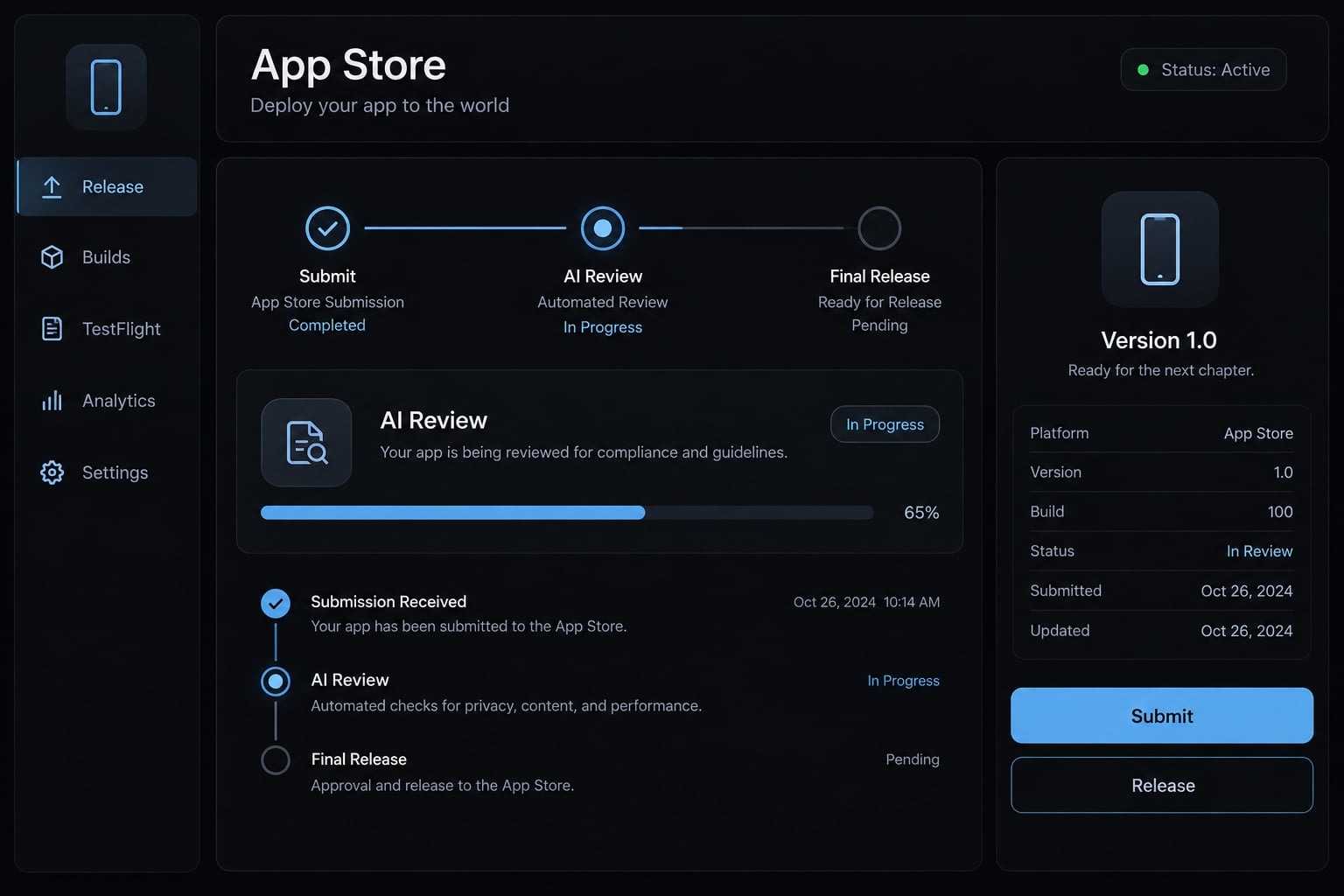
What is a vibe-coded app and can Apple accept it?
Vibe coding is the use of natural-language instructions to generate and modify software with an AI coding assistant. In native iOS development, the assistant may produce Swift or SwiftUI code, but the app must still pass through Xcode, code signing, testing, App Store Connect, and Apple’s standard review process.
SwiftUI is Apple’s framework for building native interfaces in Swift. Xcode is Apple’s development environment for building, testing, signing, archiving, and uploading iOS applications.
Apple does not publish a separate submission path for prompt-based coding. Its App Store Review Guidelines apply to the product submitted for review, including its behavior, content, privacy practices, payments, and access requirements. Approval is therefore possible, but never guaranteed. It also does not prove that an AI-generated app is secure, maintainable, accessible, or commercially viable.
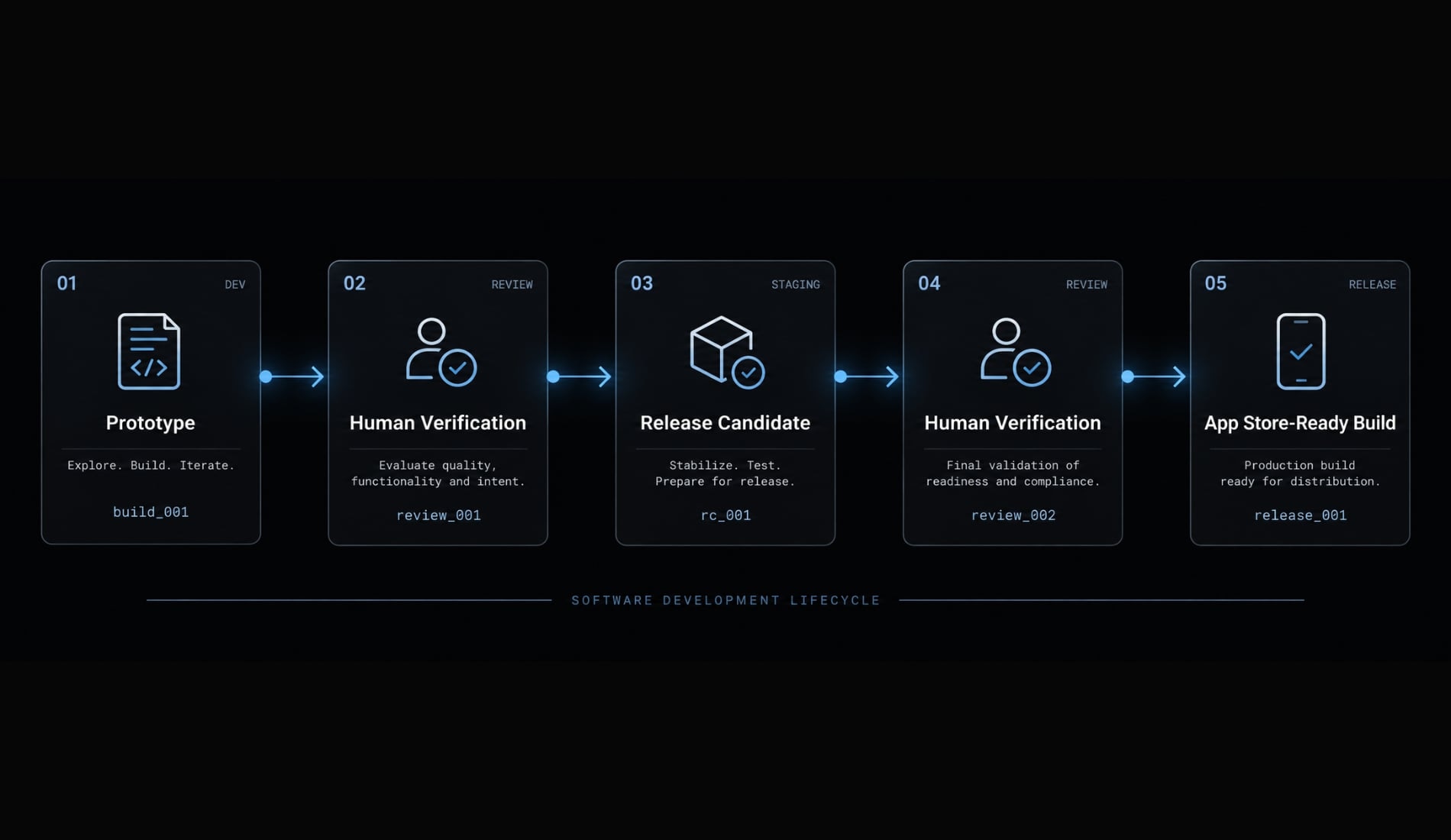
From prompt to production: Three different stages
Stage | What it means | Exit condition |
|---|---|---|
Generated prototype | A main screen or basic workflow runs, often in the simulator. | The concept can be demonstrated. |
Tested release candidate | A build believed ready for final validation, with core and failure paths tested. | No known release-blocking defects remain. |
App Store-ready build | Signing, privacy, metadata, reviewer access, policy checks, and validation are complete. | The publisher approves submission. |
A successful prototype is evidence that the concept can run. It is not evidence of production readiness.
What you need before building the app
Prepare the platform requirements, release assets, and privacy decisions before asking an AI agent to generate the entire application. Retrofitting these decisions later often creates avoidable rework.
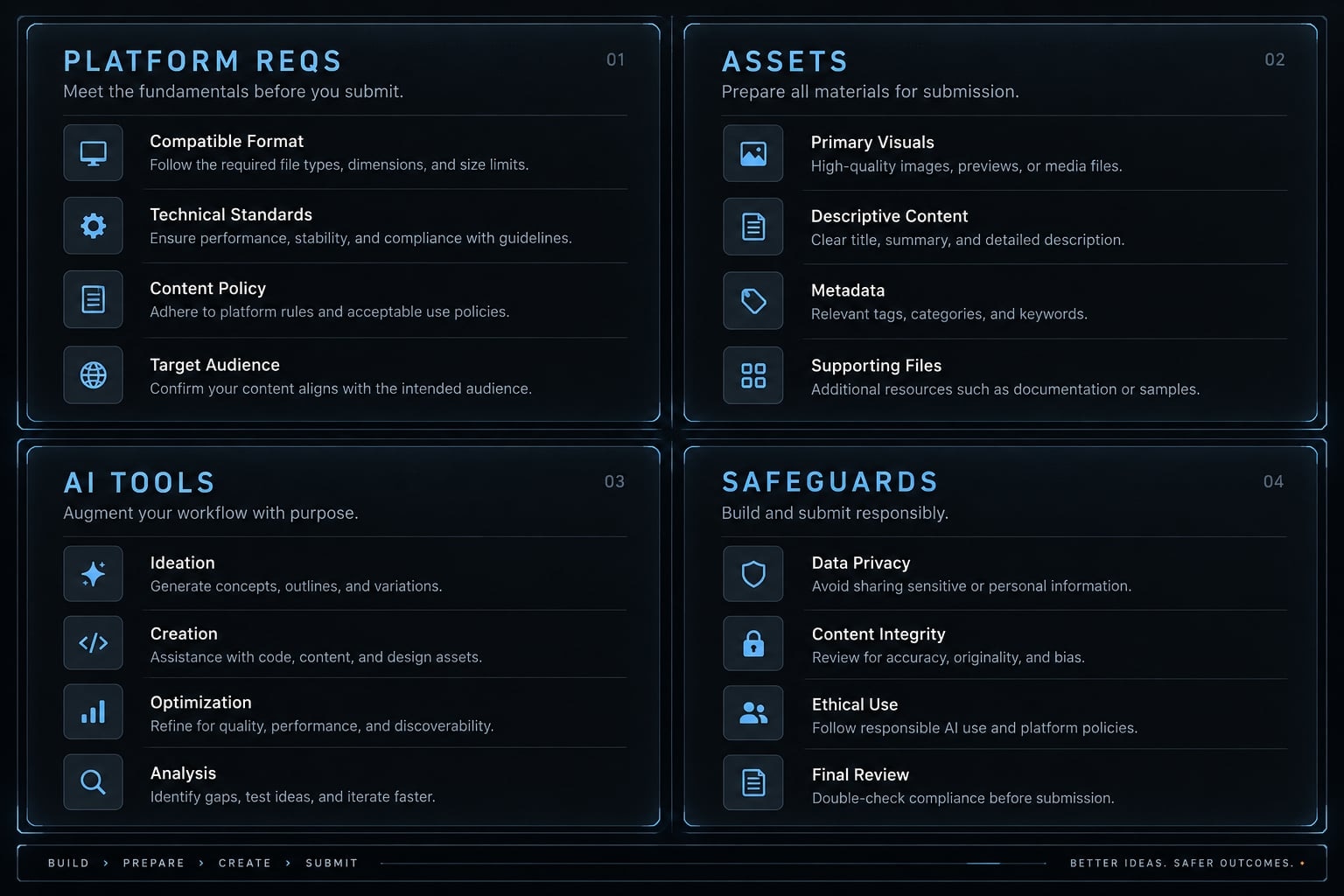
Requirement | Why it is needed | Mandatory? |
|---|---|---|
Compatible Mac | Runs Xcode and supports the native iOS build workflow | Yes |
Apple Account | Provides access to Apple developer services | Yes |
Apple Developer Program membership | Enables App Store distribution and related services | Required before submission |
Xcode | Builds, tests, signs, archives, validates, and uploads the app | Yes |
AI coding assistant | Generates, edits, explains, or reviews code | No |
Narrow minimum viable product | Controls scope and creates testable release criteria | Strongly recommended |
Privacy and data-use plan | Identifies collected data, permissions, SDK behavior, and disclosures | Depends on app behavior |
App name, icon, screenshots, and description | Creates the App Store product page | Required before submission |
Support and privacy resources | Provide user assistance and applicable privacy information | Depends on current fields and app behavior |
Physical test device | Reveals issues the simulator may not reproduce | Strongly recommended |
Consult App Store Connect Help for current record, metadata, build, privacy, and release requirements.
Choose a narrow, reviewable MVP
An MVP (minimum viable product) should fully address one specific problem without relying on unnecessary features. Establish:
- One target user.
- One core problem.
- One primary user flow.
- Explicit acceptance criteria and failure states.
Avoid adding login, subscriptions, background processing, social features, or sensitive data unless the initial product genuinely needs them. Every external API or third-party SDK adds reliability, security, privacy, and review dependencies.
Choose an AI coding tool without overcomplicating the Stack
A practical setup normally requires one primary implementation agent:
- Claude Code or Codex for repository-level planning and implementation.
- Cursor or GitHub Copilot for editor-based iteration.
- ChatGPT or another assistant for documentation interpretation and error analysis.
Let one implementation agent own changes at a time. Multiple tools editing the same files without coordination can produce conflicting assumptions and regressions.
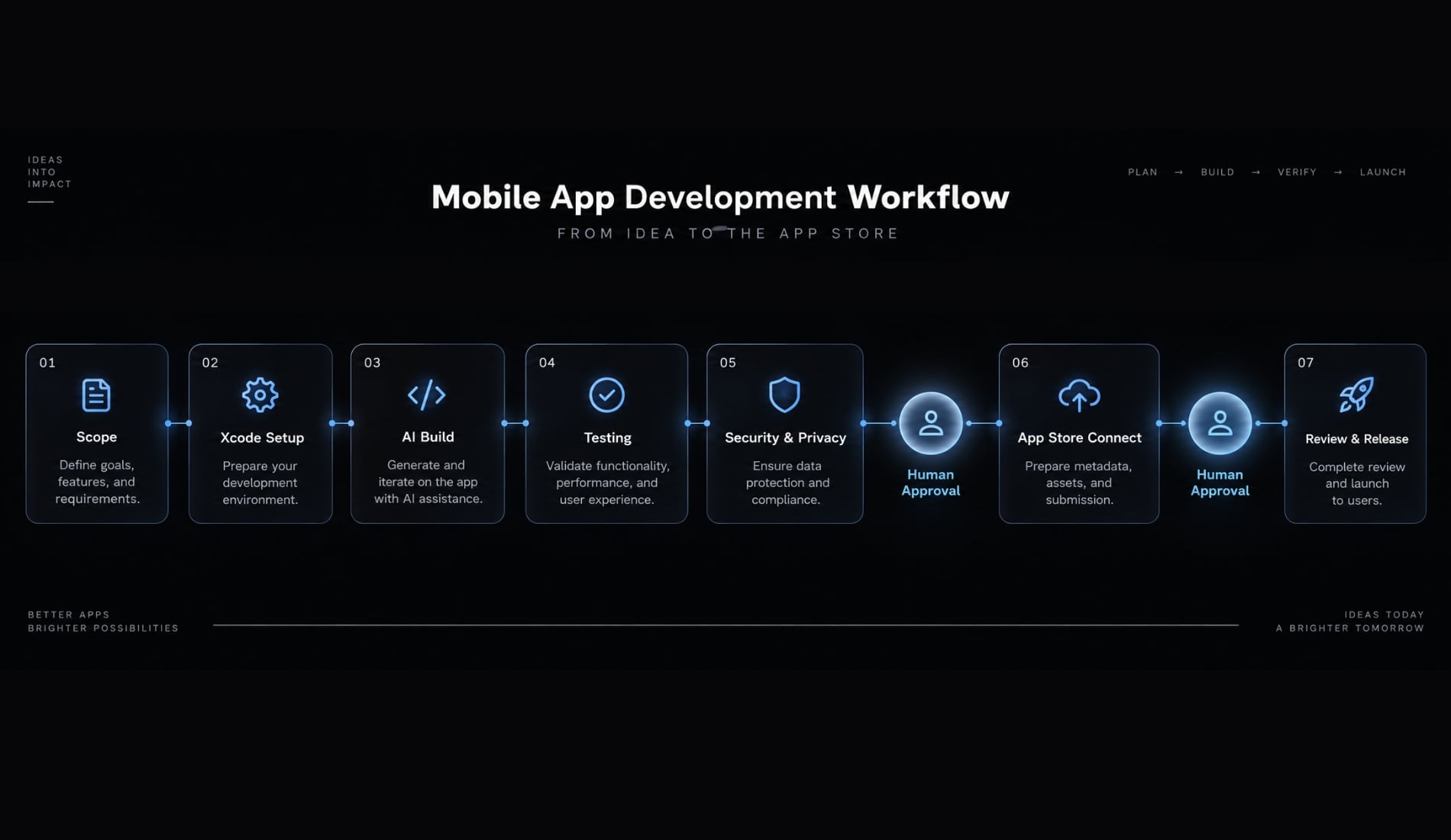
How to build and publish a vibe-coded app in seven steps
- Define the app and its acceptance criteria.
- Create the iOS project in Xcode.
- Build one feature at a time with AI.
- Test in the simulator and on physical devices.
- Review security, privacy, and production risks.
- Configure App Store Connect and upload the build.
- Submit, respond to review, and release.
1. Define the app and Its acceptance Criteria
Start with observable product behavior rather than a broad prompt such as “build a production-ready app.” Use this compact specification:
- Product:
[App type] for [target user] - Core job:
[Single primary outcome] - Main flow:
[Start → action → result] - Required data:
[Inputs and stored information] - Dependencies:
[APIs, SDKs, permissions] - Failure states:
[Offline, invalid input, denied permission, unavailable API] - Release criteria:
[Observable pass conditions]
For example, an API monitoring utility might let a developer add one endpoint, run a status check, and view the latest result. Its acceptance criteria should also cover invalid URLs, timeouts, server errors, and interrupted requests.
An AI agent can convert this brief into an implementation plan and identify missing requirements. The publisher must confirm that the scope is narrow, dependencies are known, and every critical requirement can be tested.
Release gate: Approve the specification before generating application code.
2. Create the iOS project in Xcode
Create a baseline project and select SwiftUI where it fits the app’s interface and team workflow. Configure the app name, deployment target, development team, and organization identifier. The resulting bundle identifier is the app’s unique platform identity. Confirm it carefully because it connects the Xcode project, signing configuration, capabilities, and App Store Connect record.
Initialize version control immediately. Build the untouched project before allowing an AI coding agent to change files. This establishes whether the initial Xcode setup works independently of generated code.
AI can explain project settings or propose a simple folder structure. You must verify the selected deployment target, signing team, identifier, and repository state.
Release gate: The clean baseline project builds successfully before generated changes begin.
3. Build one feature at a time with AI
Use small, reversible implementation cycles:
- Describe one feature and its expected behavior.
- Provide the relevant files, constraints, and existing conventions.
- Ask the agent to present a change plan.
- Review which files it intends to modify.
- Apply the focused change.
- Build and test the feature.
- Commit the working state.
Sample prompt: “Add endpoint validation to the existing form. Before editing, list the files you will change. Preserve the current architecture and visual style. Handle empty input, invalid URLs, and network failure. After implementation, provide simulator and physical-device testing instructions.”
Avoid prompts such as “make the whole app production-ready.” They invite broad rewrites and make defects difficult to isolate.
Always provide complete compiler messages or stack traces when debugging. Do not summarize away file names, line numbers, or the sequence that caused the failure.
Stop the correction loop if the AI keeps editing unrelated files, disrupts the project’s existing structure, or brings back bugs that have already been fixed.
Release gate: Each feature behaves according to its acceptance criteria, and the working state is committed.
4. Test in the simulator and on real devices
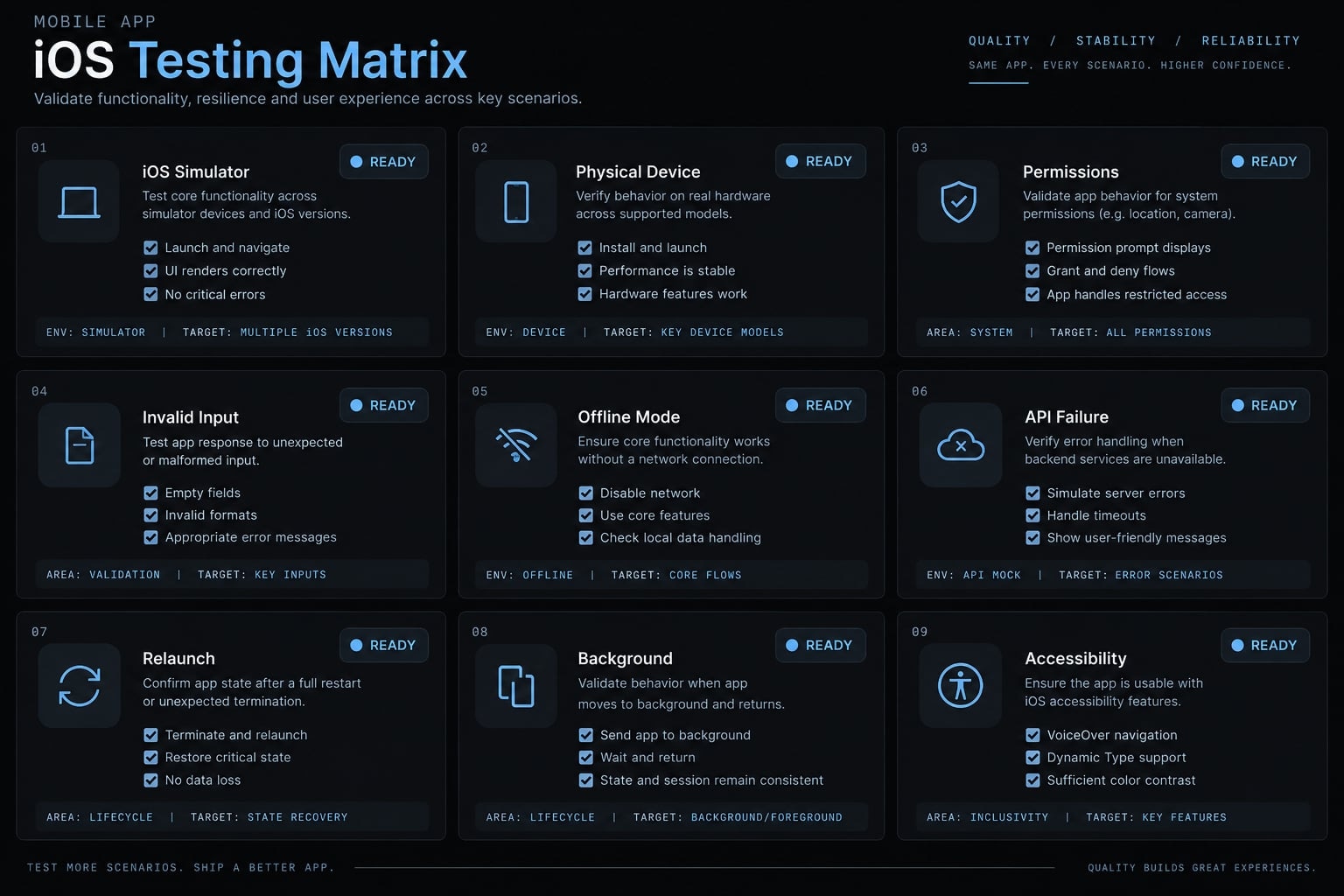
The iOS Simulator is useful for fast interface and workflow testing. A physical device is still necessary for identifying permission, layout, performance, lifecycle, camera, notification, and network behavior that simulations may not reproduce accurately.
Build Succeeded is a compiler result, not a production-readiness verdict.
Test at least:
- The complete happy path.
- Empty and invalid input.
- Denied permissions.
- Slow or disconnected networks.
- External API errors and timeouts.
- App termination and relaunch.
- Background and foreground transitions.
- Interrupted requests.
- Supported screen sizes.
- Accessibility-critical controls and text.
- Authentication with a clean account.
A common release failure occurs when an API request works under ideal conditions but crashes after interruption. Another appears when login works for the owner’s existing account but fails for a new user or reviewer.
AI can draft test cases and interpret logs. The publisher must reproduce failures and confirm the fixes on supported environments.
Release gate: Critical user flows and failure states pass, with no placeholder content or developer-only controls remaining.
5. Review security, privacy and production risks
Treat security and privacy as a mandatory release gate. Generated code may function while still exposing credentials or collecting undeclared data.
Before uploading the build:
- Search for hard-coded API keys, tokens, passwords, and test credentials.
- Rotate any credential suspected of exposure.
- Place sensitive service operations behind a protected backend where appropriate.
- Inventory data collected directly and through third-party SDKs.
- Verify that permission purpose strings describe actual behavior.
- Review analytics, authentication, payment, and AI-service data flows.
- Test applicable account-management and deletion functionality.
- Compare actual behavior with your App Store privacy answers.
Moving a key into a client-side configuration file does not automatically protect it. Secrets distributed inside an application may remain extractable.
Use Apple’s app privacy documentation to understand disclosure responsibilities. Obtain experienced engineering, security, privacy, or legal review for apps involving health, finance, children, precise location, identity information, biometric data, regulated services, or user-generated content.
AI can scan for suspicious patterns and summarize possible data flows. It cannot independently establish that the app is secure or that its declarations are legally sufficient.
Release gate: Actual app and SDK behavior matches the approved security design and privacy disclosures.
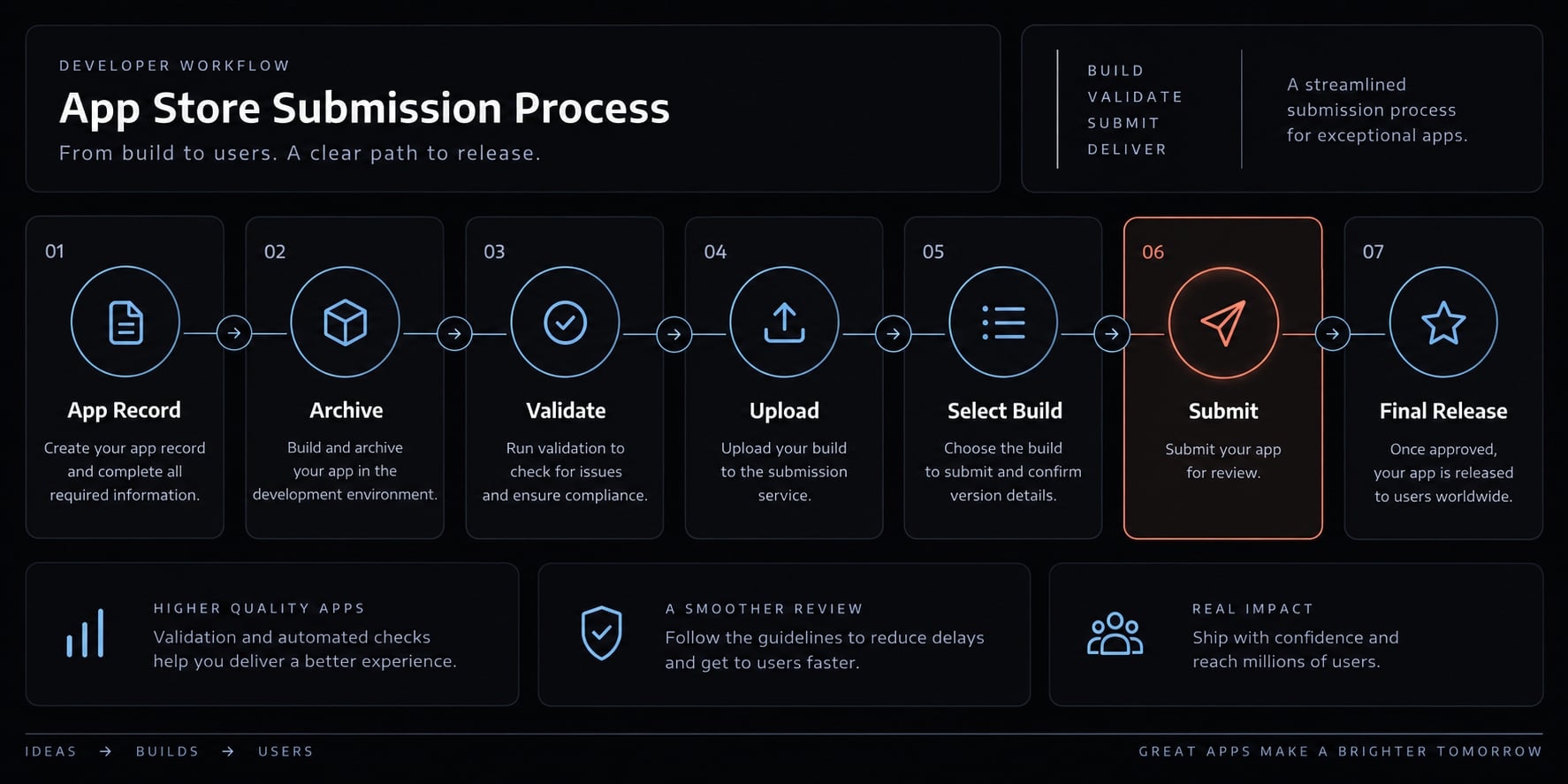
6. Configure App Store connect and upload the build
Create the app record in App Store Connect and associate it with the correct bundle identifier. Complete the applicable product-page and submission information:
- App name, subtitle, description, and category.
- Age rating and content declarations.
- Pricing, availability, and release settings.
- Support details and applicable privacy resources.
- App privacy information.
- Current screenshots and icon assets.
- Export compliance and other applicable declarations.
- Review notes and non-obvious setup instructions.
- Working demo credentials when login restricts core features.
Check that metadata describes the submitted build-not a planned future version. A frequent review issue occurs when screenshots or descriptions advertise functionality absent from the uploaded binary.
In Xcode, confirm code signing, capabilities, version, and build number. Create an archive, run validation, resolve blocking findings, and upload the selected build using Apple’s current Xcode distribution guidance.
AI can draft metadata and organize a submission checklist. You must verify every claim, declaration, credential, and selected asset.
Release gate: The correct build is uploaded, and all submission information accurately reflects its behavior.
7. Submit, respond to review and release
Select the correct uploaded build and submit it for App Review, Apple’s assessment of the app against applicable distribution requirements. Do not plan around a guaranteed review time. Monitor messages in App Store Connect and keep backend services operational during review.
If Apple raises an issue:
- Identify the cited guideline.
- Reproduce the reported behavior where possible.
- Determine whether the issue concerns code, metadata, privacy, access, or clarification.
- Make the smallest valid correction.
- Retest affected and adjacent flows.
- Respond factually with what changed.
- Confirm the corrected build is selected before resubmitting.
After approval, choose the release timing intentionally. Monitor crashes, backend errors, support requests, reviews, and retention after launch. Approval permits distribution; it is not a substitute for operational monitoring.
AI can explain reviewer feedback and structure a remediation plan. The designated human owner must approve the response, corrected build, and release decision.
Release gate: The submitted or corrected build has been retested, and a human owner explicitly approves release.
What AI can do and what the publisher must verify
An AI coding agent can accelerate implementation, documentation, testing preparation, and error analysis. It is not the release authority. Human-in-the-loop oversight means that a person verifies decisions and outputs produced by AI systems. This oversight is especially important for architecture, API security, privacy declarations, payments, authentication, and release approval.
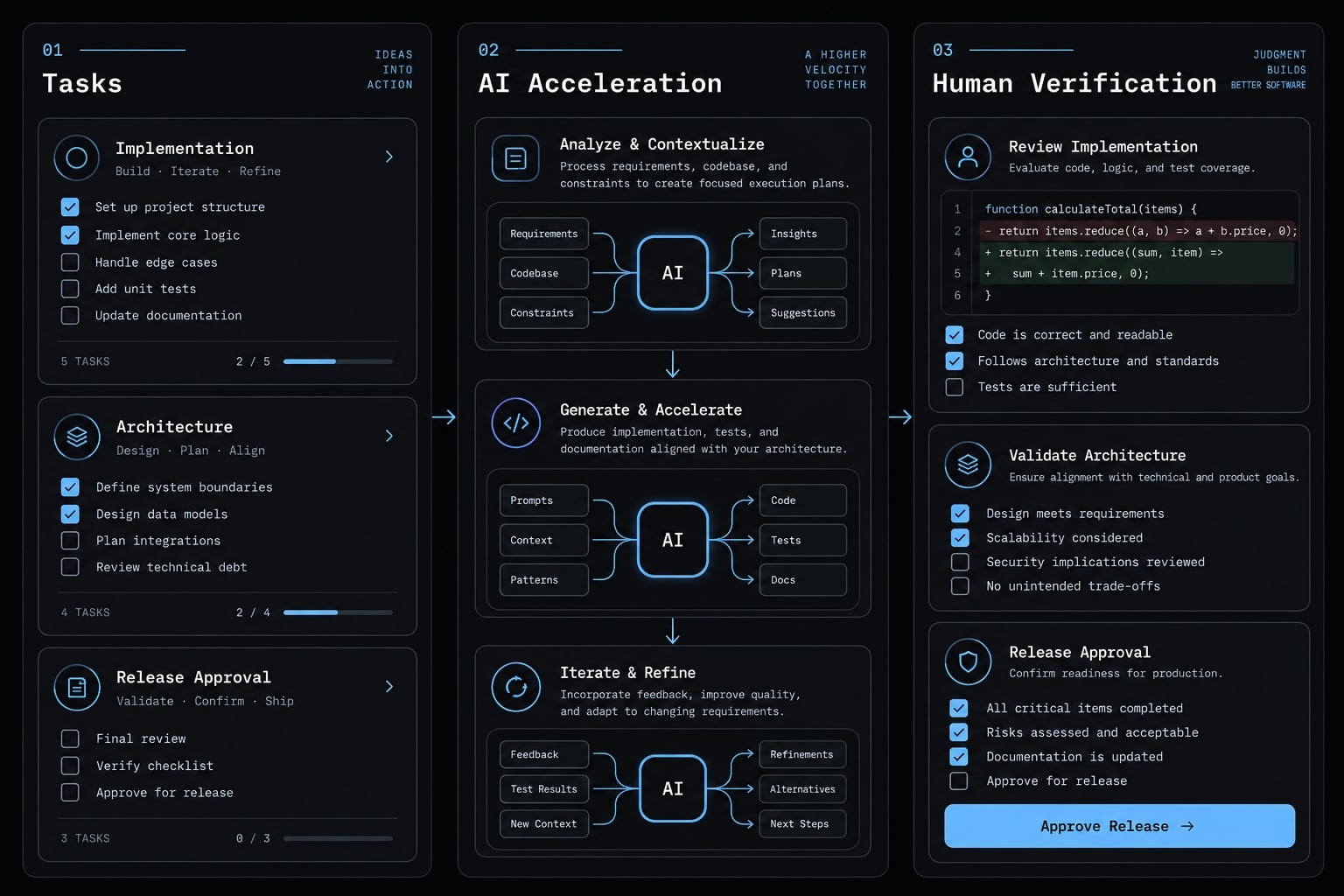
Task | AI can accelerate | Human must verify |
|---|---|---|
UI and components | Draft SwiftUI views and states | Layout, accessibility, device behavior |
Boilerplate and navigation | Generate standard structures | Correct flow and maintainability |
Error interpretation | Explain logs and suggest causes | Reproduction and root cause |
Test creation | Draft cases and test code | Coverage, expected results, environment |
API integration | Generate requests and models | Authentication, failures, data exposure |
App Store metadata | Draft descriptions and notes | Accuracy and consistency with the build |
Privacy declarations | Summarize possible data flows | Actual collection, sharing, and tracking |
Payments | Draft interface and integration code | Current Apple rules and transaction behavior |
Code review | Flag suspicious patterns | Severity, architecture, and final correction |
Release approval | Prepare readiness reports | The publisher retains release authority |
AI-generated tests remain evidence inputs, not independent proof. An implementation agent and review agent may share the same incorrect assumptions, particularly when both receive incomplete context.
Stop the correction loop when:
- The same error returns after several unrelated edits.
- A fix changes authentication, payments, storage, or security without explaining the consequences.
- The agent recommends disabling validation or safety controls.
- The code works only with hard-coded values or in one environment.
- The issue depends on current Apple or third-party policy documentation.
Revert to the last known working state, isolate the issue, consult current documentation, and seek experienced review when the risk exceeds your expertise.
Common App Store rejection risks and how to respond
Vibe-coded apps face ordinary App Review risks plus AI-specific quality-control problems, such as broad unintended edits and incomplete template residue. The following risks are preventive examples, not an exhaustive list or approval guarantee.
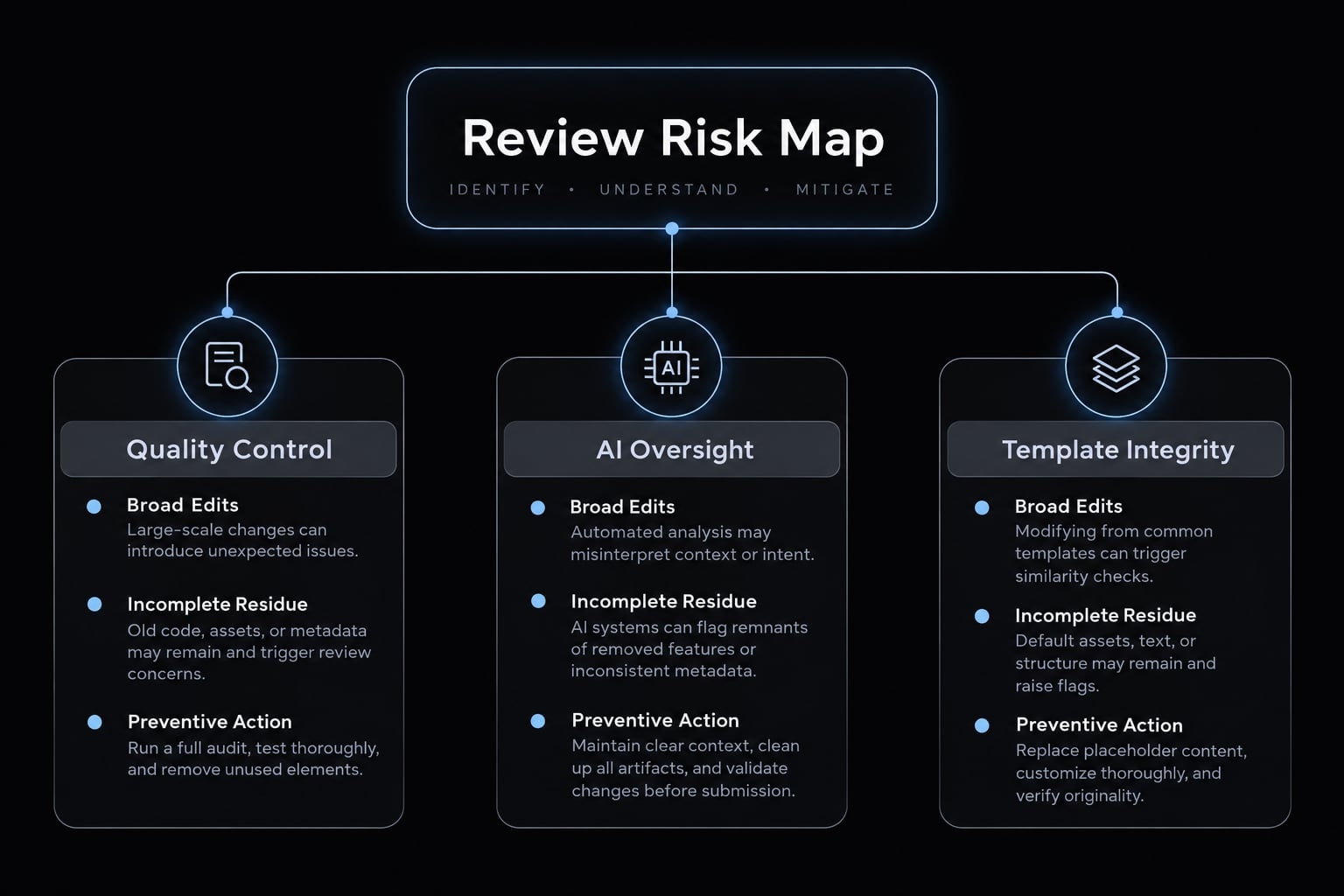
Risk category | Warning signs | Preventive action |
|---|---|---|
Crashes or incomplete functionality | Dead buttons, placeholders, failed relaunches | Test core and failure paths on supported devices |
Broken authentication | Owner can log in, but clean accounts fail | Test fresh accounts and reviewer credentials |
Misleading metadata | Screenshots or descriptions show absent features | Compare every claim with the submitted build |
Inaccurate privacy information | SDK behavior is missing from disclosures | Inventory direct and third-party data flows |
Unclear permission use | Generic or misleading purpose strings | Request only necessary access and explain it clearly |
Exposed credentials | Keys or tokens appear in client files | Remove, rotate, and redesign sensitive operations |
Payment-rule problems | Digital functionality uses an unsupported flow | Check current guidelines for the business model |
Account-management gaps | Account creation exists without applicable controls | Verify current account requirements and test flows |
Reviewer access limitations | Login, region, or backend restrictions block review | Supply valid access instructions and credentials |
Low-value or template-like experience | Duplicate content or unused generated screens remain | Remove template residue and deliver clear utility |
What to do after an App Store rejection:
- Read the exact guideline and reviewer message.
- Reproduce the reported issue where possible.
- Ask AI to explain likely causes rather than rewrite the project.
- Compare the proposed correction with current Apple documentation.
- Make the smallest valid correction.
- Retest the affected flow and nearby dependencies.
- Reply with a factual explanation of what changed.
- Confirm the correct build before resubmitting.
Not every App Store rejection requires new code. The right response may be corrected metadata, updated reviewer instructions, more accurate privacy information, or a clarification when the existing implementation complies.
Vibe-coded App Store pre-submission checklist
Use this App Store submission checklist only after the application has become a release candidate. It reduces preventable failures but does not guarantee acceptance.
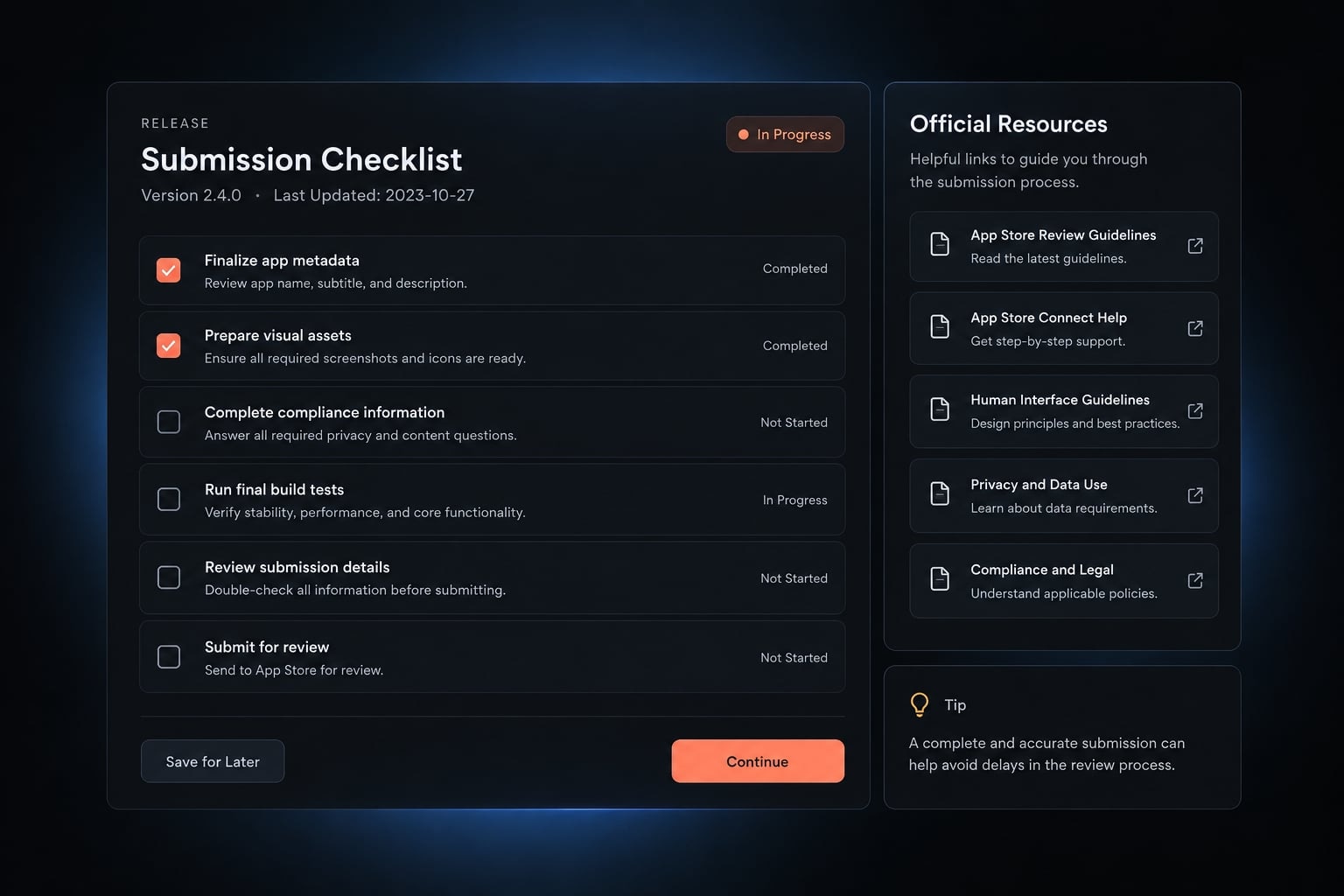
Functionality and device testing
- Primary user flow works from start to finish.
- Buttons, links, forms, and navigation work.
- Placeholder and unfinished content are removed.
- The app has been tested on a physical device.
- Offline, slow-network, invalid-input, and API-failure states are handled.
- Relaunch and background behavior have been checked.
- Supported screen sizes and iOS versions have been checked.
- Accessibility-critical interactions have been reviewed where relevant.
Security and privacy
- No reusable secrets or private credentials are embedded in the client.
- Third-party SDKs and data behavior are inventoried.
- Permissions are limited to actual needs.
- Purpose strings match real behavior.
- App privacy answers match collection, sharing, and tracking behavior.
- Privacy-policy content reflects the current release.
- Authentication and applicable account-management flows have been tested.
- Sensitive applications have received appropriate specialist review.
App Store assets and metadata
- Name, subtitle, category, and description are accurate.
- Screenshots represent the submitted build.
- Icon and visual assets meet current specifications.
- Support URL and contact information work.
- Age rating and content declarations are accurate.
- Pricing and availability are intentional.
- Applicable compliance declarations are complete.
- Claims do not describe unavailable functionality.
Submission and reviewer access
- Bundle identifier and signing team are correct.
- Correct archive, version, and build have been uploaded.
- Xcode validation has no unresolved blocking issues.
- Reviewer credentials work.
- Review notes explain non-obvious setup or dependencies.
- Backend services are available during review.
- The intended build is selected for submission.
- Release settings are selected intentionally.
Is vibe coding enough for a production app?
Vibe coding can be sufficient for lower-risk prototypes and narrow production applications when paired with disciplined testing and human verification. It is not, by itself, a production-readiness method.
The need for experienced review increases with data sensitivity, business impact, authentication, payments, user-generated content, and regulatory exposure.
Risk level | Typical app types | Additional review |
|---|---|---|
Lower risk | Personal utilities, reference apps, narrow workflow tools, early MVPs | Structured testing and basic code, security, and privacy review |
Medium risk | Apps with login, APIs, analytics, accounts, or basic paid functionality | Experienced engineering and focused security and privacy review |
Higher risk | Health, finance, children, identity, location, complex subscriptions, or user-generated content | Specialist engineering, security, privacy, and qualified legal review |
“Lower risk” describes relative release exposure. It does not mean an app is inherently safe.
A safer multi-agent release workflow:
- Planning agent: Converts the product brief into scope, dependencies, and acceptance criteria.
- Implementation agent: Builds one approved feature at a time.
- Testing agent: Creates test cases for core and failure paths.
- Code-review agent: Checks changes for defects, regressions, and maintainability risks.
- Security-check agent: Scans for exposed secrets, risky permissions, and unsafe patterns.
- Release agent: Prepares metadata, submission checks, and release-readiness reports.
- Human owner: Approves architecture, privacy decisions, policy interpretation, and release.
AgentKit can coordinate these specialized AI Agent workflows so implementation and review tasks follow a repeatable process. Separation of responsibilities can improve consistency, but it does not guarantee App Store approval or replace human release authority.
Turn the prototype into a release candidate before you submit
A successful vibe coding app store project follows three distinct stages: generated prototype, tested release candidate, and App Store-ready build. AI-assisted app development can accelerate implementation, but human verification determines whether the generated code is ready to move between those stages.
Before any App Store submission, verify critical behavior, physical-device performance, API security, privacy declarations, metadata, code signing, reviewer access, and current Apple requirements. No checklist or AI workflow can guarantee approval.
Copy or download the vibe-coded app store release checklist for your final release gate. Teams using coordinated coding agents can also adapt an AgentKit release workflow template while keeping architecture, compliance, and publishing decisions under human control.
Frequently asked questions
What is vibe coding?
Vibe coding is a software development method where you use natural-language instructions to generate, iterate, and modify code with an AI coding assistant. Instead of writing code line-by-line, you act as a director, refining AI output to build functional applications.
Can you publish a vibe-coded app on the Apple App Store?
Yes. Apple does not prohibit AI-generated code, but it evaluates the submitted product based on functionality, safety, privacy, metadata, and guideline compliance. Your app must be a tested, secure, and compliant release candidate, not just a raw AI prototype.
Does Apple have a special review process for AI-generated apps?
No. There is no separate review track for vibe-coded apps. All submissions must meet the standard App Store Review Guidelines. Be aware that non-functional template residue, copycat apps, or incomplete functionality can lead to longer review times or rejection.
Is vibe coding enough for a production-grade application?
Vibe coding is an implementation accelerator, not a production-readiness shortcut. For production, you must verify security, privacy, data handling, and backend stability. Use AI for routine tasks, but maintain human-in-the-loop oversight for architecture and critical release gates.
What is the most common reason for rejection when publishing vibe-coded apps?
Common reasons include broken core functionality (like login or payments), inaccurate metadata, missing privacy disclosures, and failure to provide necessary access (such as demo accounts) for reviewers. Always test on a physical device before submitting.
Do I need to be an expert developer to use vibe coding for iOS?
While vibe coding lowers the barrier to implementation, you still need to understand the platform. You must be able to navigate Xcode, manage signing, conduct security reviews, and validate the code generated by the AI to ensure it is safe and stable for users.
Read more:
- Vibe code mobile app: Build ideas faster with AI development
- How to vibe code: A practical beginner guide to AI development
- Vibe coding tools: How to choose the right AI app builder
Conclusion
In conclusion, while AI-driven "vibe coding" significantly speeds up iOS app development, passing Apple’s rigorous App Store review requires far more than functional prompt generation. Success relies on transforming a rough prototype into a thoroughly tested release candidate by strictly validating user flows on physical devices, securing API endpoints, ensuring accurate privacy disclosures, and providing seamless reviewer access.
By treating AI as an implementation partner while maintaining strict human oversight across architecture, compliance, and final release gates, publishers can confidently navigate the App Store submission process and deliver reliable, production-ready applications.