
Claude Code toolkit: How to choose, structure, and standardize a setup that actually scales
A Claude Code toolkit starts to matter once ad‑hoc prompting gets messy. The problem isn’t a lack of ideas; it’s scattered prompts, repeated setup, inconsistent workflows, and rebuilding the same things for every new project. Most people don’t need more prompts. They need a reusable system they can rely on for planning, coding, debugging, review, and delivery. That leaves three realistic options: use a community toolkit, build your own internal setup, or move to a more structured platform. This guide explains what a toolkit really is, what a solid setup should include, how to evaluate one before adopting it, and when a structured option makes more sense for production‑ready Claude workflows.
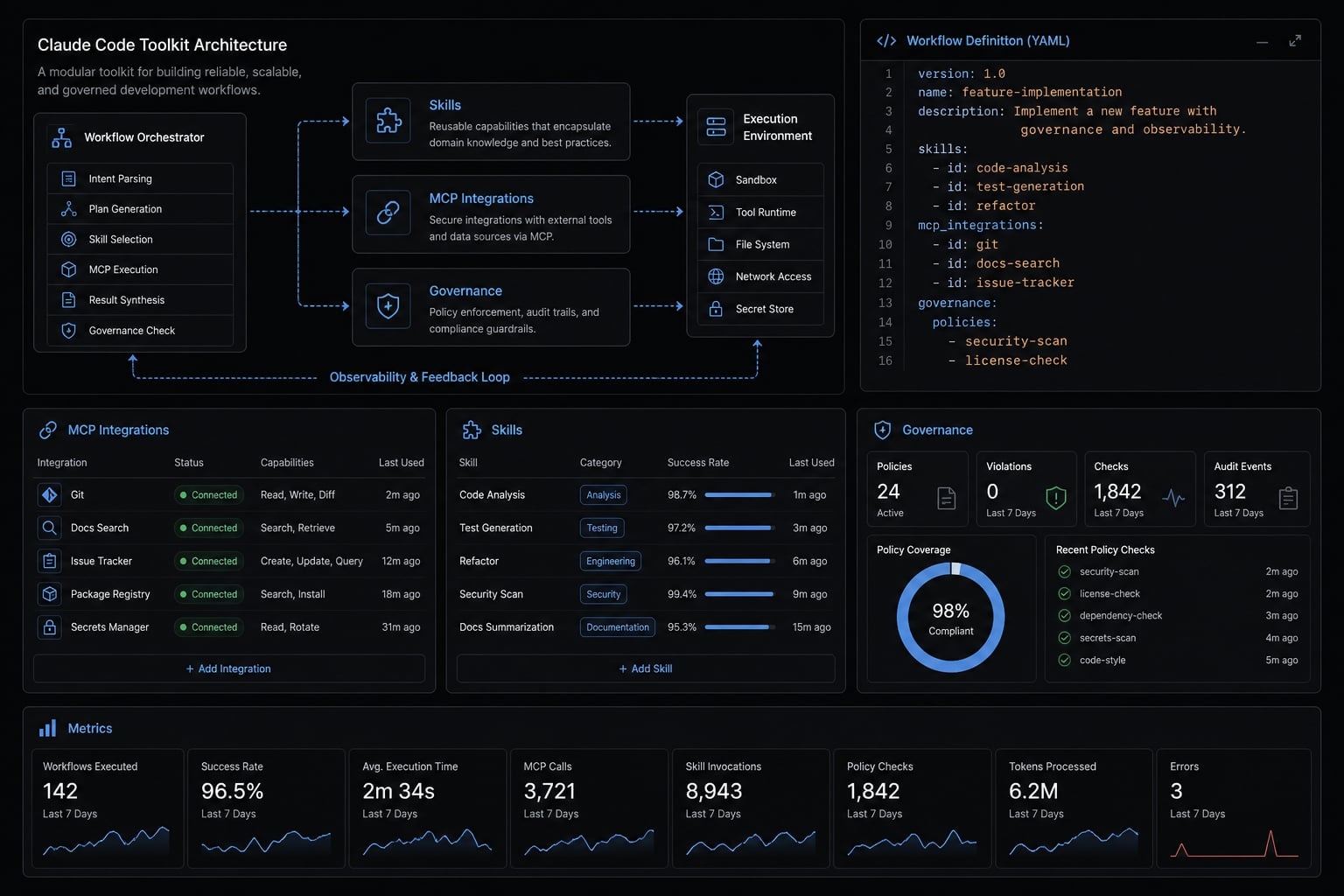
What a Claude Code toolkit actually means in practice
A Claude Code toolkit is a reusable workflow system built around Claude Code, combining instructions, packaged capabilities, integrations, and operating conventions so users can get reliable outcomes across projects without rebuilding context, prompts, and setup from scratch every time.
A Claude Code toolkit is not just a saved prompt. It is also not only one plugin or a folder of notes. In a working environment, the toolkit becomes the operating layer around Claude Code plugins, Claude Code skills, and the broader AI coding agent configuration that makes output more reliable.
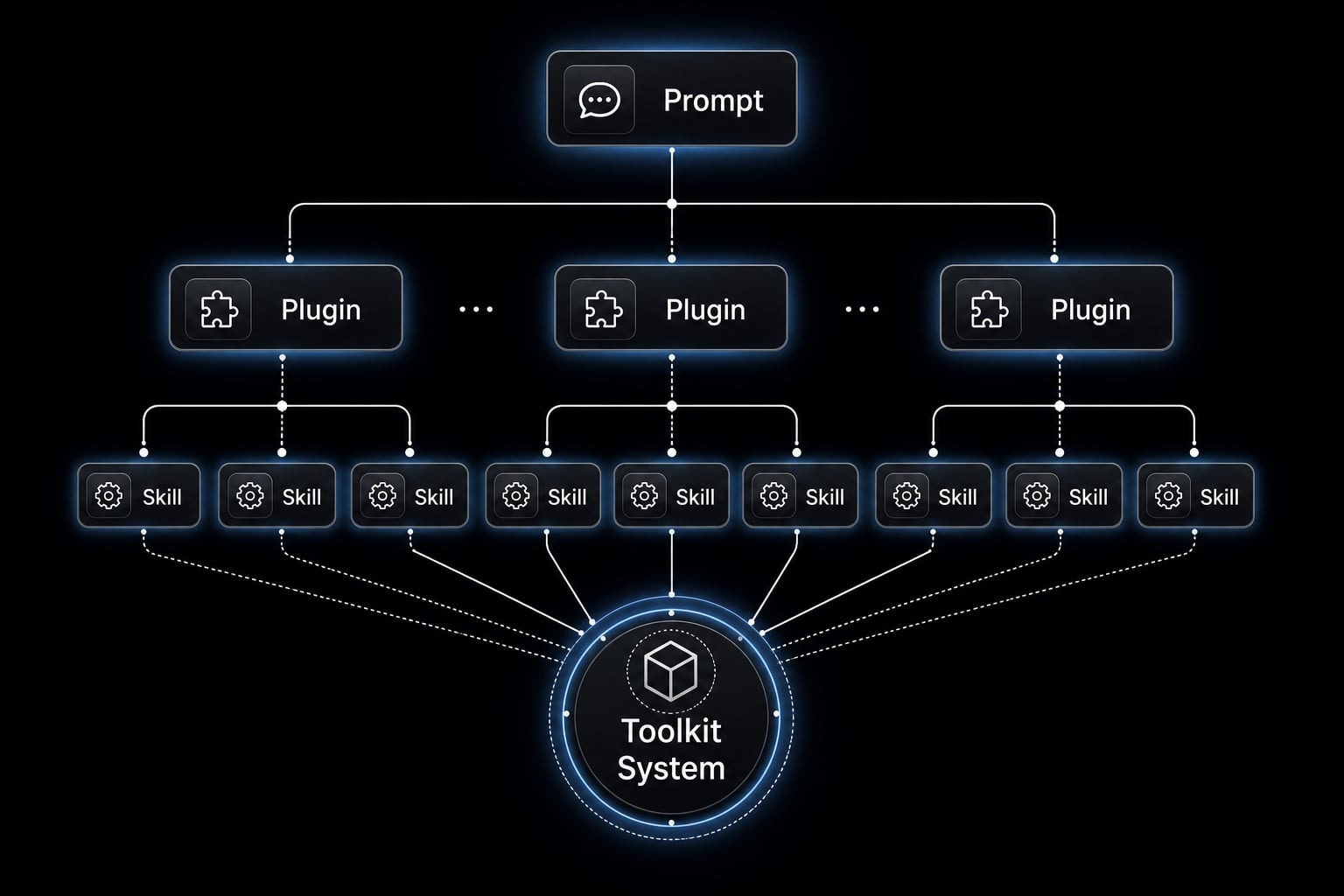
The distinction matters:
- A prompt is a one-off instruction.
- A plugin packages functionality or access in a reusable format.
- A skill library standardizes repeated tasks such as planning, debugging, or code review.
- A Claude Code toolkit coordinates those parts into a repeatable system.
That is why teams searching for a claude code toolkit are usually solving for reuse, not novelty. The real value comes from fewer repeated setup steps, more stable output, and cleaner handoffs between users or projects. A toolkit becomes useful when it helps produce production-ready Claude workflows, not when it simply adds more files to a repo.
What usually sits inside a toolkit
Most toolkits include some mix of:
- Claude Code skills for planning, debugging, code review, testing, and documentation
- Claude Code plugins for packaging and cross-project reuse
- MCP connections for docs, repos, search, or databases
- Reusable config files and invocation conventions
- Optional logging, analytics, or usage review
Why people search for toolkits instead of single tools
Most developers do not wake up wanting another layer of abstraction. They start looking for one because the current setup drifts. Prompts get copied into multiple repos. Activation behavior becomes inconsistent. Useful instructions go stale. Over time, workflow modularity matters more than one extra feature.
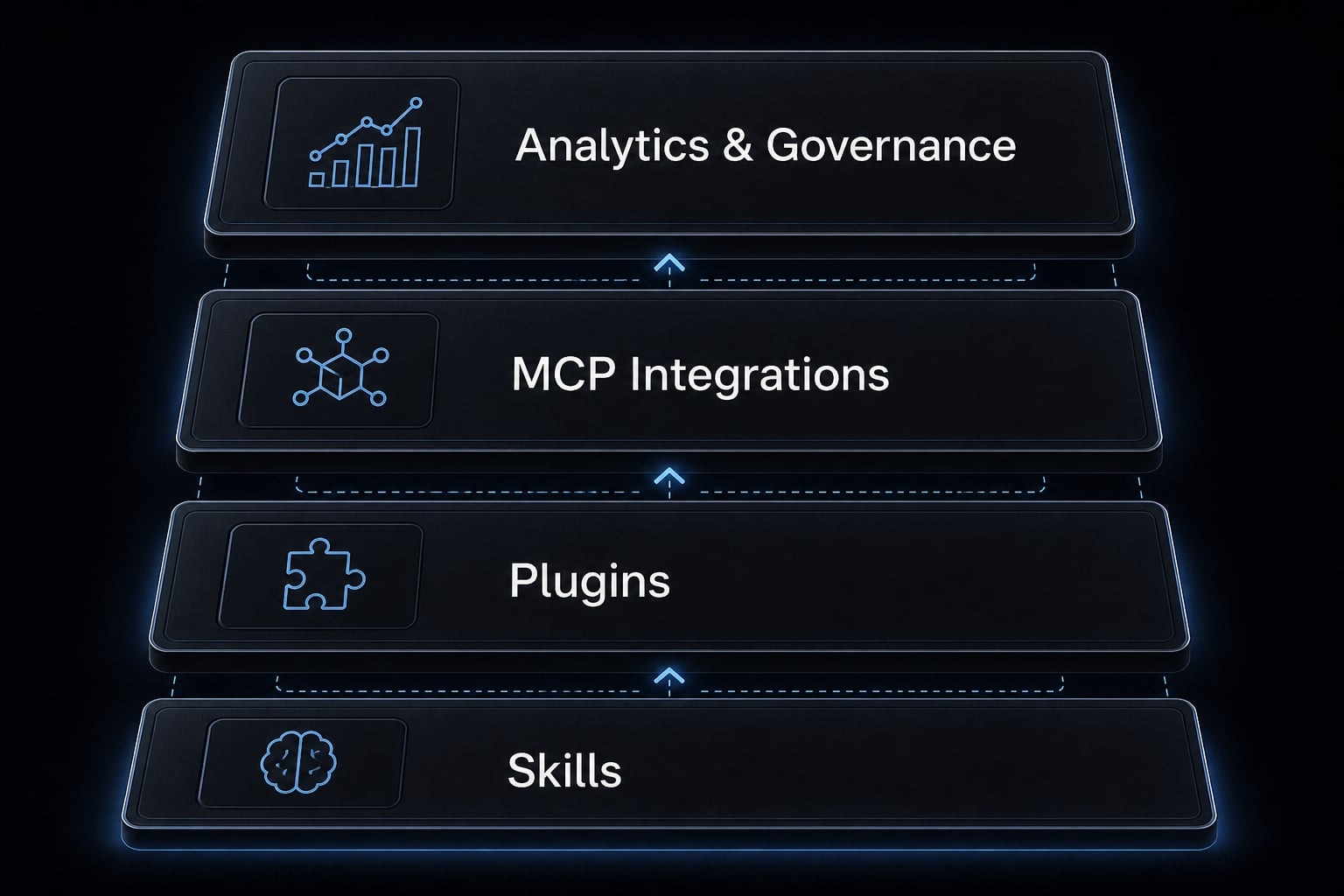
What a cood Claude Code toolkit should include
A good toolkit should include four practical layers: Reusable skills, packaged plugins, MCP servers, and enough analytics or governance to keep the setup maintainable. The goal is not feature count. The goal is reducing repeated setup while improving consistency and control.
Skills and reusable instructions
For most users, Claude Code skills are the best place to start because they create standard output with relatively low overhead. A strong toolkit should include reusable instructions for:
- Planning and task breakdown.
- Implementation guidance.
- Testing and debugging.
- Refactoring patterns.
- Code review.
- Documentation generation.
These skills matter because they reduce variation across sessions. Instead of rebuilding the same guidance repeatedly, users can call a stable pattern that supports development lifecycle automation without overengineering the workflow.
Plugins and marketplace packaging
A toolkit becomes more durable when those skills are packaged well. The Claude Code plugin ecosystem matters because packaging affects adoption just as much as content quality.
Well-packaged Claude Code plugins help with:
- Easier reuse across projects.
- Less repo-by-repo copy-paste.
- Cleaner updates.
- Better sharing across collaborators.
This is where many loose setups start to become maintenance debt. A folder of great prompts still creates friction if every new project requires manual reassembly. Packaging is a major part of AI agent configuration management.
MCP integrations and external tool access
Model Context Protocol (MCP) connects Claude Code to external systems such as documentation, repositories, search tools, databases, and internal knowledge sources. In practice, MCP servers reduce the need to stuff large amounts of context into prompts manually.
That is important for context-aware AI coding. The model performs better when relevant information can be retrieved through structured access rather than improvised prompt loading. This is also where many teams start seeing practical gains from improving AI coding agent performance with MCP.
Analytics, governance, and operational control
Solo users can tolerate a lightweight setup longer than teams can. Once workflows are shared, analytics and governance become more important.
A mature toolkit should help you:
- Track usage patterns.
- Control changes centrally.
- Understand cost and adoption.
This supports better accountability, token awareness, and safer usage across multiple users. It also reduces the risk that no one really knows which version of a workflow is in use.
If you are comparing setups and want a faster review process, agentkit.best can support that evaluation with a structured workflow audit and toolkit standardization guidance.
How to evaluate a Claude Code toolkit before you adopt it
Many toolkits look strong at install time and weak six weeks later. The common reason is simple: they are easy to try, but hard to maintain. If you are assessing the best Claude Code toolkit for production development, use a buyer-style framework rather than judging by GitHub polish alone.
- Setup speed and learning curve.
- Activation reliability and context consistency.
- Maintainability across projects.
- Ecosystem fit and extensibility.
- Governance, visibility, and production readiness.
Criterion 1: Setup speed and learning curve
A toolkit should deliver value quickly. If time to first value is too slow, adoption usually stalls before habits form.
Evaluate:
- How long it takes to get useful output
- Whether installation and onboarding are clear
- How much repo knowledge is assumed
- Whether the docs support real setup speed
Fast setup does not mean shallow capability. It means the path from install to practical use is short and understandable.
Criterion 2: Activation reliability and context consistency
This is one of the most overlooked factors. A toolkit that activates the right skills inconsistently creates false confidence. Users may think the setup is working when output quality is actually drifting from session to session.
Look for:
- Reliable triggering of relevant skills
- Stable output across repeated tasks
- Clear logic for how to optimize Claude Code skill activation
- Reduced context loss between related tasks
If activation is inconsistent, even a strong toolkit can feel unreliable in daily work.
Criterion 3: Maintainability across projects
This is where many GitHub-based setups fail. Useful workflows spread across multiple repos, then updates stop being synchronized. Versioning and update discipline become the weak point.
Check whether the toolkit supports:
- Central updates.
- Clear versioning.
- Easy reuse across more than one project.
- Less duplicated repo-level setup.
In practice, teams usually need packaging, not just instructions. That is the difference between a shared asset and a maintenance burden.
Criterion 4: Ecosystem fit and extensibility
A toolkit should fit your existing environment rather than forcing a parallel workflow. This includes compatibility with repos, external tools, and modular integration patterns.
Assess:
- Whether it works with your current toolchain.
- How well it supports manage custom plugins for Claude Code.
- Whether its plugin architecture for AI agents improves reuse.
- Whether extensibility adds capability without increasing fragility.
The right level of flexibility depends on your operating model. More extensibility is not always better if no one can maintain it.
Criterion 5: Governance, visibility, and production readiness
Governance matters more when more than one person uses the workflow, or when the workflow supports business-critical output. This is where governance and visibility stop being optional.
Review whether the toolkit provides:
- Token tracking or usage awareness.
- Config visibility.
- Plugin control.
- Security checks.
- Better AI agent configuration management.
These elements are often what separate a hobby setup from a system that can support improving AI coding agent performance with MCP in a controlled way.
Mini checklist: Fast evaluation before you commit
- Can I get value in under one day?
- Can I reuse it across more than one project?
- Can I update it centrally?
- Can I see usage and control changes?
- Will this still work well when more than one person uses it?
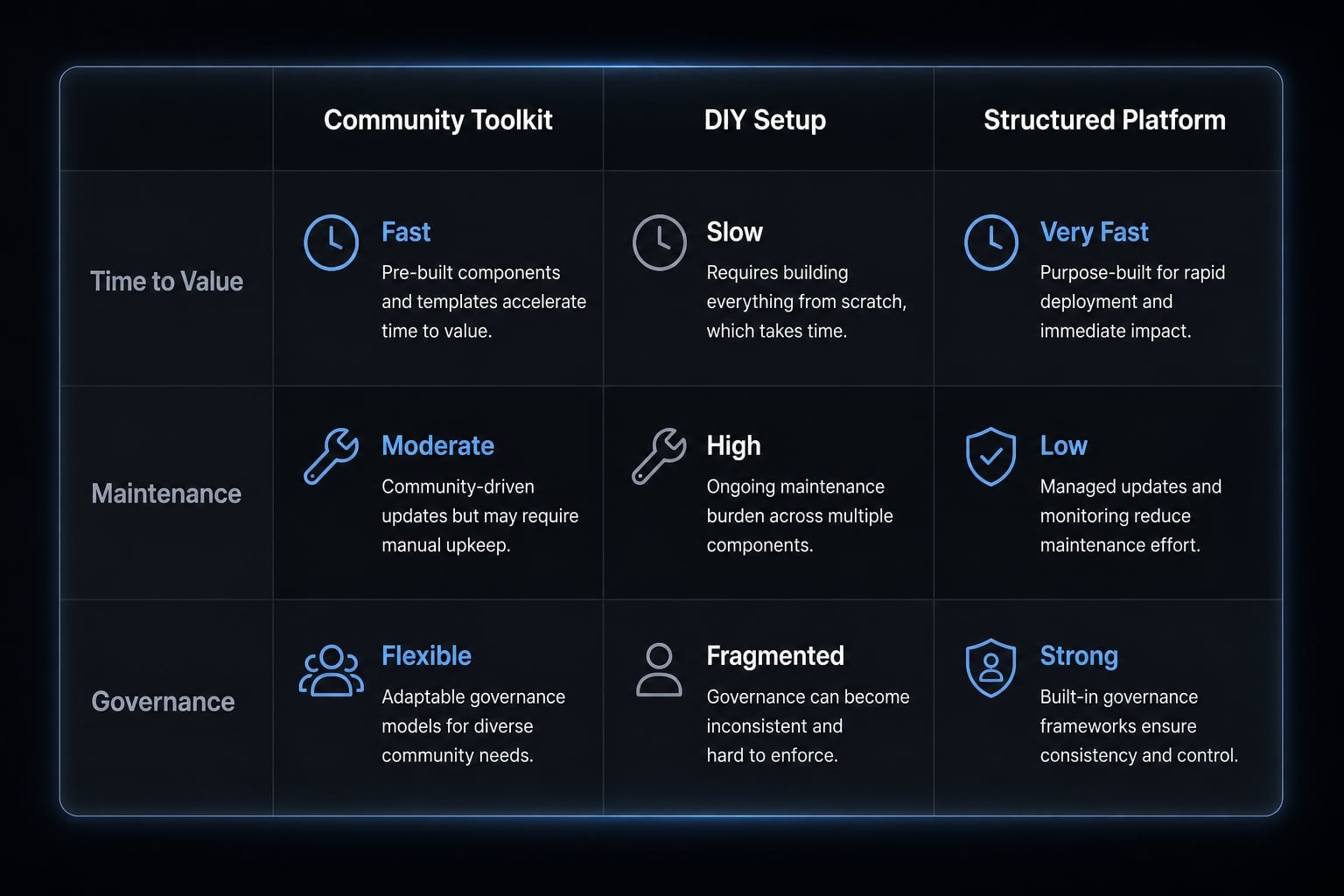
Community toolkit vs DIY setup vs structured platform
Once you understand the criteria, the decision usually narrows to three paths: A community-driven Claude Code toolkit, a custom internal setup, or a more structured Claude Code automation suite. The right choice depends less on ideology and more on how much repeatability, control, and maintenance discipline you need.
Criteria | Community Toolkit | DIY Internal Setup | Structured Platform |
|---|---|---|---|
Time to first value | Fast if docs are clear | Slow to moderate | Fast |
Upfront cost | Low | Medium to high | Subscription-based |
Flexibility | Medium | High | Medium to high |
Maintenance burden | Medium | High | Lower |
Cross-project reuse | Depends on packaging quality | Often inconsistent early on | High |
Governance and visibility | Limited | Custom-built | Stronger by default |
Best for | Solo devs, makers, experimentation | Teams with strong internal ownership | Teams wanting repeatability and control |
When a community toolkit is enough
A community setup is often enough when you are:
- Working solo.
- Experimenting with narrow use cases.
- Comfortable assembling pieces manually.
- Operating without strong governance needs.
This is usually the fastest low-cost path into an Anthropic AI development toolkit style workflow. The trade-off is that reuse and maintenance quality depend heavily on how well the toolkit is packaged and documented.
When DIY makes sense
DIY is the right fit when your workflow is highly specific and you have internal ownership to maintain it. This path suits teams that want maximum control over AI coding agent configuration and are comfortable shaping their own plugin architecture for AI agents.
DIY works best when you have:
- Strong internal engineering discipline.
- Clear workflow requirements.
- Tolerance for maintenance overhead.
- A reason to prioritize flexibility over speed.
The risk is that workflow modularity can turn into fragmentation if conventions are not enforced.
When a structured platform becomes the better option
A structured platform becomes more attractive when you are moving from experimentation to repeated delivery. That usually means multiple users, recurring workflows, shared configurations, and a stronger need for visibility.
It is often the better option when you need:
- Cross-project consistency.
- Centralized updates.
- Better operational control.
- Lower setup drift.
- More reliable production-ready Claude workflows.
This is the point where the difference is no longer feature count. It is whether the system can be reused and governed without constant cleanup.
Example of a real-world Claude Code toolkit structure
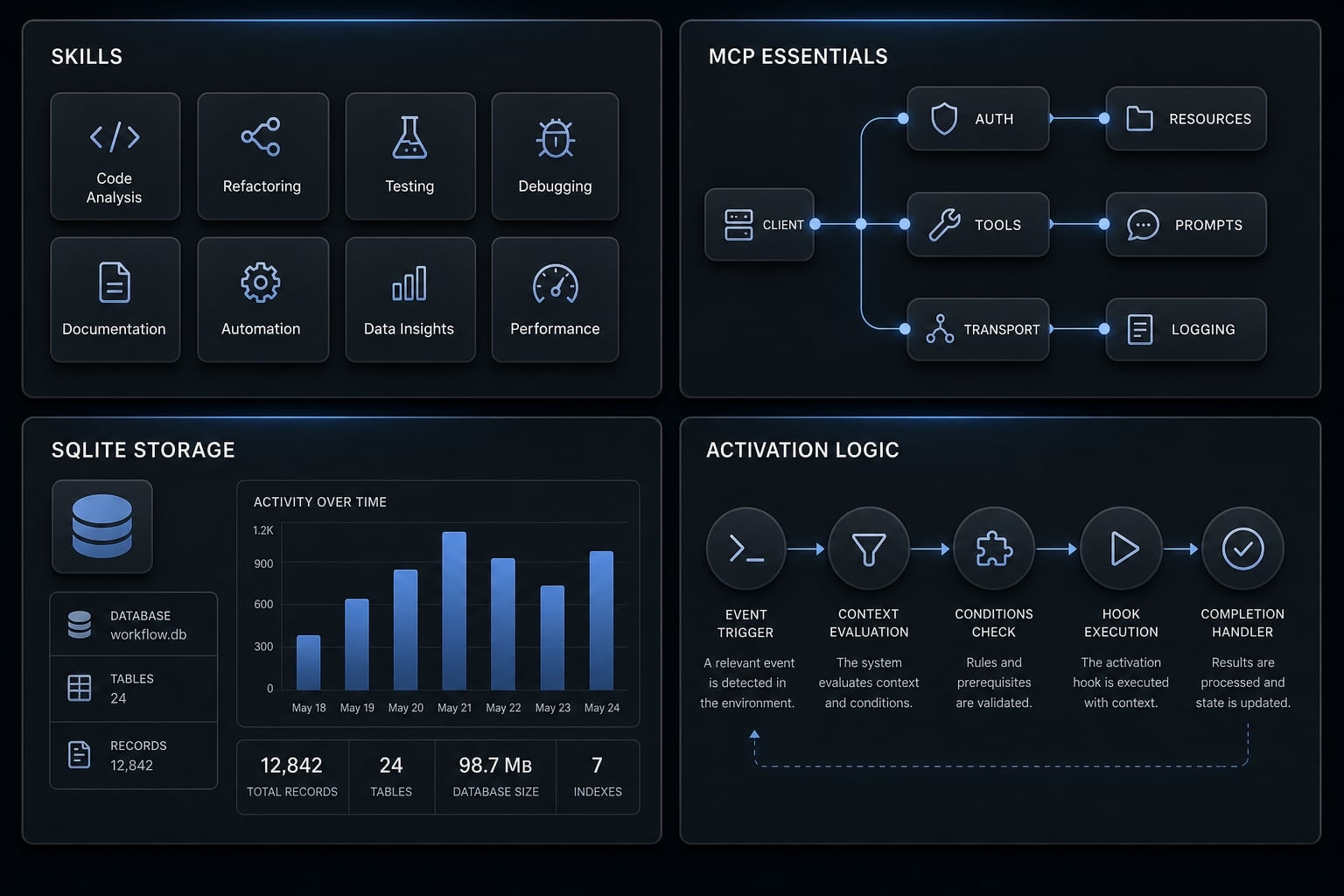
A practical community-style toolkit often combines reusable workflow parts instead of trying to do everything in one package. A visible ecosystem pattern includes modules such as toolkit-skills, MCP essentials, a forced-eval hook, SQLite for lightweight storage, and Claude Code usage analytics for tracking activity.
This kind of structure matters because it shows what a toolkit looks like in real usage:
- Toolkit-skills standardize planning, research, reflection, or review tasks.
- MCP essentials define recommended external connections.
- A forced-eval hook can improve activation reliability.
- SQLite provides lightweight local storage for logs or workflow data.
- Usage analytics help users understand session patterns, token use, and workflow quality.
Why this example matters
It turns an abstract concept into an operational one. You can see how activation patterns, packaging, and lightweight analytics all affect actual usability. It also highlights why activation reliability matters: Strong instructions do not help much if they fail to trigger at the right time.
Where users may still hit friction
Even with a strong community pattern, common limits remain:
- Repo comfort is still required.
- Manual assembly can become tedious.
- Governance is usually limited.
- Updates depend on user discipline.
That is why a toolkit can be impressive and still not be enough for teams that need centralized control.
Where AgentKit fits for teams that need more than a DIY toolkit
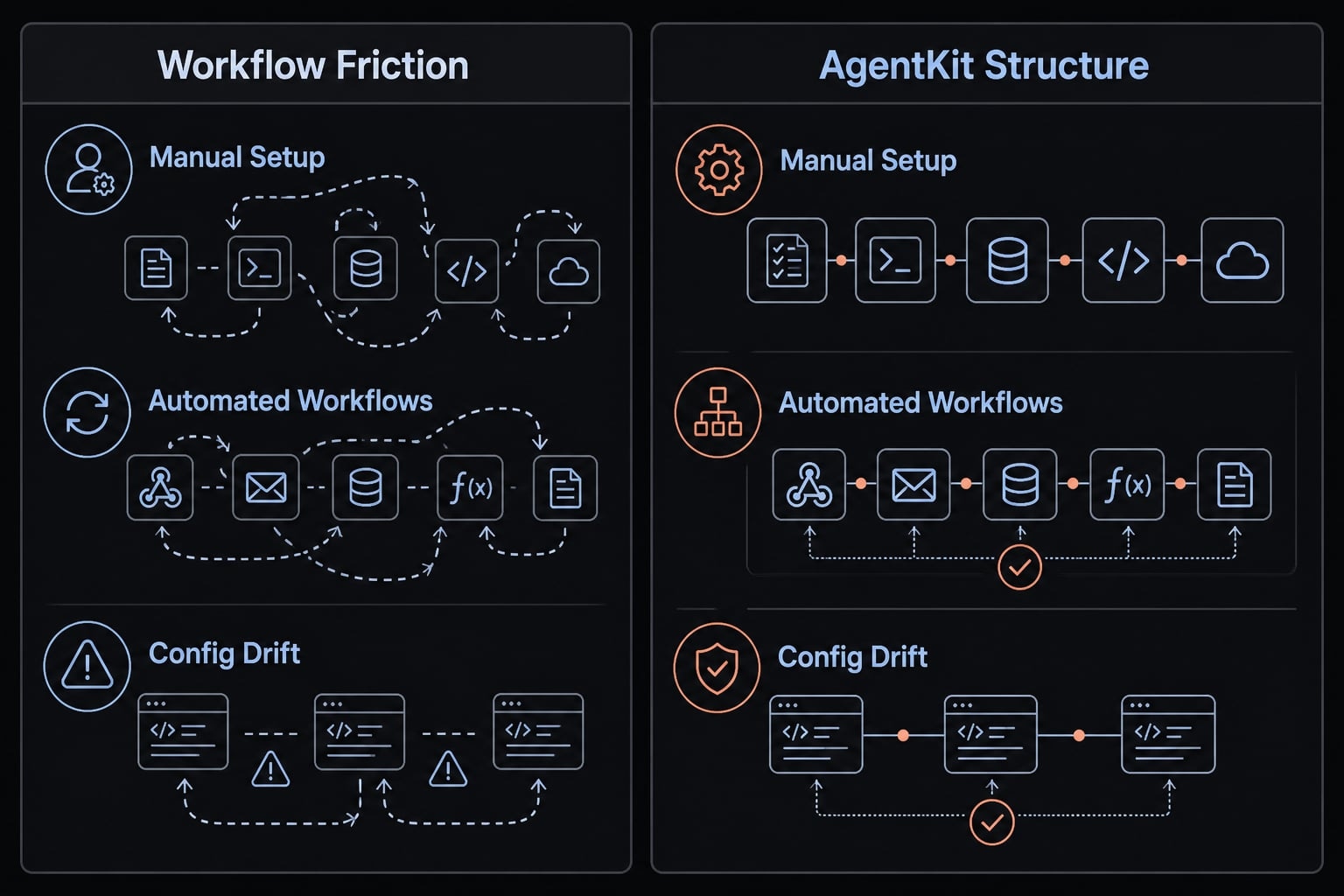
By the time a team is dealing with prompt sprawl, repeated manual setup, and config drift, the challenge is no longer tooling discovery. It is operational consistency. This is where AgentKit fits best: not as a replacement for every lightweight toolkit, but as a structured layer for teams that need more reliable production-ready Claude workflows.
What AgentKit solves beyond a loose toolkit
AgentKit addresses the failure points that usually appear as workflows become shared and business-relevant:
- Prompt sprawl → Reusable agent kits.
- Fragmented execution across tasks → Specialized subagents.
- Repeated manual steps → Automated workflows.
- Disconnected external context → MCP integrations.
- Local-only setup friction → Cross-platform CLI.
- Config drift across projects → Centralized AI agent configuration management.
- Limited control over plugins, plans, and usage → Desktop control center for skills, plugins, configs, plans, tokens, and security checks.
This matters most when the workflow must work across more than one user, repo, or delivery pattern. AgentKit is designed around repeatability rather than one-off experimentation.
Best-fit user profiles
AgentKit is usually the strongest fit for:
- Solo founders moving from experiments to repeatable shipping.
- Small product teams using Claude Code, Codex, Copilot.
- Agencies standardizing AI-assisted development or marketing execution.
- Operators who need consistent workflows without rebuilding setup repeatedly.
It is important to be clear about fit. AgentKit is strongest when reuse, consistency, and operational control matter more than maximum DIY flexibility. For a casual solo user on day one, it may be more structure than necessary.
If your team is crossing from scattered experimentation into shared execution, reviewing AgentKit through a guided walkthrough can help clarify whether a structured platform is the right next step.
A simple adoption path: What to install or standardize first
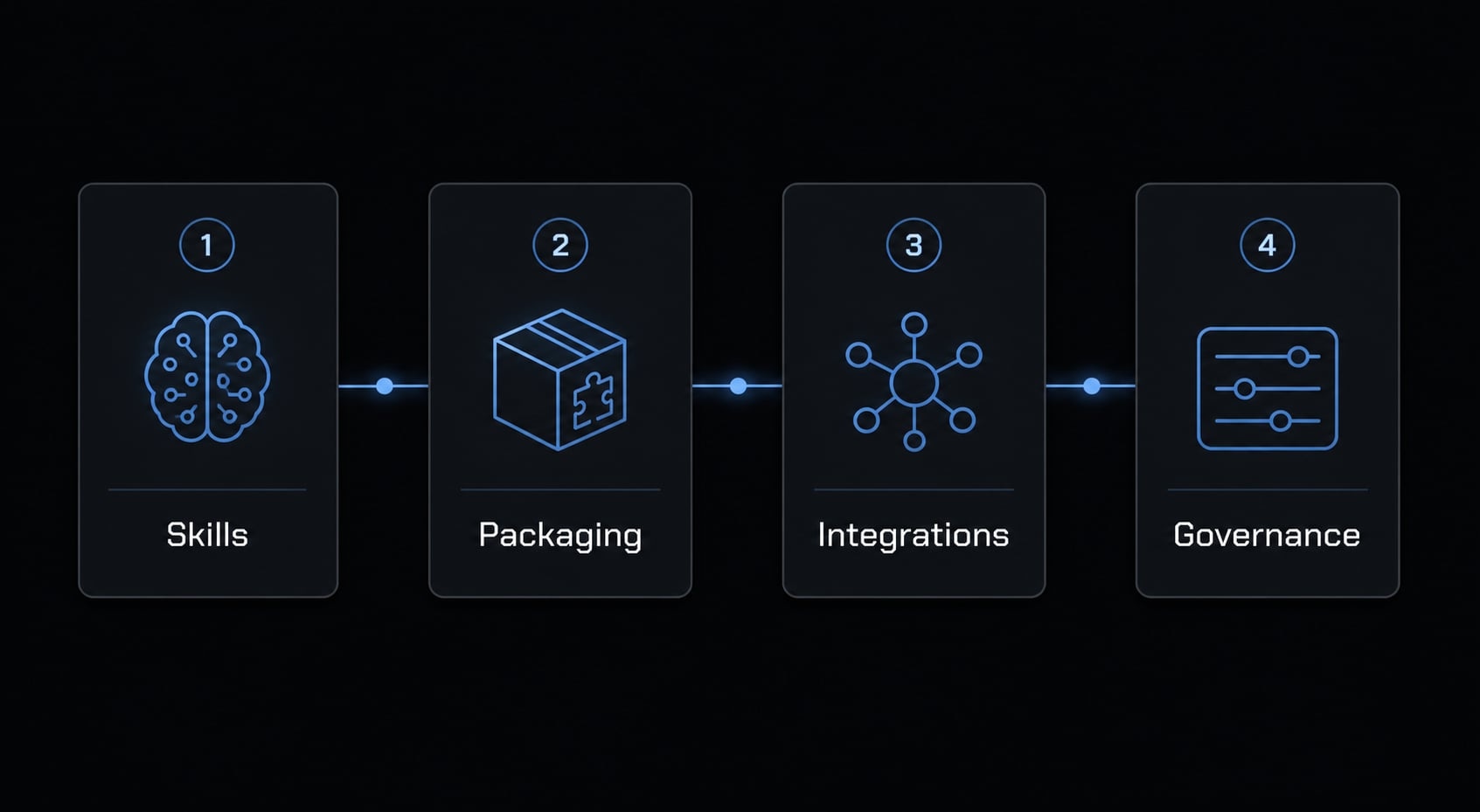
Most teams make the same early mistake: They try to standardize everything at once. That usually slows adoption. A better approach is phased rollout. Individual productivity matters, but once workflows are shared, standardization also reduces onboarding time and cross-project inconsistency.
- Start with reusable skills.
- Add plugin packaging and shared conventions.
- Connect MCP and external systems.
- Add analytics, governance, and centralized control.
Phase 1: Start with reusable skills
Begin with the highest-frequency tasks. Focus on Claude Code skills that remove repeated instruction-writing.
- Planning.
- Debugging.
- Code review.
- Documentation.
This is also the most practical place to improve how to optimize Claude Code skill activation without building too much too early.
Phase 2: Add plugin packaging and shared conventions
Once the skills prove useful, package them. This helps with managing custom plugins for Claude Code and reduces repo-by-repo duplication.
Standardize:
- Invocation patterns.
- Naming conventions.
- Shared usage rules.
- Cross-project reuse.
Phase 3: Connect MCP and external systems
Next, add MCP access where context depth matters most.
- Search.
- Documentation.
- Databases.
- Internal references.
This is where workflow modularity becomes more valuable, because the system starts pulling context instead of relying on manual prompt stuffing.
Phase 4: Add analytics, governance, and centralized control
Finally, add the controls that matter once usage expands.
- Token visibility.
- Config management.
- Security checks.
- Team-level standardization.
Frequently asked questions
What is a Claude Code toolkit?
A Claude Code toolkit is a coordinated system of skills, plugins, and configurations designed to make AI development workflows repeatable. Unlike a single prompt, it bundles reusable instructions, MCP integrations, and standardized operational settings to ensure consistent performance across multiple projects.
What should a professional Claude Code toolkit include?
A robust toolkit should include:
- Skills: Standardized instructions for planning, coding, and testing.
- Plugins: Reusable logic to avoid repo-level duplication.
- MCP Servers: Tools for connecting to databases, docs, and search.
- Governance: Basic token tracking and configuration visibility.
How do I choose between a community toolkit, DIY setup, or structured platform?
- Community Toolkit: Best for solo experimentation and low-governance use cases.
- DIY Setup: Ideal for teams with strong engineering ownership willing to maintain custom tooling.
- Structured Platform: Best for teams requiring repeatable, scalable workflows with centralized management and security checks.
Why is activation reliability important for Claude Code skills?
Activation reliability ensures that specialized skills trigger consistently when needed, rather than sporadically. Using a "forced-eval" hook or structured plugin packaging significantly improves consistency, preventing the common issue where AI agents fail to apply the correct context to specific coding tasks.
What is the advantage of using MCP in a Claude Code workflow?
MCP (Model Context Protocol) allows Claude Code to securely connect to external data sources like internal documentation, databases, and private repositories. This moves the workflow from relying on manual prompt-stuffing to context-aware AI coding, where the agent retrieves necessary information dynamically.
When should a team upgrade from a custom DIY toolkit to a platform like AgentKit?
Teams should upgrade when the maintenance of manual configurations creates "setup drift" across projects. AgentKit provides a structured layer for managing subagents, automated workflows, and security, making it suitable for teams that need to scale AI-assisted development without constant manual rebuilding.
What is the first step to building a production-ready Claude Code workflow?
Start by standardizing your most repetitive tasks into reusable skills. Once you have a core set of reliable skills, package them into plugins to enable cross-project reuse, and finally integrate MCP servers to connect your coding agent to your specific technical context and documentation.
Read more:
- Claude Code tutorial: Set up and master your AI coding agent
- Everything Claude Code: A guide to streamlined AI coding
- Claude Code hooks guide: Automate and control AI workflows
Conclusion
A Claude Code toolkit is most useful when it becomes a reusable workflow system rather than a pile of prompts and scattered configs. The right path depends on your stage and operating model: Community toolkits are often enough for experimentation, DIY setups work when you need deep custom control, and structured platforms make more sense when repeatability and governance start to matter.
If your priority is lightweight exploration, start small with reusable skills and basic packaging. If your goal is consistent, production-ready Claude workflows across projects or team members, evaluate maintainability, activation reliability, and control before you commit to any setup. If you want a clearer picture of what a structured option looks like in practice, explore AgentKit’s kits, review an example workflow setup, or request a walkthrough tailored to your team’s operating model.