Master Claude Code for large codebases: Setup & best practices
Claude Code for large codebases: Setup, best practices and templates
Yes - Claude Code for large codebases can work effectively without loading the entire repository into the model. Results depend on task scope, relevant context, and a workflow that verifies changes. In a monorepo, common problems include unrelated file reads, conflicting instructions, and full-repository tests triggered for a small package fix. This guide explains how to choose a setup level, configure repository instructions, select tools, and troubleshoot unreliable behavior. It uses an illustrative TypeScript B2B SaaS monorepo, not a tested implementation or customer case study.
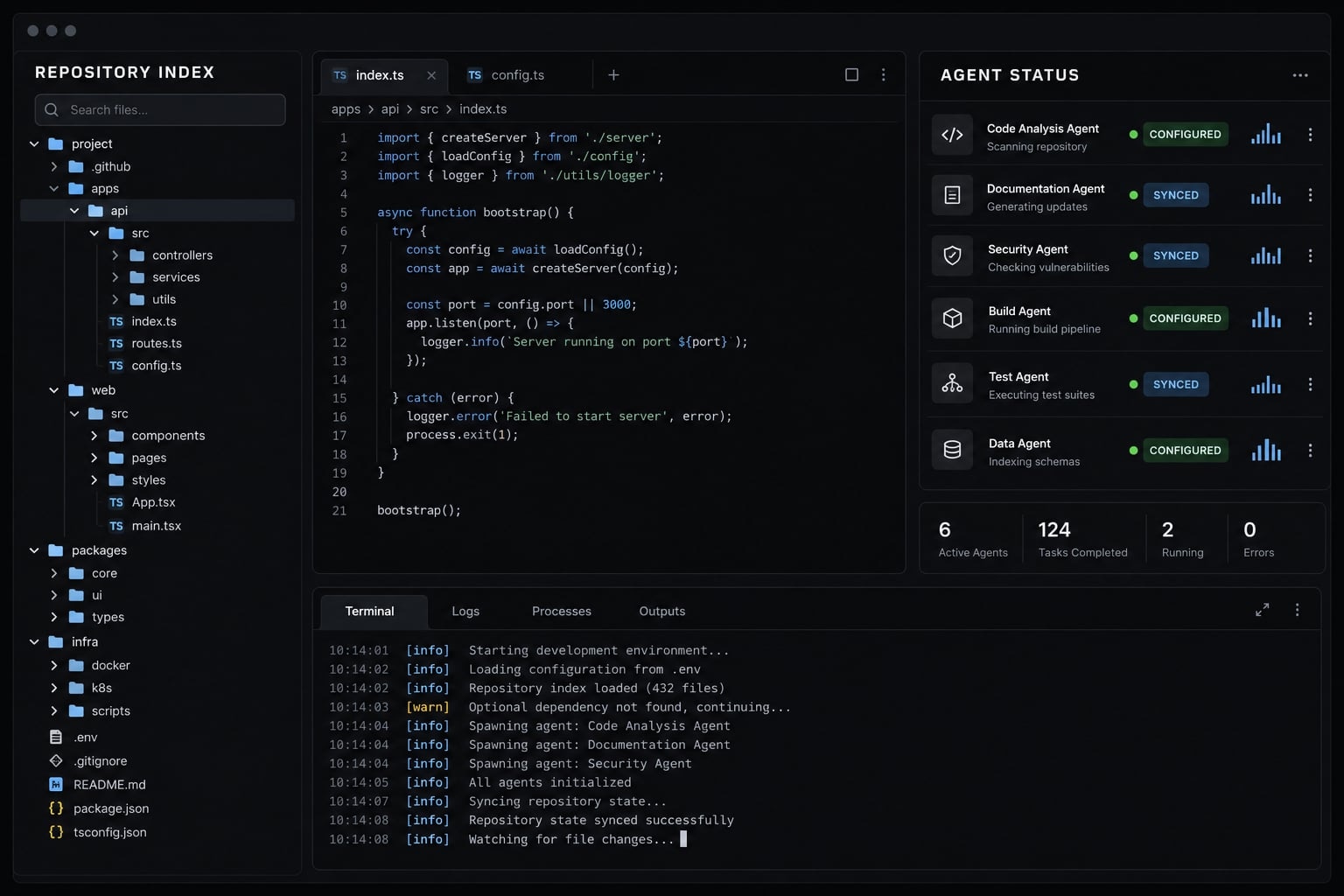
The operating model is straightforward:
- Scope: Bound the task and relevant repository surface.
- Context: Supply concise instructions and useful repository knowledge.
- Workflow: Separate discovery, implementation, and verification.
This is context engineering: maintaining the precise information and controls necessary for effective AI collaboration
Can Claude Code handle a large codebase?
Claude Code can work in large repositories by selectively searching, reading, and modifying relevant files. It does not need every file in context simultaneously. Effectiveness depends on dependency complexity, instruction quality, available tools, and validation - not repository size alone. Broad exploration still consumes context and needs a clear purpose.
Agentic Search vs. Repository Indexing
Agentic search means iterative exploration using search, file-reading, and execution tools. Anthropic’s Claude Code documentation describes exploration and targeted context gathering as practical workflow foundations.
Approach | Strength and operational dependency |
|---|---|
Live agentic search | Explores current files; depends on useful queries, accessible tools, and bounded discovery. |
Repository indexing | Retrieves from a prepared representation; depends on coverage, freshness, and retrieval quality. |
LSP-based navigation | Locates symbols and references; depends on language-server support and project configuration. |
Language Server Protocol (LSP) is a standard supporting language-tooling capabilities such as definitions and references. These approaches can coexist; they are not interchangeable architectural layers.
The context window is the information available to the model during an interaction. Selective exploration helps manage it, but retrieved files, instructions, and tool results still occupy space.
Why the default setup becomes noisy
When deploying Claude Code in large codebases without configuration, common failure patterns arise:
- Unrelated reads: Broad searches return files outside the task’s dependency chain.
- Instruction overload: Repeated or contradictory guidance obscures the applicable rule.
- Slow validation: Root commands run checks unrelated to the changed package.
In an illustrative SaaS repository, an SDK error-handling fix does not automatically require reading every frontend route. However, a changed SDK response type may require inspecting frontend consumers. Good codebase navigation narrows irrelevant work without hiding relevant dependencies.
Choose the right setup level before adding more tools
Start with dependable fundamentals. A harness is the configuration, tools, instructions, and execution controls surrounding the model. A larger harness is not inherently a better one.
The following is an editorial decision framework for context engineering:
Component | Growing repository | Monorepo | Multiple teams |
|---|---|---|---|
Root instructions | Baseline | Baseline | Baseline |
Task scope | Baseline | Baseline | Baseline |
Local validation | Baseline | Baseline | Baseline |
Access controls | Baseline | Baseline | Baseline |
Git diff review | Baseline | Baseline | Baseline |
Package instructions | Optional | Recommended | Recommended |
Dependency map | Optional | Recommended | Recommended |
LSP or scout | Optional | Optional | Optional |
Shared asset versioning | Optional | Recommended | Baseline |
Named configuration owner | Recommended | Recommended | Baseline |
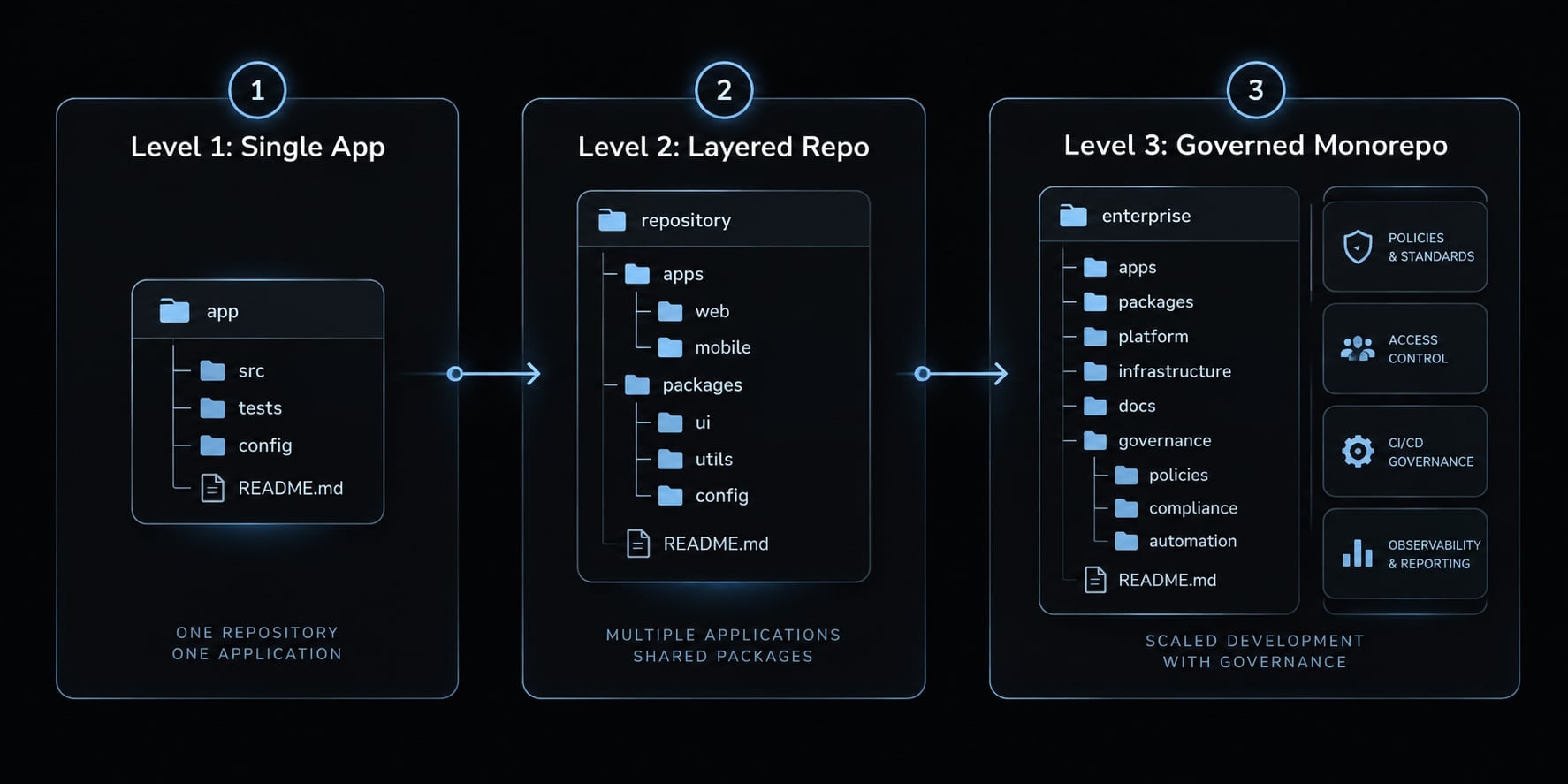
Level 1 - Minimum setup for a growing repository
Use concise root instructions, a relevant working directory, documented local checks, appropriate access restrictions, and final diff review. This AI coding workflow is sufficient for a single application. Avoid adding integrations simply because they exist in another team's configuration.
Level 2 - Optimized setup for a monorepo
Add package-specific instructions and dependency-aware validation. Identify which shared libraries and consumers may be affected before editing. A small SaaS team needs layered instructions without needing organization-wide plugin distribution. LSP, hooks, and subagents remain optional responses to observed limitations.
Level 3 - Governed setup for multiple teams
Assign ownership of shared configuration, including security responsibilities. Version changes, review them, pilot rollouts, and retain a rollback path. Measure comparable tasks consistently. Plugins are one distribution mechanism; a reviewed repository template or shared configuration repository may suffice.
Configure Claude Code for a large repository in five steps
Establish task boundaries before adding integrations.
Step 1 - Start Claude in the narrowest useful directory
Choose a starting directory that matches the task scope. A single-package repository usually needs no additional directory structure, but a monorepo benefits from localized execution.
Task | Starting location | Preserve visibility into |
|---|---|---|
Single-package change | Package directory | Direct dependencies |
Shared-library change | Library or root | Known consumers |
Cross-package feature | Repository root | Full affected chain |
Legacy subsystem repair | Subsystem directory | Adapters and integration tests |
The active working directory sets session context - it does not serve as a security sandbox. Check instruction discovery and configured access separately.
Step 2 - Layer CLAUDE.md files by responsibility
Keep global constraints at the root and local conventions near the code.
saas/├── CLAUDE.md├── services/api/CLAUDE.md├── packages/sdk/CLAUDE.md├── packages/contracts/└── apps/web/CLAUDE.md
Illustrative Root CLAUDE.md Template:
# RepositoryTypeScript SaaS: API, generated SDK, web application.# ConstraintsPreserve API compatibility. Avoid unrelated edits.# CommandsUse package checks first; pnpm test is repository-wide.# PointersSee docs/codebase-map.md and package CLAUDE.md files.
Illustrative packages/sdk/CLAUDE.md:
# Purpose and conventionsPublic API client; preserve exported names.# Checks, from repository rootpnpm --filter @sample/sdk testpnpm --filter @sample/sdk lintpnpm --filter @sample/sdk build# Dependencies and generationSource contract: packages/contracts/openapi.yaml.Do not hand-edit src/generated/.Regenerate: pnpm --filter @sample/sdk generate.
Anthropic’s documentation confirms that Claude Code loads CLAUDE.md files from the working directory and its parents at startup, and loads nested CLAUDE.md files when it reads files in those subdirectories..
Step 3 - Block irrelevant and sensitive paths
Distinguish irrelevant build output from confidential credentials. The following configuration in .claude/settings.json restricts read operations on sensitive directories:
{ "permissions": { "deny": [ "file:read:./secrets/**", "file:read:./**/.env*" ] }}
Test restrictions with dummy files before relying on them. .gitignore prevents git tracking, but explicit deny rules restrict the matching tools; they do not automatically block equivalent access through shell commands. Test coverage with dummy files, and use sandboxing or OS permissions for sensitive paths..
Step 4 - Define local build, test and lint commands
Use a clear validation ladder to prevent running unnecessary root-level test suites:
- Changed-file or unit checks.
- Package tests, lint, and build.
- Direct-dependent checks.
- Integration or repository-wide checks when warranted.
An illustrative configuration correction:
- After every SDK edit, run pnpm test.+ Run SDK package checks first.+ For contract changes, validate API and web consumers.+ Preserve required repository-wide CI gates.
Step 5 - Add a lightweight codebase map
Keep architecture routing short in a file like docs/codebase-map.md:
services/api/: backend; implements the shared contract.packages/contracts/: API schema; drives SDK generation.packages/sdk/: client; consumed by the frontend.apps/web/: frontend; uses SDK response types.
Use LSP, skills, hooks, MCP and subagents only when they solve a specific problem
Choose the smallest mechanism that addresses a recurring limitation:
Mechanism | Use it for | Avoid using it for |
|---|---|---|
Directory instructions | Package-wide conventions | Long task-specific procedures |
Path-scoped rules | Guidance for matching files | Enforced access restrictions |
Skills | Reusable task procedures | Mandatory policy enforcement |
Hooks | Deterministic event checks | Subjective architecture judgment |
LSP/code intelligence | Definitions and references | Arbitrary string discovery |
MCP | External tools and data | Unneeded integrations |
Subagents | Bounded delegated tasks | Uncoordinated parallel edits |
Plugins | Packaging shared extensions | Replacing configuration ownership |
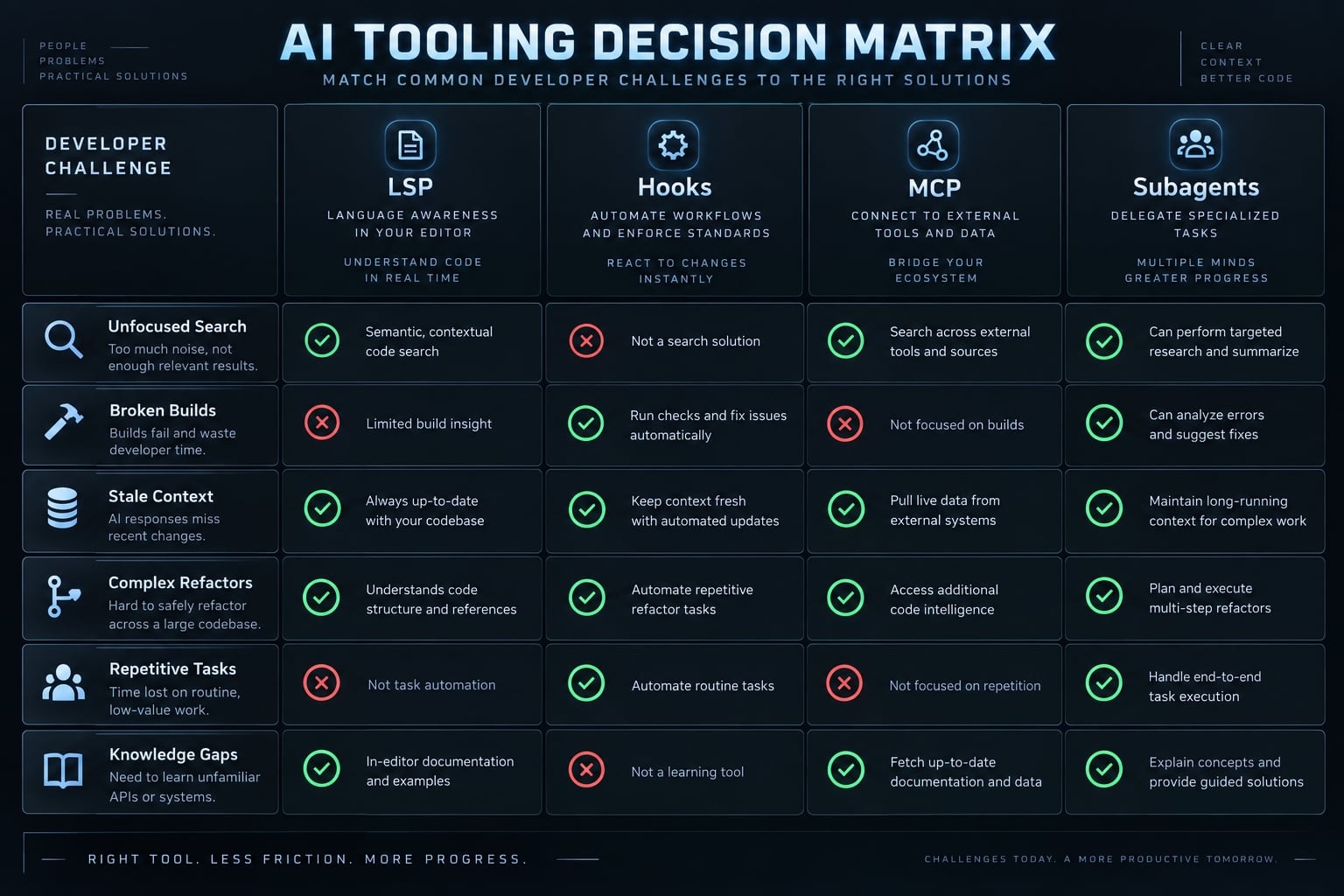
Use LSP when text search is no longer precise enough
An SDK interface name may appear in declarations, comments, fixtures, and unrelated strings. Symbol references can distinguish actual consumers from incidental matches.
Keep text search for comments, strings, and broad discovery. Confirm your Claude Code integration, language server, and project support the required operations. The official Language Server Protocol specification defines capabilities; individual implementations vary.
Move repeatable procedures into skills
API endpoint creation, database migration checks, and release checks are useful candidates. Define inputs, steps, expected artifacts, and validation requirements.
Skills hold reusable procedures; path-scoped rules attach guidance to matching files. Neither should be mistaken for an enforceable security policy. Skills can reduce repeated instruction writing, but they do not have universally zero context overhead.
Use Hooks for deterministic guardrails
Anthropic’s Hooks reference distinguishes events such as PreToolUse and PostToolUse. A supported pre-action hook can block a matching operation; a post-action check detects consequences after execution.
Prefer fast, narrow checks. Review hook code because it executes with its configured environment and privileges. A formatter cannot determine whether a public API change is architecturally appropriate.
Separate exploration from editing with subagents
A scout should return relevant paths, symbols, dependencies, uncertainties, and recommended checks - not an exploration transcript.
Restrict its tools and permissions appropriately. Calling it “read-only” does not make it so. Keep implementation ownership explicit and avoid overlapping parallel edits.
Restricted scout → Assigned implementer → Review → Human approval
Separate contexts can reduce irrelevant handoff material, but summaries can omit important evidence. Verify consequential findings. Subagents are not independent security assurance.
Feature behavior is version-dependent; consult Anthropic’s Skills, Subagents, Hooks reference, and Plugins documentation before adoption.
Follow a controlled workflow for cross-package changes
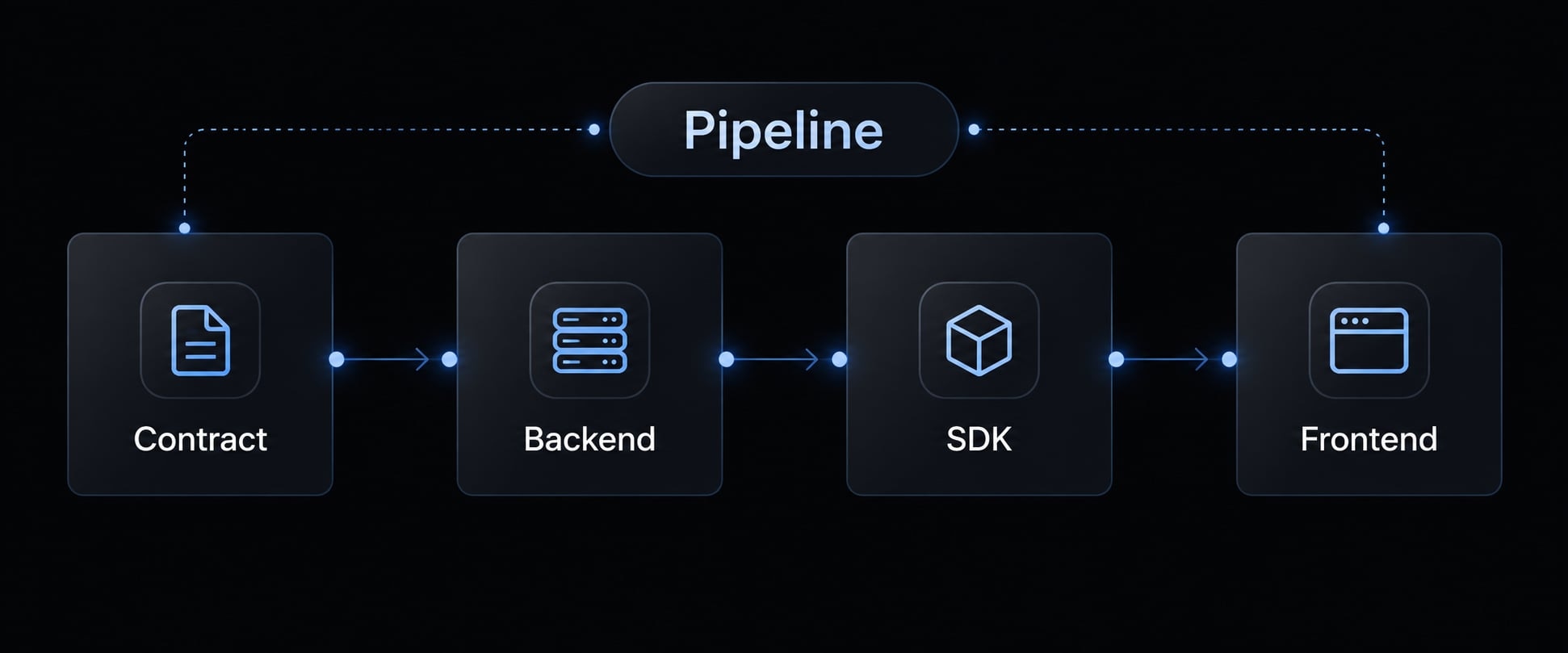
Cross-package changes require visibility across the dependency chain, not indiscriminate access to everything. Consider an API contract update adding an optional displayName field:
Contract → Backend → Generated SDK → Frontend ↓ ↓ ↓ ↓Schema API tests Package checks Consumer tests → Integration checks → Human approval
Identify the change surface
Locate the source contract, backend response builder, generated SDK types, frontend consumer, and relevant tests. List excluded packages and unresolved consumers.
The SDK is generated: change packages/contracts/openapi.yaml, then run the documented generator. Do not patch generated types manually.
Create a dependency-aware plan before editing
Require approved paths, compatibility requirements, edit order, validation commands, and open questions.
For this scenario: update the schema and backend, regenerate the SDK, then update frontend handling and tests. A written plan is a proposal, not proof of correctness.
Grant only the required directory access
Additional-directory access may be needed for dependencies outside the active workspace. Review the installed version’s access configuration before granting it.
Working-directory choice, configured access, and instruction discovery remain distinct. Git’s git-sparse-checkout documentation describes working-tree sparsity; git-worktree describes separate working trees. Neither is a security boundary. Sparse checkout may hide files needed for investigation or builds.
Separate discovery and implementation
Preserve relevant symbols, dependency findings, uncertainties, and acceptance criteria in a concise handoff. The implementer should confirm critical references before editing.
Validate from local to global
Illustrative commands, assuming matching workspace scripts:
pnpm --filter @sample/sdk generatepnpm --filter @sample/api testpnpm --filter @sample/sdk testpnpm --filter @sample/web testgit diff --checkgit diff
Add configured lint, build, and integration checks. Review the complete diff for unrelated changes, generator churn, and compatibility.
Evidence status: These commands were not executed. No passing results, final code diff, reviewer findings, test date, Claude Code version, or model identifier are claimed. A real implementation should record all of them before approval.
Compact or restart at clear task boundaries
Continue when context remains relevant. Compact when useful history needs summarizing. Restart when obsolete exploration dominates.
Before either action, save decisions, changed files, validation results, and unresolved questions. Compaction is not lossless memory.
Diagnose common Large-Codebase failure modes
Start with an observable symptom, test the smallest plausible correction, and check whether correctness improves. A broad search may be justified for cross-package work; it is not automatically waste.
Symptom | Likely cause | First fix |
|---|---|---|
Unrelated package reads | Vague task boundaries | Name relevant paths and exclusions |
Context exhaustion before editing | Excessive exploration or instructions | Narrow discovery; shorten repeated guidance |
Imprecise symbol search | Text matches obscure actual references | Try supported LSP navigation |
Missed shared dependencies | Scope excludes consumers | Trace imports and contract usage |
Slow validation | Global checks used indiscriminately | Establish package-first checks |
Generated-file edits | Generation path unclear | Document generator; test write-relevant controls |
Conflicting instructions | Overlapping rules or stale guidance | Remove contradictions at the source |
Inconsistent team behavior | Configuration, model, or environment differences | Compare settings and run conditions |
Gradual configuration degradation | Obsolete assets accumulate | Assign ownership and remove unused rules |
Excessive integration overhead | Unneeded tools or slow external calls | Inspect actual context and latency; disable selectively |
For example, if an SDK-only task repeatedly invokes pnpm test at the root, inspect both instructions and hooks. Changing the package instructions will not help if a hook still launches the full suite.
Likewise, generated-file protection needs controls covering relevant write operations. A Read deny rule is not write protection.
Review the harness every three to six months
This is a suggested maintenance cadence, not a product requirement. Review sooner after major repository, model, tool, or security changes.
Checklist: Instructions · Denied paths · Hooks · Skills · Plugins · MCP servers · Validation commands
Remove obsolete configuration rather than continually adding exceptions. Give each retained integration a purpose, owner, and validation method.
Measure outcomes, not only token usage
Indicator | Definition |
|---|---|
Manual redirections | Corrections needed to restore intended task or scope |
Unrelated edits | Unjustified changes outside approved scope |
Validation success | Tasks meeting predefined checks and acceptance criteria |
Review rework | Additional changes requested after initial review |
Treat token use and time to a useful plan as secondary diagnostics. Compare similar task types and record the model, Claude Code version, tool access, repository state, and validation conditions.
A lower token count is not an improvement if completion deteriorates. Keep failed checks and unresolved dependencies visible rather than optimizing only for a cleaner summary.
Frequently asked questions
Can Claude Code effectively navigate a large codebase?
Yes. Claude Code operates via agentic search, meaning it traverses the file system to find specific information rather than loading the entire repository at once. To ensure performance at scale, developers must provide clear context through layered CLAUDE.md files, specific file-access permissions, and scoped directory commands.
How does Claude Code differ from traditional RAG-based AI tools?
Indexing tools retrieve from a prepared representation, which depends on freshness and coverage. Claude Code primarily uses agentic search against the current files, which avoids index staleness but depends on useful queries and bounded exploration. The approaches can coexist.
What is the purpose of "harness" components in Claude Code?
The harness consists of CLAUDE.md files, hooks, skills, plugins, and MCP configurations. It serves as the operational layer that guides the model, defines project conventions, enforces safety boundaries, and connects to internal tools, allowing the AI to function reliably within complex, enterprise-grade repositories.
Should I start Claude Code from the repository root?
For cross-package refactoring, start at the root. For isolated package or microservice fixes, launch Claude Code from that specific package subdirectory to keep context focused and local.
How can I prevent Claude Code from reading irrelevant files?
Use the permissions.deny setting in your .claude/settings.json file to block access to sensitive or unnecessary paths like dist/, build/, or vendor/. Additionally, ensure you have a robust .gitignore file and use claudeMdExcludes to skip specific context files that do not apply to your current task.
When should I use LSP or MCP servers with Claude Code?
Use LSP servers when you need precise type definitions and reference tracking across typed languages. Use MCP (Model Context Protocol) servers when Claude Code needs access to external services like Jira, database schemas, or cloud logs.
How often should I review my Claude Code configuration?
Audit your harness configuration every 3 to 6 months. Remove outdated instructions, prune unused skills, and ensure test command shortcuts align with your current build pipeline.
Read more:
- Claude Code output-style guide: Customize your AI responses
- Claude Code automation: Build repeatable and low-risk workflows
- Claude Code prompt engineering: A practical guide for developers
Conclusion
Effective use of Claude Code on large codebases relies on tight scoping, localized context, and strict verification. Keep root instructions brief, place package-specific conventions near their code, and validate changes locally before expanding to dependent packages and CI quality gates.
Always review full diffs and retain human approval, adding advanced tools like LSP, MCP, hooks, or subagents only when specific limitations demand them because context engineering is a continuous engineering practice, not a set-it-and-forget-it prompt.