How to Deploy a Claude Code Project to GCP with Cloud Run
How to deploy a Claude Code project to GCP with Cloud Run
An application that runs smoothly locally can still fail on GCP due to container, IAM, or environment configuration issues. This guide demonstrates deploying stateless applications to Cloud Run using a lightweight reporting API - from local container testing through to authenticated endpoint verification. It establishes the baseline identity, cost, and rollback controls needed for safe production releases.
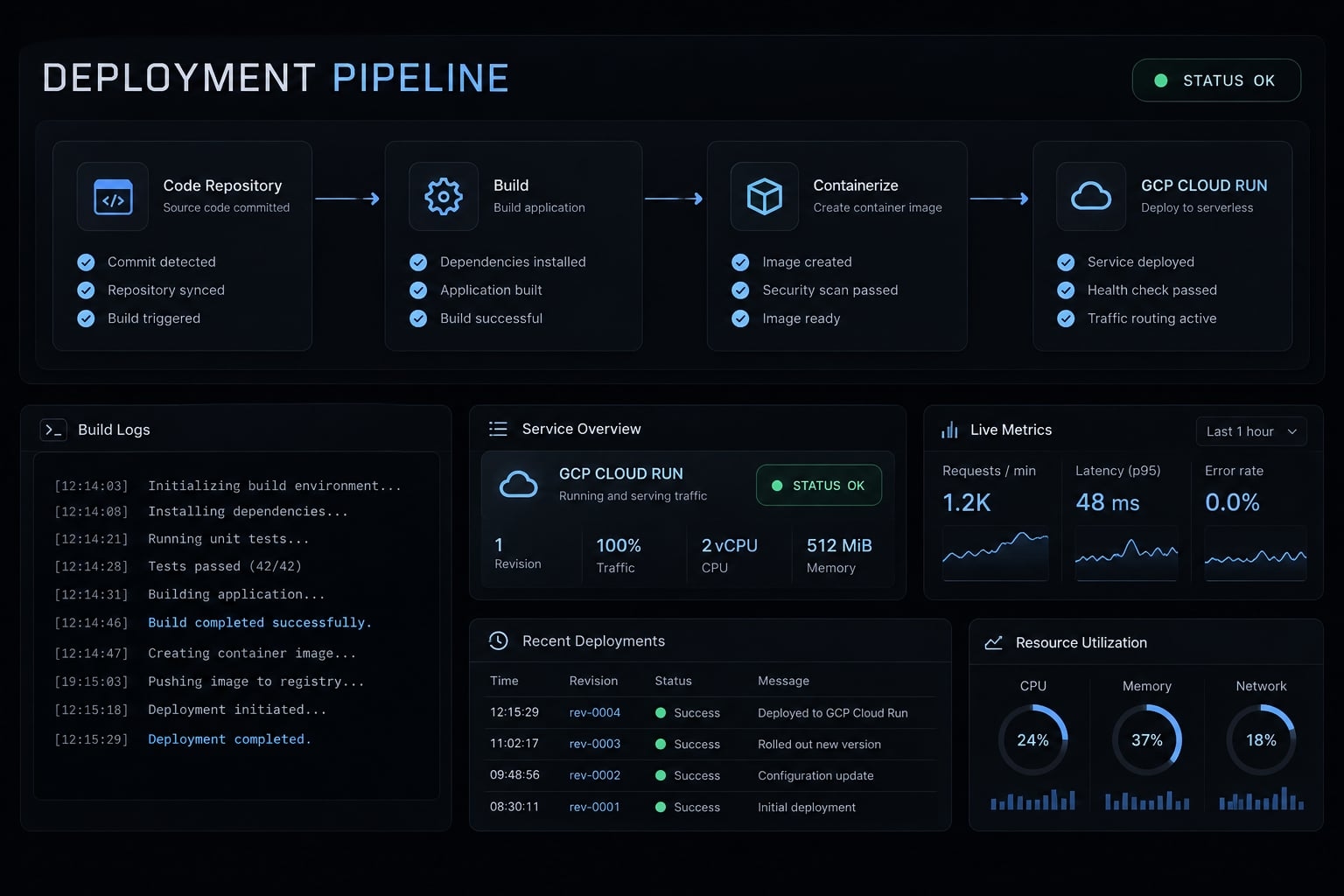
What “Claude Code GCP deployment” means
Claude Code GCP deployment means deploying an application created or maintained with Claude Code to Google Cloud infrastructure. The application’s source code or container is the deployment artifact. Claude Code remains a development tool; Google Cloud builds, stores, and runs the application using services selected for its workload.
Goal | Setup category | Coverage |
|---|---|---|
Application deployment | Build and run application code | Main tutorial |
Vertex AI model access | Configure access to Claude models | Scope clarification only |
Enterprise gateway | Centralize model routing and access controls | Out of scope |
The deployed artifact might be a web application, API, internal tool, or container. Claude Code normally stays in the development environment, where it inspects and modifies the repository. Hosting the coding agent itself is a separate advanced use case.
This distinction aligns directly with the product scopes defined in Anthropic's Claude Code overview and the official Claude Code on Vertex AI documentation
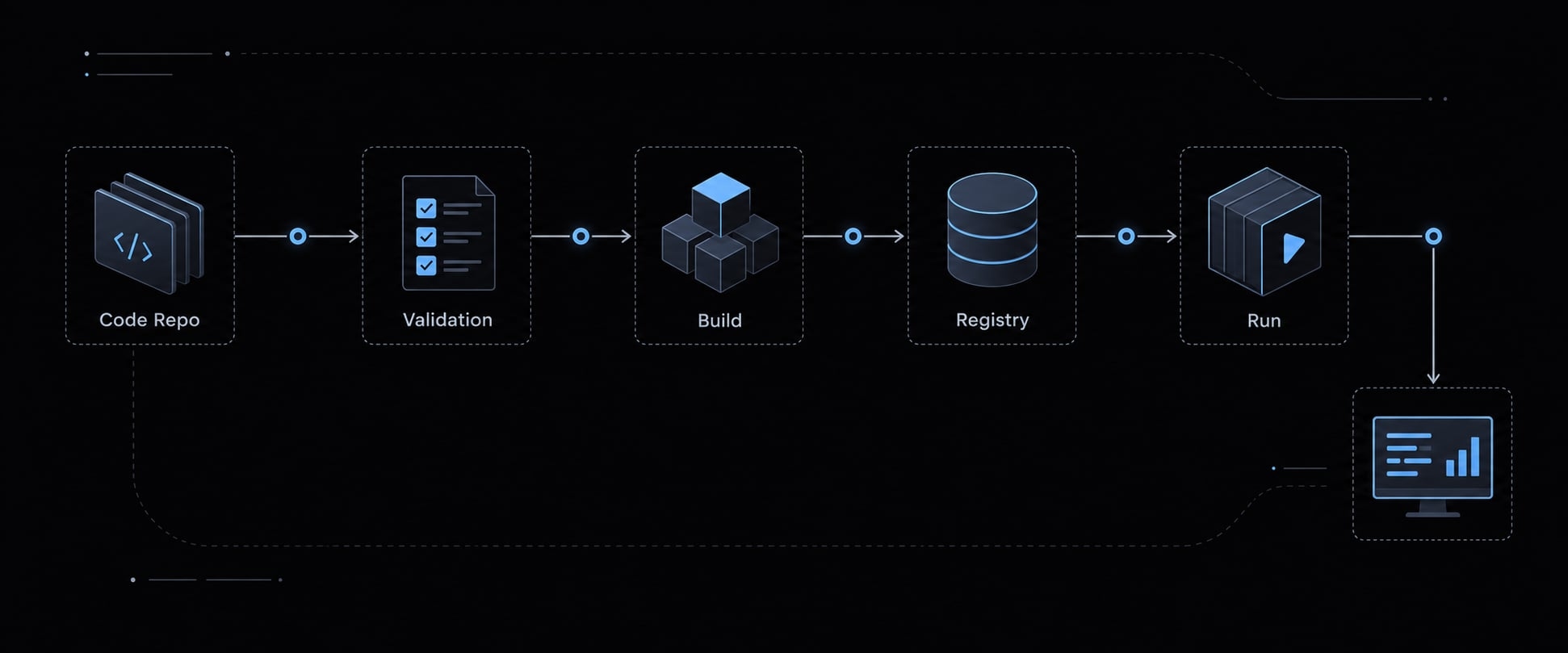
Choose the right GCP deployment service
Choose the runtime from the workload, not from the tool that wrote the code. Cloud Run services suit stateless HTTP applications that meet the Cloud Run container runtime contract.
Service | Primary workload distinction |
|---|---|
Cloud Run services | Stateless HTTP applications and APIs |
Cloud Run Jobs | Batch tasks that finish rather than serve HTTP requests |
Cloud Run functions, formerly Cloud Functions | Function-oriented HTTP or event handlers |
App Engine | Applications suited to its managed runtime conventions |
GKE—Google Kubernetes Engine | Workloads requiring Kubernetes orchestration |
Compute Engine | Workloads requiring virtual-machine-level control |
When Cloud Run is the best default
Cloud Run offers managed HTTPS, container execution, and revisions - versioned deployment configurations that support controlled releases and traffic changes.
Our internal reporting API handles independent requests and keeps no durable local state. That makes it a reasonable fit, with less infrastructure administration than maintaining virtual machines or a Kubernetes cluster.
When not to use Cloud Run
Reconsider the service model when an application needs:
- A durable local filesystem.
- Custom kernel or virtual machine capabilities.
- Kubernetes-specific orchestration.
- Execution behavior incompatible with request-serving containers.
Using a database does not disqualify an application. Persistent state can live in an external database or storage service.
Prepare the Claude Code project for deployment
Inspect the repository before generating deployment files. A container build cannot correct an unsuitable production command or missing startup configuration.
Use this readiness list:
- Identify the runtime and framework.
- Confirm the dependency manager and lockfile, if applicable.
- Identify the build command, or establish that none is required.
- Confirm the production start command.
- Read the port from
PORT. - Bind the HTTP server to
0.0.0.0. - Inventory required configuration and external services.
- Review deployment files and source-upload exclusions.
- Build locally and check the actual endpoint response.
Repository inspection with Claude Code
Ask Claude Code to inspect existing commands, database connections, Redis usage, object storage, and external APIs. Flag hard-coded hostnames, development servers, and local filesystem assumptions. For example, a reporting API bound to 127.0.0.1 may work locally but remain unreachable inside Cloud Run.
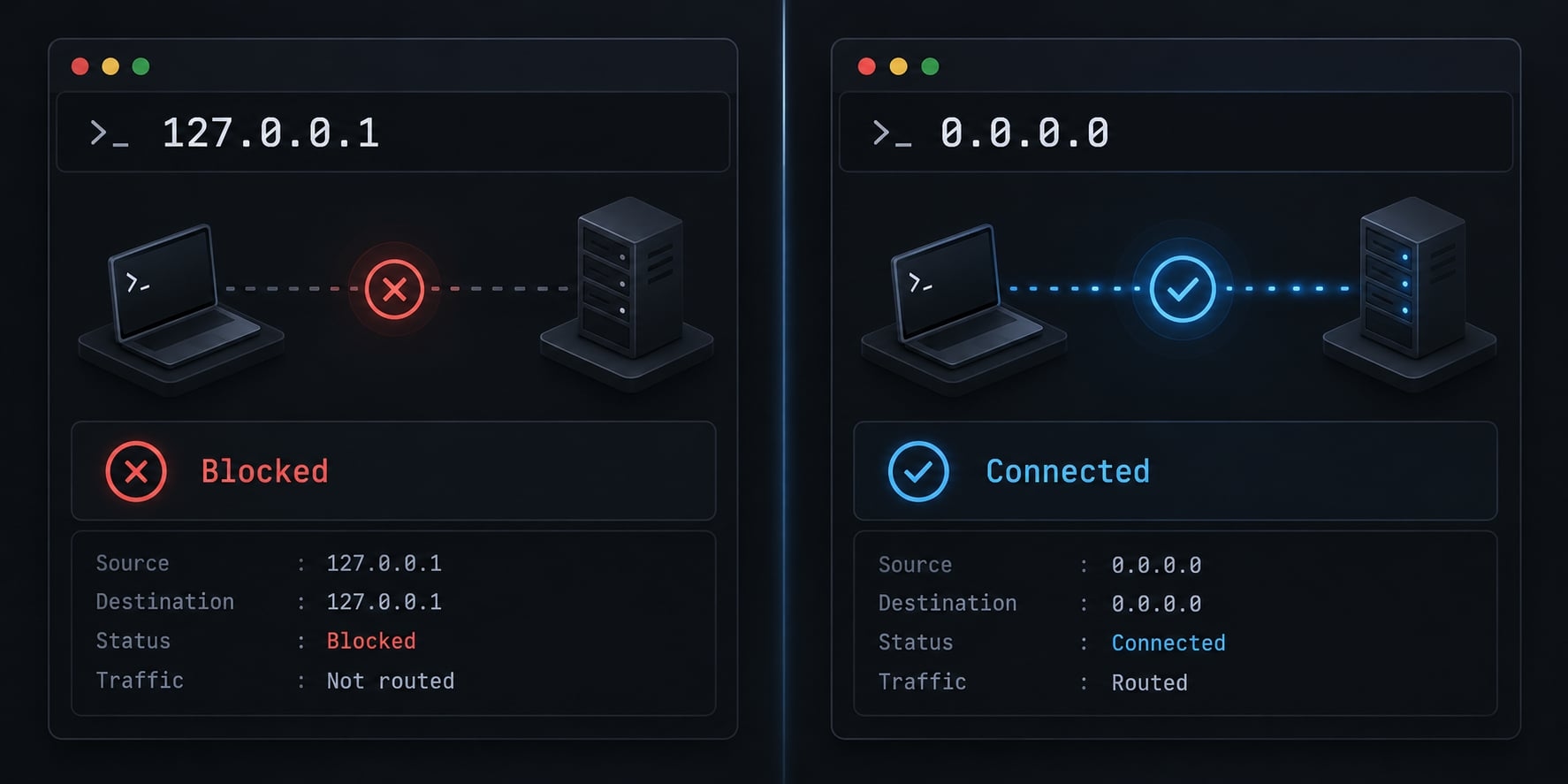
The representative sample below uses Node.js 22, its built-in HTTP module, and no third-party dependencies. It needs no compilation step or package lockfile. The production command is node server.js.
Create server.js:
const http = require("node:http");const port = Number(process.env.PORT || 8080);const reportMode = process.env.REPORT_MODE;if (!reportMode) { throw new Error("REPORT_MODE is required");}http.createServer((req, res) => { if (req.method !== "GET" || req.url !== "/") { res.writeHead(404); return res.end(); } res.writeHead(200, { "Content-Type": "application/json" }); res.end(JSON.stringify({ service: "reporting-api", status: "ok", mode: reportMode }));}).listen(port, "0.0.0.0");
This is a deployment demonstration, not a complete reporting product. It has no database, secrets or customer data.
Required deployment files
File | Purpose |
|---|---|
| Defines the runtime image and startup command |
| Excludes files from Docker’s build context |
| Excludes files from the source uploaded to Google Cloud |
Dependency manifests and lockfiles | Preserve dependency installation consistency when dependencies exist |
Use this Dockerfile:
FROM node:22-bookworm-slimWORKDIR /appCOPY --chown=node:node server.js ./USER nodeCMD ["node", "server.js"]
For repeatable releases, review and pin the base-image digest through your maintenance process.
Put these exclusions in both .dockerignore and .gcloudignore:
.gitnode_modules.env.env.*credentials/*.pem*.key
Add project-specific credential filenames too. Keep server.js and Dockerfile included. Unlike these build exclusions, .gitignore controls Git tracking. Ignoring a file does not remove an already committed credential; exposed credentials require rotation.
A Dockerfile is this tutorial’s chosen path. Source deployment also supports buildpacks, which generate an image for supported application runtimes.
Validate the container locally
The commands throughout this guide use Bash-compatible syntax, not PowerShell syntax.
docker build -t reporting-api:local .docker run --rm \ -p 8080:8080 \ -e PORT=8080 \ -e REPORT_MODE=demo \ reporting-api:local
The foreground container occupies its terminal. In a second terminal:
curl --fail-with-body -i http://localhost:8080/
Expected behavior is HTTP 200 with:
{"service":"reporting-api","status":"ok","mode":"demo"}
Deploy the project to Cloud Run step by step
The deployment sequence is:
- Authenticate and verify the project.
- Confirm billing and setup permissions.
- Enable the required APIs.
- Review developer, build, and runtime identities.
- Deploy with startup configuration and authenticated access.
- Inspect the service and invocation policy.
- Test the endpoint using an authorized caller.
Install and authenticate the Google Cloud CLI
Install the Google Cloud CLI and Docker before starting. Use a test GCP project with billing enabled.
Replace the project placeholder:
export PROJECT_ID="your-test-project-id"gcloud versiongcloud auth logingcloud auth list --filter=status:ACTIVEgcloud config set project "$PROJECT_ID"gcloud config get-value projectgcloud billing projects describe "$PROJECT_ID"
Confirm the intended account, project ID, and billingEnabled: true. If you cannot inspect billing, obtain confirmation from the billing administrator before continuing.
gcloud auth login authenticates CLI operations. Application Default Credentials are a separate mechanism used by application libraries; this walkthrough does not require a local ADC login.
Enable the required GCP APIs
An administrator must authorize API enablement if your account lacks permission.
gcloud services enable \ run.googleapis.com \ cloudbuild.googleapis.com \ artifactregistry.googleapis.com \ --project="$PROJECT_ID"
Wait for successful completion before deploying. The sample needs neither Vertex AI nor Secret Manager.
Configure the project, region and service name
Use an approved region. us-central1 below is an example, not a universal recommendation.
export REGION="us-central1"export SERVICE_NAME="reporting-api"export RUNTIME_SA="reporting-api-runtime@${PROJECT_ID}.iam.gserviceaccount.com"
A service account is an identity used by a workload rather than a person. Have an administrator create and approve the dedicated runtime account before proceeding. This sample requires no application-level access to other Google Cloud resources.
Inspect the default build identity rather than assuming which account your project uses:
gcloud builds get-default-service-account \ --project="$PROJECT_ID" \ --region="$REGION"
Then set the actual, administrator-approved build account email:
export BUILD_SA_EMAIL="your-approved-build-account@${PROJECT_ID}.iam.gserviceaccount.com"gcloud iam service-accounts describe "$RUNTIME_SA" \ --project="$PROJECT_ID"gcloud iam service-accounts describe "$BUILD_SA_EMAIL" \ --project="$PROJECT_ID"
IAM (Identity and Access Management) controls which identities may perform which actions. Resolve permissions before deployment:
- The developer needs source-deployment permissions, commonly Cloud Run Source Developer and Service Usage Consumer.
- The developer needs permission to act as the selected runtime account, typically Service Account User scoped to that account.
- Selecting a build account also requires the applicable permission to use it.
- The build identity needs source-build permissions. Cloud Run Builder is the relevant predefined role in the standard source-deployment setup.
- API enablement, service-account creation, and invocation-policy changes require additional approved permissions.
- The testing caller needs Cloud Run Invoker on the service.
These roles are not an exhaustive grant recipe for every organization. Confirm the current requirements in Cloud Run: Deploy services from source code, especially for custom build accounts and restricted projects.
Deploy directly from source
Run from the directory containing Dockerfile and server.js. Prefer a new service name for the first deployment.
gcloud run deploy "$SERVICE_NAME" \ --source . \ --project="$PROJECT_ID" \ --region="$REGION" \ --service-account="$RUNTIME_SA" \ --build-service-account="projects/${PROJECT_ID}/serviceAccounts/${BUILD_SA_EMAIL}" \ --update-env-vars=REPORT_MODE=demo \ --no-allow-unauthenticated \ --invoker-iam-check
Cloud Build creates the container, Artifact Registry stores it, and Cloud Run creates a revision. With a Dockerfile present, source deployment uses it; otherwise, supported buildpacks may apply.
Expected evidence includes a successful build and a ready service revision. Developer credentials are not copied into the runtime.
Access must be reviewed explicitly. --allow-unauthenticated is only for intentionally public endpoints. Omitting it does not make an existing service private. Inspect inherited permissions, service IAM bindings, and invoker-check settings. A protected service also does not automatically provide a browser login experience for internal users.
Add environment variables and runtime configuration
REPORT_MODE is required at startup, so the initial deployment already supplies it.
For a later non-secret update:
gcloud run services update "$SERVICE_NAME" \ --project="$PROJECT_ID" \ --region="$REGION" \ --update-env-vars=REPORT_MODE=summary
--update-env-vars adds or updates specified entries. By contrast, --set-env-vars replaces the existing environment-variable set. Review the distinction before changing a real service.
Setting | Review before tuning |
|---|---|
CPU and memory | Measured resource demand and startup requirements |
Concurrency | Requests each instance can safely handle simultaneously |
Timeout | Acceptable request duration and dependency behavior |
Minimum instances | Startup-latency requirements versus idle cost |
Maximum instances | Capacity, downstream connection limits, and cost exposure |
Required secrets must also be configured before the application’s first startup.
Retrieve and test the service URL
Retrieve the URL and inspect access policy:
export SERVICE_URL="$( gcloud run services describe "$SERVICE_NAME" \ --project="$PROJECT_ID" \ --region="$REGION" \ --format='value(status.url)')"gcloud run services get-iam-policy "$SERVICE_NAME" \ --project="$PROJECT_ID" \ --region="$REGION"
An administrator must grant the intended caller invocation permission if it is not already present. Review broad bindings such as allUsers or allAuthenticatedUsers; do not rely solely on the deployment flags.
For a logged-in developer with invocation permission:
curl --fail-with-body -i \ -H "Authorization: Bearer $(gcloud auth print-identity-token)" \ "${SERVICE_URL}/"
Expect HTTP 200 and the JSON response. Its mode is summary if you ran the optional update.
This developer test uses an identity token, not an OAuth access token. Automated callers need the appropriate service-to-service token flow and audience. Organization or ingress restrictions can also prevent direct access.
Secure credentials, secrets and GCP identities
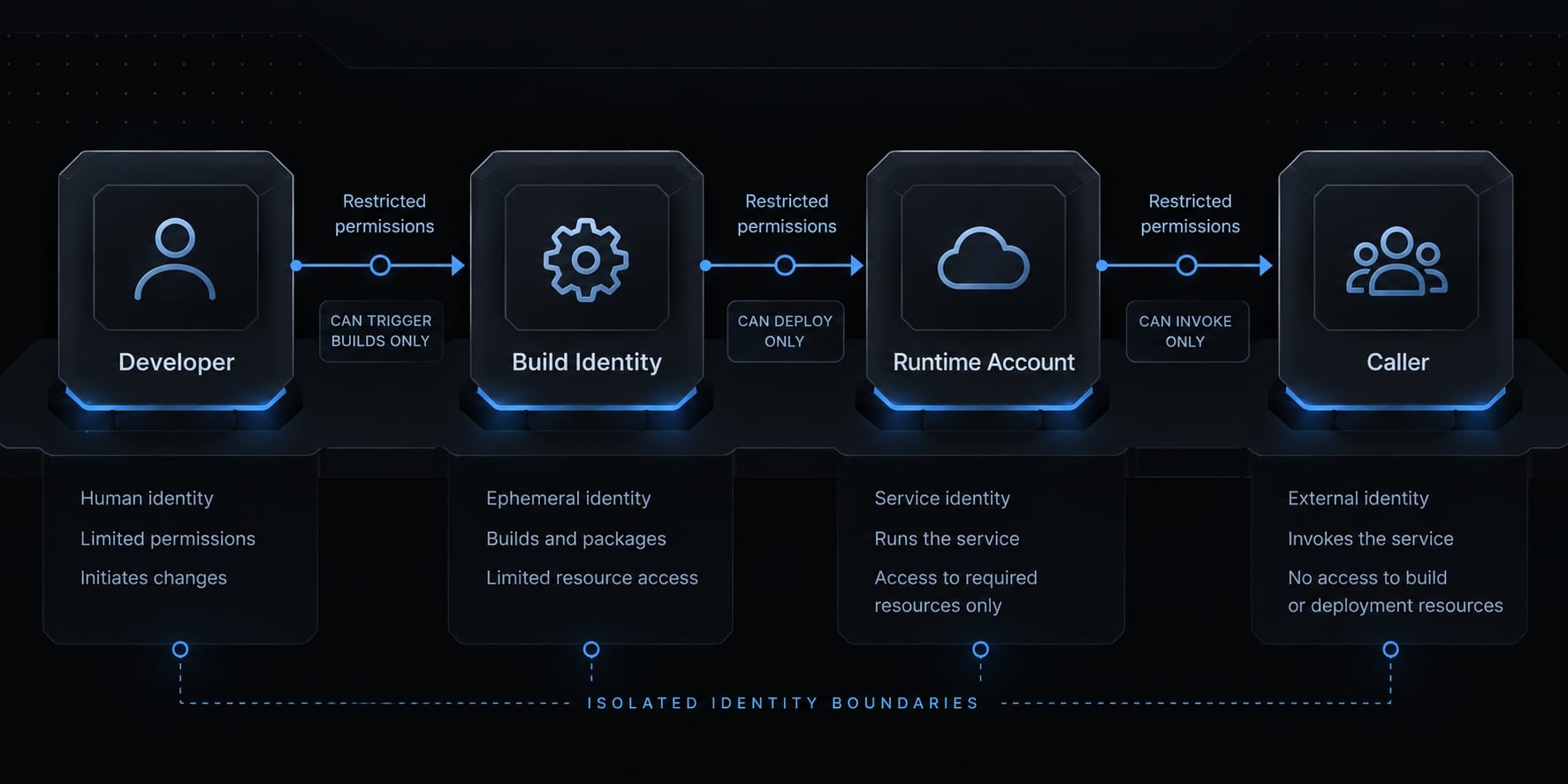
Deployment access, build access, runtime access, and invocation access are separate boundaries. Giving one identity additional permissions does not necessarily fix another identity’s failure.
Identity | Responsibility | Control |
|---|---|---|
Developer | Deploys and performs approved setup | Scoped deployment access and reviewed account-use permissions |
Build identity | Builds and publishes images | Permissions appropriate to the selected source-build setup |
Runtime service account | Accesses application dependencies | Only application-specific resource permissions |
Caller | Invokes the service | Explicit invocation policy and application authorization |
Store secrets outside the repository
For applications that need passwords, API keys, or signing secrets, use Secret Manager, Google Cloud’s managed secret storage.
Grant the runtime account access to the specific required secrets. Supply secret references in deployment configuration rather than literal values in commands.
Never package developer credentials or service-account key files into an image. Google Cloud client libraries can use managed runtime credentials for supported Google Cloud API access. Third-party API keys still require their own secure handling.
The sample does not need secrets. If you extend it, enable Secret Manager and configure secret access before deploying code that requires those values.
Review AI-generated IAM changes
Before approving an IAM change, inspect:
- The principal receiving access.
- The role being granted.
- The resource scope.
- The application or business requirement.
- Whether a narrower grant would suffice.
Do not use Owner or Editor as troubleshooting shortcuts.
Set budget alerts, but remember: Alerts notify; they do not cap spending. Instance limits can reduce exposure, but they do not cap builds, logs, storage, databases, or all other GCP charges.
Verify, update, roll back and troubleshoot the deployment
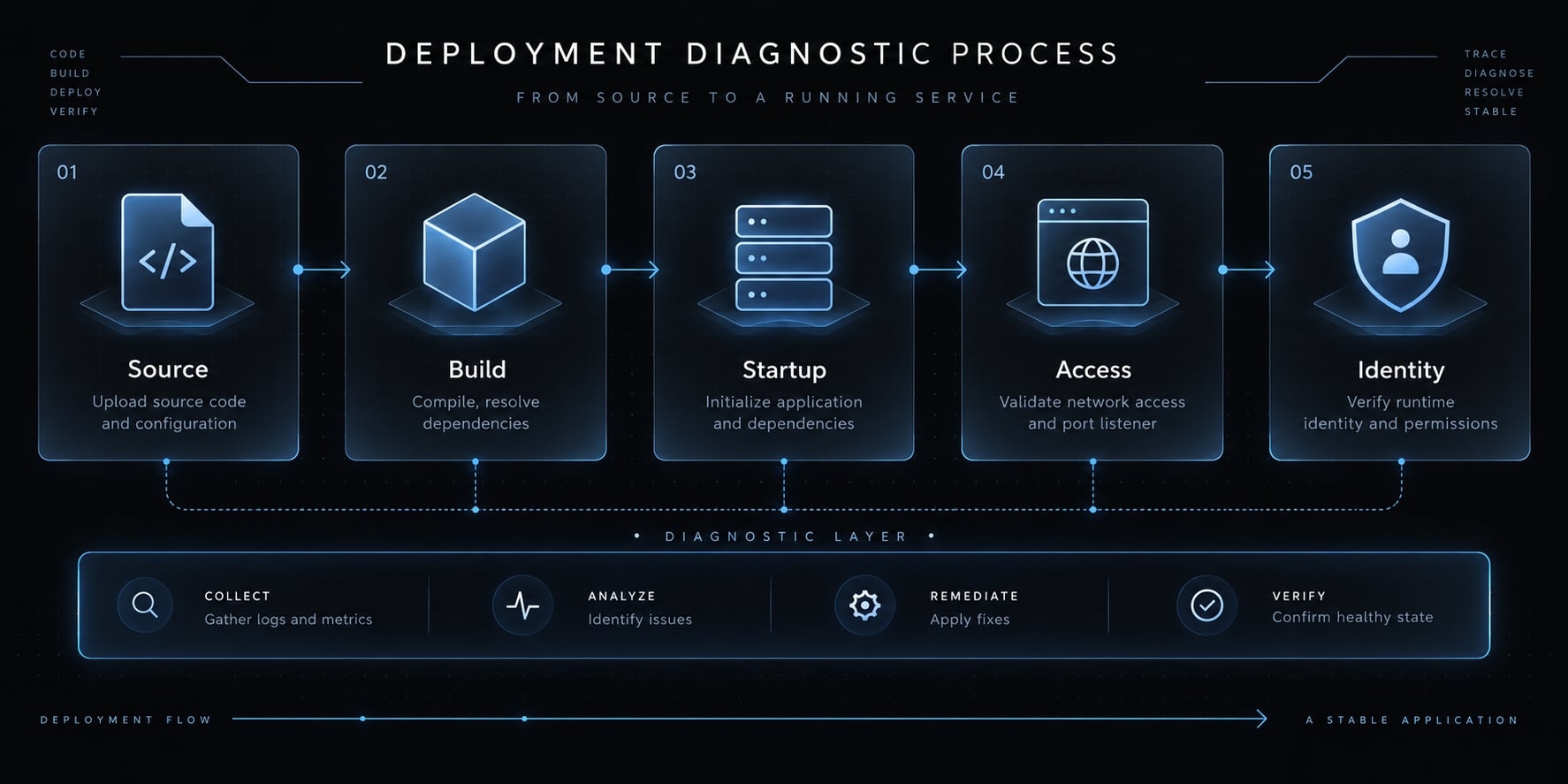
A successful build is not proof of a healthy application. Verify the deployed revision, the caller’s access, and actual request behavior independently.
Post-deployment verification checklist
- Confirm the project and region.
- Confirm the intended service.
- Check the ready revision and traffic allocation.
- Request
/and inspect its response. - Review startup and request logs.
- Confirm required configuration and secret references.
- Verify the attached runtime service account.
- Confirm invocation and application authorization rules.
- Review budget alerts and capacity settings.
A successful request proves only part of this checklist.
Read logs and inspect revisions
Inspect recent Cloud Run logs and revision history:
gcloud run services logs read "$SERVICE_NAME" \ --project="$PROJECT_ID" \ --region="$REGION" \ --limit=50gcloud run revisions list \ --service="$SERVICE_NAME" \ --project="$PROJECT_ID" \ --region="$REGION"gcloud run services describe "$SERVICE_NAME" \ --project="$PROJECT_ID" \ --region="$REGION" \ --format='yaml(status.conditions,status.latestReadyRevisionName,status.traffic)'
Use Cloud Build logs for image-build failures. Use Cloud Run and Cloud Logging for startup and request failures. Authentication failures can occur before application code executes.
For updates, validate locally, repeat the reviewed deployment command with the intended configuration, and inspect the new revision and traffic.
Common problems and fixes
Symptom | Likely layer | First check |
|---|---|---|
Missing build files | Source upload | Working directory, upload context, and ignore rules |
Startup failure | Application initialization | Start command, dependencies, and required configuration |
Port failure | Container listener | Injected |
403 response | Access controls | Caller identity, invoker permission, ingress, and organization policies |
Secret access denied | Runtime identity or secret configuration | Actual service account, secret-level permissions, and referenced version |
Database connection failure | Dependency access | Credentials, connectivity, and connector configuration where applicable |
Broken release | Revision or configuration | Revision health, configuration differences, and traffic allocation |
Unexpected charges | Usage across services | Billing breakdown, requests, instances, builds, logs, and dependencies |
Illustrative failure check: Running the sample container without REPORT_MODE should terminate it with REPORT_MODE is required. This follows from the sample code; it is not a reported test result. Fix the configuration rather than expanding IAM permissions.
Roll back to a previous revision
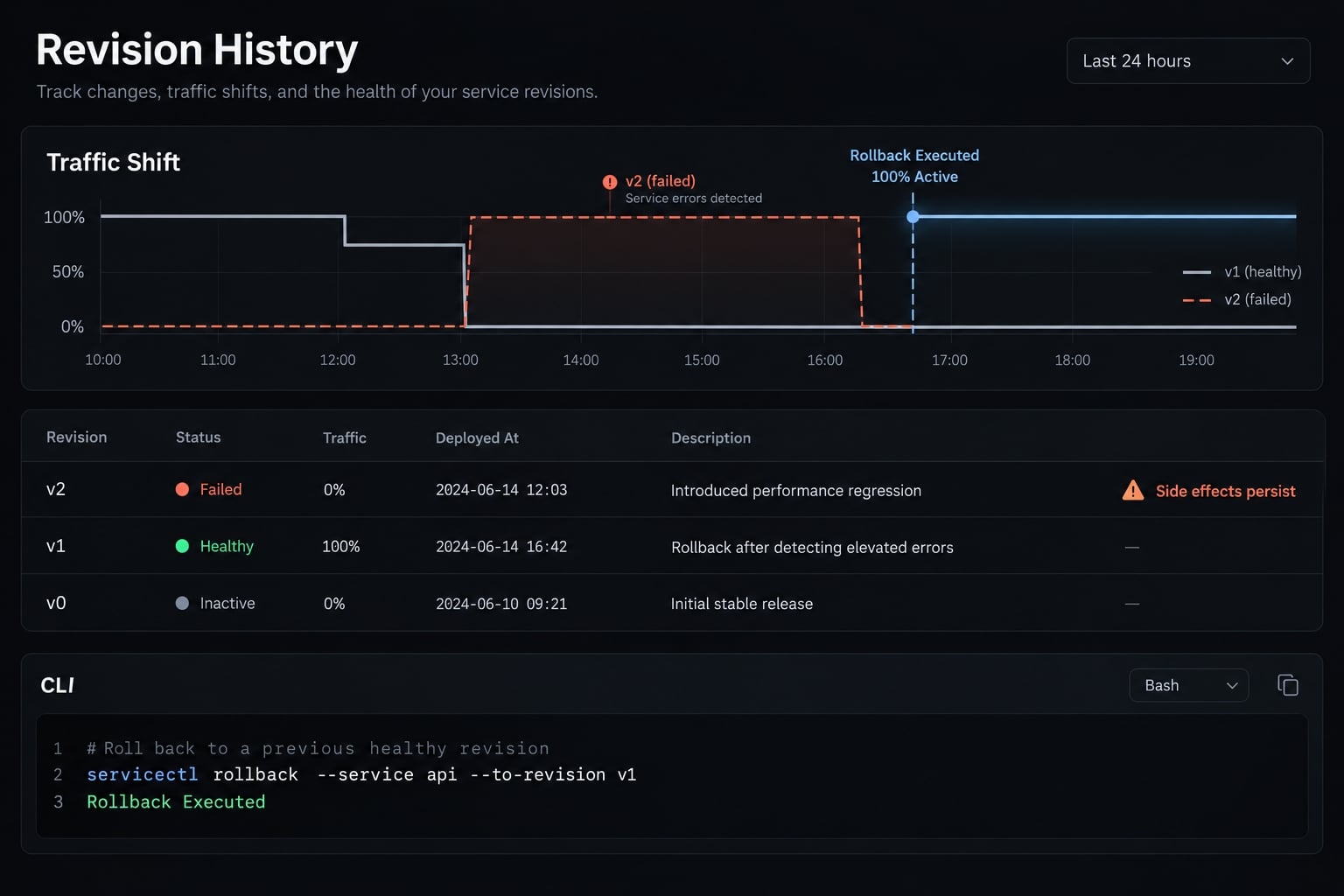
Rollback requires an existing healthy revision. Identify it from revision history and release records, then confirm compatibility with current dependencies.
export HEALTHY_REVISION="replace-with-existing-healthy-revision"gcloud run services update-traffic "$SERVICE_NAME" \ --project="$PROJECT_ID" \ --region="$REGION" \ --to-revisions="${HEALTHY_REVISION}=100"gcloud run services describe "$SERVICE_NAME" \ --project="$PROJECT_ID" \ --region="$REGION" \ --format='yaml(status.traffic)'curl --fail-with-body -i \ -H "Authorization: Bearer $(gcloud auth print-identity-token)" \ "${SERVICE_URL}/"
Confirm both traffic allocation and endpoint behavior. Practice this procedure in the test project before relying on it during an incident. Traffic rollback does not undo database migrations, restore external secrets, or reverse external side effects.
Reusable Claude Code deployment checklist
Approval-gated preparation checklist
Use these acceptance criteria when delegating deployment preparation to Claude Code:
- Runtime, framework, dependencies, and build/start commands are identified.
PORThandling and host binding are checked.- Configuration and external dependencies are inventoried without exposing secret values.
- Deployment files and all relevant ignore rules are reviewed.
- Local-only assumptions are flagged.
- Proposed changes are minimal and explained.
- File edits wait for explicit human approval.
- Local build, startup, and endpoint-validation commands are provided.
- Deployment commands use placeholders for project-specific identities and resources.
- Deployments, IAM changes, resource creation, and public exposure require separate confirmation.
- The handoff includes security, cost, verification, and rollback checks.
Keep an execution record alongside the release: repository commit, test date, CLI version, region, runtime, access model, identities, commands, sanitized outputs, and limitations. Record local validation, endpoint results, and rollback results separately. Never label an unexecuted check as passed.
Standardize the workflow only after manual validation
After a successful manual deployment, reusable agent skills can organize the same review gates. AgentKit is an optional way to manage repeatable skills and workflows, not a substitute for permissions review. Infrastructure-as-Code can follow when the deployment pattern is stable.
Frequently asked questions
What does "Claude Code GCP deployment" mean?
“Claude Code GCP deployment” means deploying an application built or maintained with Claude Code to Google Cloud infrastructure. It is different from hosting Claude Code itself or configuring Claude model access through Vertex AI.
Is Cloud Run the best choice for deploying my application?
Cloud Run is the recommended default for stateless HTTP APIs or web applications built with Claude Code. It manages container scaling, HTTPS, and revisions automatically. Other services like GKE or Compute Engine are only necessary if your application requires specific OS-level kernels, long-running persistent local filesystems, or custom network orchestration.
How do I deploy my application directly from source code?
You can deploy by using the gcloud run deploy command with the --source . flag. This command instructs Cloud Build to create an image, store it in Artifact Registry, and deploy a new revision to Cloud Run. Ensure you explicitly set the required runtime service account and startup configuration before execution.
How should I manage secrets in a GCP deployment?
Never commit secrets to your repository, build inputs, or deployment commands. Instead, use Google Secret Manager to store API keys and credentials. Reference these secrets within your Cloud Run service configuration, ensuring that the runtime service account has the specific, minimal IAM permissions required to access only the secrets it needs.
What should I check if my deployment fails?
First, verify the build logs in Cloud Build to identify containerization issues, then check the Cloud Run service logs to diagnose startup or request-path failures. Common issues include incorrect port bindings, missing environment variables, insufficient IAM permissions for the runtime identity, or secret access denials. Always confirm that your Cloud Run revision is in a "Ready" state before troubleshooting application logic.
Can I roll back to a previous deployment?
Yes, you can roll back by routing traffic back to a known healthy revision using the Cloud Run traffic migration commands. Keep in mind that a traffic rollback only reverts the service code and configuration; it does not automatically undo database schema migrations, external state changes, or secret updates made by the failing revision.
Read more:
- Claude Code Vercel deployment: Setup, deploy and troubleshoot
- Claude Code plugin security: A guide to safe AI development
- Claude Code setup: Secure installation and usage guide
Conclusion
A reliable Cloud Run deployment requires verifying container behavior, startup configuration, and explicit IAM boundaries long before pushing to production. Always separate developer, build, and runtime permissions, keep a healthy previous revision ready for fast rollback, and require human review for all IAM or network changes. Use the deployment checklist to document what was executed, observed, and verified before every release.