
Claude Code rollback: How to undo changes with /rewind
When an incorrect refactor or configuration edit changes several files, stop making further changes and run /rewind. This Claude Code rollback flow lets you select the prompt immediately before the unwanted edit, then restore code, conversation history, or both. After restoration, inspect the working tree before continuing. According to the official Claude Code checkpointing documentation, recovery coverage depends on how the files were modified. Changes made through Bash commands, manual edits, or external processes may not be restored.
Quick answer: Run/rewind, select the checkpoint before the unwanted change, choose the appropriate restore mode, then verify the result withgit status,git diff, and relevant tests.
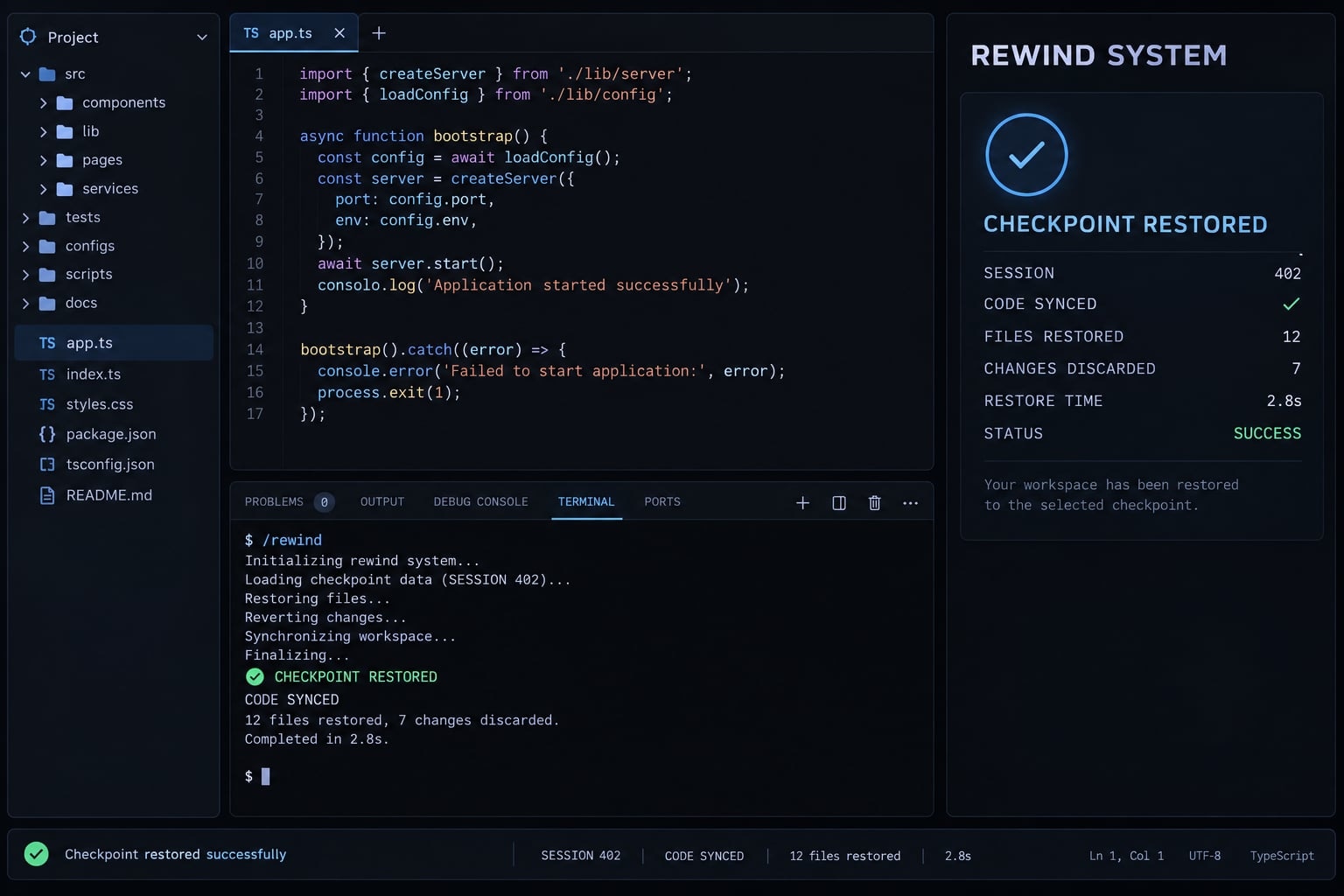
How to perform a Claude Code rollback with /rewind
/rewind is the primary session-level recovery command for reverting recent Claude Code changes. It uses available checkpoints associated with the current or resumed session.
To roll back Claude Code changes:
- Pause all changes for now. Do not rerun the task, apply formatters, or execute broad shell commands, as these actions could overwrite existing data.
- Open the recovery menu:
/rewind - Alternatively, press
Esctwice while the input line is empty. This shortcut is documented by Anthropic but may depend on your current Claude Code version. - Select the prompt immediately before the unwanted change. Treat the prompt as a session checkpoint, not a Git commit.
- Choose whether to restore code, conversation history, or both.
- Inspect the restored working tree:
git status git diff - Run relevant tests, linting, type checks, builds, or security checks before resuming development.
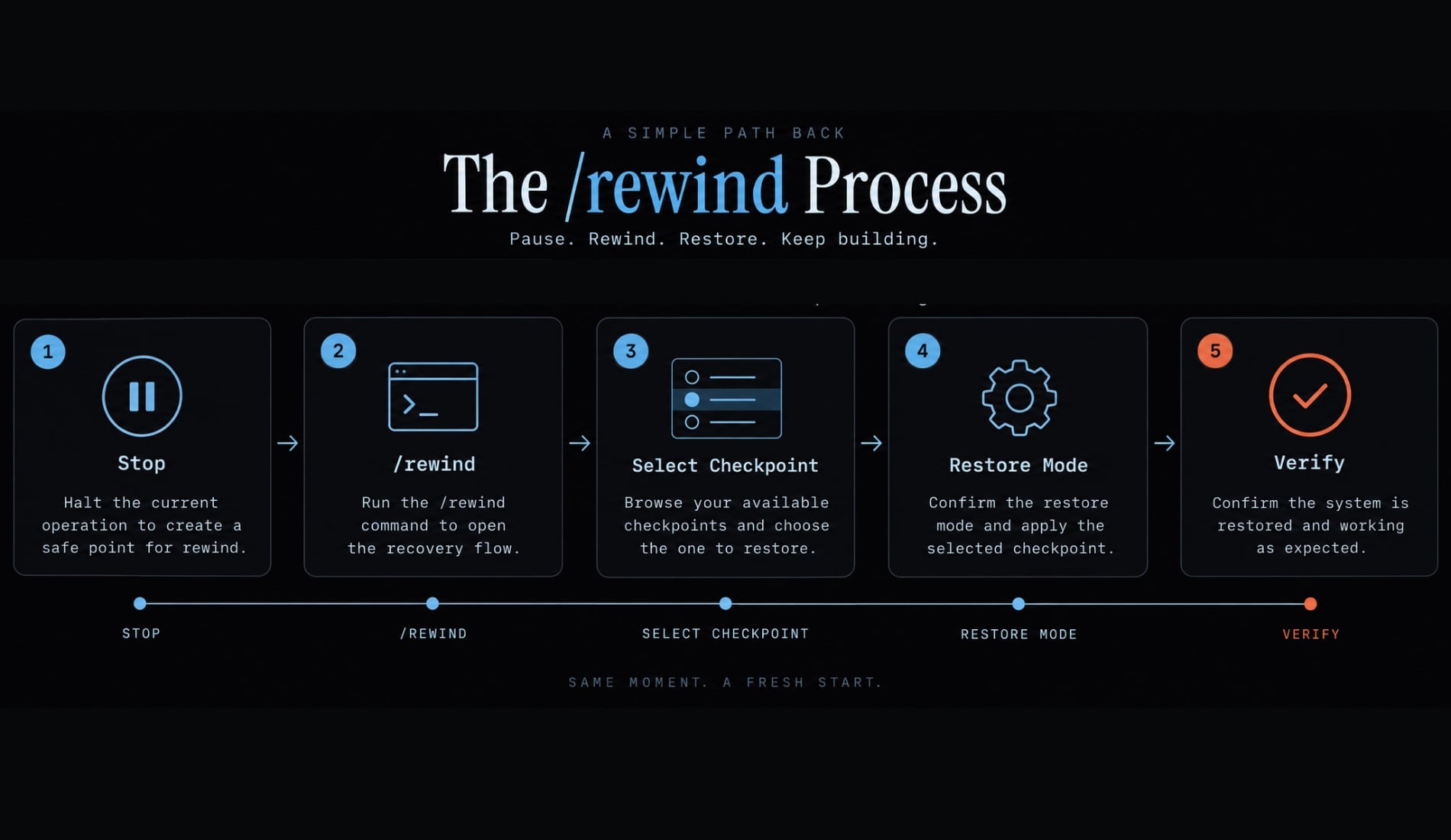
Choose the prompt immediately before the failed implementation, deletion, refactor, or configuration change.
- Selecting an earlier checkpoint may remove more Claude-tracked work than intended.
- Selecting a later checkpoint may retain part of the unwanted implementation.
- Selecting the wrong session may leave you without the expected file snapshots.
- Selecting an unavailable checkpoint may restore conversation state without restoring files.
The safest target is usually the last point where the code was known to behave correctly. If uncertain, preserve irreplaceable uncommitted work before attempting another restoration.
Warning:/rewindis not a repository-wide recovery guarantee. A mixed task involving Claude file tools, Bash commands, IDE edits, or generators can produce a partial rollback. Do not immediately rungit reset --hard,git clean, or broad deletion scripts before reviewing useful work.
Choose the correct restore option
File state and conversation state are separate. Choose the option based on what went wrong, rather than assuming restoring both is always safest.
Your situation | Option to choose | What changes | What stays |
|---|---|---|---|
Failed implementation and incorrect reasoning | Restore code and conversation | Covered files and session context return to the selected point | External or unsupported changes may remain |
Incorrect code but useful diagnosis | Restore code | Covered file changes are restored | Current conversation context remains |
Acceptable code but unhelpful later discussion | Restore conversation | Session context returns to the selected message | Files on disk remain unchanged |
Later context is consuming too much space | Summarize from here | Later messages are compressed into a summary | Files remain unchanged |
Earlier context should be compressed | Summarize up to here | Earlier messages are summarized while later messages remain | Files remain unchanged |
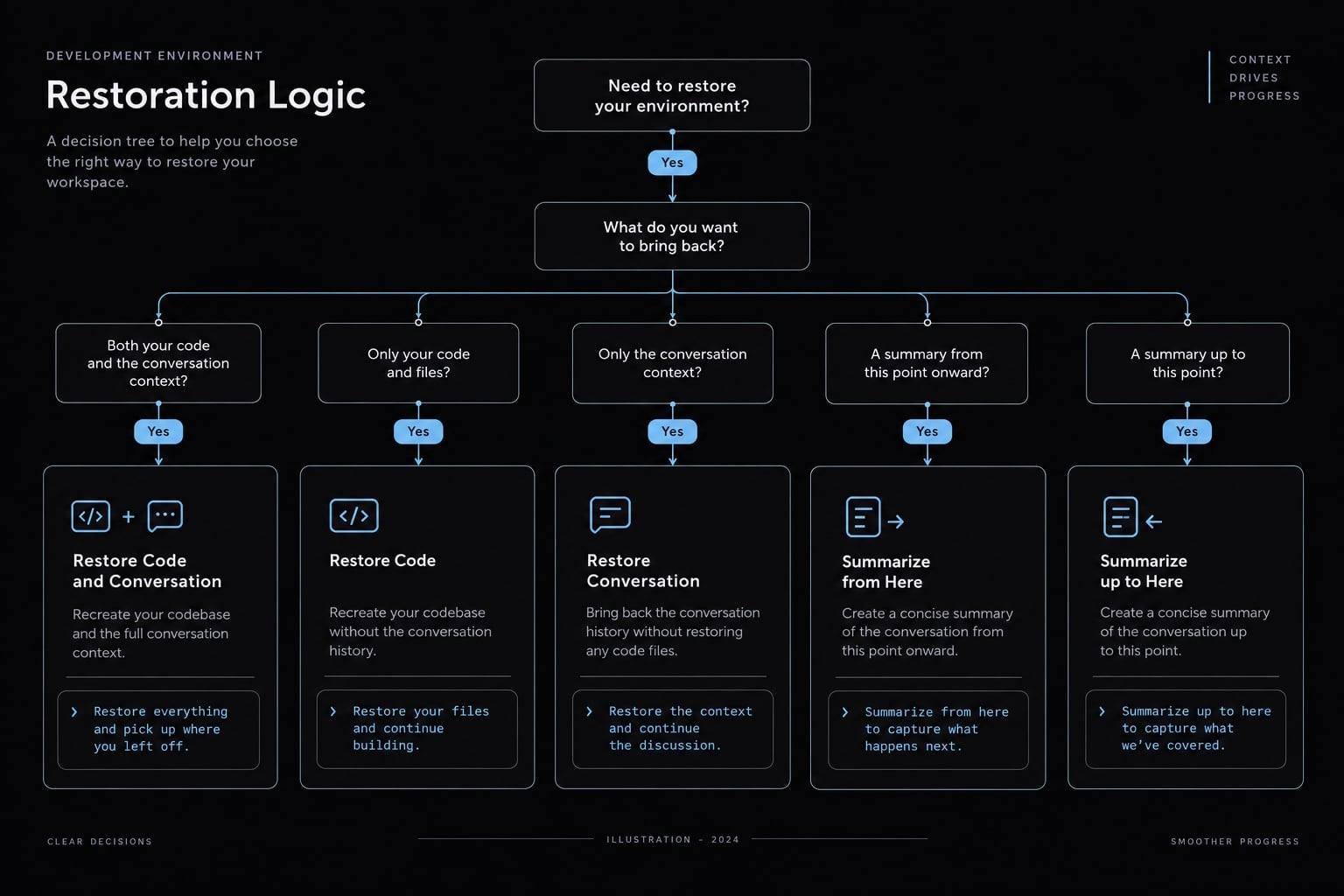
Restore code and conversation
Use Restore code and conversation when both the implementation and reasoning moved in the wrong direction. A failed architectural change or unsuitable multi-file refactor is a typical example.
Covered files return to the selected checkpoint state, and the conversation returns to that point. Claude Code also places the selected prompt back into the input field, allowing you to revise its scope before trying again.
Restore code only
Use Restore code when Claude correctly diagnosed the problem but implemented the wrong solution. The covered file state is restored while the current conversation remains available.
This option preserves useful analysis, constraints, and debugging context. Always review the resulting diff because unsupported file mutations may still be present.
Restore conversation only
Use Restore conversation when the current files are acceptable, but later messages have created misleading or unproductive context.
Restoring conversation does not revert files. The working tree remains as it was before selecting the option.
Summarization options
- Summarize from here compresses the selected point and subsequent discussion.
- Summarize up to here compresses earlier context while retaining later messages.
Context summarization does not modify files on disk. It manages the available conversation context and should not be treated as code recovery.
What Claude Code rollback can and cannot restore
Claude Code checkpointing creates session-level file snapshots for supported Claude file operations before each user prompt. /rewind uses available checkpoints to restore covered code, conversation history, or both. It does not automatically recover Bash mutations, manual IDE edits, external side effects, unsupported paths, or snapshots removed by retention cleanup.
The official documentation states that Claude Code retains file snapshots for the 100 most recent checkpoints in a session. Session snapshots are generally subject to a cleanup period of approximately 30 days after the session was last saved, unless cleanupPeriodDays is configured differently. Verify these values before publication because checkpoint behavior can change between versions.
Change type | Expected rollback coverage | Important note |
|---|---|---|
Files edited through supported Claude Code file tools | Generally restored | Depends on an available checkpoint |
Files created through supported operations | Generally restored | The file may be removed when returning to an earlier state |
Files deleted through tracked operations | May be restored | Requires a retained snapshot of the previous file |
Files modified through Bash commands | Not tracked | Commands such as |
Files edited manually in an IDE | Not tracked | Check IDE local history, Git, or backups |
Files changed by formatters, generators, or scripts | Not tracked | Generated files may remain after |
Subagent edits | Conditional | Coverage depends on how the subagent ran and modified files |
Symlinked or hard-linked paths | Not restored | Claude Code skips these paths and should display a warning |
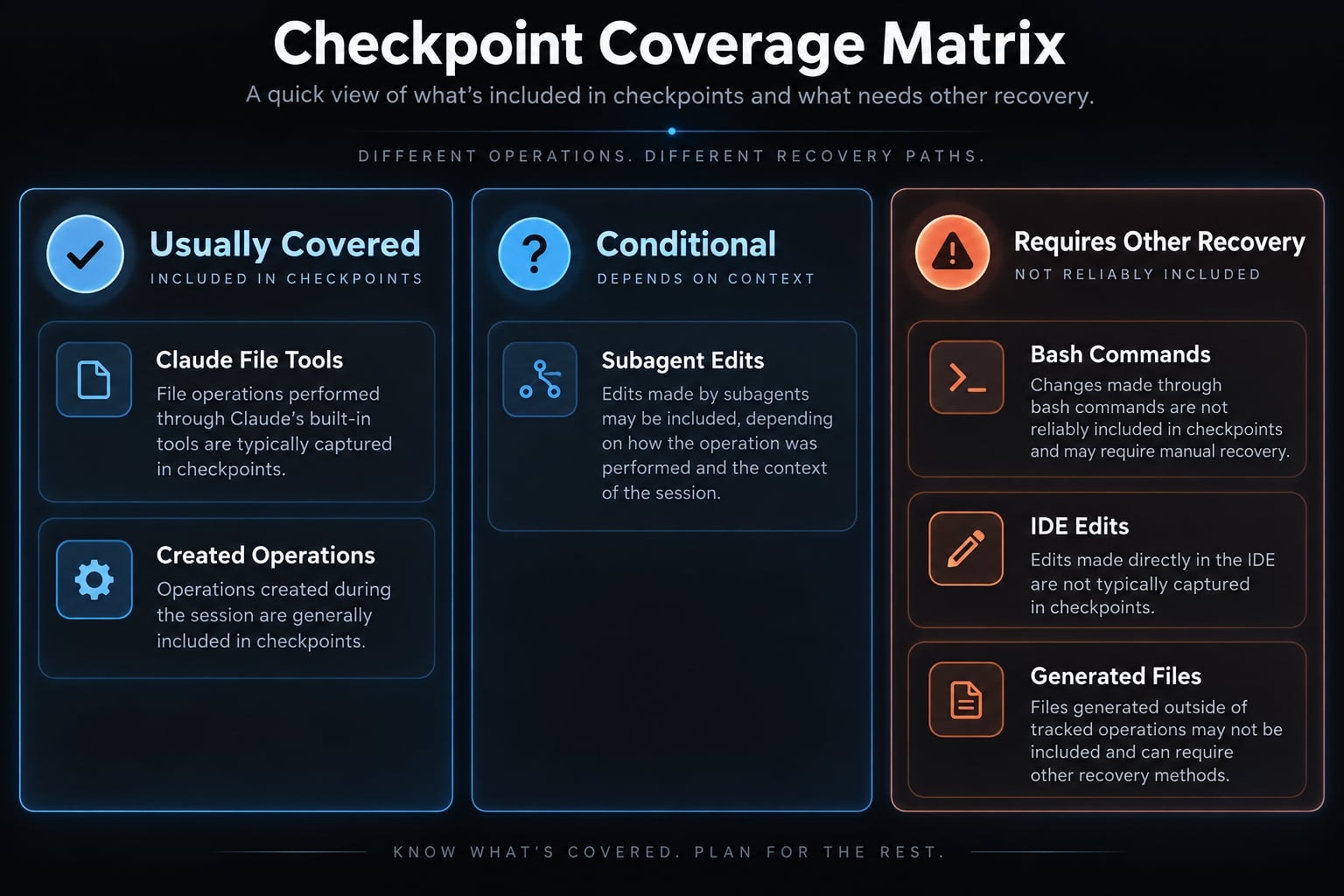
Changes usually covered by checkpointing
When the checkpoint remains available, Claude Code can generally restore:
- Direct file edits made through supported Claude Code file-editing operations.
- Files created through tracked write operations.
- Files deleted through covered operations when a prior snapshot exists.
- Multiple tracked edits associated with the selected session checkpoint.
- Recent Claude-generated changes without requiring a prior Git commit.
These file snapshots are designed for short-term, session-level recovery. They are not permanent backups or a replacement for repository history.
Changes that usually require another recovery method
Use Git, local history, backups, or a system-specific recovery process for:
- File mutations performed through Bash commands.
- Manual IDE edits.
- Changes produced by formatters, generators, build scripts, or external tools.
- Database migrations and data mutations.
- Package publishing or artifact uploads.
- Deployment and infrastructure side effects.
- Symlinked and hard-linked paths.
Restoring local source files does not reverse a deployment, published package, database operation, or remote API request.
Why partial rollbacks happen
Consider a task where Claude edits source files directly, then runs a shell command that regenerates configuration files. /rewind may restore the directly edited source files while leaving generated files unchanged.
The working tree then contains a combination of restored and externally modified files. This is why git status, git diff, and project tests are required after recovery.
Important limitation: A successful recovery message only confirms that the selected action completed. It does not prove that every repository file or external system returned to the intended state.
Troubleshooting when /rewind does not restore the expected files
If Claude Code rewind is not working, diagnose the modification source before trying random checkpoints. Repeated attempts can make the working tree harder to understand.
1. Stop before making more changes
Do not rerun the same Claude task, apply a formatter, execute a generator, or use broad shell commands. If the working tree contains irreplaceable uncommitted work, copy the affected files or preserve them through an appropriate non-destructive method before continuing.
2. Confirm how the file was modified
Determine which process created the unwanted change:
- Did Claude edit the file through a supported file operation?
- Did a Bash command rewrite, rename, move, or delete it?
- Did you edit it manually in an IDE?
- Did a formatter, generator, hook, or build process change it?
- Was it generated rather than directly edited?
Checkpoint coverage follows the source of the mutation. A file discussed by Claude is not necessarily a file tracked by checkpointing.
3. Confirm the session and checkpoint
Resume the Claude Code session that originally produced the change. Checkpoints are stored with the conversation, so switching to another session can hide the relevant recovery points.
Select a checkpoint that predates the unwanted edit. A later checkpoint may preserve part of the change, while an unnecessarily early checkpoint may remove useful Claude-tracked work.
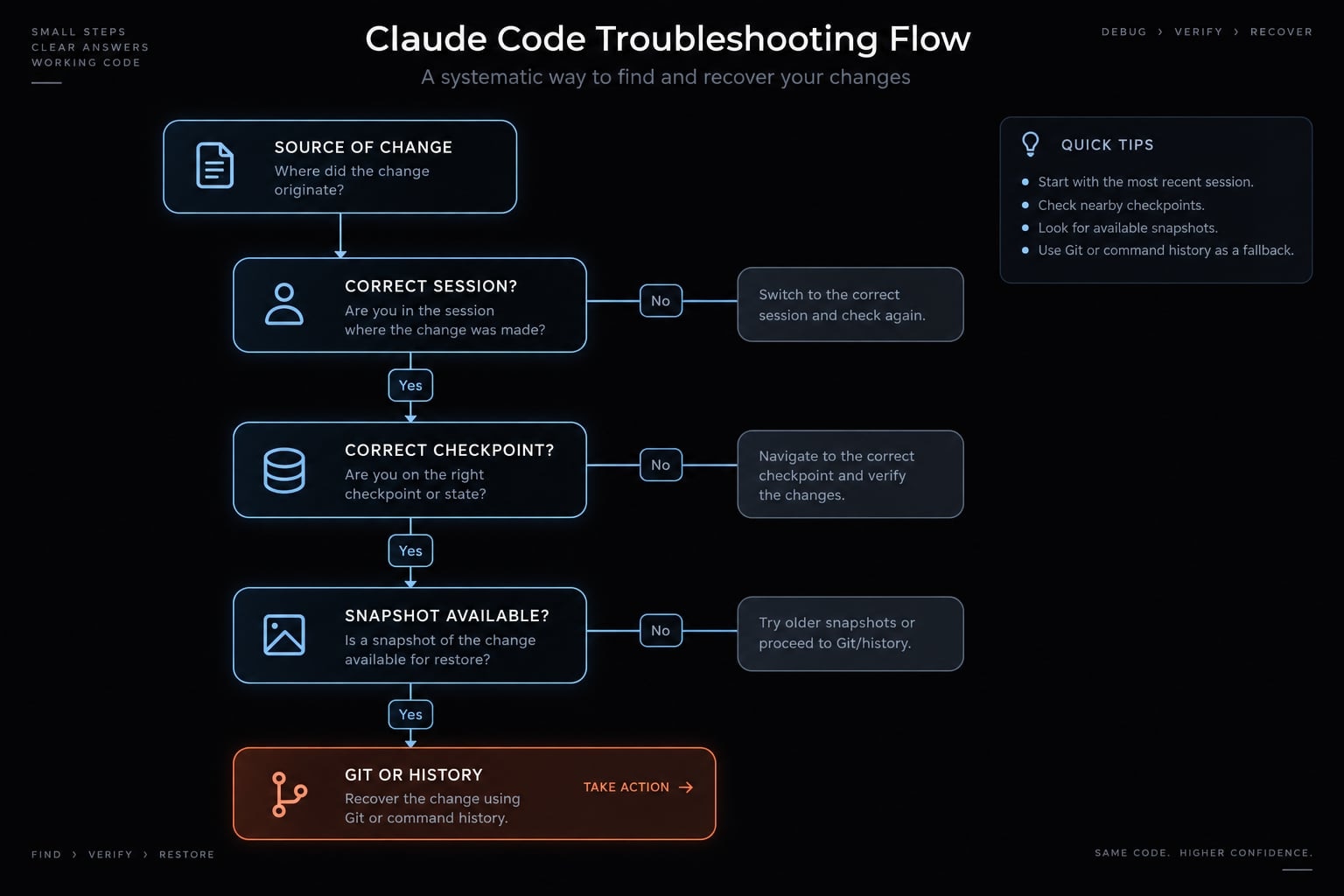
4. Check checkpoint retention
Checkpoints and file snapshots are not retained indefinitely. Older snapshots may be removed during retention cleanup even when the session conversation remains available.
If Claude Code reports “No files were restored,” possible causes include:
- The selected files were changed through unsupported methods.
- The relevant snapshots are no longer available.
- The selected checkpoint did not contain earlier file states.
- The wrong session or checkpoint was selected.
Do not assume retention is the only cause.
5. Check unsupported paths and subagent activity
Review restoration warnings involving:
- Symbolic links.
- Hard links.
- Subagent-generated changes.
- Files outside the expected project path.
- Permission or path-related failures.
Subagent recovery depends on how the subagent performed its edits. Treat its coverage as conditional unless verified in the current session.
6. Inspect Git and local history
Start with inspection rather than destruction:
git status
git diffgit status identifies modified and untracked files. git diff shows tracked working-tree differences, but it does not automatically display the contents of untracked files.
Then inspect available recovery sources:
- Existing commits and branches.
- Git stashes.
- IDE local history.
- Filesystem or cloud backups.
- Manually copied files.
Warning: Do not run destructive Git commands before reviewing and preserving useful work. Those commands can remove uncommitted changes that Claude Code file recovery cannot restore.
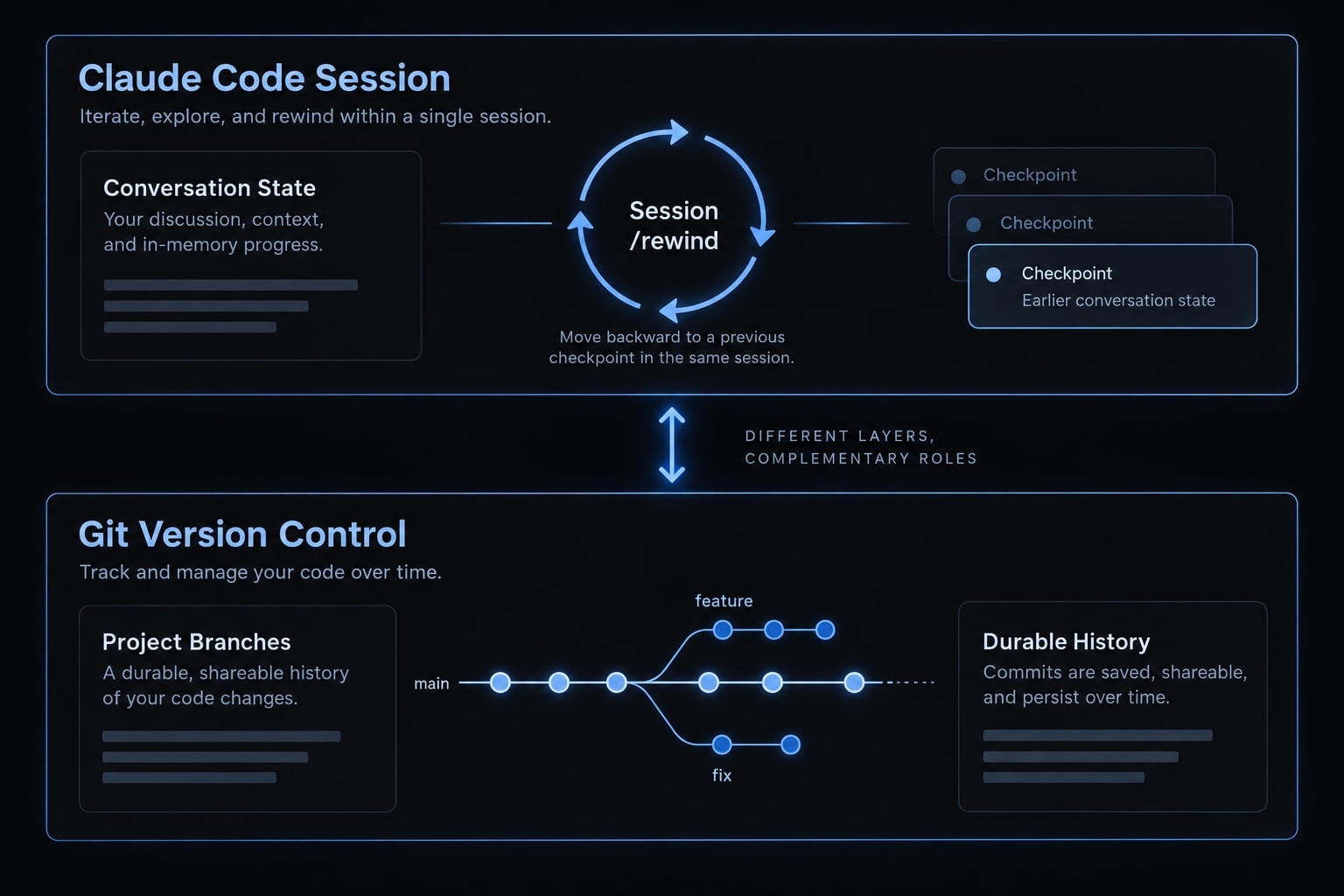
Claude Code /rewind vs. Git Rollback
The practical difference between Claude Code rollback and Git revert lies in their scope. The /rewind command manages recent session checkpoints and can restore conversation state, while Git provides durable project history, collaboration support, and detailed release tracking.
git revert is a specific Git command that creates a new commit reversing an earlier commit. It should not be used as a generic name for every Git recovery method.
Criterion | Claude Code | Git | Recommended choice |
|---|---|---|---|
Recent Claude-generated edit | Fast session-level restoration | Possible when useful Git state exists |
|
Conversation restoration | Supported | Not supported |
|
Manual IDE changes | Not automatically tracked | Can track repository changes once represented in Git state | Git or IDE local history |
Bash-generated repository changes | Not automatically tracked | Broader repository coverage | Git |
Long-term history | Limited by sessions and retention | Durable commit history | Git |
Multi-developer collaboration | Not designed for shared history | Branches, commits, reviews, and auditability | Git |
Fine-grained recovery between commits | Per available Claude checkpoint | Limited without additional saved state |
|
Production release rollback | Not appropriate | Supports release-level recovery workflows | Git and deployment tooling |
Overall best practice | Short-term recovery layer | Durable version-control layer | Use both |
Use /rewind when
- The unwanted edit occurred recently.
- The relevant session checkpoint is still available.
- Claude used supported file operations.
- You need coordinated file and conversation restoration.
- You need fine-grained working tree recovery between Git commits.
Use Git when
- Changes came from multiple tools or contributors.
- A known-good commit or branch exists.
- Claude Code checkpoints are unavailable.
- Manual or shell-generated changes must be recovered.
- The team requires durable history, auditability, or release rollback.
Use both
A safer recovery model has three layers:
- Git records durable milestones before and after meaningful changes.
/rewindhandles fast session-level recovery between those milestones.- Diff review and tests verify the final state before development continues.
Neither tool universally replaces the other. Git cannot restore Claude Code session history, while /rewind does not provide complete repository or release history.
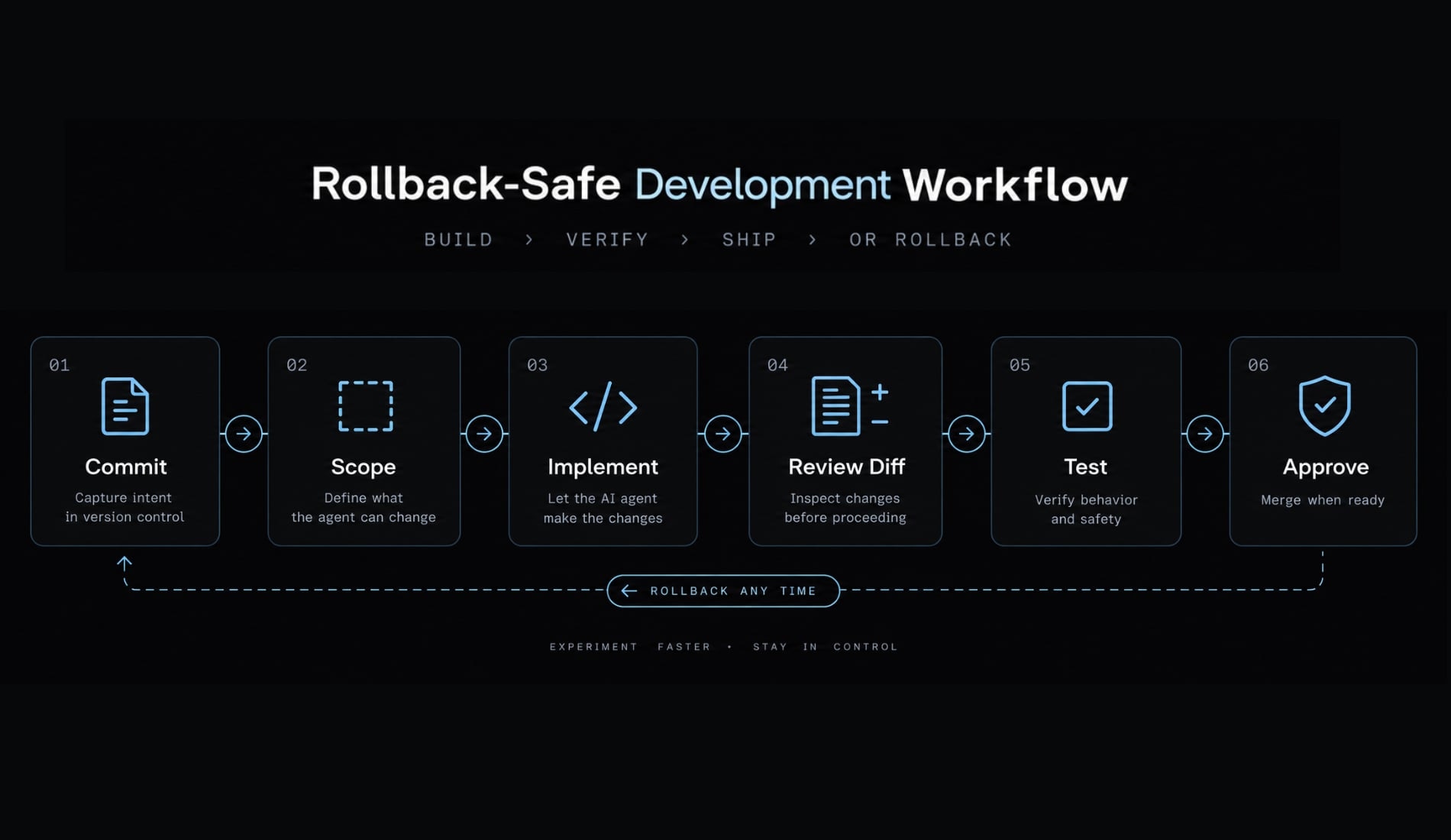
A safer workflow for future Claude Code changes
A rollback-safe workflow reduces both recovery time and uncertainty. The objective is to create clear boundaries before Claude edits code or triggers external processes.
- Create a Git commit before a broad, experimental, or high-risk change.
- Give Claude a bounded objective with explicit acceptance criteria.
- Specify allowed files or directories where practical.
- Ask Claude for an affected-file plan before implementation.
- Review the resulting
git diffbefore accepting the change. - Run targeted tests, linting, type checks, builds, and security checks.
- Commit only after verification; use
/rewindwhen covered Claude edits are unsuitable.
Require an explicit approval gate before Claude performs:
- File deletion.
- Schema migration.
- Dependency upgrades.
- Package publishing.
- Deployment.
- Infrastructure changes.
- Commands with irreversible external side effects.
Separating direct code edits from shell commands also makes recovery boundaries easier to understand. If possible, review code changes before allowing a formatter, generator, migration, or deployment command to run.
AgentKit can standardize this process through reusable Claude Code workflow setup, affected-file planning, automated testing, review agents, and approval gates. These AI agentic workflows improve process consistency but do not extend Claude Code’s native checkpoint retention or file coverage.
Restore first, then verify
A reliable Claude Code rollback starts by stopping further changes, running /rewind, and selecting the checkpoint immediately before the unwanted edit. Choose whether to restore code, conversation history, or both based on the actual failure.
Recovery is not complete until you inspect the working tree, review the diff, and run relevant tests. Use Claude Code /rewind for available session-level recovery, while relying on Git version control for durable project history, collaboration, and release traceability.
Frequently asked questions
What is Claude Code rollback?
Claude Code rollback is a session-level recovery mechanism that uses the /rewind command to revert your files and conversation history to a previous checkpoint. It allows you to undo unwanted edits performed by Claude Code and reset your session state after a mistake.
How do I undo changes in Claude Code?
To undo changes, stop making further edits and run the /rewind command in your terminal. Select the checkpoint immediately preceding the unwanted changes, choose whether to restore code, conversation, or both, and verify the resulting diff using git diff before continuing your work.
Which restore option should I choose?
Choose "Restore code and conversation" for failed multi-file refactors. Use "Restore code only" if Claude identified the correct problem but implemented the wrong solution. Select "Restore conversation only" if your files are acceptable but the session context has become misleading or unhelpful.
Does /rewind restore files changed by Bash commands?
No. /rewind only tracks and restores file edits performed by Claude Code’s internal tools. Changes made through Bash commands, manual IDE edits, formatters, or external processes are not automatically tracked by checkpointing and generally require recovery via Git or local history.
Can I use Git instead of /rewind?
Yes. /rewind is optimized for fast, session-level recovery between checkpoints, whereas Git provides durable repository-wide history, collaboration, and release-level traceability. The best practice is to commit at important milestones using Git and use /rewind for fine-grained rollbacks during active development sessions.
Why did "No files were restored" appear?
This message typically occurs if you selected a checkpoint where no snapshots were available, if the files were modified via unsupported external tools, or if the checkpoint retention period has expired. In this case, inspect your working tree with git status and revert changes using Git.
Read more:
- Claude Code revert: How to undo changes with /rewind
- How to Update Claude Code: The fastest method for every install
- How to uninstall Claude Code completely on all platforms
Conclusion
Overall, Claude Code’s /rewind command provides a convenient way to undo recent changes, while Git offers more reliable long-term version control. By reviewing the restored files, checking the differences, and running relevant tests, developers can recover safely and continue working with confidence.