Claude Code plugin security: A guide to safe AI development
Claude Code plugin security: Installation, checks, and safe setup
Faster AI-assisted development can increase the amount of changed code requiring review. Claude Code plugin security addresses two problems: checking generated code for vulnerabilities and controlling the tools allowed to inspect or modify your development environment. Improving source-code security should not introduce uncontrolled access to credentials, client repositories, or production services.
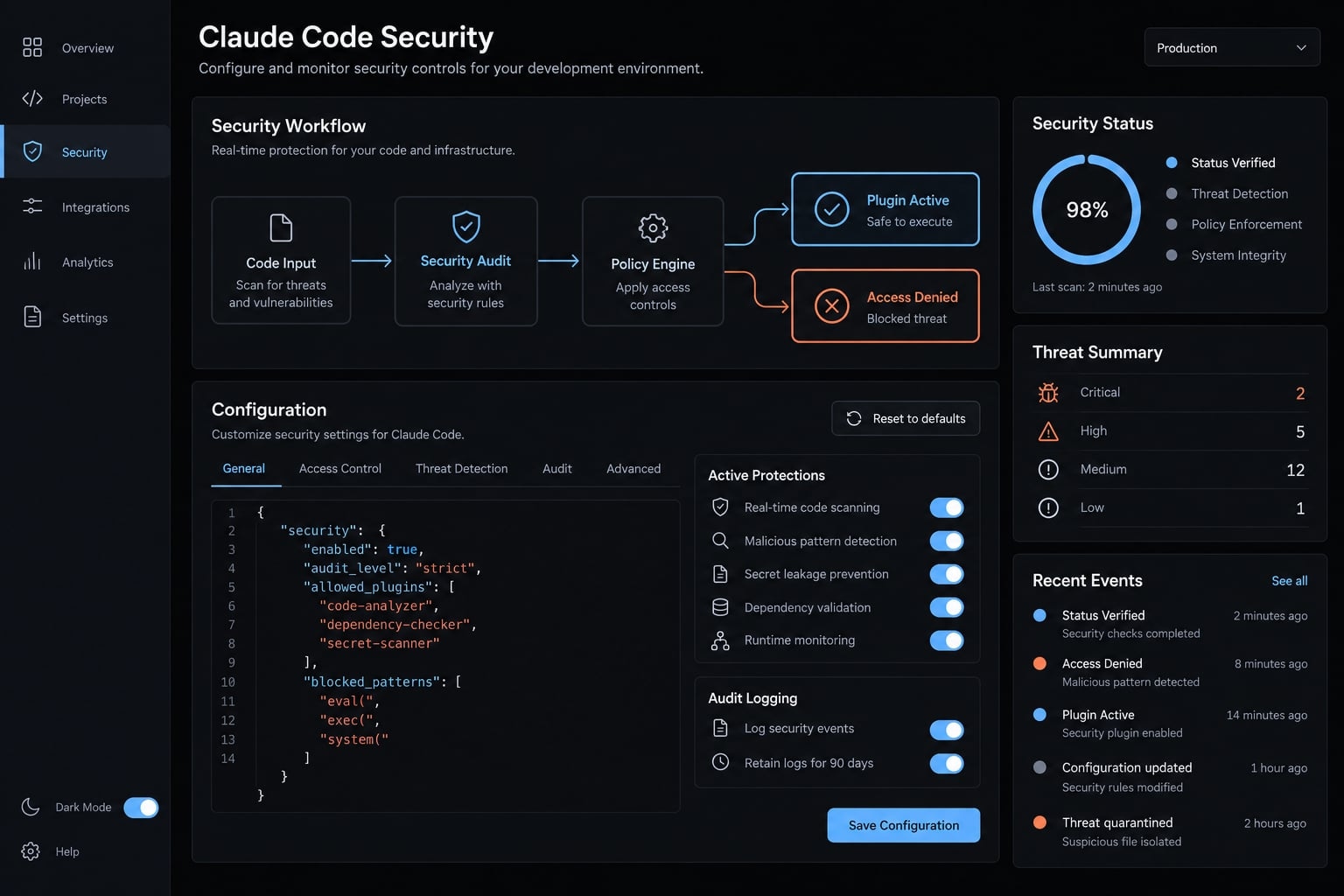
A plugin extends Claude Code, a slash command invokes a workflow, a CI scanner runs within continuous integration, the automated checks surrounding code changes. These categories are not interchangeable. The practical approach is to verify provenance, validate activation, measure review costs, and retain approval gates.
Which Claude Code security plugin should you use?
Claude Code plugin security combines vulnerability review with controls over installed extensions, permissions, and data access. Choose a documented tool for the review stage you need, validate it in an isolated environment, and retain CI checks and human approval. A security-oriented name alone establishes neither provenance nor effectiveness.
Code-review capabilities examine application behavior. Plugin-governance controls determine what the reviewing tool can read, execute, modify, or transmit. You need both.
These are editorial recommendations, not vendor-prescribed defaults.
Use case | Recommended setup | Reason | Caution |
|---|---|---|---|
Solo developer | Verified guidance, focused reviews, secret and dependency checks | Keeps review manageable | Inspect generated changes |
Small product team | Shared configuration, required review, CI gates | Makes checks repeatable | Assign a configuration owner |
Security-sensitive application | Isolated assessment plus specialist review | Adds scrutiny for sensitive behavior | A plugin cannot establish compliance |
Existing repository assessment | Bounded vulnerability scan, followed by broader review | Establishes findings and operating costs | Narrow scope can miss dependencies |
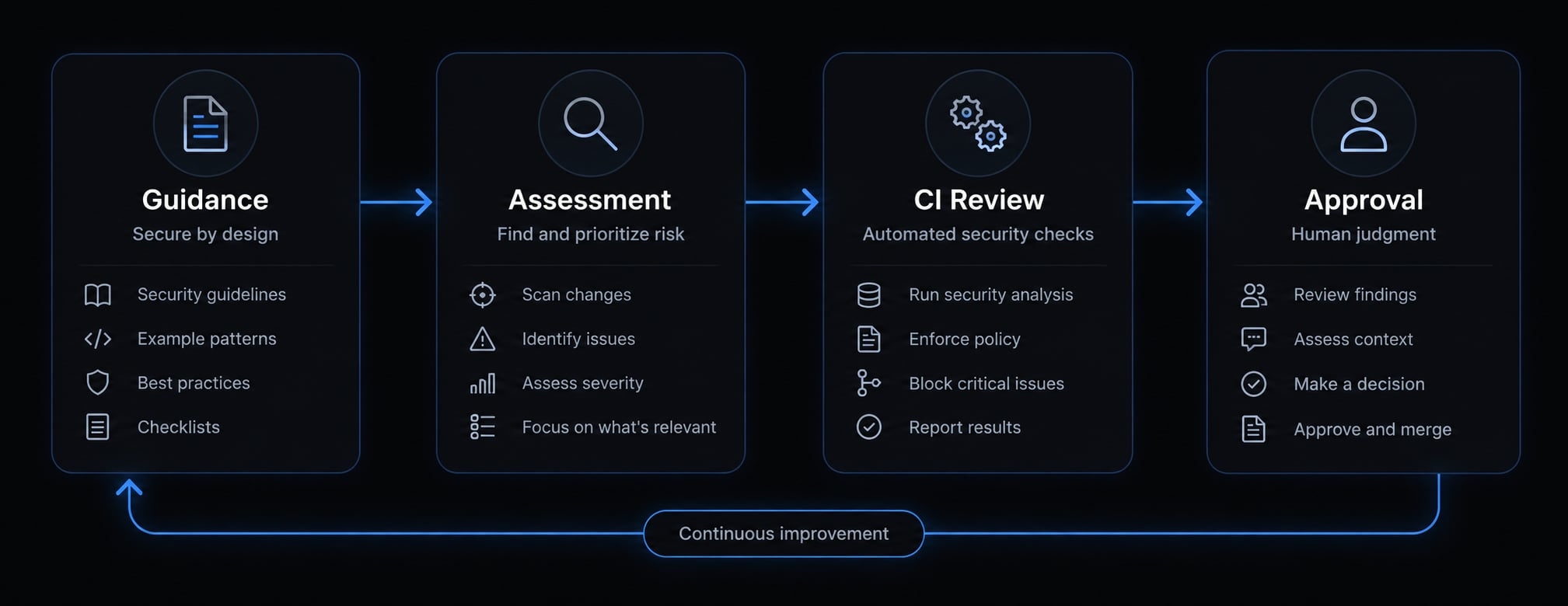
Claude Code security options compared
Compare behavior, not names. Installation method, review scope, account eligibility, and output formats can differ even when tools share similar branding.
Anthropic documents four distinct security layers for Claude Code: the security-guidance plugin reviews code while Claude writes it, /security-review runs a single pass over your branch, the Claude Security plugin runs an on-demand multi-agent scan, and Code Review reviews pull requests.
A separate managed Claude Security product, available on the Enterprise plan, monitors repositories as a hosted service. Similarly named third-party plugins are not the same products.
Comparison table
The table compares Anthropic's documented options with existing CI scanners. Check each product's documentation for current plan requirements.
Option | Primary use | Operation | Scope | Model usage | Output | Best fit |
|---|---|---|---|---|---|---|
Verified guidance plugin | Flag risky development patterns | Documented triggers | Supported actions | Implementation-dependent | Warnings or guidance | Early feedback |
In-session review workflow | Examine selected changes | User-initiated request | Supplied code and context | Usually model-backed | Review response | Focused assessment |
Dedicated security assessment | Investigate contextual risks | Product-specific | Documented assessment boundary | Product-specific | Supported report | Higher-risk changes |
Hosted pull-request review | Review proposed changes | Configured repository workflow | Pull request and available context | Product-specific | Comments or reports | Team review |
Existing CI security scanners | Enforce repeatable checks | Pipeline execution | Configured files and artifacts | Tool-dependent | Logs or supported reports | Merge gates |
SAST (Static Application Security Testing) examines code without running the application to identify potential security issues. It is a category, not a guarantee of deterministic behavior or complete coverage.
SARIF is a standardized format for exchanging static-analysis findings between compatible tools. Support must be verified for both the producing tool and receiving platform.
Can you use both together?
Guidance and focused assessment can complement each other when their implementations are compatible. Confirm this during validation rather than assuming coexistence means coordinated operation.
An authentication refactor deserves deeper scrutiny than a documentation correction. Running every available assessment after every edit can duplicate findings and consume review capacity.
Within a DevSecOps pipeline security integrated into development and operations-define which layer owns each check and how duplicate findings are resolved.
How to verify and install a security guidance plugin
Provenance, activation, and permissions are separate checks. A successful installation does not demonstrate that security detection works.
security-guidanc is published by Anthropic in the official claude-plugins-official marketplace, which ships enabled by default in Claude Code. Still record the plugin version and confirm its behavior in a test repository: a successful installation does not prove detection works for your stack.
Step 1 - Check prerequisites
Record the Claude Code version and the extension version you intend to evaluate. Confirm runtime dependencies against that extension’s documentation.
Do not assume Python is universally required by Claude Code. Similarly, distinguish Git requirements for obtaining an extension from Git requirements for reviewing a diff.
Prepare a synthetic repository without production credentials. Use a separate environment when the workflow could otherwise access sensitive host files.
Step 2 - Install from the verified listing
- Locate the extension through the documented plugin-management interface.
- Confirm the exact publisher and marketplace source.
- Check whether marketplace registration is necessary.
- Follow the listing’s installation procedure for your supported client.
- Record the resulting installed and enabled states.
An “Anthropic marketplace” label in a blog post is insufficient evidence. Match the listing to an authoritative publisher record.
If documentation provides an interactive installation command, enter it inside Claude Code not your system shell unless explicitly instructed otherwise.
Step 3 - Review team configuration
Review project configuration before committing it. Do not copy an enabledPlugins example into .claude/settings.json without checking the current schema. Sharing configuration does not necessarily install dependencies or authorize execution for every teammate. Trust prompts, local installation state, and organizational policies may still apply.
Installation scope is not sandboxing. Repository-level configuration does not inherently prevent access outside that repository.
Step 4 - Verify and reverse the setup
Use a harmless fixture designed to exercise a documented behavior. Record the trigger, expected result, observed output, and relevant version.
Then test the documented disable and uninstall procedures. Inspect remaining configuration and generated files afterward.
Before expanding access, make this installation-and-rollback record part of the team’s onboarding checklist.
How to run a deep scan with the Claude Security plugin
Use an available, documented workflow rather than guessing a plugin identifier. A product called Claude Code Security does not automatically establish an installable claude-security extension.
If a dedicated assessment tool is unavailable, an ordinary Claude Code review request can help inspect selected code. That is model-assisted review not a verified security-plugin scan or a substitute for security tooling.
Step 1 - Confirm the review interface
Check the available interface, supported version, account requirements, and documented invocation method.
If installation fails, investigate the exact listing, marketplace registration, client compatibility, and account eligibility. Do not substitute a similarly named third-party extension.
Preserve existing work before starting. Do not assume a review workflow is read-only unless its behavior and permissions establish that boundary.
Step 2 - Define a focused review
For the illustrative SaaS API, begin with tenant authorization, authentication dependencies, API boundaries, and sensitive-data handling.
A plain-language request could be:
Review the selected authorization changes for possible cross-tenant access. Trace relevant callers and authorization helpers. Explain uncertainty and missing context. Do not modify files or run commands without approval.
This is an example request, not a security control. Enforce restrictions through supported permissions and environmental isolation.
A focused review may reduce usage, but excluding shared helpers or middleware can hide the actual authorization behavior.
Step 3 - Triage findings
Use the following as reviewer-maintained fields, not promised output from any particular plugin.
Field | Meaning | Reviewer action |
|---|---|---|
Severity | Potential impact | Assess exposure and business consequences |
Confidence | Strength of supporting evidence | Check the reasoning and missing context |
Location | Relevant code path | Trace callers and access checks |
Impact | What an unauthorized actor could achieve | Validate against application behavior |
Remediation | Suggested corrective change | Evaluate correctness and side effects |
Confidence is not automatically a calibrated probability. A severe-looking issue may be invalid because of an upstream control, a modest-looking issue may affect every tenant. Verify Markdown, JSONL, and SARIF support individually before designing report ingestion.
Step 4 - Apply security patches safely
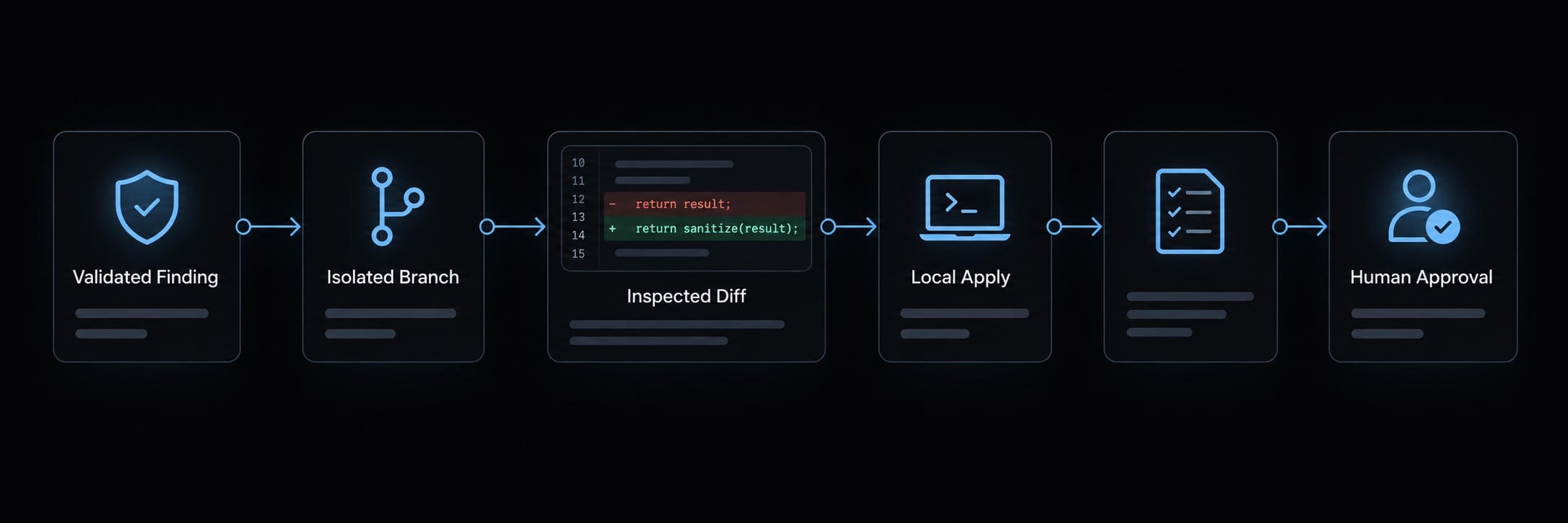
- Validate the finding.
- Request a patch only through an available, documented workflow.
- Inspect the diff in an isolated branch.
- Check whether the patch applies.
- Apply locally, then run tests and security checks.
- Obtain human approval before merging.
For patch files, git apply --check checks applicability, git apply applies changes. Neither establishes security correctness. Git’s “git-apply” documentation describes this distinction.
What security review layers check, what they cost, and where they fall short
Coverage depends on implementation and available context. Neither a security-oriented plugin nor a broad vulnerability assessment establishes that a codebase is secure.
An agentic review is a model-driven workflow that performs multiple analysis steps rather than a single check. Multiple steps do not necessarily provide independent verification.
Security coverage by review layer
Layer | Use it for | Do not rely on it for | Usage consideration |
|---|---|---|---|
Pattern-based guidance | Recognizing supported risky patterns | Complete business-logic analysis | Trigger frequency and noise |
Model-backed change review | Reasoning about changed behavior | Exhaustive coverage | Context size and repeated review |
Contextual assessment | Following relevant cross-module behavior | Proof of exploitability or safety | Runtime and reviewer effort |
CI security controls | Repeatable configured checks | Every deployment or authorization issue | Pipeline time and maintenance |
The security-guidance plugin covers edit-time, end-of-turn, and commit or push checks; other tools need their own documented configuration.
Cost and model usage
Separate four cost categories:
- Access: Extension fees, subscriptions, and account eligibility.
- Model usage: Tokens, request limits, or separately metered analysis.
- Execution: Runtime and supporting infrastructure.
- Review: Triage, investigation, testing, and maintenance.
The security-guidance plugin is free on all plans; its instant pattern checks make no model calls, while deeper reviews draw on your normal Claude usage. Claude Security scans count against your plan's usage limits, and Code Review requires a Team or Enterprise plan. Check current billing documentation before budgeting.
Pilot one representative change. Record repository size, assessment scope, elapsed time, reported usage, findings reviewed, and confirmed issues. A faster scan can still create more work if it produces weak findings.
An in-session interface does not prove local-only processing. Model-backed analysis may send code to remote services, verify applicable retention, processing, and contractual terms.
What these reviews do not replace
Keep SAST, dependency and secret scanning, container and infrastructure checks, runtime testing, and supply-chain controls. Sensitive business logic may also need specialist assessment or penetration testing. A false positive is a reported issue that is not a valid vulnerability in context. A false negative is a real vulnerability the review misses.
For tenant isolation, validate actual authorization behavior and negative tests. An unflagged path may still be vulnerable. OWASP’s Code Review Guide and NIST’s Secure Software Development Framework support this layered approach. No findings does not mean no vulnerabilities.
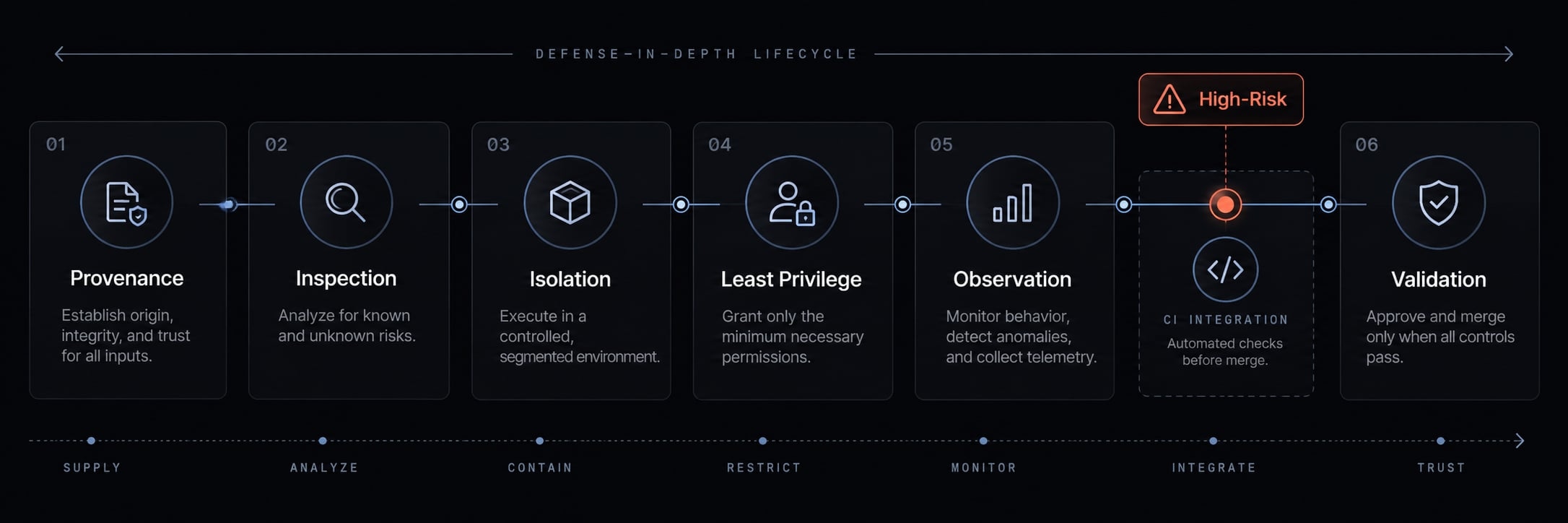
Safe plugin adoption and defense-in-depth checklist
Treat plugins as development dependencies with execution consequences. Official distribution can help establish provenance, but it does not eliminate operational risk.
Hooks can execute configured actions. MCP (Model Context Protocol) connects AI tools to external tools and data sources. Both deserve explicit review.
Before installation
- Verify provenance: Record publisher, marketplace source, version, release information, and the authoritative documentation used.
- Inspect repository-controlled behavior: Review settings, instructions, hooks, and MCP integrations before trusting an unfamiliar repository. Malicious content or tool output may attempt to redirect an agent.
- Define prohibited access: Identify credentials, environment variables, sensitive code, and external services the workflow must not reach.
Do not assume an ignore file prevents access through shell commands, integrations, or other execution paths.
During validation
- Apply least privilege: Give the tool only the access needed for its task. Use non-production credentials and a synthetic repository.
- Observe actual behavior: Inspect commands, file changes, network-dependent integrations, and model usage. Compare observations with documentation.
- Test control paths: Verify permission prompts, patch approval, disabling, and uninstallation. Do not bypass permissions to resolve installation friction.
A test repository alone does not isolate host credentials or network access. Use supported sandboxing or a separate environment where appropriate.
During team rollout
- Review shared settings: Version-control approved project configuration and plugin security settings without including secrets.
- Assign ownership: Name a maintainer, review updates, and pin versions where supported. Revalidate meaningful changes before broad rollout.
- Retain evidence: Record tested versions, review dates, activation results, limitations, and rollback procedures.
Uninstalling a plugin does not reverse file modifications, external actions, or credential exposure. Suspected exposure requires incident handling, potentially including credential rotation and access-log review.
Recommended defense-in-depth workflow
Coding → pre-commit checks → pull request → CI and required review → merge approval → release validation
Place high-risk assessments before merge approval. Release validation remains necessary because deployment configuration and runtime behavior can introduce different risks.
Assign an owner to each gate before enabling the workflow across additional repositories. A documented control without an accountable reviewer can become a routinely ignored warning.
Recommended Claude Code security setup by team type
Standardize operating responsibility, not just installation. The right setup depends on product risk, repository count, and the team’s ability to investigate findings.
Solo developer or indie founder
Maintain a small, repeatable routine: verified guidance where supported, focused assessment for sensitive changes, and dependency and secret checks.
Set a manageable usage budget. Review every proposed patch, especially changes involving authentication, authorization, payments, or data deletion. A short checklist followed consistently is more useful than many ignored tools.
Small product or agency team
Assign a configuration owner and require pull-request approval for security-sensitive changes. Keep update, evidence-retention, and rollback procedures consistent.
For agencies, separate client credentials, workspaces, and permissions. Access granted for one repository should not silently extend to another client’s environment.
Review configuration changes as code changes, including newly introduced hooks and integrations.
Security-Sensitive or Regulated Product
Require specialist review, mandatory CI gates, stronger environment isolation, and documented access decisions.
Retain findings, remediation diffs, test results, and approvals according to organizational policy. Review remote code-processing terms before exposing restricted code.
These records can support evidence collection, they do not independently establish compliance.
Where AgentKit Fits
AgentKit acts as the operational layer that standardizes and controls coding agents across projects:
- AgentKit Engineer structures development into deterministic subagent workflows and lifecycle commands (/brainstorm, /plan, /cook, /code-review, /ship), enforcing test-driven discipline and consistent context via CLAUDE.md.
- AgentKit App provides a desktop cockpit (macOS & Windows) to visually track skill graphs, configure MCP servers, and manage tool hooks.
- Safety and control: With pre-tool safety hooks and MCP guardrails, developers keep ultimate authority to approve diffs, pause actions, and block unauthorized executions.
Frequently asked questions
What is the Claude Code security plugin?
The claude-security plugin is an official tool by Anthropic designed to perform multi-agent vulnerability scanning within your local Claude Code session. It maps architecture, constructs threat models, and identifies security flaws, offering patches for human review and approval.
How does the security-guidance plugin differ from Claude Security?
security-guidance acts as a shift-left guardrail, automatically vetting code edits and terminal commands in real time. Conversely, the claude-security plugin is an on-demand tool used to conduct deeper, repository-wide vulnerability assessments and suggest targeted remediation patches.
Does Claude Code automatically patch security findings?
No. While the claude-security plugin can generate suggested patches, they are never applied automatically. You must review each patch, inspect the code diff, verify it in an isolated branch, and apply it manually through your shell or a pull request.
Can plugins access my computer’s sensitive files or credentials?
Yes, plugins operate within your local environment with the same permissions as your Claude Code session. To mitigate risks, you should use .claudeignore to block access to sensitive directories, implement OS-level sandboxing, and avoid granting unrestricted shell execution permissions.
What are the risks of using third-party MCP servers or agent skills?
Third-party MCP tools may contain "poisoned" instructions or overly broad scopes. Malicious skills can attempt to exfiltrate environment variables or override agent guardrails. Always verify the source and scope of any MCP integration before adding it to your workspace.
How can I verify that a plugin is safe to install?
Before installation, verify the plugin publisher through official Anthropic documentation or the marketplace. Check the plugin's configuration, hooks, and MCP manifest for suspicious instructions. In a professional environment, validate all new plugins in a non-production test repository first.
Are there risks associated with repository-level configuration files?
Yes. Vulnerabilities like CVE-2025-59536 demonstrated that untrusted repositories can use .claude/settings.json or custom hooks to execute code upon opening. Ensure your environment is updated to the latest versions, which enforce strict trust boundaries and explicit consent for project-level tool execution.
Read more:
- Agent skill security: Risks, threat models and best practices
- Claude Code plugin security audit: Installation and patch guide
- Claude Code supply chain security: Risks & mitigation guide
Conclusion
Effective Claude Code plugin security protects both the application and the development environment. Guidance can highlight risky patterns, focused review can examine contextual behavior, CI checks and human reviewers provide additional scrutiny. None of these layers proves that code is secure, and installing an extension does not establish effective detection.
Start with one synthetic repository and one representative authorization change. Verify provenance and activation, observe permissions and file changes, measure usage, and test rollback. Expand only after a named owner accepts the findings and operating limits.