How to build an Electron app with Claude Code: A guide
How to build an Electron app with Claude Code
Claude Code simplifies building and managing Electron apps by inspecting repositories, editing code, and executing permitted commands. To ensure reliable results, define your architecture and approval boundaries upfront across five stages: architecture, baseline setup, repo instructions, bounded implementation, and verification. This structured approach prevents hard-to-review code changes and rendering issues, ensuring development yields small, inspectable features backed by necessary human oversight.
What “Claude Code Electron” means and what you need to start
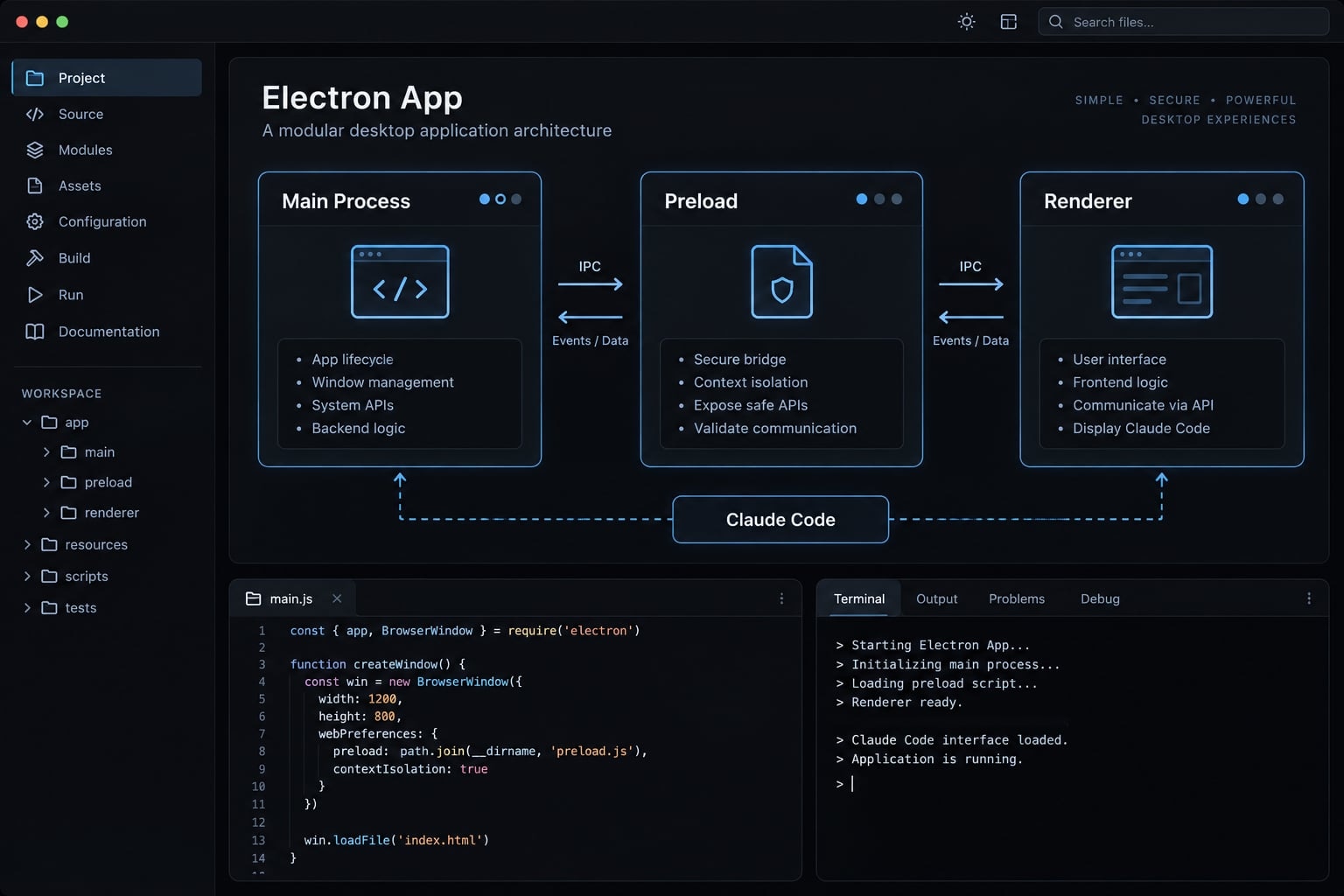
The term 'Claude Code Electron' refers to using Anthropic’s coding agent to build, debug, and maintain Electron desktop apps. It is not a standalone product or an official integration name. The workflow combines repository-based coding assistance with Electron’s desktop runtime, while developers retain responsibility for architecture, permissions, and release decisions.
Claude Code is the coding agent; this guide uses the Claude Code CLI, its terminal interface. Electron combines Chromium-based interfaces with Node.js capabilities. Claude Desktop is a separate Anthropic application, not the utility built here.
Basic prerequisites
- A supported, authenticated Claude Code installation.
- A development Node.js version supported by your tooling.
- The project’s existing package manager.
- A Git working tree with existing changes protected.
- An Electron repository or selected starter.
- Local terminal and editor access.
What Claude Code should and should not control
Agent assists | Developer approves |
|---|---|
Inspect, plan, implement bounded edits, run permitted checks, explain changes | Architecture, permissions, dependencies, destructive actions, commits, releases |
Verification note: The report-file utility below is illustrative, not a tested reference implementation. No operating system, tool versions, screenshots, or execution results are claimed.
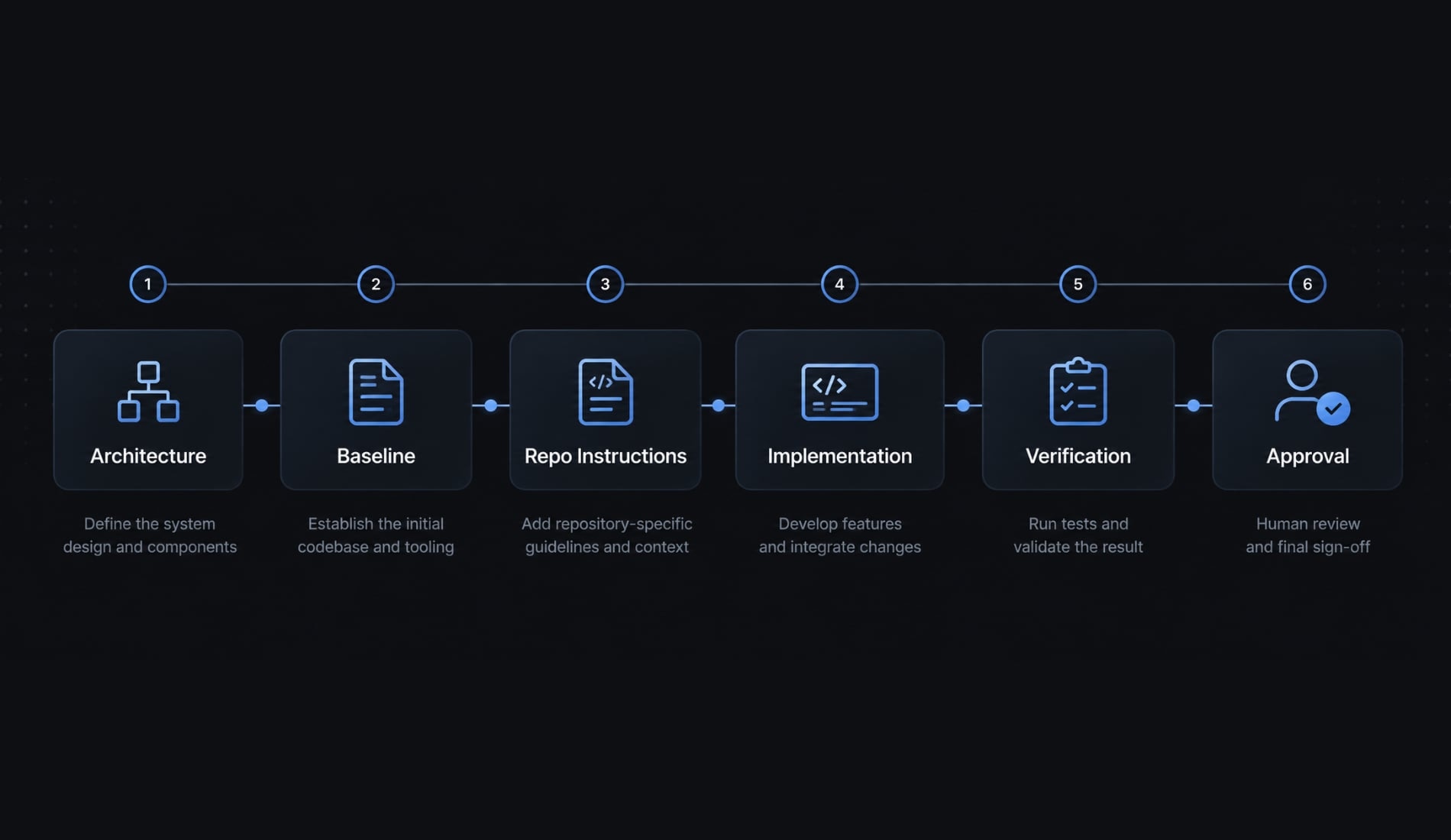
Step 1 - Define the app and Electron architecture before generating code
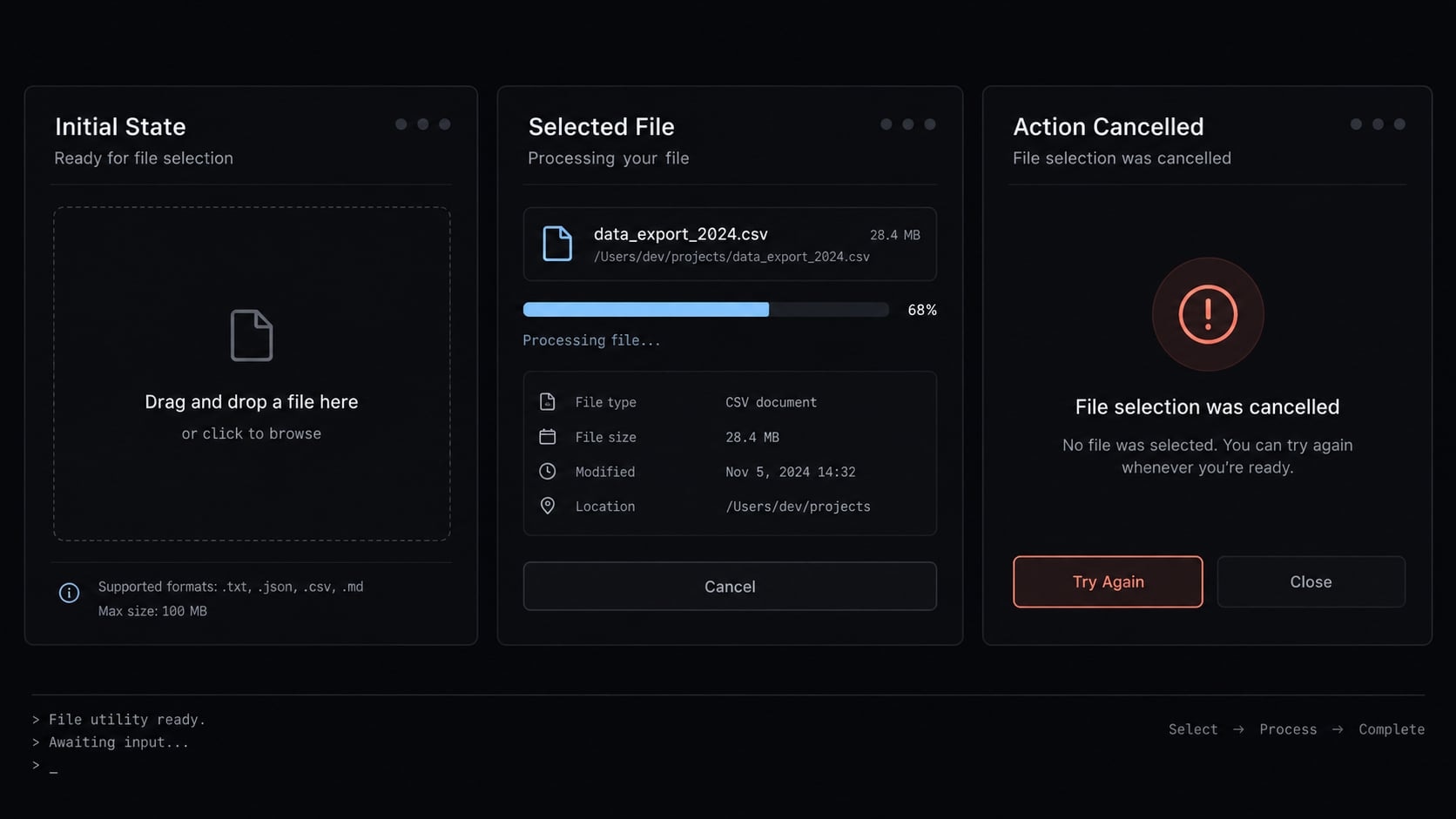
Define the smallest useful outcome before requesting implementation. Our illustrative utility lets a team member select a local report file and displays its filename. It does not read, upload, or modify the file.
Record these constraints:
- Platforms: Which operating systems must pass release checks?
- Local data: Filename only; no persistent selection history.
- External integrations: None for this feature.
- Privacy: No file contents or full paths in logs.
- Acceptance: Selection displays a filename; cancellation remains neutral; unauthorized requests fail.
Use a simple main–preload–renderer model
Electron architecture separates privileged operations from interface code. Electron’s Process Model and Inter-Process Communication documentation describe these responsibilities.
Component | Responsibility | Constraint |
|---|---|---|
Main process | Window lifecycle and privileged operating-system operations | Validate privileged requests |
Preload script | Controlled bridge between isolated contexts | Expose specific methods through |
Renderer process | User interface and interaction | No unrestricted Node.js or Electron access |
IPC mechanism | Requests and responses across boundaries | Use explicit channels; validate payloads and senders |
IPC means inter-process communication. It is a mechanism, not a fourth Electron process.
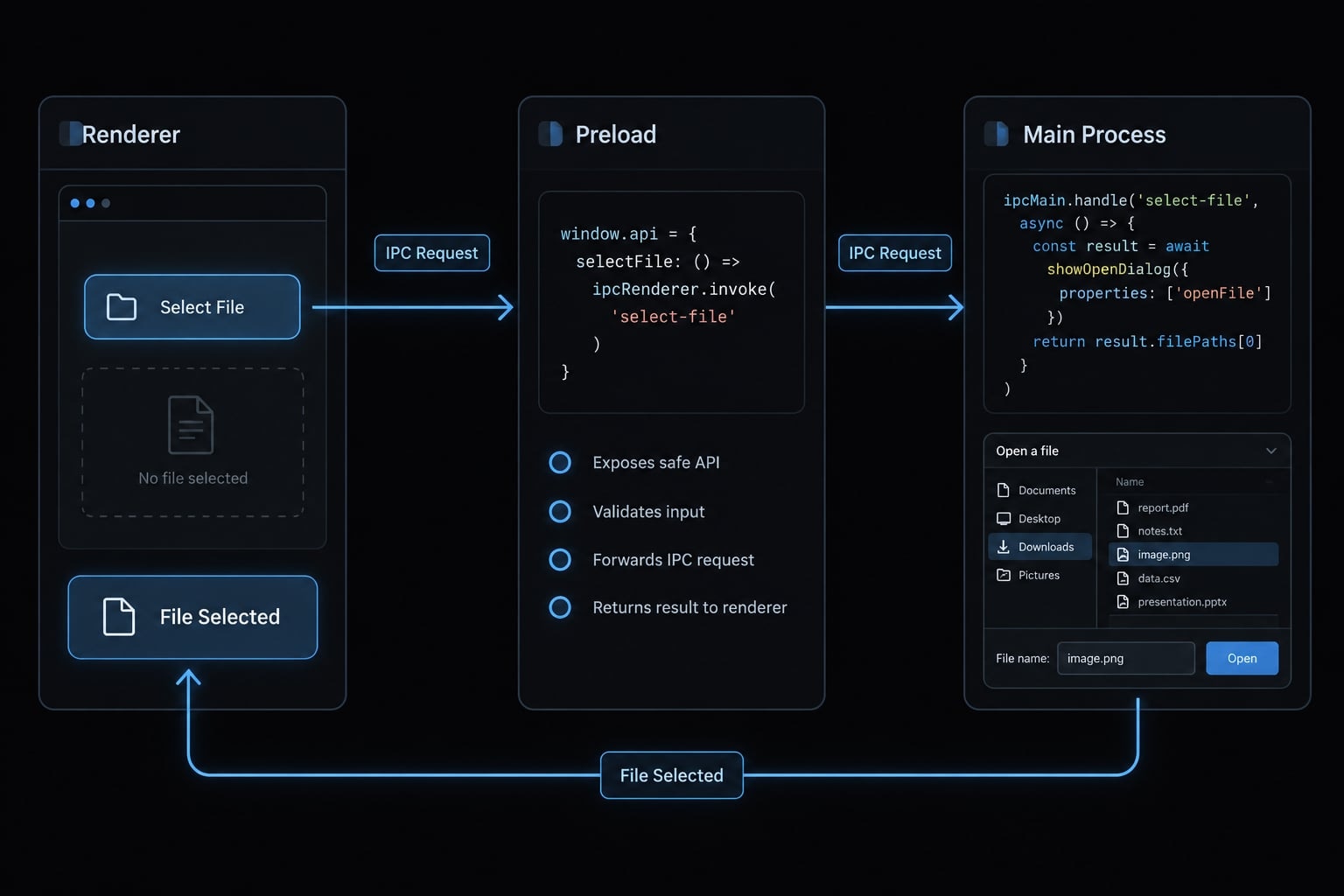
The main process owns the native dialog. The preload exposes a specific operation such as selectReport(). The renderer displays its result without receiving unrestricted filesystem access.
Ask for a plan before allowing edits
Use a read-only planning request:
Inspect this repository without editing files. Locate main, preload,renderer, and IPC entry points. Plan a feature that selects a local reportand displays only its filename.List affected files, proposed dependencies, tests, measurable acceptancecriteria, risks, and assumptions. Preserve process boundaries.Pause for approval before implementation.
Approving Electron architecture first makes unexpected dependencies and privilege changes visible before they become a large diff.
Step 2 - Scaffold or onboard the Electron project
Establish a working baseline before agent-authored changes. Without one, you cannot reliably distinguish a new regression from an existing setup problem.
Starting a new project
Electron Forge provides tooling for developing, packaging, and distributing applications. electron-vite focuses on a Vite-based development and build setup; distribution may require additional configuration.
For Electron project setup:
- Choose Electron Forge, electron-vite, or an approved organizational starter.
- Follow that starter’s current documentation.
- Install dependencies with the selected package manager.
- Run its documented development application.
- Confirm the window opens and renders.
- Record available check, build, and packaging scripts.
- Create a reviewed baseline checkpoint.
- Start Claude Code from the project root.
TypeScript helps maintain contracts between application layers. Its types do not validate runtime messages or enforce security.
Avoid remembered scaffolding commands when current instructions are available. Check prerequisites and version compatibility in the Electron Forge or electron-vite documentation.
Onboarding an existing repository
Inspect package scripts, lockfiles, entry points, preload scripts, IPC handlers, tests, and packaging configuration. Preserve existing tooling unless a change is approved.
Inspect this project read-only. Map process entry points, preload APIs,IPC handlers, package scripts, lockfiles, tests, and packaging settings.Identify documented baseline checks and existing failures.Do not install, upgrade, edit, or migrate anything.
Run approved baseline checks separately. Record actual operating-system, Electron, development Node.js, package-manager, and Claude Code versions alongside results.
An illustrative map—not a required folder layout—is:
src/main/ # privileged operationssrc/preload/ # narrow bridgesrc/renderer/ # interfacetests/ # automated checks
Missing scripts are gaps to document, not commands to invent.
Step 3 - Create an Electron-specific CLAUDE.md
CLAUDE.md is a project instruction file that Claude Code loads according to its documented location and scope rules. It can describe repository structure, commands, conventions, and approval expectations. This form of project memory supplies guidance; it is not persistent execution state or an enforced security policy.
Minimum information to include
Keep CLAUDE.md specific to the repository:
- Purpose, platforms, stack, and actual directory map.
- Process responsibilities and verified commands.
- Coding conventions and security rules.
- Dependency policy, protected files, and approval requirements.
- A definition of done with evidence requirements.
Copy-ready CLAUDE.md structure
Replace every placeholder before adopting this template.
# Project instructions## Purpose and layoutBuild an internal desktop utility that selects a report and displays itsfilename. Supported platforms: [REPLACE].Stack and supported versions: [REPLACE].Main: [PATH]. Preload: [PATH]. Renderer: [PATH]. Tests: [PATH].Follow existing naming, formatting, and error-handling conventions.## Process boundariesMain owns native dialogs and privileged operations.Preload exposes narrow, named methods through contextBridge.Renderer handles presentation without unrestricted Node.js or Electron access.Use explicit IPC channels. Validate payloads and sender frames againstapproved application origins before privileged work.TypeScript contracts do not replace runtime validation.Return only the data the feature needs; do not expose full paths unnecessarily.## SecurityKeep contextIsolation enabled and renderer nodeIntegration disabled.Preserve renderer sandboxing where applicable to the supported configuration.Restrict navigation, new windows, and external destinations.Protect secrets and sensitive configuration. Never include them in rendererbundles, prompts, screenshots, or logs.Do not weaken controls to make tests pass.## Verified commandsDevelopment: [VERIFIED COMMAND OR NOT CONFIGURED].Typecheck/lint: [VERIFIED COMMANDS OR NOT CONFIGURED].Tests/build/package: [VERIFIED COMMANDS OR NOT CONFIGURED].## Change controlInspect before editing. Obtain approval for the smallest implementation plan.Request explicit approval before dependency changes, broad refactors,destructive operations, commits, or releases.Do not modify [PROTECTED FILES] without approval.Preserve unrelated work.## CompletionReport changed files, behavioral changes, risks, and unresolved work.Label every check passed, failed, or not run, with supporting output.Require runtime and visual inspection, security review, and human diff review.
Project-specific command safety
Verify scripts before documenting them in CLAUDE.md. Never execute placeholders literally. Review commands that download and execute tooling, especially when package identity or version selection is implicit.
Keep approval requirements in actual tool permissions as well as written instructions. A Markdown rule cannot prevent an otherwise authorized command from running. Update CLAUDE.md whenever entry points, commands, or boundaries change. Stale instructions create contradictory context instead of reducing rediscovery.
Step 4 - Build one vertical slice at a time
A vertical slice delivers one observable outcome across the necessary layers. For our utility, that means a renderer button, a narrow preload method, a validated main-process handler, and a displayed filename.
Selection should produce the expected filename. Cancellation must not crash the application or show success. Invalid or unauthorized IPC requests must be rejected.
The implementation loop
- Define one user-visible outcome.
- Write acceptance criteria.
- Request the smallest implementation plan.
- Approve scope and dependencies.
- Implement the slice.
- Run focused checks.
- Launch and inspect the application.
- Review the diff.
- Commit only after approval.
Keep file reading outside this vertical slice. Selecting a filename does not justify exposing arbitrary filesystem access.
Use bounded implementation prompts
Implement the approved report-selection feature only in the agreed main,preload, renderer, and test files. Main owns the native dialog; expose onenarrow preload method. Validate IPC payloads and authorized sender frames.Add no dependencies without approval.Display the filename after selection. Handle cancellation without a successstate and show a useful error on failure. Add focused behavior and IPC testswhere supported. Do not read file contents, refactor unrelated code, or commit.Report changed files, checks passed/failed/not run, unresolved work, andmanual verification steps.
Focused IPC testing should cover expected requests, unexpected arguments, and untrusted senders—not just the successful selection path.
Decide cancellation semantics explicitly: Preserve the previous filename or clear it. Either can be valid, but implementation and tests should agree.
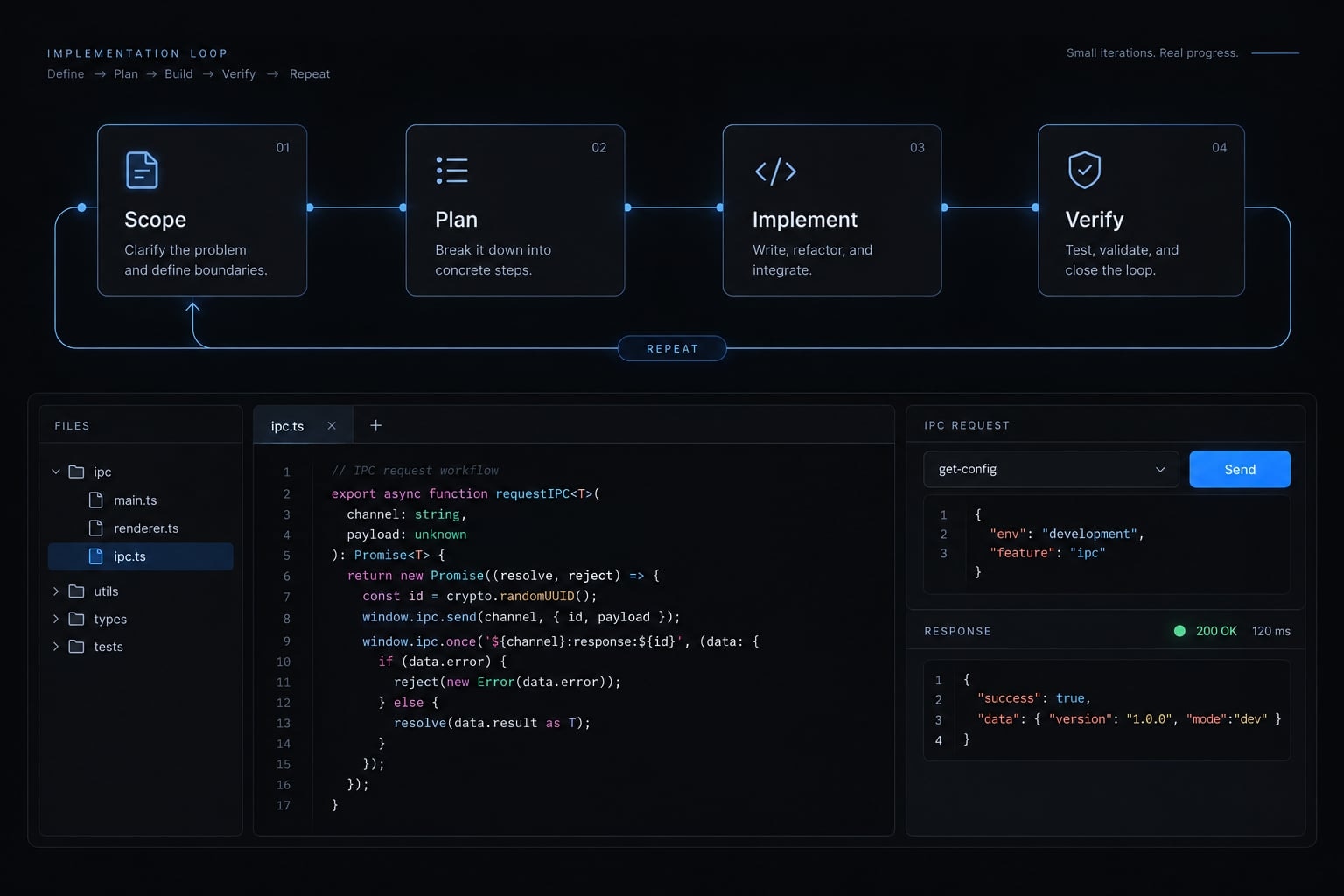
Smaller diffs reduce review scope; they do not eliminate regressions. Accept the slice only when its behavior and evidence satisfy the agreed criteria.
Step 5 - Test, visually inspect and review the Electron app
Build success is one checkpoint, not proof of readiness. Use this validation ladder:
Static checks → automated tests → runtime checks → visual inspection → security review → diff review.
Run static and automated checks first
Run verified type checks, linting, unit tests, focused integration or IPC tests, and the project build where available. Report missing suites as not run, with an explanation. Record commands, outcomes, and relevant errors. Never translate “no test command exists” into “tests passed.”
Launch and inspect the actual desktop application
Check main-process output and renderer console errors. Exercise selection, cancellation, repeated selection, and failure handling. Inspect applicable loading, empty, success, and error states. Confirm long filenames remain readable. Check menus, file access, and native integrations relevant to the feature.
Before release, verify packaged builds on each supported operating system. Development behavior does not prove packaged paths, permissions, or integrations work.
Add an optional visual feedback loop with CDP
Development only: Verify loopback-only debugging reachability. Never expose or forward the port publicly. Close it after testing and exclude remote debugging from release configurations.
CDP, the Chrome DevTools Protocol, can inspect Electron’s Chromium renderer when debugging is explicitly configured. Manual inspection remains valid without it.
For an optional visual feedback loop:
- Verify how your starter forwards debugging flags to Electron.
- Connect an inspection tool to the intended renderer target.
- Capture screenshots and supported page-state information.
- Make those artifacts available to Claude Code through permitted tools.
- Recheck the changed interface.
If using agent-browser, verify connection, target selection, screenshot, and snapshot syntax against its maintainer documentation for the installed release.
No executable recipe is provided here because this workflow has not been tested. Consult Electron’s debugging documentation and the Chrome DevTools Protocol documentation.
CDP does not establish correctness of native dialogs, operating-system permissions, or every main-process behavior. A screenshot demonstrates appearance, not comprehensive functionality.
Apply an Electron security completion gate
Control | Required review |
|---|---|
Context isolation | Enabled |
Renderer Node integration | Disabled |
Renderer sandbox | Preserved for supported configuration |
Preload APIs | Narrow, task-specific methods |
IPC | Explicit channels; runtime payload and sender validation |
Navigation, windows, webviews | Restricted to approved behavior |
Content Security Policy | Restricts permitted content sources appropriately |
Remote debugging | Absent from release configurations |
Dependencies and Electron | Versions and relevant advisories reviewed |
Excluded from renderer bundles and logs | |
Privileged operations | Scoped to approved resources |
This is a completion gate, not an exhaustive audit or a vulnerability-free guarantee.
Review the diff before committing
Inspect unrelated edits, lockfiles, new dependencies, duplicated IPC handlers, weakened controls, unexplained changes, and unresolved failures.
Require a final record separating passed, failed, and not run checks. Human approval determines whether remaining gaps block acceptance or release.
Common Claude Code–Electron mistakes and how to prevent them
Problems in AI-generated code are not always prompting problems. Electron debugging also involves runtime configuration, packaging, platform behavior, and dependency compatibility. Correct the failing layer rather than repeatedly expanding the task.
Mistake | Consequence | Prevention |
|---|---|---|
No architecture plan | Privileges spread into UI code | Approve process ownership before edits |
Whole-app prompts | Large, difficult-to-review diffs | Implement one observable slice |
Build-only validation | Broken runtime behavior goes unnoticed | Launch and exercise the actual app |
Broad preload or IPC exposure | Unnecessary privileged access | Expose named operations; validate requests and senders |
Unreviewed dependencies | Added maintenance and supply-chain risk | Approve additions and inspect lockfile changes |
Premature global refactors | Feature work hides regressions | Separate refactors from feature changes |
Automatic commits | Unreviewed work becomes a checkpoint | Require explicit commit approval |
Outdated | Incorrect commands and assumptions | Update instructions with repository changes |
Debugging left enabled | Unnecessary inspection or control access | Close debugging and check release configuration |
When to stop the agent and investigate manually
Pause when:
- Repeated fixes do not resolve the same error.
- A small bug triggers broad rewrites.
- Runtime remains broken despite green tests.
- The diff contains unrelated changes.
- A proposed fix disables a security control.
- Packaging fails on a supported platform.
- The agent cannot explain the data flow.
Preserve logs and protect unrelated work. Compare against the last known-good checkpoint; return to it only through an approved, non-destructive recovery process.
Identify whether the failure belongs to the renderer, preload, main process, or packaging configuration. If IPC security must be weakened to continue, reject that approach rather than treating it as a temporary fix.
Claude Desktop and Electron: What is confirmed?
Claude Desktop and Claude Code are distinct products, even where Anthropic provides connected coding experiences. This guide does not independently verify the desktop application’s framework for a particular operating system and release. A web-like interface alone cannot establish its complete architecture.
Claims about Claude Desktop should identify platform-specific primary evidence. They should not turn community discussion into a verified explanation of Anthropic’s internal engineering decisions.
For any cross-platform application, these are general Electron considerations—not confirmed reasons behind Anthropic’s choices:
Area | Potential benefit | Tradeoff |
|---|---|---|
Shared web code | Reuse interface logic | Desktop adaptation remains |
Feature parity | Coordinate shared behavior | Platform differences persist |
Delivery effort | Use existing web expertise | Native integrations need work |
Maintenance | Share application code | Maintain framework and dependencies |
Ecosystem access | Use web tooling | Review compatibility and supply-chain risk |
Electron can carry additional runtime and memory overhead. Actual performance depends on implementation and workload.
Does AI make native development the automatic better choice?
No. AI may reduce implementation effort, but platform-specific testing, maintenance, signing, distribution, and support remain. Choose based on product requirements and measured behavior, not code-generation capability alone.
Frequently asked questions
Can Claude Code build and manage Electron applications?
Yes, Claude Code can build and manage Electron applications by operating within your local repository. It can inspect files, propose architectural changes, write code, and execute permitted commands. However, successful builds do not guarantee runtime, visual, or security correctness; therefore, human review and validation remain essential.
What is the recommended architecture for Electron apps developed with AI?
The most robust approach is the main-process, preload, and renderer model. The main process handles privileged operations, the preload script acts as a secure bridge, and the renderer process executes the UI. Use explicit IPC channels with strict payload and sender validation for communication.
What should be included in the CLAUDE.md file?
CLAUDE.md should include the project's purpose, a directory map, process responsibilities, verified build commands, coding conventions, security rules, dependency policies, and clear approval requirements for changes. It functions as a project-specific instruction set to guide Claude Code's decisions. It is guidance, not enforcement — keep approval requirements in actual tool permissions as well, and update the file whenever entry points, commands, or boundaries change.
How should I test an Electron application built by Claude Code?
You should employ a validation ladder consisting of static analysis, automated testing, runtime checks, and visual inspection. If the application environment is configured, Chrome DevTools Protocol (CDP) can facilitate visual feedback, but it should never be included in final release configurations for security reasons.
Does using Claude Code make native development obsolete for Electron apps?
No. While Claude Code reduces the effort of cross-platform implementation, Electron's shared codebase can reduce duplicate interface work, but framework and dependency maintenance remains an ongoing cost. Many teams choose Electron for its shared codebase and maintainability, balancing those benefits against the runtime and memory footprint associated with the framework.
What happens if Claude Code proposes an insecure change?
If an agent proposes an insecure change, such as disabling context isolation or exposing broad IPC APIs, you must reject the plan. Claude Code operates within the permissions you grant; you remain the final authority for all security-critical decisions and should always review diffs before committing.
Read more:
- Mastering the Claude Code workflow for reliable AI development
- How to vibe code a desktop app: From concept to installer
- Claude Code automation: Build repeatable and low-risk workflows
Conclusion
A dependable Claude Code Electron workflow begins with clear architecture, a working baseline, and incremental, single-slice implementations. Verification requires combining automated checks, runtime validation, and visual inspection, supplemented by strict security, human diff, and platform-specific release reviews.
To maintain momentum, start small with a focused feature, log all test outcomes transparently, and adapt the provided CLAUDE.md template and checklist to your project's specific requirements.