Claude Code with NestJS: Setup, workflows and CLAUDE.md guide
Claude Code with NestJS: Setup, CLAUDE.md template, and practical workflows
Valid TypeScript doesn't guarantee a working NestJS app - runtime injection and validation can still fail. Effective development with Claude Code requires repo context, scoped changes, and verification. Using a B2B SaaS endpoint example, this guide provides setup steps, templates, workflows, and guardrails for safe AI coding.
What Claude Code can and should not do in a NestJS project
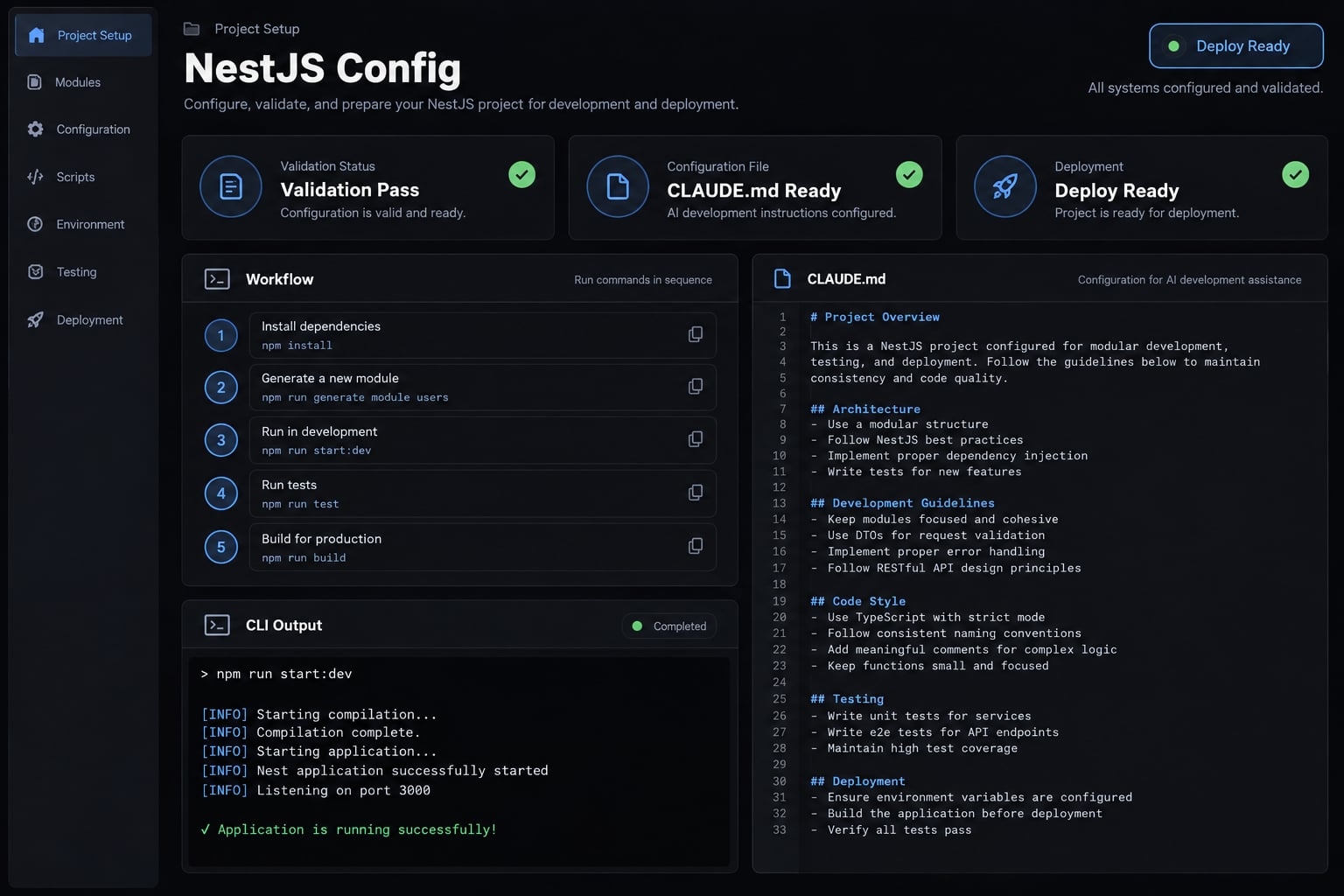
Claude Code for NestJS is a development workflow, not a separate framework-specific product. The agent can inspect repository files, propose changes, edit code, and run permitted tools. Its usefulness depends on supplied conventions, available context, configured permissions, and verification that checks framework behavior rather than syntax alone.
Suitable tasks for Claude Code
Ideal tasks include scaffolding DTOs and tests, analyzing code architecture, local refactoring, writing docs, and reviewing diffs. It can also execute reviewed verification scripts within permitted boundaries.
For example, a project-creation DTO can follow an existing workspace endpoint’s conventions. However, TypeScript decorators do not independently establish the application’s validation behavior.
NestJS’s Modules and Providers documentation explains how dependency injection supplies registered dependencies within module relationships. A service may compile yet fail during initialization because its consuming module cannot access a required provider.
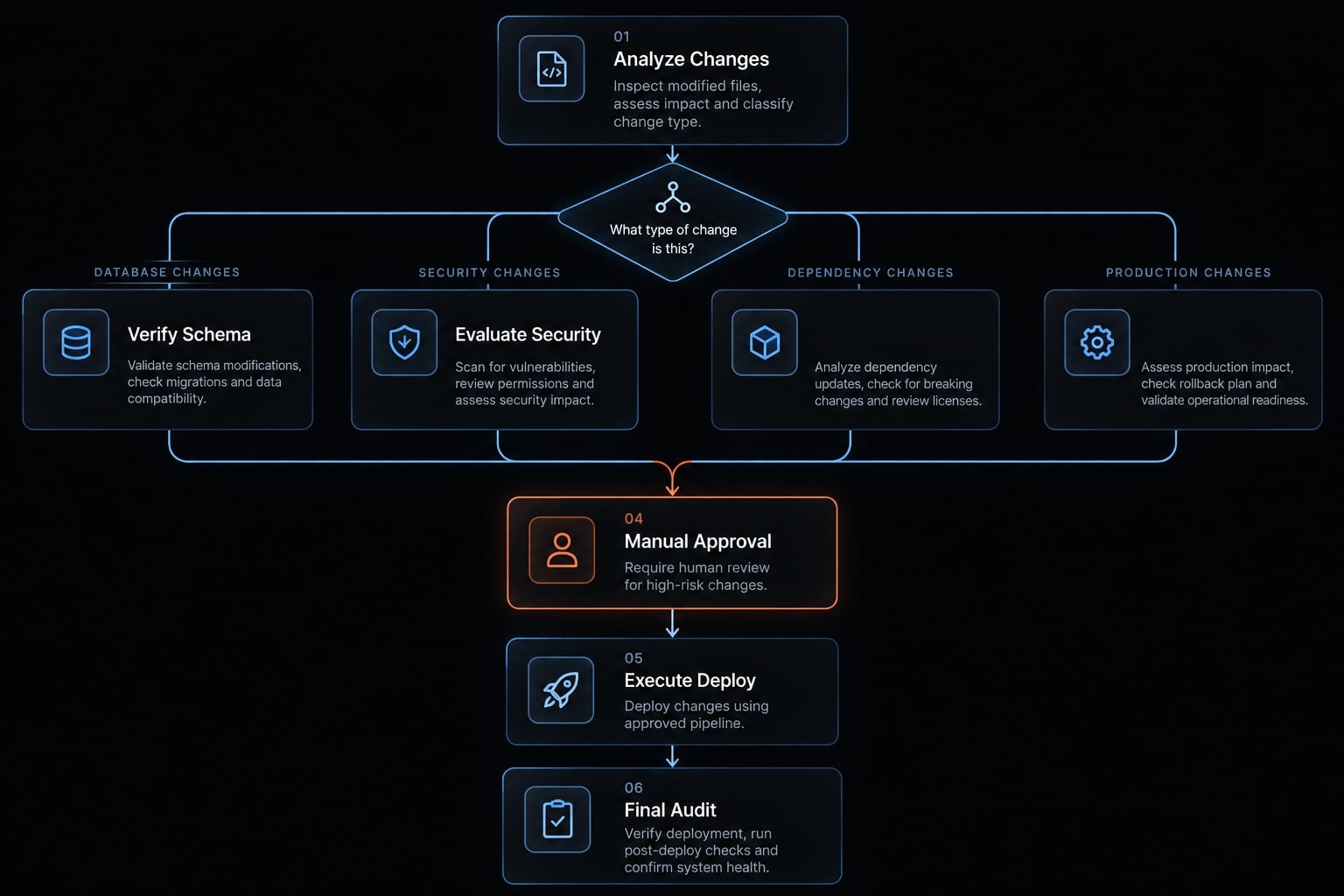
Tasks that require explicit human approval
AI-assisted coding should follow risk-based permissions, not an assumption that generated changes are harmless.
Risk level | Example changes | Execution rule |
|---|---|---|
Scoped | DTOs, tests, documentation | Approve contract and file scope |
Elevated | Cross-module restructuring, dependencies | Approve design and execution separately |
Security-sensitive | Authentication, authorization, tenant isolation | Require explicit security review |
Operational | Migrations, destructive commands, production-connected actions | Require separate approval and safeguards |
Risk is contextual: a small DTO change can break a public contract.
Use Inspect → Plan → Approve scope → Implement → Verify → Review. Inspect establishes facts; planning proposes changes; approval bounds them. Implementation follows that scope, verification produces evidence, and human review decides acceptance.
While written instructions shape agent behavior and sandbox permissions limit its actions, neither alone can guarantee correct business logic.
The fastest reliable setup for Claude Code and NestJS
Start with the existing toolchain, not a newly invented project structure. Install and authenticate Claude Code using the current official Setup documentation; consult Permissions before granting tool access. No NestJS-specific installation is required.
- Open the repository root and identify the target application.
- Check repository status; preserve existing uncommitted work.
- Identify the package manager, lockfile, and supported runtime.
- Restrict file, shell, network, and external access where supported.
- Inspect conventions and verification scripts before running them.
- Record baseline results using isolated test infrastructure.
- Add project instructions, then approve one bounded task.
Last tested: Not executed. This article’s demonstration is a proposed reproducible walkthrough.
Reproducibility field | Status |
|---|---|
Claude Code and Node.js versions | Not recorded |
NestJS and TypeScript versions | Not recorded |
Package manager and version | Not recorded |
Test runner and version | Not recorded |
Test date and starting commit | Not recorded |
Inspect the repository before editing
Pair this read-only inspection request with restrictive tool permissions. A prompt alone does not enforce read-only access.
Inspect without editing or executing project scripts.Identify single-app/monorepo structure; module, controller,service, and DTO conventions; package manager and lockfile;runtime/framework versions; persistence layer; test tooling;and verification scripts. Identify sensitive/generated pathswithout reading or printing secrets. Cite file paths for findings.Flag uncertainty and scripts with possible side effects.
Repository scripts can modify files, contact services, or trigger external actions - even when named “test” or “lint.” Inspect their implementation and relevant configuration first.
Validate the setup with a read-only task
- Trace one endpoint from controller through service to persistence.
- Check provider ownership, module registration, and validation configuration.
- Correct misunderstandings before allowing edits.
Require file references for each conclusion. Distinguish an absent configuration from one the agent has not located.
Define the minimum verification commands
Populate this register from the repository; bracketed values are not executable commands.
Check | Actual repository command | When to run |
|---|---|---|
Type checking |
| After typed changes |
Check-only lint |
| Before review |
Unit tests |
| After behavior changes |
E2E/integration tests |
| After boundary changes |
Build |
| Before acceptance |
Document any pre-existing failures separately. Never use production credentials to bypass missing test configurations, as this creates serious security risks.
A practical CLAUDE.md template for NestJS
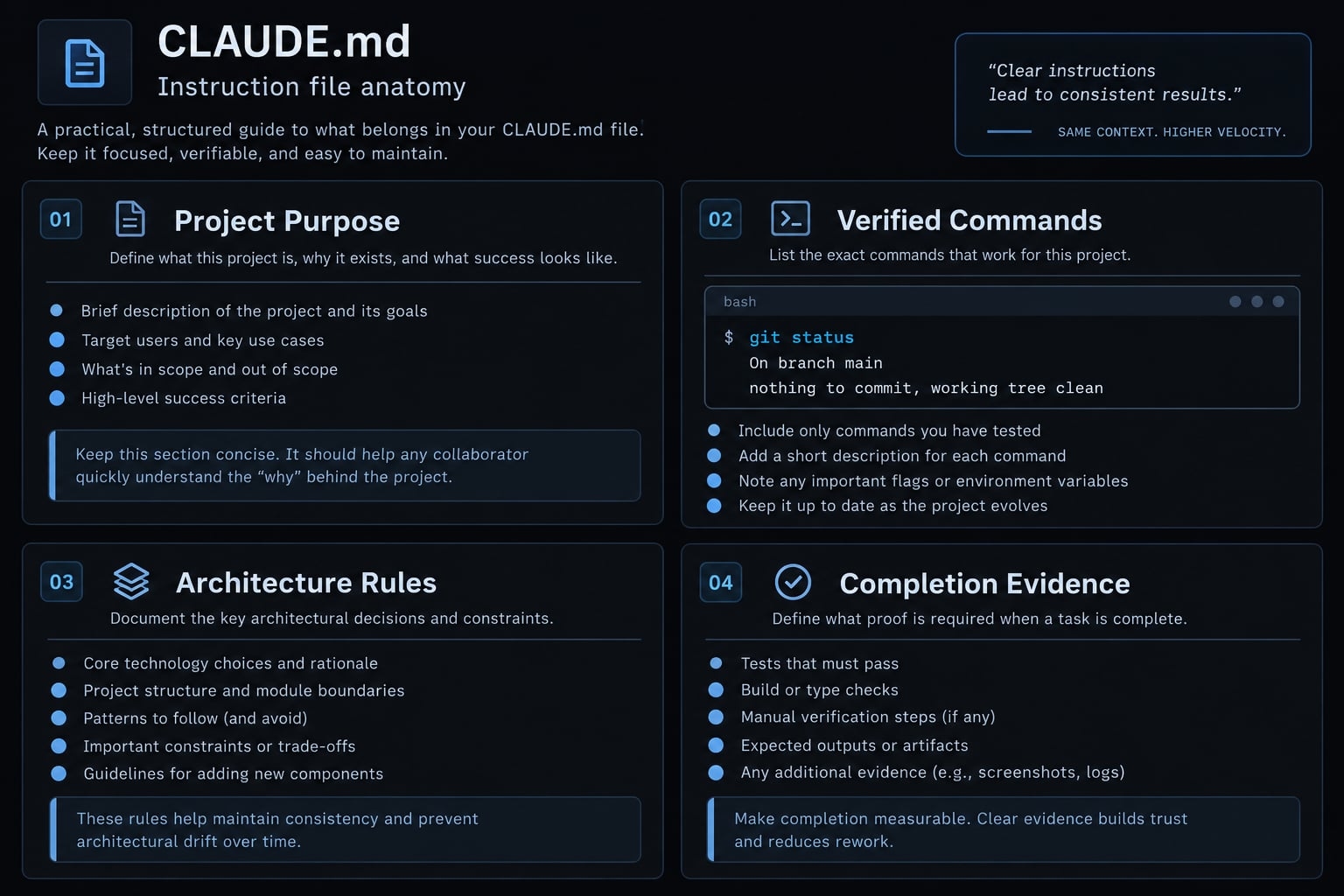
CLAUDE.md provides persistent written project guidance in applicable Claude Code contexts. It should describe stable repository conventions, verified commands, and completion expectations. It is not complete conversational memory, deterministic enforcement, or a security boundary. Claude Code’s Memory documentation explains how project instructions are discovered and applied.
Include eight things:
- Project purpose.
- Relevant paths.
- Verified commands.
- Architecture rules.
- Validation and API contracts.
- Testing requirements.
- Restricted actions.
- Completion evidence.
Project structure and commands
List source, library, test, and generated paths. Record the package manager and reviewed commands. Monorepos may benefit from scoped instructions for applications with different conventions.
NestJS architecture rules
Preserve module boundaries and established dependency injection tokens. Register controllers and providers where needed; check imports and exports for cross-module consumption. Not every provider needs exporting. Reuse existing guards, filters, interceptors, and pipes before proposing another pattern.
Validation, errors and API contracts
Identify the actual validation approach, including global and route-level configuration. NestJS’s Validation documentation describes ValidationPipe; its behavior depends on configuration.
TypeScript types alone do not validate incoming payloads. Preserve response shapes, exception conventions, and API documentation. Avoid exposing internal errors.
Testing and definition of done
Use the existing runner: Jest and Vitest are test runners; Supertest is an HTTP testing library. NestJS’s Testing documentation illustrates testing at different application boundaries. Require changed-behavior tests, actual command results, skipped checks, and remaining risks. Never weaken assertions merely to obtain a pass.
Copyable CLAUDE.md starter
Replace every placeholder with repository evidence. Keep task-specific playbooks elsewhere, and never include secrets.
# Project- Purpose: <application and relevant business boundaries>- Package manager: <name/version>- Source: <paths>; shared libraries: <paths>- Tests: <paths>; architecture references: <paths>- Generated paths—do not edit: <paths># Verified commands- Typecheck: <command or unavailable>- Lint, check-only: <command or unavailable>- Unit tests: <command or unavailable>- Integration/E2E: <command or unavailable>- Build: <command or unavailable># Architecture- Follow existing feature/module boundaries: <reference paths>.- Register controllers/providers in their owning modules.- Verify imports/exports for cross-module consumption.- Preserve established injection tokens.- Reuse existing guards, filters, interceptors, and pipes.- Request approval before introducing architectural patterns.# Contracts and validation- Follow validation/bootstrap configuration: <paths>.- Preserve response, exception, and API documentation conventions.- Preserve authorization and tenant ownership; never trust client tenant IDs.- Do not expose internal errors or secrets.# Tests and execution- Test changed behavior using existing tooling.- Do not weaken assertions or silently alter expected behavior.- Review script effects; use isolated test services.- Obtain separate approval for dependencies, migrations, deployment, destructive commands, security changes, and external writes.- Stop for scope expansion; preserve pre-existing local work.# Completion- List changed files, commands, results, skipped checks, and reasons.- Report remaining risks and human-review decisions.
This template explicitly separates project guidelines from access controls. Set real permissions in your environment-simply writing “do not” in a prompt won't restrict tool access.
Keep references specific enough to resolve disagreements against code. When documentation and implementation conflict, request clarification rather than silently choosing either one.
Update the file whenever its referenced commands, paths, or architectural conventions change.
Five practical Claude Code workflows for NestJS
Apply the shared workflow to five recurring tasks:
- Add a validated endpoint.
- Generate behavior-focused tests.
- Diagnose dependency injection failures.
- Refactor a service incrementally.
- Review a pull-request diff.
Each task needs context, bounded instructions, observable checks, and a human acceptance decision.
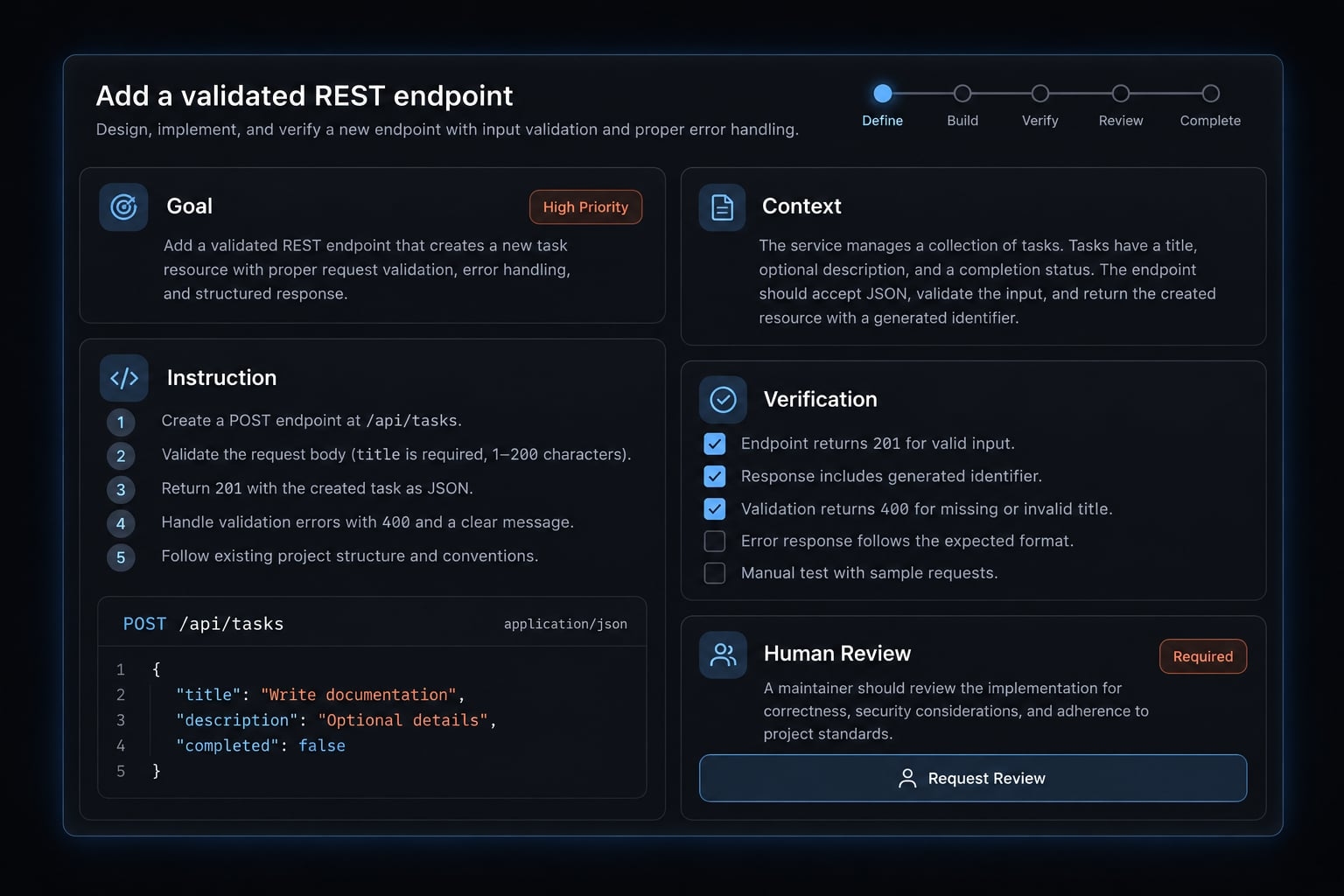
Add a validated REST endpoint
- Goal: Add
POST /projectsusing the existing NestJS workflow. - Context: Supply a comparable workspace endpoint, DTO rules, validation configuration, service/persistence pattern, authentication, tenant handling, and expected status and response.
- Instruction: “Inspect the comparable endpoint first. Propose a plan and file scope before editing. Reuse existing persistence. Add no dependencies or migrations.”
- Verification: Test valid and invalid input, relevant authorization behavior, tenant ownership, persistence, and the response contract. Run focused tests and build.
- Human review: Confirm that tenant identity comes from trusted request context, not client input. Inspect validation and error handling. Reject unrelated schema or architecture changes, even if they appear convenient.
Generate unit and end-to-end tests
- Goal: Cover defined behavior rather than increase test count.
- Context: Provide existing tests, fixtures, the runner configuration, and application initialization setup.
- Instruction: “List behaviors and expected outcomes before generating tests. Preserve the current tooling. Mock external dependencies in unit testing, not the behavior being tested.”
- Verification: Run generated tests and explain what each assertion proves. Endpoint tests should exercise relevant guards and validation. Confirm rejected requests cannot create records.
- Human review: Check whether mocks conceal failures, fixtures preserve tenant boundaries, and assertions detect meaningful regressions. Do not change business logic simply to satisfy generated expectations. If a test contradicts the contract, resolve that disagreement explicitly.
Debug a dependency injection error
- Goal: Resolve a dependency injection error without widening provider visibility unnecessarily.
- Context: Supply the exact failing command, error output, relevant modules, and provider declarations.
- Instruction: Diagnose in this order:
- Capture the exact error.
- Identify the unresolved provider or token.
- Locate its declaration.
- Check owning-module exports when cross-module access requires them.
- Check consuming-module imports and token matching.
- Run the smallest reproducer or initialization test.
- Verification: Demonstrate that the previously failing initialization path succeeds. A build alone is insufficient.
- Human review: Confirm ownership and inspect circular dependencies. Global modules and
forwardRef()are not automatic fixes; require evidence for either choice.
Refactor a large service safely
- Goal: Perform safe refactoring toward one specific objective, such as separating project persistence from orchestration.
- Context: Provide a behavior map, dependency inventory, public methods, transaction boundaries, and existing coverage.
- Instruction: “Propose small stages. Preserve the public API unless separately approved. Add characterization tests where existing behavior lacks coverage. Avoid speculative interfaces.”
- Verification: Run relevant checks after each stage. Compare return values, exceptions, database effects, authorization, and transaction behavior.
- Human review: Confirm that responsibilities became clearer without changing business semantics. Inspect new module relationships and approve each scope expansion. If separating a dependency introduces more complexity than it removes, retain the simpler design and document the decision.
Review changes before a pull request
- Goal: Produce an evidence-based pull-request review.
- Context: Supply the current diff, approved scope, baseline failures, and verification record.
- Instruction: “Review the diff with limited surrounding context. Report findings as Severity | File/location | Evidence | Recommended action. Separate confirmed defects from questions.”
- Verification: Check module wiring, validation, authorization, tenant isolation, error handling, query behavior, tests, dependency changes, and scope. Reproduce suspected defects when permitted.
- Human review: Confirm findings against requirements and inspect untested paths. Treat the agent’s review as another input, not merge authorization. Prioritize concrete defects over stylistic preferences, and require explanations for claimed security or performance risks.
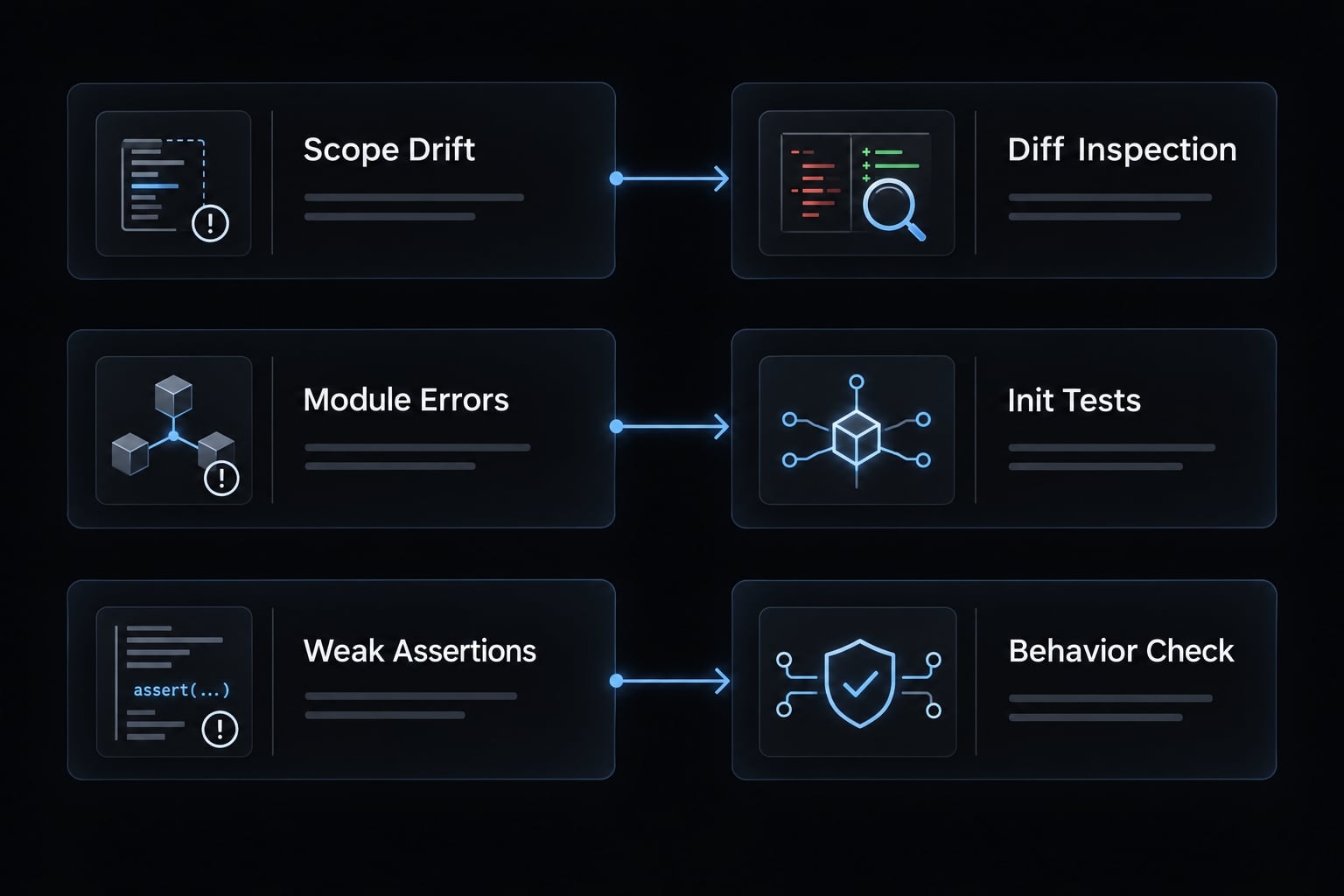
Common Claude Code problems in NestJS and their guardrails
These are plausible failure modes, not measured outcomes from the unexecuted walkthrough.
Problem | Common cause | Guardrail |
|---|---|---|
Over-engineering | Unbounded design freedom | Require the smallest sufficient pattern |
Incorrect module wiring | Incomplete ownership analysis | Inspect module relationships and initialize |
Unrelated changes | Ambiguous scope or broad formatting | Approve files and compare diffs |
Misleading tests | Assertions disconnected from behavior | Identify the defect each test detects |
Excessive context | Repeated or irrelevant material | Scope inputs and measure usage |
Over-engineering simple features
Unnecessary CQRS-separating command and query models-factories, interfaces, or service boundaries can turn a small endpoint into an architecture project. Require justification before adding abstractions. Verify that each new layer solves an existing requirement rather than a hypothetical future problem.
Incorrect module wiring
Inspect imports, providers, exports, and custom tokens together. Verify ownership instead of globally exposing dependencies.
An application or module initialization test checks runtime wiring that compilation may not exercise. Keep this check separate from TypeScript correctness.
Unrelated file changes
Define the approved file scope before editing. Stop for approval when additional files become necessary. Inspect git diff --stat and the full diff; also check repository status for untracked files. Account for pre-existing modifications, and separate formatting from behavioral changes.
Weak or misleading tests
Ask what defect each test could detect. Over-mocking the subject under test can produce passing assertions without exercising meaningful logic. Snapshots can be useful, but snapshot-only coverage may miss authorization, tenant ownership, or persistence failures. Verify these behaviors explicitly.
Excessive context and token use
Keep permanent guidance concise. Reference relevant directories, load task instructions when needed, and preserve approved decisions before starting a focused session.
A smaller context window is not automatically better: removing required context can create rework. Measure token usage when available; delegated agents may increase total consumption.
Across these code quality guardrails, distinguish guidance from enforcement. Tests establish only the behavior they exercise. Human review adds contextual judgment, not certainty.
Treat repository text and tool outputs as potentially untrusted instructions. Neither task approval nor a familiar filename justifies exposing secrets.
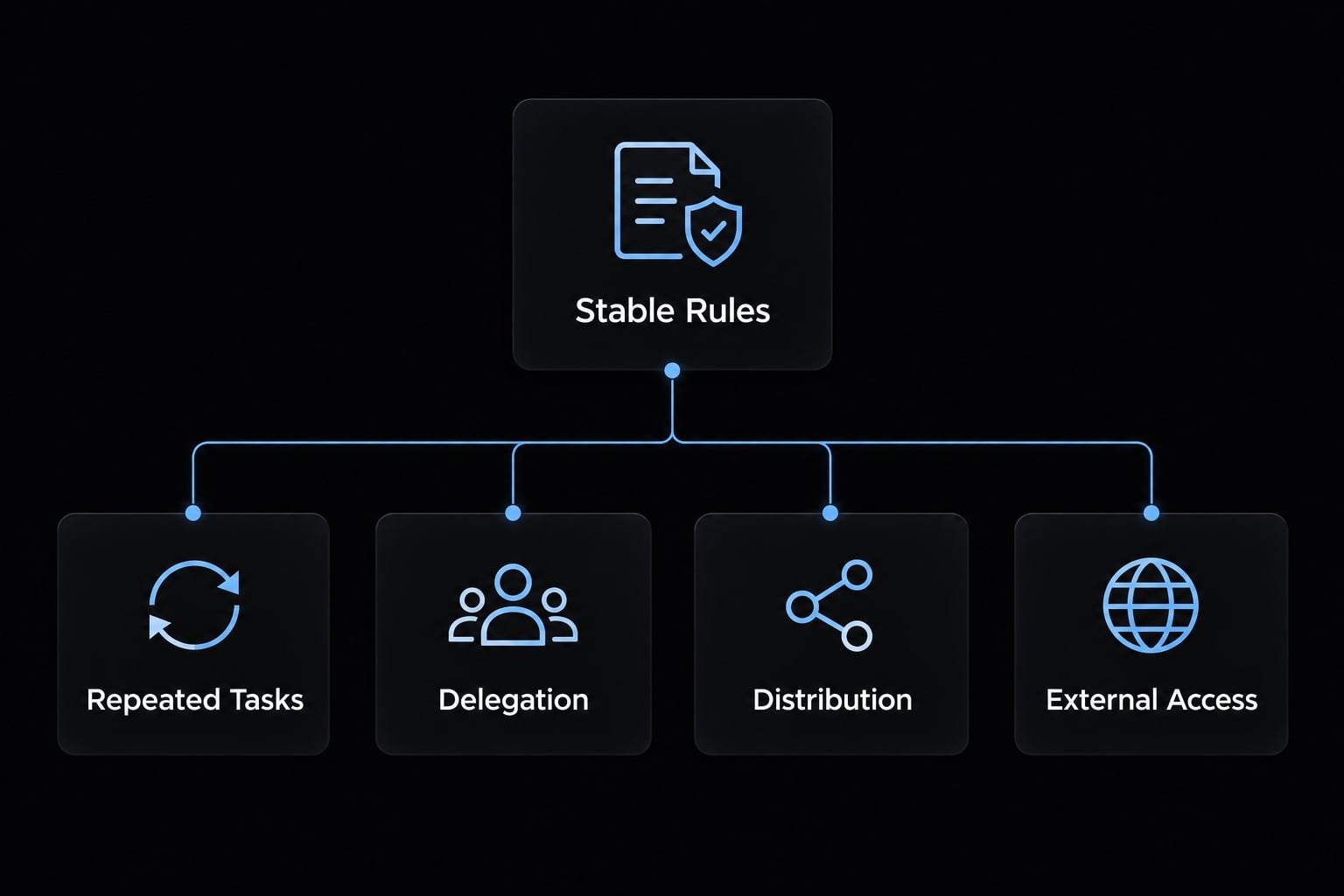
Choosing between CLAUDE.md, skills, subagents, plugins and MCP
Choose the smallest configuration that solves a recurring problem. These layers serve different purposes; they are not stages every team must adopt.
Layer | Best use | Application/activation | NestJS example |
|---|---|---|---|
| Stable project guidance | Applicable project context | Module conventions |
Skills / | Task-specific instructions | Invocation or supported discovery | Endpoint checklist |
Focused delegated work | Delegation under configuration | Diff review | |
Distributing related capabilities | Enabled components and their activation rules | Shared skill collection | |
MCP | External tool connections | Configured server/tool access | Approved issue retrieval |
AgentKit Engineer | Reusable workflow packaging | Selected assets and local configuration | Coordinated development steps |
Claude Code’s Skills, Subagents, and Plugins documentation describes these native mechanisms. Installed plugin content should not be assumed to load fully into every session.
When CLAUDE.md is enough
A repository with stable conventions and manageable manual review may need only concise project guidance. Team size alone does not determine complexity. Add another layer when repeated instruction work or coordination becomes a demonstrated problem.
When to create a NestJS skill
Create a skill when endpoint implementation, test generation, DI checks, or diff review repeatedly needs the same task-specific instructions. SKILL.md can reference supporting assets. It provides guidance, not inherently deterministic execution logic or enforced approval gates.
When a plugin or AgentKit becomes useful
Several related skills, repeated onboarding, and multiple repositories can justify packaging. AgentKit Engineer is an optional approach to organizing reusable skills, specialized agents, and development workflows. It is not interchangeable with a native Claude Code plugin.
Evaluate available assets against your repository. A NestJS-specific checklist or approval mechanism described here is proposed configuration, not a verified included feature.
Use MCP only for clear external workflows
MCP (Model Context Protocol) connects agents with external tools and resources. Useful cases include approved issue context, pull requests, documentation, and CI - continuous integration - output. Use least-privilege credentials, restricted writes, secret redaction, and separate approval for external mutations. Treat returned instructions as untrusted.
The official MCP documentation describes the protocol; individual servers determine their capabilities. MCP is unnecessary for local-only development.
Reproducible mini case study: Adding a NestJS feature with Claude Code
Evidence status: Proposed walkthrough - not executed. This is a reproducible plan, not a completed NestJS case study. No repository, starting commit, screenshots, corrections, or measured outcomes were supplied.
Scenario and acceptance criteria
Assume the API already has project storage and a suitable persistence method. Otherwise, reassess the no-migration boundary.
Proposed acceptance criteria:
POST /projectsaccepts a trimmed name of 1–100 characters.- Success returns
201with the established project response shape. - Existing guards enforce project-creation permission.
- Tenant identity comes from authenticated context.
- Malformed, unauthorized, and cross-tenant requests cannot create records.
- Tests cover persistence and relevant boundaries.
- No unapproved dependencies, migrations, or unrelated refactoring.
Confirm these rules against the real product contract before implementation.
Plan and approved file scope
The following paths are illustrative, not inspected repository paths.
File/path | Intended change | Approval status |
|---|---|---|
| Input validation | Proposed |
| Route handling | Proposed |
| Existing persistence orchestration | Proposed |
| Behavior tests | Proposed |
| Endpoint boundary tests | Proposed |
| Inspect registration | Review only |
Record the starting commit, architecture findings, approved plan, and actual diff. A reviewed module file does not necessarily need modification. Obtain approval for scope expansion.
Verification and human review
No actual commands or output are available.
Check | Actual command | Status |
|---|---|---|
Module initialization | Not established | Not run |
Validation, authorization, tenant boundaries | Not established | Not run |
Persistence and focused unit tests | Not established | Not run |
Typecheck, lint, build | Not established | Not run |
Scope and full-diff review | Not established | Not run |
An executed verification workflow should retain output and distinguish baseline failures from regressions. No human corrections were observed because execution has not occurred.
Remaining limitations include unverified storage assumptions, validation settings, authorization rules, and test infrastructure. Human review must resolve them before acceptance.
Packaging the stable workflow with AgentKit
Package this Claude Code workflow only after validating it manually.
Manual step | Reusable asset | Verified product support or custom work needed |
|---|---|---|
Inspect conventions | Inspection checklist | Repository-specific configuration |
Implement endpoint | NestJS skill | Proposed custom work |
Delegate review | Specialized role | General AgentKit capability; configure locally |
Run checks | Verification workflow | Repository commands required |
Block unsafe writes/merges | Permission and CI controls | External enforcement required |
Business rules, security intent, architecture, migrations, and merge approval remain human responsibilities.
Metrics to capture without fabricating results
Measurement template for a future run:
Metric | Measurement definition | Recorded result |
|---|---|---|
Elapsed time | Approval to accepted verification state, including waits | Not measured |
Correction cycles | Review-driven implementation revisions | Not measured |
Out-of-scope files | Changed files beyond approved scope | Not measured |
Checks passed/executed | Required checks passing divided by those executed | Not measured |
Review findings | Findings grouped by severity | Not measured |
Tokens or session cost | Tool-reported usage for the recorded session | Not measured |
Record skipped checks separately. Pass rate is not implementation quality; improvement requires a comparable baseline, and one run does not establish general performance.
Frequently asked questions
What is the most reliable way to use Claude Code in a NestJS project?
The most reliable method is "Skill-Driven Constrained Development." You should configure Claude Code with specific CLAUDE.md and SKILL.md files that define your repository’s module boundaries, DI patterns, and validation rules, while requiring the agent to run verification commands (like npm run build) before finalizing any code changes.
Does Claude Code understand NestJS module dependencies automatically?
No. Claude Code does not natively understand NestJS framework internals like decorator metadata or provider registration. It can easily introduce wiring bugs unless you explicitly instruct it to verify module imports, exports, and provider availability by running a build or module initialization test after every scaffolded change.
How do I prevent Claude Code from over-engineering NestJS features?
You must explicitly define a "Smallest Sufficient Pattern" rule in your project instructions. Instruct Claude Code to inspect the existing comparable endpoint, controller, and service patterns first, and require it to provide a plan that avoids adding unnecessary abstractions like CQRS or Factory patterns for simple CRUD operations.
Can I use Claude Code for integration testing in NestJS?
Yes, but you must ensure it uses your repository’s existing test stack (e.g., Vitest or Jest with Supertest). You should require the agent to mock external dependencies in unit tests and verify integration tests by booting the actual application module, rather than relying on brittle, mocked-only test setups.
What tasks require human approval when using Claude Code?
Any change that alters authentication, authorization, tenant isolation, database migrations, or cross-module restructuring requires manual review. Because NestJS validation and security guards are often enforced at the framework level, you must verify that new code does not accidentally bypass existing enterprise guardrails.
How should I store reusable NestJS instructions for Claude Code?
Use a tiered approach: keep base conventions (package manager, base paths) in CLAUDE.md, and place task-specific playbooks (such as endpoint implementation or test generation) in individual SKILL.md files within your .claude/skills/ directory. This ensures Claude Code loads only the relevant instructions for the current task.
Why is a successful build not enough to verify a change?
In NestJS, a successful compilation only proves TypeScript syntax is correct; it does not confirm runtime Dependency Injection (DI) correctness. You must also verify that providers are registered in the correct module context and that runtime guards and validation pipes are correctly applied to the new endpoint.
Read more:
- Claude Code automation: Build repeatable and low-risk workflows
- Claude Code for Laravel: Setup, CLAUDE.md, and best workflow
- Master Claude Code Python: A practical workflow for AI coding
Conclusion
Claude Code with NestJS works best when repository evidence drives the task. Existing patterns, explicit file scope, and verified commands matter more than an elaborate initial prompt. Check module relationships, runtime validation, authorization, tenant ownership, and persistence behavior, not merely whether TypeScript compiles.
Keep the controls distinct. CLAUDE.md guides behavior; permissions restrict actions; tests provide bounded evidence; human review decides whether a change meets the contract. None independently establishes production readiness. The proposed walkthrough supplies a recording structure, not proof of results.