Master Claude Code Python: A practical workflow for AI coding
Claude Code Python: The most effective setup and workflow
Many developers try Claude Code Python workflows once, get one good result, then hit inconsistency on the next task. In most cases, the problem is not just model quality. It is missing project instructions, weak file boundaries, unclear commands, and no verification loop. If Claude Code does not know how your repo runs tests, where scripts belong, or what files it should avoid, it will guess. This guide shows a practical way to use this AI coding agent in Python work: where it fits best, how to set up a clean repo, what to put in CLAUDE.md, and how to keep tests, lint checks, and diff review in the loop.
What Claude Code is actually useful for in Python
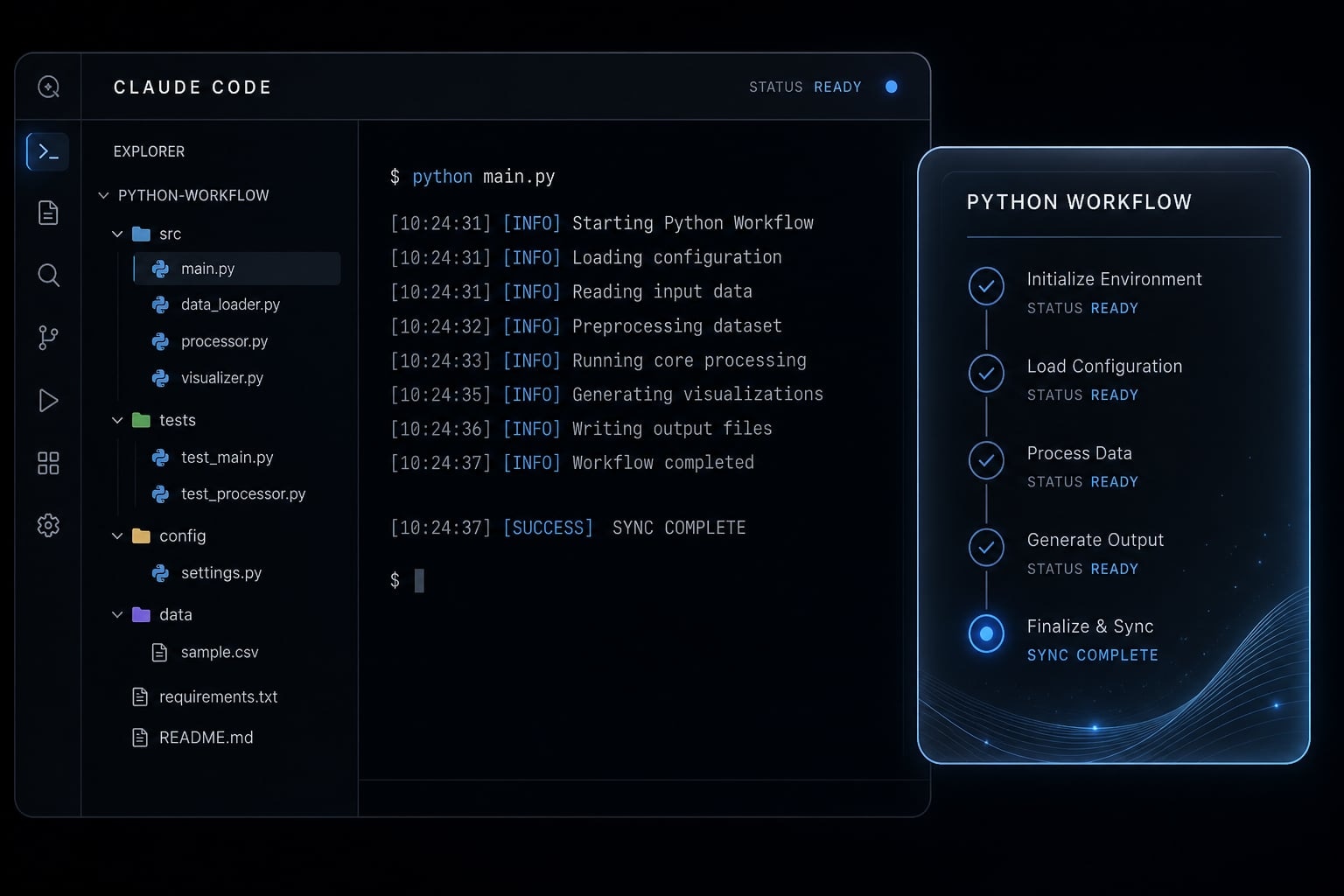
Claude Code for Python is a CLI-based coding agent that works inside your project directory, using repo context, local files, and your instructions to help with coding tasks. It is most useful when the work is narrow, verifiable, and easy to review through tests, linting, and diffs.
That distinction is crucial. Using a project-aware CLI is far more effective than simply pasting code into a standard chat window. In a repo, Claude Code can work against your actual structure, commands, and constraints. That usually produces better results than one-off prompting with partial context.
Using Claude Code for Python projects works best when the task is bounded and the output can be checked quickly. It works worse when the request is broad, ambiguous, or too consequential to validate fast.
Best-fit Python tasks
These are usually the highest-value use cases because they have clear input, fast feedback loops, and verifiable outputs:
- Test generation with
pytest- Add missing unit tests for an existing module.
- Expand edge-case coverage after a bug fix.
- Turn manual reproduction steps into automated checks.
- Targeted refactoring
- Rename functions or split a large helper cleanly.
- Improve readability without changing behavior.
- Add type hints to a defined file set.
- Bug investigation with reproducible errors
- Trace a failing test.
- Inspect a stack trace and suggest a fix.
- Narrow down bad assumptions in a utility function.
- Small automation scripts
- File cleanup tools.
- CSV transformation scripts.
- Internal reporting helpers.
- Lightweight data or report scripts
- Summarize datasets.
- Generate recurring exports.
- Build simple manager-ready reporting pipelines.
Lower-fit tasks
These areas need more caution because the downstream impact is larger and the “correct” answer is less obvious:
- Greenfield architecture.
- Major dependency decisions.
- Large production-sensitive changes.
- Ambiguous business logic.
- Cross-cutting rewrites across many modules.
Claude Code can support thinking in these areas, but it does not replace architecture judgment, technical ownership, or production accountability. The most common mistake is assuming that plausible output means the overall solution is on the right track.
A simple Python setup that makes Claude Code more reliable
Claude Code becomes more dependable when your Python environment is explicit, predictable, and easy to validate. A clean setup reduces ambiguity. Clear commands reduce guesswork. A simple structure improves targeting and lowers the chance of stray edits.
It is a straightforward form of project context management: the fewer assumptions the tool has to make, the better it usually performs.
Minimal project setup
- Open or create a Python project folder: Start Claude Code inside the actual repo root, not an unrelated parent directory.
- Set up
.venv: Keep the environment local to the project so commands are predictable. - Use
uvfor dependency management: It is fast, clean, and works well for modern Python environment setup. - Make sure
pytestandruffrun locally: If your checks do not already work from the terminal, the agent cannot reliably use them. - Optionally add
mypy: Helpful for stricter Python codebases, but not mandatory for every repo. - Create
CLAUDE.mdbefore heavier usage: This is where you define commands, boundaries, and review expectations.
Here is a minimal setup for Claude Code Python:
uv venvsource .venv/bin/activateuv pip install pytest ruff mypypytestruff check .
Minimal project structure
A simple structure gives Claude Code clearer file boundaries and cleaner context:
project/├── src/├── tests/├── scripts/├── pyproject.toml└── CLAUDE.md
Why this helps:
src/keeps production code separate.tests/makes validation obvious.scripts/gives one-off automation a clear home.pyproject.tomlcentralizes tooling config.CLAUDE.mdprovides stable operating instructions.
A short setup checklist:
- Use one repo root.
- Keep commands runnable from that root.
- Separate app code from tests.
- Define no-touch files early.
- Validate with tools, not intuition.
Setup improves reliability, but it does not prove that your business logic is correct. It only makes Claude Code’s behavior easier to control and review.
What to put in CLAUDE.md for a Python project
CLAUDE.md is a lightweight project instruction file that gives Claude Code persistent context about your Python repo: How to run it, how to test it, what conventions to follow, and what files or directories should be treated as protected.
That persistence matters. Repeating the same rules in every prompt is inconsistent and easy to forget. A solid CLAUDE.md gives Claude Code a stable operating layer, which improves consistency across sessions and makes your Python workflow more repeatable.
Recommended fields in a Python CLAUDE.md
Field | Why it matters | Example |
|---|---|---|
Python version | Prevents wrong syntax or package assumptions. |
|
Install/run/test commands | Removes guesswork about how to execute the project. |
|
Lint/format command | Ensures style validation is explicit. |
|
Type-check command | Useful for stricter repos. |
|
Project structure | Helps file targeting and edit boundaries. |
|
Coding conventions | Aligns implementation with repo standards. |
|
Test expectations | Forces validation into the workflow. |
|
Protected files / no-touch areas | Reduces risky adjacent edits. |
|
A good CLAUDE.md template does not need to be long. It needs to be specific enough that Claude Code knows how to operate without inventing commands or touching the wrong files.
Sample lightweight CLAUDE.md template for Python
# Project Instructions## Environment- Python 3.12- Use `.venv` in the project root- Use `uv` for package management## Commands- Install: `uv pip install -e .`- Run tests: `pytest tests/ -x --tb=short`- Run single test: `pytest tests/test_example.py -v`- Lint: `ruff check . && ruff format --check .`- Type check: `mypy src/`## Project Structure- `src/` = application code- `tests/` = test suite- `scripts/` = internal utilities and automation- Prefer targeted edits to the smallest relevant file set## Coding Rules- Add type hints to public functions- Do not change behavior unless requested- Keep refactors narrow and reviewable- Ask for clarification if business logic is ambiguous## Validation Expectations- Run relevant tests after changes- Run lint checks on edited files or full repo where appropriate- Summarize what changed and what was validated## Review Expectations- Propose a short plan before implementing non-trivial work- Keep changes scoped- Treat output as draft until diff review is complete## Do Not Modify Without Approval- `.env` files- `migrations/`- dependency versions in `pyproject.toml`- CI configuration
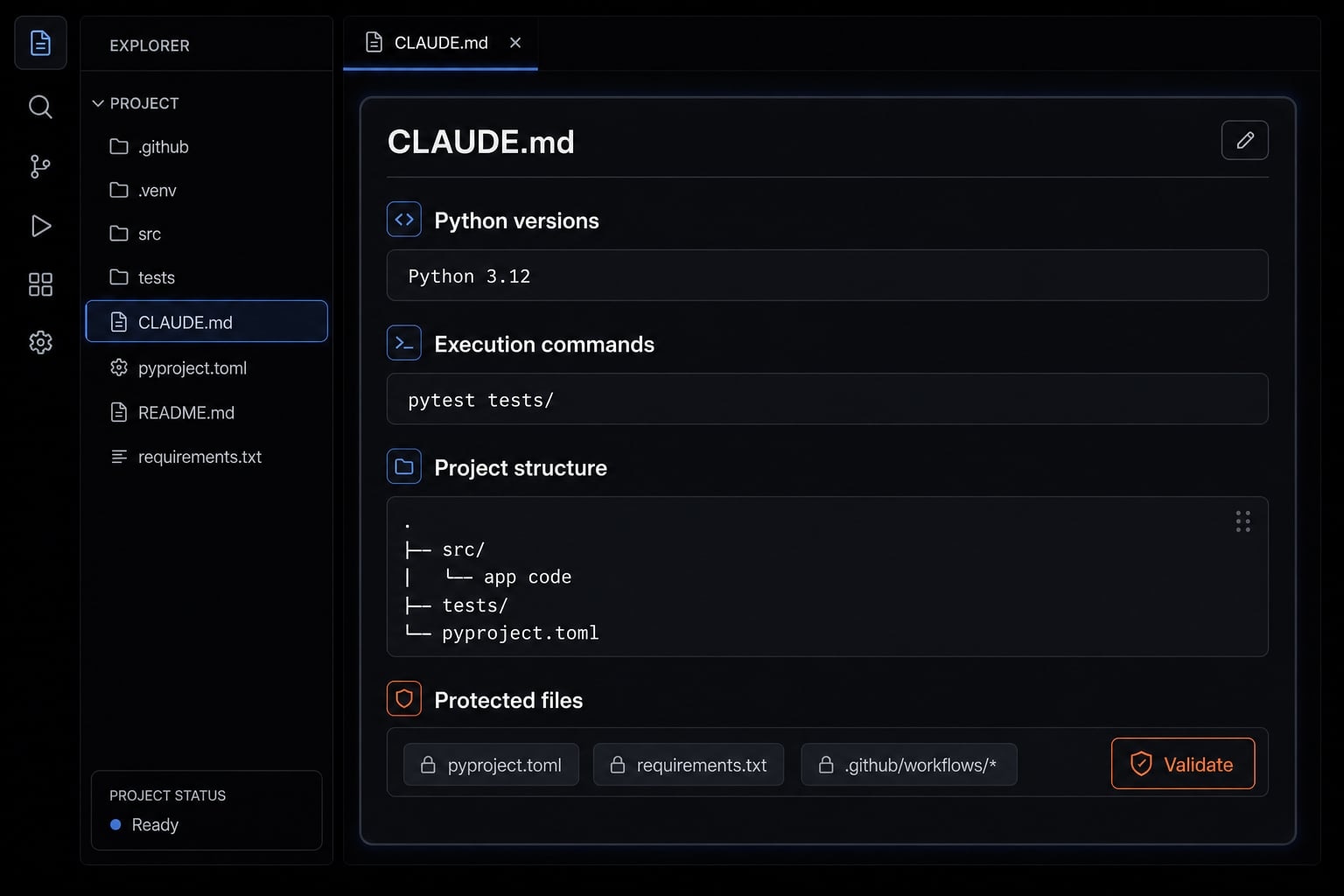
This kind of file gives Claude Code strong project constraints without turning the instruction layer into bureaucracy.
Common mistakes
The most common problems in CLAUDE.md are operational, not technical:
- Vague instructions: “Write clean code” is too abstract to guide behavior.
- Missing commands: If test or lint commands are absent, Claude Code may invent them.
- No boundary rules: Without protected files, adjacent edits become more likely.
- Too many style preferences: Overloading the file with minor preferences creates noise.
- Unclear validation requirements: If you do not require tests or lint checks, review quality usually drops.
A simple way to make this more reliable is to optimize for commands, boundaries, and checks first. Style details come second.
A practical Claude Code workflow for everyday Python tasks
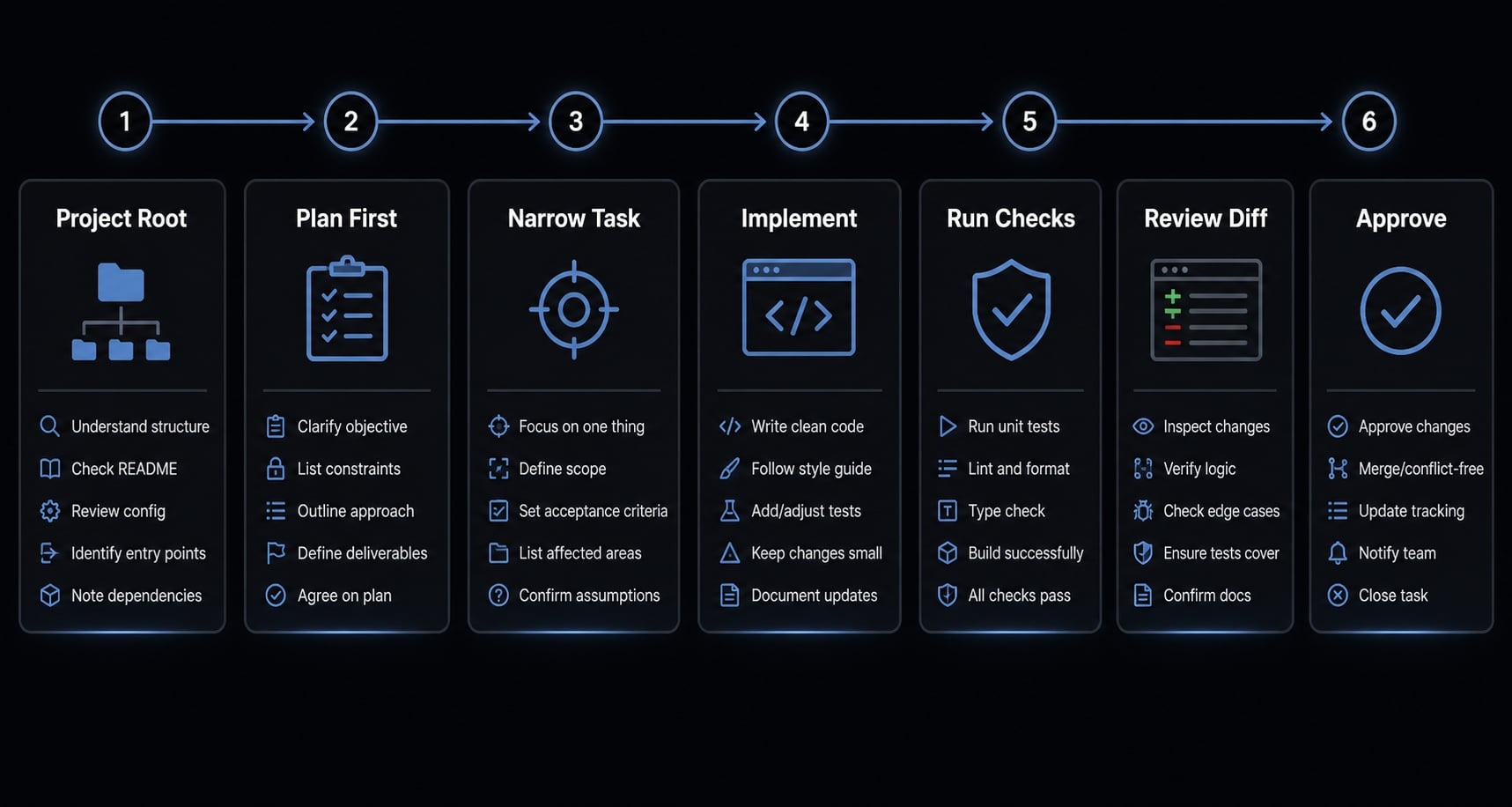
A good Claude Code workflow is less about clever prompts and more about operating discipline. Start in the repo, ask for a plan, keep the scope narrow, validate the output, and review the diff before accepting anything.
Reusable day-to-day workflow
- Start in the project root: Launch Claude Code where it can see the real repo structure and
CLAUDE.md. - Ask for a plan first: For anything beyond a tiny edit, get a short implementation plan before code changes start.
- Keep the task narrow: Specify the bug, feature, or file set. Narrow scope reduces drift.
- Request implementation: Once the plan looks right, ask it to make the smallest viable change.
- Run tests, lint, and optional type checks: Use
pytest,ruff, andmypywhere relevant. This is your automated testing workflow. - Review the diff before accepting: Treat every change as reviewable draft output, not completed work.
This is not a one-off trick. It is the operating pattern that makes Claude CLI for Python programming useful over time.
The three common usage modes
Mode | Best for | Notes |
|---|---|---|
| Exploratory work, multi-step tasks, debugging. | Best default mode for an interactive session with project context. |
| Quick, well-scoped edits. | Best in one-shot mode when the task is precise. |
| Ongoing implementation of the same task. | Useful when resuming work, but avoid mixing unrelated tasks. |
You can easily choose the right mode for your workflow:
- Use
claudewhen you need back-and-forth. - Use
claude -pwhen the request is fully specified. - Use
--continueonly when the context is still the same problem.
Prompt pattern that works well
You do not need elaborate prompt engineering for development. A lightweight structure is usually enough:
- Goal.
- Constraints.
- Target files.
- Expected checks.
Example: Python bug-fix prompt
Investigate the failing parser behavior in `src/parsing/csv_loader.py`.Only modify files directly related to the bug.Preserve current public function signatures.Run the relevant pytest tests and summarize the result before suggesting approval.
Example: Test-generation prompt
Add `pytest` coverage for `src/billing/rounding.py`.Focus on edge cases around zero values, negative inputs, and decimal rounding.Do not change implementation unless a failing test proves it is necessary.Run tests and show the diff summary.
The main point is clarity, not cleverness. Good prompts reduce ambiguity. Good checks reduce risk.
Best Python use cases for Claude Code, and where it struggles
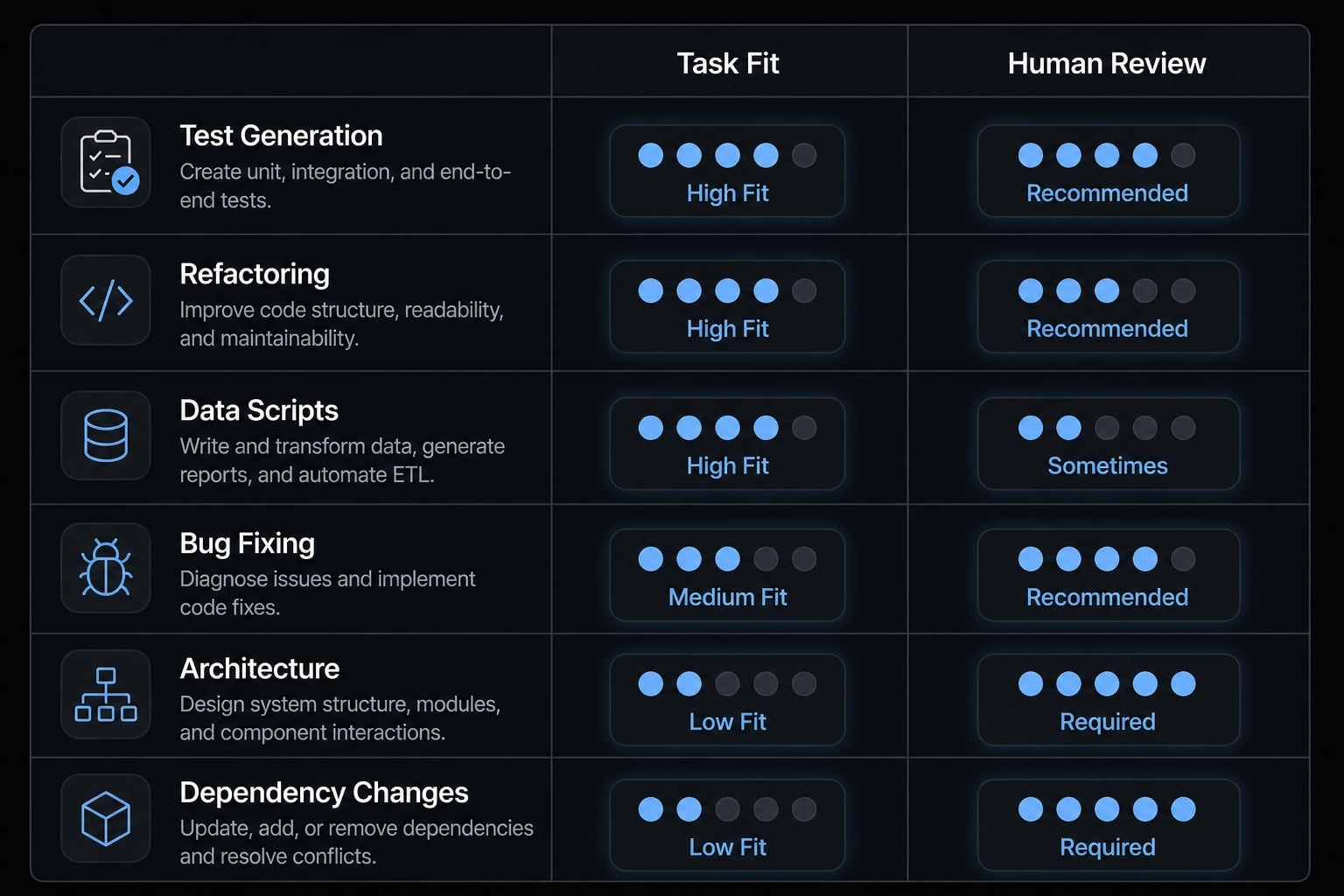
The best Claude Code Python use cases are tasks with clear scope and short validation loops. The worst-fit tasks are broad, ambiguous, or highly consequential once deployed.
A simple decision rule works well:
- High fit = Clear inputs + fast verification.
- Low fit = Ambiguity + long downstream impact.
Task suitability matrix:
Python task | Fit for Claude Code | Why it works | Required human review |
|---|---|---|---|
Test generation | High | Inputs are visible and outputs are easy to verify with | Confirm coverage quality and edge cases |
Refactoring | Medium to high | Works well when scope is narrow and behavior should stay stable | Review diffs for unintended changes |
Data scripts | High | Small scripts usually have clear inputs and measurable outputs | Validate logic, sample outputs, and assumptions |
Bug fixing | Medium to high | Strong fit when there is a reproducible error or failing test | Check root cause, not just symptom suppression |
Architecture planning | Low | Broad design work is ambiguous and hard to validate quickly | Human ownership is mandatory |
Dependency changes | Low to medium | Changes can ripple across runtime, CI, and production behavior | Review compatibility, security, and deployment impact |
For teams doing report automation, dataset scripting, or technical ops workflows, Claude Code is often strongest in the middle ground: Small scripts, recurring transforms, and reviewable utility code. That is where AI-driven Python code generation tends to be most practical.
The caution zones are consistent:
- Broad architecture.
- Business-critical dependency changes.
- Code that cannot be validated quickly.
That is where human judgment matters most.
Guardrails that prevent low-quality or unsafe Python changes
AI speed only helps when it is paired with review, version control, and automated checks. If those are missing, the cost shows up later as hidden defects, noisy diffs, and lower trust in the workflow.
AI-generated code should be treated as reviewable draft output. Version control for AI-generated code and QA checks are non-negotiable.
Safe workflow checklist for Python users
- Always use Git.
- Ask for a plan before implementation.
- Require tests for behavior changes.
- Run lint and optional type checks.
- Review diffs before approval.
- Define boundaries in
CLAUDE.md. - Avoid oversized sessions.
These guardrails keep your safe Python workflow intact even when Claude Code is moving quickly.
Common failure modes
The most common failure modes are familiar:
- Unnecessary adjacent file edits.
- Invented commands.
- Over-refactoring.
- Skipped verification.
- Accepting plausible but untested changes.
Why these failures matter:
- They create hidden maintenance cost.
- They make rollback harder.
- They reduce confidence in future AI-assisted edits.
- They increase review burden that should have been avoidable.
A common example is debugging Python scripts where Claude Code “fixes” the issue by rewriting neighboring helpers or changing data flow that was not part of the request. The result may look polished but still increase risk.
The protective pattern is simple:
- Define boundaries early.
- Keep sessions focused.
- Verify behavior automatically.
- Review code before trust.
Moving from one-off prompting to a repeatable team workflow
One person can get good results with ad hoc prompting. Teams usually cannot scale that way for long. What works for one developer’s memory and habits does not automatically become a reliable team process.
To make this repeatable, small teams need:
- Shared instructions.
- Standard run and test commands.
- Validation rules.
- Reusable workflow patterns.
- Clear boundaries for risky files and changes.
That is what turns isolated wins into reusable AI coding workflows. The value is not just speed. It is consistency, easier onboarding, and less time rebuilding prompts or explaining local conventions to every new contributor.
This is also where agentic workflows start to matter. A packaged workflow can preserve repo rules, checks, and approval expectations instead of depending on tribal knowledge. For teams that want that structure, AgentKit can be used to standardize production-ready AI development patterns across repos without forcing developers back into prompt-by-prompt reinvention. The useful idea is repeatability, not automation theater.
Frequently asked questions
What is Claude Code for Python development?
Claude Code is a CLI-based AI coding agent that provides interactive, project-aware assistance within your terminal. For Python developers, it helps automate tasks like writing tests, refactoring code, and debugging by utilizing project context to propose and execute file-level changes directly.
How do I set up Claude Code for a Python project?
- Initialize a Python project with a virtual environment (
uv venv). - Install standard tools:
pytestfor testing andrufffor linting. - Create a
CLAUDE.mdfile in the root directory. - Define your project structure, test commands, and boundaries within
CLAUDE.md. - Launch
claudein your terminal to begin an interactive session.
What is a CLAUDE.md file and why do I need one?
CLAUDE.md is a persistent instruction file located at your project root. It provides the coding agent with stable project context, coding standards, and operational boundaries, which significantly improves the reliability and quality of AI-generated edits compared to repeating instructions in every prompt.
Which Python tasks are best suited for Claude Code?
Claude Code excels at bounded, verifiable tasks including generating pytest test suites, performing targeted refactoring, writing small automation scripts, and debugging issues with clear reproduction steps. It is less effective for greenfield architectural design or complex, ambiguous business logic that lacks immediate validation.
How can I safely use Claude Code in my workflow?
Always treat AI output as reviewable draft code. Maintain a safe workflow by:
- Using Git for version control.
- Asking for a plan before implementing changes.
- Running
pytestandruffafter every edit. - Reviewing diffs manually before accepting changes.
- Setting clear file boundaries in
CLAUDE.md.
Is it necessary to review code generated by Claude Code?
Yes. AI coding agents can generate plausible but incorrect code. You must treat all AI-generated edits as drafts and use automated testing (pytest), linting (ruff), and manual diff reviews to verify correctness before merging changes into your codebase or production environments.
Read more:
- Claude Code toolkit: Scale your AI development workflow easily
- Everything Claude Code: A guide to streamlined AI coding
- Claude Code Plan Mode: Optimize your AI coding workflow
Conclusion
Claude Code works best in Python when the setup is explicit, CLAUDE.md is clear, tasks are narrow, and verification is built in. The difference between a convincing demo and a reliable daily workflow is usually not the model. It is process discipline.
For most teams, the practical model is simple: start in the repo, define commands and boundaries, ask for a plan, keep edits scoped, run checks, and review the diff. That is the version of Claude Code Python that tends to hold up over time.
If you want a low-friction next step, create a lightweight CLAUDE.md today and test it on one narrow task: a bug fix, a small refactor, or a pytest expansion. That single change usually tells you more than another generic AI coding demo.