Claude Code Redis integration: Install and use safely
Claude Code Redis integration: Install, verify, and use Redis agent skills safely
Claude Code Redis integration adds reusable Redis development guidance to your coding workflow. Choose a Redis Agent Skills package or a Claude Code plugin only after confirming its source and contents. Neither instructional Skills nor plugin installation inherently supplies database credentials, network connectivity, or permission to inspect Redis.
- Inside Claude Code: Use the plugin manager to verify the Redis package’s marketplace listing before installing.
- In your terminal: Follow the Redis Agent Skills repository’s current instructions for your chosen installer and agent.
Verification status: Installation commands and package contents have not been independently tested here. Start with source verification, then confirm discovery separately from answer quality.
What the Claude Code Redis integration actually does
A Claude Code Redis integration supplies instructions and resources that can support Redis design, code review, and refactoring. Packaging determines how those resources are distributed; configured tools determine external access. Guidance can inform recommendations, but it does not establish database connectivity, enforce permissions, or guarantee correct code.
Skill metadata and relevant instructions may enter agent context at different stages; installing a package does not mean every resource remains loaded.
Redis skills, plugins, MCP and clients compared
Component | Purpose | Redis access | When needed |
|---|---|---|---|
Redis Agent Skills | Reusable guidance and resources | Not inherently; inspect bundled resources | Design and static review |
Redis plugin, if verified | Packages components for Claude Code | Depends on its manifest and configuration | Native distribution |
Redis-compatible MCP server | Exposes tools through Model Context Protocol | Requires credentials, network access, and permissions | Approved live inspection |
Redis client library | Connects application code to Redis | Application runtime access | Implementing Redis features |
Redis Insight | Database inspection interface | Uses separately configured connections | Human-led investigation |
Illustrative architecture:
Plugin packaging → Skills → Claude Code guidanceClaude Code → approved MCP or shell tools → RedisApplication → Redis client library → Redis
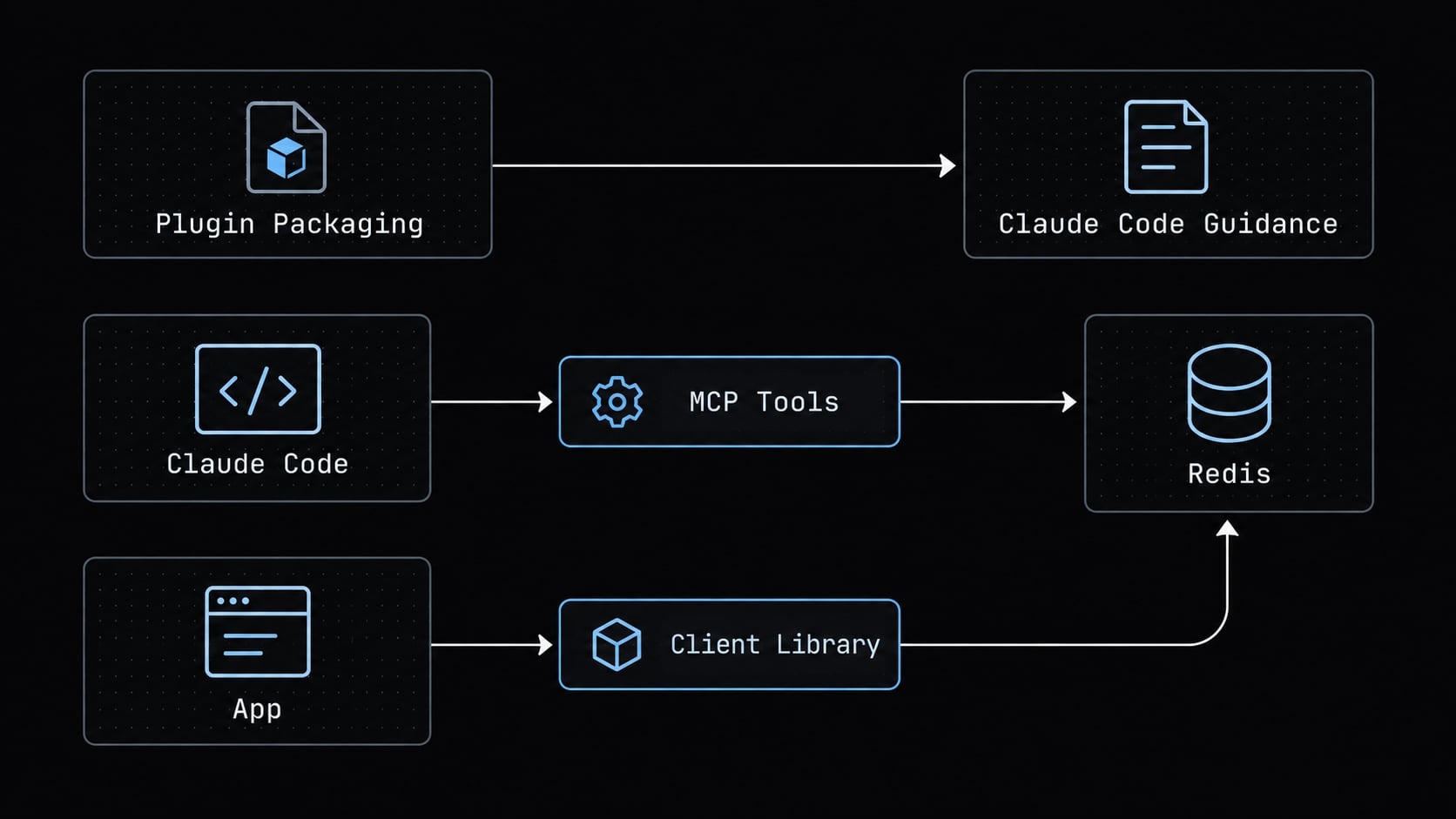
Choose instructional support for code work. Configure separately approved tooling for live inspection. A plugin may include hooks, executable resources, or tool configuration—not just instructions.
Redis capabilities included in the skill pack
Treat the installed revision as the authoritative inventory. Inspect its Skill identifiers, descriptions, instructions, and executable resources.
No module inventory is independently confirmed here. Key design, connection lifecycle, search, and security are useful review topics, not verified package identifiers. Consult the Redis Agent Skills repository and Claude Code Skills documentation before depending on specific coverage.
How to install the Redis plugin in Claude Code
Option 1 - Install the native Claude Code plugin
To install the Redis plugin in Claude Code:
- Open your supported Claude Code environment and its plugin-management interface.
- Locate the Redis package in the intended marketplace. Confirm its publisher and use the installation action documented for that listing.
- Inspect package contents, requested scope, hooks, and tool configuration before approval.
- Refresh or restart only if the interface or current documentation requires it.
- Record the installed version and scope, then continue to verification.
If the listing cannot be confirmed, stop rather than substituting a similarly named package. A marketplace reference alone does not establish package availability.
Capture your actual installation status for team records. Include scope and revision where available; redact credentials and identifying paths.
Option 2 — Install the cross-Agent Redis skills package
First, confirm Node.js and npx availability against the installer’s requirements. Review both the Skills CLI publisher and the target repository: npx executes a CLI package, not merely a text download.
Then:
- Use the installation syntax currently documented by the Redis Agent Skills repository.
- Choose project or user scope deliberately.
- Select Claude Code if the installer offers agent selection.
- Inspect the reported installation location and installed Skills.
- Record the source revision and any executable resources.
Do not assume a fixed destination or unattended behavior. The Agent Skills specification describes packaging conventions; it does not run the installer.
Which Installation Method Should You Choose?
Situation | Preferred approach |
|---|---|
Claude Code-focused workflow | Verified native plugin |
Multiple supported agents | Verified cross-agent installer |
Team-managed setup | Either route, with recorded versions and ownership |
Live Redis inspection | Separate approved tool configuration |
Avoid duplicate installations until discovery precedence and update behavior are understood.
Verify that Claude Code is using the Redis skills
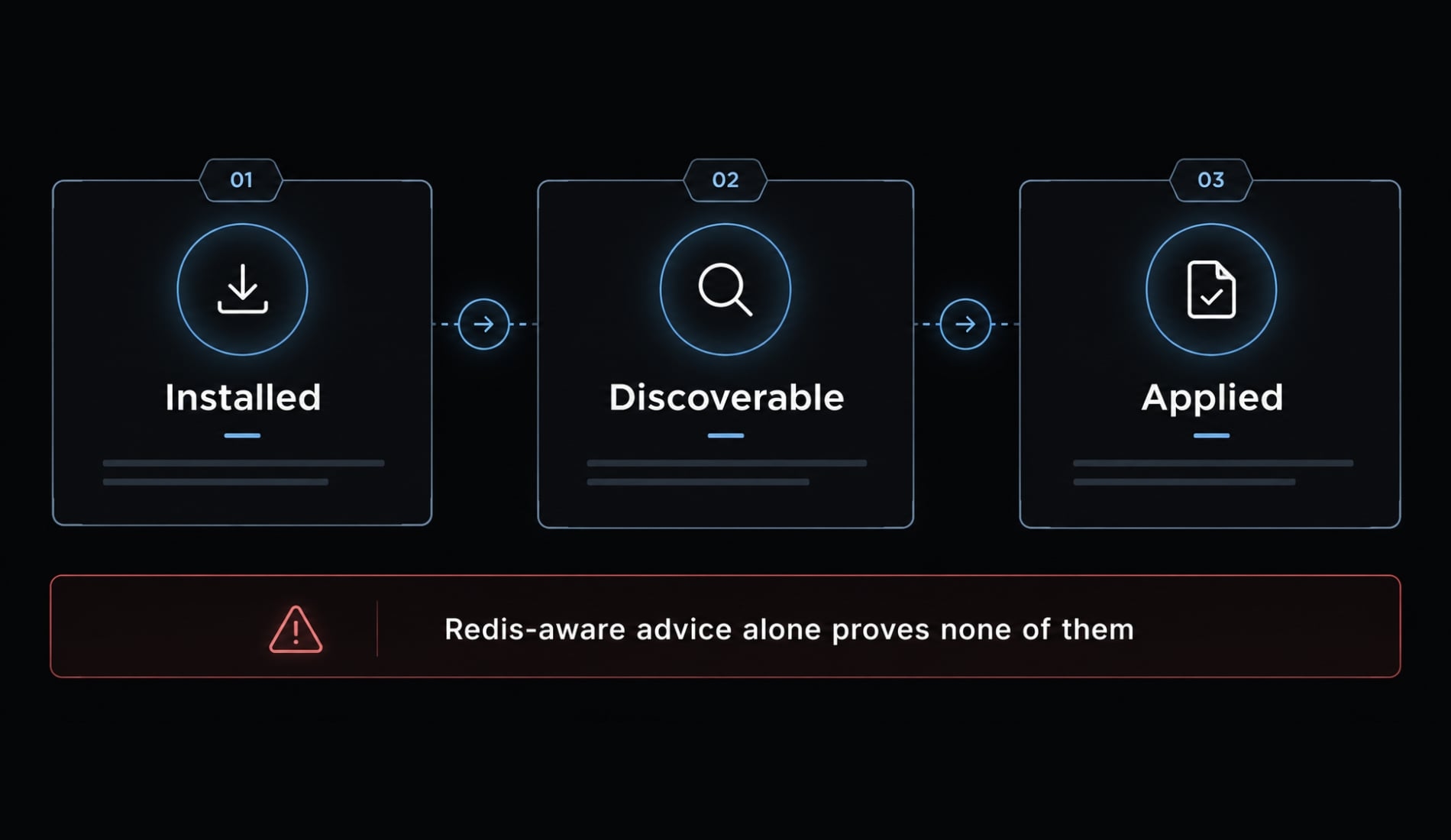
Installation, discovery, and use are separate checks. Redis-aware advice alone proves none of them.
- Confirm the package appears in the supported management interface.
- Check that Skills are discoverable in the intended project or user scope.
- Inspect supported invocation or loading evidence, where available.
- Run a bounded static review.
- Evaluate findings against the actual file.
- Record uncertainty without treating self-reported activation as conclusive.
Use a synthetic fixture, such as examples/tenant-cache.ts: a small tenant-configuration cache using your project’s client library. Include its dependency version and deployment assumptions. Do not introduce customer data.
Run a simple verification prompt
Review examples/tenant-cache.ts and the relevant dependency manifest.Use available Redis guidance. Report:- Tenant-aware key naming and intentional expiration.- Client reuse or pooling appropriate to this library.- Blocking or unbounded operations.- Error handling and deployment-topology constraints.For each finding, cite file and line references, explain the risk,and propose a bounded correction with required tests.Do not edit files, execute shell commands, or connect to Redis.If Skill-loading evidence is unavailable, state that limitation.
This approval language expresses intent. Enforce restrictions through actual tool permissions.
Check the response for Redis-specific guidance
Use this evaluation checklist, not an assumed result:
- Does TTL (time to live) reasoning match retention requirements?
- Are lifecycle recommendations specific to the client library?
- Are broad enumeration risks identified where present?
- Are alternatives bounded?
SCANremains operational work. - Is pipelining limited to suitable command dependencies?
- Are collection growth and Redis Cluster constraints addressed when relevant?
Not every fixture requires every finding. Verify cited lines and reject recommendations unsupported by the inspected code.
Optional before-and-after validation
Keep the fixture, prompt, model, and configuration constant. Record observed findings as a local sanity check.
A single comparison cannot establish causation: Model variability and context differences can change results even without a Skill change.
Practical Claude Code prompts for Redis development
Apply this shared boundary to every prompt:
Perform static review first. Do not connect to databases or execute commands without approval. Propose changes before editing, cite evidence, and identify required tests.
Replace example paths with a narrow, relevant target. Include dependency versions and deployment topology rather than expecting the assistant to infer them.
Choose the right Redis data structure
Review src/tenant-config/ for tenant configuration caching. Reads are frequent; updates are occasional. Use documented retention and consistency requirements, and flag missing requirements. Compare suitable Redis data structures, propose a tenant-aware key schema, and explain memory and atomicity trade-offs. Consider JSON only if the target environment supports it. Return a design table and test plan before proposing edits.Review a cache-aside implementation
Review src/cache/tenant-config.ts for cache-aside correctness. Trace hits, misses, expiration, invalidation, and serialization. Evaluate stampede protection and Redis-unavailable behavior, including database overload risk during fallback. Return prioritized findings, a minimal patch proposal, and tests covering stale data, concurrent misses, malformed values, and dependency failure.Check Redis connection handling
Inspect src/redis/client.ts and the dependency manifest. Identify the actual client library and version. Review connection reuse or connection pooling where appropriate, timeouts, reconnect policy, error propagation, and graceful shutdown. Explain recommendations using this client’s behavior and application concurrency model. Return a lifecycle diagram and proposed tests; do not assume every client needs a pool.Detect unsafe or expensive Redis operations
Reviewsrc/jobs/forKEYS *, unbounded ranges, large values, uncontrolled collection growth, repeated round trips, and cross-slot multi-key operations. Cite each relevant call site. Propose bounded alternatives and explain their limitations. Do not treatSCANas cost-free or pipelining as transactional atomicity. Return a ranked Redis code review and validation plan.
Review Redis search or vector retrieval
Review src/search/ and its index definitions against Redis Query Engine documentation. Check deployment-version compatibility, schema, vector dimensions, distance metric, filters, and query behavior. Identify unsupported assumptions. Prioritize correctness before tuning, and return proposed changes with retrieval tests. Separate source-verified requirements from suggestions needing workload measurement.Connect Claude Code to a live Redis database safely
Claude Code can inspect Redis through separately configured tooling, such as a compatible MCP server or an approved shell/client path. Access depends on exposed operations, credentials, network reachability, and permissions. Installing instructional Skills alone does not establish that connection or make live queries safe.
Minimum safety controls for MCP or tool access
Use Redis ACL documentation and your selected tool’s documentation to configure:
- A dedicated ACL (access control list) identity, not an administrator account.
- Minimal command permissions and supported key-pattern restrictions.
- Non-production access with synthetic or redacted data first.
- TLS (Transport Layer Security) for remote connections.
- Approved secret storage and separate environment credentials.
- Tool-level approval controls and bounded response sizes.
- Activity logging where supported.
Verify restrictions command by command. Key-pattern permissions do not necessarily constrain every command’s behavior or returned information.
Read-only is not risk-free. Reads can expose tenant data, consume resources, or return excessive payloads. Consider whether retrieved values will enter model-provider systems.
Environment variables are not automatically secret from an agent that can inspect its shell or process environment. Avoid exposing credentials through tool output.
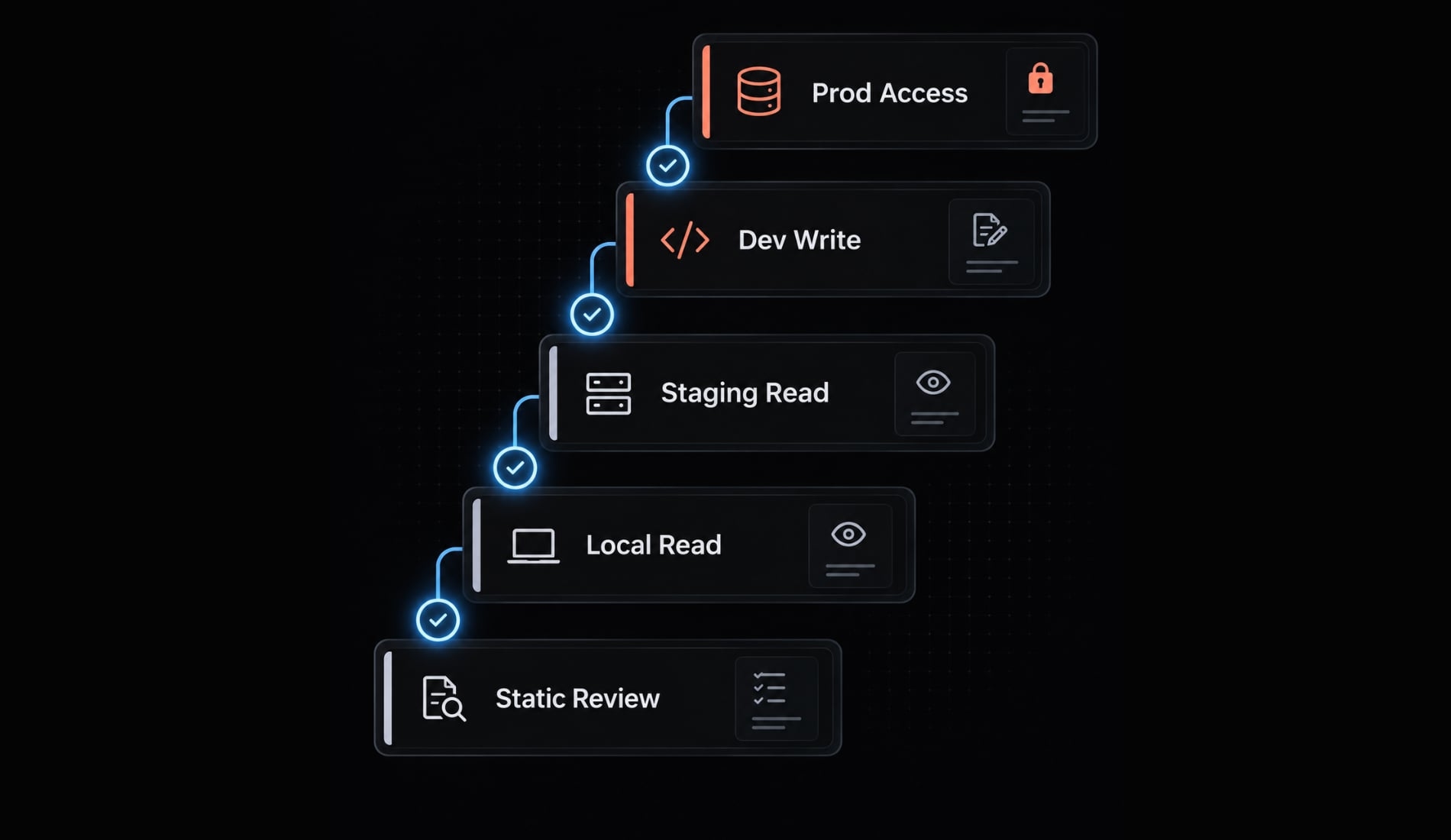
Recommended access progression
1. Static review only ↓ Explicit approval and scoped credentials2. Local/development read-only ↓ Separate environment approval3. Staging read-only ↓ Narrow write authorization4. Approved development writes ↓ Exceptional production review5. Controlled production access
Each stage needs its own justification. Production access is optional, not the expected destination. Later stages represent additional exposure—not a better integration.
Troubleshoot common Claude Code Redis setup problems
Separate installation failures from discovery problems and database connectivity. Redis plugin troubleshooting should not begin by expanding permissions.
Symptom | Possible cause | Next check or fix |
|---|---|---|
Plugin unavailable | Wrong execution context, absent marketplace listing, organizational policy | Check Claude Code plugin configuration and the current listing |
Skills CLI fails | Runtime requirements, package provenance, network or filesystem restrictions | Read the actual error and current CLI requirements |
Installed but undiscovered | Wrong scope, disabled package, duplicate copy, stale session | Check active scope and supported skill detection; refresh only as documented |
Advice but no live inspection | Instructions installed without approved tools | Review separate connectivity configuration |
Connection fails | Credentials, routing, TLS, endpoint, or ACL mismatch | Test with an approved client in a controlled environment |
Conflicting guidance | Multiple package copies or overlapping instructions | Inspect sources and precedence before removing duplicates |
Outdated recommendations | Old revision, model assumptions, incompatible dependency version | Compare installed guidance with current client and Redis documentation |
Generic output may reflect task fit or model variability, not merely failed activation. Keep an error transcript, but redact secrets and internal infrastructure details.
Updating and removing the integration
Use the current plugin manager or installer help. Review release notes, changed resources, and new permissions before updating.
Check for leftover duplicates after removal or migration. Re-run discovery checks and the same bounded fixture after updates. Never disable TLS, grant administrator access, or bypass approvals to make an installation appear functional.
Production-readiness checklist for AI-generated Redis code
This is a pre-merge aid, not production certification. Skills can support review, but tests, profiling, monitoring, and human judgment remain necessary. Apply checks to the actual workload rather than treating every recommendation as universal.
Before merging Redis changes:
- Keys use appropriate tenant-aware namespaces.
- Cache and temporary-key expiration is intentional.
- Persistent keys have documented retention decisions.
- Collections and payload sizes have growth boundaries.
- Enumeration is bounded and operationally justified.
- Client lifecycle matches library and concurrency behavior.
- Batching or pipelining preserves required semantics.
- Multi-key operations match deployment topology.
- Timeouts, reconnects, and fallback behavior are tested.
- Credentials are externalized and narrowly scoped.
- Behavioral tests and representative performance checks pass.
- A human reviewer approves changes and rollback planning.
Record exceptions with an owner and rationale. A checked box should point to evidence, not simply repeat the assistant’s recommendation.
Frequently asked questions
What does the Claude Code Redis integration actually add?
The integration adds domain-specific "Agent Skills"—procedural instructions that guide Claude Code to use Redis correctly. It does not automatically grant database connectivity. While Skills supply reasoning patterns, live database inspection or interaction requires separately configured tooling, such as a compatible Model Context Protocol (MCP) server or approved shell/client path.
What are the safety controls for live Redis access?
For live access via MCP or other tools, implement a dedicated Redis ACL identity with least-privilege permissions (e.g., read-only). Restrict commands, use TLS for remote connections, and ensure the agent operates only in non-production environments. Never bypass approval controls or expose credentials to the model provider through unchecked prompt inputs.
Is the Redis code generated by Claude Code production-ready?
No, AI-generated code is not inherently production-ready. Skills provide guidance to support the review process, but human validation is required. Before merging, verify that the code handles edge cases, implements proper error propagation, follows production topology constraints, and includes behavioral tests to ensure reliability under actual system load.
Read more:
- Claude Code permissions security: Guide to safe workflows
- Claude Code tutorial: Set up and master your AI coding agent
- Claude Code OWASP skills: Secure implementation and best practices
Conclusion
A useful Claude Code Redis workflow starts with source verification, a deliberate installation scope, and separate checks for discovery and response quality. Choose an installation route from the installation section, confirm the package’s current instructions, and begin with one bounded static review.
Redis development guidance and live database connectivity remain different capabilities. Add live access only when the task requires it, using scoped credentials, enforced tool permissions, and bounded operations. Recommendations still need library-specific review, relevant tests, and human approval.