Claude Code code review: Ultimate setup and optimization guide
Claude Code code review: How it works, how to set it up and when it’s worth it
PR review often becomes the bottleneck before coding does. That is why Claude Code code review is getting attention from teams that want an AI-powered PR reviewer without adding another heavy SaaS layer. The appeal is straightforward: use Claude Code inside an existing GitHub workflow, tune the review scope, and aim for higher-signal feedback before human reviewers spend time on a pull request. This guide covers what Claude Code actually does in review workflows, how teams usually set it up, how to reduce noisy comments, and when it is a stronger fit than dedicated review tools.
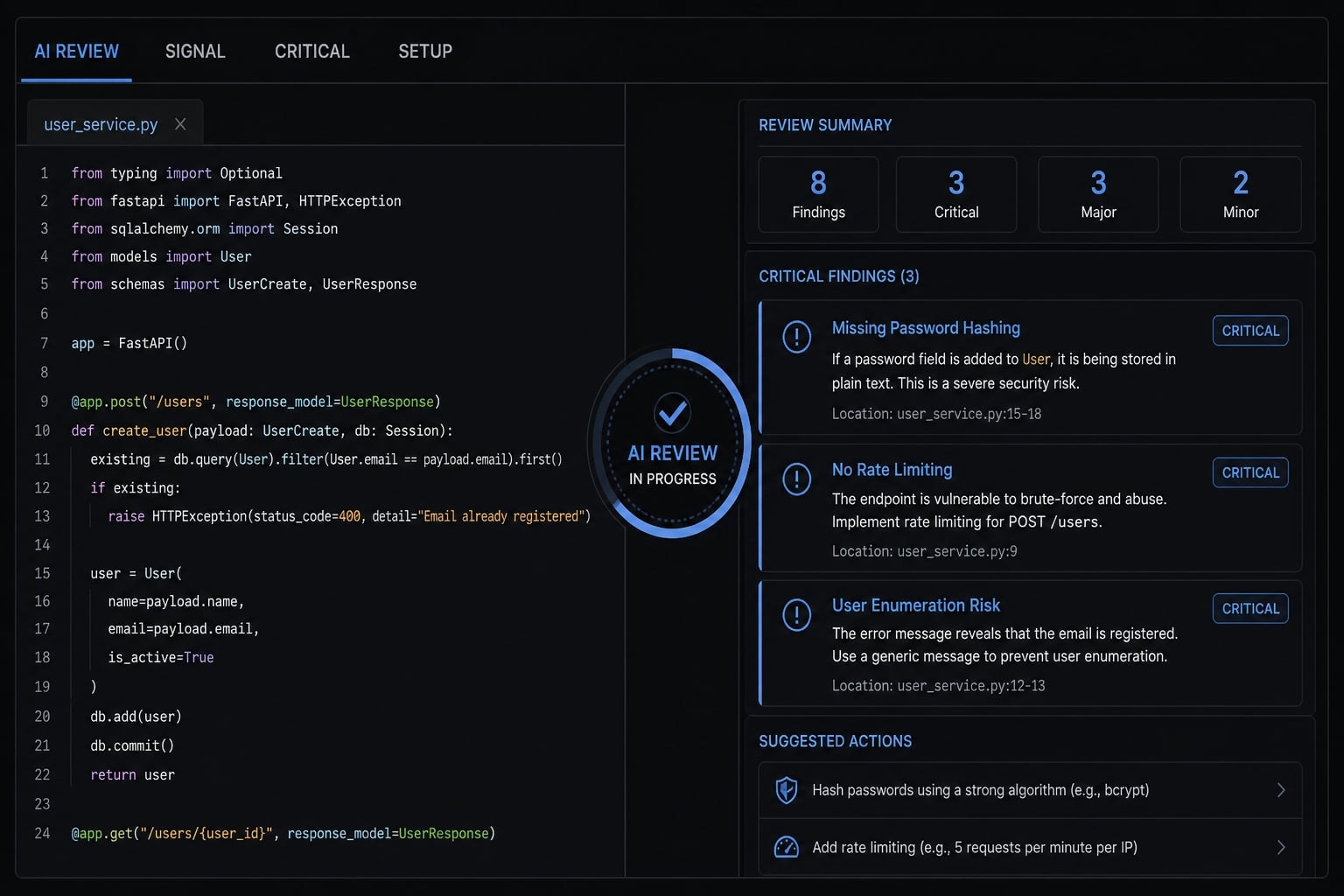
What Claude Code actually does in a code review workflow
Claude Code code review is an AI-assisted review workflow that analyzes pull request changes, repository context, and project instructions to flag potential bugs, correctness issues, performance risks, and security concerns. It works best as a first-pass reviewer, not as a replacement for human engineering judgment.
In practice, the main value is not “automated approval.” The value is a fast first pass that helps reviewers focus on likely issues earlier in the pull request workflow. Claude Code reads the PR diff, uses available repository context, follows repo instructions such as CLAUDE.md, and generates feedback based on the review scope you define.
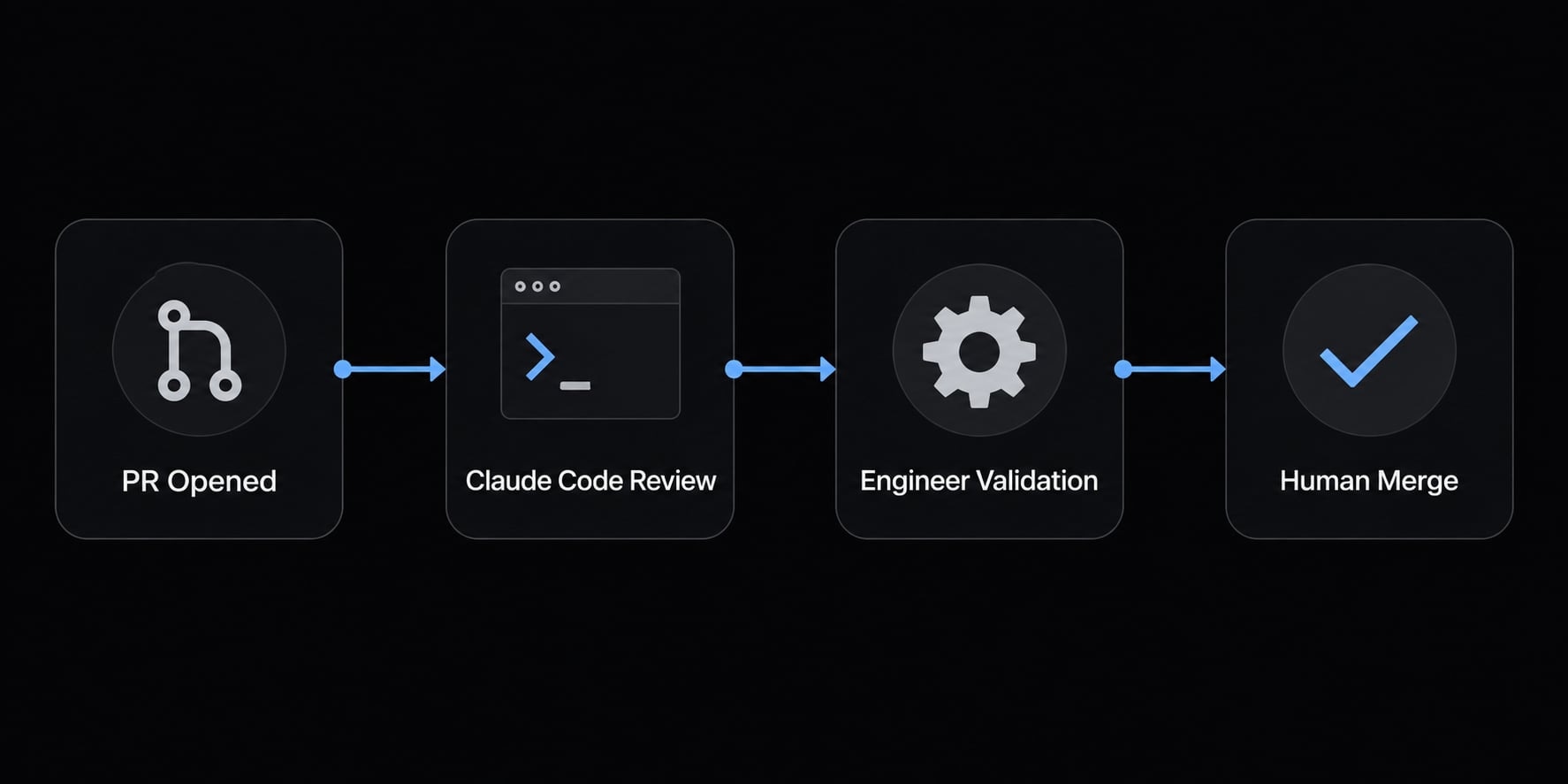
AI-assisted review vs full automation
A better mental model is AI-assisted code review, not autonomous review. Claude Code can surface likely bugs and risks, but it does not own approvals, architecture tradeoffs, or accountability.
Human validation still matters for:
- Merge decisions.
- Business logic interpretation.
- Architecture judgment.
- Risk acceptance.
- Final reviewer sign-off.
Common review targets and default limitations
Strengths
- Finding likely bugs.
- Spotting correctness issues.
- Flagging performance red flags.
- Surfacing security concerns.
- Noting possible missing test coverage.
Limitations
- Style nitpicking when prompts are too broad.
- Low-priority over-commenting.
- Uncertain interpretation of edge cases.
- Weaker output when repo instructions are vague.
Most teams usually find that setup is rarely the hard part; building trust in the AI’s comments is. That is why Claude Code is strongest when it behaves like a conservative review assistant, not an all-purpose critic.
Simple setup path: How teams usually enable Claude Code for PR reviews
First - do you need a workflow at all? If you just want automatic review on every PR, the separate Code Review product does that with no workflow file. The setup below is for teams who want control over prompt, model, and triggers.
Prerequisites: admin access to the repo, and GitHub CLI authenticated (gh auth login) - Claude Code checks for it. Quick setup covers the Claude API and Claude subscriptions; Bedrock, Google Cloud's Agent Platform, and Microsoft Foundry have a separate path.
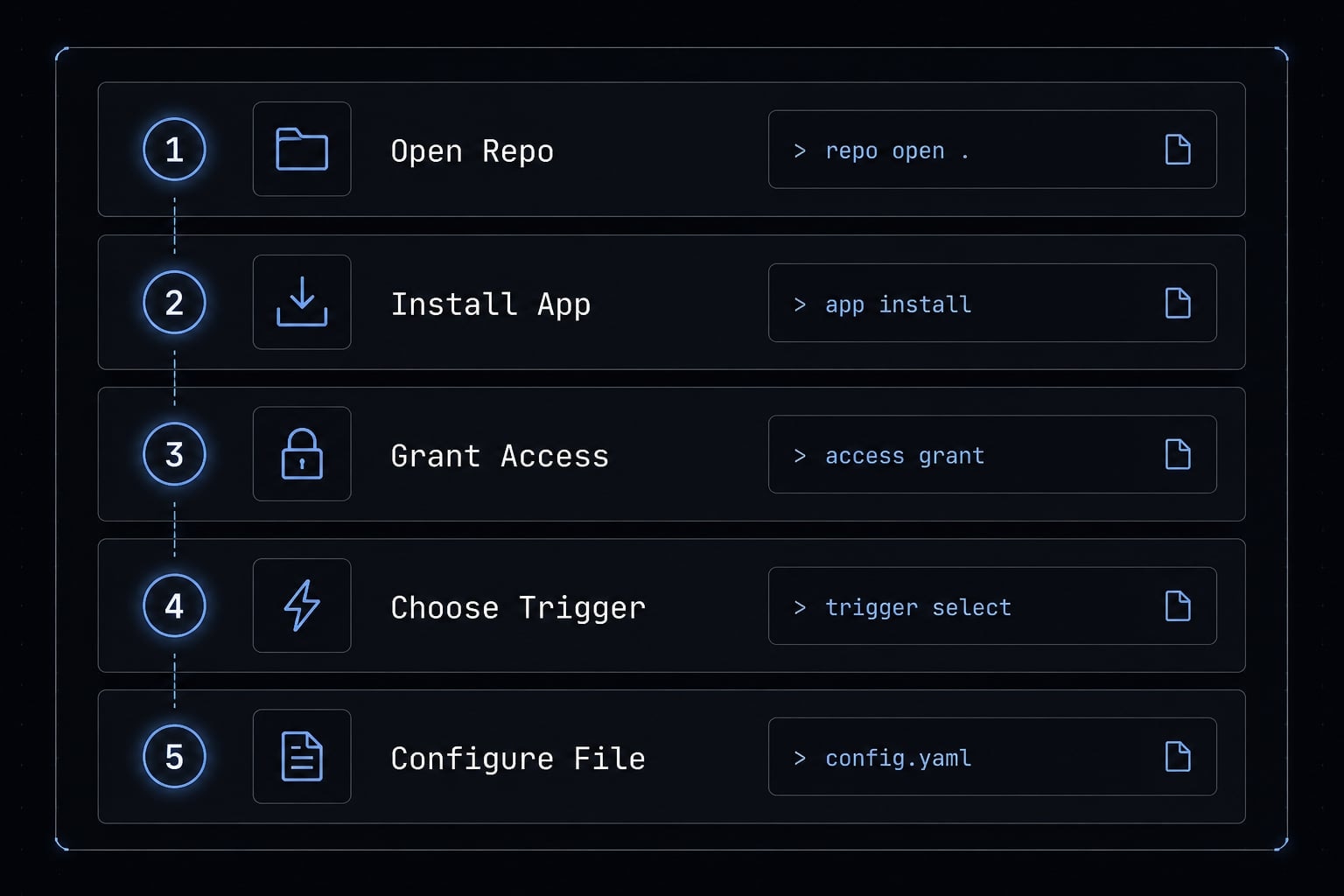
Five steps
1. Open Claude Code in the repository so the agent sees your real code structure.
2. Run /install-github-app. This installs the app, sets up the authentication secret for you, and pushes a branch with the workflow files - then opens a PR ready to create. Merge it and @claude works. You don't add the secret manually: Claude Code reuses an existing API key, or offers a subscription token or key paste, and saves it as ANTHROPIC_API_KEY or CLAUDE_CODE_OAUTH_TOKEN.
3. Check what you're granting. The action uses Contents, Issues, and Pull requests. But the app is shared across all Claude GitHub features, so the set is wider - Actions, Checks, Discussions, Members, Metadata, Repository hooks, Statuses, Workflows. GitHub won't let you accept a subset. Orgs needing least privilege can build a custom app with just the three, but it covers the Action only; Code Review and web auto-fix still need the official app.
4. Choose your trigger mode. See below - this drives noise and cost more than any prompt tweak.
5. Narrow the prompt and add rules to CLAUDE.md: The default scope is broader than most teams want. Keep CLAUDE.md short; Claude reads it every run.
Interactive vs automation mode
The action detects which to use from your workflow file.
| Interactive | Automation |
|---|---|---|
How you get it | No |
|
What fires it |
| The GitHub event. |
Output goes to | Comment on the issue or PR. | Workflow run log, unless the prompt tells Claude to post. |
Reviews per PR | One, on request. | One per event. |
Interactive is the lower-noise default - one review per PR by construction, nothing spent on PRs nobody asks about. Automation on synchronize is where noise starts: Five pushes, five passes over the same diff.
- Both modes run two access checks, and the run fails if either rejects. The triggering user needs write access (
allowed_non_write_usersplus your owngithub_tokento exempt specific people). Bot actors are rejected unless listed inallowed_bots— this also catches scheduled runs, which GitHub attributes to whoever last edited the cron. - Open source note: GitHub withholds secrets from fork PRs on public repos, so reviews only run on branches in the same repository.
The actual review workflow
Quick setup's review workflow runs a plugin, not plain text:
name: Code Reviewon: pull_request: types: [opened, synchronize, ready_for_review, reopened]jobs: review: runs-on: ubuntu-latest permissions: contents: read pull-requests: read issues: read id-token: write steps: - uses: actions/checkout@v6 with: fetch-depth: 1 - uses: anthropics/claude-code-action@v1 with: anthropic_api_key: ${{ secrets.ANTHROPIC_API_KEY }} plugin_marketplaces: "https://github.com/anthropics/claude-code.git" plugins: "code-review@claude-code-plugins" prompt: "/code-review:code-review --comment ${{ github.repository }}/pull/${{ github.event.pull_request.number }}" claude_args: '--allowedTools "mcp__github_inline_comment__create_inline_comment"'
Two lines decide where the review lands, and both break easily:
--commentposts on the PR - inline per issue, or one summary when clean. Without it, findings sit in the run log where nobody reads them.claude_argsmust stay even though the skill's frontmatter names the same tool. The action starts the inline-comment MCP server only when--allowedToolsnames it here.
Some noise control is already built in: Claude skips draft and closed PRs, ones it judges trivial, and ones it has already commented on.
Using a subscription instead of a key? Swap the anthropic_api_key line for claude_code_oauth_token: ${{ secrets.CLAUDE_CODE_OAUTH_TOKEN }}.
The real challenge is signal-to-noise control
The biggest adoption problem is usually not installation. It is noise. If Claude Code posts too many weak comments, reviewers stop trusting it. Once trust drops, even useful findings get ignored.
Signal-to-noise in AI code reviews is the ratio between useful, merge-relevant findings and low-value comments that reviewers learn to ignore.
This matters because false positives carry an operational cost. They slow reviewers down, create comment fatigue, and make teams question whether the tool improves quality or simply adds another review layer.
Broad review prompt vs critical issues only
Prompt scope is one of the strongest levers for reducing noise in AI code reviews.
Broad review prompt
- Reviews everything.
- Produces more comments.
- Often includes style nits and weak suggestions.
- May look helpful at first but lowers trust over time.
Critical issues only prompt
- Focuses on correctness, security, performance, and merge-blocking bugs.
- Ignores style unless behavior is affected.
- Creates fewer, more actionable comments.
- Usually improves adoption.
Before: “Review this PR for bugs, style, architecture, readability, edge cases, and improvements.”
After: “Review this PR for merge-blocking correctness, security, and performance issues only. Ignore style unless it affects behavior.”
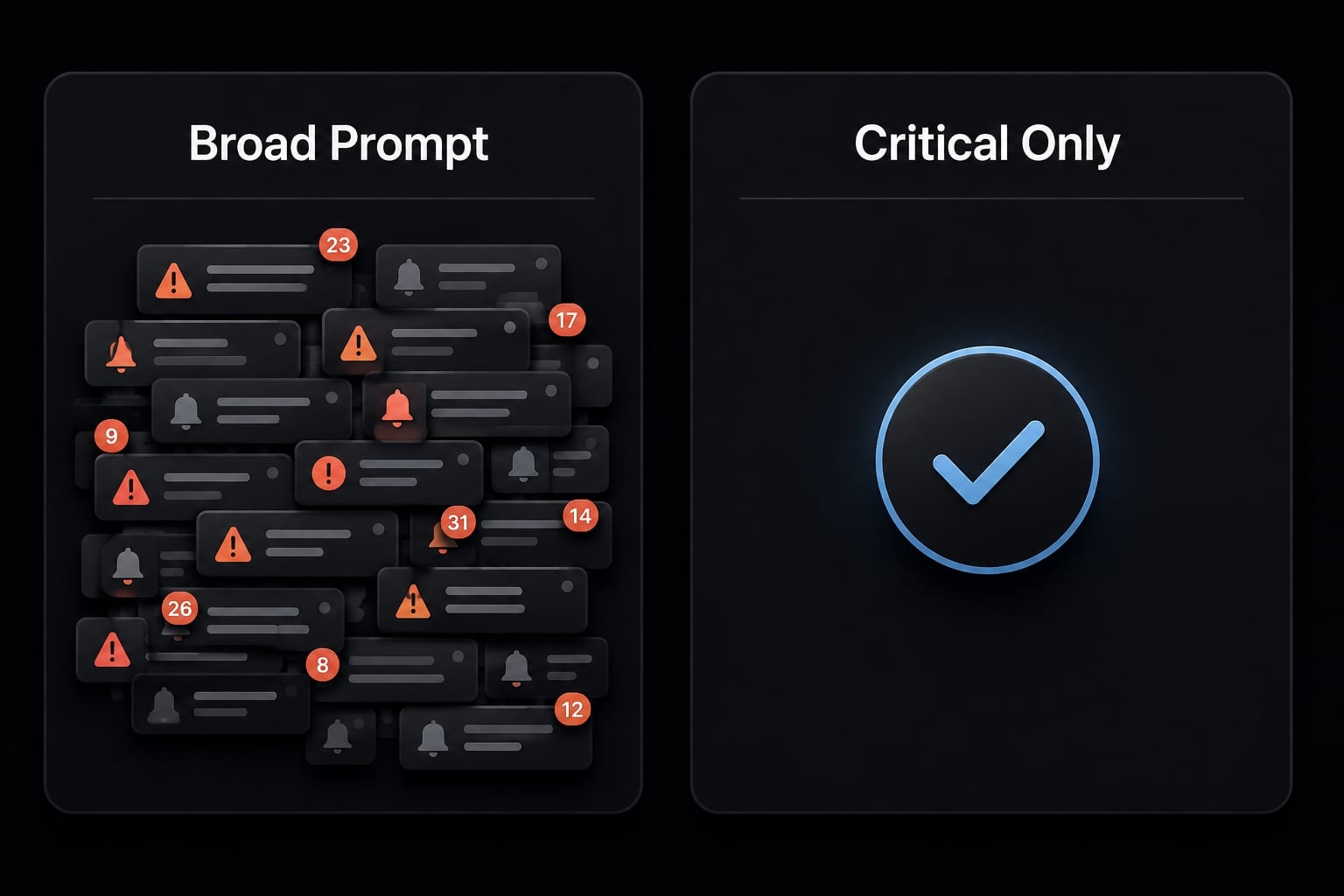
In practice, teams usually find narrower prompts produce better workflow outcomes. That does not mean the model becomes perfect. It means the comments become easier to trust.
Best-practice rules for noise control
To reduce noisy AI code review comments, most teams should follow five rules:
- Run one review per PR by default.
- Ask for concise output in short bullets.
- Exclude style nits unless they affect behavior.
- Escalate only meaningful risks.
- Keep humans responsible for approval and follow-up.
This is where light prompt engineering matters. The goal is not clever prompts, it is reliable reviewer behavior. For most teams, the winning setup is simple: narrow scope, short output, limited triggers, and explicit human ownership.
If your current AI reviewer is flooding PRs with low-value feedback, create a small internal checklist for critical issues only, concise output, and one review per PR before changing tools.
Claude Code vs BugBot, CodeRabbit, and manual-only review
This is a workflow-fit decision, not a fan ranking. Claude Code, BugBot, CodeRabbit, and manual review solve different problems at different operating points. The right choice depends on whether your team values customization, rollout speed, reviewer judgment, or lower tool sprawl.
Criteria | Claude Code | Dedicated AI reviewer (BugBot/CodeRabbit) | Manual-only review |
|---|---|---|---|
Setup effort | Moderate; needs initial configuration and prompt tuning | Low to moderate; faster out-of-the-box | Low tool setup, high human effort |
Customization | High; prompts, workflow, and repo rules are flexible | Medium; depends on vendor constraints | High in principle, but manual and inconsistent |
Review quality | Good when scoped tightly; depends on prompt quality | Good baseline, but can be noisy | High judgment, limited scale |
Signal-to-noise control | High if prompt and triggers are tuned | Medium; defaults often shape behavior | High, but expensive in reviewer time |
Cost model | Efficient if team already pays for Claude | Extra subscription or bundled platform cost | No software fee, high people cost |
Team rollout | Requires conventions and ownership | Easier for non-expert rollout | Familiar, but not scalable |
Governance and control | High; clearer control over instructions and behavior | Medium; workflow bounded by vendor | High |
Best for | Small teams, solo founders, workflow-conscious leads | Teams wanting turnkey automation | High-risk changes and final approval |
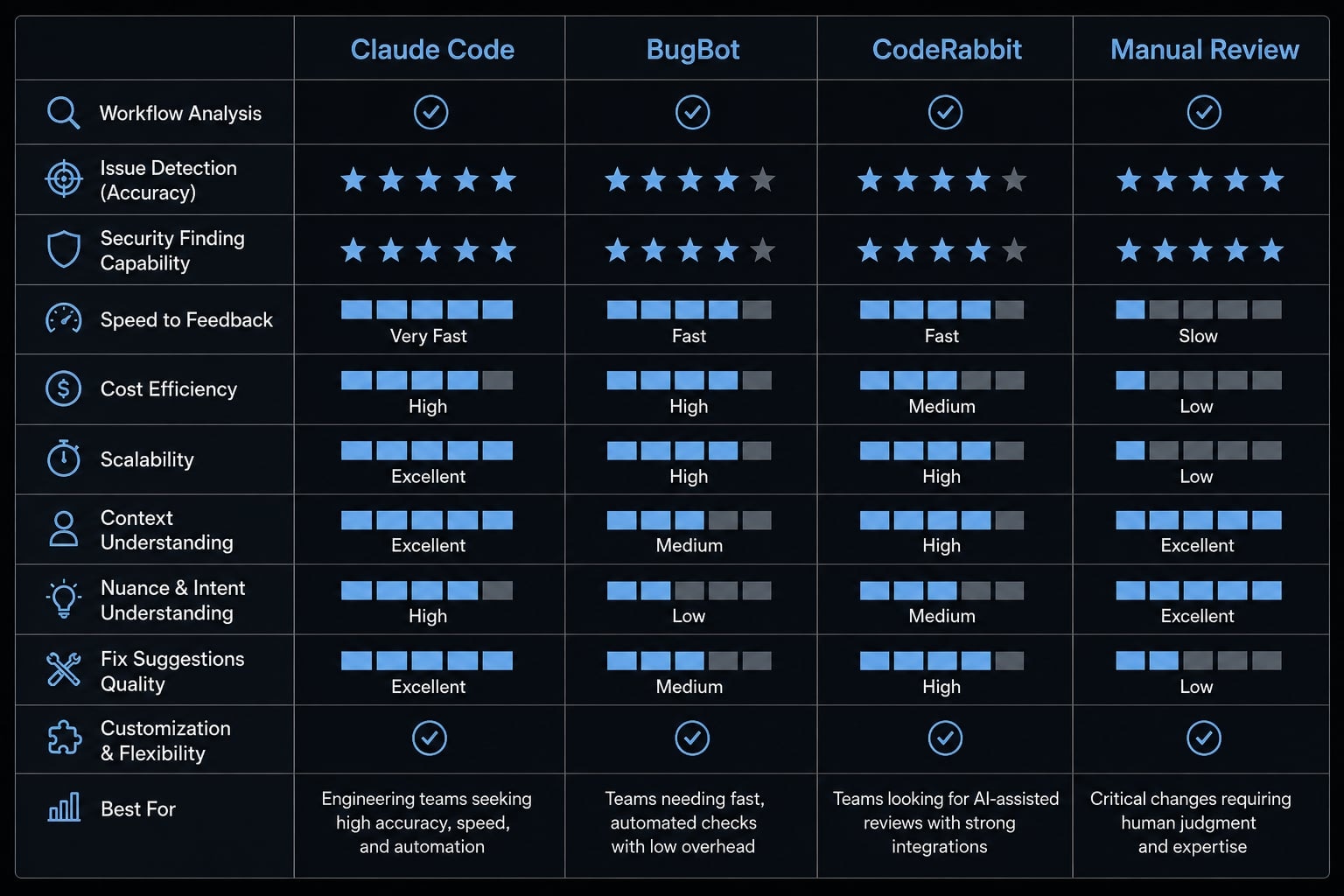
The main value of using Claude Code vs BugBot or CodeRabbit is not just about feature counting. It is understanding tradeoffs.
Claude Code usually wins on:
- Workflow control.
- Prompt customization.
- Repo-specific behavior through
CLAUDE.md - Lower extra software overhead if the team already uses Claude.
Dedicated tools usually win on:
- Faster rollout.
- Less tuning.
- Easier adoption for teams without a clear review owner.
- More turnkey automation.
Manual code review still wins where judgment matters most:
- Architecture decisions.
- Domain-sensitive logic.
- High-risk production changes.
- Final approval responsibility.
A realistic AI reviewer cost calculation should include reviewer time, not just subscription cost. A cheaper tool that creates more noise can become more expensive operationally.
Who should choose which path:
- Choose Claude Code if your team wants fewer SaaS layers and stronger workflow control.
- Choose BugBot / CodeRabbit-style tools if you want faster rollout and less tuning.
- Stay mostly manual if the codebase is highly sensitive and reviewer judgment matters most.
For technical leads evaluating build vs buy, the tradeoff is clear: Claude Code asks for more ownership up front, but gives more control back in return.
When Claude Code is a strong choice and when it is not
Claude Code is a strong option when expectations are framed correctly. The safest framing is as a review accelerator, not a review replacement. That framing improves throughput while preserving engineering accountability.
Treating Claude Code as a review accelerator lowers adoption risk. It helps teams use AI where it is strongest, as a fast first-pass reviewer, while keeping critical judgment with humans. That balance matters for team adoption and long-term trust.
Strong fit
- Your team already uses Claude.
- You want more workflow fit and control.
- You prefer fewer SaaS tools.
- Someone on the team can define prompt boundaries.
- You want an AI review workflow for first-pass review, not autonomous approvals.
Weak fit / not ideal
- You expect zero-tuning rollout.
- You want automatic final approval behavior.
- No one owns prompt or workflow maintenance.
- You operate in regulated environments without clear engineering governance.
- Your team has no tolerance for occasional weak suggestions.
This becomes a weak fit when teams want convenience but not ownership. Claude Code rewards clear rules and operational discipline.
From individual setup to repeatable team workflow
A solo setup proving “it works on my repo” is not the same as a team-ready workflow. Repeatability requires team standardization, explicit rules, and a way to measure whether comments improve decisions or simply increase volume.
To operationalize Claude Code across a team, use a lightweight governance checklist:
- Standardize one review template
- Define what counts as blocking feedback
- Store repo-specific rules in
CLAUDE.md - Assign a review owner
- Track false positives for two weeks
- Evaluate whether comments improved merge decisions or only increased volume
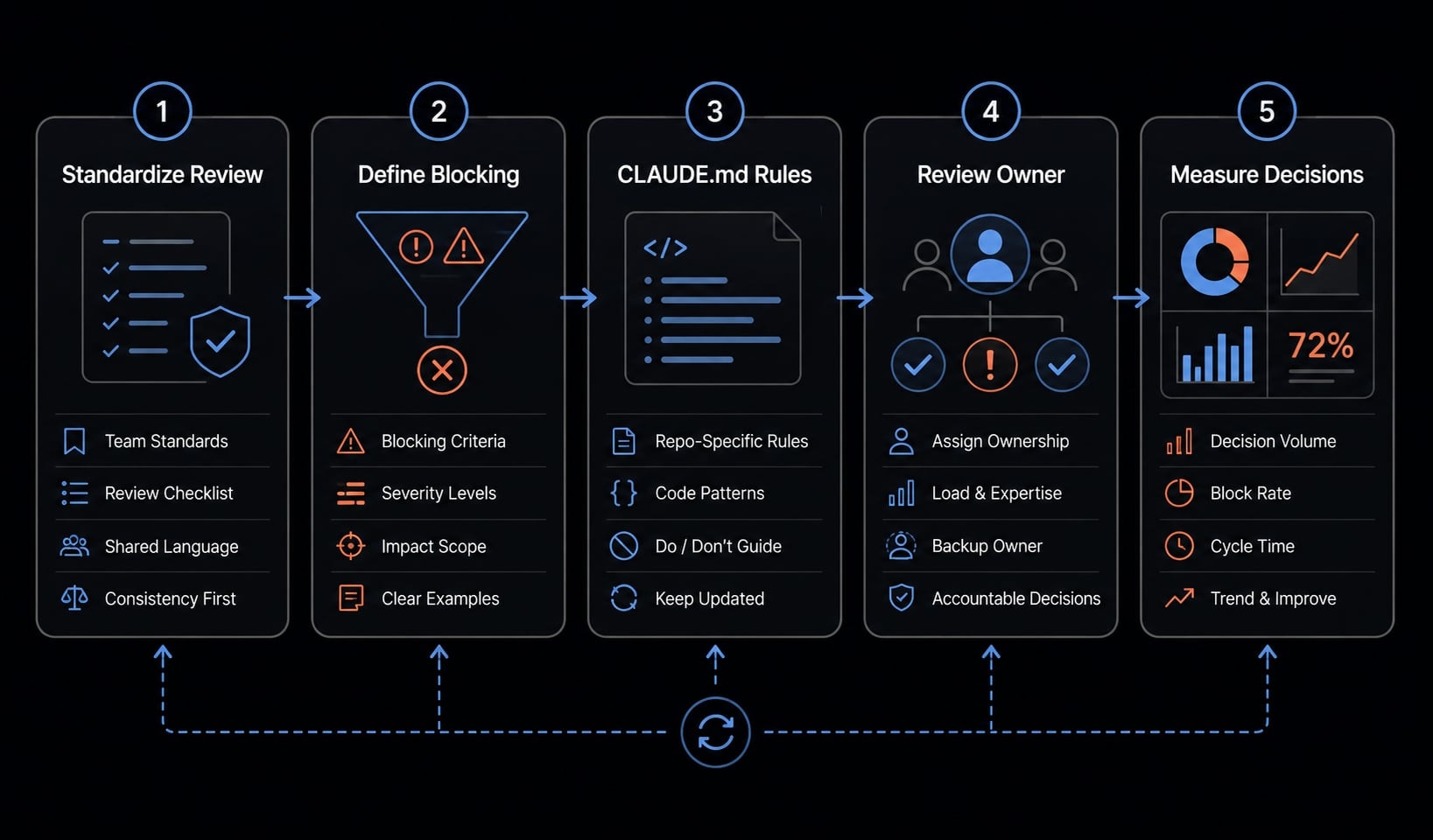
In practice, this is where many teams stall. Individual usage can feel productive quickly. Team usage needs consistency. That usually means limiting variation, documenting expectations, and deciding who updates prompts when comment quality drifts.
Frequently asked questions
What is Claude Code in a code review workflow?
Claude Code code review is an AI-assisted workflow that analyzes pull request changes, repository context, and project instructions to flag bugs, correctness issues, and performance risks. It functions best as a first-pass reviewer to accelerate human oversight, rather than as a replacement for engineering judgment.
How do I set up Claude Code for pull request reviews?
To enable Claude Code for reviews, follow these six steps:
- Open Claude Code in your repository.
- Run
/install-github-app. - Connect your target repository.
- Enable review triggers via GitHub Actions.
- Customize the default review prompt.
- Configure
CLAUDE.mdto provide repository-specific style and logic guidance.
How can I reduce noisy or low-value AI review comments?
To minimize noise, teams should focus on signal-to-noise control by narrowing the review scope. Follow these rules:
- Run only one review pass per PR.
- Use a "critical issues only" prompt.
- Explicitly exclude style suggestions.
- Focus strictly on correctness, security, and performance.
- Keep final approval responsibility with human reviewers.
Is Claude Code better than dedicated AI reviewers like CodeRabbit or BugBot?
Claude Code offers higher customization and control over the review workflow, making it ideal for teams wanting to minimize SaaS overhead. Dedicated tools often provide a faster, more turnkey setup but may offer less flexibility regarding custom prompts and specific repository behaviors compared to a manual-first Claude Code setup.
Who is Claude Code for code review best suited for?
It is a strong fit for small engineering teams, technical founders, and workflow-conscious leads who already use Claude and prioritize workflow control. It is less suitable for organizations that require a "zero-touch" turnkey automation solution or those lacking the capacity to tune prompts and manage repository-specific review instructions.
Does using Claude Code for reviews replace human developers?
No. Claude Code is designed to be an assistive layer, not a replacement. Human engineers must remain responsible for the final code review, architectural decisions, and the validation of all AI-flagged issues to ensure long-term code quality and system security.
Read more:
- Claude Code tutorial: Set up and master your AI coding agent
- Claude Code VS Code: Installation and setup guide 2026
- Claude Code hooks guide: Automate and control AI workflows
Conclusion
Claude Code code review is strongest when teams want customization, lower SaaS overhead, and tighter workflow control inside GitHub. In practice, success depends far more on review scope, prompt design, trigger discipline, and expectations than on installation alone.
For most small teams, technical founders, and workflow-conscious engineering leads, Claude Code works best as a controlled first-pass reviewer. It is less suitable for teams expecting autonomous approvals or zero-maintenance rollout. If you want a more repeatable operating model, explore a reusable AI review workflow kit and review AgentKit resources for production-ready coding agent workflows, standardized prompts, and team-level governance.