Claude Code MongoDB: Complete MCP setup and integration guide
Claude Code MongoDB: MCP setup, examples and troubleshooting
Claude Code connects to MongoDB via the MCP Server, allowing it to access permitted database context and inspect real documents rather than relying on assumed schemas. Setting up this integration requires a reachable database deployment, restricted read-only credentials, and a properly configured MCP server. By preparing secure access, registering the server, and running a bounded read test, you can enable Claude to safely verify document structures and draft accurate queries grounded in your actual data.
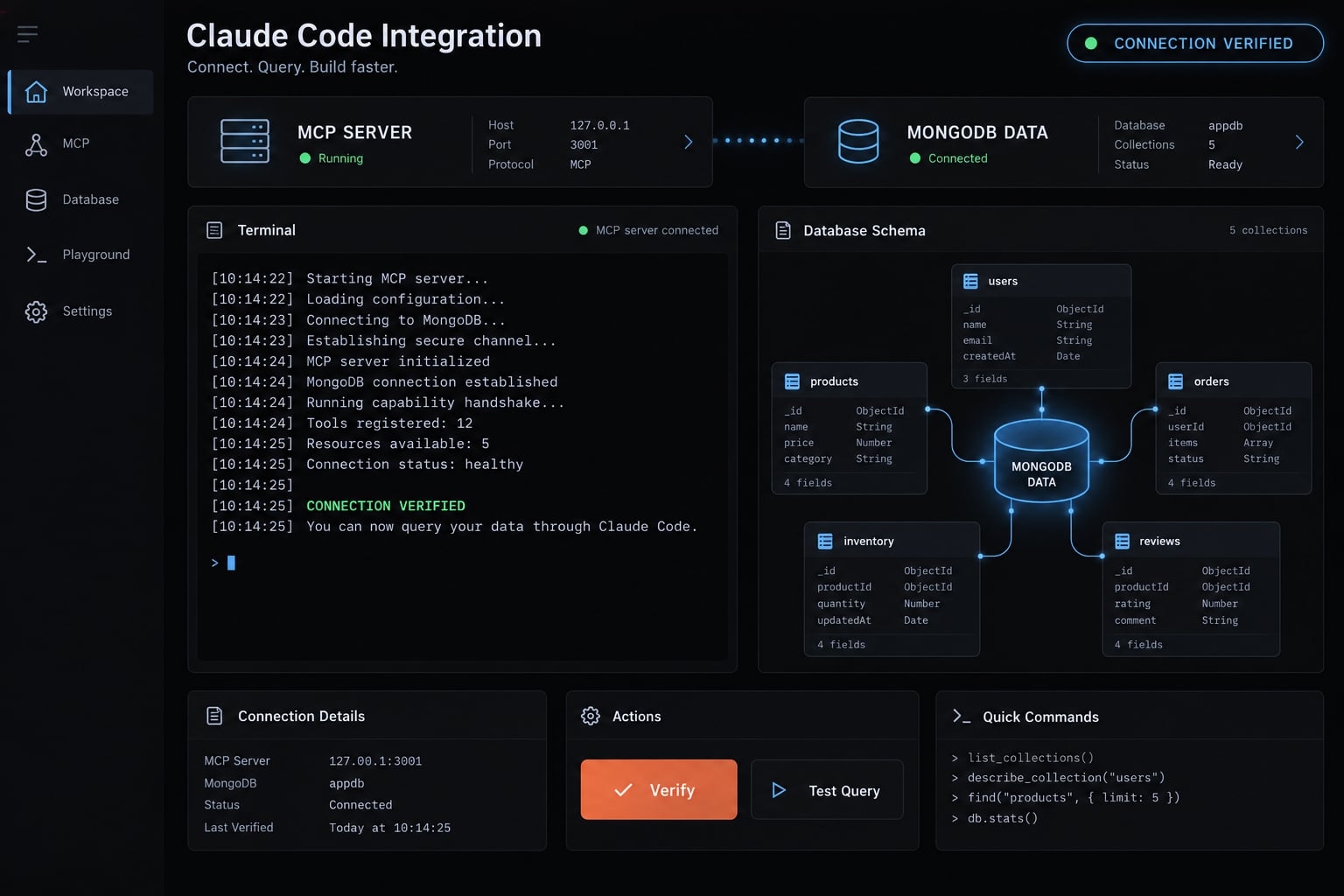
What you can do with Claude Code and MongoDB
AI-assisted MongoDB database management is most useful when it replaces assumptions with limited, relevant evidence. Instead of describing a collection from memory, you can ask Claude to inspect permitted documents before drafting application code.
Useful first tasks include:
- Schema inspection: Identify fields and data types observed in a small sample of
subscriptions. - Bounded document sampling: Retrieve selected, non-sensitive fields from a development database.
- MongoDB query generation: Draft queries using field names and types that actually appear in the sample.
- Index recommendation: Compare a query pattern with existing indexes and propose changes for review.
For example, an application might store subscription status as status, not state. Sampling documents helps avoid generating syntactically valid queries against nonexistent fields.
How the connection works:
- Claude Code requests an available tool.
- The MCP server handles the request.
- MongoDB evaluates the operation using the configured database identity.
- Authorized results return to Claude Code.
Claude Code │ MCP tool request over local stdio ▼MongoDB MCP Server │ Database connection using restricted credentials ▼MongoDB Atlas or self-managed MongoDB
Illustrative architecture: Claude Code sends MCP tool requests through the MongoDB MCP server to an authorized MongoDB deployment.
Available operations depend on both the server version and database permissions. Sampled documents reveal observed structure, not a complete schema. Database access also does not establish continuous synchronization, comprehensive telemetry, or autonomous database administration.
MongoDB agent skills vs. MongoDB MCP server
Skills provide guidance; MCP provides callable tools. Neither is a substitute for database permissions or human review.
MongoDB Agent Skills refers here to MongoDB-focused instructions and reusable development guidance. Specific official packages, installation commands, and release claims require confirmation against current MongoDB documentation. This configuration is independent of any additional Skills packages.
Component | Primary role | Live database access | Typical uses | Main limitation |
|---|---|---|---|---|
MongoDB Agent Skills | Instructions, patterns, and workflow guidance | Not by themselves | Document modeling, query review, development conventions | Do not independently establish credentials or enforce permissions |
MongoDB MCP Server | Expose callable database tools | Yes, when configured and authorized | Inspect collections, read documents, inspect supported metadata | Restricted by available tools, credentials, and deployment capabilities |
Skills plus MCP | Combine guidance with permitted database context | Through configured tools | Context-grounded query and application development | Still requires validation and review |
Which option should you use?
- Guidance only: Use Skills or project instructions with sanitized examples.
- Actual deployment inspection: Configure MCP with a restricted database identity.
- Guided development grounded in database context: Combine instructions with MCP.
Live database access is unnecessary when sanitized sample data answers the task. Avoid adding credentials and networking complexity merely to generate a straightforward query.
Skills may direct Claude to use external tools, but instructions cannot independently create database access. Similarly, an instruction to avoid writes is not an authorization boundary.
“Schema-aware guidance” should mean guidance grounded in supplied samples or connected data. It does not mean every recommendation has been checked against every document, application constraint, or current MongoDB release.
Prerequisites and environment record
Prepare these items before starting:
- A working Claude Code installation with an authenticated session.
- A Node.js runtime compatible with the selected npm package.
- Available
npmandnpxcommands. - A reachable MongoDB Atlas cluster or local MongoDB deployment.
- A dedicated database identity-not production application credentials.
- Restricted read permissions on
saas_dev. - Secure handling for the MongoDB connection string.
- Appropriate network access and working DNS.
- Synthetic
accounts,subscriptions, andusage_eventscollections. - Package provenance, runtime requirements, and CLI options checked against official documentation.
Node.js is required for this article’s npm-based local process, not for every possible MCP integration.
Recommended test environment: Use a non-production database containing synthetic B2B SaaS records. Have an administrator create fixtures before connecting the read-only identity. Check connectivity independently using mongosh or MongoDB Compass. If the same credentials fail there, investigate MongoDB access before debugging Claude Code.
Environment item | Article status or recommended value |
|---|---|
Last tested | No recorded execution |
OS and shell | Examples target a Bash session on macOS or Linux |
Claude Code version | Record |
Node.js version | Record |
MCP package |
|
Deployment | Non-production Atlas or authenticated local MongoDB |
Configuration scope | Claude Code local scope for the current project |
| |
Validation outcome | Must be established by the restricted read test |
Step 1 - Prepare MongoDB access safely
Database authorization is the primary safety boundary. Server settings and Claude’s approval controls provide additional layers.
Create a restricted MongoDB user
- Create a dedicated identity for this development workflow.
- Grant the built-in
readrole onsaas_dev, or narrower collection-level permissions through a custom role. - Keep development, staging, and production credentials separate.
- Validate a permitted read outside Claude Code.
- Add privileges only when a defined, reviewed task requires them.
MongoDB database roles control database operations. Atlas project and organization roles control separate administrative capabilities; they are not interchangeable.
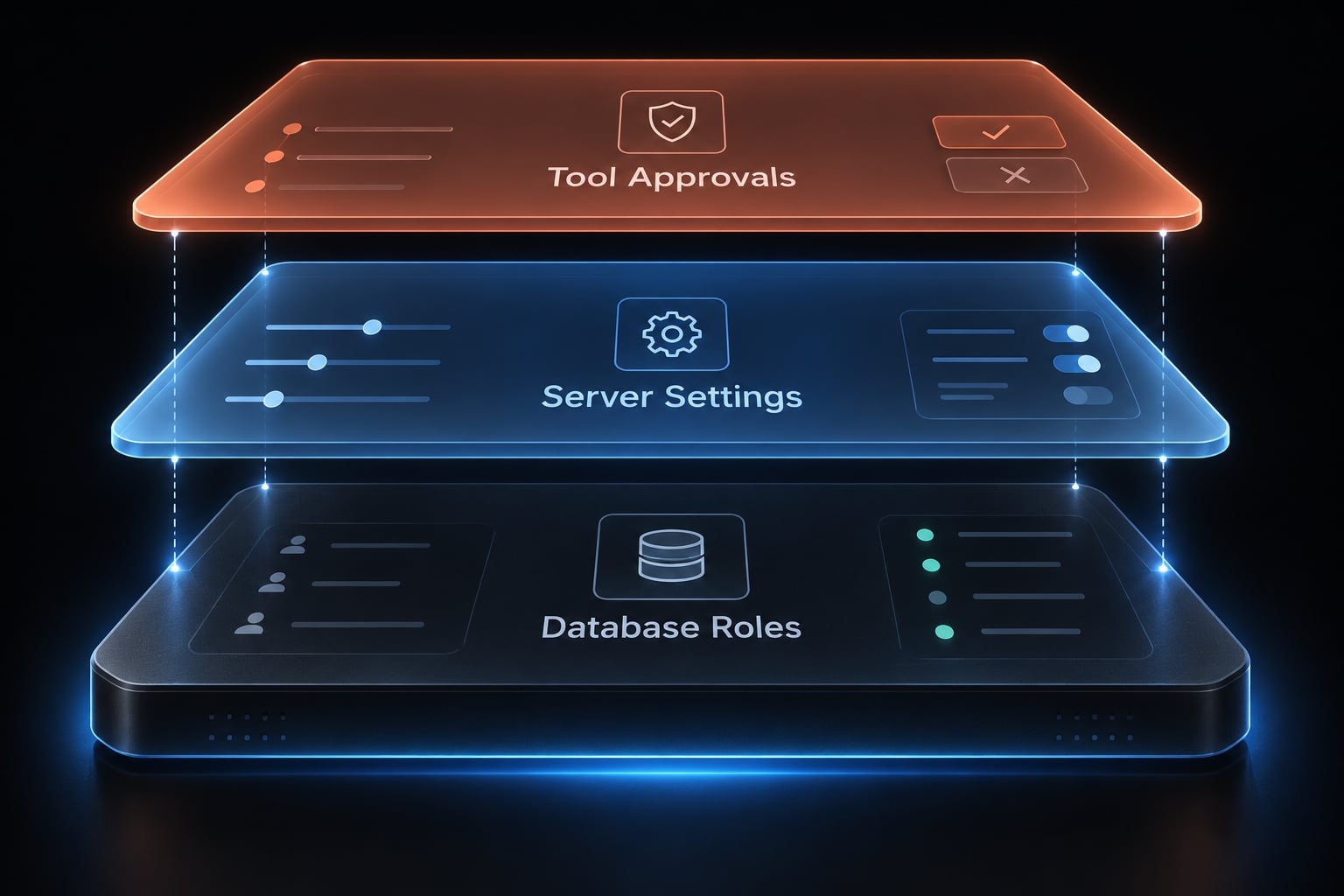
No production admin credentials: Do not use an administrative identity simply because it is already available.
Configure Atlas network access
For Atlas, add the actual client egress IP or an approved narrow range to the Atlas IP access list. A VPN change can alter that address.
If connectivity fails, check DNS, firewalls, routing, and VPN behavior. Do not use 0.0.0.0/0 as the default troubleshooting fix.
For local MongoDB, confirm that the database process is running and listening on the expected bind address and port.
Store the connection string securely
For a temporary Bash session, read the connection string without echoing it or putting its literal value into shell history:
read -r -s -p "Development MongoDB connection string: " MDB_MCP_CONNECTION_STRINGprintf '\n'export MDB_MCP_CONNECTION_STRINGexport MDB_MCP_READ_ONLY=true
export matters: an ordinary shell variable is not automatically passed to child processes.
MDB_MCP_CONNECTION_STRING and MDB_MCP_READ_ONLY are MongoDB MCP configuration names; confirm them against the selected release’s configuration reference.
Do not paste credentials into Claude’s conversation. Environment variables remain accessible to processes with sufficient privileges, so they are not a complete secret-management solution.
Exclude any local secret files from version control. Rotate credentials if exposed through logs, screenshots, history, or commits.
Test independently:
mongosh "$MDB_MCP_CONNECTION_STRING" --quiet --eval 'db.getSiblingDB("saas_dev").subscriptions.find( {}, { _id: 0, accountId: 1, status: 1 }).limit(1).toArray()'
This command may expose its URI argument to local process inspection. Use an approved credential-entry method on shared systems.
Steps 2-3 - Install the MongoDB MCP server and add it to Claude Code
This Claude Code MCP setup uses one local stdio workflow: Claude launches a process and communicates through its standard input and output streams.
The process can connect to Atlas or self-managed MongoDB. “Local server” describes where the MCP process runs, not necessarily where the database lives.
Configure the local MongoDB MCP server
1. Check the runtime and client
claude --versionnode --versionnpm --versionnpx --versionclaude mcp add --help
If Claude Code is unavailable, complete its installation using Anthropic’s installation documentation before continuing.
2. Inspect the package and resolve a version
The npm package used in this workflow is mongodb-mcp-server.
npm view mongodb-mcp-server name version engines repository.urlMCP_VERSION="$(npm view mongodb-mcp-server version)"export MCP_VERSIONnpm view "mongodb-mcp-server@$MCP_VERSION" enginesprintf 'Selected MCP version: %s\n' "$MCP_VERSION"
Compare the repository and installation instructions with MongoDB’s official MCP Server documentation before execution. Registry metadata alone is not sufficient proof of provenance.
This resolves a current release rather than asserting an article-tested version. Record the selected version, review its release notes, and reuse that exact version throughout your validation.
3. Confirm environment propagation without printing secrets
Run this in the same Bash session used for secret entry:
node -e 'if (!process.env.MDB_MCP_CONNECTION_STRING) { throw new Error("Missing MDB_MCP_CONNECTION_STRING");}if (process.env.MDB_MCP_READ_ONLY !== "true") { throw new Error("Read-only setting is missing");}console.log("Required environment values are present; values not displayed.");'
The server’s read-only setting supplements the database user’s restricted role. Do not rely on it instead of MongoDB authorization.
4. Check options and launch a diagnostic instance
npx --yes "mongodb-mcp-server@$MCP_VERSION" --helpnpx --yes "mongodb-mcp-server@$MCP_VERSION"
npx downloads or reuses a cached package and launches it on demand. This is not a persistent global installation.
A stdio server may wait silently for client messages. Silence does not prove either failure or success. Inspect startup errors, then stop the diagnostic process with Ctrl+C.
5. Register the server with Claude Code
From your intended project directory:
claude mcp add --transport stdio --scope local mongodb -- \ npx --yes "mongodb-mcp-server@$MCP_VERSION"
The shell substitutes the selected version during registration. The URI is not included in this command.
Configuration element | Meaning |
|---|---|
Server name |
|
|
|
|
|
| Not stored explicitly here; the process inherits exported variables |
Scope |
|
Claude Code documents local-scope configuration in ~/.claude.json, associated with the project. Use the CLI rather than manually editing that file.
This MongoDB MCP configuration does not rely on JSON string interpolation. JSON itself does not expand environment variables.
6. Start Claude from the same shell
claude mcp listclaude
Inside Claude Code:
/mcp
If Claude was already running, exit and relaunch it from the prepared shell. An existing process will not receive subsequently exported variables.
Local MongoDB configuration notes
For local development, use an authenticated loopback URI with this format:
mongodb://REPLACE_USER:REPLACE_PASSWORD@127.0.0.1:27017/saas_dev?authSource=admin
authSource identifies the database where the user authenticates. Use admin only if that matches the user’s configuration. Percent-encode reserved characters in credentials.
Purely local access does not need an Atlas IP access-list entry. An unauthenticated loopback deployment lacks the database-enforced read-only identity required by this workflow.
Confirm that Claude Code loaded the MCP server
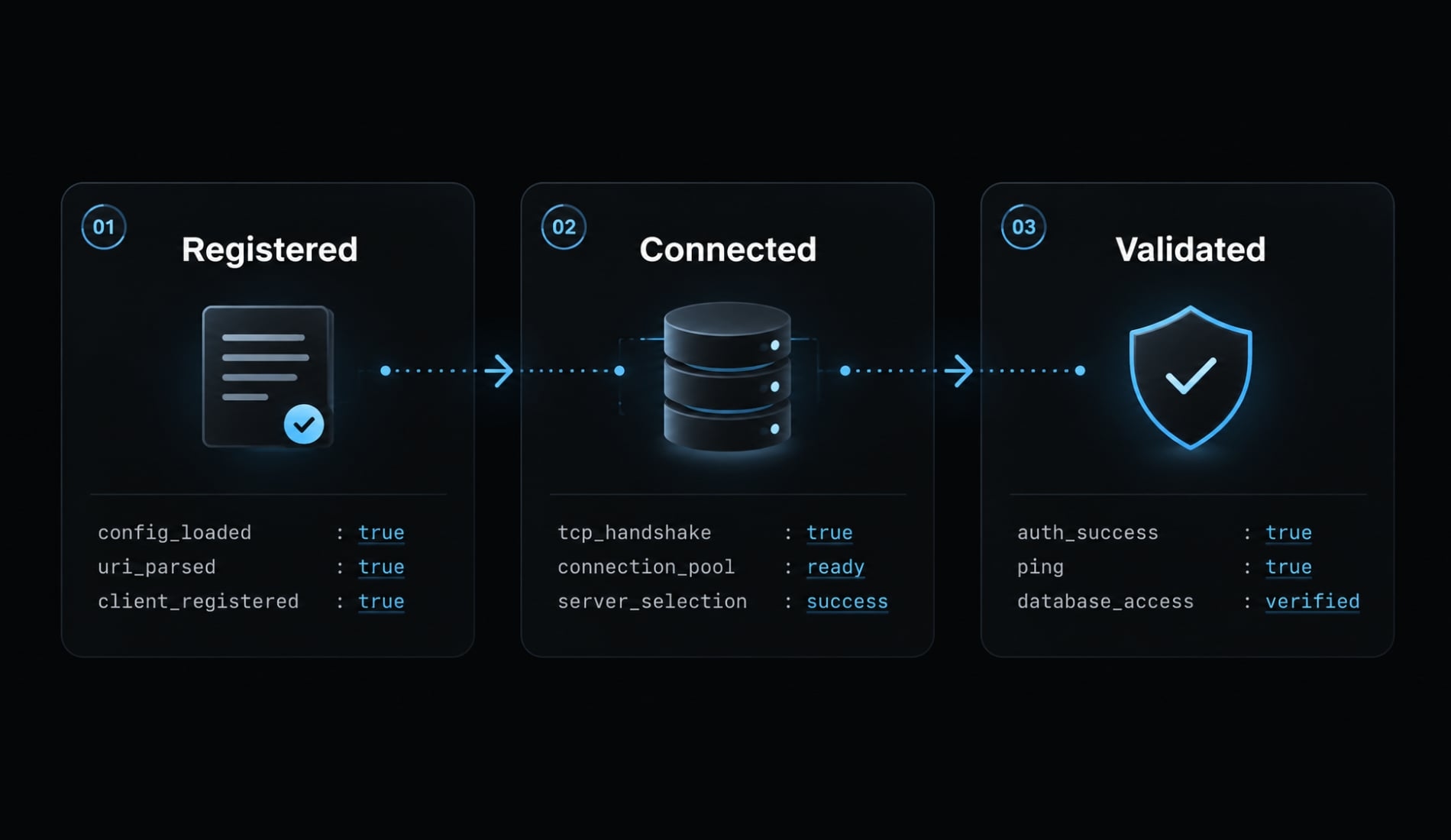
Keep three checkpoints separate:
- Registered: The configuration exists.
- Connected: Claude and the MCP process can communicate.
- Validated: An authorized MongoDB read succeeds.
A connected process is not proof of successful database authentication.
Step 4 - Verify the connection and run practical MongoDB tasks
Use the same synthetic saas_dev database throughout. Approve only the tools needed for each task; do not grant blanket permissions to simplify validation.
Run a read-only connection test
Use this MongoDB MCP example:
Use the mongodb MCP server and the saas_dev database.List collections permitted to this identity.Read at most five documents from subscriptions.Project only accountId, status, plan, and updatedAt; exclude _id.Do not modify data or inspect other databases.Report the tool used and any authorization error.
Expected result: A successful tool response containing only permitted fields, or an explicit empty result if no documents match.
An empty result confirms a successful read operation, but not that fixtures were loaded correctly. Failure to list every database does not necessarily indicate a broken connection.
Read-only protection comes from enforced permissions—not the prompt.
Understand an unfamiliar collection
Using only the subscription sample already retrieved, summarize fieldsobserved in the sample, observed types, missing fields, and inconsistenttypes. Identify possible account references. Draft a provisional TypeScripttype without querying additional documents.
Review criterion: Conclusions explicitly say “observed in the sample.” Missing fields do not prove that a field is optional across the entire collection.
Schema discovery cannot establish complete relationships or validation rules from five records.
Generate and review a MongoDB query
Draft, but do not execute, a query for the 20 most recently updated activesubscriptions belonging to accountId "acct_demo_001".Return accountId, status, plan, and updatedAt only.Explain the filter, projection, sort, limit, and relevant index assumptions.
An illustrative draft, assuming string account IDs and BSON Date timestamps:
db.subscriptions .find( { accountId: "acct_demo_001", status: "active" }, { _id: 0, accountId: 1, status: 1, plan: 1, updatedAt: 1 } ) .sort({ updatedAt: -1 }) .limit(20);
Check actual types before use. A result limit bounds returned documents, not necessarily scanned documents or sort work.
Review an index recommendation
If permitted, inspect existing indexes on subscriptions.Review whether { accountId: 1, status: 1, updatedAt: -1 } suits the draftquery. Discuss field order, existing alternatives, redundancy, write cost,and storage overhead. Do not create or drop indexes.
Review criterion: The recommendation reflects the actual query shape and existing indexes. It is not a measured performance improvement.
Draft a write operation without executing it
Draft a development-only update changing subscription "sub_demo_001"for account "acct_demo_001" to plan "growth".Do not execute it. Disable upsert.State the filter, intended match count, preflight checks, and recovery needs.Distinguish expected counts from observed counts.
The intended match count is one; that is not an observed result. A preflight count requires a separate approved read.
Draft → Human review → Explicit approval → Separately authorized execution
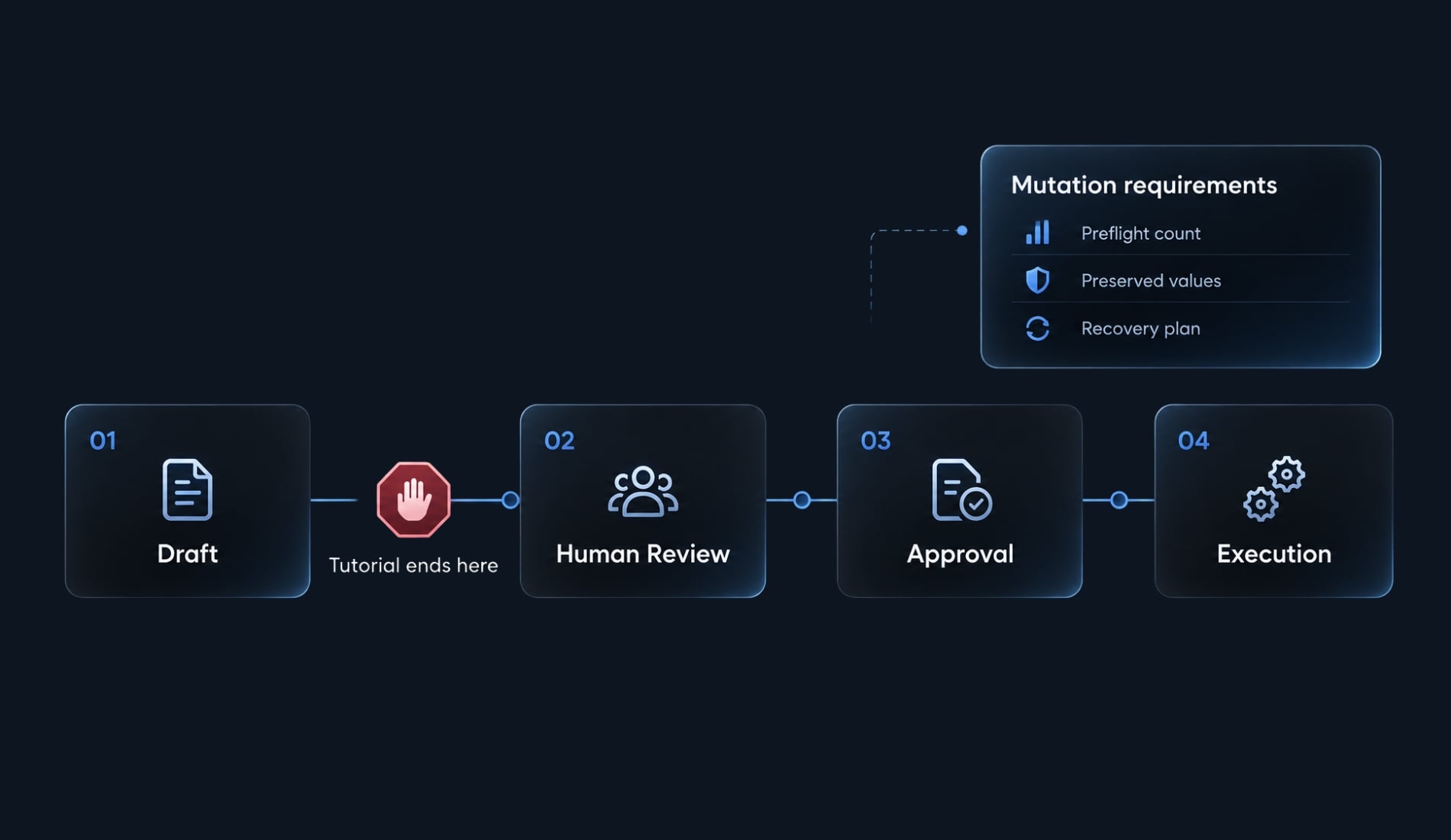
Recovery may require preserved prior values and coordination with concurrent writes. Rollback is not automatically trivial.
Security best practices and common setup errors
Minimum security controls
MongoDB MCP security requires controls across the database, server process, and client:
- Enforce least privilege and separate identities per environment.
- Protect secrets and rotate exposed credentials.
- Restrict network access.
- Minimize projected fields and document disclosure.
- Review query cost, not just result count.
- Require human approval for mutations.
- Enable appropriate audit logging where available.
Treat database text as untrusted content, never as instructions that can redirect the agent. Returned database output becomes part of an AI-assisted workflow and must meet organizational data-handling requirements.
Production safety boundaries
Production database safety: Avoid unrestricted administrative identities and autonomous destructive changes. Prefer synthetic development data. Explicitly scope production diagnostics, and require backups plus an appropriate recovery procedure before approved mutations. Read-only access still permits sensitive-data exposure and expensive queries.
Troubleshooting table
Use MCP troubleshooting to isolate the failing layer before changing permissions.
Symptom | Likely cause | Safe next check |
|---|---|---|
Server absent | Wrong scope or configuration | Check project directory, registration, and restart requirements |
Process exits | Runtime, package, arguments, or missing environment | Inspect startup errors and confirm inherited variables without printing values |
Authentication failure | Invalid credentials or authentication settings | Check URI encoding, authentication mechanism, and authSource independently |
Timeout | Network or DNS failure | Check reachability, firewall, VPN, and Atlas allowlisting |
Database unavailable | Wrong target or insufficient authorization | Confirm the database name and assigned roles |
Collections visible, reads fail | Custom role or collection restriction | Inspect the specific tool error and collection privileges |
Atlas tools absent | Unsupported capabilities or missing Atlas API authentication | Check server capabilities separately from database credentials |
Unsafe suggestion | Overbroad task or unreliable recommendation | Stop; narrow the operation and inspect permissions |
Incomplete results | Sampling limits or heterogeneous documents | Check projection, filters, limits, and observed field variation |
Authentication establishes identity; authorization determines permitted operations. Do not diagnose insufficient read privileges as an authentication failure.
When to Stop and Recheck the Setup
Stop if:
- Credentials are requested inside the conversation.
- The server package cannot be verified.
- Only administrative credentials are available.
- Validation unexpectedly attempts a mutation.
- An operation targets production or requests an unbounded read without review.
After testing, close the relevant processes and clear session variables:
unset MDB_MCP_CONNECTION_STRING MDB_MCP_READ_ONLY MCP_VERSION
Frequently asked questions
Can Claude Code connect directly to MongoDB?
Yes, Claude Code can connect to MongoDB using the Model Context Protocol (MCP). By installing the official MongoDB MCP server, you enable Claude Code to inspect permitted collections and read authorized documents. Available operations depend on the server version and the database identity's permissions — start read-only, and treat any mutation as a separately approved step.
How do I install the MongoDB MCP server for Claude Code?
Resolve and record a specific version of the mongodb-mcp-server package after checking its provenance against MongoDB's official documentation, export the connection string and read-only setting in your shell, then register it with claude mcp add --transport stdio --scope local. Launch Claude from that same shell.
Is it safe to use Claude Code with a production MongoDB database?
You should exercise caution by utilizing the principle of least privilege. It is recommended to use dedicated read-only identities, restrict network access, and require human approval before executing any mutations or index changes. Avoid connecting production administrative credentials directly to AI-assisted workflows.
What should I check if Claude Code cannot access my MongoDB database?
First, verify your network connectivity and confirm your database identity has the required permissions. Then, check that the MCP server is correctly registered and that your connection string is valid. You should also verify that the specific MCP server package is correctly installed and compatible with your current Claude Code version.
Can Claude Code automatically optimize my MongoDB queries?
It can compare a query shape with existing indexes and propose changes for review. Available tooling depends on your deployment and server capabilities. Treat suggestions as drafts — an index recommendation is not a measured performance improvement.
Read more:
- Connect Notion to Claude Code: Official Notion MCP setup guide
- How to Add Supabase MCP to Claude Code
- Claude Code Google Drive MCP: Ultimate setup & Auth guide
Conclusion
A reliable Claude Code MongoDB setup relies on disciplined execution across four key checkpoints: package verification, restricted database access, server registration, and authorized read validation. Remember to treat Skills as development guidance and MCP as tool access, as neither replaces strict permission enforcement or human oversight.
To ensure a repeatable workflow, document your environment details, log sanitized validation proofs, and evaluate query or index recommendations as proposals until tested against real workloads before scaling across your team.