Claude Code API security: Prevent API key leaks and secure code
Claude Code API security: How to prevent API key leaks and secure untrusted repositories
Claude Code API security depends on your software version, repository configuration, integrations, and active credentials. Inspect unfamiliar repositories before launching agent tools, as credential leaks can happen through mechanisms beyond just malicious code. For untrusted projects, prioritize pre-launch inspection, access restrictions, and isolation and if you suspect a leak, immediately contain the session and revoke your API keys.
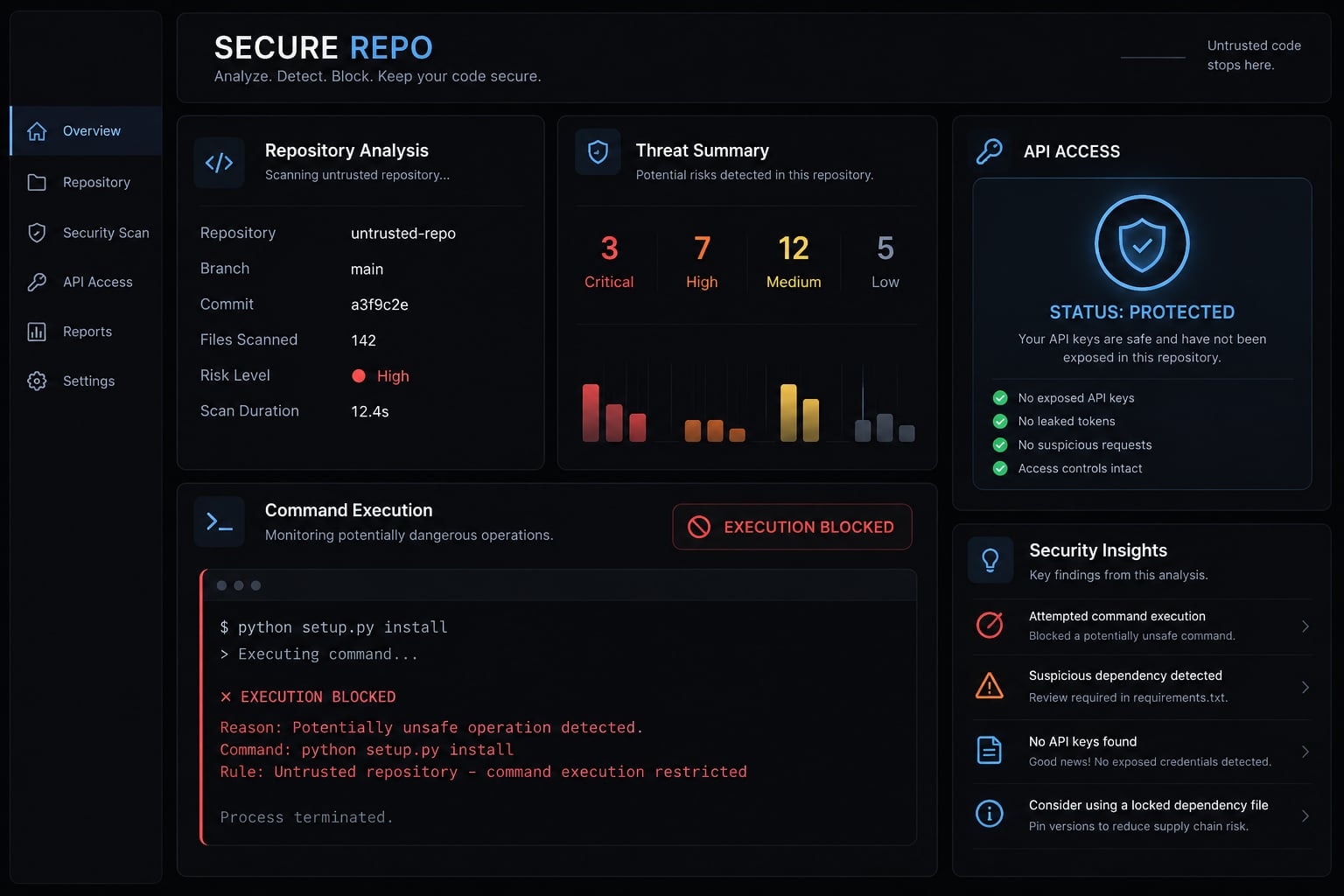
Can Claude Code leak an API key?
Yes, under specific conditions—not simply because a repository exists on your machine. Claude Code can read files, execute commands, and interact with services within its available permissions. It is an agentic development tool, not only a text interface.
A Claude Code API key leak requires a relevant exposure path. Examples include a process accessing an inherited secret or an authenticated request reaching an unintended destination. Prompt injection—untrusted content attempting to redirect the agent—is a possible contributing factor, not proof of credential theft.
What “Claude Code API security” includes
The term covers four related boundaries:
- Authentication: API keys, account-login credentials, cloud-provider authentication, and integration tokens are distinct.
- Destinations: Endpoint configuration determines where requests go; authentication behavior determines what accompanies them.
- Execution: Commands, hooks, and MCP (Model Context Protocol) integrations can extend what the agent does.
- Runtime access: Filesystem permissions, network access, and inherited environment variables determine what processes can reach.
Configuration-driven execution means settings can influence executable actions, rather than merely presentation. Anthropic’s Claude Code Security and Permission Management documentation are the primary references for product-specific boundaries.
Who faces the highest risk?
Higher-risk situations include:
- Engineers inspecting customer or external code.
- Founders combining development and production administration on one workstation.
- Teams retaining broad credentials in persistent shell environments.
- Users granting extensive standing permissions.
Hypothetical example: A SaaS engineer reviews a customer repository from a shell containing deployment credentials. If project-controlled tooling can access that environment, those credentials may become exposed independently of the model-provider key.
Conditional exposure path: Repository content/configuration → permitted execution or request path → accessible credentials → possible disclosure.
Each arrow depends on configuration, permissions, and runtime behavior.
How to configure Claude Code securely
Map each safeguard to an exposure path. Secure Claude Code configuration combines permissions, credential limits, isolation, and network controls rather than relying on one switch.
Risk | Practical control |
|---|---|
Project configuration | Inspect before trusting; review changes |
Hooks | Review triggers, actions, and execution context |
MCP integrations | Approve identity, capabilities, and access |
Endpoint overrides | Validate destination and authentication expectations |
Broad permissions | Narrow standing approvals; review exceptions |
Outbound network access | Restrict at the applicable sandbox, host, or network layer |
Persistent credentials | Minimize runtime availability; revoke when indicated |
Use approval-required permissions and least privilege
Least privilege means granting only the access needed for the task. Prefer scoped approvals over broad standing permission to execute arbitrary commands.
Review stored Claude Code permissions periodically and after configuration changes. Avoid permission-bypass operation when handling sensitive data or unfamiliar projects.
Reduce approval fatigue through reviewed, narrowly scoped defaults—not blanket approval. Permission rules influence product behavior; they are not equivalent to operating-system isolation. Consult Anthropic’s Permission Management documentation for supported controls in your installed release.
Sandbox commands and restrict network access
Filesystem restrictions limit what a process can read or modify. Network restrictions limit where it can communicate. Both matter: blocking a secret file does not address credentials already inherited through the environment.
Consult Anthropic’s Sandboxing documentation for platform support and covered operations. Do not assume the Claude Code sandbox covers every hook, integration, subprocess, or request.
For unfamiliar repositories, consider an externally constrained container or disposable virtual machine. Avoid unnecessary home-directory mounts, forwarded credentials, and privileged containers.
Outbound controls must cover the relevant execution layer. Not every outbound request necessarily produces a Claude Code approval prompt.
Review hooks before enabling them
- Locate applicable hook definitions.
- Identify triggering events and invoked actions.
- Review sensitive access, downloads, and unexpected remote execution.
- Require review when definitions change.
Include scripts called indirectly by hooks. A short configuration entry may delegate substantial behavior elsewhere. Do not depend on ordinary command prompts to review every hook action.
Approve only trusted MCP servers
For MCP security, evaluate:
- Publisher and source provenance.
- Package/version or remote-service identity.
- Expected capabilities.
- Credential, filesystem, and network access.
- Named owner, maintenance, and removal process.
An approved inventory is a starting point, not permanent assurance. Reassess material updates and capability changes. Use the Model Context Protocol project’s Security Best Practices alongside Claude Code’s MCP documentation.
Protect API keys and other secrets
Never place secrets in tracked configuration. Use approved storage and inject only necessary credentials into the intended runtime.
Separate development and production credentials. Apply scope, lifetime, and spending restrictions where the provider supports them. Combine organizational rotation policy with immediate, event-driven revocation.
Secret storage and runtime access are different controls. A secret manager cannot prevent disclosure after a compromised process receives a secret.
Similarly, .gitignore does not prevent runtime reads or erase committed history. Claude Code API key protection requires controlling both where secrets persist and which processes receive them.
Safe workflow for opening an untrusted repository
Inspect before launching Claude Code inside an unfamiliar repository. Treat agent configuration as execution-relevant supply-chain material, not harmless project metadata.
For suspicious repositories, choose isolation before obtaining or inspecting the files. Popularity, a familiar organization name, or a clean-looking README does not establish safety.
Before launching Claude Code
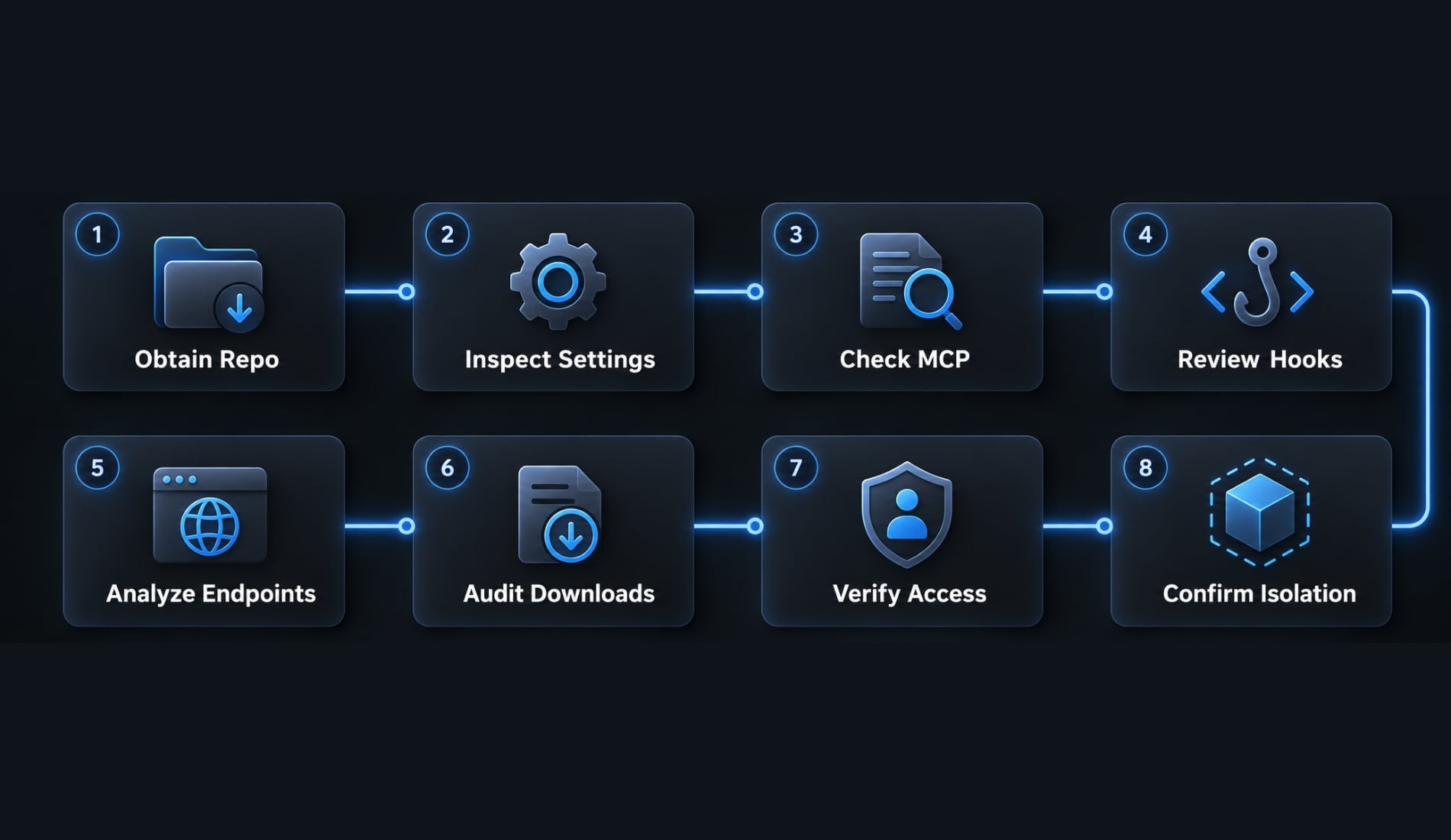
Use this repository preflight checklist:
- Obtain the repository with an updated client in the chosen review environment.
- Inspect project settings without enabling project tooling.
- Inspect MCP definitions and referenced components.
- Identify hooks and startup automation.
- Review endpoint and environment references.
- Identify remote downloads and execution behavior.
- Check access to sensitive paths and credentials.
- Confirm isolation before enabling tooling.
Cloning a repository only downloads code—it doesn't execute installers, lifecycle scripts, or project tools.However, obtaining and viewing unfamiliar content should not be described as universally risk-free.
Configuration files to review
.claude/settings.json: Review project-level settings and execution-relevant entries..mcp.json: Review project MCP definitions and referenced commands or services.- Other configuration scopes: Account for user, local, and managed settings; confirm precedence in Anthropic’s Settings documentation.
- Environment files and templates: Identify secret references and endpoint assumptions.
- Shell and package scripts: Check startup, installation, and lifecycle behavior.
- Container definitions: Inspect mounts, privileges, networking, and credential forwarding.
- Build tasks and CI/CD workflows: Review commands and secret use in continuous integration and deployment automation.
Treat CLAUDE.md and similar repository instructions as untrusted contextual input. They are not executable configuration by themselves, but may influence requested actions.
During the first session
Human decision aid—not official product UI
- Allow: Expected, scoped behavior necessary for the task.
- Review: New integrations, destinations, automation, or sensitive-path access.
- Stop: Unexplained credential collection, uploads, persistence changes, or task-inconsistent behavior.
Repository risk levels
Repository | Suggested environment |
|---|---|
Maintained internal | Reviewed workstation or standard team environment |
Known public | Restricted development environment; inspect dependencies |
Customer or partner | Dedicated review environment without unrelated credentials |
Unknown or suspicious | Disposable, isolated environment with tightly limited connectivity |
These are risk-based recommendations, not certifications. A trusted organization can distribute compromised dependencies or unsafe configuration.
Preflight inspection reduces risk; it is not a complete audit. Keep production credentials outside unfamiliar sessions.
What to do if an API key may have been exposed
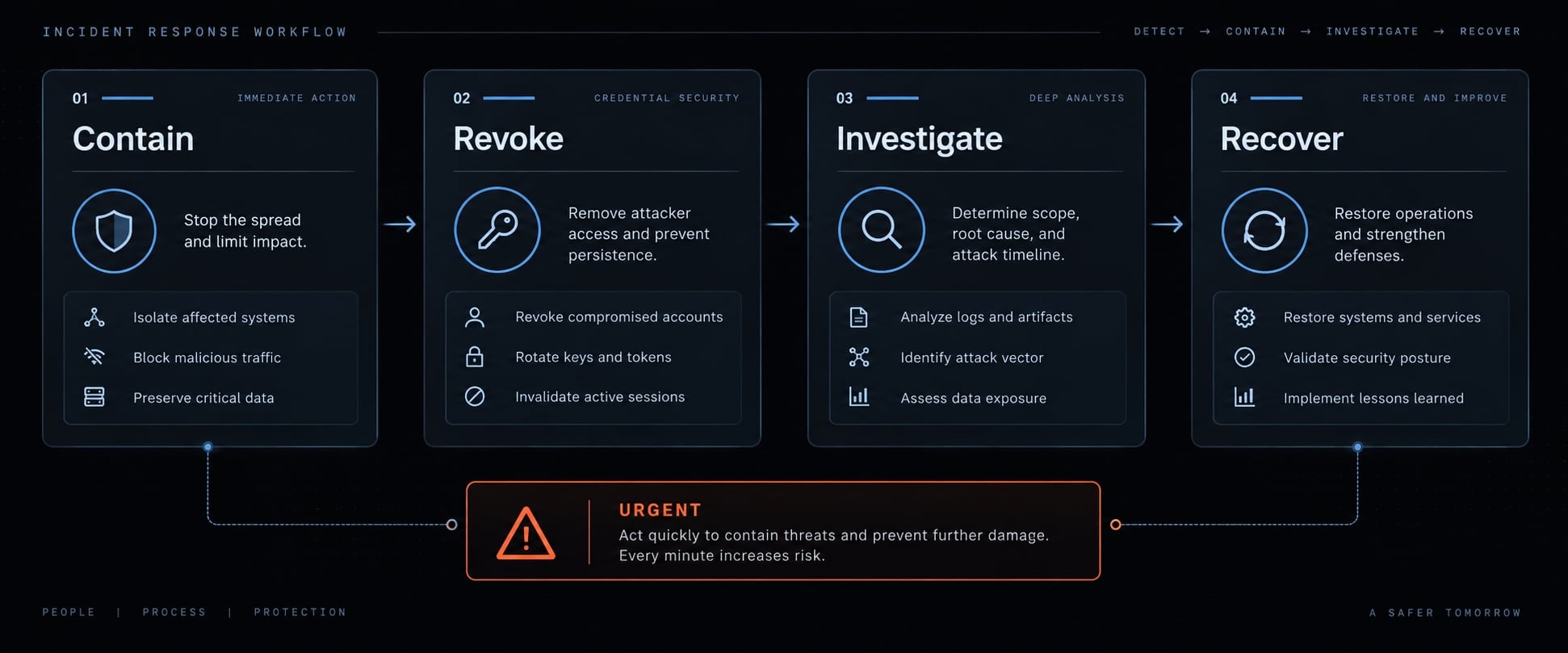
Contain the session and invalidate suspected credentials promptly. Credential incident response should not wait for proof of unauthorized spending.
Incident sequence: Contain → Revoke → Investigate → Recover.
Administer credentials from a separate, trusted environment.
Contain the session
Stop affected agent and project-defined processes. Isolate the environment if active disclosure is suspected.
Preserve relevant configuration, timestamps, and records when feasible, without delaying containment. Do not copy suspected secrets into ordinary tickets or chat messages.
Revoke and rotate credentials
- Revoke or invalidate the suspected credential.
- Assess other credentials accessible to the affected processes.
- Create appropriately limited replacements from a trusted environment.
- Update legitimate consumers only after their environments are trusted.
- Confirm invalidation through supported administrative records or safe validation.
For an exposed Anthropic API key, use the provider’s supported key-management controls. Apply the corresponding provider procedures to other secrets.
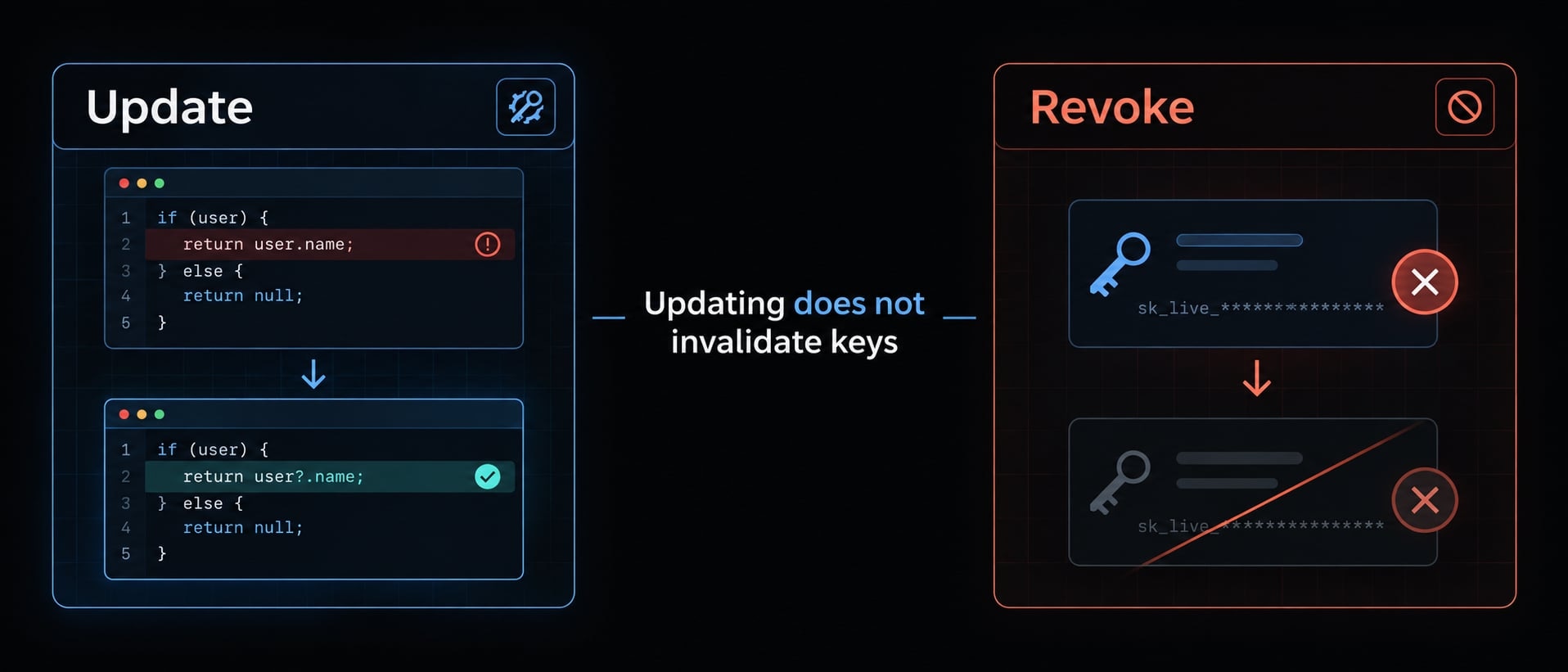
API key rotation is not merely creating another active key. Leaving the suspected credential usable preserves the exposure.
Investigate scope and impact
Evidence category | Review |
|---|---|
Provider usage and billing | Unexpected requests, consumption, and spending |
Connected systems | Source-control, cloud, database, and deployment activity |
Local environment | Configuration changes, persistence, process and network evidence |
Availability depends on provider, account type, deployment, and retention settings. Normal billing or incomplete logs cannot establish that no disclosure occurred.
Logs may not reconstruct every accessed file or request. Investigate other credential exposure based on actual accessibility, not assumption.
Recover safely
Patch affected software and restore trusted configuration. Rebuild the environment when system integrity is uncertain.
Record the likely exposure window, affected credentials, legitimate consumers, and remediation. Escalate customer-data or regulated-data concerns through organizational procedures. Never introduce replacement secrets into a still-untrusted session.
Team and organization-level Claude Code security controls
Establish a minimum baseline with named ownership, then increase controls with sensitivity. AI agent governance should clarify who approves access, maintains configuration, and handles incidents.
Security requirements are organizational decisions. Their implementation may require product settings, operating-system controls, provider policies, and network infrastructure.
Minimum baseline for individuals and solo founders
Maintain verified updates, reviewed permissions, and a small inventory of trusted MCP integrations. Separate development credentials from production administration. Use isolation for unfamiliar repositories and enable available usage monitoring. Record how to revoke critical credentials before an incident occurs.
Team baseline
Assign owners for shared settings, MCP governance, secret-management rules, patch review, and incident procedures. Review configuration changes through the same accountable process used for other sensitive code changes.
Where supported, use managed settings for centrally enforced controls. Confirm supported keys, precedence, and deployment behavior in official documentation before rollout. Ordinary repository configuration is not automatically an enforceable organizational policy. Test whether users or project settings can override the intended restriction.
High-sensitivity environment baseline
The following is a recommended organizational baseline, not an Anthropic mandate or compliance determination.
Control | Individual | Team | High sensitivity |
|---|---|---|---|
Versions | Verify updates | Owned patch review | Controlled rollout and verification |
Permissions | Narrow approvals | Reviewed shared rules | Enforced restrictions |
MCP approval | Review each server | Owned inventory | Restricted capabilities and destinations |
Credentials | Development-only | Separate project access | Short-lived access where supported |
Isolation | Unfamiliar repositories | Standard review environment | Dedicated disposable environments |
Network | Review destinations | Defined outbound policy | Enforced outbound restrictions |
Evidence | Available usage records | Defined retention | Central collection where available |
Logging and billing alerts vary by account and provider. Verify coverage rather than assuming enterprise-wide visibility.
Recommended policy statement
Before launching agent tooling in an unfamiliar repository, inspect execution-relevant configuration. Review hooks and MCP integrations before enabling them. Provide least-privilege credentials and keep production access separate. Suspected exposure requires prompt escalation, containment, and credential revocation. Engineering owns configuration; security or the designated technical lead approves, documents, and periodically reviews exceptions.
Frequently asked questions
What are the primary security issues identified in Claude Code?
Reported issue classes include credential disclosure, command execution, and consent bypass — each with different prerequisites and impact. This guide does not map specific CVE identifiers to impacts or fixed releases.
Check Anthropic's security advisories, the applicable CVE record, and the release notes for your installed version, and compare against the advisory's stated affected range rather than a circulating version number.
How can I configure Claude Code securely?
Secure your setup by enabling managed settings to restrict arbitrary command execution, prefer scoped, approval-required permissions over broad standing approvals, and run unfamiliar repositories in an externally constrained container or disposable virtual machine.
What should I do before opening an untrusted repository?
Before launching Claude Code, inspect the repository in a secure environment by reviewing .claude/settings.json, .mcp.json, and any build or lifecycle scripts. Disable all untrusted hooks, automation, and MCP integrations, and ensure the tooling runs within an isolated sandbox or containerized environment.
What steps are required if I suspect my API key was exposed?
Immediately contain the session by terminating all agent processes and isolating the affected environment. Revoke the potentially exposed credential via your provider's dashboard, rotate it to a new secure key in a separate trusted environment, and investigate other credentials that may have been accessible during the exposure.
How do I enforce team-level security for Claude Code?
Where supported, managed settings can enforce controls centrally. Confirm supported keys, precedence, and deployment behavior for your release, then test whether user or project settings can override the intended restriction
Read more:
- Claude Code API key: How to get, configure and secure access
- Claude Code plugin security audit: Installation and patch guide
- Claude Code authentication security: A practical enterprise guide
Conclusion
Claude Code API security is an ongoing operational discipline, not just a single permission setting. Exposure depends on software versions, repository content, executable configuration, integration behavior, available credentials, and isolation boundaries. A patched tool can still run with excessive access. A trusted integration can still receive unnecessary secrets. Effective protection limits what each component can read, execute, and transmit.
Use Update → Inspect → Restrict → Isolate → Monitor → Rotate as a prevention mnemonic. It helps organize routine maintenance and repository review, but it is not the incident-response order. Suspected exposure still requires immediate containment and revocation from a trusted environment.