Claude Code authentication security: A practical enterprise guide
Claude Code authentication security: A practical enterprise guide
Because coding agents can interact directly with files, system commands, and repositories, securing Claude Code goes beyond mere login protection. It demands distinct controls across credentials, execution permissions, and MCP connections. This guide provides engineering leaders and developers with a practical, low-overhead framework to secure Claude Code usage across different enterprise deployments.
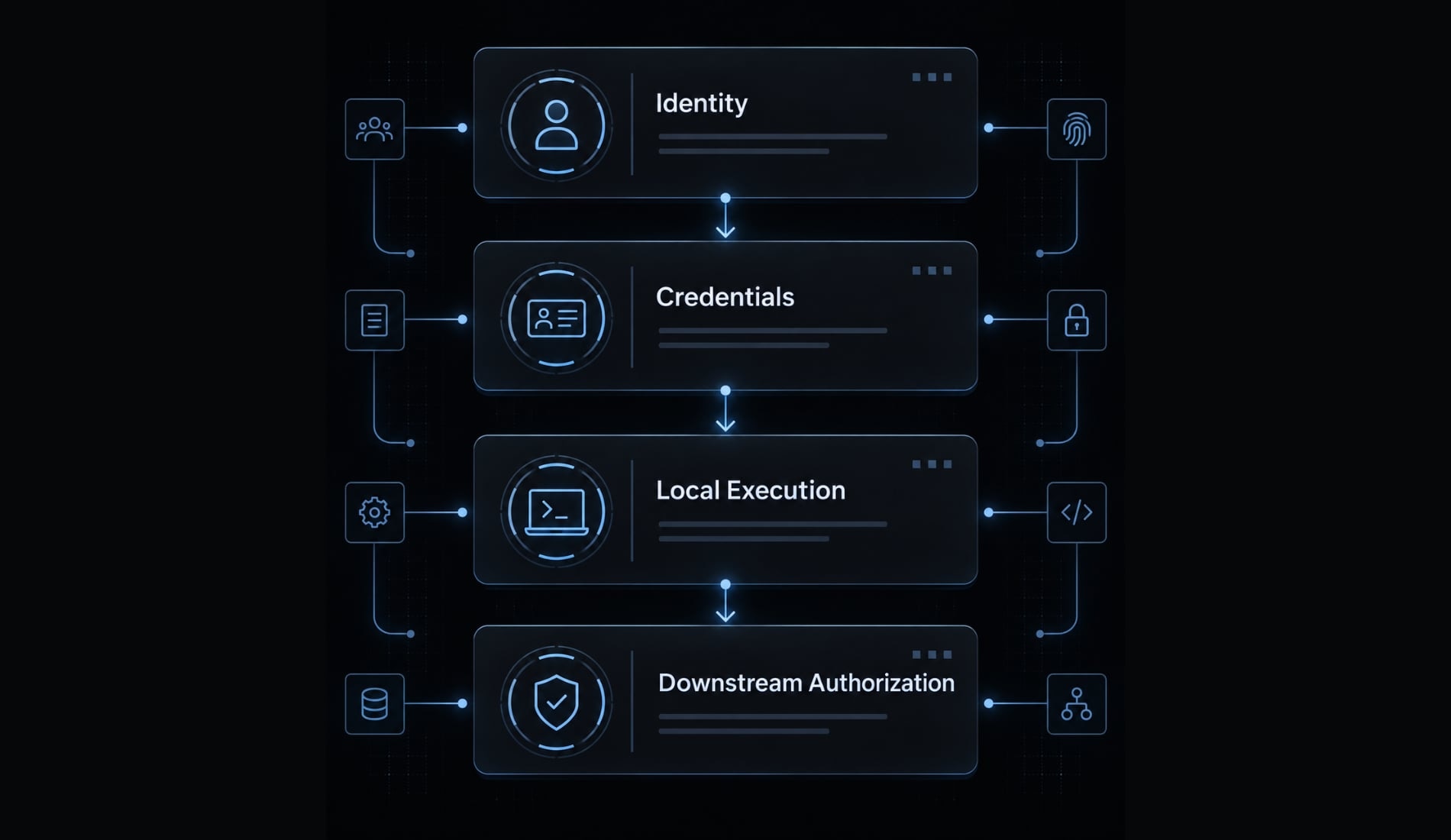
Start with four layers:
- Identity and approved access routes.
- Credentials and sessions.
- Local execution permissions.
- MCP connections and downstream authorization.
What Claude Code authentication security actually covers
Claude Code authentication security serves as this guide’s operational framework for verifying identity, protecting credentials and sessions, restricting local execution, and governing downstream access. Authentication itself establishes identity; authorization determines permitted actions. These related controls must work together, but they are not interchangeable or necessarily supplied by the same product.
The four-layer Claude Code security model
This is an editorial control model, not an official Anthropic architecture.
Security layer | Question answered | Typical controls | Primary organizational owner |
|---|---|---|---|
Identity | Who or what is accessing the service? | Named accounts; deployment-dependent SSO and MFA | Identity team |
Credentials | How is access established and maintained? | Appropriate credential stores, ownership, revocation | Security and platform teams |
Local execution | What can run or access local resources? | Permission rules; separate OS, sandbox, and network restrictions | Platform and endpoint teams |
Downstream authorization | What can connected systems access? | Scoped identities, resource restrictions, integration review | Target-system owners |
SSO (single sign-on) centralizes an applicable login path. MFA (multifactor authentication) requires additional identity verification. Neither automatically governs every integration credential.
A human identity represents a person; a workload identity represents software or automation. A credential may identify an application or project rather than an individual.
Shared-responsibility boundaries
- Anthropic: Documented service protections and native product controls.
- Organization/system owners: Identity policy, endpoints, secret handling, integration approval, authorization, and monitoring.
- Developers: Sensitive approvals, configuration review, and safe secret handling.
Illustrative scenario: A SaaS team secures account login but gives its database integration unrestricted access. Strong authentication does not correct excessive database permissions.
Use the official Claude Code documentation, “Security,” to understand native safeguards. Treat organizational controls as additional responsibilities, not capabilities implied by installing the tool.
Choose the right authentication model for your deployment
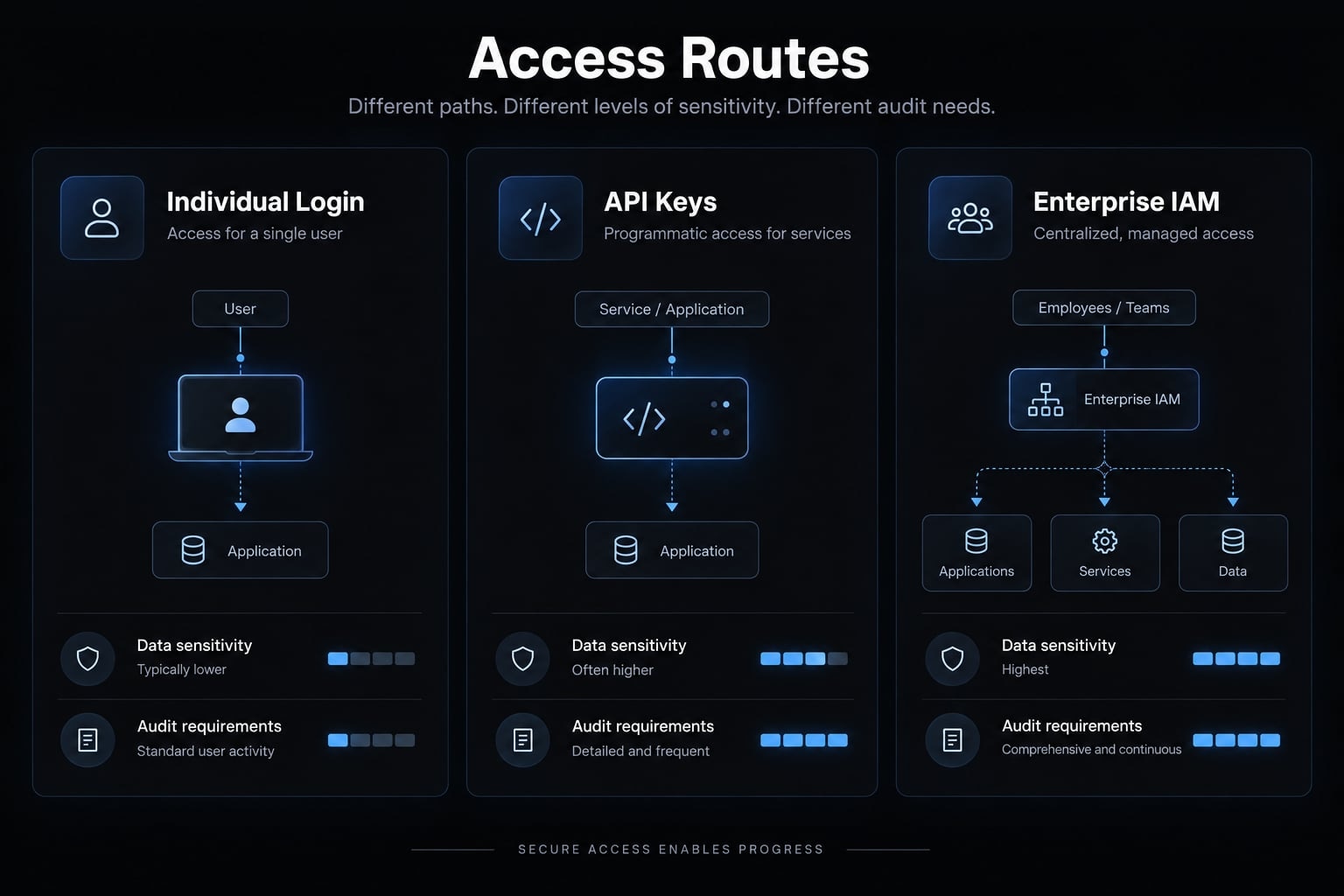
Choose an approved access route based on identity ownership, data sensitivity, and revocation requirements—not team size alone. Separate interactive developer access from unattended automation.
Individual account login
Named-user login supports accountability when the subscription and organizational arrangement permit the intended use. Enforce MFA at the applicable account or identity-provider layer.
Document what administrators can disable and which sessions require separate termination. Account logout is not universal revocation for API credentials or connected systems.
Individual API credentials
For API (application programming interface) access, use this ownership checklist:
- Assign a named owner or defined service identity.
- Avoid shared human-use keys.
- Separate environments and purposes.
- Apply available restrictions and monitor consumption.
- Keep credentials out of project files and copied output.
Where keys are not genuinely user-bound, describe them as dedicated, owner-tracked credentials. An ownership spreadsheet does not create cryptographic user attribution.
Budget limits control expenditure; they do not replace authorization.
Enterprise identity and centralized access
IAM (identity and access management) governs identity lifecycles and access policy. Enterprise SSO, provisioning, and revocation capabilities must be checked for the selected plan and route.
Claude Code documentation describes Anthropic authentication and cloud-provider integrations, including Amazon Bedrock and Google Vertex AI. Provider-based deployments introduce their own IAM, billing, and credential requirements; confirm current support before selection.
- Native controls may suffice: Limited integrations, managed endpoints, documented revocation, and modest audit requirements.
- Centralized infrastructure adds value: Enforceable identity policy, cross-team attribution, routing requirements, or consolidated monitoring.
A gateway is optional infrastructure, not a prerequisite or automatic source of complete audit evidence.
Deployment-level decision matrix
This is a recommended control baseline, not a product-feature availability table. Verify automated offboarding and logging coverage before relying on them.
Control | Individual developer | Small team | Sensitive enterprise deployment |
|---|---|---|---|
Identity | Named account | Approved named users | Enforced identity policy |
MFA | Applicable identity layer | Required by policy | Central enforcement |
Credential ownership | Recorded owner | Shared inventory | Human/workload separation |
Storage | Supported secure storage | Approved storage standard | Managed secret lifecycle |
Offboarding | Revocation procedure | Tested checklist | Automation plus integration checks |
Execution | Restrictive baseline | Reviewed common settings | Managed baseline and isolation |
Records | Available activity evidence | Sampled attribution | Correlated user-level records |
Illustrative comparison: A small SaaS team without production access may need fewer controls than a similarly sized team handling regulated customer data.
Protect API keys, OAuth tokens and local sessions
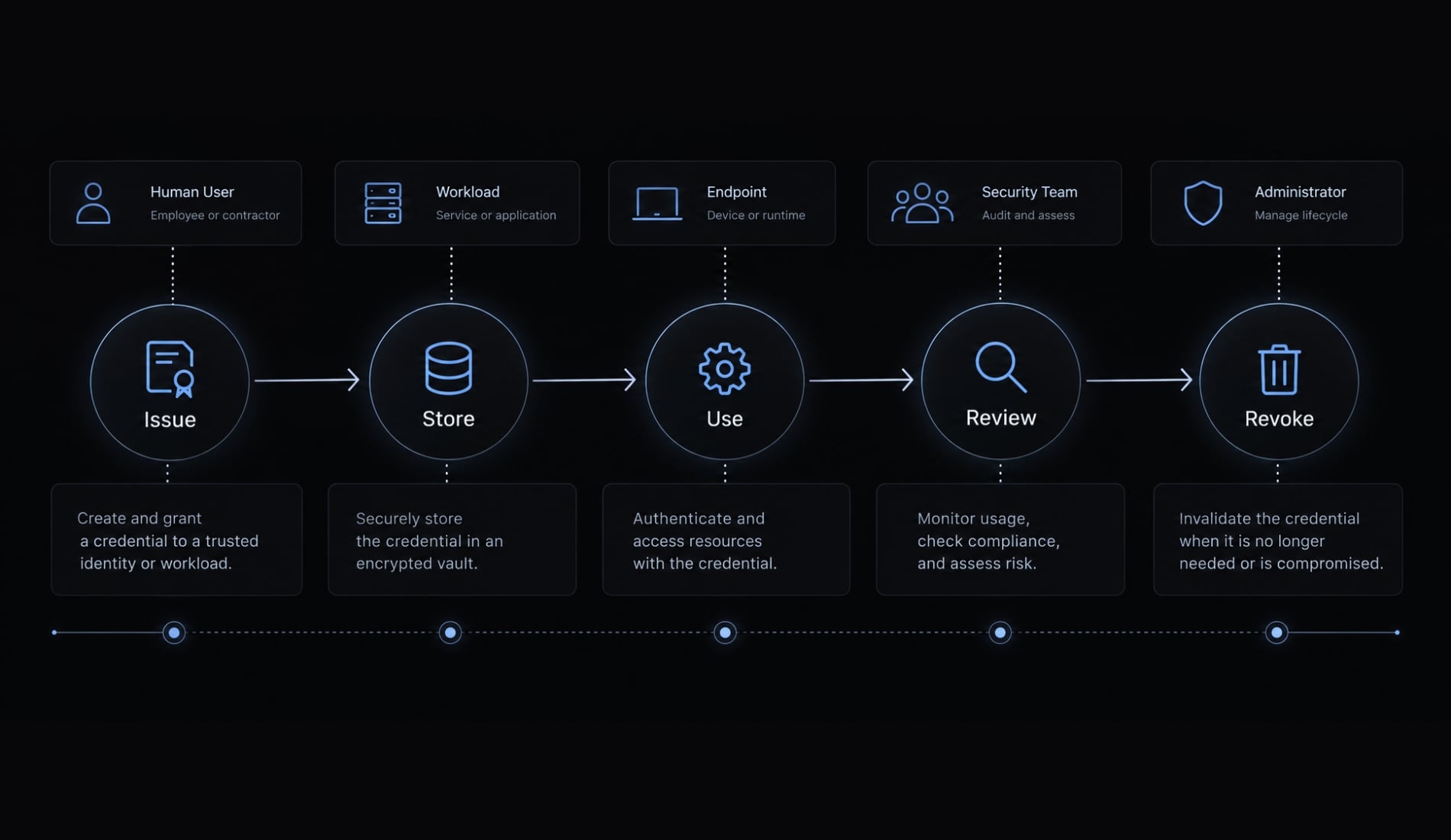
Protect credentials throughout issuance, storage, use, and revocation. OAuth (an authorization framework) tokens and API keys have different lifecycles; protecting either also requires a trustworthy endpoint.
Issue credentials to individuals, not teams
For human use, assign accountable ownership rather than informally sharing keys. Automation should use an approved workload credential.
- Identify the human owner or workload.
- Record purpose, environment, and revocation path.
- Separate production from local development.
- Apply available scopes, roles, and usage restrictions.
Store credentials outside repositories and prompts
Native storage varies by operating system and configuration. Follow supported instructions; do not manually relocate session credentials based on assumptions.
Do | Don’t |
|---|---|
Use supported credential storage | Assume identical protection across operating systems |
Use workflow-compatible secrets management | Hardcode credentials in repository configuration |
Inject secrets only where needed | Treat environment variables as protected storage |
Redact diagnostics and scan commits | Paste tokens into prompts or support tickets |
Revoke committed secrets | Assume .gitignore removes Git history |
Environment variables can leak through child processes, diagnostics, logs, or scripts. Secret scanners reduce exposure but cannot detect every secret.
Secret-free configuration may legitimately belong in version control. Review its behavior and references rather than banning all configuration files.
Understand credential precedence
Multiple configured sources can select an unintended identity or billing context. Do not assume a universal precedence order.
- Identify configured authentication sources.
- Inspect relevant variable names without displaying values.
- Remove stale or unintended overrides.
- Confirm the effective account, organization, provider, and billing context using documented status methods.
Illustrative scenario: A SaaS developer retains an environment credential from earlier testing. The resulting session uses an unintended credential source despite a recent account login.
Rotate and revoke credentials
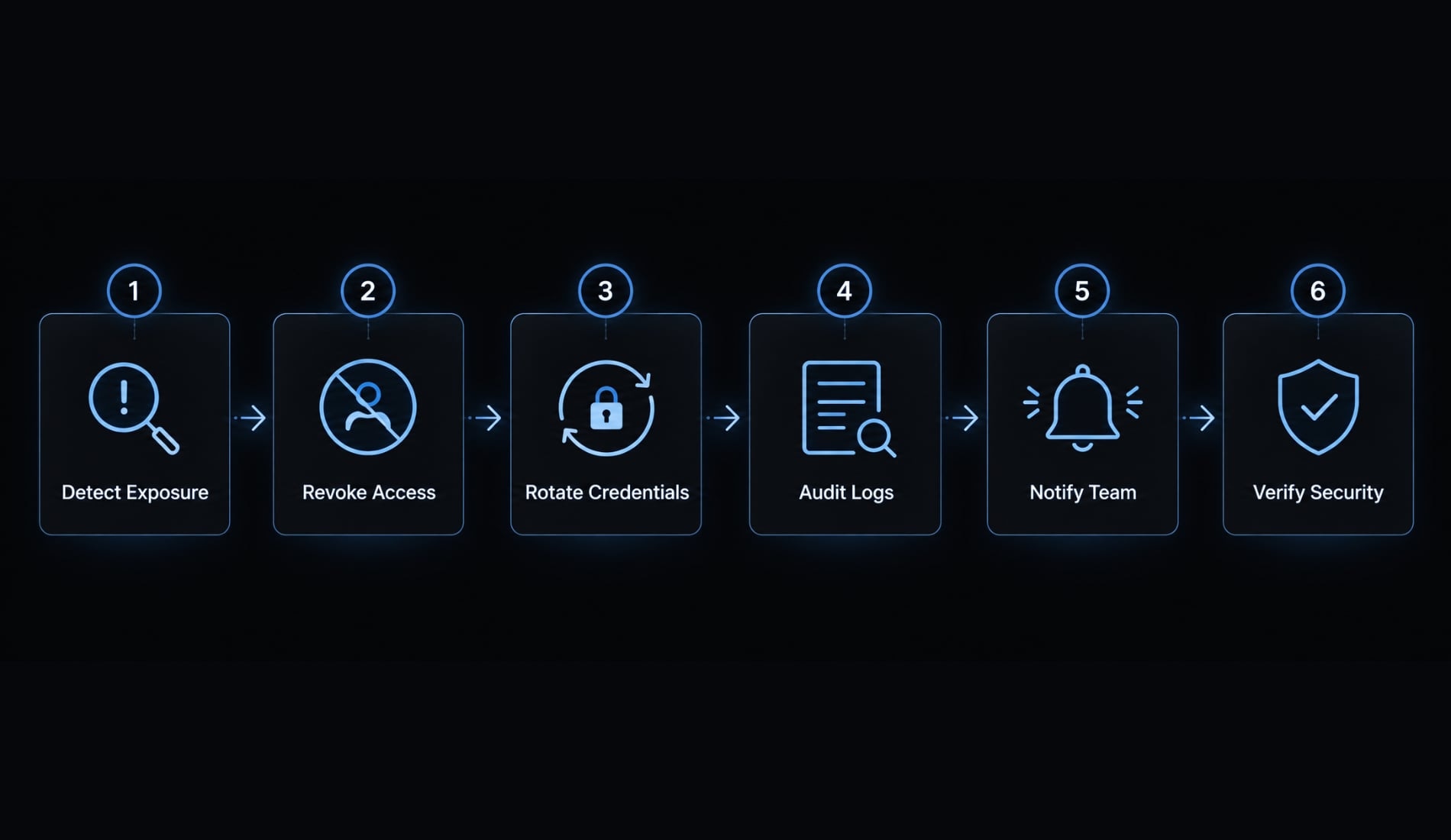
For suspected exposure:
- Revoke the affected credential.
- Terminate associated sessions where supported.
- Issue a replacement into a trusted environment.
- Search repositories, logs, artifacts, and tickets for secondary exposure.
- Review available activity for misuse.
- Correct the root cause.
Preserve evidence without delaying containment. Do not install replacements on a potentially compromised endpoint. API-key replacement differs from provider-managed OAuth token refresh. Routine refresh does not establish that compromised sessions or grants were revoked.
Illustrative scenario: A contractor loses account access but retains a separate integration token. Offboarding must reach that integration’s credential owner.
Credential risk-control matrix
Risk | Primary control |
|---|---|
Shared key | Dedicated ownership |
Committed secret | Revocation and exposure investigation |
Stolen token | Session containment and endpoint review |
Stale access | Recurring ownership review |
Excessive scope | Target-system restrictions |
Exposed output | Redaction and restricted logging |
Configure Claude Code permissions as a second security boundary
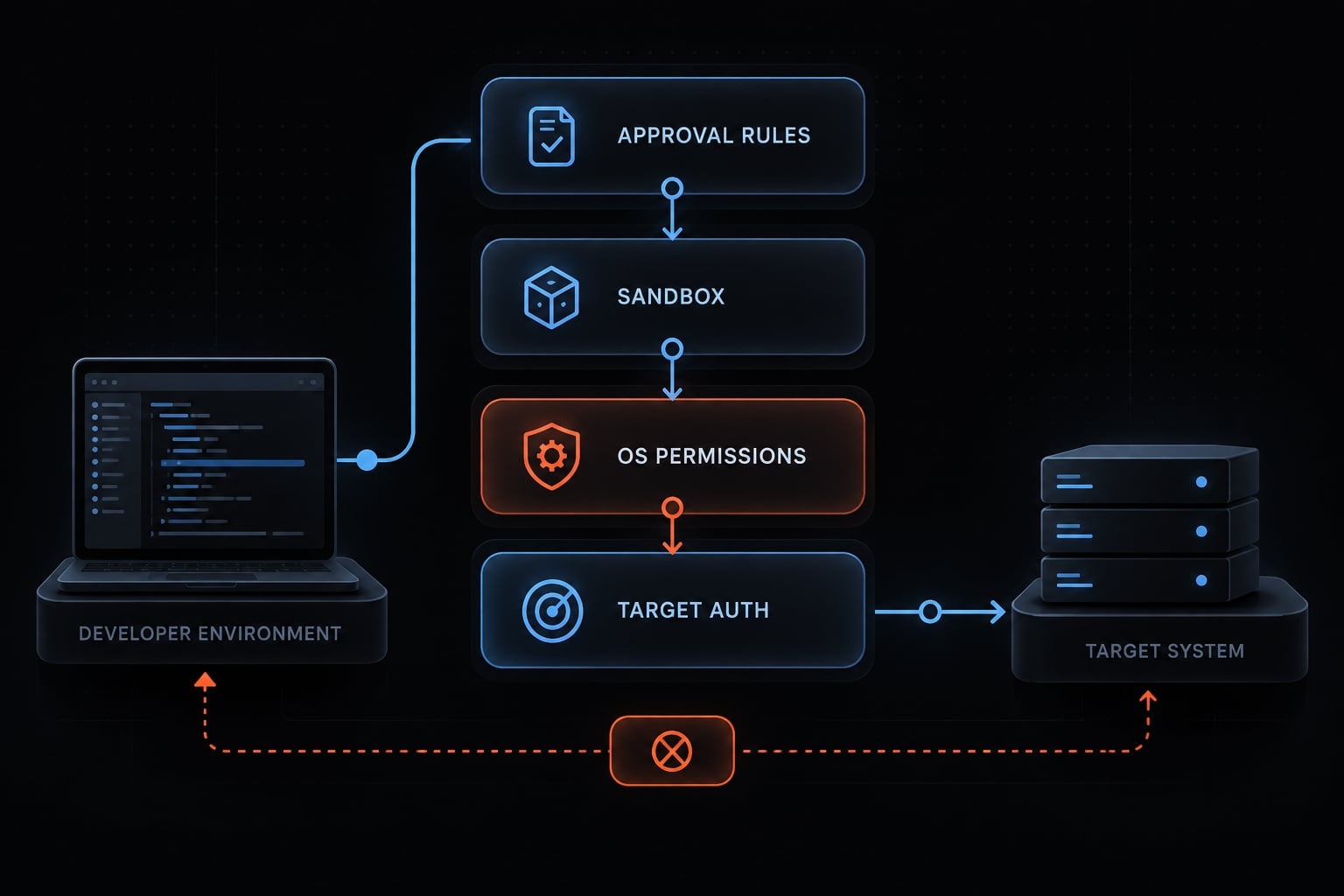
Authentication verifies an identity; execution controls govern what an authenticated session can do. Claude Code permissions provide another control layer, but approval prompts are not a complete containment boundary. Effective restrictions also depend on sandbox configuration, operating-system access, endpoint protection, network policy, and downstream authorization.
Establish a minimum permission baseline
- Start restrictively: Validate supported settings against the deployed version.
- Approve narrow operations: Review repeatable, low-risk actions before reducing prompts.
- Protect sensitive resources: Enforce file, destructive-action, and production restrictions at the appropriate layer.
- Apply managed settings where supported: Verify precedence and users’ ability to override them.
- Review exceptions: Reassess after repository, integration, or workflow changes.
A permission deny rule does not necessarily constrain every filesystem operation, subprocess, credential source, or outbound connection.
“Allow tests” is not inherently safe: Repository-defined test scripts can execute arbitrary code. Review what an approved command actually invokes.
Use sandboxing for untrusted or high-risk work
Select isolation according to the resources that must remain inaccessible:
- Inspect unfamiliar repositories away from sensitive host resources.
- Treat dependency installers and scripts as executable code.
- Restrict unnecessary outbound connections.
- Mount only required directories.
- Exclude unnecessary production credentials.
- Use disposable, limited-scope access.
Containers, virtual machines, and native sandboxes have different boundaries. Bash sandboxing is configuration- and environment-dependent, not a guarantee that every tool operation is isolated.
Illustrative scenario: A B2B team reviews an external repository in an isolated environment without mounted cloud credentials or production connectivity.
Reduce prompt injection and command injection risk
Prompt injection places malicious instructions in content the agent reads. Command injection turns untrusted input into executable commands. Warning signs include:
- Credential or hidden-directory access.
- Unexpected external endpoints.
- Shell startup-file changes.
- Encoded or difficult-to-review commands.
- Requests to bypass restrictions.
Illustrative scenario: Frequent approval prompts encourage a developer to accept commands without inspection. Reduce this fatigue through narrow, reviewed rules—not blanket bypass modes.
No security control completely eliminates prompt or command injection risks. Keep sensitive actions out of auto-approval workflows and thoroughly validate any exceptions.
Secure MCP authentication and downstream authorization
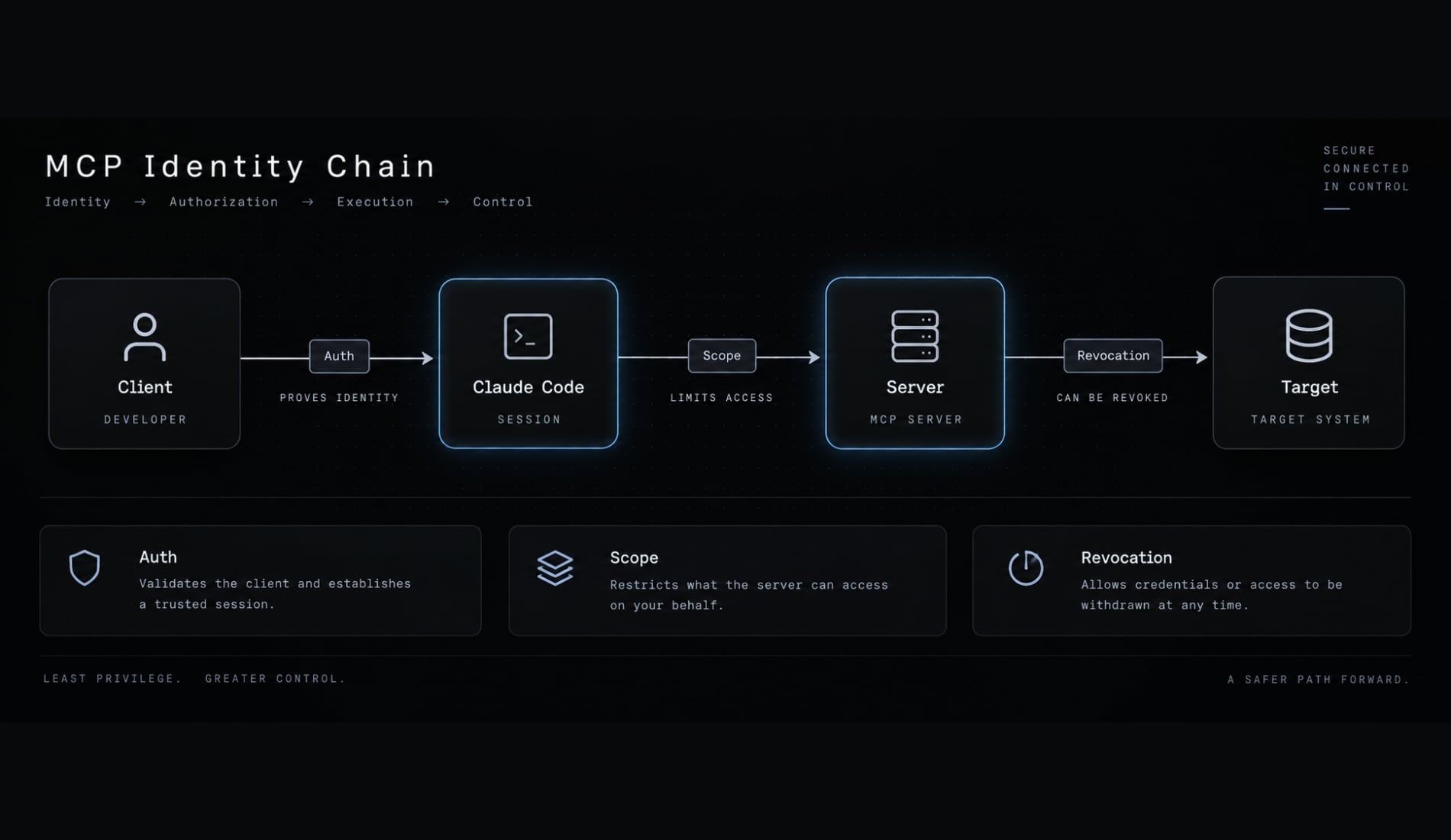
MCP (Model Context Protocol) authentication establishes identity for applicable connections between clients and tool servers. Mechanisms vary by transport and implementation: a local process does not necessarily use remote OAuth login. Authentication to Claude Code does not automatically authenticate an MCP connection or authorize access to its target systems.
Map the MCP identity chain
Use this conceptual flow: Developer → Claude Code session → MCP server → downstream identity → target system
For each connection, record:
- Client-to-server authentication, where applicable.
- Server-to-target authorization.
- Credential storage location.
- Components able to access credentials.
- Owner responsible for revocation.
The downstream identity is an access annotation, not necessarily another network hop. This flow does not imply automatic credential forwarding.
For local servers, inspect process execution, inherited environment variables, and endpoint permissions. Remote servers require separate hosting, transport, and identity review.
Approve MCP servers before use
Require a compact approval record:
- Named owner.
- Verified source and publisher.
- Hosting and transport.
- Maintenance and update process.
- Requested access.
- Credential handling.
- Reassessment trigger.
Repository inclusion is not evidence of trust.
Illustrative scenario: An unfamiliar repository adds an MCP configuration requesting broad database access. Review it before execution or credential assignment.
Approval is a point-in-time decision, not a guarantee of future safety.
Apply least-privilege downstream access
Choose identities deliberately:
- Delegated user identity: May preserve user-specific access where supported.
- Service identity: Needs purpose-specific scope and correlation to the initiating actor.
- Broad shared credentials: Expand exposure and weaken accountability.
Prefer read-only access, environment separation, resource restrictions, and time-bounded elevation where supported. RBAC (role-based access control) assigns permissions through roles, but not every target supports it or fine-grained scopes.
Illustrative scenario: An approved server connects to an issue tracker through delegated user access and a staging database through a restricted service identity. Neither connection should inherit production access.
Log MCP and downstream actions
Audit field | Purpose |
|---|---|
Timestamp | Establish sequence |
Initiating actor | Identify accountable user or workload |
Session/request correlation | Connect events across systems |
Server and tool | Identify execution path |
Target resource | Identify affected system or object |
Effective downstream identity | Explain authorization used |
Action and outcome | Record operation and result |
These fields may require Claude Code, MCP server, identity-system, gateway, and target-application records. Use trusted actor correlation, restricted log access, and defined retention. Exclude raw tokens and unnecessary sensitive payloads. Usage telemetry alone is not security audit evidence.
Alert on new servers, repeated failures, unusual privilege use, and unexpected production access.
Enterprise rollout framework and security checklist
Begin with visibility and approved defaults. Assign owners, collect evidence, and pilot before expansion. Small teams can combine responsibilities without removing accountability.
Step 1: Inventory Claude Code usage
Organizational process: Platform owners inventory users, devices, authentication routes, repositories, MCP servers, and sensitive systems. Keep an owner-maintained usage register.
Step 2: Define approved identity methods
Enterprise IAM control: IAM owners document approved human and workload access routes, MFA requirements, and credential ownership. Evidence is an approved identity policy.
Step 3: Set the credential lifecycle policy
Organizational process; Enterprise IAM control: Security owners define issuance, storage, review, and revocation responsibilities. Retain a controlled revocation-test record.
Step 4: Enforce a permission baseline
Native Claude Code control; Organizational process: Platform and application-security owners validate settings and exceptions. Record endpoint and infrastructure isolation separately; it is not inherently native.
Step 5: Govern MCP connections
Organizational process: Integration owners maintain a server catalog with trust review, scope, credential handling, and revocation procedures. Evidence is a completed approval record.
Step 6: Pilot and monitor
Organizational process; Optional third-party control: Developer-experience and security owners test friction, unexpected access, attribution, and response readiness. Add external tooling only for demonstrated gaps.
Step 7: Review and revoke
Enterprise IAM control; Organizational process: Identity and system owners review stale access, offboarding, device loss, and changed product behavior. Maintain exception expiry dates and review records.
Claude Code authentication security checklist
- Identity: Approved human/workload routes; applicable MFA enforced.
- Credentials: Accountable owners and approved storage; revocation tested.
- Permissions: Restrictive baseline reviewed; isolation and exceptions documented.
- MCP and downstream systems: Servers reviewed; target permissions scoped.
- Monitoring: Sensitive actions attributable; retention and incident owners defined.
Use this recommended working-document format for each control:
Control | Owner | Enforcement layer | Evidence | Status | Review date | Exception |
|---|---|---|---|---|---|---|
Integration revocation | System owner | Target system | Test record | Record result | Actual date | Owner and expiry |
Measure the pilot over a declared window:
- Approved-route users ÷ inventoried active users.
- Owned, reviewed integrations ÷ inventoried integrations.
- Elapsed time from a test revocation request to verified denial across listed access paths.
- Sensitive actions with usable actor correlation ÷ sampled sensitive actions.
- Open permission-exception count and age at window end.
Record sample selection and unavailable evidence. These are proposed indicators, not reported deployment results.
Consider starting with a monthly review cycle for your organization—this is a policy recommendation, not a strict Anthropic requirement. Be sure to increase review frequency for sensitive access or material system changes.
No checklist automatically establishes SOC 2 or ISO 27001 compliance; evidence must address the organization’s actual requirements.
Frequently asked questions
What are the main authentication risks when using Claude Code?
Choose the access route by identity ownership, data sensitivity, and revocation requirements. SSO centralizes one login path; it does not govern integration credentials, which need their own owners and revocation paths.
How does Claude Code authentication differ from standard API key usage?
Claude Code supports two primary routes: browser-based OAuth via your Claude Pro or Team subscription, and static ANTHROPIC_API_KEY usage. OAuth links the CLI session to your account, while static keys are metered and typically used for programmatic or service-based deployments, requiring stricter credential lifecycle management. Cloud-provider routes such as Amazon Bedrock and Google Vertex AI introduce their own IAM and credential requirements.
Is it safe to store Claude Code credentials in repository configuration files?
Credentials, no. Configuration files are a different matter: Secret-free settings may legitimately belong in version control. The risk is secrets inside them, and configuration that grants access or executes commands — review what a committed file actually does and what it references.
How does the Model Context Protocol (MCP) affect Claude Code security?
MCP servers allow Claude Code to interact with external tools and databases, introducing new attack surfaces. You must treat every MCP server as an external dependency that requires security verification, owner attribution, and least-privilege access controls to prevent the agent from overstepping its intended operational scope.
Should I use an AI Gateway for Claude Code in an enterprise environment?
Not by default. A gateway can help where you need enforceable identity policy, cross-team attribution, routing requirements, or consolidated monitoring. Add it to close a demonstrated control gap — it is not a prerequisite, and it does not automatically produce complete audit evidence.
Read more:
- Claude Code OWASP skills: Secure implementation and best practices
- Claude Code sandbox security: Best practices and configuration
- Claude Code prompt engineering: A practical guide for developers
Conclusion
Effective Claude Code security requires coordinated controls across identity, credentials, local execution, and MCP connections. Organizations should align protection with data sensitivity—starting small teams with basic ownership and restrictive defaults, while adding centralized infrastructure only to close clear gaps. Always verify implementations against official documentation and test revocation before expanding rollout.