Vibe coding vs no code: What is the difference and how to choose?
The core difference in vibe coding vs. no-code is how applications are built: Vibe coding uses natural language prompts to generate and revise code, no-code uses visual development to configure components and workflows. The main trade-off is code flexibility versus a platform-managed structure. Neither approach removes the need to understand your application’s behavior. The right choice depends on what you need to build, who can maintain it, and which responsibilities your team can handle.
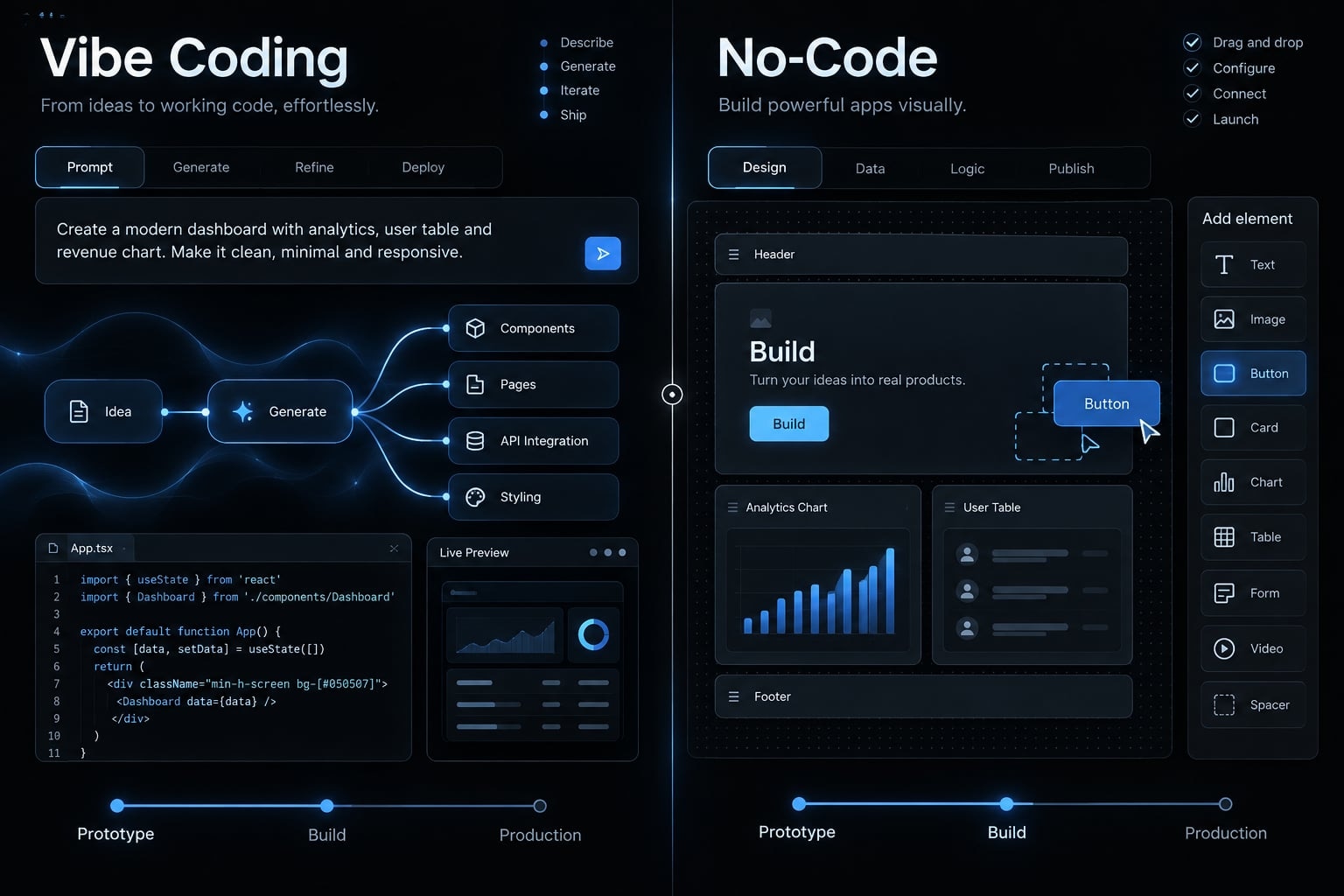
Vibe coding vs. no-code at a glance
The interface is the starting distinction, control and maintenance determine the longer-term fit. How vibe coding and no-code differ in practice:
Criterion | Vibe coding | No-code |
|---|---|---|
Primary interface | Prompt-based development that generates and modifies code. | Visual components, configured workflows, and often a drag-and-drop builder. |
Typical output | Application files; source code is accessible in many workflows. | Platform-managed configuration; export options vary. |
Technical skill | Easy to start; diagnosis and reliable changes require technical understanding. | Requires platform knowledge, logical thinking, and application design. |
Customization | Flexible when generated code can be understood and maintained. | Bounded by supported components, extensions, and execution limits. |
Initial build speed | Can accelerate custom experiments; correction effort varies. | Can accelerate workflows that match existing platform capabilities. |
Ownership | Code and hosting control depend on terms and dependencies. | Code export, data export, and hosting options are platform-specific. |
Maintenance | The team maintains application code and its operating environment. | The platform maintains its service; the team maintains application configuration. |
Best fit | Controlled custom experiments, followed by structured review when needed. | Operational workflows supported by the platform and team. |
Consider an illustrative lead-routing and approval application connected to a CRM (customer relationship management system). Visual rules may suit routine territory updates. Unusual account-matching logic may justify code.
Neither column is a security or quality rating. Platform dependency can simplify operations while constraining migration. Code access can expand control while increasing the work needed to exercise it.
What vibe coding and no-code actually mean
What is vibe coding?
Vibe coding is a prompt-led way of building software in which AI generates implementation code and the builder iterates by observing results. In its stricter original meaning, the builder pays limited attention to the underlying code, relying mainly on prompts, previews, and reported errors.
Andrej Karpathy’s February 2025 public explanation introduced the term around this limited-inspection approach. Everyday usage now often applies it more broadly to conversational programming. The basic loop is:
- Describe the desired behavior.
- Generate or modify code.
- Preview the result.
- Report errors or request changes.
- Repeat.
That loop can produce a useful experiment. It does not establish that the implementation is correct. When developers deliberately inspect changes and test behavior, they move toward structured AI-assisted development rather than strict vibe coding.
What is no-code development?
No-code development is a way to build applications through visual components and configuration rather than writing implementation code directly. Builders define screens, data structures, permissions, and workflow rules inside a platform that handles much of the underlying execution and infrastructure.
Common categories include website builders, app and portal builders, and workflow automation platforms. Their capabilities differ: A website-focused product may not support the approval rules or record permissions a business application needs.
No-code does not mean no logic. Someone must decide whether duplicate leads merge, which manager approves an exception, and what happens when the CRM connection fails.
The platform supplies building blocks. The team remains responsible for arranging them into a reliable business process and checking that the result matches its requirements.
Vibe coding is not the same as all AI-assisted development
- Strict vibe coding: Prompt-led iteration with limited inspection of the implementation.
- Structured AI-assisted development: AI-generated code combined with deliberate review, tests, and accountable engineering decisions.
- No-code with AI: Prompts that generate configuration or components inside a managed visual platform.
A conversational interface can appear in all three. What matters is the underlying output, the available controls, and who validates changes.
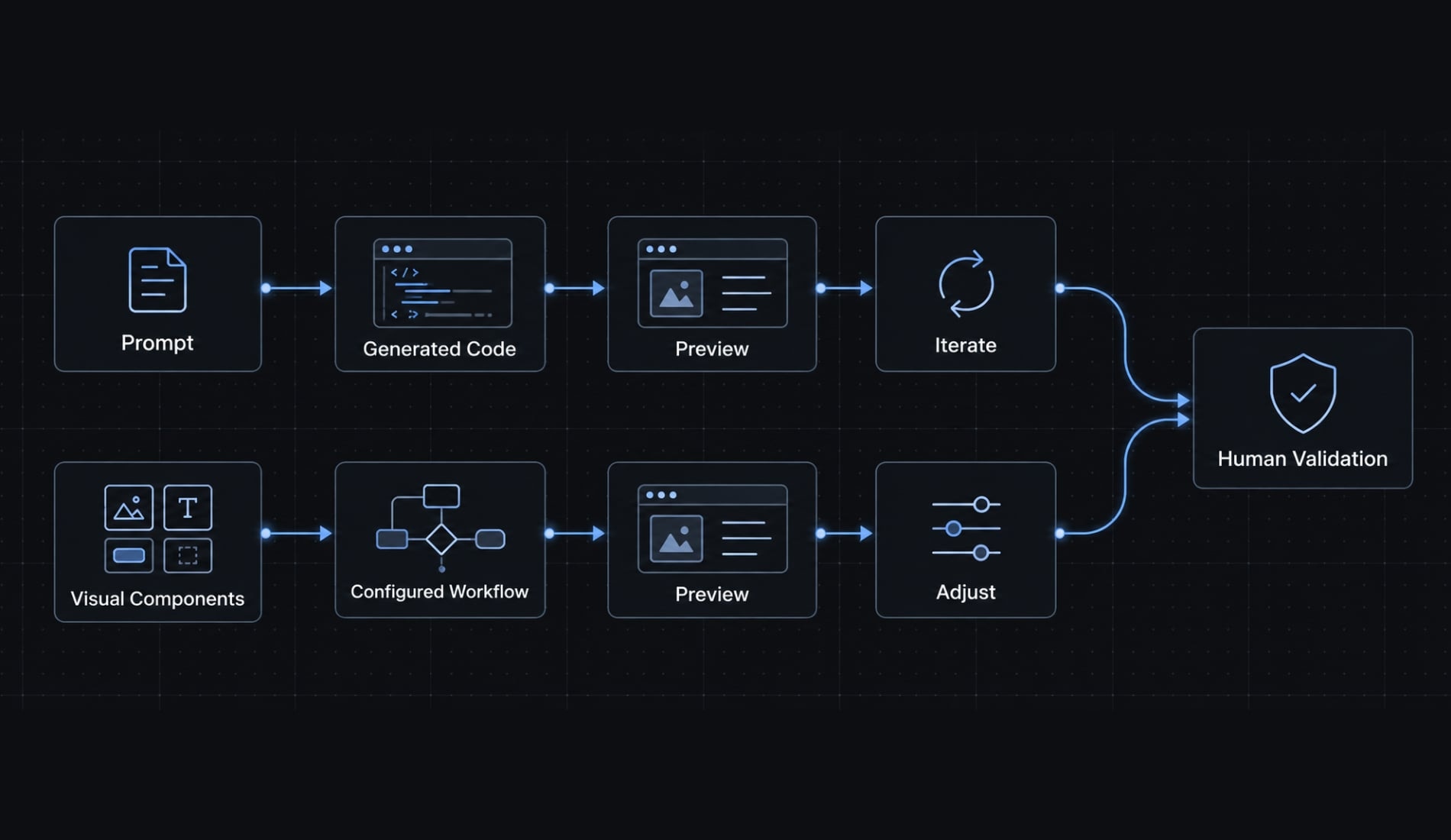
The key differences between vibe coding and no-code
Building interface and required skills
Prompting can make starting easy without making diagnosis easy. An incorrect routing result might originate in matching logic, permissions, or inconsistent CRM data. No-code exposes constrained building blocks, but users must understand their interactions and execution order.
For either approach, ask who can safely change an approval rule after launch. Initial creation and responsible maintenance require different levels of understanding.
Prototype speed vs. production readiness
Production readiness means having the controls needed to operate reliably for real users. A working screen demonstrates much less. What a demo proves versus what production requires
Stage | What it establishes | What still needs checking |
|---|---|---|
First working demonstration | A selected example follows the intended path. | Permissions, invalid data, integration failures, and recovery. |
Real-user release | Defined requirements pass documented acceptance checks. | Ongoing monitoring, changed requirements, and unexpected conditions. |
For lead routing, test whether an interrupted CRM update loses a record or creates a duplicate when retried. Neither development approach answers that question automatically.
Customization and functional limits
Code-based workflows can accommodate unusual matching logic and interfaces when the implementation is accessible and maintainable. No-code extensions depend on supported components, plugins, and APIs (connections that let software systems exchange data or actions).
A custom account-matching rule may justify code where standard routing does not. However, additional flexibility also creates implementation decisions, testing requirements, and maintenance work.
Ownership, portability and vendor lock-in
Vendor lock-in is the difficulty or cost of moving away from a provider. Check:
- Code access and export availability.
- Legal rights to use and modify the output.
- Application data export, including relationships and attachments.
- Hosting and deployment alternatives.
- Dependencies on external services or proprietary features.
Legal ownership, code visibility, and operational independence are different. Exportable code may still require a proprietary backend. Data export may preserve records without preserving workflows.
A runtime (the environment required to run an application) must also be available after migration. Owning files is not equivalent to being able to operate them independently.
Maintenance and technical debt
Technical debt means shortcuts or accumulated complexity that make future changes harder.
- Generated-code debt: Duplicated logic, fragile changes, untracked dependencies, and missing tests.
- No-code debt: Tangled workflows, duplicated automations, plugin dependence, and unclear configuration ownership.
In the illustrative routing application, changing territory logic could disrupt approvals if both processes depend on undocumented rules. Software maintenance is allocated differently, not eliminated. A managed platform can handle infrastructure while leaving your team responsible for workflow behavior.
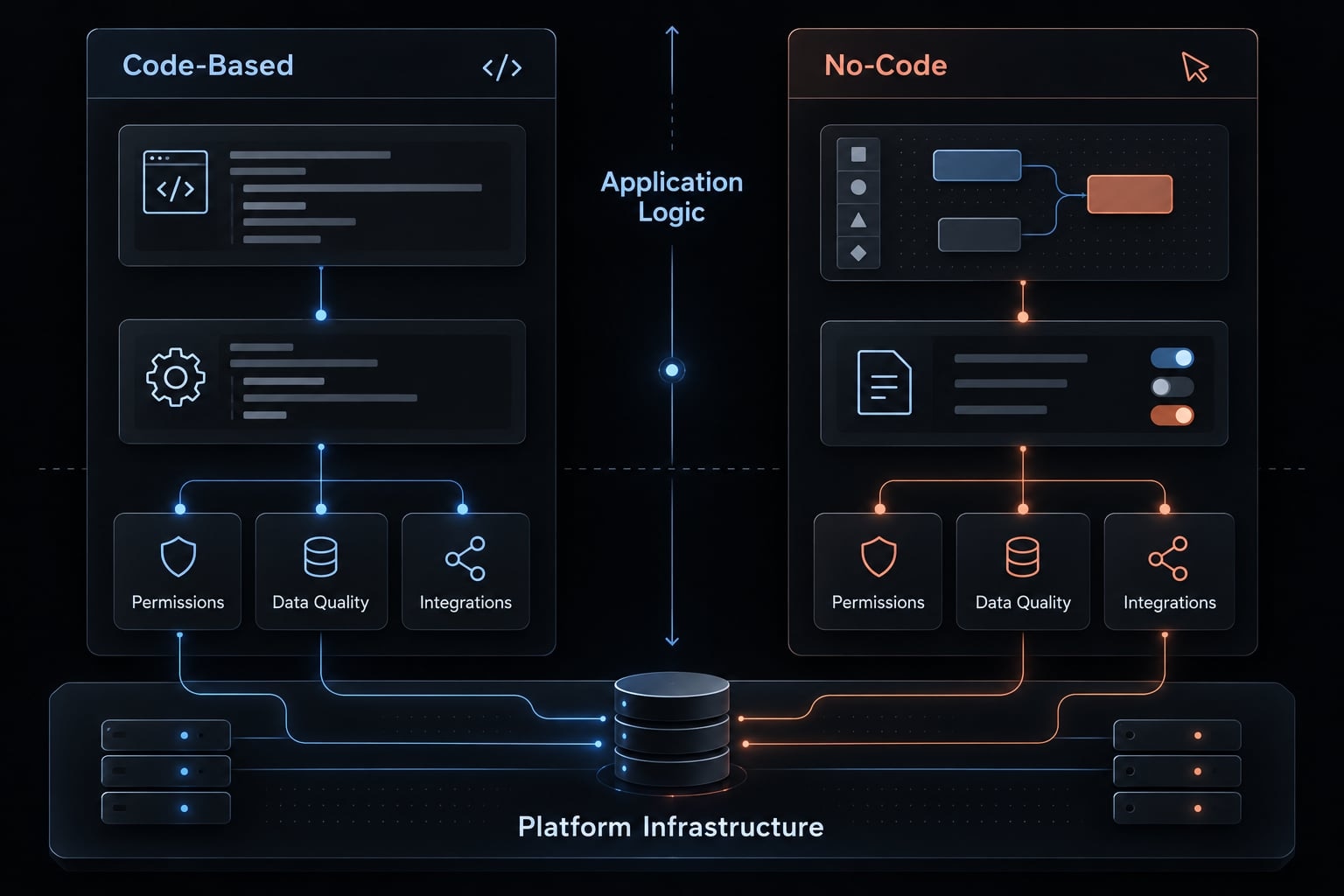
Security and governance
Security depends on implementation, configuration, and oversight-not the category label. Application risks and practical controls.
Risk | Control |
|---|---|
Unauthorized data access | Test roles and permissions, including attempts to access another user’s records. |
Exposed credentials | Use protected secret storage and credential scanning. |
Failed or harmful changes | Use tests, activity logs, backups, and tested recovery procedures. |
OWASP’s Authorization Cheat Sheet recommends denying access by default and validating permissions on every request. Hiding an approval button is not sufficient access control.
Platform-managed protections still require correct configuration. Likewise, a vendor’s security documentation does not establish that your particular application meets its legal or compliance obligations.
Scalability and cost
Scalability depends on workload, database design, integrations, and execution limits. Test expected peak conditions, not only a few sample records.
Generated-code costs include tool usage, review, hosting, testing, and maintenance. No-code costs include subscriptions, usage, plugins, administration, and potential migration.
Lifecycle cost = build + operation + maintenance + eventual migration.
A lower subscription price can be offset by manual exception handling. A flexible codebase can also become expensive if nobody understands it well enough to make safe changes.
When to choose vibe coding, no-code or a hybrid approach
Choosing between vibe coding and no-code starts with application requirements and a maintenance owner: The person or team accountable for keeping it working.
Choose vibe coding when
- You are testing an idea in a controlled environment.
- The interface or behavior is unusually custom.
- Standard platform components do not fit.
- Exportable code matters and the tool supports it.
- Technical review is available.
- The team accepts testing and maintenance responsibility.
An illustrative example is a B2B SaaS (software-as-a-service) prototype with a distinctive account-analysis interface. Strict vibe coding can support rapid prototyping. Reviewing and controlling the output before consequential use means transitioning toward structured AI-assisted development.
Choose no-code when
- The workflow follows a standard pattern.
- Business users need to make routine changes.
- Required permissions and integrations are supported.
- Visual configuration suits the team.
- Platform costs and limits are acceptable.
- Migration constraints have been considered.
Potential applications include campaign approvals, internal dashboards, lead-routing automation, and simple partner portals. Suitability depends on the specific platform.
For business process automation, test exception handling as carefully as the main workflow. A convenient connector may not support every CRM action or permission requirement.
Consider a hybrid approach when
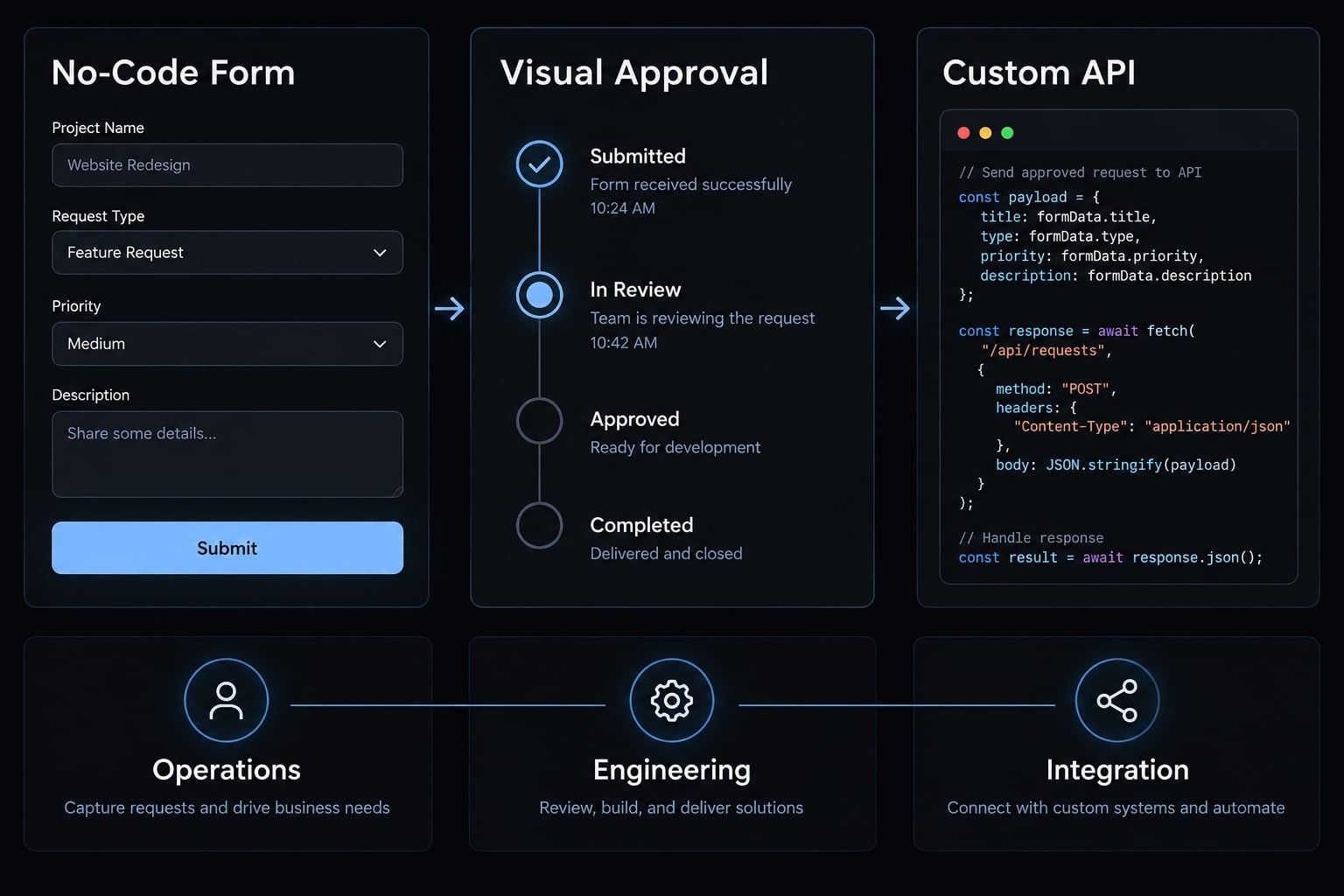
Hybrid development separates responsibilities across visual and code-based components. Three illustrative patterns are:
- No-code forms and approvals with a reviewed custom API: Operations owns visual rules; a technical owner maintains matching logic and the connection.
- No-code validation followed by selective rebuilding: The team retains supported workflows while engineers replace constrained components. Data and behavior must be checked during the transition.
- A custom application with no-code CRM automation: Engineers own the application; operations maintains configured follow-ups, with shared responsibility for integration failures.
Hybrid systems add interfaces, monitoring needs, and potential ownership gaps. Migration is not automatically seamless, and code ownership does not extend to platform-managed components.
Avoid using either approach as a shortcut when
- Sensitive data lacks a security review.
- No maintenance owner is assigned.
- Mission-critical requirements remain undefined.
- Recovery and permissions have not been tested.
- Selection depends only on demo speed.
These warnings concern bypassing controls, not prohibiting either method. A suitable platform or codebase still needs an accountable operating process.
A simple decision framework
Identify non-negotiable requirements first. Convenience cannot compensate for a failed security, ownership, or maintenance requirement.
Evaluate these seven questions
- How custom is the functionality? Separate standard workflows from unique behavior; project complexity alone does not determine fit.
- Who will maintain it? Evaluate current maintenance capability, not a hypothetical future hire.
- What code and hosting control is required? Distinguish preferred flexibility from mandatory application ownership conditions.
- How sensitive is the data? Let data sensitivity determine review and access requirements.
- How complex are the integrations? Check connector coverage, unusual logic, and failure recovery.
- How long will the application be used? Separate disposable experiments from long-lived operations.
- What is the exit plan? Check data export, code export, hosting alternatives, and replacement effort.
Decision matrix
This development decision matrix provides editorial guidance, not tested performance scores. Ratings assume verified capabilities and an assigned maintenance owner. Approach suitability by project condition
Project condition | Vibe coding / AI-generated code | No-code | Hybrid |
|---|---|---|---|
Disposable experiment | Useful in isolation | Useful with matching components | Often unnecessary |
Custom minimum viable product | Strong fit with technical review | Depends on supported behavior | Useful for distinct custom components |
Standard internal workflow | Possible; adds code upkeep | Strong fit with suitable controls | Useful for integration gaps |
Business-owned rule changes | Needs a safe editing interface | Strong fit with governed editing | Keep routine rules visual |
Full code ownership required | Tool- and terms-dependent | Verify export and rights | Only for controlled components |
Unusual integration logic | Useful with technical ownership | Check extension limits | Useful with owned interfaces |
Sensitive data | Requires reviewed controls | Requires reviewed configuration | Review across boundaries |
Mission-critical production | Requires structured development and validated controls | Requires validated controls | Requires validated end-to-end controls |
For the illustrative lead-routing application, make the evaluation reproducible: submit a duplicate record, attempt an unauthorized approval, change a routing rule, and interrupt the CRM connection. Record expected results before testing.
From fast prototype to maintainable product
Prompt-driven experimentation should transition into a structured AI-assisted workflow before consequential production use. The objective is not more ceremony, it is making changes reviewable and failures recoverable.
Minimum controls for AI-assisted development
- Written requirements and acceptance criteria.
- Version control in a source-code repository-the stored, versioned application files.
- Automated testing for important behavior.
- Human code review before consequential changes.
- Dependency scanning for vulnerable components and scanning for exposed secrets.
- Database and application permission checks.
- Deployment, monitoring, and rollback planning to restore a known working version.
- A named maintenance owner.
These are minimum controls, not an exhaustive security standard. Tests should cover rejected actions and failed integrations, not only successful submissions. For no-code components, preserve configuration history where available and document equivalent acceptance checks.
AgentKit coordinates AI-assisted workflows across planning, implementation, testing, debugging, and review through specialized agents and reusable workflows. This human-in-the-loop development model keeps approval authority explicit: agents assist the process; people remain responsible for approving changes and operating the application.
Frequently asked questions
What is the core difference between vibe coding and no-code?
Vibe coding uses AI agents to generate standard source code (like React or Python) from natural language prompts, whereas no-code platforms use visual interfaces to configure proprietary, pre-built components. Vibe coding offers more flexibility and code ownership, while no-code provides a stable, visual environment for non-technical users.
Does vibe coding provide full source-code ownership?
Not automatically. Many tools generate code you can commit to your own repository, but ownership depends on the tool's terms, export support, and runtime dependencies. Exportable code may still require a proprietary backend, so check legal rights, export availability, and hosting alternatives separately.
Can non-technical users be successful with vibe coding?
Yes, but with caveats. While natural language prompts lower the barrier to entry, vibe coding produces real codebases that may require technical understanding to debug, secure, or scale. No-code platforms remain more accessible for business users who need to build and maintain operational workflows without touching source code.
What is the biggest risk when using vibe coding?
The primary risk is technical debt and security fragility. Because AI can generate code rapidly without inherent guardrails, it may create vulnerabilities, handle sensitive data incorrectly, or build complex logic that becomes difficult for a human to maintain or audit over time without disciplined review processes.
How do I choose between these two approaches?
Choose no-code if you require a stable, visual tool for standard business operations that non-technical teams can maintain. Choose vibe coding if you need custom logic, standard code ownership, and the ability to integrate with any external system, provided you have a process for reviewing and securing the generated code.
Read more:
- Vibe coding vs traditional coding: Which approach wins?
- Agentic coding vs vibe coding: A practical guide for developers
- Vibe code SaaS: Why AI-built apps need more than just speed
Conclusion
The practical answer to vibe coding vs. no-code is not that one approach replaces the other. Prompt-led code generation can provide flexibility when the output is accessible, reviewed, and maintainable. Visual development can make supported workflows easier to configure while leaving application logic and data responsibilities with your team.
Source-code control matters, but so do legal rights, hosting dependencies, and the ability to operate independently. Hybrid development is another option when component boundaries and ownership are clear.
Choose according to application requirements, team capability, and data sensitivity-not the most impressive first demonstration. Apply the seven-question framework to one real workflow, then test its most important requirement and a likely failure condition before committing to a platform or codebase.