Vibe coding pricing page: What the real cost looks like beyond the monthly plan
Most buyers land on a vibe coding pricing page expecting a simple answer, then discover the budget is less clear once usage, rework, deployment, and maintenance enter the picture. AI-assisted development can look inexpensive at entry level, but the gap between real cost vs advertised price often widens as projects move from first draft to something people can actually use. This guide breaks down what vibe coding pricing really includes, how major tools structure charges, where hidden costs usually appear, and what realistic budget ranges look like by project type.
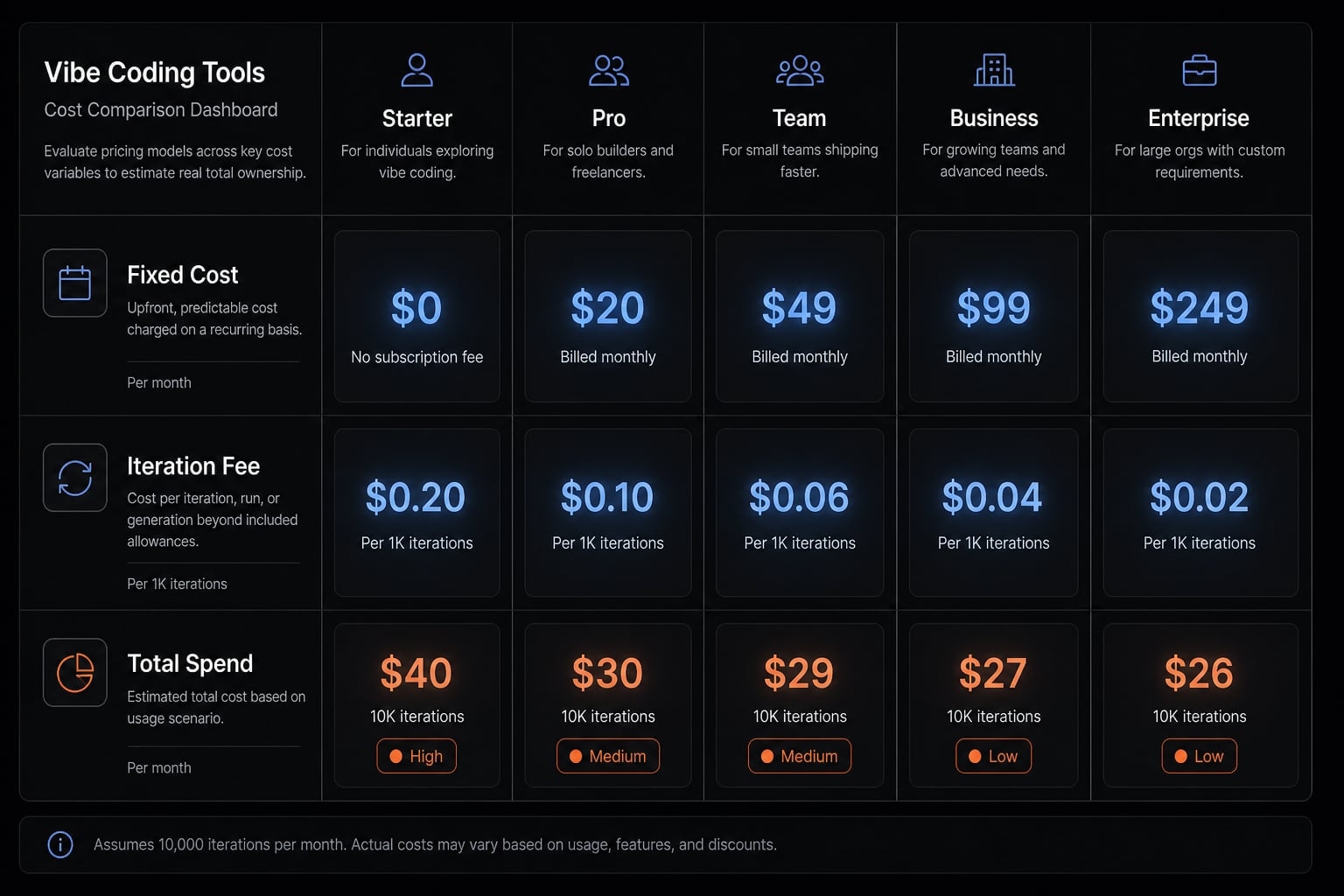
What “vibe coding pricing” actually includes
Vibe coding pricing is the combined cost of using AI coding tools to generate, revise, deploy, and maintain software. The subscription is rarely the full cost. In practice, vibe coding pricing also includes token or credit usage, debugging, deployment, integrations, and the ongoing work required to keep an app stable.
A common budgeting mistake is to treat a tool subscription as the entire project budget. That may work for a quick prototype, but it falls apart once development includes review cycles, bug fixes, and operational overhead.
A practical six-part framework looks like this:
- Base subscription or seat cost.
- Token consumption or credit/compute usage.
- Hosting and deployment.
- Integrations and external services.
- Review, debugging, and iteration time.
- Ongoing maintenance and refactoring.
Two teams can use the same tool plan and spend very differently. One team may produce a small internal tool with limited changes. Another may run repeated prompt cycles, rebuild flows, add auth, connect external systems, and absorb much higher usage-based pricing overhead.
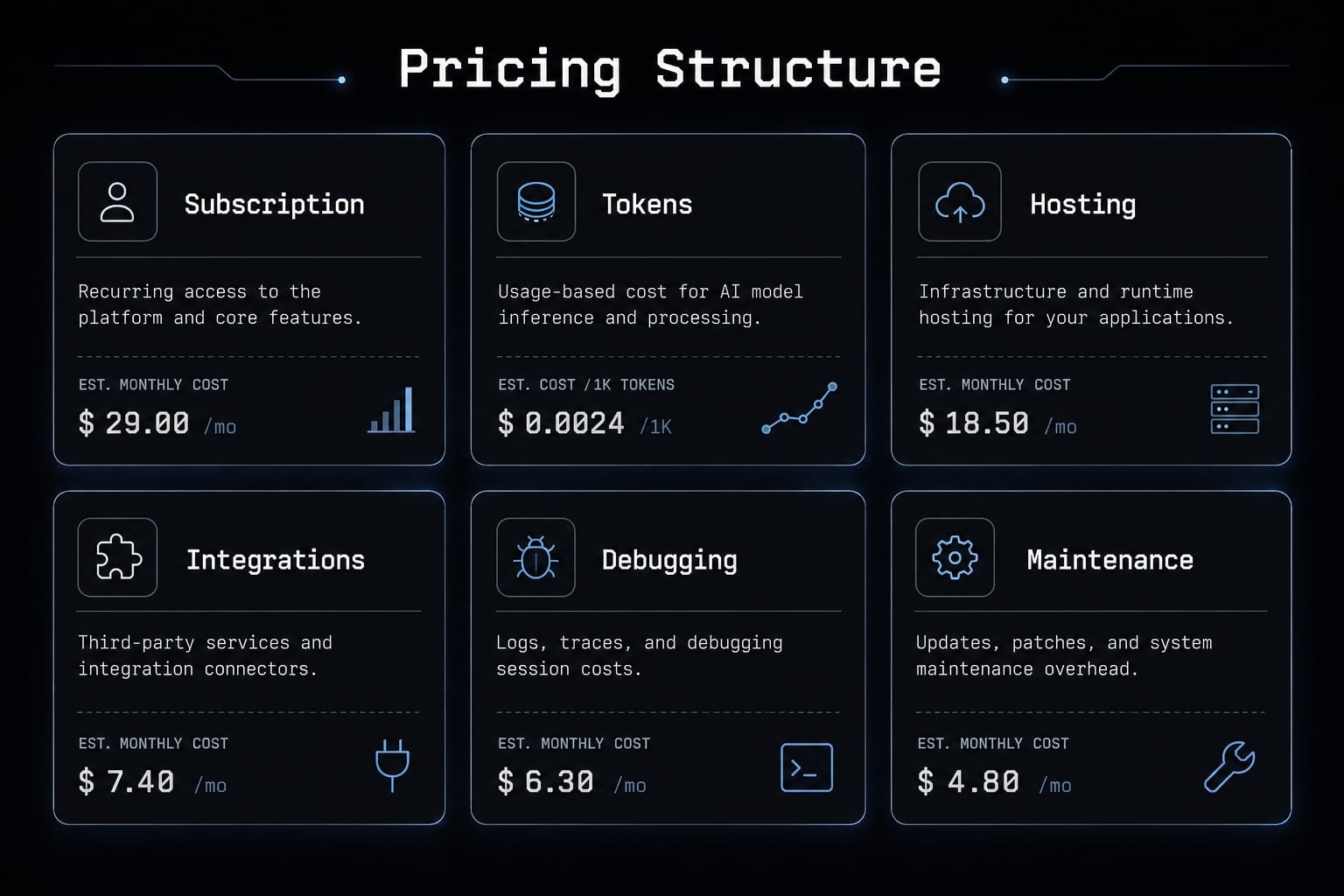
The core issue is total cost of ownership. The monthly plan is only one layer. The real economic question is how much effort and variable spending it takes to turn “generated” code into code that is actually usable.
Fixed cost vs Variable cost
- Fixed cost usually means the monthly plan, seat fee, or subscription tier.
- Variable cost includes token use, extra runs, credits, compute time, deployment-related charges, and external service usage.
- With usage-based pricing, the same month can cost very differently depending on iteration volume.
- Repeated revision loops increase total spend even when the entry plan looks cheap.
- PAYGO models improve flexibility, but they reduce budget certainty.
For operators, this matters because variable spend is harder to forecast than a flat subscription. A low sticker price can still produce unstable monthly costs.
Sticker price vs Total cost of ownership
Most pricing pages show the number that is easiest to market, not the number that best reflects project reality. That is why vibe coding pricing often looks simpler than it is. The visible monthly plan may exclude the real work needed to clean up outputs, secure workflows, deploy the app, and maintain it over time.
Total cost of ownership includes both software charges and human effort. For lean teams, founder or operator time is a real budget line, even if it does not appear on an invoice. In practice, the biggest planning error is not underestimating the plan price. It is underestimating the labor and iteration behind it.
A useful rule: If the build needs sustained review, team handoff, or customer-facing reliability, budget beyond the pricing table.
Pricing models compared: Replit, v0, Bolt, Lovable and Claude-driven workflows
The biggest difference between major tools is not just output quality. It is budget predictability. Some tools charge in ways that are easier to reason about, while others create more uncertainty once projects become iteration-heavy.
Pricing and packaging change frequently. Readers should verify current vendor pricing on official pricing pages.
Tool / workflow | Pricing model | Budget predictability | Best fit | Main cost risk | Practical take |
|---|---|---|---|---|---|
Replit | Subscription + usage/time-based mechanics | Medium | Builders needing an integrated environment | Heavy iteration can raise spend faster than expected | Strong capability, but Replit pricing can climb during stabilization |
v0 | Credit-based | Medium | Technical users comfortable managing external stack choices | Revision loops consume credits quickly | v0 pricing is often easier to reason about if you already understand deployment flows |
Bolt | Token-based or opaque usage logic | Low to Medium | Early experimentation | Spend can be hard for non-technical buyers to forecast | Bolt pricing may feel affordable at entry, but cost visibility is weaker |
Lovable | Credit/cloud-style mixed model | Medium | Fast prototypes and simpler use cases | Smooth UX can hide workflow inefficiency | Lovable pricing is easier to try than to fully forecast at scale |
Claude-driven workflows | Subscription + external tooling stack | Medium to Low | Flexible operators with strong process discipline | Costs spread across prompts, tools, hosting, and cleanup work | Claude-driven workflows offer flexibility, but economics depend on workflow control |
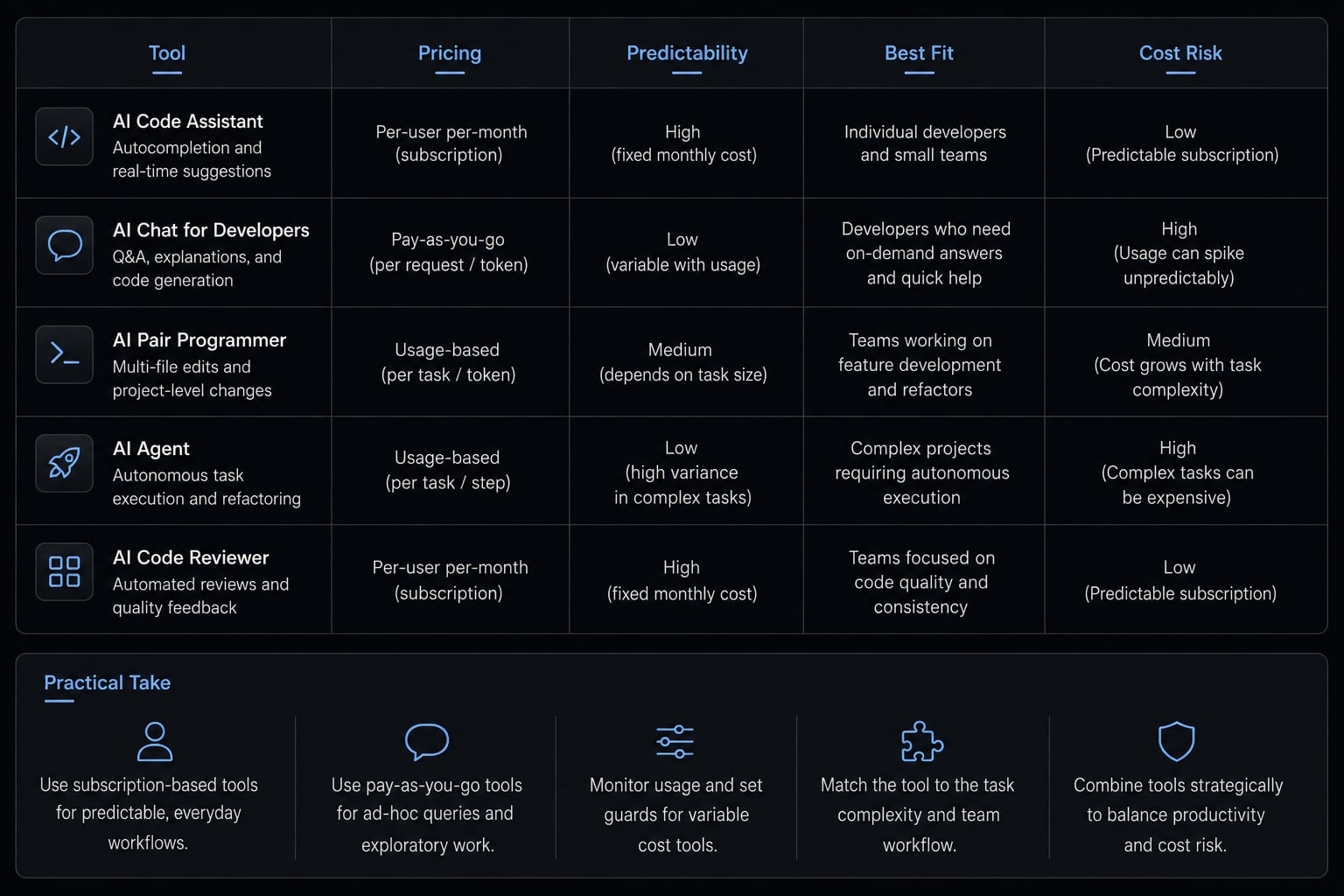
This is where a Replit vs v0 vs Bolt pricing comparison becomes more useful than a feature comparison. The buyer is not only choosing a UI. The buyer is choosing a pricing mechanic.
Tool-by-tool pricing logic
- Replit pricing tends to make sense when you value an all-in-one environment and can manage iteration carefully. Stronger capability can still lead to higher spend if the workflow involves many rebuilds, tests, or revisions.
- v0 pricing is often more intuitive for technical users because the flow from generation to deployment can be clearer. That said, revision cycles still consume credits, especially when requirements are not tightly scoped.
- Bolt pricing can create friction because token logic often feels less transparent to non-technical buyers. When spend is hard to interpret, planning becomes harder.
- Lovable pricing may feel simpler on the surface, but smoother UX does not automatically mean stronger cost control. Easy generation can still produce expensive cleanup later.
- Claude-driven workflows are different from all-in-one platforms. They can be highly efficient, but only when teams have strong prompting habits, scope control, and a disciplined external stack.
Across all of these AI coding agents, the main budgeting question is the same: what are you really paying for after the first usable draft?
Why the cheapest plan is usually the wrong benchmark
The lowest advertised plan is rarely the right comparison point. It tells you the cost to start, not the cost to finish. In many cases, pricing transparency is more valuable than a lower entry number. A slightly more expensive option can be cheaper overall if it reduces tool fragmentation, lowers overages, or shortens cleanup cycles.
That is why buyers should compare pricing logic, not just plan names. The cheapest plan often produces the most misleading forecast.
A structured cost review can help before scope expands. Teams that want a more controlled evaluation process can use an internal AI workflow checklist or a cost audit framework rather than benchmarking tools by headline plan alone.
The hidden costs most pricing pages do not show
The biggest budgeting errors usually sit outside the visible pricing table. The hidden costs of building AI-generated applications tend to appear after the first draft, not before.
- Debugging loops.
- Rework from inconsistent outputs.
- Security fixes and access control.
- Database and hosting setup.
- Refactoring and maintenance.
- Vendor lock-in.
- Founder or operator time.
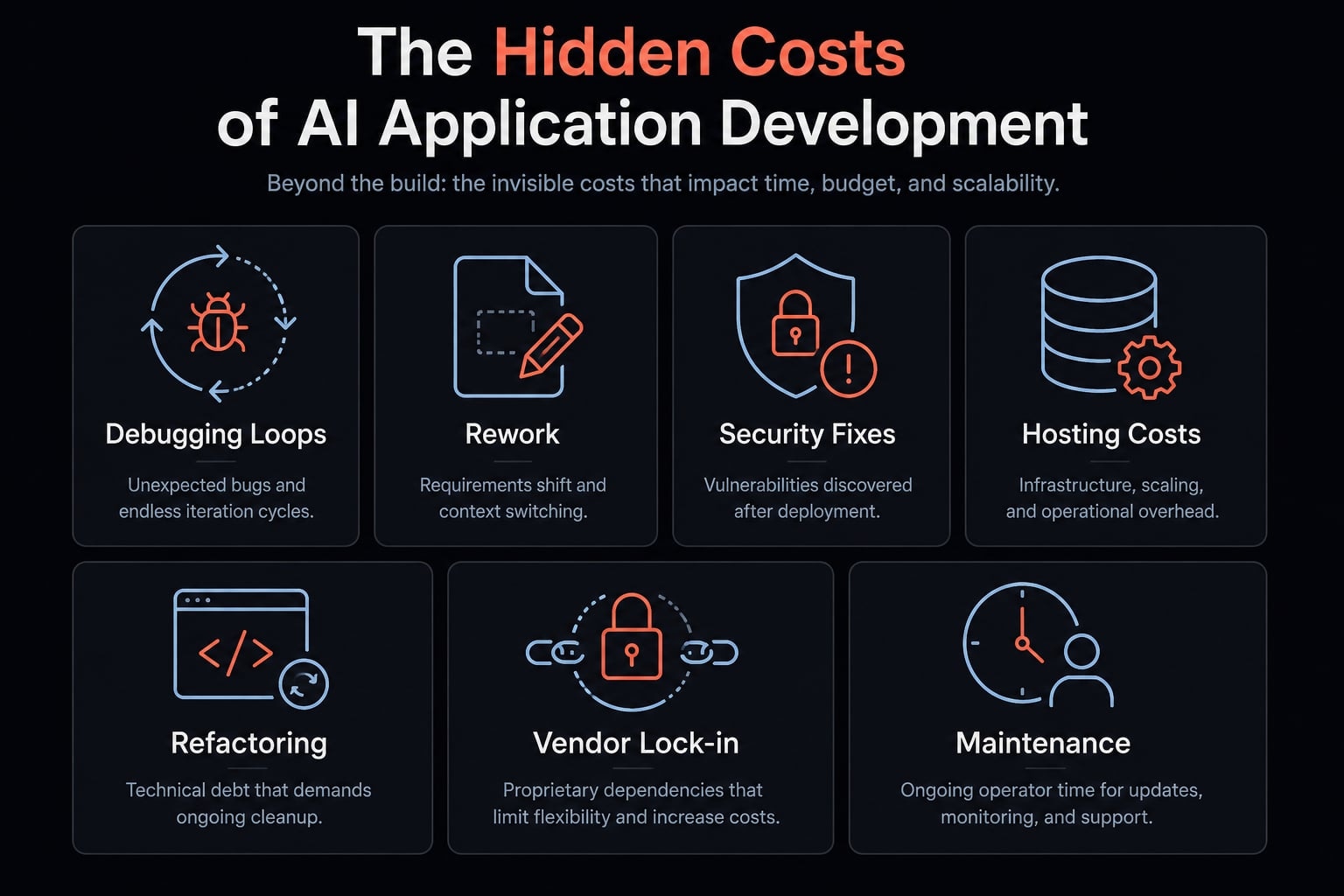
These costs appear because generated output is not the same as finished software. A tool may produce a working screen quickly, but production use introduces new requirements: Cleaner logic, better error handling, more reliable auth, safer permissions, and more maintainable structure.
For simple internal tools, the biggest hidden cost is often founder time. For customer-facing apps, maintenance cost, security hardening, and future refactoring matter more. For multi-step systems, the main budget risk is usually not generation itself. It is the work required to make the system reliable enough to trust.
This is where the hidden costs of building AI-generated applications become more important than the plan price. The budget changes once the app needs to behave like a product, not just a prototype.
Debugging and iteration can quietly multiply cost
Fast first drafts do not guarantee low total spend. Non-deterministic output means the same request can lead to slightly different implementations, which creates repeated correction cycles. What looks cheap to generate can become expensive to stabilize.
In practice, debugging loops affect more than just engineering effort; they also impact other parts of the project:
- They extend launch timelines.
- They reduce team confidence in the build.
- They make handoff harder.
- They weaken cost predictability.
This is one of the most overlooked drivers in production-ready AI workflows. Iteration volume changes the economics quickly. A tool that seems cheap in week one can become much less efficient in week four if every new change introduces cleanup work.
Opportunity cost matters here as well. Time spent on repeated prompting, QA, and fixes is time not spent on sales, validation, hiring, or customer conversations.
Security, governance and maintainability are economic factors
- Security hardening is real work, not an optional polish layer.
- Internal tools and production SaaS should not share the same cost assumptions.
- Security fixes often appear late, when changing structure is more expensive.
- Vendor lock-in affects future flexibility and migration cost.
- Technical debt mitigation belongs in the budget from the start for shared or customer-facing systems.
- Refactoring is part of ownership, not a rare exception.
For buyers, this is the difference between “it works” and “it is economically sustainable to operate.”
Realistic budget ranges by project type
The most useful way to budget is by scope and production requirements, not by tool plan alone. Vibe coding pricing for production apps varies widely because project type changes the amount of review, integration, and maintenance required.
These ranges are directional planning bands, not vendor quotes.
- Simple: Low integration, limited logic, low risk, short lifespan.
- Medium: Includes auth, workflows, third-party integrations, and meaningful data handling.
- Production-grade: Requires reliability, security, monitoring, maintainability, and team handoff readiness.
Common budget multipliers include auth, payments, integrations, and monitoring. These features increase complexity more than the base tool plan usually suggests.
Project type | Likely tool spend | Other costs to expect | Your time requirement | Cost risk level | Best route |
|---|---|---|---|---|---|
Landing page / microsite | Low | Domain, hosting, small design cleanup | Low | Low | Vibe coding or lightweight no-code |
Internal dashboard / workflow tool | Low to Medium | Auth, database setup, access control, maintenance | Medium | Medium | Vibe coding if scope is narrow and owner can review |
MVP web app | Medium | Integrations, testing, refactoring, deployment, monitoring | Medium to High | Medium to High | Vibe coding with disciplined review, or hybrid support |
Production SaaS app | Medium to High tool spend, but much higher total build cost | Security, reliability, monitoring, QA, handoff, maintainability, ongoing fixes | High | High | Hybrid, agency, or in-house depending on control needs |
Trust note: These planning bands are directional, not precise quotes. Actual costs depend on scope clarity, iteration volume, team review capacity, and infrastructure choices.
The main mistake buyers make is underestimating vibe coding pricing for production apps. A simple prototype can be extremely economical. A customer-facing system with auth, payments, and meaningful integrations is a different budget category.
A practical way to think about it:
- MVP budget stays manageable when scope is tight and reliability stakes are moderate.
- Internal tool cost can remain efficient if governance requirements are light.
- SaaS prototype cost rises quickly once third-party dependencies and shared-user workflows appear.
- Production-grade software requires budget for quality control, not just generation.
AI coding agents create the most economic leverage when the project is narrow enough to review well and important enough to justify structured iteration. If your team is estimating a new tool or product build, a lightweight planning template can help separate visible tool spend from downstream cost layers before development starts.
Is vibe coding actually cheaper than agencies, freelancers, no-code, or in-house development?
When buyers ask whether vibe coding is cheaper, the right question is cheaper for what outcome. A first draft, an internal workflow, and a stable product system are not the same purchase. The real comparison should include upfront spend, predictability, maintenance burden, technical control, and the amount of operator involvement required.
Criteria | Vibe coding | Freelancer | Agency | No-code | In-house |
|---|---|---|---|---|---|
Upfront cost | Low | Medium | High | Low to Medium | High |
Cost predictability | Low to Medium | Medium | Medium to High | High for simple use cases | Medium |
Speed to first version | High | Medium | Medium | High | Medium |
Need for your involvement | High | Medium | Low to Medium | Medium | Medium to High |
Technical control | Medium | Medium to High | Medium | Low to Medium | High |
Hidden maintenance risk | Medium to High | Medium | Medium | Medium | Medium |
Best fit | MVPs, prototypes, narrow internal tools | Targeted builds with defined scope | Production systems with execution risk | Simple workflows and basic apps | Long-term product ownership |
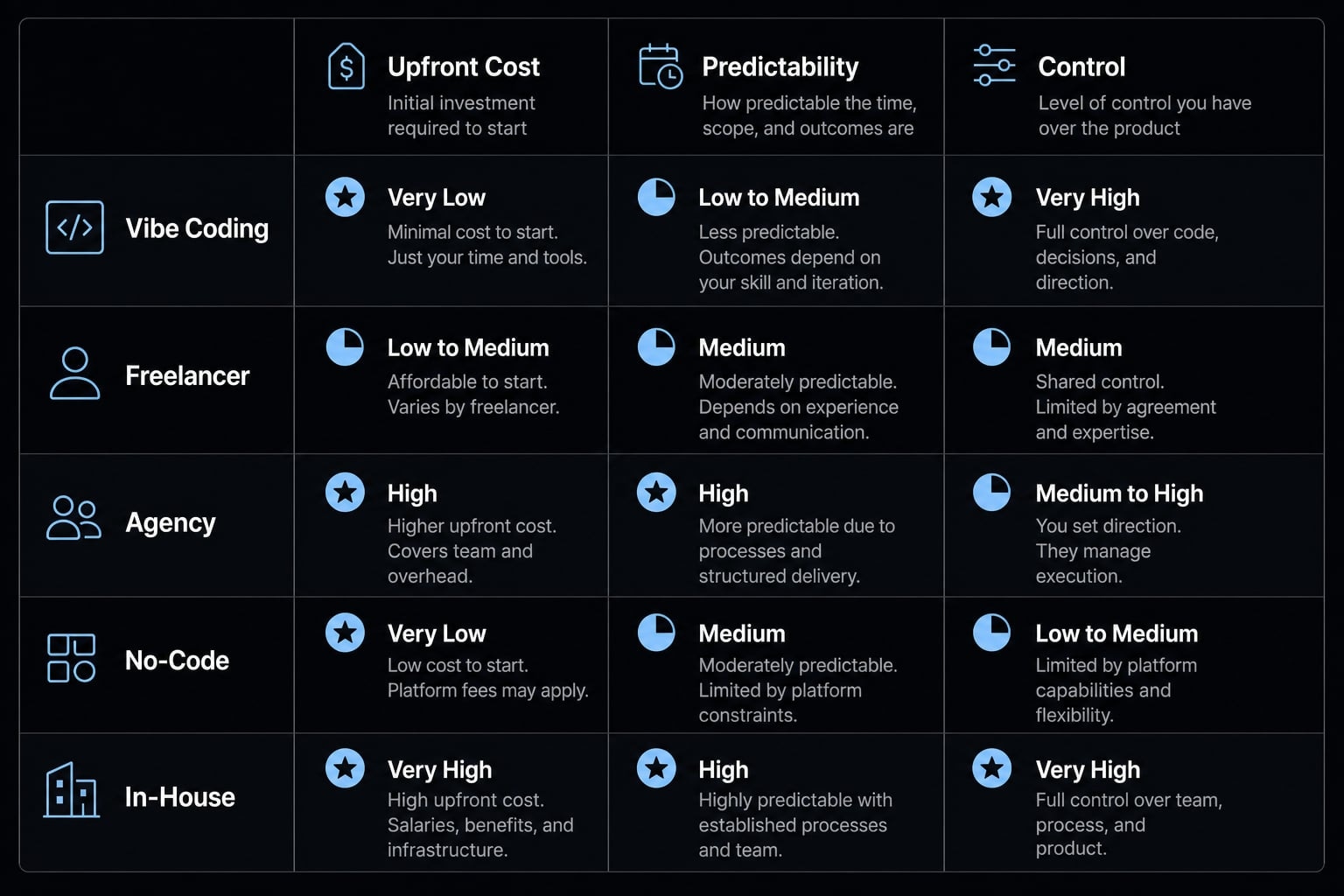
Vibe coding usually wins when:
- Speed matters.
- Scope is narrow.
- The builder can review outputs quickly.
- Reliability stakes are moderate.
- The goal is a first version, not a long-lived platform.
Vibe coding usually loses when:
- Compliance or governance matters.
- Security sensitivity is high.
- The product is customer-facing and long-lived.
- The team lacks review discipline.
- The system becomes expensive to stabilize.
So, is vibe coding cheaper than hiring a software agency? Often yes for a prototype or internal workflow. Not always for a durable production system. Agencies cost more upfront, but they can reduce execution risk, improve handoff quality, and lower stabilization pain.
The same logic applies to no-code vs vibe coding. No-code may be more predictable for simple internal workflows because pricing is easier to model and outputs are more constrained. Vibe coding may offer more flexibility, but flexibility increases review burden.
Compared with freelance developer cost, vibe coding can be cheaper for early experimentation. But freelancers may still be the better choice when you need accountability, continuity, and fewer correction cycles.
Compared with in-house development, vibe coding lowers the barrier to building quickly. In-house becomes easier to justify when the system is core to the product and long-term control matters.
This is fundamentally a build vs buy vs vibe code decision. The cheapest route to a first version is not automatically the cheapest route to a maintainable business asset.
A simple decision framework: When vibe coding is worth the cost
The economics of AI-assisted development depend less on tool hype and more on scope clarity, workflow maturity, review capacity, and reliability requirements. If the team lacks workflow discipline, low entry pricing can quickly turn into messy operating cost.
Green light
- Narrow scope.
- Low compliance risk.
- Fast execution matters more than perfect architecture.
- A founder or operator can review outputs quickly.
- Best fit for MVPs, prototypes, or lightweight internal tools.
Yellow flag
- Multiple integrations are involved.
- Ownership will be shared across a team.
- Moderate reliability is required.
- The project may evolve into a real product system.
- Pricing transparency becomes more important than entry price.
Red flag
- Regulated or sensitive data is involved.
- The system is customer-facing and production-critical.
- Long-term maintainability is essential.
- Review discipline is weak.
- Technical debt mitigation will be difficult later.
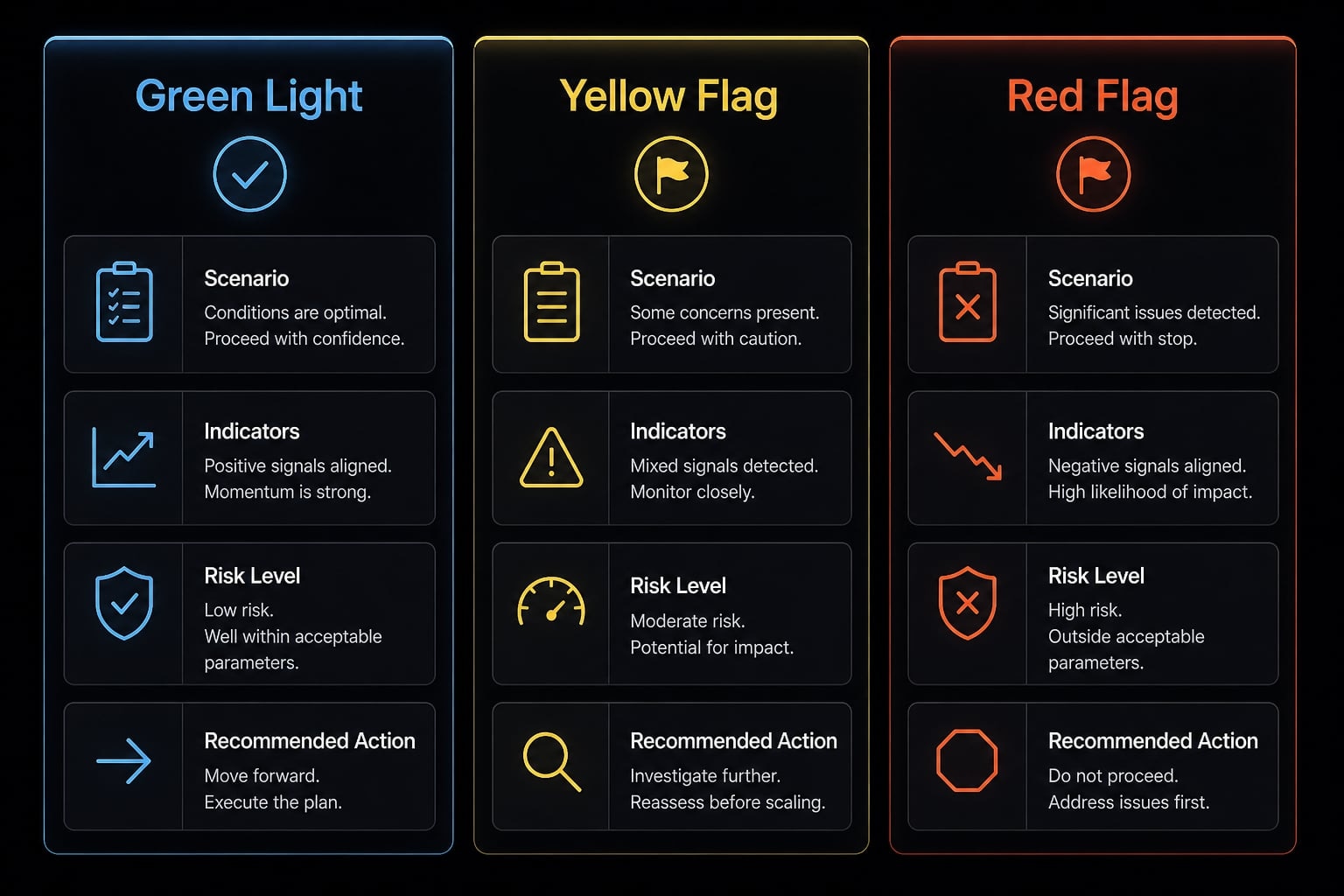
The main takeaway is simple: Ad hoc prompting wastes money. Production-ready AI workflows require process discipline, not just powerful tools. For teams that need repeatability and cost control, workflow maturity often matters more than which tool is chosen first.
Frequently asked questions
What is vibe coding pricing, and why does it often differ from advertised subscription costs?
Vibe coding pricing refers to the total expense of using AI-assisted development tools to build software. Advertised monthly subscriptions rarely represent the total cost of ownership, which frequently includes variable token consumption, deployment fees, iteration-heavy debugging cycles, and the hidden cost of operator time required to stabilize non-deterministic AI outputs.
How do pricing models vary between popular tools like Replit, v0, and Bolt?
Pricing models differ significantly by tool: Replit utilizes usage-based compute time, v0 operates on a credit-based system, and tools like Bolt often employ opaque, token-based consumption. While entry-level pricing is often low, teams must choose models based on whether their workflow prioritizes fixed budget predictability or flexible, high-resolution iteration.
What are the "hidden costs" most pricing pages fail to mention?
Most pricing pages overlook the costs of debugging loops, rework caused by inconsistent AI output, security hardening, database/hosting configuration, and ongoing maintenance. Furthermore, the economic burden of "operator time"—the hours founders or managers spend reviewing, testing, and refining AI-generated code—is a critical, often neglected line item in software development budgets.
Is vibe coding actually cheaper than hiring freelancers or agencies?
Vibe coding is typically the most cost-effective route for rapid MVPs and internal prototypes. However, it is not always cheaper for production-grade systems, where costs related to security compliance, long-term maintainability, and architectural discipline can lead to higher total expenditure compared to traditional development approaches when project complexity grows.
How should I budget for a production-ready application using vibe coding tools?
Budgeting for production-ready apps requires moving beyond base plan prices to account for high-frequency iteration tokens, external integration costs, and professional quality assurance. Expect to allocate significant resources toward technical debt mitigation and manual oversight, as "production-grade" reliability demands more human intervention than simple, low-risk prototypes.
When should a team avoid using vibe coding for software development?
Teams should avoid relying solely on vibe coding when building customer-facing systems that handle sensitive, regulated data or require high reliability. If your project demands strict security governance, long-term maintainability, or complex architecture that exceeds the capabilities of your team’s review discipline, traditional development or agency partnerships are often more economically and technically sound.
Read more:
- Vibe coding tools: How to choose the right AI app builder
- Vibe code marketplace: Defining AI-driven development & risks
- Vibe coder meaning: How AI is changing software development
Conclusion
A vibe coding pricing page is useful for understanding entry cost, but it rarely tells the full economic story. The real budget depends on iteration volume, integration complexity, review capacity, and whether the build needs to become one of your production-ready AI workflows rather than a disposable prototype.
Vibe coding can be the cheapest path to a first version. It is not always the cheapest path to a stable, maintainable system. The right decision comes from comparing total cost of ownership, not the lowest visible plan.
For teams that want a more structured evaluation, AgentKit’s workflow checklists and cost-planning templates can help map tool pricing, hidden overhead, and production-readiness requirements before scope expands.