Vibe coding flutter: Speed up development without technical debt
Vibe coding flutter: A practical guide to using AI without wrecking your codebase
Repetitive Flutter tasks like forms, routing, and boilerplate take up a lot of time. While AI can drastically speed up this process, the real challenge is maintaining long-term code quality. The solution is not to let AI build everything, but to use it strategically: keep scopes tight, target specific tasks where it excels, and review every change before merging. This guide covers where AI helps most in Flutter, practical workflows, effective prompts, and how to avoid the technical debt that turns short-term gains into future cleanup work.
What is vibe coding in flutter?
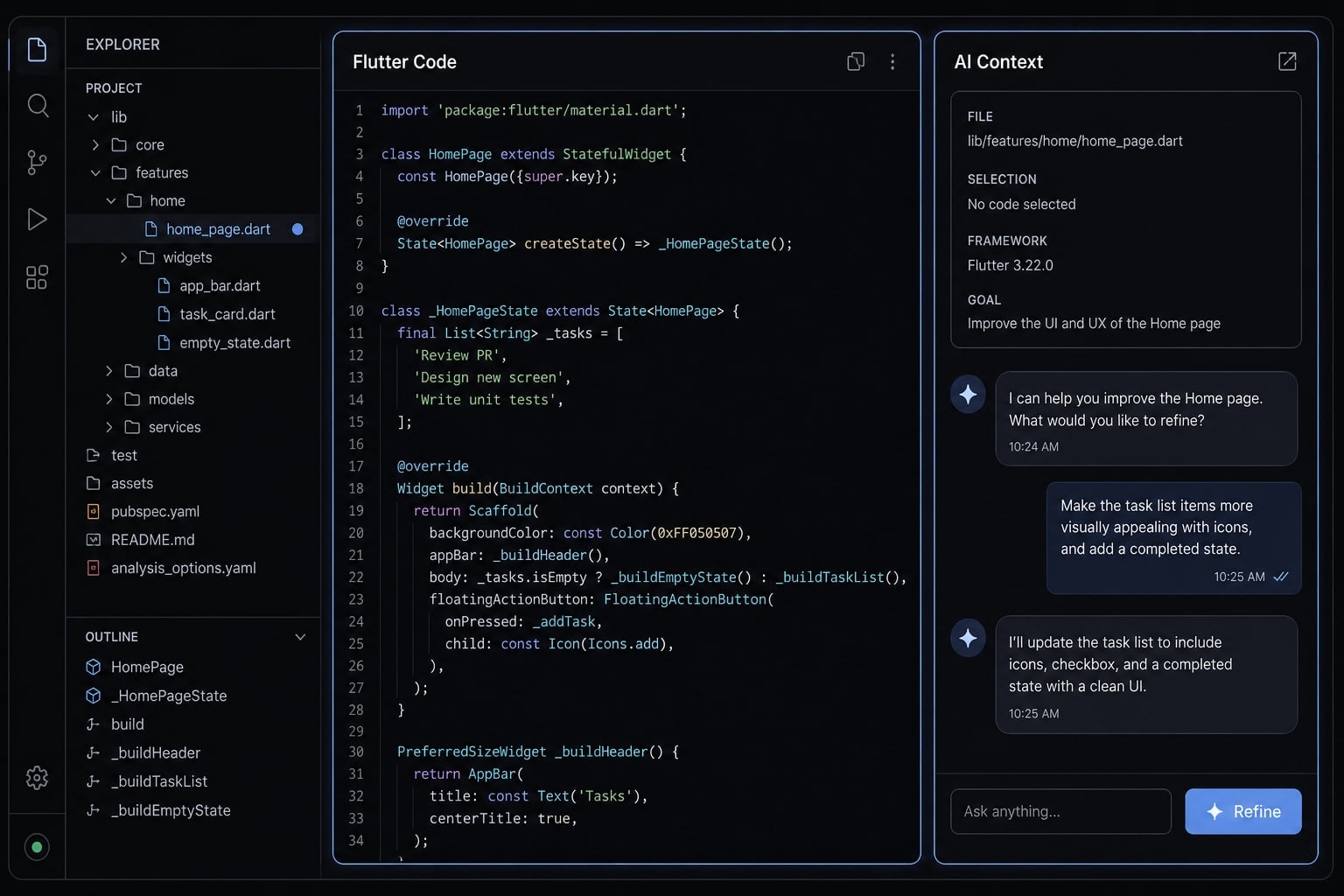
Vibe coding Flutter means using AI prompts and iteration to generate meaningful parts of Flutter work such as screens, widgets, forms, and API wiring, then reviewing, testing, and refining the output before it becomes part of the app.
In practice, this approach is not about ignoring the code. It is about using AI to accelerate the parts of Dart development that are repetitive, bounded, and easy to verify. That includes first drafts for settings screens, validation logic, list items, navigation setup, and boilerplate UI patterns.
This is why the topic matters now. AI tools are better at structured implementation than they were even a year ago. But AI-assisted Flutter development still breaks down when the task is vague, architecture-heavy, or sensitive to app-wide consistency. The output may compile and still be a poor fit.
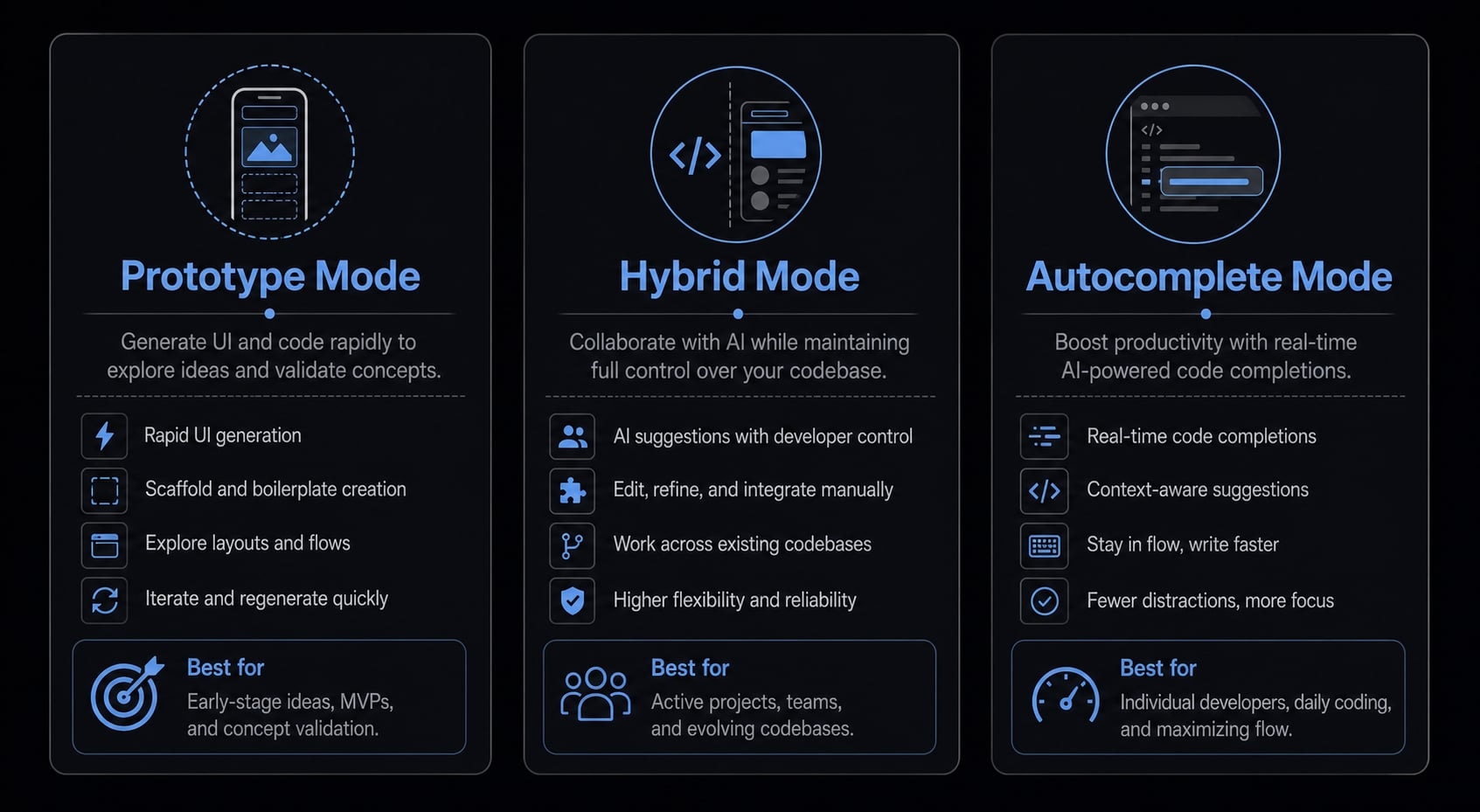
The most useful mental model is to separate vibe coding into three modes:
- Pure prototype mode: Prompt-first generation for rough demos, experiments, or disposable MVP flows.
- Hybrid mode: AI drafts the implementation, then a developer reviews, edits, refactors, and tests.
- Autocomplete-style mode: AI helps with local code completion, boilerplate, or small repetitive changes.
For most real product work, hybrid mode is the safest default. It keeps the speed benefit of AI-assisted Flutter development without pretending that Flutter AI coding should own architecture, state decisions, or app-wide conventions by default.
Define vibe coding in the Flutter context
In the Flutter context, vibe coding means using prompts and iteration to generate screens, widgets, forms, and API wiring faster, while still relying on human review and testing to confirm structure, correctness, and fit with the rest of the app.
Prototype speed vs production readiness
- Pure vibe coding is useful when the goal is a fast prototype, not polished delivery.
- Hybrid vibe coding is usually the better choice for shipping product features.
- Production readiness requires naming cleanup, structural consistency, tests, review, and refactoring into maintainable Flutter code.
- The main risk is not syntax failure. It is code that works in isolation but weakens the rest of the app over time.
Where vibe coding helps most in flutter projects
AI works best in the Flutter workflow when the task is repetitive, bounded, and easy to evaluate. That is where AI-generated Flutter code saves real time. The less a task depends on app-wide architecture or sensitive business rules, the safer it is to delegate part of it.
Task type | AI fit | Human review needed |
|---|---|---|
Screen scaffolding | High | Check layout structure, responsiveness, reuse |
Forms and validation drafts | High | Verify rules, edge cases, field behavior |
Navigation setup | Medium-High | Confirm route structure and app conventions |
Basic API client wiring | Medium-High | Review models, error handling, null safety |
State setup | Medium | Check lifecycle, rebuild behavior, ownership |
Auth flow | Low-Medium | Review security, token handling, edge paths |
Payment/security logic | Low | Do not delegate blindly |
Performance-critical UI | Low | Manual review and profiling required |
A simple rule applies: If the task generates visible UI structure, AI is usually helpful. However, if the work impacts app integrity, security, or performance, proceed with caution.
Tasks that are usually safe to delegate to AI
- Widget generation for repeated UI patterns.
- Widget scaffolding for new screens.
- Flutter UI boilerplate for forms, cards, settings rows, and list items.
- Basic form field layouts.
- Draft validation rules.
- Navigation setup for straightforward flows.
- Basic API client wiring.
- Test skeletons for widgets or simple logic.
- Refactoring repeated UI into reusable components.
These tasks tend to have clear outputs and shorter review cycles.
Tasks that need careful review
Task | Why AI helps | What you must check |
|---|---|---|
State management structure | Speeds up initial setup | Ownership, rebuilds, side effects, lifecycle |
Async loading/error handling | Generates common patterns quickly | Empty states, retries, race conditions |
Repository patterns | Drafts interfaces and implementations | App consistency, dependency boundaries |
Auth-related flows | Handles boilerplate screens and wiring | Token flow, session edge cases, security |
Package/version compatibility | Suggests package usage patterns | Actual version support and project fit |
This is often where developers get overconfident. The code looks reasonable, but the review burden is higher than it appears.
Tasks that should not be delegated blindly
- Security-sensitive logic.
- Payment processing flows.
- Production architecture decisions.
- Sensitive data handling.
- Performance-critical screens with heavy rebuild cost.
- Cross-feature decisions that affect the entire Flutter workflow.
These areas need human ownership because the cost of “plausible but wrong” is too high.
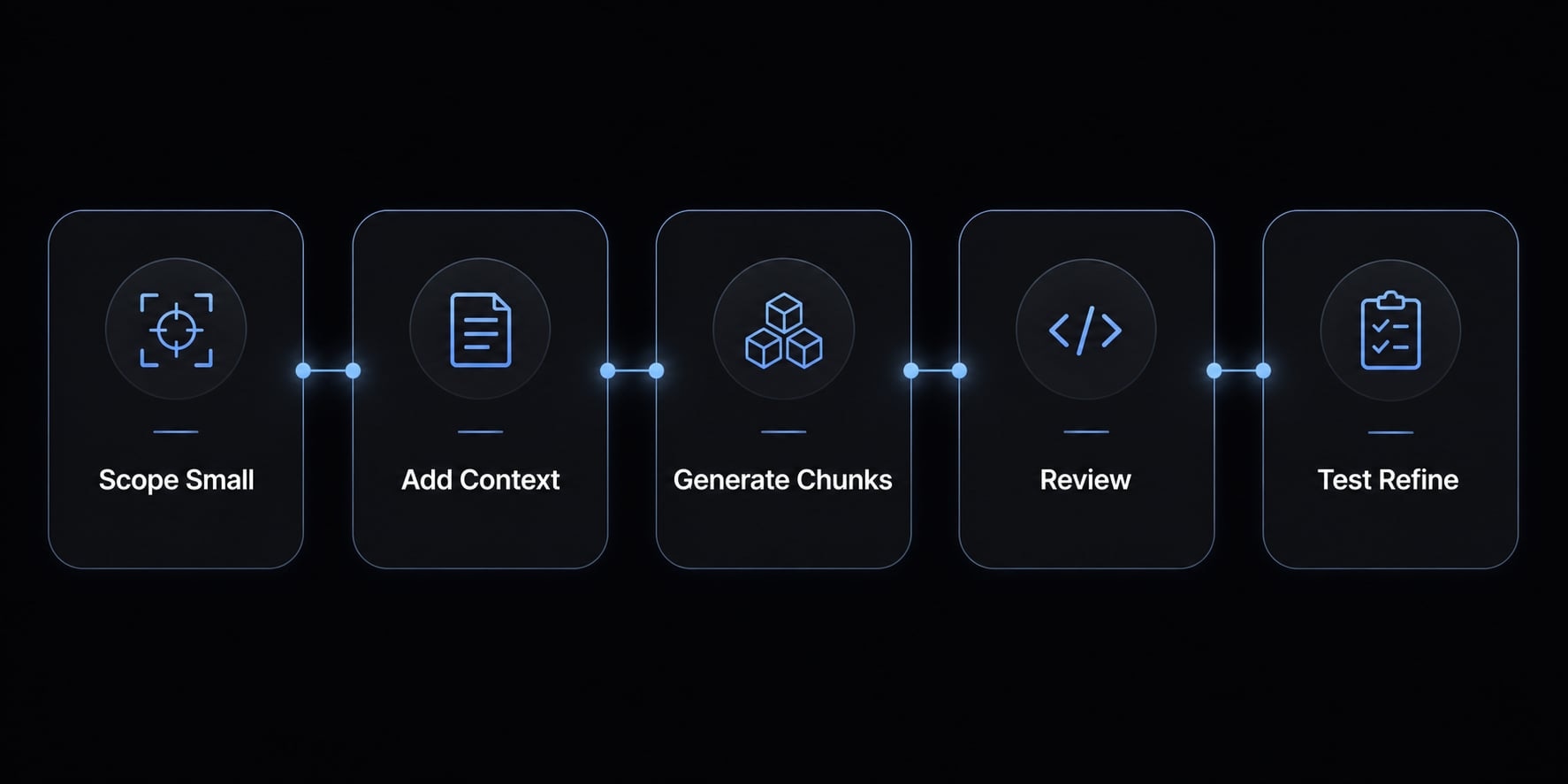
A simple step-by-step workflow for vibe coding flutter
- Start with one small feature.
- Provide project context.
- Generate in small chunks.
- Review before merging.
- Test and refine.
This is the simplest answer to how to use AI for Flutter apps without creating cleanup debt later. A reliable Flutter coding workflow does not depend on one perfect prompt. It depends on bounded tasks, good context management, and disciplined review.
Step 1: Start with one small feature
The best entry point is one screen, one form, one widget group, or one API interaction. When using AI for Flutter development, keeping the scope small matters more than the model choice itself.
Good examples:
- A profile settings screen.
- An address form.
- A reusable account card.
- A paginated list screen.
- A simple preferences API call.
This keeps the Flutter coding workflow reviewable. It also reduces assumptions. AI usually performs worse when asked to “build the whole app” because it fills missing context with guesses.
Why small scoped tasks outperform “build my whole app” prompts? Small scope works better in prompt-based Flutter development because it reduces ambiguity, limits drift, makes review easier, and fits naturally into a real Flutter coding workflow where features are built and checked incrementally.
Step 2: Provide project context
AI is only as useful as the context it receives. Good context management gives the model enough structure to match your app without burying it in irrelevant files.
To get better Flutter output from AI, give it this context:
- Folder structure
- Package list
- State management approach
- Theme rules
- Widget conventions
- Naming rules
- Expected inputs and outputs
- Existing patterns the code should match
- Any constraints around responsiveness or accessibility
For example, if your app uses Riverpod, feature folders, shared spacing constants, and a common form field wrapper, say that directly. In how to use AI for Flutter apps, this is often the difference between usable output and rework.
Step 3: Generate in small chunks
Ask for one piece at a time. A screen. Then validation. Then extraction of repeated widgets. Then tests. This is the safer version of prompt-based Flutter development.
Chunked requests usually outperform one-shot generation because:
- The output is easier to inspect
- Integration is simpler
- Structural mistakes are easier to catch
- The app stays aligned with the current Flutter coding workflow
If you are using AI coding agents, keep them on bounded implementation tasks instead of broad app-wide decisions.
After the first pass, do not restart from zero unless the output is fundamentally wrong. A better pattern is to improve the current version in small steps.
- Ask the AI to clean up naming
- Request one structural change at a time
- Extract reusable widgets after the layout is stable
- Fix loading or error behavior separately
- Ask it to align with an existing feature pattern
This reduces churn and keeps the change set readable.
Step 4: Review before merging
This is the control point most teams skip. In a real Flutter coding workflow, AI output should be treated like a junior draft: useful, fast, and absolutely subject to review.
Check for:
- Naming consistency.
- Duplicated widgets or helpers.
- Null safety issues.
- Brittle state updates.
- Hardcoded spacing or colors.
- Missing responsive behavior.
- Incomplete loading, empty, or error states.
A strong Flutter code review habit prevents low-grade issues from spreading across the app.
Use this checklist before merge:
- Confirm naming consistency.
- Remove duplicated code.
- Check rebuild behavior.
- Verify null safety.
- Test responsiveness on small and large screens.
- Verify loading, error, and empty states.
- Add or improve basic tests.
- Ensure the output fits maintainable Flutter code standards.
This is the practical version of review before merge.
Step 5: Test and refine
Run the feature. Click through it. Break it on purpose. AI-generated code often handles the happy path first and leaves edge cases unfinished.
Test for:
- Invalid input
- API failure behavior
- Loading loops
- Navigation back/forward issues
- Overflow on smaller screens
- State reset problems
This last step is what turns a fast draft into something stable enough to ship. It is also why how to use AI for Flutter apps should always include refinement, not just generation.
Prompt and context patterns that produce better Flutter code
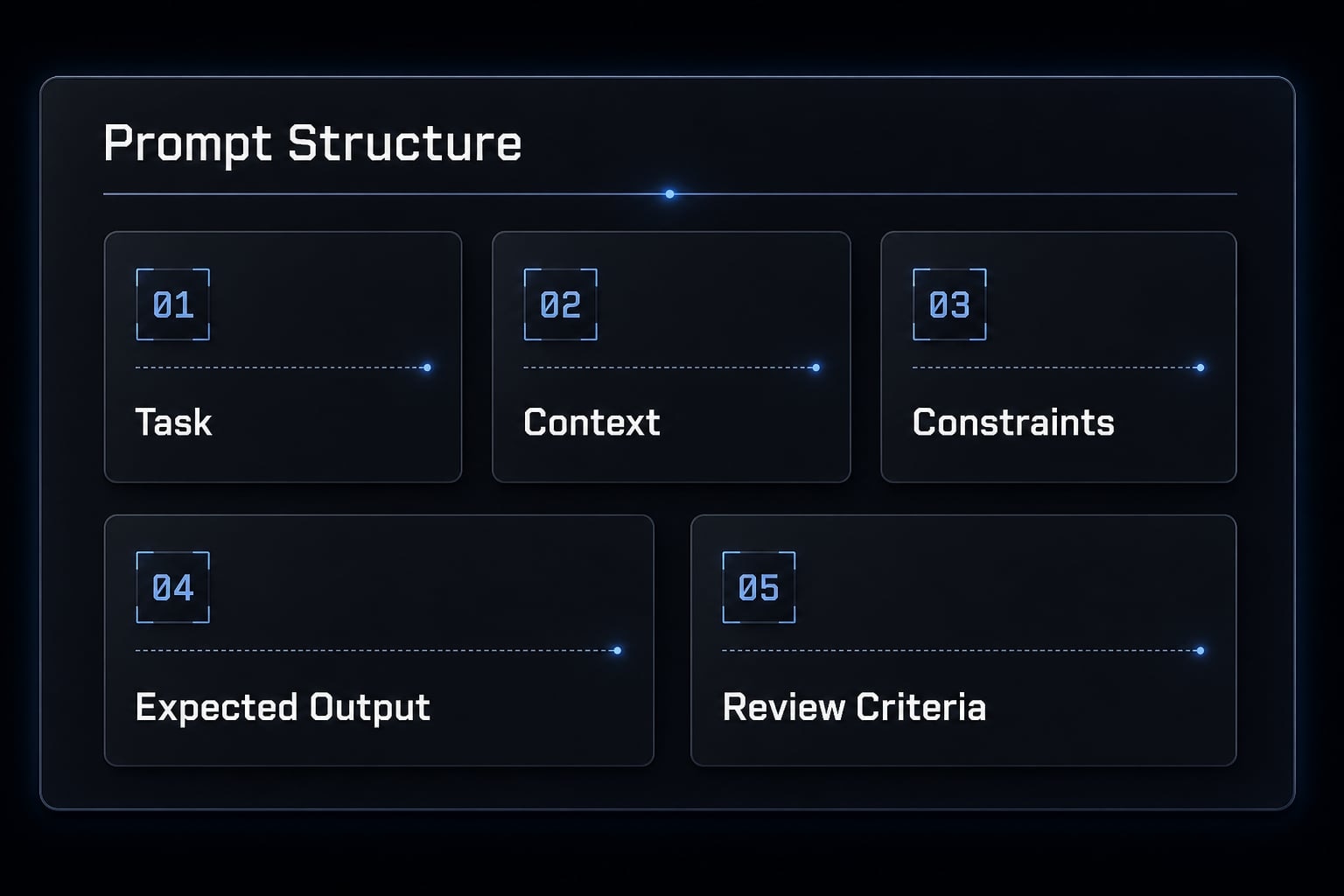
Good Flutter prompts do not need to be long. They need to be specific. The most reliable pattern for AI prompt engineering for Flutter is simple: define the task, provide relevant context, set constraints, state the expected output, and tell the AI how the result will be reviewed. That improves the odds of useful Dart code generation, but it does not guarantee correctness.
A practical prompt formula:
- Task: What you want built or changed
- Context: Current app structure and conventions
- Constraints: Packages, styling, state, architecture limits
- Expected output: File or code block type
- Review criteria: What the AI should optimize for
Concise context also helps context window optimization. Dumping too much unrelated information often makes the output worse, not better. For repeatable work, modular code generation is usually safer than large all-in-one prompts.
Prompt template for building a Flutter screen
Build a Flutter profile settings screen.Context:- App uses Riverpod- Feature-based folder structure- Shared theme spacing and text styles already exist- Reuse existing AppTextField and PrimaryButton widgets- Screen should match current account settings patternsConstraints:- No new package- Keep logic simple- Support loading and error states- Extract repeated rows into reusable widgets if neededExpected output:- One screen widget- One reusable settings row widget if usefulReview criteria:- Clean naming- Minimal duplication- Responsive layout- Easy to maintain
Refactor this settings screen into reusable components.Context:- Repeated card sections and field groups exist- Keep current behavior unchanged- Match existing widget naming conventionsConstraints:- Do not change state ownership- Avoid over-abstractionExpected output:- Suggested widget extraction plan- Updated code for the extracted widgetsReview criteria:- Better reuse- Clearer structure- No extra complexity
Prompt template for debugging or tests
Review this Flutter screen for a layout overflow issue and possible state handling problem.Context:- Overflow happens on smaller devices- Current screen uses a Column with form fields and a fixed button- Riverpod is used for state- Explain assumptions before making structural changesExpected output:- Root cause explanation- Minimal code changes- Any tradeoffs
Generate basic widget tests for this Flutter settings form.Context:- Validate required fields- Save button disabled during loading- Error message shown on failed save- Keep tests focused on real user flowsConstraints:- Do not invent app-specific dependencies- Explain any missing assumptions firstExpected output:- Test file- Short note on what is covered and what still needs manual test review
These Flutter prompts are usually enough for practical AI prompt engineering for Flutter without turning the process into ceremony.
Lightweight context assets for consistency
- Short PRD notes for the feature.
- A small implementation checklist.
- Coding rules and naming conventions.
- Folder conventions.
- Reusable widget references.
- Shared state pattern notes.
- Optional instruction files such as AGENTS.md for Flutter projects.
These assets help context window optimization by keeping the most relevant guidance reusable and compact. AGENTS.md for Flutter projects is optional, not required, but it can be useful if you repeatedly enforce the same coding rules.
Common vibe coding mistakes in Flutter and how to avoid them
The biggest risk in AI-assisted implementation is not broken syntax. It is code that looks correct, compiles, and still creates Flutter technical debt. Most AI coding mistakes happen because the model optimizes for plausible output, not perfect fit with your app’s structure, naming, and long-term maintenance needs.
The most common code quality failures
- Repeated widgets instead of reusable components: This is one of the fastest paths to Flutter technical debt in AI-generated Flutter code.
- Inconsistent naming or folder structure: The feature works, but it stops matching the rest of the app.
- Unnecessary complexity for simple UI: Some AI coding mistakes add abstraction where a straightforward widget tree would be better.
- Missing loading, empty, or error states: The happy path is present, but real usage is incomplete.
- Weak tests that look complete: Generated tests often assert surface behavior without covering meaningful user flows.
- “Looks right” but does not fit the app: This is the subtle one. The code is plausible, but it conflicts with established architecture or team conventions.
A disciplined Flutter code review process catches most of these before they spread.
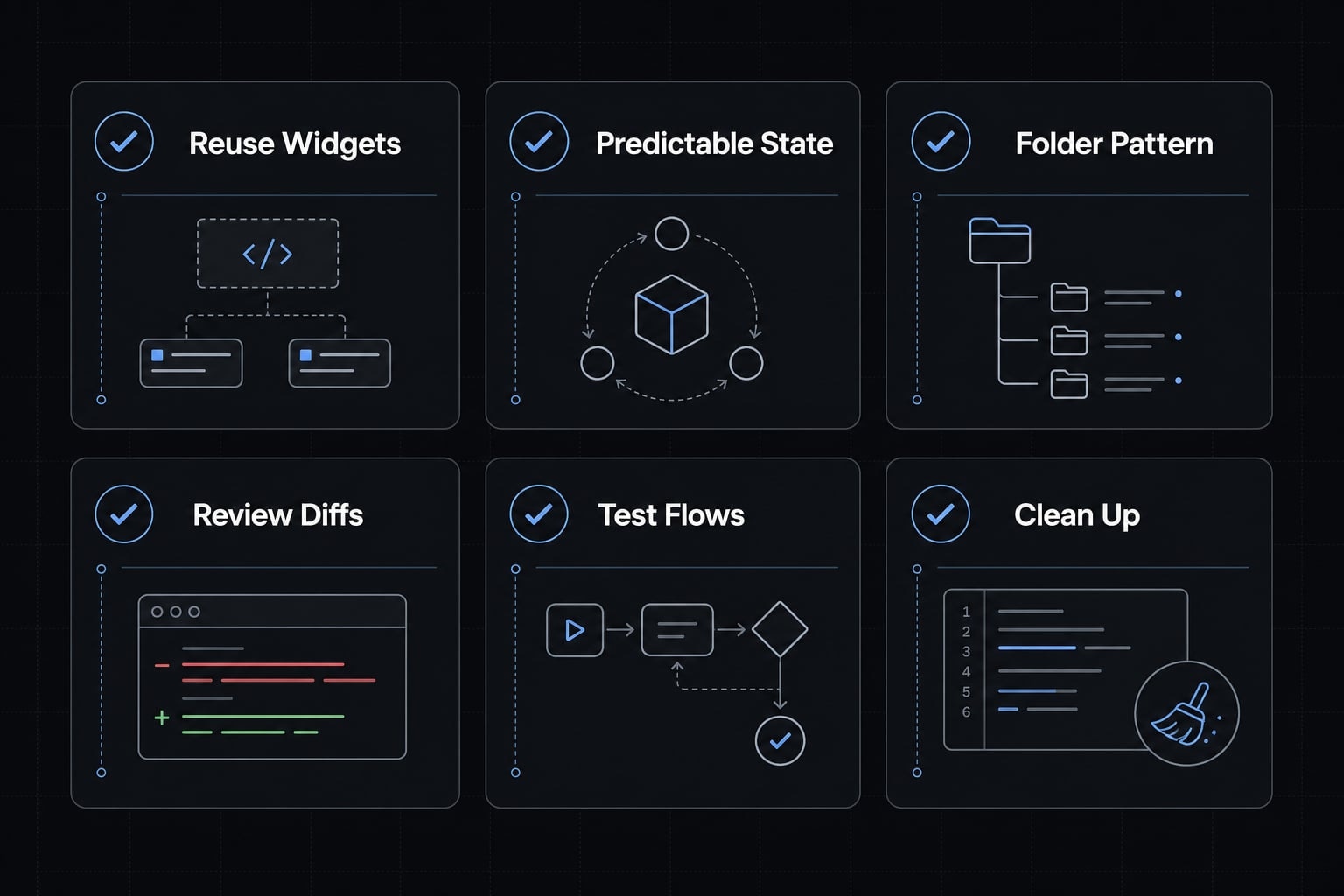
A simple Flutter maintainability checklist
To keep AI-generated Flutter code maintainable, use this checklist:
- Reuse widgets where patterns repeat.
- Keep state predictable and easy to trace.
- Use one folder pattern consistently.
- Review every generated diff.
- Test real user flows, not just isolated widgets.
- Clean up naming and duplication before merge.
- Confirm the output supports maintainable Flutter code.
- Use hybrid vibe coding instead of blind acceptance.
- Make Flutter code review part of the default workflow.
This is how teams reduce Flutter technical debt while still getting speed from AI.
A practical example: Using AI to build a Flutter feature faster
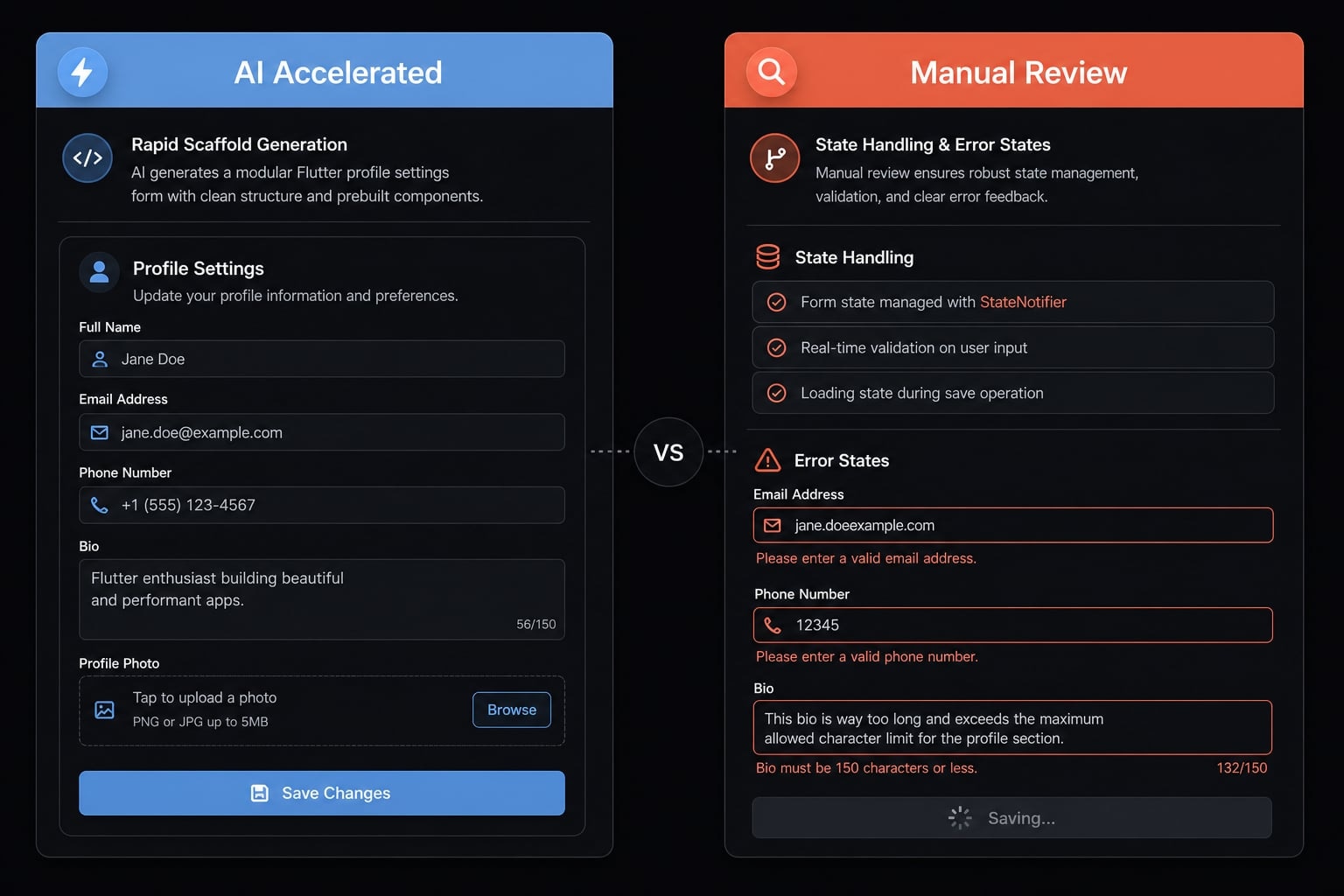
A profile settings screen is a good example of Flutter feature development that fits this approach well. It has repeated form patterns, bounded logic, a clear UI structure, and predictable states. That makes it ideal for a controlled AI coding workflow.
A practical sequence looks like this: generate the initial screen structure, add field groups, draft validation, wire the save action, then review responsiveness and polish loading and error handling. This is a lightweight structured agent workflow because the task stays narrow and the output is easy to verify.
Feature goal and why it fits vibe coding
The feature goal is simple: let users update profile details through a settings form. The structure is clear, the UI repeats familiar patterns, and the logic is bounded enough to benefit from fast generation.
What AI accelerated vs what still needed manual review
AI accelerated:
- Base UI scaffolding.
- Validation draft.
- Initial widget extraction.
- Test skeleton.
Still needed manual review:
- Naming consistency.
- State handling.
- Edge cases.
- Responsiveness.
- Loading and error polish.
The result is not full automation. It is better developer productivity through structured iteration.
Frequently asked questions
What is vibe coding in the context of Flutter development?
Vibe coding in Flutter is an approach where developers use AI agents to generate UI components, logic, or boilerplate code through natural language prompts. It relies on iterative cycles of generation, human review, and refinement, moving beyond simple autocomplete to support faster prototyping and scaffolded development.
How does vibe coding differ from traditional coding?
Traditional coding requires manual implementation of every line, while vibe coding utilizes AI to draft complex structures or repetitive code blocks. While vibe coding accelerates scaffolding, it requires significant human oversight to ensure naming consistency, architectural fit, and proper state management, unlike traditional manual development.
What are the main risks of using AI for Flutter code generation?
The primary risks include the accumulation of technical debt, inconsistent widget naming, redundant code, and missing edge cases. AI models prioritize plausible syntax over architectural integrity, which can lead to fragile implementations if generated code is merged into a production codebase without a thorough code review.
Which Flutter tasks are safest to delegate to AI?
Tasks safest for AI delegation include screen scaffolding, building reusable widget layouts, setting up basic form field structures, generating boilerplate code, and creating initial skeletons for unit or widget tests. These tasks are bounded and easily verified by developers during the review process.
Is vibe coding worth the effort for production-ready apps?
Yes, provided you adopt a hybrid workflow. Vibe coding is highly effective for accelerating repetitive tasks and prototyping, but it requires disciplined human-in-the-loop oversight. For production apps, you must treat AI output as a "first draft" that necessitates manual testing, refactoring, and security verification before deployment.
How can I get better Flutter code from an AI agent?
To improve output, provide rich context including your folder structure, state management patterns, theme conventions, and expected inputs/outputs. Use small, scoped prompts for specific features rather than asking for full application logic, and always include instructions for the AI to follow your existing codebase standards.
Read more:
- 7 practical vibe coding examples: Build apps faster with AI
- Vibe coder meaning: How AI is changing software development
- Vibe coding SEO: Build AI-powered assets without developers
Conclusion
Vibe coding Flutter works best when treated as a controlled, human-reviewed workflow, not a shortcut around engineering judgment. Start with small features, provide useful context, generate in chunks, and review everything before merge. That pattern gives you faster implementation without quietly increasing maintenance cost.
The most reliable results come from a structured agent workflow where AI handles bounded implementation and developers keep ownership of architecture, consistency, testing, and sensitive logic. If you want a practical next step, use a Flutter AI workflow checklist or a small prompt template pack to standardize how your team applies AI across everyday Flutter work.