How to vibe code a booking app: Step-by-step MVP guide
A generated booking form can look complete while still losing reservations or accepting conflicting appointments, meaning the interface is only the beginning. Vibe coding a booking app uses AI agents to translate a product brief into working scheduling software, which must then be thoroughly tested to generate valid availability, persist bookings, reject conflicts, and confirm stored reservations.
This guide focuses on a single-host B2B MVP, walking through defining rules, choosing a lean tech stack, structuring prompts, and verifying each stage before handling real appointments.
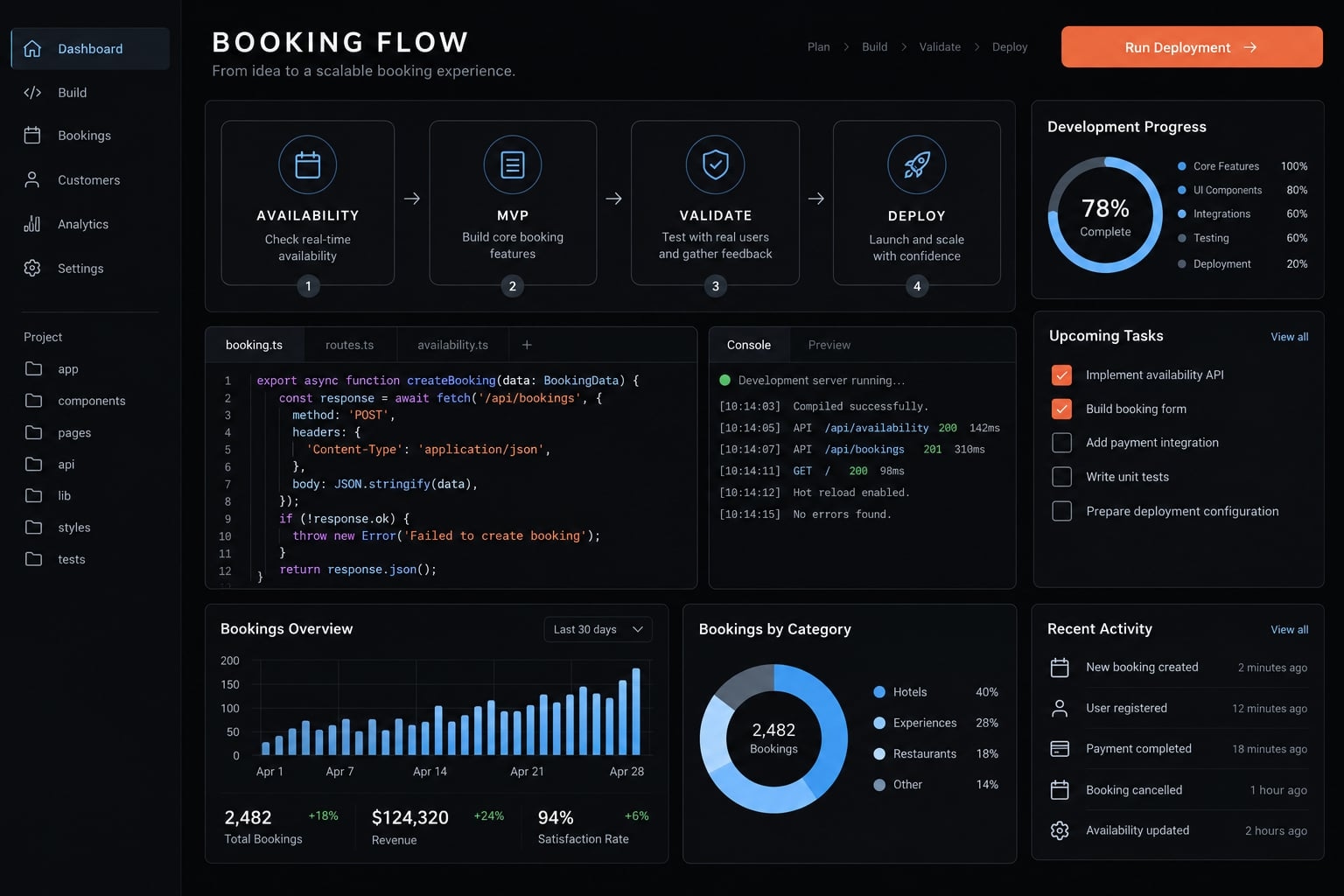
What you will build?
Your booking app MVP serves one consultant and guests booking 30-minute discovery sessions.
Core host capabilities
- Configure an event title, duration, description, and public slug.
- Set weekly hours and a named host time zone.
- View confirmed bookings through a protected dashboard.
Core guest capabilities
- Open a public booking page without creating an account.
- Choose a date and available time slots.
- Submit a name and email address.
- Receive on-screen booking confirmation; email is optional.
A reservation must persist after a refresh and show up in the database. A confirmation animation proves nothing on its own.
Payments, team scheduling, CRM (customer relationship management) connections, and external calendar synchronization are excluded. Availability reflects this app’s rules and reservations, plus manually blocked periods if added. It does not detect meetings in Google Calendar.
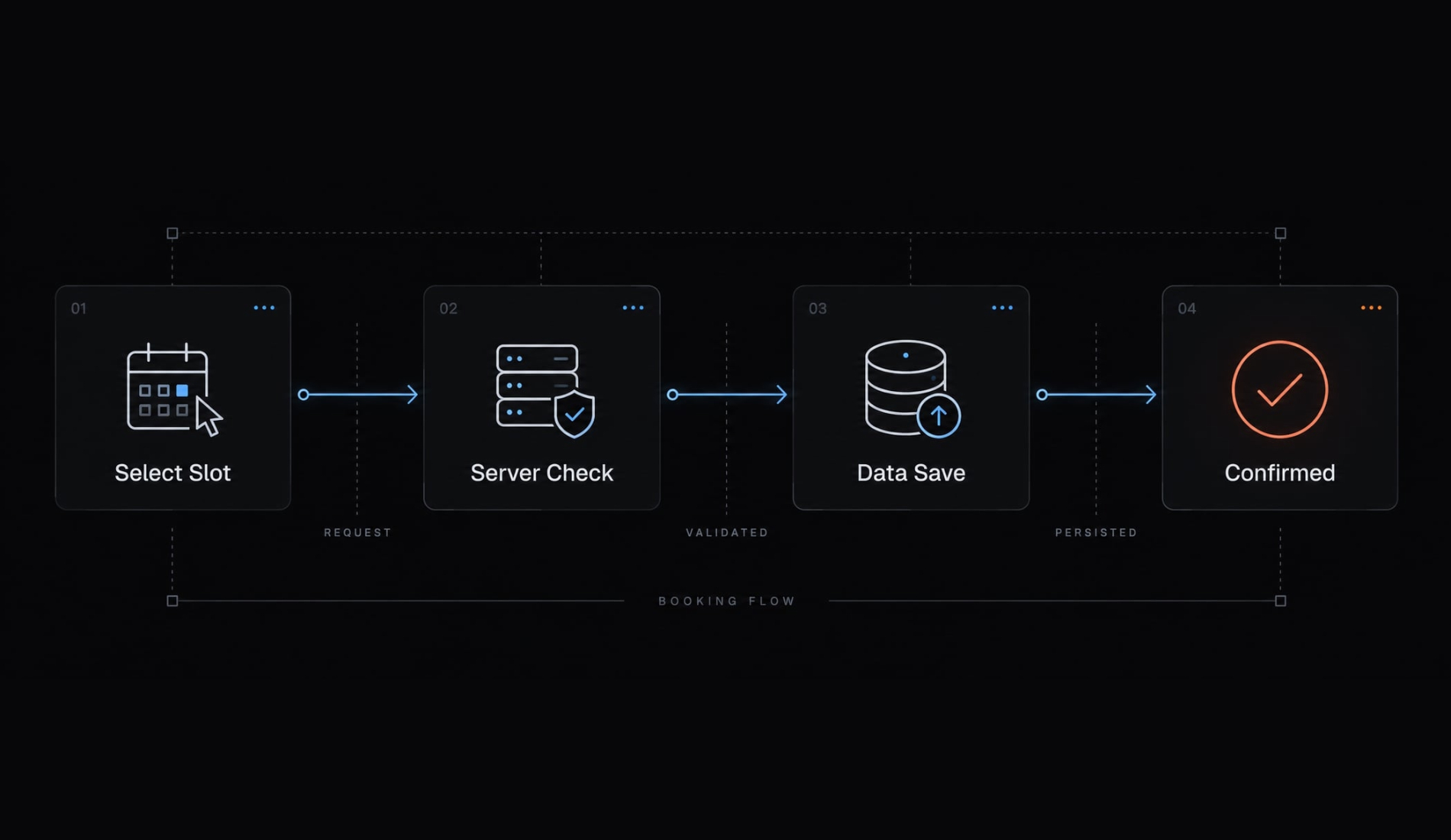
The minimum functional booking flow
- Load event.
- Choose date.
- Request slots.
- Select slot.
- Submit details.
- Revalidate.
- Save.
- Confirm.
Define the booking app MVP before prompting the AI
Define scheduling behavior before generating screens. “Build a scheduling app” leaves the agent guessing about availability, permissions, and what counts as a completed reservation.
Build now, add next, add later
Priority | Features | Reason |
|---|---|---|
Build now | Event types, weekly hours, public flow, server validation, database storage, confirmation, protected deployed dashboard | Establish a functional, controlled booking path. |
Add next | Email, cancellation, rescheduling, blocked dates | Improve operations after integrity is verified. |
Add later | Payments, teams, CRM, calendar sync, meeting polls, video links | Avoid unrelated integration complexity. |
A local, isolated MVP can use a seeded host. A publicly accessible dashboard requires authentication and authorization-checking whether the current user may perform a specific action. Guest accounts remain unnecessary.
Define the booking rules explicitly
Use these illustrative product rules:
- Duration: 30 minutes; starts every 30 minutes.
- Minimum notice: Two hours.
- Buffers: Zero minutes before; 10 minutes after.
- Booking horizon: 30 days.
- Recurring availability: Weekdays, 09:00–17:00 in
America/New_York. - Guest display: Detected zone, visibly labeled and changeable.
- Cancellation rules: No guest self-service initially; publish a contact instruction.
- Conflict scope: All event types belonging to the host.
Specify that the session must fit within working hours; its trailing buffer may extend beyond closing but still blocks another appointment. These choices are editable, not industry benchmarks.
Double-booking prevention must follow the host’s occupied interval, including buffers-not merely the selected event type.
Use a simple definition of done
The MVP succeeds when a genuinely available slot produces exactly one saved booking, conflicting requests are rejected, and confirmation reflects that saved record.
This definition turns an attractive prototype into a testable implementation target.
Choose a simple vibe coding stack
Choose tools you can inspect and debug. One coding environment, one application, and one relational database are enough.
Recommended MVP stack
Layer | Default | Role |
|---|---|---|
AI coding environment | Plan, edit, and run approved checks; Codex, Cursor, or GitHub Copilot are alternatives. | |
Web application | Next.js | Public interface and server-side booking logic. |
Database | Supabase PostgreSQL | Relational storage and integrity constraints. |
Authentication | Supabase Auth | Host sign-in; combine with authorization policies. |
Optional email | Resend | Notifications after persistence. |
Deployment | Vercel | Run the application with server-side configuration. |
Later integrations | None initially | Keep external calendars and payments outside scope. |
These coding tools have different execution and approval models. They are alternatives, not a required combined toolchain.
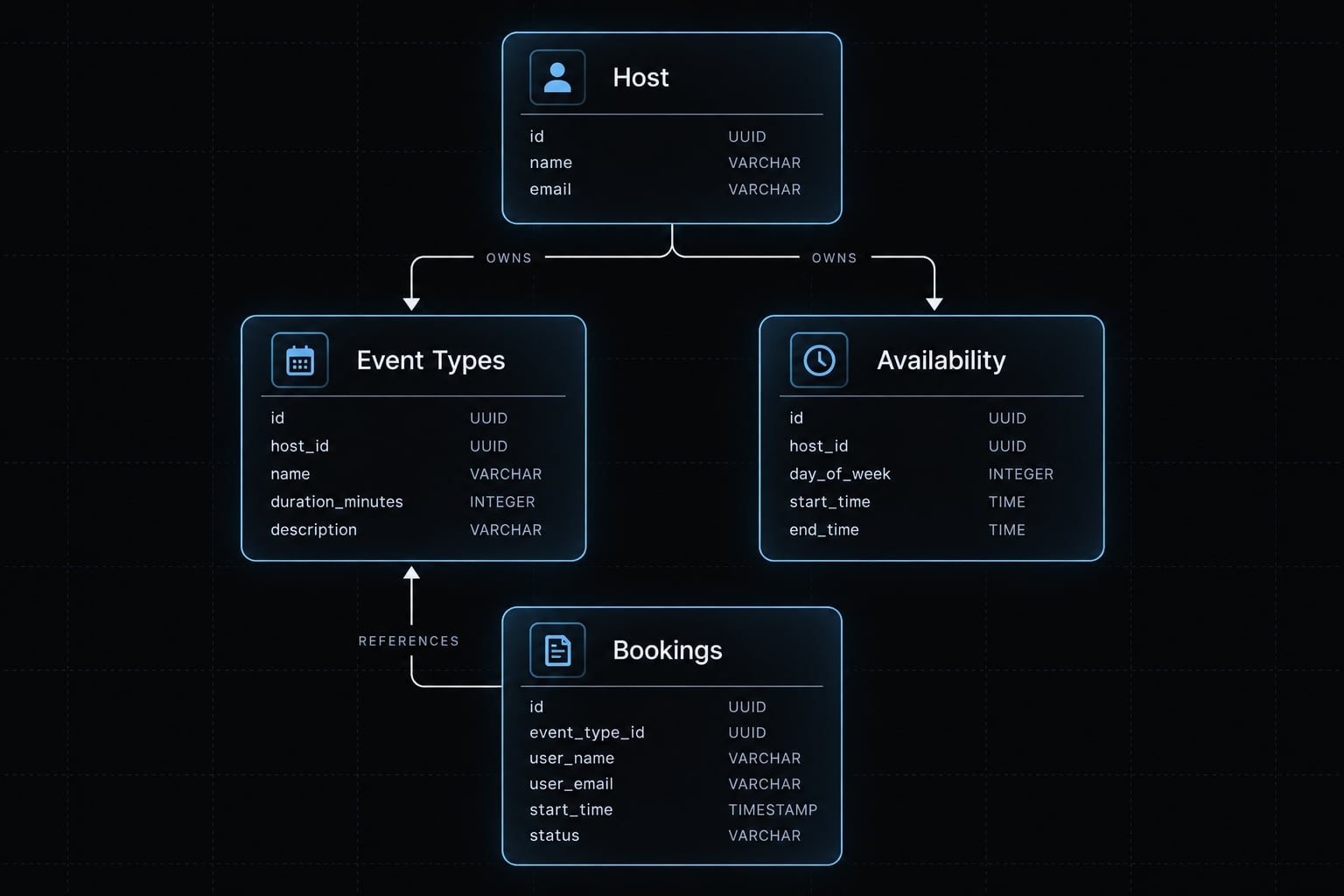
Minimum data model
Keep these entities explicit:
- Host/user: identity and IANA time zone, such as
America/New_York. - Event type: host ownership, slug, duration, description, active status.
- Availability rule: local weekday, start/end times, associated host zone.
- Booking: host/event identifiers, minimal guest details, absolute start/end instants, and
confirmedorcanceledstatus. - Blocked period: optional host-owned occupied interval.
Store booking instants as time-zone-aware timestamps. Weekly hours remain local rules, not permanent UTC offsets.
Stack selection rule
Prefer documented tools with local tests and migrations-tracked database-structure changes-you can debug without blindly trusting generated code. Consult Next.js environment-variable guidance and Supabase authentication and row-level security documentation.
Use a structured master prompt and staged agent workflow
A booking app prompt should function as a product brief. Require a reviewed plan before implementation and evidence before advancing.
Required elements of the master prompt
- Goal: Single-host consultations.
- Users: Host and account-free guests.
- Flow: Selection through confirmation.
- Data model: Ownership and timestamps.
- Rules: Availability and conflicts.
- Stack: Application and database.
- Error handling: Conflicts and retries.
- Security: Access and secrets.
- Acceptance criteria: Observable tests.
- Exclusions: Deferred integrations.
Build a single-host B2B consultation app using Next.js, Supabase PostgreSQL/Auth, and Vercel. Guests book without accounts; authenticate the host and authorize every host action.Editable rules: 30-minute sessions, 30-minute increments, two-hour notice, zero-minute pre-buffer, 10-minute post-buffer, 30-day horizon; weekdays 09:00–17:00 America/New_York. Sessions must fit working hours; trailing buffers may extend beyond closing.Store weekly hours as host-local rules and booking start/end as absolute time-zone-aware timestamps. Show the guest’s labeled zone. Revalidate server-side using stored event rules. Prevent host-wide interval overlaps, including buffers, through reviewed concurrency-safe persistence. Make repeated submissions idempotent.Exclude payments, teams, CRM, external calendars, email, and guest cancellation initially. Confirm only saved bookings.Inspect the repository and present a plan before editing. Implement one stage at a time. Test persistence, concurrency, authorization, tampering, retries, and daylight saving boundaries. Report changed files, migrations, tests actually executed, failures, and unresolved risks. Stop for missing credentials or ambiguous requirements.
Agent control rules
- Inspect first; approve the plan.
- Change one stage at a time.
- Explain every migration.
- Keep secrets outside client code and prompts.
- Request approval for destructive or architectural changes.
- Report executed tests separately from generated tests.
Idempotency means retrying the same logical request does not create another booking. A generated test file is not evidence that the test passed.
Recommended multi-stage prompt sequence
- Inspect and plan.
- Create schema.
- Configure host access.
- Build availability.
- Build guest flow.
- Implement persistence.
- Add confirmation.
- Run adversarial tests.
- Review changes.
- Deploy and verify.
These ten stages map to the eight steps below; testing and review receive separate agent passes. AgentKit’s reusable skills and coordinated workflows can optionally organize these stages across AI coding engines, without replacing human technical oversight.
Build the booking app step by step
To vibe code a booking app reliably with AI, verify each stage before committing. If verification fails, fix that stage and rerun affected checks before continuing.
Step 1 - Ask the agent to create an Implementation plan
- Build: Ask the agent to inspect the repository or propose a minimal scaffold. Confirm database access, environment configuration, coding tools, and a clean version-control baseline. Require ordered tasks and explicit assumptions.
- Verify: The saved plan covers schema, server logic, interface, and tests. Record the initial commit before implementation begins.
Step 2 - Create the database schema
- Build: Request migrations defining ownership, required fields, positive durations, and
confirmed/canceledstatuses. Separate local availability from absolute booking instants. Establish host-wide conflict protection now. - Verify: Apply migrations to the intended database. Use a seed operation or test to persist sample records and reject invalid ones. Confirm that records survive a fresh connection.
Step 3 - Build event types and weekly availability
- Build: Ask for a protected dashboard with title, description, duration, slug, active status, host zone, and weekly hours. Keep settings simple and validated.
- Verify: Saved settings survive refresh. Invalid ranges fail clearly. Inactive events reject reservations. Signed-out users and unrelated authenticated users cannot read or modify host data.
Step 4 - Generate available time slots
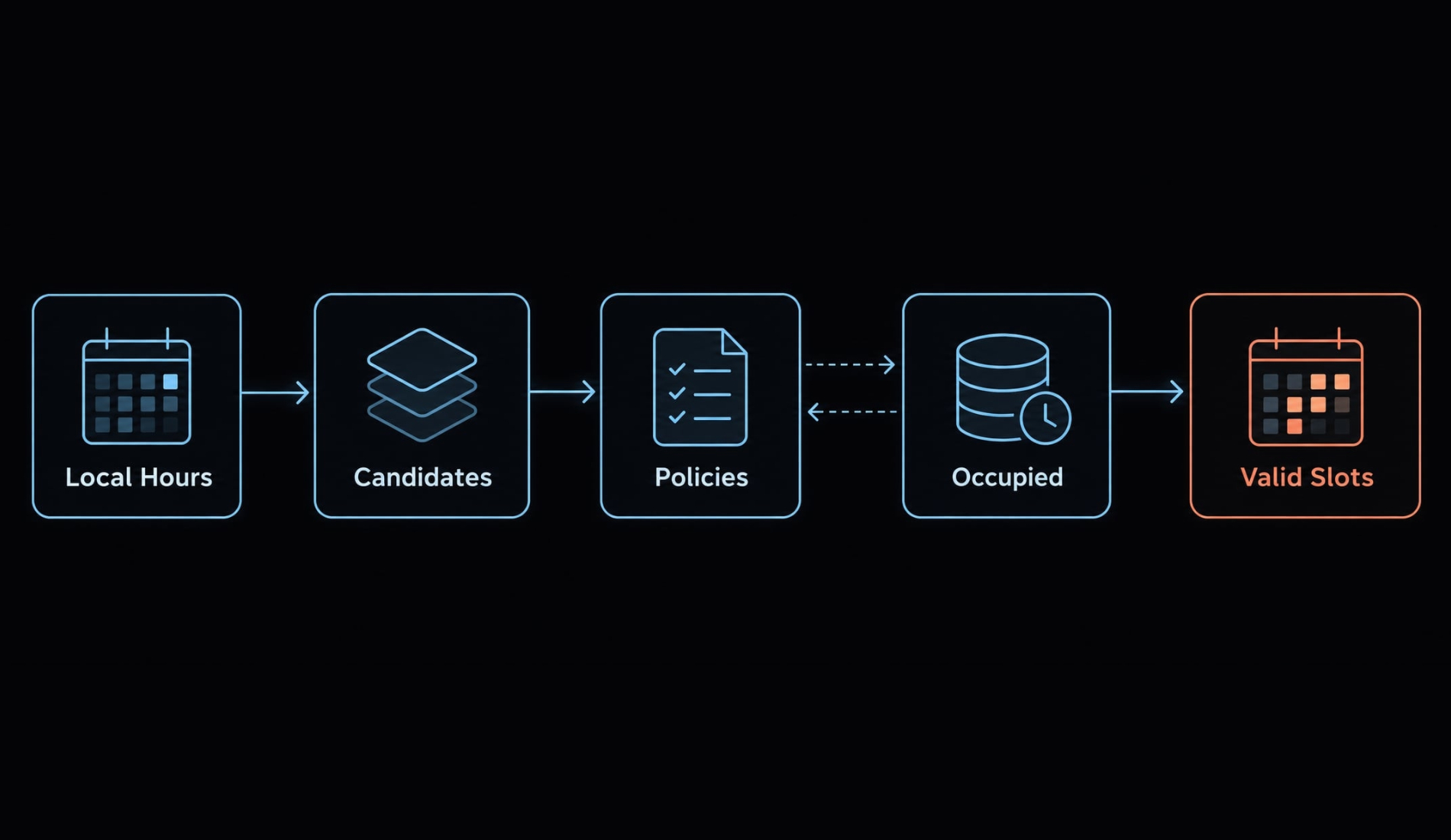
Build: Request deterministic logic: the same rules and inputs produce the same availability result.
The availability calculation should:
- Read host-local hours.
- Resolve them for the requested interval.
- Generate candidate appointments.
- Apply duration, increments, notice, and horizon.
- Remove booking, buffer, and blocked-period conflicts.
- Return valid absolute timestamps.
A guest’s selected date may span two host dates; inspect both when necessary.
Verify: No past, out-of-hours, overlapping, or buffer-conflicting slots appear.
Step 5 - Build the public booking flow
- Build: Load the public event, label the viewing zone, and collect only name and email. Include loading, unavailable-slot, and submission-error states. Submit the selected slot’s stable timestamp, not a reparsed display label.
- Verify: Complete the flow in a private browser. Changing display zones changes the representation, not the underlying appointment instant.
Step 6 - Validate and save the booking on the server
Build: Ask for server-side validation that derives duration and host ownership from stored event data. Recheck active status, guest input, availability rules, notice, horizon, and conflicts.
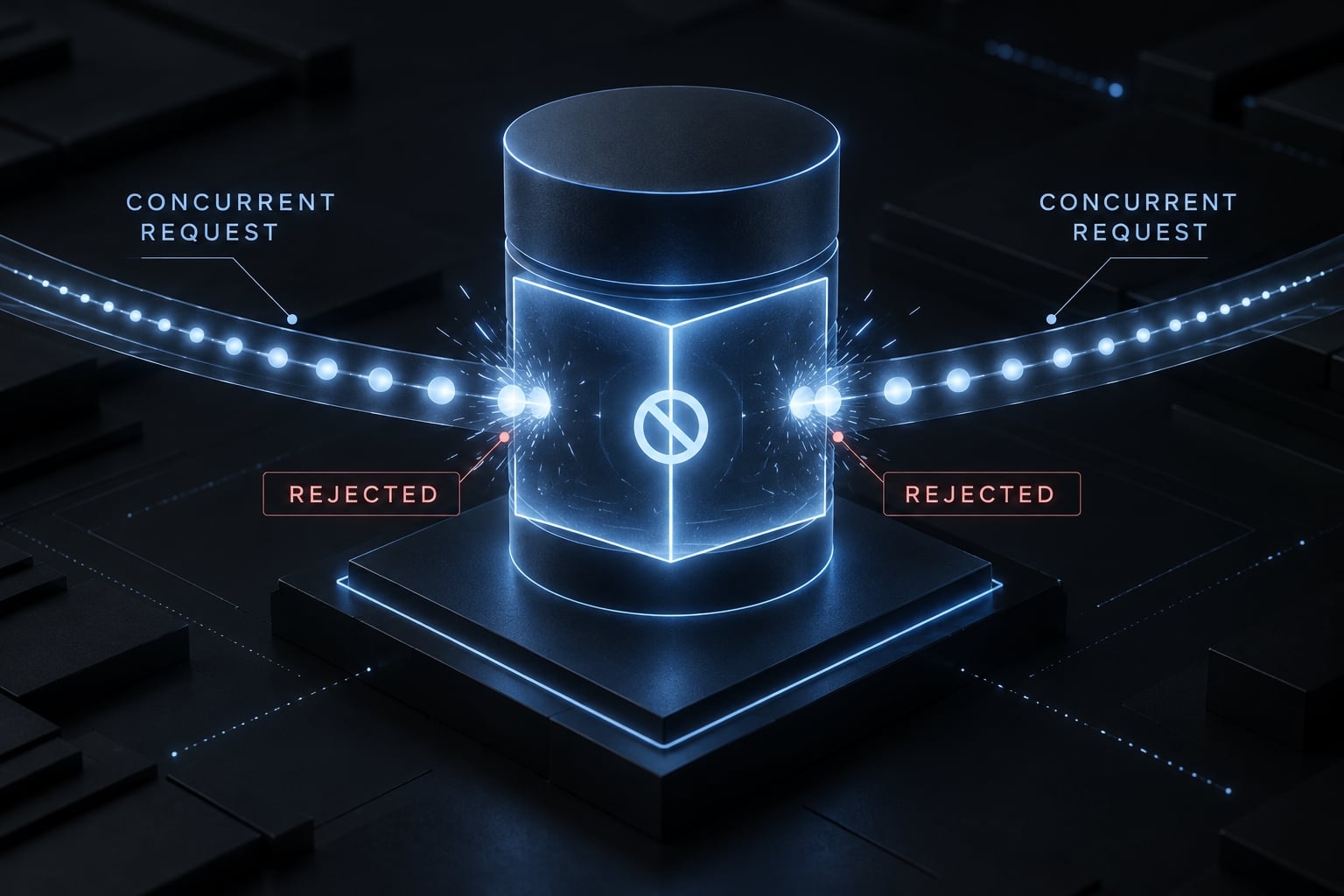
Persist through a reviewed database constraint or correctly designed concurrency-control strategy. For PostgreSQL, an exclusion constraint can protect overlapping host intervals when configured to include occupied buffers and relevant statuses.
A plain “check, then insert” sequence can still fail inside ordinary transactions. Technical review must verify the chosen approach.
Add a request identifier for idempotency and return the existing result for a valid retry. Reject reuse with different booking details.
Disabling a booking button does not prevent concurrent bookings.
Verify: Test a stale slot, simultaneous requests, cross-event overlaps, manipulated times/durations, and a retry after timeout. Inspect persisted records: conflicting attempts must not create conflicting reservations.
Step 7 - Add Cconfirmation and basic booking management
- Build: Render confirmation from the saved record. If email is added, send it separately. If cancellation is added, require authorized access or a scoped, unguessable management token with expiry or invalidation rules.
- Verify: Confirmation matches storage. Email failure does not recreate the reservation. Enabled cancellation changes status and releases availability according to policy.
Step 8 - Deploy and run a production-like smoke test
- Build: Configure secrets, apply reviewed migrations, and use synthetic guest data. Keep unnecessary personal information out of logs.
- Verify: Book from an external browser, inspect persistence, test protected access, and compare local/deployed time behavior. Preserve test evidence and unresolved issues. Proceed to the production gate below-not an automatic launch declaration.
Prevent double bookings, time-zone errors and other common failures
Test adverse conditions, not just the successful path. Correct-looking screens do not establish correct storage or concurrency behavior.
Time-zone handling rules
Store absolute booking instants while retaining the named host zone and local recurring rules. Label selection and confirmation zones. Test cross-midnight displays and daylight saving time (DST) transitions.
Define how nonexistent spring-forward times and repeated fall-back times behave. Skipping nonexistent times and explicitly disambiguating repeated ones are workable policies; silently guessing is not. UTC storage alone cannot make these choices.
The IANA Time Zone Database and your date/time library’s documentation provide the relevant reference behavior.
Double-booking protection
Double-booking protection rejects conflicting occupied intervals across the entire host schedule. It combines server business-rule validation with concurrency-safe persistence.
A race condition occurs when competing requests act on state that can change before either finishes. PostgreSQL documentation on range types, exclusion constraints, and transaction isolation explains why a basic transaction is insufficient by itself.
Booking app acceptance test matrix
These are required tests, not reported execution results.
Test scenario | Expected result | Failure signal |
|---|---|---|
Valid booking | One persistent record; matching confirmation | Missing or duplicate record |
Concurrent or overlapping requests | Only nonconflicting reservations succeed | Host-wide overlap survives |
Alternate zone, midnight, DST | Same instant; defined transition behavior | Shifted or ambiguous appointment |
Past or out-of-policy time | Server rejects request | Invalid booking saved |
Missing or manipulated fields | Validation rejects invalid input | Client controls trusted duration |
Inactive event | Booking rejected | Reservation accepted |
Email failure/retry, if enabled | Existing booking remains unique | Notification creates duplicate |
Unauthorized dashboard/API action | Read/write denied | Data disclosed or changed |
Common agent-generated problems
- Stale slot → Revalidate on submission; return a conflict and refresh availability.
- Browser-only checks → Repeat validation on the server.
- Inconsistent date parsing → Pass absolute timestamps; format only for display.
- Missing deployed schema → Apply and verify tracked migrations.
- Exposed secrets → Revoke, rotate, and remove them from client-accessible code.
For each correction, rerun the original failure and inspect storage-not merely the message shown. OWASP’s Authorization, Input Validation, and Secrets Management Cheat Sheets provide review guidance.
Public scheduling URLs normally remain reusable. Management-token security and duplicate-submission handling are separate concerns.
Know when the booking app is ready for real users
An AI-built prototype is not automatically production-ready. Accept real bookings only after integrity, access control, concurrency, and time-zone behavior pass observable tests in the deployed environment. You also need restricted personal-data access, monitoring, recovery procedures, and a named person responsible when something fails. A successful demo proves only one path.
Demo-ready vs. production-ready
Area | Demo-ready | Production baseline |
|---|---|---|
Booking integrity | Happy path | Conflicts and retries tested |
Authentication/authorization | Isolated seeded host | Protected reads and writes |
Automated tests | Basic checks | Regression and failure coverage |
Secrets | Local configuration | Restricted, reviewed storage |
Privacy/retention | Synthetic records | Minimal collection; deletion policy |
Monitoring/recovery | Manual inspection | Alerts and tested restore |
Optional integrations | Absent: not applicable | If enabled: failure/retry tests |
Deployment/rollback | Manual launch | Repeatable release and rollback |
Names and email addresses are personal data. Avoid unnecessary free-text fields, restrict records, and add basic rate limits and abuse controls to public endpoints.
Production gate
Require passing integrity, authorization, concurrency, and time-zone tests; restricted data access; secrets review; monitoring; tested recovery; rollback planning; and a named incident owner. Human oversight remains necessary.
This production readiness baseline is not compliance certification. Sensitive or regulated booking contexts require additional review.
Final booking app checklist
Use these observable checks to support review-not replace it.
Scope and functionality
- One host and account-free guests are explicitly supported.
- Advanced integrations remain outside the implemented scope.
- Event settings and weekly availability survive refresh.
- Guests complete the public booking flow.
- Confirmation displays the saved reservation’s details.
Booking integrity
- Absolute timestamps coexist with named-zone availability rules.
- Guest displays pass midnight and DST fixtures.
- The server revalidates every booking submission.
- Host-wide concurrency and interval-overlap tests pass.
- Cancellation behavior is tested or clearly unavailable.
Security and deployment
- Unauthorized host reads and writes are denied.
- Secrets remain outside client-accessible code.
- Invalid direct requests fail server validation.
- Required migrations exist in the deployed database.
- Error logs omit unnecessary personal data.
- Recovery is tested and rollback instructions exist.
- External deployed-flow tests confirm persistence and access controls.
Keep the completed checklist beside the build log, including actual test results and unresolved issues.
Frequently asked questions
What does it mean to "vibe code" a booking app?
To vibe code a booking app means using AI coding agents to generate a functional scheduling system through structured, natural-language prompts. Unlike standard prototypes, a production-ready vibe-coded app requires precise business rules, server-side data persistence, and rigorous testing to manage availability and prevent booking conflicts.
How do I prevent double bookings when using AI-generated code?
Double bookings are prevented by implementing database-level transaction controls and server-side revalidation. You must instruct your AI agent to use atomic operations-such as PostgreSQL exclusion constraints or database locks-to ensure that even when multiple users request the same time slot simultaneously, only one reservation is successfully persisted.
Can an AI coding agent build a complete booking app without manual input?
No. While agents can scaffold the interface and logic quickly, they cannot automatically verify business constraints or security requirements. An engineer must provide a clear MVP scope, define scheduling rules, review generated database migrations, and perform manual acceptance testing to ensure the system is reliable for real users.
How should I handle time zones in a vibe-coded scheduling app?
You must store all booking records as absolute, time-zone-aware timestamps in your database. Instruct your agent to associate availability rules with a specific IANA time zone (e.g., America/New_York) rather than simple UTC offsets. This ensures that calculations remain accurate even during daylight saving transitions.
Is the code generated by AI safe for handling payments?
AI-generated code is a starting point, not a security certification. For payment handling, you must manually review the code to ensure that sensitive data is not exposed, API keys are properly managed via environment variables, and webhooks from payment providers are validated correctly. Always treat payment logic as a high-stakes, human-reviewed component.
What are the main limitations of vibe coding for booking apps?
The primary limitations include handling complex asynchronous integrations, managing edge cases in time-zone math, and ensuring data integrity under high concurrency. AI agents often optimize for the "happy path"; therefore, you must explicitly prompt for failure conditions, such as connection timeouts or invalid input attempts, to ensure a robust system.
Read more:
- Vibe coding documentation: A guide for AI-assisted projects
- Vibe coding benefits: Uses, risks and best practices
- How to vibe code a RAG chatbot: A practical step-by-step guide
Conclusion
To vibe code a booking app reliably, follow a narrow sequence: define scope, make scheduling rules explicit, prompt in stages, and verify each implementation. The valuable result is not a polished calendar. It is a reservation system that persists valid bookings and rejects conflicting ones.
Keep the first release limited to one host and a controlled booking flow. Add email, cancellation, and integrations only after the foundation is tested. Your AI coding workflow can accelerate implementation, but human review remains necessary before customer appointments depend on it.
Save this project brief, master prompt, staged prompt sequence, and pre-launch checklist as your reusable booking-app prompt pack.