
Repeatable AI coding workflow: A practical framework for speed, quality, and control
While AI accelerates coding, ad-hoc prompting often leads to inconsistent output, repeated setup, and high review overhead. The missing piece isn't another tool - it's a repeatable operating model. This guide explains how to transition to a lightweight workflow (Plan → Context → Execute → Verify → Capture → Reuse) that ensures consistency, reduces context loss, and keeps developers firmly in control.
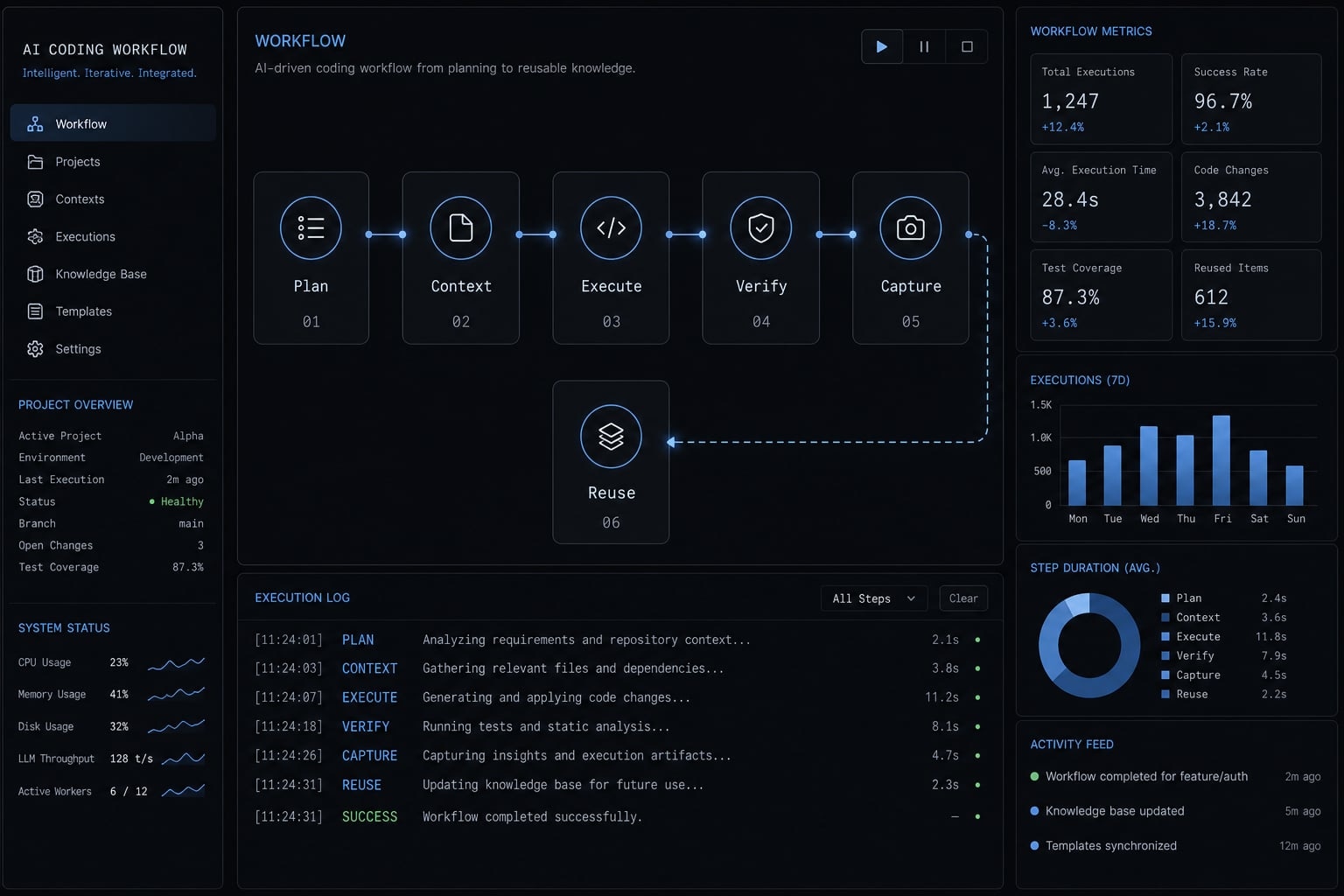
What makes an AI coding workflow truly repeatable?
A repeatable AI coding workflow is a structured AI coding process with defined inputs, scoped execution, quality checks, and reusable outputs. Its purpose is not just faster generation. It is to create stable delivery quality, lower review overhead, and make useful patterns repeatable across similar tasks.
A repeatable AI coding workflow is different from simply using Claude Code, Codex, or GitHub Copilot frequently. Many teams use AI every day and still reset the same context, rewrite the same instructions, and rely on personal memory to get acceptable results. That is activity, not operational repeatability.
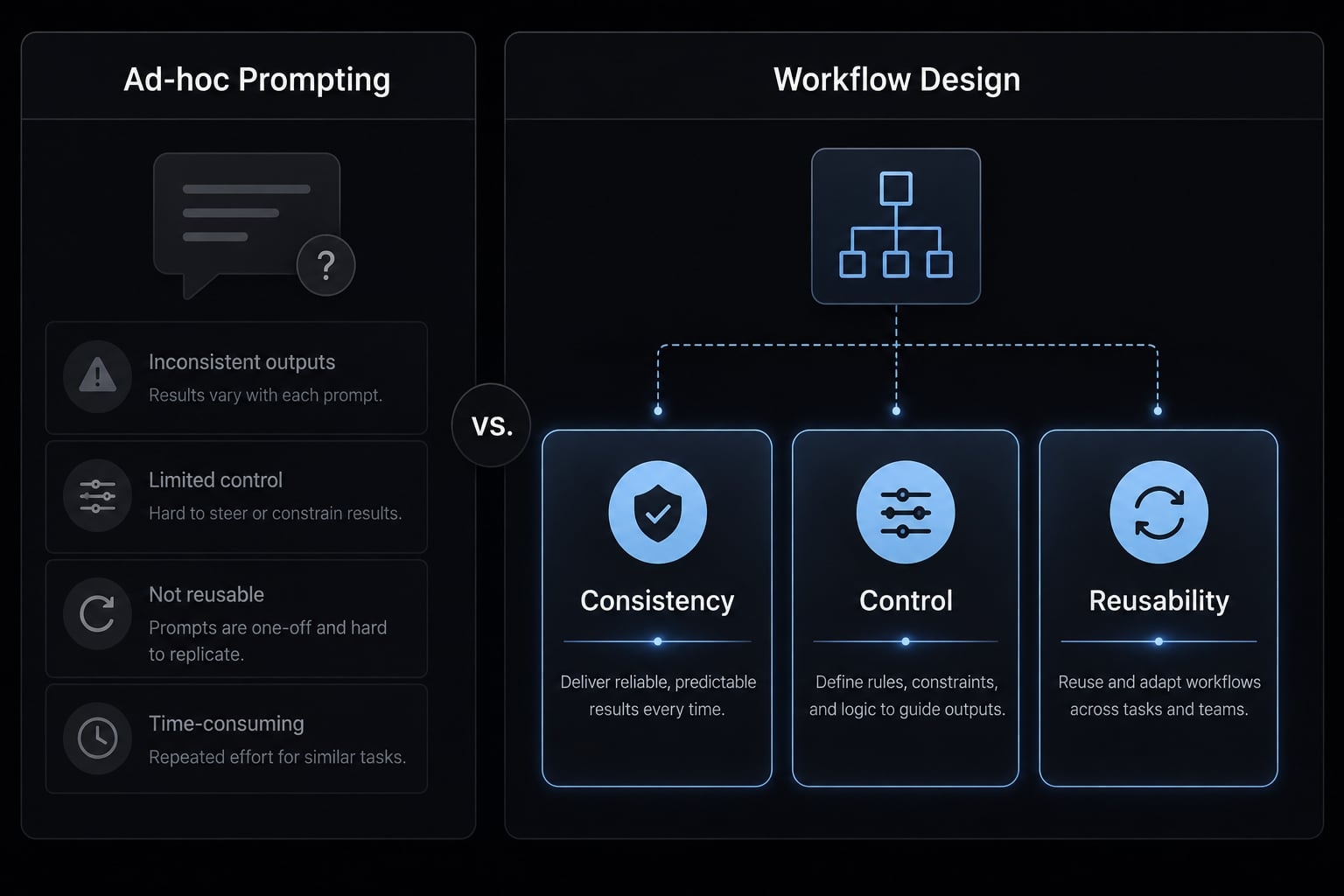
A reusable AI development workflow has three qualities:
- Consistency: Similar task types produce reasonably stable output quality.
- Control: Developers keep decision authority, review rights, and final approval.
- Reusability: What works once can be saved and reused for future tasks.
Repeatable does not mean autonomous. It means the workflow is structured enough that useful outcomes do not depend on one person remembering the right prompt at the right time.
Ad-hoc prompting vs. workflow design
- Ad-hoc prompting relies on memory, improvisation, and one-off context setup.
- One strong prompt can help on a single task, but it does not create a repeatable system.
- Workflow design defines the task brief, context rules, review steps, and outputs in advance.
- Ad-hoc work tends to create variable quality, oversized changes, and unclear reasoning.
- Workflow design creates repeatability because each task follows the same operating shape.
The three qualities of repeatability
- Consistency: A feature task, bug diagnosis, or test-writing task should start from a similar structure each time.
- Control: The agent proposes; the developer evaluates, verifies, and approves.
- Reusability: Good task briefs, review rubrics, and patterns become assets instead of disappearing in chat history.
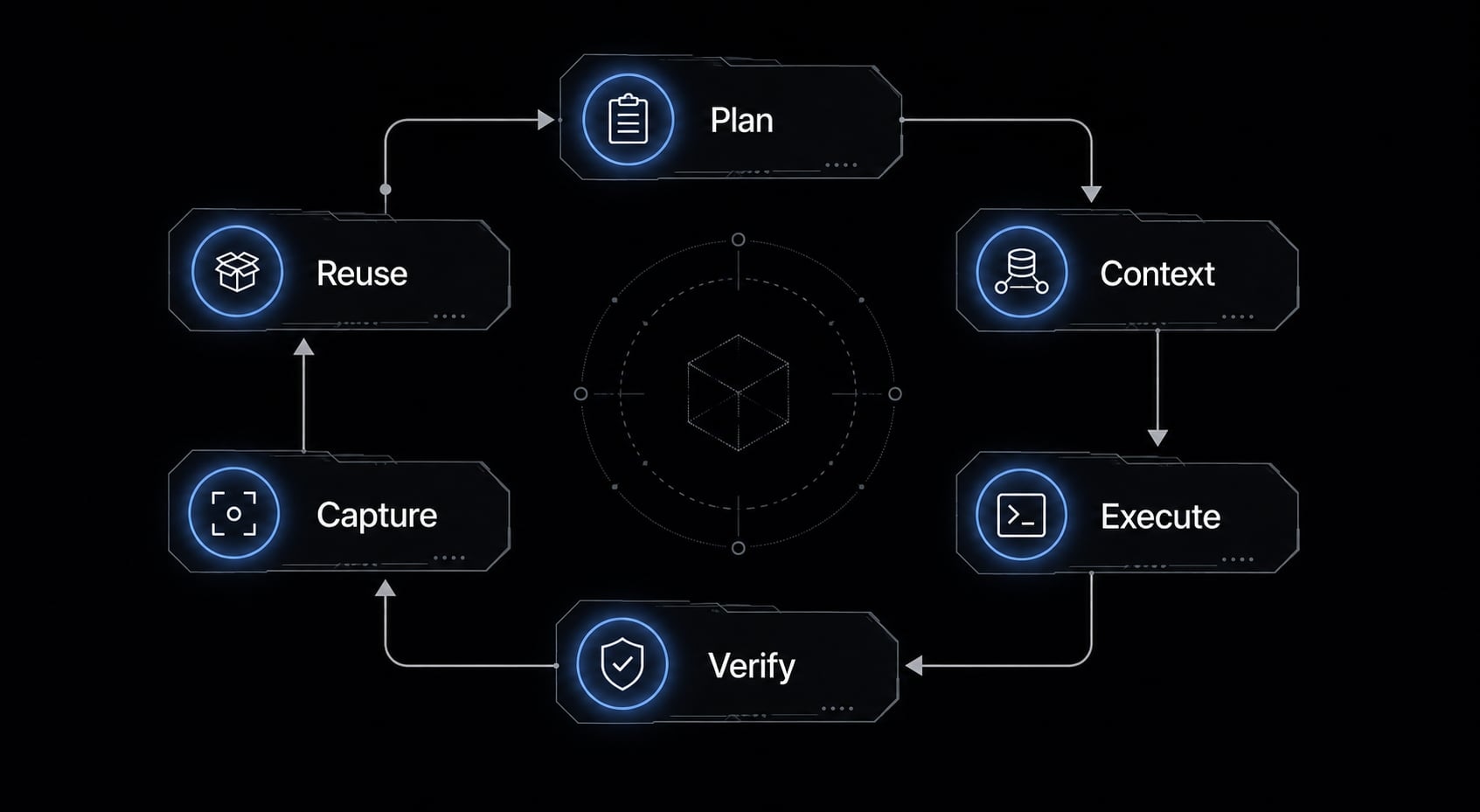
A simple framework: Plan → Context → Execute → Verify → Capture → Reuse
A strong AI workflow framework works because it reduces ambiguity before generation and reduces cleanup after generation. Instead of asking the agent to “just build it,” you give it a repeatable coding process with clear boundaries, relevant context, and quality gates. That improves reproducibility without making the workflow heavy.
- Plan
- Context
- Execute
- Verify
- Capture
- Reuse
Plan
Start by defining the work before generating code. This is where many inconsistent outputs begin.
Use a short checklist:
- Define the goal in plain English.
- Create a scoped task.
- Write acceptance criteria.
- Note constraints, dependencies, and non-goals.
- State what should not be changed.
This prevents:
- Vague output.
- Oversized diffs.
- Poor alignment with the actual task.
A short plan does more for output quality than adding another paragraph of prompting. If the task is unclear to you, it will usually be unclear to the model.
Context
Relevant context matters more than clever wording. In practice, the biggest quality gap often comes from weak context window management, not weak prompting.
Provide:
- The relevant files.
- Key parts of the repo structure.
- Existing docs or README sections.
- Coding conventions.
- Architectural constraints.
- Related tests, interfaces, or patterns already used in the codebase.
This prevents:
- Context drift.
- Bad assumptions.
- Irrelevant changes across the codebase.
In a repo-native or CLI-based environment, this step is easier to repeat because the agent works close to real files instead of detached chat fragments.
Execute
Execution should be broken into smaller units. A repeatable coding process is usually modular, not monolithic.
Use task decomposition such as:
- One feature slice at a time.
- One diagnosis step before one patch.
- One refactor segment at a time.
- One test-writing task before broader implementation.
This prevents:
- Unstable broad output.
- Messy implementation.
- Hard-to-review diffs.
If a request touches routing, data access, UI, tests, and docs all at once, quality usually drops. Smaller steps improve reviewability and make failures easier to isolate.
Verify
Verification is where speed becomes trustworthy. Without checks, fast generation simply moves effort into debugging and rollback.
Use a checklist:
- Review against the original acceptance criteria.
- Run tests.
- Run linting.
- Run type checks.
- Inspect changed files manually.
- Require human approval before merge.
This prevents:
- Silent regressions.
- Incorrect assumptions.
- Low-confidence merges.
A faster workflow that increases regressions is not an improvement. Automated checks are essential, but they do not replace engineering judgment.
Capture
Most teams learn useful patterns and then lose them. That creates repeated rediscovery and inconsistent execution.
Save:
- Task briefs that worked well.
- Prompt patterns tied to task types.
- Review rubrics.
- Diagnosis steps.
- Decision logic for recurring work.
- Docs notes for future contributors.
These are reusable workflow assets. This is also where workflow modularization begins. You are identifying repeated units of work and preserving them in a form others can use.
This prevents:
- Overreliance on memory.
- Output inconsistency.
- Repeated setup effort.
Reuse
Reuse is the shift from experimentation to operations. Once a pattern proves useful, convert it into reusable task definitions, templates, scripts, or lightweight skills.
That could mean:
- A standard feature brief template.
- A bug diagnosis checklist.
- A docs update pattern.
- A reusable review workflow.
- A repeatable test-generation sequence.
This improves reproducibility because the same kind of task no longer starts from zero every time. Tools are execution layers, not substitutes for process discipline.
How to keep the workflow simple without creating tool sprawl
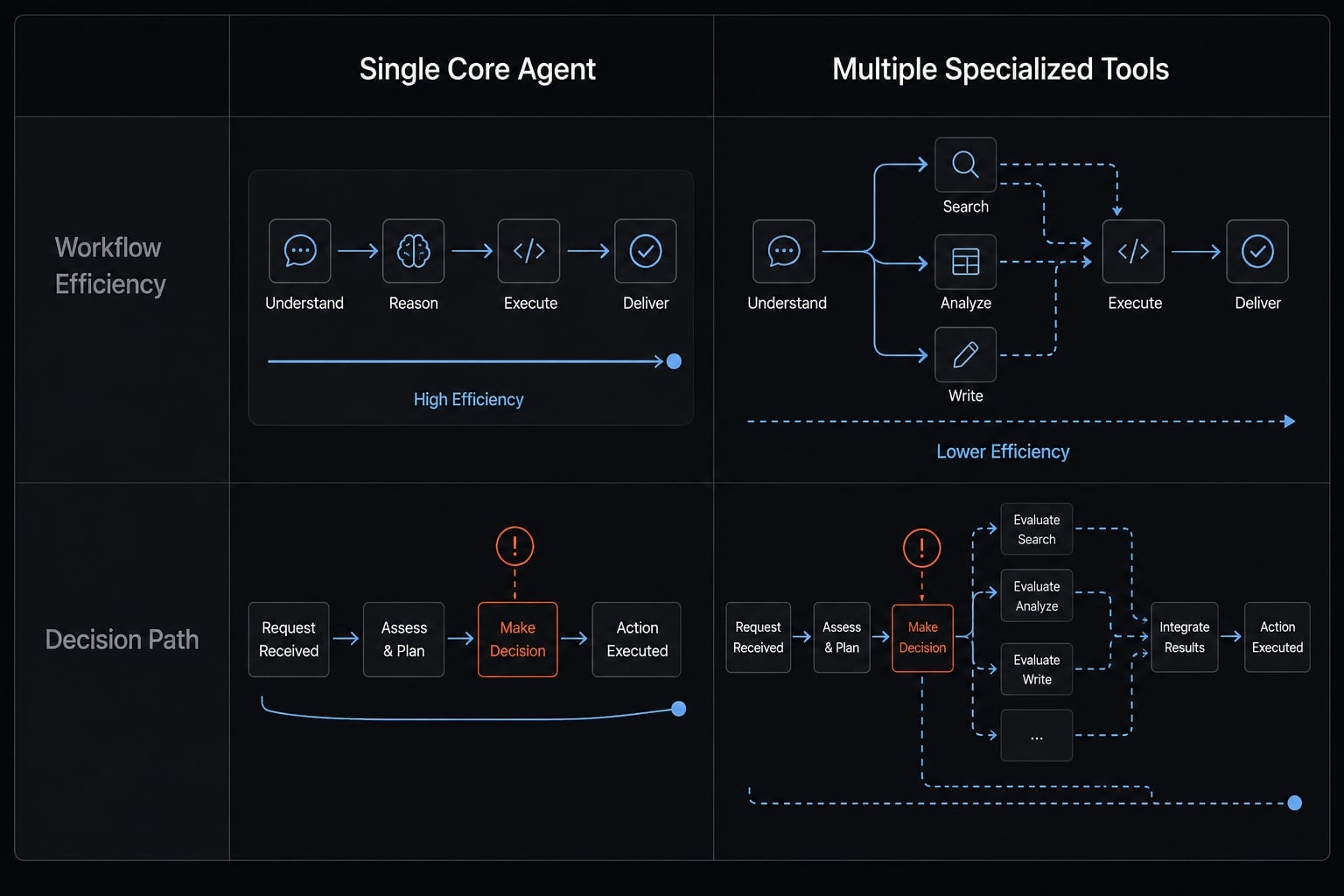
The common mistake is collecting AI tools before defining the recurring workflow. That leads to tool sprawl, more switching, and more coordination overhead. The goal is not to build the most advanced stack. It is to make repeated work easier to repeat.
Start with one main work layer
A CLI-first workflow or repo-native setup is usually easier to operationalize than a chat-first setup. When the agent works close to the codebase, it has better access to files, tests, and conventions. That reduces context leakage.
This is why many developers gradually move from scattered chat usage toward one primary work layer. A Claude Code workflow, a Codex-based repo workflow, or a structured GitHub Copilot flow can all work if they keep the task close to the actual code and review loop.
When people ask about Codex vs Claude Code, the more useful question is usually not feature comparison. It is: which layer best supports your recurring workflow with the least friction?
Add tools only when they solve a recurring workflow
Add automation, MCP integrations, scripts, or subagents only when a recurring workflow clearly justifies them.
Good reasons to add another layer:
- The same task happens frequently.
- Handoffs repeat across contributors.
- External system access is repeatedly needed.
- The extra layer reduces manual coordination.
Bad reasons:
- Curiosity alone.
- Feature abundance.
- Fear of missing out.
- Trying to solve weak process with more tools.
Cross-tool orchestration should reduce effort, not create another system to manage.
Minimum viable workflow vs. overengineered stack
Setup | Minimum viable workflow | Overengineered stack |
|---|---|---|
Solo builder | One main coding surface, one review/test checklist, one reusable task brief template. | Multiple agents, several integrations, fragmented notes, no standard review flow. |
Small team | One main coding layer, shared templates, review rules, light automation for repeated tasks. | Too many tools, inconsistent setup by person, unclear ownership, duplicated workflow logic. |
Decision area | One main tool is enough | Add tools when |
|---|---|---|
Task frequency | Work is repetitive but manageable in one place. | A specific task repeats often enough to justify automation. |
Handoffs | Few contributors, limited coordination. | Multiple contributors need shared structure. |
Review complexity | Manual review remains lightweight. | Repeated checks or multi-step workflows need support. |
Integration needs | Most work stays inside the repo. | External systems are frequently involved. |
Repeated workflows | Templates solve most needs. | Reuse requires packaged orchestration. |
The guardrails that protect code quality and developer control
AI-assisted coding introduces real risks: regressions, bloated diffs, context drift, undocumented changes, and false confidence from plausible-looking output. That is why code quality guardrails matter. A repeatable workflow is only useful if it protects developer control and preserves engineering quality.
Guardrail 1 - Plan before generation
Use spec before code as a habit.
Checklist:
- Write a short task spec.
- Define boundaries clearly.
- Create a scoped task.
- List acceptance criteria.
- Name non-goals.
This keeps the task narrow enough to reduce drift and makes later review much easier.
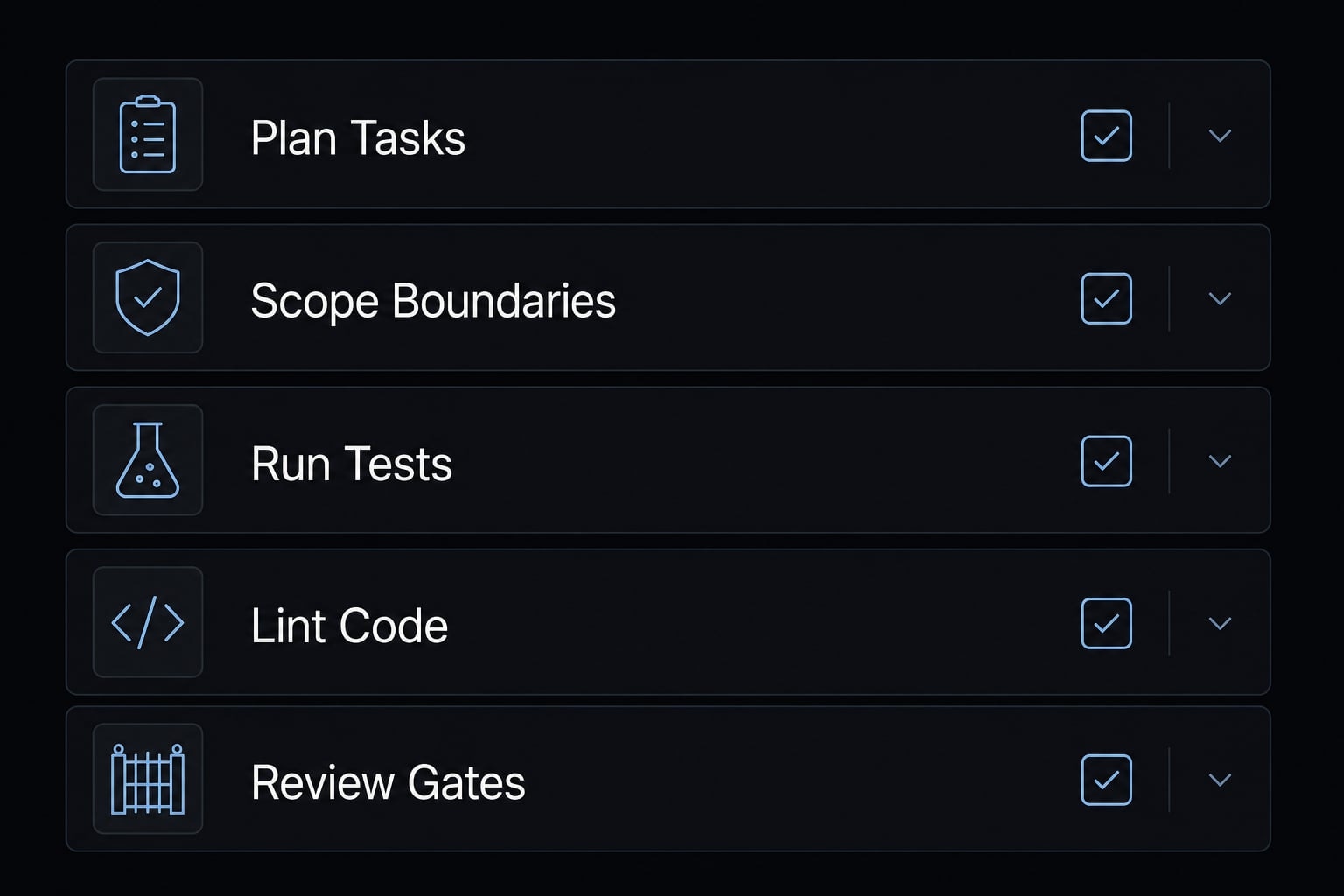
Guardrail 2 - Verify with tests and review gates
An AI code review workflow should preserve the same quality expectations you already trust.
Use these review gates:
- Tests must run.
- Linting must pass.
- Type checks must pass.
- Changed files must be reviewed.
- PR review should remain in place.
- Human approval remains the final gate.
If your team is experimenting with test-driven development with ai, start by asking the agent to draft tests before implementation. That often improves verification discipline because success gets defined before the code path expands.
AI-generated code should not bypass existing QA discipline.
This is the core of code quality guardrails. Repeatable does not mean deterministic perfection, but it should create a more deterministic workflow than improvising from scratch every time.
Guardrail 3 - Capture decisions and update docs
Without documentation updates, workflow quality stays trapped in individual habits. A team cannot reuse what it cannot see.
Capture:
- Why a change was made.
- What constraints mattered.
- What review logic was used.
- What pattern should be repeated later.
This preserves developer control because decisions remain visible and reviewable instead of disappearing into tool history.
What a repeatable AI coding workflow looks like in practice
A practical AI coding workflow should feel usable on normal work, not only on ideal examples. The task type changes, but the operating pattern stays similar. That is what makes an AI coding playbook useful.
Example - New feature workflow
- Write a short feature brief.
- Define scope and acceptance criteria.
- Attach relevant files, docs, and repo context.
- Generate implementation in small chunks.
- Review each chunk and run tests after each stage.
- Save the brief and review pattern for reuse.
This works well in a feature development workflow because it controls scope early and limits review complexity later.
Example - Bug fix or refactor workflow
- Reproduce the issue.
- Collect logs or failing behavior.
- Provide relevant files and constraints.
- Ask for diagnosis first.
- Request a patch second.
- Verify with tests and review.
- Document the pattern if it is likely to recur.
This is effective in a bug fix workflow because diagnosis and patching are treated as separate steps. That reduces bad assumptions and makes review more reliable.
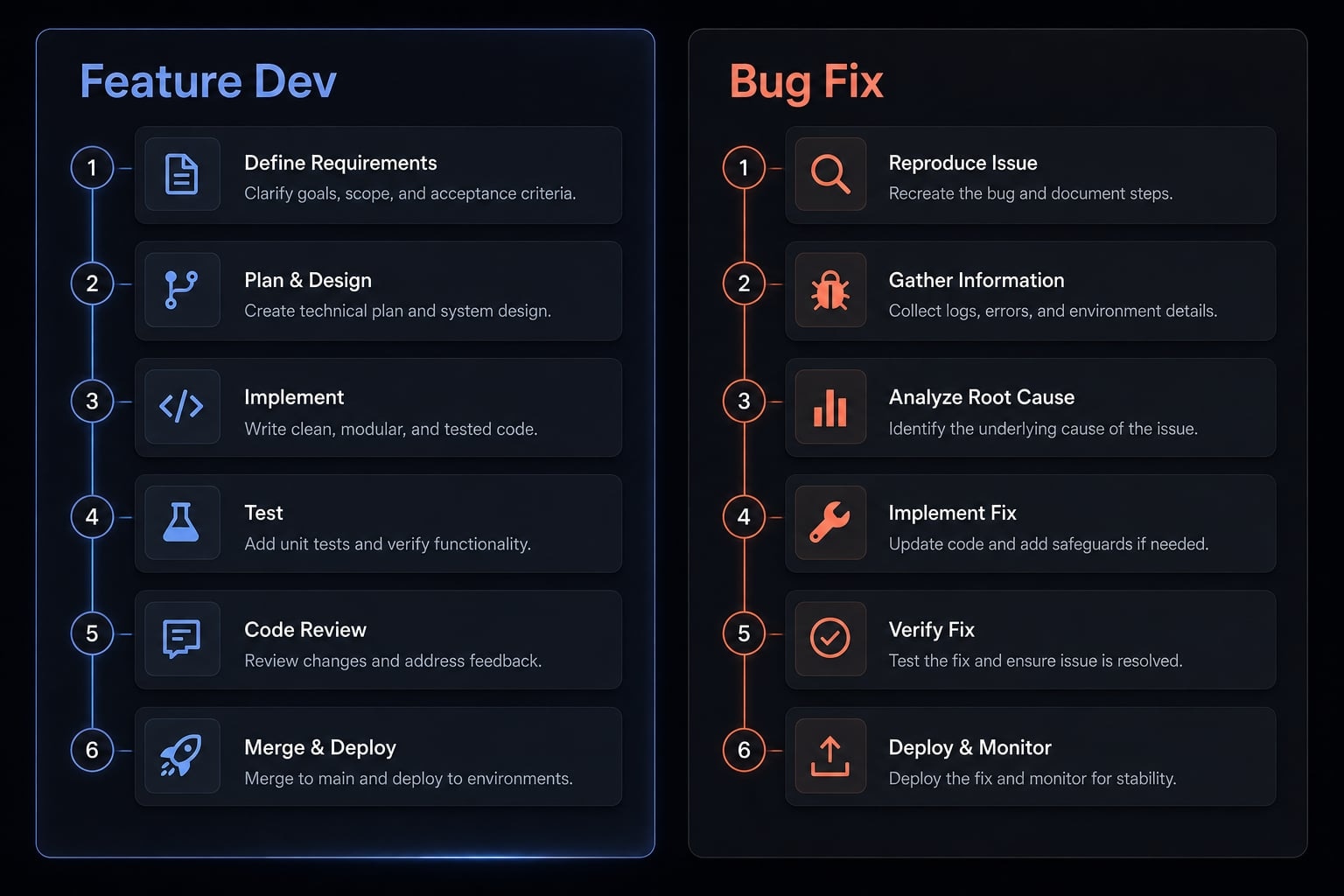
The useful takeaway is simple: The task may change, but the practical AI coding workflow stays structurally similar. The reusable pattern is brief → context → scoped execution → verification → capture for reuse. These are starter templates, not universal rules, but they are a strong foundation for building reusable coding patterns.
From personal habit to team standard
Most team AI workflow standards do not begin with a big transformation program. They begin with a few repeated habits that already work and are worth standardizing. Good workflow standardization for small teams should reduce variance, not add ceremony.
Start with:
- A planning template.
- A context checklist.
- A review checklist.
- Reusable skills or an SOP library.
- Shared vocabulary for task types.
- Shared vocabulary for approval gates.
- Shared rules for when to capture and reuse a pattern.
This is the foundation of a lightweight engineering playbook and practical AI coding standards. Standardize the parts that repeat often. Do not overformalize edge cases. A small team usually benefits more from one clear template and one shared review rule than from a large governance model.
A practical example of turning repeated tasks into reusable workflow assets
Teams often repeat the same categories of work: Code review, test writing, docs updates, and bug triage. Rewriting instructions every time creates memory dependency and output variance. A better approach is to package that work into reusable workflow assets.
That may include:
- A code review rubric.
- A test-writing template.
- A docs update checklist.
- A bug triage brief.
- Lightweight agent skills.
- small workflow kits for recurring tasks.
This is how repeated work becomes repeatable AI operations. Instead of relying on one developer’s habits, the task logic becomes portable. Onboarding becomes faster, handoffs become cleaner, and outcomes become more consistent.
Platforms such as AgentKit are useful here as an example of how teams can operationalize reusable skills, subagents, and workflows without rebuilding the same setup each time. The important point is not the platform itself. It is the shift from scattered prompts to reusable structure.
Frequently asked questions
What makes an AI coding workflow truly repeatable?
A repeatable AI coding workflow is a structured process that transforms inconsistent, prompt-based tasks into stable operations. It relies on three core pillars: Consistency in task handling, developer-led control over final output, and the ability to reuse proven patterns across future projects.
How do I implement a repeatable AI coding workflow?
Follow this six-step framework:
- Plan: Define clear acceptance criteria before generating code.
- Context: Provide relevant files and constraints.
- Execute: Break tasks into small, manageable chunks.
- Verify: Run tests, linters, and human reviews.
- Capture: Document effective prompt patterns and logic.
- Reuse: Convert these into reusable templates or skills.
How can I avoid tool sprawl in my AI workflow?
Start with one primary work layer, such as a CLI-based coding agent, rather than jumping between multiple chat interfaces. Add secondary tools, integrations, or subagents only when they solve a specific, recurring bottleneck, ensuring each addition simplifies your process instead of increasing your coordination burden.
Does a repeatable workflow mean full AI autonomy?
No. Repeatability focuses on standardizing how you work, not surrendering authority. High-quality output requires that AI-generated code never bypasses critical quality gates, including automated testing, linting, type checks, and human code review. You retain control while AI handles the execution of defined patterns.
Why is planning better than prompt-engineering?
Planning focuses on defining scope, constraints, and acceptance criteria before generation begins. While clever prompts may yield better short-term results, a plan-first approach provides the necessary context and boundaries to prevent context drift and ensure that the generated code aligns with your project's architectural standards.
How do I scale a repeatable AI workflow for a small team?
Standardize the "high-frequency" parts of your process first. Begin by creating shared planning templates, a common context checklist, and unified review rubrics. Establishing a shared vocabulary for task types and approval gates allows your team to maintain consistency without the need for complex, heavy-handed governance.
Read more:
- Human in the loop AI coding: Optimize speed and quality
- Agentic coding vs vibe coding: A practical guide for developers
- Mastering Claude Code rules: A guide to consistent AI development
Conclusion
A repeatable AI coding workflow does not start with more tools. It starts with a workflow that improves consistency, control, and reuse. If your current AI usage still feels prompt by prompt, the missing piece is usually not model quality. It is process shape.
The most practical ai coding playbook is also the simplest: Plan → Context → Execute → Verify → Capture → Reuse. That sequence helps you move faster without giving up review discipline or developer control.
If you want a low-friction next step, start with one task brief template, one review checklist, and one reusable pattern library. That is enough to turn scattered AI usage into a workflow you can actually trust and repeat.