MCP vs Skills in Claude Code: Choosing the right architecture
MCP vs Skills in Claude Code: Differences, use cases and when to use each
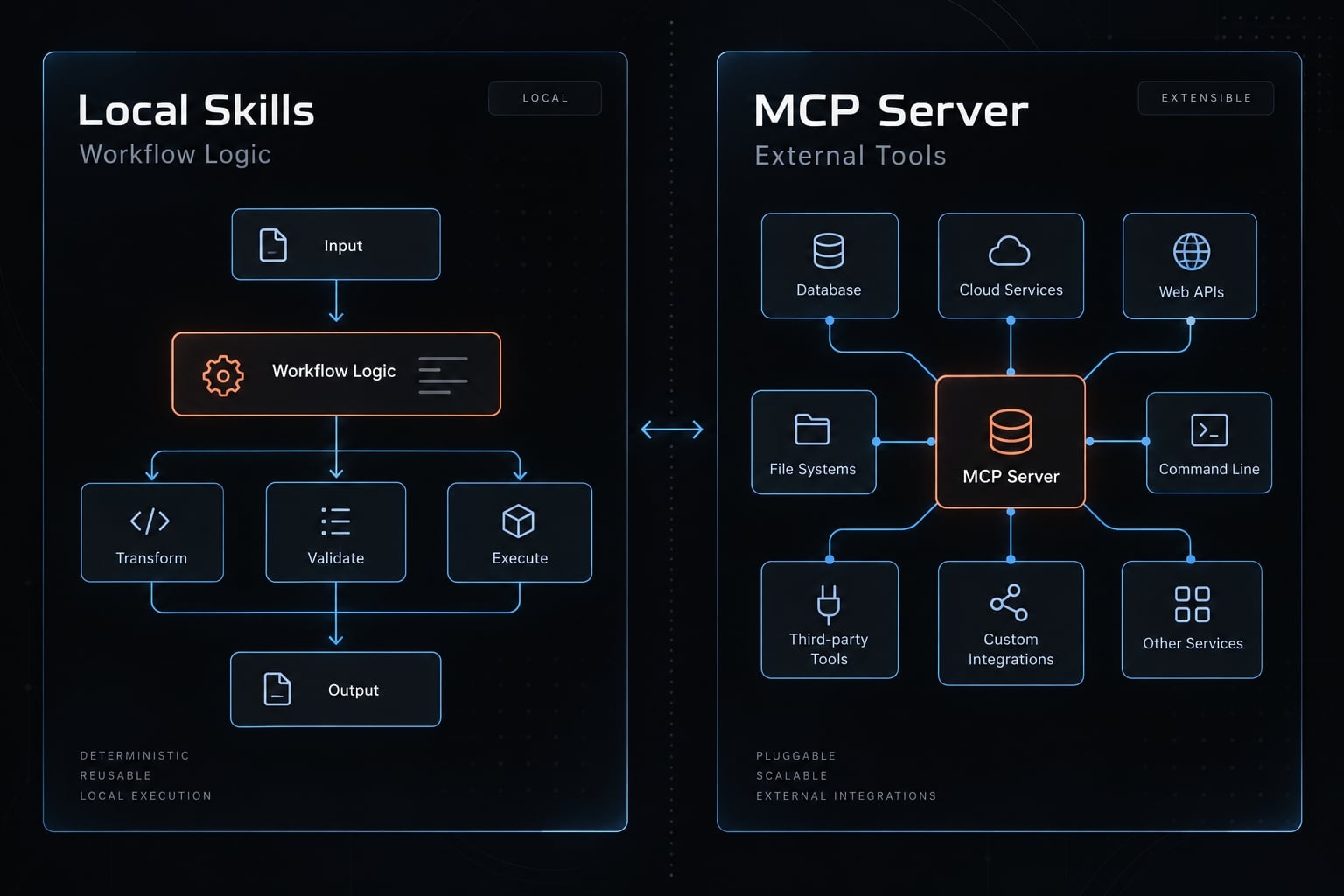
In Claude Code, choosing between MCP and Skills comes down to a clear architectural divide: Skills package reusable task instructions and guidance, while MCP standardizes connections to external tools and data. The practical choice depends on your specific workflow gap—use a Skill when domain instructions are missing, an MCP server when external integrations are required, and both when an automated procedure needs to operate over connected systems.
MCP vs Skills in Claude Code: The short answer
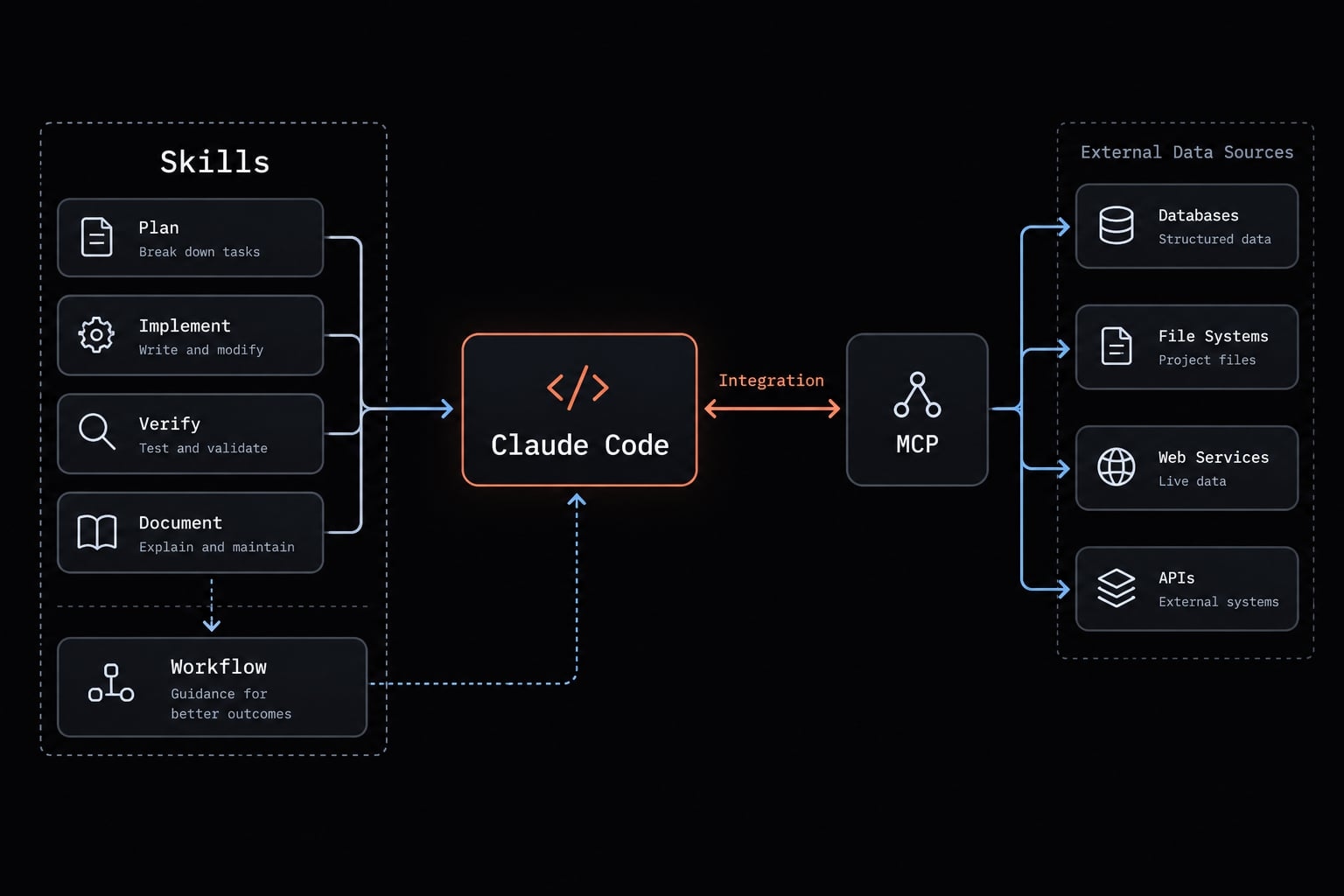
It all boils down to procedure versus connection: a Skill outlines how to handle a task, often including references and scripts. MCP provides an integration interface through which Claude Code can discover and use supported capabilities.
Mechanism | Practical role | Question it answers |
|---|---|---|
Skill | Reusable instructions and supporting resources | How should this task be performed? |
MCP | Standardized access to server-provided capabilities | Which connected tools and data are available? |
Skill + MCP | A procedure applied through connected tools | How should these capabilities serve this workflow? |
Built-in Claude Code tools already support local file inspection, search, and shell tasks, subject to permissions. A Skill can guide those tools without an MCP server. Choose by requirements, not a capability ranking.
What are Claude Code Skills?
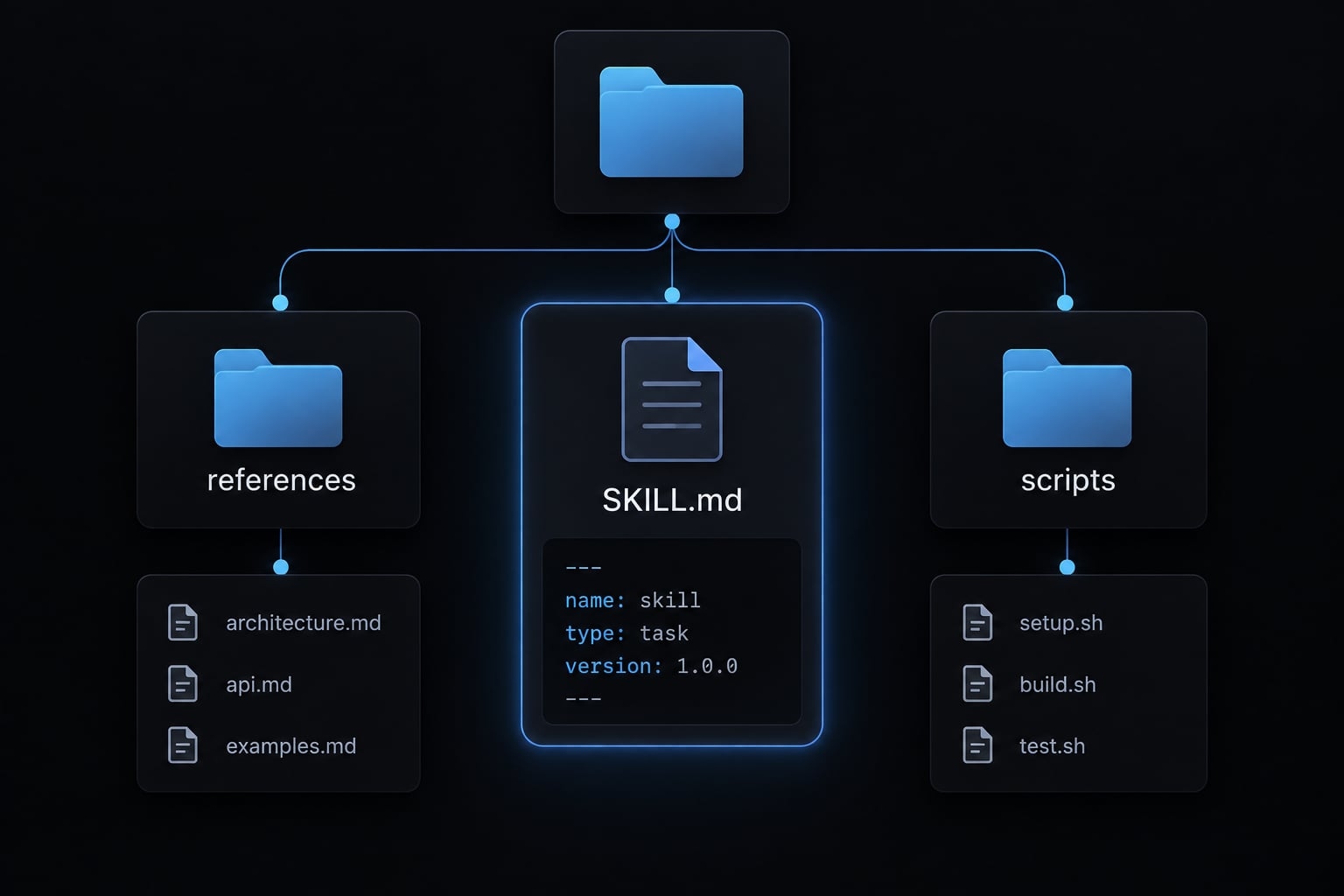
Claude Code Skills are modular, reusable packages of task instructions centered around a SKILL.md file. Located inside the .claude/skills/ directory of a repository or global context, a Skill provides procedural knowledge-guidance on how to approach recurring development tasks consistently without writing lengthy prompts every session.
An illustrative repository-level structure:
.claude/skills/code-review/├── SKILL.md├── references/security-standards.md├── scripts/check-secrets.sh└── assets/review-template.md
These supporting directories are organizational examples, not mandatory components. SKILL.md combines YAML frontmatter-structured metadata at the beginning of the file-with task instructions.
Key characteristics of Skills
- Progressive Disclosure: To preserve context window capacity, Claude Code reads only lightweight metadata during initial discovery. Detailed instructions and reference files are loaded dynamically only when the Skill is invoked.
- Zero Infrastructure: Skills live as plain files inside your version-controlled repository or user home folder. No background processes or external services are needed.
Claude Code Skills suit reusable workflows where shared expectations matter:
- Repository coding conventions and preferred patterns.
- Review checklists with explicit evidence requirements.
- Documentation formats and terminology.
- Release procedures and prerequisite checks.
- Organization-specific security guidance.
- Shared domain instructions and business rules.
These instructions guide behavior. Hard enforcement still requires automated checks, permissions, or other executable controls.
Where Skills stop being enough
Instructions alone cannot create an unavailable access path. If a task needs live data or actions beyond the current environment, evaluate an approved integration. That could be MCP, an existing command-line interface (CLI), or a tool using an application programming interface (API).
What is MCP in Claude Code?
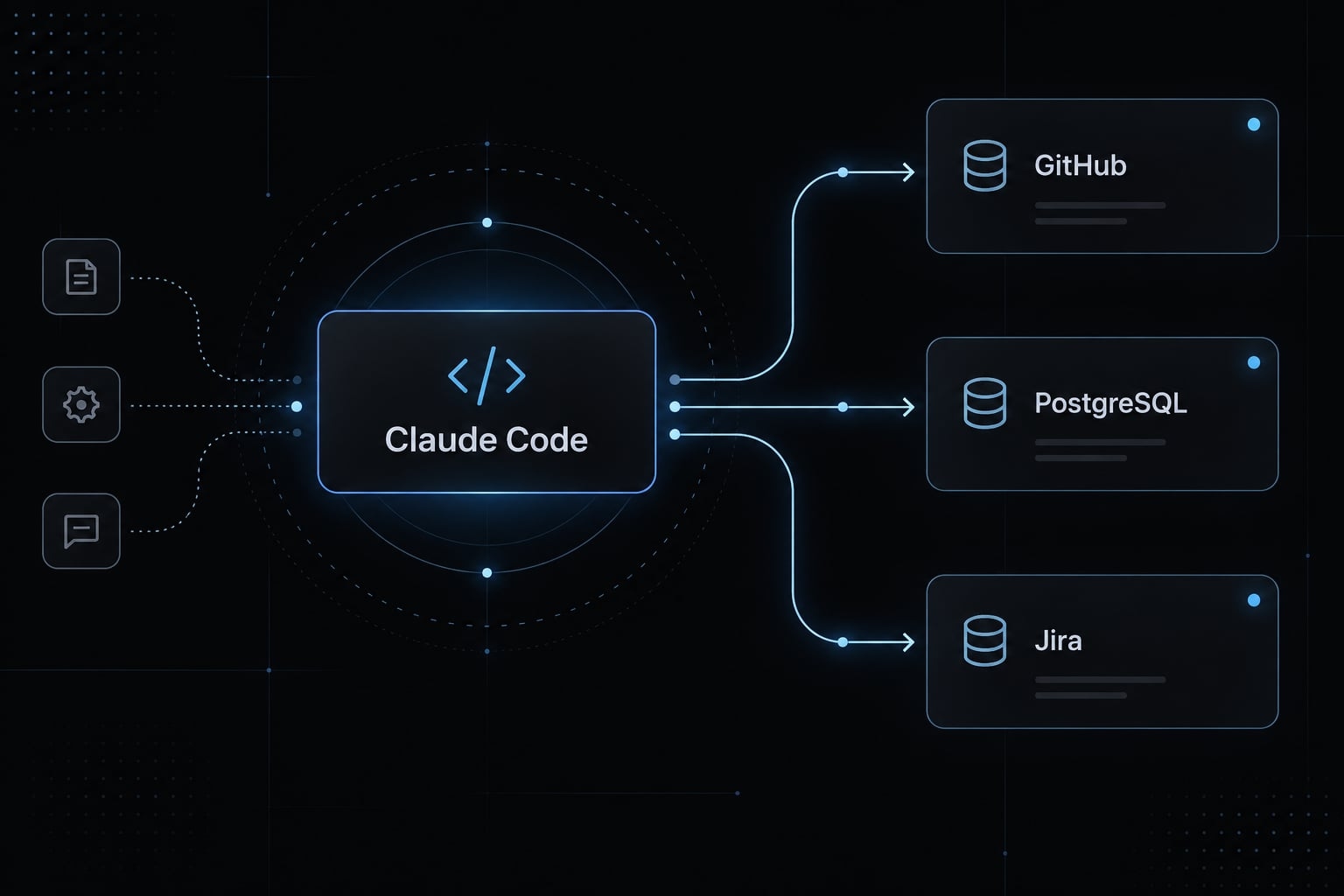
The Model Context Protocol (MCP) is an open standard that enables AI applications to establish secure, bi-directional connections with external tools, APIs, and data repositories. In this architecture, Claude Code acts as the MCP Client, communicating with local or remote MCP Servers.
Key characteristics of MCP
- System Integration: MCP exposes external data feeds (e.g., live Jira tickets, production logs, GitHub pull requests) and server-executable operations to the model.
- Protocol Standard: MCP decouples the LLM interface from specific API implementations, allowing any supported MCP server to interface cleanly with Claude Code.
Best use cases:
- Querying active PostgreSQL/MySQL databases or vector stores.
- Interacting with issue trackers (Jira, Linear) and communication tools (Slack).
- Managing remote GitHub repositories, PRs and CI/CD pipelines.
- Exposing custom internal enterprise REST/gRPC APIs.
When MCP is unnecessary
There's no need to introduce a server unnecessarily. Routine tasks like local file inspection, shell execution, and static workflow instructions are often best handled by native tools or a dedicated Skill. Existing approved CLI/API access may also suffice when another integration layer adds no meaningful capability.
Claude Code Skills vs MCP: Side-by-Side comparison
Claude Code Skills vs MCP is primarily an ownership and architecture decision. Compare what each component contributes, then account for the tools and permissions it depends on.
Criterion | Skills | MCP |
|---|---|---|
Primary purpose | Task guidance and reusable resources | Standardized capability access |
Core question | How should we work? | What can we connect to? |
Typical format |
| Server implementation and client configuration |
Best-fit tasks | Recurring procedures and standards | Reusable tool and data integrations |
External connectivity | Guides native tools, scripts, CLIs, APIs, or MCP | Provides a standardized connection path |
Infrastructure | Files; scripts may need runtimes | Local or remote server |
Context behavior | Discovery information, loaded instructions, consulted resources | Discovery information, schemas, tool results |
Setup complexity | Usually simpler for instruction-led tasks | Server, access, and client setup |
Authentication | Uses underlying tools’ credentials | Connection authentication; service authorization remains distinct |
Security focus | Instructions, scripts, commands, data access | Server trust, exposure, credentials, scopes |
Maintenance | Procedures and supporting files | Server, APIs, credentials, compatibility |
Team sharing | Distribute files and dependencies | Share configuration; provision access separately |
Failure modes | Stale guidance, missing dependencies | Unavailable server, expired credentials, API changes |
Combined role | Guides the workflow | Supplies connected operations |
Context and token usage
Neither mechanism automatically guarantees lower token costs. Because tools and data are loaded dynamically and discovered gradually, they directly impact how the AI's memory window is utilized; never assume that every data schema is loaded right from the start.
- Keep Skills focused and supporting resources modular.
- Enable only relevant MCP capabilities.
- Measure representative sessions, including tool outputs.
Context-window occupancy is not identical to billed cost. Numerical comparisons need the same task, model, version, configuration, and success criteria.
Security and permission boundaries
Neither mechanism is automatically safe. Apply least privilege: grant only the access required for the task.
- Review third-party provenance and code.
- Inspect scripts and local commands.
- Restrict credentials and access scopes.
- Separate read operations from writes.
- Require actual approval controls for high-impact actions.
- Treat retrieved content as untrusted.
A Skill saying “ask before publishing” is guidance, not a security boundary. Enforce that boundary through appropriate Claude Code permissions, service authorization, or runtime controls.
Setup and maintenance trade-offs
Assign a Skill owner for instructions, references, scripts, and workflow validation. Assign an integration owner for server configuration, credentials, API compatibility, and tool exposure. These may be the same person, but neither responsibility disappears when components are shared.
When to use Skills, MCP or both
Choose the least complex mechanism that reliably satisfies the workflow. If existing approved tools already provide access to external systems, a new MCP integration may be unnecessary.
The Three-question decision tree
- Does the task primarily need repeatable instructions or reference material? Choose a Skill when access already exists and inconsistent procedure is the gap.
- Does it need a standardized integration that existing approved tools do not adequately provide? Evaluate MCP against the required capabilities, permissions, and maintenance burden.
- Does it need both that integration and a specific operating procedure? Choose Skill + MCP, with separate ownership and enforceable controls where required.
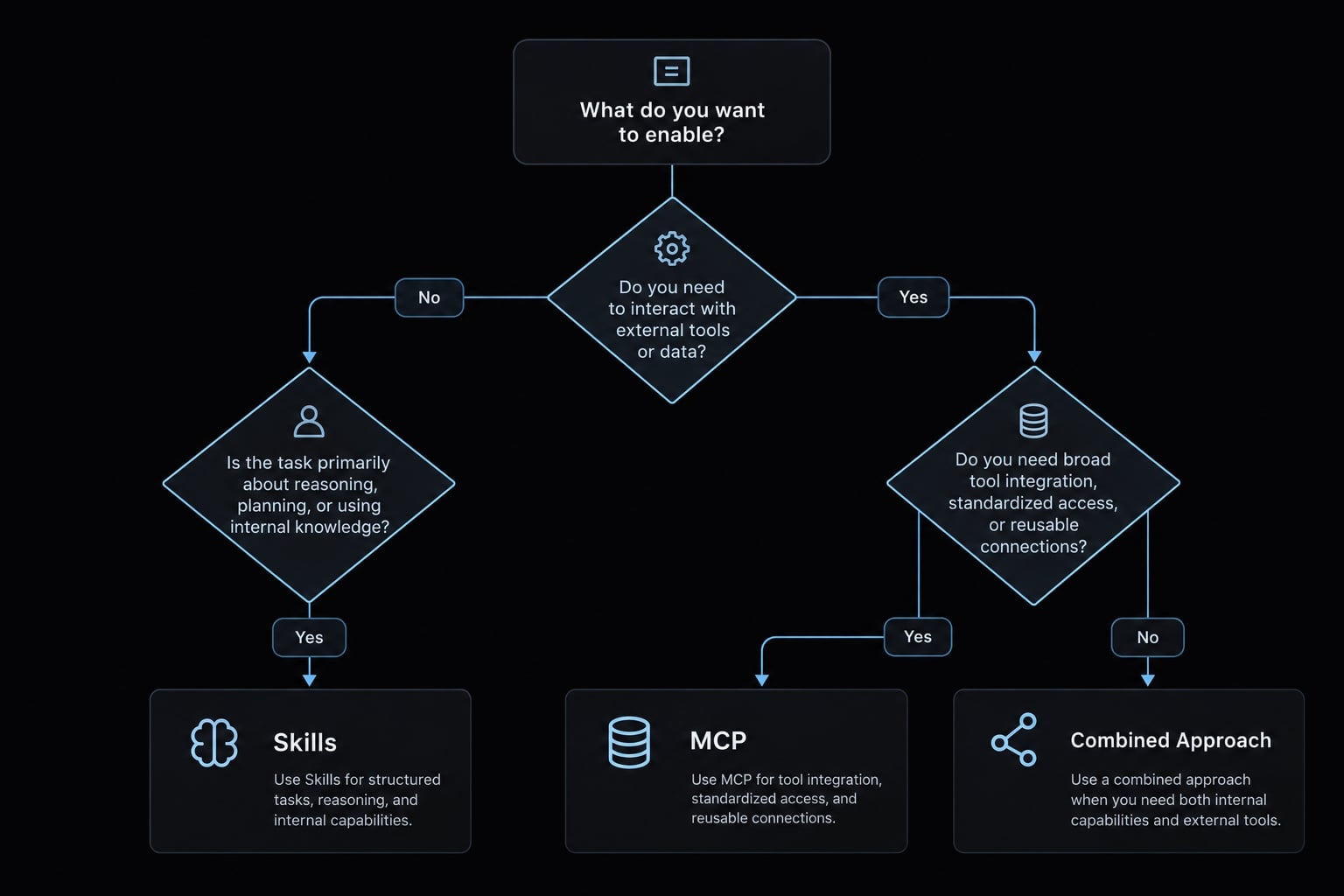
Common workflow decisions
Use this decision framework to distinguish missing guidance from missing access.
Workflow | Choice | Reason |
|---|---|---|
Repository coding standards | Skill plus automated checks | Reusable guidance; checks provide hard enforcement. |
Review checklist | Skill | Fits when consistency is the missing requirement. |
Live Jira tickets | MCP if approved | Use the chosen access path; an approved CLI may suffice. |
Production database | Scoped integration | Prefer read-only access and safer environments where feasible. |
GitHub PR against company standards | Skill + MCP | Applies when using an MCP-based GitHub integration. |
Local documentation generation | Native tools; optional Skill | Add repeatable style or procedure only when needed. |
Remote documentation publishing | Skill plus approved integration | MCP is one option; publication requires write controls. |
Lifecycle-triggered action | Supported hook | Hooks run event-driven actions at supported lifecycle points. |
Signs you chose the wrong mechanism
Diagnose the missing requirement before adding another component.
Symptom | Likely issue | Better direction |
|---|---|---|
Server supplies only static rules | Unnecessary infrastructure | Move procedural guidance into a Skill. |
Correct tools, inconsistent sequence | Missing procedure | Skill for guidance; code or hooks for strict enforcement. |
Unused definitions or oversized outputs burden context | Excess exposure | Narrow capabilities, discovery, and results. |
Instructions differ across developers | Fragmented guidance | Share and version a Skill. |
Credentials exceed task needs | Overbroad authorization | Reduce scopes; separate read and write access. |
Integration duplicates adequate native or CLI access | Redundant access layer | Retain the simpler approved path. |
A Skill can remove an unnecessary MCP server, but cannot itself supply a missing connection. MCP supplies capabilities, not every organization-specific procedure. Neither independently guarantees deterministic execution, safe behavior, or autonomous scheduling.
Practical pattern: Using Skills to direct MCP tools
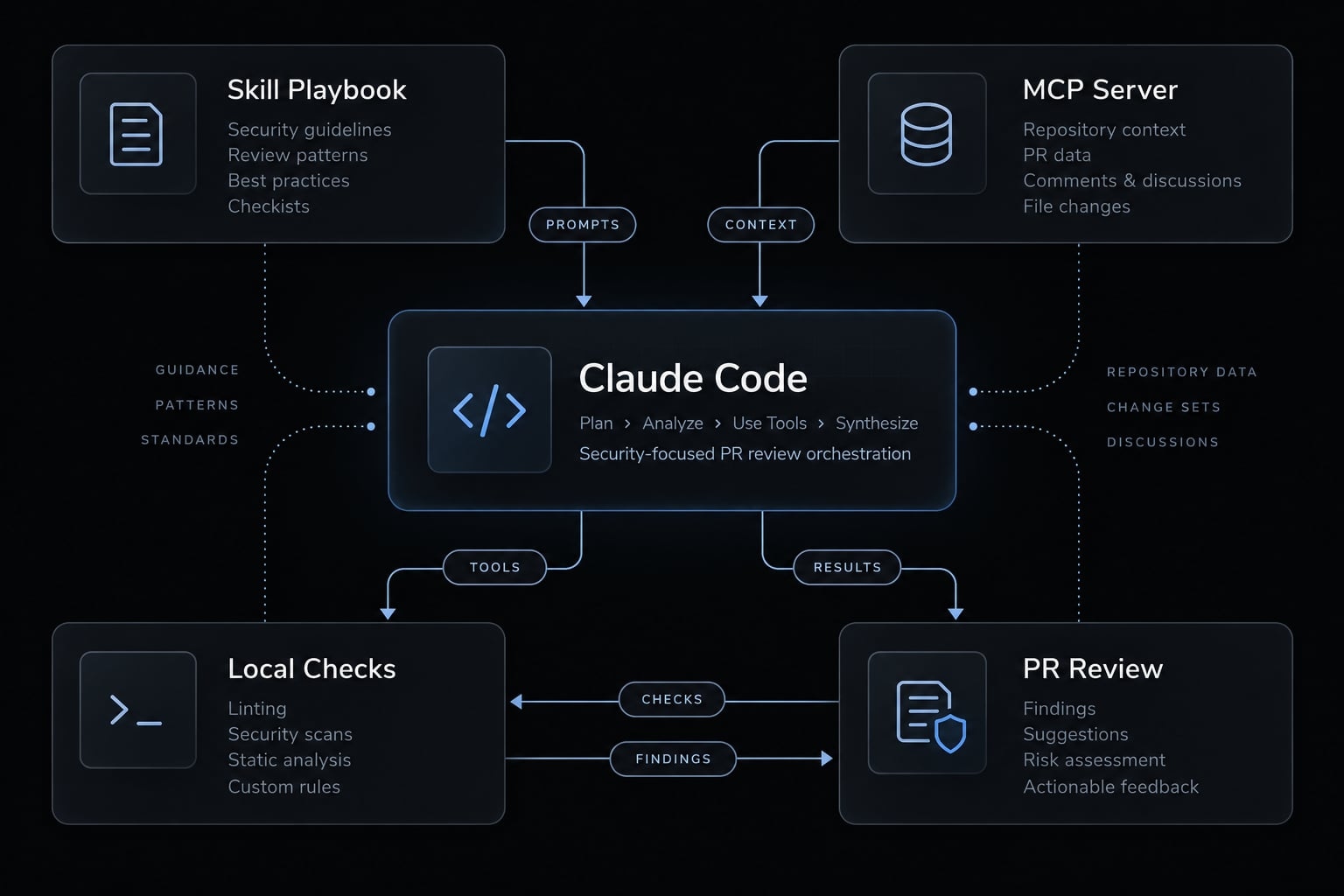
In sophisticated enterprise AI Engineering Systems, Skills and MCP operate in tandem: the Skill defines the business logic and evaluation sequence, while MCP supplies the external operational handles.
Example: Automated Pull-Request security review
The following is an illustrative architecture, not a tested implementation or customer result.
Layer | Responsibility |
|---|---|
Skill | Review sequence, company standards, severity definitions, evidence requirements, reporting format. |
MCP integration | Retrieve supported GitHub data; publish a review only when supported and separately authorized. |
Native Claude Code tools | Inspect local files, search code, and run approved checks. |
The official GitHub MCP server documentation is the reference for selecting available operations. Confirm capabilities against the installed server version and enabled tools.
Start with read-only access and separate analysis from publication. Generate findings first; permit publication only through actual permissions or approval controls.
Run checks against untrusted contributions in an appropriately isolated environment, without production credentials. Repository instructions and retrieved text remain untrusted inputs. AI-assisted review does not guarantee vulnerability detection or replace necessary human review.
Minimal architecture
User request ↓Claude Code orchestration ← Skill instructions and resources ├── Built-in tools → Local repository / approved checks └── MCP client → MCP server → Connected system │ ↑ │ Scoped access controls └── Write action: Approval/authorization gate → Publish review
Workflow-specific guidance generally belongs in the Skill; integrations expose reusable operations. Authorization and essential validation must remain enforceable outside natural-language instructions. Test the read-only Claude Code workflow before enabling publication, including how failures and denied permissions are handled.
Implementing AI workflows with AgentKit
If you'd rather not write every Skill from scratch, AgentKit provides an editable starting set for Claude Code: 100+ skills, specialized subagents, and chained workflows such as /ak:plan, /ak:cook, and /ak:code-review. Its Marketing kit adds MCP integrations for research and content work. AgentKit is a commercial kit with full source access, so you can keep, change, or remove any Skill; it has production support for Claude Code and Codex and beta support for Cursor.
The same rules from this guide apply: AgentKit's Skills supply procedure, not access. Connect the MCP servers or CLIs your workflow actually needs, keep credentials scoped, and enforce approvals through permissions rather than instructions. Because every installed Skill adds to the skill listing, enable only the ones your team uses.
Frequently asked questions
What is the difference between Claude Code Skills and MCP?
Claude Code Skills serve as procedural playbooks written in Markdown that guide how a task should be performed. MCP is an integration standard that provides the technical connection to external databases, tools, and APIs.
When should I use a Skill versus an MCP server?
Use a Skill for reusable procedures, coding standards, or multi-step checklists that reside within your repository. Choose an MCP server when the agent requires live access to external systems like Jira, databases, or third-party APIs that exist outside your local environment.
Why do some configurations use more tokens than others?
MCP servers can consume significant tokens because they often inject tool definitions into the context window. Skills are more token-efficient, utilizing progressive disclosure to load only relevant instructions and metadata, keeping the context window clean for actual task execution.
Are Claude Code Skills just system prompts?
No. While system prompts are static text strings passed at session initiation, Skills are modular, version-controlled packages located in your repository. They support progressive disclosure (loading only when relevant) and can include supporting assets, reference documents, and executable scripts.
Do I need to set up infrastructure to use Skills?
No. Skills live as simple files inside your repository or local home directory. They require zero server infrastructure or background processes to run.
Is one mechanism inherently more secure than the other?
Neither is automatically secure. Security depends on your implementation: you must verify the provenance of third-party MCP servers, restrict API credentials to the principle of least privilege, and ensure that scripts within Skills are reviewed and executed within appropriately isolated environments.
Read more:
- Claude Code MCP configuration: A practical setup guide
- Claude Code Astro: A practical workflow to build or migrate
- Connect GitHub MCP to Claude Code: Step-by-step guide
Conclusion
The MCP vs Skills in Claude Code decision starts with the missing requirement. Use a Skill for repeatable instructions, MCP for a justified standardized connection, and both when a procedure needs that integration. Native tools or existing approved access paths may already be enough. More components do not automatically produce a more reliable workflow.
Audit one real task before expanding your setup. Identify missing instructions, identify missing access, measure representative context usage, review permissions, and assign owners. Then test the smallest workable configuration against a clear success criterion. Keep analysis separate from high-impact actions, and make authorization enforceable outside the instructions. The goal is a workflow your team can understand, maintain, and control-not the largest collection of extensions.