GSD for Claude Code: Master spec-driven AI development flows
GSD for Claude Code: What it is, how it works and how to use it safely
GSD for Claude Code is a spec-driven workflow designed to prevent "context rot" in long AI coding sessions by storing requirements in structured files, separating planning from execution, and enforcing explicit verification checkpoints. While it improves structure and traceability across complex tasks, human oversight remains essential as it does not guarantee flaw-free code.
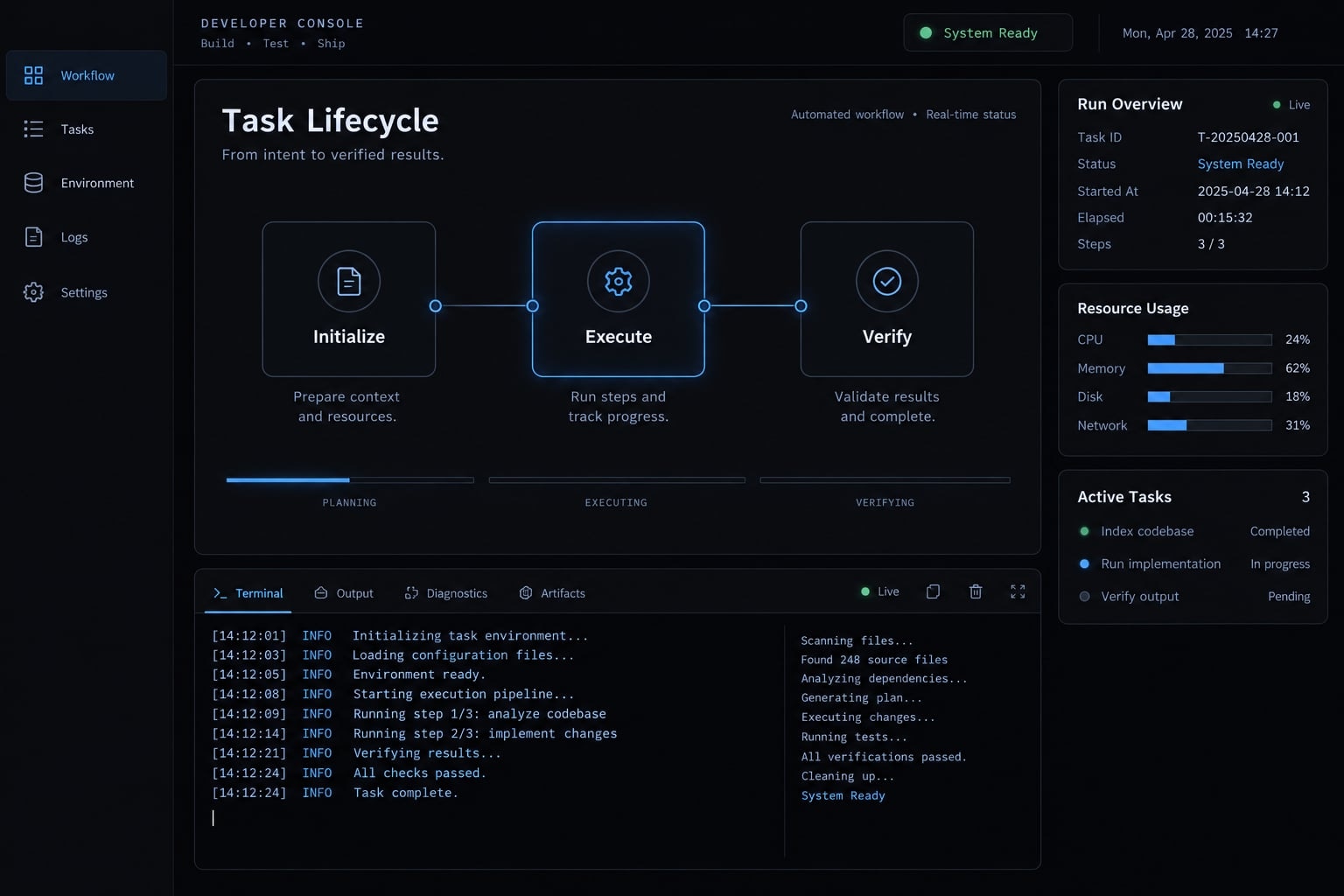
What is GSD for Claude Code?
GSD is not an Anthropic model feature. “Get Stuff Done”-also described in some projects as “Get Shit Done”-can refer either to a third-party implementation or a broader workflow pattern for Claude Code.
A GSD implementation may include slash commands, skills, sub-agents, hooks, scripts, configuration files and project-state documents. Together, these components apply context engineering, the deliberate control of which instructions, decisions, and files enter an agent context.
The underlying method is spec-driven AI development: Define scope, constraints, and acceptance criteria before changing code. GSD does not make Claude inherently smarter. It organizes inputs, execution boundaries, saved state, and review.
The named GSD system vs. the general GSD pattern
Term | Explanation |
|---|---|
GSD implementation | A specific third-party repository or package containing commands, agents, scripts, hooks, and workflow files |
GSD workflow pattern | The broader practice of separating definition, planning, implementation, and review into focused stages |
The coding-agent environment where compatible workflow assets may run | |
Spec-driven development | Defining requirements, constraints, and acceptance criteria before implementation |
This guide focuses on the command-driven, file-backed pattern. Exact assets, installation methods, and command syntax depend on the maintained release being used.
What problem does GSD solve?
GSD is designed to reduce several common failures in AI-assisted development:
- Requirements disappear from active context: Persistent files preserve approved decisions, but developers must keep them synchronized with the repository.
- Planning, coding, and debugging become mixed: Separate stages give each task a narrower objective and cleaner working context.
- Large changes become difficult to reverse: Small tasks and atomic Git commits create clearer inspection and rollback boundaries.
- Decisions are lost between sessions: Versioned state files provide a durable record instead of relying only on chat history.
- Requirements lack traceability: IDs can connect specifications, tasks, commits, tests, and verification evidence.
These controls reduce conversational noise. They do not prevent incorrect assumptions, weak tests, or poor engineering decisions.
How the GSD workflow works
GSD behaves like a controlled software development lifecycle rather than one large prompt:
Define → Discuss → Plan → Execute → Verify → Complete → Resume
Each stage produces a reviewable artifact. This structure supports context window management by loading focused information instead of carrying an entire conversation forward.
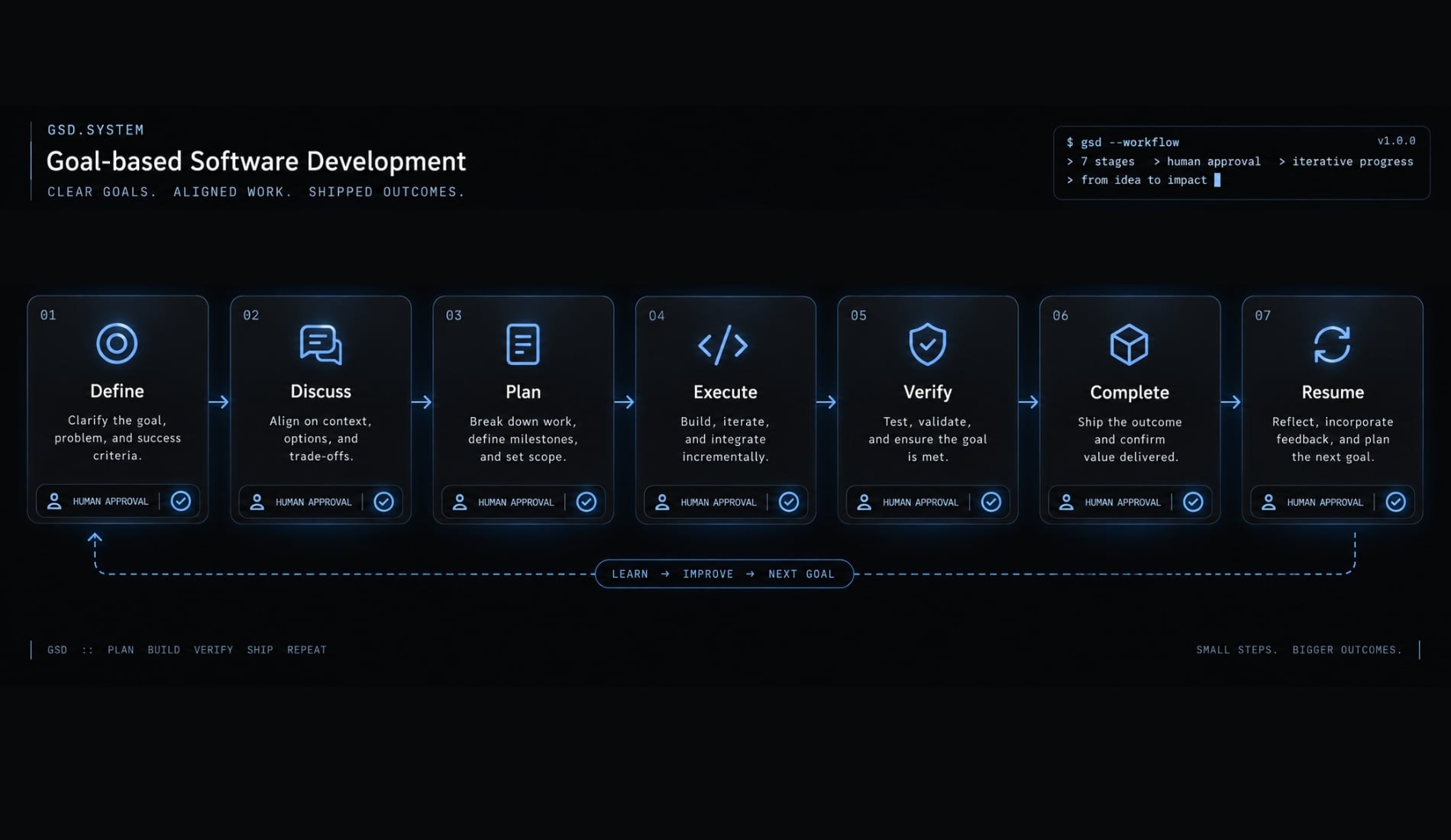
Stage | Primary artifact |
|---|---|
Define | Scope and requirements |
Discuss | Decisions and constraints |
Plan | Tasks and dependencies |
Execute | Code changes and commits |
Verify | Test and acceptance evidence |
Complete | Updated state and archived milestone |
Resume | Reconciled project context |
File-based project state
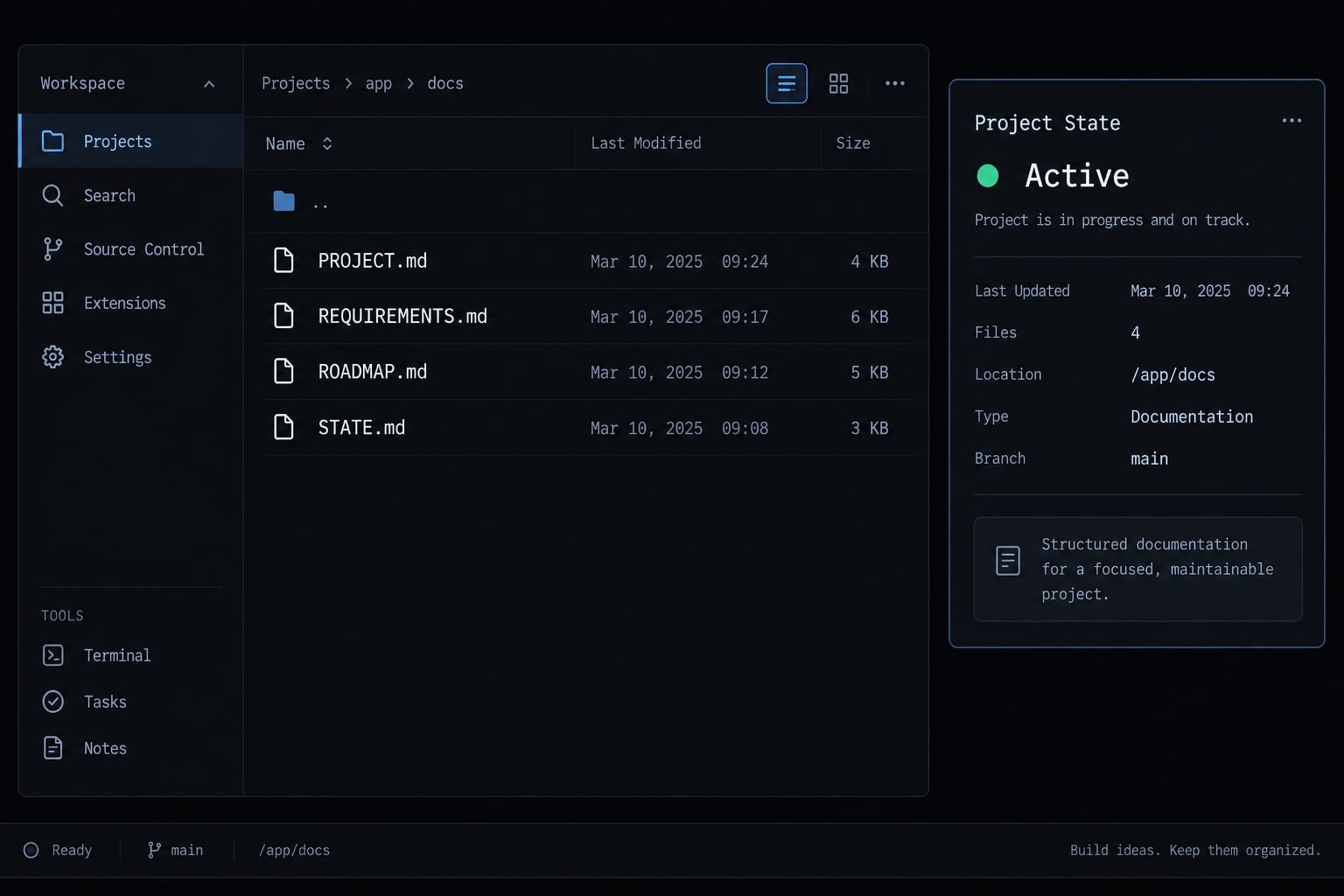
Persistent project state means storing decisions and progress in versioned files instead of relying only on conversation history.
File or artifact | Typical purpose | Caveat |
|---|---|---|
| Product goal, boundaries, constraints, and major decisions | Name and structure may differ |
| Requirement IDs and acceptance criteria | Must be updated when scope changes |
| Milestones and phase sequence | Should not be treated as immutable |
| Current progress and next action | Can drift from Git after interruptions |
Configuration files | Workflow settings, hooks, agents, or model preferences | Treat as security-sensitive |
Markdown is human-readable and easy to version. However, these files describe intent and progress; Git history remains the implementation evidence. Before resuming work, reconcile both sources.
Skills, agents, hooks and scripts
- Skills or commands: User-facing entry points that start workflow stages.
- Sub-agents: Focused agents assigned narrow planning, research, implementation, review, or debugging tasks.
- Hooks: Automated actions triggered at defined workflow events.
- Scripts: Deterministic operations such as validation, configuration reading, or state calculation.
- Git: Versioned history for diff inspection, rollback, and task-level traceability.
Agents remain probabilistic. Scripts can add deterministic controls, but they are not automatically safe. Treat hooks and installer scripts as executable code.
Fresh contexts and task Isolation
Task isolation limits an agent to a narrow objective, approved files, and relevant artifacts. A fresh context reduces unrelated history and conflicting instructions.
This can improve context focus, but it does not create complete context. Acceptance criteria, tests, diff review, and human judgment remain necessary.
Focused sessions may reduce wasted context. However, multi-agent orchestration can increase total token consumption, so token efficiency is workload-dependent.
How to install GSD safely
Installing a GSD implementation is a software supply-chain decision. Verify ownership, package provenance, scripts, permissions, and compatibility before running anything.
Verification status for this guide
Verification field | Value |
|---|---|
Last source review | May 2026 |
Claude Code version tested | Not independently reproduced for publication |
GSD version or commit tested | Not independently reproduced for publication |
Repository reviewed | |
Package source tested | No package installation command independently verified |
Node.js version tested | Not independently reproduced for publication |
Test environment | No reproducible installation environment published |
Version note: Because the repository commit, package owner, runtime, and uninstall path have not all been independently verified together, this guide does not provide a direct installation command for safety.
Warning: Installation commands, package names, file locations, and Claude Code command formats can change between releases. Follow the current documentation for the exact maintained repository and release you select.
Pre-installation verification checklist
Before installing GSD for Claude Code, verify the source, scripts, compatibility, permissions, sensitive-file exposure, and rollback path.
- Confirm the maintained repository: Compare the project website, repository organization, release history, and linked documentation.
- Verify ownership and activity: Check maintainers, recent commits, signed releases where available, package ownership, and unresolved security notices.
- Inspect executable assets: Review installer, lifecycle, hook, update, and uninstall scripts before running them.
- Check supported versions: Confirm the required Claude Code skill format and supported Node.js CLI runtime.
- Review migration notes: Look for renamed commands, moved directories, configuration changes, and breaking skill-discovery updates.
- Use an isolated repository: Start with a disposable project, container, virtual machine, or restricted test account.
- Remove sensitive access: Do not expose
.envfiles, deployment keys, cloud credentials, or unrelated directories. - Create a Git checkpoint: Commit or stash existing work, then record the clean state before installation.
Installation and configuration path
- Choose a verified source: Use the maintained GitHub repository or registry page linked by that repository.
- Choose installation scope: Global assets affect multiple projects; project-local assets limit exposure and simplify removal. Prefer project-local evaluation.
- Inspect generated assets: Record every command, skill, agent, hook, script, configuration file, and planning directory added.
- Confirm Claude Code recognition: Use the discovery method documented for the tested release. Verify names and paths rather than assuming older syntax.
- Run a minimal test: Use a disposable task, then inspect generated files, running processes, Git status, and diffs.
Do not move the setup into a production repository until installation, workflow execution, removal, and rollback have all been reproduced.
Command syntax and version compatibility
Category | Example | Explanation |
|---|---|---|
Current verified syntax | Follow the selected release documentation | Valid only for the versions explicitly tested |
Typical legacy syntax |
| Common in older tutorials and may not work now |
Migration notes | Release-dependent | Check skill-directory and command-name changes |
Colon-based commands may belong to an older GSD implementation or Claude Code convention. Claude Code skill discovery has changed across releases, so never combine commands from unrelated forks or tutorials.
Permissions and uninstallation
Warning: --dangerously-skip-permissions bypasses normal approval boundaries and can allow broader file or command access. Do not treat it as a routine GSD requirement. If a controlled test requires it, use an isolated environment without production credentials.For complete removal:
- Disable hooks before deleting their supporting scripts.
- Remove installed packages using the verified package-manager method.
- Delete added commands, skills, agents, and configuration files.
- Inspect project-generated planning and state artifacts separately.
- Reconcile or restore the pre-install Git checkpoint.
- Rotate credentials if sensitive data may have been exposed.
Uninstalling a package does not automatically remove generated files, revert repository changes, or revoke credentials.
The GSD Claude Code workflow, step by step
A version-neutral GSD Claude Code workflow follows eight stages:
- Initialize the project.
- Map an existing codebase when applicable.
- Discuss the phase.
- Plan the phase.
- Execute the phase.
- Verify the work.
- Complete the milestone.
- Resume from reconciled project state.
Initialize the Project
Typical legacy command: /gsd:new-project
Capture the objective, intended users, scope, non-goals, technical constraints, security boundaries, acceptance criteria, and milestone order. Expected outputs include project, requirement, roadmap, and state artifacts.
- Human checkpoint: Confirm every requirement is specific, testable, bounded, and linked to a project objective.
- Stop condition: Do not proceed while major product decisions or non-goals remain undefined.
Map an existing codebase
Typical legacy command: /gsd:map-codebase
For brownfield work, inspect architecture, dependencies, tests, data flows, integrations, deployment constraints, and security-sensitive modules before planning changes.
Generated codebase maps are hypotheses. Validate them against recent Git history, runtime configuration, tests, architecture documentation, and maintainer knowledge.
- Stop condition: Do not plan changes while critical flows or ownership boundaries remain unclear.
Discuss the phase
Typical legacy command: /gsd:discuss-phase N
Resolve user experience, API contracts, data models, edge cases, failure behavior, observability, dependencies, migrations, security boundaries, and non-goals.
The output should be a concise decision record, not an open-ended transcript. Require human approval for architecture changes, authentication, migrations, destructive operations, and external services.
Plan the phase
Typical legacy command: /gsd:plan-phase N
Plan field | Required detail |
|---|---|
Objective | One coherent phase outcome |
Requirement IDs | Requirements addressed |
Tasks | Small, auditable units |
Files | Expected modules affected |
Dependencies | Sequential and parallel constraints |
Tests | Automated and manual checks |
Completion condition | Evidence required for closure |
Separate parallel tasks from dependent work. Include testing in the plan rather than adding it after implementation.
- Stop condition: Do not execute tasks without acceptance criteria or expected file boundaries.
Execute the phase
Typical legacy command: /gsd:execute-phase N
Assign each agent a focused objective and only the relevant artifacts. Independent tasks may run in parallel waves; dependent tasks should remain sequential. Use one coherent commit per task where practical.
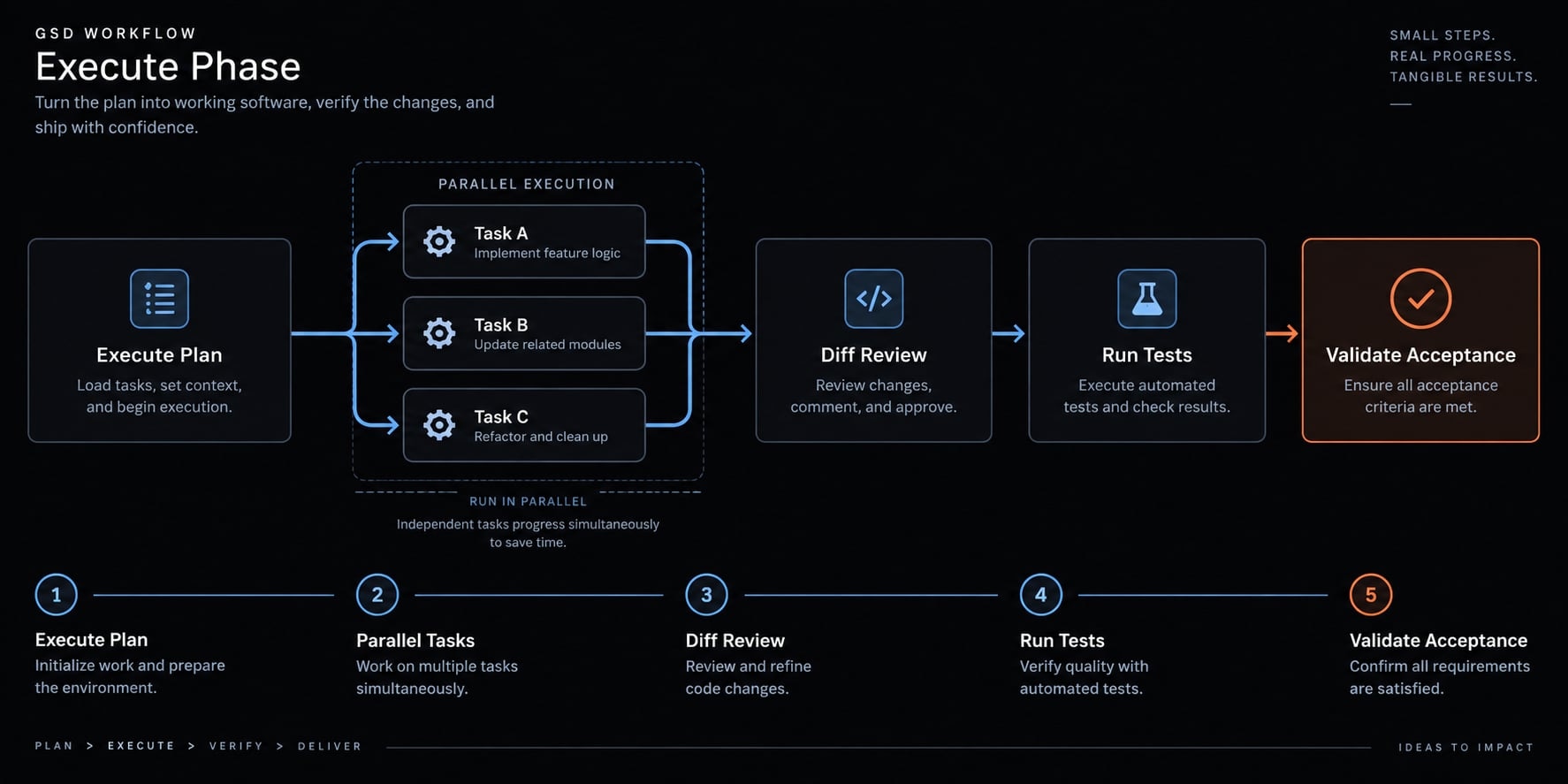
Stop execution when:
- Unrelated files are modified.
- An unapproved dependency appears.
- Tests are removed or weakened.
- Repository architecture conflicts with the plan.
- Credentials or sensitive files are accessed unnecessarily.
- Implementation materially deviates from approved scope.
Verify the work
Typical legacy command: /gsd:verify-work N
Run unit and integration tests, linting, formatting, type checks, security checks, regression tests, manual behavior checks, and diff review. Map each acceptance criterion to evidence.
Passing tests do not prove that the requirement was satisfied. Verification must compare actual behavior with the original specification.
Failure found → corrective task → focused patch→ rerun checks → update evidence
Do not complete a milestone while critical security checks or acceptance criteria remain unresolved.
Complete the milestone and resume later
Typical legacy commands: /gsd:complete-milestone and /gsd:resume-work
Before completion, confirm that requirements are satisfied or explicitly deferred, verification evidence exists, state files match Git, and deviations are documented.
Before resuming, compare saved state with Git history, manual changes, current dependencies, and runtime versions. State files are a convenience, not an unquestionable source of truth.
Core command reference
Stage | Typical legacy command | Output | Human checkpoint |
|---|---|---|---|
Initialize |
| Requirements and roadmap | Confirm scope |
Map |
| Repository map | Validate critical flows |
Discuss |
| Decisions and constraints | Approve assumptions |
Plan |
| Implementation plan | Check tasks and tests |
Execute |
| Code and commits | Review diffs |
Verify |
| Test and acceptance evidence | Confirm satisfaction |
Complete |
| Updated milestone state | Approve closure |
Resume |
| Restored context | Reconcile with Git |
These names are historical examples. Use the syntax documented for the exact implementation and release you have verified.
Practical example: Adding passwordless authentication
This compact GSD workflow example illustrates managing complex coding tasks with Claude Code. It is not production-ready authentication guidance.
Stage | Example artifact |
|---|---|
Requirements | IDs and out-of-scope boundaries |
Discussion | Token, expiration, redirect, rate-limit, and logging decisions |
Plan | Atomic implementation and test tasks |
Execution | Focused commits and reviewed diffs |
Verification | Acceptance evidence and token-reuse correction |
Requirement and Scope
- R1: Users can request a one-time sign-in link.
- R2: Links expire after a defined period.
- R3: Links cannot be reused.
- R4: Existing sessions remain unaffected.
- R5: Email failures return safe, non-enumerating responses.
Social login, password migration, and account linking remain out of scope. Requirement IDs connect planning, commits, tests, and verification evidence.
Discussion decisions
Area | Decision required |
|---|---|
Provider | External provider or internal implementation |
Token storage | Hashing, persistence, and consumption |
Expiration | Validity period and clock behavior |
Redirect | Approved post-authentication destinations |
Rate limiting | Request and callback controls |
Audit logging | Safe events without exposed secrets |
Errors | Generic, non-enumerating responses |
These decisions must be resolved before coding. No single implementation is appropriate for every system.
Phase plan
- Add the data model and token-generation mechanism.
- Add request and callback endpoints.
- Add the user interface and email template.
- Add automated tests and acceptance checks.
- Identify dependencies and parallelizable work.
Token rules and persistence must precede endpoint behavior.
Execution and commit sequence
Use focused commits where practical:
feat(auth): add one-time token modelfeat(auth): add request and callback endpointsfeat(auth): add sign-in UI and email templatetest(auth): cover expiration, reuse, and rate limits
Review each diff before dependent tasks continue. Prevent unrelated refactoring and record any deviation from the approved plan.
Verification and recovery
Verification covers expired, reused, malformed, and revoked tokens, plus rate limits, generic errors, existing sessions, and transactional consumption.
Assume the callback accepts the same token twice because consumption is not atomic. The workflow should:
- Stop milestone completion.
- Create a corrective task linked to R3.
- Make validation and consumption atomic.
- Add a concurrent or repeated-use regression test.
- Rerun the full verification set.
- Update evidence and project state.
The workflow did not prevent the defect. It created a controlled path for detection, correction, and traceability.
When to use GSD and when to skip it
Workflow depth should depend on risk, dependencies, reviewability, and session length-not only code volume.
Situation | Recommended approach | Reason |
|---|---|---|
One-line fix | Standard Claude Code prompting | Full workflow adds overhead |
Small contained feature | Lightweight structured workflow | Limited planning is sufficient |
Multi-file feature | Full GSD phase | Dependencies need tracking |
New application | Roadmap and phased execution | Work spans multiple milestones |
Existing production repository | Map, then use scoped phases | Architecture risk is higher |
Security-sensitive change | Full planning and manual review | Audit requirements are stronger |
Limited token budget | Standard prompting or smaller phases | Multiple agents may cost more |
Strong traceability need | Full GSD with focused commits | History is easier to inspect |
Practical task-sizing rule:
- Standard prompting: Use for obvious, isolated, reversible changes that are easy to verify.
- Lightweight structured workflow: Use when several decisions exist but architecture and security risk remain low.
- Full GSD workflow: Use when failure is costly, dependencies are broad, or work spans multiple sessions.
Any phase that cannot be reviewed as one coherent unit should be divided into smaller phases.
Limitations, security risks and troubleshooting
GSD adds useful structure, but it also introduces state files, scripts, permissions, commands, and maintenance dependencies.
Common workflow problems
Problem | Likely cause | Recommended response |
|---|---|---|
Phase is too broad | Weak decomposition | Replan into smaller tasks |
Unrelated files change | Unclear boundaries | Stop, inspect, revert, and tighten scope |
Tests pass but requirements fail | Technical-only verification | Recheck acceptance criteria |
State disagrees with Git | Interrupted or manual work | Reconcile files and history |
Token costs are high | Too many agents or large phases | Reduce agents and task size |
Commands stop working | Syntax or skill format changed | Check release and migration notes |
Source becomes untrusted | Ownership or provenance changed | Stop updates, remove assets, and reassess |
Begin workflow troubleshooting by comparing the installed version with the documentation originally used.
Security boundaries
- Do not run unverified installers in production repositories.
- Avoid broad permission bypasses around sensitive code or secrets.
- Review hooks, scripts, and lifecycle actions as executable code.
- Restrict
.envfiles, credentials, deployment keys, and unrelated directories. - Require human approval before migrations, deployments, destructive commands, or external service changes.
- Stop when an agent accesses or modifies assets outside the approved boundary.
Local execution does not eliminate Claude Code security risk. Local agents may access files, shells, credentials, and connected services according to their permissions.
What GSD does not replace
GSD does not replace:
- Engineering judgment.
- Architecture ownership.
- Secure code review.
- Automated testing.
- Product requirement validation.
- Dependency and supply-chain review.
- Human approval for production deployment.
Structure improves control only when specifications remain accurate, permissions remain restricted, and reviewers actively inspect the evidence.
Frequently asked questions
What is GSD for Claude Code?
GSD (Get Stuff Done) is a structured, spec-driven workflow framework designed to optimize AI-assisted software development. It functions as a pattern for managing complex projects by separating planning, execution, and verification into isolated, file-backed stages to prevent "context rot"-the degradation of AI performance during long sessions.
Why is context rot a problem for Claude Code users?
Context rot occurs when a single AI session carries too much information, causing the model to forget requirements or cut corners as the context window fills. GSD mitigates this by using fresh, focused context windows for atomic tasks, ensuring the AI maintains high-quality output throughout the project lifecycle.
Is GSD an official feature of Claude Code?
No, GSD is a third-party workflow implementation, not a native Anthropic capability. Because it relies on external scripts, hooks, and configuration files, users must verify the specific repository, version compatibility, and security settings before integration to ensure it aligns with their Claude Code environment.
How does GSD improve code traceability?
GSD enforces traceability by requiring persistent project-state files (such as REQUIREMENTS.md and STATE.md) and generating atomic Git commits for each task. This creates an auditable trail that connects high-level requirements to specific code changes, verification evidence, and the current progress of the project.
Is it safe to use GSD for production projects?
While GSD improves workflow structure, it involves running external scripts and hooks that interact with your local environment. You should treat these as executable code. Always verify repository provenance, restrict file permissions, conduct initial testing in a disposable repository, and maintain a Git checkpoint before installation.
What should I do if a GSD command stops working?
Command failures often result from Claude Code updates (such as changes to skill discovery formats) or GSD release shifts. First, verify your installed version against the official documentation for that specific fork. If the syntax has changed, you may need to update your skill files or migrate to the latest release.
When should I skip using GSD?
Skip GSD for trivial changes, quick bug fixes, or ad-hoc prototyping where the overhead of planning and multi-stage verification outweighs the benefit of strict structure. Standard Claude Code prompting is typically more efficient for minor tasks that do not risk architectural drift or require long-term traceability.
Read more:
- Claude Code prompt engineering: A practical guide for developers
- Master Claude Code Python: A practical workflow for AI coding
- Claude Code Plan Mode: Optimize your AI coding workflow
Conclusion
GSD Claude Code is a structured workflow for defining requirements, planning changes, isolating execution, verifying behavior, and preserving project state. Its primary value lies in disciplined context engineering and clearer requirement-to-change traceability. Full GSD is most useful for multi-step, high-risk, or multi-session work; smaller changes usually need less process.
Before adoption, verify the repository, release, command syntax, scripts, package ownership, and permission boundaries. Test installation and rollback in an isolated repository first.
Bookmark this guide and copy the safety checklist before modifying a real codebase. For broader reusable Claude Code workflows, AgentKit provides optional skills and workflow patterns that can be evaluated under the same controls.