Claude Code vs Cursor: Which AI tool fits your workflow?
Claude Code vs Cursor: Which fits your development workflow better?
Claude Code vs Cursor is no longer a question about whether AI coding tools are useful. The real decision is which workflow model fits how you and your team actually build software. For some teams, the better choice is the tool that handles repo-wide reasoning, debugging, and multi-step execution with less supervision. For others, it is the tool that keeps momentum high inside the editor during everyday implementation. This guide breaks down the decision in practical terms: quick verdict, workflow model, task fit, cost and autonomy trade-offs, role-based recommendations, and when a mixed setup makes more sense than choosing one side.
Claude Code vs Cursor: Quick verdict at a glance
There is no universal winner in Claude Code vs Cursor. The better choice depends on what kind of work dominates your week and how you prefer to interact with AI during development.
In most AI coding agent comparisons, the split is clear: Claude Code excels at broad execution and deep reasoning, while Cursor wins on rapid editing and IDE convenience. In practice, developer workflow matters more than a long feature list.
Quick comparison table:
Criteria | Claude Code | Cursor | Best fit / note |
|---|---|---|---|
Interface | CLI-first, terminal-centric | IDE-first, editor-native | Choose based on working style |
Best use case | Repo-wide execution, debugging | Fast editing, visual review | Task mix matters most |
Main strengths | Deep reasoning, shell workflows | Inline edits, speed, review comfort | Different strengths, not strict replacement |
Main weaknesses | Heavier for tiny edits | Less differentiated in broader execution | Mismatch creates frustration |
Best fit user type | Terminal-heavy builders, senior ICs | IDE-first engineers, fast implementers | Team habits matter |
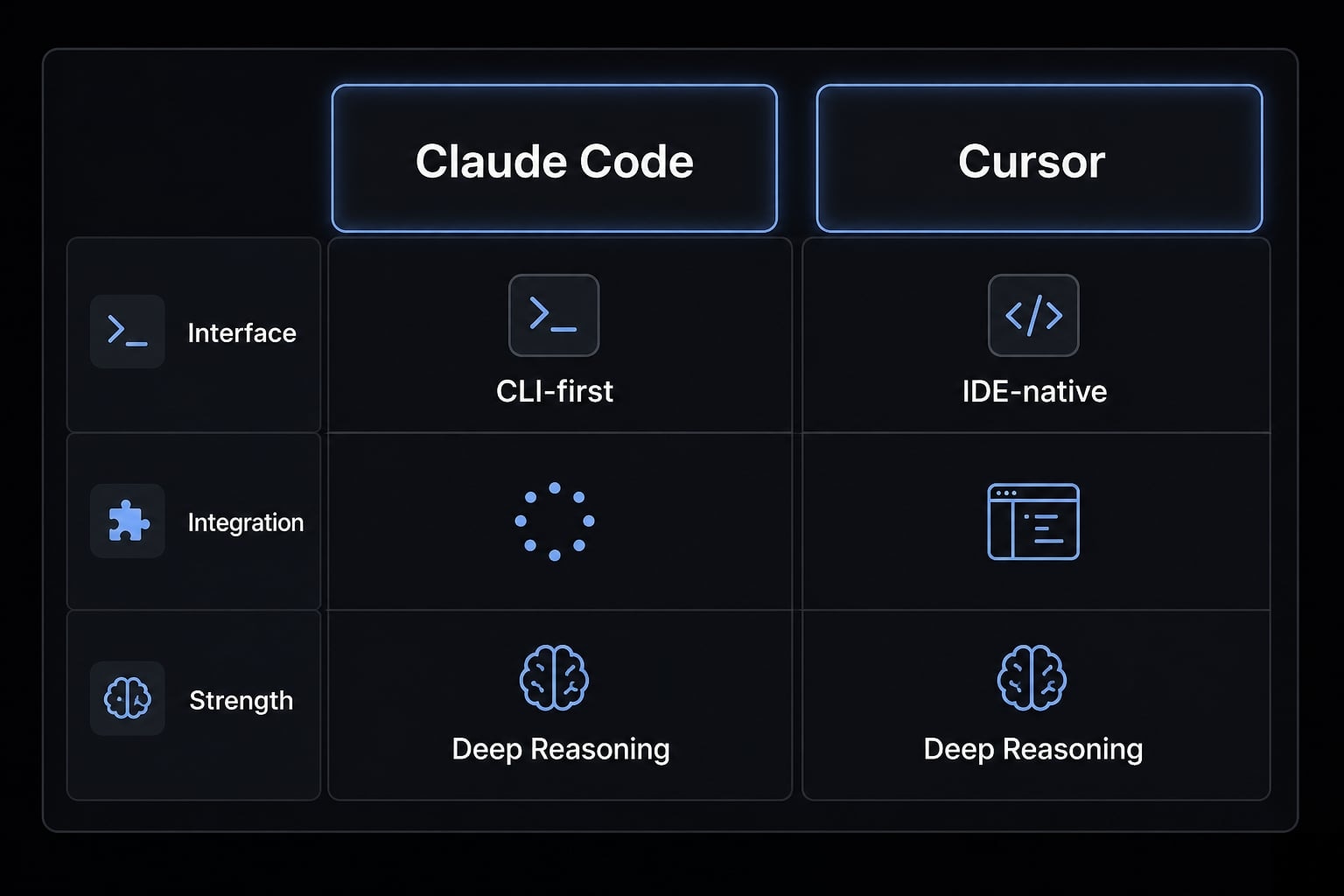
In Claude Code vs Cursor, the short answer is this: choose Claude Code if your work is broader, more execution-heavy, and terminal-centric; choose Cursor if your day is dominated by editing, reviewing, and quick iteration. In practice, many developers end up using both because the split between heavy-lift work and daily coding is real.
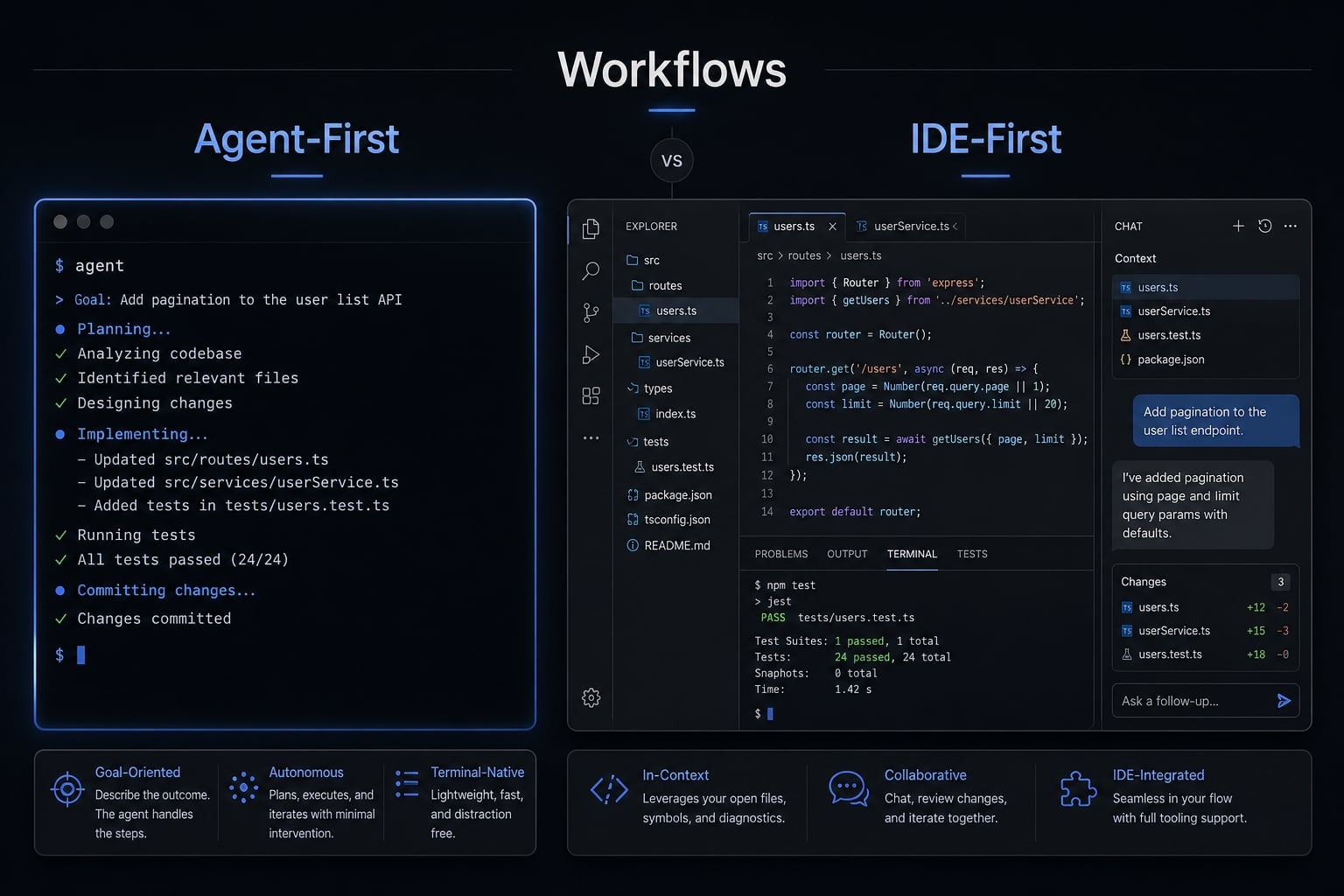
The core difference: Agent-first vs IDE-first workflow
Claude Code and Cursor differ primarily in workflow model. Claude Code is terminal-centric and broader in execution, while Cursor is optimized for editing and review inside the IDE. That is why the Claude Code CLI vs Cursor IDE decision feels less like a feature comparison and more like choosing how you want AI to participate in development.
The real difference is not just interface preference. It changes how you review output, how much trust you place in agentic coding, and where workflow friction appears.
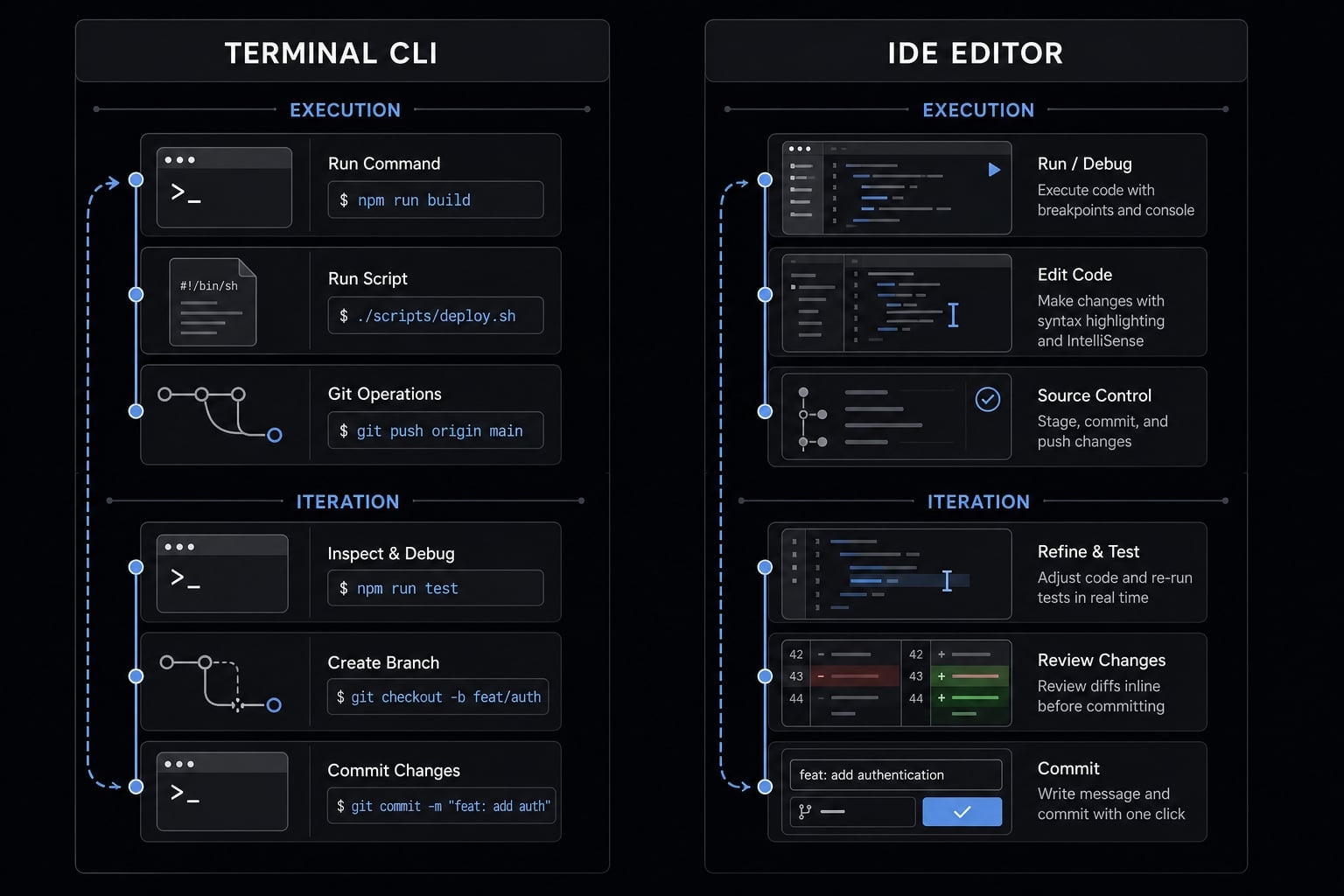
When developers use a terminal-centric tool, they often think in tasks that span files, scripts, tests, Git operations, and shell commands. That makes broader execution feel more natural. When developers use an AI-integrated IDE, they usually stay closer to code selection, inline edits, navigation, and visible review. That makes everyday implementation feel faster and safer.
Many “which tool is better?” debates are really workflow mismatch problems. A developer who wants quick local edits may find Claude Code heavier than necessary. A developer who wants broader task continuity may find Cursor less satisfying once work extends beyond the editor. Operating model usually matters more than headline features because it shapes trust, speed, and rework.
Claude Code’s operating model
- It thrives in terminal environments-handling shell commands, scripting, test suites, and multi-step Git workflows natively.
- Feels stronger for autonomous terminal agents use cases where execution spans multiple steps.
- Supports better continuity when a task requires planning, code changes, test runs, and follow-up fixes.
- Often feels more natural for broader repo actions and higher codebase autonomy.
- Can feel heavier than necessary for tiny edits or quick visual adjustments.
Cursor’s operating model
- Lives inside the AI-integrated IDE, which lowers context switching for editor-first developers.
- Strong for inline changes, completions, file navigation, and visible review.
- Usually easier for teams already centered around IDE habits and short implementation loops.
- Delivers good context-awareness for focused coding tasks inside the editor.
- Becomes less differentiated when tasks turn broader, more execution-heavy, or more shell-dependent.
Claude Code vs Cursor by real development tasks
The most useful way to decide is by task type. If you are asking which ai coding tool is better for refactoring, debugging, or shipping feature work, the answer changes depending on the shape of the job.
In practice, Claude Code tends to pull ahead when the work is broad, sequential, and dependent on execution continuity. Cursor tends to pull ahead when speed inside the editor matters more than repo-level orchestration. For teams shipping production code, this distinction matters because the wrong tool often increases review burden rather than reducing it.
Refactoring large or messy code
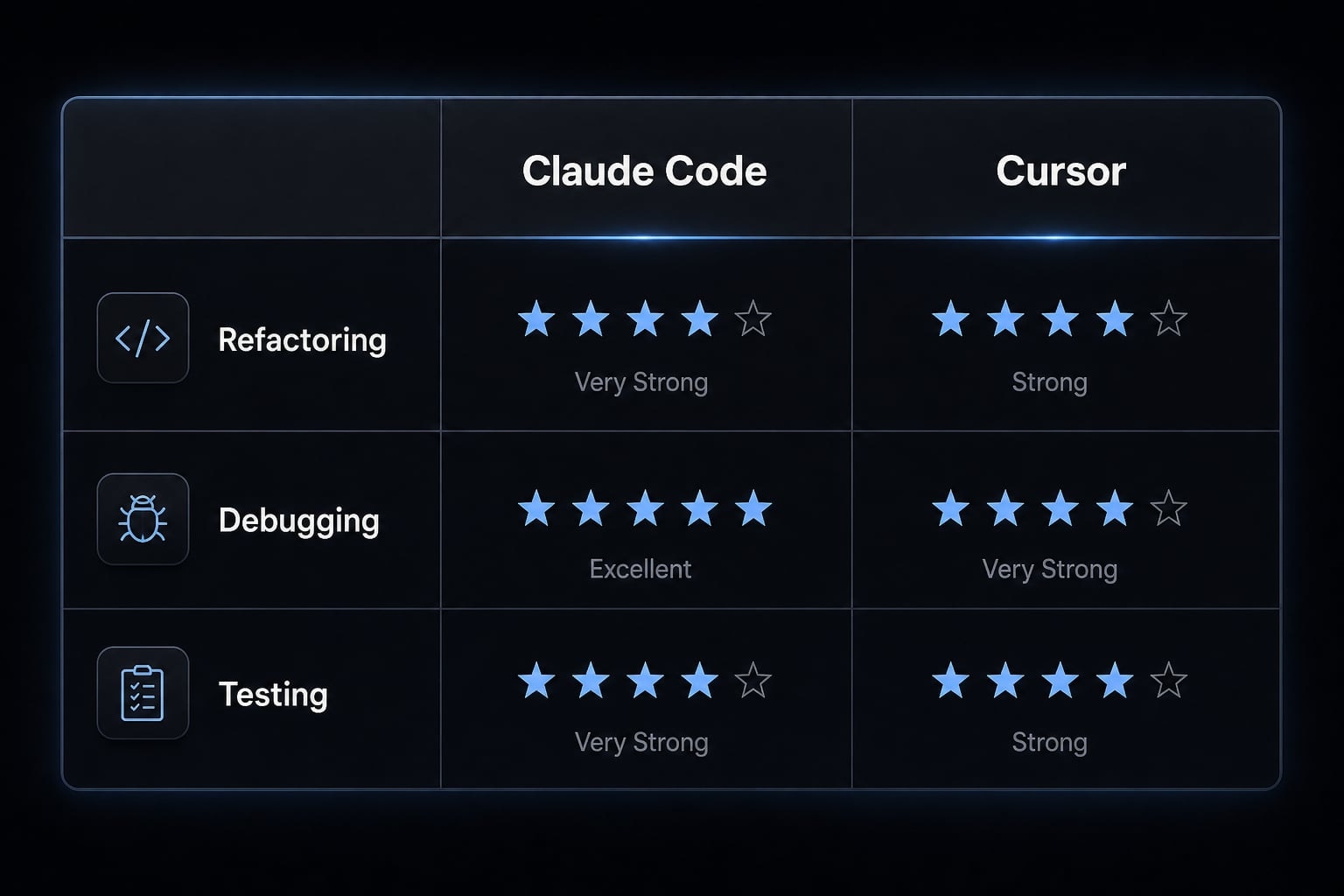
For multi-file refactoring, Claude Code usually has the edge. It is stronger when the goal is not just changing code, but preserving consistency across related files, patterns, and conventions. In broader refactors, the advantage often comes from better architectural reasoning across the repo rather than from faster typing.
Cursor still performs well for tighter refactors, especially when a developer wants to supervise file-by-file edits closely and review changes visually in context. That makes it useful for smaller reorganizations or cleanup work where oversight matters more than broad execution continuity.
If the refactor crosses multiple directories, shared components, tests, and naming patterns, Claude Code usually feels more coherent. If the work is narrower and benefits from immediate visual acceptance or rejection, Cursor is often more comfortable.
Claude Code usually wins for larger cross-file refactors.
Debugging and root-cause analysis
Debugging with Claude Code tends to feel stronger when the issue spans logs, shell output, multiple code paths, tests, and scripts. That is where terminal proximity becomes more than a preference. It supports broader root-cause analysis without forcing constant switching between editor, terminal, and test tooling.
Cursor is often more comfortable for localized issues that are already visible in the editor. If the bug is tightly scoped and you mainly need quick edits, contextual suggestions, and nearby code inspection, Cursor can be faster.
The deeper the issue crosses files, services, and runtime behavior, the more Claude Code tends to help. That does not make Cursor weak at debugging. It means Cursor is usually strongest when the problem is local, while Claude Code is stronger when the investigation is systemic.
Claude Code is usually the better choice for deeper debugging.
Writing tests and reviewing generated code
Cursor for test writing is often easier when the goal is quick generation plus immediate visual review. Developers can inspect suggestions next to the code, adjust assertions quickly, and keep momentum high without leaving the editor.
Claude Code becomes more compelling when tests involve repeated terminal execution, setup scripts, fixture adjustments, or broader loops between failing output and follow-up changes. That is especially true when the test workflow is not isolated to one file.
This is one of the clearest split categories. Cursor usually wins on convenience and review comfort. Claude Code usually wins when test work behaves more like a terminal workflow than an editing workflow.
Cursor usually wins on convenience, while Claude Code is stronger in terminal-heavy test workflows.
Building new features from specs
Claude Code is often stronger when feature work requires ambiguity handling, planning, and planning and execution continuity before implementation starts. That usually matters when the spec is incomplete, the architecture is evolving, or the task touches multiple parts of the codebase.
Cursor is strong when the feature is already clear and implementation speed matters more than broad planning. For well-scoped work, it often helps developers move faster inside an established coding rhythm.
The important distinction here is coherence versus raw speed. Claude Code tends to be better when the task needs sequencing, clarification, and broader repo awareness. Cursor tends to be faster when the route is already obvious and the main objective is execution velocity.
Claude Code is usually better for ambiguous or planning-heavy work; Cursor is faster when implementation is already well defined.
UI fixes, small edits, and daily coding flow
For daily coding flow, Cursor is usually the easier default. It is better suited to fast editing, quick visual tweaks, maintenance changes, and the small implementation loops that fill most engineering days.
Because it stays inside the editor, Cursor reduces friction for localized adjustments and lets developers review changes where they already work. That makes it especially useful for UI fixes and other tasks where visual context matters.
Claude Code can still handle this work, but it often feels like more overhead than necessary for minor changes. The broader the tool, the easier it is to feel over-equipped for small tasks.
Cursor is usually the better default for everyday editing work.
Summary matrix by task type
Task type | Better choice | Why | When hybrid works best |
|---|---|---|---|
Large refactors | Claude Code | Stronger multi-step, cross-file coherence | Use Cursor to review and polish output |
Debugging | Claude Code | Better shell, logs, tests, investigation flow | Use Cursor for localized follow-up fixes |
Test writing/review | Cursor | Faster visual generation and review | Use Claude for repeated test-run loops |
New feature work | Claude Code or Cursor | Claude for ambiguity, Cursor for speed | Split planning and implementation |
UI fixes/small edits | Cursor | Better editor-native iteration | Use Claude only when issue expands |
A hybrid ai dev stack often works best when your week includes both broad execution tasks and small editor-centric changes. That is common in real teams, which is why forcing a single-tool answer can create avoidable friction.
Cost, UX, and autonomy trade-offs you should evaluate
The cost comparison of ai coding agents should not stop at the price page. Teams often underestimate how much rework, context switching, and review burden affect real economics. A tool that looks cheaper upfront may be more expensive operationally if it creates more workflow friction or weaker task fit.
Before choosing, evaluate these five factors:
- Workflow model.
- Task mix.
- Cost behavior.
- Trust/review requirements.
- Onboarding friction.
This matters because autonomy is only valuable when the team trusts the execution model, and low sticker price means little if output quality creates downstream cleanup.
Cost and usage pattern
Nominal monthly price is a weak buying metric if you ignore rework and context switching.
- A flat-feeling subscription often looks simpler for budgeting.
- Variable usage can create different cost exposure as activity scales.
- Heavy autonomous usage may change the economics significantly.
- Teams should evaluate token efficiency and output-per-dollar, not just list price.
In practice, the cheaper-looking option is not always cheaper operationally. If one tool reduces rework on larger tasks, its higher apparent cost may still be justified. If your work is mostly lightweight editing, a broader execution model may be unnecessary overhead.
UX and learning curve
Cursor is usually easier for teams already comfortable with VS Code-style habits. That matters for adoption because familiar interaction patterns reduce training needs and improve short-term developer experience metrics.
Claude Code may require more behavior change. The upside is often greater leverage on broader tasks, but the learning curve can be steeper. Teams that are not comfortable with terminal-centric workflows may struggle to realize the full benefit early on.
The wrong interface model usually creates more pain than missing features. That is why workflow fit should come before feature count in any buying decision.
Control, permissions, and trust
- Some teams want more review before actions are executed.
- Some teams value broader autonomous execution because it reduces manual overhead.
- The right choice depends on repo sensitivity, team seniority, review culture, and permissions design.
- More autonomy is only useful if developers trust the output enough to avoid constant second-guessing.
- Hidden cost often appears as review fatigue, not just invoice size.
A practical evaluation should treat control and trust as operating issues, not abstract preferences. If the team will override or re-check everything, the autonomy benefit is not real.
Comparison table: Claude Code vs Cursor for decision-making
This is a buyer-oriented view of Claude Code vs Cursor for teams. It is not a fan ranking. The goal is to compare adoption realities, not just visible features.
Criteria | Claude Code | Cursor | Notes |
|---|---|---|---|
Interface model | CLI-first | IDE-first | Cursor IDE vs Claude Code CLI is the core split |
Best task fit | Broad execution, debugging | Editing, review, iteration | Match to task mix |
Editing speed | Moderate | Strong | Cursor feels faster day to day |
Deep reasoning | Strong | Good | Claude often stronger on broader tasks |
Multi-file changes | Strong | Good | Claude stronger in repo-wide work |
Testing / terminal workflows | Strong | Moderate | Claude benefits from shell proximity |
Visual review experience | Moderate | Strong | Cursor has clearer review comfort |
Cost predictability | Usage-dependent | Often simpler-feeling | Real cost varies by usage |
Team onboarding friction | Higher for IDE-first teams | Lower for many teams | Familiarity matters |
Workflow autonomy | Higher codebase autonomy | More editor-centered control | Trust model matters |
Best fit by user type | Senior ICs, terminal-heavy builders | IDE-first implementers | Role and habits decide |
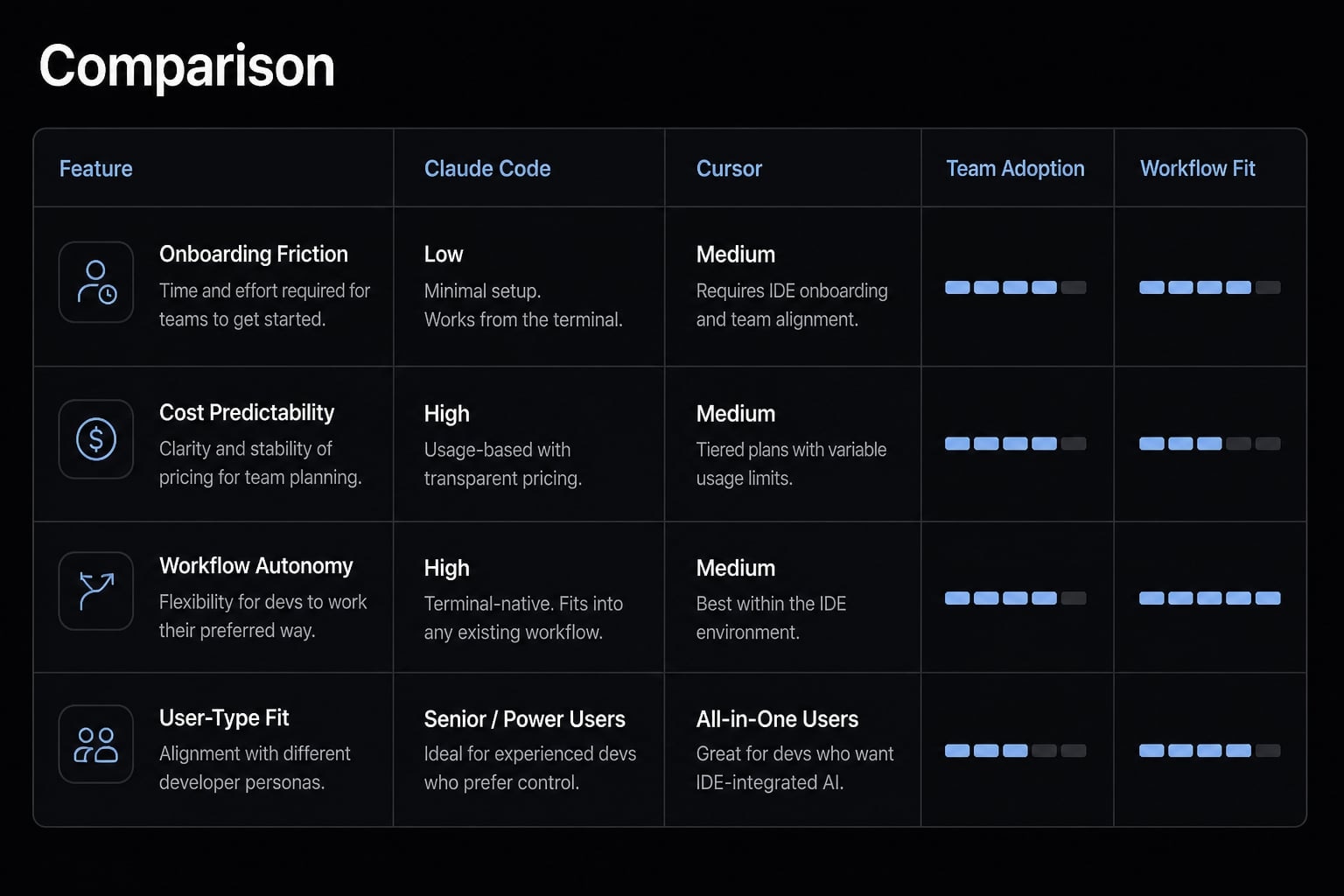
Read this table as an adoption guide, not a winner board. If your team values visible review and low onboarding friction, Cursor usually looks stronger. If your team needs broader execution continuity and stronger context-awareness across shell-heavy workflows, Claude Code usually has the clearer advantage.
Who should choose Claude Code, who should choose Cursor, and when hybrid wins
The best choice depends less on raw capability and more on how a person or team actually works. In most cases, the wrong buying decision is not choosing the weaker tool. It is choosing the wrong operating model for the work.
Choose Claude Code if…
- You are part of terminal-heavy teams or already work comfortably in shell-first environments.
- Repo-wide changes, debugging, migrations, or infrastructure-adjacent tasks are common.
- Architecture-heavy work matters more than editor-native convenience.
- You want broader autonomy across planning, execution, testing, and follow-up steps.
- You are comfortable reviewing larger chunks of output instead of only line-level edits.
- You are a founder or senior IC looking for the best AI coding tool for founders when leverage across many task types matters.
Choose Cursor if…
- If you're an IDE-first developer who spends most of your day inside the editor, this is for you.
- Fast iteration and editing speed matter more than broad execution continuity.
- Visual review is important to your development process.
- Implementation and maintenance work dominate more than migrations or repo-wide changes.
- Lower onboarding friction matters for team rollout.
- You want the most natural fit for day-to-day coding in established IDE workflows.
Use both if…
- You want Claude Code for planning, debugging, and broader repo changes, but Cursor for review, polish, and everyday editing.
- Your team wants output quality without forcing everyone into one workflow model.
- You're intentionally integrating Claude Code into your Cursor workflow-turning potential overlap into a strength.
- A hybrid AI dev stack better reflects how real work is split across deep tasks and fast implementation.
- You are evaluating Claude Code vs Cursor for enterprise development and need flexibility across different engineer preferences.
A hybrid AI dev stack is not indecision. It is often the most operationally honest model when teams have mixed task types and mixed working styles.
How teams can standardize AI-assisted development without tool sprawl
As adoption grows, the bigger problem is often not tool quality. It is inconsistency. Teams start with good intentions, then drift into prompt sprawl, uneven review standards, duplicated configurations, and fragmented ai-assisted development workflow patterns.
That is where governance matters. To build production-ready AI development workflows, teams need more than access to tools. They need shared ways of working, reusable task logic, and control over how agents are used across projects.
AgentKit fits here as orchestration and governance infrastructure. It complements Claude Code and Cursor rather than replacing them. For teams trying to build a standardized coding-agent stack, the value is not “more AI.” It is more repeatability, less improvisation, and better control as usage scales.
Where AgentKit fits:
- Orchestrates reusable skills and specialized subagents across workflows.
- Reduces ad hoc prompting and scattered team conventions.
- Supports shared configurations and controlled workflows.
- Helps standardize execution, review practices, and security checks.
- Useful for building production-ready AI development workflows across both Claude Code and Cursor.
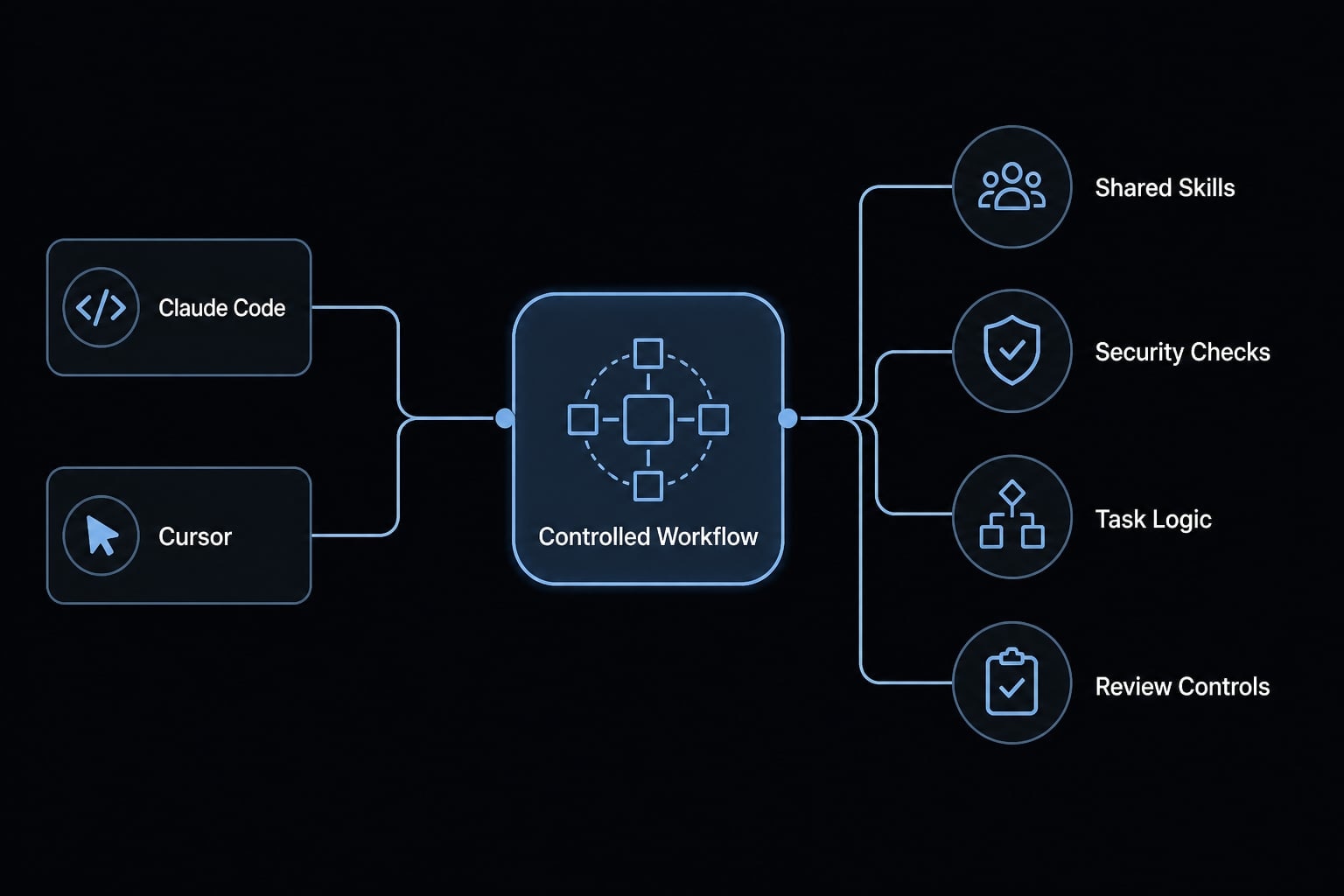
If your team is moving from individual experimentation to repeatable delivery, this governance layer becomes more important than adding another standalone tool.
Frequently asked questions
What is the core difference between Claude Code and Cursor?
The primary difference lies in their operating model: Claude Code is a terminal-centric, agent-first CLI that excels at broader, multi-step autonomous execution, whereas Cursor is an IDE-first, editor-native tool optimized for fast, visual, day-to-day coding and human-in-the-loop review.
Which tool is better for large refactoring tasks?
Claude Code is generally better for large, multi-file refactoring tasks. Its ability to execute broad repo-wide changes, maintain architectural consistency, and interact directly with terminal-based test suites makes it more effective for complex structural migrations than standard IDE-native editing tools.
Can I use Claude Code and Cursor together?
Yes. Many senior developers and engineering teams adopt a hybrid workflow. They use Claude Code for the heavy lifting—such as complex debugging, planning, and multi-file automation-and rely on Cursor for the interactive daily editing, visual bug fixes, and reviewing the code generated by the agent.
Does the cost of these AI coding tools vary significantly?
While both often start at similar monthly price points, actual costs vary based on usage patterns. Claude Code tends to be token-efficient for broad tasks, while Cursor’s credit-based model can become expensive during high-volume autonomous usage. Evaluate output-per-dollar rather than just subscription fees.
Which tool should a team choose for standardized AI development?
Teams prioritizing standardization and production-ready workflows should focus on governance rather than just selecting one tool. For teams managing shared skills, consistent configurations, and controlled execution across multiple developer environments, platforms like AgentKit can provide the necessary orchestration layer to complement both Claude Code and Cursor.
Do I need to learn a new interface to use Claude Code?
Yes, Claude Code requires a shift toward a terminal-first workflow, which can be an adjustment if you are exclusively used to IDE-native environments. However, for many developers, the increased leverage in autonomy and repo-wide reasoning provides a significant return on the learning curve.
Read more:
- Claude Code vs Cline: Which AI coding workflow suits you?
- Claude Code vs GitHub Copilot: Which AI coding tool fits you?
- Aider vs Claude Code: Choosing the right AI Coding Assistant
Conclusion
In Claude Code vs Cursor, the better choice depends on workflow fit and task mix, not hype. Claude Code is usually stronger for deep reasoning, debugging, repo-wide work, and autonomy-heavy tasks. Cursor is usually stronger for fast editing, visual review, and everyday IDE-native execution.
There is no universal winner. For many teams, the most practical answer is a hybrid workflow: use Claude Code for broader execution and Cursor for review and daily coding flow. That approach reflects how real engineering work is split. If your team is evaluating how to standardize AI-assisted development across tools, reduce prompt sprawl, or build a more production-ready operating model, explore AgentKit or request a workflow audit at agentkit.best to design a setup that matches your engineering workflow instead of fighting it.