
Claude Code vs GitHub Copilot: Which fits your workflow better?
When choosing between Claude Code and GitHub Copilot, most developers are not really choosing which AI coding assistant is “smarter.” They are choosing between speed and flow, deeper analysis and debugging quality, or a combination of both. If your work is mostly routine implementation, one tool may feel immediately better. If your work involves brittle logic, refactoring risk, or unclear requirements, the better fit can change fast. This guide compares both tools by real workflow use cases so you can decide whether to use Claude Code, GitHub Copilot, or a hybrid setup that gives you both speed and depth.
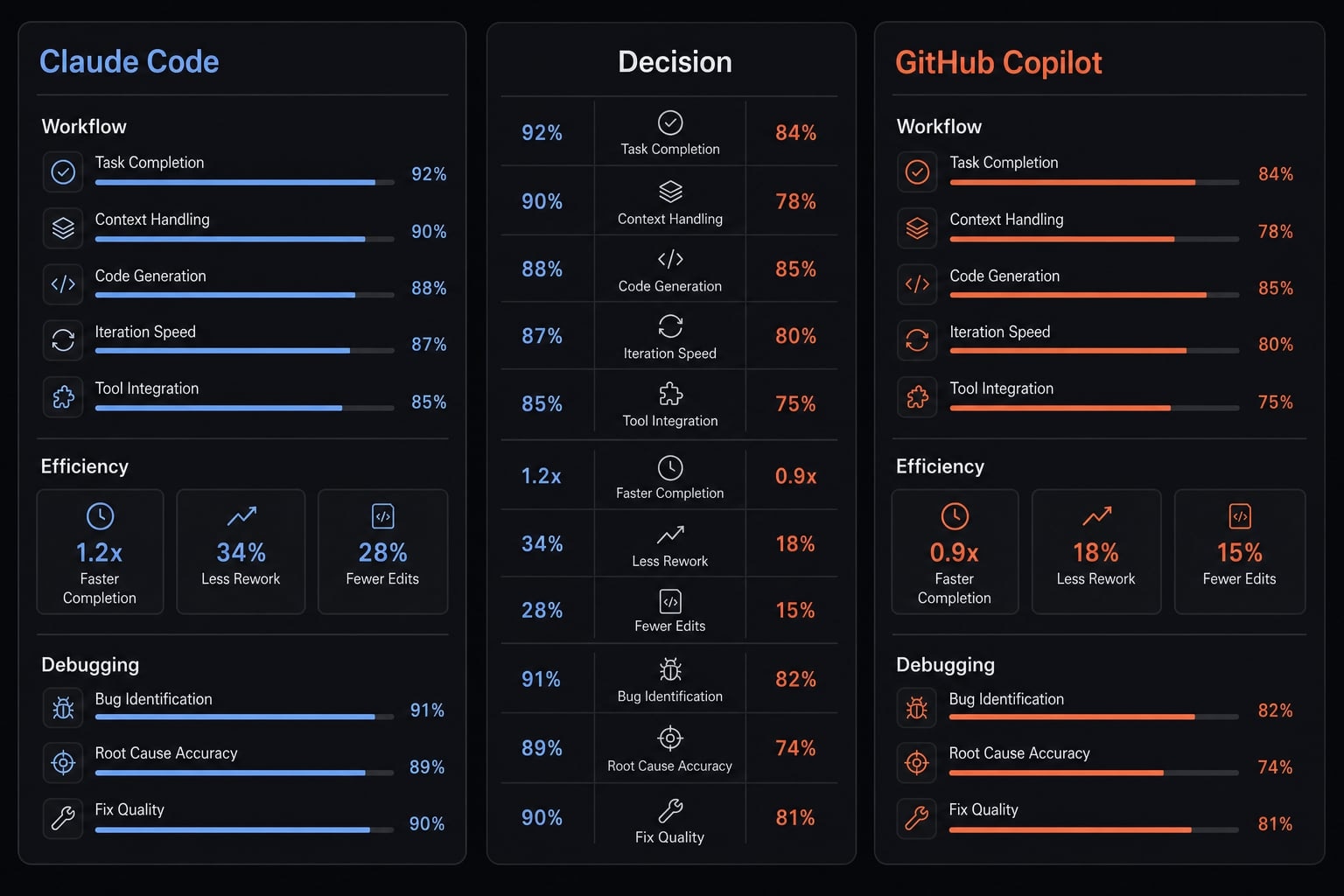
Claude Code vs GitHub Copilot at a glance
Positioning in Plain English
Claude Code and GitHub Copilot solve different parts of the coding workflow. Users compare them because autocomplete alone is no longer enough for modern software work. In most Claude Code vs GitHub Copilot comparison scenarios, the real trade-off is code completion latency versus reasoning depth, not just feature count.
GitHub Copilot is generally positioned as a fast, editor-native AI coding assistant for routine implementation.
Claude Code is generally positioned as a deeper coding partner for analysis-heavy work, debugging, and refactoring.
This matters because modern teams need both execution speed and better judgment when code changes carry more risk.
Quick-scan comparison table
Category | Claude Code | GitHub Copilot | Best Fit |
|---|---|---|---|
Best for | Debugging, refactoring, analysis. | Fast daily coding, autocomplete. | Depends on task type. |
Main strength | Stronger reasoning depth. | Lower code completion latency. | Split by workflow. |
Main weakness | Can interrupt flow. | Can be shallow or “close but wrong”. | Trade-off matters. |
Ideal user | Developer handling ambiguity. | Developer optimizing speed. | Mixed teams may use both. |
Best workflow fit | Hard problems and safer changes. | Routine implementation and momentum. | Hybrid often works best. |
A practical Claude Code vs GitHub Copilot comparison usually comes down to this: Copilot is often better when you want code to appear quickly inside the editor, while Claude Code is often better when you need the tool to think through a messier problem. That is why many serious users do not frame this as a winner-takes-all decision.
Instead of asking “Which tool is best?”, ask yourself “Which tool reduces friction in my day-to-day tasks?” when comparing Claude Code and GitHub Copilot.
Where GitHub Copilot wins: Speed, inline flow, and everyday coding
GitHub Copilot usually has the edge when your priority is staying in motion. If most of your day is routine coding, low-ambiguity implementation, and quick editor work, its inline autocomplete experience often feels more natural than a tool built for deeper analysis. This is especially true for developers who care about rhythm and minimizing interruptions inside a VS Code AI assistant workflow.
Why near-instant suggestions matter more than they sound
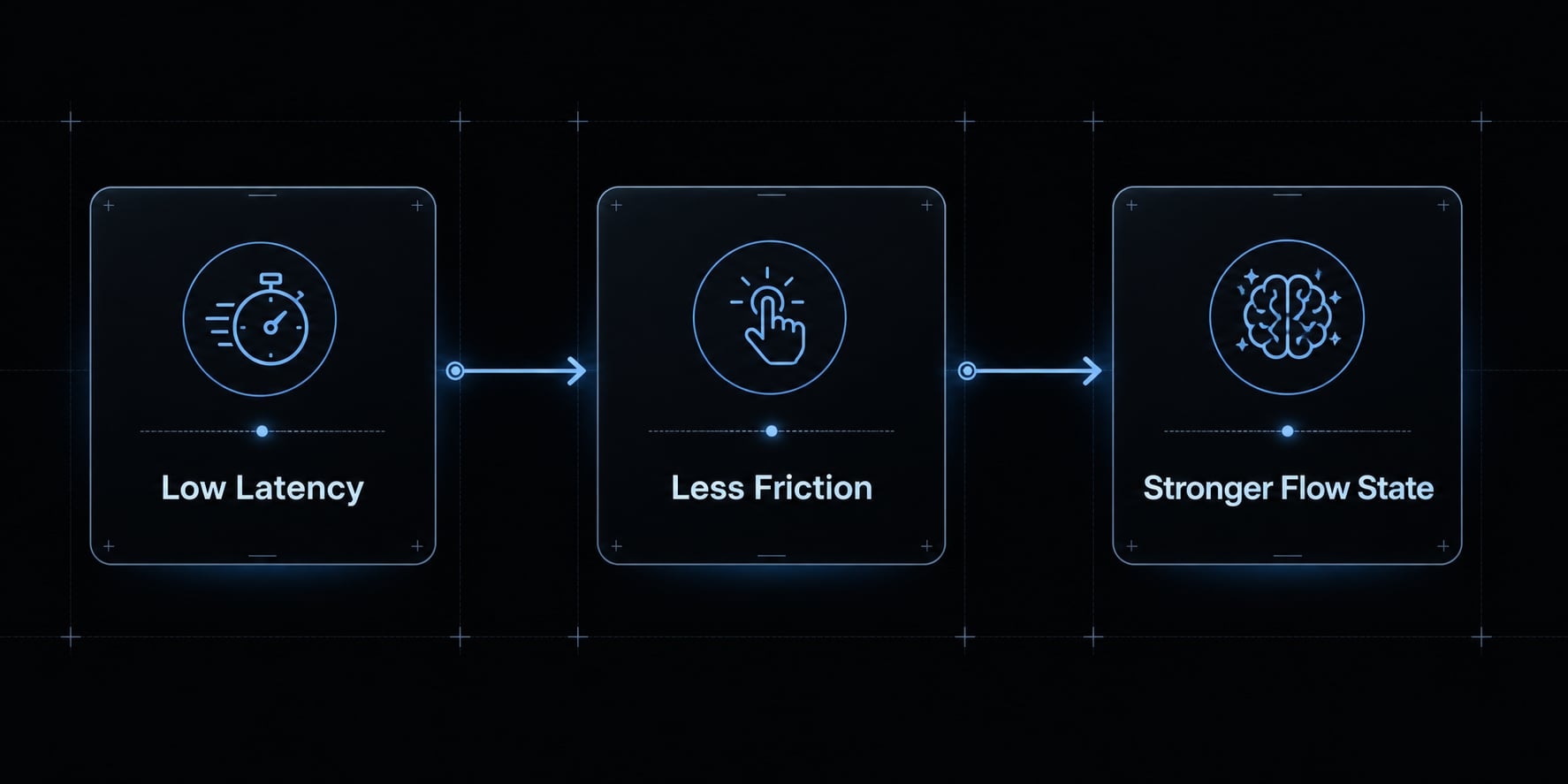
The value of Copilot is not just raw speed as a metric. It is how that speed supports the developer flow state. When suggestions appear almost instantly, you preserve keyboard rhythm. You keep moving through small decisions without breaking concentration. That matters because coding productivity is often lost in micro-friction, not only in big blockers.
A fast code suggestion engine reduces:
- Context switching between thinking and waiting.
- Interruption during repetitive implementation.
- Friction around accepting or editing suggestions.
- The temptation to abandon the tool mid-task.
In practice, many developers adopt or reject an AI tool based on whether it feels native in the editor. If the suggestion loop is fast and predictable, usage becomes habitual. If not, even a capable tool can feel heavier than it should.
Best use cases for Copilot
Copilot is usually strongest in tasks where inline autocomplete can remove small, repetitive steps without requiring much deeper reasoning:
- Boilerplate code, where fast suggestions reduce manual setup time and the logic is already clear.
- Test scaffolding, especially when creating predictable test cases, mocks, or repeated patterns.
- Imports and repetitive wiring, where the main value is speed rather than decision support.
- Small utility functions, when the function shape is obvious and the code is standard.
- Standard frontend or CRUD work, where common patterns repeat across components, endpoints, forms, and handlers.
- Routine coding during feature delivery, when staying in flow matters more than long-form analysis.
Where Copilot can fall short
The trade-off is that speed does not always mean better judgment. Copilot can produce overconfident completions that look correct at a glance but do not fully match the real intent.
This shows up when:
- The bug is not local to the current file.
- The code needs diagnosis, not prediction.
- Business logic is ambiguous.
- A change needs safer reasoning across several steps.
That is the core limitation. Copilot is often excellent for momentum, but less reliable when the task is unclear enough that the tool needs to help think, not just complete.
If your team is testing multiple AI coding tools, create a short evaluation checklist around speed, friction, code quality, and task fit before standardizing on one workflow.
Where Claude Code wins: Debugging, refactoring, and deeper reasoning
Claude Code tends to perform better when the hard part is not typing faster, but understanding the problem well enough to make a safer change. In many AI-driven debugging workflows, that difference is decisive. If your work involves brittle logic, unclear requirements, or multi-step changes, Claude Code often feels more useful as a refactoring assistant than a pure autocomplete tool.
Why reasoning depth matters in real development work
Reasoning depth matters when the task is not obvious, the bug is not local, or the change carries more risk than a simple completion.
In practical terms, Claude Code reasoning is more valuable when you need help with:
- Tracing causes across files.
- Interpreting ambiguous logic.
- Proposing safer code changes.
- Breaking down a multi-step implementation.
- Making sense of unfamiliar parts of a codebase.
This is where project-wide context becomes important. Developers do not just need code suggestions. They need a tool that can hold more of the problem in view and respond with something closer to a thought-out recommendation than a fast guess.
Best Use Cases for Claude Code
Claude Code is often better suited for analysis-heavy situations such as:
- Tracing hard bugs across files, where the issue is spread across several components or services.
- Rewriting brittle code more safely, when a fast completion could introduce new regressions.
- Explaining unfamiliar logic, especially in inherited codebases or rushed handoffs.
- Planning a multi-step implementation, where you need a sequence, not just a snippet.
- Interpreting incomplete requirements, when the developer still needs help clarifying what the code should do.
- Reviewing changes toward more production-ready code, where caution and logic quality matter more than typing speed.
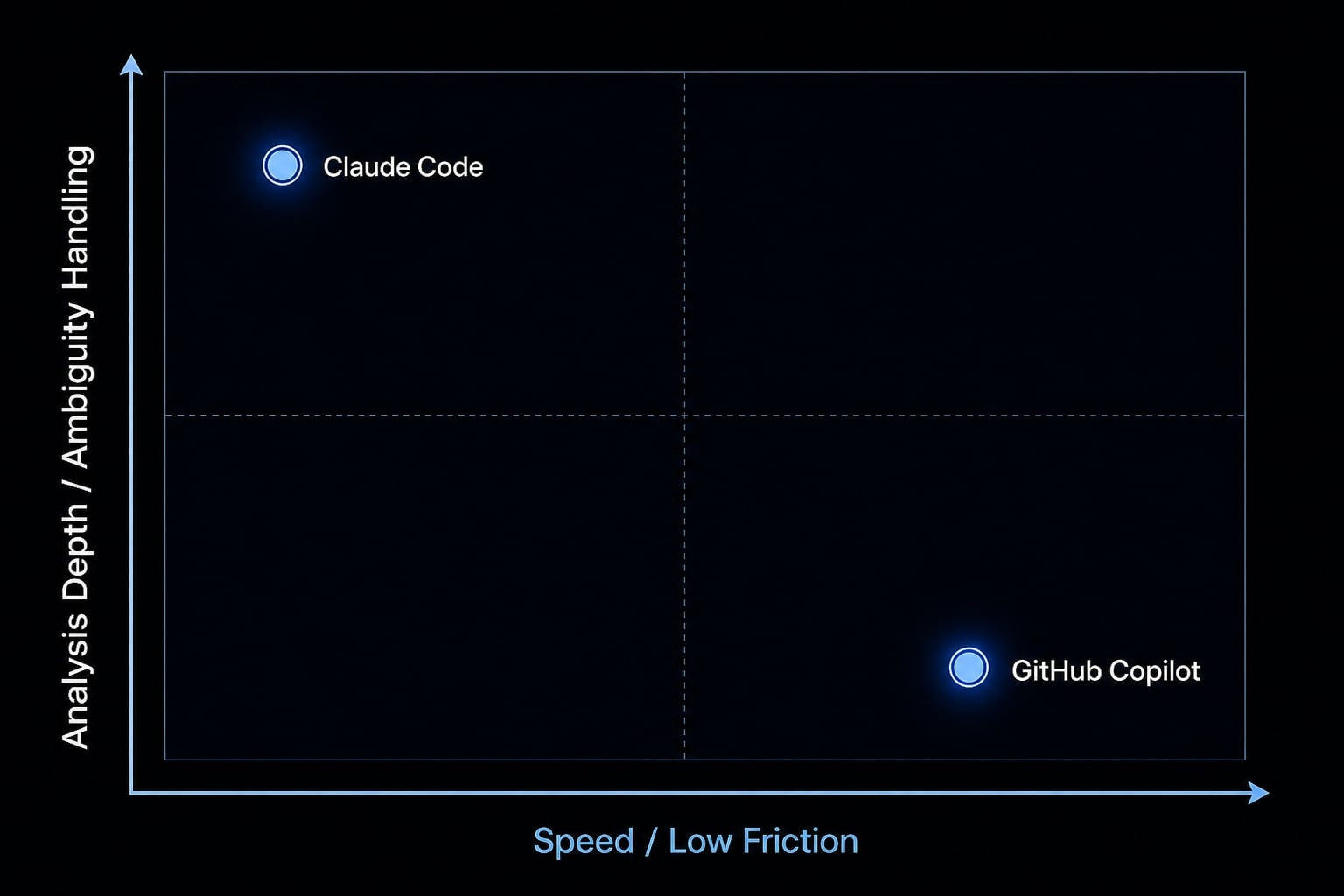
The main trade-off: Better analysis, slower flow
The advantage in AI-driven debugging workflows often comes with a cost. Better analysis can introduce more friction. Compared with a highly editor-native autocomplete loop, Claude Code may feel slower in routine moments. That matters because not every task needs deeper thought. Many developers would rather preserve speed on common implementation work than bring heavier analysis into every coding session.
This is why Claude Code reasoning should not be treated as an automatic win across all use cases. It is generally stronger when the problem is harder, but not always better when the goal is simply to keep shipping.
If your team spends too much time debugging repeated classes of issues, audit which tasks actually need deeper reasoning versus which only need faster execution.
Head-to-head comparison by use case
The most useful way to choose is not by brand loyalty, but by latency vs reasoning. That lens gives better decision support than generic rankings of the best AI coding tool. In practice, the right choice depends on your mix of implementation speed, bug complexity, review needs, and tolerance for workflow interruption.
This becomes especially relevant in Claude Code vs GitHub Copilot for backend development decisions, where requirements are often less obvious than in straightforward UI work. It also affects your code review workflow, because some teams need help generating code faster, while others need better thinking around risky changes.
Comparison table with use-fit by category
Use Case / Decision Factor | Claude Code | GitHub Copilot | Better Fit |
|---|---|---|---|
Autocomplete speed | Slower | Faster | Copilot |
Debugging help | Stronger | More limited | Claude Code |
Refactoring quality | Usually stronger | Good for lighter edits | Claude Code |
Multi-step implementation | Better planning support | Better for fast execution | Depends on ambiguity |
Codebase convention awareness | Often useful with broader reasoning | Often strong in editor context | Depends on setup |
Flow disruption | Higher risk of interruption | Lower friction | Copilot |
Learning curve | May require role adjustment | Usually easier to adopt | Copilot |
Solo use vs team use | Strong for deliberate work | Strong for daily throughput | Hybrid for many teams |
For most buyers, the real issue is latency vs reasoning. If the work is repetitive and speed-sensitive, Copilot often feels better. If the work is ambiguous or failure-prone, Claude Code usually adds more value.
If your priority is X, choose Y
- Fast daily shipping → Copilot-first: Choose GitHub Copilot if most of your work is standard implementation and you want minimal friction.
- Deep problem-solving → Claude-first: Choose Claude Code if debugging quality, safer refactoring, and analysis matter more than typing speed.
- Mixed workflow → Hybrid: Use both if your day alternates between fast execution and ambiguous engineering problems.
- Team repeatability → Define roles before buying more tools: A hybrid coding workflow works best when each tool has a clear job in the process.
For teams evaluating Claude Code vs GitHub Copilot for backend development, the answer is often not either-or. Backend work frequently includes debugging, data edge cases, and multi-step changes that benefit from deeper reasoning, while still needing fast completion in routine implementation. That makes a hybrid coding workflow a legitimate operating model, not a compromise.
Should you replace one with the other, or use both?
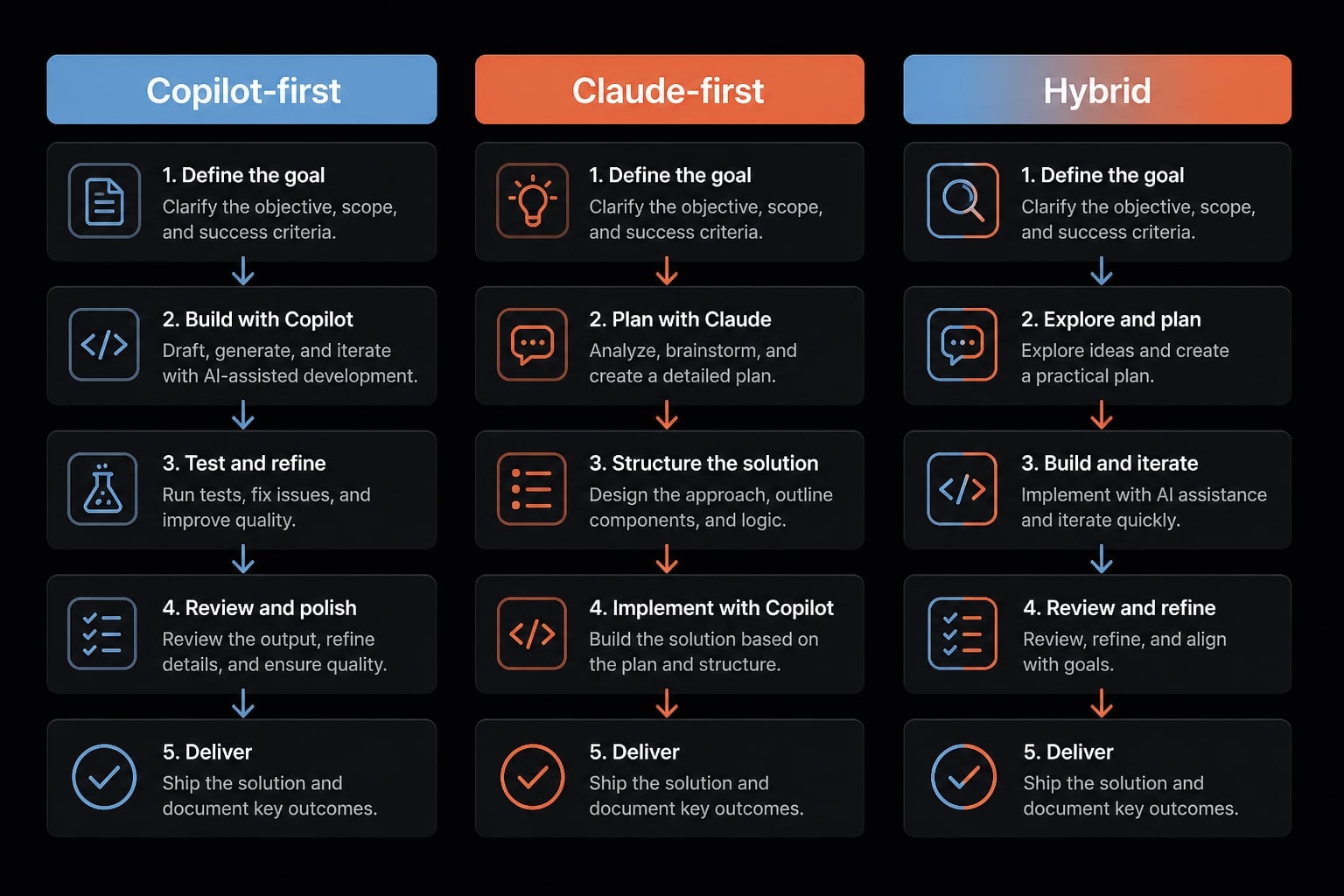
For many developers, replacing one tool with the other is the wrong question. A better framework is to choose the operating model that matches your workload.
- Copilot-first
- Claude-first
- Hybrid workflow
This is the most practical way to think about integrating Claude Code and GitHub Copilot into a real coding environment.
Copilot-first model
A speed-first workflow usually fits best when:
- Your main KPI is shipping quickly.
- Most work is routine implementation.
- You value low-friction editor behavior.
- You spend long hours inside the IDE.
- You are a solo builder optimizing for throughput.
In this model, GitHub Copilot acts as the default execution layer. The goal is to keep coding momentum high and avoid unnecessary interruptions.
Claude-first model
A reasoning-first workflow is often better when:
- Debugging is frequent.
- Code changes carry higher risk.
- Requirements are incomplete or ambiguous.
- Refactoring decisions need more care.
- Thoughtful problem-solving matters more than raw typing speed.
Here, Claude Code becomes the preferred tool because the value comes from better analysis, not just faster completion.
Hybrid model
For many advanced users, the strongest setup is a hybrid AI toolstack. But it only works if roles are clear. A practical split looks like this:
- GitHub Copilot for inline execution, repetitive coding, and fast completion.
- Claude Code for debugging, refactors, review, and planning.
One tool for speed, the other for higher-stakes thinking.
That is what integrating Claude Code and GitHub Copilot should look like in practice. Not “use both somehow,” but separate responsibilities with role clarity.
This is also where workflow orchestration matters. Without clear tool roles, a hybrid AI toolstack can create overlap, inconsistency, and extra mental load. With clear boundaries, it can improve both throughput and code quality.
What small teams often miss: The tool is only part of the workflow
Small teams often assume the right tool will automatically create a better AI development workflow. In practice, that rarely happens. Tool quality matters, but output consistency usually depends on prompt discipline, review standards, and clear role definitions.
Why tool choice alone does not create repeatable results
Workflow orchestration in AI coding means standardizing how prompts, tools, agents, and review steps are used so output becomes more repeatable, safer, and easier to manage across a team. Without that layer, teams often run into the same issues:
- Inconsistent prompting between developers.
- No shared implementation patterns.
- Unclear expectations for review.
- Overlapping tool usage.
- Variable output quality across similar tasks.
That is why a strong AI development workflow is not just about choosing Copilot or Claude Code. It is about reducing randomness in how the team uses them.
Where AgentKit fits
AgentKit is most relevant when a team needs structure around usage, not just access to more tools. In that context, it can support:
- Reusable skills for repeated engineering and marketing tasks
- Prompt standardization across common workflows
- Orchestrated subagents for clearer task delegation
- Cross-tool consistency across different AI environments
- Agent workflow management for small teams building more production-ready AI teams
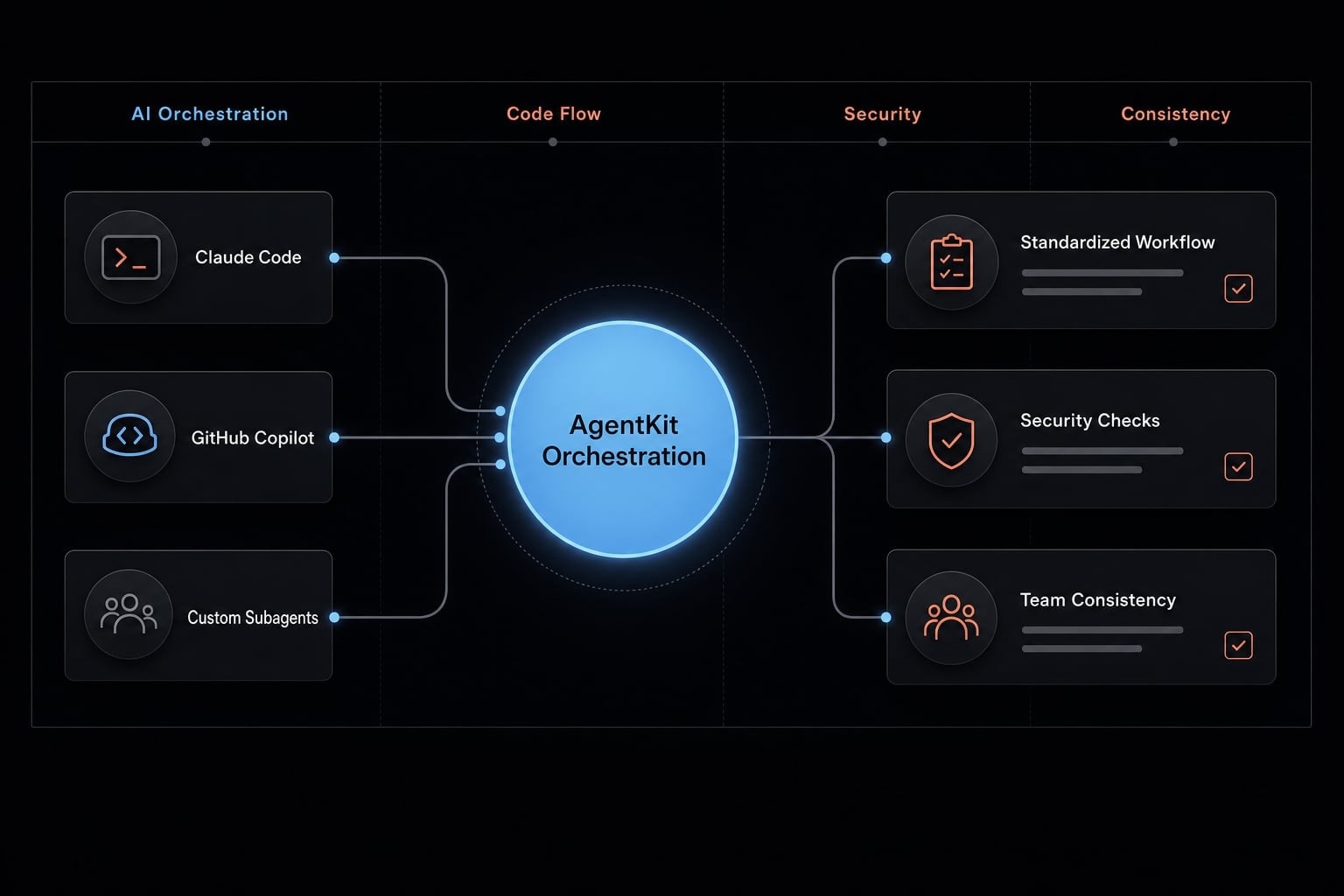
This matters most when multiple developers are using AI differently and results start to vary more than expected.
Frequently asked questions
What are the main differences between Claude Code and GitHub Copilot?
Claude Code is optimized for deeper reasoning, complex debugging, and refactoring across multiple files, while GitHub Copilot excels at high-speed, inline autocomplete within the editor. The primary trade-off is between the "reasoning depth" of Claude Code and the "low-latency flow" provided by GitHub Copilot.
Is Claude Code better for coding than GitHub Copilot?
Not necessarily; it depends on your task. Use Claude Code for ambiguous logic, architectural changes, or hard-to-trace bugs where reasoning is critical. Use GitHub Copilot for routine implementation, boilerplate code, and tasks where maintaining an uninterrupted typing rhythm is your top priority.
Should I replace GitHub Copilot with Claude Code?
Most experienced developers find that replacing one with the other is unnecessary. Instead, a hybrid approach—using Copilot for daily execution and Claude Code for analysis, debugging, and complex refactoring—often results in the highest productivity. Choose based on your specific workflow needs rather than brand preference.
Which tool is more suitable for solo developers?
For solo developers, GitHub Copilot is often preferred for day-to-day coding speed. However, if you frequently hit complex roadblocks or spend significant time debugging, integrating Claude Code as a secondary assistant for deep dives can significantly accelerate your development cycle and improve code quality.
How do these tools impact developer flow?
GitHub Copilot is designed to minimize friction by providing near-instant suggestions directly in the IDE, which helps maintain your flow state. Claude Code, while more insightful, may introduce slight latency during complex reasoning tasks, making it better suited for deliberate "deep work" sessions rather than rapid-fire implementation.
Do small teams need to standardize AI tools?
Yes. Relying on individual tool choice alone often leads to inconsistent code and workflows. Standardizing how your team uses AI—by defining clear roles for tools like Claude Code and GitHub Copilot and implementing shared prompt practices—is essential for achieving repeatable, production-ready results across the entire development team.
Read more:
- Aider vs Claude Code: Choosing the right AI Coding Assistant
- Gemini CLI vs Claude Code: Which coding tool suits you best?
- Windsurf vs Claude Code: Which AI coding assistant fits best?
Conclusion
The practical answer in Claude Code vs GitHub Copilot is straightforward. GitHub Copilot is generally the better fit for fast inline coding, lower friction, and uninterrupted daily flow. Claude Code is generally the better fit for debugging, refactoring, and slower but more thoughtful problem-solving.
If your work is mostly routine implementation, start Copilot-first. If your work is heavy on ambiguity, code quality risk, or deeper analysis, Claude-first is often more effective. For many experienced developers and small teams, the best answer is not replacement but a hybrid model with clear responsibilities.