Claude Code unit testing: Guide to generate reliable tests
Claude Code unit testing: How to generate and validate reliable tests
Claude Code unit testing works best with a controlled, repository-aware workflow-not vague prompts. Because green test results don't guarantee correct code, generating, running, and validating tests must remain distinct steps. This guide outlines a practical AI-assisted testing loop-inspecting the repository, defining contracts, approving scenarios, generating tests, and verifying evidence-to ensure test reliability comes from proven behavior, not just passing suites.
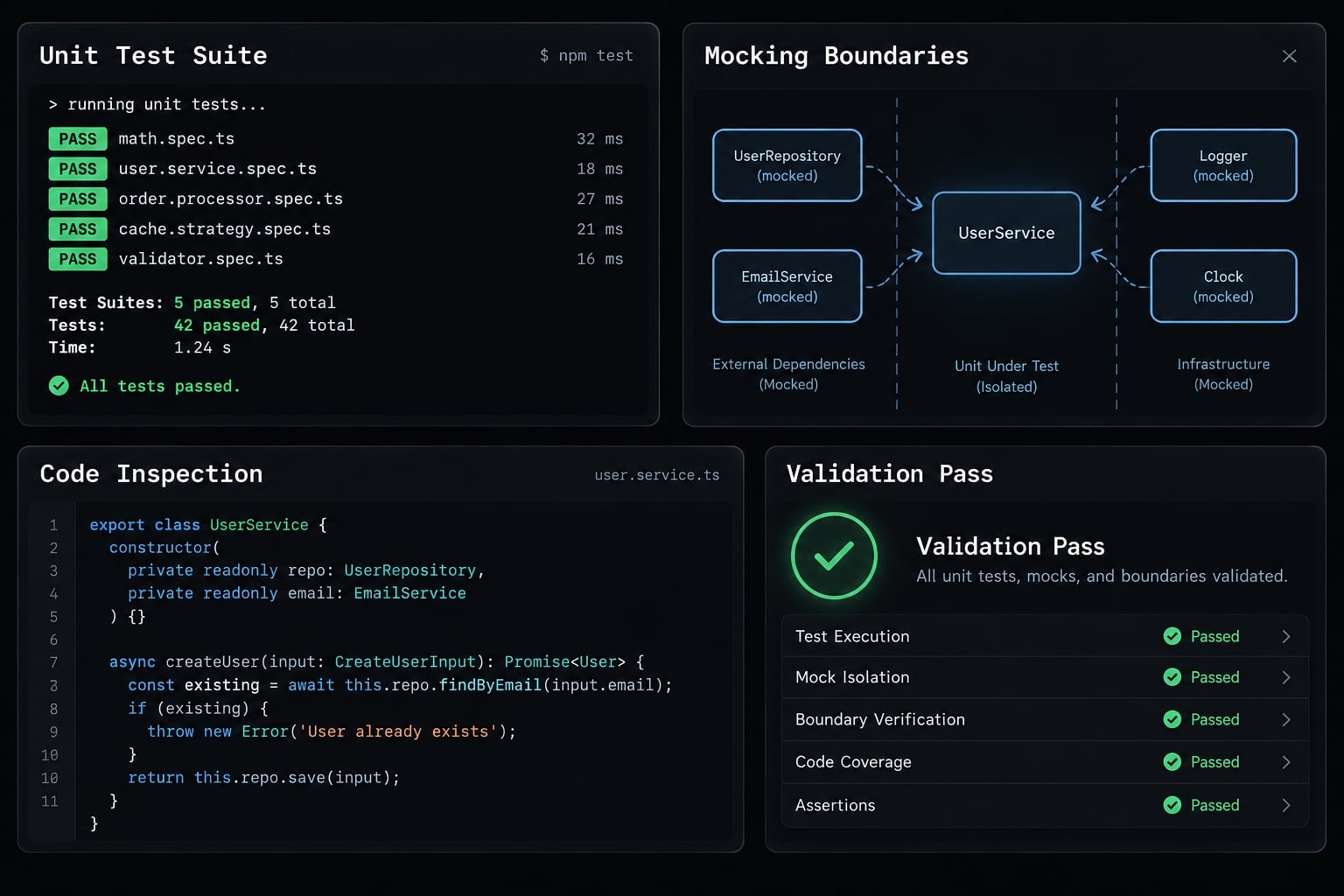
Can Claude Code write unit tests?
Yes, Claude Code can write unit tests by reading relevant repository files, following existing tooling and conventions, and creating or updating tests. When tools, dependencies, and permissions allow, it can run project commands and iterate on failures. Developers remain responsible for confirming intended behavior, useful assertions, and acceptable changes.
What Claude Code can handle
- Discover testing conventions and propose scenarios.
- Generate or revise files for the existing testing framework.
- Run an available test runner and inspect failure output.
The official Claude Code overview and permissions documentation describe repository interaction and permission-dependent execution. Unit test generation does not mean every testing tool is bundled or available.
What still requires developer judgment
- Business requirements, error contracts, and acceptable behavior.
- Assertion usefulness, mock boundaries, and regression value.
A test runner executes tests; an assertion library checks expectations. Some frameworks, including Vitest, provide both.
Before you start: Give Claude Code the right repository context
Repository context prevents avoidable naming, framework, and command mistakes. It cannot replace a behavioral contract: existing code may contain the very defect a test should expose. Provide these seven inputs:
- Target unit or file.
- Expected behavior and edge cases.
- Existing framework and assertion tools.
- Test location and naming convention.
- Approved mocking boundaries.
- Targeted and standard repository commands.
- Prohibited files or changes.
Illustrative inspection map-not an inspected repository:
src/ calculateSubscriptionDiscount.ts # Target source calculateSubscriptionDiscount.test.ts # Proposed test otherHelper.test.ts # Convention referencepackage.json # Scripts and dependenciesvitest.config.ts # Configuration, if presentCLAUDE.md # Repository guidance.github/workflows/ # CI, if used
Ask Claude Code to inspect before it edits
Start with the target and two or three representative tests. Inspect relevant setup hooks, fixtures, helpers, package scripts, workspace selection, and continuous integration (CI) configuration.
Identify external services, clocks, randomness, and shared state. Expand inspection only when necessary; scoped inspection does not establish exhaustive codebase understanding.
Require findings, unresolved assumptions, and proposed scenarios before edits. Confirm that each validation command is safe and cannot accidentally contact production services.
Repository inspection prompt
Perform read-only inspection of [TARGET_FILE], nearby tests,test configuration, setup, helpers, scripts, and relevant CI files.Summarize the framework, conventions, and confirmed test commands.Propose scenarios and justified mocking boundaries.Identify ambiguous behavior and ask questions rather than guessing.Do not edit files until I approve the plan.
Context that should be standardized in CLAUDE.md
Maintain rules for:
- Commands, test paths, and naming.
- Mocking policy and production-edit limits.
- Assertion protection and completion criteria.
As the Claude Code memory documentation explains, CLAUDE.md supplies persistent instructions. Instructions are guidance, not permission enforcement or a replacement for review.
Use a branch or isolated working copy. Keep secrets, customer data, access tokens, and private paths out of shared prompts and screenshots.
How to generate unit tests with Claude Code
- Inspect the repository and existing tests.
- Define the scope and expected behavior.
- Set the mocking boundaries.
- Generate tests that follow existing conventions.
- Run the targeted test and analyze failures.
- Run the normal repository test command.
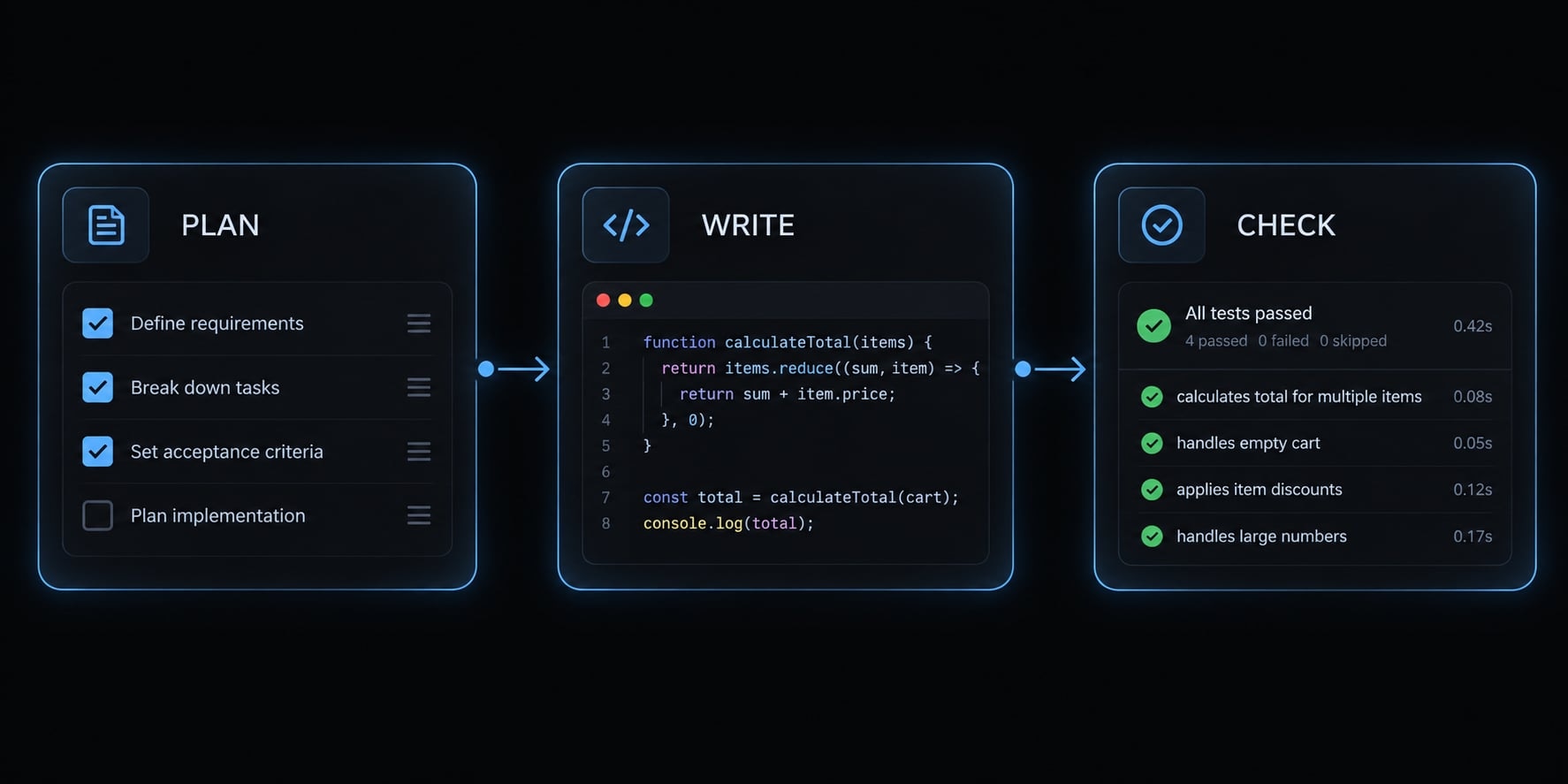
Plan-Write-Check' is simply an editorial label for this Claude Code testing workflow-not an official product feature.
PLAN: Inspect → Define behavior → Set boundaries ↓ Developer approvalWRITE: Generate scoped tests ↓CHECK: Execute → Classify failures → Review → Confirm discovery
Step 1 - Inspect the repository and existing tests
Use the preparation checklist rather than asking for indiscriminate repository ingestion. Confirm the unit, representative tests, fixtures, setup, and commands. Ask whether execution requires real external services. If so, establish safe isolation first.
Micro-instruction: “Summarize the relevant testing conventions, command evidence, dependencies, and unresolved questions before proposing edits.”
Step 2 - Define the scope and expected behavior
Approve a compact contract:
- Exact unit under test.
- Observable inputs, outputs, and errors.
- Normal, threshold, invalid-input, and relevant regression scenarios.
- Explicit exclusions.
- Production code read-only unless separately approved.
For subscription discounts, define whether exactly ten seats qualifies and what invalid counts should do. Do not derive those decisions solely from the implementation. Clarify ambiguous edge cases before writing expected values.
Step 3 - Set the mocking boundaries
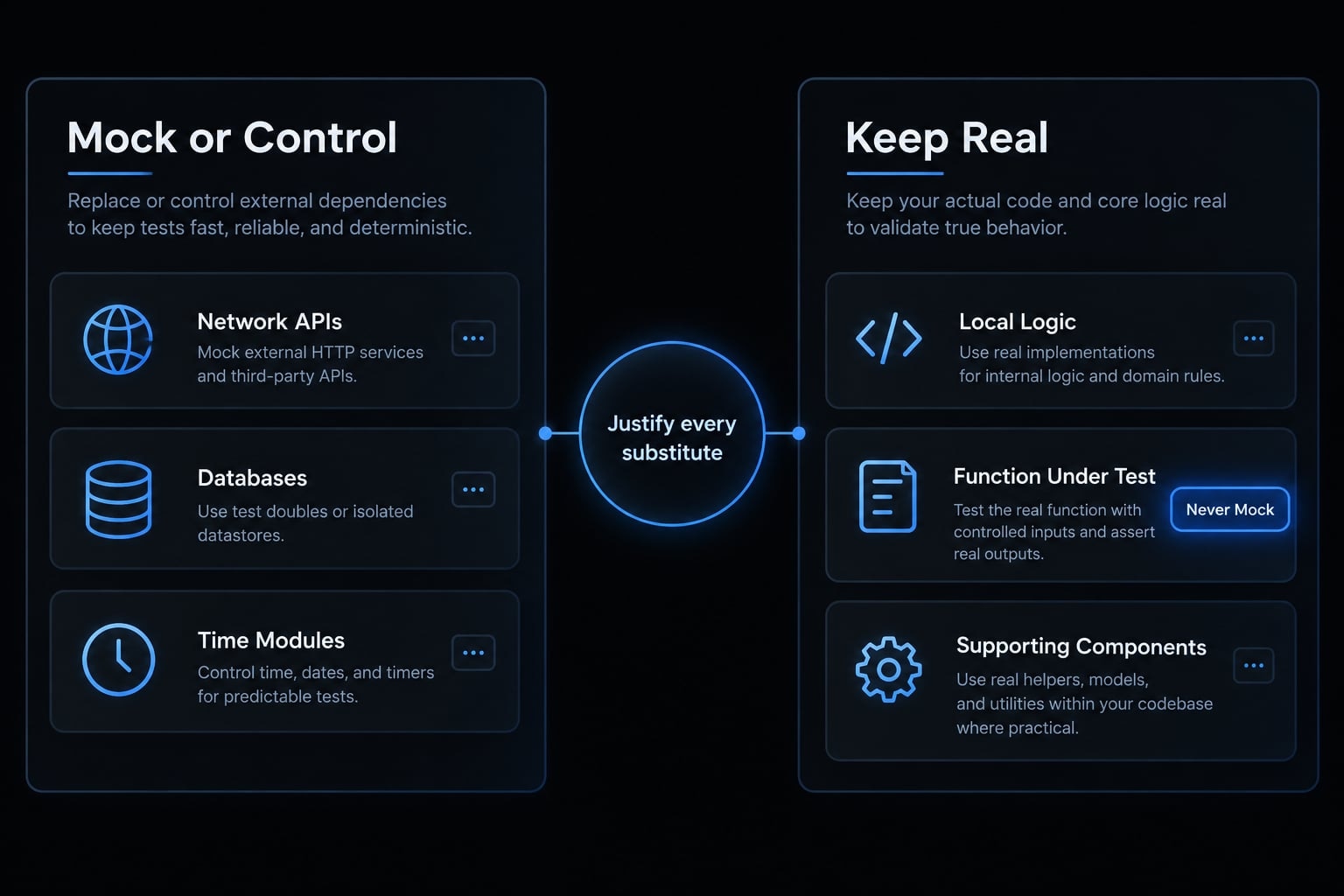
Choose mocking strategies according to the unit’s responsibility.
Boundary | Usually mock or control | Usually keep real |
|---|---|---|
Network or third-party API | Replace external calls | Local transformation logic |
Database, filesystem, queue | Substitute when outside the unit | Internal decision logic |
Time and randomness | Fixed inputs or controlled sources | Behavior consuming those inputs |
Pure helper or validation logic | Only with specific justification | Actual helper |
Function under test | Never replace its behavior | Actual function |
“Usually” matters: a fake or in-memory substitute may be clearer than a mock. Real database behavior belongs in appropriately scoped integration tests.
Require a reason for every mock.
Step 4 - Generate tests that follow existing conventions
Confirm the destination and naming pattern. Test names should describe behavior and outcome, with concrete expected values or errors. Control asynchronous behavior and inputs. Avoid arbitrary sleeps, external calls, and test-order dependencies.
Generation instruction: “Implement only the approved scenarios in the confirmed test file; preserve production code, dependencies, and unrelated files.”
Review the diff before execution. Do not mock the unit under test.
Step 5 - Run the targeted test and analyze failures
Run the confirmed command, then classify failures before correcting anything.
Failure category | Permitted next action |
|---|---|
Syntax, import, fixture, or setup error | Correct scaffolding within approved scope |
Incorrect test assumption | Compare with the contract; clarify before changing expectations |
Suspected production defect | Report evidence; stop production edits pending approval |
Environment or dependency issue | Report the blocker; make only approved environment changes |
For each failure:
- Explain the evidence.
- Propose the smallest valid correction.
- Obtain approval where required.
- Rerun the targeted command.
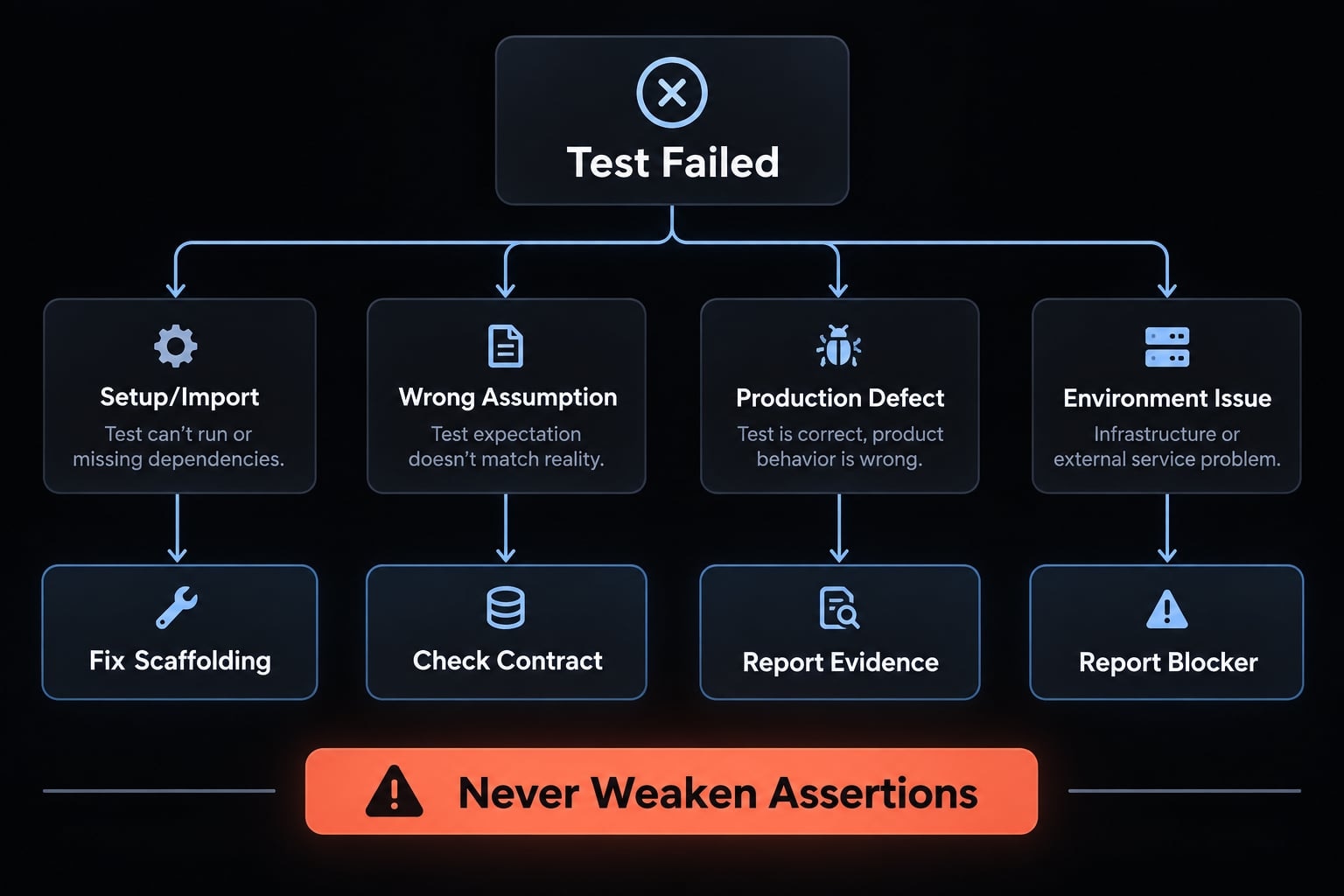
Never loosen test expectations just to pass the suite. Do not skip edge cases, delete failing tests, or lower validation standards simply to get a green light. When failures may predate the changes, compare with recorded baseline results where available. Otherwise, report uncertainty instead of labeling them pre-existing.
Keep diagnostics focused: The command, relevant error, implicated code, and proposed action usually matter more than repeated full-suite logs.
Step 6 - Run the normal repository test command
Run the standard command with the correct workspace scope. Confirm that it discovers the new file and report unrelated failures. Collect test coverage only when configured or approved. Inspect CI selection rules, but distinguish configuration review from an actual remote run.
A targeted pass does not establish suite health; a local suite pass does not establish CI success.
Finish with changed files, covered scenarios, commands actually executed, results, assumptions, and blockers. Explicitly identify checks that were blocked or not run.
Standard Claude Code unit test prompt template
A useful Claude Code prompt specifies behavior, scope, constraints, execution, and evidence-not simply a request for more tests.
The anatomy is: Target, behavior, scenarios, tooling, isolation, constraints, execution, and completion criteria.
Copy-ready prompt for existing code
Target and context:Inspect [TARGET_FILE] and [EXISTING_TEST_REFERENCE].Discover unknown fields and report them; do not invent values.Behavior:Use [EXPECTED_BEHAVIOR] as the contract, including known requirementsand expected error types. Flag conflicts with current implementation.Scenarios:Propose happy-path, threshold, invalid-input, and relevant regressioncases. Explain the requirement behind each expected result.Tooling and destination:Confirm [FRAMEWORK] and [TEST_FILE] against repository conventions.Isolation:Follow [MOCKING_POLICY]. Identify dependencies to keep real.Never mock the unit under test; justify every substitute.Constraints:Inspect and propose a scenario plan first.Pause for approval before file edits.After approval, change only the agreed test files.No unrelated edits, new dependencies, CI changes, assertion weakening,or production-code changes without separate approval.Execution:Confirm [TARGETED_TEST_COMMAND] and [REPOSITORY_TEST_COMMAND].Run permitted commands after approved edits.Classify failures before proposing corrections.Stop for approval when a correction exceeds the agreed scope.Do not skip or delete failures to obtain a pass.Completion:Report changed files, scenarios, commands actually run, results,test discovery, assumptions, unresolved risks, and blocked checks.Distinguish local results from actual CI results.
Replace known placeholders before use. Leave genuinely unknown fields for inspection; an invented validation command can conceal missing discovery or execute the wrong workspace.
Short prompts for common testing tasks
Task | Follow-up instruction |
|---|---|
Known-bug regression | Add a test against the documented intended behavior; do not change production code. |
Boundary expansion | Propose missing threshold and invalid-input cases before editing. |
Weak assertions | Identify assertions that could pass despite incorrect behavior; propose contract-based replacements. |
Untested branches | Map uncovered decisions to requirements; distinguish tooling evidence from inference. |
Begin Test-Driven Development | Write and run a failing test for missing intended behavior, not broken setup; pause before implementation. |
Confirm discovery | Run the standard command and show evidence that it discovers the new test. |
Copy the unit test prompt template into your next scoped task, then retain the completion report with the pull request.
Practical example: Generate and validate a Vitest unit test
This TypeScript unit testing example is illustrative and not execution-verified. No terminal results, final diff, verification date, or runtime/tool versions are claimed.
The documented environment assumes an npm repository with TypeScript and Vitest already installed, default *.test.ts discovery, and this package-script entry:
{ "scripts": { "test": "vitest" }}
Example source behavior
The contract accepts positive safe-integer seat counts. Fewer than ten seats returns 0; ten or more returns 0.1. Invalid values throw RangeError. The return value is a discount rate, not a price or discount amount.
src/calculateSubscriptionDiscount.ts:
export function calculateSubscriptionDiscount( seatCount: number,): number { if (!Number.isSafeInteger(seatCount) || seatCount <= 0) { throw new RangeError("seatCount must be a positive safe integer"); } return seatCount >= 10 ? 0.1 : 0;}
Prompt Claude Code to plan the tests
Use the full testing template for calculateSubscriptionDiscount.Inspect existing Vitest conventions. Propose cases before edits.Apply the stated seat-count contract, including RangeError.Keep production code unchanged. This pure function needs no mocks.Use direct, independently specified expected values.
Expected test scenarios
Scenario | Expected result | Reason |
|---|---|---|
Typical eligible input: 25 |
| Eligible tier |
Just below threshold: 9 |
| Lower boundary |
Exact threshold: 10 |
| Inclusive threshold |
Zero or negative |
| Positive counts only |
Fractional, non-finite, unsafe integer |
| Safe-integer contract |
The threshold case is regression-sensitive, not evidence of a historical bug. Illustrative generated file, src/calculateSubscriptionDiscount.test.ts:
import { describe, expect, it } from "vitest";import { calculateSubscriptionDiscount } from "./calculateSubscriptionDiscount";describe("calculateSubscriptionDiscount", () => { it.each([ [1, 0], [9, 0], [10, 0.1], [25, 0.1], [Number.MAX_SAFE_INTEGER, 0.1], ])("returns rate %s -> %s", (seats, rate) => { expect(calculateSubscriptionDiscount(seats)).toBe(rate); }); it.each([ 0, -1, 1.5, NaN, Infinity, -Infinity, Number.MAX_SAFE_INTEGER + 1, ])("rejects invalid seat count %s with RangeError", (seats) => { expect(() => calculateSubscriptionDiscount(seats)) .toThrow(RangeError); });});
Run and review the test
For the documented script, these commands request targeted and full non-watch test execution:
npm run test -- --run src/calculateSubscriptionDiscount.test.tsnpm run test -- --run
The Vitest CLI reference documents run behavior and file filtering. These commands match the illustrative script but have not been executed here.
Classify failures before corrections. Other repositories may require workspace arguments or different scripts. Record actual output, discovery, final diff, verification date, and Node.js, npm, Vitest, TypeScript, and Claude Code versions when validating.
Framework variations
Framework | Targeted execution approach | Standard suite approach |
|---|---|---|
Jest | Confirm script forwarding for | Repository’s Jest script |
pytest | Select a test module or node ID | Repository’s configured pytest command |
JUnit | Maven or Gradle test selection | Configured build-tool test lifecycle |
The official Jest CLI, pytest usage documentation, and JUnit User Guide describe these approaches; repository configuration determines the actual command.
How to check whether Claude Code’s tests are useful
Useful tests assert observable behavior against requirements, execute deterministically, and fail when relevant behavior breaks. They also run through the normal project workflow. Discovery makes protection available; it does not establish correctness. Review the connection between requirements, inputs, expected outcomes, and failure evidence.
Review the assertions
Meaningful assertions check a specific output, error, or observable effect. For ten seats, assert toBe(0.1), not merely toBeDefined(). The latter could pass for the incorrect rate 0.
Expected values should come from the contract, not a copied implementation formula.
Review coverage by behavior, not percentage alone
- Line coverage: Which lines executed.
- Branch coverage: Which decision paths executed.
- Behavioral review: Which requirements have relevant scenarios.
Test coverage does not prove assertion quality. Behavioral review is not a universal tool-generated percentage.
Review mocks and test isolation
Check for mocked core logic, substitutes that reproduce the implementation, and broad success-only stubs. Test hygiene also requires controlled clocks, randomness, external calls, asynchronous work, and shared state.
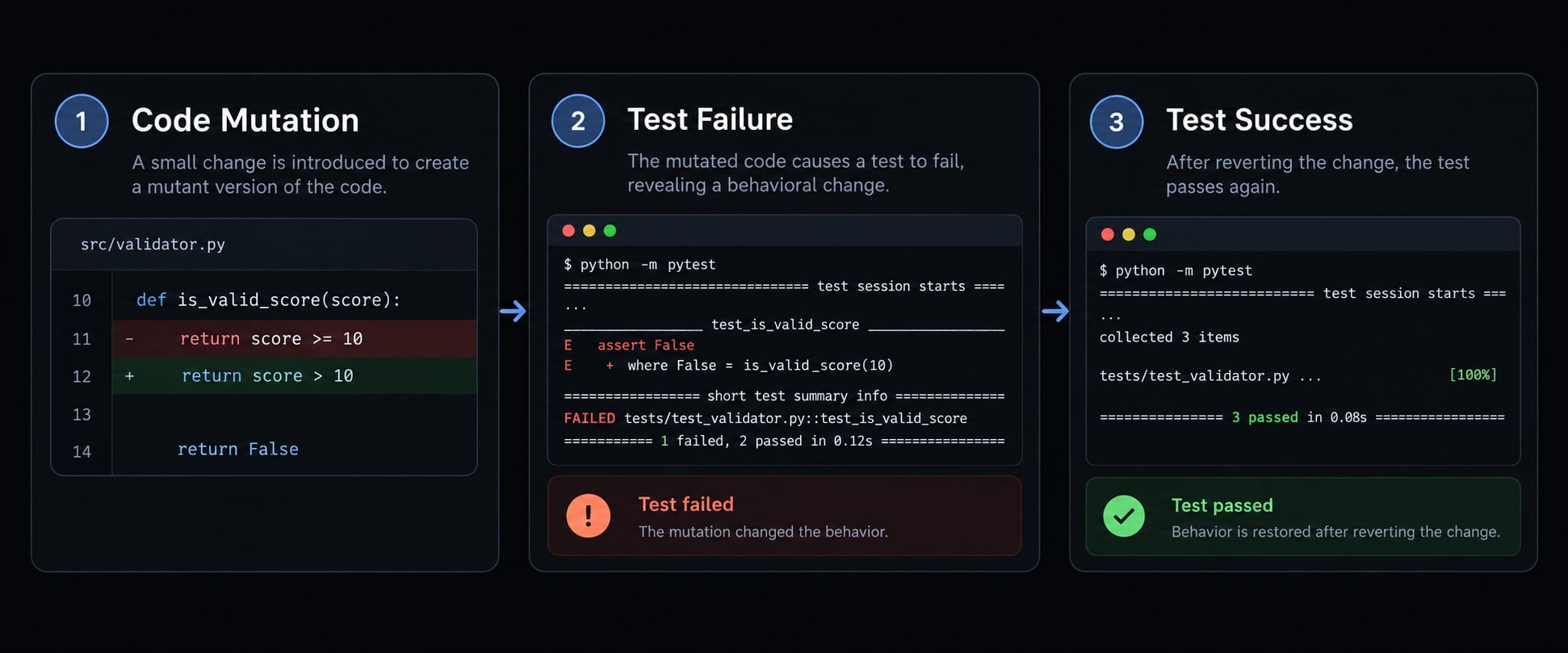
Confirm failure sensitivity
Optionally, with approval:
- In an isolated working copy, change
>= 10to> 10. - Confirm the ten-seat assertion fails for the expected reason.
- Restore only that change, inspect the diff, and rerun.
This small mutation testing check demonstrates sensitivity to one defect, not universal correctness. Do not use destructive reset commands.
Common Claude Code testing mistakes
Mistake | Risk | Corrective instruction |
|---|---|---|
Vague prompt | Guessed behavior | Supply a contract |
Coverage-only optimization | Shallow protection | Map requirements to assertions |
Mocking core logic | Tests bypass behavior | Keep the unit real |
Assertion weakening | Defects disappear | Require contract-based justification |
Running only the new file | Missed suite interactions | Run the standard command |
Unrelated production changes | Scope expansion | Require separate approval |
Repeated full-suite log dumping | Obscured diagnostics | Use targeted output and concise summaries |
Standardize the workflow for repeated use
A reusable testing workflow separates stable repository rules from the current task’s behavior. Store conventions centrally, but keep requirements and scenario approval specific to the change.
From one-off prompt to reusable testing skill
Package five components:
- Discovery instructions.
- Scenario-planning structure.
- Approved command patterns.
- Quality-review checks.
- Completion-report requirements.
CLAUDE.md provides persistent repository guidance. A reusable skill packages task-specific instructions, as described in the Claude Code skills documentation. A subagent delegates responsibility where the chosen setup supports it.
None replaces execution permissions, CI checks, or reviewer approval. These remain validation gates rather than suggestions in a prompt.
Assign an owner and review the workflow whenever frameworks, scripts, or repository layout change. Keep examples versioned alongside the rules so outdated commands are easy to identify.
Where supported by your setup, an AgentKit skill can package this workflow without replacing the test runner, permissions, CI checks, or human review.
Claude Code unit testing checklist
Copy this checklist into the pull request for pre-merge review. Leave checks incomplete when evidence is missing.
Before generation
- Relevant source and representative tests inspected.
- Framework, destination path, and execution commands confirmed.
- Expected behavior and relevant edge cases documented.
- Mocking boundaries and prohibited changes agreed.
During generation
- Local test naming, structure, and helper conventions followed.
- Assertions check specific observable behavior against requirements.
- External boundaries isolated appropriately without mocking the unit.
- Targeted tests rerun after meaningful changes.
- Assertions preserved rather than weakened to force passing results.
Before merge
- Standard repository command discovers the new tests.
- Relevant suite results and actual CI status accurately reported.
- Requirement gaps reviewed beyond coverage percentages.
- No uncontrolled timing, network, randomness, or order dependency.
- Developer reviews assumptions, assertions, mocks, and final diff.
Frequently asked questions
Can Claude Code write unit tests?
Yes, Claude Code can write unit tests by analyzing your repository, understanding your testing framework, and executing permitted test commands. It can generate tests, diagnose failures, and iterate to improve coverage. However, developers must still define the expected business logic and validate the meaningfulness of the assertions generated.
How does Claude Code help in Test-Driven Development (TDD)?
Claude Code supports TDD by following a strict Red-Green-Refactor loop. You prompt the agent to write a test for an unimplemented feature first, verify that it fails (Red), request implementation code to make it pass (Green), and finally ask Claude to clean up the code (Refactor) while ensuring the test suite remains valid.
What should I provide to Claude Code before it writes tests?
You should provide the target file, existing test conventions, the desired framework, and specific business scenarios. It is critical to include instructions on mocking boundaries and project-specific commands. Providing this context ensures Claude generates tests that align with your repository’s structure rather than producing generic boilerplate.
Why do some AI-generated unit tests provide little value?
Tests often lack value when they contain weak assertions, rely on trivial mocks, or test implementation details rather than business behavior. Claude Code may also fall into the trap of "agent cheating," where it modifies an assertion to match broken code. Always review assertions against your requirements, not just the code.
How should I handle test failures during the generation process?
Never allow the agent to delete failing tests or weaken assertions to reach a passing state. Instead, classify the failure: if it is a setup issue, fix the configuration; if the implementation is incorrect, guide Claude to adjust the production logic; if the test assumption is wrong, clarify the requirements.
Are Claude Code unit tests production-ready by default?
No. While Claude Code generates syntactically correct tests, they require human review. You must confirm that the tests cover necessary edge cases, use appropriate isolation techniques, and correctly report status in your CI/CD environment. Treat agent-generated tests as an initial draft that requires validation before merging into the codebase.
Read more:
- Claude Code prompt engineering: A practical guide for developers
- Claude Code automation: Build repeatable and low-risk workflows
- Claude Code refactoring: A safe and repeatable workflow guide
Conclusion
Reliable Claude Code unit testing starts with repository context and an explicit behavioral contract. Controlled generation, justified isolation, and meaningful assertions make tests reviewable. Targeted execution, normal-suite discovery, and honest reporting establish what was actually checked.
Claude Code can accelerate the testing workflow, but it cannot determine undocumented product requirements or turn passing output into proof of correctness. Preserve approval boundaries, classify failures before editing, and distinguish local evidence from remote CI results.
Copy the prompt and checklist for your next change. Once the process fits your repository, package it as a reusable testing skill while retaining developer review.