Claude Code transcripts: Convert session logs to readable HTML
Claude Code transcripts: How to export sessions to readable HTML
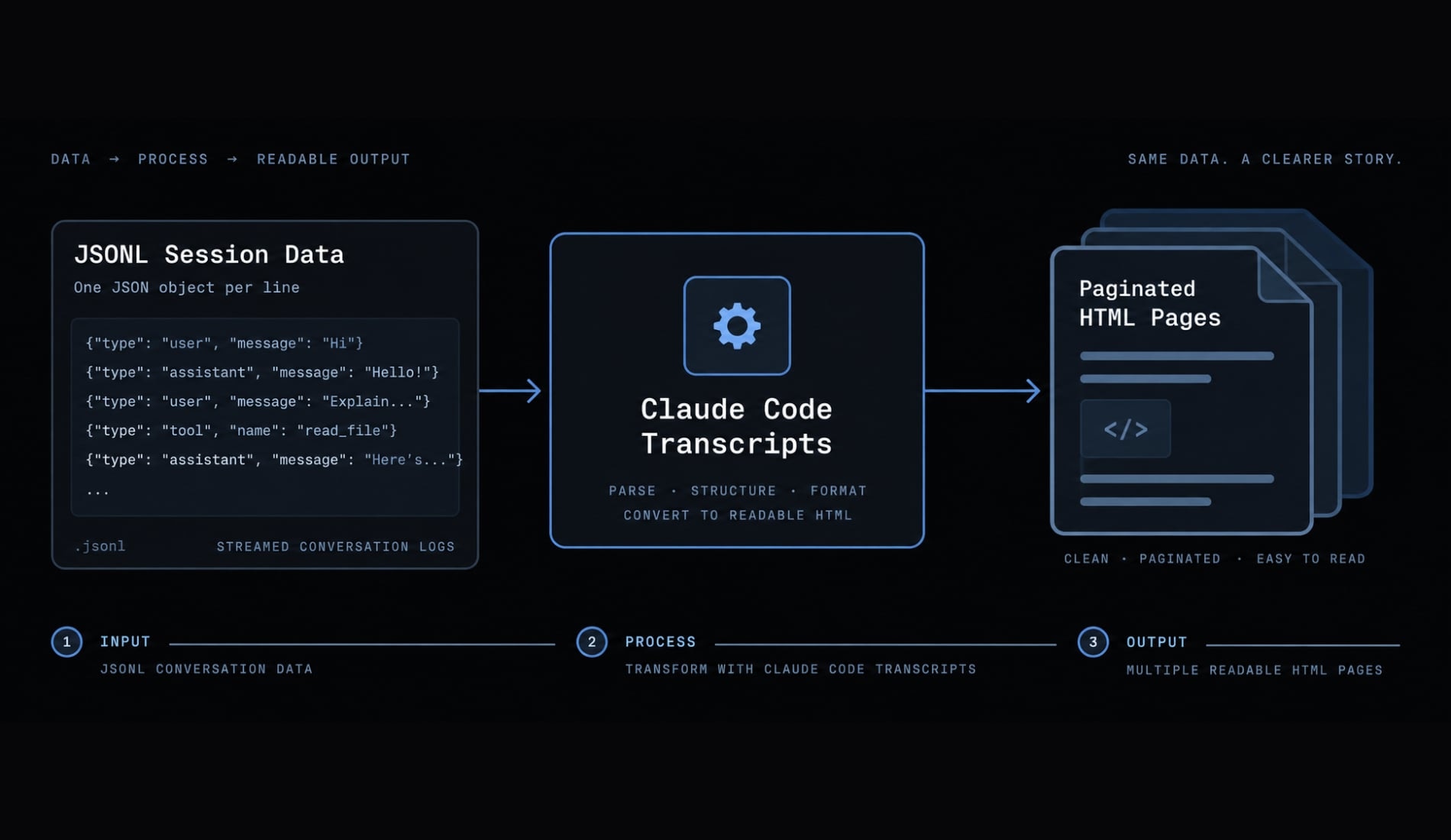
Claude Code transcripts can store prompts, terminal output, tool activity, debugging history, and important implementation decisions. However, the raw local JSONL files are difficult to inspect, document, or share with a team. claude-code-transcripts converts supported Claude Code session data into readable, paginated HTML. This guide covers local Claude Code session export, direct JSON/JSONL conversion, bulk archives, output management, safe sharing, and common failures.
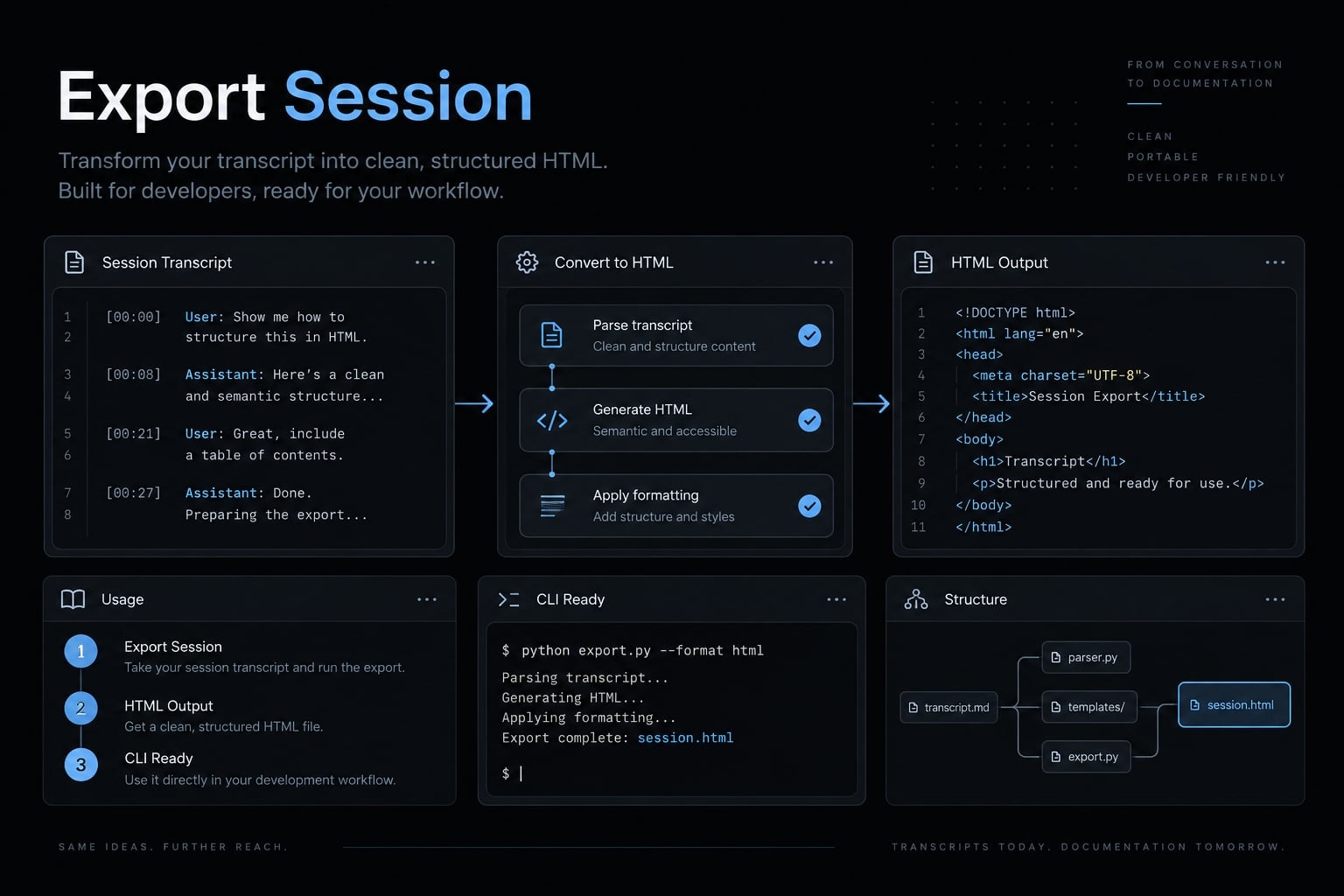
Local export is the dependable primary workflow. Generated HTML is not automatically sanitized and must be reviewed before publication.
uvx claude-code-transcripts
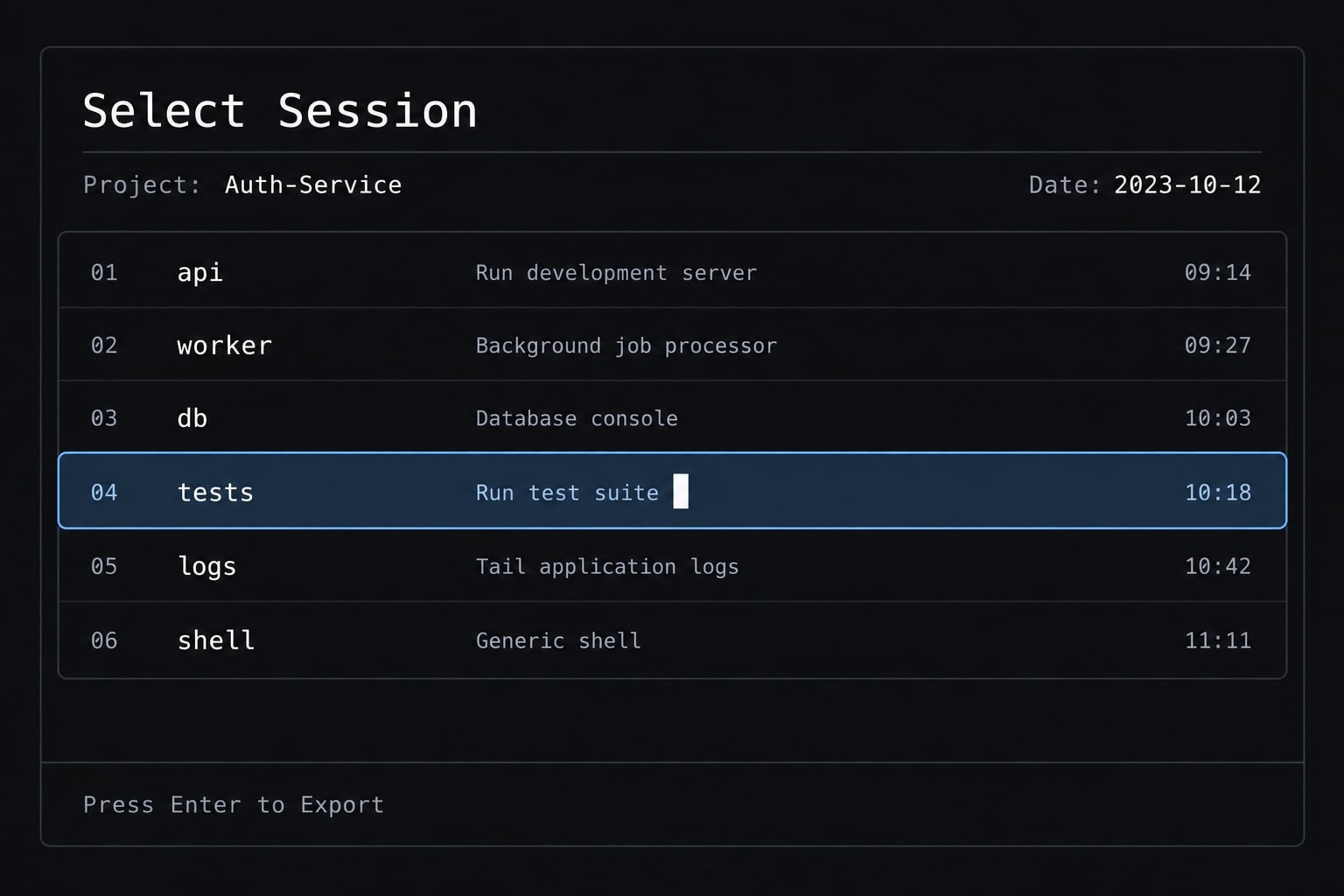
This command opens an interactive selector for recent local sessions without permanently installing the package.
What is claude-code-transcripts, and when should you use it?
claude-code-transcripts is an open-source CLI created by Simon Willison. It parses compatible Claude Code JSON or JSONL session data and generates readable, paginated HTML. It supports individual session exports, bulk local archives, and reviewed GitHub Gist publishing workflows where those capabilities remain available in the current release.
The tool addresses a practical problem: Raw LLM interaction logs are optimized for storage, not human review. A session may contain many separate records covering user instructions, assistant responses, tool calls, command output, file operations, and recorded session events. Converting that information into browser-readable pages is useful when you need to:
- Review how Claude Code approached a development task.
- Preserve implementation context that is absent from the final commit.
- Debug unexpected tool calls, shell commands, or failed operations.
- Create sanitized onboarding and documentation examples.
- Compare prompting and execution patterns across selected sessions.
- Share a curated workflow with developers or technical stakeholders.
The tool performs transcript conversion, not transcript redaction or governance. It does not guarantee secret removal, enterprise permissions, compliance coverage, or complete capture of internal model reasoning. Claude Code’s web-session extraction feature relies on version-sensitive, unofficial behavior and should not be considered a stable workflow.
What the tool generates
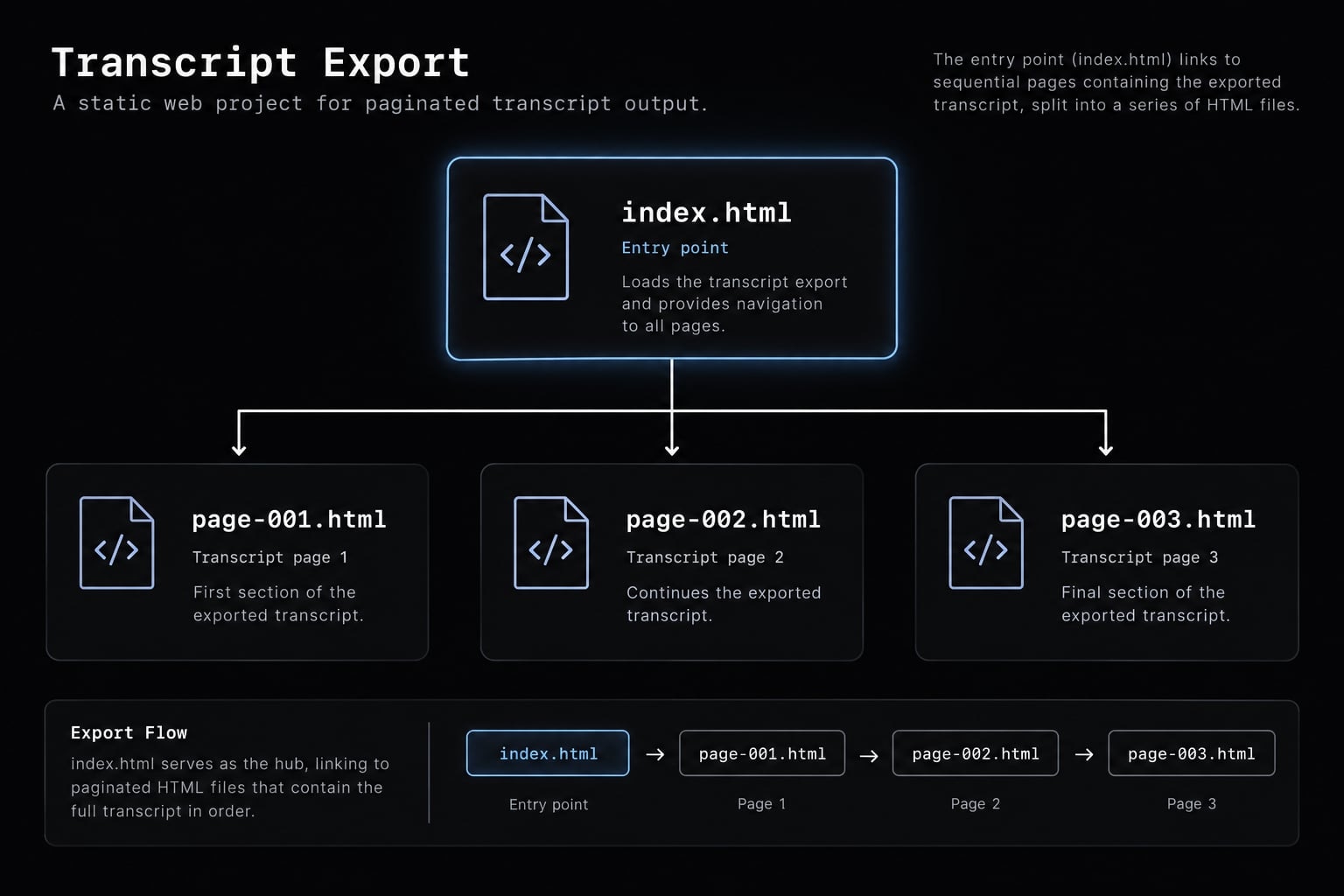
A standard export produces:
index.html: The overview and navigation entry point.page-001.html,page-002.html, and later pages: Detailed paginated transcript content.- Original JSON/JSONL: Included only when the applicable
--jsonoption is selected. - Static HTML: Suitable for local browser viewing or reviewed static hosting.
The source JSON/JSONL may contain more raw information than the rendered pages. Retain or publish it only when there is a defined debugging or archival requirement.
When it is the right tool
Use it when | Do not assume |
|---|---|
Raw session files are difficult to read | Generated output is safe to publish |
Implementation decisions must be retained | Credentials and sensitive values are removed |
A selected session should become documentation | An unlisted URL provides access control |
Prompting or execution patterns need comparison | The output is a complete audit record |
You need an HTML transcript viewer | Web extraction will remain permanently compatible |
Quick start: Export a recent local Claude Code session
To export a Claude Code session to HTML:
- Run the quick-start command.
- Select a recent local session.
- Press Enter to confirm.
- Open the generated
index.html. - Inspect every generated page before sharing.
uvx claude-code-transcripts
uvx runs a Python CLI in an isolated environment without permanently installing it. It is part of the uv toolchain, which must already be available on your system. Local Claude Code sessions are commonly stored under:
~/.claude/projects
The interactive session selector usually removes the need to find the underlying JSONL file manually. When several projects exist, use the displayed project path, session metadata, or date to identify the correct record. Automatic labels may not always make the intended session obvious.
After selection, the command creates an output directory containing index.html and one or more paginated detail pages. When no explicit output directory is provided, the tool may use temporary output and open the transcript in your default browser.
In practice, the safest first test is a recent session containing no production credentials, customer data, client code, or confidential repository information. This lets you confirm the workflow before processing a high-sensitivity session.
Requirements
Before running the local workflow, confirm that:
- At least one local Claude Code session exists.
uvis installed for the recommendeduvxworkflow.- A modern browser is available for inspecting the output.
- GitHub CLI is not required for local export.
- GitHub CLI is required only for the Gist publishing workflow.
If no sessions appear, verify that Claude Code has created local session files and inspect the expected project storage directory.
Permanent installation options
Frequent exports are easier to standardize with a permanent installation. The official documentation presents uv tool install as the primary installation approach:
uv tool install claude-code-transcripts
A pip installation is also available as an alternative:
pip install claude-code-transcripts
Confirm the installed command and inspect current options before building scripts around it:
claude-code-transcripts --help
Permanent installation is appropriate for recurring documentation exports, shell scripts, internal CLI wrappers, and repeatable team workflows. Use uvx when you want an isolated execution without retaining the package as a permanent command.
Choose the right export workflow
Start with the interactive local workflow unless you already know the exact session file or need a multi-session archive.
Goal | Recommended command | Operational note |
|---|---|---|
Export a recent local session |
| Recommended first workflow |
Use a permanent installation |
| Opens the local selector |
Display more local sessions |
| Useful when the desired session is older |
Convert a known JSONL file |
| Input must contain compatible session data |
Save to a chosen directory |
| Better for documentation and archives |
Export all local sessions |
| Significantly increases review scope |
Publish reviewed output |
| Requires authenticated GitHub CLI |
Inspect current capabilities |
| Prefer this over older tutorials |
Export a local session interactively
The installed command opens the local session selector:
claude-code-transcripts
You can also specify the local command group explicitly:
claude-code-transcripts local
The workflow is straightforward:
- Review the projects and sessions shown in the selector.
- Use the arrow keys to highlight the intended session.
- Use project paths and dates to confirm your choice.
- Press Enter to generate the readable transcript.
- Review the resulting index and detail pages.
If the required session is outside the default result limit, increase the number displayed:
claude-code-transcripts local --limit 20
Avoid selecting a session based only on its position in the list. Similar task names across repositories can make session identification unreliable.
Convert a specific JSON or JSONL file
JSONL is a text format where each line contains a separate JSON record. Direct conversion is preferable when you know the exact Claude Code session file.
claude-code-transcripts json session.jsonl --open
This converts the compatible file and opens the generated HTML in your default browser. To save the files in a controlled location, specify an output directory:
claude-code-transcripts json session.jsonl -o output-directory/
Use direct JSON/JSONL conversion when:
- The exact source file is already known.
- The session came from another machine.
- Conversion is part of a documentation pipeline.
- The output belongs in a designated archive.
- You need predictable paths for later processing.
The json command may also accept supported remote file URLs in current releases. Local files remain the safer primary example because they reduce availability, authentication, and unintended data-transfer risks.
Not every arbitrary JSONL file is compatible. The input must contain supported Claude Code session data with the expected record structure.
Export all local sessions
To generate a browsable archive of local Claude Code session files, run:
claude-code-transcripts all
A bulk transcript export can create:
- A main archive index.
- Project-level navigation pages.
- Individual paginated session transcripts.
This workflow is useful for a personal AI coding session archive, internal knowledge-base preparation, or reviewing AI-assisted work across several projects.
Bulk export increases the amount of proprietary code, credentials, paths, logs, customer information, and internal instructions that must be reviewed and protected.
Do not make bulk export your default merely because it is convenient. Selected, high-value sessions are easier to govern than an unmanaged dump of every interaction.
Understand and manage the generated HTML output
index.html is the entry point, not necessarily the complete transcript. Detailed content is distributed across linked paginated pages that must remain together.
output-directory/├── index.html├── page-001.html├── page-002.html└── ...
The file roles are:
index.html: Provides the transcript overview and navigation.page-001.htmlonward: Contains detailed interaction history and session events.- Optional source file: Preserves the original JSON or JSONL when explicitly included.
Moving only index.html can break navigation or omit most transcript content. Copy, archive, or publish the complete output directory.
Temporary browser output is suitable for immediate personal inspection. For team documentation or longer retention, use a deliberately named directory:
project-name/task-name/YYYY-MM-DD-session-id/
Avoid placing client names, vulnerability details, credentials, or other unnecessary confidential information in folder names.
For a managed session archive, record:
- Project and associated task or issue.
- Session date.
- Author or owner.
- Repository.
- Review status.
- Sensitivity classification.
- Hosting location.
- Retention or deletion date.
Generated HTML does not automatically become searchable across your organization. Multi-session archives require separate indexing, ownership, access control, and retention decisions.
Recommended output options:
Option | Purpose | Appropriate use |
|---|---|---|
| Save to a chosen directory | Documentation repositories and controlled archives |
| Create an automatic output directory | Fast, repeated local exports |
| Open output in the default browser | Immediate transcript inspection |
| Include the source session file | Controlled debugging or archival |
For example, save a converted session to a deliberate location with:
claude-code-transcripts json session.jsonl -o output-directory/
Use --json selectively. Source files may contain more raw data than the HTML conversion, including metadata or records that are not prominent in the rendered transcript. Do not include the source by default in shareable output.
Review, redact and share Claude Code transcripts safely
Review before sharing: Inspect every generated HTML page and source file for credentials, proprietary code, internal paths, API responses, personal data, and confidential instructions. Do not treat an unlisted link as access-controlled storage.
Transcript generation is not transcript sanitization. A readable transcript can still expose:
- API keys, access tokens, passwords, cookies, and
.envvalues. - Proprietary or client-owned source code.
- Customer information, personal data, and production records.
- Shell commands, terminal output, and deployment details.
- Stack traces and API responses.
- Local file paths and usernames.
- Repository names, remote URLs, branches, and commit details.
- Internal prompts, operational instructions, and architecture notes.
A common mistake is reviewing only index.html while overlooking sensitive data on later paginated pages. Source JSON/JSONL files require a separate review because they may expose additional raw records.
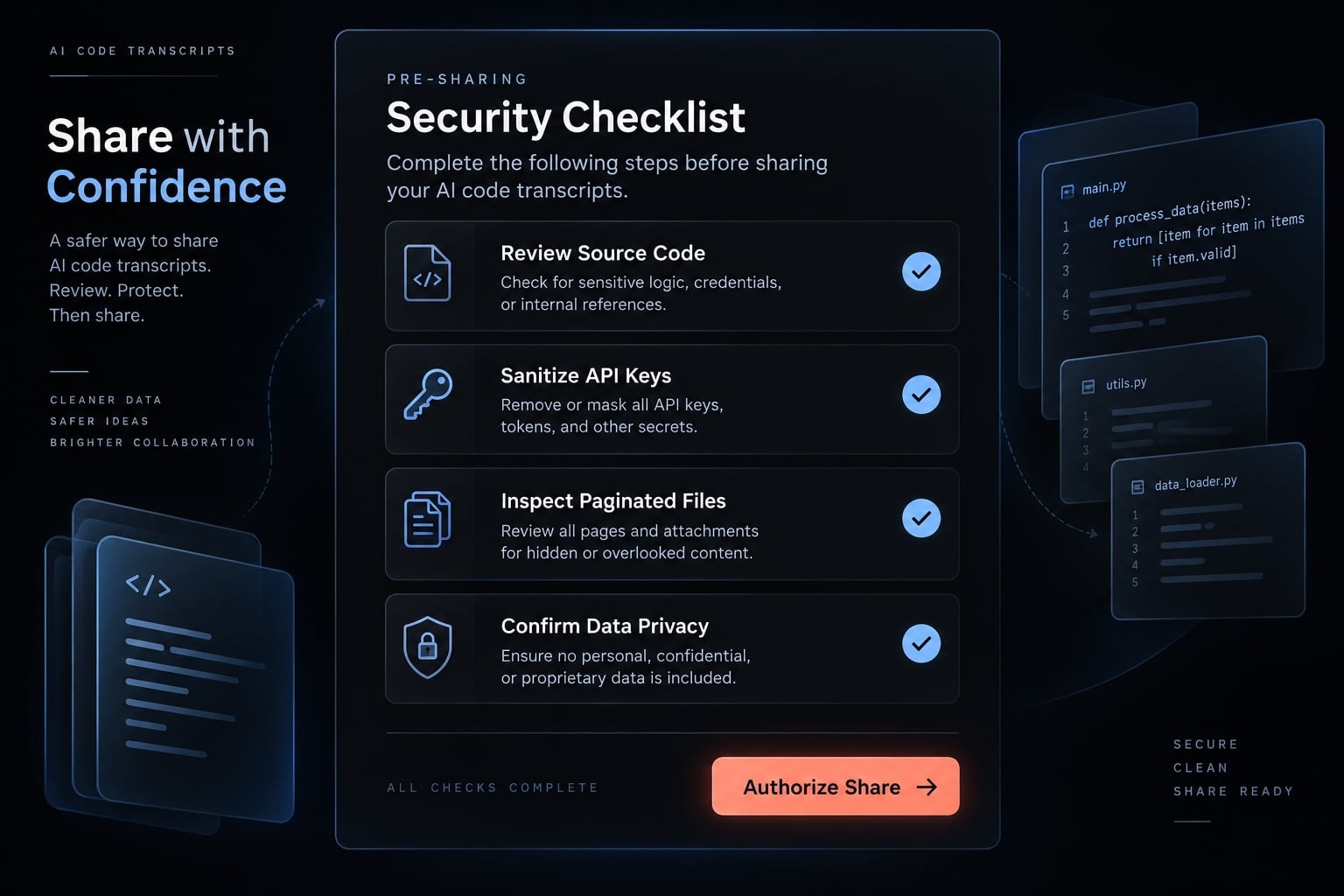
Pre-sharing review checklist
- Remove API keys, tokens, passwords, cookies, and
.envvalues. - Check for proprietary and client-owned source code.
- Remove customer data, personal information, and production records.
- Inspect shell output, logs, stack traces, and API responses.
- Check usernames, local paths, repository names, and internal URLs.
- Inspect every linked pagination page.
- Review included JSON or JSONL separately.
- Obtain owner, company, or client approval where required.
- Select hosting based on actual access-control needs.
- Record who completed and approved the review.
Automated secret scanning can support transcript redaction, but it should not replace manual inspection. Pattern matching may miss business-sensitive content that does not resemble a credential.
Publish a reviewed transcript with GitHub Gist
GitHub Gist publishing requires the GitHub CLI to be installed and authenticated. Follow the official gh auth login documentation:
gh auth login
Only after inspection, redaction, and approval should you run:
claude-code-transcripts --gist
According to the project’s Gist workflow documentation, the command uploads the generated files and provides a viewing path when successful.
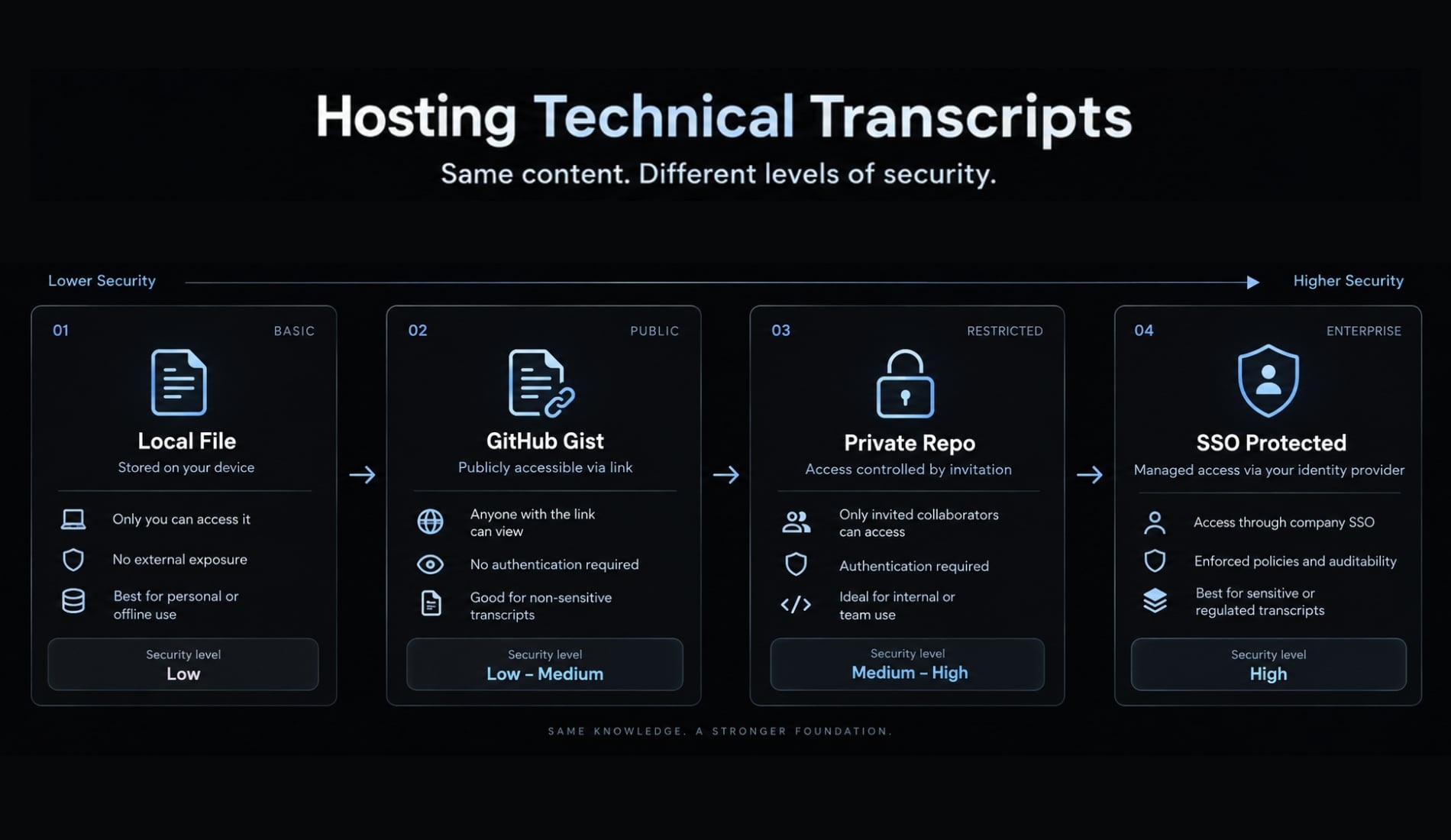
Use GitHub Gist for public or intentionally shareable examples. An unlisted or difficult-to-guess URL is not authenticated access control. Sensitive company sessions belong in a private repository or SSO-protected static hosting with explicit user permissions.
Choose the right hosting model
The transcript’s sensitivity-not publishing convenience-should determine the hosting model.
Hosting option | Best for | Primary limitation |
|---|---|---|
Local filesystem | Personal inspection and debugging | Not available to teammates |
GitHub Gist or static preview | Public or deliberately shareable examples | Limited access control |
Private repository | Team-managed archives | Requires permissions and maintenance |
SSO-protected static hosting | Internal organizational knowledge | Requires identity and hosting infrastructure |
Limitations and common troubleshooting
Verification basis: Current repository documentation and linked project status sources. Installed versions should be recorded during final technical review.
Local session selection and direct JSON/JSONL conversion are the primary dependable workflows. Gist publishing depends on GitHub CLI authentication. Claude Code for web extraction is version-sensitive because it may rely on undocumented behavior.
The repository currently carries a warning that web commands may fail following changes to unofficial APIs. Check the official repository and web extraction issue #77 before attempting that workflow.
Capability status
Workflow | Status positioning | Recommended use |
|---|---|---|
Local session selection | Primary supported workflow | Recommend first |
Direct JSON/JSONL conversion | Primary supported workflow | Use when the input file is known |
Bulk local export | Supported workflow | Add archive-security controls |
GitHub Gist publishing | Dependency-based workflow | Require authenticated GitHub CLI |
Claude Code for web extraction | Version-sensitive or experimental | Verify current repository status |
Current --help output should take precedence over older tutorials:
claude-code-transcripts --help
Troubleshooting table
Symptom | Likely cause | Recommended fix |
|---|---|---|
|
| Install |
| The tool is not permanently installed or not on | Use |
No sessions appear | No local sessions, wrong account, or unexpected storage path | Confirm Claude Code created sessions and inspect |
Desired session is missing | The interactive result limit is too low | Increase the verified |
JSON/JSONL conversion fails | Incorrect path, malformed file, or incompatible records | Confirm the path and validate compatible Claude Code session data |
Browser does not open | Headless environment or missing browser association | Save with |
| GitHub CLI is missing or unauthenticated | Install |
Web extraction fails | Unofficial API behavior changed | Check the active repository warning and use local export where possible |
For a larger local selection list, run:
claude-code-transcripts local --limit 20
For environments without a browser association, save the output and open it manually:
claude-code-transcripts json session.jsonl -o output-directory/
Avoid troubleshooting web extraction by extracting tokens, bypassing authentication, or reproducing undocumented credential procedures. Version-sensitive failures should be checked against canonical project sources.
Build a repeatable team transcript workflow
The CLI handles conversion. It does not manage the complete artifact lifecycle across inspection, approval, access control, indexing, retention, and deletion.
Teams should convert selected high-value sessions rather than exporting everything. Useful candidates include architectural decisions, difficult debugging work, reusable prompting patterns, incident follow-ups, and implementation examples with long-term documentation value.
A lightweight lifecycle keeps agentic workflow documentation useful without turning it into an unmanaged data dump.
The export–inspect–approve–publish framework:
- Export: Convert a selected Claude Code session into HTML.
- Inspect: Review every HTML page and included source file.
- Approve: Assign an owner and record publication approval.
- Publish: Choose hosting based on sensitivity and access requirements.
- Index: Add project, task, repository, date, owner, and keywords.
- Retain: Periodically archive or delete the artifact according to policy.
Recommended metadata includes:
- Project, task, issue, and repository.
- Session owner and session date.
- Review status and reviewer.
- Sensitivity level.
- Hosting location.
- Approval record.
- Retention or deletion date.
Apply one of four access tiers:
- Personal: Available only to the creator.
- Team-internal: Shared with an authorized project team.
- Client-restricted: Limited to approved internal and client stakeholders.
- Public: Deliberately prepared for unrestricted distribution.
This is an operational model, not a compliance standard. Regulatory or contractual data-retention requirements must still undergo separate legal and security review.
Export your first Claude Code transcript
claude-code-transcripts provides a practical route from difficult-to-read session data to navigable HTML. For the fastest dependable Claude Code session export, start with:
uvx claude-code-transcripts
Use the interactive selector for a recent local session, the json workflow for a known JSON/JSONL file, and all only when a browsable local archive is justified. Use --gist only after transcript inspection, redaction, and approval. Check the official repository before attempting version-sensitive web extraction.
Readable HTML must still be inspected before publication. Conversion does not remove credentials, proprietary code, customer information, or internal context.
For teams that need repeatable review, documentation, and security-focused operational steps, AgentKit can help coordinate reusable skills and engineering workflows around these artifacts. Review the available capabilities at agentkit.best before designing a shared transcript process.
Frequently asked questions
What are Claude Code transcripts?
Claude Code transcripts are detailed session logs that record the interaction history between a developer and the Claude Code AI assistant. These transcripts capture prompts, tool activity, terminal commands, and debugging history, providing a comprehensive audit trail of how an AI agent helped implement specific project features or solve technical tasks.
Why use claude-code-transcripts to export sessions?
Raw Claude Code session files are typically saved in complex JSON or JSONL formats that are difficult to review manually. The claude-code-transcripts CLI tool converts these raw logs into readable, paginated HTML pages, making it significantly easier for developers to inspect, document, and share specific implementation decisions or debugging contexts.
Is it safe to publish exported Claude Code transcripts?
No, exported transcripts are not automatically sanitized and often contain sensitive information. Before publishing, you must manually inspect all generated HTML pages and source files to redact API keys, access tokens, passwords, proprietary source code, internal system paths, customer data, and any other confidential information that may have been recorded during the session.
How do I export a recent local Claude Code session?
You can export a recent session by running the command uvx claude-code-transcripts in your terminal. Follow the interactive prompts to select the specific session from your local storage. The tool will then generate an index.html file and paginated transcript pages in a new directory, which you can open in your browser to inspect.
Does claude-code-transcripts support all Claude Code web sessions?
The ability to extract web sessions is version-sensitive and relies on unofficial APIs. Because these APIs may change, web extraction can be unstable or stop working without notice. Always verify the current status of the repository and check for open issues before attempting to export sessions directly from the Claude web interface.
How can teams use these transcripts for knowledge sharing?
Teams should adopt a structured lifecycle: export a high-value session, perform a thorough manual security review, approve the content, and publish it to a controlled, SSO-protected hosting environment. It is recommended to index these transcripts by project, task, and owner, rather than exporting every session as an unmanaged data dump.
Read more:
- Oh My Claude Code: Mastering multi-agent development workflows
- Claude Code refactoring: A safe and repeatable workflow guide
- Claude Code permissions security: Guide to safe workflows
Conclusion
Claude Code transcripts make it easier to turn raw session logs into readable, searchable HTML for documentation, debugging, and team knowledge sharing. Start with a local export using uvx claude-code-transcripts, choose direct JSON/JSONL conversion when you know the source file, and use bulk or web-based workflows only when they are necessary and currently supported.
Before publishing, inspect every generated page and source file, remove sensitive information, and select hosting with appropriate access controls.