Vibe coding vs low code: Choosing the right development path
Vibe coding vs. Low code: Key differences and when to use each
Building a working demo is very different from managing a dependable application. While vibe coding generates code from natural-language prompts, low code assembles applications using visual components and models. Neither removes the need for accuracy, security, or maintenance. This guide compares their workflows, core trade-offs, and selection criteria to help you choose a solution your team can reliably operate after launch.
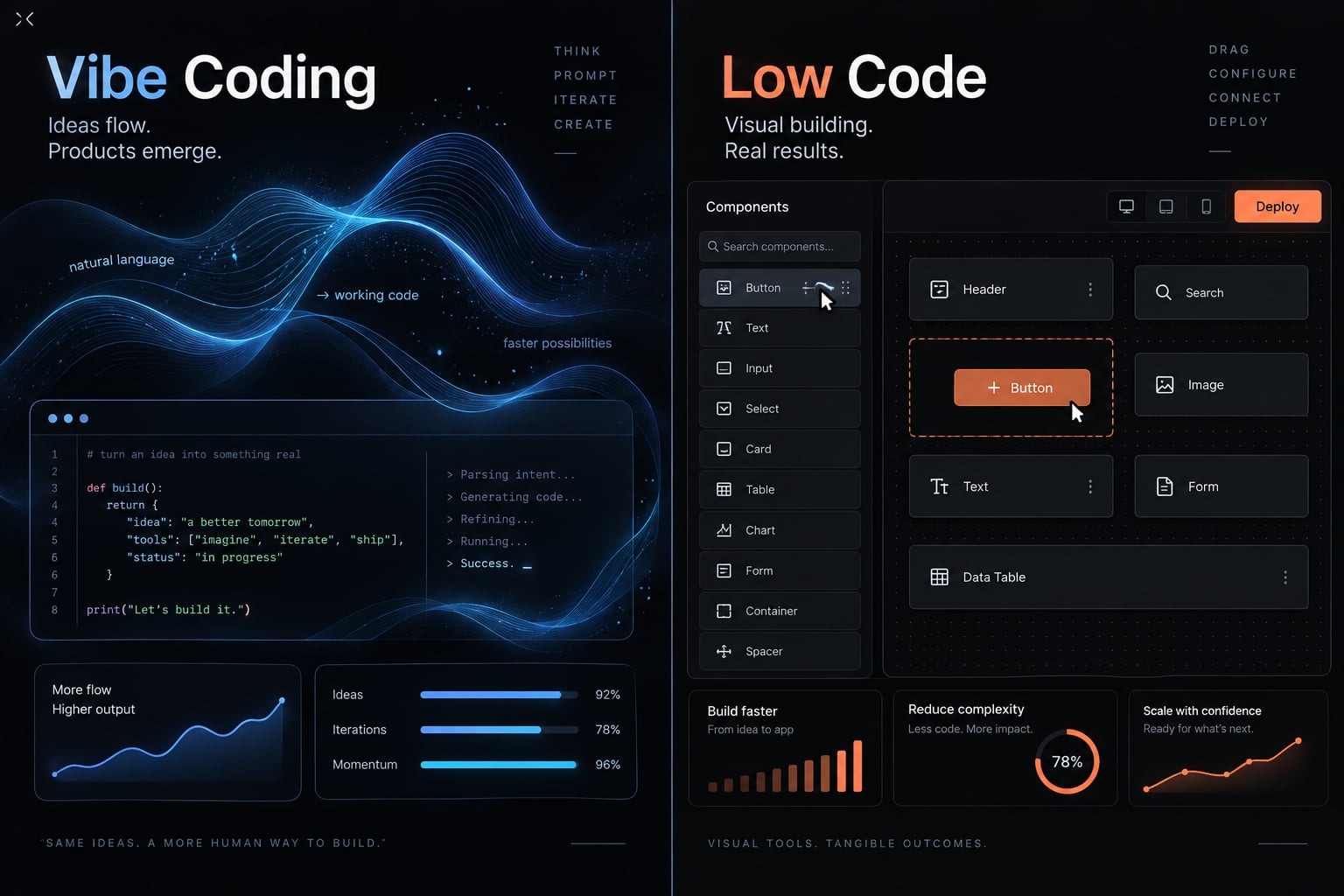
Vibe coding vs. Low code at a glance
Vibe coding uses prompts to generate and revise code; low-code development uses visual models, configuration, and reusable components. Their main difference is how applications are specified and assembled—not whether AI is involved. Low-code platforms can include AI, and generated applications can depend on managed platforms.
Criterion | Vibe coding | Low-code development |
|---|---|---|
Primary interaction | Natural-language prompts and iteration | Visual interface and configuration |
Underlying mechanism | AI-generated code | Application models and reusable components |
Typical output | Often editable source code | Platform-managed application; export varies |
Best-fit projects | Exploratory, custom prototypes | Standardized business workflows |
Required skills | Clear specifications; technical validation before production | Process modeling, configuration, integration knowledge |
Customization | Code-level changes, subject to tooling | Supported components and extension points |
Governance | Requires explicit controls and oversight | Capabilities vary by platform and plan |
Maintenance owner | Named technical owner for production | Operations and IT, with assigned responsibilities |
Main dependencies | Libraries, services, hosting, coding tools | Platform models, connectors, runtime where applicable |
Governance means rules for access, changes, approvals, and accountability. Neither generated code nor visual configuration guarantees those rules are correctly implemented.
Favor prompting when experimentation matters and qualified validation is available; favor visual assembly when requirements fit supported patterns. Evaluate vendor lock-in—dependencies that make switching providers difficult or expensive—in both approaches, rather than assuming source access eliminates it.
What is vibe coding?
Vibe coding is a prompt-led practice in which someone asks AI to create or modify software, tries the result, and requests changes. In its narrower meaning, the person judges behavior with limited code inspection; broader usage sometimes describes prompt-led coding with substantially more technical oversight.
Large language models (LLMs)—AI models that generate text and code—translate natural-language prompts into implementations. This supports rapid prototyping, but a convincing screen does not establish correct permissions or reliable data handling.
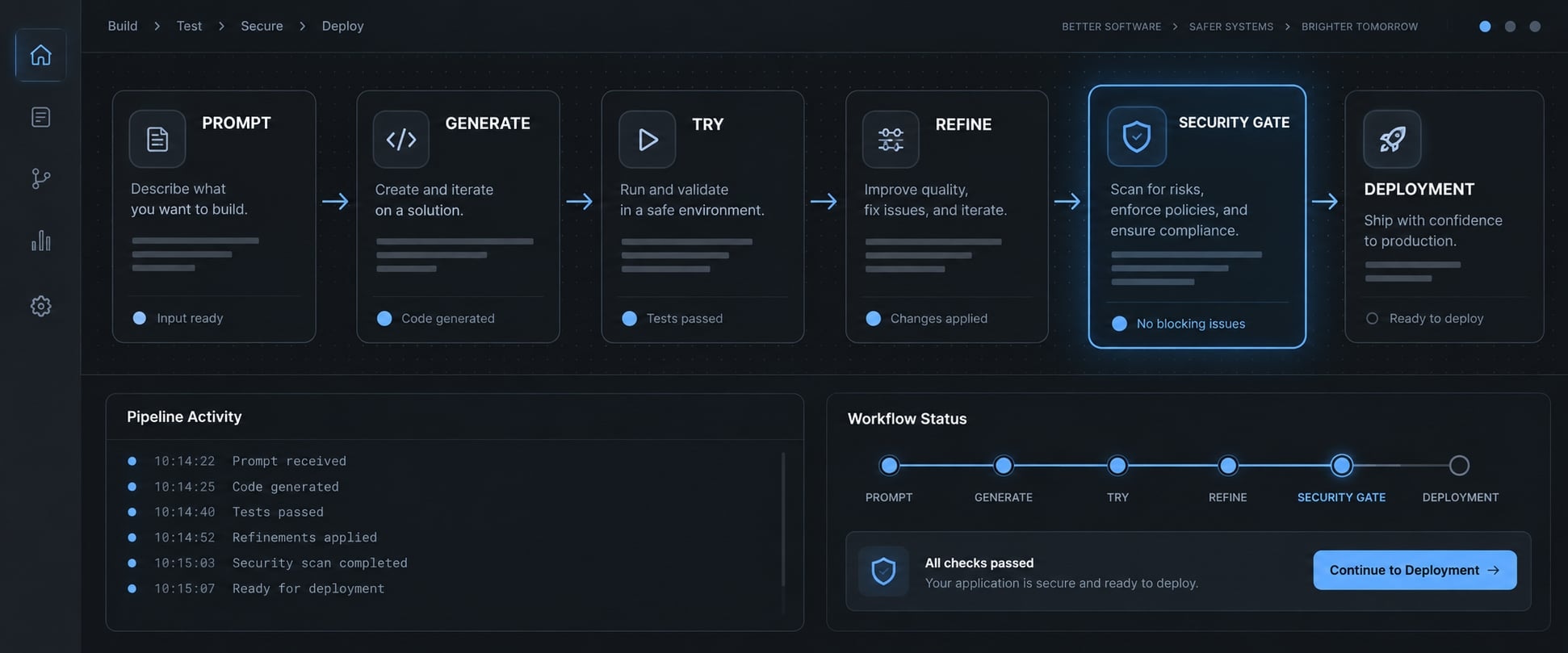
A typical workflow is:
- Describe the intended behavior and constraints.
- Generate an initial implementation.
- Try the result against the intended task.
- Request changes based on observed behavior.
- Before deployment, review, test, and secure the application.
The final step is a recommended production gate, not a defining feature of strict vibe coding.
Vibe coding is not the same as every form of AI-assisted coding
Andrej Karpathy’s public introduction of the term emphasized accepting generated changes without closely inspecting the code.
- Strict vibe coding: Limited implementation inspection.
- Disciplined AI-assisted development: Deliberate review, tests, and engineering accountability.
- Same tool, different practice: The workflow determines the distinction.
Where vibe coding works best
Suitable starting points include:
- A software-as-a-service (SaaS) customer-interface prototype.
- A product proof of concept using synthetic data.
- A non-critical internal utility.
- A founder-led minimum viable product (MVP), with qualified technical review.
What is low-code development?
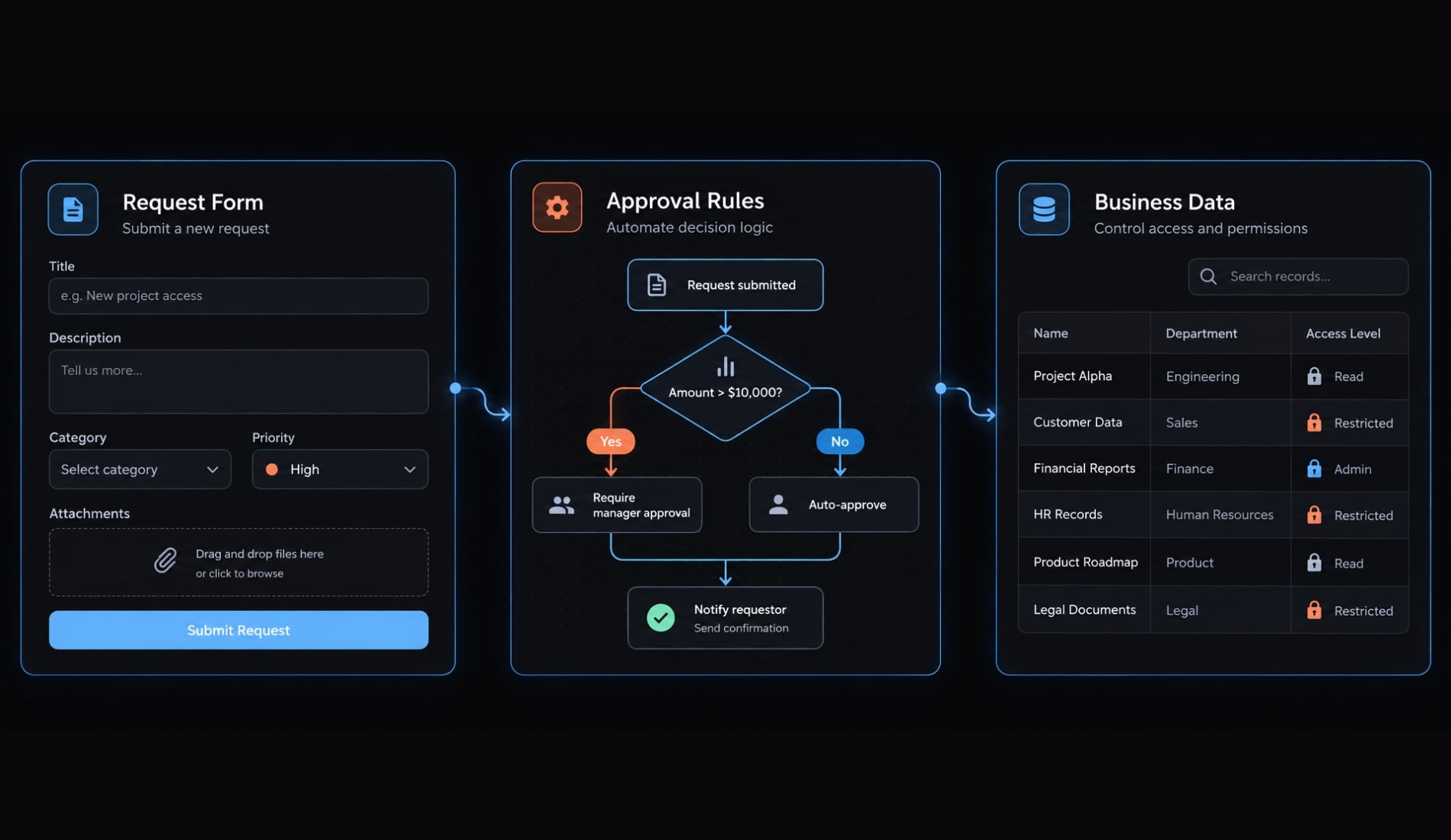
Low-code development is a platform-based approach that combines visual models, reusable components, configuration, and optional custom code to build applications. Teams assemble screens, connect data, and define business rules through supported tools, reducing manual coding while retaining responsibility for application behavior, access controls, integrations, and ongoing operation.
Microsoft Learn’s Power Apps documentation illustrates this model through visual application design, data connections, and extensibility. Specific capabilities and licensing must still be checked for the selected platform.
A typical visual development workflow is:
- Select a template or application model.
- Configure data connections and permissions.
- Assemble screens and workflows with prebuilt components.
- Add business rules and integrations.
- Test and deploy through supported platform processes.
Deployment may depend on a vendor runtime. Export, hosting, and customization options differ, so assess the particular product rather than the category alone.
Low code vs. no code
No-code tools aim to minimize the need for custom coding. Low-code tools typically support developer extensions, although product boundaries overlap.
Where low code works best
Common fits include:
- Customer relationship management (CRM) approval workflows.
- Employee request management.
- Marketing operations dashboards.
- Internal account administration.
- Departmental applications maintained jointly by operations and IT.
These applications often benefit from repeatable workflow automation rather than distinctive interfaces. Platform governance and audit trails—records of actions and changes—remain dependent on available features and correct configuration.
The main differences between vibe coding and low code
Compare the approaches across seven dimensions:
- Development experience and initial speed
- Flexibility and customization
- Required skills and team ownership
- Code ownership and vendor lock-in
- Security, governance and compliance
- Maintenance and scalability
- Total cost
Development experience and initial speed
Prompting can shorten exploration when requirements are uncertain. Visual assembly can accelerate familiar forms, approvals, and data-driven screens.
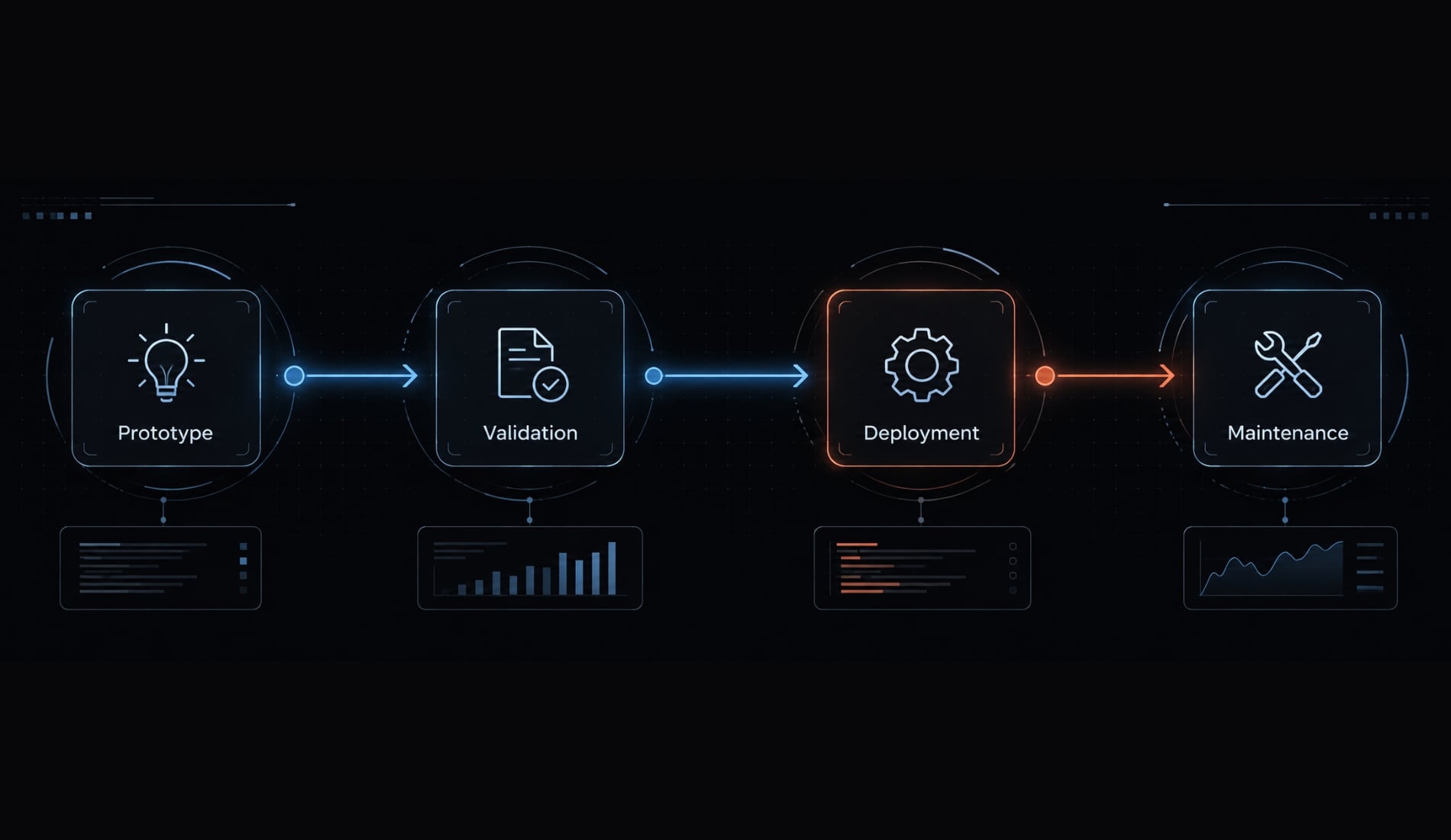
Prototype speed is not production delivery speed. Real deployment adds permission checks, integration testing, failure handling, and support preparation. Requirements, tooling, and team capability determine how much work remains.
Flexibility and customization
Generated code can support behavior beyond a platform’s standard components, provided someone can evaluate and maintain it. Low code offers extension points, but unusual requirements may demand awkward workarounds.
Both can accumulate technical debt—shortcuts that make later changes harder. For a SaaS portal, a custom interface may fit customers better, while standard internal approvals fit low code.
Required skills and team ownership
Starting an application does not establish the ability to operate it. Prompt-led development needs someone capable of diagnosing failures and reviewing changes.
Low-code applications still need process owners, integration expertise, and IT oversight. Assign a named maintainer before launch, including responsibility for incidents and handover.
Code ownership and vendor lock-in
Source access, contractual rights, maintainability, and migration readiness are separate considerations. Check tool terms, export options, third-party licenses, and service dependencies.
Do not confuse source access with easy migration. An exported repository may still depend on proprietary authentication, databases, or hosting. Platform-managed applications may likewise require rebuilding workflows elsewhere; migration costs depend on those dependencies.
Security, governance and compliance
Available controls are not the same as correctly implemented controls. Check permissions, change approvals, logging, and separation of customer data.
Generated code, conventional code, and low-code configurations can all contain defects. NIST’s Secure Software Development Framework and OWASP’s Application Security Verification Standard support systematic security practices and verification. Neither a coding tool nor platform subscription automatically establishes compliance.
Maintenance and scalability
Software maintenance includes updates, regression testing—checking that changes preserve existing behavior—monitoring, documentation, and handover.
Scaling depends on architecture, workload, platform limits, and subscription terms. Managed hosting shifts some infrastructure tasks to providers; self-hosting shifts them toward your team. Neither arrangement removes responsibility for application behavior or capacity planning.
Total cost
Compare the complete operating model, not the first subscription or prototype invoice.
Cost category | Vibe Coding | Low-Code Development |
|---|---|---|
Initial build effort | Requirements, iterations, integration complexity | Workflow fit, configuration, custom extensions |
Tool or platform charges | Coding subscriptions and usage | Seats, usage, connectors, plan tiers |
Developer/reviewer time | Code validation and correction | Configuration and extension review |
Hosting and infrastructure | Managed services or team-operated infrastructure | Bundled capacity or additional charges |
Security and governance | Controls, tools, verification | Control configuration and verification |
Maintenance | Dependencies, defects, changing requirements | Platform changes, connectors, workflows |
Exit and migration | Service replacement and deployment changes | Export, workflow rebuilding, retraining |
Neither approach is inherently cheaper. Model expected users, integrations, support needs, and exit requirements before comparing total cost.
When to choose vibe coding, low code or traditional development
Use a decision framework based on risk and ownership, not enthusiasm for a particular interface. Ask four questions:
- How sensitive is the data?
- How damaging would failure be?
- How long must the application remain maintainable?
- Who will own it after launch?
Traditional development here means deliberate custom engineering, which may still use AI.
Scenario-based decision matrix
Scenario | Recommended approach | Reason |
|---|---|---|
Interactive B2B product concept | Vibe coding with synthetic data | Exploration matters; failure has limited consequences. |
Founder-led MVP with technical review | Prompt-led prototype, then disciplined engineering | Custom behavior needs validation before customer use. |
Marketing operations utility | Low code for standard workflows; reviewed code for unusual needs | Choose around process fit and maintenance capability. |
CRM approval workflow | Low code if controls and integrations fit | Repeatable rules suit visual configuration. |
Customer-facing SaaS feature | Disciplined engineering using suitable tools | Customer data and availability require accountable delivery. |
Regulated internal application | Verified platform or custom engineering with validated controls | Evidence and requirements determine suitability. |
Mission-critical, long-lived system | Deliberate architecture and engineering governance | Failure impact and lifespan outweigh demo speed. |
Choose vibe coding when
- Exploration and custom behavior dominate.
- Source access is available and useful.
- A qualified owner can validate and maintain the result.
For production use, that validation should move the practice beyond loosely supervised prompting.
Choose low code when
- Requirements fit supported workflow patterns.
- Business teams benefit from visual maintenance.
- Available platform controls meet actual requirements.
Confirm those controls in the applicable subscription, including permissions, change history, and release processes.
When neither approach is enough
Vibe coding alone or unverified platform configuration may be insufficient for high-risk systems. Neither can substitute for architecture decisions, security review, or operational accountability.
Regulated software can use low code, and professional engineers can use AI. The determining factor is whether the complete implementation meets documented requirements. If nobody can explain failure recovery or approve access rules, pause deployment regardless of the tool.
Can vibe coding and low code work together?
Yes—when each part has a clear purpose, a supported integration path, and an accountable owner. Hybrid development adds integration responsibilities, so combining tools does not automatically combine their advantages.
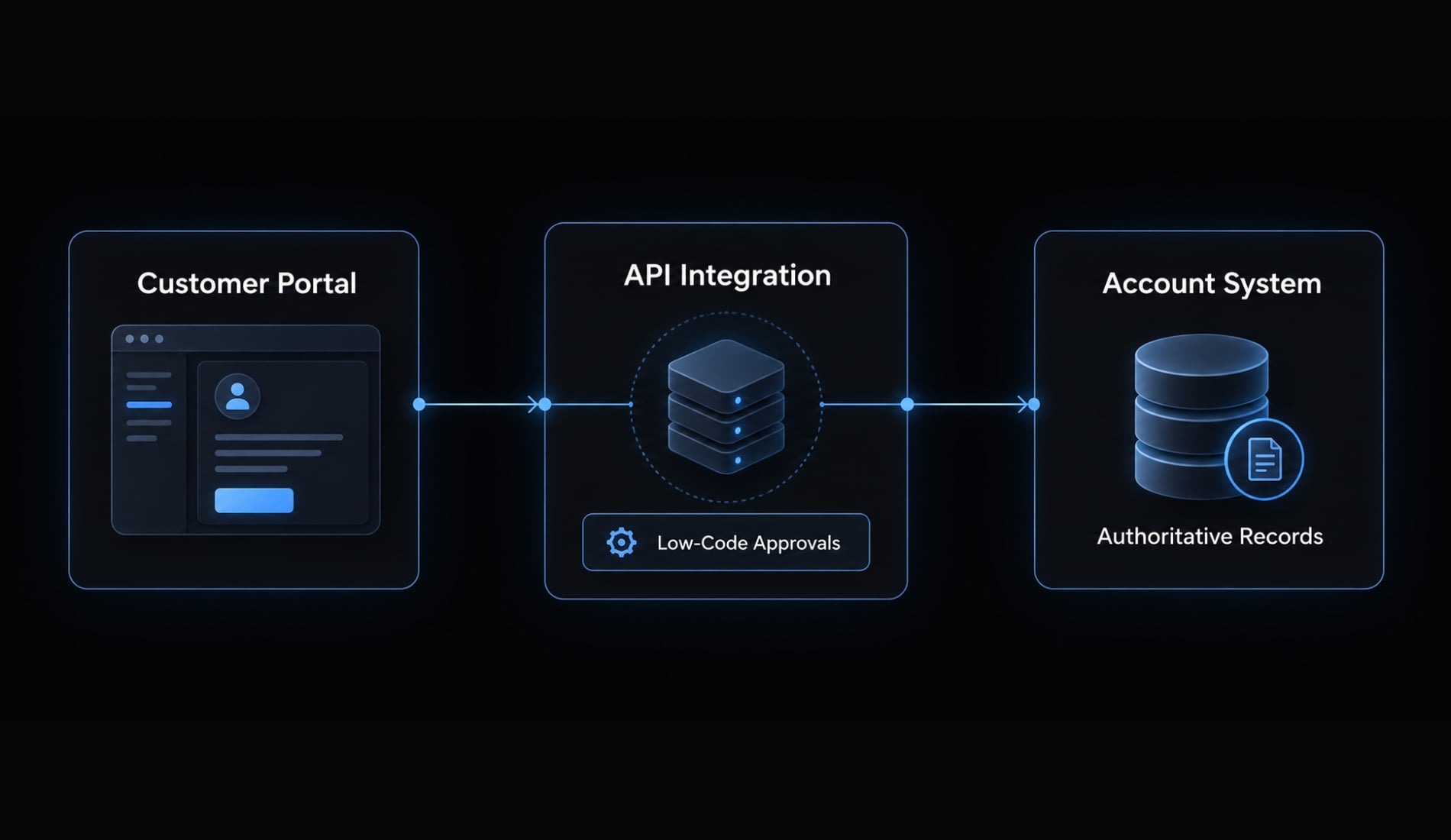
In this illustrative scenario, a SaaS company uses AI-assisted development for its custom customer portal. A low-code application handles internal account approvals and administration.
An API—an interface through which applications exchange data or request actions—connects the applications. An authoritative account system owns account status and approval records; neither interface independently decides the final status.
Use this six-step process:
- Define the user problem and sensitive data.
- Prototype the custom customer interface.
- Review the implementation before production.
- Configure internal workflows and approval permissions.
- Connect systems through supported APIs.
- Assign owners for data, changes, monitoring, and failures.
Engineering owns the portal and API integration. Operations owns approval policy, while the account-system owner controls authoritative records and access.
Watch for:
- Duplicated rules producing inconsistent account status.
- Unclear data ownership.
- Inconsistent permissions.
- Breaking API changes.
- Missing support responsibility.
For example, the portal might mark an account active before approval is recorded. Keeping the approval transition authoritative in one system reduces that risk. Teams must also define retry behavior and how users see pending or failed requests.
Compatibility must be verified; generated code cannot necessarily be imported into a chosen low-code platform.
Making vibe coding more reliable with a structured AI workflow
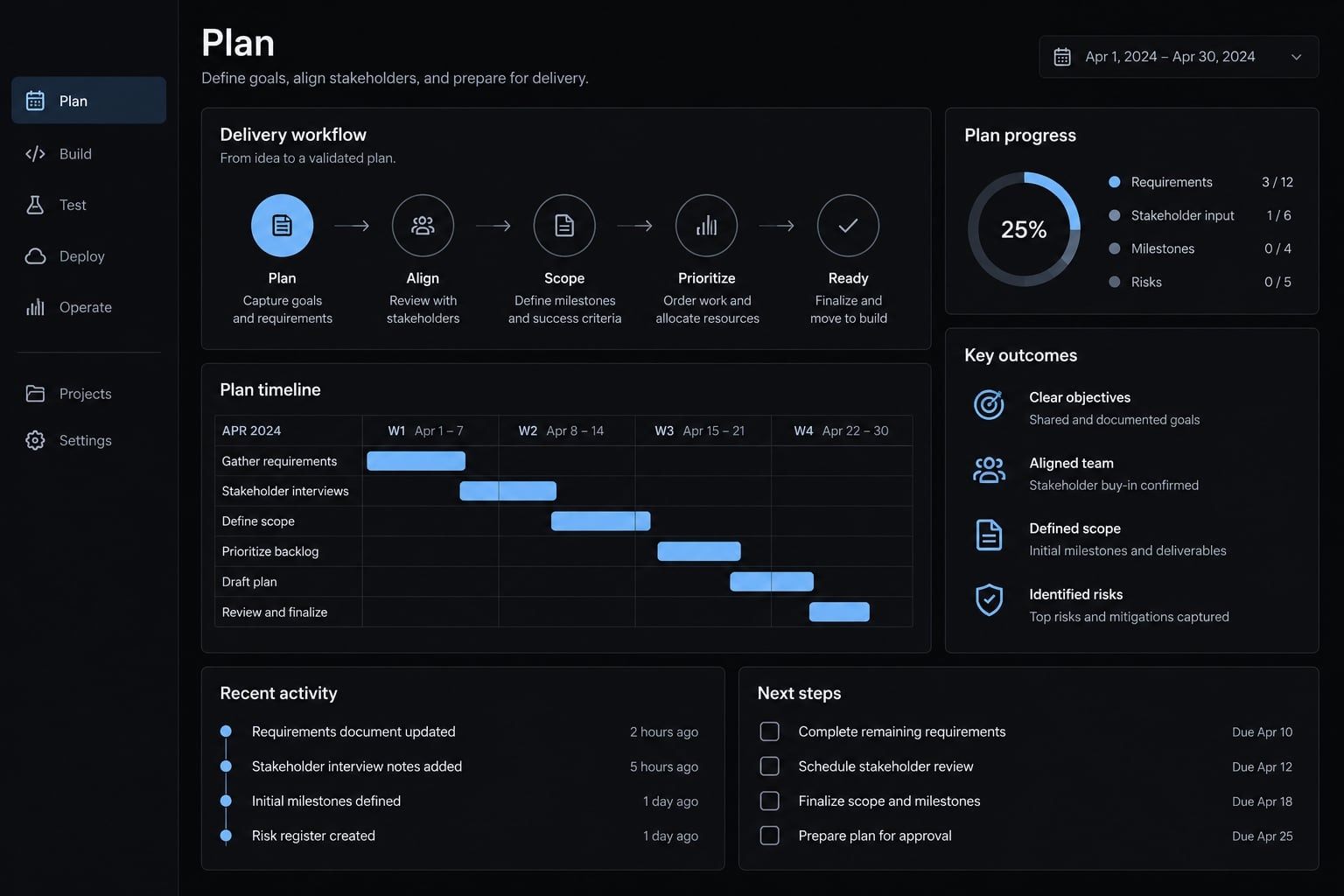
Moving from loosely supervised prompting to controlled delivery shifts the practice toward disciplined AI-assisted development. Structured AI development makes responsibilities and evidence explicit, but a checklist alone does not establish production readiness.
Organize delivery into three phases: Plan, Build and Verify and release. The final phase contains four separate checks:
- Plan: Define requirements, acceptance criteria, data boundaries, and ownership.
- Build: Implement manageable increments that someone can inspect.
- Test: Validate expected behavior, failures, and permissions with automated testing and targeted manual checks.
- Review: Inspect changes, dependencies, and generated tests through code review.
- Secure: Assess access controls, secrets, data handling, and relevant threats.
- Ship: Obtain release approval; deploy with monitoring and a rollback plan.
Generated tests also need scrutiny: They can repeat the implementation’s mistaken assumptions. Scanners do not catch every security problem, and successful security checks do not replace qualified judgment.
A named owner must approve release readiness and know how to reverse a failed change.
Frequently asked questions
Is vibe coding the same as low-code development?
No. Vibe coding uses AI to generate custom, editable source code from natural-language prompts, whereas low-code development relies on visual drag-and-drop interfaces and proprietary platforms.
Vibe coding can support behavior beyond a platform's standard components — provided someone can evaluate and maintain the result, while low-code platforms may include governance features, though capabilities vary by platform and plan, and available controls still need correct configuration.
Can I use vibe coding for enterprise production apps?
Yes, but it requires professional supervision. While vibe coding can produce high-quality code, it lacks built-in enterprise governance. Production-ready applications require rigorous human code review, automated testing, security vulnerability scanning, and adherence to established architectural standards to manage technical debt effectively.
Does vibe coding lead to vendor lock-in?
Both can. Source access is not the same as migration readiness: generated code often depends on proprietary authentication, databases, or hosting, and platform-managed applications may require rebuilding workflows elsewhere. Assess tool terms, export options, third-party licenses, and service dependencies in either case.
Which approach is faster for building internal tools?
For simple, standardized internal workflows, low-code platforms are often faster because they provide pre-built components and ready-to-use integrations. For unique, highly customized internal utilities, vibe coding can be faster, as it allows developers to build specific logic without conforming to the limitations of a visual builder.
What are the main risks of vibe coding?
The primary risks include the accumulation of "vibe debt"—where AI-generated code becomes difficult to maintain without proper documentation—security vulnerabilities from unvetted code, and a lack of built-in compliance controls. These issues require diligent human management, automated CI/CD pipelines, and consistent security audits to mitigate.
Do I need to be a developer to use vibe coding tools?
While you do not need to write code manually, vibe coding is most effective when managed by someone with technical knowledge. Understanding software architecture and debugging is essential for reviewing AI outputs, ensuring security, and maintaining the codebase over the long term as the application scales.
Can I combine vibe coding and low-code platforms?
Yes, when each part has a clear purpose, a supported integration path, and an accountable owner. Keep authoritative records in one system — if both sides can change account status, you get inconsistent state. Verify integration compatibility; generated code cannot necessarily be imported into a given platform.
Read more:
- Vibe coding vs. no-code: Which approach is right for you?
- Vibe coding vs traditional coding: Which approach wins?
- Agentic coding vs vibe coding: A practical guide for developers
Conclusion
The core distinction between vibe coding and low code lies in prompt-led generation versus visual assembly. While both simplify initial creation, long-term success depends on validation, security, and ongoing maintenance.
Choose vibe coding for custom, exploratory builds with technical oversight, and low code for standardized workflows with built-in controls. For critical, long-lived systems, prioritize sound engineering and clear governance over speed, regardless of the tools used.