Vibe coding better auth: How to build production-ready systems
Vibe coding better auth: A production-ready authentication workflow
A login flow that works smoothly in local development isn't necessarily safe for production deployment. Vibe coding Better Auth requires more than generating a polished sign-in screen. Production authentication also depends on identity rules, sessions, permissions, recovery, secrets, database changes, and deployment configuration. This guide provides a decision framework, a six-step implementation workflow, a reusable planning prompt, pre-deployment tests, and a recovery process for broken authentication.
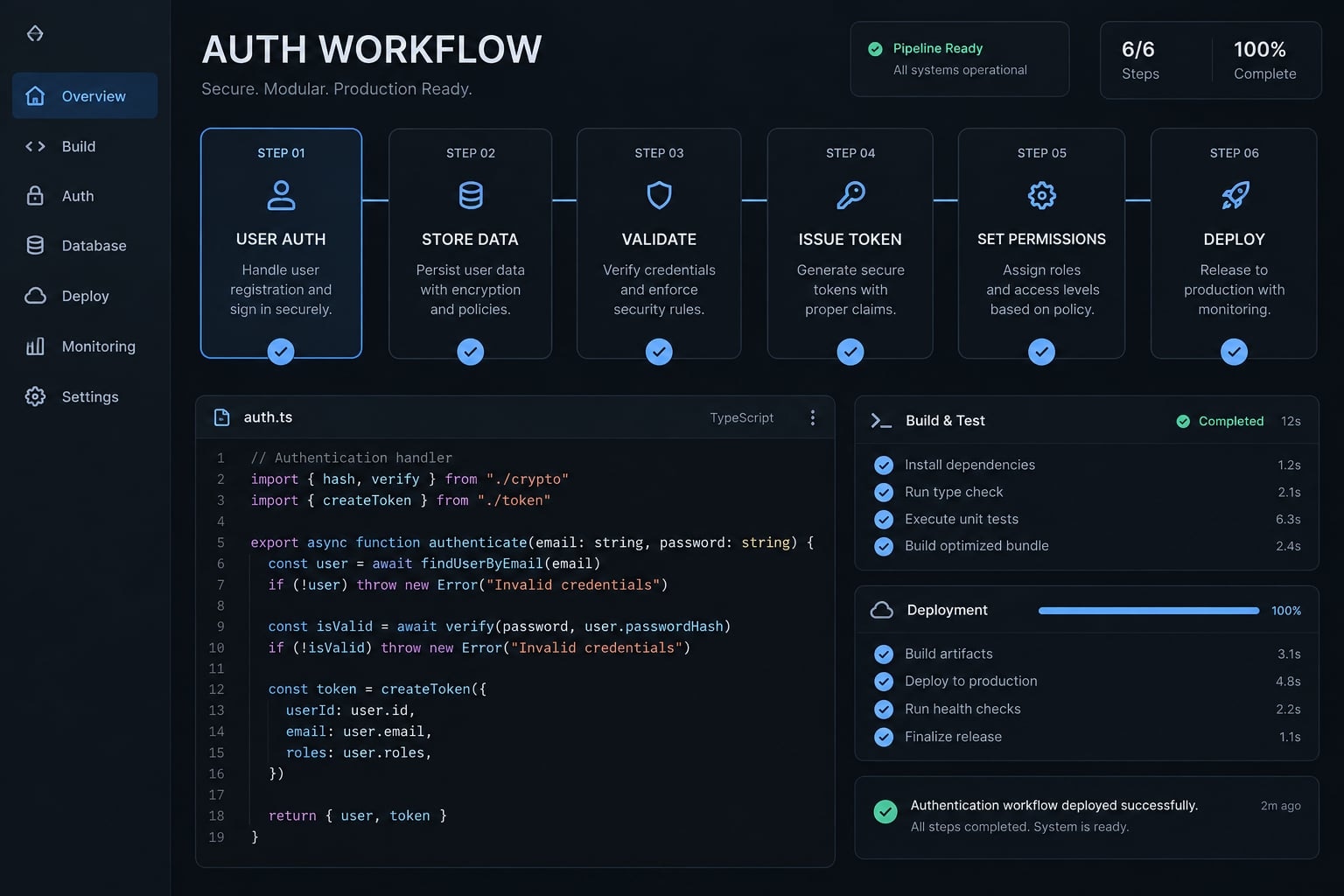
Direct answer: Use a maintained authentication framework, define application-specific access rules, inspect the existing repository before editing, and test failure scenarios independently. Production-ready authentication also requires deployment validation and human approval for credentials, permissions, migrations, and release decisions.
What does “Vibe coding better auth” mean?
Vibe coding Better Auth can mean using an AI coding agent to implement the Better Auth authentication framework. It can also describe the broader goal of making AI-assisted authentication reliable enough for production.
In both cases, generating a login page is only the interface layer. A complete authentication system must verify identities, maintain sessions, control access, support account recovery, protect secrets, and behave correctly after deployment.
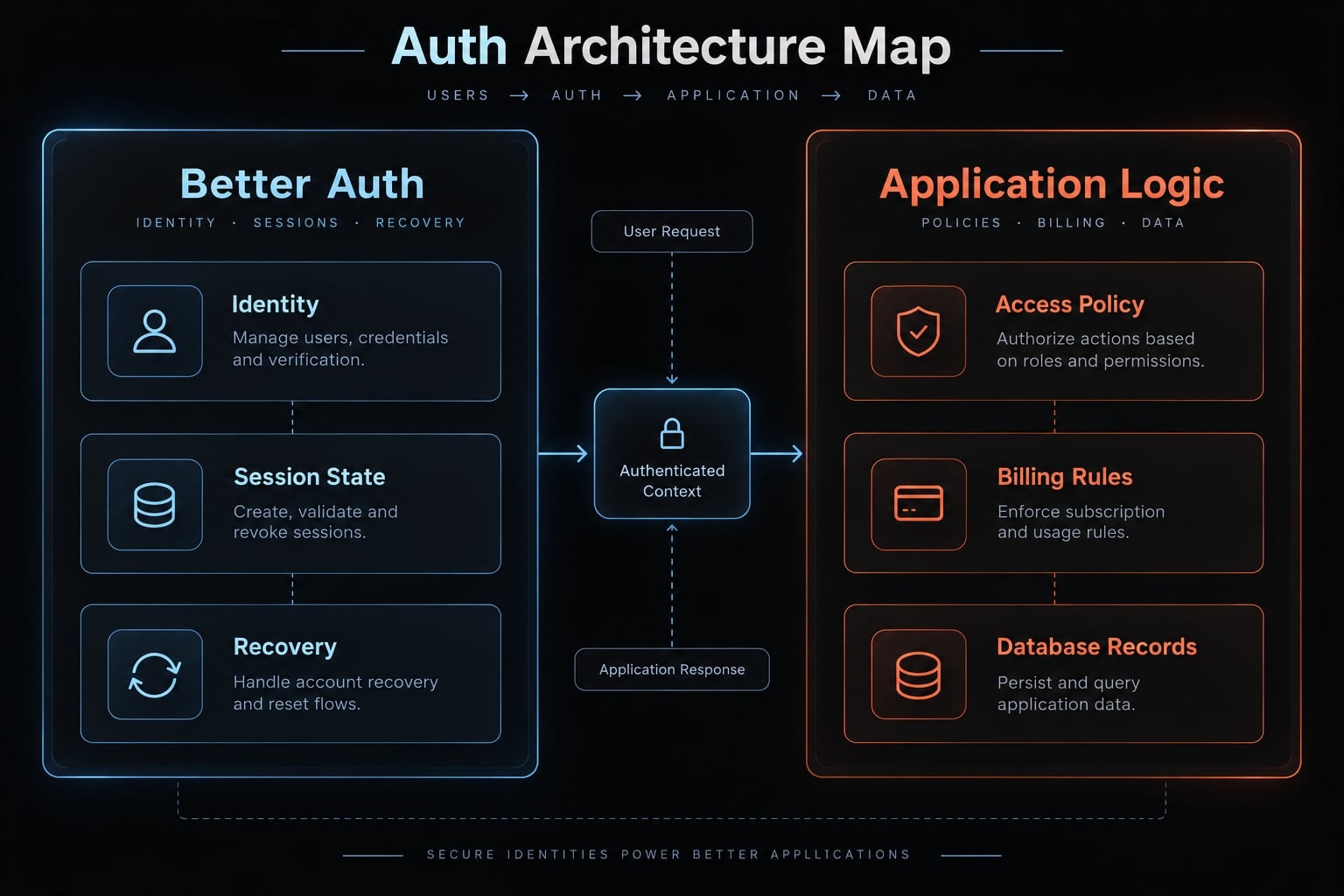
Better Auth can reduce avoidable implementation work by providing maintained authentication patterns. Its current capabilities and supported integrations should always be verified through the official Better Auth documentation. However, the framework cannot decide whether a project member may edit billing settings or access another organization’s records. Those decisions belong to the application.
Concept | Practical meaning |
|---|---|
Authentication | Confirms who the user is |
Authorization | Determines which resources and actions are permitted |
Session management | Creates, persists, validates, expires, and revokes authenticated state |
Better Auth | Standardizes supported authentication and account mechanics |
Production-ready authentication | Combines framework behavior, access policy, recovery, configuration, tests, and review |
Authentication confirms identity. Authorization decides what that identity may do. A logged-in session does not automatically grant access to every server route or database record. Consider a multi-tenant SaaS application. A member logs in and sees only projects belonging to their organization. The interface appears correct.
The same member then manually requests another tenant’s project through an API endpoint. The server must reject that request by checking ownership or active organization membership. Hiding the project in the interface is not an authorization control.
RBAC (Role-Based Access Control - access based on assigned roles) may determine whether someone is an administrator. It often needs additional ownership and tenant isolation checks to prevent one organization from accessing another organization’s data.
Why authentication breaks in vibe-coded applications
Authentication breaks because it crosses several application layers, while the agent often receives only a feature-level request such as “add login.” The resulting code may work on the successful local path without establishing a coherent identity, session, and authorization model.
Common causes include:
- “Add login” lacks identity requirements: Registration, account linking, verification, recovery, and duplicate-email behavior remain undefined.
- Authentication is confused with authorization: Logged-in users receive access without role, ownership, or tenant checks.
- Client-side guards replace server-side controls: Hidden buttons protect the interface, not the underlying resource.
- Duplicate auth paths appear: Repeated fixes introduce competing middleware, session helpers, callbacks, or routes.
- Secrets are incorrectly scoped: Credentials enter browser-accessible variables, source control, or application logs.
- Local and production settings differ: Cookies, domains, callback URLs, proxies, or environment variables behave differently.
- Only successful login is tested: Expired sessions, revoked accounts, provider failures, recovery abuse, and denied access are overlooked.
Symptom | Likely cause | First action |
|---|---|---|
Works locally, fails after deployment | Cookie, callback, domain, proxy, or environment mismatch | Compare deployment settings with current documentation |
Cross-account data is accessible | Missing ownership or tenant check | Trace authorization through the database query |
Session disappears after refresh | Inconsistent persistence or cookie handling | Map session creation, storage, and validation |
OAuth redirects repeatedly | Provider or callback mismatch | Inspect registered callbacks and server logs |
Every fix breaks another route | Duplicate auth paths | Inventory routes, middleware, adapters, and session helpers |
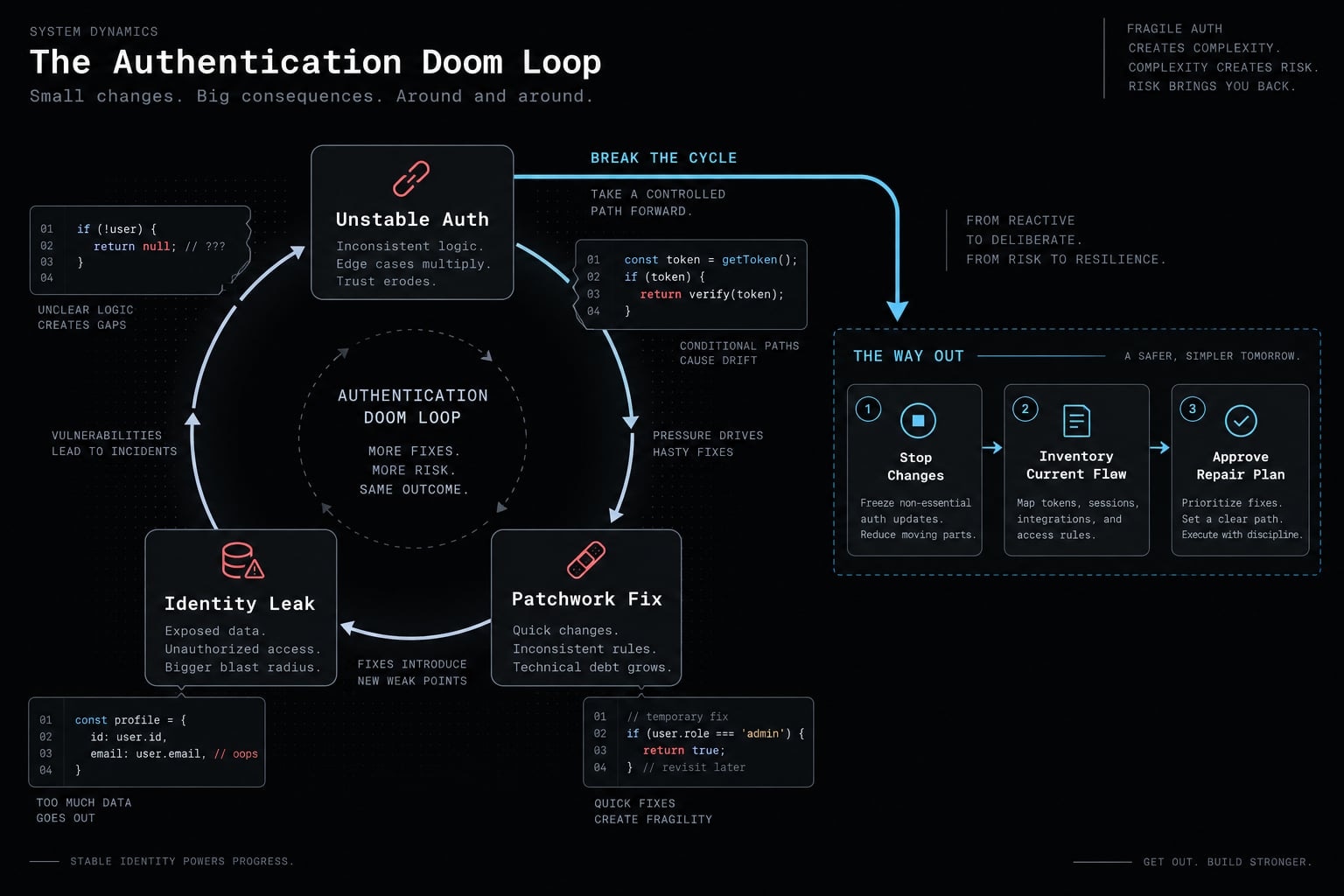
The authentication doom loop follows a predictable sequence:
Failure → Generic Fix Prompt → New Patch → Conflicting Auth Path → Partial Improvement → New Failure
Repeated patches create technical debt because the agent modifies symptoms without understanding the complete system. One route starts working while logout, recovery, or session persistence fails elsewhere.
Freeze code changes when the agent cannot explain the complete identity and session flow. Repository inspection and an approved repair plan should come before another implementation attempt.
Should you use better auth or build authentication from scratch?
Use the Better Auth framework when it supports your stack, required login methods, session model, database integration, and deployment environment. The team must still own configuration, authorization policy, testing, monitoring, and long-term maintenance.
The practical choice is not simply “framework versus custom code.” Teams generally choose among three ownership models.
Path | Best fit | Primary trade-off |
|---|---|---|
Maintained framework such as Better Auth | Teams wanting application-controlled integration with reusable mechanics | The team owns policy, configuration, testing, and operations |
Managed identity provider | Teams prioritizing outsourced identity infrastructure or enterprise identity features | Cost, vendor dependency, and integration constraints |
Custom authentication | Specialized requirements with qualified security ownership | Highest implementation and maintenance burden |
A managed provider can reduce responsibility for parts of identity infrastructure. It does not eliminate application-level authorization, ownership checks, or tenant isolation.
What better auth can and cannot do
Better Auth can help standardize | Your application must decide and verify |
|---|---|
Supported sign-in and account flows | Which login methods the product permits |
Session mechanics | Session duration, renewal, and revocation policy |
Provider integration primitives | Callback URLs, credentials, and provider configuration |
Reusable account functionality | Roles, permissions, and sensitive actions |
Consistent implementation patterns | Ownership checks and tenant isolation |
Framework-supported recovery behavior | Monitoring, incident response, privacy, and compliance |
When custom authentication is justified
Custom authentication should be an exception rather than the default. It may be justified when:
- Identity requirements cannot be supported by an appropriate framework or managed service.
- Qualified security engineers own architecture, implementation, testing, and incident response.
- The organization accepts ongoing responsibility for dependencies, migrations, account lifecycle, and operational failures.
An agent successfully generating password, token, or session logic is not evidence that custom authentication is safe to maintain.
A six-step workflow for vibe coding better auth
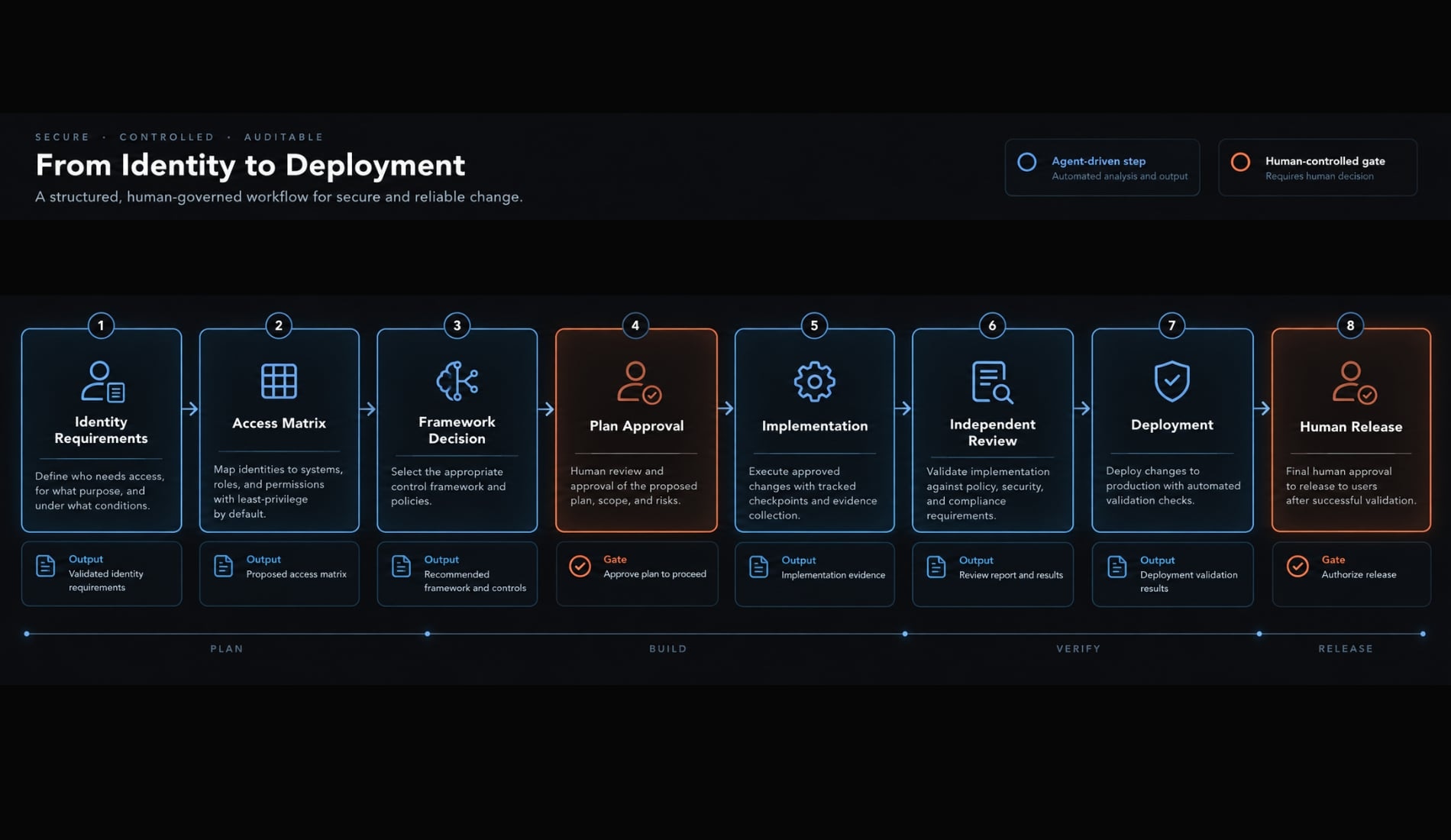
A secure authentication workflow separates requirements, architecture, planning, implementation, testing, and review. It also creates human approval gates before security-sensitive decisions reach production.
- Define users and login methods.
- Map roles, resources, and protected actions.
- Select the authentication model and framework.
- Request an implementation plan before code.
- Implement in small, reviewable checkpoints.
- Run independent review and deployment validation.
1. Define users and login methods
Create an Identity Requirements Document before asking an AI coding agent to modify the repository. It becomes the shared source of truth for implementation and review.
Document:
- User types and account relationships.
- Permitted login methods.
- Open, invited, or administrator-managed registration.
- Account-linking rules.
- Duplicate-email behavior.
- Verification, recovery, suspension, and deletion requirements.
Do not add every available provider to version one. Passwordless login, passkeys, social providers, and email-password authentication are product decisions with different support and recovery implications.
2. Map access rules across roles, resources, and protected actions
Every protected operation needs a server-side authorization decision. Identify roles, resources, ownership rules, organization membership, tenant boundaries, and actions that require recent reauthentication.
User type | Resource | Allowed actions | Required server check |
|---|---|---|---|
Member | Own project | Read, update | Ownership or active organization membership |
Organization admin | Team settings | Read, manage | Active admin role within the organization |
Support operator | Customer account | Limited support action | Explicit permission and audit record |
This access-control matrix is a starting point, not a complete policy. Expand it to cover exports, invitations, billing, API credentials, destructive actions, and administrator impersonation.
3. Select the authentication model and framework
Confirm the implementation environment before selecting components:
- Application framework and runtime.
- Database and ORM.
- Deployment platform.
- Supported Better Auth integration.
- Session model and required providers.
- Middleware and callback routes.
- Environment variables.
- Schema changes and migration requirements.
The agent must consult current Better Auth and deployment-platform documentation. Training data may contain outdated configuration names or unsupported integration patterns.
Human approval checkpoint:Framework choiceSession modelProvider listMigration planDeployment assumptions
No single session model is universally superior. Select one based on revocation, operational, scaling, and application requirements rather than generic claims about JWT or database sessions.
4. Ask for an implementation plan before code
Require repository inspection and a written plan containing:
- Existing authentication inventory.
- Conflicting routes, middleware, and session utilities.
- File-by-file changes.
- New or changed dependencies.
- Schema and migration impact.
- Server-side authorization points.
- Environment variables and callbacks.
- Positive and negative test cases.
- Risks and unresolved assumptions.
- Rollback steps.
Do not permit code changes until the plan is approved. Inspection prevents the agent from creating a second authentication system beside an incomplete first implementation.
5. Implement in small, reviewable checkpoints
Use this implementation sequence:
- Install and pin reviewed dependencies.
- Add server-side authentication configuration.
- Create and review schema changes.
- Apply migrations in a non-production environment.
- Implement one login method.
- Add session validation to protected server routes.
- Implement authorization and ownership rules.
- Add recovery, logout, and account lifecycle behavior.
After every stable checkpoint:
- Run relevant tests and create a small commit.
- Reject unrelated refactoring.
- Require explanations for migrations and security-sensitive configuration.
Small diffs make causality easier to identify. If a route fails, the team can review or roll back the specific checkpoint instead of untangling a large generated change.
6. Run independent review and deployment validation
The review should inspect:
- Secrets and environment-variable scope.
- Cookie and session behavior.
- Server-side access control.
- Recovery and account lifecycle.
- Input validation and abuse controls.
- Dependency vulnerabilities.
- Security-relevant logging.
- Production domains, callbacks, proxies, and configuration.
A separate agent or fresh context can reduce anchoring on implementation assumptions. It does not replace human accountability or guarantee an unbiased review. The reviewer should compare the repository with the approved specification-not with the implementer’s summary.
Human approval remains mandatory for production credentials, access policies, migrations, unresolved findings, and release.
A reusable prompt for planning an effective better auth implementation
Plan-first prompting forces repository inspection, exposes unresolved assumptions, and separates framework behavior from business-specific permissions. It creates an approval point before an AI coding agent changes authentication code.
Better auth planning prompt for Claude Code, Codex, Cursor, or GitHub Copilot:
Review this repository and prepare an authentication implementation plan.Do not modify code yet.Application context:- Stack: [FRAMEWORK AND RUNTIME]- Database and ORM: [DATABASE AND ORM]- Deployment platform: [PLATFORM]- User types: [USER TYPES]- Registration model: [OPEN, INVITE-ONLY, OR ADMIN-MANAGED]- Login methods: [EMAIL-PASSWORD, MAGIC LINK, OAUTH/OIDC, PASSKEY, ETC.]- Protected resources: [RESOURCES]- Authorization rules: [ROLES, OWNERSHIP, ORGANIZATION MEMBERSHIP]- Tenant boundaries: [RULES]- Session requirements: [DURATION, RENEWAL, REVOCATION]- Recovery requirements: [RESET, VERIFICATION, SUSPENSION, DELETION]Use current official Better Auth and platform documentation.First, inspect the existing repository and identify:1. Current auth routes, middleware, session helpers, adapters, and UI.2. Duplicate or conflicting authentication implementations.3. Existing schema, migrations, dependencies, and environment variables.4. Current server-side authorization and ownership checks.Then provide:1. Recommended authentication architecture.2. File-by-file changes.3. Dependencies and version considerations.4. Schema and migration plan.5. Environment variables, callback URLs, and deployment assumptions.6. Server-side authorization points.7. Positive, negative, abuse, and deployment test cases.8. Risks and unresolved assumptions.9. Small implementation checkpoints.10. Rollback steps.Separate Better Auth framework behavior from application-specific access policy.Wait for approval before implementing any change.
Adapt the prompt to each tool’s capabilities. Before running it:
- Confirm the stack and deployment platform.
- Define users and protected resources.
- Add session and recovery requirements.
- Specify ownership and tenant boundaries.
- Require approval before edits.
A strong Better Auth prompt improves reviewability. It is not a substitute for security testing or qualified assessment.
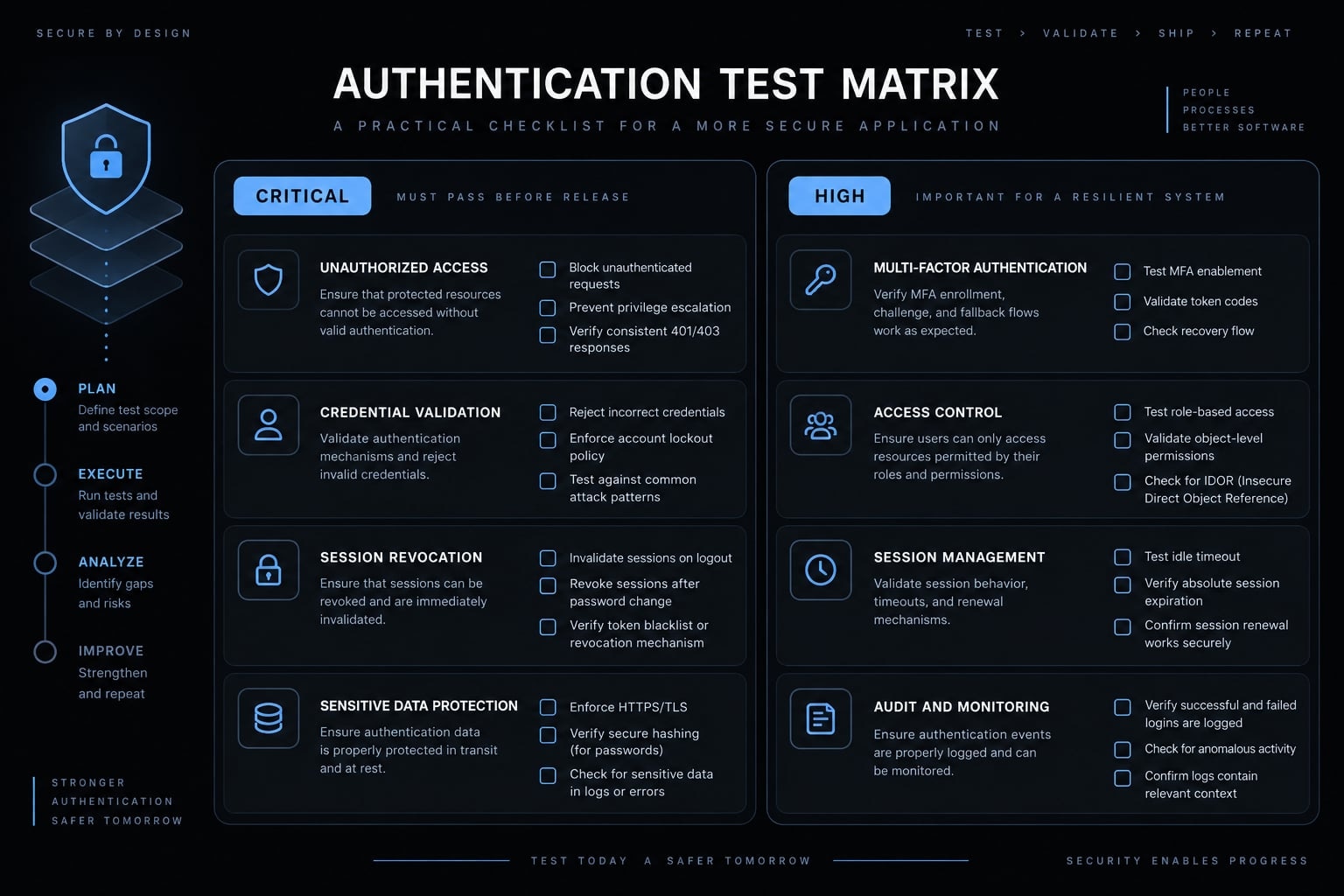
Authentication tests to run before deployment
Authentication testing must cover successful behavior, denied access, session lifecycle, recovery abuse, and production configuration.
Priority | Scenario | Expected result |
|---|---|---|
Critical | Unauthenticated protected-route request | Server denies access |
Critical | Cross-user data request | Server rejects ownership violation |
Critical | Cross-tenant data request | Tenant boundary is enforced |
Critical | Standard user requests admin action | Server denies the operation |
Critical | Revoked session | Session is no longer accepted |
Critical | Secret scan | No credentials appear in source, browser bundles, or logs |
Critical | Missing environment variable | Application fails safely without exposing secrets |
High | Valid login | Correct session is created |
High | Invalid credentials | Generic failure without account enumeration |
High | Expired session | Reauthentication is required |
High | Invalid or reused recovery link | Request is rejected |
High | OAuth provider failure | Failure is handled without a redirect loop |
High | Repeated login attempts | Abuse controls activate as designed |
High | Logout | Intended session is invalidated |
High | Account suspension or deletion | Existing access follows documented policy |
Production acceptance also requires a pass/fail review:
- Every protected operation has a server-side check.
- Roles, ownership, and tenant boundaries have negative tests.
- Session expiration and session revocation are verified separately.
- Recovery links are one-time, limited, or invalidated as designed.
- Credentials and private tokens remain server-side.
- Production cookies, callbacks, domains, and proxies are validated.
- Logs contain no passwords, tokens, reset links, or sensitive personal data.
- Authentication dependencies and versions are documented.
- Database migrations have a tested rollback plan.
- A named human reviewer approves release.
Automated security testing provides baseline acceptance criteria. Sensitive, regulated, or high-impact systems may also require threat modeling, penetration testing, compliance review, and qualified security specialists.
How to recover when an agent gets authentication wrong
Stop requesting generic fixes once the implementation enters a doom loop. Preserve evidence and restore diagnostic control before editing more files.
- Freeze authentication-related changes.
- Commit, branch, or otherwise preserve the current repository state.
- Start a fresh context or use a separate diagnostic agent.
- Trace login, session creation, storage, validation, and logout end to end.
- Inventory duplicate routes, middleware, adapters, and helpers.
- Compare the implementation with current framework and platform documentation.
- Approve the smallest safe repair plan.
- Re-run the complete authentication test matrix.
Multi-agent diagnostic isolation means using a fresh agent context to reduce dependence on assumptions made during implementation. It can improve reviewability but does not guarantee an independent or correct conclusion.
Use this diagnostic-only prompt:
Diagnose the current authentication implementation.Do not modify code.Trace the complete flow through:- Login interface.- Server handler.- Authentication configuration.- Session creation and storage.- Middleware.- Authorization checks.- Database query.- Logout and recovery.- Environment variables and callback configuration.Inventory duplicate or conflicting implementations.For every finding, provide:- File-level evidence.- Observed behavior.- Likely root cause.- Security or reliability impact.- Smallest safe repair path.- Tests required after repair.- Rollback considerations.Compare the implementation with current official documentation.Wait for approval before making changes.
Do not delete the entire authentication layer before diagnosis. A smaller evidence-backed repair is easier to review, test, and reverse.
Using coordinated agents for authentication work
A single long agent conversation can mix outdated planning assumptions with implementation and debugging details. The same agent may then review decisions it already made, while approval checkpoints become difficult to identify.
Role separation creates a more reviewable process:
Role | Responsibility |
|---|---|
Planning agent | Repository inspection and authentication specification |
Implementation agent | Approved, scoped code changes |
Test agent | Test generation, execution, and failed-scenario reporting |
Security-review agent | Secrets, sessions, permissions, dependencies, and configuration |
Human approver | Framework, policy, credentials, migrations, unresolved risk, and release |
AgentKit is a workflow and coordination layer for reusable agents, skills, plans, security checks, and cross-tool configurations. It can structure an AI coding agent workflow, package reusable agent skills, and separate implementation from code review and deployment validation.
This model can be adapted to supported Claude Code, Codex, and GitHub Copilot workflows. Their capabilities differ, so tasks, permissions, and execution behavior must be verified against current documentation.
AgentKit coordinates process and review checkpoints. It does not independently guarantee secure authentication, regulatory compliance, or vulnerability-free code.
Build authentication as a reviewed system, not a generated feature
Successful vibe coding Better Auth follows a controlled sequence: define identity requirements, map authorization, select a maintained framework, approve the plan, implement small checkpoints, and test production behavior before release.
Better Auth can standardize common mechanics, but it cannot make application-specific access decisions. AI agents can accelerate implementation, yet credentials, permissions, migrations, unresolved risks, and production releases still require human approval.
Frequently asked questions
What does "vibe coding better auth" mean?
"Vibe coding better auth" refers to the practice of building production-ready authentication in AI-assisted development by moving beyond simple UI generation. It involves using maintained frameworks and structured workflows to implement identity, session management, and authorization, ensuring the application is secure rather than just functional.
Why does authentication often break in AI-assisted applications?
Authentication breaks because AI agents often lack a complete system map. Common causes include confusing client-side UI with server-side authorization, duplicate middleware layers, incorrect production callback URLs, exposed secrets, and failing to test session revocation or account recovery flows thoroughly under production conditions.
Is the Better Auth framework always the right choice?
Better Auth is an excellent choice for teams wanting reusable, framework-supported authentication mechanics they can control. However, it is not a "magic" solution; you must still design your application’s specific access policies, manage deployment configuration, and conduct independent security reviews to ensure production safety.
How do I fix a "doom loop" in AI-generated authentication?
Stop requesting generic fixes. Instead, freeze code changes, preserve your current repository state, and use a fresh context to diagnose the issue. Identify the specific conflicting route or session handler, compare your implementation against official documentation, and approve a scoped, minimal repair plan before applying new patches.
How can I coordinate agents to improve authentication security?
You can coordinate agents by separating roles: use a planning agent for repository inspection and specifications, an implementation agent for approved changes, and a dedicated review agent for secrets, dependencies, and access control. This orchestrated workflow, supported by platforms like AgentKit, ensures every change is reviewable and approved.
What authentication tests should I run before deployment?
Before deploying, you must run a baseline test matrix including: valid/invalid logins, session expiration, cross-tenant data requests, revoked session handling, OAuth provider failures, and recovery link abuse. Automated tests are critical, but they should be supplemented by manual review and deployment configuration validation.
Read more:
- Vibe coding stripe: Building secure payment flows with AI
- Vibe coding tools: How to choose the right AI app builder
- Vibe coding product spec: Build faster with AI clarity
Conclusion
Vibe coding with Better Auth can dramatically speed up authentication setup, but a working login UI isn't a substitute for real security. Production readiness depends on strict server-side authorization, disciplined testing, and controlled deployment workflows. While AI tools handle the repetitive mechanics, human developers must remain fully accountable for access rules, secrets, and final release decisions.