Vibe Coding best practices: A practical guide for reliable AI
Vibe Coding best practices: A practical workflow for reliable AI code
Generating code fast isn't validating it. Natural-language coding uses AI to propose edits, while unchecked "vibe coding" accepts changes blindly. This guide applies practical engineering controls to that interaction without dismissing AI assistance. For lean teams, the six-stage workflow below helps constrain scope, supply context, test behavior, and recover from failed fixes - because rigorous supervision minimizes regressions, but never replaces foundational programming expertise.
Vibe coding best practices: Quick-reference checklist
Reliable results depend on a repeatable process, not a perfect prompt; use this vibe coding checklist for each task.
# | Best practice | What to do |
|---|---|---|
1 | Scope one testable outcome | Describe observable behavior and its acceptance criteria. |
2 | Maintain project instructions | Record approved tools, conventions, commands, and boundaries. |
3 | Approve a plan before edits | Inspect proposed files, assumptions, and validation steps. |
4 | State requirements and exclusions | Specify what must change - and what must remain untouched. |
5 | Prefer the simplest viable approach | Reuse existing patterns before introducing abstractions or packages. |
6 | Generate small changes | Implement one coherent behavior with its related tests. |
7 | Review every diff | Inspect actual edits, not only the agent’s summary. |
8 | Verify before accepting | Run applicable checks and exercise the affected user journey. |
9 | Strengthen controls for high-risk code | Escalate permissions, payments, and data changes for qualified review. |
10 | Commit verified checkpoints | Record focused changes after required checks pass. |
11 | Reset stale context | Restart with relevant evidence when decisions become contradictory. |
12 | Reuse successful workflow artifacts | Version-control useful prompts, review lists, and validation steps. |
Match controls to consequences. A simple UI label update requires far less scrutiny than modifying tenant authorization or database schemas. Tenant permissions determine which organization’s records a user can access.
Your AI coding workflow should become stricter as potential harm increases. Small changes, current context, code review, and verification reinforce one another. No single defense can eliminate risk on its own.
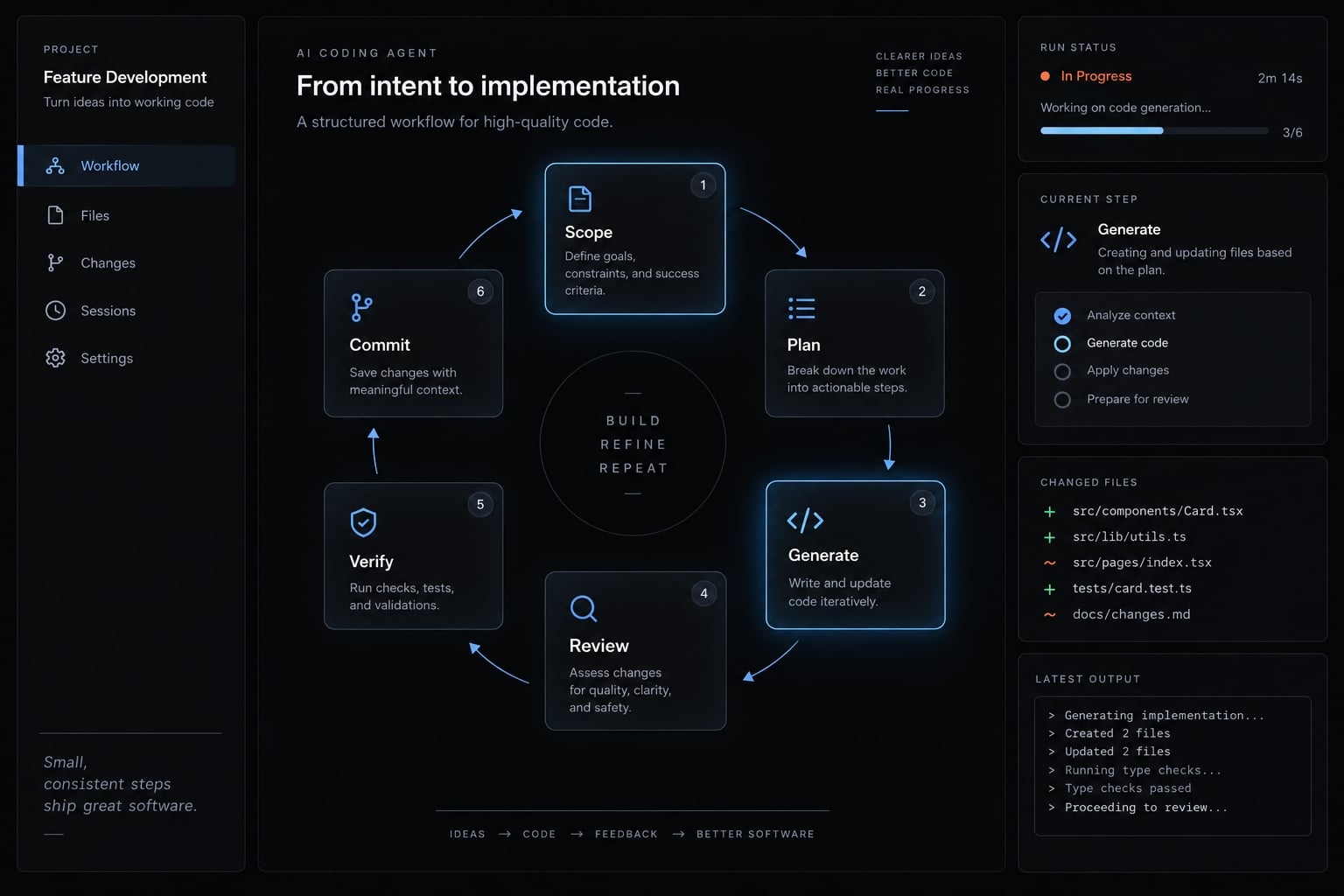
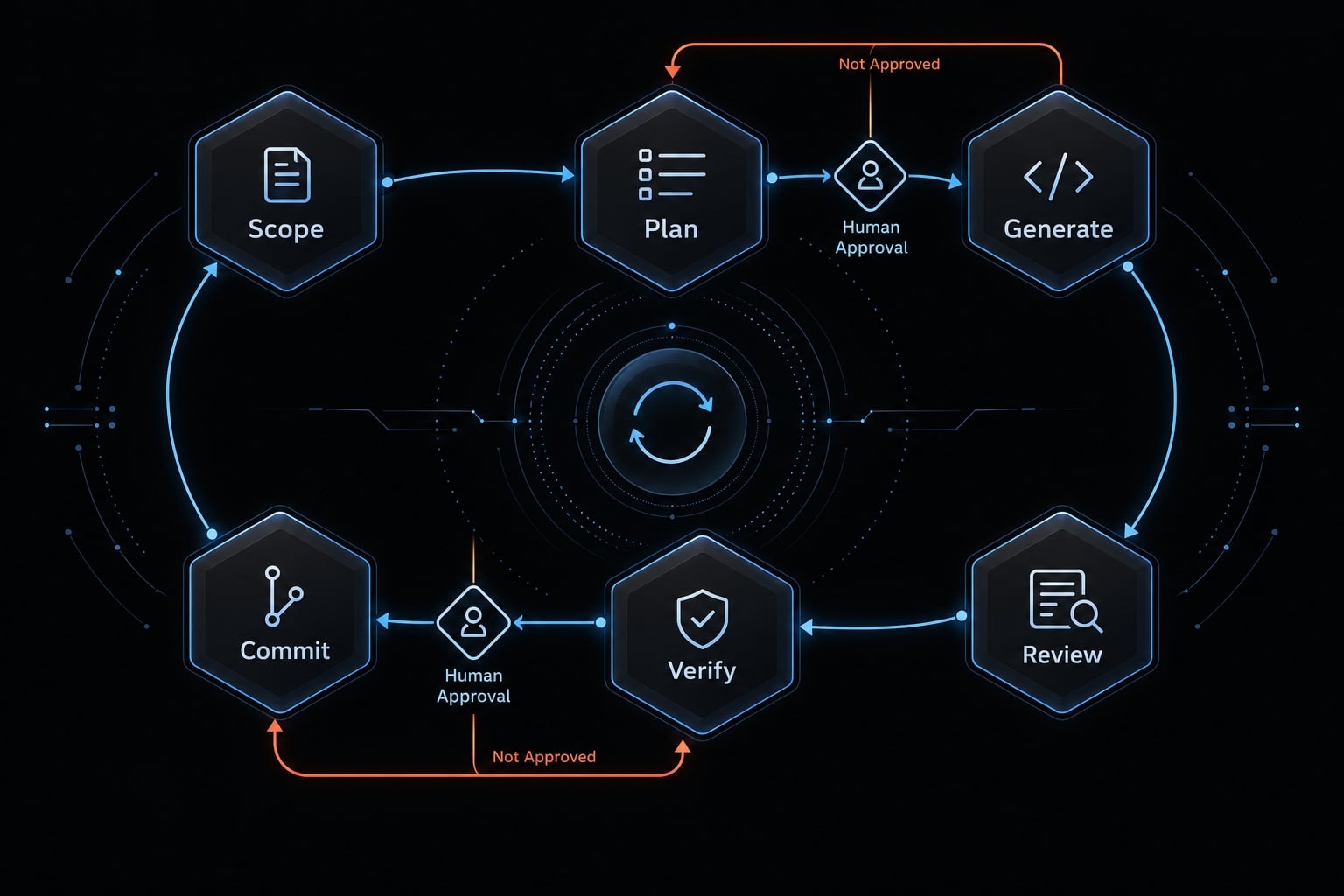
Follow the Scope → Plan → Generate → Review → Verify → Commit Loop
This recommended AI-driven development workflow gives each stage a visible output and an explicit stopping point:
- Scope: Define the outcome.
- Plan: Approve the approach.
- Generate: Implement the bounded change.
- Review: Inspect actual edits.
- Verify: Gather execution evidence.
- Commit: Record the verified state.
Scope one testable outcome
Illustrative example: Add a status filter to an internal CRM (Customer Relationship Management) dashboard. This is a teaching scenario, not a customer implementation.
Start with a bounded request:
Add an All/Open/Closed filter to the existing CRM dashboard. Default to All. Preserve existing access restrictions. Do not change authentication, database schema, or dependencies.
Define acceptance criteria: matching records appear, All restores the authorized list, and no matches produces an empty state. Keep unrelated dashboard improvements separate.
Exit criterion: The outcome, acceptance criteria, and excluded areas are unambiguous.
Plan before the agent writes code
Ask the agent to inspect relevant repository files first:
Identify affected files, existing filter patterns, assumptions, edge cases, and validation steps. Explain the proposed approach briefly. Do not edit files yet.
For the CRM filter, determine whether filtering belongs in an existing server request or a fully loaded client-side list. Filtering only the current page could misrepresent results.
This is a human-in-the-loop approval point, a person decides whether the approach is acceptable.
Exit criterion: A human approves a comprehensible implementation plan.
Generate the smallest meaningful change
Implement the filter and directly related tests using existing patterns. Require separate approval for new packages, configuration changes, or migrations - changes to database structure or stored data.
Avoid a universal line-count limit. Reviewability depends on complexity, not just size.
Exit criterion: The change can be reviewed and validated as one unit.
Review the change before accepting it
Inspect changed files rather than the completion message. Check unexpected edits, altered interfaces, and deviations from the plan.
Nontechnical builders can identify scope changes, but unfamiliar data-access behavior needs qualified review.
Exit criterion: The reviewer can account for every changed file and resolve identified concerns.
Verify behavior with deterministic checks
Code verification compares implementation against acceptance criteria. Run applicable automated checks and exercise All, Open, Closed, and empty-result behavior.
If required checks fail, return to diagnosis. Do not advance because the agent says the failure is unrelated without supporting evidence.
Exit criterion: Required checks pass in the stated environment, and expected behavior is observed.
Commit a known-good state
Create a focused, descriptive commit, such as “Add CRM status filter and empty-state coverage.”
Git checkpoints record code states. “Known-good” means verified against the checks actually performed - not defect-free.
Exit criterion: The verified state is recorded, and recovery limits are understood. Restoring repository files does not automatically restore databases or external systems.
Give the AI clear context without overloading it
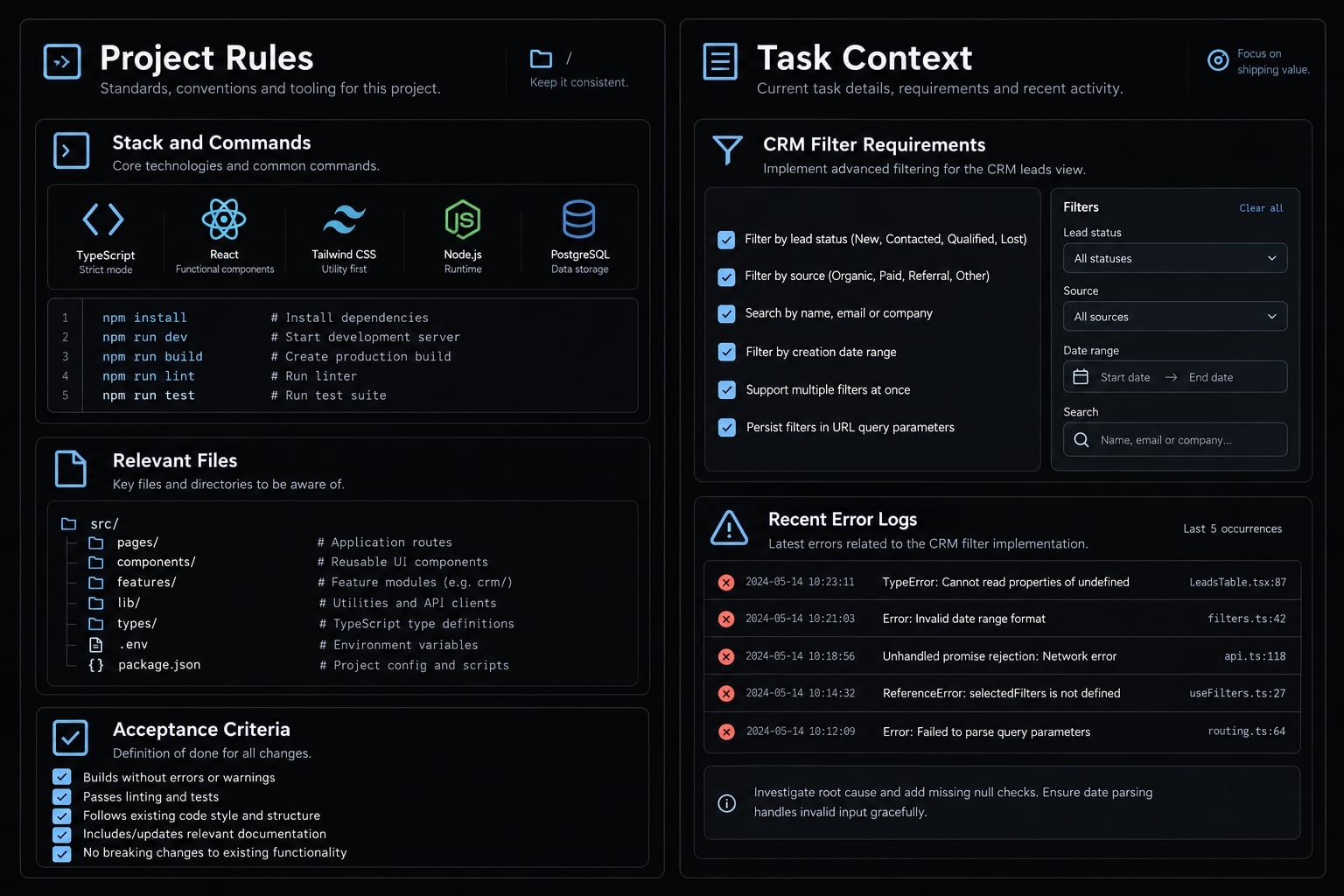
Effective context management separates stable project rules from temporary task instructions. Relevant information reduces unsupported assumptions; an indiscriminate transcript makes important constraints harder to identify.
Maintain a Project-Level source of truth
Keep a short project instruction file covering:
- Approved stack and package manager.
- Verified build, test, and lint commands.
- Existing modules and conventions to reuse.
- Protected areas and approval requirements.
- References to detailed specifications.
Instruction-file discovery and precedence differ between coding tools. Use your installed tool’s official documentation rather than assuming one filename or loading behavior works everywhere.
Maintain the guide when commands or architecture change. An outdated instruction can be worse than an explicit unknown.
Instructions guide behavior; they do not enforce permissions. Agents may ignore or misinterpret them. Restrict sensitive operations through actual access controls. A Git branch is not a sandbox: it does not block credentials or production services.
Use a Three-Layer task prompt
Supply three conceptual layers:
- Technical context: Relevant files, stack, and existing patterns.
- Functional outcome: The behavior you need.
- Integration and verification: Constraints, permissions, edge cases, and checks.
These five fields implement those three layers:
Context: [Relevant stack, files, and existing patterns]Goal: [One observable outcome]Constraints: [What to reuse, avoid, or seek approval for]Edge cases: [Errors, empty states, permissions, unusual inputs]Validation: [Required checks and user journey]Inspect the relevant files, propose a plan, and list assumptions.Do not edit files until the plan is approved.
For the CRM filter, explicitly preserve authorized record access and existing pagination behavior.
Reset context before it becomes a liability
Use context window management - the deliberate selection of information available to the model - when these warning signs appear:
- Repeated failed solutions: Preserve evidence and narrow the diagnosis.
- Forgotten constraints: Restate the approved specification.
- Contradictory decisions: Record the current decision and discard obsolete alternatives.
- Unrelated feature work: Start a separate task.
Carry forward relevant files, current error output, approved requirements, and verified decisions - not the entire conversation.
Keep changes small, reviewable and reversible
Atomic changes address one coherent outcome, making mistakes easier to locate and recovery easier to reason about.
Work in atomic changes
Keep the CRM filter implementation and directly related tests together. Separate unrelated refactoring - restructuring existing code - from feature work.
Reject speculative cleanup. Ask the agent to stop after the approved behavior is implemented, before expanding scope.
Architectural consistency matters more than cosmetic uniformity. A working existing pattern is usually preferable to an unnecessary new abstraction.
Review every diff, even if you cannot read every line
A diff records added, changed, and deleted code. Review the actual AI-generated diff using five questions:
Check | Question |
|---|---|
Out-of-scope files | Why did files outside the approved plan change? |
Added dependencies | Is each new package necessary and approved? |
Interface or configuration changes | Did APIs, database structure, or settings change unexpectedly? |
Removed safeguards | Was validation, error handling, or an access check removed? |
Independent reversibility | Can this change be undone without losing unrelated work? |
An API is an interface through which software components communicate.
- Developer review: Inspect behavior, interfaces, error paths, authorization, and test adequacy.
- Nontechnical review: Check file lists, deletions, packages, permission changes, sensitive settings, and demonstrated user journeys. Escalate authentication, data access, migrations, or any behavior you cannot evaluate.
An agent’s explanation helps navigation; it is not independent verification.
Stop the debugging doom loop
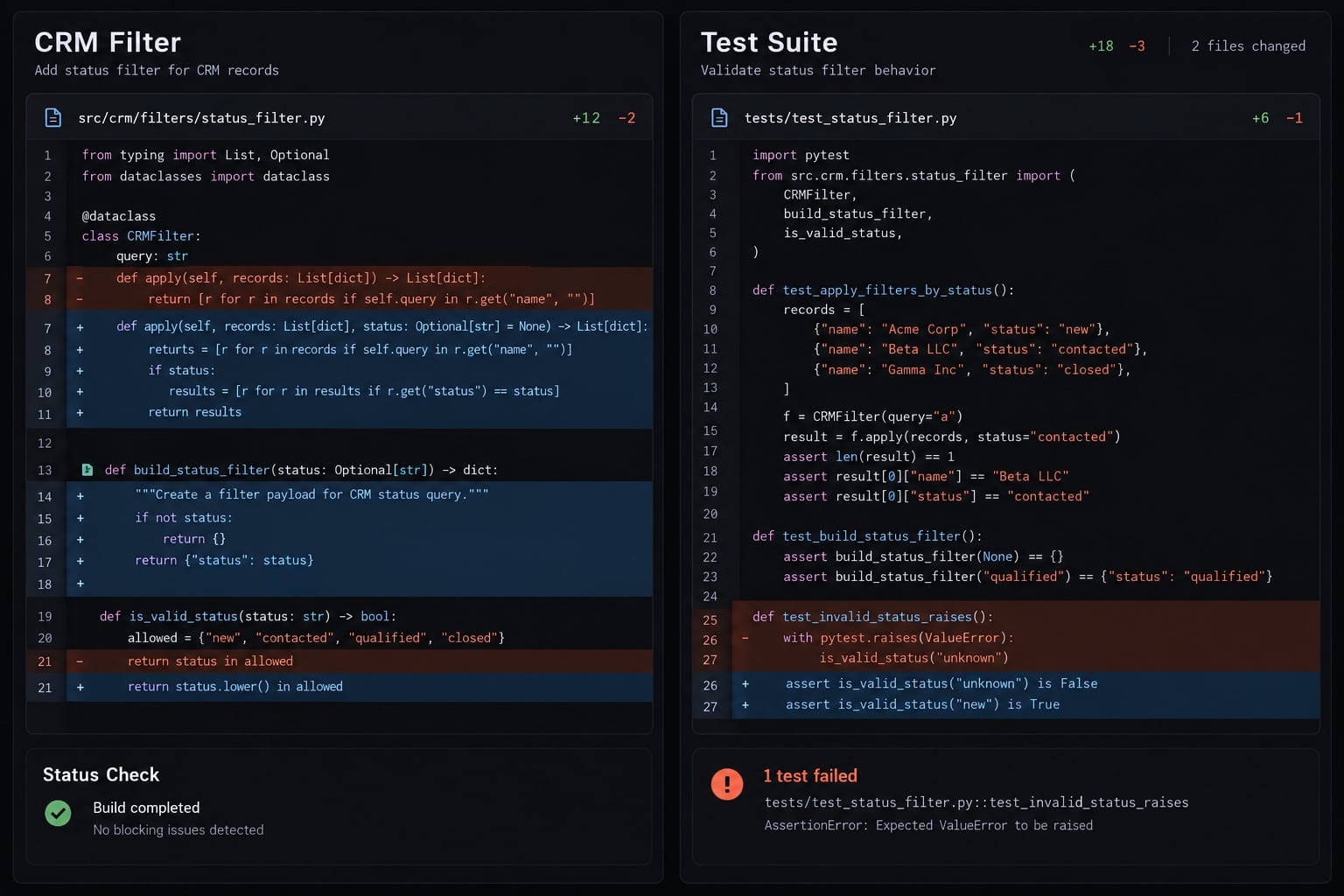
Use the two-strike rule as a heuristic, not a diagnosis:
- Pause after two unsuccessful repair attempts.
- Preserve error output and the relevant diff.
- Protect unrelated work; return to a verified checkpoint where appropriate.
- Restart with fresh context and a narrower diagnostic question.
Git’s git-restore and git-revert documentation distinguishes restoring files from recording changes that reverse earlier commits. Choose recovery deliberately; do not discard work blindly.
Git checkpoints help recover code, not every consequence of running it.
Use deterministic tests and security gates
Execution evidence is stronger than a completion claim. Automated testing, code-quality checks, and security review address different failure modes.
Run a minimum verification stack
Use this practical default:
- Build or compile: Confirm the application can be assembled.
- Type-check: Where supported, detect incompatible data types.
- Lint: Check configured code-quality rules.
- Run unit and integration tests: Check individual behaviors and component interactions.
- Start the application: Confirm it runs in the test environment.
- Test the affected user journey manually: Exercise the CRM filter.
This is not a universal dependency order. Some stacks combine or omit commands. Manual testing is verification, but not deterministic automation.
Use controlled environments and reproducible fixtures - predictable test data. Require command results, environment details, and exit status, which indicates success or failure. Automated hooks can trigger checks; their presence does not prove execution.
Use tests as the acceptance contract
Apply Red → Green → Verify:
- Establish expected behavior independently of the implementation.
- Confirm a relevant test fails for the intended reason.
- Implement the behavior and rerun the test.
- Run surrounding checks to detect regressions.
For the CRM filter, test empty results and preserved access restrictions—not just matching statuses. If filtering changes requests, cover invalid values and request failures.
Tests that mirror incorrect generated logic can pass while validating the wrong behavior. Automated testing needs review too.
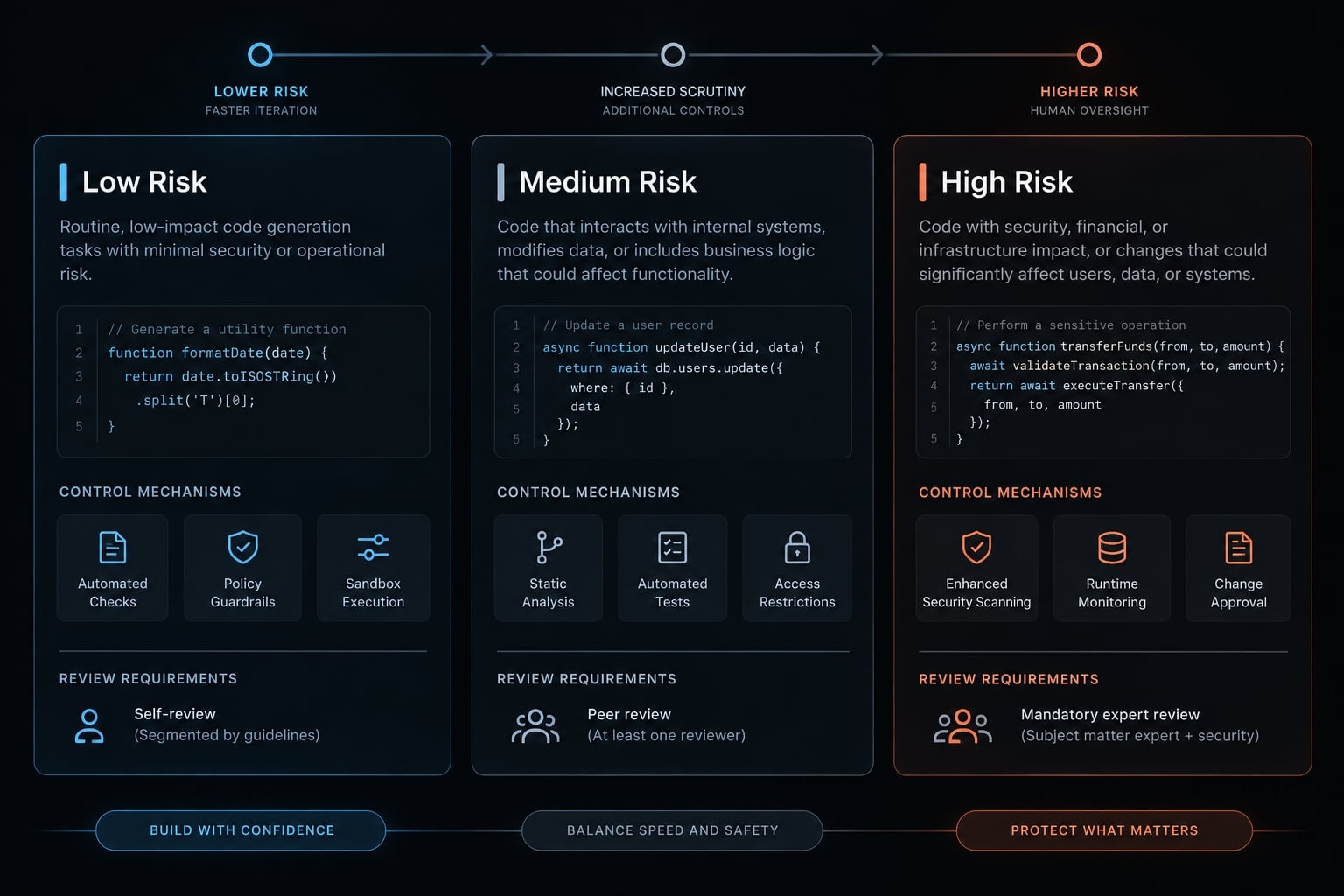
Apply Risk-Based guardrails
Risk level | Example scope | Minimum control emphasis |
|---|---|---|
Low | Isolated copy or styling without sensitive behavior | Visual review and applicable checks |
Medium | Business logic, integrations, dependency changes | Diff review, relevant tests, dependency assessment, checkpoint |
High | Authentication, authorization, secrets, payments, tenant data, migrations | Approved plan, isolated environment, qualified review, recovery plan, explicit release approval |
Context can raise risk. A small visual edit may affect consent or expose customer information.
Enforce a minimum production security baseline
Production safety requires controls beyond prompts:
- Keep secrets out of source, browser code, logs, and prompts.
- Check authentication - who the user is - and server-side authorization - what that user may access - separately.
- Validate external input. Use parameterized queries that separate data from database commands, and context-appropriate output encoding.
- Enforce least privilege: grant only necessary access. Preserve separation between organizations’ data.
- Review package identity, provenance, and known vulnerabilities.
- Review migrations, backups, and recovery procedures.
- Restrict agent access; require approval for destructive actions.
- Apply secret scanning, dependency scanning, and static analysis - checks that inspect code without running it.
Passing checks does not prove correctness or security. A second AI reviewer offers another assessment, not guaranteed independent assurance. High-risk AI-generated code still needs qualified human security review.
Know when a prototype is not production-ready
AI-assisted applications can reach production, but generation method does not establish readiness. Production-ready AI code needs evidence that critical behavior works, data access is controlled, failures are observable, and recovery is practical. A working demonstration is insufficient when real users or customer information are involved.
Prototype vs. production requirements
Here, prototype development means an isolated experiment using synthetic or disposable data. Public access or real-system connections require stronger controls, regardless of the “prototype” label.
Area | Isolated prototype | Production |
|---|---|---|
Architecture | Minimal, bounded design | Understandable structure suited to expected use |
Testing | Core demonstration checks | Critical journeys and regression coverage |
Authentication | Mock identities in isolation | Verified identity controls where required |
Data access | Synthetic or disposable records | Enforced permissions and tenant separation |
Secrets | No exposed credentials | Managed storage, access, and rotation |
Dependencies | Reviewed experimental packages | Reviewed, version-locked, monitored packages |
Database changes | Disposable test storage | Reviewed migrations and recovery |
Error handling | Visible local failures | Safe user errors and actionable reporting |
Deployment | Restricted test environment | Controlled release and recovery procedure |
Ownership | Named experiment owner | Named maintenance and incident owner |
Dependency locking improves reproducibility; it does not guarantee safe packages. Maintainable software needs appropriate structure, not enterprise-scale complexity by default.
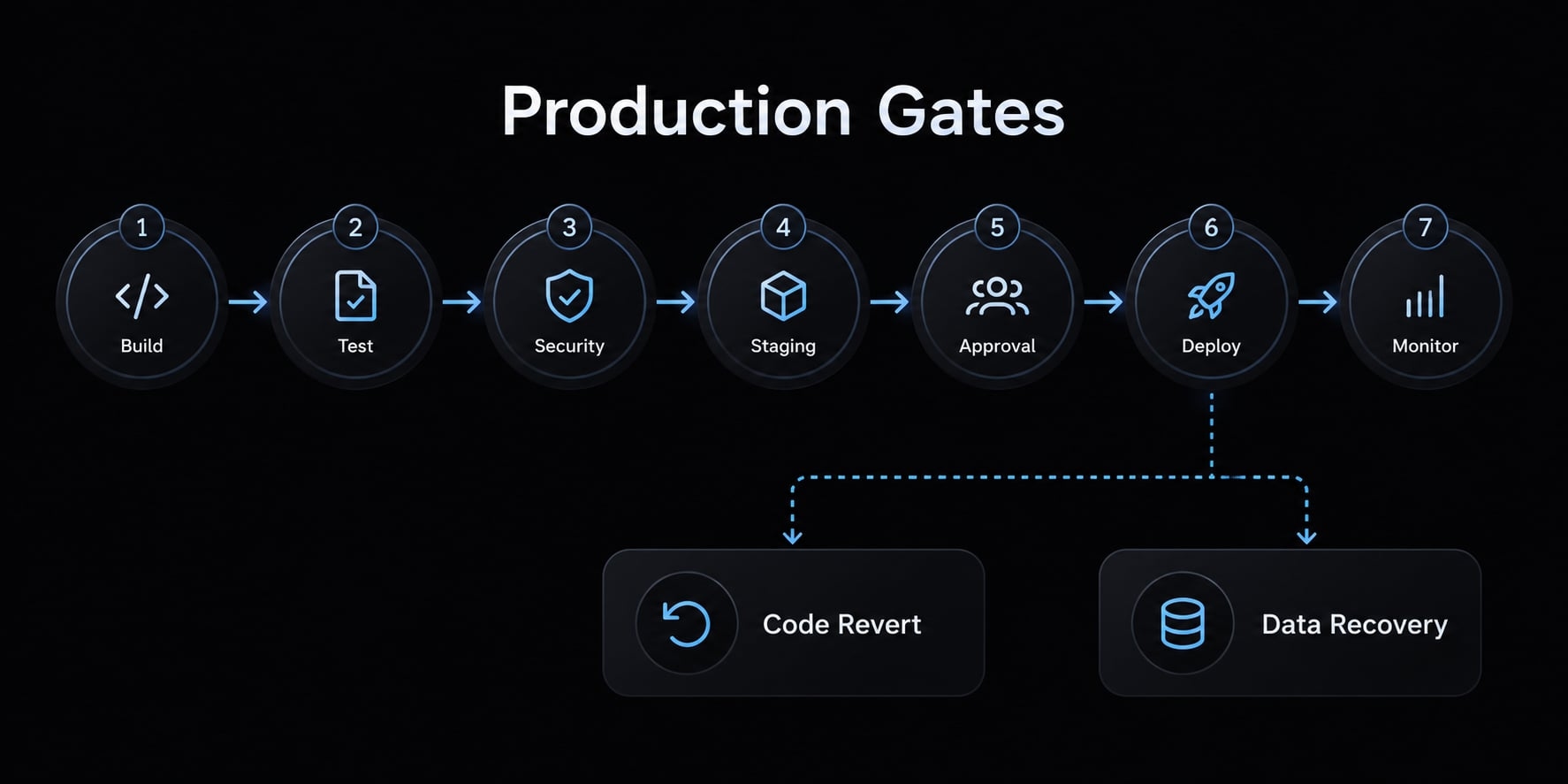
Use a production safety gate
Require these seven release checks:
- A named owner and reviewer.
- Verified critical user journeys.
- Passing required automated checks.
- Reviewed permissions, data handling, and secrets.
- Monitoring and error reporting.
- A tested rollback or restore procedure appropriate to the change.
- An owner who can explain how user data is stored, accessed, and protected.
A rollback strategy must distinguish code recovery from data restoration. Reverting code may not reverse a database migration or an external API side effect. Validate recovery against your database and deployment platform’s documentation.
Turn successful prompts into reusable workflows
Save processes that demonstrate useful results, not merely prompts that sound convincing.
One-off prompt → Saved template → Vversion-controlled skill → Automated validation → Team standard
A skill is reusable task instructions and supporting resources; packaging differs by tool. Keep reusable agent skills version-controlled so changes can be reviewed.
Start with four artifacts: a planning prompt, diff-review checklist, test workflow, and release checklist. Update them when repository conventions change.
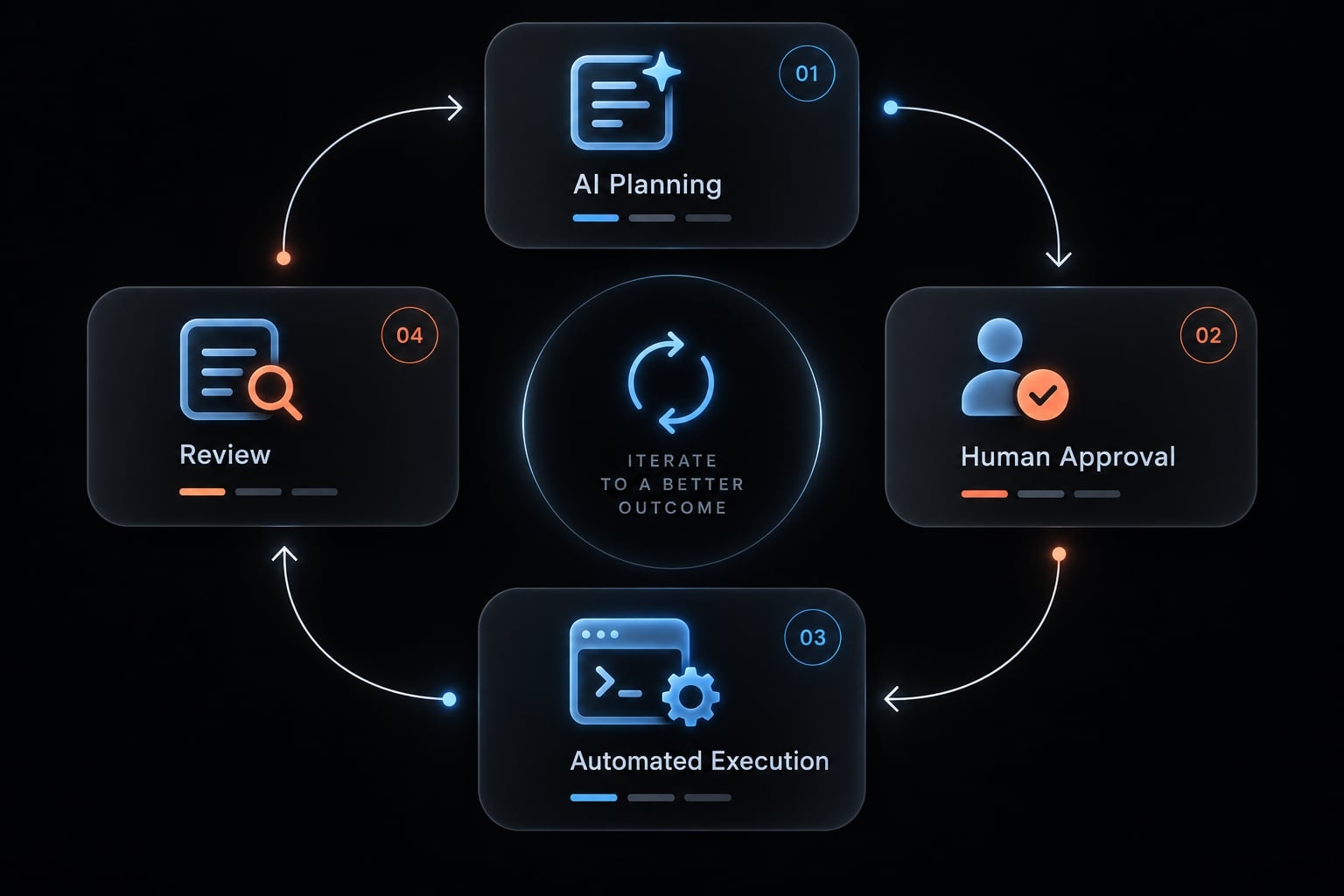
Example reusable agent workflow:
- Planner reads the specification and repository instructions.
- Human approves the plan.
- Implementer makes one scoped change.
- Test workflow runs the required checks.
- Reviewer inspects the diff and results.
- Human accepts the change or requests revision.
One agent can perform several roles. Multiple agents are optional, and role separation does not prove independent assurance.
AgentKit provides scaffolding for AI engineering systems, with reusable skills and workflows that map to the example above: plan, tests-first implementation, review, and ship. Teams can adapt them across repositories, but approval checkpoints still depend on how each coding agent harness enforces hooks and permissions.
Frequently asked questions
What are the best practices for vibe coding to ensure high-quality output?
Vibe coding best practices revolve around supervision rather than passive acceptance. Always maintain a lean project configuration file (e.g., CLAUDE.md), require the agent to present a plan before generating code, limit sessions to single features, and run the checks appropriate to each change’s risk to ensure consistency.
How can I stop my AI coding agent from getting stuck in a "doom loop"?
Avoid the doom loop by following the two-strike rule: if an agent fails to resolve an issue in two attempts, stop immediately. Reset your context by starting a fresh chat session, provide only the necessary diffs and error logs, and ask the agent to diagnose the root cause before attempting new code fixes.
Why should I require a plan before letting an AI agent write code?
Requiring a plan allows you to act as a project supervisor. This phase identifies potential architectural conflicts, assumptions, and edge cases. By forcing the agent to output a plan first, you catch errors in logic or scope before a single line of code is written or files are modified.
How do I handle code reviews when using vibe coding?
Never trust an agent’s summary as a complete verification. Perform a manual diff review to check for out-of-scope file edits, unexpected dependencies, or removed error handling. For high-risk areas like authentication or database migrations, escalate the review to a qualified engineer instead of relying solely on the AI or nontechnical inspection.
Is AI-generated code automatically ready for production?
No. Generation method does not establish readiness. Production requires operational ownership, passing required checks, reviewed permissions and data access, monitoring, and a recovery plan that covers both code and data changes.
How can I make my vibe coding workflow more repeatable?
Turn successful coding patterns into reusable "skills" or templates. Save your best planning prompts, diff-review checklists, and test execution workflows as version-controlled artifacts within your repository. This standardizes how your team handles recurring tasks, ensuring consistent quality and reduced variance across different sessions and developers.
Read more:
- Vibe coding documentation: A guide for AI-assisted projects
- Vibe code marketplace: Defining AI-driven development & risks
- Vibe code extra income: Building profitable AI products fast
Conclusion
The best vibe coding practices keep generated changes understandable, testable, and recoverable. Define a single outcome, inspect the actual diff, and verify behavior before committing. Because tests provide evidence rather than absolute guarantees, production readiness still relies on human ownership, strict access controls, and monitoring. Apply this workflow to a small task like a CRM status filter and always involve a qualified developer when touching sensitive permissions or migrations.