Vibe code ecommerce: A practical guide to building and launching safely
Vibe coding ecommerce uses conversational prompts and AI-generated code to build storefronts, custom apps, or internal workflows. While AI turns business ideas into testable prototypes quickly, running a reliable store requires human oversight, trusted services, and rigorous testing. This guide covers build options, preparation, a six-step workflow, a reusable prompt template, and essential launch checks.
What is Vibe Code Ecommerce and how does it work?
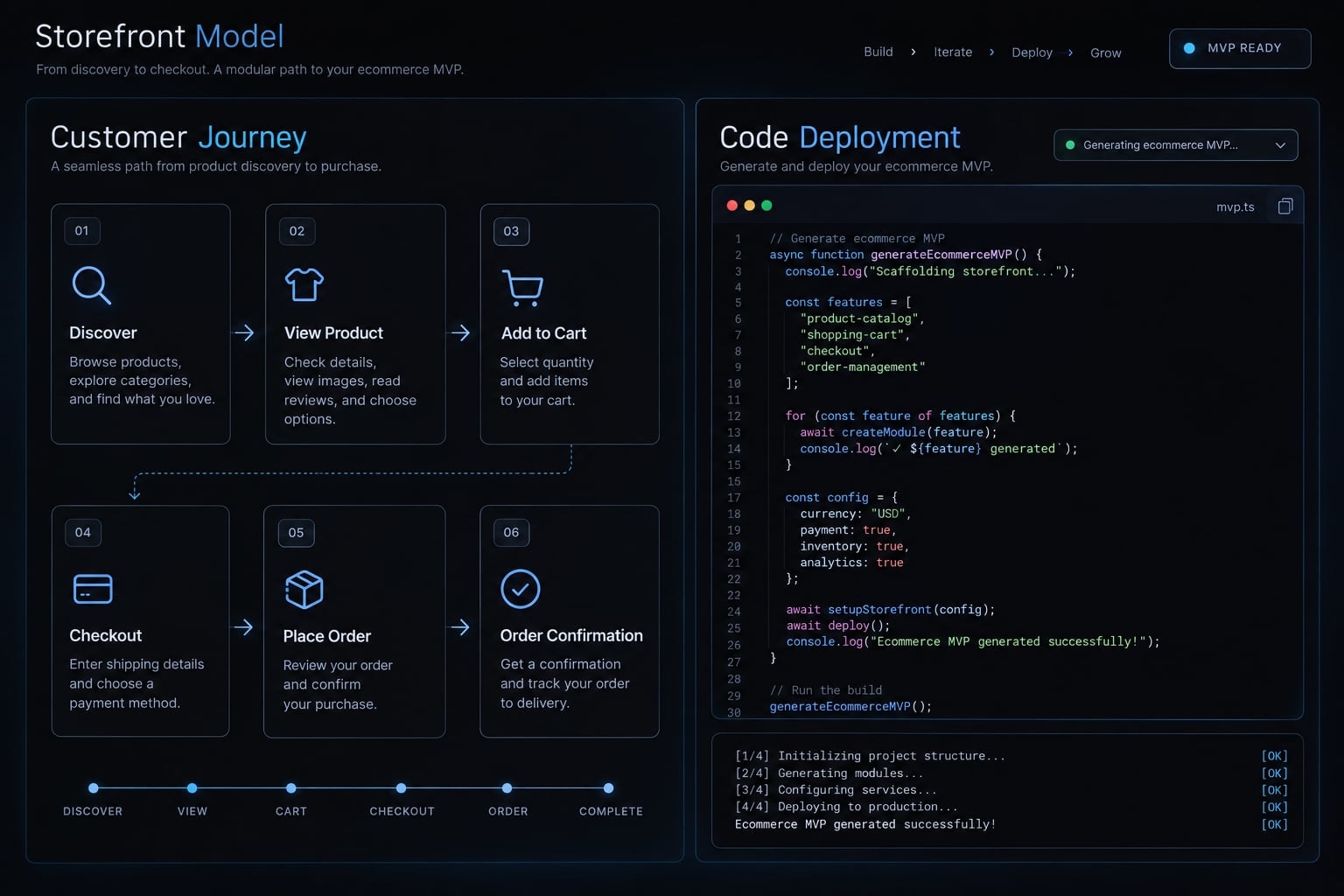
“Vibe coding” is an informal term used broadly for building software through conversational direction. You describe a feature, inspect generated output, and ask for revisions. This guide recommends supervised AI-assisted implementation, not accepting code you cannot evaluate simply because the interface looks correct.
Responsibilities remain separate:
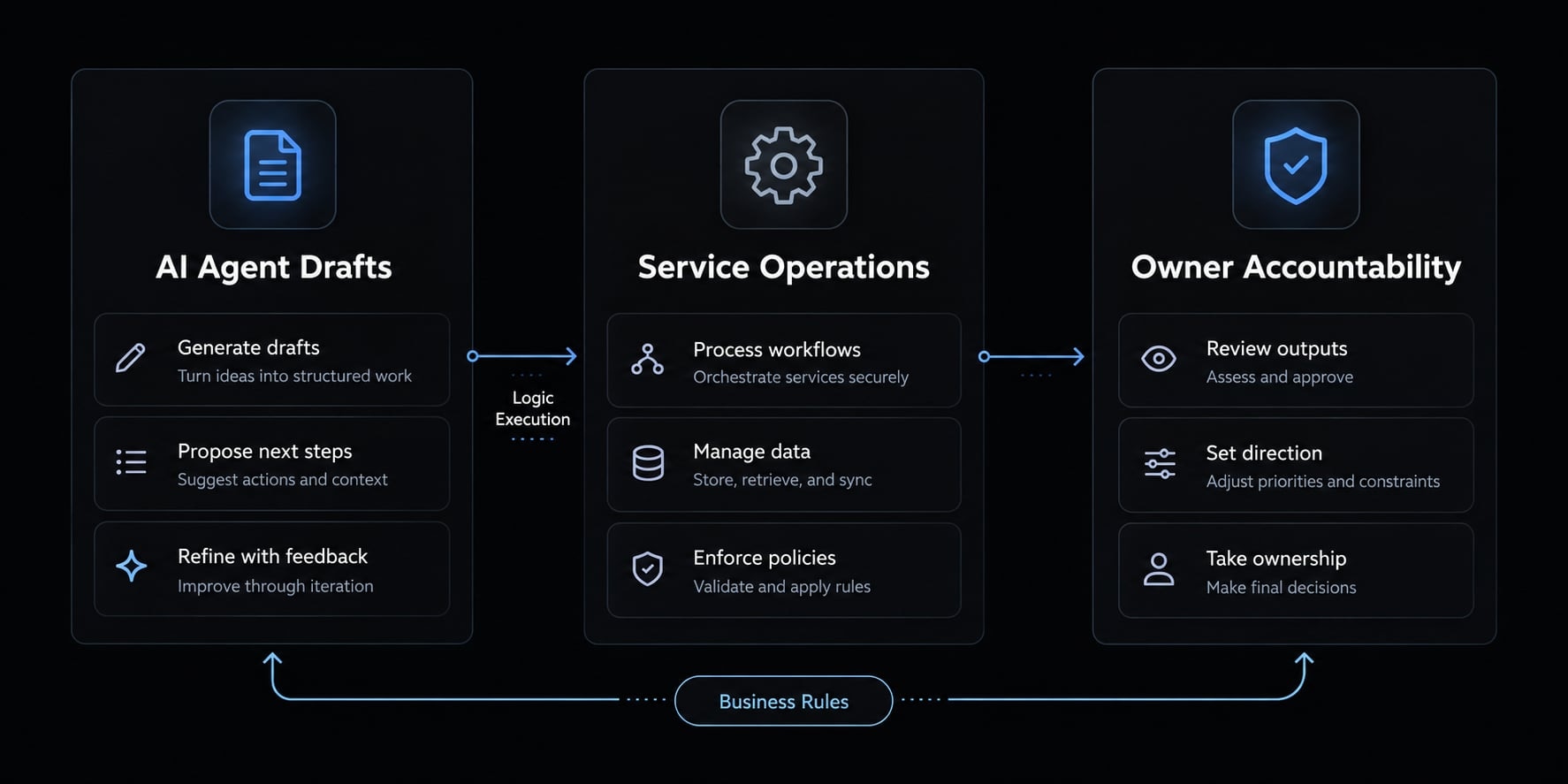
- AI coding agents generate implementation drafts and suggest changes.
- Commerce providers operate the services you select, within their documented scope.
- Owners and teams approve business rules, configuration, testing, and maintenance.
Vibe coding vs. no-code ecommerce builders
No-code ecommerce and AI-generated workflows can coexist. Flexibility depends on the platform and its extension limits.
Approach | How it works | Flexibility | Technical responsibility | Best use |
|---|---|---|---|---|
No-code builder | Configure visual components | Within platform limits | Platform infrastructure; merchant configuration | Standard stores |
AI-enabled hosted store | Generate and edit within a platform | Platform-dependent | Shared; merchant verifies results | Guided storefront creation |
AI-assisted custom development | Generate and review application code | Broad, integration-dependent | Team owns custom code | Differentiated experiences |
Traditional development | Engineers implement and review; AI optional | Broad, resource-dependent | Engineering team | Complex requirements |
What vibe coding can and cannot replace
Can accelerate | Cannot remove ownership of |
|---|---|
Scaffolding and layouts | Business rules and compliance decisions |
Repetitive setup and simple workflows | Acceptance testing and security review |
First-pass integration code | Maintenance and incident response |
Throughout this guide, an illustrative office-supplies wholesaler sells standardized replenishment packs to businesses. Its generated product grid could look complete before stock validation or order processing exists.
A functional-looking website is only a starting point, not proof that the business can handle orders properly.
Decide what type of ecommerce solution you need
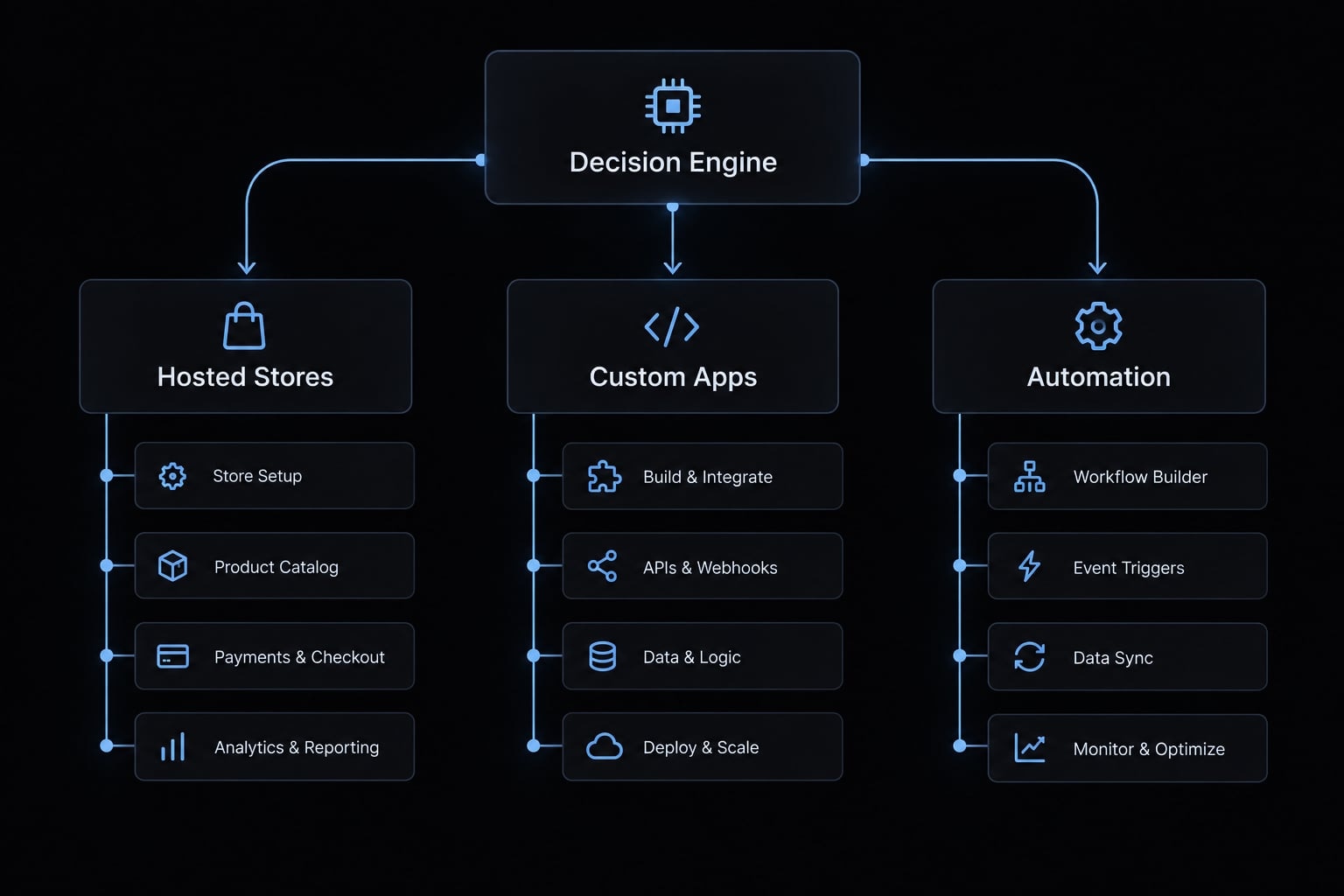
Focus on your business goals before selecting the right tool. More customization generally means more integration and maintenance responsibility.
Build type | Goal | Example projects | Tool category | Main risk |
|---|---|---|---|---|
Hosted storefront | Sell standard products | Public-price pack catalog | Hosted AI store builder | Configuration gaps |
Custom application | Differentiate purchasing | Pack configurator, customer portal | App builder or coding agent | Broken integrations |
Internal automation | Reduce operational work | Supplier-feed cleanup, inventory alerts | Workflow platform | Unauthorized changes |
Choose a hosted storefront when speed and simplicity matter
Start here when your requirements fit established commerce features:
- Standard catalog, variants, and checkout.
- Limited developer capacity.
- Willingness to accept platform constraints.
For the wholesaler, public prices and managed checkout-a checkout service operated by an established provider-make this a sensible starting point.
Before storefront generation, confirm which payment, shipping, tax, and security functions your plan includes. Platform-managed infrastructure does not eliminate configuration or operational work.
Choose a custom app when the experience creates differentiation
Choose a custom ecommerce application when a configurator, portal, or distinctive purchasing interface solves a specific customer problem.
Build the differentiating experience; reuse the transactional core.
A custom frontend-the customer-facing interface-is not a complete commerce system. It still needs authoritative products, inventory, orders, and payment processing.
If the wholesaler only needs standard pack selection, custom development may add responsibility without adding meaningful customer value.
Choose internal automation for focused operational problems
Useful ecommerce automation projects include:
- Supplier-data normalization.
- Product-feed enrichment drafts.
- Read-only inventory alerts.
- Campaign reporting.
- Returns triage recommendations.
Start with read-only access or draft outputs. Require approval before changing prices, issuing refunds, updating inventory, or contacting customers.
Internal tools are lower risk only when permissions, data exposure, and side effects are constrained. A supplier-feed formatter should produce a reviewable file before receiving permission to overwrite the live catalog.
Prepare the ecommerce brief before opening an AI tool
A useful project brief defines business rules and observable outcomes. Elaborate prompt wording cannot compensate for missing ecommerce requirements.
Define the business and customer context
Prepare this checklist:
- Product category and selling model.
- Customer type and purchase motivation.
- Initial market, currency, and language.
- Catalog size, variants, bundles, or subscriptions.
- Brand direction and approved product assets.
- First-release exclusions.
For the illustrative wholesaler, specify one market, public prices, straightforward pack variants, and managed card checkout. Exclude negotiated pricing, purchasing approvals, account hierarchies, and credit terms. These introduce requirements that belong in a separate scope.
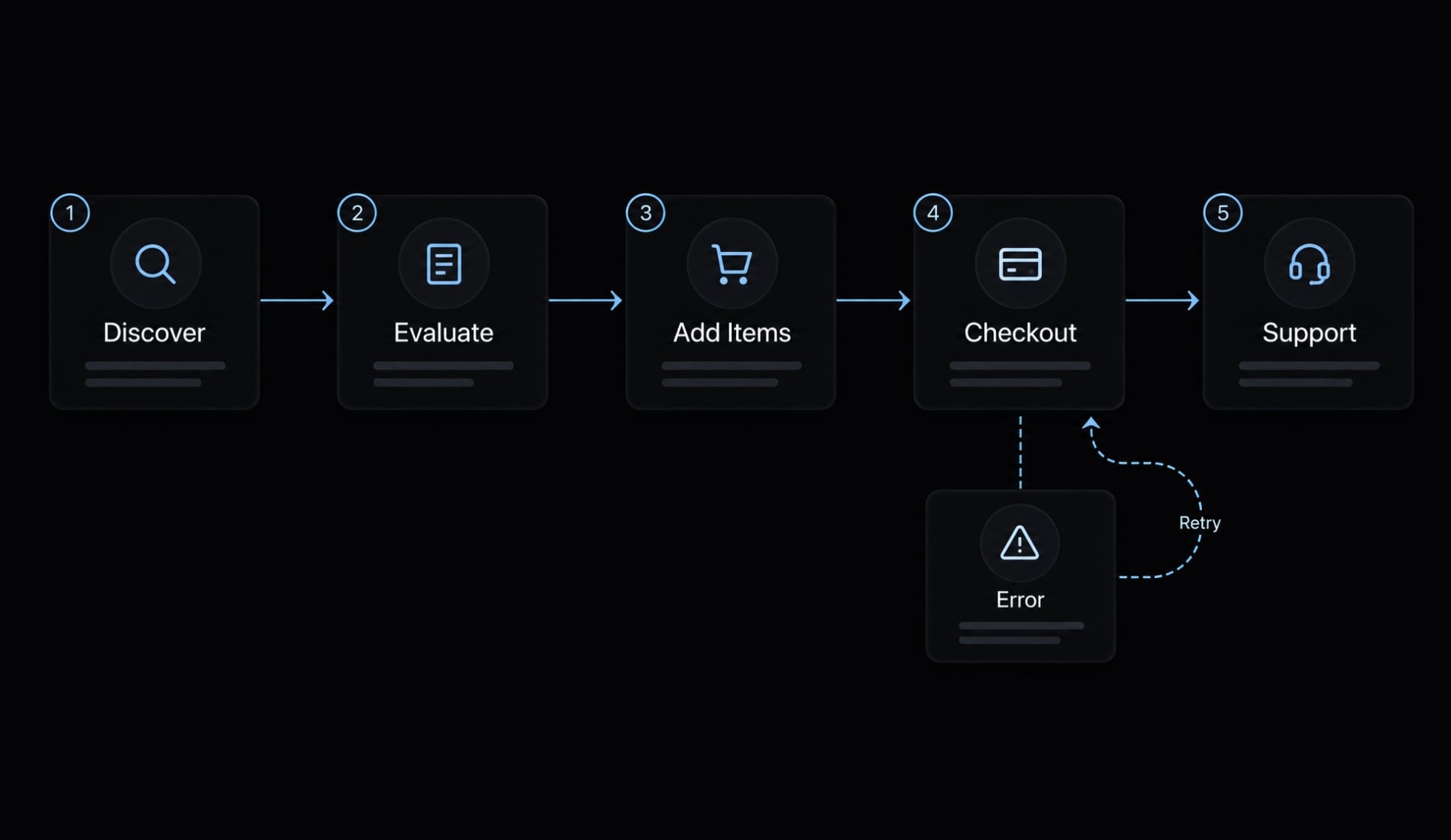
Map the minimum customer journey
- Discover: Find the relevant replenishment pack.
- Evaluate: Understand contents, price, availability, and delivery.
- Add valid items: Select available variants and quantities.
- Complete managed checkout: Provide required details and pay.
- Receive support: Get confirmation, delivery updates, and return instructions.
Add account access only when the business needs it. Post-purchase operations are part of the product, not an optional enhancement.
Define integrations and acceptance criteria
Identify existing catalog, inventory, payment, shipping, tax, and email services. Not every project requires separate tools for each function.
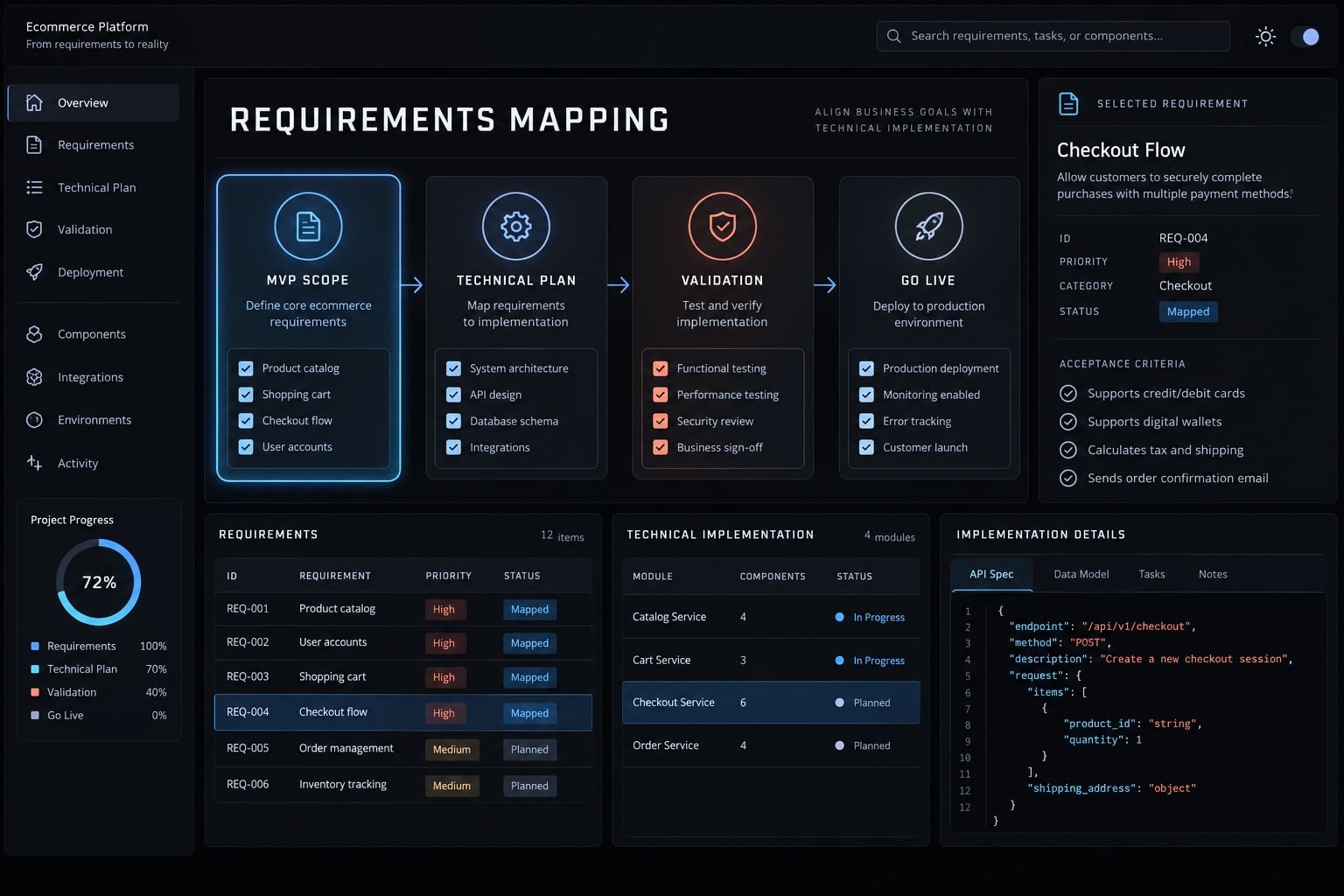
Acceptance criteria are observable conditions showing that a requirement works. For example:
- Only valid, available variants can be purchased.
- The backend-the trusted system validating data and business rules-recalculates totals.
- Failed payments show a recoverable error.
- Verified order events trigger the appropriate notification.
Record unknowns rather than letting the AI silently decide them. Keep optional marketing tracking separate from order processing: Declining analytics consent must not prevent fulfillment.
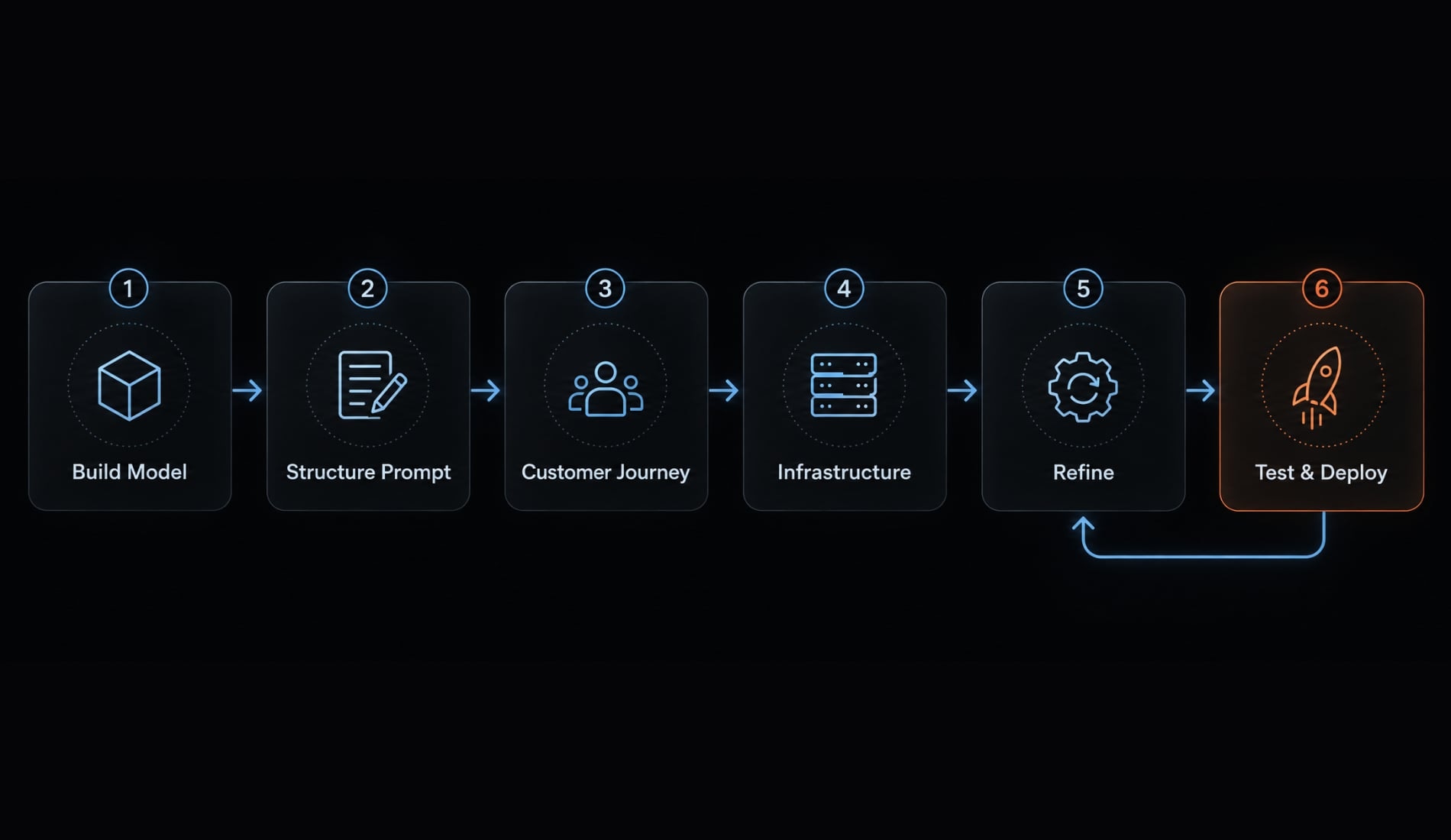
How to vibe code an ecommerce store in six steps
To build an ecommerce store using vibe coding, move through reviewable stages rather than requesting a complete business in one generation.
- Choose the Build Model and Tool Category.
- Submit a Structured First Prompt.
- Generate the Minimum Viable Customer Journey.
- Connect Trusted Commerce Infrastructure.
- Refine Through Focused Iterations.
- Test, Review, and Deploy.
Step 1: Choose the build model and tool category
Action: Match the tool category to your chosen path:
- Hosted AI builder for platform-supported stores.
- AI app builder for custom application prototypes.
- Coding agent or editor for developer-managed implementations.
- Workflow automation platform for operational tasks.
Compare checkout support, integrations, code export, ownership, deployment controls, and maintenance requirements. Read official documentation rather than relying on a generated feature summary.
A coding agent is not automatically a managed commerce stack. Neither is an app builder.
- Output: A selected category and responsibility map.
- Check: You can name who hosts, reviews, updates, and supports the resulting system, including third-party integrations.
Step 2: Submit a structured first prompt
- Action: Transfer the brief into instructions covering scope, customers, catalog, journey, existing services, design, and acceptance criteria.
Request a plan before implementation. Ask the tool to identify dependencies, missing assumptions, and decisions requiring approval. Explicitly prohibit raw-card handling and exposed credentials. Require test data rather than customer records.
These instructions guide implementation, a strong prompt is not a security control. Someone must inspect whether the generated result actually follows them.
- Output: An implementation plan with unresolved questions.
- Check: The plan separates confirmed requirements from assumptions and does not silently invent payment, shipping, or inventory behavior.
Step 3: Generate the minimum viable customer journey
- Action: Build the smallest complete flow:
Browse → Product → Valid variant → Cart → Managed checkout → Confirmed order
An ecommerce MVP-a minimum viable product with limited scope-should reduce features, not transaction safeguards.
Use test-mode data. Review mobile and desktop behavior, including empty carts, unavailable variants, and payment errors. Prioritize corrections in this order:
- Functional defects.
- Confusing states.
- Visual defects.
- Output: A testable purchase journey.
- Check: A tester can complete the sandbox flow and identify which data and integrations are real, mocked, or incomplete. A mock checkout does not validate payment processing.
Step 4: Connect trusted commerce infrastructure
- Action: Connect authoritative products, inventory, checkout, payments, shipping, taxes, transactional email, and account access where needed.
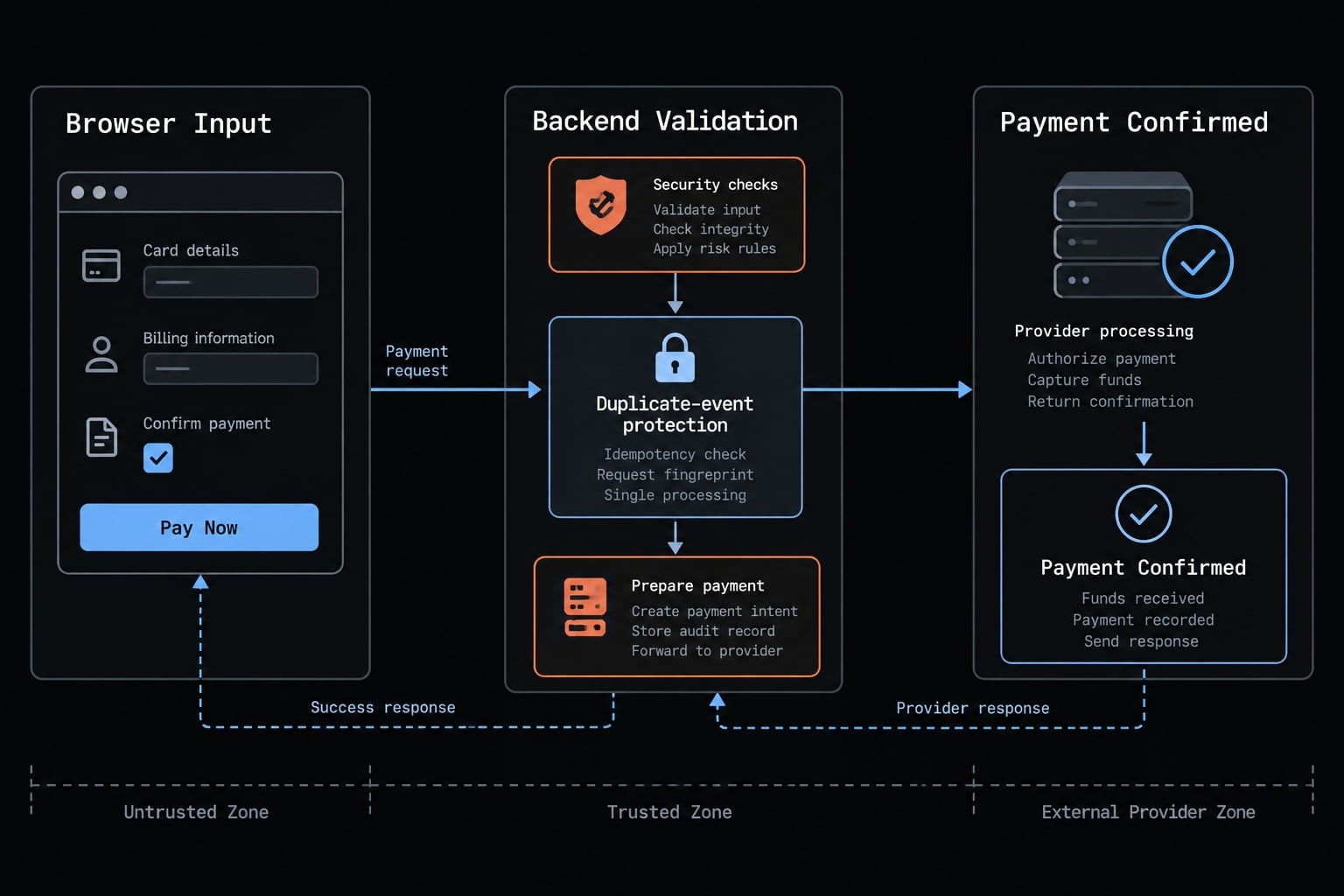
The trusted backend-not the shopper’s browser-must decide valid prices, discounts, stock availability, and totals.
Do not build a payment gateway or route raw card details through generated application logic. Keep server secrets out of browser code and public bundles. Environment variables are not automatically private; some framework settings expose them.
Confirm payment through trusted provider verification or verified provider events. Handle repeated notifications without duplicate fulfillment.
Illustrative failure scenario: The wholesaler’s interface displays “Order confirmed” after a success-page visit, but payment remains unverified. Correct this by deriving paid status from the trusted provider and testing canceled and repeated events.
Stripe’s Checkout fulfillment documentation illustrates why fulfillment cannot rely solely on the landing page.
- Output: Connected transactional services.
- Check: Test orders, totals, and payment status reconcile with the commerce system.
Step 5: Refine Through Focused Iterations
- Action: Follow this iterative development loop:
Plan → Generate → Review → Test → Correct → Document
Improve one area at a time: Discovery, product clarity, cart behavior, mobile layout, errors, accessibility, or search metadata.
Ask the AI to summarize changed files, settings, integrations, and workflows. Compare these changes against the requested outcome.
Preserve a known working version. Rerun the purchase journey after significant changes, including seemingly cosmetic changes affecting checkout controls.
- Output: A change history linked to test results.
- Check: Every accepted change has a documented purpose and relevant retest. Avoid combining unrelated changes when that makes failures harder to isolate.
Step 6: Test, review and deploy
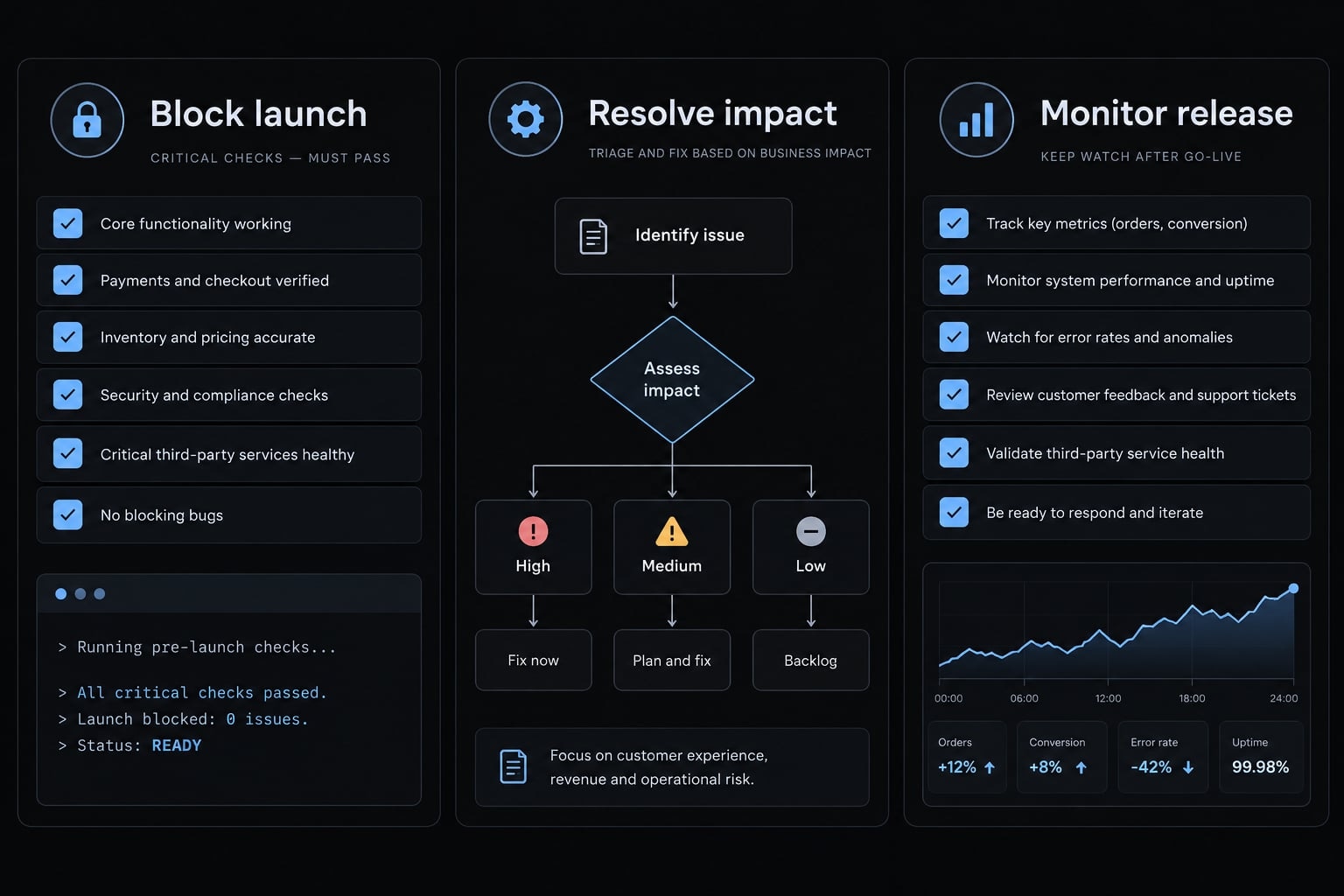
- Action: Run successful and unsuccessful order scenarios. Review data access, dependencies, credentials, and configuration.
Check mobile usability, accessibility, analytics, notifications, and whether intended public pages can be indexed. Verify monitoring, recovery arrangements, and operational ownership before releasing.
Rollback means returning software to a previous version after a problematic release. Hosted platforms and custom applications offer different recovery controls. Rolling back code does not undo payments, emails, or stock changes.
Custom transactional code needs qualified human review before live use. Higher-impact systems require deeper security and operational testing.
- Output: A release record listing passed checks, unresolved issues, owners, and recovery actions.
- Check: Release to a controlled audience, inspect early transactions, and expand only after confirming payment, fulfillment, and support behavior.
AgentKit can organize reusable planning, building, testing, review, and SEO roles within an AI coding workflow. Agent-generated reviews supplement-not replace-qualified human review.
Copy-ready prompt template for an ecommerce MVP
This ecommerce vibe coding prompt translates requirements into instructions. Its constraints still require verification.
Recommended prompt structure
Role:Act as an AI implementation assistant. Propose a plan before building.Project and initial scope:Create an ecommerce MVP for [business]. Launch in [market],using [currency/language]. Exclude [out-of-scope features].Customer:Serve [buyer type] purchasing [products] to solve [need].Catalog rules:Use [catalog size], [variants], and [bundle rules].Apply public prices and authoritative stock availability.Identify missing shipping, tax, and returns rules before implementation.Required journey:Browse → product details → valid variant → cart →managed checkout → verified order confirmation and support information.Include recoverable errors and mobile behavior.Add accounts only if explicitly required.Existing commerce services:Use [catalog/inventory], [checkout/payment], [shipping/tax],and [transactional email].For unknown services, use “not selected—recommend options.”Explain which functions each service covers and what remains our responsibility.Design and accessibility:Follow [brand direction]. Use readable text, labeled inputs,keyboard-operable controls, visible focus, and understandable errors.Security and data constraints:Use synthetic test data, not real customer records.Do not store or process raw card details in application logic.Use server-side secret storage; exclude secrets from browser bundles,logs, screenshots, and public repositories.Require trusted backend validation of prices, discounts, stock,totals, and payment status.Never infer payment success from a browser redirect.Prevent repeated payment events from duplicating fulfillment.Acceptance criteria:Valid items complete test checkout; invalid items cannot.Failed payments allow recovery without false confirmation.Verified orders trigger appropriate notifications.Document test results and unresolved limitations.Plan and clarification:List assumptions, dependencies, and questions.Report mocked or unverified integrations.Do not make live charges, deploy, or perform destructivedata changes without explicit approval.
For internal tools, replace the purchase journey with the operational workflow and approval rules.
Weak prompt vs. strong prompt
Weak | Strong |
|---|---|
“Build a modern store.” | “Build a public-price office-pack store for business buyers, using managed checkout; verify unavailable variants cannot be purchased.” |
The stronger request makes scope and success observable.
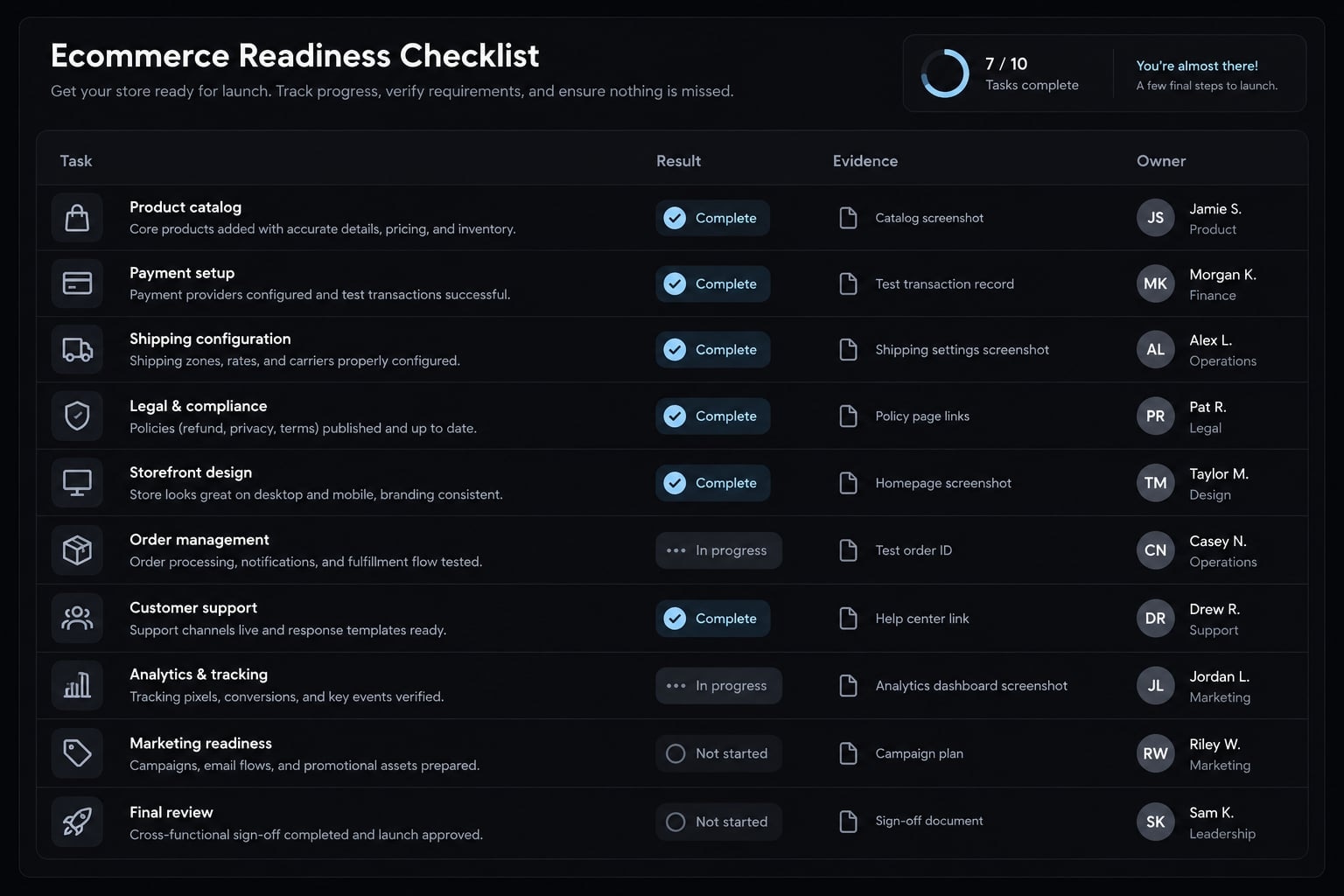
Production-readiness checklist: What to verify before launch
Ecommerce production readiness means having evidence that transactions, customer protection, and operations work under expected conditions, including failures. Visual quality is insufficient. Record pass/fail results, evidence, and an owner for each check. Transaction-integrity and data-protection failures block real purchases.
Area | Must test | Why it matters |
|---|---|---|
Payments | Blocker: Failed, canceled, refunded, and duplicate-event scenarios | Prevent false confirmation or duplicate fulfillment |
Pricing | Blocker: Backend validates prices and discounts | Prevent incorrect charges |
Inventory | Blocker: Concurrent orders; appropriate stock restoration after cancellation or refund | Prevent overselling |
Customer data | Blocker: Account authorization, secrets, applicable privacy obligations | Prevent data exposure |
Mobile experience | Complete purchase on supported devices; blocked checkout stops launch | Avoid unusable purchasing |
SEO | Indexability, canonical URLs, metadata, accurate product schema | Support search interpretation |
Analytics | Purchase deduplication and consent; prioritize by impact | Avoid misleading reporting |
Accessibility | Keyboard flow, focus, labels, contrast, errors; address purchasing barriers | Support usable access |
Operations | Blocker: Confirm fulfillment handoff, notifications, refund ownership | Ensure orders are handled |
Reliability | Blocker: Recovery owner, monitoring, rollback limits | Contain operational failures |
PCI Security Standards Council guidance makes clear that outsourcing payment processing does not eliminate all merchant obligations. For ecommerce security checks, OWASP guidance supports reviewing access controls, input validation, secrets, and dependencies.
For technical SEO-search-related implementation checks-Schema.org defines product vocabulary; Google Search Central documents supported product structured data features. Merchant feeds and page markup complement each other. Neither guarantees indexing, rankings, rich results, or AI citations.
Use W3C WCAG guidance for accessibility testing. Spot checks are not certification or proof of full compliance.
Common ecommerce vibe-coding mistakes
- Interface first: Order lifecycle ignored.
- Custom foundations: Payments or authentication without expertise.
- Frontend trust: Browser totals accepted.
- Feature overload: Scope exceeds review capacity.
- Undocumented prompting: Changes become untraceable.
- Unchecked dependencies: Packages and secrets unreviewed.
- Incomplete testing: Mobile, email, accessibility, errors omitted.
- Copy-only SEO: Indexability and product markup neglected.
When not to rely on vibe coding alone
- Financial/compliance complexity: Multiple markets, custom payments, sensitive financial data, payouts.
- Business-critical operations: High volume, strict uptime, reservations, split shipping.
- Enterprise integration: Enterprise resource planning or warehouse systems, negotiated pricing, account hierarchies, approvals, credit terms.
These are not bans on AI. They require professional architecture, AI-generated code review, and operational testing.
Practical launch verdict
Project profile | Review expectation |
|---|---|
Standard store with managed checkout | Owner testing for platform-supported configurations; additional review for custom code or sensitive integrations |
Custom frontend using established commerce interfaces | Qualified integration and transactional review |
Complex or business-critical commerce | Professional engineering, security, and operational validation |
Frequently asked questions
What is vibe coding for e-commerce?
Vibe coding is the process of building e-commerce solutions-such as storefronts, internal tools, or custom applications-by describing your business requirements in natural language to AI agents. The agent generates the application structure, while you refine the output through iterative conversation and review.
Can you vibe code an e-commerce website without coding?
Yes, you can generate a functional e-commerce storefront or micro-app from a text prompt without writing code. However, you must still configure your commerce backend, set up secure payment gateways, and conduct thorough acceptance testing to ensure the generated store is production-ready and secure.
How does vibe coding differ from no-code e-commerce builders?
No-code builders provide pre-set templates and environments managed by a single platform. Vibe coding allows for more custom logic and UI, but shifts the responsibility of testing, security, and backend validation to you, the store owner, rather than leaving it entirely to a platform provider.
Does vibe coding provide production-ready e-commerce security?
Not by default. While AI agents can generate functional code, they may introduce logic errors or security vulnerabilities. You must manually verify that sensitive data, such as credit card information, is never processed on the client side and that all pricing and order totals are validated on a trusted server.
What should I verify before launching a vibe-coded store?
You must verify that your payment gateway integration is secure, inventory rules function correctly during concurrent orders, and all error states-such as failed payments or out-of-stock items-are handled gracefully. Always conduct controlled test transactions before allowing live customer traffic on your storefront.
Is vibe coding suitable for complex B2B e-commerce operations?
For complex B2B operations involving negotiated pricing, account hierarchies, or net terms, vibe coding should only be used for prototyping or internal micro-apps. Mission-critical systems require professional architecture review and rigorous operational testing to ensure the stability and compliance of your commerce stack.
Read more:
- Vibe coding stripe: Building secure payment flows with AI
- How to vibe code a landing page that actually converts
- Vibe code marketplace: Defining AI-driven development & risks
Conclusion
The responsible way to vibe code ecommerce is to narrow the scope, document requirements, and generate the smallest useful customer journey. Connect that journey to trusted commerce services, then test both successful purchases and failure conditions. Keep changes reviewable, preserve working versions, and assign ownership for maintenance and incidents.
For the illustrative wholesaler, a standard public-price store or read-only inventory alert is a more controlled first project than a complex purchasing portal. The right starting point is the smallest project your team can understand, verify, and support.
AI-generated output becomes production-ready ecommerce through evidence and accountable review-not through a convincing demonstration. Copy the prompt, complete the business-specific fields, and use the launch checklist to decide whether your first release is ready for real customers.