
Claude Code sandbox security: What it protects, how to configure it, and where the limits still matter
Claude Code sandbox security matters because AI coding agents can do more than suggest text: They can read files, edit code, run commands, and reach external services. For teams evaluating practical adoption, the real question is not whether the tool feels secure, but what boundaries are actually enforced. This guide explains what Claude Code sandbox security means, the two protections that matter most, how to configure it conservatively, what limitations remain, and a simple checklist for safer rollout in real AI agent security workflows.
What Claude Code sandbox security actually means
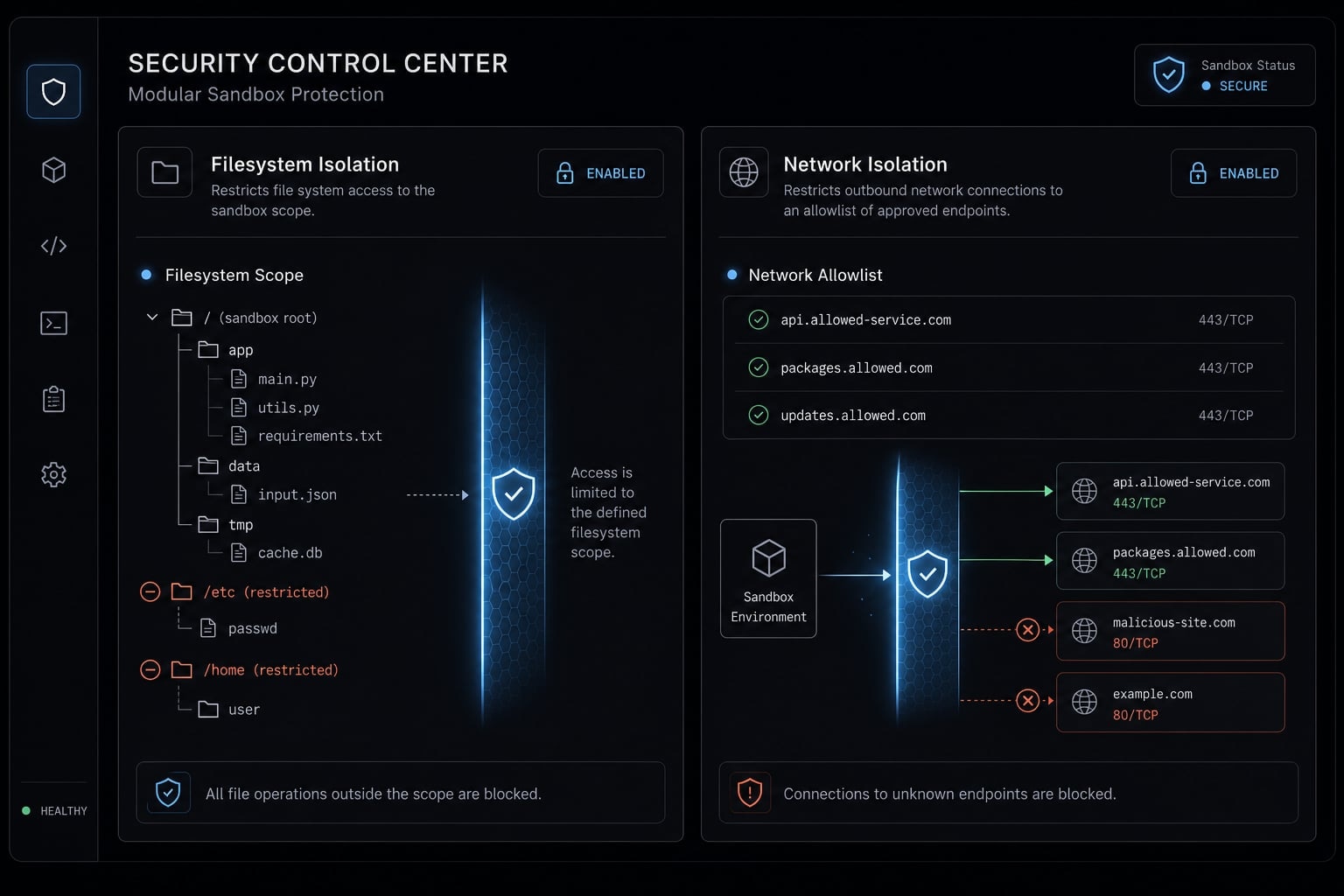
Claude Code sandbox security is a boundary-based safety model that limits what the agent can access or do inside a scoped environment. Instead of relying only on per-action approvals, it defines where Claude can operate freely, such as specific files or approved network destinations, while blocking activity outside those limits.
The simplest way to think about Claude Code sandbox security is this: it is not a trust signal about model intent, but a containment model around agent behavior. That distinction matters. An agent may still be influenced by unsafe input, but sandboxing helps narrow what that influenced agent can actually touch.
Permission prompts vs sandboxing
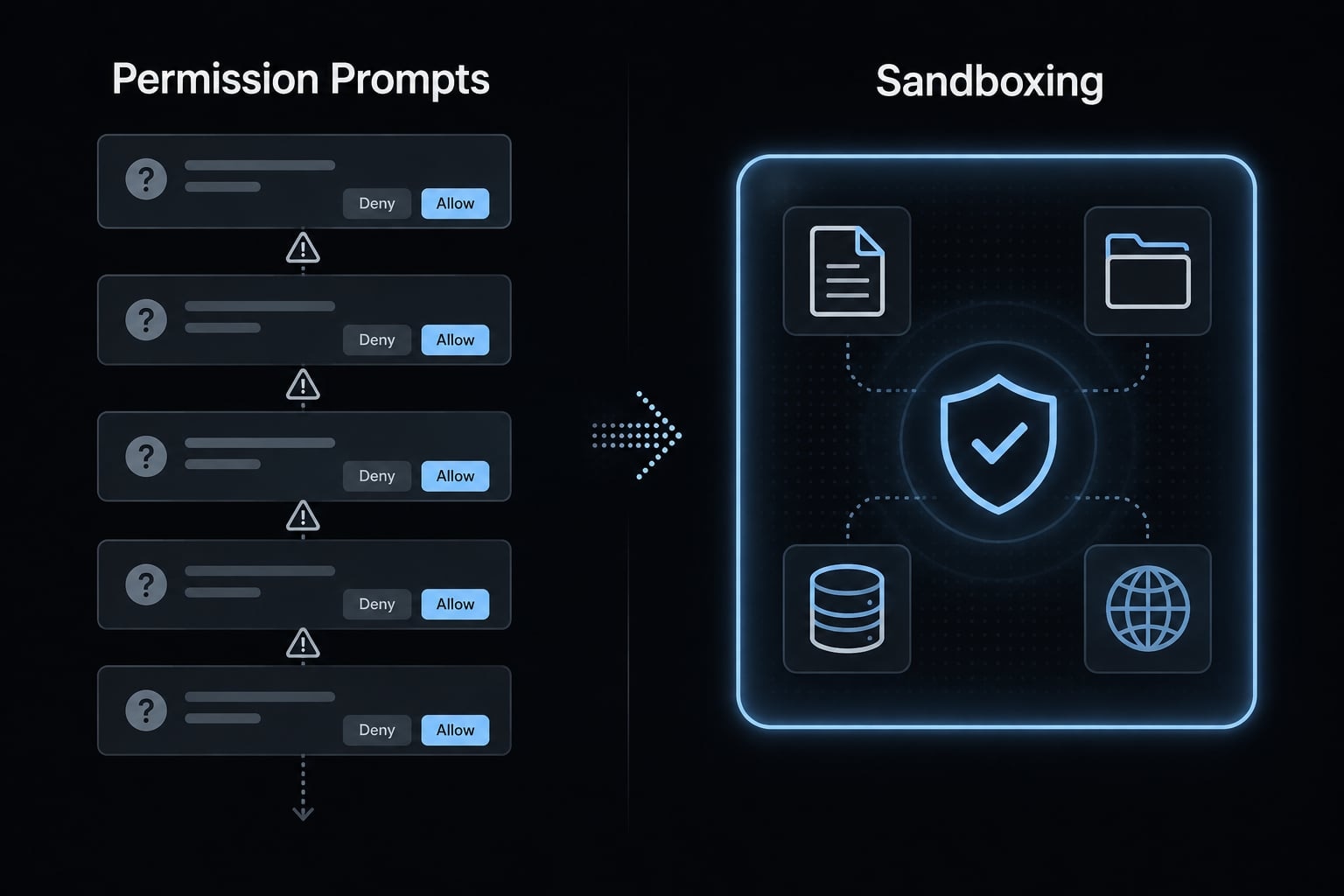
- Permission prompts gate individual actions, such as editing a file or running a command.
- Sandboxing predefines the allowed environment, so actions inside that boundary can happen with less interruption.
- A purely permission-based control model often creates approval fatigue in longer sessions.
- For multi-step coding workflows, boundaries usually scale better than constant manual confirmation.
Why this matters for real workflows
In practice, AI coding agents often chain actions together: Read project files, modify code, run tests, install dependencies, and request network access. If every step depends on repeated approvals, users start clicking faster and inspecting less carefully. Sandboxing reduces that dependency on constant intervention. It improves control, but it does not create absolute safety on its own.
The two main protections: Filesystem isolation and network isolation
The two controls that matter most in Claude Code sandbox security are filesystem isolation and network isolation. They protect different surfaces, and relying on only one leaves meaningful exposure. The right mental model is layered boundaries under least privilege.
One scope note before the details: these controls apply to the Bash tool and its child processes, not to Claude's built-in file tools. Sandboxing and permission rules cover different surfaces, which is why neither replaces the other.
Filesystem isolation in plain English
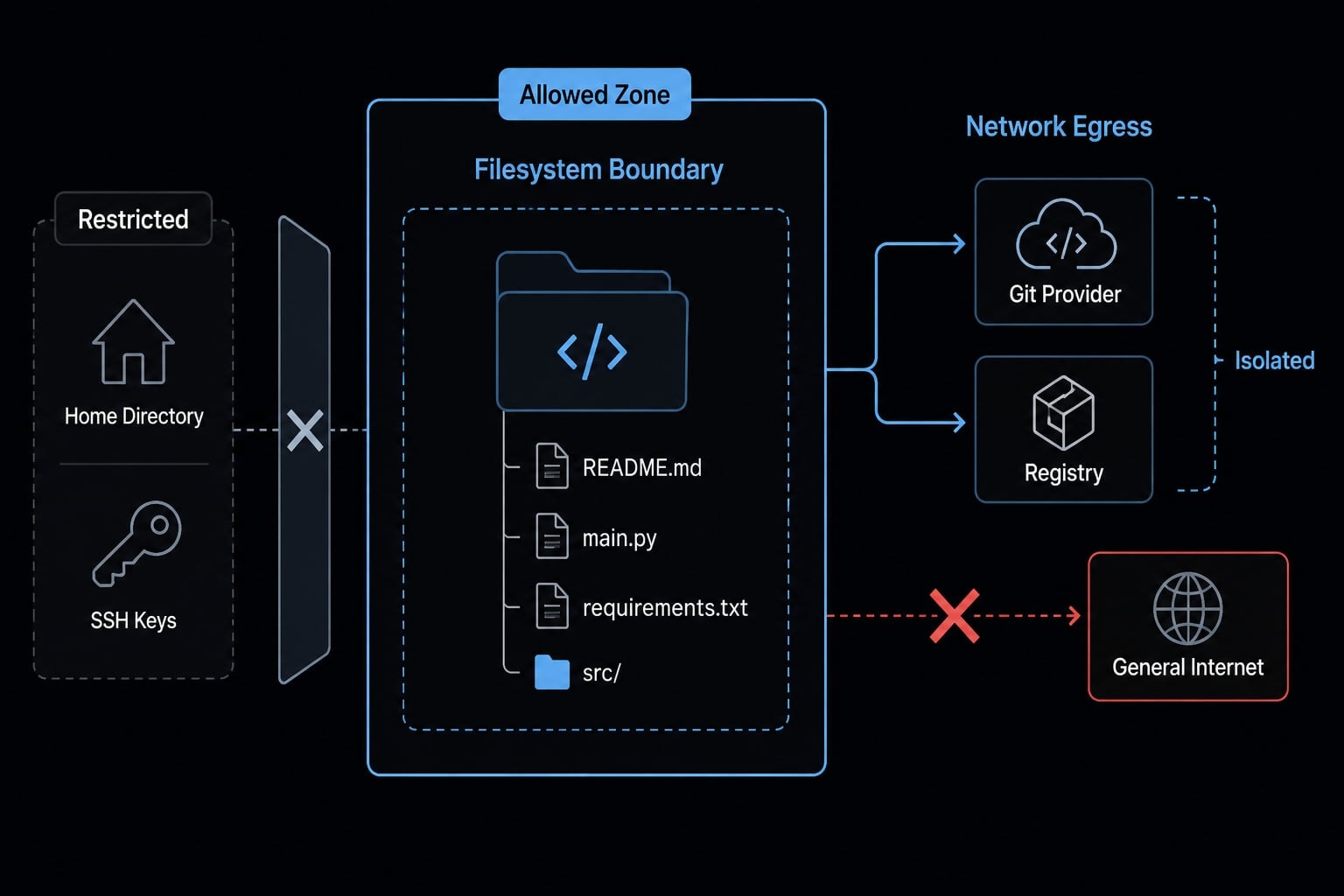
Filesystem isolation restricts what sandboxed bash commands can touch. The defaults are asymmetric and worth knowing: write access covers the current working directory and its subdirectories; read access covers the entire computer except specific denied paths. If you want reads narrowed, you configure that yourself with sandbox.filesystem.denyRead.
Example: A sandboxed cat ~/.ssh/id_rsa is blocked at the OS level. But note the scope carefully — sandboxing applies only to Bash commands and their child processes. Claude's built-in Read, Write, Edit, Glob, and Grep tools run in the same process as Claude Code itself, outside the sandbox. To restrict those, you need permission deny rules as well.
This is the file-side expression of least privilege principle: give the agent only the access needed for the task, not the access available on the machine.
Network isolation in plain English
Network isolation limits outbound connections to approved hosts or domains. It helps reduce broad internet reach, unnecessary downloads, and the chance of sensitive information being sent to unapproved destinations.
Typical approved hosts might include:
- Your Git provider.
- A package registry.
- A documentation domain needed for the task.
- An internal artifact server, if explicitly required.
A conservative setup uses network egress control to deny general outbound internet access unless there is a clear reason to allow it.
Why both layers are necessary
If file access is narrow but outbound network access is broad, sensitive data inside scope may still be sent outward. If outbound traffic is narrow but file access is broad, the agent may still reach local secrets or unrelated files. The goal is not convenience-first autonomy. It is constrained autonomy.
Missing layer | What can still happen | Risk result |
|---|---|---|
Filesystem restricted, network open | In-scope data may still be sent to too many destinations | Higher exfiltration risk |
Network restricted, filesystem broad | Agent may still access local secrets or unrelated files | Higher local exposure risk |
Both broad | Agent has wide local and outbound reach | Weak containment |
Both narrow | Access stays close to task needs | Stronger bounded control |
How to configure Claude Code sandboxing more safely
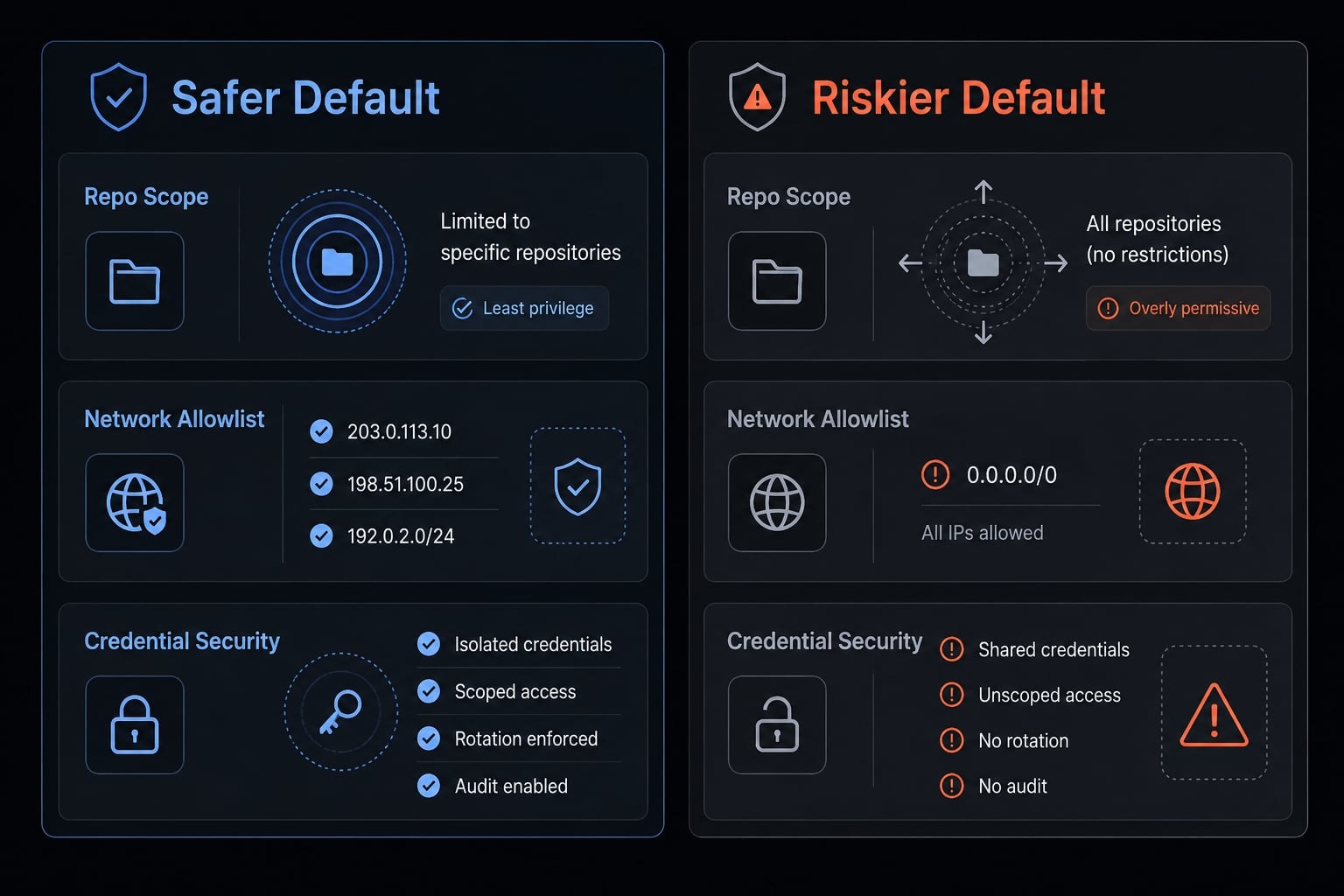
If you are setting this up, /sandbox is the right orientation point, but safe sandbox configuration is less about memorizing commands and more about applying least privilege consistently. Start narrow, assume external input can be unsafe, and keep sensitive credentials out of scope whenever possible.
A practical default looks like this:
- Limit filesystem scope to the working repo.
- Keep network access on a short allowlist.
- Treat credentials as out-of-scope by default.
- Use sandboxing together with review habits.
Setting | What it does |
|---|---|
| Grant write access to additional paths. |
| Block reads at the OS level. |
| The domain allowlist. |
| Drop filesystem isolation, keep network isolation. |
Step 1 - Limit filesystem scope to the working repo
Use the smallest filesystem scope that still supports the task.
Checklist:
- Allow only the current repository or explicitly approved subdirectories.
- Avoid broad home-directory access.
- Avoid shared folders that may contain unrelated client or internal files.
- Keep temporary exceptions explicit and time-limited.
- Prefer repo-only scope over machine-wide convenience.
A smaller boundary reduces accidental overreach and makes review simpler.
Step 2 - Keep network access on a short allowlist
The safest default is a short domain allowlist, not open outbound access.
Checklist:
- Approve only hosts the workflow truly needs.
- Start with a Git host, package registry, and one docs domain if necessary.
- Avoid allowing broad internet access “just in case”.
- Review new host requests carefully before expanding the list.
- Keep network isolation aligned to a real task, not future possibilities.
A narrow allowlist is usually more useful than broad convenience.
Step 3 - Treat credentials as out-of-scope by default
Good secrets hygiene is still essential.
Checklist:
- Remove long-lived tokens from the accessible environment where possible.
- Avoid exposing SSH keys, signing keys, and broad cloud credentials.
- Prefer short-lived credentials or mediated access when required.
- Keep sensitive environment variables outside the agent’s reachable scope.
- Review credential handling before enabling autonomy.
A critical limitation: If a secret is already inside scope, sandboxing cannot undo that exposure. It can reduce reach, but it cannot retroactively make exposed credentials safe.
Step 4 - Use sandboxing together with review habits
Even with strong boundaries, human review still matters. Review unexpected file diffs, unusual command patterns, and requests for new domains. High-risk actions still require judgment. This is also the practical answer for anyone asking how to secure Claude Code against prompt injection: constrain the environment first, then keep a review gate for actions that materially affect systems, data, or deployment paths.
Safer default | Riskier default |
|---|---|
Repo-only scope | Broad directory access |
Short allowlist | Open outbound internet access |
No secrets in scope | Long-lived secrets present |
Reviewed high-risk actions | Blind autonomy |
What Claude Code sandbox security helps reduce and what it does not eliminate
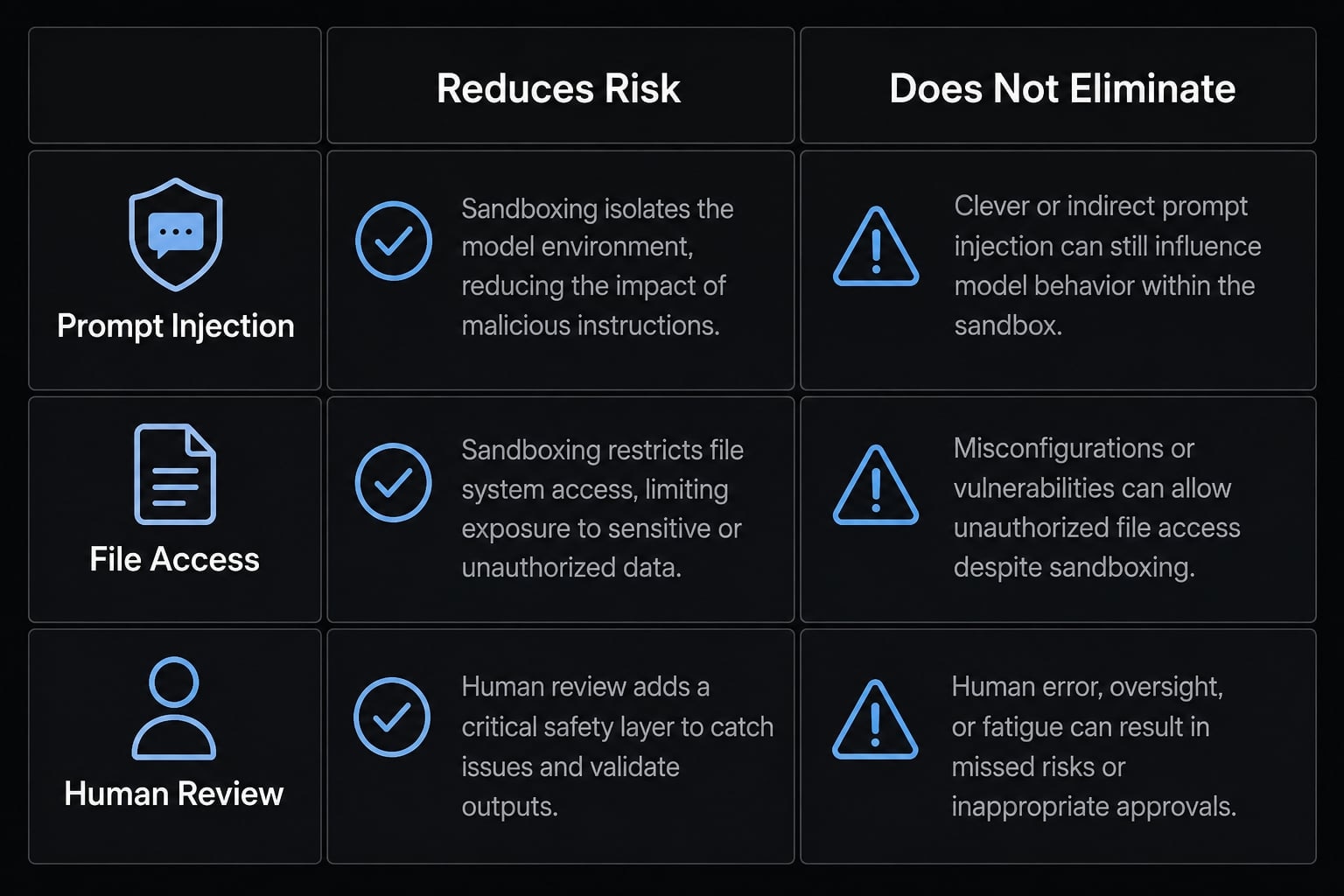
Claude Code sandbox security should be treated as a risk-reduction layer, not a guarantee of absolute safety. It can reduce the blast radius around file access, outbound requests, accidental overreach, and even approval fatigue. It does not eliminate weak allowlists, poor approvals, implementation gaps, or sensitive data that is already exposed inside the allowed boundary.
That distinction is central to runtime security for AI coding tools. A constrained agent is safer than an unconstrained one, but a constrained agent can still be risky if the boundary is too broad or the review process is weak.
Protection vs limitation matrix
Risk area | What sandboxing helps reduce | What it does not eliminate |
|---|---|---|
Prompt injection | Limits what an influenced agent can access or do | Does not make external content trustworthy |
Data exfiltration | Narrows outbound paths through boundary controls | Does not stop leaks if allowed destinations are too broad |
Excessive file access | Restricts local reach to defined folders | Does not protect secrets already inside scope |
Broad outbound traffic | Enforces tighter network isolation | Does not guarantee perfect enforcement in all cases |
Human approval mistakes | Reduces prompt volume and friction | Does not replace judgment on high-risk actions |
Sensitive data already in scope | May limit where it can go | Cannot erase exposure that already exists |
Prompt injection - the realistic framing
Prompt injection can influence agent behavior, not just model output. In an execution-capable environment, unsafe external input may shape what the agent tries to do next. Prompt injection mitigation through sandboxing works by constraining the action space, not by magically making malicious instructions harmless. External content should still be treated as untrusted input.
Why layered controls still matter
A practical AI agent security framework still needs multiple layers:
- Least privilege for file and network scope.
- Strong secret hygiene.
- Tight network restrictions.
- Manual review for high-risk actions.
- Ongoing monitoring of unusual behavior patterns.
This reduces risk, not eliminates it. That is the correct operating assumption.
Known bypass discussions and security incidents: What teams should take away
Public discussion around Claude Code sandbox bypass vulnerabilities and related enforcement gaps should be taken seriously, but should not cause panic. In most cases, these discussions highlight an important governance truth: Security controls are only as strong as their real runtime enforcement, not their intended policy description.
What these incidents usually reveal
Common themes include:
- Policy parsing gaps, where a rule is interpreted differently across layers.
- Path-based bypass issues, where identity checks rely on names or paths rather than stronger enforcement models.
- Enforcement mismatch between intended policy and actual runtime behavior.
- Boundary failure caused by drift between design assumptions and what the system really executes.
These are not unique to one tool. They are common failure modes in modern agent runtimes, proxy-controlled egress models, and execution environments.
What a non-alarmist takeaway looks like
A practical response is governance, not drama:
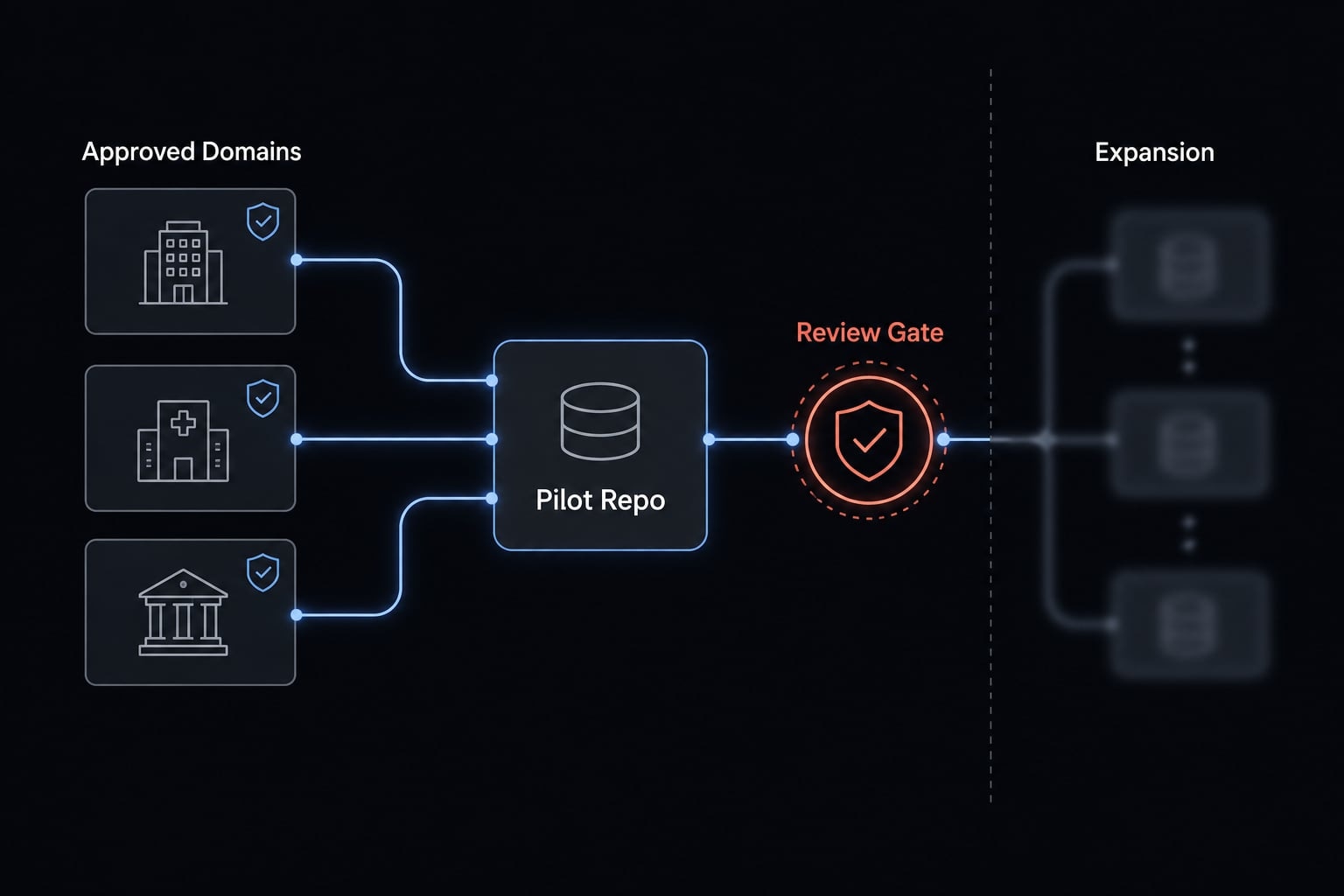
- Pilot before wide rollout.
- Track version changes and security updates.
- Keep secret exposure narrow from day one.
- Avoid broad access during early adoption.
- Evaluate each layer, including any proxy layer or kernel-level enforcement, as part of one larger control set.
The presence of bypass discussions does not make sandboxing useless. It makes disciplined rollout more important.
Observation | What it means | Practical response |
|---|---|---|
Reported bypass discussion | One layer may have implementation gaps | Avoid treating one control as sufficient |
Policy and runtime differ | Intended rules may not match actual execution | Keep scope narrow and test assumptions |
Broad secrets exposure | Boundary failure has bigger consequences | Remove unnecessary credentials from scope |
Updates quietly matter | Risk posture can change over time | Review release notes and security changes |
A practical safe-use checklist for solo developers and small teams
If you want safe AI coding workflows, use this short checklist before moving from experimentation into regular development work.
Before enabling sandbox
- Define the allowed repo or directory scope clearly.
- Define approved domains before the first session.
- Remove unnecessary secrets from the reachable environment.
- Decide which actions still require manual review.
- Document a narrow initial use case.
- Apply best practices for AI agent filesystem isolation from the start.
Before wider team rollout
- Start with pilot users, not the full team.
- Document allowed and disallowed use cases.
- Review updates, change logs, and security notes regularly.
- Separate experimental work from production-sensitive work.
- Align the setup with basic AI toolchain governance.
- Expand autonomy only after you see stable, reviewable behavior.
How teams operationalize safer AI coding workflows
A conservative rollout often looks like this: Start with one staging repo, not a production-sensitive codebase. Allow only the Git host, package registry, and a specific docs domain. Keep production credentials out of scope entirely. Use review gates for unusual file changes, new domain requests, and any action that affects deployment paths.
After a pilot period, expand only if the boundary model proves stable and the team can review behavior consistently. This is what least privilege AI workflows look like in practice: Narrow scope first, measured learning second, broader autonomy last. That approach fits a realistic secure software development lifecycle far better than turning on wide access and hoping the model behaves.
Frequently asked questions
What is Claude Code sandbox security?
Claude Code sandbox security is a boundary-based safety model that limits the agent’s reach within your environment. It uses filesystem and network isolation to constrain what the agent can access, effectively reducing the blast radius of potential prompt injection or unintended actions compared to relying solely on permission prompts.
How does sandboxing differ from permission prompts?
Permission prompts require you to approve every individual action, which often leads to "approval fatigue" and slower development cycles. Sandboxing provides a pre-defined safety boundary, allowing the agent to work autonomously within those specific limits without requiring a manual click for every minor command or file read.
Is Claude Code sandbox security completely bulletproof?
No. It is a risk-reduction layer, not a guarantee of absolute safety. While it significantly limits what a compromised agent can do, security still relies on your adherence to the principle of least privilege, careful management of secrets, and human oversight of high-risk actions.
What is the best way to configure the sandbox safely?
To configure your sandbox safely, limit filesystem access to your current working directory, maintain a short, specific allowlist for necessary network domains, treat all sensitive credentials as out-of-scope by default, and continue to review unusual command patterns or high-risk file changes manually.
Read more:
- Claude Code permissions security: Guide to safe workflows
- Claude Code dangerously-skip-permissions: Risks and best practices
- Mastering Claude Code rules: A guide to consistent AI development
Conclusion
Claude Code sandbox security is best understood as bounded autonomy for an execution-capable coding agent. The two layers that matter most are filesystem isolation and network isolation, and both work best when configured with least privilege. That means narrow repo scope, short allowlists, and secrets kept out of reach by default.
Just as important, sandboxing is not a complete answer to prompt injection, data leakage, or unsafe approvals. It reduces risk, not all risk. Before broader adoption, review your current AI coding workflow against a simple boundary checklist and run a conservative rollout first.