
Windsurf vs Claude Code: Which one is the better fit for real development work?
Choosing between Windsurf vs Claude Code is less about feature checklists and more about how your team actually builds software day to day. Many comparisons focus on raw capabilities, but buyers usually care about four things: workflow fit, cost, control, and code quality. This guide is built to help founders, senior developers, and small product teams make a practical choice without the hype. We will compare daily usage, maintainability, pricing logic, and the operational trade-offs that matter after the first demo.
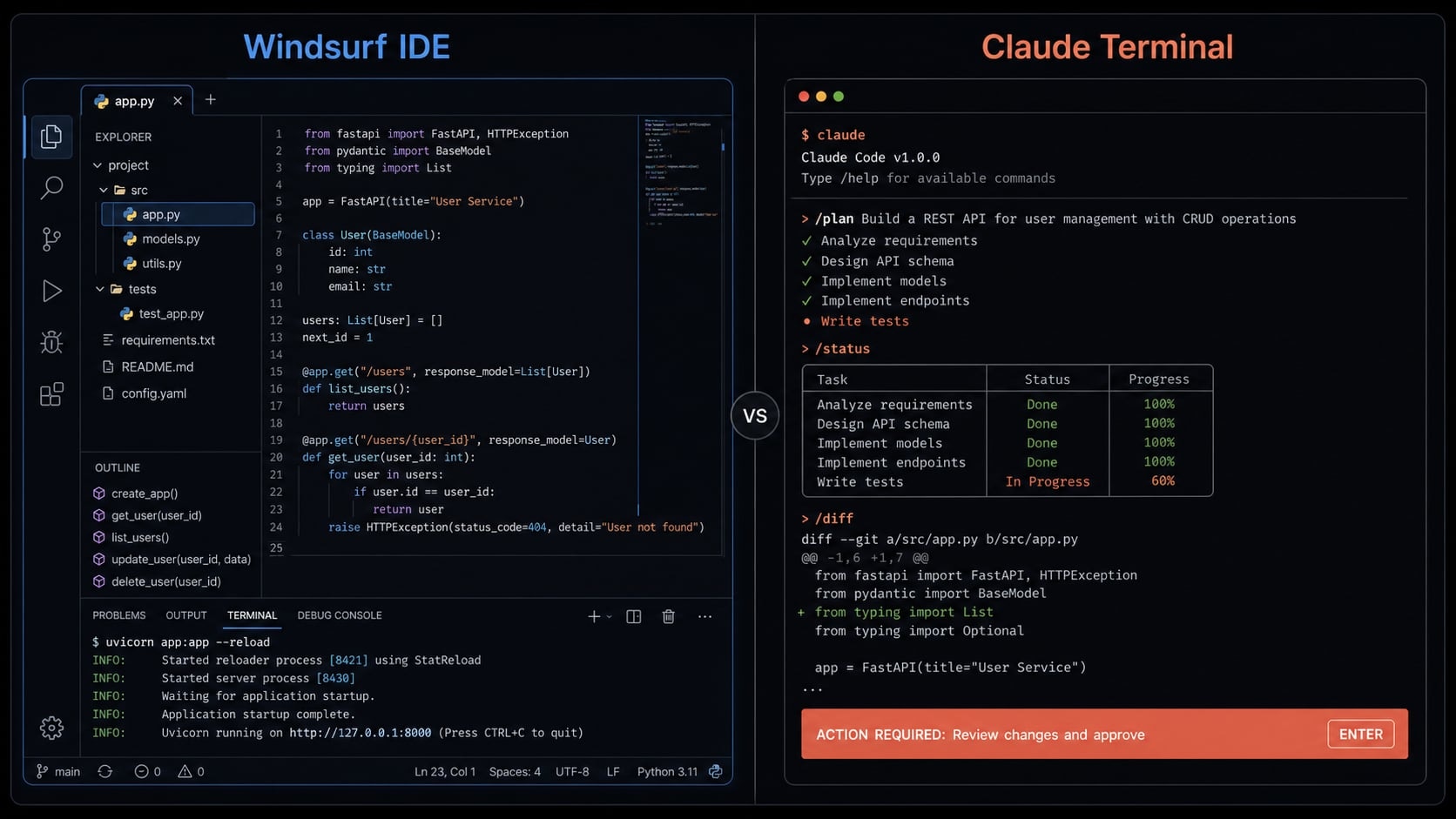
Windsurf vs Claude Code: The short answer
If you want the fastest practical answer, Windsurf is typically easier to adopt for developers who prefer an IDE (Integrated Development Environment) workflow, while Claude Code is often a better fit for developers who are comfortable in a CLI (Command-Line Interface) and want more control. There is no universal winner. The better choice depends on workflow fit, quality expectations, and cost tolerance.
Which tool is better overall?
There is no single best tool for every developer or team, because the right choice depends on how people actually work rather than on brand popularity.
- Windsurf often wins on speed to start, ease of use, and lower onboarding friction.
- Claude Code often wins for users who value stronger control and more maintainability-oriented workflows.
Ultimately, developer productivity is shaped more by workflow fit than by which tool is more popular, since fast initial code is not the same as faster final delivery if review and cleanup take longer.
Fast recommendation by user type
- Solo founder / indie maker: Choose Windsurf if you want quick momentum, UI iteration, and more predictable monthly spending.
- Terminal-native senior developer: Choose Claude Code if you prefer command-line control and deeper task orchestration.
- Small product team: Choose based on operating style. IDE-first teams often adopt Windsurf faster. Process-heavy teams may prefer Claude Code.
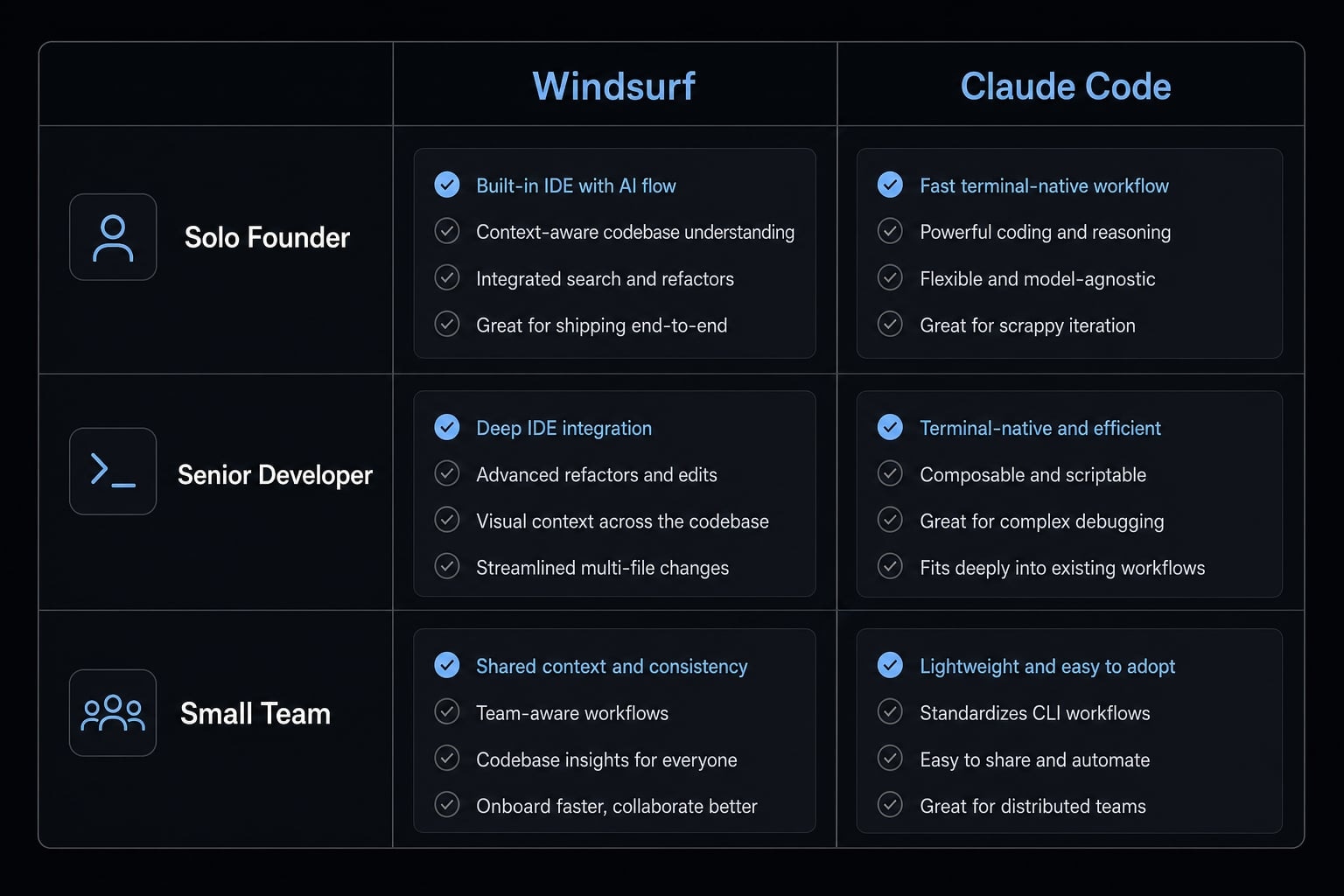
What actually feels different in daily use
The biggest difference in daily work is simple: Windsurf IDE feels like AI embedded into an editor, while Claude Code CLI feels more like operating an agent through the terminal. That difference changes adoption speed, editing flow, and how much control you feel you have.
Windsurf: IDE-first and easier to adopt
For developers already comfortable with VS Code-style tools, Windsurf usually feels familiar quickly. Its Cascade workflow makes it easier to move from instruction to edit without switching context too often.
In practice, this matters for:
- Inline edits to existing files.
- Fast UI changes.
- Preview-driven iteration.
- Lower onboarding friction for new users.
Windsurf’s context awareness is easy to understand in plain terms: It tends to keep track of the code around what you are editing, so you spend less time manually re-explaining nearby files. For many users, that makes it feel approachable from day one.
Claude Code: Terminal-first and more operator-like
Claude Code feels different because the terminal becomes the main working surface. That often suits developers who already run tests, inspect logs, manage Git, and execute development tasks from the command line. Its strengths usually show up in:
- Multi-step task execution.
- Repo-wide changes.
- Instruction-heavy workflows.
- More autonomous task handling.
Claude Code can also support parallel agents or parallel sessions, which is useful when experienced users want multiple workstreams running at once. The trade-off is a steeper learning curve. For many teams, it feels more powerful but less immediately approachable.
Daily-use factor | Windsurf | Claude Code |
|---|---|---|
Onboarding friction | Lower | Higher |
Editing style | IDE-first, inline, visual | Terminal-first, command-driven |
Control feel | Convenient and guided | More operator control |
Best daily-use fit | UI work, fast iteration | Task orchestration, deeper workflows |
Ease and control often trade off against each other. Windsurf is typically easier to adopt. Claude Code can feel more controllable in skilled hands.
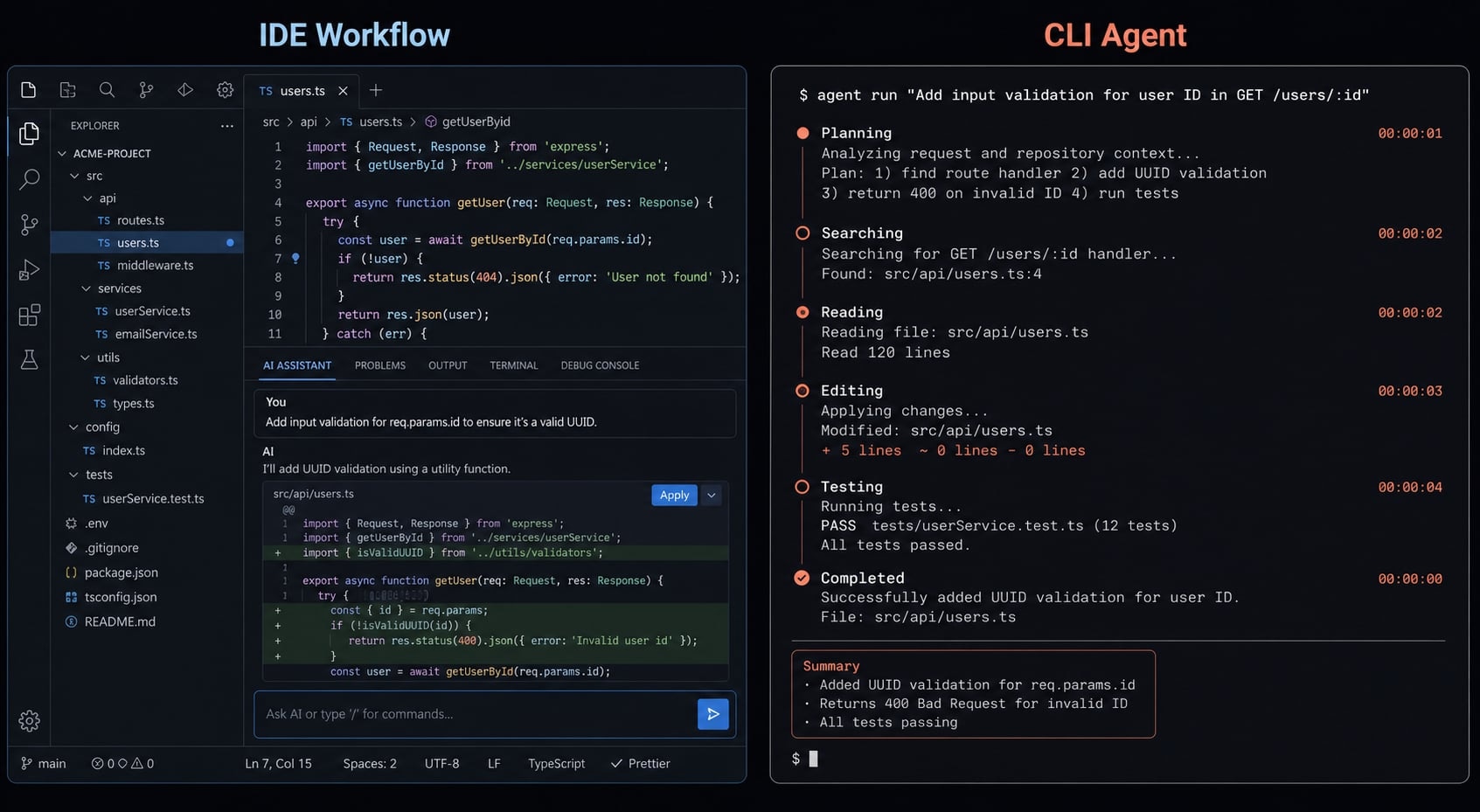
Side-by-side comparison: Workflow, quality, cost, and control
If you are making a buying decision, this is the section that matters most. The right choice is rarely about who generates more code. It is about who helps you ship with less friction, less cleanup, and more consistency.
Criteria | Windsurf | Claude Code |
|---|---|---|
Platform | AI-powered IDE | Terminal-based CLI |
Learning curve | Typically easier | Typically steeper |
Workflow style | IDE-first | CLI-first |
Speed to prototype | Often faster | Usually more deliberate |
Code quality | Can be strong, but varies by task | Often stronger on structure |
Maintainability | Good for many workflows, but may need more cleanup | Often stronger for long-term maintainability |
Long-session consistency | Can drift in longer sessions | Often more stable for structured tasks |
Parallel work | More limited by active workspace flow | Stronger for parallel sessions |
Pricing model | Fixed monthly pricing | Token-based pricing |
Budget predictability | Higher | Lower |
Best for | Rapid prototyping, UI-heavy work | Control, refactoring, maintainability |
Workflow fit
Windsurf is usually the better fit for developers who want AI inside a familiar editor experience. That lowers adoption friction and can help teams move faster early on. Claude Code is usually the better fit for terminal-first users who already manage development through commands, scripts, and repo-wide workflows.
This matters because workflow fit influences more than comfort. It affects:
- Onboarding time.
- Prompting consistency.
- Review habits.
- Team adoption rate.
A tool that looks powerful in isolation can still underperform if it clashes with how the team already works.
Code quality and maintainability
In many real-world comparisons, Claude Code is often perceived as stronger on structure, refactoring discipline, and maintainability. It tends to suit users who care about how code evolves after the first output, not just how fast it appears.
Windsurf often feels faster for first-pass output, especially in UI-heavy work or quick feature scaffolding. That can be valuable in early product cycles, demos, and exploratory builds.
But the key point is this: Faster generated code can still mean slower final delivery if cleanup is heavier.
With either tool, review discipline still matters. Neither removes the need for:
- Code review
- Testing
- Architecture judgment
- Security checks
The dev.to comparison of multiple AI coding tools also reflected a pattern many teams already recognize: tools that reach MVP faster do not always produce the cleanest final implementation. That pattern is useful, but it should be treated as directional, not absolute.
Pricing and cost predictability
This is where many buyers underestimate the real trade-off.
- Windsurf’s fixed monthly pricing is easier to forecast. That matters for solo builders and smaller teams that want cleaner budgeting without watching usage constantly.
- Claude Code’s token-based pricing can be flexible, but it is usually less predictable. Heavy usage, repeated prompting, or large task chains can change the monthly bill more than expected.
The real cost is not just the sticker price. It includes:
- Failed iterations
- Review time
- Cleanup work
- Re-prompts
- Inconsistencies across sessions
Budget predictability is not the same as total cost efficiency. A tool with a lower visible entry price can still cost more if outputs need more rework.
Reliability and user control
Windsurf often feels more convenient. Claude Code often feels more controllable. That is the clearest summary.
Windsurf can be a strong choice when speed and ease matter more than precise operator control. Claude Code can be a stronger choice when experienced developers want more direct command over tasks and workflows.
Both still require a trust-but-verify habit. AI-generated code remains a productivity multiplier, not a substitute for engineering judgment.
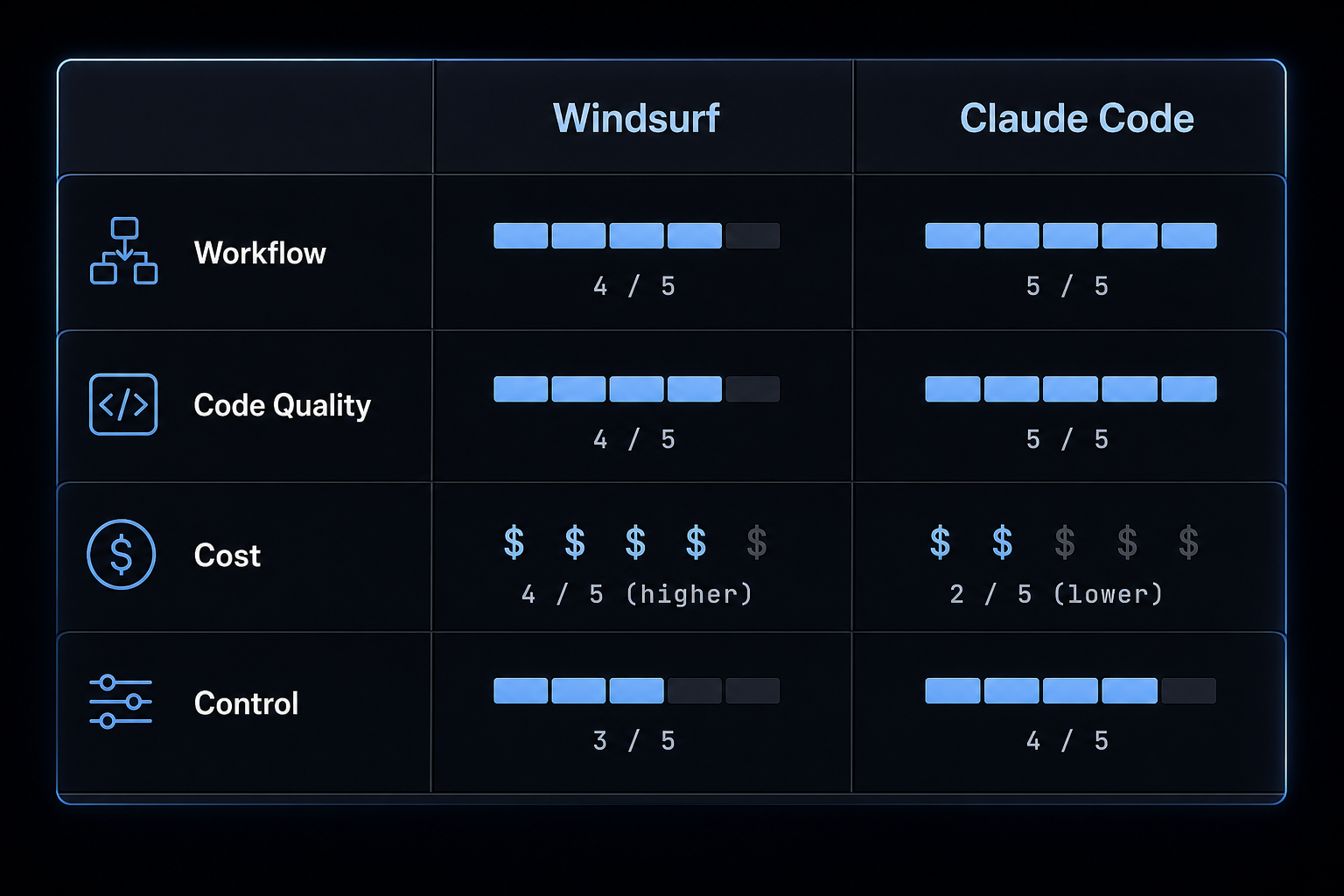
Which one should you choose by use case?
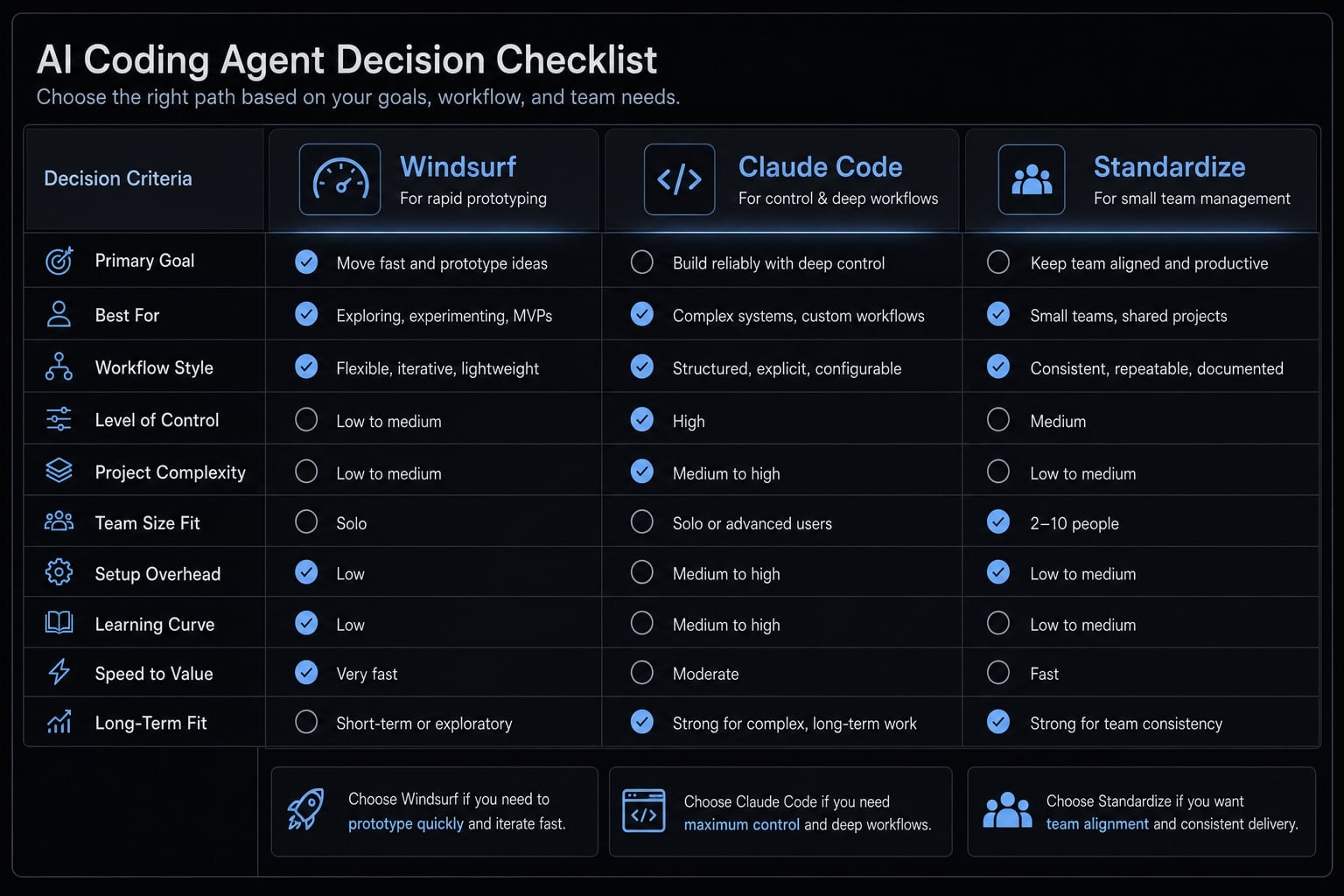
The best AI coding agent for you depends less on feature volume and more on how you work, what you are building, and how much process your team already has.
- Choose Windsurf for lower friction and rapid prototyping.
- Choose Claude Code for control, deeper workflows, and maintainability.
- If you lead small teams, evaluate not just the tool, but the workflow around it.
Choose Windsurf if…
Choose Windsurf if you:
- Work mostly in an IDE.
- Want low-friction adoption.
- Do frequent UI iteration.
- Need quick demos or prototypes.
- Want easier budget forecasting.
- Prefer a more guided user experience.
This usually makes Windsurf attractive for:
- Solo founders.
- Indie makers.
- Product builders validating ideas quickly.
- Teams doing a lot of frontend iteration.
The trade-off is that speed can come with more cleanup in some workflows. If your standard is highly production-ready code from the start, you may need tighter review discipline.
Choose Claude Code if…
Choose Claude Code if you:
- Are comfortable in the terminal.
- Prefer control over convenience.
- Care strongly about maintainability.
- Work in larger repos.
- Handle multi-step engineering tasks.
- Can tolerate variable usage cost.
This often makes Claude Code a better fit for:
- Senior developers.
- Engineering leads.
- Backend-heavy builders.
- Developers who already use CLI-driven workflows daily.
The downside is adoption friction. Teams without strong terminal habits may find it slower to onboard, even if the output quality is attractive.
If you lead a small product team…
For small teams, the tool decision is only half the problem. Teams usually also need:
- Shared prompting conventions.
- Review loops.
- Approval steps.
- Reusable workflows.
- Clear boundaries around who can run what.
This is where many ad hoc experiments start to break down. A capable tool can still produce inconsistent team results if every developer uses it differently.
The bigger issue most comparisons miss: Tool choice vs repeatable workflow
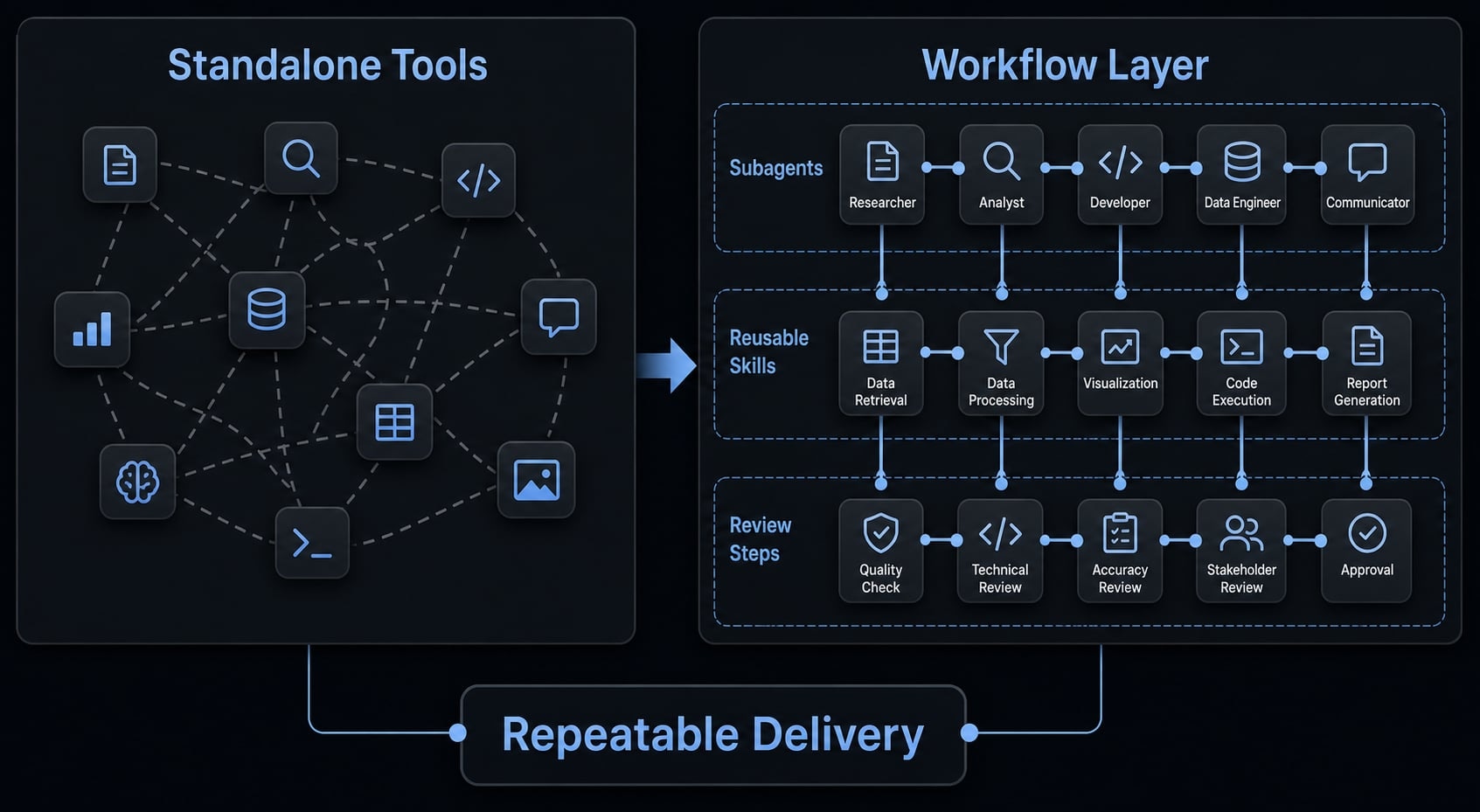
AI development workflows are the repeatable systems teams use to turn AI assistance into consistent delivery. That includes shared instructions, reusable skills, specialized subagents, review steps, and development automation that reduce one-off prompting and improve repeatable delivery across tasks and contributors.
Where standalone tools start to break down
Once more than one or two people start using AI coding tools regularly, a different set of problems often appears:
- Prompt sprawl across people and projects.
- Inconsistent outputs.
- Ad hoc review loops.
- Duplicated setup work.
- No shared standards for tasks or approvals.
This is why tool quality alone does not solve team-scale adoption. The issue becomes operational, not just technical.
Where a workflow layer helps
A workflow layer becomes useful when the goal shifts from “help one developer move faster” to “help the team produce consistent results.
That usually includes:
- Ready-to-use agent kits.
- Specialized subagents.
- Reusable skills.
- Automated workflows.
- Better control over plans, tokens, configs, and security checks.
This is where AgentKit Engineer fits best. It is not a replacement for Windsurf or Claude Code. It is better understood as a coordination layer for teams that want more repeatability, governance, and shared execution standards.
For some solo users, standalone tools may still be enough. But once AI-assisted development becomes part of team operations, a workflow layer often matters more than one more model switch.
A practical verdict for most buyers
If you want the simplest Windsurf vs Claude Code review, here is which one to choose in practical terms:
- Choose Windsurf if you want ease of use, fast setup, strong IDE comfort, and more predictable cost.
- Choose Claude Code if you want terminal-native control, stronger maintainability patterns, and more structured multi-step execution.
- If you are scaling usage across a team, do not stop at tool selection alone.
- The moment repeatability, review consistency, and governance matter, workflow design becomes part of the decision.
For most buyers, there is no need to overcomplicate this. Start with the tool that matches your operating style. Then evaluate whether your next bottleneck is the tool itself, or the lack of a shared workflow around it.
Frequently asked questions
How do Windsurf and Claude Code differ?
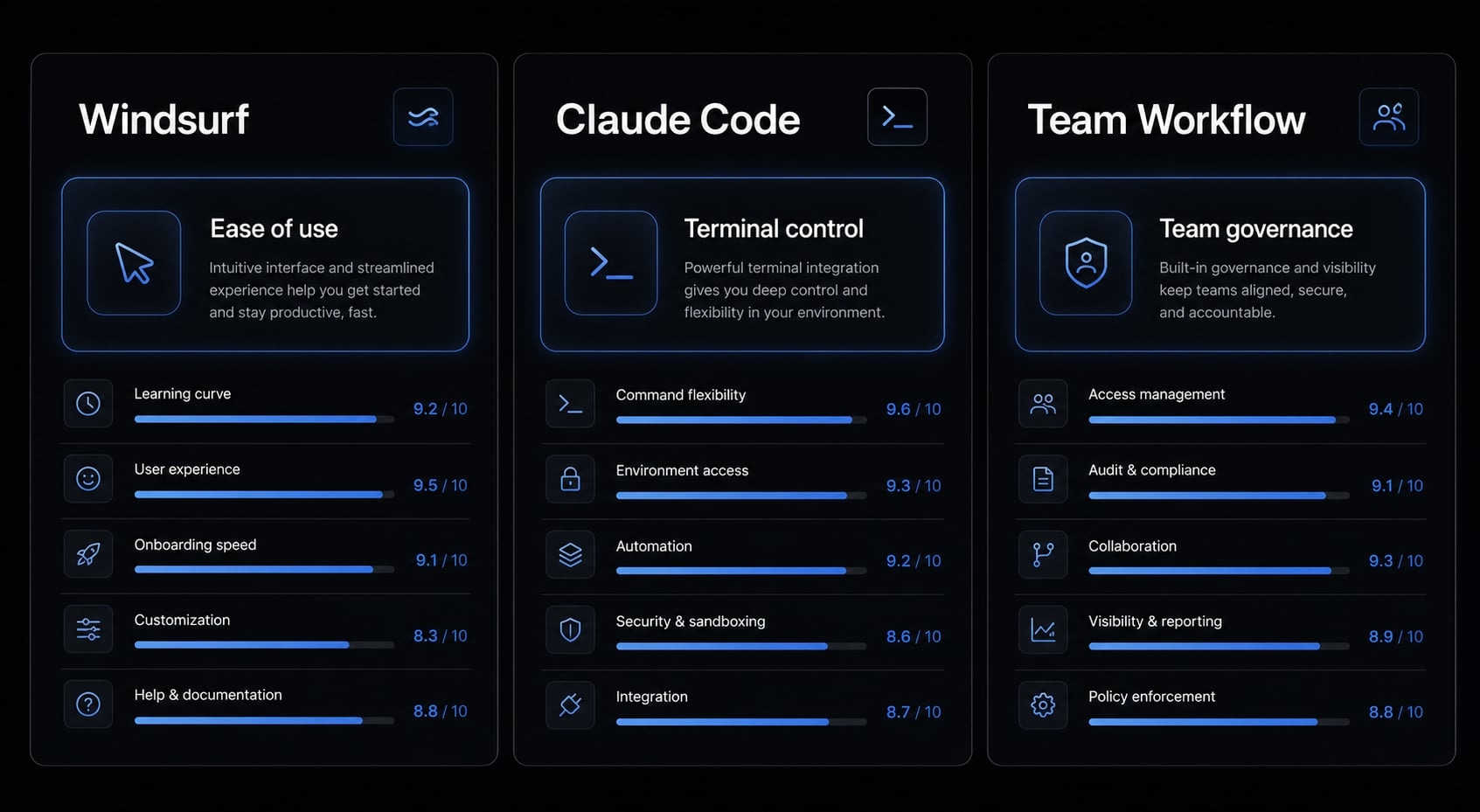
The core difference lies in how they operate. Windsurf is a complete IDE based on VS Code and optimized for a graphical user experience, while Claude Code is a command-line interface (CLI) that runs directly in the terminal, focusing on automation and advanced control.
Which tool is more suitable for beginners?
Windsurf is generally considered more beginner-friendly because of its intuitive interface and IDE-first approach. If you are familiar with VS Code and want a built-in AI experience that is easy to set up and navigate, Windsurf is the most suitable place to start.
Why choose Claude Code over Windsurf for complex projects?
Claude Code offers greater control and customization for large projects. Its CLI architecture allows developers to run multiple agents in parallel, manage complex workflows through CLAUDE.md files, and maintain greater transparency throughout refactoring processes.
Does faster code generation lead to greater project efficiency?
Not necessarily. Faster code generation, often associated with Windsurf, can accelerate the prototyping stage. However, without a rigorous review process, the code may require more cleanup and debugging, potentially making the total project completion time longer than with a more deliberate approach.
When should I use AgentKit instead of Windsurf or Claude Code alone?
Consider AgentKit when your needs extend beyond individual code-generation tasks and involve building repeatable workflow systems. If your team struggles with inconsistent prompts, lacks standardized review practices, or needs to deploy specialized subagents, AgentKit provides an orchestration layer that helps standardize performance.
Read more:
- Gemini CLI vs Claude Code: Which coding tool suits you best?
- Claude Code vs Cline: Which AI coding workflow suits you?
- Aider vs Claude Code: Choosing the right AI Coding Assistant
Conclusion
The right answer to Windsurf vs Claude Code depends on a few practical variables: How your developers work, how much maintainability matters, how predictable your budget needs to be, and whether you are choosing for one user or for a team. In this AI coding tool comparison, Windsurf stands out for IDE-first ease and faster prototyping, while Claude Code stands out for CLI-first control and more maintainability-oriented workflows.
The bigger lesson is that tool choice alone rarely creates consistent outcomes at scale. If your team is already using Claude Code, Codex, or similar agents and wants a more repeatable way to manage workflows, skills, approvals, and control, explore how AgentKit Engineer can support a more standardized implementation through reusable workflow design and team-ready execution patterns.