Master Claude Code focused sessions: A workflow guide
Master Claude Code focused sessions: A workflow guide
Accumulated logs and unrelated prompts can easily derail AI coding sessions over time. Managing session context is about maintaining clear work boundaries, keeping history aligned with your active objective without confusing past decisions with current code state. This guide provides a session decision framework, a five-step workflow, and a handoff template to help you continue, compact, or reset sessions for consistent AI accuracy.
What is a focused Claude Code session?
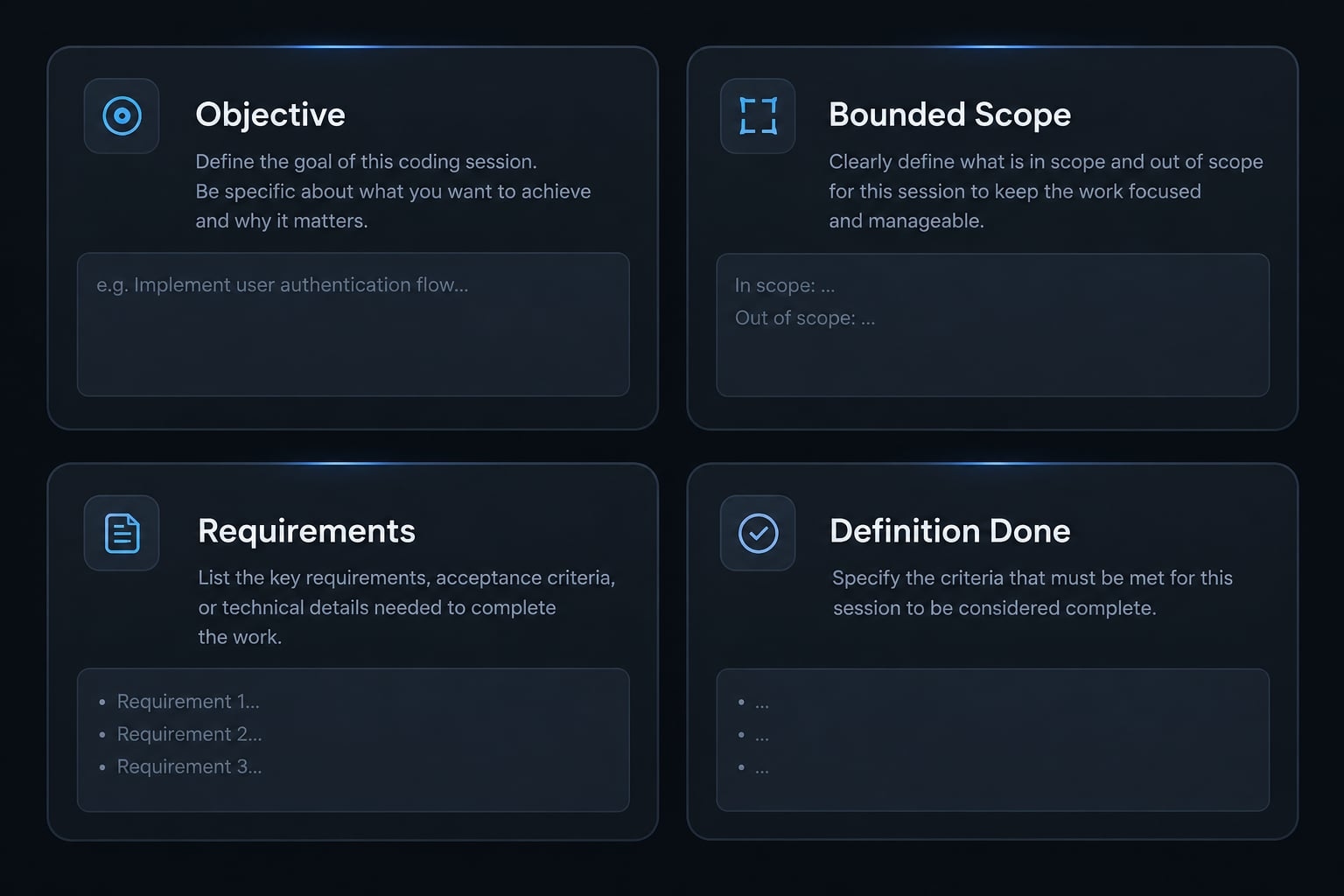
A focused Claude Code session can span multiple prompts, files, and verification steps. What connects them is a shared outcome - not their location in the repository. Define four elements before implementation:
- Objective: The behavior you intend to change.
- Bounded scope: The components or files likely involved.
- Requirements and constraints: What must hold and what must remain untouched.
- Definition of done: Acceptance criteria - the observable conditions that establish completion.
Throughout this guide, an illustrative scenario involves a validation defect in an organization-management API. The fix and regression test belong together because they establish the same behavior. An unrelated permissions redesign does not.
Focus is determined by task coherence, not duration
A short conversation mixing validation, navigation, and infrastructure can be less coherent than a longer implementation with relevant tests. Task coherence determines useful session boundaries. Duration and token usage are signals to inspect, not automatic reset instructions. Opening another file does not necessarily introduce another objective; it may supply essential evidence for the existing task.
Good and bad session scopes
Focused scenario | Unfocused contrast |
|---|---|
Fix organization API validation and add a regression test. | Also redesign the dashboard and analyze deployment costs. |
Implement one endpoint and verify its response contract. | Handle every ticket in one running conversation. |
Debug one failing test and its underlying function. | Investigate unrelated failures because they share a repository. |
Review one sensitive change against explicit criteria. | Request broad approval without identifying the change or criteria. |
Why long or mixed sessions become less effective
The Claude Code context window has finite capacity for information available during an interaction. It does not automatically contain every repository file. Relevant information must reach the conversation through instructions, supplied material, or tool activity.
Accumulated input creates context pressure. Separately, conflicting requirements and obsolete logs can undermine reasoning even when capacity remains available. Incomplete requirements and genuine code defects can also explain poor results.
Available context and billable token usage are related, but they are not identical measurements. Limits and accounting depend on the model, configuration, and access method. Avoid universal reset thresholds.
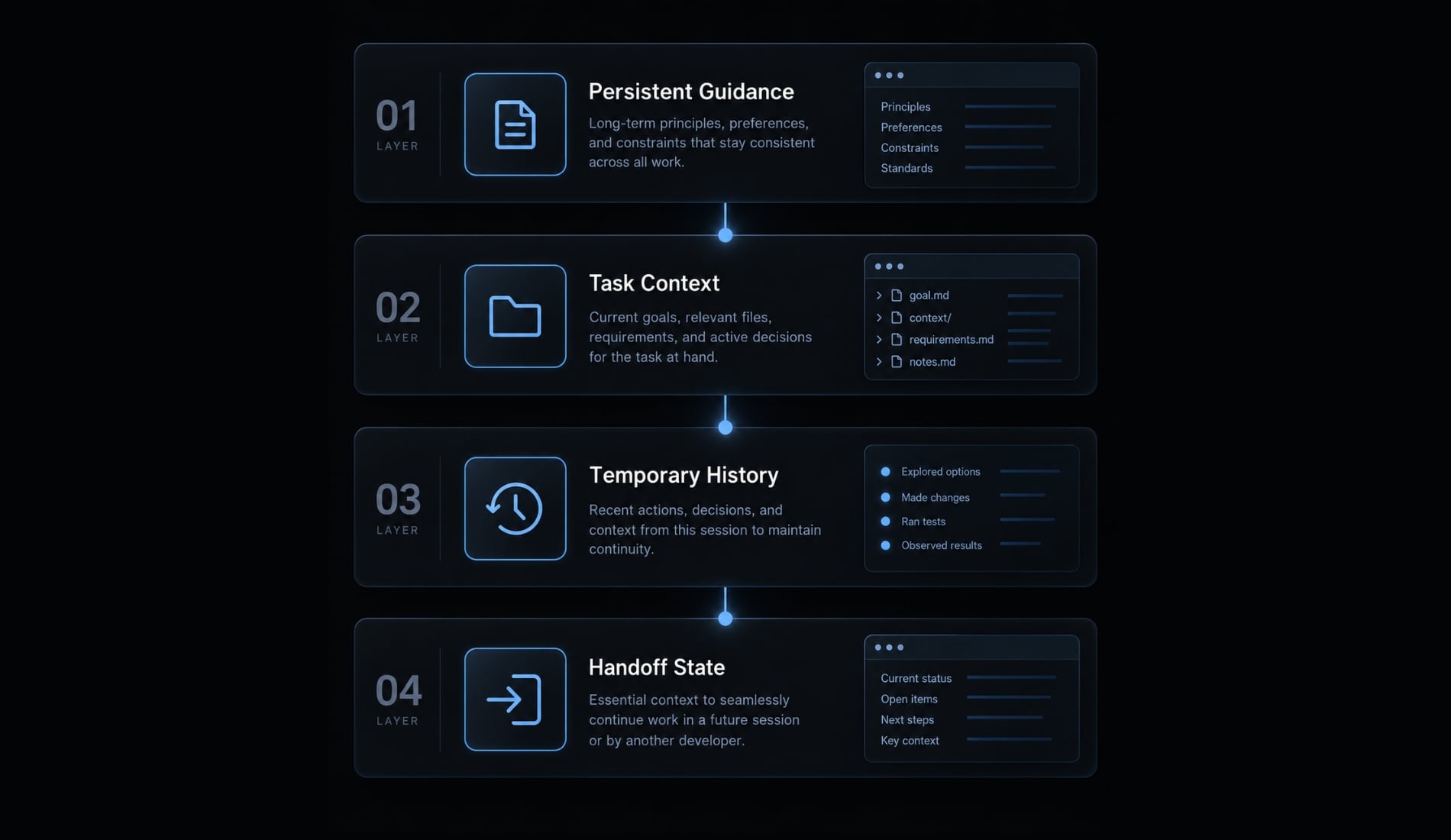
The four context layers
This workflow model is an practical editorial framework, not an official Anthropic architecture.
Layer | Include | Location guidance |
|---|---|---|
Persistent project context | Stable conventions, architecture, standard checks. | Appropriate CLAUDE.md files or maintained documentation. |
Current task context | Objective, requirements, exclusions, references. | Opening task brief. |
Temporary history | Tool output, attempts, transient logs, corrections. | Active conversation; preserve only useful evidence later. |
Handoff state | Decisions, verified progress, failures, next action. | Deliberately maintained handoff artifact. |
Official Claude Code memory documentation describes CLAUDE.md loading and scope. Project guidance helps only when appropriately loaded or supplied. Files named PLAN.md or handoff.md are workflow conventions, not automatically authoritative memory.
Warning signs of context drift
Investigate when Claude starts:
- Asking questions already answered.
- Referring to superseded requirements.
- Editing outside the approved scope.
- Giving inconsistent explanations.
- Requiring repeated corrections without convergence.
- Reusing obsolete logs or failed assumptions.
- Losing the one-sentence objective.
These signs do not prove context pressure is responsible. Check requirements and current code before treating context compaction as the solution.
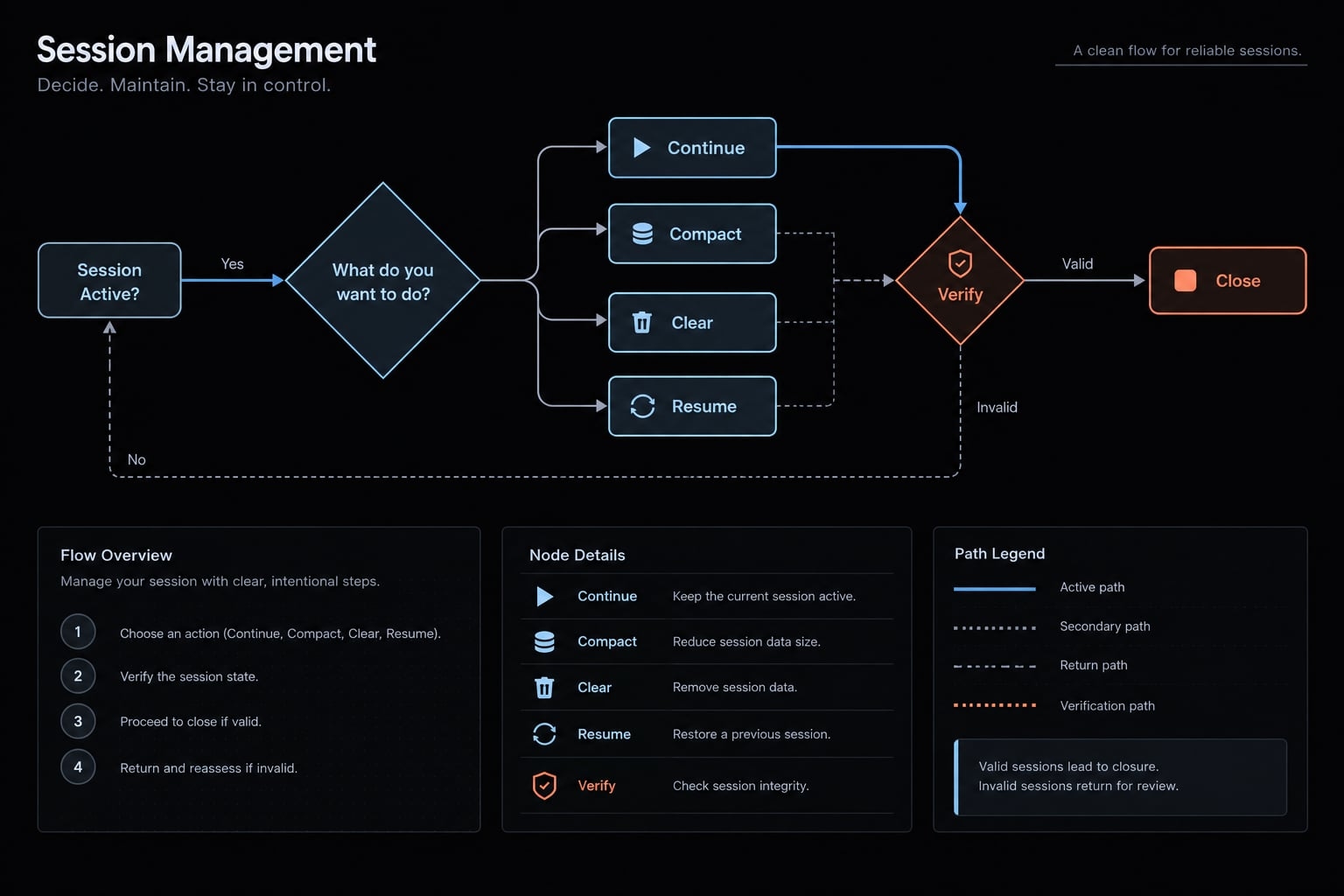
Continue, compact, clear, resume or start fresh?
Choose by task continuity and context usefulness. A long history may remain valuable; a short history may already contain misleading assumptions.
Commands and behavior can vary by release. Check your installed version’s help and official Claude Code interactive-mode and session documentation before relying on specific behavior. The distinctions below describe their intended workflow roles, not guarantees about every release.
Session management decision table
Situation | Recommended action | Reason |
|---|---|---|
Same objective; useful history. | Continue. | Existing context still supports the task. |
Same objective; accumulated noise. |
| Summarize retained direction; recheck critical constraints. |
Completed task; unrelated request. |
| Separate objectives without reverting files. |
Returning to previous work. |
| Previous conversation may not match current code. |
Repeated obsolete assumptions. | Preserve state; start fresh. | Stop adding corrections to misleading history. |
New out-of-scope issue. | Record and separate it. | Protect active acceptance criteria. |
Work complete. | Verify, summarize, close. | Establish an evidence-backed stopping point. |
When to continue
Continue when acceptance criteria remain unchanged, evidence is relevant, and corrections are converging. Ask for a one-sentence task summary if alignment is uncertain. A correct summary indicates understanding, not proof that implementation is correct.
When to use /compact
Compaction summarizes accumulated conversation material while retaining working context. It is not lossless memory. Preserve decisions, active constraints, changed files, test results, and the next action in a durable note first.
Keep failed approaches when they explain an important decision. If the resulting summary is not directly inspectable, restate critical constraints and confirm them before further edits. Compaction cannot repair an undefined objective.
When to use /clear or start fresh
Separate unrelated objectives or restart when stale assumptions persist despite correction. Preserve unfinished work in a handoff first. Clearing conversation context does not undo edits, delete repository files, or necessarily remove persistent project guidance. Those are separate concerns requiring separate controls.
When to use /resume
Resuming restores a prior conversation, not a matching repository snapshot. Immediately inspect:
- Branch and working-tree state.
- Recent commits and changed files.
- Relevant dependency changes.
- Current verification status.
In the illustrative API scenario, another developer may have changed the validation helper since the earlier session. Compare that code with the handoff before editing. Old passing tests describe an earlier state unless current evidence confirms otherwise.
A five-step workflow for focused Claude Code sessions
A reliable Claude Code workflow makes the objective, permission boundaries, and completion evidence explicit. Use the same sequence whether fixing a defect or implementing a bounded feature.
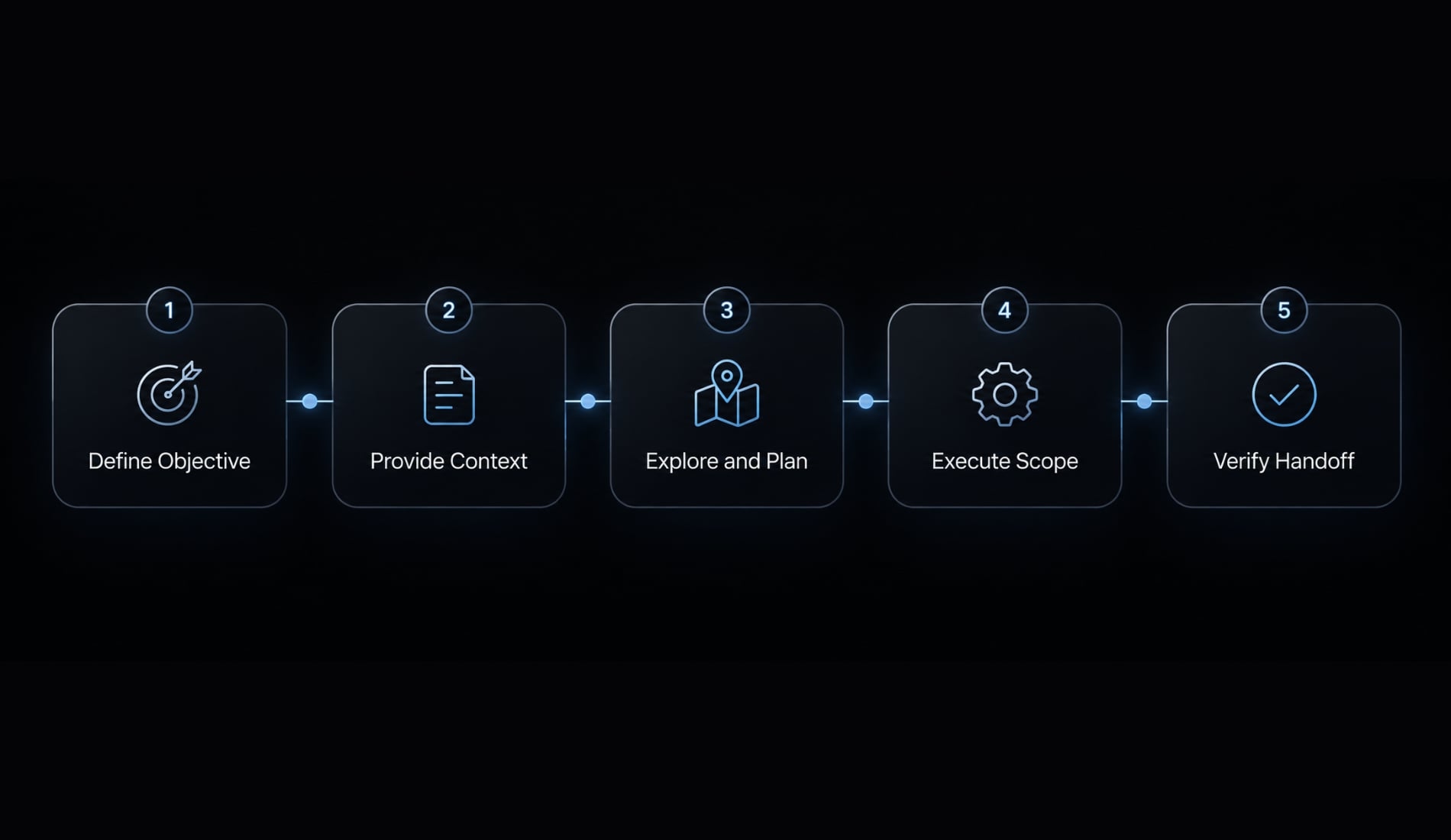
Step 1: Define one objective
Write the intended outcome before supplying extensive background. “Improve validation” leaves too much unresolved. “Reject whitespace-only organization names using the existing error contract” identifies observable behavior.
Copy this brief:
Objective: [One observable outcome]Scope: [Relevant components or likely files]Requirements: [Expected behavior and compatibility needs]Constraints and excluded areas: [What must not change]Approval requirements: [Actions requiring human approval]Definition of done:- [Observable acceptance criterion]- [Relevant regression check passes]- [Diff reviewed; unresolved issues recorded]
For the illustrative defect, the acceptance criterion could require whitespace-only names to fail validation while valid names remain accepted. Clarify the expected error response rather than letting Claude invent it.
Step 2: Provide only the required context
Include:
- Relevant file references.
- The failing test or error excerpt.
- An existing implementation pattern.
- Current constraints and compatibility requirements.
Exclude:
- Unrelated documentation.
- Entire logs when a useful excerpt suffices.
- Historical assumptions not checked against current code.
Minimal context does not mean insufficient context. Encourage targeted inspection of callers, helpers, and tests where they affect the decision. Expand the evidence deliberately rather than loading the repository indiscriminately.
Step 3: Explore and plan before broad changes
Request a plan identifying affected files, assumptions, risks, and verification strategy. Resolve ambiguities before implementation, particularly when validation behavior affects existing API clients.
Plan Mode is an optional aid; consult official Claude Code documentation for its behavior and permission boundaries in your version. An explicit “inspect first, do not edit” instruction can organize planning, but it is not equivalent to an enforced permission boundary.
Approve the plan only after checking its scope.
Step 4: Execute within the approved scope
Require escalation before:
- Adding dependencies.
- Running destructive operations.
- Creating database migrations.
- Making security-sensitive changes.
- Materially expanding the approved plan.
If the validation investigation reveals a permissions redesign opportunity, record it separately. Do not let it become an incidental refactor.
Prompts alone cannot guarantee enforcement. Use available permission controls and human review. Inspect unexpected file changes promptly rather than waiting until the final summary.
Step 5: Verify and create a clean exit
Completion depends on evidence, not an agent’s assertion:
- Inspect the diff for unintended changes.
- Compare behavior against acceptance criteria.
- Run relevant tests and proportionate checks.
- Record failures, skipped checks, and environmental blockers.
- Summarize remaining risk and repository state.
- State the next action or confirm completion.
For the illustrative defect, check invalid input and a valid-input regression path. Select broader checks when shared validation logic changes. Passing tests support a bounded conclusion; they do not establish that all behavior is correct.
Preserve actual check output or a concise factual record, not a reconstructed success message.
How to preserve progress before resetting context
A Claude Code session handoff is a written transfer of current task state. It preserves what the next session needs, not the entire conversation.
Store it in a temporary handoff file, maintained PLAN.md, issue tracker, pull request description, or project documentation. These are storage choices, not automatic loading guarantees. Explicitly direct the next session to the relevant artifact.
Focused session handoff template
Separate completed work from decisions, verified results, and uncertainty:
## Objective[Current outcome and acceptance criteria]## Completed work[Implemented changes; distinguish partial work]## Decisions and rationale[Chosen approach, constraints, relevant rejected approaches]## Files changed[Paths and purpose of each change]## Verification- Check performed: [Command or inspection]- Observed result: [Passed / failed / not run / blocked]- Relevant code state: [Commit and working-tree changes]- Limits or blocker: [What remains unverified]## Open issues and risks[Unresolved questions, known failures, excluded follow-ups]## Repository state- Branch: [Branch]- Relevant commit: [Commit identifier]- Uncommitted changes: [Summary]## Next step[One specific action, or completion statement]
Add a timestamp when it helps distinguish stale evidence. Keep credentials, customer data, and sensitive terminal output out of the note.
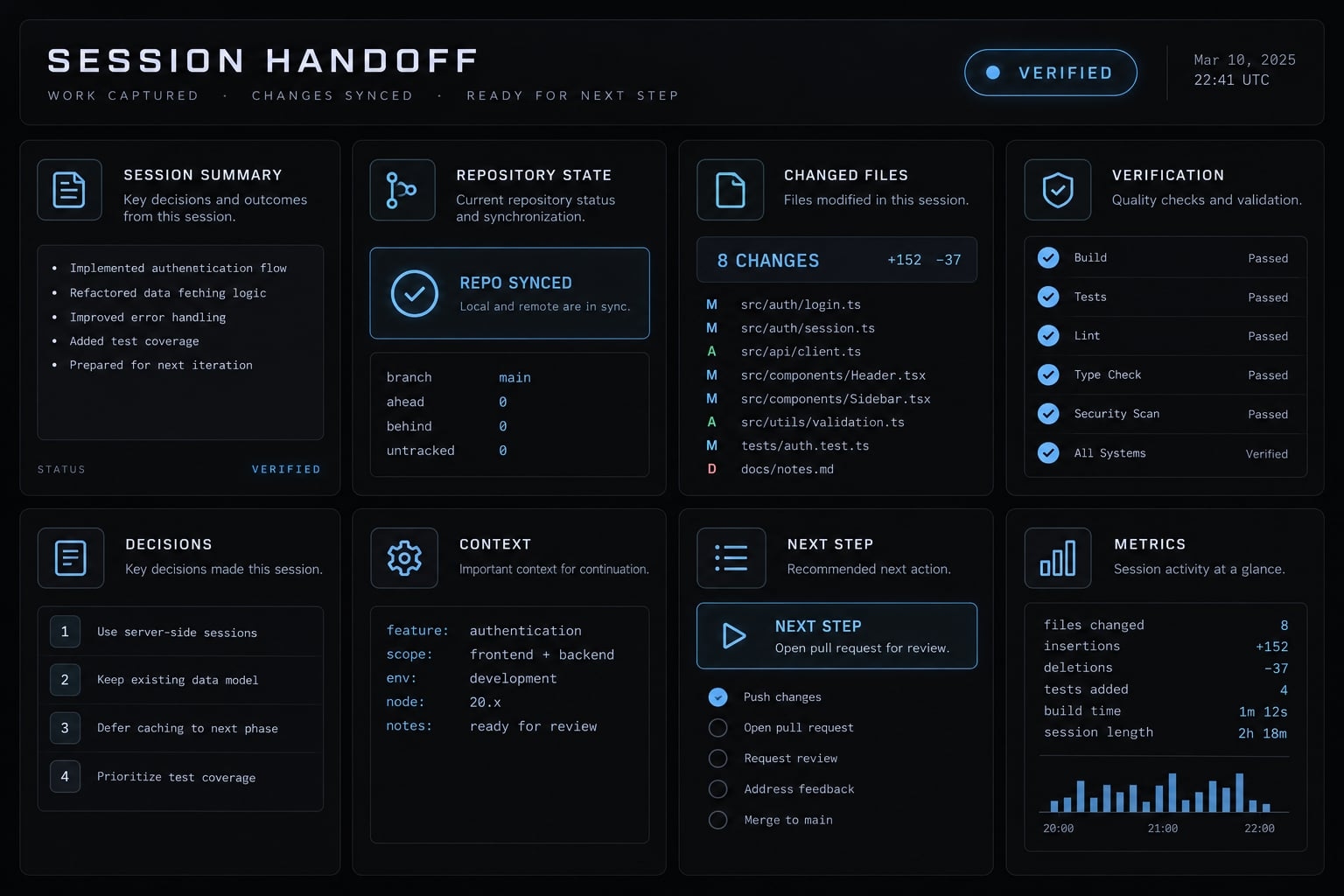
Starting the next session from a Handoff
Before editing:
- Read the handoff and inspect current files and Git state.
- Identify discrepancies between the note and repository.
- Restate the current objective.
- Revalidate assumptions and rerun checks when necessary.
In the illustrative scenario, the note may describe an earlier validation helper. If that helper changed, update the plan before applying the proposed fix.
A session summary does not save uncommitted code or make the repository recoverable. Protect code through your normal version-control practices. Review temporary AI notes before staging changes so they are not committed unintentionally.
Practical session boundaries and common mistakes
Group work by shared outcome; separate work by unrelated purpose or review responsibility. File count is not a useful substitute for this judgment.
Examples of good session boundaries
Activities | Boundary | Reason |
|---|---|---|
Defect fix and regression testing. | Usually together. | Tests establish the corrected behavior. |
Endpoint implementation and contract verification. | Together. | Both establish the endpoint’s expected behavior. |
Authentication and unrelated navigation redesign. | Separate. | Different objectives and risks. |
Feature and relevant tests. | Together. | Verification belongs to implementation. |
Sensitive implementation and fresh-context review. | Often separate. | Another review pass can question assumptions. |
Current bug and unrelated architecture discovery. | Separate. | Record discovery without expanding the fix. |
Implementation and directly related clarification. | Together. | Clarification resolves the current task. |
Several unrelated backlog bugs. | Separate. | Each needs distinct evidence and completion criteria. |
A fresh code review session can offer another perspective. It does not provide independent security assurance or replace qualified human review.
Common mistakes to avoid
- Keeping one conversation for unrelated daily work: split by objective.
- Combining tickets because they share a repository: check task coherence.
- Loading broad context first: define the goal before inspection.
- Repeatedly correcting stale assumptions: preserve state and reconsider the session.
- Expecting automatic compaction to fix scope: narrow the objective.
- Resetting without decisions: write the handoff first.
- Trusting resumed history: compare it with current code.
- Allowing unrelated refactors: record separate follow-up work.
- Skipping diff review: inspect what actually changed.
- Accepting completion claims: require relevant verification evidence.
For a debugging workflow, preserve causal continuity. Investigation, correction, and regression testing usually belong together when they address the same failure.
Focused session checklist and team standardization
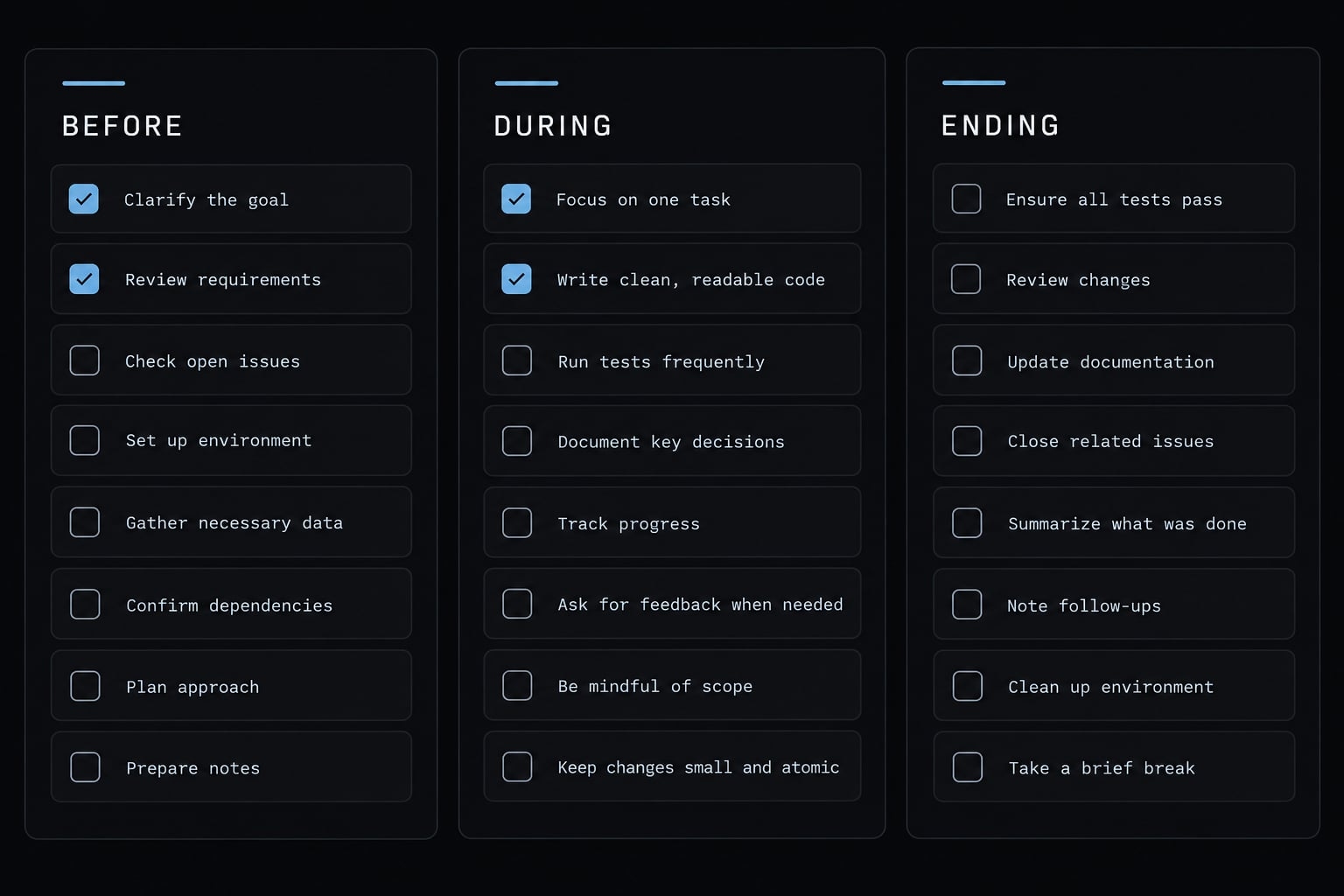
Use this focused session checklist at task boundaries, not as a timer-driven reset policy. Keep it alongside your task brief so the checks remain actionable.
Before the session
- ☐ Define one objective and explicit acceptance criteria.
- ☐ Supply relevant references and excluded scope.
- ☐ Confirm branch and working-tree state.
- ☐ Identify sensitive data and approval boundaries.
During the session
- ☐ Stay within approved scope and existing patterns.
- ☐ Record decisions and separate follow-up requests.
- ☐ Check that corrections are converging.
- ☐ Obtain human approval for risky operations.
Before ending the session
- ☐ Review the diff and summarize changed files.
- ☐ Record relevant checks with honest status.
- ☐ Preserve remaining risks and the next action.
- ☐ Separate unrelated follow-up work.
Standardizing focused sessions across a team
Package task briefs, planning requirements, verification expectations, and handoff conventions as reusable workflows. Assign an owner to keep these development standards current. AgentKit is one optional way to organize reusable skills and workflows; repository templates can also suffice. Neither reusable prompts nor agent configurations automatically enforce security controls. Keep permissions, approvals, and accountability explicit.
Frequently asked questions
What is a focused Claude Code session?
A focused Claude Code session is a workflow method where you align a single terminal session with one clear objective, defined scope, and specific acceptance criteria. This approach limits context drift by separating unrelated tasks into distinct sessions rather than bundling multiple features into one history.
How do I decide when to clear or restart a session?
You should restart or clear your session when you switch to a completely new task, or when the agent begins repeating obsolete assumptions. Use /clear or open a new terminal window to ensure the agent is not biased by the history of a previous, unrelated feature.
Does /compact delete important project instructions?
No, but /compact summarizes your conversation history to free up context space. To ensure critical constraints are preserved, provide a focus area (e.g., /compact Focus on the authentication logic) rather than running it bare, ensuring the agent prioritizes relevant architectural requirements during the summarization process.
How do I handle progress between different coding sessions?
Use a session handoff process. Ask Claude to generate a summary of completed work, decisions, and next steps in a Markdown file. Before starting your next session, inspect this file and verify the current repository state and Git branch to ensure the agent’s context is perfectly synchronized with your actual code.
Should I use Plan Mode for every coding task?
Plan Mode is recommended for complex architectural changes, as it allows Claude to research the repository and propose a strategy before it performs any file edits. Using it helps define a verifiable boundary, reducing the need for mid-session corrections and preventing accidental edits to out-of-scope files.
Can I run multiple Claude Code sessions at once?
Yes, you can run parallel sessions, but you must prevent write collisions. The recommended practice is to pair Claude Code with Git worktrees, assigning each session to its own worktree. This ensures that different coding agents operate on isolated parts of the codebase, preventing conflicting changes during a feature build.
Read more:
- Claude Code session handoff: Continue Work Without context loss
- Claude Code specialized agents: Boost your coding efficiency
- Master Claude Code Python: A practical workflow for AI coding
Conclusion
Focused sessions maintain AI accuracy by aligning conversation context with clear task boundaries. Continue while goals stay aligned, compact when noise accumulates, and reset for new objectives or persistent errors. Above all, never rely on conversation history alone - use the handoff template and validation checklist to confirm that every task ends with verifiable code evidence.